1
ENGLISH
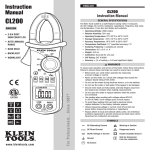
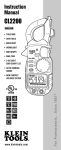
CL200
Instruction Manual
H.
FEATURE DETAILS
•
•
•
•
GENERAL SPECIFICATIONS
The Klein Tools CL200 is a multi-featured clamp meter. It measures
AC / DC voltage, AC current, resistance, capacitance, frequency, duty cycle,
and temperature. It can also test diodes and continuity.
•
•
•
•
•
•
•
•
•
•
•
•
~
AC Alternating Current
Warning or Caution
DC Direct Current
Dangerous levels
DC/AC Voltage or Current
Double Insulated Class II
Ground
Safe for disconnect
from live conductors
AC Source
Features: HOLD
AC
• Use included thermocouple.
5.
Resistance / Capacitance / Diode / Continuity
PRESS TO SELECT
TO SELECT
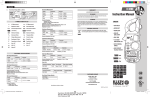
FUNCTION INSTRUCTIONS
A
Resistance
Diode
Capacitance
Continuity
On Back
1
Resistance Features:
HOLD
AUTO
5
H
AC
A
RANGE
Ω < 40MΩ
•
•
2
D
E
C
3
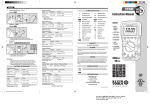
WARNINGS
SYMBOLS
Temperature: -4° ~ 1832°F (-20° ~ 1000°C)
G
To ensure safe operation and service of the tester, follow these instructions.
Failure to observe these warnings can result in severe injury or death.
• Before each use, verify meter operation by measuring
a known voltage or current.
• Never use the meter on a circuit with voltages that exceed the
category based rating of this meter.
• Do not use the meter during electrical storms, or in wet weather.
• Do not use the meter or test leads if they appear to be damaged.
• Ensure meter leads are fully seated, and keep fingers away from
the metal probe contacts when making measurements.
• Do not open the meter to replace batteries while the probes
are connected.
• Use caution when working with voltages above 60V DC,
or 25V AC RMS. Such voltages pose a shock hazard.
• To avoid false readings that can lead to electrical shock,
replace batteries if a low battery indicator appears.
• Unless measuring voltage or current, shut off and lock out
power before measuring resistance or capacitance.
• Always adhere to local and national safety codes. Use individual
protective equipment to prevent shock and arc blast injury where
hazardous live conductors are exposed.
H
B
4.
Hold button down to enable worklight and backlight.
On release, lights will turn off automatically after 5 to 15 seconds.
Worklight only operates during AC current measurement.
Using lights drains the battery significantly.
Auto Power-Off
• Device will power off after 30 minutes non-use.
• Turn the dial or press a button to wake.
• Press the HOLD button while turning on to disable
Auto Power-Off feature.
1
Operating Altitude: 2000 meters
Relative Humidity: 75% max
Operating Temperature: 32°F ~ 104°F (0°C~ 40°C)
Storage Temperature: 14°F ~ 122°F (-10°C ~ 50°C)
Accuracy Temperature: 64°F ~ 82°F (18°C ~ 28°C)
Temperature Coefficient: 0.1*(specified accuracy) / °C
Sampling Frequency: 3 samples per second
Dimensions: 8" x 3" x 1" (203 mm x 76 mm x 25 mm)
Weight: 10 oz. (283 g)
Calibration: Accurate for one year
Safety Rating: CAT III 600V
Accuracy: ± (% of reading + # of least significant digits)
Backlight / Worklight
Do not measure resistance
on a live circuit.
Capacitance Features:
4
F
1.
HOLD
AUTO
AC
• F < 100μF
• Wait up to 60 seconds for measurement.
•
Safely discharge capacitor before
measurement.
AC Current: < 600A
Features: HOLD
RANGE
RANGE
A
WORKLIGHT
Diode Features:
AUTO
AC
HOLD
A
A
A.
Use CAT III rated leads or higher.
Do not attempt to measure more than 600V or
any current on lead input.
B.
Keep hands below line when measuring high current levels.
C.
D.
Select Functionality Button
• Switch between AC and DC.
• Switch between Ω,
,
, and
Display shows:
• Forward voltage drop if forward biased.
• “O.L.” if reverse biased.
• Center wire in guides for best accuracy.
• Opposing currents cancel (use line-splitter when necessary).
2.
• Display shows resistance.
• Buzzer sounds if less than 60Ω
RANGE
PRESS
PRESS
Data Hold
AUTO
• Press to hold the current input on the display.
• Press again to return to live reading.
E.
AUTO
AC
Auto / Manual Range
• Press repeatedly to cycle through manual ranges.
• Hold for 2 seconds to return to auto ranging mode.
• AUTO is displayed on LCD only during auto ranging mode.
F. G. Battery Replacement
• When
indicator is displayed on the LCD,
batteries must be replaced.
• Remove the back screw and replace 3 x AAA batteries.
HOLD
A
AC / DC Voltage: < 600V
Features: HOLD
.
Continuity Features:
AUTO
AC
˚C
˚F
AC
A
AC
~
-
DC
• Select AC or DC voltage source.
3.
Frequency (Hz) / Duty Cycle
Features: HOLD
PRESS
PRESS
AUTO
AC
˚C
˚F
Hz
SYMBOLS USED ON LCD
A
Duty
Duty
A
AC Measurement
Negative DC Value
Low Battery
H
Hold Active
V
Hz
F
Ω
m
n
Voltage Measurement
Frequency in Hertz
Capacitance in Farads
Resistance in Ohms
Milli 10-3
Nano 10-9
DC Measurement
AUTO
A
Auto Range Active
Current in Amps
Diode Test
Continuity Test
%
°F
M
k
μ
Duty Cycle
Temperature in Fahrenheit
Mega 106
Kilo 103
Micro 10-6