1
Page 1 Friday, January 16, 2004 2:25 PM
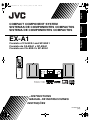
COMPACT COMPONENT SYSTEM
SISTEMAS DE COMPONENTES COMPACTOS
SISTEMA DE COMPONENTES COMPACTOS
Português
EX-A1
Español
English
EXA1[UW]-00Cov1.fm
Consists of CA-EXA1 and SP-EXA1
Consiste de CA-EXA1 y SP-EXA1
Consiste em CA-EXA1 e SP-EXA1
INSTRUCTIONS
MANUAL DE INSTRUCCIONES
INSTRUÇÕES
LVT1095-014A
[UW]
EXA1[UW]-00Cov2.fm
Page 1 Friday, January 16, 2004 2:29 PM
Warnings, cautions and others/Avisos, precauciones y
otras notas/Advertêcias, precauções e outras notas
CAUTION
To reduce the risk of electrical shocks, fire, etc.:
1. Do not remove screws, covers or cabinet.
2. Do not expose this appliance to rain or moisture.
PRECAUTION
Para reducir el riesgo de descargas eléctricas, fuego, etc.:
1. No quitar los tomillos, tapas o caja.
2. No exponer el aparato a la lluvia ni a la húmedad.
1. CLASS 1 LASER PRODUCT
PRECAUÇÃO
2. CAUTION: Do not open the top cover. There are no user
serviceable parts inside the unit; leave all servicing to
qualified service personnel.
Para reduzir o riscos de choques eléctricos, incêndio, etc.:
1. Não retire parafusos nem desmonte as tampas ou o
gabinete.
2. Não exponha este aparelho à chuva nem à umidade.
3. CAUTION: Visible and invisible laser radiation when open
and interlock failed or defeated. Avoid direct exposure to
beam.
CAUTION — F button!
4. REPRODUCTION OF LABEL: CAUTION LABEL,
PLACED INSIDE THE UNIT.
Disconnect the mains plug to shut the power off completely
(the STANDBY lamp goes off).
The F button in any position does not disconnect the mains line.
• When the system is on standby, the STANDBY lamp
lights red.
• When the system is turned on, the STANDBY lamp goes
off. The power can be remote controlled.
PRECAUCIÓN — Botón F!
Para desactivar la alimentación completamente, desenchufe el
cable de alimentación de CA (lámpara STANDBY se apaga).
La línea de la red no se desconecta en ninguna de las
posiciones del botón F .
• Cuando el sistema se encuentra en standby, lámpara
STANDBY se enciende en rojo.
• Cuando se activa la alimentación del sistema, la lámpara
STANDBY se apaga. La alimentación puede ser
controlada a distancia.
1. PRODUCTO LÁSER CLASE 1
2. PRECAUCIÓN: No abra la tapa superior. En el interior de
la unidad no hay piezas que pueda reparar el usuario;
encargue el servicio a personal técnico cualificado.
3. PRECAUCIÓN: Radiación láser visible e invisible en
caso de apertura o con interbloqueo averiado o
defectuoso. Evite la exposición directa a los haces.
4. REPRODUCCIÓN DE LA ETIQUETA: ETIQUETA DE
PRECAUCIÓN, COLOCADA EN EL INTERIOR DE LA
UNIDAD.
PRECAUÇÃO — botão F!
1. PRODUTO LASER DE CLASSE 1
Desligue a ficha principal da parede para desligar totalmente a
energia (a lâmpada STANDBY apaga-se).
O botão F em qualquer posição não desliga o cabo
principal.
• Quando o sistema está em espera, a luz da lâmpada
STANDBY fica vermelha.
• Quando o sistema está ligado, a lâmpada STANDBY
apaga-se. A energia pode ser controlada à distância.
2. PRECAUÇÃO: não abrir a cobertura superior. Dentro da
unidade não existem partes cuja manutenção tenha de
ser feita pelo usuário; deixe qualquer manutenção a
cargo do pessoal de serviço qualificado.
CAUTION
• Do not block the ventilation openings or holes.
(If the ventilation openings or holes are blocked by a
newspaper or cloth, etc., the heat may not be able to get out.)
• Do not place any naked flame sources, such as lighted
candles, on the apparatus.
• When discarding batteries, environmental problems must
be considered and local rules or laws governing the
disposal of these batteries must be followed strictly.
• Do not expose this apparatus to rain, moisture, dripping or
splashing and that no objects filled with liquids, such as
vases, shall be placed on the apparatus.
PRECAUCIÓN
• No obstruya las rendijas o los orificios de ventilación.
(Si las rendijas o los orificios de ventilación quedan
tapados con un periódico, un trozo de tela, etc., no se
podrá disipar el calor).
• No ponga sobre el aparato ninguna llama al descubierto,
como velas encendidas.
• Cuando tenga que descartar las pilas, tenga en cuenta los
problemas ambientales y observe estrictamente los
reglamentos o las leyes locales sobre disposición de las pilas.
• No exponga este aparato a la lluvia, humedad, goteos o
salpicaduras. Tampoco ponga recipientes conteniendo
líquidos, como floreros, encima del aparato.
PRECAUÇÃO
G-1
IMPORTANT FOR LASER PRODUCTS /
IMPORTANTE PARA PRODUCTOS LÁSER/
PARA PRODUTOS LASER, IMPORTANTE
• Não obstrua as aberturas e orifícios de ventilação.
(Se os orifícios ou aberturas de ventilação estiverem
obstruídos por qualquer papel ou tecido, não haverá
circulação do ar quente.)
• Não coloque nenhum objeto com chamas, como velas
acesas, sobre o aparelho.
• Ao descartar as baterias, leve em consideração os
problemas que possam ser causados ao meio ambiente e
os regulamentos e leis locais e governamentais sobre
recolhimento dessas baterias devem ser rigorosamente
seguidos.
• Não exponha este aparelho à chuva, umidade, pingos ou
esguichos de água, nem coloque em cima do mesmo
qualquer tipo de recipiente que contenha líquidos, como
por exemplo vasos.
3. PRECAUÇÃO: radiação laser visível e invisível quando
se abre e com a conexão interna em falha ou frustrada.
Evite a exposição direta ao raio.
4. REPRODUÇÃO DE ETIQUETA: ETIQUETA DE AVISO
SITUADA NO INTERIOR DA UNIDADE.
EXA1[UW]-00Cov2.fm
Page 2 Friday, January 16, 2004 4:08 PM
Introduction
CAUTION — Proper Ventilation
To avoid risk of electric shock and fire and to protect from damage, locate the apparatus as follows:
Top/Front/Back/Sides:
No obstructions should be placed in the areas shown by the dimensions below.
Bottom:
Place on the level surface. Maintain adequate air path for ventilation by placing on a stand
with a height of 10 cm more.
In addition, maintain the best possible air circulation.
PRECAUCIÓN — Ventilación apropiada
Para evitar riesgos de incendios o de descargas eléctricas u otros daños, el aparato deberá colocarse de
siguiente manera:
Parte superior/parte delantera/parte trasera/laterales:
No debe haber ninguna obstrucción en la zona cuyas dimensiones se indican en el
gráfico.
Parte inferior: Deberá instalarse sobre una superficie nivelada. Coloque la unidad sobre un soporte que
tenga como mínimo 10 cm de altura para permitir el paso de aire y una ventilación
adecuada.
Asimismo, mantenga la mejor circulación de aire posible.
CUIDADO — Ventilação adequada
Para evitar risco de choques elétricos e incêndios, e proteger contra avarias, instale o aparelho como se
segue:
Partes tampa/frontal/posterior/laterais:
Nenhuma obstrução deverá ser colocada entre as áreas cujas dimensões são
indicadasabaixo.
Parte inferior: Instale-o sobre uma superfície plana. Deverá ser mantido espaço suficiente para a
ventilação se este for instalado numa posição que tenha uma altura de 10 cm ou mais.
Além disso, mantenha a melhor circulação de ar possível.
Front view
Vista delantera
Visão frontal
Side view
Vista lateral
Visão lateral
Main unit
Unidad principal
Unidade principal
15cm
1cm
1cm
15cm
15cm
Wall or obstructions
Pared u obstrucciones
Parede ou obstruções
15cm
Main unit
Unidad principal
Unidade principal
Front
Frente
Parte frontal
10cm
G-2
EXA1[UW].book
Page 1
Thursday, January 8, 2004
10:09 AM
English
Table of contents
Introduction
Warnings, cautions and others....................G-1
Special cautions ..............................................2
About discs......................................................3
To select the color system...............................5
Description of parts .........................................6
Getting started
Using the remote control .................................7
Putting the batteries in the remote control .......... 7
Operating the TV using the remote control......... 8
Connecting up .................................................9
Basic operations
Playing discs .................................................13
Playback ........................................................... 13
To switch the display ........................................ 14
Select what you want to play by using
the number buttons....................................... 15
To stop playback............................................... 15
To pause playback............................................ 15
To advance picture frame-by-frame.................. 15
Fast reverse/Fast forward search ..................... 15
Playing back from a position 10 seconds
before (One Touch Replay) .......................... 16
Slow Motion Playback....................................... 16
Skip to the beginning of the selection ............... 16
To change the brightness of the
display window (DIMMER)............................ 17
Adjusting the volume ........................................ 17
Adjusting sound quality..................................... 17
Turning off the sound temporarily (MUTING) ... 17
Functions specific to DVD AUDIO................. 28
Playing the Bonus Group...................................28
Browsable Still Pictures (B.S.P.) .......................28
Using the menu bar .......................................29
Preferences ...................................................30
Country/Area codes.......................................32
Listening to radio
Listening to a radio broadcast .......................33
Tuning in to a preset station ..........................34
Convenient functions
Listening to the sound of
other audio device .....................................35
Auto Standby.................................................35
Sleep Timer ...................................................36
Tray Lock.......................................................36
Using AV COMPU LINK ................................37
Reference
Troubleshooting.............................................38
Language codes............................................39
Specifications ................................................40
Advanced operations
Playing MP3 and JPEG discs........................17
Resume Playback .........................................19
Select the scene to be played .......................20
Program Playback/Random Playback...........21
Repeat Playback ...........................................23
Other convenient functions............................25
Selecting the subtitles....................................... 25
Selecting the audio language ........................... 25
Selecting a view angle ...................................... 25
Enlarging the picture (ZOOM)........................... 26
Adjusting the picture quality (VFP) ................... 26
Creating realistic sound
(VIRTUAL SURROUND) .............................. 27
Adjusting playback level (DVD LEVEL) ............ 27
Enjoying better pictures (PROGRESSIVE)....... 27
1
How to read this manual
• Operations are described by mainly using the
remote control buttons. If there are the same
marks on the main unit, the buttons on the main
unit can also be used.
• The following marks tell you for which type of the
discs the operation can be made.
• The illustrations and TV screens may be different
between the actual case and the description.
• “VCD” is an abbreviation of “Video CD”.
• “SVCD” is an abbreviation of “Super Video CD”.
Page 2
Friday, January 16, 2004
2:08 PM
Special cautions
Introduction
Care of the cabinet
When cleaning the system, use a soft cloth and follow the
relevant instructions on the use of chemically-coated
cloths. Do not use benzene, thinner or other organic
solvents including disinfectants. These may cause
deformation or discoloring.
Notes on handling
7 Important cautions
Installation of the system
• Select a place which is level, dry and neither too hot
nor too cold; between 5°C and 35°C.
• Leave sufficient distance between the system and the
TV.
• Do not use the system in a place subject to vibration.
Power cord
• Do not handle the power cord with wet hands!
• A small amount of power is always consumed while
the power cord is connected to the wall outlet.
• When unplugging the power cord from the wall outlet,
always pull on the plug, not the power cord.
To prevent malfunctions of the system
• There are no user-serviceable parts inside. If anything
goes wrong, unplug the power cord and consult your
dealer.
• Do not insert any metallic object into the system.
• Do not use any non-standard shape disc (like a heart,
flower or credit card, etc.) available on the market,
because it may damage the system.
• Do not use a disc with tape, stickers, or paste on it,
because it may damage the system.
Label sticker
Sticker
Paste
Note about copyright laws
Check the copyright laws in your country before
recording from DVDs, Super Video CDs (SVCDs), VCDs
and CDs. Recording of copyrighted material may infringe
copyright laws.
English
EXA1[UW]-01.fm
If water gets inside the system
Turn the system off and disconnect the power cord plug
from the wall outlet, then call the store where you made
your purchase. Using the system in this condition may
cause fire or electrical shock.
7 When condensation or water drops adhere to the lens
In any of the following cases, condensation or water
drops may adhere to the lens to prevent the system from
working properly:
• Immediately after roomheating starts
• When the system is installed in a steamy or damp
space
• When the system is suddenly moved from a cold place
to a warm space
In any of these cases, leave the system turned on for 1 or
2 hours before use.
Supplied accessories
Check to be sure you have all of the supplied
accessories.
The number in parentheses is the quantity of the pieces
supplied. If anything is missing, contact your dealer
immediately.
•
•
•
•
•
•
•
•
Remote control (1)
Batteries (2)
FM antenna (1)
AM loop antenna (1)
Power cord (1)
Composite video cord (1)
Speaker cords (2)
AC plug adaptor (1)
Note about copy guard system
DVDs are protected by copy guard system. When you
connect the system to your VCR directly, the copy guard
system activates and the picture may not be played back
correctly.
7 Safety precautions
Avoid moisture, water and dust
Do not place the system in moist or dusty places.
Avoid high temperatures
Do not expose the system to direct sunlight and do not
place it near a heating device.
When you are away
When away on travel or for other reasons for an extended
period of time, disconnect the power cord plug from the
wall outlet.
Do not block the vents
Blocking the vents may damage the system.
• Manufactured under license from Dolby Laboratories. “Dolby”, “MLP Lossless”, and the double-D symbol are
trademarks of Dolby Laboratories.
• “DTS” and “DTS 2.0+DIGITAL OUT” are registered trademarks of Digital Theater Systems, Inc.
• This product incorporates copyright protection technology that is protected by method claims of certain U.S. patents
and other intellectual property rights owned by Macrovision Corporation and other rights owners. Use of this
copyright protection technology must be authorized by Macrovision Corporation, and is intended for home and other
limited viewing uses only unless otherwise authorized by Macrovision Corporation. Reverse engineering or
disassembly is prohibited.
2
EXA1[UW].book
Page 3
Thursday, January 8, 2004
10:09 AM
English
About discs
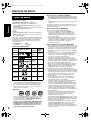
Discs that cannot be played back
Playable disc types
This system has been designed to play back the following
discs:
DVD VIDEO, DVD AUDIO, VCD, SVCD, CD
This system can also play back the following discs:
• Finalized DVD-R/RW discs recorded in the DVD
VIDEO format.
• CD-R/RW discs recorded in the following formats
- Music CDs (finalized discs)
- VCDs
- SVCDs
- MP3/JPEG discs recorded in ISO 9660 (for details, refer
to “About MP3/JPEG discs ”)
However, some discs may not be played back because of
their disc characteristics, recording conditions, or
damage or stain on them.
Only sounds can be played back from the following discs:
MIX-MODE CD
CD-G
CD-EXTRA
CD TEXT
Discs you can play:
Disc
Type
Mark (Logo)
DVD
VIDEO
Video Region Code
Format Number*
NTSC
/PAL
4/ALL
—
—
VCD
NTSC
/PAL
—
SVCD
NTSC
/PAL
—
CD
—
—
CD-R
—
—
CD-RW
—
—
DVD
AUDIO
AU D I O
* Note on Region Code
DVD players and DVD VIDEOs have their own Region
Code numbers. This system can only play back a DVD
VIDEO recorded with the Region Code number and
video format mentioned above.
Examples:
If a DVD VIDEO with an improper Region Code
number is loaded, “REGION CODE ERROR!” appears
on the TV screen and playback cannot start.
• On some DVD VIDEOs, DVD AUDIOs, VCDs or SVCDs,
their actual operation may be different from what is
explained in this manual. This is due to the disc
programming and disc structure, not a malfunction of
this system.
3
• The following discs cannot be played back:
DVD-ROM, DVD-RAM, DVD-RW (recorded in VR
format), CD-ROM, CD-I (CD-I Ready), Photo CD,
SACD, etc.
Playing back these discs will generate noise and
damage the speakers.
Damaged discs and discs in an extraordinary shape
(other than a disc of 12 cm or 8 cm in diameter) cannot
be played back.
About MP3/JPEG discs
Playable MP3/JPEG discs and files
• Discs recorded in the ISO 9660 format are playable
(except discs recorded in the “packet write” format
(UDF format)).
• Discs recorded in the multi-session format are also
playable.
• Files with an extension of “.mp3,” “.jpg” or “.jpeg”
(extensions with uppercase and lowercase letters
mixed are also acceptable) are playable.
Notes on MP3/JPEG discs and files
• A disc may not be played, or reading it may take a long
time depending on its recording conditions or
properties.
• The time needed for reading varies with the number of
groups or tracks (files) recorded on the disc.
• If a character other than single byte English characters
is used in the file name of an MP3/JPEG file, the track/
file name will not be displayed correctly.
• The order of tracks/groups displayed on the MP3
Control screen, and the order of files/groups displayed
on the JPEG Control screen may be different from that
of files/folders displayed on PC’s monitor screen.
• In the case of MP3 discs, since groups/tracks are
played in alphabetical order, an off-the-shelf MP3 disc
may be played in an order different from that indicated
on the label attached to the disc.
• Playing an MP3 file including a still image may take a
long time. The elapsed time is not displayed until
playing starts. If playing starts, the elapsed time may
not be displayed correctly.
• This system does not handle the ID3 tag of the MP3
file.
• For an MP3 file, a disc with a sampling frequency of
44.1 kHz and transmission rate of 128 kbps is
recommended.
• This system can play a baseline JPEG file, excluding
monochromatic JPEG files.
• This system can play JPEG data taken with a digital
camera conforming to the DCF (Design Rule for
Camera File System) standard (when a function is
applied such as the automatic rotation function of a
digital camera, data goes beyond the DCF standard,
so the image may not be displayed).
• If data has been processed, edited and restored with
PC image editing software, the data may not be
displayed.
• This system cannot play animations such as MOTION
JPEG, or still images (TIFF etc.) other than JPEG, and
image data with sound.
• The resolution of 640 x 480 is recommended for JPEG
files. If a file has been recorded at a resolution of more
than 640 x 480, display may take a long time. An
image with a horizontal resolution of more than 2,400
pixels cannot be displayed.
EXA1[UW].book
Page 4
Thursday, January 8, 2004
10:09 AM
English
Introduction
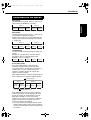
Disc structure
DVD VIDEO
A DVD VIDEO consists of “titles” and each title
may be divided into “chapters”.
Title 1
Title 2
Chapter 1 Chapter 2 Chapter 3 Chapter 1 Chapter 2
DVD AUDIO
A DVD AUDIO consists of “groups” and each group
may be divided into “tracks”.
Some discs include a “bonus group” that requires a
password for playing (A page 28).
Group 1
Track 1
Track 2
Group 2
Track 3
Track 1
Track 2
VCD/SVCD/CD
VCD, SVCD and CD consist of “tracks”.
In general, each track has its own track number.
(On some discs, each track may also be further
divided by indexes.)
Track 1
Track 2
Track 3
Track 4
Track 5
MP3 [JPEG] discs
On an MP3 [JPEG] disc, each still picture
(material) is recorded as a track [file]. Tracks [Files]
are usually grouped into a folder. Folders can also
include other folders, creating hierarchical folder
layers.
This unit simplifies the hierarchical construction of
a disc and manages folders by “groups”.
Up to 99 groups
Group 1
Track 1
[File 1]
Track 2
[File 2]
Group 2
Group 3
Group 4
Group 5
Up to 150 files
This unit can recognize up to 150 tracks [files] per
group and up to 99 groups per disc (up to 14,850
files in total). Since the unit ignores the tracks
[files] whose numbers are exceeding 150 and the
groups whose numbers are exceeding 99, they
cannot be played back.
• If there is any type of files other than MP3 [JPEG]
files in a folder, those files are also counted in the
total file number.
4
EXA1[UW]-01.fm
Page 5
Friday, January 16, 2004
2:08 PM
English
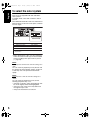
To select the color system
This system is compatible with PAL and NTSC
color systems.
In standby mode, select PAL or NTSC to match
your TV.
If the VIDEO OUT SELECT switch is switched over
when the power is ON, turn off the power, and then
turn it on again.
13
13
Color system of TV
Multi-color system
VIDEO OUT SELECT
PAL or NTSC*
PAL
PAL
NTSC
NTSC
* Set the color system of the unit and TV to match the
playback disc.
• Before playing back a disc, it is also required to
select the correct monitor type in the PICTURE
menu according to the aspect ratio of your TV
(A page 30).
NOTE
If you play back an NTSC disc with this setting set to
“PAL”.
You can watch the playback pictures (the disc will
be reproduced using “PAL 60” format), but the TV
screen may rolls over upward and downward
rapidly.
NOTE
If you play back a PAL disc with this setting set to
“NTSC”.
You can watch the playback pictures, but the
following symptoms may occur:
• The items on the disc menu will be blurred, and
be shown slightly shifted when highlighted.
• The aspect ratio of the picture may differ from
the original aspect ratio.
• The picture movement is not smooth.
5
EXA1[UW]-01.fm
Page 6
Friday, January 16, 2004
2:08 PM
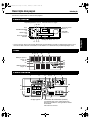
Description of parts
English
Introduction
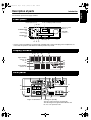
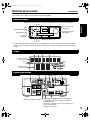
The numbers represent the page numbers.
Front panel
Play/Pause:13, 15
Look at “Display window” below.
33 35
Remote control
sensor: 7
12,13
STANDBY/ON
: 13
Open/Close
: 13
Headphones
jack*
VOLUME
control: 17
PHONES
Disc tray: 13
15 15 15
* Connect a pair of headphones (commercially available) with a stereo mini plug. If the headphones are
connected, the speakers and subwoofer will not produce any sound.
Display window
18, 23
21
36
27
Upper display
section: 14
18, 23
22
33
33
35
28
28
Lower display
section: 14
Rear panel
11
12
11
12
11
12
37
38 12
13
9
10
9
10
12
13
10
11
13
12
12
13
5
Region Code Number: 3
Cooling fan (inside)
The fan rotates and stops automatically.
This discharges heat generated inside the unit.
Do not cover up these holes.
6
EXA1[UW].book
Page 7
Thursday, January 8, 2004
10:09 AM
English
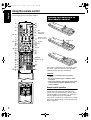
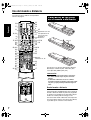
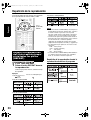
Using the remote control
The numbers represent the page numbers.
Putting the batteries in
the remote control
13
17
14
16, 18
8
8
15, 33
16
15
20
20, 29
29
25
30
14
27
28
26
21
33
27
35
34, 35
11
33
36
13
8
35
8 One touch
17
replay: 16
Remote control
mode selector: 8
17
15, 33
13
16
15
20
20, 29
Batteries (2)
22
25
25
Number
buttons: 8, 16
23
27
17
17
If the range or effectiveness of the remote control
decreases, replace the batteries. Use two R6P
(SUM-3)/AA(15F) type dry-cell batteries.
CAUTION
• Do not use a used battery and a new battery
together.
• Do not use different types of batteries at the
same time.
• Take out the batteries if the remote control is not
to be used for a long time. Otherwise it may
cause a leakage.
Remote control operation
When operating the remote control, point it
towards the front panel of the main unit. If the
remote control is operated from a direction that is
extremely oblique or when there is an obstacle in
the way, signals may not be transmitted.
If the remote control sensor is exposed to a strong
light such as direct sunlight, correct operation may
not be carried out.
7
EXA1[UW].book
Page 8
Thursday, January 8, 2004
10:09 AM
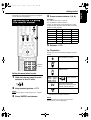
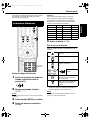
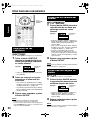
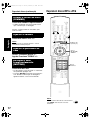
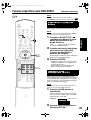
This page is for when operating your TV using the
remote control of this product.
Operating the TV using
the remote control
4
Press number buttons (1-9, 0).
Examples:
For a Hitachi TV: Press 1, then 0.
For a Toshiba TV: Press 0, then 8.
English
Getting
Introduction
started
If there are more than one manufacturer’s codes,
try them in turn and select the one that causes the
product to work properly.
Manufacturer
Code
Manufacturer
Code
JVC
01
Samsung
12
Hitachi
10
Sanyo
13
Magnavox
02
Sharp
06
Mitsubishi
03
Sony
07
Panasonic
04, 11
Toshiba
08
RCA
05
Zenith
09
5
Release F TV.
For TV operation
Operate the remote control by pointing it towards
the TV.
Turn ON/OFF the power.
Change channels.
Number
buttons
Adjust volume.
Setting the manufacturer's code
1
2
Slide the remote control mode
selector to the TV side.
Select channels.
9
100+
*1
Alternates between the
previously selected channel
and the current channel.
Keep pressing down F TV.
Switch TV and video input.
NOTE
Keep pressing down F TV until Step 4 is complete.
3
Press ENTER and release.
*1 Make sure to slide the remote control mode
selector to the TV side in advance.
NOTE
When the batteries are replaced, perform the
manufacturer's code setting again.
8
EXA1[UW].book
Page 9
Thursday, January 8, 2004
10:09 AM
English
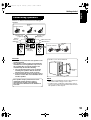
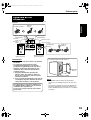
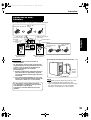
Connecting up – Do not turn on the power until the connection is complete –
Connection
Connecting antennas
Connecting AM loop antenna (supplied)
1 Set up the AM loop antenna.
Connecting FM antenna (supplied)
(/ǡ
%1#:+#.
FM antenna
Main unit
(rear panel)
Put the antenna up straight in the direction where
the best radio reception can be obtained, and fix
by using tape.
2 Connect antenna cords.
Main unit
(rear panel)
How to insert antenna cords
Connect two antenna cords
as described above.
Black
White
If the antenna cord is
covered with vinyl on the
tip, twist and pull the vinyl
off and remove.
7 When good radio reception cannot be
obtained with the supplied antenna or when
using a communal antenna
Antenna cord (sold
separately)
3 Turn the AM loop antenna to the direction of the
best radio reception.
Locate the AM loop antenna as far away from
the main unit as possible.
• Do not locate the AM loop antenna on a metallic
table or close to a TV, personal computer, etc.
Otherwise it may result in bad radio reception.
7 When good radio reception cannot be
obtained with the supplied AM loop antenna
Electric wire: 3 - 5m (commercially available)
Electric wire
Twist
AM loop
antenna
Main unit
(rear panel)
Put up an electric
wire extending
horizontally,
preferably at a high
place such as
above a window or
outdoors.
Communal
antenna terminal
or
Main unit
(rear panel)
Converter
(sold separately:
compatible with 300C/
75C)
Outdoor FM antenna
(commercially
available)
Coaxial cable
(commercially
available)
Depending on the radio reception
conditions, an FM feeder antenna (sold
separately: compatible with 300C) can
be used. In the case, a converter (sold
separately) is required.
For details of connecting a separately sold
antenna, refer to the user guide for the antenna
or converter.
Connect the AM loop
antenna cords together.
When positioning the antenna, listen to an actual radio program (refer to “Listening to a radio broadcast” on page 33).
9
EXA1[UW].book
Page 10
Thursday, January 8, 2004 10:09 AM
Getting
Connection
started
English
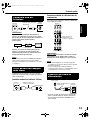
Connecting up
Connecting speakers
There is no difference between the left and right
speakers.
Speaker terminal
Speaker
cord
Speaker cord
(supplied)
Speaker cord
(supplied)
Without
black line
With black
line
Without black line
With black line
Speaker terminal
Speaker
cord
Main unit
(rear panel)
Right speaker
(rear panel)
Left speaker
(rear panel)
CAUTION
• DO NOT connect more than one speaker to one
speaker terminal.
• The speakers of this product are magnetically
shielded, but color irregularities may occur on
the TV depending on how the speakers are
installed. Keep in mind the following.
1. Turn off the main power of your TV before
installing the speakers. Wait for about 30
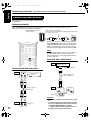
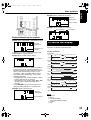
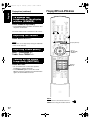
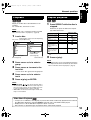
minutes before turning on the TV again.
2. If color irregularity occurs in pictures , keep a
distance of more than 10 cm between the TV
and the speakers.
The speakers employ natural wood for the
diaphragm and the cabinet in order to
reproduce the original sound faithfully.
The appearance will therefore be different for
each unit.
Speaker cover can be detached.
Speaker
cover
NOTE
• Impedance of speaker that can be connected to the
main unit is within a range of 4C to 16C.
• In order to have a sufficient cooling effect, leave a
space of more than 1cm between the main unit and
the speakers or other objects.
10
EXA1[UW].book
Page 11
Thursday, January 8, 2004 10:09 AM
English
Connecting up (continued)
– Do not turn on the power until the connection is complete –
Connection
Connecting other devices
This page is for when connecting the main unit with
other devices.
Connecting subwoofer
With an amplifier-built in subwoofer (sold separately), you can enjoy a more dynamic bass sound.
Refer to the manual of the subwoofer for details.
Amplifier-built-in subwoofer
(sold separately)
Audio cord (sold separately)
(If an audio cord comes with the amplifier-built-in subwoofer,
you can use the cord.)
Main unit
When you want to hear sound from the subwoofer,
press S.WFR OUT on the remote control to display
“SUB WFR ON” (Sub Woofer ON) on the display
window on the main unit. Each time you press the
button, the display toggles between “ON” and “OFF”.
NOTE
When "SUB WFR ON" is selected, bass sound from
the left and right speakers will be automatically
lowered and the bass sound will be emitted mainly
from the subwoofer.
Connecting with a digital device
Input
To digital input terminal
Connecting with other audio device
Output
Other audio
device
Audio cord (sold
separately)
Digital device
(MD recorder etc.)
Optical digital cord
(sold separately)
Output
Main unit
CAUTION
Input
Main unit
11
• For details of signals to be output, refer to page
31.
• If connecting the main unit with equipment with the
function of a Dolby Digital decoder, the setting in
“D. RANGE COMPRESSION” of “AUDIO”
(A page 31) will be invalid regarding sound from
the digital audio output of the main unit.
Page 12
Thursday, January 8, 2004 10:09 AM
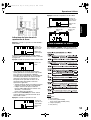
Connecting up
Getting
Connection
started
Connecting by using the component video
cord
Connecting with TV
TV
Supplied composite video cord
Main unit
English
EXA1[UW].book
You can enjoy better quality pictures than when
using the S-Video cord.
CAUTION
Connect the main unit directly with a TV (or a
monitor) without routing through a VCR.
Otherwise it may cause picture distortion while
playing.
Component video cord
(sold separately)
TV (or
monitor)
Main unit
Connecting directly
Also, when connecting the main unit to a TV with
a VCR built in, there may be picture distortion
while playing.
Main unit
NOTE
Please check that the setting for VIDEO OUT SELECT
(PAL / NTSC) on the rear panel of the main unit and
the color system on your TV set are the same.
(A page 5)
When a clearer picture is
desired
You can enjoy pictures of better quality using the
following cord instead of the supplied video cord.
CAUTION
Use one of either the S-Video cord or the
component video cord. If both cords are used,
pictures may not be played properly.
NOTE
• In order to enjoy pictures with Progressive mode
(A page 27), the TV is required to have Progressive
video input.
• If the component video input jacks of your TV are
BNC type, use a plug adapter (not supplied) to
convert the plugs.
Connecting by using the S-Video cord
TV
Connecting the power cord
S-Video cord
(sold separately)
Main unit
AC outlet
Supplied power cord
Main unit
• Connect the power cord after all other
connections are complete.
• The STANDBY lamp (on the front panel) will be
lit.
12
EXA1[UW].book
Page 13
Thursday, January 8, 2004 10:09 AM
English
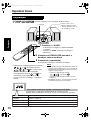
Playing discs
Playback
(Refer to page 17 for playing MP3 and JPEG.)
A page 6
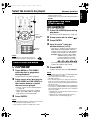
1
Place a disc with the label side
facing up.
• Place an 8 cm disc in to the
hollow part in the center.
Press F AUDIO.
• The power will be turned on and the STANDBY
lamp will go off.
• Press F AUDIO again to turn off the power.
2
Press 0 OPEN/CLOSE to open the disc
tray to load a disc.
3
Press 3 (play).
The disc tray will close and playback will start.
• The power will be turned on when any of
,
or
on the main unit and
,
or
on the remote control is
pressed while the power is off.
If any button other than
or
is
pressed, the source will also be changed (if
there is a disc loaded, playback will start).
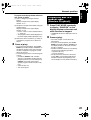
NOTE
,
,
• A menu screen may be displayed after starting
playback of a DVD. In this case, select a desired
item to playback by using the following buttons on
the remote control.
• Select a desired item using
and
press
.
• Select a desired item using the number buttons.
• Depending on the disc, actual operation may be
different from the description.
Screens displayed on the TV when the power is turned ON.
The following messages appear depending on the status of the system.
(When FM/AM or AUX is selected as a source, the messages do not appear.)
NOW READING
REGION CODE
ERROR!
NO DISC
OPEN
CLOSE
13
Appears when the system is reading the disc information. Wait for a while.
Appears when the Region Code of the DVD does not match the code the
system supports. (A page 3)
Appears when no disc is loaded.
Appears when opening the disc tray.
Appears when closing the disc tray.
EXA1[UW].book
Page 14
Thursday, January 8, 2004 10:09 AM
Example: When an MP3 disc is played
Elapsed
playing time
English
Basic operations
Track number
Example: When a JPEG disc is played
Group number
File number
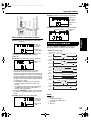
Display window during disc playback
Example: When a DVD VIDEO or DVD AUDIO is played
Elapsed
playing time
Chapter/Track
number
If “BONUS” or “B.S.P.” is displayed during a DVD
AUDIO playback, refer to page 28.
Example: When a SVCD or VCD is played
Track number
To switch the display
Press UPPER or LOWER. Each time you press
the button, the display will be alternated.
Display examples
DVD VIDEO
UPPER: 0:00:03 Elapsed playing time
T1 C3 (Title and Chapter number)
No display
LOWER:
03 Chapter number
T1 Title number
DVD
DVD AUDIO
UPPER: 0:00:03 Elapsed playing time
G1 T3 (Group and Track number)
No display
LOWER:
• PBC (Play Back Control): A signal recorded in a
VCD (version 2.0) for controlling playback. It is
possible to enjoy interactive software or software
with a search function using a menu screen
recorded in a PBC compatible VCD. To play a
disc with the PBC function OFF, carry out the
following operations.
• Designate the track number using the number
buttons while the disc is stopped.
• Designate the track number using 4 or ¢
while the disc is stopped, and then press
3 (play).
• Press RETURN to go back to the upper layer
during the PBC playback of a VCD or SVCD.
Example: When a CD is played
03 Track number
G1 Group number
DVD
VCD/SVCD
UPPER:
0:03 Elapsed playing time
LOWER:
No display
PBC 2 (PBC and Track number appear only
when PBC function is played)
02 Track number
VCD
CD
UPPER:
0:03 Elapsed playing time
LOWER:
02 Track number
No display
CD
MP3 disc
UPPER:
0:00:03 Elapsed playing time
G1 T3 Track number
No display
LOWER:
G1 Group number
MP3
03 Track number
JPEG disc
UPPER:
G1 F3 (Group number and File number)
No display
LOWER: JPG
Elapsed
playing time
NOTE
Track number
Abbreviations
G: Group
T: Title (DVD VIDEO)
Track (DVD AUDIO and MP3)
C: Chapter
F: File
14
EXA1[UW].book
Page 15
Thursday, January 8, 2004 10:09 AM
English
Playing discs (continued)
Designate the chapter number or
track number to play during
playback.
Refer to “How to use the number buttons” on page
16.
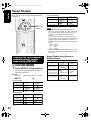
To stop playback
Press 7 during playback.
To pause playback
3 (Play button)
Press 8 during playback.
Cursor
(5// )
To resume normal playback, press 3 (play).
• Press 8 to pause during JPEG disc slide-show.
Press 3(play) to start playback from the next file.
• It is not possible to pause by pressing 3/8 on
the main unit during JPEG disc slide-show.
To advance picture
frame-by-frame
Number
buttons
Press 8 during pause.
Each time you press the button, picture will be
advanced frame-by-frame.
Fast reverse/Fast forward
search
There are two methods.
Select what you want to
play by using the number
buttons
• Press 1 or ¡ during playback.
Each time you press the button, the speed
increases ( ×2, ×5, ×10, ×20, ×60). To restore
the normal speed, press 3(play).
• Hold down 4 or ¢ .
NOTE
• Set the remote control mode selector to
AUDIO before using the number buttons.
• For a VCD or SVCD, this operation can be carried
out when the disc is stopped, or during playback
without the PBC function.
• For a DVD AUDIO, CD, MP3 or JPEG, this operation
can also be carried out when the disc is stopped.
• This operation may not be carried out for some
discs.
15
Fast reverse/Fast forward search can be carried
out only while the button is pressed ( ×2 → ×5).
NOTE
• Fast reverse/Fast forward search cannot be carried
out for MP3 and JPEG.
• For a DVD VIDEO, SVCD or VCD, no sound comes
out during fast reverse/fast forward search.
• For a CD or DVD AUDIO, sound is intermittent
during fast reverse/fast forward search.
EXA1[UW].book
Page 16
Thursday, January 8, 2004 10:09 AM
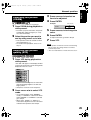
Playing back from a position
10 seconds before
(One Touch Replay)
Skip to the beginning of
the selection
English
Basic operations
Press 4 or ¢ during playback*.
Press
during playback.
NOTE
• This operation may not be carried out for some
discs.
• It is not possible to go back to the immediately
previous title.
Slow Motion Playback
Press SLOW
pause.
or SLOW
during
• Each time you press the button, the speed
increases.
• Press 8 to pause playback, and press 3(play) to
resume normal playback.
• Each time you press the button, the previous or
next beginning of chapter/track/file to the current
position will be skipped to.
• Press 4 once to skip back to the beginning of
the chapter or track currently being played
(except for JPEG).
• Press GROUP/TITLE
or
to select the title
or group.
• During playback of a JPEG disc, press ¢ or
cursor / to play the next file, or press 4 or
cursor5 to play the previous file.
NOTE
* For a VCD or SVCD, this operation can be carried out
during playback without the PBC function.
• Except for a DVD VIDEO, this operation can also be
carried out while the disc is stopped.
• This operation may not be carried out for some
discs.
NOTE
• No sound will be produced.
• The picture motion in the reverse direction may not
be smooth.
• For a VCD or SVCD, Slow Motion Playback can be
carried out in the forward direction only.
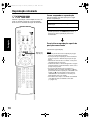
How to use the number buttons
Examples:
5:
20:
15:
25:
Guide icons displayed on the TV screen (On-screen guide)
: Play
: Containing multi-angle views
(A page 25)
: Pause
: Containing multi-audio languages
(A page 25)
: Fast reverse/Fast forward search
: Containing multi-subtitle languages
(A page 25)
: Slow Motion Playback (reverse/
forward directions)
: The disc cannot accept the operation you
have attempted.
16
EXA1[UW].book
Page 17
Thursday, January 8, 2004 10:09 AM
English
Playing discs (continued)
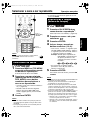
Playing MP3 and JPEG discs
To change the
brightness of the display
window (DIMMER)
Press DIMMER repeatedly.
• The modified brightness will be stored even after
the power is turned off.
The items below can be carried out for all sources.
Adjusting the volume
Press AUDIO VOL +/–.
NOTE
3 (Play button)
The volume can be adjusted by turning the VOLUME
control on the main unit.
Adjusting sound quality
Cursor
(5// /2/3 )
/ENTER
Bass: Press BASS +/–.
Treble: Press TREBLE +/–.
Turning off the sound
temporarily (MUTING)
Number
buttons
Press MUTING.
• No sound will come out from the speakers,
headphones and the subwoofer.
• Press MUTING again to restore the sound.
When the power is tuned off once and turned on
again, the sound will be restored.
NOTE
Set the remote control mode selector to
AUDIO before using the number buttons.
17
EXA1[UW].book
Page 18
Thursday, January 8, 2004 10:09 AM
Playback
Repeat playback
Display of an MP3 disc is described here as an
example.
For a JPEG disc, read “track” as “file”.
1
When playing a disc containing both MP3 and JPEG
files, set one of them to be played (A page 30).
Load a disc.
TV screen
Elapsed time of the track currently being
played (MP3 only).
Time : 00:03:08
Track:
Group list
Selected group
2
3
Press REPEAT while the disc is
stopped.
Each time you press the button, the Repeat
type will be alternated.
NOTE
1
English
Advanced operations
Track list (Tracks
included in the
selected group)
Selected track
Repeat types
Display on the TV screen
Repeats the current
track (only for MP3).
Repeats the current
group.
Repeats the entire
disc.
Cancels repeat.
REPEAT TRACK
REPEAT GROUP
REPEAT ALL
No display
Repeats the current track
during a Program or
Random Playback (only
for MP3).
REPEAT STEP
Repeats all programmed
tracks or the all tracks for
Random play (only for
MP3).
REPEAT ALL
*
represents blinking.
2
Press 3(play).
Display on the display
window on the main unit
ALL
*
ALL
No display
ALL
NOTE
Press cursor 5// to select a
group.
• The Repeat types can be changed during playback.
• The Repeat mode will be automatically cancelled if
there is a file that cannot be played (A page 3).
Press cursor 3 to move to the
track list.
• Press cursor 2 to go back to the group list.
4
5
Press cursor 5// to select a
track.
Press 3 (play) or ENTER.
NOTE
• GROUP/TITLE
can also be used in Step 2.
• The number buttons can also be used in Step 4. In
this case, Steps 3 and 5 are not needed. (For how
to use the number buttons, refer to page 16).
• 4 or ¢ can also be used in Step 4. In this case,
Step 3 is not needed.
Slide-Show Playback
• In Step 5, for a JPEG disc, when 3 (play) is pressed, files will be continuously played from the selected
file (Slide-Show Playback), and when ENTER is pressed, only a selected file will be played.
• Display time for a file in Slide-Show Playback is about 3 seconds.
• When all files are played through, the playback will be automatically stopped.
18
EXA1[UW].book
Page 19
Thursday, January 8, 2004 10:09 AM
English
Resume Playback
How to suspend playback
When playback is stopped in the middle, playback
can be started from the stopped scene.
This is called Resume function.
Perform any of the following operations during
playback.
Press 7 once.*
Press F AUDIO to turn off the power.
Change the source to FM/AM or AUX.*
* Even if the power is turned off by pressing
FAUDIO after this, the position where playback
has been stopped will be stored.
To start playback from the stored
position
Press 3 (play).
NOTE
3 (Play button)
19
• This function does not work in Program Playback or
Random Playback.
• The position where playback starts again may be a
little different from the stopped position.
• When a disc menu is displayed, the Resume
function may not work.
• The audio language, the subtitle language and the
angle at that time are stored as well as the stopped
position.
• The stored position will be cleared if the disc tray is
opened. Further, if 7 is pressed during playback,
“RESUME” will be displayed. If 7is pressed at this
time, “RESUME OFF” will be displayed and the
stored information will be cleared.
• At the time of purchase, Resume is set to ON.
Resume can be set to OFF (A page 31).
Page 20
Thursday, January 8, 2004 10:09 AM
Select the scene to be played
Advanced operations
English
EXA1[UW].book
without a menu screen.
• Playback may start for some discs without pressing
ENTER.
Designate the time
(Time search)
1
Cursor
(5// /2/3 )
/ENTER
Press ON SCREEN twice during
playback*2.
The menu bar will be displayed (A page 29).
2
3
4
Press cursor2/3 to select
Press ENTER.
Input the time*3 using the
number buttons (1-9, 0).
• Input “hours”, “minutes” and “seconds” for a
DVD VIDEO and DVD AUDIO, and input
“minutes” and “seconds” for a CD and VCD.
“minutes” and “seconds” can be omitted.
Example: When you want to play a DVD
VIDEO from the position of (0
hour) 23 minutes 45 seconds,
press the buttons in the order:
Number
buttons
NOTE
Set the remote control mode selector to
AUDIO before using the number buttons.
2
Select from the menu
Press MENU or TOP MENU
while the disc is stopped or
during playback*1.
The disc menu screen will be displayed.
2
Press cursor 5///2/3(only for
a DVD VIDEO or DVD AUDIO) or
the number buttons to select
the scene to be played.
• Refer to “How to use the number buttons”
(A page 16).
• When the menu screen has a couple of
pages, press 4 or ¢ to change the
page (only for a VCD and SVCD).
3
Press ENTER.
3
4
5
.
• If you input wrong numbers, press cursor2
to delete the numbers and re-input.
5
1
.
Press ENTER.
To delete the menu bar, press ON SCREEN.
NOTE
• This function does not work for a DVD VIDEO with
no time information recorded.
• This function does not work during Program or
Random Playback.
*2 For a CD, this operation can always be carried out,
while, for a VCD, the operation can be carried out
when the disc is stopped or during playback without
the PBC function.
*3 Time search for a DVD VIDEO is from the beginning
of the title, for a DVD AUDIO from the beginning of
the track being played. Time search for a VCD and
a CD is as follows:
• When the disc is stopped, time search is from the
beginning of the disc.
• When the disc is being played, time search is
within the track currently being played.
NOTE
*1 For a VCD and SVCD, this operation can be carried
out only when the PBC function is off.
• This operation cannot be carried out for a disc
20
EXA1[UW].book
Page 21
Thursday, January 8, 2004 10:09 AM
English
Program Playback/Random Playback
Play the disc in the
desired order
(Program Playback)
It is possible to program a maximum of 99 chapters
or tracks. The same chapter or track can be
programmed more than once.
1
While the disc is stopped, press
PLAY MODE repeatedly to
display “PRGM” on the display
window on the main unit.
“PRGM” is an abbreviation for PROGRAM.
Example: For DVD VIDEO
TV screen
3 (Play button)
Program
screen
2
Number
buttons
NOTE
Set the remote control mode selector to
AUDIO before using the number buttons.
21
Create a program following the
description on the TV screen.
Refer to “How to use the number buttons”
(A page 16).
• The input content varies depending on the
disc type.
• DVD VIDEO:
Titles and chapters
• VCD, SVCD, CD: Tracks
• DVD AUDIO, MP3: Groups and tracks
• To select a DVD AUDIO bonus group, carry
out the operations of “Playing the Bonus
Group” on page 28 in advance to erase the
display “BONUS”.
• If the number of chapters or tracks input is
greater than 99, “FULL” will be displayed.
• In the case of a CD, SVCD or VCD, when
the total playback time reaches 99 minutes
59 seconds, “--:--” will be displayed on the
display window (It is possible to continue
programming).
EXA1[UW].book
Page 22
Thursday, January 8, 2004 10:09 AM
To program on the display window on the main
unit, operate as follows.
(1) Select a title/group using the number
buttons.
Display example of the upper display
window: T2 C-(2) Designate a chapter/track number using the
number buttons.
Display example of the upper display
window: T2 C3
• Refer to “How to use the number buttons”
(A page 16).
• The program number will be displayed on
the lower display window (Example: “P2”).
(3) Repeat the above operations (1) and (2) to
complete the program. Then, advance to
Step 3.
3
Press 3 (play).
• To resume normal playback, press PLAY
MODE repeatedly to display “NORMAL” on
the display window on the main unit while
the disc is stopped. The program content
will not be erased.
• The following operations erase the program
content.
• Hold down CANCEL until “CLEAR!”
appears on the display window with the
program preference screen displayed (if
CANCEL is pressed and released
quickly, programs will be erased one by
one).
• Open the disc tray
• Turn off the power
Playing the disc in a
random order
(Random Playback)
1
English
Advanced operations
Press PLAY MODE repeatedly
to display “RANDOM” on the
display window on the main unit
while the disc is stopped.
• “RANDOM” will also be displayed on the TV
screen.
2
Press 3(play).
• The same chapter or track will not be
played twice.
• To resume normal playback, press PLAY
MODE repeatedly to display “NORMAL” on
the display window on the main unit while
the disc is stopped.
• Random Playback will also be cancelled by
carrying out the following operations.
• Open the disc tray
• Turn off the power
• The previous track will not be returned to
even if 4 is pressed repeatedly during
Random Playback (the beginning of the
current chapter or track will be returned to).
22
EXA1[UW]-04.fm
Page 23
Thursday, January 8, 2004
10:18 AM
English
Repeat Playback
Refer to page 18 for Repeat Playback of MP3 and
JPEG files.
For CD/VCD/SVCD
Repeat types
Repeats the current
track
Cursor
(5// /2/3 )
/ENTER
Display on the TV
screen
Display on the
main unit
TRACK
Repeats all tracks
ALL
Cancels repeat
OFF
ALL
No display
NOTE
• For a DVD AUDIO and CD, this operation can
always be carried out, while, for a VCD and SVCD,
the operation can be carried out when the disc is
stopped or during playback without the PBC
function.
• It is possible to set Repeat on the menu bar. For
how to operate, refer to “Playing the designated part
repeatedly (A-B Repeat Playback)”(A page 24).
• The abbreviations displayed on the main unit are as
follows.
TRK : Track
CHP : Chapter
TI. : Title
GR. : Group
• For a DVD VIDEO and DVD AUDIO, if the source is
switched to FM/AM or AUX, the Repeat mode will be
cancelled.
Playing the title/chapter/
group/track/all tracks
repeatedly (REPEAT)
Repeat Playback during Program or
Random Playback
Repeat types
1
Repeats the current
chapter or track
Press REPEAT during playback.
Each time you press the button, the Repeat
type will be alternated.
Example:
TV screen
Display window on the main unit
CHAP
For DVD VIDEO
Repeat types
Display on the TV
screen
Repeats the current
chapter
CHAP.
Repeats the current
title
TITLE
Cancels repeat
OFF
Display on the
main unit
ALL
*
No display
For DVD AUDIO
Repeat types
Display on the TV
screen
Repeats the current
track
TRACK
Repeats the current
group
GROUP
Cancels repeat
*
23
represents blinking.
OFF
Display on the
main unit
ALL
No display
*
Repeats all
programmed tracks
or all the tracks in
Random Playback
Cancels repeat
Display on the TV
screen
STEP
Display on the
main unit
or
REPEAT STEP
ALL
or
REPEAT ALL
OFF
or
No display
ALL
No display
EXA1[UW].book
Page 24
Thursday, January 8, 2004 10:09 AM
English
Advanced operations
Playing the designated
part repeatedly
(A-B Repeat Playback)
1
Press ON SCREEN twice during
playback.
The menu bar (A page 29) will be displayed.
2
3
4
Press cursor2/3 to select
OFF .
Press ENTER.
Press cursor5// to display
OFF
A B
.
Other Repeat modes can be selected here.
For other Repeat modes, refer to “Playing the
title/chapter/group/track/all tracks repeatedly
(REPEAT)” (A page 23).
5
Press ENTER at the start point
of the part to be repeated
(designating A point).
• The icon on the menu bar will be
6
A-
.
Press ENTER at the end point of
the part to be repeated
(designating B point).
• The icon on the menu bar will be
A-B .
will appear blinking on the display
window on the main unit and the part
between A and B points will be played
repeatedly.
• A-B Repeat Playback will be cancelled by
carrying out the following operations.
• Press 7.
• Select
A-B and press ENTER twice.
NOTE
A-B Repeat Playback is possible only within the same
title or track. A-B Repeat Playback cannot be carried
out during PBC playback, Program Playback, Random
Playback and Repeat Playback.
24
EXA1[UW].book
Page 25
Thursday, January 8, 2004 10:09 AM
English
Other convenient functions
Cursor
(5// /2/3 )
/ENTER
Selecting the audio
language
1
Press AUDIO during playback of
a disc containing several audio
languages.
Example:
• Each time you press the button, the audio
language will be alternated. Also, the audio
language can be changed by pressing
cursor5//.
• For a language code such as “AA”, refer to
“Language codes” (A page 39).
• “ST”, “L” and “R” displayed when playing a
VCD or SVCD respectively represent
“Stereo”, “left sound” and “right sound”.
Selecting the subtitles
2
(only for moving image)
1
Press SUBTITLE during
playback of a disc containing
subtitles in several languages.
Example:
TV screen
Wait for a few seconds or press
ENTER.
NOTE
It is possible to operate by using the menu bar
(A page 29).
TV screen
Selecting a view angle
• Each time you press the button, the subtitle
will be alternated between ON/OFF.
2
Press cursor5// to select a
subtitle language.
(only for moving image)
1
• For a language code such as “AA”, refer to
“Language codes” (A page 39).
• The manner of displaying subtitle
languages may be different depending on
the disc.
3
Wait for a few seconds or press
ENTER.
NOTE
• It is possible to operate by using the menu bar
(A page 29).
• For a SVCD, each time you press SUBTITLE in
Step 1 , the subtitle type and ON/OFF will be
alternated.
25
Press ANGLE during playback
of a scene containing multi-view
angles.
Example:
TV screen
• Each time you press the button, the angle
will be alternated. Also, the angle can be
changed by pressing cursor5//.
2
Wait for a few seconds or press
ENTER.
NOTE
It is possible to operate by using the menu bar
(A page 29).
EXA1[UW].book
Page 26
Thursday, January 8, 2004 10:09 AM
Enlarging the picture
(ZOOM)
3
4
Press ZOOM during playback or
while paused.
• Each time you press the button, the picture
magnification will be changed ( M1.5 only
for a VCD and SVCD).
2
Select the portion you want to
see by using cursor 5// /2/3.
• This operation cannot be carried out when
the magnification is M1.
• To resume normal playback, select M1 in
Step 1.
Adjusting the picture
quality (VFP)
1
Press ENTER.
Example:
(only for moving image)
1
Press cursor5//to select an
item to be adjusted.
English
Advanced operations
TV screen
GAMMA
5
6
Press cursor5//to change the
value.
Press ENTER.
To adjust other items, go back to Step 3.
7
Press VFP.
NOTE
• If no operation is made for several seconds during
the procedure, the settings made so far will be
automatically stored.
• “VFP” is an abbreviation of “Video Fine Processor”.
Press VFP during playback or
while paused.
“VFP SET” will appear on the display window
on the main unit and the current setting will be
displayed on the TV screen.
• Gamma: Controls brightness of neutral tints
while maintaining brightness of dark and
bright portions.
• Sharpness: Controls screen sharpness.
2
Press cursor2 /3 to select VFP
mode.
• It is recommended to select “NORMAL”
usually, or “CINEMA” in a dark room. When
either “NORMAL” or “CINEMA” is selected,
go to Step 7.
• When either “USER 1” or “USER 2” is
selected, the adjustment can be carried out
in detail in the operations after Step 3.
26
EXA1[UW].book
Page 27
Thursday, January 8, 2004 10:09 AM
English
Other convenient functions (continued)
types of disc. If the difference is not to your liking,
adjust the DVD Level.
1
Press DVD LEVEL during
playback.
• Each time you press the button, the level
will be alternated among “NOR” (Normal),
“MID” (Middle) and “HIG” (High).
• Select the level while listening to the sound
played.
NOTE
• DVD Level is effective only for playback of a DVD.
• Even if the DVD Level is changed, the output level
from the digital audio output terminal will not be
changed.
• This operation can be carried out while the disc is
stopped or paused.
Creating realistic sound
(VIRTUAL SURROUND)
Enjoying better pictures
(PROGRESSIVE)
In the Progressive mode, better pictures can be
enjoyed.
NOTE
CAUTION
Virtual Surround can be set only for multi-channel
sound (AC3, LPCM, PPCM and DTS). Virtual
Surround cannot be set for 2 channel audio such as
PCM stereo or Dolby Surround.
• In order to enjoy pictures in the Progressive
mode, the following requirements should be met.
• There must be a component video input terminal
on the TV set connected to the main unit.
• The main unit and the TV set must be
connected using a component video cord
(A page 12).
When the above requirements are not satisfied,
leave the main unit in the Interlace mode. If the
Progressive mode is set, pictures may be distorted.
• When the VIDEO OUT SELECT switch is set to
PAL, there will be no PROGRESSIVE output to
the component video terminal.
1
Press VIRTUAL SURROUND
during playback.
Example:
TV screen
• Each time you press the button, the Surround
mode will be alternated between ON/OFF.
• When ON, “SURROUND” appears on the
display window.
• When switching the Surround mode, the
sound will be intermittent.
NOTE
• Virtual Surround is effective for the speakers and
headphones.
• “V.SUR.” displayed on the display window is an
abbreviation of “Virtual Surround”.
Adjusting playback level
(DVD LEVEL)
The audio of a DVD VIDEO and DVD AUDIO may
be recorded at a lower level (volume) than for other
27
NOTE
Progressive mode:
All scanned lines will be displayed at once. Pictures
of higher resolution than those in the Interlace mode
can be realized.
Interlace mode:
This is a conventional image method. Half of the
scanned lines displayed in the Progressive mode
will appear, alternating with the other half.
Display “PROGRESS” by holding
down PROGRESSIVE during
playback or while the disc is stopped,
or when there is no disc loaded.
• Each time you hold down the button, the mode
will be alternated between the Progressive mode
and the Interlace mode.
• The display window displays “PROGRESS”
when in the Progressive mode, and “INTER.”
when in the Interlace mode.
Page 28
Thursday, January 8, 2004 10:09 AM
Functions specific to DVD AUDIO
Advanced operations
NOTE
Set the remote control mode selector to
AUDIO before using the number buttons.
English
EXA1[UW].book
Playing the Bonus Group
There are some DVD AUDIO discs with a special
group, called “Bonus Group”, recorded.
NOTE
This operation can be carried out when “BONUS” is lit
on the display window on the main unit.
1
Press GROUP/TITLE
repeatedly during playback to
select a bonus group.
“KEY_ _ _ _” appears on the TV screen, and
on the display window on the main unit.
2
Press the number buttons to
enter a pin code (4 digits).
The method of getting a pin code may be
different depending on the disc.
Cursor
(5//)
/ENTER
Number
buttons
3
Press ENTER.
• When a correct pin code is entered,
“BONUS” disappears and the playback of
the bonus group starts.
• If an incorrect pin code is entered, try
entering a correct pin code again.
Browsable Still Pictures
(B.S.P.)
There are some DVD AUDIO discs with still
pictures recorded. Among the still pictures, there
are pictures called B.S.P. (Browsable Still
Pictures). With these pictures, it is possible to
switch a picture as if turning over pages.
NOTE
This operation can be carried out when “B.S.P.” is lit
on the display window on the main unit.
1
Press PAGE during playback.
Each time you press the button, the still picture
will be switched over. It is also possible to
switch the picture using cursor 5//.
Example:
2
TV screen
Wait for a few seconds or press
ENTER.
28
EXA1[UW].book
Page 29
Thursday, January 8, 2004 10:09 AM
English
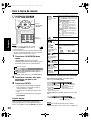
Using the menu bar
Select this to change time information
displayed on the display window on the
main unit and the status bar. Each time
ENTER is pressed, the display will be
alternated.
DVD VIDEO/DVD AUDIO (operating
during playback)
TOTAL : Elapsed playing time of current title/
group.
T.REM : Remaining time of current title/group
TIME : Elapsed playing time of current
chapter/track.
REM : Remaining time of current chapter/track
CD (operating during playback)/VCD/
SVCD
TIME : Elapsed playing time of current
track.
REM : Remaining time of current track.
TOTAL: Elapsed playing time of disc.
T.REM : Remaining time of disc.
TIME
Time display
selection
Cursor
(5// /2/3 )
/ENTER
A page 23
Number
buttons
Repeat mode
A page 20
Time search
/
CHAP.
NOTE
TRACK
• Set the remote control mode selector to
AUDIO before using the number buttons.
• This operation can be carried out when there is a
disc loaded. There are some functions that may not
work while the disc is stopped.
1
Chapter search
(DVD VIDEO)/Track
search (DVD
AUDIO)
Press ON SCREEN twice.
“ON SCREEN” will appear on the display
window on the main unit. The status bar and
the menu bar will appear on the TV screen.
Subtitle language
(DVD VIDEO/SVCD)
The above is an example for a DVD VIDEO.
2
3
Press cursor2 /3 to select an
item to be operated.
1/3
24:
2
4
A page 25
Switch the still pictures (B.S.P.) recorded
on a DVD AUDIO disc. (A page 28)
Page switch (DVD
AUDIO)
Information displayed on the status bar
DVD VIDEO/DVD AUDIO (the example below is for
a DVD VIDEO)
Transfer rate
(only for DVD VIDEO)
(DVD VIDEO)
Current title number
(DVD AUDIO)
Current group number
Time Playback status
(DVD VIDEO)
Current chapter number
(DVD AUDIO)
Current track number
VCD/SVCD/CD (the example below is for a CD)
Functions list
For the functions with no special description for the
operations, press cursor5// to select, and press
ENTER to determine.
5
View angle (DVD
VIDEO/DVD AUDIO)
Press ENTER.
• The selected function can be set. For the
setting content, refer to the following
“Functions list”.
• The currently active function shows blue.
• To delete the menu bar, press ON
SCREEN.
29
5:
A page 25
PAGE -/-
Menu bar
Examples:
A page 25
Audio language/
Audio (DVD VIDEO/
DVD AUDIO/VCD/
SVCD)
Status bar
Select a chapter/track. Press the
number buttons to input the chapter/
track number and press ENTER.
Playback mode
Time Playback status
Current track number
NOTE
The playback status mark has the same meaning of
the mark on the On-screen guide (A page 16).
Page 30
Thursday, January 8, 2004 10:09 AM
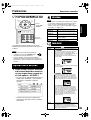
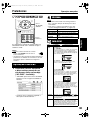
Preferences
Advanced operations
LANGUAGE
English
EXA1[UW].book
NOTE
Cursor
(5///2/3 )
/ENTER
• If the selected language is not recorded on the disc,
the optimum language set for the disc will be
displayed.
• For a language code such as “AA”, refer to the
“Language codes ” (A page 39).
Items
Contents
MENU LANGUAGE Select the language for the DVD VIDEO menu.
AUDIO LANGUAGE Select the audio language for the DVD VIDEO.
Number
buttons
SUBTITLE
Select the subtitle language for the DVD
VIDEO.
ON SCREEN
LANGUAGE
Select the language displayed on the
preference screens.
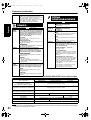
PICTURE
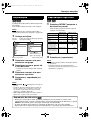
The initial settings of the system can be changed
according to the environment the system is used
in.
Items
Contents (
MONITOR
TYPE
Select a display method suitable for your TV.
16 : 9 NORMAL:
Select this when the aspect ratio of your wide
TV is fixed to 16:9 (when playing a DVD
VIDEO recorded at 4:3, the system
automatically adjusts the screen width of the
output signal).
NOTE
• Set the remote control mode selector to
AUDIO before using the number buttons.
• The top and bottom of the preference screen may
not be displayed on a wide TV. Adjust the picture
size on the TV.
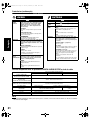
16 : 9 AUTO:
Select this when your TV is an ordinary wide
TV.
Basic operations
1
: initial setting)
Press CHOICE while the disc is
stopped or no disc is loaded
(“NO DISC” is displayed).
4 : 3 LB (Letter Box) :
Select this when the aspect ratio of your TV is
conventional 4:3. While viewing a wide screen
picture, the black bars appear on the top and
bottom of the screen.
• “SETTING” will appear on the display
window on the main unit and the following
screen will be displayed on the TV.
4 : 3 PS (Pan Scan):
Select this when the aspect ratio of your TV is
conventional 4:3. While viewing a wide screen
picture, the left and right edges of the picture
will not be shown on the screen. (If the disc is
not compatible with Pan Scan, the picture will
be displayed at the Letter Box ratio.)
• Proceed with operations by following the
description on the TV screen.
SCREEN
SAVER
Select the Screen Saver mode between ON /
OFF (Screen Saver activates when there is no
operation made for about 5 minutes since a
still picture was last displayed).
MP3/JPEG
If there are both MP3 and JPEG files on a
disc, you can select which files to play. When
the preference has been changed, open/close
the tray and turn on the power again. (A disc
with only one of MP3 file or JPEG file recorded
can be played regardless of this preference.)
30
EXA1[UW]-04.fm
Page 31
Friday, February 6, 2004 11:13 AM
English
Preferences (continued)
PICTURE
AUDIO
OTHERS
Items
Contents (
DIGITAL
AUDIO
OUTPUT
Select an output signal type from the
following in accordance with the device
connected to the digital audio output
terminal (AV amplifier, etc.). (See the list
below for the preference items and output
signal.)
: initial setting)
PCM ONLY:
Device corresponding only to linear PCM.
Items
Contents (
RESUME
Select ON /OFF. (A page 19)
ON SCREEN
GUIDE
Select ON /OFF. (A page 16)
AV
COMPULINK
MODE
(A page 37)
DOLBY DIGITAL/PCM:
Dolby digital decoder or a device having the
same function.
STREAM/PCM :
DTS/Dolby digital decoder or a device having
the same function.
DOWN MIX
Switch signal from the digital output
terminal of the DVD VIDEO according to the
connected device. Select this when Digital
Audio Output is set to “PCM ONLY”.
: initial setting)
DVD1 :
Connect to the video-3 input on the TV set or
the DVD input on the AV amplifier.
DVD2:
Connect to the video-1 input of the TV set.
DVD3:
Connect to the video-2 input of the TV set.
PARENTAL
LOCK
Set the Parental Lock function to cut off
violent scenes or replace the scenes with
others. (This is effective only for discs
equipped with the Parental Lock function.)
COUNTRY CODE (A page 32)
Select your country.
DOLBY SURROUND :
A Dolby Pro Logic decoder-built-in device.
SET LEVEL:
The restriction is stricter as the number
becomes smaller. “NONE” is no restriction.
STEREO:
An ordinary device.
PASSWORD (essential):
Enter four-digit number as your password
using the number buttons (1-9, 0) every time.
(Enter “8888” if you forget your password.)
The password is required at the time of
playback.
• When Virtual Surround is ON, Down Mix
does not work.
D (Dynamic).
To make adjustments for the difference
RANGE
between a high volume and a low volume
COMPRESSION when playing back with low volume (only
for a DVD recorded with Dolby digital).
• If you enter a wrong password three times,
“EXIT” will be automatically selected.
AUTO :
D. Range Compression automatically works.
ON:
D. Range Compression always works.
List of relationships of DIGITAL AUDIO OUTPUT preference items and output signal
Playback disc
DIGITAL AUDIO OUTPUT preference
STREAM/PCM
DOLBY DIGITAL/PCM
48 kHz, 16/20/24 bits
Linear PCM DVD VIDEO
96 kHz linear PCM DVD VIDEO
48 kHz, 16 bits stereo linear PCM
48/96/192 kHz,
16/20/24 bits linear PCM DVD AUDIO
48 kHz, 16 bits stereo linear PCM
44.1/88.2/176.4k Hz,
16/20/24 bits linear PCM DVD AUDIO
44.1 kHz, 16 bits stereo linear PCM
DTS DVD VIDEO
DOLBY DIGITAL DVD VIDEO/
DVD AUDIO
CD/VCD/SVCD
DTS CD
MP3 disc
DTS bit stream
PCM ONLY
48 kHz, 16 bits stereo linear PCM
48 kHz, 16 bits stereo linear
PCM
DOLBY DIGITAL bit stream
44.1 kHz, 16 bits stereo linear PCM/48kHz, 16 bits linear PCM
DTS bit stream
44.1 kHz, 16 bits linear PCM
No output
NOTE
• For a DVD VIDEO without content protection set, there is a 20 bit or 24 bit output at the digital audio output
terminal.
31
Page 32
Thursday, January 8, 2004 10:09 AM
Country/Area codes
AD
AE
AF
AG
AI
AL
AM
AN
AO
AQ
AR
AS
AT
AU
AW
AZ
BA
BB
BD
BE
BF
BG
BH
BI
BJ
BM
BN
BO
BR
BS
BT
BV
BW
BY
BZ
CA
CC
CF
CG
CH
CI
CK
CL
CM
CN
CO
CR
CU
CV
CX
CY
CZ
DE
DJ
DK
DM
DO
DZ
EC
EE
EG
EH
ER
Andorra
United Arab Emirates
Afghanistan
Antigua and Barbuda
Anguilla
Albania
Armenia
Netherlands Antilles
Angola
Antarctica
Argentina
American Samoa
Austria
Australia
Aruba
Azerbaijan
Bosnia and
Herzegovina
Barbados
Bangladesh
Belgium
Burkina Faso
Bulgaria
Bahrain
Burundi
Benin
Bermuda
Brunei Darussalam
Bolivia
Brazil
Bahamas
Bhutan
Bouvet Island
Botswana
Belarus
Belize
Canada
Cocos (Keeling)
Islands
Central African
Republic
Congo
Switzerland
Côte d’Ivoire
Cook Islands
Chile
Cameroon
China
Colombia
Costa Rica
Cuba
Cape Verde
Christmas Island
Cyprus
Czech Republic
Germany
Djibouti
Denmark
Dominica
Dominican Republic
Algeria
Ecuador
Estonia
Egypt
Western Sahara
Eritrea
ES
ET
FI
FJ
FK
FM
FO
FR
FX
GA
GB
GD
GE
GF
GH
GI
GL
GM
GN
GP
GQ
GR
GS
GT
GU
GW
GY
HK
HM
HN
HR
HT
HU
ID
IE
IL
IN
IO
IQ
IR
IS
IT
JM
JO
JP
KE
KG
KH
KI
KM
KN
KP
KR
KW
KY
KZ
LA
LB
Spain
Ethiopia
Finland
Fiji
Falkland Islands
(Malvinas)
Micronesia
(Federated States of)
Faroe Islands
France
France, Metropolitan
Gabon
United Kingdom
Grenada
Georgia
French Guiana
Ghana
Gibraltar
Greenland
Gambia
Guinea
Guadeloupe
Equatorial Guinea
Greece
South Georgia and
the South Sandwich
Islands
Guatemala
Guam
Guinea-Bissau
Guyana
Hong Kong
Heard Island and
McDonald Islands
Honduras
Croatia
Haiti
Hungary
Indonesia
Ireland
Israel
India
British Indian Ocean
Territory
Iraq
Iran (Islamic Republic of)
Iceland
Italy
Jamaica
Jordan
Japan
Kenya
Kyrgyzstan
Cambodia
Kiribati
Comoros
Saint Kitts and Nevis
Korea, Democratic
People’s Republic of
Korea, Republic of
Kuwait
Cayman Islands
Kazakhstan
Lao People’s
Democratic Republic
Lebanon
Advanced operations
LC
LI
LK
LR
LS
LT
LU
LV
LY
MA
MC
MD
MG
MH
ML
MM
MN
MO
MP
MQ
MR
MS
MT
MU
MV
MW
MX
MY
MZ
NA
NC
NE
NF
NG
NI
NL
NO
NP
NR
NU
NZ
OM
PA
PE
PF
PG
PH
PK
PL
PM
PN
PR
PT
PW
PY
QA
RE
RO
RU
RW
SA
SB
SC
Saint Lucia
Liechtenstein
Sri Lanka
Liberia
Lesotho
Lithuania
Luxembourg
Latvia
Libyan Arab
Jamahiriya
Morocco
Monaco
Moldova, Republic of
Madagascar
Marshall Islands
Mali
Myanmar
Mongolia
Macau
Northern Mariana
Islands
Martinique
Mauritania
Montserrat
Malta
Mauritius
Maldives
Malawi
Mexico
Malaysia
Mozambique
Namibia
New Caledonia
Niger
Norfolk Island
Nigeria
Nicaragua
Netherlands
Norway
Nepal
Nauru
Niue
New Zealand
Oman
Panama
Peru
French Polynesia
Papua New Guinea
Philippines
Pakistan
Poland
Saint Pierre and
Miquelon
Pitcairn
Puerto Rico
Portugal
Palau
Paraguay
Qatar
Réunion
Romania
Russian Federation
Rwanda
Saudi Arabia
Solomon Islands
Seychelles
SD
SE
SG
SH
SI
SJ
SK
SL
SM
SN
SO
SR
ST
SV
SY
SZ
TC
TD
TF
TG
TH
TJ
TK
TM
TN
TO
TP
TR
TT
TV
TW
TZ
UA
UG
UM
US
UY
UZ
VA
VC
VE
VG
VI
VN
VU
WF
WS
YE
YT
YU
ZA
ZM
ZR
ZW
Sudan
Sweden
Singapore
Saint Helena
Slovenia
Svalbard and Jan
Mayen
Slovakia
Sierra Leone
San Marino
Senegal
Somalia
Suriname
Sao Tome and Principe
El Salvador
Syrian Arab Republic
Swaziland
Turks and Caicos
Islands
Chad
French Southern
Territories
Togo
Thailand
Tajikistan
Tokelau
Turkmenistan
Tunisia
Tonga
East Timor
Turkey
Trinidad and Tobago
Tuvalu
Taiwan
Tanzania, United
Republic of
Ukraine
Uganda
United States Minor
Outlying Islands
United States
Uruguay
Uzbekistan
Vatican City State
(Holy See)
Saint Vincent and the
Grenadines
Venezuela
Virgin Islands (British)
Virgin Islands (U.S.)
Viet Nam
Vanuatu
Wallis and Futuna
Islands
Samoa
Yemen
Mayotte
Yugoslavia
South Africa
Zambia
Zaire
Zimbabwe
English
EXA1[UW].book
32
EXA1[UW].book
Page 33
Thursday, January 8, 2004 10:09 AM
English
Listening to a radio broadcast
You can tune in to FM or AM.
Selecting a station
1
Press FM/AM.
Each time you press the button, the band will
be alternated between FM and AM.
Example:
Frequency
Cursor
(5// )
2
Press TUNING
or TUNING
to select the station (frequency).
Automatic tuning:
Hold down TUNING or TUNING until the
system starts searching, and then release the
button.
When a station of sufficient signal strength is
tuned in to, the system stops searching
automatically.
To stop searching manually, press
TUNING or TUNING .
Setting the AM tuner
interval spacing
Some countries space AM stations 9 kHz apart,
and other countries use 10 kHz spacing.
On the main unit ONLY:
• When an FM stereo program is received,
the “ST” (Stereo) indicator lights.
• You can also select the station with
cursor 5// .
NOTE
F STANDBY/ON
button
PHONES
4 ¢
To select 10 kHz intervals, while holing down ¢
on the main unit in Standby mode, press
F STANDBY/ON on the main unit to turn on the
power. “10 kHz” appears on the display window.
To select 9 kHz intervals, while holing down 4
on the main unit in Standby mode, press
F STANDBY/ON on the main unit to turn on the
power. “9 kHz” appears on the display window.
NOTE
If the interval spacing is switched, the memory in
which the radio stations were stored will be erased.
33
Manual tuning:
Each time you press TUNING or
TUNING , the frequency changes.
If the stereo FM program currently tuned in to is noisy,
you can improve the reception by pressing FM MODE
to switch to the monaural mode (“MONO” lights). If you
press FM MODE again, or tune in to another station,
the receiving mode returns automatically to the stereo
mode.
Page 34
Thursday, January 8, 2004 10:09 AM
Tuning in to a preset station
Listening to radio
3
Select the number you want to
store by pressing cursor 2/3
while the memory number is
blinking.
English
EXA1[UW].book
• You can also select the number by using the
number buttons.
• Refer to “How to use the number buttons”
(A page 16).
4
Cursor
(2/3 )
/ENTER
Press MEMORY or ENTER while
the selected number is blinking.
“SET” will be displayed and the selected
station will be stored.
NOTE
Storing a new station to a used number erases the
previously stored station.
Number
buttons
Tuning in to a preset
station
1
2
Presetting stations in the system allows you to
easily tune in to a station.
NOTE
Set the remote control mode selector to
AUDIO before using the number buttons.
Press FM/AM repeatedly to
select either FM or AM.
Press the number buttons to
select the memory number of a
station you want to tune in to.
Refer to “How to use the number buttons”
(A page 16).
You can also select by pressing cursor 2/3.
Presetting stations
The system stores up to 30 FM stations and up to
15 AM stations.
1
2
Select a station you want to
store (A page 33 for how to
select).
Press MEMORY.
Figures (memory number) blink on the display
window for about 5 seconds.
34
English
EXA1[UW].book
Page 35
Thursday, January 8, 2004 10:09 AM
Listening to the sound of
other audio device
Auto Standby
If there is no operation for 3 minutes while the disc
is stopped, the power will be automatically turned
off.
1
Connect the other audio device to this system in
advance (A page 11).
1
Press AUX.
The source changes to AUX.
2
Play the other audio device.
For details, refer to the manual of the device
connected.
3
Adjust the volume and the
sound quality of the system
(A page 17).
Press A.STANDBY during playback
or while the disc is stopped, or no
disc is loaded (“NO DISC” is
displayed).
“A.S.ON” (Auto Standby On) and “A.STANDBY”
will be lit on the display window on the main unit.
When a stopped state is entered (after playback is
finished, for example), “A.STANDBY” starts
blinking.
This means that the power will be turned off
automatically if there is no operation for 3 minutes.
And, 20 seconds before the power is turned off,
“POWER OFF” will appear blinking.
Releasing Auto Standby
Adjust the sound input
level of the audio device
You can adjust the sound input level of another
audio device connected to the AUX jack.
1
Press AUX.
The source changes to AUX.
2
Hold down MEMORY until an
input level is displayed.
Each time you hold down the button, it switches
as follows:
LEVEL 1: Select this normally.
LEVEL 2: Select this when the input level
from the other device is too high
and the sound is distorted.
The initial setting is “LEVEL1”.
35
Press A.STANDBY.
“A.S.OFF” (Auto Standby Off) will appear and
“A.STANDBY” will be turned off on the display
window on the main unit.
NOTE
When the source is FM/AM or AUX, Auto Standby
does not work.
Page 36
Thursday, January 8, 2004 10:09 AM
Sleep Timer
Tray Lock
You can lock the disc tray to prevent the disc from
being ejected.
English
EXA1[UW].book
Setting
Turn off the power. And while holding down 7(Stop)
on the main unit, press 0(Open/Close).
“LOCKED” appears on the display window on the
main unit.
When the time you specify elapses, the system will
be turned off by itself.
Press SLEEP.
Each time you press the button, the time indicated
on the display window on the main unit changes (in
minutes).
Releasing
Carry out the same operations as those for setting.
“UNLOCKED” appears on the display window on
the main unit.
Example: When Sleep Timer is set to 60
minutes
(Blinking)
Sleep Timer will be automatically set in a few
seconds, and the indication will disappear.
NOTE
When Sleep Timer is set, the display window darkens
automatically.
Changing the time
Reselect the time by pressing SLEEP repeatedly.
Confirming the time
Press SLEEP once while Sleep Timer is set.
Releasing
Press SLEEP repeatedly until “OFF” appears.
NOTE
Sleep Timer will also be released when the power is
turned off.
36
EXA1[UW].book
Page 37
Thursday, January 8, 2004 10:09 AM
English
Using AV COMPU LINK
Reference
When the TV set or device to be connected is a
JVC product equipped with the AV COMPU LINKII or -III jack, connecting them to the AV COMPU
LINK jack on the system will allow you to control
the other devices by operating one device.
Connection with a TV set and an AV
amplifier
AV COMPU
LINK-II or -III
• Also read manuals of the
AV amplifier.
JVC
JVC-made
TV set
Connection and setting
NOTE
Main unit
Connection
cord (sold
separately)
AV amplifier
• Refer to “Others” (A page 31) to set the AV
COMPU LINK mode.
• Also carefully read manuals of devices to be
connected.
AV
COMPU LINK
Connection cord
(sold separately)
Connection with a TV set
JVC
Main unit
Connection cord
(sold separately)
TV input jack
Setting of AV COMPU LINK mode
Video 3
DVD 1
• Connect to the Video 3 (DVD) input jack on your
TV set. If Video 3 is for DV/Movie input, read the
following descriptions:
Connection with a TV set and a VCR
Operations
1
JVC
Main unit
Connection cord
(sold separately)
3
Connection cord
(sold separately)
AV COMPU
LINK-II
JVC-made VCR
TV input jack
AV COMPU LINK mode
Remote-control code of VCR
Video 1
DVD 2
B
Video 2
DVD 3
A
• When using with initial settings, connect to Video
3 (if not set to DV/Movie input). Set the remotecontrol code to “A”.
37
DVD 1
• Connecting DVD sound output to a sound input jack
for any device other than a DVD disables proper
operation.
• When connecting component video output to a TV
set, change setting of the AV COMPU LINK mode in
this system to “DVD 1”. Do not connect to the Svideo jack on the AV amplifier.
2
AV COMPU
LINK-II or -III
JVC-made
TV set
AV COMPU LINK mode
DVD
NOTE
AV COMPU
LINK-II or -III
JVC-made
TV set
Input jack of AV amplifier
Turn on the main power of the
TV set.
Insert a disc or videotape into
the source device (the system
or a VCR).
Press the play button on the
source device.
• The TV set will be turned on.
• TV input will be switched to external input
(Video 1, 2 or 3) of the source device.
• The AV amplifier will be turned on.
• The source of the AV amplifier will be
switched to the device on which the play
button has been pressed.
Page 38
Thursday, January 8, 2004 10:09 AM
Troubleshooting
When you encounter a problem that seems to be a
fault, check the following points before contacting
your JVC service center:
Power source
7 Power does not come on.
• The power cord is not connected to the main
unit or an AC outlet.
→ Connect the power cord correctly.
(A page 12)
Reference
7 The TV screen darkens.
• “SCREEN SAVER” is set.
→ If set, press any button. (A page 30)
English
EXA1[UW].book
7 The screen cannot be switched.
• The Progressive mode is applied only to
component video output.
7 The screen rolls over upward and downward.
→ Select a color system correctly.
(A page 5)
About sound
Operation
7 There is no sound.
7 You cannot operate any button.
• Some specific operations may be inhibited
for some discs.
7 The remote control does not work.
• The dry-cell batteries have run out.
→ Replace the batteries. (A page 7)
7 A disc cannot be played back.
• In the case of DVD VIDEO discs
→ Check the Region Code number of the
disc. (A page 3)
• “PLAYABLE Err” is displayed on the display
window.
It is not a disc that can be played on this
system.
→ Check the disc type. (A page 3)
• Parental Lock is set. (A page 31)
About images
• Speakers are not connected correctly.
→ A page 10
• The sound is muted.
→ A page 17
• “NO AUDIO” is displayed on the display
window.
The disc may have been produced through
illegal copying.
→ Confirm at the store where you bought the
disc.
7 The sound is weak compared with TV or Video.
• “DVD LEVEL” is set to “NOR”.
→ Set to other than “NOR”. (A page 27)
7 The sound is distorted.
• The volume is turned up too high.
→ Turn down the volume. (A page 17)
7 No sound comes out of the subwoofer.
• “SUB WFR” is turned off.
→ Press S.WFR OUT to turn on.
(A page 11)
7 No picture appears.
• The video cord is not connected correctly.
→ A page 12
About radio
• Both of the component video jack and Svideo jack are connected.
→ Connect either. (A page 12)
7 The sound is noisy while receiving./Receiving
is disabled.
7 The picture is distorted.
• A VCR is connected between the main unit
and the TV set.
→ Connect the main unit directly to the TV
set. (A page 12)
• The antenna is not connected correctly.
→ Connect the antenna correctly.
(A page 9)
• Although this system is connected to a nonProgressive TV set, DVD’s scan mode is set
to “PROGRESS”.
→ Set the scan mode to “INTER.”.
(A page 27)
7 The screen size is abnormal.
• The screen size is set improperly.
→ Set “MONITOR TYPE” according to the TV
set you are using. (A page 30)
38
EXA1[UW].book
Page 39
Thursday, January 8, 2004 10:09 AM
English
Troubleshooting (continued)
Others
7 It is not possible to switch audio or subtitles
between languages.
• The disc does not contain 2 or more
languages.
→ If only a single language is recorded on the
disc, switching to another language is
impossible. (A page 25)
7 No subtitle is displayed.
• The disc does not contain any subtitles.
→ A DVD VIDEO without subtitles cannot
display any subtitles.
• The subtitle language is set to “OFF”.
→ Specify a language. (A page 30)
• Before or after A point or B point in A-B
Repeat Playback, no subtitle may be
displayed.
7 The disc cannot be ejected.
• Tray Lock is set.
→ A page 36
7 “TRAY Err” is displayed on the display
window.
• The tray is not open fully due to an obstacle.
→ Close the tray and remove the obstacle.
7 “LR ONLY” is displayed on the display window
(for a DVD AUDIO).
• Because, for the track being played back,
down mix is inhibited for multi-channel
sound, the sound of L and R is output directly
(a normal action).
If the system does not work properly
despite correction measures above
Many functions of this system are implemented by
microcomputers. If pressing any button does not
result in the normal action, disconnect the power
plug from the outlet, wait for a while, and reconnect
the system.
39
Language codes
Code
AA
AB
AF
AM
AR
AS
AY
AZ
BA
BE
BG
BH
BI
BN
BO
BR
CA
CO
CS
CY
DA
DZ
EL
EO
ET
EU
FA
FI
FJ
FO
FY
GA
GD
GL
GN
GU
HA
HI
HR
HU
HY
IA
IE
IK
IN
IS
IW
JI
JW
KA
KK
KL
KM
KN
KO
KS
KU
KY
LA
LN
LO
LT
LV
MG
MI
Language
Afar
Abkhazian
Afrikaans
Ameharic
Arabic
Assamese
Aymara
Azerbaijani
Bashkir
Byelorussian
Bulgarian
Bihari
Bislama
Bengali, Bangla
Tibetan
Breton
Catalan
Corsican
Czech
Welsh
Danish
Bhutani
Greek
Esperanto
Estonian
Basque
Persian
Finnish
Fiji
Faroese
Frisian
Irish
Scots Gaelic
Galician
Guarani
Gujarati
Hausa
Hindi
Croatian
Hungarian
Armenian
Interlingua
Interlingue
Inupiak
Indonesian
Icelandic
Hebrew
Yiddish
Javanese
Georgian
Kazakh
Greenlandic
Cambodian
Kannada
Korean (KOR)
Kashmiri
Kurdish
Kirghiz
Latin
Lingala
Laothian
Lithuanian
Latvian, Lettish
Malagasy
Maori
Code
MK
ML
MN
MO
MR
MS
MT
MY
NA
NE
NL
NO
OC
OM
OR
PA
PL
PS
PT
QU
RM
RN
RO
RU
RW
SA
SD
SG
SH
SI
SK
SL
SM
SN
SO
SQ
SR
SS
ST
SU
SV
SW
TA
TE
TG
TH
TI
TK
TL
TN
TO
TR
TS
TT
TW
UK
UR
UZ
VI
VO
WO
XH
YO
ZU
Reference
Language
Macedonian
Malayalam
Mongolian
Moldavian
Marathi
Malay (MAY)
Maltese
Burmese
Nauru
Nepali
Dutch
Norwegian
Occitan
(Afan) Oromo
Oriya
Panjabi
Polish
Pashto, Pushto
Portuguese
Quechua
Rhaeto-Romance
Kirundi
Rumanian
Russian
Kinyarwanda
Sanskrit
Sindhi
Sangho
Serbo-Croatian
Singhalese
Slovak
Slovenian
Samoan
Shona
Somali
Albanian
Serbian
Siswati
Sesotho
Sundanese
Swedish
Swahili
Tamil
Telugu
Tajik
Thai
Tigrinya
Turkmen
Tagalog
Setswana
Tonga
Turkish
Tsonga
Tatar
Twi
Ukrainian
Urdu
Uzbek
Vietnamese
Volapuk
Wolof
Xhosa
Yoruba
Zulu
EXA1[UW]-specification.fm Page 40 Friday, January 16, 2004
4:11 PM
Specifications
General
Power source:
Power consumption:
Audio input
AC 110 - 240 V Ó,
50 Hz/60 Hz
24 W (in operation)
1.1 W (on standby)
3.0 kg
Weight:
External dimensions
(W M H M D):
232 mm M100 mm M269 mm
DVD player
Playable discs: DVD VIDEO, DVD AUDIO, VCD,
Super VCD, CD, CD-R/RW (CD,
VCD, MP3, JPEG format), DVD-R/
RW (video format)
Sound input:
Level 1:
Level 2:
Tuner
FM tuner:
Receiving frequency:
Antenna:
AM tuner:
Receiving frequency:
Antenna:
Video output
Color system:
NTSC/PAL selectable
Horizontal resolution: 500 lines
Composite M1:
1.0 V (p-p)/75 C,
synchronization negative
S-video M1:
Y output: 1.0 V (p-p)/75 C,
synchronization negative
C output: 0.286 V (p-p)/75 C
Component M1:
Y output: 1.0 V (p-p)/75 C
PB/PR output: 0.7 V (p-p)/75 C
AUX M 1
250 mV/50 kC
500 mV/50 kC
English
Reference
87.50 MHz to 108.00 MHz
75 C- unbalanced type
531 kHz to 1710 kHz
(at 9 kHz interval space)
530 kHz to 1710 kHz
(at 10 kHz interval space)
External antenna jack (loop
antenna)
Speaker
Type:
1-way bass-reflex type
Magnetically shielded type
Speaker:
8 cm cone M 1
Power handling capacity: 30 W
Impedance:
4C
Sound pressure level:
81 dB/W • m
Dimension (W M HM D): 120 mm M 161 mm M 239 mm
Weight (1 unit):
1.6 kg
Audio output
Analog sound output:
Speakers M2
Output power
(IEC 268-3):
Fitting impedance:
Headphones M1:
Fitting impedance:
Subwoofer M1:
Digital sound output:
Optical M1:
60 W (30 W + 30 W)
at 4 C (10% THD)
4 C to 16 C
11 mW/32 C
16 C to 1 kC
500 mVrms/10 kC
–21 dBm to –15 dBm
Other output
AV COMPU LINK M2 (ø3.5)
Designs and Specifications are subject to change
without notice.
40
EXA1[UW][SP]-TOC.fm Page 1 Thursday, January 29, 2004
3:49 PM
Índice
Introducción
Español
Avisos, precauciones y otras notas.............G-1
Precauciones especiales.................................2
Acerca de los discos .......................................3
Para seleccionar el sistema de color...............5
Nombres de las piezas....................................6
Primeros pasos
Uso del mando a distancia ..............................7
Colocación de las pilas en el mando a
distancia .......................................................... 7
Control del televisor usando el mando a
distancia .......................................................... 8
Conexiones .....................................................9
Operaciones básicas
Reproducción de discos ................................13
Reproducción.................................................... 13
Para cambiar el visor ........................................ 14
Selección de la reproducción deseada con
los botones numéricos .................................. 15
Para detener la reproducción ........................... 15
Para hacer una pausa en la reproducción........ 15
Reproducción fotograma a fotograma .............. 15
Búsqueda rápida hacia atrás/hacia delante...... 15
Repetición desde una posición 10 segundos
anterior (Repetición con una sola
pulsación)...................................................... 16
Reproducción a cámara lenta........................... 16
Volver al principio de la selección..................... 16
Cambio del brillo del visor (DIMMER)............... 17
Ajuste del volumen ........................................... 17
Ajuste de la calidad del sonido ......................... 17
Para quitar el sonido temporalmente
(MUTING)...................................................... 17
Introducción
Funciones específicas de DVD AUDIO......... 28
Reproducción del grupo adicional .....................28
Imágenes fijas hojeables (B.S.P.) .....................28
Uso de la barra de menú...............................29
Preferencias ..................................................30
Códigos de país/zona....................................32
Escuchar la radio
Sintonización de una emisión de radio.......... 33
Sintonización de emisoras memorizadas...... 34
Funciones convenientes
Escuchar el sonido de otro componente
de audio .....................................................35
Apagado automático .....................................35
Temporizador de reposo ...............................36
Bloqueo de bandeja ......................................36
Utilización de AV COMPULINK.....................37
Referencias
Solución de problemas..................................38
Códigos de idioma.........................................39
Especificaciones............................................40
Operaciones avanzadas
Reproducción de discos MP3 y JPEG ..........17
Reanudación de la reproducción...................19
Selección de la escena que reproducir .........20
Reproducción de programas/Reproducción
aleatoria .....................................................21
Repetición de la reproducción.......................23
Otras funciones convenientes .......................25
Selección de los subtítulos ............................... 25
Selección del idioma del sonido ....................... 25
Selección del ángulo de visión ......................... 25
Ampliación de la imagen (ZOOM) .................... 26
Ajuste de la calidad de la imagen (VFP)........... 26
Creación de campos sonoros realistas
(VIRTUAL SURROUND)............................... 27
Ajuste del nivel de la reproducción
(DVD LEVEL) ................................................ 27
Mejores imágenes (PROGRESSIVE)............... 27
1
Cómo leer este manual
• Las distintas operaciones se explican
principalmente usando los botones del mando a
distancia. Si en la unidad principal aparecen las
mismas etiquetas de los botones, también se
pueden utilizar los botones de la unidad principal.
• Las marcas siguientes le indican el tipo de discos
para los que se pueden efectuar las operaciones.
• Las ilustraciones y las pantallas el televisor
pueden ser distintas entre cada caso concreto y
la descripción usada.
• “VCD” es la abreviatura de “CD Vídeo”.
• “SVCD” es la abreviatura de “CD Super Vídeo”.
Page 2 Tuesday, January 27, 2004 3:35 PM
Precauciones especiales
Introducción
Evite las altas temperaturas
No deje el sistema expuesto a la luz solar directa ni
cerca de aparatos de calefacción.
Notas sobre la
manipulación
En caso de ausencia
Cuando vaya a estar ausente por un viaje o por cualquier
otro motivo durante un período prolongado, desconecte
el enchufe de la toma de corriente.
7 Precauciones importantes
Instalación del sistema
• Elija un lugar nivelado, seco y en el que no haga
demasiado calor ni demasiado frío, entre 5 °C y 35 °C.
• Deje suficiente espacio entre el sistema y el televisor.
• No utilice el sistema en lugares sometidos a
vibraciones.
Cable de alimentación
• No manipule el cable de alimentación con las manos
húmedas!
• Siempre se consume una pequeña cantidad de
energía cuando el cable de alimentación está
conectado a la toma de corriente.
• Cuando desenchufe el cable de alimentación, tire
siempre del enchufe y no del cable.
!
Para evitar fallos de funcionamiento del sistema
• En el interior no hay piezas que pueda reparar el
usuario. Si observa algún defecto de funcionamiento,
desenchufe el cable de alimentación y consulte al
distribuidor.
• No introduzca ningún objeto metálico en el sistema.
• No utilice ningún disco de forma distinta a la estándar
(en forma de corazón, flor, tarjeta de crédito, etc.) de
los que existen en el mercado, ya que podría dañar el
sistema.
• No utilice ningún disco que tenga cinta adhesiva,
pegatinas o pegamento, pues podría dañar el sistema.
Etiqueta adhesiva
Pegatina
No bloquee las salidas de ventilación
El bloqueo de las salidas de ventilación puede dañar el
sistema.
Cuidado de la carcasa exterior del equipo
Cuando limpie el sistema, utilice un paño suave y siga
las instrucciones correspondientes al uso de paños con
impregnaciones químicas. No utilice benceno, aguarrás
u otros disolventes orgánicos, incluidos los
desinfectantes, ya que podrían provocar deformaciones
o decoloraciones.
Si entra agua en el sistema
Apague el sistema, desconecte el enchufe de la toma de
corriente y póngase en contacto con el establecimiento
donde adquirió el equipo. El uso del sistema en este
estado puede provocar incendios o descargas eléctricas.
7 Si se acumulan en la lente gotas de agua o
condensación
En cualquiera de los casos siguientes, pueden
acumularse en la lente gotas de agua o condensación
que impedirán que el sistema funcione correctamente:
• Inmediatamente después de poner en marcha la
calefacción de la habitación
• Cuando el sistema se instala en lugares húmedos o en
los que hay vapor
• Cuando se traslada bruscamente el sistema desde un
lugar frío a otro más caldeado
Si se da alguno de estos casos, deje el sistema
encendido durante una o dos horas antes de utilizarlo.
Accesorios
suministrados
Pegamento
Nota sobre las leyes de propiedad intelectual
(copyright)
Antes de grabar desde un DVD, CD Super Vídeo
(SVCD), CD Vídeo (VCD) o CD Audio, compruebe la
legislación sobre propiedad intelectual vigente en su
país. La grabación de material protegido puede infringir
las leyes de propiedad intelectual.
Nota sobre el sistema de protección contra copia
Los DVD están protegidos por un sistema de protección
contra copia. Cuando conecte el sistema directamente a
su aparato de vídeo (VCR), se activará el sistema de
protección contra copia, por lo que es posible que la
imagen no se reproduzca correctamente.
7 Precauciones de seguridad
Español
EXA1[UW][SP].book
Compruebe que tiene todos los accesorios.
El número que se indica entre paréntesis es el número
de piezas suministradas. Si falta alguna, póngase
inmediatamente en contacto con su distribuidor.
•
•
•
•
•
•
•
•
Mando a distancia (1)
Pilas (2)
Antena de FM (1)
Antena de cuadro de onda media (AM) (1)
Cable de alimentación (1)
Cable de vídeo compuesto (1)
Cables de altavoz (2)
Adaptador de conector de CA (1)
Evite la humedad, el agua y el polvo
No coloque el sistema en lugares húmedos o
polvorientos.
• Fabricado con licencia de Dolby Laboratories. “Dolby”, “MLP Lossless” y el símbolo de la doble D son marcas
comerciales de Dolby Laboratories.
• “DTS” y “DTS 2.0+DIGITAL OUT” son marcas registradas de Digital Theater Systems, Inc.
• Este producto incorpora una tecnología para la protección del copyright que está protegida por determinadas
patentes de EE.UU. y otros derechos de propiedad intelectual que corresponden a Macrovision Corporation y a otros
titulares de derechos. La utilización de esta tecnología para la protección del copyright debe ser autorizada por
Macrovision Corporation y está exclusivamente destinada al uso doméstico y a otras formas limitadas de visión, a
menos que Macrovision Corporation autorice otros extremos. Se prohibe la ingeniería inversa o el desmontaje de
esta tecnología.
2
EXA1[UW][SP]-01.fm Page 3 Thursday, January 29, 2004 3:09 PM
Acerca de los discos
Discos que no se pueden reproducir
Español
Tipos de disco
Este sistema ha sido diseñado para reproducir los
siguientes tipos de disco:
DVD VIDEO, DVD AUDIO, VCD, SVCD, CD
También puede reproducir los siguientes discos:
• Discos DVD-R/RW finalizados grabados en formato
DVD VIDEO.
• Discos CD-R/RW grabados en los siguientes formatos
- CD de música (discos finalizados)
- VCD
- SVCD
- Discos MP3/JPEG grabados según las normas ISO
9660 (para más información, consulte “Acerca de los
discos MP3/JPEG”).
No obstante, algunos discos no pueden reproducirse por
las propias características del disco, las condiciones de
la grabación o porque estén dañados o manchados.
Sólo pueden reproducirse sonidos contenidos en los
siguientes discos:
MIX-MODE CD
CD-G
CD-EXTRA
CD TEXT
Discos que puede utilizar:
Tipo de
disco
Marca (logotipo)
DVD
VIDEO
Formato Número de
código de
de vídeo región*
NTSC/
PAL
4/ALL
—
—
VCD
NTSC/
PAL
—
SVCD
NTSC/
PAL
—
CD
—
—
CD-R
—
—
CD-RW
—
—
DVD
AUDIO
AU D I O
* Nota sobre el código de región
Los reproductores de DVD y DVD VIDEO tienen sus
propios números de código de región. Este sistema
sólo puede reproducir discos DVD VIDEO grabados
con los números de código de región y el formato de
vídeo antes mencionados.
Ejemplos:
Si se carga un DVD VIDEO con un número de código
de región inadecuado, en la pantalla del televisor
aparece el mensaje “ ERROR CÓDIGO REGIONAL!”
y no puede iniciarse la reproducción.
• En algunos discos DVD VIDEO, DVD AUDIO, VCD y
SVCD, el funcionamiento real puede ser distinto
del explicado en este manual. Esto se debe a la
programación y la estructura del disco, no a un
fallo de funcionamiento del sistema.
!
3
• No se pueden reproducir los siguientes tipos de disco:
DVD-ROM, DVD-RAM, DVD-RW (grabado en formato
VR), CD-ROM, CD-I (CD-I Ready), Photo CD, SACD,
etc.
La reproducción de estos discos produce ruido y daña
los altavoces.
No pueden reproducirse los discos dañados ni los que
tengan una forma no estándar (aquellos que no tienen
12 u 8 cm de diámetro).
Acerca de los discos MP3/JPEG
Discos y archivos MP3/JPEG reproducibles
• Los discos grabados en formato ISO 9660 son
reproducibles (excepto los discos grabados en el
formato “escritura por paquetes” (formato UDF)).
• También pueden reproducirse discos grabados con
formato multisesión.
• Este sistema también puede reproducir archivos que
tengan las extensiones de archivo “.mp3”, “.jpg” o
“.jpeg” (son además aceptables las extensiones en
letras mayúsculas, minúsculas o cualquier
combinación de ellas).
Notas sobre discos y archivos MP3/JPEG
• Dependiendo de las condiciones de la grabación o de
las características del disco, puede que no sea posible
reproducirlo o que su lectura tarde más de lo normal.
• El tiempo necesario para la lectura varía en función
del número de grupos o de pistas (archivos) grabados
en el disco.
• Si en el nombre de los archivos MP3/JPEG se utilizan
caracteres no incluidos en el juego de caracteres
ingleses de un solo byte, el nombre de la pista o el
archivo no se mostrará correctamente.
• El orden de las pistas o grupos mostrados en la
pantalla de control MP3 y el orden de los archivos o
grupos que aparecen en la pantalla de control JPEG
puede ser distinto al de los archivos o carpetas que se
presenta en la pantalla del monitor del PC.
• En el caso de los discos MP3, dado que los grupos o
pistas se reproducen por orden alfabético, un disco
adquirido en el mercado podría reproducirse en un
orden distinto al que se indica en su etiqueta.
• La reproducción de archivos MP3 que incluyen
imágenes fijas puede tardar mucho tiempo. El tiempo
transcurrido de la canción no se muestra en la pantalla
hasta que comienza la reproducción. Si ésta comienza
antes, el tiempo indicado puede no ser el correcto.
• El sistema no reconoce las etiquetas ID3 de los
archivos MP3.
• La frecuencia de muestreo recomendada para los
archivos MP3 es de 44,1 kHz y la velocidad de
transferencia de datos, de 128 kbps.
• El sistema puede reproducir archivos JPEG básicos,
excepto los archivos JPEG monocromáticos.
• El sistema puede reproducir datos JPEG obtenidos
con una cámara digital que cumpla las normas DCF
(regla de diseño para el sistema de archivos de las
cámaras). Cuando se aplica una función como la
función de giro automático de una cámara digital, los
datos superan la norma DCF, por lo que la imagen no
puede reproducirse.
• Si los datos son el resultado de un procesamiento,
edición y reconstrucción mediante software de
manipulación de imágenes para PC, los datos
tampoco pueden mostrarse.
• El sistema no puede reproducir animaciones como las
que están en formato MOTION JPEG, imágenes fijas
(TIFF, etc.) que no tengan formato JPEG ni datos de
imagen que incluyan sonidos.
• Para los archivos JPEG se recomienda la resolución
de 640 x 480. Si algún archivo tiene una resolución
superior a 640 x 480, la representación de las
imágenes puede llevar mucho tiempo. Las imágenes
con resolución horizontal superior a 2400 píxeles no
pueden mostrarse.
EXA1[UW][SP]-01.fm Page 4 Thursday, January 29, 2004 3:09 PM
Introducción
Estructura de los discos
DVD VIDEO
Un DVD VIDEO consta de “títulos” y cada uno de
ellos puede estar dividido en “capítulos”.
Título 2
Capítulo 1 Capítulo 2 Capítulo 3 Capítulo 1 Capítulo 2
DVD AUDIO
Un DVD AUDIO consta de “grupos” y cada uno de
ellos puede estar dividido en “pistas”.
Algunos discos incluyen un “grupo adicional” que
requiere una contraseña para poder reproducirse
(A página 28).
Grupo 1
Pista 1
Pista 2
Español
Título 1
Grupo 2
Pista 3
Pista 1
Pista 2
VCD/SVCD/CD
Los discos VCD, SVCD y CD están formados por
“pistas”.
En general, cada pista tiene su propio número.
(En algunos discos, cada pista puede estar
dividida, a su vez, en índices.)
Pista 1
Pista 2
Pista 3
Pista 4
Pista 5
Discos MP3 [JPEG]
En un disco MP3 [JPEG], cada imagen fija
(material) se graba como una pista [archivo].
Las pistas [archivos] normalmente se agrupan en
carpetas que, a su vez, pueden incluir otras
carpetas, creándose niveles de carpetas que
siguen un orden jerárquico.
Esta unidad simplifica la estructura jerárquica de un
disco y administra las carpetas mediante “grupos”.
Hasta 99 grupos
Grupo 1
Pista 1
Pista 2
[Archivo 1] [Archivo 2] Grupo 3
Grupo 2
Grupo 4
Grupo 5
Hasta 150 archivos
Esta unidad puede reconocer hasta 150 pistas
[archivos] por grupo y hasta 99 grupos por disco
(hasta un máximo de 14.850 archivos en total).
Dado que la unidad no reconoce las pistas
[archivos] cuyo número sea superior a 150 ni los
grupos cuyo número sea superior a 99, estos
archivos no pueden reproducirse.
• Si en una carpeta hay cualquier tipo de archivo
distinto a MP3 [JPEG], dichos archivos también
se tienen en cuenta para calcular el número total
de archivos.
4
EXA1[UW][SP]-01.fm
Page 5 Tuesday, February 3, 2004 11:48 AM
Para seleccionar el sistema de color
Español
Este sistema es compatible con los sistemas de
color PAL y NTSC.
En modo de espera, seleccione PAL o NTSC para
ver el televisor.
Si cambia el interruptor VIDEO OUT SELECT
cuando la alimentación está encendida, apáguela
y vuelva a encenderla de nuevo.
13
13
Sistema de color del televisor VIDEO OUT SELECT
Sistema multicolor
PAL o NTSC*
PAL
PAL
NTSC
NTSC
* Ajuste el sistema de color de la unidad y del televisor
para que coincidan con el disco reproducido.
• Antes de reproducir un disco, también es
necesario seleccionar el tipo de monitor correcto
en el menú IMAGEN de acuerdo con la relación
de aspecto del televisor (A página 30).
NOTA
Si reproduce un disco NTSC con este ajuste en “PAL”.
Puede ver las imágenes reproducidas (el disco se
reproducirá utilizando el formato “PAL 60”), pero la
pantalla del televisor puede desplazarse hacia
arriba y hacia abajo rápidamente.
NOTA
Si reproduce un disco PAL con este ajuste en “NTSC”.
Podrá ver las imágenes pero con los siguientes
síntomas:
• Los elementos del menú del disco estarán borrosos
y aparecerán ligeramente desplazados cuando
estén destacados.
• La relación de aspecto de la imagen puede ser
distinta de la relación de aspecto del original.
• El movimiento de la imagen no es uniforme.
5
EXA1[UW][SP].book
Page 6 Tuesday, January 27, 2004 3:35 PM
Nombres de las piezas
Introducción
Los números que se indican corresponden a números de página.
Panel frontal
Reproducción/Pausa:13, 15 Consulte el apartado “Visor” incluido más adelante.
Sensor del mando
a distancia: 7
12,13
Botón STANDBY/ON
: 13
Botón Abrir/Cerrar
: 13
Toma de
auriculares*
Control de volumen
(VOLUME): 17
Español
33 35
PHONES
Bandeja de disco: 13
15 15 15
* Conecte unos auriculares (disponibles en los establecimientos comerciales) que tengan una miniclavija
estéreo. Si los auriculares están conectados, los altavoces y el altavoz de subgraves no emitirán ningún
sonido.
Visor
18, 23
21
36
27
Sección superior
del visor: 14
18, 23
22
33
33
35
28
28
Sección inferior
del visor: 14
Panel posterior
11
12
11
12
11
12
37
38 12
13
9
10
9
10
12
13
10
11
12
13
12
13
5
Número de código de región: 3 Ventilador de refrigeración (en el interior)
El ventilador se pone en marcha y se detiene
automáticamente.
Su función es disipar el calor que se genera en el
interior de la unidad.
No tape estos orificios.
6
EXA1[UW][SP].book
Page 7 Tuesday, January 27, 2004 3:35 PM
Uso del mando a distancia
Los números que se indican corresponden a
números de página.
Español
13
17
14
16, 18
8
8
15, 33
16
15
20
20, 29
29
25
30
14
27
28
26
21
33
27
35
34, 35
11
Colocación de las pilas
en el mando a distancia
33
36
13
8
35
8 Repetición con una
17
sola pulsación: 16
Selector de modo
del mando a
distancia: 8
17
15, 33
13
16
15
20
20, 29
Pilas (2)
22
25
25
Botones
numéricos: 8, 16
23
27
17
17
Si el alcance o la eficacia del mando a distancia
disminuyen, cambie las pilas. Utilice dos pilas
secas tipo R6P (SUM-3)/AA (15F).
PRECAUCIÓN
• No instale una pila usada junto a una nueva.
• No utilice distintos tipos de pilas al mismo
tiempo.
• Si el mando a distancia no se va a utilizar
durante un período de tiempo prolongado, quite
las pilas, ya que podrían producirse fugas en
ellas.
Uso del mando a distancia
Oriente el mando a distancia directamente hacia el
panel frontal de la unidad principal. Si se emplea el
mando a distancia desde un punto muy angulado
en relación a la unidad o si hay obstáculos de por
medio, las señales podrían no llegar a ella.
Si el sensor del mando a distancia está expuesto a
una fuente de luz intensa como la luz solar directa,
es posible que no funcione correctamente.
7
EXA1[UW][SP].book
Page 8 Tuesday, January 27, 2004 3:35 PM
Primeros
Introducción
pasos
Control del televisor usando
el mando a distancia
Ejemplos:
Para un televisor Hitachi: Pulse 1 y luego 0.
Para un televisor Toshiba: Pulse 0 y luego 8.
Si hay más de un código para cada fabricante,
pruébelos por orden y seleccione el que haga
funcionar correctamente el producto.
Fabricante
Código
Fabricante
Código
JVC
01
Samsung
12
Hitachi
10
Sanyo
13
Magnavox
02
Sharp
06
Mitsubishi
03
Sony
07
Panasonic
04, 11
Toshiba
08
RCA
05
Zenith
09
5
Español
Esta página contiene explicaciones sobre el modo
de controlar el televisor utilizando el mando a
distancia de este producto.
Suelte el botón F TV.
Para el uso con el televisor
Utilice el mando a distancia orientándolo hacia el
televisor.
Encender o apagar el
aparato.
Cambiar canales.
Ajustar el volumen.
Botones
numéricos
Seleccionar
canales.
9
100+
Ajuste del código del fabricante
1
2
Alternar entre el canal
previamente seleccionado y
el canal actual.
Deslice el selector de modo del
mando a distancia hasta la
posición TV.
Mantenga pulsado el botón
F TV.
NOTA
Mantenga pulsado el botón F TV hasta que finalice
el Paso 4.
3
4
*1
Alternar entre la entrada de
televisión y la entrada de
vídeo.
*1 Antes de realizar cualquier operación,
asegúrese de poner el selector de modo del
mando a distancia en la posición TV.
NOTA
Después de cambiar las pilas tendrá que volver a
ajustar los códigos del fabricante.
Pulse el botón ENTER y suéltelo.
Pulse los botones numéricos
(1-9, 0).
8
EXA1[UW][SP].book
Page 9 Tuesday, January 27, 2004 3:35 PM
Conexiones
– No encienda el aparato hasta que haya realizado todas las conexiones
Conexión–
Conexión de las antenas
Español
Conexión de la antena de cuadro de AM
(OM) suministrada
1 Prepare la antena de cuadro de AM (onda media).
Conexión de la antena de FM
(suministrada)
Antena de FM
Unidad principal
(panel posterior)
2 Conecte los cables de la antena.
Unidad principal
(panel posterior)
Coloque la antena orientada verticalmente hacia
la dirección en la que se obtenga la mejor
recepción de radio y fíjela en esa posición con
cinta adhesiva.
Cómo insertar los cables de
la antena
Conecte ambos cables
como se explica a
continuación.
Negro
Blanco
Si la punta del cable está
cubierta con una pieza de
vinilo, tire de ella hasta
retirarla por completo.
7 Si no se puede obtener una buena recepción
de radio con la antena suministrada o usando
una antena colectiva
3 Oriente la antena de cuadro de AM (OM) hacia la
Cable de antena (se
vende por separado)
dirección donde se obtenga la mejor recepción.
Coloque la antena de cuadro de AM (OM) tan
alejada de la unidad principal como sea posible.
• No coloque la antena sobre mesas metálicas o
cerca de un receptor de TV, un ordenador
personal, etc., ya que la calidad de la recepción de
radio podría disminuir.
7 Si no se consigue una buena recepción de
radio con la antena de cuadro de AM (OM)
suministrada
Cable eléctrico: 3 - 5 m (disponible en comercios)
Cable eléctrico
Trenzar
Antena
de cuadro
de AM (OM)
Unidad principal
(panel posterior)
9
Extienda horizontalmente un cable eléctrico, preferentemente
en un lugar elevado,
como encima de una
ventana o en el exterior
del edificio.
o
Unidad principal
(panel posterior)
Convertidor
Terminal de la
antena colectiva
Antena de FM exterior
(disponible en
comercios)
Cable coaxial
(disponible en
(se vende por separado: comercios)
compatible con 300C/
75C)
Dependiendo de las condiciones de
recepción de radio, se puede utilizar una
antena amplificadora de FM (se vende por
separado: compatible con 300C). Si éste
es el caso, es necesario emplear un
convertidor (se vende por separado).
Para obtener información detallada para la
conexión de una antena adquirida por
separado, consulte la guía del usuario de la
antena o del convertidor.
Una entre sí los dos cables
de la antena de cuadro de
AM (OM).
Al colocar la antena, sintonice un programa de radio real (consulte el apartado “Sintonización de una emisión de radio”
en la página 33).
EXA1[UW][SP].book
Page 10 Tuesday, January 27, 2004 3:35 PM
Conexiones
Primeros
Conexión
pasos
Conexión de los
altavoces
No hay ninguna diferencia entre los altavoces derecho e
izquierdo.
Cable de
altavoz
Español
Terminal del altavoz
Cable de altavoz
(suministrado)
Cable de altavoz
(suministrado)
Sin línea
negra
Con línea
negra
Sin línea negra
Con línea negra
Terminal del
altavoz
Cable de
altavoz
Unidad principal
(panel posterior)
Altavoz derecho
(panel posterior)
Altavoz izquierdo
(panel posterior)
PRECAUCIÓN
• NO CONECTE más de un altavoz a un terminal
de altavoz.
• Los altavoces de este producto están
magnéticamente blindados, pero pueden
producirse irregularidades en el color de las
imágenes de televisión dependiendo de la
instalación de los altavoces. Recuerde los
siguientes puntos.
1. Apague la alimentación principal del
televisor antes de instalar los altavoces.
Espere unos 30 minutos antes de volver a
encender el televisor.
2. Si se producen irregularidades en el color de
las imágenes, deje una distancia de más de
10 cm entre el televisor y los altavoces.
En el diafragma y la caja de los altavoces se
ha utilizado madera natural a fin de aumentar
la fidelidad de la reproducción.
Por lo tanto, el aspecto final de cada unidad
puede variar.
La tapa del altavoz puede retirarse.
Tapa del
altavoz
NOTA
• La impedancia de los altavoces que pueden
conectarse a la unidad principal oscila entre 4C y
16C.
• Con el fin de conseguir un efecto de refrigeración
suficiente, deje libre un espacio de más de 1 cm
entre la unidad principal y los altavoces o cualquier
otro objeto.
10
EXA1[UW][SP].book
Page 11 Tuesday, January 27, 2004 3:35 PM
Conexiones (continuación) – No encienda el aparato hasta que haya realizado todas las conexiones
Conexión
–
Conexión de otros
componentes
En esta página se explica cómo conectar la unidad principal a otros componentes.
Español
Conexión del altavoz de subgraves
Utilizando un altavoz de subgraves con amplificador integrado (que se vende por separado), podrá disfrutar
de un sonido de graves más dinámico.
Consulte el manual del altavoz de subgraves para obtener más detalles.
Altavoz de subgraves con
amplificador incorporado
(se vende por separado).
Cable de sonido (se vende por separado)
(Si el altavoz de subgraves con amplificador incorporado
incluye un cable de sonido, puede utilizarlo para conectarlo
a la unidad.)
Unidad principal
Si desea escuchar el sonido procedente del altavoz
de subgraves, pulse el botón S.WFR OUT del
mando a distancia; a continuación en el visor de la
unidad principal aparecerá el mensaje “SUB WFR
ON” (altavoz de subgraves activado). Cada vez que
pulse el botón, la indicación del visor alternará entre
“ON” (activado) y “OFF” (desactivado).
NOTA
Cuando esté activado el altavoz de subgraves (“SUB
WFR ON”), se reducirá automáticamente la
reproducción de graves de los altavoces derecho e
izquierdo y los tonos graves se emitirán
principalmente a través del altavoz de subgraves.
Conexión a un componente digital
Entrada Componente digital
(grabadora de MD, etc.)
Conexión con otro componente de sonido
Salida
Al terminal de entrada
digital
Otro componente
de sonido
Cable digital óptico
(se vende por
separado)
Salida
Cable de sonido (se
vende por separado)
Unidad
principal
PRECAUCIÓN
Entrada
Unidad principal
11
• Para obtener información detallada de las
señales de salida, consulte la página 31.
• Si se conecta la unidad principal a componentes
que tengan funciones de decodificador Dolby
Digital, el ajuste “COMPR. GAMA DINÁMICA” de
“SONIDO” (A página 31) no será válido para el
sonido procedente de la salida de sonido digital de
la unidad principal.
EXA1[UW][SP]-02.fm
Page 12 Thursday, January 29, 2004
3:45 PM
Conexiones
Primeros
Conexión
pasos
Conexión mediante el cable de vídeo de
componentes
Conexión con un
televisor
Cable de vídeo compuesto
suministrado
Unidad
principal
Televisor
Español
Televisor
Podrá disfrutar de imágenes de mejor calidad que
con el cable de S-Vídeo.
PRECAUCIÓN
Conecte la unidad principal directamente al
televisor (o al monitor) sin hacer pasar la señal
por un aparato de vídeo (VCR). De lo contrario, la
imagen reproducida podría aparecer
distorsionada.
Cable de vídeo de
componentes (se
vende por separado)
Televisor
(o monitor)
Unid. principal
Conexión directa
Además, al conectar la unidad principal a un
televisor con aparato de vídeo incorporado,
también pueden producirse distorsiones en la
imagen durante la reproducción.
NOTA
Compruebe que el ajuste de VIDEO OUT SELECT
(PAL / NTSC) del panel posterior de la unidad
principal y el sistema de color del televisor coinciden.
(A página 5)
Si se desea una imagen
más clara
Podrá disfrutar de imágenes de mejor calidad
utilizando el siguiente cable en lugar del cable de
vídeo suministrado.
Unidad principal
PRECAUCIÓN
Utilice el cable de S-Vídeo o el cable de vídeo de
componentes. Si se utilizan ambos cables, la
reproducción de las imágenes no será correcta.
NOTA
• Para ver las imágenes con el modo Progresivo
(A página 27), el televisor debe tener una entrada
de vídeo Progresivo.
• Si los conectores de entrada de vídeo de
componentes del televisor son del tipo BNC, utilice
un adaptador de conector (no incluido).
Conexión del cable de
alimentación
Conexión mediante el cable de S-Vídeo
Toma de CA
Televisor
Cable de S-Vídeo (se
vende por separado)
Unidad principal
Cable de alimentación
suministrado
Unidad
principal
• Enchufe el cable de alimentación después de
haber realizado todas las demás conexiones.
• Se encenderá el indicador STANDBY (en el
panel frontal).
12
EXA1[UW][SP].book
Page 13 Tuesday, January 27, 2004 3:35 PM
Reproducción de discos
Reproducción
(Consulte la página 17 para reproducir archivos MP3 y JPEG.)
A página 6
Español
Coloque el disco con la cara
de la etiqueta hacia arriba.
• Ponga un disco de 8 cm en
la parte hueca del centro.
1
Pulse el botón F AUDIO.
• Se activará la alimentación y se apagará el indicador
STANDBY.
• Vuelva a pulsar el botón F AUDIO para apagar el
aparato.
2
Pulse el botón 0 OPEN/CLOSE para abrir la
bandeja y cargar un disco.
3
Pulse el botón 3 (reproducir).
La bandeja de disco se cerrará y comenzará la reproducción.
NOTA
• Si la unidad está apagada, el aparato se
encenderá cuando se pulse cualquiera de los
botones
,
,
y
de la unidad
principal, o bien, al pulsar los botones
,
o
,
del mando a distancia.
Si se pulsa cualquier botón que no sea
o
, también se cambiará la fuente de
reproducción (si ya hay un disco cargado en la
bandeja, comenzará la reproducción).
• Cuando comience la reproducción de un DVD, se
mostrará una pantalla de menú. En este caso,
seleccione el elemento que desea reproducir con
los botones del mando a distancia que se indican
más adelante.
• Seleccione el elemento deseado usando los
botones
y pulse el botón
.
• Seleccione el elemento deseado mediante los
botones numéricos.
• Dependiendo del disco, el funcionamiento real
puede ser distinto al explicado anteriormente.
Mensajes que aparecen en el televisor al encender el aparato.
En función del estado del sistema aparecen los siguientes mensajes.
(Cuando la fuente seleccionada es FM/AM o AUX, no aparece ningún mensaje.)
Aparece mientras el sistema está leyendo la información del disco. Espere un instante.
!
13
LEYENDO
ERROR CÓDIGO
REGIONAL!
Aparece cuando el código de región del DVD no coincide con el código admitido por el
sistema. (A página 3)
NO HAY DISCO
ABRIR
Aparece cuando no hay ningún disco cargado.
CERRAR
Aparece al cerrar la bandeja de disco.
Aparece al abrir la bandeja de disco.
EXA1[UW][SP]-03.fm
Page 14
Tuesday, January 27, 2004
3:50 PM
Operaciones básicas
Ejemplo: Cuando se reproduce un disco MP3
Tiempo de
reproducción
transcurrido
Ejemplo: Cuando se reproduce un disco JPEG
Número de
grupo
Número de
archivo
Español
Número de
pista
Indicaciones del visor durante la
reproducción de discos
Ejemplo: Cuando se reproduce un DVD VIDEO o
DVD AUDIO
Tiempo de
reproducción
transcurrido
Para cambiar el visor
Pulse UPPER o LOWER. Cada vez que pulse el
botón, el visor alternará de una disposición a otra.
Número de
capítulo/pista
Si durante la reproducción de un DVD AUDIO
aparece la indicación “BONUS” o “B.S.P.”, consulte
la página 28.
Ejemplo: Cuando se reproduce un disco SVCD o VCD
Número de
pista
• PBC (Función de control de reproducción):
Señal grabada en un VCD (versión 2,0) usada
para controlar la reproducción. Mediante
pantallas de menú grabadas en un VCD dotado
con PBC puede disfrutar de software de tipo
interactivo y de software con función de
búsqueda. Para reproducir un disco con la
función de PBC desactivada, realice las
operaciones siguientes.
• Señale el número de pista usando los botones
numéricos mientras el disco está detenido.
• Indique el número de pista usando los
botones 4 o ¢ mientras el disco está
detenido y, a continuación,
pulse el botón 3 (reproducir).
• Pulse el botón RETURN para volver al nivel
superior durante la reproducción PBC de un
disco VCD o SVCD.
Ejemplo: Cuando se reproduce un CD
Tiempo de
reproducción
transcurrido
Número de
pista
NOTA
Abreviaturas
G: Group (Grupo)
T: Title (Título) (DVD VIDEO)
Track (Pista) (DVD AUDIO y MP3)
C: Chapter (Capítulo)
F: File (Archivo)
14
EXA1[UW][SP].book
Page 15 Tuesday, January 27, 2004 3:35 PM
Reproducción de discos (continuación)
Indicación del número de capítulo o
pista que desea reproducir durante
la reproducción de otro.
Consulte el apartado “Cómo utilizar los botones
numéricos” en la página 16.
Español
Para detener la
reproducción
Pulse el botón 7 durante la
reproducción.
3 (Botón
reproducir)
Cursor
(5//)
Botones
numéricos
Para hacer una pausa
en la reproducción
Pulse el botón 8 durante la
reproducción.
Para reanudar la reproducción normal, pulse el
botón 3 (reproducir).
• Para realizar una pausa durante la presentación
de un disco JPEG, pulse el botón 8. Pulse el
botón 3 (reproducir) para comenzar la reproducción desde el siguiente archivo.
• No pueden hacerse pausas pulsando el botón
3/8 de la unidad principal durante la presentación del contenido de los discos JPEG.
Reproducción
fotograma a fotograma
Pulse el botón 8 durante la pausa.
Cada vez que pulse el botón, la imagen fija
avanzará un fotograma.
Selección de la reproducción deseada con los
botones numéricos
Búsqueda rápida hacia
atrás/hacia delante
Pueden utilizarse dos métodos.
NOTA
• Coloque el selector de modo del mando a
distancia en la posición AUDIO antes de
utilizar los botones numéricos.
• En el caso de discos VCD o SVCD, esta
operación puede realizarse mientras el disco está
detenido, o bien, durante la reproducción si no se
utiliza la función PBC.
• Si se trata de discos DVD AUDIO, CD, MP3 o JPEG,
esta operación también puede realizarse mientras el
disco está detenido.
• En algunos discos, esta operación no puede
efectuarse.
15
• Pulse los botones 1 o ¡
durante la reproducción.
Cada vez que se pulsa el botón, se acelera la
velocidad de reproducción ( ×2, ×5, ×10, ×20,
×60). Para volver a la velocidad normal, pulse
el botón 3 (reproducir).
• Mantenga pulsado el botón 4 o
¢.
La búsqueda rápida hacia delante o hacia atrás
sólo se realiza cuando está pulsado el botón
( ×2 → ×5).
EXA1[UW][SP].book
Page 16 Tuesday, January 27, 2004 3:35 PM
NOTA
NOTA
• La búsqueda rápida hacia atrás/hacia delante no
puede realizarse cuando se reproducen archivos
MP3 y JPEG.
• En el caso de DVD VIDEO, SVCD o VCD, durante
la búsqueda rápida hacia atrás/hacia delante no se
emite el sonido correspondiente.
• Al reproducir discos CD o DVD AUDIO, el sonido
que se emite durante la búsqueda rápida hacia
atrás/hacia delante es intermitente.
• No se emitirá ningún sonido.
• La velocidad de reproducción de las imágenes en
movimiento en dirección inversa puede no ser
uniforme.
• En el caso de los discos VCD y SVCD, la
reproducción a cámara lenta sólo puede realizarse
hacia delante.
Repetición desde una
posición 10 segundos
anterior (Repetición con una
sola pulsación)
Volver al principio de la
selección
Español
Operaciones básicas
Pulse el botón 4 o ¢ durante la
reproducción*.
• Cada vez que pulse uno de los botones, se
Pulse el botón
reproducción.
durante la
NOTA
• En algunos discos, esta operación no puede
realizarse.
• Tampoco se puede volver al título inmediatamente
anterior.
Reproducción a cámara
lenta
Durante la pausa, pulse el botón
SLOW o SLOW .
• Cada vez que se pulsa el botón aumenta la
velocidad.
• Pulse el botón 8 para realizar una pausa
durante la reproducción, o bien, pulse el botón
3 (reproducir) para reanudar la reproducción
normal.
dirigirá directamente al principio del capítulo/
pista/archivo anterior o siguiente a la posición
actual.
• Pulse una vez el botón 4 para volver
directamente al principio del capítulo o la pista
que se esté reproduciendo en cada momento
(excepto para JPEG).
• Pulse el botón GROUP/TITLE
o
para
seleccionar el título o el grupo.
• Durante la reproducción e discos JPEG, pulse el
botón ¢ o el cursor / para reproducir el
siguiente archivo, o bien, pulse el botón 4 o el
cursor5 para reproducir el archivo anterior.
NOTA
* En el caso de discos VCD y SVCD, esta operación sólo
se puede realizarse durante la reproducción sin la función
PBC.
• Excepto si se trata de un disco DVD VIDEO, esta
operación también puede realizarse mientras el
disco está detenido.
• En algunos discos, esta operación no puede
realizarse.
Cómo utilizar los botones numéricos
Ejemplos:
5:
20:
15:
25:
Iconos de guía mostrados en la pantalla del televisor (Guía en pantalla)
: Reproducir
: Contiene múltiples ángulos de visión
(A página 25)
: Pausa
: El sonido está disponible en varios idiomas
(A página 25)
: Búsqueda rápida hacia atrás/
hacia delante
: Subtítulos en varios idiomas
(A página 25)
: Reproducción a cámara lenta
(hacia atrás o hacia delante)
: El disco no puede realizar la operación que
está intentando hacer.
16
EXA1[UW][SP].book
Page 17 Tuesday, January 27, 2004 3:35 PM
Reproducción de discos (continuación)
Reproducción de discos MP3 y JPEG
Cambio del brillo del
visor (DIMMER)
Español
Pulse el botón DIMMER
repetidamente.
• El ajuste de brillo elegido se conservará incluso
después de apagar el sistema.
Los elementos siguientes pueden realizarse con
todas las fuentes.
Ajuste del volumen
Pulse el botón AUDIO VOL +/–.
3 (Botón
reproducir)
NOTA
El volumen también puede ajustarse girando el
mando VOLUME de la unidad principal.
Ajuste de la calidad del
sonido
Cursor
(5///2/3)
/ENTER
Graves: Pulse los botones
BASS +/–.
Agudos: Pulse los botones
TREBLE +/–.
Botones
numéricos
Para quitar el sonido
temporalmente
(MUTING)
Pulse el botón MUTING.
• Los altavoces, los auriculares y el altavoz de
subgraves dejarán de emitir sonido.
• Para reanudar el sonido, vuelva a pulsar
MUTING. El sonido se reanudará si se apaga la
unidad y vuelve a encenderse.
NOTA
Coloque el selector de modo del mando a
distancia en la posición AUDIO antes de
utilizar los botones numéricos.
17
EXA1[UW][SP].book
Page 18 Tuesday, January 27, 2004 3:35 PM
Operaciones avanzadas
En este ejemplo se ofrecen las indicaciones que
aparecen en la pantalla al reproducir discos MP3.
Cuando se trate de discos JPEG, sustituya la
palabra “pista” por “archivo”.
NOTA
Cuando reproduzca un disco que contenga tanto
archivos MP3 como JPEG, seleccione el formato que
se debe reproducir (A página 30).
1
• En el Paso 2 también pueden utilizarse los botones
GROUP/TITLE
,
.
• Los botones numéricos también pueden utilizarse
en el Paso 4. En este caso, los Pasos 3 y 5 no son
necesarios. (Para obtener instrucciones sobre
cómo utilizar los botones numéricos, consulte la
página 16).
• También pueden usarse los botones 4 o ¢ en
el Paso 4. En este caso, el Paso 3 no es necesario.
Repetición de la
reproducción
Español
NOTA
Reproducción
Cargue un disco.
Pantalla del
televisor
Tiempo transcurrido de la pista que
se está reproduciendo en ese
momento (sólo MP3).
1
Pulse el botón REPEAT
mientras el disco está detenido.
Cada vez que pulse el botón, cambiará el tipo
de repetición.
Tipos de repetición
Repite la pista actual
(sólo para MP3).
Lista de grupos
Grupo seleccionado
2
3
Lista de pistas (pistas
incluidas en el grupo
seleccionado)
Pista seleccionada
Pulse los cursores 5// para
seleccionar un grupo.
Pulse el cursor 3 para
desplazarse hasta la lista de
pistas.
• Pulse el cursor 2 para volver a la lista de
grupos.
4
5
Repite el grupo
actual.
Indicación en la pantalla Indicación en el visor de
la unidad principal
del televisor
REPEAT TRACK
REPEAT GROUP
Repite todo el disco.
REPEAT ALL
Cancela la repetición.
Sin indicación
Repite la pista actual
durante la reproducción
aleatoria o de programa
(sólo para MP3).
REPEAT STEP
Repite todas las pistas
programadas o todas las
pistas en reproducción
aleatoria (sólo para MP3).
REPEAT ALL
*
ALL
Sin indicación
ALL
indica parpadeo.
*
2
ALL
Pulse el botón 3 (reproducir).
NOTA
Pulse los cursores 5// para
seleccionar una pista.
Pule el botón 3 (reproducir) o
ENTER.
• Los tipos de repetición pueden cambiarse durante
la reproducción.
• Si hay algún archivo que no puede reproducirse, el
modo de repetición se cancelará automáticamente
(A página 3).
Reproducción de presentaciones
• Si se va a reproducir un disco JPEG, en el Paso 5, al pulsar el botón 3 (reproducir), los archivos se
reproducirán continuamente a partir del archivo seleccionado (reproducción de presentaciones) y, si se
pulsa el botón ENTER, sólo se reproducirá el archivo seleccionado.
• En caso de reproducción de presentaciones, el tiempo de visualización de cada archivo es de unos 3
segundos.
• Cuando se hayan mostrado todos los archivos, la reproducción se detendrá automáticamente.
18
EXA1[UW][SP].book
Page 19 Tuesday, January 27, 2004 3:35 PM
Reanudación de la reproducción
Cómo suspender la reproducción
Español
Si se detiene la reproducción sin que ésta haya
terminado, la reproducción se puede iniciar a partir
de la escena en que se detuvo.
Esta función se denomina Reanudación.
Efectúe cualquiera de las siguientes operaciones
durante la reproducción.
Pulse el botón 7 una vez.*
Pulse el botón F AUDIO para apagar el
sistema.
Cambie la fuente de reproducción a FM/AM o
AUX.*
* Incluso aunque se apague el sistema pulsando
el botón F AUDIO después, se reanudará la
reproducción desde el punto en que se detuvo
anteriormente.
Para iniciar la reproducción desde
la posición almacenada
Pulse el botón 3 (reproducir).
3 (Botón
reproducir)
NOTA
• Esta función no está activa en la reproducción de
programas ni en la reproducción aleatoria.
• La posición en que se reanudará la reproducción
podría ser ligeramente distinta a aquella en la que
se detuvo.
• Cuando se muestra el menú de un disco, la función
de reanudación podría no funcionar.
• Junto con la posición en la que se detuvo la
reproducción también se memoriza, el idioma del
sonido, el de los subtítulos y el ángulo de visión
seleccionado en ese momento.
• Si se abre la bandeja de disco, se borra la posición
memorizada. Además, si durante la reproducción
se pulsa el botón 7, en el visor aparecerá la
indicación “RESUME”. Si en ese momento se pulsa
de nuevo el botón 7, la indicación cambiará a
“RESUME OFF” y se borrará la información
memorizada.
• En el momento de la compra, la función de
reanudación está activada (ON). Dicha función
también se puede desactivar (OFF) (A página 31).
19
EXA1[UW][SP]-04.fm
Page 20 Thursday, January 29, 2004
3:10 PM
Selección de la escena que reproducir
Operaciones avanzadas
1
Pulse dos veces el botón ON
SCREEN durante la
reproducción*2.
Aparecerá la barra de menú (A página 29).
Cursor
(5///2/3)
/ENTER
2
3
4
Pulse los cursores 2/3 para
seleccionar
.
Pulse el botón ENTER.
Introduzca el valor del tiempo*3
usando los botones numéricos
(1-9, 0).
• En el caso de discos DVD VIDEO y DVD
AUDIO, introduzca el valor de “horas”,
“minutos” y “segundos”; si se trata de discos
CD y VCD, proporcione el valor de los
“minutos” y los “segundos”. La introducción
de los valores de “minutos” y “segundos”.
Ejemplo: Si desea reproducir un DVD
VIDEO desde la posición de
(0 hora) 23 minutos y 45
segundos, pulse los botones en
el siguiente orden:
Botones
numéricos
NOTA
Coloque el selector de modo del mando a
distancia en la posición AUDIO antes de
utilizar los botones numéricos.
Selección desde el menú
1
2
2
3
4
5
• Si introduce números equivocados, pulse el
cursor 2 para eliminar los números y
volver a introducirlos.
Pulse el botón MENU o TOP
MENU mientras el disco está
detenido o durante la
reproducción*1.
5
Aparecerá la pantalla del menú del disco.
NOTA
Pulse los cursores 5///2/3
(sólo para DVD VIDEO o DVD
AUDIO) o los botones
numéricos para seleccionar la
escena que desea reproducir.
• Consulte el apartado “Cómo utilizar los
botones numéricos” (A página 16).
• Cuando el menú tiene más de una página,
pulse los botones 4 o ¢ para cambiar
de página (sólo para discos VCD y SVCD).
3
Español
Designación del tiempo
(Búsqueda temporal)
Pulse el botón ENTER.
NOTA
*1 En el caso de discos VCD y SVCD, esta operación
sólo se puede efectuar cuando la función PBC esté
desactivada.
• Esta operación no puede realizarse si el disco no
tiene pantalla de menú.
• La reproducción de algunos discos puede
comenzar sin necesidad de pulsar el botón ENTER.
Pulse el botón ENTER.
Para ocultar la barra de menú, pulse el botón
ON SCREEN.
• Esta función no está disponible para discos DVD
VIDEO que no tengan grabada información sobre el
tiempo.
• Esta función no puede utilizarse durante la
reproducción de programas ni en la reproducción
aleatoria.
*2 En el caso de discos CD, siempre se puede utilizar
esta función, mientras que, si el disco es un VCD, la
operación sólo se puede efectuar cuando el disco
está parado o durante la reproducción si no está
activada la función PBC.
*3 La búsqueda temporal en discos DVD VIDEO se
realiza desde el principio del título y, si es un disco
DVD AUDIO, desde el principio de la pista que se
vaya a reproducir. La búsqueda temporal para
discos VCD y CD se realiza como se explica a
continuación:
• Cuando el disco está parado, la búsqueda
temporal se realiza desde el principio del disco.
• Si se está reproduciendo el disco, la búsqueda
temporal se efectúa en la pista que se esté
reproduciendo.
20
EXA1[UW][SP]-04.fm
Page 21 Monday, February 2, 2004 4:45 PM
Reproducción de programas/Reproducción aleatoria
Reproducir el disco
en el orden deseado
(Reproducción de
programas)
Español
Se pueden programar hasta un máximo de 99
capítulos o pistas. Sin embargo, no se puede
reproducir el mismo capítulo o pista más de una
vez.
1
Con el disco parado, pulse
varias veces el botón PLAY
MODE hasta que en el visor de
la unidad principal aparezca la
indicación “PRGM”.
“PRGM” es una abreviatura de PROGRAM.
Ejemplo: Para discos de DVD VIDEO
3 (Botón
reproducir)
PROGRAMA
Pantalla del televisor
Pantalla
del
programa
2
Botones
numéricos
NOTA
21
Coloque el selector de modo del mando a
distancia en la posición AUDIO antes de
utilizar los botones numéricos.
Cree un programa siguiendo las
instrucciones que aparecen en
la pantalla del televisor.
Consulte el apartado “Cómo utilizar los
botones numéricos” (A página 16).
• El contenido de entrada varía dependiendo
del tipo de disco.
• DVD VIDEO:
Títulos y capítulos
• VCD, SVCD, CD: Pistas
• DVD AUDIO, MP3: Grupos y pistas
• Para seleccionar un grupo adicional de
DVD AUDIO, siga los pasos expuestos en
el apartado “Reproducción del grupo
adicional” de la página 28 antes de borrar
la indicación “BONUS”.
• Si la entrada de número de capítulos o
pistas es superior a 99, aparecerá el
mensaje “FULL”.
• En caso de disco CD, SVCD o VCD,
cuando el tiempo de reproducción total
alcanza el valor de 99 minutos y 59
segundos, en el visor aparecerá la
indicación “--:--” (Si bien todavía se puede
continuar con la programación).
EXA1[UW][SP].book
Page 22 Tuesday, January 27, 2004 3:35 PM
Operaciones avanzadas
(1) Seleccione un título o grupo mediante los
botones numéricos.
Ejemplo de indicación en la parte superior
del visor: T2 C-(2) Seleccione un número de capítulo o pista
usando los botones numéricos.
Ejemplo de indicación en la parte superior
del visor: T2 C3
• Consulte el apartado “Cómo utilizar los
botones numéricos” (A página 16).
• En la parte inferior del visor aparecerá el
número del programa (Ejemplo: “P2”).
(3) Repita las operaciones (1) y (2) para
terminar de definir el programa. A
continuación, diríjase al Paso 3.
3
Pulse el botón 3 (reproducir).
• Para reanudar la reproducción normal,
estando el disco parado, pulse varias veces
el botón PLAY MODE hasta que en el visor
de la unidad principal aparezca el mensaje
“NORMAL”. El contenido del programa no
se borra.
• Si desea borrar el contenido del programa,
siga este procedimiento.
• Mantenga pulsado el botón CANCEL
hasta que en el visor aparezca la
indicación “CLEAR!” estando visible la
pantalla de preferencias de programa (si
se pulsa y suelta rápidamente el botón
CANCEL, los programas se borrarán uno
a uno).
• Abra la bandeja de disco.
• Apague la alimentación del aparato.
Reproducción del disco
en orden aleatorio
(Reproducción
aleatoria)
1
Con el disco parado, pulse
varias veces el botón PLAY
MODE hasta que en el visor de
la unidad principal aparezca la
indicación “RANDOM”.
Español
Para preparar el programa en el visor e la
unidad principal, siga estos pasos.
• En la pantalla del televisor también se
mostrará el mensaje “ALEATORIA”.
2
Pulse el botón 3 (reproducir).
• El mismo capítulo o pista no se reproducirá
dos veces.
• Para reanudar la reproducción normal,
estando el disco parado, pulse varias veces
el botón PLAY MODE hasta que en el visor
de la unidad principal aparezca el mensaje
“NORMAL”.
• La reproducción aleatoria también se
puede cancelar realizando las siguientes
operaciones.
• Abra la bandeja de disco.
• Apague la alimentación del aparato.
• No se volverá a la pista anterior, incluso
aunque se pulse varias veces el botón 4
durante la reproducción aleatoria (se
volverá al principio del capítulo o la pista
que se esté reproduciendo).
22
EXA1[UW][SP].book
Page 23 Tuesday, January 27, 2004 3:35 PM
Repetición de la reproducción
Consulte la página 18 para efectuar una repetición
de la reproducción de archivos MP3 y JPEG.
Español
Cursor
(5///2/3)
/ENTER
Repetir la reproducción
del título/capítulo/grupo/
pista/todas las pistas
(REPEAT)
1
Pulse el botón REPEAT durante
la reproducción.
Cada vez que pulse el botón, cambiará el tipo
de repetición.
Ejemplo:
Pantalla del televisor
Visor de la unidad principal
CHAP
Para discos DVD VIDEO
Para discos DVD AUDIO
23
Para discos CD/VCD/SVCD
NOTA
• En el caso de discos DVD AUDIO y CD, siempre se
puede utilizar esta función, mientras que, si el disco
es VCD o SVCD, la operación sólo se puede
efectuar cuando el disco está parado o durante la
reproducción si no está activada la función PBC.
• La función de repetición se puede activar desde la
barra de menú. Para obtener instrucciones sobre el
uso de esta función, consulte el apartado
“Reproducción repetida de la parte seleccionada
(Repetición de la reproducción A-B)” (A página 24).
• Las abreviaturas que aparecen en el visor son las
siguientes.
TRK : Track (Pista)
CHP : Chapter (Capítulo)
TI. : Title (Título)
GR. : Group (Grupo)
• Si se trata de discos DVD VIDEO y DVD AUDIO, si
se cambia la fuente de reproducción a FM/AM o
AUX, se cancelará el modo de repetición.
Repetición de la reproducción durante la
reproducción aleatoria o de programa
EXA1[UW][SP].book
Page 24 Tuesday, January 27, 2004 3:35 PM
Operaciones avanzadas
1
Pulse dos veces el botón ON
SCREEN durante la reproducción.
Aparecerá la barra de menú (A página 29).
2
3
4
Español
Reproducción repetida
de la parte seleccionada
(Repetición de la
reproducción A-B)
Pulse los cursores 2/3 para
OFF .
seleccionar
Pulse el botón ENTER.
Pulse los cursores5// para
OFF
A B
seleccionar
.
De esta manera también pueden
seleccionarse otros modos de repetición.
Para obtener información sobre otros modos
de repetición, consulte el apartado “Repetir la
reproducción del título/capítulo/grupo/pista/
todas las pistas (REPEAT)” (A página 23).
5
Pulse el botón ENTER en el
punto inicial de la parte que
desea repetir (indicación del
punto A).
• El icono de la barra de menú será
6
A-
.
Pulse de nuevo el botón ENTER
en el punto final de la parte que
desea repetir (indicación del
punto B).
• En la barra de menú aparecerá el icono
A-B . Además, la indicación
aparecerá parpadeando en el visor de la
unidad principal y se repetirá la
reproducción de la parte comprendida
entre los puntos A y B.
• La repetición de reproducción A-B se
puede cancelar realizando las siguientes
operaciones.
• Pulse el botón 7.
• Seleccione
A-B y pulse dos veces el
botón ENTER.
NOTA
La repetición de reproducción A-B sólo puede
realizarse dentro del mismo título o la misma pista.
La repetición de reproducción A-B no puede llevarse
a cabo durante la reproducción PCB, reproducción de
programa, reproducción aleatoria y la repetición de
reproducción.
24
EXA1[UW][SP].book
Page 25 Tuesday, January 27, 2004 3:35 PM
Otras funciones convenientes
Cursor
(5///2/3)
/ENTER
Selección del idioma del
sonido
Español
1
Pulse el botón AUDIO durante la
reproducción de un disco que
contenga sonido en varios
idiomas.
Ejemplo:
Pantalla del
televisor
ESPAÑOL
• Cada vez que pulse el botón, cambiará el
idioma del sonido. Asimismo, el idioma del
sonido puede cambiarse pulsando los
cursores 5//.
• Para conocer el significado de los códigos
de idioma, como “AA”, consulte el apartado
“Códigos de idioma” (A página 39).
• Cuando se reproducen discos VCD o
SVCD, aparecen las indicaciones “ST”, “L”
y “R” que corresponden, respectivamente a
“Stereo”, “sonido en la izquierda” y “sonido
en la derecha”.
Selección de los
subtítulos
(sólo para imágenes en movimiento)
1
Pulse el botón SUBTITLE
durante la reproducción de un
disco que contenga subtítulos
en varios idiomas.
Ejemplo:
Pantalla del
televisor
ESPAÑOL
• Cada vez que pulse el botón, se alternará
entre ON/OFF.
2
Pulse los cursores 5// para
seleccionar el idioma de los
subtítulos.
2
NOTA
Estas funciones también se pueden utilizar mediante
la barra de menú (A página 29).
Selección del ángulo de
visión
(sólo para imágenes en movimiento)
1
• Para conocer el significado de los códigos
de idioma, como “AA”, consulte el apartado
“Códigos de idioma” (A página 39).
• La forma de representación de los idiomas
de los subtítulos puede variar dependiendo
del disco utilizado.
3
• Estas funciones también se pueden utilizar
mediante la barra de menú (A página 29).
• En el caso de los discos SVCD, cada vez que pulse
el botón SUBTITLE en el Paso 1, se alternará entre
el tipo de subtítulos ON/OFF.
25
Pulse el botón ANGLE durante
la reproducción de escenas con
múltiples ángulos de visión.
Ejemplo:
Pantalla del
televisor
• Cada vez que pulse el botón, cambiará el
ángulo de visión. Además, el ángulo
también puede cambiarse pulsando los
cursores 5//.
Espere unos segundos o pulse
el botón ENTER.
NOTA
Espere unos segundos o pulse
el botón ENTER.
2
Espere unos segundos o pulse
el botón ENTER.
NOTA
Estas funciones también se pueden utilizar mediante
la barra de menú (A página 29).
EXA1[UW][SP]-04.fm
Page 26 Thursday, January 29, 2004
3:47 PM
Operaciones avanzadas
(sólo para imágenes en movimiento)
1
Pulse el botón ZOOM durante la
reproducción o mientras ésta se
encuentra en pausa.
3
4
• Cada vez que pulse el botón cambiará el
Pulse los cursores 5// para
seleccionar el elemento que
desee ajustar.
Pulse el botón ENTER.
Ejemplo:
nivel de ampliación de la imagen(en caso
de discos VCD y SVCD, sólo M1,5).
2
Seleccione la sección que
desea ampliar usando los
cursores 5///2/3.
• Esta operación no puede llevarse a cabo
cuando el nivel de ampliación es de M1.
• Para reanudar la reproducción normal,
seleccione M1 en el Paso 1.
Ajuste de la calidad de
la imagen (VFP)
1
Pulse el botón VFP durante la
reproducción o mientras ésta se
encuentra en pausa.
Pantalla del televisor
Español
• Si se seleccionan las configuraciones
“USUARIO 1” o “USUARIO 2”, se pueden
realizar ajustes detallados siguiendo las
operaciones explicadas después del Paso
3.
Ampliación de la imagen
(ZOOM)
GAMMA
5
6
Pulse los cursores 5// para
cambiar los valores de los
ajustes.
Pulse el botón ENTER.
Para ajustar otros elementos, repita las
operaciones desde el Paso 3.
7
Pulse el botón VFP.
NOTA
• Si durante este procedimiento transcurren varios
segundos sin que se realice ninguna operación, se
memorizarán automáticamente los ajustes
realizados hasta ese momento.
• “VFP” es la abreviatura de “Video Fine Processor”
(procesador preciso de vídeo).
En el visor de la unidad principal aparecerá la
indicación “VFP SET” y, en la pantalla del
televisor, el ajuste actual de la función.
GAMMA
BRILLO
CONTRASTE
SATURACIÓN
MATIZ
NITIDEZ
• GAMMA: Controla el brillo de los matices
neutrales a la vez que mantiene el brillo de
las partes oscuras y claras.
• NITIDEZ: Controla la nitidez de la pantalla.
2
Para seleccionar el modo VFP,
pulse los cursores 2 /3.
• Si la sala está en penumbra, normalmente
es recomendable seleccionar las configuraciones “NORMAL” o “CINEMA”. Una vez
seleccionadas las configuraciones
“NORMAL” o “CINEMA”, diríjase al Paso 7.
26
EXA1[UW][SP]-04.fm
Page 27 Monday, February 2, 2004 4:46 PM
Otras funciones convenientes (continuación)
El sonido de los discos DVD VIDEO y DVD AUDIO
puede grabarse a un nivel (volumen) más bajo que
el obtenido con otros tipos de disco. Si no le
satisface la diferencia, ajuste el nivel de DVD.
1
Pulse el botón DVD LEVEL
durante la reproducción.
Español
• Cada vez que pulse el botón, el nivel irá
pasando por los valores “NOR” (Normal),
“MID” (Medio) y “HIG” (Alto).
• Seleccione el nivel mientras escucha el
sonido reproducido.
NOTA
• La función de ajuste de nivel de DVD sólo surte
efecto durante la reproducción de DVD.
• Incluso aunque se cambie el nivel de DVD, el nivel
de salida del terminal de salida de sonido digital no
se verá modificado.
• Esta operación se puede llevar a cabo mientras el
disco está parado o la reproducción en pausa.
Creación de campos
sonoros realistas
(VIRTUAL SURROUND)
Mejores imágenes
(PROGRESSIVE)
En el modo Progresivo podrá disfrutar de mejores
imágenes.
PRECAUCIÓN
NOTA
La función Virtual Surround sólo se puede activar para
sonido multicanal (AC3, LPCM, PPCM y DTS).
El sistema Virtual Surround no se puede activar para
sonido en dos canales como PCM estéreo Dolby
Surround.
1
Pulse el botón VIRTUAL
SURROUND durante la
reproducción.
Ejemplo:
Pantalla del televisor
AMBIENTE VIRTUAL
• Cada vez que pulse el botón, el modo
Surround de sonido envolvente alternará
entre ON/OFF.
• Si está activado (ON), en el visor aparecerá
la indicación “SURROUND”.
• Mientras se cambia al modo Surround, el
sonido será intermitente.
NOTA
• El sistema Virtual Surround surte efecto para los
altavoces y para los auriculares.
• En el visor aparecerá la indicación “V.SUR.”, que es
la abreviatura de “Virtual Surround”.
Ajuste del nivel de la
reproducción
(DVD LEVEL)
27
• Para ver imágenes en el modo Progresivo,
deberán cumplirse los siguientes requisitos.
• Debe haber un terminal de entrada de vídeo de
componentes en el televisor conectado a la
unidad principal.
• La unidad principal y el televisor deben
conectarse utilizando un cable de vídeo de
componentes (A página 12).
Si no se cumplen los requisitos anteriores, deje
la unidad principal en el modo Entrelazado. Si se
deja el modo Progresivo, las imágenes pueden
aparecer distorsionadas.
• Cuando el interruptor VIDEO OUT SELECT está
ajustado a PAL, no habrá salida PROGRESSIVE
al terminal de vídeo de componentes.
NOTA
Modo Progresivo:
Todas las líneas escaneadas se visualizarán al
mismo tiempo. Pueden verse imágenes de mayor
resolución que en el modo Entrelazado.
Modo Entrelazado:
Es un método de reproducción de imágenes
convencional. Aparece la mitad de las imágenes
escaneadas que se muestran en el modo
Progresivo, alternándose con la otra mitad.
Mantenga pulsado PROGRESSIVE para que
aparezca “PROGRESS” durante la
reproducción, mientras el disco está parado
o cuando no hay ningún disco cargado.
• Siempre que mantenga pulsado el botón, el
modo cambiará entre Progresivo e Entrelazado.
• Mientras esté en el modo Progresivo, en la
pantalla aparecerá “PROGRESS” y en el modo
Entrelazado aparecerá “INTER.”.
EXA1[UW][SP].book
Page 28 Tuesday, January 27, 2004 3:35 PM
Funciones específicas de DVD AUDIO
Operaciones avanzadas
NOTA
1
Para seleccionar un grupo
adicional, pulse varias veces el
botón GROUP/TITLE
durante la reproducción.
En la pantalla del televisor y en el visor de la
unidad principal aparecerá la indicación
“KEY_ _ _ _”.
2
Español
Esta operación se puede realizar cuando en el visor
de la unidad principal está iluminada la indicación
“BONUS”.
Pulse los botones numéricos
para introducir un código de
seguridad (4 dígitos).
Dependiendo del disco, el método de
obtención del código de seguridad puede
variar.
3
Pulse el botón ENTER.
• Cuando se introduce un código de
seguridad correcto, desaparece la
indicación “BONUS” y comienza la
reproducción del grupo adicional.
• Si se proporciona un código de seguridad
incorrecto, pruebe de nuevo a introducir un
código de seguridad correcto.
Cursor
(5//)
/ENTER
Imágenes fijas
hojeables (B.S.P.)
Botones
numéricos
Algunos discos DVD AUDIO incluyen imágenes
fijas. Entre las imágenes fijas hay algunas que se
denominan B.S.P. (Browsable Still Pictures). Con
estas imágenes es posible cambiar de una a otra
como si se estuvieran pasando páginas.
NOTA
Esta operación se puede realizar cuando en el visor
de la unidad principal está iluminada la indicación
“B.S.P.”.
1
NOTA
Pulse el botón PAGE durante la
reproducción.
Cada vez que pulse el botón, se pasará a la
siguiente imagen fija. También se pueden
pasar las imágenes usando los cursores 5//.
Coloque el selector de modo del mando a
distancia en la posición AUDIO antes de
utilizar los botones numéricos.
Ejemplo:
Reproducción del grupo
adicional
Algunos discos DVD AUDIO incluyen un grupo
especial denominado “grupo adicional”.
2
Pantalla del
televisor
Espere unos segundos o pulse
el botón ENTER.
28
EXA1[UW][SP].book
Page 29 Tuesday, January 27, 2004 3:35 PM
Uso de la barra de menú
TIME
Selección de la
indicación de tiempo
Español
Cursor
(5///2/3)
/ENTER
Botones
numéricos
NOTA
• Coloque el selector de modo del mando a
distancia en la posición AUDIO antes de
utilizar los botones numéricos.
• Esta operación se puede efectuar cuando
hay un disco cargado. Otras funciones pueden no
funcionar mientras el disco está detenido.
1
Modo de repetición
A página 23
Búsqueda temporal
A página 20
CHAP.
Seleccione un capítulo o pista. Pulse
los botones numéricos para
introducir el número de capítulo o
pista y pulse el botón ENTER.
/
TRACK
Búsqueda de capítulos
Ejemplos:
(DVD VIDEO)/Búsqueda
5
5:
de pistas (DVD AUDIO)
Idioma del sonido/Sonido
(DVD VIDEO/DVD
AUDIO/VCD/SVCD)
En el visor de la unidad principal aparecerá la
indicación “ON SCREEN”. En ese caso, en la
pantalla del televisor aparecerán la barra de
estado y la barra de menú.
Idioma de los subtítulos
(DVD VIDEO/SVCD)
La imagen anterior es un ejemplo de disco DVD VIDEO.
2
3
Pulse los cursores 2/3 para
seleccionar el elemento que
desea activar.
Pulse el botón ENTER.
• De ese modo podrá ajustar la función
seleccionada. Para los contenidos de los
ajustes, consulte la siguiente “Lista de
funciones”.
• La función activa en cada momento se
representa en color azul.
• Para ocultar la barra de menú, pulse el
botón ON SCREEN.
2
4
A página 25
A página 25
1/3
Ángulo de visión (DVD
VIDEO/DVD AUDIO)
PAGE -/-
Barra de menú
24:
A página 25
Pulse dos veces el botón ON
SCREEN.
Barra de estado
Seleccione esta opción para cambiar
la información de tiempo ofrecida por
el visor de la unidad principal y la
barra de estado. Cada vez que pulse
el botón ENTER, cambiará el modo
de presentación del tiempo.
DVD VIDEO/DVD AUDIO
(funcionamiento durante la
reproducción)
TOTAL : Tiempo transcurrido de reproducción
del título o grupo actual.
T.REM : Tiempo restante del título o grupo
actual.
TIME : Tiempo transcurrido de reproducción
del capítulo o pista actual.
REM : Tiempo restante del capítulo o pista
actual.
CD (funcionamiento durante la
reproducción)/VCD/SVCD
TIME : Tiempo transcurrido de
reproducción de la pista actual.
REM : Tiempo restante de la pista actual.
TOTAL: Tiempo transcurrido de
reproducción del disco.
T.REM : Tiempo restante del disco.
Avance de página (DVD
AUDIO)
Pasar la página de las imágenes fijas
(B.S.P.) grabadas en un disco DVD
AUDIO. (A página 28)
Información ofrecida en la barra de
estado
DVD VIDEO/DVD AUDIO (el ejemplo siguiente
corresponde a un DVD VIDEO)
Velocidad de transferencia
(sólo para DVD VIDEO)
(DVD VIDEO)
Número de título actual
(DVD AUDIO)
Número de grupo actual
Tiempo Estado de la
reproducción
(DVD VIDEO)
Número del capítulo actual
(DVD AUDIO)
Número de la pista actual
VCD/SVCD/CD (el ejemplo siguiente corresponde
a un CD)
Modo de reproducción
Tiempo Estado de la
reproducción
Número de la pista actual
Lista de funciones
29
Para las funciones que no requieren una
explicación especial de su funcionamiento, pulse
los cursores 5// para seleccionarlas y, a
continuación, pulse el botón ENTER para
confirmar la selección.
NOTA
La marca de estado de la reproducción tiene el mismo
significado que la marca especificada en la Guía en
pantalla (A página 16).
EXA1[UW][SP]-04.fm
Page 30 Thursday, January 29, 2004
3:11 PM
Preferencias
Operaciones avanzadas
IDIOMA
Cursor
(5///2/3)
/ENTER
Botones
numéricos
• Si en el disco no está incluido el idioma seleccionado,
se mostrará el idioma más apropiado para el disco.
• Para conocer el significado de los códigos de
idioma, como “AA”, consulte el apartado “Códigos
de idioma” (A página 39).
Elementos
Contenidos
IDIOMA DE
MENU
Seleccione el idioma del menú del disco
DVD VIDEO.
IDIOMA DE
AUDIO
Seleccione el idioma del sonido del disco
DVD VIDEO.
SUBTÍTULO
Seleccione el idioma de los subtítulos del
disco DVD VIDEO.
IDIOMA DE
PANTALLA
Seleccione el idioma utilizado en las
pantallas de preferencias.
Español
NOTA
IMAGEN
La configuración inicial del sistema se puede
modificar para ajustarla al entorno en el que se va
a utilizar.
Elementos
Contenidos (
TIPO DE
MONITOR
Seleccione un método de representación de
imágenes apropiado para su televisor.
16 : 9 NORMAL:
Seleccione este elemento cuando la relación de
aspecto de su televisor esté fijada en 16:9
(cuando se reproduce un DVD VIDEO grabado en
con relación de 4:3, el sistema ajusta
automáticamente la anchura de la pantalla a la
señal de salida).
NOTA
• Coloque el selector de modo del mando
a distancia en la posición AUDIO antes
de utilizar los botones numéricos.
• La parte superior e inferior de la pantalla de
preferencias podría no mostrarse en televisores
panorámicos. Ajuste el tamaño de la imagen en el
televisor.
16 : 9 AUTO:
Seleccione esta opción cuando su televisor tenga
la anchura habitual.
Operaciones básicas
1
: ajuste inicial)
Pulse el botón CHOICE mientras
el disco está detenido o mientras
no hay ningún disco cargado (en
el visor aparece “NO DISC”).
4 : 3 BÚZÓN :
Seleccione esta opción cuando la relación de
aspecto de su televisor sea 4:3 (convencional).
Cuando se esté reproduciendo una imagen en
formato de televisión ancha, en la parte superior e
inferior de la pantalla aparecerán franjas negras.
• En el visor de la unidad principal aparecerá
la indicación “SETTING” y, en la pantalla
del televisor, el siguiente cuadro de
elección.
IDIOMA
IDIOMA DE MENU
ESPAÑOL
IDIOMA DE AUDIO
ESPAÑOL
SUBTÍTULO
ESPAÑOL
IDIOMA DE PANTALLA
ESPAÑOL
4 : 3 PS (Pantalla completa):
Seleccione esta opción cuando la relación de
aspecto de su televisor sea 4:3 (convencional).
Cuando se esté reproduciendo una imagen en
formato de televisión ancha, los lados izquierdo y
derecho de la imagen no se representarán en la
pantalla. (Si el disco no es compatible con el
formato de pantalla completa (Pan Scan), la
imagen se mostrará con la relación de aspecto
Buzón (Letter Box).
• Continúe las operaciones siguiendo las
instrucciones que aparecen en la pantalla
del televisor.
SALVAPANTALLA
La función de protector de pantalla (Screen Saver)
puede alternarse entre CONECTAR /
DESCONECTAR (el protector de pantalla se
activa cuando no se realiza ninguna operación
durante unos 5 minutos desde que se muestra por
última vez una imagen fija).
30
EXA1[UW][SP].book
Page 31 Tuesday, January 27, 2004 3:35 PM
Preferencias (continuación)
MP3/JPEG
Si en un disco hay grabados archivos MP3 y
JPEG, puede seleccionar qué archivos desea
reproducir. Cuando cambien las preferencias, abra
o cierre la bandeja y vuelva a encender la
alimentación. (Si un disco contiene un solo archivo
MP3 o JPEG, éste puede reproducirse,
independientemente de esta preferencia.)
IMAGEN
Español
SONIDO
Elementos
Contenidos (
: ajuste inicial)
SALIDA DE
AUDIO
DIGITAL
Seleccione un tipo de señal de salida entre
los descritos a continuación que corresponda
con el componente conectado al terminal de
salida de sonido digital (amplificador AV, etc.).
(Consulte la lista siguiente para conocer los
elementos de las preferencias y la señal de
salida correspondiente.)
OTRAS
CONFIGURACIONES
Elementos
Contenidos (
RENAUDAR
Puede seleccionar entre los valores
CONECTAR /DESCONECTAR.
(A página 19)
GUÍA EN
PANTALLA
Puede seleccionar entre los valores
CONECTAR /DESCONECTAR.
(A página 16)
MODO AV
COMPULINK
(A página 37)
DOLBY DIGITAL/PCM:
Decodificador de Dolby digital o componente que
tenga la misma función.
STREAM/PCM :
Decodificador de DTS/Dolby digital o componente
que cumpla la misma función.
Señal de conmutación procedente del
terminal de salida digital del DVD VIDEO de
acuerdo con el componente conectado.
Seleccione esta opción cuando la salida de
sonido digital esté ajustada en “PCM ONLY”.
DOLBY SURROUND :
Componente que lleva incorporado el sistema
Dolby Pro Logic.
DVD3:
Conéctelo a la entrada vídeo-2 del televisor.
BLOQUEO
INFANTIL
Para eliminar escenas violentas o
sustituirlas por otras puede utilizar la
función Parental Lock. (Esta función sólo
está disponible para los discos dotados de
la función Parental Lock.)
CÓDIGO REGIONAL (A página 32)
Seleccione su país.
NIVEL DE BLOQUEO:
La restricción se hace más estricta a medida
que disminuye el valor del número. La opción
“NONE” significa que no se aplica ninguna
restricción.
CONTRASEÑA (valor fundamental):
Escriba siempre un número de cuatro dígitos
con los botones numéricos (1-9, 0) para que
sirva de contraseña. (Introduzca el número
“8888” si ha olvidado la contraseña.)
La contraseña es necesaria para llevar a cabo
la reproducción.
ESTÉREO:
Componente normal.
• Cuando la opción Virtual Surround esté
activada (ON), la función Down Mix no surte
ningún efecto.
COMPR.
GAMA
DINÁMICA
DVD1 :
Conéctelo a la entrada vídeo-3 del televisor o
a la entrada DVD del amplificador AV.
DVD2:
Conéctelo a la entrada vídeo-1 del televisor.
PCM SÓLO:
El componente sólo se corresponde con el
sistema PCM lineal.
MEZCLA
: ajuste inicial)
Se utiliza para realizar ajustes para cubrir la
diferencia existente entre volumen alto y bajo al
reproducir con volumen bajo (sólo en el caso
de un disco DVD grabado con Dolby digital).
AUTO :
La opción D. Range Compression se activa
automáticamente.
• Si escribe una contraseña incorrecta en
tres ocasiones, se seleccionará
automáticamente la opción “EXIT”.
CONECTAR:
La opción D. Range Compression está siempre
activada.
Lista de relaciones de los elementos de preferencia de DIGITAL AUDIO OUTPUT con las señales de salida
Disco reproducido
Preferencia de DIGITAL AUDIO OUTPUT
STREAM/PCM
DOLBY DIGITAL/PCM
PCM SÓLO
48 kHz, 16/20/24 bits
DVD VIDEO con PCM lineal
DVD VIDEO con PCM lineal a 96 kHz
PCM lineal estéreo a 48 kHz y 16 bits
48/96/192 kHz,
DVD AUDIO con PCM lineal de 16/20/24 bits
PCM lineal estéreo a 48 kHz y 16 bits
44,1/88,2/176,4 kHz,
DVD AUDIO con PCM lineal de 16/20/24 bits
PCM lineal estéreo a 44,1 kHz y 16 bits
DTS DVD VIDEO
DOLBY DIGITAL DVD VIDEO/
DVD AUDIO
CD/VCD/SVCD
DTS CD
Disco MP3
Flujo de bits DTS
PCM lineal estéreo a 48 kHz y 16 bits
PCM lineal estéreo a 48 kHz
y 16 bits
Flujo de bits DOLBY DIGITAL
PCM lineal estéreo a 44,1 kHz y 16 bits/PCM lineal a 48 kHz y 16 bits
Flujo de bits DTS
PCM lineal a 44,1 kHz y 16 bits
Sin señal de salida
NOTA
31
• En el caso de discos DVD VIDEO sin sistema de protección de contenido, en el terminal de salida de sonido digital
se produce una salida de 20 o 24 bits.
Page 32 Tuesday, January 27, 2004 3:35 PM
Códigos de país/zona
AD
AE
AF
AG
AI
AL
AM
AN
AO
AQ
AR
AS
AT
AU
AW
AZ
BA
BB
BD
BE
BF
BG
BH
BI
BJ
BM
BN
BO
BR
BS
BT
BV
BW
BY
BZ
CA
CC
CF
CG
CH
CI
CK
CL
CM
CN
CO
CR
CU
CV
CX
CY
CZ
DE
DJ
DK
DM
DO
DZ
EC
EE
EG
Andorra
Emiratos Árabes Unidos
Afganistán
Antigua y Barbuda
Anguila
Albania
Armenia
Antillas Holandesas
Angola
Antártida
Argentina
Samoa Americana
Austria
Australia
Aruba
Azerbaiyán
Bosnia y Hercegovina
Barbados
Bangladesh
Bélgica
Burkina Faso
Bulgaria
Bahréin
Burundi
Benín
Bermudas
Brunéi Darussalam
Bolivia
Brasil
Bahamas
Bhután
Isla Bouvet
Botsuana
Bielorrusia
Belice
Canadá
Islas Cocos
República Centroafricana
Congo
Suiza
Costa de Marfil
Islas Cook
Chile
Camerún
China
Colombia
Costa Rica
Cuba
Cabo Verde
Isla Christmas
Chipre
República Checa
Alemania
Yibuti
Dinamarca
Dominica
República Dominicana
Argelia
Ecuador
Estonia
Egipto
EH
ER
ES
ET
FI
FJ
FK
FM
FO
FR
FX
GA
GB
GD
GE
GF
GH
GI
GL
GM
GN
GP
GQ
GR
Sáhara Occidental
Eritrea
España
Etiopía
Finlandia
Fiyi
Islas Malvinas
Micronesia
Islas Feroe
Francia
Francia, Metropolitana
Gabón
Reino Unido
Granada
Georgia
Guayana Francesa
Ghana
Gibraltar
Groenlandia
Gambia
Guinea
Guadalupe
Guinea Ecuatorial
Grecia
GS
Islas Georgia del Sur y
Sandwich del Sur
GT
GU
GW
GY
HK
HM
HN
HR
HT
HU
ID
IE
IL
IN
Guatemala
Guam
Guinea-Bissau
Guyana
Hong Kong
Islas Heard y McDonald
Honduras
Croacia
Haití
Hungría
Indonesia
Irlanda
Israel
India
IO
Territorio Británico del
Océano Índico
IQ
IR
IS
IT
JM
JO
JP
KE
KG
KH
KI
KM
KN
KP
KR
KW
KY
KZ
Iraq
Irán
Islandia
Italia
Jamaica
Jordania
Japón
Kenia
Kirguistán
Camboya
Kiribati
Comoras
San Cristóbal y Nieves
Corea del Norte
Corea del Sur
Kuwait
Islas Caimán
Kazajstán
Operaciones avanzadas
LA
LB
LC
LI
LK
LR
LS
LT
LU
LV
LY
MA
MC
MD
MG
MH
ML
MM
MN
MO
MP
MQ
MR
MS
MT
MU
MV
MW
MX
MY
MZ
NA
NC
NE
NF
NG
NI
NL
NO
NP
NR
NU
NZ
OM
PA
PE
PF
PG
PH
PK
PL
PM
PN
PR
PT
PW
PY
QA
RE
RO
RU
Laos
Líbano
Santa Lucía
Liechtenstein
Sri Lanka
Liberia
Lesotho
Lituania
Luxemburgo
Letonia
Libia
Marruecos
Mónaco
Moldavia
Madagascar
Islas Marshall
Malí
Myanmar
Mongolia
Macao
Islas Marianas
Martinica
Mauritania
Montserrat
Malta
Mauricio
Maldivas
Malawi
México
Malasia
Mozambique
Namibia
Nueva Caledonia
Níger
Isla Norfolk
Nigeria
Nicaragua
Países Bajos
Noruega
Nepal
Nauru
Niue
Nueva Zelanda
Omán
Panamá
Perú
Polinesia Francesa
Papúa Nueva Guinea
Filipinas
Pakistán
Polonia
San Pedro y Miquelón
Islas Pitcairn
Puerto Rico
Portugal
Paláu
Paraguay
Qatar
Reunión
Rumania
Rusia
RW
SA
SB
SC
SD
SE
SG
SH
SI
SJ
SK
SL
SM
SN
SO
SR
ST
SV
SY
SZ
TC
TD
TF
TG
TH
TJ
TK
TM
TN
TO
TP
TR
TT
TV
TW
TZ
UA
UG
Ruanda
Arabia Saudí
Islas Salomón
Seychelles
Sudán
Suecia
Singapur
Santa Elena
Eslovenia
Svalbard y Jan Mayen
Eslovaquia
Sierra Leona
San Marino
Senegal
Somalia
Surinam
Santo Tomé y Príncipe
El Salvador
Siria
Suazilandia
Islas Turcas y Caicos
Chad
Territorios Australes Franceses
Togo
Tailandia
Tayikistán
Tokelau
Turkmenistán
Túnez
Tonga
Timor Oriental
Turquía
Trinidad y Tobago
Tuvalu
Taiwán
Tanzania
Ucrania
Uganda
UM
Islas menores alejadas de
Estados Unidos
US
UY
UZ
VA
VC
VE
VG
VI
VN
VU
WF
WS
YE
YT
YU
ZA
ZM
Estados Unidos
Uruguay
Uzbekistán
Ciudad del Vaticano
San Vicente y las Granadinas
Venezuela
Islas Vírgenes Británicas
Islas Vírgenes Americanas
Vietnam
Vanuatu
Wallis y Futuna
Samoa
Yemen
Mayotte
Serbia y Montenegro
Sudáfrica
Zambia
ZR
República Democrática del
Congo
ZW
Zimbabue
Español
EXA1[UW][SP].book
32
EXA1[UW][SP].book
Page 33 Tuesday, January 27, 2004 3:35 PM
Sintonización de una emisión de radio
Puede sintonizar emisoras de FM o AM (onda
media).
Selección de una
emisora
Español
1
Pulse el botón FM/AM.
Cada vez que pulse el botón, se alternará la
banda de frecuencias entre FM y AM.
Ejemplo:
Frecuencia
Cursor
(5//)
2
Ajuste del intervalo del
sintonizador de AM
En algunos países, el intervalo entre emisoras AM es
de 9 kHz; en otros se utiliza un intervalo de 10 kHz.
Pulse los botones TUNING
o
TUNING para seleccionar la
emisora (frecuencia).
Sintonización automática:
Mantenga pulsados los botones TUNING o
TUNING hasta que el sistema comience a
buscar y, entonces, suelte el botón.
Cuando el sistema encuentra una emisora de
una intensidad lo suficientemente fuerza, la
búsqueda se detiene automáticamente.
Para detener la búsqueda manualmente,
pulse los botones TUNING o TUNING .
Sintonización manual:
Cada vez que pulse los botones TUNING
TUNING , cambia la frecuencia.
o
SÓLO en la unidad principal:
Botón F
STANDBY/ON
PHONES
4 ¢
Para seleccionar intervalos de 10 kHz, mantenga
pulsado ¢ de la unidad principal en modo
Standby y pulse F STANDBY/ON de la unidad
principal para encender la alimentación. En la
pantalla aparecerá “10 kHz”.
Para seleccionar intervalos de 9 kHz, mantenga
pulsado 4 de la unidad principal en modo
Standby y pulse F STANDBY/ON de la unidad
principal para encender la alimentación. En la
pantalla aparecerá “9 kHz”.
NOTA
33
Si se cambia el intervalo, se borrará la memoria en la
que estaban almacenadas las emisoras de radio.
• Cuando se recibe un programa de FM
estéreo, se enciende el indicador “ST”
(estéreo).
• También puede seleccionar la emisora con
los cursores 5//.
NOTA
Si el programa de FM estéreo sintonizado tiene
demasiado ruido, puede mejorar la calidad de
recepción pulsando el botón FM MODE para activar el
modo monoaural (se enciende el indicador “MONO”).
Si vuelve a pulsar el botón FM MODE o sintoniza otra
emisora, el modo de recepción volverá
automáticamente al modo estéreo.
Page 34 Tuesday, January 27, 2004 3:35 PM
Sintonización de emisoras memorizadas
3
Escuchar la radio
Seleccione la posición en la que
desea memorizar la emisora
pulsando los cursores 2/3
mientras parpadea el número de
memoria.
• También puede seleccionar la posición de
memoria utilizando los botones numéricos.
• Consulte el apartado “Cómo utilizar los
botones numéricos” (A página 16).
4
Cursor
(2/3)
/ENTER
Español
EXA1[UW][SP].book
Pulse los botones MEMORY o
ENTER mientras parpadea el
número de posición
seleccionado.
Se presentará la indicación “SET” y se
memorizará la emisora seleccionada.
NOTA
Botones
numéricos
Al memorizar una nueva emisora en una posición de
memoria ya ocupada, se borra la emisora
memorizada anteriormente.
Sintonización de una
emisora memorizada
Memorizando las emisoras en el sistema podrá
sintonizarlas fácilmente.
1
NOTA
Coloque el selector de modo del mando a
distancia en la posición AUDIO antes de
utilizar los botones numéricos.
Memorización de
emisoras
El sistema puede memorizar hasta 30 emisoras de
FM y un máximo de emisoras de AM.
1
2
2
Pulse varias veces el botón FM/
AM para seleccionar la banda
FM o AM.
Pulse los botones numéricos
para seleccionar el número de
memoria de la emisora que
desea sintonizar.
Consulte el apartado “Cómo utilizar los
botones numéricos” (A página 16).
También puede seleccionarla pulsando los
cursores 2/3.
Seleccione la emisora que
desee memorizar (A página 33
para obtener instrucciones
específicas sobre el proceso).
Pulse el botón MEMORY.
El número (la posición de memoria)
parpadeará en el visor durante unos 5
segundos.
34
EXA1[UW][SP].book
Page 35 Tuesday, January 27, 2004 3:35 PM
Apagado automático
Español
Escuchar el sonido de otro
componente de audio
Si no se realiza ninguna operación durante más de
3 minutos mientras el disco está parado, la unidad
se apagará automáticamente.
Conecte primero el otro componente de audio al
sistema (A página 11).
1
2
Pulse el botón AUX.
La fuente de reproducción cambiará a AUX.
Inicie la reproducción del otro
componente de audio.
Para obtener más detalles, consulte el
manual del componente conectado.
3
Ajuste el volumen y la calidad
de imagen del sistema
(A página 17).
Ajuste el nivel de
entrada de sonido del
otro componente
El nivel de entrada de sonido del componente de
audio conectado a la toma AUX puede regularse.
1
2
Pulse el botón AUX.
La fuente de reproducción cambiará a AUX.
Mantenga pulsado el botón
MEMORY hasta que en el visor
se indique un nivel de entrada.
Cada vez que se mantiene pulsado el botón,
cambia de la siguiente manera:
LEVEL 1: Éste es el ajuste normal.
(NIVEL 1)
LEVEL 2: Seleccione esta opción cuando el
(NIVEL 2) nivel de entrada del otro componente sea demasiado elevado y el
sonido quede distorsionado.
35
El ajuste inicial es “LEVEL1” (NIVEL 1).
1
Pulse el botón A.STANDBY durante
la reproducción, mientras el disco
está detenido o mientras no hay
ningún disco cargado (en el visor
aparece “NO DISC”).
En el visor de la unidad principal se
encenderán las indicaciones “A.S.ON” (Auto
Standby On) y “A.STANDBY”.
Cuando se llega a un estado de parada (por
ejemplo, cuando termina la reproducción), la
indicación “A.STANDBY” comienza a parpadear.
Esto significa que la unidad se apagará
automáticamente si no se realiza ninguna
operación durante 3 minutos. Asimismo, 20
segundos antes de que se apague la alimentación,
también comenzará a parpadear la indicación
“POWER OFF”.
Desactivación de la función de apagado
automático
Pulse el botón A.STANDBY.
En el visor de la unidad principal se encenderá la
indicación “A.S.OFF” (Auto Standby Off) y se
apagará la de “A.STANDBY”.
NOTA
Cuando la fuente de reproducción sea FM/AM o AUX,
la función de apagado automático no surte efecto.
EXA1[UW][SP].book
Page 36 Tuesday, January 27, 2004 3:35 PM
Temporizador de reposo
Bloqueo de bandeja
Para evitar que se expulse el disco, puede
bloquear la bandeja de disco.
Apague la alimentación del aparato. Mientras
mantiene pulsado el botón 7 (Detener) de la
unidad principal, pulse el botón 0 (Abrir/Cerrar).
En el visor de la unidad principal aparecerá la
indicación “LOCKED”.
Cuando transcurra el tiempo especificado, el
sistema se apagará automáticamente.
Pulse el botón SLEEP.
Cada vez que pulse el botón, cambiará el tiempo
(en minutos) indicado en el visor de la unidad
principal.
Desbloqueo
Español
Activación
Siga el mismo procedimiento que para la
activación del bloqueo.
En el visor de la unidad principal aparecerá la
indicación “UNLOCKED”.
Ejemplo: Temporizador de reposo ajustado a
60 minutos
(Parpadeando)
El temporizador de reposo se ajustará
automáticamente en unos segundos y
desaparecerá la indicación.
NOTA
Cuando está activado el temporizador de reposo, el
visor se oscurece automáticamente.
Cambio del tiempo restante para el
apagado
El tiempo se puede reajustar pulsando varias
veces el botón SLEEP.
Comprobación del tiempo restante
Pulse una vez el botón SLEEP estando activado el
temporizador de reposo.
Cancelación del temporizador
Pulse varias veces el botón SLEEP hasta que
aparezca la opción “OFF”.
NOTA
El temporizador de reposo también se cancela
cuando se apaga la alimentación del sistema.
36
EXA1[UW][SP]-06.fm
Page 37
Monday, February 2, 2004
4:46 PM
Utilización de AV COMPULINK
Cuando el televisor o el dispositivo que se desea
conectar es un producto JVC equipado con un
conector AV COMPU LINK-II o III, al conectarlos
al conector AV COMPU LINK del sistema podrá
controlar todos los dispositivos manejando sólo
uno.
Conexión con un televisor y un
amplificador AV
AV COMPU
LINK-II o -III
• Lea también los manuales
del amplificador AV.
JVC
Televisor
marca JVC
Español
Unidad principal
Cable de
conexión (se
vende por
separado)
Conexión y ajuste
AV
COMPU LINK
• Consulte “OTRAS CONFIGURACIONES”
(A página 31) para activar el modo AV
COMPULINK.
• Lea atentamente los manuales de los dispositivos
que desee conectar.
AV COMPU
LINK-II o -III
JVC
Unidad principal
Televisor
marca JVC
Cable de conexión
(se vende por separado)
Conector de entrada del amplificador AV Modo AV COMPULINK
DVD
Cable de conexión
(se vende por separado)
Conector de entrada del televisor Ajuste del modo AV COMPULINK
• Si se conecta una salida de sonido de DVD a un
conector de entrada de sonido de un dispositivo que
no sea un DVD, el funcionamiento no será correcto.
• Al conectar la salida de vídeo de componentes a un
televisor, cambie el ajuste del modo AV
COMPULINK de este sistema a “DVD 1”. No
conecte el conector de S-vídeo en el amplificador
AV.
DVD 1
Vídeo 3
• Conéctelo al conector de entrada Vídeo 3 (DVD)
del televisor. Si Vídeo 3 es para la entrada DV/
Movie, lea las siguientes descripciones:
Conexión con un televisor y un aparato
de vídeo (VCR)
Operaciones
1
2
AV COMPU
LINK-II o -III
JVC
Televisor
marca JVC
DVD 1
NOTA
Conexión con un televisor
Unidad principal
Cable de conexión
(se vende por separado)
Cable de conexión
(se vende por separado)
AV COMPU
LINK-II
VCR marca JVC
Conector de entrada del televisor Modo AV COMPULINK Código del mando a distancia del VCR
Vídeo 1
DVD 2
B
Vídeo 2
DVD 3
A
• Cuando se utilizan los ajustes iniciales,
conéctelo a Vídeo 3 (si no está ajustado a la
entrada DV/Movie). Ajuste el código del mando a
distancia a “A”.
37
Amplificador AV
NOTA
3
Encienda la alimentación
principal del televisor.
Inserte un disco o una cinta de
vídeo en el dispositivo fuente (el
sistema o un VCR).
Pulse el botón de reproducción
del dispositivo fuente.
• El televisor se encenderá.
• La entrada de TV cambiará a la entrada
externa (Vídeo 1, 2 o 3) del dispositivo
fuente.
• El amplificador AV se encenderá.
• La fuente del amplificador AV cambiará al
dispositivo en el que se ha pulsado el botón
de reproducción.
EXA1[UW][SP].book
Page 38 Tuesday, January 27, 2004 3:35 PM
Solución de problemas
Cuando encuentre algún problema que parezca
ser un fallo del equipo, compruebe los puntos
siguientes antes de ponerse en contacto con su
centro de servicio JVC:
Alimentación
Referencias
7 El tamaño de la pantalla es anormal.
• El tamaño de la pantalla está incorrectamente
ajustado.
→ Ajuste el valor de “TIPO DE MONITOR” de
acuerdo con el televisor que esté
utilizando. (A página 30)
• El cable de alimentación no está conectado
a la unidad principal o a una toma de
corriente (CA).
→ Conecte correctamente el cable de
alimentación. (A página 12)
Funcionamiento
7 Al pulsar los botones no ocurre nada.
• Está activada la función del protector de
pantalla (“SCREEN SAVER”).
→ Si es así, pulse cualquier botón.
(A página 30)
7 La pantalla no puede conmutarse.
• El modo Progresivo sólo se aplica a la salida
de vídeo de componentes.
7 La pantalla se desplaza hacia arriba y hacia abajo.
→ Seleccione correctamente un sistema de
color. (A página 5)
• Algunas operaciones concretas pueden
estar deshabilitadas para algunos discos.
7 El mando a distancia no funciona.
• Se han gastado las pilas.
→ Sustituya las pilas. (A página 7)
7 No se puede reproducir un disco.
• En el caso de discos DVD VIDEO
→ Compruebe el número de código de región
del disco. (A página 3)
• En el visor aparece el mensaje “PLAYABLE
Err”.
El disco no puede reproducirse en este
sistema.
→ Compruebe el tipo de disco. (A página 3)
• Está activada la función Parental Lock.
(A página 31)
Imagen
7 No aparece ninguna imagen.
• El cable de vídeo no está correctamente
conectado.
→ A página 12
• Están conectados tanto el conector de vídeo
de componentes como el conector de S-vídeo.
→ Conecte uno de los dos. (A página 12)
7 La imagen aparece distorsionada.
• Hay un aparato de vídeo (VCR) conectado
entre la unidad principal y el televisor.
→ Conecte directamente la unidad principal
al televisor. (A página 12)
• Aunque este sistema está conectado a un
televisor no progresivo, el modo de
escaneado del DVD está ajustado a
“PROGRESS”.
→ Ajuste el modo de escaneado a “INTER.”.
(A página 27)
Español
7 Se oscurece la pantalla del televisor.
7 No se enciende el equipo.
Sonido
7 No hay sonido.
• Los altavoces no están correctamente
conectados.
→ A página 10
• Está activada la función de enmudecimiento.
→ A página 17
• En el visor aparece el mensaje “NO AUDIO”.
El disco puede ser una copia ilegal.
→ Confírmelo en el establecimiento donde
adquirió el disco.
7 El sonido es débil en comparación con el del
televisor o el vídeo.
• El valor de “DVD LEVEL” está ajustado a
“NOR”.
→ Seleccione un ajuste que no sea “NOR”.
(A página 27)
7 Sonido distorsionado.
• El volumen está ajustado a un nivel
demasiado alto.
→ Baje el volumen. (A página 17)
7 El altavoz de subgraves no emite ningún
sonido.
• La opción “SUB WFR” está desactivada.
→ Pulse el botón S.WFR OUT para activarla.
(A página 11)
Radio
7 La recepción tiene demasiado ruido/
Recepción deshabilitada.
• La antena no está correctamente conectada.
→ Conecte correctamente la antena.
(A página 9)
38
EXA1[UW][SP].book
Page 39 Tuesday, January 27, 2004 3:35 PM
Solución de problemas (continuación)
Otros
Español
7 No se puede cambiar el idioma del audio ni de
los subtítulos.
• El disco no contiene dos o más idiomas.
→ Si en el disco sólo hay grabado un idioma,
no es posible cambiar de idioma.
(A página 25)
7 No se muestran los subtítulos.
• El disco no contiene subtítulos.
→ No se pueden mostrar los subtítulos si el
DVD VIDEO no contiene subtítulos.
• El idioma de los subtítulos está ajustado a
“OFF”.
→ Especifique un idioma. (A página 30)
• No se pueden mostrar los subtítulos
contenidos antes o después de los puntos A
o B, respectivamente, durante la repetición
de reproducción A-B.
7 No se puede expulsar el disco.
• Está activada la función de bloqueo de
bandeja.
→ A página 36
7 En el visor aparece el mensaje “TRAY Err”.
• La bandeja no está completamente abierta
porque hay un obstáculo en su trayectoria.
→ Cierre la bandeja y retire el obstáculo.
7 En el visor aparece la indicación “LR ONLY”
(en discos DVD AUDIO).
• Puesto que la función Down Mix está
deshabilitada para el sonido multicanal de la
pista que se esté reproduciendo, la salida de
sonido para los canales derecho (R) e
izquierdo (L) se realiza directamente (esto es
normal).
Si el sistema no funciona correctamente
a pesar de llevar a cabo las funciones
anteriores
Muchas de las funciones de este sistema se
realizan mediante microordenadores. Si al pulsar
un botón no se obtiene el resultado previsible,
desenchufe el cable de alimentación de la toma
eléctrica, espere unos momentos y vuelva a
conectar el sistema.
39
Códigos de idioma
Código
AA
AB
AF
AM
AR
AS
AY
AZ
BA
BE
BG
BH
BI
BN
BO
BR
CA
CO
CS
CY
DA
DZ
EL
EO
ET
EU
FA
FI
FJ
FO
FY
GA
GD
GL
GN
GU
HA
HI
HR
HU
HY
IA
IE
IK
IN
IS
IW
JI
JW
KA
KK
KL
KM
KN
KO
KS
KU
KY
LA
LN
LO
LT
LV
MG
MI
Idioma
Afar
Abjasio
Afrikaans
Amárico
Árabe
Assamés
Aimara
Azerbaiyano
Bashkir
Bielorruso
Búlgaro
Bihari
Bislama
Bengalí, Bangla
Tibetano
Bretón
Catalán
Corso
Checo
Galés
Danés
Butaní
Griego
Esperanto
Estonio
Euskera
Persa
Finés
Fiyiano
Feroés
Frisón
Gaélico
Gaélico de Escocia
Gallego
Guaraní
Gujaratí
Hausa
Hindi
Croata
Húngaro
Armenio
Interlingua
Interlingüe
Inupiak
Indonesio
Islandés
Hebreo
Yiddish
Javanés
Georgiano
Kazajo
Groenlandés
Camboyano
Canara
Coreano (KOR)
Cachemirano
Kurdo
Kirguiz
Latín
Lingala
Laosiano
Lituano
Letón
Malgache
Maorí
Código
MK
ML
MN
MO
MR
MS
MT
MY
NA
NE
NL
NO
OC
OM
OR
PA
PL
PS
PT
QU
RM
RN
RO
RU
RW
SA
SD
SG
SH
SI
SK
SL
SM
SN
SO
SQ
SR
SS
ST
SU
SV
SW
TA
TE
TG
TH
TI
TK
TL
TN
TO
TR
TS
TT
TW
UK
UR
UZ
VI
VO
WO
XH
YO
ZU
Idioma
Macedonio
Malayálam
Mongol
Moldavo
Marathi
Malayo (MAY)
Maltés
Birmano
Nauru
Nepalí
Holandés
Noruego
Occitano
(Afan) Oromo
Oriya
Punjabi
Polaco
Pashtu
Portugués
Quechua
Retorromance
Kirundi
Rumano
Ruso
Kinyarwanda
Sánscrito
Sindhi
Sangho
Serbocroata
Cingalés
Eslovaco
Esloveno
Samoano
Shona
Somalí
Albanés
Serbio
Siswati
Sesotho
Sudanés
Sueco
Suahili
Tamil
Telugu
Tajik
Tailandés
Tigrinya
Turcomano
Tagalo
Setswana
Tonga
Turco
Tsonga
Tártaro
Twi
Ucraniano
Urdu
Uzbeko
Vietnamita
Volapuk
Wolof
Xhosa
Yoruba
Zulú
Page 40 Tuesday, January 27, 2004 3:35 PM
Especificaciones
Referencias
General
Entrada de audio
CA 110 - 240 V Ó,
50 Hz/60 Hz
Consumo de corriente: 24 W (en funcionamiento)
1,1 W (en espera)
Peso:
3,0 kg
Dimensiones exteriores
(An M Al M Fo):
232 mm M 100 mm M 269 mm
Entrada de sonido:
Nivel 1:
Nivel 2:
Alimentación:
Sintonizador
Sintonizador de FM:
Recepción de frecuencias:
Antena:
Reproductor de DVD
Discos reproducibles:
DVD VIDEO, DVD AUDIO,
VCD, Super VCD, CD, CD-R/
RW (formatos CD, VCD,
MP3, JPEG), DVD-R/RW
(formato de vídeo)
Salida de vídeo
Sistema de color:
NTSC/PAL seleccionable
Resolución horizontal: 500 líneas
Compuesto M1:
1,0 V (p-p)/75 C,
sincronización negativa
S-vídeo M1:
Salida Y: 1,0 V (p-p)/75 C,
sincronización negativa
Salida C: 0,286 V (p-p)/75 C
Componente M1:
Salida Y: 1,0 V (p-p)/75 C
Salida PB /PR: 0,7 V (p-p)/75 C
Salida de audio
Salida de sonido analógico:
Altavoces M2
Potencia de salida
(IEC 268-3):
60 W (30 W + 30 W) a
4 C (10% THD)
Impedancia de ajuste: 4 C a 16 C
AuricularesM1:
11 mW/32 C
Impedancia de ajuste: 16 C a 1 kC
Altavoz de subgraves M1: 500 mVrms/10 kC
Salida de sonido digital:
Óptica M1:
–21 dBm a –15 dBm
AUX M1
250 mV/50 kC
500 mV/50 kC
87,50 MHz a 108,00 MHz
75 C- sin
compensación
Sintonizador de AM:
Recepción de frecuencias: 531 kHz a 1710 kHz
(a intervalos de 9 kHz)
530 kHz a 1710 kHz
(a intervalos de 10 kHz)
Antena:
Conector de antena
externa (antena de
cuadro)
Español
EXA1[UW][SP].book
Altavoces
Tipo:
Altavoces:
Capacidad de carga:
Impedancia:
Nivel de presión acústica:
Dimensiones (An M Al M Fo):
Peso (1 unidad):
1 vía con reflexión de
graves
Magnéticamente
blindado
Cono de 8 cm M1
30 W
4C
81 dB/W • m
120 mm M 161 mm M
239 mm
1,6 kg
Otras salidas
AV COMPU LINK M2 (ø3,5)
Los diseños y especificaciones están sujetos a
cambios sin previo aviso.
40
EXA1[UW][Po].book
Page 1 Friday, February 6, 2004 10:53 AM
Sumário
Introdução
Advertêcias, precauções e outras notas .....G-1
Precauções especiais .....................................2
Sobre os discos...............................................3
Selecionar o sistema colorido .........................5
Descrição das peças .......................................6
Preparativos
Usar o controle remoto....................................7
Colocar as pilhas no controle remoto ................. 7
Operar o televisor com o controle remoto .......... 8
Português
Conectar..........................................................9
Operações básicas
Reproduzir discos..........................................13
Reproduzir ........................................................ 13
Alternar a exibição ............................................ 14
Selecione o que deseja reproduzir usando os
botões numéricos.......................................... 15
Para parar a reprodução................................... 15
Para pausar a reprodução ................................ 15
Avançar a imagem quadro-a-quadro. ............... 15
Busca em retrocesso rápido/avanço rápido ..... 15
Reproduzir a partir de uma posição anterior em
10 segundos (Reprodução por um toque) .... 16
Reprodução em câmara lenta .......................... 16
Salta para o início da seleção........................... 16
Alterar o brilho do visor (DIMMER)................... 17
Ajustar o volume ............................................... 17
Ajustar a qualidade do som .............................. 17
Desligar o som temporariamente (MUTING) .... 17
Funções específicas para DVD AUDIO ........ 28
Reproduzir o grupo de bônus ............................28
Imagens fixas navegáveis (B.S.P.)....................28
Usar a barra de menus..................................29
Preferências ..................................................30
Códigos país/área .........................................32
Ouvir rádio
Ouvir uma transmissão de rádio ................... 33
Sintonizar uma estação pré-selecionada ...... 34
Funções convenientes
Ouvir o som de outro dispositivo de áudio .... 35
Espera automática ........................................35
Temporizador ................................................36
Trava da bandeja ..........................................36
Usar AV COMPU LINK..................................37
Referência
Identificação e solução de problemas ........... 38
Códigos de idiomas.......................................39
Especificações ..............................................40
Operações avançadas
Reproduzir discos MP3 e JPEG....................17
Reprodução retomada...................................19
Selecionar a cena a ser reproduzida.............20
Reprodução programada/reprodução
aleatória .................................................. 21
Reprodução repetitiva ...................................23
Outras funções convenientes........................25
Selecionar aslegendas ..................................... 25
Selecionar o idioma do áudio ........................... 25
Selecionar um ângulo de visualização ............. 25
Aumentar a imagem (ZOOM) ........................... 26
Ajustar a qualidade da imagem (VFP).............. 26
Criar sons realísticos (VIRTUAL SURROUND) 27
Ajustar nível de reprodução (DVD LEVEL)....... 27
Apreciar imagens melhores (PROGRESSIVE) 27
1
Como ler este manual
• As operações são descritas principalmente por
meio da utilização dos botões do controle remoto.
Se houver as mesmas marcas na unidade principal, os seus botões também serão usados.
• As marcas a seguir, informam os tipos de discos
para os quais as operações podem ser executadas.
• As figuras e telas do televisor podem diferir entre
a situação real e o descrito neste manual.
• “VCD” é a abreviatura de “Video CD”.
• “SVCD” é a abreviatura de “Super Video CD”.
Page 2 Friday, February 6, 2004 10:53 AM
Precauções especiais
Notas sobre o manuseio
7 Precauções importantes
Instalação do sistema
• Escolha um local que seja nivelado, seco e não muito
quente ou muito frio; entre 5°C e 35°C.
• Deixe espaço suficiente entre o sistema e o televisor.
• Não use o sistema em um local sujeito a vibrações.
Cabo de alimentação
• Jamais manuseie o cabo de alimentação com as mãos
molhadas!
• Uma pequena quantidade de energia é consumida
mesmo quando o cabo de alimentação está ligado à
tomada de parede.
• Ao desligar o cabo de alimentação da tomada de
parede, sempre segure o plugue, jamais o cabo de
alimentação.
Para evitar o mau funcionamento do sistema
• Não há peças internas que possam ser reparadas
pelo usuário. Se houver qualquer problema, desligue o
cabo de alimentação e consulte o revendedor.
• Não coloque nenhum objeto metálico dentro do
sistema.
• Não use discos de formatos irregulares (tais como
formato de coração, flor ou cartão de crédito, etc.) que
se encontram à venda, pois podem danificar o
sistema.
• Não use discos com fita adesiva, selos ou cola, pois
podem danificar o sistema.
Etiqueta adesiva
Introdução
Quando estiver ausente
Quando for ausentar-se por um longo período de tempo
devido a viagens ou outros motivos, desligue o cabo de
alimentação da tomada de parede.
Não bloquear os orifícios de ventilação
O bloqueio dos orifícios de ventilação pode danificar o
sistema.
Cuidados com a caixa exterior
Para limpar o sistema, use um pano macio e siga as
instruções pertinentes sobre o uso de panos de limpeza
quimicamente tratados. Não use benzina, diluentes ou
outros solventes orgânicos, inclusive desinfetantes.
Esses materiais podem causar deformação ou
descoloração.
Se entrar água no sistema
Desligue o sistema, desligue o cabo de alimentação da
tomada e contate a loja onde adquiriu o sistema. O uso
do sistema nessas condições pode causar incêndio ou
choque elétrico.
7 Quando houver aderência de condensação ou gotas de
água às lentes
Em qualquer um dos casos a seguir, condensação ou
gotas de água podem aderir às lentes e impedir o correto
funcionamento do sistema:
• Imediatamente após o início do aquecimento da sala
• Quando o sistema estiver instalado em um espaço
com vapor ou umidade
• Quando o sistema for levado repentinamente de um
local frio para um local quente
Em qualquer um destes casos, deixe o sistema ligado
por 1 ou 2 horas antes de usá-lo.
Português
EXA1[UW][Po].book
Acessórios fornecidos
Adesivo
Cola
Informações sobre as leis de direitos autorais
Verifique as leis de direitos autorais locais antes de fazer
a gravação de DVDs, Super Video CDs (SVCDs), VCDs
e CDs. A gravação de material com direitos autorais
pode infringir leis de direitos autorais.
Informações sobre o sistema de proteção contra
cópia
Os DVDs são protegidos por um sistema contra cópia.
Quando conectar o sistema diretamente ao seu videocassete, o sistema de proteção contra cópia é ativado e
a imagem pode não ser reproduzida corretamente.
Confirme que recebeu todos os acessórios fornecidos.
O número em parêntesis indica a quantidade de peças
fornecidas. Se estiver faltando algum acessório, contate
o seu revendedor imediatamente.
•
•
•
•
•
•
•
•
Controle remoto (1)
Pilhas (2)
Antena FM (1)
Antena de quadro AM (1)
Cabo de alimentação (1)
Cabo de vídeo composto (1)
Cabo dos alto-falantes (2)
Adaptador do plugue de CA (1)
7 Precauções de segurança
Evitar umidade, água e poeira
Não instale o sistema em locais úmidos ou empoeirados.
Evitar altas temperaturas
Não exponha o sistema à luz solar direta nem instale-o
próximo a um aquecedor.
• Fabricado sob licença da Dolby Laboratories. “Dolby”, “MLP Lossless” e o símbolo de dois Ds são marcas comerciais
da Dolby Laboratories.
• “DTS” e “DTS 2.0+DIGITAL OUT” são marcas comerciais da Digital Theater Systems, Inc.
• Este produto inclui tecnologia de proteção de direitos autorais que, por sua vez, está protegida por reivindicações de
método de certas patentes dos Estados Unidos e outros direitos de propriedade intelectual da Macrovision
Corporation e outros proprietários. Esta tecnologia destina-se à utilização doméstica e outras utilizações de exibição
limitadas, a não ser que haja autorização em contrário concedida pela Macrovision Corporation. É proibido realizar
engenharia reversa ou desmontagem.
2
EXA1[UW][Po].book
Page 3 Friday, February 6, 2004 10:53 AM
Sobre os discos
Discos que não podem ser reproduzidos
Tipos de discos
reproduzíveis
Português
Este sistema foi projetado para reproduzir os seguintes
discos:
DVD VIDEO, DVD AUDIO, VCD, SVCD, CD
Este sistema reproduz ainda os seguintes discos:
• Discos DVD-R/RW finalizados gravados no formato
DVD VIDEO.
• Discos CD-R/RW gravados nos formatos a seguir
- CDs de música (discos finalizados)
- VCDs
- SVCDs
- Discos MP3/JPEG gravados em ISO 9660 (para obter
detalhes, consulte “Sobre os discos MP3/JPEG”)
No entanto, alguns discos podem não ser reproduzidos
devido as suas características, condições de gravação,
arranhões ou sujeira.
Apenas sons podem ser reproduzidos nestes discos:
MIX-MODE CD
CD-G
CD-EXTRA
CD TEXT
Discos que podem ser reproduzidos:
Tipo de
disco
Marca (logotipo)
DVD
VIDEO
Formato Código
de vídeo regional*
NTSC/
PAL
4/ALL
—
—
VCD
NTSC/
PAL
—
SVCD
NTSC/
PAL
—
CD
—
—
CD-R
—
—
CD-RW
—
—
DVD
AUDIO
AU D I O
* Nota sobre o código regional
Os reprodutores de DVD VIDEOs têm seus próprios
códigos. Este sistema pode apenas reproduzir um
DVD VIDEO gravado com o código regional e formato
de vídeo mencionados acima.
Exemplos:
Se colocar um DVD VIDEO com código regional impróprio, “REGION CODE ERROR!” aparecerá na tela do
televisor e não será possível iniciar a reprodução.
• O funcionamento de alguns DVD VIDEOs, DVD AUDIOs,
VCDs ou SVCDs, pode ser diferente do explicado neste
manual. Isto é devido à programação e estrutura do
disco, não ao mau funcionamento deste sistema.
3
• Os seguintes discos não podem ser reproduzidos:
DVD-ROM, DVD-RAM, DVD-RW (gravado em formato
VR), CD-ROM, CD-I (CD-I Ready), Photo CD, SACD,
etc.
A reprodução desses discos provocará a geração de
ruído e danificará os alto-falantes.
Discos danificados e com formatos irregulares (além de
um disco de 12 cm ou 8 cm de diâmetro) não podem ser
reproduzidos.
Sobre os discos MP3/JPEG
Discos e arquivos MP3/JPEG reproduzíveis
• Discos gravados no formato ISO 9660 são
reproduzíveis (exceto os discos gravados no formato
“packet write” (formato UDF)).
• Discos gravados no formato “multi-sessões” também
são reproduzíveis.
• Arquivos com extensão “.mp3”, “.jpg” ou “.jpeg”
(extensões com letras maiúsculas e minúsculas
misturadas são aceitáveis) são reproduzíveis.
Notas sobre discos e arquivos MP3/JPEG
• Um disco pode não ser reproduzido ou sua leitura
pode levar mais tempo dependendo das condições ou
propriedades de gravação.
• O tempo necessário para a leitura varia com o número
de grupos ou faixas (arquivos) gravados no disco.
• Se um caractere diferente dos caracteres em inglês de
byte único for usado no nome de um arquivo MP3/
JPEG, o nome do arquivo/faixa não será exibido corretamente.
• A ordem de faixas/grupos exibidos na tela de Controle
MP3 e a ordem de arquivos/grupos exibidos na tela de
Controle JPEG pode ser diferente daquela de
arquivos/pastas exibidos na tela do monitor do PC.
• No caso de discos MP3, como grupos/faixas são
reproduzidos em ordem alfabética, um disco MP3
comercial pode ser reproduzido em uma ordem
diferente da indicada na etiqueta do disco.
• A reprodução de um arquivo MP3 com uma imagem
fixa pode levar mais tempo. O tempo decorrido não é
exibido até o início da reprodução. O tempo decorrido
pode não ser exibido corretamente no início da reprodução.
• Este sistema não identifica a tag ID3 do arquivo MP3.
• Para um arquivo MP3, recomenda-se um disco com
uma freqüência de amostragem de 44,1 kHz e taxa de
transmissão de 128 kbps.
• Este sistema pode reproduzir arquivos JPEG Baseline,
com exceção de arquivos JPEG monocromáticos.
• Este sistema pode reproduzir dados JPEG obtidos de
uma câmera digital em conformidade com o padrão
DCF (Design Rule for Camera File System) (quando é
aplicada uma função como a função de rotação automática de uma câmera digital, os dados vão além do
padrão DCF; portanto, a imagem não pode ser
exibida).
• Os dados não serão exibidos caso tenham sido
processados, editados e restaurados com software de
edição de imagens de PC.
• O sistema não pode reproduzir animações do tipo
MOTION JPEG ou imagens fixas (TIFF, etc.)
diferentes de JPEG, e dados de imagem com som.
• A resolução de 640 x 480 é recomendada para
arquivos JPEG. Se um arquivo for gravado em resolução superior a 640 x 480, a exibição pode levar mais
tempo. Uma imagem com resolução horizontal superior a 2.400 pixels não pode ser exibida.
EXA1[UW][Po].book
Page 4 Friday, February 6, 2004 10:53 AM
Introdução
Estrutura do disco
DVD VIDEO
Um DVD VIDEO consiste em “títulos” e cada título
pode ser dividido em “capítulos”.
Título1
Título2
Capítulo1 Capítulo2 Capítulo3 Capítulo1 Capítulo2
Grupo 1
Faixa1
Faixa 2
Grupo 2
Faixa 3
Faixa1
Faixa 2
Português
DVD AUDIO
Um DVD AUDIO consiste em “grupos” e cada
grupo pode ser dividido em “faixas”.
Alguns discos incluem um “grupo de bônus” que
requer uma senha para reprodução (A página 28).
VCD/SVCD/CD
VCD, SVCD e CD consistem em “faixas”.
Em geral, cada faixa tem seu próprio número.
(Em alguns discos, cada faixa pode ser ainda
dividida por índices.)
Faixa 1
Faixa 2
Faixa 3
Faixa 4
Faixa 5
Discos MP3 [JPEG]
Em um disco MP3 [JPEG], cada imagem fixa
(material) é gravada como uma faixa [arquivo].
As faixas [Arquivos] são geralmente reunidas em
uma pasta. Pastas podem também incluir outras
pastas, criando camadas hierárquicas de pastas.
Esta unidade simplifica a construção hierárquica
de um disco e gerencia pastas por “grupos”.
Até 99 grupos
Grupo 1
Faixa 1
Faixa 2
[Arquivo 1] [Arquivo 2] Grupo 3
Grupo 2
Grupo 4
Grupo 5
Até 150 arquivos
Esta unidade pode reconhecer até 150 faixas
[arquivos] por grupo e até 99 grupos por disco
(até 14.850 arquivos no total). Como a unidade
ignora as faixas [arquivos] com números acima de
150 e os grupos com números acima de 99, eles
não podem ser reproduzidos.
• Se houver outro tipo de arquivo além dos
arquivos MP3 [JPEG] em uma pasta, esses
arquivos também serão contados no número
total de arquivos.
4
EXA1[UW][Po]-01.fm
Page 5 Tuesday, February 10, 2004
9:02 AM
Selecionar o sistema colorido
Este sistema é compatível com os sistemas coloridos PAL e NTSC.
No modo de espera, selecione PAL ou NTSC para
corresponderao seu televisor.
Se o interruptor VIDEO OUT SELECT for alternado
com a alimentação ligada, desligue-a e ligue-a
novamente.
13
Português
13
Sistema de cores do televisor VIDEO OUT SELECT
Sistema colorido
PAL ou NTSC*
PAL
PAL
NTSC
NTSC
* Defina o sistema de cores da unidade e do televisor
para corresponder ao disco de reprodução.
• Antes de reproduzir um disco, é necessário
selecionar o tipo de monitor correto no menu
PICTURE de acordo com o formato do seu
televisor (A página 30).
NOTA
Se reproduzir um disco NTSC com essa configuração
definida como “PAL”.
Você poderá assistir as imagens reproduzidas
(o disco será reproduzido usando o formato
“PAL 60”), mas a tela da TV talvez role para cima
e para baixo rapidamente.
NOTA
Se reproduzir um disco PAL com essa configuração
definida como “NTSC”.
Você poderá assistir as imagens reproduzidas,
mas as seguintes situações podem ocorrer:
• Os itens no menu do disco ficarão tremidos e
serão exibidos levemente deslocados quando
realçados.
• O formato da imagem pode diferir do original.
• O movimento da imagem não é suave.
5
EXA1[UW][Po].book
Page 6 Friday, February 6, 2004 10:53 AM
Descrição das peças
Introdução
Os números representam os números das páginas.
Painel frontal
Reprodução/Pausa: 13, 15
Consulte “Visor” a seguir.
33 35
Controle remoto
sensor: 7
12,13
ESPERA/LIGADA
: 13
Abrir/Fechar
: 13
Fones de ouvido
tomada*
VOLUME
controle: 17
Bandeja do disco: 13
15 15 15
* Conecte um par de fones de ouvido (disponível comercialmente) usando um mini-plugue estéreo. Se os
fones de ouvido estiverem conectados, os alto-falantes e o subwoofer não produzirão qualquer som.
Português
PHONES
Visor
18, 23 21
36
27
Exibição superior
seção: 14
18, 23
22
33
33
35
28
28
Exibição inferior
seção: 14
Painel traseiro
11
12
11
12
11
12
37
38 12
13
9
10
9
10
12
13
10
11
13
12
12
13
5
Código regional: 3
Ventilador de esfriamento (interno)
O ventilador gira e pára automaticamente.
Este processo libera o calor gerado no interior
da unidade.
Não cubra os orifícios.
6
EXA1[UW][Po].book
Page 7 Friday, February 6, 2004 10:53 AM
Usar o controle remoto
Preparativos
Os números representam os números das
páginas.
13
17
14
Português
16, 18
8
8
15, 33
16
15
20
20, 29
29
25
30
14
27
28
26
21
33
27
35
34, 35
11
Colocar as pilhas no
controle remoto
33
36
13
8
35
8 Reprodução por
um toque: 16
17
Seletor do modo
do controle
remoto: 8
17
15, 33
13
16
15
20
20, 29
Pilhas (2)
22
25
25
Botões numéricos:
8, 16
23
27
17
17
Se a distância de alcance do controle remoto
diminuir, troque as pilhas. Use duas pilhas secas
do tipo R6P (SUM-3)/AA (15F).
PRECAUÇÃO
• Não misture pilhas novas e velhas.
• Não use tipos diferentes de pilhas ao mesmo
tempo.
• Caso o controle remoto não seja utilizado por
um longo período de tempo, retire suas pilhas.
Caso contrário, pode haver vazamento.
Operação do controle remoto
Ao usar o controle remoto, aponte-o para o painel
frontal da unidade principal. O sinal pode não ser
transmitido caso o controle remoto seja usado em
uma direção muito inclinada ou se houver um
obstáculo no caminho.
Se o sensor do controle remoto for exposto à luz
solar direta, pode não funcionar corretamente.
7
EXA1[UW][Po].book
Page 8 Friday, February 6, 2004 10:53 AM
Preparativos
Introdução
Esta página refere-se à operação do seu televisor
usando o controle remoto deste produto.
Operar o televisor com o
controle remoto
4
Pressione os botões numéricos
(1-9, 0).
Exemplos:
Para um televisor Hitachi: Pressione 1e,
em seguida, 0.
Para um televisor Toshiba: Pressione 0e,
em seguida, 8.
Se houver mais de um código de fabricante, tente
um de cada vez e selecione o que fizer o produto
funcionar corretamente.
Código
Fabricante
Código
JVC
01
Samsung
12
Hitachi
10
Sanyo
13
Magnavox
02
Sharp
06
Mitsubishi
03
Sony
07
Panasonic
04, 11
Toshiba
08
RCA
05
Zenith
09
5
Português
Fabricante
Libere F TV.
Para operar o televisor
Opere o controle remoto apontando-o para o
televisor.
Liga/desliga a alimentação.
Botões
numéricos
Muda os canais.
Ajustar o código do fabricante
1
Ajusta o volume.
Deslize o seletor do modo do
controle remoto para TV.
9
100+
2
*1
Alterna entre o canal
anteriormente selecionado e
o canal atual.
Mantenha pressionado F TV.
NOTA
Alterna entre entrada de TV
e vídeo.
Mantenha pressionado F TV até concluir o passo 4.
3
Pressione ENTER e solte.
Seleciona os
canais.
*1 Deslize o seletor do modo do controle remoto
para TV, previamente.
NOTA
Ao substituir as pilhas, ajuste o código do fabricante
novamente.
8
EXA1[UW][Po].book
Page 9 Friday, February 6, 2004 10:53 AM
Conectar – Não ligue a alimentação até concluir a conexão –
Conexão
Conectar as antenas
Conectar a antena de quadro AM
(fornecida)
1 Ajuste a antena de quadro AM.
Conectar a antena FM (fornecida)
Antena FM
Unidade principal
(painel traseiro)
Português
Coloque a antena para cima, na direção com a
melhor recepção de rádio e fixe-a com fita
adesiva.
2 Conecte os cabos da antena.
Unidade principal
(painel traseiro)
Como inserir os cabos da
antena
Conecte os dois cabos da
antena como descrito acima.
Preto
Branco
Se a ponta do cabo da
antena estiver isolada,
torça e puxe o isolamento
para removê-lo.
7 Quando uma boa recepção de rádio não puder
ser obtida com a antena fornecida ou quando
usar antena comunitária.
Cabo de antena
(vendido
separadamente)
3 Gire a antena de quadro AM para a direção com
a melhor recepção de rádio.
Posicione a antena de quadro AM tão longe da
unidade principal quanto possível.
• Não posicione a antena de quadro AM sobre uma
mesa metálica ou perto do televisor, computador
pessoal, etc. Caso contrário, pode resultar em má
recepção de rádio.
7 Quando uma boa recepção de rádio não puder
ser obtida com a antena de quadro AM fornecida
Cabo elétrico: 3 - 5m (disponível comercialmente)
Cabo elétrico
Torcer
Antena de
quadro AM
Unidade principal
(painel traseiro)
Estenda um cabo
elétrico horizontalmente, de preferência
em um lugar alto
como acima de uma
janela ou em local
externo.
ou
Unidade
principal
(painel
traseiro)
Terminal de antena
comunitária
Antena FM externa
(disponível
comercialmente)
Conversor (vendido Cabo coaxial
(disponível
separadamente:
comercialmente)
compatível com
300C/75C)
Dependendo das condições de
recepção de rádio, uma antena
alimentadora de FM (vendida
separadamente: compatível com 300C)
pode ser usada. No caso, um conversor
(vendido separadamente) é necessário.
Para obter detalhes sobre a conexão de
antena vendida separadamente, consulte o
guia do usuário da antena ou do conversor.
Conecte os cabos da
antena de quadro AM
juntos.
Ao posicionar a antena, ouça um programa de rádio real (consulte “Ouvir uma transmissão de rádio” na página 33).
9
EXA1[UW][Po].book
Page 10 Friday, February 6, 2004 10:53 AM
Conectar
Preparativos
Conexão
Conectar os altofalantes
Não há diferença entre os alto-falantes esquerdo e o direito.
Terminal do alto-falante
Cabo do altofalante
Cabo do altofalante (fornecido)
Cabo do alto-falante
(fornecido)
Sem linha
preta
Com linha
preta
Português
Sem linha preta
Com linha preta
Terminal do altofalante
Cabo do altofalante
Unidade principal
(painel traseiro)
Alto-falante direito
(painel traseiro)
Alto-falante esquerdo
(painel traseiro)
PRECAUÇÃO
• NÃO conecte mais de um alto-falante ao
A tampa do alto-falante pode ser destacada.
mesmo terminal.
• Os alto-falantes deste produto são protegidos
magneticamente, mas irregularidades em cores
podem ocorrer no televisor dependendo de
como os alto-falantes são instalados.
Recomendações:
1. Desligue a alimentação principal do televisor
antes de instalar os alto-falantes. Aguarde
cerca de 30 minutos antes de ligar o televisor
novamente.
2. Se ocorrerem irregularidades nas cores das
imagens, mantenha uma distância de mais de
10 cm entre o televisor e os alto-falantes.
Os alto-falantes usam madeira natural em
seus diafragmas e gabinetes para reproduzir
com fidelidade o som original.
A aparência será então diferente para cada
unidade.
Tampa
do altofalante
NOTA
• A impedância do alto-falante que pode ser conectado à unidade principal varia de 4C a 16C.
• Para conseguir um efeito resfriador suficiente, deixe
um espaço de mais de 1 cm entre a unidade
principal e os alto-falantes ou outros objetos.
10
EXA1[UW][Po].book
Page 11 Friday, February 6, 2004 10:53 AM
Conectar (continuação) – Não ligue a alimentação até concluir a conexão –
Conexão
Conectar outros
dispositivos
Esta página deve ser usada ao se conectar a unidade principal a outros dispositivos.
Conectar subwoofer
Você pode apreciar um som grave mais dinâmico usando um subwoofer com amplificador incorporado
(vendido separadamente). Consulte o manual do subwoofer para obter detalhes.
Subwoofer com amplificador
incorporado (vendido
separadamente)
Cabo de áudio (vendido separadamente)
(Se um cabo de áudio acompanhar o subwoofer com
amplificador incorporado, você poderá usá-lo.)
Português
Unidade principal
Quando você quiser ouvir som do subwoofer,
pressione S.WFR OUT no controle remoto para
exibir “SUB WFR ON” (Subwoofer ligado) no visor
da unidade principal. Cada vez que pressionar o
botão, a exibição alternará entre “ON” e “OFF”.
NOTA
Quando “SUB WFR ON” for selecionado, o som grave
dos alto-falantes direito e esquerdo será automaticamente diminuído, e passará a ser emitido principalmente do subwoofer.
Conectar a um dispositivo digital
Entrada
Dispositivo digital
(Gravador MD, etc.)
Para o terminal de
entrada digital
Conectar com outro dispositivo de áudio
Saída
Cabo óptico digital
(vendido
separadamente)
Outro dispositivo
de áudio
Saída
Cabo de áudio (vendido
separadamente)
Unidade
principal
PRECAUÇÃO
• Para obter detalhes sobre os sinais de saída,
consulte a página 31.
• Se estiver conectando a unidade principal a um
Entrada
Unidade principal
11
equipamento com a função de um decodificador
Dolby Digital, a programação de “D. RANGE
COMPRESSION” como “AUDIO” (A página 31)
será inválida com respeito ao som da saída de
áudio digital da unidade principal.
EXA1[UW][Po].book
Page 12 Friday, February 6, 2004 10:53 AM
Conectar
Preparativos
Conexão
Conectar ao televisor
Televisor
Cabo de vídeo
composto fornecido
Unidade
principal
Conectar por meio do cabo de vídeo
componente
Você pode obter imagens de melhor qualidade do
que ao usar o cabo S-Video.
PRECAUÇÃO
Conecte a unidade principal diretamente ao
televisor (ou a um monitor) sem passar pelo
videocassete. Caso contrário, pode haver
distorção na imagem durante a reprodução.
Cabo de vídeo componente
(vendido separadamente)
Português
Televisor
(ou
monitor)
Unidade principal
Conectar diretamente
Além disso, pode haver distorção de imagem
durante a reprodução quando conectar a unidade
principal a um televisor com videocassete
incorporado.
Unidade principal
NOTA
PRECAUÇÃO
Certifique-se de que VIDEO OUT SELECT (PAL/NTSC)
no painel traseiro da unidade principal e o sistema de
cores de seu televisor estejam configurados igualmente. (A página 5)
Use o cabo S-Video ou o cabo de vídeo componente. Se ambos os cabos forem usados, as
imagens podem não ser exibidas apropriadamente.
Quando uma imagem
mais nítida for desejada
Você pode obter imagens de melhor qualidade
usando o cabo a seguir, em vez do cabo de vídeo
fornecido.
Conectar por meio do cabo S-Video
Televisor
Cabo S-Video (vendido
separadamente)
Unidade
principal
NOTA
• Para obter imagens com o modo progressivo,
(A página 27), o televisor precisa ter a entrada de
vídeo progressivo.
• Se as tomadas de entrada de vídeo componente do
seu televisor forem do tipo BNC, use um adaptador
de plugue (não fornecido) para converter os plugues.
Ligar o cabo de
alimentação
Tomada de CA
Cabo de alimentação
fornecido
Unidade
principal
• Ligue o cabo de alimentação após concluir
todas as outras conexões.
• A lâmpada STANDBY (no painel frontal) será
acesa.
12
EXA1[UW][Po].book
Page 13 Friday, February 6, 2004 10:53 AM
Reproduzir discos
Operações básicas
Reproduzir
(Consulte a página 17 para reprodução de MP3 e JPEG.)
A página 6
Coloque o disco com a
etiqueta voltada para cima.
Português
• Coloque um disco de 8 cm
na cavidade no centro.
1
Pressione F AUDIO.
• A alimentação será ligada e a lâmpada STANDBY
se apagará.
• Pressione F AUDIO novamente para desligar a
alimentação.
2
Pressione 0 OPEN/CLOSE para abrir a
bandeja e colocar um disco.
3
Pressione 3 (reprodução).
A reprodução iniciará após o fechamento da bandeja.
• A alimentação será ligada quando for pressionado
,
,
ou
na unidade principal e
,
,
ou
no controle remoto,
enquanto a alimentação estiver desligada.
Se qualquer botão além de
ou
for
pressionado, a fonte também será alterada
(se houver um disco na bandeja, a reprodução
iniciará).
NOTA
• Uma tela de menu pode ser exibida após o início da
reprodução de um DVD. Nesse caso, selecione um
item desejado para reprodução usando os botões a
seguir no controle remoto.
• Selecione o item desejado usando
e pressione
.
• Selecione o item desejado usando os botões
numéricos.
• Dependendo do disco, o funcionamento real pode
ser diferente do descrito neste manual.
Telas exibida no televisor quando a alimentação está ligada.
As mensagens a seguir aparecem dependendo do estado do sistema.
(Quando selecionar FM/AM ou AUX como a fonte, as mensagens não aparecem.)
NOW READING
REGION CODE
ERROR!
NO DISC
OPEN
CLOSE
13
Aparece quando o sistema está lendo as informações do disco. Aguarde alguns instantes.
Aparece quando o código regional do DVD não corresponde ao código compatível com o
sistema. (A página 3)
Aparece quando não há disco na bandeja.
Aparece ao abrir a bandeja do disco.
Aparece ao fechar a bandeja do disco.
EXA1[UW][Po].book
Page 14 Friday, February 6, 2004 10:53 AM
Operações básicas
Exemplo: Quando um disco MP3 é reproduzido
Tempo de
reprodução
decorrido
Número da
faixa
Exemplo: Quando um disco JPEG é reproduzido
Número do grupo
Número do
arquivo
Exemplo: Quando um DVD VIDEO ou DVD AUDIO é
reproduzido
Tempo de
reprodução
decorrido
Número do
capítulo/faixa
Se “BONUS” ou “B.S.P.” for exibido durante uma
reprodução de um DVD AUDIO, consulte a
página 28.
Exemplo: Quando um SVCD ou VCD é reproduzido
Número da
faixa
Português
Visor durante a reprodução de disco
Alternar a exibição
Pressione UPPER ou LOWER. Cada vez que
pressionar o botão, a exibição será alternada.
Exemplos de exibição
DVD VIDEO
Tempo de reproSUPERIOR: 0:00:03 dução decorrido
T1 C3 (Número do título e capítulo)
Nenhuma exibição
INFERIOR:
03 Número do capítulo
T1(Número do título
DVD
DVD AUDIO
Tempo de reproSUPERIOR: 0:00:03 dução decorrido
G1 T3 (Número do grupo e da faixa)
Nenhuma exibição
INFERIOR:
03 Número da faixa
G1 Número do grupo
DVD
VCD/SVCD
SUPERIOR: 0:03 Tempo de execução
• PBC (Controle de Reprodução): Um sinal
gravado em um VCD (versão 2.0) para o
controle da reprodução. É possível desfrutar de
software interativo ou software com uma função
de busca usando uma tela de menu gravada em
um VCD compatível com PBC. Para reproduzir
um disco com a função PBC desligada, execute
as operações a seguir.
• Especifique o número da faixa usando os
botões numéricos enquanto o disco está
parado.
• Especifique o número da faixa usando 4
ou ¢ enquanto o disco está parado e
pressione 3 (reprodução).
• Pressione RETURN para voltar à camada superior durante a reprodução PBC de um VCD ou
SVCD.
Exemplo: Quando um CD é reproduzido
Tempo de
reprodução
decorrido
Número da
faixa
INFERIOR:
CD
SUPERIOR:
INFERIOR:
Nenhuma exibição
PBC 2 (Número de PBC e da faixa aparecem
apenas quando a função PBC é reproduzida)
02 Número da faixa
VCD
Tempo de repro0:03 dução decorrido
Nenhuma exibição
02 Número da faixa
CD
Disco MP3
Tempo de reproSUPERIOR: 0:00:03 dução decorrido
G1 T3 Número da faixa
Nenhuma exibição
INFERIOR:
G1 Número do grupo
MP3
03 Número da faixa
Disco JPEG
SUPERIOR: G1 F3 (Número do grupo e número do arquivo)
Nenhuma exibição
INFERIOR: JPG
NOTA
Abreviaturas
G: Grupo
T: Título (DVD VIDEO)
Faixa (DVD AUDIO e MP3)
C: Capítulo
F: Arquivo
14
EXA1[UW][Po].book
Page 15 Friday, February 6, 2004 10:53 AM
Reproduzir discos (continuação)
Especifique o número do capítulo
ou da faixa para reprodução.
Consulte “Como usar os botões numéricos” na
página 16.
Para parar a reprodução
Pressione 7 durante a reprodução.
Português
Para pausar a
reprodução
3 (Botão de
reprodução)
Cursor
(5//)
Pressione 8 durante a reprodução.
Para retomar a reprodução normal, pressione 3
(reprodução).
• Pressione 8 para pausar durante o slide-show de
um disco JPEG. Pressione 3 (reprodução) para
iniciar a reprodução do próximo arquivo.
• Não é possível pausar pressionando 3/8 na
unidade principal durante o slide-show de um
disco JPEG.
Avançar a imagem
quadro-a-quadro.
Botões
numéricos
Pressione 8 durante a pausa.
Cada vez que pressionar o botão, a imagem
avançará quadro-a-quadro.
Busca em retrocesso
rápido/avanço rápido
Selecione o que deseja
reproduzir usando os
botões numéricos
NOTA
• Deslize o seletor do modo do controle
remoto para AUDIO antes de usar os
botões numéricos.
• Para um VCD ou SVCD, esta operação pode ser
executada quando o disco estiver parado ou
durante a reprodução sem a função PBC.
• Para um DVD AUDIO, CD, MP3 ou JPEG, esta
operação pode também ser executada quando o
disco estiver parado.
• Esta operação pode não ser executada para alguns
discos.
15
Há dois métodos.
• Pressione 1 ou ¡ durante a
reprodução.
Cada vez que pressionar o botão, a velocidade
aumenta (×2, ×5, ×10, ×20, ×60). Para
restaurar a velocidade normal, pressione 3
(reprodução).
• Mantenha pressionado 4 ou ¢.
A busca em retrocesso rápido/avanço rápido
pode ser executada enquanto o botão está
pressionado (×2 → ×5).
NOTA
• A busca em retrocesso rápido/avanço rápido não
pode ser executada para MP3 and JPEG.
• Durante a busca em retrocesso rápido/avanço rápido
em DVD VIDEO, SVCD ou VCD, não há som.
• Para um CD ou DVD AUDIO, o som é intermitente
durante a busca em retrocesso rápido/avanço rápido.
EXA1[UW][Po].book
Page 16 Friday, February 6, 2004 10:53 AM
Operações básicas
Reproduzir a partir de uma
posição anterior em
10 segundos
(Reprodução por um toque)
Salta para o início da
seleção.
Pressione
durante a reprodução.
NOTA
• Esta operação pode não ser executada para alguns
discos.
• Não é possível retornar ao título imediatamente
anterior.
Reprodução em câmara
lenta
Pressione SLOW
durante a pausa.
• Cada vez que pressionar o botão, o início
anterior ou seguinte de capítulo/faixa/arquivo em
relação à posição atual será omitido.
• Pressione 4 uma vez para saltar para o início
do capítulo ou da faixa atual sendo reproduzida
(exceto para JPEG).
• Pressione GROUP/TITLE
ou
para
selecionar o título ou grupo.
• Durante a reprodução de um disco JPEG,
pressione ¢ ou cursor / para reproduzir o
próximo arquivo, ou pressione 4 ou cursor 5
para reproduzir o arquivo anterior.
NOTA
ou SLOW
• Cada vez que pressionar o botão, a velocidade
aumenta.
• Pressione 8 para pausar a reprodução e 3
(reprodução) para retomar a reprodução normal.
NOTA
• Não há produção de som.
• O movimento da imagem na direção reversa pode
Português
Pressione 4 ou ¢ durante a
reprodução*.
* Para um VCD ou SVCD, esta operação pode ser
executada durante a reprodução sem a função
PBC.
• Esta operação pode também ser executada quando
o disco estiver parado, exceto para um DVD
VIDEO.
• Esta operação pode não ser executada para alguns
discos.
não ser suave.
• Para um VCD ou SVCD, a reprodução em câmara
lenta pode ser executada apenas na direção de
avanço.
Como usar os botões numéricos
Exemplos:
5:
20:
15:
25:
Ícones exibidos na tela do televisor (Guia na tela)
: Reprodução
: Contém vários ângulos de visualização
(A página 25)
: Pausa
: Contém áudio em vários idiomas
(A página 25)
: Busca em retrocesso rápido/
avanço rápido
: Contém legendas em vários idiomas
(A página 25)
: Reprodução em câmara lenta
(direções de avanço e retrocesso)
: O disco não pode aceitar a operação
tentada.
16
EXA1[UW][Po].book
Page 17 Friday, February 6, 2004 10:53 AM
Reproduzir discos (continuação)
Reproduzir discosOperações
MP3 e JPEG
avançadas
Alterar o brilho do visor
(DIMMER)
Pressione DIMMER repetidamente.
• O brilho modificado será memorizado mesmo
após a alimentação ser desligada.
Os itens a seguir podem ser executados para
todas as fontes.
Ajustar o volume
Português
Pressione AUDIO VOL +/–.
NOTA
3(Botão de
reprodução)
O volume pode ser ajustado girando o controle
VOLUME da unidade principal.
Ajustar a qualidade do
som
Cursor
(5///2/3)
/ENTER
Grave: Pressione BASS +/–.
Agudo: Pressione TREBLE +/–.
Desligar o som
temporariamente
(MUTING)
Botões
numéricos
Pressione MUTING.
• Os alto-falantes, fones de ouvido e o subwoofer
não produzirão qualquer som.
• Pressione MUTING novamente para restaurar o
som. Quando a alimentação for desligada e
ligada novamente, o som será restaurado.
NOTA
Deslize o seletor do modo do controle remoto
para AUDIO antes de usar os botões
numéricos.
17
EXA1[UW][Po].book
Page 18 Friday, February 6, 2004 10:53 AM
Operações avançadas
Reprodução
Reprodução repetitiva
A exibição de um disco MP3 é descrita aqui como
um exemplo.
Para um disco JPEG, leia “faixa” como “arquivo”.
1
Cada vez que pressionar o botão, o tipo de
repetição será alternado.
Ao reproduzir um disco contendo arquivos MP3 e
JPEG, defina um deles para reproduzir (A página 30).
Coloque um disco.
Tela do
televisor
Tempo decorrido de reprodução da faixa
atual (apenas MP3).
Lista de grupos
Grupo selecionado
2
3
Lista de faixas
(Faixas incluídas no
grupo selecionado)
Faixa selecionada
5
Repete a faixa atual
durante um programa
ou reprodução aleatória
(apenas para MP3).
REPEAT STEP
Repete todas as faixas
programadas ou todas
as faixas na reprodução
aleatória (apenas para
MP3).
REPEAT ALL
Exibição no visor da
unidade principal
ALL
*
ALL
Nenhuma exibição
ALL
representa piscamento.
*
2
Pressione 3 (reprodução).
Pressione o cursor 5// para
selecionar um grupo.
NOTA
• Os tipos de repetição podem ser alterados durante
Pressione o cursor 3 para ir até
a lista de faixas.
• O modo de repetição será automaticamente
• Pressione o cursor 2 para voltar à lista de
grupos.
4
Exibição na tela do
Tipos de repetição
televisor
Repete a faixa atual REPEAT TRACK
(apenas para MP3).
Repete o grupo
REPEAT GROUP
atual.
Repete o disco
REPEAT ALL
inteiro.
Cancela repetição.
Nenhuma exibição
Português
NOTA
1
Pressione REPEAT enquanto o
disco estiver parado.
a reprodução.
cancelado se houver um arquivo que não possa ser
reproduzido (A página 3).
Pressione o cursor 5// para
selecionar uma faixa.
Pressione 3 (reprodução) ou
ENTER.
NOTA
• GROUP/TITLE
também pode ser usado no
passo 2.
• O número de botões também pode ser usado no
passo 4. Nesse caso, os passos 3 e 5 não são
necessários. (Para saber como usar os botões
numéricos, consulte a página 16).
• 4 ou ¢ também pode ser usado no passo 4.
Nesse caso, o passo 3 não é necessário.
Reprodução de slide-show
• No passo 5, para um disco JPEG, quando 3 (reprodução) for pressionado, os arquivos serão
reproduzidos de modo contínuo a partir do arquivo selecionado (Reprodução de slide-show), e quando
ENTER for pressionado, apenas um arquivo selecionado será reproduzido.
• O tempo de exibição de um arquivo na reprodução de slide-show é de cerca de 3 segundos.
• Depois que todos os arquivos do grupo forem reproduzidos, a reprodução pára automaticamente
18
EXA1[UW][Po].book
Page 19 Friday, February 6, 2004 10:53 AM
Reprodução retomada
Como suspender a reprodução
Quando a reprodução é interrompida no meio, ela
pode ser iniciada a partir da cena interrompida.
Este recurso é chamado de função de retomada.
Execute qualquer uma das operações a seguir
durante a reprodução.
Pressione 7 uma vez.*
Pressione F AUDIO para desligar a
alimentação.
Mude a fonte para FM/AM ou AUX.*
Português
* Mesmo que alimentação esteja desligada
quando pressionar F AUDIO depois disso, a
posição em que a reprodução parou será
memorizada.
Para iniciar a reprodução a partir da
posição memorizada
Pressione 3 (reprodução).
3(Botão de
reprodução)
NOTA
• Esta função não funciona na reprodução programada ou na reprodução aleatória.
• A posição em que a reprodução inicia novamente
•
•
•
•
19
pode ser um pouco diferente da posição em que
parou.
Quando um menu do disco é exibido, a função de
retomada pode não funcionar.
O idioma de áudio, o idioma da legenda e o ângulo
naquele momento são memorizados, assim como a
posição em que parou.
A posição memorizada será cancelada se a
bandeja do disco for aberta. Além disso, se 7 for
pressionado durante a reprodução, “RESUME” será
exibido. Se 7 for pressionado neste momento,
“RESUME OFF” será exibido e as informações
memorizadas serão canceladas.
No momento da compra, a retomada está definida
como ON. Ela pode ser definida como OFF
(A página 31).
EXA1[UW][Po].book
Page 20 Friday, February 6, 2004 10:53 AM
Selecionar a cena a ser reproduzida
Operações avançadas
• A reprodução pode iniciar em alguns discos sem
pressionar ENTER.
Especificar o tempo
(busca de tempo)
1
A barra de menus será exibida (A página 29).
2
3
4
Botões
numéricos
Deslize o seletor do modo do controle remoto
para AUDIO antes de usar os botões
numéricos.
Selecionar no menu
Pressione MENU ou TOP MENU
enquanto o disco estiver parado
ou durante a reprodução*1.
A tela do menu do disco será exibida.
2
Pressione o cursor 5///2/3
(apenas para um DVD VIDEO ou
DVD AUDIO) ou os botões
numéricos para selecionar a
cena a ser reproduzida.
• Consulte “Como usar os botões numéricos”
na (A página 16).
• Quando a tela do menu tiver algumas
páginas, pressione 4 ou ¢ para
mudar a página (apenas para um VCD e
SVCD).
3
Pressione ENTER.
NOTA
*1 Para um VCD e SVCD, esta operação pode ser
executada apenas quando a função PBC estiver
desligada.
• Esta operação pode não ser executada para um
disco sem uma tela de menu.
Pressione ENTER.
Insira o tempo*3 usando os
botões numéricos (1-9, 0).
• Insira “horas”, “minutos” e “segundos” para
um DVD VIDEO e DVD AUDIO, e “minutos”
e “segundos” para um CD e VCD. “minutos”
e “segundos” podem ser omitidos.
Exemplo: Quando quiser reproduzir um
DVD VIDEO a partir da posição
de (0 hora) 23 minutos e 45
segundos, pressione os botões
na ordem:
NOTA
1
Pressione o cursor 2/3 para
selecionar
.
Português
Cursor
(5///2/3)
/ENTER
Pressione ON SCREEN duas
vezes durante a reprodução*2.
2
3
4
5
.
• Se você inserir os número errados,
pressione o cursor 2 para excluir os
números e reinseri-los.
5
Pressione ENTER.
Para excluir a barra de menus, pressione ON
SCREEN.
NOTA
• Esta função não funciona para um DVD VIDEO sem
informação de tempo gravada.
• Esta função não funciona durante a reprodução
programada ou reprodução aleatória.
*2 Para um CD, esta operação pode ser executada
sempre, enquanto que, para um VCD, a operação
pode ser executada quando o disco estiver parado
ou durante a reprodução sem a função PBC.
*3 A busca de tempo para um DVD VIDEO acontece a
partir do início do título e para um DVD AUDIO a
partir do início da faixa sendo executada. A busca
de tempo para um VCD e um CD é como a seguir:
• Quando o disco está parado, a busca de tempo
acontece a partir do início do disco.
• Quando o disco está sendo reproduzido, a busca
de tempo acontece na trilha sendo reproduzida
no momento.
20
EXA1[UW][Po].book
Page 21 Friday, February 6, 2004 10:53 AM
Reprodução programada/reprodução aleatória
Reproduza o disco
na ordem desejada
(reprodução
programada)
É possível programar um máximo de 99 capítulos
ou faixas. O mesmo capítulo ou faixa pode ser
programado mais de uma vez.
Português
1
Pressione PLAY MODE
repetidamente enquanto o
disco estiver parado para exibir
“PRGM” no visor da unidade
principal.
“PRGM” é a abreviatura de PROGRAM.
Exemplo: Para DVD VIDEO
Tela do televisor
3(Botão de
reprodução)
Tela de
programação
2
Botões
numéricos
NOTA
Deslize o seletor do modo do controle remoto
para AUDIO antes de usar os botões
numéricos.
21
Crie um programa seguindo a
descrição na tela do televisor.
Consulte “Como usar os botões numéricos”
na (A página 16).
• O conteúdo da entrada varia dependendo
do tipo do disco.
• DVD VIDEO:
Títulos e capítulos
• VCD, SVCD, CD: Faixas
• DVD AUDIO, MP3: Grupos e faixas
• Para selecionar um grupo de bônus de
DVD AUDIO, execute as operações de
“Reproduzir o grupo de bônus” em
página 28 antes de apagar a exibição
“BONUS”.
• Se o número de entrada de capítulos ou
faixas for maior que 99, “FULL” será
exibido.
• No caso de um CD, SVCD ou VCD, quando
o tempo total de reprodução chegar a 99
minutos 59 segundos, “--:--” será exibido no
visor (É possível continuar a programação).
EXA1[UW][Po].book
Page 22 Friday, February 6, 2004 10:53 AM
Operações avançadas
(1) Selecione um título/grupo usando os
botões numéricos.
Exemplo de exibição do visor superior:
T2 C-(2) Especifique um número de capítulo/faixa
usando os botões numéricos.
Exemplo de exibição do visor superior:
T2 C3
• Consulte “Como usar os botões
numéricos” na (A página 16).
• O número do programa será exibido no
visor inferior (Exemplo: “P2”).
(3) Repita as operações acima (1) e (2) para
concluir o programa. Em seguida, vá para o
passo 3.
3
Pressione 3 (reprodução).
• Para retomar a reprodução normal,
pressione PLAY MODE repetidamente
para exibir “NORMAL” no visor da unidade
principal enquanto o disco estiver parado.
O conteúdo do programa não será
apagado.
• As operações a seguir apagam o conteúdo
do programa
• Mantenha pressionado CANCEL até
“CLEAR!” aparecer no visor com a tela
de preferência de programa exibida (se
CANCEL for pressionado e liberado
rapidamente, os programas serão
apagados um de cada vez).
• Abra a bandeja do disco.
• Desligue a alimentação.
Reproduza o disco
em ordem aleatória
(reprodução
aleatória)
1
Pressione PLAY MODE repetidamente enquanto o disco
estiver parado para exibir
“RANDOM” no visor da unidade
principal.
• “RANDOM” será também exibido na tela do
televisor.
2
Pressione 3 (reprodução).
• O mesmo capítulo ou faixa não poderá ser
reproduzido duas vezes.
• Para retomar a reprodução normal,
pressione PLAY MODE repetidamente
para exibir “NORMAL” no visor da unidade
principal enquanto o disco estiver parado.
• Para cancelar a reprodução aleatória,
execute as seguintes operações:
• Abra a bandeja do disco.
• Desligue a alimentação.
• Não será possível voltar à faixa anterior
mesmo se pressionar 4 repetidamente
durante a reprodução aleatória (voltará ao
início do capítulo ou faixa atual).
Português
Para programar o visor na unidade principal,
execute a seguinte operação:
22
EXA1[UW][Po].book
Page 23 Friday, February 6, 2004 10:53 AM
Reprodução repetitiva
Consulte a página 18 para Reprodução repetitiva
de arquivos MP3 e JPEG.
Para DVD AUDIO
Tipos de repetição
Cursor
(5///2/3)
/ENTER
Repete a faixa
atual
TRACK
Repete o grupo
atual
GROUP
Cancela repetição
*
ALL
*
Nenhuma exibição
Para CD/VCD/SVCD
Repete a faixa atual
Português
OFF
Exibição na
unidade principal
representa piscamento.
Tipos de repetição
Exibição na tela do
televisor
Exibição na
unidade principal
TRACK
Repete todas as
faixas
ALL
Cancela repetição
OFF
ALL
Nenhuma exibição
NOTA
• Para um DVD AUDIO e CD, esta operação pode ser
executada sempre, enquanto que, para um VCD e
SVCD, a operação pode ser executada quando o
disco estiver parado ou durante a reprodução sem
a função PBC.
• É possível ajustar a repetição na barra de menus.
Para saber como operar, consulte “Reproduzir a
parte especificada repetidamente (Reprodução
repetitiva A-B)” (A página 24).
• As abreviaturas exibidas na unidade principal são
apresentadas a seguir:
TRK : Faixa
CHP : Capítulo
TI. : Título
GR. : Grupo
• Para um DVD VIDEO e DVD AUDIO, se a fonte for
alternada para FM/AM ou AUX, o modo de
repetição será cancelado.
Reproduzir repetidamente título/capítulo/
grupo/faixa/todas as
faixas (REPEAT).
1
Pressione REPEAT durante a
reprodução.
Cada vez que pressionar o botão, o tipo de
repetição será alternado.
Exemplo:
Tela do televisor
Visor na unidade principal
CHAP
Para DVD VIDEO
Tipos de repetição
Exibição na tela do
televisor
Repete o capítulo
atual
CHAP.
Repete o título
atual
TITLE
Cancela repetição
23
Exibição na tela do
televisor
OFF
Exibição na
unidade principal
ALL
*
Nenhuma exibição
Repetição repetitiva durante repetição
programada ou aleatória
Exibição na tela do
televisor
STEP
Repete o capítulo ou
ou
a faixa atual
REPEAT STEP
Tipos de repetição
Repete todas as
faixas programadas
ou todas as faixas na
reprodução aleatória
Cancela repetição
ALL
ou
REPEAT ALL
Exibição na
unidade principal
ALL
OFF
ou
Nenhuma exibição
Nenhuma exibição
EXA1[UW][Po].book
Page 24 Friday, February 6, 2004 10:53 AM
Operações avançadas
Reproduzir a parte especificada repetidamente
(Reprodução repetitiva
A-B)
1
Pressione ON SCREEN duas
vezes durante a reprodução.
2
3
4
Pressione o cursor 2/3 para
OFF .
selecionar
Pressione ENTER.
Pressione o cursor 5// para
OFF
A B
exibir
.
Português
A barra de menus (A página 29) será
exibida.
Outros modos de repetição podem ser
selecionados aqui. Para conhecer outros
modos de repetição, consulte “Reproduzir
repetidamente título/capítulo/grupo/faixa/
todas as faixas (REPEAT).” (A página 23).
5
Pressione ENTER no ponto
inicial da parte a ser repetida
(ponto A especificado).
• O ícone na barra de menus será
6
A-
.
Pressione ENTER no ponto final
da parte a ser repetida (ponto B
especificado).
• O ícone na barra de menus será
A-B .
aparecerá piscando no visor da
unidade principal e a parte entre os pontos
A e B será reproduzida repetidamente.
• Para cancelar a reprodução repetitiva A-B,
execute as seguintes operações:
• Pressione 7.
• Selecione
A-B e pressione ENTER
duas vezes.
NOTA
A reprodução repetitiva A-B é possível apenas no
mesmo título ou faixa. A reprodução repetitiva A-B
não pode ser executada durante a reprodução PBC,
reprodução programada, reprodução aleatória e
reprodução repetitiva.
24
EXA1[UW][Po].book
Page 25 Friday, February 6, 2004 10:53 AM
Outras funções convenientes
Cursor
(5///2/3)
/ENTER
Selecionar o idioma do
áudio
1
Pressione AUDIO durante a reprodução de um disco que contenha
áudio em vários idiomas.
Exemplo:
Português
• Cada vez que pressionar o botão, o idioma
de áudio será alternado. Além disso, o
idioma do áudio pode ser alterado
pressionando o cursor 5//.
• Para saber o código de um idioma do tipo
“AA”, consulte “Códigos de idiomas”
(A página 39).
• “ST”, “L” e “R” exibidos na reprodução de
um VCD ou SVCD representam, respectivamente, “Estéreo”, “som esquerdo” e “som
direito”.
Selecionar aslegendas
(apenas para imagens em movimento)
1
Pressione SUBTITLE durante a
reprodução de um disco que
contenha legendas em vários
idiomas.
Exemplo:
Tela do televisor
2
Aguarde alguns segundos ou
pressione ENTER.
NOTA
A operação é possível por meio da barra de menus
(A página 29).
Selecionar um ângulo de
visualização
• Cada vez que pressionar o botão, a
legenda alternará entre ligada/desligada.
2
Pressione o cursor 5// para
selecionar um idioma de
legenda.
(apenas para imagens em movimento)
1
• Para saber o código de um idioma do tipo
“AA”, consulte “Códigos de idiomas”
(A página 39).
• A forma de exibição de idiomas de legenda
pode ser diferente dependendo do disco.
3
no passo 1, o tipo de legenda e ligada/desligada
serão alternados.
25
Pressione ANGLE durante a
reprodução de uma cena que
contenha vários ângulos de
visualização.
Exemplo:
Tela do televisor
• Cada vez que pressionar o botão, o tipo de
ângulo será alternado. Além disso, o
ângulo pode ser alterado pressionando o
cursor 5//.
Aguarde alguns segundos ou
pressione ENTER.
NOTA
• A operação é possível por meio da barra de menus
(A página 29).
• Para um SVCD, cada vez que pressionar SUBTITLE
Tela do televisor
2
Aguarde alguns segundos ou
pressione ENTER.
NOTA
A operação é possível por meio da barra de menus
(A página 29).
EXA1[UW][Po].book
Page 26 Friday, February 6, 2004 10:53 AM
Operações avançadas
3
4
Pressione ZOOM durante a
reprodução ou enquanto em
pausa.
• Cada vez que pressionar o botão, a ampliação da imagem será alterada ( M 1,5
apenas para um VCD e SVCD).
2
Selecione a parte que deseja ver
usando o cursor 5///2/3.
• Esta operação não poderá ser executada
quando a ampliação for M 1.
• Para retomar a reprodução normal,
selecione M 1 no passo 1.
Ajustar a qualidade da
imagem (VFP)
1
Pressione ENTER.
Exemplo:
(apenas para imagens em movimento)
1
Pressione o cursor 5// para
selecionar o item a ser ajustado.
Tela do televisor
GAMMA
5
6
Pressione o cursor 5// para
alterar o valor.
Pressione ENTER.
Para ajustar outros itens, volte ao passo 3.
7
Pressione VFP.
NOTA
• Se nenhuma operação for executada por vários
segundos durante o procedimento, as
configurações feitas até o momento serão
automaticamente memorizadas.
• “VFP” é a abreviatura de “Video Fine Processor”.
Português
Aumentar a imagem
(ZOOM)
Pressione VFP durante a
reprodução ou enquanto em
pausa.
“VFP SET” aparecerá no visor da unidade
principal e a configuração atual será exibida
na tela da TV.
• Gamma: Controla o brilho de colorações
neutras mantendo o brilho das partes
escuras e brilhantes.
• Sharpness: Controla a nitidez da tela.
2
Pressione o cursor 2/3 para
selecionar o modo VFP.
• Recomenda-se selecionar “NORMAL” ou
“CINEMA” em uma sala escura. Quando
“NORMAL” ou “CINEMA” for selecionado,
vá para o passo 7.
• Quando “USER 1” ou “USER 2” for selecionado, o ajuste poderá ser executado em
detalhes nas operações após o passo 3.
26
EXA1[UW][Po].book
Page 27 Friday, February 6, 2004 10:53 AM
Outras funções convenientes (continuação)
1
Pressione DVD LEVEL durante
a reprodução.
• Cada vez que pressionar o botão, o nível
alternará entre “NOR” (Normal), “MID”
(Médio) e “HIG” (Alto).
• Selecione o nível enquanto estiver ouvindo
o som reproduzido.
NOTA
• O nível DVD é eficaz apenas para a reprodução de
um DVD.
• Mesmo que o nível do DVD seja alterado, o nível de
Português
saída do terminal de saída de áudio digital não o
será.
• Esta operação pode ser executada enquanto o
disco está parado ou em pausa.
Apreciar imagens
melhores (PROGRESSIVE)
No modo progressivo, podem ser apreciadas
imagens melhores.
Criar sons realísticos
(VIRTUAL SURROUND)
NOTA
O surround virtual pode ser ajustado apenas para som
de multi-canais ((AC3, LPCM, PPCM e DTS).
O surround virtual não pode ser ajustado para áudio
de 2 canais como estéreo PCM ou Dolby Surround.
1
Pressione VIRTUAL SURROUND
durante a reprodução.
Exemplo:
Tela do televisor
• Cada vez que pressionar o botão, o modo
surround alternará entre ON/OFF.
• Quando ON, “SURROUND” aparece no
visor.
• Quando estiver alternado o modo surround,
o som será intermitente.
NOTA
• O surround virtual é eficaz para os alto-falantes e
fones de ouvido.
• “V.SUR.” exibido no visor é a abreviatura de “Virtual
Surround”.
Ajustar nível de reprodução (DVD LEVEL)
O áudio de um DVD VIDEO e DVD AUDIO pode
ser gravado em um nível menor (volume) do que
em outros tipos de disco. Se a diferença não for do
seu gosto, ajuste o nível do DVD.
27
PRECAUÇÃO
• Para apreciar imagens no modo progressivo, os
requisitos a seguir devem ser satisfeitos.
• Deve haver um terminal de entrada de vídeo
componente no televisor conectado à
unidade principal.
• A unidade principal e o televisor devem ser
conectados por meio de um cabo de vídeo
componente (A página 12).
Quando os requisitos acima não forem satisfeitos, deixe a unidade principal no modo entrelaçado. Caso o modo progressivo esteja
definido, as imagens podem ficar distorcidas.
• Quando o interruptor VIDEO OUT SELECT
estiver ajustado como PAL, não haverá saída
PROGRESSIVE para o terminal de vídeo
componente.
NOTA
Modo progressivo:
Todas as linhas escaneadas serão exibidas ao
mesmo tempo. Poderão ser apreciadas imagens
com resolução maior do que no modo entrelaçado.
Modo entrelaçado:
Este é um método de imagem convencional.
Metade das linhas escaneadas exibidas
aparecerão no modo progressivo alternando-se
com a outra metade.
Para exibir “PROGRESS”, mantenha
pressionado PROGRESSIVE durante
a reprodução ou enquanto o disco
estiver parado, ou quando não
houver disco na bandeja.
• Cada vez que mantiver pressionado o botão, o
modo será alternado entre progressivo e
entrelaçado.
• O visor exibe “PROGRESS” no modo
progressivo e “INTER.” no modo entrelaçado.
Page 28 Friday, February 6, 2004 10:53 AM
Funções específicas para DVD AUDIO
Operações avançadas
NOTA
Deslize o seletor do modo do controle remoto
para AUDIO antes de usar os botões numéricos.
Reproduzir o grupo de
bônus
Existem alguns discos de DVD AUDIO gravados
com um grupo especial denominado “Bonus Group”.
NOTA
Esta operação pode ser executada quando “BONUS”
está aceso no visor da unidade principal.
1
Pressione GROUP/TITLE
repetidamente durante a reprodução para selecionar um
grupo de bônus.
“KEY_ _ _ _” aparece na tela do televisor e
no visor da unidade principal.
2
Cursor
(5//)
/ENTER
Pressione os botões numéricos
para inserir um código PIN
(número de identificação
pessoal) de 4 dígitos.
Português
EXA1[UW][Po].book
O método para a obtenção de um código PIN
pode variar dependendo do disco.
3
Pressione ENTER.
• Quando um código PIN correto é inserido,
“BONUS” desaparece e a reprodução do
grupo de bônus inicia.
• Se um PIN incorreto for inserido, tente
digitar um PIN correto novamente.
Botões
numéricos
Imagens fixas
navegáveis (B.S.P.)
Existem alguns discos de DVD AUDIO gravados
com imagens fixas. Entre as imagens fixas, existem
as denominadas B.S.P. (imagens fixas navegáveis).
Com essas imagens, é possível mudar de imagem
como se estivesse virando páginas.
NOTA
Esta operação pode ser executada quando “B.S.P.”
está aceso no visor da unidade principal.
1
Pressione PAGE durante a
reprodução.
Cada vez que pressionar o botão, a imagem
fixa será trocada. Também é possível mudar a
figura usando o cursor 5//.
Exemplo:
2
Tela do televisor
Aguarde alguns segundos ou
pressione ENTER.
28
EXA1[UW][Po]-04.fm
Page 29 Friday, February 6, 2004 2:52 PM
Usar a barra de menus
TIME
Seleção de exibição
de tempo
Cursor
(5///2/3)
/ENTER
Português
Botões
numéricos
Modo de repetição
A página 20
Busca de tempo
NOTA
• Deslize o seletor do modo do controle
CHAP.
/
TRACK
Selecione um capítulo/faixa. Pressione
os botões numéricos para inserir o
número do capítulo/faixa e pressione
ENTER.
remoto para AUDIO antes de usar os
botões numéricos.
• Esta operação pode ser executada quando existe
um disco na bandeja. Quando o disco está parado,
algumas funções podem não funcionar.
Busca de capítulo
Exemplos:
(DVD VIDEO)/Busca
5
5:
de faixa (DVD
AUDIO)
A página 25
1
Idioma do áudio/
Áudio (DVD VIDEO/
DVD AUDIO/VCD/
SVCD)
Pressione ON SCREEN duas
vezes.
“ON SCREEN” aparecerá no visor da
unidade principal. A barra de estado e a barra
de menus aparecerão na tela do televisor.
Ângulo de visualização (DVD VIDEO/
DVD AUDIO)
Barra de menus
Mudança de página
(DVD AUDIO)
PAGE -/-
2
3
Pressione o cursor 2/3 para
selecionar um item a ser
executado.
Pressione ENTER.
• A função selecionada pode ser definida.
Para configurar o conteúdo, consulte a
“Lista de funções” a seguir.
• A função ativa no momento aparece em
azul.
• Para excluir a barra de menus, pressione
ON SCREEN.
Lista de funções
Para as funções sem descrição especial das
operações, pressione o cursor 5// para selecionar e, em seguida, pressione ENTER para definir.
2
4
Idioma da legenda
(DVD VIDEO/SVCD)
Barra de estado
O exemplo acima refere-se a um DVD VIDEO.
24:
A página 25
1/3
29
Selecione para alterar as informações de
tempo exibidas no visor da unidade principal e na barra de estado. Cada vez que
pressionar ENTER, a exibição será alternada.
DVD VIDEO/DVD AUDIO (operação
durante a reprodução)
TOTAL : Tempo decorrido de reprodução do
título/grupo atual.
T.REM : Tempo restante do título/grupo atual
TIME : Tempo decorrido de reprodução do
capítulo/faixa atual.
REM : Tempo restante do capítulo/faixa atual
CD (operação durante a reprodução)/
VCD/SVCD
TIME : Tempo decorrido de reprodução da
faixa atual.
REM : Tempo restante da faixa atual.
TOTAL: Tempo decorrido de reprodução do
disco.
T.REM : Tempo restante do disco.
A página 23
A página 25
Muda as imagens fixas (B.S.P.) gravadas
em um disco DVD AUDIO. (A página 28)
Informações exibidas na barra de estado
DVD VIDEO/DVD AUDIO (o exemplo abaixo
refere-se a um DVD VIDEO)
Taxa de transferência
(apenas para DVD VIDEO)
(DVD VIDEO)
Número do título atual
(DVD AUDIO)
Número do grupo atual
Tempo Estado da
reprodução
(DVD VIDEO)
Número do capítulo atual
(DVD AUDIO)
Número da faixa atual
VCD/SVCD/CD (o exemplo abaixo refere-se a um
CD)
Modo de reprodução
Tempo Estado da
reprodução
Número da faixa atual
NOTA
A marca de estado da reprodução tem o mesmo
significado da marca dos ícones na tela (A página 16).
EXA1[UW][Po].book
Page 30 Friday, February 6, 2004 10:53 AM
Preferências
Operações avançadas
IDIOMA
NOTA
• Se o idioma selecionado não estiver gravado no
Cursor
(5///2/3)
/ENTER
disco, a melhor definição de idioma para o disco
será exibida.
• Para saber o código de um idioma do tipo “AA”,
consulte “Códigos de idiomas” (A página 39).
Itens
Conteúdo
MENU LANGUAGE Selecione o idioma do menu do DVD VIDEO.
Botões
numéricos
SUBTITLE
Selecione o idioma da legenda do DVD
VIDEO.
ON SCREEN
LANGUAGE
Selecione o idioma exibido nas telas de
preferência.
IMAGEM
As configurações iniciais do sistema podem ser
alteradas de acordo com o ambiente em que o
sistema é usado.
Itens
MONITOR
TYPE
NOTA
• Deslize o seletor do modo do controle
remoto para AUDIO antes de usar os
botões numéricos.
• As partes de cima e de baixo da tela de preferência
podem não ser exibidas em um televisor com tela
panorâmica. Ajuste o tamanho da imagem no
televisor.
Conteúdo (
: configuração inicial)
Selecione um método de exibição adequado ao
seu televisor.
16 : 9 NORMAL:
Selecione esta opção se o formato do seu televisor
com tela panorâmica for fixo em 16:9 (quando
estiver reproduzindo um DVD VIDEO gravado em
4:3, o sistema ajusta automaticamente a largura da
tela do sinal de saída).
Português
AUDIO LANGUAGE Selecione o idioma do áudio do DVD VIDEO.
16 : 9 AUTO:
Selecione este modo se o seu televisor é um
televisor com tela panorâmica comum.
Operações básicas
1
Pressione CHOICE enquanto
o disco estiver parado ou se
não houver disco na bandeja
(“NO DISC” é exibido).
4 : 3 LB (Letter Box) :
Selecione esta opção se o formato do seu televisor
for 4:3 convencional. Ao visualizar uma imagem
em tela panorâmica, aparece uma barra preta na
parte de cima e na parte de baixo da tela.
• “SETTING” aparecerá no visor da unidade
principal e a tela a seguir será exibida no
televisor.
4 : 3 PS (Pan Scan):
Selecione esta opção se o formato do seu televisor
for 4:3 convencional. Ao visualizar uma imagem
em tela panorâmica, as margens esquerda e
direita da imagem não aparecerão na tela. (Se o
disco não for compatível com Pan Scan, a imagem
será exibida na relação Letter Box.)
• Continue com as operações seguindo a
descrição na tela do televisor.
SCREEN
SAVER
Selecione o modo protetor de tela entre ON / OFF
(o protetor de tela é ativado se não houver operação
por cerca de 5 minutos desde a última exibição de
uma imagem fixa).
MP3/JPEG Se houver arquivos MP3 e JPEG em um disco,
você poderá selecionar quais arquivos reproduzir.
Quando alterar a preferência, abra/feche a bandeja e
ligue novamente a alimentação. (Um disco com
apenas um arquivo MP3 ou JPEG gravado pode ser
reproduzido independentemente da preferência.)
30
EXA1[UW][Po].book
Page 31 Friday, February 6, 2004 10:53 AM
Preferências (continuação)
IMAGEM
ÁUDIO
OUTROS
Itens
Conteúdo (
DIGITAL
AUDIO
OUTPUT
Selecione um dos tipos de sinal de saída a
seguir, de acordo com o dispositivo conectado ao terminal de saída de áudio digital
(amplificador AV, etc.). (Consulte a lista
abaixo para ver os itens de preferência e
sinal de saída.)
: configuração inicial)
PCM ONLY:
Dispositivo correspondente apenas ao PCM
linear.
Itens
Conteúdo (
RESUME
Selecione ON /OFF. (A página 19)
ON SCREEN
GUIDE
Selecione ON /OFF. (A página 16)
AV
COMPULINK
MODE
(A página 37)
Português
DOWN MIX
DVD1 :
Conecte à entrada video-3 no televisor ou à
entrada DVD no amplificador AV.
DVD2:
Conecte à entrada video-1 do televisor.
DOLBY DIGITAL/PCM:
Decodificador Dolby Digital ou um dispositivo
com a mesma função.
STREAM/PCM :
Decodificador DTS/Dolby Digital ou um
dispositivo com a mesma função.
: configuração inicial)
DVD3:
Conecte à entrada video-2 do televisor.
PARENTAL
LOCK
Ative a função de bloqueio de canais para
cortar cenas violentas ou substituí-las por
outras. (Esta opção é eficaz apenas para
discos equipados com a função de bloqueio
de canais.)
Alterne o sinal do terminal de saída digital
do DVD VIDEO de acordo com o dispositivo
conectado. Selecione este modo quando a
saída de áudio digital é definida como “PCM
ONLY”.
COUNTRY CODE (A página 32)
Selecione o país.
DOLBY SURROUND :
Um dispositivo com decodificador incorporado
Dolby Pro Logic.
SET LEVEL:
A restrição fica mais estrita conforme o número
fica menor. “NONE” significa sem restrição.
STEREO:
Um dispositivo comum.
PASSWORD (essencial):
Insira um número de quatro dígitos como sua
senha usando sempre os botões numéricos
(1-9, 0). (Se esquecer sua senha, digite
“8888”).
A senha é necessária no momento da
reprodução.
• Quando o surround virtual está ligado, o
Down Mix não funciona.
D (Dinâmico).
Para fazer ajustes da diferença entre um
RANGE
volume alto e baixo quando reproduzindo
COMPRESSION com volume baixo (apenas para um DVD
gravado com Dolby Digital).
• Se você digitar a senha incorreta três vezes,
“EXIT” será automaticamente selecionado.
AUTO :
Compressão de gama dinâmica funciona
automaticamente.
ON:
Compressão de gama dinâmica funciona
sempre.
Lista de relações de itens de preferência DIGITAL AUDIO OUTPUT e sinal de saída
Disco de reprodução
Preferência DIGITAL AUDIO OUTPUT
STREAM/PCM
DOLBY DIGITAL/PCM
48 kHz, 16/20/24 bits
Linear PCM DVD VIDEO
96 kHz Linear PCM DVD VIDEO
48 kHz, 16 bits Linear PCM estéreo
48/96/192 kHz,
16/20/24 bits Linear PCM DVD AUDIO
48 kHz, 16 bits Linear PCM estéreo
44,1/88,2/176,4 kHz,
16/20/24 bits Linear PCM DVD AUDIO
44,1 kHz, 16 bits Linear PCM estéreo
DTS DVD VIDEO
DOLBY DIGITAL DVD VIDEO/
DVD AUDIO
CD/VCD/SVCD
DTS CD
Disco MP3
Fluxo de bits DTS
PCM ONLY
48 kHz, 16 bits Linear PCM estéreo
48 kHz, 16 bits Linear PCM
estéreo
Fluxo de bits DOLBY DIGITAL
44,1 kHz, 16 bits Linear PCM estéreo/48kHz, 16 bits Linear PCM
Fluxo de bits DTS
44,1 kHz, 16 bits Linear PCM
Não há saída
NOTA
• Para um DVD VIDEO sem definição de proteção de conteúdo, existe uma saída de 20 bits ou 24 bits no terminal
de saída de áudio digital.
31
Page 32 Friday, February 6, 2004 10:53 AM
Códigos país/área
AD
AE
AF
AG
AI
AL
AM
AN
AO
AQ
AR
AS
AT
AU
AW
AZ
BA
BB
BD
BE
BF
BG
BH
BI
BJ
BM
BN
BO
BR
BS
BT
BV
BW
BY
BZ
CA
CC
CF
CG
CH
CI
CK
CL
CM
CN
CO
CR
CU
CV
CX
CY
CZ
DE
DJ
DK
DM
DO
DZ
EC
EE
EG
EH
ER
Andorra
Emiratos Árabes Unidos
Afganistão
Antigua e Barbuda
Anguilla
Albânia
Arménia
Antilhas Holandesas
Angola
Antárctica
Argentina
Samoa Americana
Áustria
Austrália
Aruba
Azerbeijão
Bósnia Herzgovina
Barbados
Bangladesh
Bélgica
Burkina Faso
Bulgária
Bahrain
Burundi
Benin
Bermudas
Brunei Dares-Salam
Bolívia
Brasil
Bahamas
Botão
Ilha Bouvet
Botswana
Bielorrússia
Belize
Canadá
Ilhas dos Cocos
(Keeling)
República Centro
Africana
Congo
Suíça
Costa do Marfim
Ilhas Cook
Chile
Camarões
China
Colômbia
Costa Rica
Cuba
Cabo Verde
Ilhas Natal
Chipre
República Checa
Alemanha
Djibuti
Dinamarca
Dominica
República Dominicana
Argélia
Equador
Estónia
Egito
Sahara Ocidental
Eritreia
ES
ET
FI
FJ
FK
Espanha
Etiópia
Finlândia
Fidji
Ilhas Falkland (Malvinas)
Micronésia (Estados
FM
Federados da)
FO Ilhas Faroé
FR França
FX França, Metropolitana
GA Gabão
GB Reino Unido
GD Granada
GE Geórgia
GF Guiana francesa
GH Gana
GI Gibraltar
GL Groenlândia
GM Gâmbia
GN Guiné
GP Guadalupe
GQ Guiné Equatorial
GR Grécia
Geórgia do Sul e as Ilhas
GS
Sandwich do Sul
GT Guatemala
GU Guam
GW Guiné-Bissau
GY Guiana
HK Hong Kong
Ilha Heard e Ilhas
HM
McDonald
HN Honduras
HR Croácia
HT Haiti
HU Hungria
ID Indonésia
IE Irlanda
IL Israel
IN India
Território Britânico do
IO
Oceano Índico
IQ Iraque
Irão (República Islâmica
IR
do)
IS Islândia
IT Itália
JM Jamaica
JO Jordânia
JP Japão
KE Quênia
KG Quirgizstão
KH Camboja
KI Kiribati
KM Comores
KN Saint Kitts e Nevis
Coreia, República
KP
popular Democrática da
KR Coreia, República da
KW Quovaite
KY Ilhas Caimão
KZ Casaquistão
República Popular
LA
Democrática do Laos
LB Líbano
Operações avançadas
LC
LI
LK
LR
LS
LT
LU
LV
LY
MA
MC
MD
MG
MH
ML
MM
MN
MO
MP
MQ
MR
MS
MT
MU
MV
MW
MX
MY
MZ
NA
NC
NE
NF
NG
NI
NL
NO
NP
NR
NU
NZ
OM
PA
PE
PF
PG
PH
PK
PL
PM
PN
PR
PT
PW
PY
QA
RE
RO
RU
RW
SA
SB
SC
SD
SE
Sainta Luzia
Liechtenstein
Sri Lanka
Libéria
Lesoto
Lituânia
Luxemburgo
Letónia
Líbia Arab Jamahiriya
Marrocos
Mônaco
República da Moldávia
Madagáscar
Ilhas Marshall
Mali
Myanmar
Mongólia
Macau
Ilhas Marianas do Norte
Martinica
Mauritânia
Montserrat
Malta
Maurício
Maldivas
Malaui
México
Malásia
Moçambique
Namíbia
Nova Caledónia
Niger
Ilha Norfolk
Nigéria
Nicarágua
Holanda
Noruega
Nepal
Nauru
Niue
Nova Zelândia
Omã
Panamá
Peru
Polinésia Francesa
Papua Nova Guiné
Filipinas
Paquistão
Polônia
Saint Pierre e Miquelon
Pitcairn
Porto Rico
Portugal
Palau
Paraguai
Qatar
Reunião
Romênia
Federação Russa
Ruanda
Arábia Saudita
Ilhas Salomão
Seicheles
Sudão
Suécia
SG
SH
SI
SJ
SK
SL
SM
SN
SO
SR
ST
SV
SY
SZ
TC
TD
TF
TG
TH
TJ
TK
TM
TN
TO
TP
TR
TT
TV
TW
TZ
UA
UG
UM
US
UY
UZ
VA
VC
VE
VG
VI
VN
VU
WF
WS
YE
YT
YU
ZA
ZM
ZR
ZW
Cingapura
Santa Helena
Eslovénia
Svalbard e Jan Mayen
Eslováquia
Serra Leoa
San Marino
Senegal
Somália
Suriname
São Tomé e Príncipe
El Salvador
República Árabe da Síria
Suazilândia
Ilhas Turks e Caicos
Chade
Territórios Franceses do
sul
Togo
Tailândia
Tajiquistão
Tokelau
Turquemenistão
Tunísia
Tonga
Timor Ocidental
Turquia
Trinidade e Tobago
Tuvalu
Formosa
Tanzânia, República
Unida da
Ucrânia
Uganda
Estados Unidos das
Ilhas Menores ao Largo
Estados Unidos
Uruguai
Uzbequistão
Estado da Cidade do
Vaticano (Santa Sé)
Português
EXA1[UW][Po].book
São Vincente e
Grenadinas
Venezuela
Ilhas Virgens (Britânicas)
Ilhas Virgens (E.U.)
Vietnã
Vanuatu
Ilhas Wallis e Futuna
Samoa
Iêmen
Mayotte
Jugoslávia
África do sul
Zâmbia
Zaire
Zimbábue
32
EXA1[UW][Po].book
Page 33 Friday, February 6, 2004 10:53 AM
Ouvir uma transmissão de rádio
Ouvir rádio
NOTA
Se o intervalo de separação for alternado, a memória
em que as estações de rádio foram memorizadas será
apagada.
Você pode sintonizar estações FM ou AM.
Selecionar uma estação
1
Cada vez que pressionar o botão, a banda
alternará entre FM and AM.
Exemplo:
Português
Cursor
(5//)
Freqüência
2
Ajustar o intervalo de
separação do sintonizador AM
Alguns países usam uma separação de 9 kHz
para as estações AM enquanto que outros usam
10 kHz.
SOMENTE na unidade principal:
F STANDBY/ON
botão
PHONES
4 ¢
Para selecionar intervalos de 10 kHz, enquanto
mantém pressionado ¢ na unidade principal no
modo de espera, pressione F STANDBY/ON na
unidade principal para ligar a alimentação.
“10 kHz” aparece no visor.
Para selecionar intervalos de 9 kHz, enquanto
mantém pressionado 4 na unidade principal no
modo de espera, pressione F STANDBY/ON na
unidade principal para ligar a alimentação.
“9 kHz” aparece no visor.
33
Pressione FM/AM.
Pressione TUNING
ou
TUNING para selecionar a
estação (freqüência).
Sintonização automática:
Mantenha pressionado TUNING ou
TUNING até que o sistema inicie a procura,
e então solte o botão.
Ao sintonizar uma estação com sinal suficiente, o sistema pára a procura automaticamente.
Pressione TUNING ou TUNING para
interromper a procura manualmente.
Sintonização manual:
Cada vez que pressionar TUNING
TUNING , a freqüência muda.
ou
• Ao receber um programa estéreo FM, o
indicador “ST” (Estéreo) acende-se.
• Você também pode selecionar a
estação com o cursor 5//.
NOTA
Se o programa FM estéreo atualmente sintonizado
tiver interferência, você pode melhorar a recepção
pressionando FM MODE para trocar para o modo
monofônico (“MONO” se acende). Se você pressionar
FM MODE novamente, ou sintonizar outra estação, o
modo de recepção retornará automaticamente ao
modo estéreo.
EXA1[UW][Po].book
Page 34 Friday, February 6, 2004 10:53 AM
Sintonizar uma estação pré-selecionada
3
Ouvir rádio
Selecione o número que deseja
memorizar pressionando o
cursor 2 /3 enquanto o
número da memória estiver
piscando.
• Você também pode selecionar o número
usando os botões numéricos.
• Consulte “Como usar os botões numéricos”
na (A página 16).
Cursor
(2 /3)
/ENTER
Pressione MEMORY ou ENTER
enquanto o número selecionado estiver piscando.
“SET” será exibido e a estação selecionada
será memorizada.
NOTA
Memorizar uma nova estação em um número já usado
cancela a estação anteriormente memorizada.
Botões
numéricos
Sintonizar uma estação
pré-selecionada
1
A pré-seleção de estações permite sintonizar
facilmente uma estação.
NOTA
Deslize o seletor do modo do controle remoto
para AUDIO antes de usar os botões
numéricos.
Pré-selecionar estações
O sistema memoriza até 30 estações FM e até 15
estações AM.
1
2
Português
4
2
Pressione FM/AM repetidamente para selecionar FM or
AM.
Pressione os botões numéricos
para selecionar o número da
memória da estação que deseja
sintonizar.
Consulte “Como usar os botões numéricos”
na (A página 16).
Você também pode selecionar pressionando
o cursor 2 /3.
Selecione uma estação que
deseje memorizar (A página 33
para saber como selecionar).
Pressione MEMORY.
Dígitos (número da memória) piscam no visor
por aproximadamente 5 segundos.
34
EXA1[UW][Po].book
Page 35 Friday, February 6, 2004 10:53 AM
Ouvir o som de outro
dispositivo de áudio
Espera automática
Funções convenientes
Português
Se não houver operação por 3 minutos enquanto o
disco estiver parado, a alimentação será automaticamente desligada.
Conecte primeiro o outro dispositivo de áudio a
este sistema (A página 11).
1
2
Pressione AUX.
A fonte muda para AUX.
Inicie a reprodução do outro
dispositivo de áudio.
Consulte o manual do dispositivo conectado
para obter detalhes.
3
Ajuste o volume e a qualidade do
som do sistema (A página 17).
Ajuste o nível de entrada
do som do dispositivo de
áudio
Você pode ajustar o nível de entrada do som de
outro dispositivo de áudio conectado à tomada
AUX.
1
2
Pressione AUX.
A fonte muda para AUX.
Mantenha MEMORY pressionado até que um nível de
entrada seja exibido.
Cada vez que o botão for pressionado, ele
alterna como a seguir:
LEVEL 1: Selecione este, normalmente.
LEVEL 2: Selecione este, quando o nível de
entrada do outro dispositivo
estiver muito alto e o som estiver
distorcido.
A configuração inicial é “LEVEL1”.
35
1
Pressione A.STANDBY durante
a reprodução ou enquanto o
disco estiver parado, ou
nenhum disco estiver carregado (“NO DISC” é exibido).
“A.S.ON” (espera automática ligada) e
“A.STANDBY” serão acesos no visor da
unidade principal.
Quando um estado parado ocorrer (após encerrada uma reprodução, por exemplo), “A.STANDBY”
começa a piscar.
Isso significa que a alimentação será desligada
automaticamente se não houver operação por 3
minutos. Além disso, 20 segundos antes da alimentação ser desligada, “POWER OFF” aparecerá
piscando.
Liberar a espera automática
Pressione A.STANDBY.
“A.S.OFF” (espera automática desligada)
aparecerá e “A.STANDBY” será desligado no visor
da unidade principal.
NOTA
Quando a fonte for FM/AM ou AUX, a espera
automática não funcionará.
EXA1[UW][Po].book
Page 36 Friday, February 6, 2004 10:53 AM
Temporizador
Trava da bandeja
Você pode travar a bandeja do disco para impedir
que o disco seja ejetado.
Configurar
Desligue a alimentação. E enquanto mantém
pressionado 7 (Parar) na unidade principal,
pressione 0 (Abrir/Fechar).
“LOCKED” aparece no visor da unidade principal.
Pressione SLEEP.
Cada vez que o botão é pressionado, o tempo
indicado no visor da unidade principal muda
(em minutos).
Exemplo: Quando o temporizador for
programado para 60 minutos
Liberar
Execute as mesmas operações da configuração.
“UNLOCKED” aparece no visor da unidade
principal.
Português
Quando o tempo especificado se esgotar, o
sistema será automaticamente desligado.
(Piscando)
O temporizador será automaticamente programado em alguns segundos, e a indicação
desaparecerá.
NOTA
Quando o temporizador é programado, o visor
escurece automaticamente.
Alterar o tempo
Selecione novamente o tempo pressionando
SLEEP repetidamente.
Confirmar o tempo
Pressione SLEEP uma vez enquanto o
temporizador é programado.
Liberar
Pressione SLEEP repetidamente até aparecer
“OFF”.
NOTA
O temporizador também será liberado quando a
alimentação for desligada.
36
EXA1[UW][Po].book
Page 37 Friday, February 6, 2004 10:53 AM
Usar AV COMPU LINK
Referência
Quando o televisor ou dispositivo a ser conectado
for um produto JVC equipado com tomada AV
COMPU LINK-II ou -III, sua conexão com a
tomada AV COMPU LINK do sistema lhe
proporcionará o controle sobre os outros
dispositivos por meio da operação de um deles.
Conectar e configurar
Conectar a um televisor e um amplificador AV
AV COMPU
LINK-II or -III
JVC
Televisor
fabricado
pela JVC
Cabo de conexão
(vendido separadamente)
Português
JVC
Unidade
principal
Cabo de conexão
(vendido separadamente)
Configuração do modo AV
Video 3
Conectar a um televisor e um
videocassete
Operações
1
2
JVC
Unidade
principal
Cabo de conexão
(vendido separadamente)
Cabo de conexão
(vendido
separadamente)
AV COMPU
LINK-II
Videocassete fabricado
pela JVC
Modo AV COMPU LINK
Código de controle remoto
do videocassete
Video 1
DVD 2
B
Video 2
DVD 3
A
• Quando usar com as configurações iniciais,
conecte ao Video 3 (caso não estiver programado
para entrada DV/Movie). Defina o código do
controle remoto como “A”
37
DVD 1
entrada de som para qualquer dispositivo que não
seja um DVD impede uma operação adequada.
• Quando conectar a saída de vídeo componente a
um televisor, mude a configuração do modo AV
COMPU LINK neste sistema para “DVD 1”. Não
conecte à tomada S-video do amplificador AV.
AV COMPU
LINK-II or -III
Tomada de
entrada de TV
Modo AV COMPU LINK
DVD
DVD 1
• Conecte à tomada de entrada Video 3 (DVD) de
seu televisor. Se Video 3 for para entrada DV/
Movie, leia as seguintes descrições:
Televisor
fabricado
pela JVC
Tomada de entrada de
amplificador AV
NOTA
• Conectar a saída de som DVD a uma tomada de
AV COMPU
LINK-II or -III
Tomada de entrada de TV
Amplificador AV
AV
COMPU LINK
modo AV COMPU LINK.
• Além disso, leia cuidadosamente os manuais dos
dispositivos a serem conectados.
Televisor
fabricado
pela JVC
Unidade
principal
Cabo de conexão
(vendido
separadamente)
NOTA
• Consulte “Outros” (A página 31) para programar o
Conectar ao televisor
• Leia também os manuais
do amplificador AV.
3
Ligue a alimentação principal
do televisor.
Insira um disco ou fita de vídeo
no dispositivo fonte (o sistema
ou um videocassete).
Pressione o botão de reprodução no dispositivo fonte.
• O televisor será ligado.
• A entrada do televisor será alternada para a
entrada externa (Video 1, 2 ou 3) do
dispositivo fonte.
• O amplificador AV será ligado.
• A fonte do amplificador AV será alternada
para o dispositivo no qual o botão de
reprodução foi pressionado.
EXA1[UW][Po].book
Page 38 Friday, February 6, 2004 10:53 AM
Identificação e solução de problemas
Ao encontrar um problema que pareça ser uma
falha, verifique os seguintes pontos antes de
entrar em contato com o serviço de assistência
JVC:
Fonte de alimentação
Referência
7 O tamanho da tela é anormal.
• O tamanho da tela está definido
incorretamente.
→ Programe “MONITOR TYPE” de acordo
com o televisor que estiver usando.
(A página 30)
7 A tela do televisor escurece.
• O cabo de alimentação não está conectado
à unidade principal ou à tomada de CA.
→ Conecte o cabo de alimentação
corretamente. (A página 12)
Operação
7 Você não pode operar botão algum.
• Algumas operações específicas podem não
ser possíveis para alguns discos.
7 O controle remoto não funciona.
• A energia das pilhas secas acabou.
→ Troque as pilhas. (A página 7)
7 Não é possível reproduzir o disco.
• No caso de discos DVD VIDEO
→ Verifique código regional do disco.
(A página 3)
• “PLAYABLE Err” é exibido no visor.
Este não é um disco que possa ser
reproduzido pelo sistema.
→ Verifique o tipo de disco. (A página 3)
• A função de bloqueio de canais está ativada.
(A página 31)
Sobre as imagens
7 Nenhuma imagem aparece.
• O cabo de vídeo não está conectado
corretamente. → A página 12
• As tomadas de vídeo componente e S-video
estão conectadas.
→ Conecte apenas uma delas.
(A página 12)
• “SCREEN SAVER” está programado.
→ Se programado, pressione qualquer
botão. (A página 30)
7 A tela não pode ser alternada.
• O modo progressivo é aplicado apenas à
saída de vídeo componente.
7 A tela rola para cima e para baixo.
→ Selecione um sistema de cores
corretamente. (A página 5)
Sobre o som
7 Não há som.
Português
7 Não há alimentação.
• Os alto-falantes não estão conectados
corretamente.
→ A página 10
• O som está bloqueado.
→ A página 17
• “NO AUDIO” é exibido no visor.
O disco pode ter sido produzido por meio de
cópia ilegal.
→ Confirme na loja onde comprou o disco.
7 O som está fraco, comparado com o televisor
ou vídeo.
• “DVD LEVEL” está programado para “NOR”.
→ Programe com outro diferente de “NOR”.
(A página 27)
7 O som está distorcido.
• O volume está muito alto.
→ Abaixe o volume. (A página 17)
7 Nenhum som é ouvido no subwoofer.
• “SUB WFR” está desligado.
→ Pressione S.WFR OUT para ligar.
(A página 11)
7 A imagem está distorcida.
• Um videocassete está conectado entre a
unidade principal e o televisor.
→ Conecte a unidade principal diretamente
ao televisor. (A página 12)
• Apesar deste sistema estar conectado a um
televisor não-progressivo, o modo de scan
do DVD é programado para “PROGRESS”.
→ Programe o modo scan para “INTER.”.
(A página 27)
Sobre o rádio
7 O som está com interferência durante a
recepção./Recepção está desativada.
• A antena não está conectada corretamente.
→ Conecte a antena corretamente.
(A página 9)
38
EXA1[UW][Po].book
Page 39 Friday, February 6, 2004 10:53 AM
Identificação e solução de problemas
(continuação)
Outros
7 Não é possível alternar áudio ou legendas
entre idiomas.
• O disco não contém 2 ou mais idiomas.
→ Não é possível trocar de idioma se apenas
um for gravado no disco. (A página 25)
7 Nenhuma legenda é exibida.
• O disco não contém legenda alguma.
→ A DVD VIDEO sem legenda não pode
exibir legenda alguma.
Português
• O idioma da legenda está definido como
“OFF”.
→ Especifique um idioma. (A página 30)
• Antes ou depois do ponto A ou Ponto B em
Repetir Reprodução A-B, nenhuma legenda
pode ser exibida.
7 O disco não pode ser ejetado.
• A trava da bandeja está ativada.
→ A página 36
7 “TRAY Err” é exibido no visor.
• A bandeja não está completamente aberta
devido a um obstáculo.
→ Feche a bandeja e remova o obstáculo.
7 “LR ONLY” é exibido no visor (para um DVD
AUDIO).
• O som de L (Esquerda) e R (Direita) é
emitido diretamente (uma ação normal)
porque, para a trilha em reprodução, a
mistura de sons de vários canais não é
possível.
Se o sistema não funcionar
adequadamente, mesmo com os
procedimentos de correção acima
Várias funções deste sistema são implementadas
por microcomputadores. Se pressionar qualquer
botão não resultar na ação esperada, desconecte
o plugue de alimentação da tomada, aguarde
alguns instantes e reconecte o sistema.
39
Códigos de idiomas Referência
Código
AA
AB
AF
AM
AR
AS
AY
AZ
BA
BE
BG
BH
BI
BN
BO
BR
CA
CO
CS
CY
DA
DZ
EL
EO
ET
EU
FA
FI
FJ
FO
FY
GA
GD
GL
GN
GU
HA
HI
HR
HU
HY
IA
IE
IK
IN
IS
IW
JI
JW
KA
KK
KL
KM
KN
KO
KS
KU
KY
LA
LN
LO
LT
LV
MG
MI
Idioma
Afar
Abcazião
Africander
Ameárico
Árabe
Assamese
Aimara
Azerbaijani
Bashkir
Bielorusso
Búlgaro
Bihari
Bislama
Bengali, Bangla
Tibetano
Bretão
Catalão
Corso
Checo
Galês
Dinamarquês
Bhutani
Grego
Esperanto
Estoniano
Basco
Persa
Finlandês
Fidji
Faroês
Frísio
Irlandês
Galês Escocês
Galego
Guarani
Gujarati
Hausa
Hindu
Croata
Húngaro
Arménio
Interlíngua
Interlingue
Inupiak
Indonésio
Islandês
Hebreu
Yiddish
Javanês
Georgiano
Kazakh
Groenlândico
Cambodjano
Canadiano
Coreano (KOR)
Cashmiriano
Curdo
Quirghiz
Latim
Lingala
Letão
Lituano
Letónio, Lettish
Malagasy
Maori
Código
MK
ML
MN
MO
MR
MS
MT
MY
NA
NE
NL
NO
OC
OM
OR
PA
PL
PS
PT
QU
RM
RN
RO
RU
RW
SA
SD
SG
SH
SI
SK
SL
SM
SN
SO
SQ
SR
SS
ST
SU
SV
SW
TA
TE
TG
TH
TI
TK
TL
TN
TO
TR
TS
TT
TW
UK
UR
UZ
VI
VO
WO
XH
YO
ZU
Idioma
Macedónio
Malayalam
Mongol
Moldavo
Marathi
Malaio (MAY)
Maltês
Burmês
Nauru
Nepalês
Holandês
Norueguês
Occitan
(Afan) Oromo
Oriya
Panjabi
Polaco
Pashtum, Pushto
Português
Quechua
Rhaeto-Romance
Kirundi
Romeno
Russo
Kinyarwanda
Sanscrito
Sindhi
Sangho
Serbo-Croata
Singhalês
Eslovaco
Esloveno
Samoano
Shona
Somali
Albanês
Sérvio
Siswati
Sesotho
Sundanês
Sueco
Swahili
Tamil
Telugu
Tajik
Thai
Tigrinya
Turkmen
Tagalog
Setswana
Tonga
Turco
Tsonga
Tatar
Twi
Ucraniano
Urdu
Uzbeque
Vietnamiano
Volapuk
Wolof
Xhosa
Yoruba
Zulu
Page 40 Friday, February 6, 2004 10:53 AM
Especificações
Referência
Geral
Entrada de áudio
Fonte de alimentação: CA 110 - 240 V Ó,
50 Hz/60 Hz
Consumo de energia: 24 W (em operação)
1,1 W (em espera)
Peso:
3,0 kg
Dimensões externas
(L M A M P):
232 mm M 100 mm M 269 mm
Entrada de som:
Nível 1:
Nível 2:
Reprodutor de DVD
Discos reproduzíveis: DVD VIDEO, DVD AUDIO,
VCD, Super VCD, CD, CD-R/
RW (formato CD, VCD, MP3,
JPEG), DVD-R/RW (formato
de vídeo)
Saída de vídeo
Sistema de cores:
NTSC/PAL selecionável
Resolução horizontal: 500 linhas
Composto M 1:
1,0 V (p-p)/75 C, sincronismo
negativo
S-video M 1:
Saída Y: 1,0 V (p-p)/75 C,
sincronismo negativo
Saída C: 0,286 V (p-p)/75 C
Componente M 1:
Saída Y: 1,0 V (p-p)/75 C
Saída PB/PR: 0,7 V (p-p)/75 C
Saída de áudio
Saída de som analógica:
Alto-falantes M 2
Potência de saída
(IEC 268-3):
AUX M 1
250 mV/50 kC
500 mV/50 kC
Sintonizador
Sintonizador FM:
Freqüência de recepção: 87,50 MHz a 108,00 MHz
Antena:
75 C-tipo desbalanceado
Sintonizador AM:
Freqüência de recepção: 531 kHz a 1710 kHz
(em intervalos de 9 kHz)
530 kHz a 1710 kHz
(em intervalos de 10 kHz)
Antena:
Tomada de antena
externa (antena de
quadro)
Alto-falante
Tipo:
Alto-falante:
Capacidade de manuseio
de energia:
Impedância:
Nível de pressão de som:
Dimensão (L M A M P):
Peso (1 unidade):
Tipo bass-reflex
unidirecional
Tipo blindado
magneticamente
Cone de 8 cm M 1
Português
EXA1[UW][Po].book
30 W
4C
81 dB/W • m
120 mm M 161 mm M
239 mm
1,6 kg
60 W (30 W + 30 W)
em 4 C (10% THD)
Impedância adequada: 4 C a 16 C
Fones de ouvido M 1:
11 mW/32 C
Impedância adequada: 16 C a 1 kC
Subwoofer M 1:
500 mVrms/10 kC
Saída de som digital:
Óptica M 1:
–21 dBm a –15 dBm
Outra saída
AV COMPU LINK M 2 (ø3,5)
Os desenhos e as especificações estão sujeitos a
alterações sem aviso prévio.
40
EXA1[UW]-BackCov.fm Page 42 Friday, February 6, 2004
11:14 AM
EN, SP, PR
c 2004 VICTOR COMPANY OF JAPAN, LIMITED
0204SKMMODJSC
Instructions
COMPACT COMPONENT SYSTEM
EX-A1