1
7. Installation
SCT012 User Guide
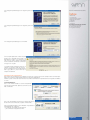
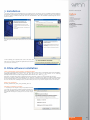
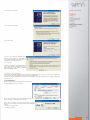
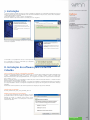
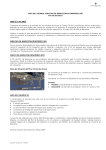
1. Insert the CD Driver in the CD ROM unit of your computer before conecting the unit. The installation window will appear
automatically. If this window doesn´t appear automatically please go to "My Computer" and then select the CD or DVD unit
of your PC. Click on "Windows" folder and run the file "SCT012Driver". Once the installation assistant appears click on
"Next" to continue.
Index
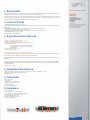
1. Welcome
2. Features
3. Technical Specifications
4. System Requirements
5. Content
6. Hardware
7. Installation
8. DNIe software installation
9. Card Reader
10. Uninstallation
11. FAQs
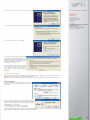
2. Restart your PC when all the drivers have been correctly installed.
3. After restarting your computer please connect the device and
wait until your computer installs the applications and confirms
you can use the new device.
8. DNIe software installation
How to install the cryptographic module for DNIe
The CD Driver provided with the unit includes the software with the autorun file for cryptographic DNIe module installation:
/DniDigital/Windows/DNIe_v4_0_0.exe. You can also find the last version of the software in the following
link:http://www.dnielectronico.es/descargas/windows.html with this name: “DNIe vx_j_y.exe”.
Run this file to install CSP module for Windows and run the PKCS#11 module for Firefox Mozilla and Netscape.
Restart your computer to finish the installation process. During the restart process the DGP root certificate will be installed
(for the navigator softwares you have installed). The security systems for Firefox Mozilla and Netscape will be also setup.
There are two files in the following directory: C:\DNIe which you can use if you want to setup the device it in the future.
DGP root certificate
ACRAIZ_CERTIFICATE_AND_CRL_SIGNING_SHA1.crt
PKCS#11 installation module
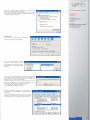
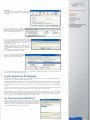
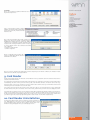
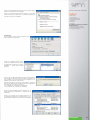
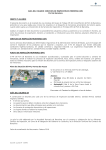
1. Depending on the navigator setup, it is possible that when
you restart your computer the following window will appear asking for the installation of DNIe root certificate. Please click on
accept/install. This step is necessary for the correct use of your
DNIe.
English
11