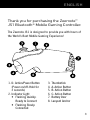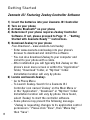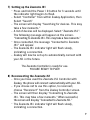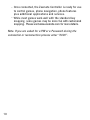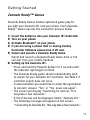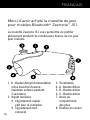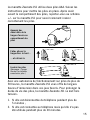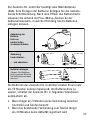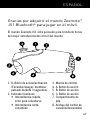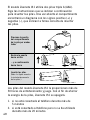
1
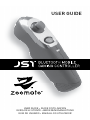
USER GUIDE USER GUIDE • GUIDE D'UTILISATION GUIDA DELL'UTENTE • BEDIENUNGSANLEITUNG GUÍA DE USUARIO • MANUAL DO UTILIZADOR For your convenience this User Guide is provided in English, Spanish, French, Italian, German, and Portuguese. À toutes fins utiles, ce guide d’utilisation est fourni en anglais, allemand, espagnol, français, italien et portugais. Questa guida utente viene fornita in inglese, spagnolo, francese, italiano, tedesco e portoghese. Diese Bedienungsanleitung wurde in englischer Sprache verfasst und für Sie ins Französische, Italienische, Deutsche, Spanische und Portugiesische übersetzt. Para su comodidad, este Manual del usuario ha sido traducido a los siguientes idiomas: inglés, español, francés, italiano, alemán y portugués. Para sua conveniência, este manual do utilizador é fornecido em inglês, espanhol, francês, italiano, alemão e português. TABLE OF CONTENTS About Your Zeemote™ JS1 Bluetooth Controller..............................3 Installing the Batteries...................................................................4 Zeekey™ Controller Software and Games Compatibility................5 Getting Started - Zeemote™ JS1 featuring Zeekey.........................8 Getting Started - Zeemote Ready™ Games..................................11 TABLE DES MATIÈRES À propos de la manette Bluetooth Zeemote™ JS1........................14 Installation des piles....................................................................15 Compatibilité des jeux et du logiciel de la manette Zeekey™. ....16 Introduction - Zeemote™ JS1 avec Zeekey....................................19 Introduction - Jeux Zeemote Ready™. ..........................................22 SOMMARIO Controller Bluetooth Zeemote™ JS1..............................................25 Installazione delle batterie...........................................................26 Software del Controller Zeekey™ e compatibilità con i giochi.....27 Introduzione - Zeemote™ JS1 con Zeekey.....................................30 Introduzione - Giochi Zeemote Ready™........................................33 1 INHALTSVERZEICHNIS Über den JS1 Bluetooth-Controller von Zeemote™.......................36 Einsetzen der Batterien.................................................................37 Software für den Zeekey™-Controller and kompatible Spiele......38 Erste Schritte mit dem Zeemote™ JS1 und Zeekey......................41 Erste Schritte mit Zeemote Ready™-Spielen................................44 ÍNDICE Acerca del Mando Bluetooth Zeemote™ JS1.................................47 Instalar las pilas...........................................................................48 El software Zeekey™ del Mando y compatibilidad con juegos.....49 Primeros pasos: función Zeekey del Mando Zeemote™ JS1.........52 Primeros pasos: juegos Zeemote Ready™....................................55 ÍNDICE Acerca do Controlador Bluetooth Zeemote™ JS1..........................58 Instalar as pilhas..........................................................................59 Software de controlador Zeekey™ e compatibilidade com jogos....60 Introdução - Zeemote™ JS1 com Zeekey.......................................63 Introdução - Jogos Zeemote Ready™............................................66 2 ENGLISH Thank you for purchasing the Zeemote™ JS1 Bluetooth® Mobile Gaming Controller. The Zeemote JS1 is designed to provide you with hours of the World’s Best Mobile Gaming Experience! 1.D: Action/Power Button (Power on/off: Hold for 3 seconds) 2.Indicator Light • Flashing Quickly: Ready to Connect • Flashing Slowly: Connected 3.Thumbstick 4.A: Action Button 5.B: Action Button 6.C: Action Button 7.Battery Door 8.Lanyard Anchor 3 The Zeemote JS1 Controller uses two AAA batteries. Follow directions below to insert the batteries. Once the battery door has been removed there is a +/- diagram on the body of the JS1 that shows you the proper way to insert the batteries. Squeeze battery door on both sides Slide door up… …then out Insert batteries (Note: Picture shows proper battery installation.) The Zeemote JS1 Controller has a 50+ hour battery life for hours of fun and immersive game play. In order to conserve battery power, the Zeemote JS1 will turn off: 1.If it is not connected to the phone for 5 minutes 2.If it is connected to the phone, but has not been used for over 20 minutes 4 Zeemote JS1 Compatibility Using your Zeemote JS1: 1.The Zeemote JS1 Featuring Zeekey Controller Software is compatible with all mobile games on specific mobile devices. 2.Zeemote Ready Games are optimized for compatibility between the mobile device, controller and specific games. 5 Zeemote JS1 Featuring Zeekey Controller Software About Zeekey™ Controller Software All Mobile Games are compatible with the Zeemote JS1 when using the Zeekey™ Controller Software. The Zeekey Controller Software is an application for your mobile device that enables the Zeemote JS1 to have the following features: 1.Precise and responsive control of all mobile games 2.Navigate your device and control other applications such as the music player, web browser and more 3.Mobile Console Gaming Experience: Play mobile games anytime, anywhere on any screen by combining a mobile device with “TV Out” and a Zeemote JS1. TO DOWNLOAD THE FREE ZEEKEY CONTROLLER SOFTWARE AND TO CHECK DEVICE COMPATIBILITY GO TO WWW.ZEEMOTE.COM/ZEEKEY 6 Zeemote Ready™ Games About Zeemote Ready™ Games Your Zeemote JS1 will also work with Zeemote Ready™ Games that have support for the JS1 Controller built into the games. Zeemote Ready™ games feature: 1.Game Play optimized for use with the controller 2.In-Game Zeemote JS1 Controller Detection and Auto Connect 3.Controller Settings in the option menu If your phone makes use of Zeekey Controller Software it must be turned off when playing Zeemote Ready™ Games. 7 Getting Started Zeemote JS1 Featuring Zeekey Controller Software 8 1) Insert the batteries into your Zeemote JS1 Controller 2) Turn on your phone 3) Activate Bluetooth® on your phone 4) Determine if your phone requires Zeekey Controller Software. If not, please proceed to Page 11 - “Getting Started with Zeemote Ready™” instructions. 5) Download Zeekey to your phone Free Download – www.zeemote.com/zeekey •Enter www.zeemote.com/zeekey into your phone’s browser to download and install the software •You can also download Zeekey to your computer and install to your phone with a cable. •After installation you will typically find Zeekey on the phone’s main menu screen or within the “Application” folder, “Download” folder, or “My Own” folder. Installation location will vary by phone. 6) Locate and launch Zeekey: •Go to Phone Menu •To Launch Zeekey: Search for a Zeemote JS1 Controller icon named ‘Zeekey’ on the Main Menu or in the “Application”, “Download” or “My Own” folder. Installation location will vary by phone. Once found, select ‘Zeekey’ to start the controller software. •Some phones may present the following message: “Zeekey is requesting changes to its application control permissions.” Please click “View”, then “Menu Key” then “Save”. 7) Setting up the Zeemote JS1 •Press and hold the Power / D button for 3 seconds until the indicator light begins to flash. •Select “Controller” from within Zeekey Application, then Select “Search” •The screen will display “Searching for devices. This may take a few moments.” •A list of devices will be displayed. Select “Zeemote JS1”. The following message will appear on the screen: “Connecting to Zeemote JS1. This may take a few moments.” •Once connected, the message “Connected to Zeemote JS1” will appear. •The Zeemote JS1 indicator light will flash slowly, indicating a connection. •Zeekey will now be set up to automatically connect with your JS1 in the future. The Zeemote Controller is ready for use. YOU ARE READY TO PLAY! 8) Reconnecting the Zeemote JS1 •Once you have used the Zeemote JS1 Controller with Zeekey, the phone will connect automatically with your JS1. •If you choose not to use this option, to reconnect, choose “Reconnect” from the Zeekey Controller screen. •The screen will then display “Connecting to Zeemote JS1. This may take a few moments.” When successful, the screen will display “Connected to Zeemote JS1.” •The Zeemote JS1 indicator light will flash slowly, indicating a connection. 9 Once connected, the Zeemote Controller is ready for use to control games, phone navigation, phone features plus additional applications and services. •While most games work well with the standard key mapping, some games may be more fun with customized mapping. Please visit www.zeemote.com for more details. • Note: If you are asked for a PIN or a Password during the connection or reconnection process enter “0000”. 10 Getting Started Zeemote Ready™ Games Zeemote Ready Games feature optimized game play for use with your Zeemote JS1 and your phone. Each Zeemote Ready™ Game requires the connection process below. 1) Insert the batteries into your Zeemote JS1 Controller 2) Turn on your phone 3) Activate Bluetooth® on your phone 4) If you are using a phone that is running Zeekey Controller Software please turn it off now. 5) Select and Launch a Zeemote Ready Game Select and launch a Zeemote Ready Game (trial or full version) from your mobile handset. 6) Setting up the Zeemote JS1: •Press and hold the Power/D button for 3 seconds until the indicator light begins to flash •The Zeemote Ready game should automatically start to search for your Zeemote JS1 Controller. See Note 2 if controller search does not occur. •If asked whether you would like to allow the application to connect, answer: “Yes” or “Yes, never ask again”. •The screen will display “Searching for devices. This may take a few moments”. •A list of devices will be displayed. Select “Zeemote JS1”. •The following message will appear on the screen: “Connecting to Zeemote JS1. This may take a few moments.” 11 Once connected, the message “Connected to Zeemote JS1” will appear. •The Zeemote JS1 indicator light will flash slowly, indicating a connection. • The Zeemote Controller is ready for use. YOU ARE READY TO PLAY! Note 1: If you are using a Zeemote Ready™ Game on a handset with Zeekey, please make sure Zeekey is turned off to play the game. Note 2: If the game fully loads and does not present a “Controller” Screen, please proceed to the Game Menu and look for “Settings”, “Options”, or “Preferences” and select “Controller”. Follow the same directions. Note 3: If you are asked for a PIN or a Passcode during the connection or reconnection process, enter “0000”. 12 Replaying a Zeemote Ready™ Game •When replaying a Zeemote Ready Game, the game and the phone will recognize the Zeemote JS1 Controller. •If asked whether you would like to allow the application to connect, answer: “Yes” or “Yes, never ask again”. •The following message will appear on the screen: “Connecting to Zeemote JS1. This may take a few moments.” •Once connected, the message ”Connected to Zeemote JS1” will appear. •The Zeemote JS1 indicator light will flash slowly, indicating a connection. •Auto Connect Feature: If you would like to automatically connect to the Zeemote JS1 Controller every time the game launches, set “Auto Connect” to “ON”. FOR MORE INFORMATION, TROUBLESHOOTING, AND TO REGISTER YOUR JS1 PLEASE VISIT WWW.ZEEMOTE.COM/SUPPORT YOU CAN ALSO EMAIL [email protected] TO CONTACT CUSTOMER SUPPORT 13 FRANÇAIS Merci d'avoir acheté la manette de jeux pour mobiles Bluetooth® Zeemote™ JS1. La manette Zeemote JS1 vous permettra de profiter pleinement pendant de nombreuses heures de vos jeux pour mobiles. 14 1.D : Bouton Action/d'alimentation (mise sous/hors tension : maintenir enfoncé pendant 3 secondes) 2.Voyant lumineux • Clignotement rapide : prêt pour la connexion • Clignotement lent : connecté 3.Thumbstick 4.A : Bouton Action 5.B : Bouton Action 6.C : Bouton Action 7.Accès au compartiment des piles 8.Fixation du cordon La manette Zeemote JS1 utilise deux piles AAA. Suivez les instructions pour mettre les piles en place. Après avoir ouvert le compartiment des piles, reportez-vous au schéma +/- sur la manette JS1 pour savoir comment insérer correctement les piles. Appuyez des deux côtés de la trappe d'accès au compartiment des piles Faites glisser la trappe vers le haut… …et retirez-la Insérez les piles (Remarque : l'image illustre l'installation correcte des piles.) Avec une autonomie de fonctionnement sur piles de plus de 50 heures, la manette Zeemote JS1 vous offre de longues heures d'immersion dans vos jeux favoris. Pour prolonger la durée de vie des piles, la manette Zeemote JS1 se met hors tension : 1.Si elle est déconnectée du téléphone pendant plus de 5 minutes ; 2.Si elle est connectée au téléphone mais qu'elle n'a pas été utilisée pendant plus de 20 minutes. 15 Compatibilité de Zeemote JS1 Utilisation de la manette Zeemote JS1 : 1.La manette Zeemote JS1 dotée du logiciel Zeekey est compatible avec tous les jeux pour mobiles installés sur des téléphones mobiles. 2.Les jeux Zeemote Ready assurent la compatibilité entre le téléphone mobile, le contrôleur et les jeux. 16 Manette Zeemote JS1 dotée du logiciel Zeekey À propos du logiciel Zeekey™ Tous les jeux pour mobiles sont compatibles avec la manette Zeemote JS1 lorsque le logiciel Zeekey™ est utilisé. Le logiciel Zeekey est une application pour mobiles qui confère à la manette Zeemote JS1 les caractéristiques suivantes : 1.Contrôle précis et réactif de tous les jeux pour mobiles 2.Navigation sur l'appareil et contrôle d'autres applications telles que le lecteur de musique, le navigateur Web, etc. 3.Mobilité : possibilité de jouer à tout moment, quels que soient le lieu et l'appareil, en utilisant la manette Zeemote JS1 avec un mobile doté d'une sortie TV. POUR TÉLÉCHARGER LE LOGICIEL GRATUIT ZEEKEY ET VÉRIFIER LA LISTE DES TÉLÉPHONES COMPATIBLES, VISITEZ LE SITE WWW.ZEEMOTE.COM/ZEEKEY 17 Jeux Zeemote Ready™ À propos des jeux Zeemote Ready™ La manette Zeemote JS1 fonctionne également avec les jeux Zeemote Ready™, qui intègrent sa prise en charge. Les jeux Zeemote Ready™ offrent les avantages suivants : 1.Optimisation du jeu grâce au programme de contrôle 2.Détection de la manette Zeemote JS1 par le jeu et fonction de connexion automatique 3.Paramétrage de la manette dans le menu d'options Si le programme Zeekey est installé sur votre téléphone, vous devez le désactiver lorsque vous jouez à des jeux Zeemote Ready™. 18 Mise en route Manette Zeemote JS1 dotée du logiciel Zeekey 1) Insérez les piles dans la manette Zeemote JS1 2) Allumez votre téléphone 3) Activez la fonction Bluetooth® sur votre téléphone. 4) Déterminez si votre téléphone requiert le logiciel Zeekey. Si ce n'est pas le cas, reportez-vous aux instructions fournies à la page 22, « Mise en route de Zeemote Ready™ ». 5) Téléchargez Zeekey sur votre téléphone. Téléchargement gratuit – www.zeemote.com/zeekey •Entrez l'adresse www.zeemote.com/zeekey dans le navigateur de votre téléphone pour télécharger et installer le logiciel. •Vous pouvez également télécharger Zeekey sur votre ordinateur et l’installer sur votre téléphone à l’aide d’un câble. •À l'issue de l'installation, vous verrez en principe apparaître Zeekey dans le menu principal du téléphone ou dans le dossier « Application », « Télécharger » ou « Mes applications ». L'emplacement d'installation varie selon les téléphones. 6) Localisez, puis démarrez Zeekey : •Accédez au menu du téléphone 19 Pour lancer Zeekey : recherchez l'icône du programme de contrôle de Zeemote JS1 intitulée « Zeekey » dans le menu principal ou dans le dossier « Application », « Télécharger » ou « Mes applications ». L'emplacement d'installation varie selon les téléphones. Lorsque vous l'avez localisé, sélectionnez « Zeekey » pour démarrer le programme de contrôle. •Certains téléphones peuvent afficher un message du type suivant : « Zeekey requiert la modification de ses autorisations de contrôle d'application. » Cliquez sur « Afficher », puis sur la clé « Menu » et « Enregistrer ». 7) Configuration de la manette Zeemote JS1 •Appuyez sur le bouton d'alimentation (D) pendant 3 secondes jusqu'à ce que le voyant lumineux commence à clignoter. •Sélectionnez « Manette », puis « Rechercher » dans le logiciel Zeekey. •L'écran affiche le message « Recherche de périphériques. Cela peut prendre quelques instants. ». •La liste des périphériques trouvés s'affiche. Sélectionnez « Zeemote JS1 ». Le message suivant s'affiche : « Connexion à Zeemote JS1. Cela peut prendre quelques instants. ». •Une fois la connexion établie, le message « Connecté à Zeemote JS1 » s'affiche. •Le voyant lumineux de la manette Zeemote JS1 clignote lentement, ce qui indique que la connexion fonctionne. •Zeekey est désormais configuré pour se connecter à l'avenir automatiquement à votre manette JS1. 20 • La manette Zeemote est prête à l'emploi. VOUS POUVEZ JOUER ! 8) Connexions ultérieures de la manette Zeemote JS1 •Après une première utilisation de la manette Zeemote JS1 avec Zeekey, le téléphone s'y reconnecte automatiquement. •Si vous n'avez pas opté pour cette option, vous pouvez vous reconnecter en sélectionnant « Reconnecter » dans l'écran Zeekey. •L'écran affiche alors « Connexion à Zeemote JS1. Cela peut prendre quelques instants. ». Une fois la connexion établie, l'écran affiche « Connecté à Zeemote JS1 ». •Le voyant lumineux de la manette Zeemote JS1 clignote lentement, ce qui indique que la connexion fonctionne. •Une fois connectée, la manette Zeemote peut être utilisée pour jouer, pour naviguer sur le téléphone, ainsi que pour accéder à des applications et services supplémentaires. •Bien que la configuration standard des commandes convienne à la plupart des jeux, certains jeux peuvent être plus ludiques avec une configuration personnalisée. Pour en savoir plus, consultez le site www.zeemote.com. Remarque : si vous êtes invité à entrer un code PIN ou un mot de passe lors de l'établissement d'une connexion, tapez « 0000 ». 21 Mise en route Jeux Zeemote Ready™ Le produit Zeemote Ready permet d'optimiser le jeu avec votre manette Zeemote JS1 et votre téléphone. Pour chaque jeu Zeemote Ready™, vous devez effectuer la procédure de connexion ci-dessous. 1) Insérez les piles dans la manette Zeemote JS1 2) Allumez votre téléphone 3) Activez la fonction Bluetooth® sur votre téléphone 4) Si vous utilisez un téléphone équipé du programme Zeekey, désactivez ce dernier. 5) Sélectionnez et lancez un jeu Zeemote Ready Sélectionnez et lancez un jeu Zeemote Ready (version d'essai ou version intégrale) à partir de votre téléphone mobile. 6) Configuration de la manette Zeemote JS1 : •Appuyez sur le bouton d'alimentation (D) pendant 3 secondes jusqu'à ce que le voyant lumineux commence à clignoter. •En principe, le jeu Zeemote Ready tente de trouver automatiquement votre manette Zeemote JS1. Consultez la remarque 2 si la recherche ne démarre pas. •Si vous êtes invité à autoriser l'application à se connecter, répondez : « Oui » ou « Oui, ne plus me demander ». 22 L'écran affiche le message « Recherche de périphériques. Cela peut prendre quelques instants. ». •La liste des périphériques trouvés s'affiche. Sélectionnez « Zeemote JS1 ». •Le message suivant s'affiche : « Connexion à Zeemote JS1. Cela peut prendre quelques instants. ». •Une fois la connexion établie, le message « Connecté à Zeemote JS1 » s'affiche. •Le voyant lumineux de la manette Zeemote JS1 clignote lentement, ce qui indique que la connexion fonctionne. • La manette Zeemote est prête à l'emploi. VOUS POUVEZ JOUER ! Remarque 1 : si vous utilisez un jeu Zeemote Ready™ sur un mobile équipé de Zeekey, assurez-vous que Zeekey est désactivé pour utiliser le jeu. Remarque 2 : si le jeu est complètement chargé et qu'aucun écran de manette ne s'affiche, accédez au menu des jeux et sélectionnez « Paramètres », « Options » ou « Préférences », puis « Manette ». Suivez les mêmes instructions. Remarque 3 : si vous êtes invité à entrer un code PIN ou un mot de passe lors de l'établissement d'une connexion, tapez « 0000 ». 23 Rejouer avec un jeu Zeemote Ready™ •Lorsque vous rejouez avec un jeu Zeemote Ready, ce dernier et le téléphone reconnaissent automatiquement la manette Zeemote JS1. •Si vous êtes invité à autoriser l'application à se connecter, répondez : « Oui » ou « Oui, ne plus me demander ». •Le message suivant s'affiche : « Connexion à Zeemote JS1. Cela peut prendre quelques instants. ». •Une fois la connexion établie, le message « Connecté à Zeemote JS1 » s'affiche. •Le voyant lumineux de la manette Zeemote JS1 clignote lentement, ce qui indique que la connexion fonctionne. •Fonction de connexion automatique : pour connecter automatiquement la manette Zeemote JS1 à chaque lancement du jeu, configurez « Connexion auto » sur « On ». POUR PLUS D'INFORMATIONS SUR VOTRE MANETTE JS1, OBTENIR DES CONSEILS DE DÉPANNAGE ET L'ENREGISTRER, VISITEZ LE SITE WWW.ZEEMOTE.COM/SUPPORT VOUS POUVEZ ÉGALEMENT CONTACTER LE SUPPORT TECHNIQUE EN ENVOYANT UN E-MAIL À L'ADRESSE [email protected] 24 ITALIANO Grazie per aver acquistato il controller di gioco mobile Zeemote™ JS1 Bluetooth®. Zeemote JS1 è progettato per fornire ore della migliore esperienza di gioco mobile al mondo! 1.D: Pulsante di azione/ accensione (Accensione/ Spegnimento: tenere premuto per 3 secondi) 2.Indicatore luminoso • Lampeggio rapido: pronto per la connessione • Lampeggio lento: connesso 3.Joystick 4.A: Pulsante di azione 5.B: Pulsante di azione 6.C: Pulsante di azione 7.Sportellino delle batterie 8.Aggancio per laccetto 25 Il controller Zeemote JS1 impiega due batterie AAA. Per inserire le batterie attenersi alle istruzioni seguenti. Dopo aver rimosso lo sportellino delle batterie, sul corpo del JS1 è visibile lo schema +/- che mostra il modo corretto di inserimento delle batterie. Stringere lo sportellino delle batterie su entrambi i lati Far scorrere lo sportellino verso l'alto... ...quindi in fuori Inserire le batterie (Nota: la figura mostra la corretta installazione delle batterie.) Le batterie del controller Zeemote JS1 hanno oltre 50 ore di autonomia, per un'esperienza di gioco e divertimento completa. Per mantenere la carica delle batterie, Zeemote JS1 verrà spento: 1.Se non è connesso al telefono per 5 minuti 2.Se è connesso al telefono, ma non è stato utilizzato per più di 20 minuti 26 Compatibilità Zeemote JS1 Utilizzo di Zeemote JS1: 1.Zeemote JS1 con il software del controller Zeekey è compatibile con tutti i giochi mobili su dispositivi mobili specifici. 2.I giochi Zeemote Ready sono ottimizzati per la compatibilità tra dispositivo mobile, controller e giochi specifici. 27 Zeemote JS1 con software del controller Zeekey Informazioni sul software del controller Zeekey™ Tutti i giochi mobili sono compatibili con Zeemote JS1 quando si utilizza il software del controller Zeekey™. Il software del controller Zeekey è un'applicazione per dispositivi mobili che consente a Zeemote JS1 di disporre delle funzionalità seguenti: 1.Controllo preciso e veloce di tutti i giochi mobili 2.Navigazione del dispositivo e controllo di altre applicazioni quali il lettore musicale, il browser Web e altre 3.Esperienza di console di gioco mobile: giochi mobili sempre, ovunque e su qualsiasi schermo combinando un dispositivo mobile con "uscita TV" e Zeemote JS1. PER ESEGUIRE IL DOWNLOAD GRATUITO DEL SOFTWARE DEL CONTROLLER ZEEKEY E PER VERIFICARE LA COMPATIBILITÀ DEL DISPOSITIVO, VISITARE WWW.ZEEMOTE.COM/ZEEKEY 28 Zeemote Ready™ Zeemote Ready™ Zeemote JS1 funziona anche con i giochi Zeemote Ready™ in cui il supporto del controller JS1 è integrato nei giochi. Funzionalità dei giochi Zeemote Ready™: 1.Gioco utilizzato per l'utilizzo del controller 2.Rilevamento e connessione automatica del controller Zeemote JS1 integrati nel gioco 3.Impostazioni del controller nel menu Opzioni Se il telefono utilizza il software del controller Zeekey, è necessario disattivarlo quando si eseguono giochi Zeemote Ready™. 29 Introduzione Zeemote JS1 con software del controller Zeekey 1) Inserire le batterie nel controller Zeemote JS1 2) Accendere il telefono 3) Attivare Bluetooth® sul telefono 4) Determinare se il telefono richiede il software del controller Zeekey. In caso negativo, procedere a pagina 33 - "Introduzione ai giochi Zeemote Ready™". 5) Eseguire il download di Zeekey sul telefono Download gratuito – www.zeemote.com/zeekey •Per eseguire il download e installare il file, digitare www.zeemote.com/zeekey nel browser del telefono •È anche possibile scaricare Zeekey sul proprio computer e installarlo sul telefono tramite cavo. •Dopo l'installazione, in genere Zeekey si trova nel menu principale del telefono o nella cartella "Applicazioni", "Download" o "Personale". La posizione dell'installazione varia a seconda del telefono. 6) Trovare e avviare Zeekey: •Accedere al menu del telefono •Per avviare Zeekey: Cercare l'icona del controller Zeemote JS1, identificata dal nome "Zeekey", nel menu principale del telefono o nella cartella "Applicazioni", "Download" o "Personale". La posizione dell'installazione varia a seconda del telefono. Dopo averla trovata, selezionare "Zeekey" per avviare il software del controller. 30 Su alcuni telefoni potrebbe essere visualizzato il messaggio seguente: "Zeekey richiede modifiche alle autorizzazioni di controllo dell'applicazione." Fare clic su "Visualizza", quindi su "Chiave menu" e su "Salva". 7) Impostazione di Zeemote JS1 •Tenere premuto il pulsante di accensione / D per 3 secondi finché l'indicatore luminoso non inizia a lampeggiare. •Selezionare "Controller" dall'applicazione Zeekey, quindi selezionare "Cerca". •Viene visualizzato il messaggio "Ricerca di dispositivi. L'operazione potrebbe richiedere alcuni secondi." •Verrà visualizzato un elenco di dispositivi. Selezionare "Zeemote JS1". Verrà visualizzato il messaggio seguente: “Connessione a Zeemote JS1 in corso. L'operazione potrebbe richiedere alcuni secondi." •Dopo aver eseguito la connessione, verrà visualizzato il messaggio "Connesso a Zeemote JS1". •L'indicatore luminoso di Zeemote JS1 lampeggerà lentamente, per indicare la connessione attiva. •Zeekey viene impostato in modo da eseguire automaticamente la connessione con JS1 in futuro. • Il controller Zeemote è pronto per l'uso. E VOI SIETE PRONTI PER GIOCARE! 8) Riconnessione di Zeemote JS1 •Dopo aver utilizzato il controller Zeemote JS1 con Zeekey una volta, il telefono si connetterà automaticamente con JS1. 31 Se si sceglie di non utilizzare questa opzione, per riconnettersi scegliere "Riconnetti" dalla schermata Controller di Zeekey. •Viene visualizzato il messaggio "Connessione a Zeemote JS1 in corso. L'operazione potrebbe richiedere alcuni secondi." Al termine, verrà visualizzato il messaggio "Connesso a Zeemote JS1". •L'indicatore luminoso di Zeemote JS1 lampeggerà lentamente, per indicare la connessione attiva. •Dopo la connessione, il controller Zeemote è pronto per controllare giochi, navigazione e funzionalità del telefono oltre ad applicazioni e servizi. •La maggior parte dei giochi funziona correttamente con la mappatura standard dei tasti, tuttavia alcuni giochi potrebbero essere più divertenti con mappature personalizzate. Per ulteriori informazioni, visitare www.zeemote.com. • Nota: Se durante il processo di connessione o riconnessione viene richiesto un PIN o una password, immettere "0000". 32 Introduzione Giochi Zeemote Ready™ I giochi Zeemote Ready sono ottimizzati per l'utilizzo del controller Zeemote JS1 e del telefono. Tutti i giochi Zeemote Ready™ richiedono il processo di connessione seguente. 1) Inserire le batterie nel controller Zeemote JS1 2) Accendere il telefono 3) Attivare Bluetooth® sul telefono 4) Se si sta utilizzando un telefono su cui è in esecuzione il software del controller Zeekey, disattivarlo. 5) Selezionare e avviare un gioco Zeemote Ready Selezionare e avviare un gioco Zeemote Ready (versione di prova o completa) dal telefono cellulare. 6) Impostazione di Zeemote JS1: •Tenere premuto il pulsante di accensione / D per 3 secondi finché l'indicatore luminoso non inizia a lampeggiare. •Il gioco Zeemote Ready dovrebbe iniziare a cercare automaticamente il controller Zeemote JS1. Se la ricerca del controller non viene avviata, vedere la nota 2. •Se viene richiesto di consentire all'applicazione di connettersi, rispondere: "Sì" o "Sì, non visualizzare più questo messaggio". •Viene visualizzato il messaggio "Ricerca di dispositivi. L'operazione potrebbe richiedere alcuni secondi." 33 Verrà visualizzato un elenco di dispositivi. Selezionare "Zeemote JS1". •Verrà visualizzato il messaggio: "Connessionea Zeemote JS1 in corso. L'operazione potrebbe richiedere alcuni secondi." •Dopo aver eseguito la connessione, verrà visualizzato il messaggio "Connesso a Zeemote JS1". •L'indicatore luminoso di Zeemote JS1 lampeggerà lentamente, per indicare la connessione attiva. • Il controller Zeemote è pronto per l'uso. E VOI SIETE PRONTI PER GIOCARE! Nota 1: Se si utilizza un gioco Zeemote Ready™ su un cellulare con Zeekey, assicurarsi che Zeekey sia disattivato per giocare. Nota 2: Se il gioco viene caricato e non viene visualizzata una "schermata Controller", accedere al menu Giochi, cercare "Impostazioni", "Opzioni" o "Preferenze" e selezionare "Controller". Seguire le istruzioni precedenti. Nota 3: Se durante il processo di connessione o riconnessione viene richiesto un PIN o una password, immettere "0000". 34 Ripetizione di un gioco Zeemote Ready™ •Quando si ripete un gioco Zeemote Ready, il gioco e il telefono riconosceranno il controller Zeemote JS1. •Se viene richiesto di consentire all'applicazione di connettersi, rispondere: "Sì" o "Sì, non visualizzare più questo messaggio". •Verrà visualizzato il messaggio seguente: "Connessione a Zeemote JS1 in corso. L'operazione potrebbe richiedere alcuni secondi." •Dopo aver eseguito la connessione, verrà visualizzato il messaggio "Connesso a Zeemote JS1". •L'indicatore luminoso di Zeemote JS1 lampeggerà lentamente, per indicare la connessione attiva. •Funzione di connessione automatica: Se si desidera connettersi automaticamente al controller Zeemote JS1 ogni volta che si avvia un gioco, impostare "Connessione automatica" su "Attiva". PER ULTERIORI INFORMAZIONI, RISOLUZIONE DEI PROBLEMI E PER REGISTRARE IL VOSTRO JS1, VISITARE WWW.ZEEMOTE.COM/SUPPORT OPPURE INVIARE UNA E-MAIL A [email protected] PER CONTATTARE L'ASSISTENZA CLIENTI 35 DEUTSCH Vielen Dank, dass Sie sich für den Zeemote™ JS1 Bluetooth®-Controller für Handyspiele entschieden haben. Mit dem erstklassigen Zeemote JS1-Controller können Sie viele Stunden mobilen Spielspaß erleben! 36 1.Aktionstaste D / Ein/Aus-Taste (Ein/Aus: 3 Sekunden gedrückt halten) 2.Anzeigeleuchte • Schnelles Blinken: Bereit zum Verbindungsaufbau • Langsames Blinken: Verbunden 3.Thumbstick 4.Aktionstaste A 5.Aktionstaste B 6.Aktionstaste C 7.Batteriefachabdeckung 8.Anhängeöse Der Zeemote JS1-Controller benötigt zwei Mikrobatterien (AAA). Zum Einlegen der Batterien befolgen Sie die nachstehende Schrittanleitung. Nach dem Öffnen des Batteriefachs erkennen Sie anhand der Plus-/Minus-Zeichen an der Gehäuseinnenseite, in welcher Richtung Sie die Batterien einlegen müssen. Abdeckung des Batteriefachs an beiden Seiten zusammendrücken Abdeckung hochschieben ... … und abnehmen Batterien einlegen (Hinweis: Die Abbildung zeigt, in welcher Richtung Sie die Batterien einlegen müssen.) Die Batterien des Zeemote JS1-Controllers bieten Ihnen mehr als 50 Stunden mobilen Spielspaß. Um Batteriestrom zu sparen, schaltet der Zeemote JS1 in folgenden Situationen automatisch ab: 1.Wenn länger als 5 Minuten keine Verbindung zwischen Controller und Telefon besteht 2.Wenn bei bestehender Verbindung zum Telefon länger als 20 Minuten keine Aktivität registriert wird 37 Kompatibilität des Zeemote JS1 Verwendung des Zeemote JS1: 1.Bei Verwendung der Zeekey-Controller-Software ist der Zeemote JS1 bei ausgewählten mobilen Endgeräten mit allen Handyspielen kompatibel. 2.Spiele mit dem Zeemote Ready-Logo sind speziell für die Kompatibilität zwischen mobilem Endgerät, Controller und Spiel optimiert. 38 Zeemote JS1 mit Zeekey-Controller-Software Über die Zeekey™-Controller-Software Bei Verwendung der Zeekey™-Controller-Software sind alle Handyspiele mit dem Zeemote JS1 kompatibel. Bei installierter Zeekey-Controller-Software bietet der Zeemote JS1 folgende Funktionen: 1.Präzise und reaktionsschnelle Steuerung aller JavaHandyspiele 2.Bedienung Ihres Handys und Steuerung weiterer Anwendungen wie z. B. Musikplayer oder Webbrowser 3.Mobile Spielekonsole (zeit- und ortsunabhängig) auf jedem beliebigen Bildschirm durch Kombination des Zeemote JS1 mit einem mobilen Endgerät mit TV-Ausgang. UNTER WWW.ZEEMOTE.COM/ZEEKEY KÖNNEN SIE DIE ZEEKEYCONTROLLER-SOFTWARE KOSTENLOS HERUNTERLADEN UND DIE KOMPATIBILITÄT IHRES MOBILTELEFONS ÜBERPRÜFEN. 39 Zeemote Ready™-Spiele Über Zeemote Ready™-Spiele Sie können den Zeemote JS1-Controller mit allen Zeemote Ready™-Spielen verwenden, die den JS1-Controller unterstützen. Zeemote Ready™-Spiele bieten folgende Vorteile: 1.Speziell für die Verwendung des Controllers optimiert 2.Integrierte Erkennung des Zeemote-JS1-Controllers und automatischer Verbindungsaufbau 3.Controller-Einstellungen im Optionsmenü Wenn auf Ihrem Telefon die Zeekey-Controller-Software installiert ist, muss das Telefon beim Spielen von Zeemote Ready™-Spielen ausgeschaltet sein. 40 Erste Schritte Zeemote JS1 mit Zeekey-Controller-Software 1) Legen Sie die Batterien in den Zeemote JS1-Controller ein. 2) Schalten Sie das Mobiltelefon ein. 3) Aktivieren Sie Bluetooth® auf Ihrem Mobiltelefon. 4) Überprüfen Sie, ob Ihr Telefon die Zeekey-ControllerSoftware benötigt. Falls nicht, fahren Sie mit den Hinweisen auf Seite 44, „Erste Schritte mit Zeemote Ready™-Spielen“, fort. 5) Laden Sie die Zeekey-Software auf Ihr Mobiltelefon herunter. Kostenloser Download unter www.zeemote.com/zeekey •Geben Sie im Browser Ihres Mobiltelefons „www.zeemote.com/zeekey“ ein, um die Software herunterzuladen und zu installieren. •Sie können Zeekey auch auf Ihren Computer herunterladen und über ein Kabel auf dem Telefon installieren. •Nach der Installation finden Sie Zeekey in der Regel im Ordner „Anwendungen“, „Download“ oder „Eigene“. Das Installationsverzeichnis kann abhängig vom Mobiltelefon variieren. 6) Suchen und starten Sie Zeekey: •Öffnen Sie das Telefonmenü. •Starten Sie Zeekey: Suchen Sie im Hauptmenü oder im Ordner „Anwendungen“, „Download“ bzw. „Eigene“ nach dem Zeemote JS1-Controller-Symbol mit der Bezeichnung ‚Zeekey‘. Das Installationsverzeichnis kann abhängig vom Mobiltelefon variieren. Wählen Sie ‚Zeekey‘ aus, um die Controller-Software zu starten. 41 Bei einigen Telefonen kann die folgende Meldung angezeigt werden: „Zeekey fordert Änderungen der Zugriffsberechtigungen für die Anwendung.“ Klicken Sie auf „Ansehen“ und dann auf „Menütaste“ und „Speichern“. 7) So konfigurieren Sie den Zeemote JS1: •Halten Sie die Ein/Aus- bzw. D-Taste 3 Sekunden lang gedrückt, bis die Anzeigeleuchte anfängt zu blinken. •Wählen Sie in der Zeekey-Anwendung zunächst den Controller und anschließend „Suchen“ aus. •Auf dem Bildschirm erscheint die Meldung „Gerätesuche. Dieser Vorgang kann einen Moment dauern.“ •Es wird eine Liste von Geräten angezeigt. Wählen Sie „Zeemote JS1“ aus. Daraufhin wird folgende Meldung angezeigt: „Verbinden mit Zeemote JS1. Dieser Vorgang kann einen Moment dauern.“ •Sobald die Verbindung hergestellt ist, erscheint die Meldung „Mit Zeemote JS1 verbunden“. •Bei aktiver Verbindung blinkt die Anzeigeleuchte des Zeemote JS1 langsam. •Nun wird die Zeekey-Software für den künftig automatischen Verbindungsaufbau zum JS1 eingerichtet. • Anschließend ist der Zeemote-Controller betriebsbereit. DAS SPIEL KANN BEGINNEN!! 8) Erneuter Verbindungsaufbau zum Zeemote JS1 •Sobald Sie den Zeemote JS1-Controller einmal mit Zeekey verwendet haben, stellt das Handy die Verbindung mit dem JS1 beim nächsten Mal automatisch her. 42 Wenn Sie diese Möglichkeit ausdrücklich nicht nutzen möchten, müssen Sie zum erneuten Verbindungsaufbau im Zeekey-Controller-Bildschirm die Option „Neu verbinden“ auswählen. •Auf dem Bildschirm erscheint dann die Meldung „Verbinden mit Zeemote JS1. Dieser Vorgang kann einen Moment dauern.“ Sobald die Verbindung erfolgreich hergestellt ist, wird die Meldung „Mit Zeemote JS1 verbunden“ angezeigt. •Bei aktiver Verbindung blinkt die Anzeigeleuchte des Zeemote JS1 langsam. •Nach erfolgreichem Verbindungsaufbau können Sie mit dem Zeemote-Controller Spiele steuern, das Telefon bedienen und weitere Anwendungen und Dienste nutzen. •Die meisten Spiele kommen mit der Standardtastaturbelegung aus. Bei einigen Spielen kommt der richtige Spaß aber erst durch den Einsatz zusätzlicher Tasten auf. Weitere Informationen hierzu finden Sie im Internet unter www.zeemote.com. • Hinweis: Wenn Sie beim Aufbau einer Verbindung zur Eingabe einer PIN oder eines Kennworts aufgefordert werden, geben Sie 0000 ein. 43 Erste Schritte Zeemote Ready™-Spiele Spiele mit dem Zeemote Ready-Logo sind speziell für die Verwendung des Zeemote JS1-Controllers auf Ihrem Mobil telefon optimiert. Bei allen Zeemote Ready™-Spielen müssen Sie zum Herstellen der Verbindung die folgenden Schritte ausführen. 1) Legen Sie die Batterien in den Zeemote JS1-Controller ein. 2) Schalten Sie das Mobiltelefon ein. 3) Aktivieren Sie Bluetooth® auf Ihrem Mobiltelefon. 4) Wenn auf dem Telefon die Zeekey-Controller-Software ausgeführt wird, müssen Sie sie an dieser Stelle ausschalten. 5) Öffnen und starten Sie ein Zeemote Ready-Spiel. Wählen Sie auf Ihrem Handy ein Zeemote Ready-Spiel (Test- oder Vollversion), und starten Sie das Spiel. 6) So konfigurieren Sie den Zeemote JS1: •Halten Sie die Ein/Aus- bzw. D-Taste 3 Sekunden lang gedrückt, bis die Anzeigeleuchte anfängt zu blinken. •Das Zeemote Ready-Spiel müsste daraufhin automatisch starten und nach Ihrem Zeemote JS1-Controller suchen. Wenn die Controller-Suche nicht gestartet wird, beachten Sie Hinweis 2. •Falls Sie nach einer Bestätigung für die Verbindung der Anwendung gefragt werden, wählen Sie „Ja“ bzw. „Ja. Nicht mehr fragen“. 44 Auf dem Bildschirm erscheint die Meldung „Geräte suche. Dieser Vorgang kann einen Moment dauern.“ •Es wird eine Liste von Geräten angezeigt. Wählen Sie „Zeemote JS1“ aus. •Auf dem Bildschirm wird folgende Meldung angezeigt: „Verbinden mit Zeemote JS1. Dieser Vorgang kann einen Moment dauern.“ •Sobald die Verbindung hergestellt ist, erscheint die Meldung „Mit Zeemote JS1 verbunden“. •Bei aktiver Verbindung blinkt die Anzeigeleuchte des Zeemote JS1 langsam. • Anschließend ist der Zeemote-Controller betriebsbereit. DAS SPIEL KANN BEGINNEN!! Hinweis 1: Wenn Sie ein Zeemote Ready™-Spiel auf einem Handy mit installierter Zeekey-Software nutzen, müssen Sie Zeekey vor Spielbeginn deaktivieren. Hinweis 2: Wenn das Spiel vollständig geladen ist, aber der Controller-Bildschirm nicht angezeigt wird, öffnen Sie das Spielemenü, und wählen Sie unter „Einstellungen“, „Optionen“ oder „Voreinstellungen“ die Option „Controller“. Befolgen Sie die Schrittanleitungen. Hinweis 3: Wenn Sie beim Aufbau einer Verbindung zur Eingabe einer PIN oder eines Kennworts aufgefordert werden, geben Sie 0000 ein. 45 Wiederholung eines Zeemote Ready™-Spiels •Wenn Sie ein Zeemote Ready-Spiel zum wiederholten Mal spielen, wird der Zeemote JS1-Controller vom Spiel und Handy automatisch erkannt. •Falls Sie nach einer Bestätigung für die Verbindung der Anwendung gefragt werden, wählen Sie „Ja“ bzw. „Ja. Nicht mehr fragen“. •Daraufhin wird folgende Meldung angezeigt: „Verbinden mit Zeemote JS1. Dieser Vorgang kann einen Moment dauern.“ •Sobald die Verbindung hergestellt ist, erscheint die Meldung „Mit Zeemote JS1 verbunden“. •Bei aktiver Verbindung blinkt die Anzeigeleuchte des Zeemote JS1 langsam. •Automatischer Verbindungsaufbau: Wenn der Zeemote JS1-Controller bei jedem Spielstart automatisch eine Verbindung herstellen soll, müssen Sie die Funktion „Autom. Verbindung“ einschalten („AN“). WEITERE INFORMATIONEN SOWIE HINWEISE ZUR FEHLERBEHEBUNG UND DIE MÖGLICHKEIT ZUR REGISTRIERUNG DES JS1 FINDEN SIE AUF UNSERER WEBSITE UNTER WWW.ZEEMOTE.COM/SUPPORT. WENN SIE DIREKT MIT UNSEREM KUNDENSUPPORT IN KONTAKT TRETEN MÖCHTEN, SENDEN SIE BITTE EINE E-MAIL AN [email protected]. 46 ESPAÑOL Gracias por adquirir el mando Zeemote™ JS1 Bluetooth® para jugar en el móvil. El mando Zeemote JS1 está pensado para brindarle horas del mejor entretenimiento móvil del mundo 1.D: Botón de acción/activación (Encender/apagar: mantener pulsado durante 3 segundos) 2.Indicador luminoso • Intermitencia rápida: Listo para conectarse • Intermitencia lenta: conectado 3.Mando de control 4.A: Botón de acción 5.B: Botón de acción 6.C: Botón de acción 7.Compartimento de pila 8.Anclaje del cordón de conexión/desconexión 47 El mando Zeemote JS1 utiliza dos pilas triple A (AAA). Siga las instrucciones que se indican a continuación para insertar las pilas. Una vez abierto el compartimento encontrará un diagrama con los signos positivo (+) y negativo (-), que indican la forma correcta de insertar las pilas. Presione la puerta del compartimento de la pila por ambos lados Deslice la puerta hacia arriba ... y a continuación hacia fuera Inserte las pilas (Nota: La figura muestra la instalación correcta de las pilas.) Las pilas del mando Zeemote JS1 le proporcionan más de 50 horas de entretenimiento y juego. Con el fin de ahorrar la energía de la pilas, Zeemote JS1 se apagará: 48 1.si no está conectado al teléfono durante más de 5 minutos 2.si está conectado al teléfono pero no se ha utilizado durante más de 20 minutos Compatibilidades de Zeemote JS1 Utilizar el mando Zeemote JS1: 1.Zeemote JS1, que incluye el software del mando Zeekey, es compatible con todos los juegos móviles en dispositivos específicos. 2.Los juegos Zeemote Ready están optimizados para que sean compatibles con el dispositivo móvil, el controlador y con juegos específicos. 49 Zeemote JS1 con el software Zeekey Acerca del software Zeekey™ Todos los juegos móviles son compatibles con Zeemote JS1 cuando se utiliza el software Zeekey™. El software Zeekey es una aplicación para dispositivos móviles que ofrece las siguientes funciones en Zeemote JS1: 1.Mantener un control preciso y dinámico de todos los juegos móviles 2.Navegar en el dispositivo y controlar otras aplicaciones como el reproductor de música, el navegador web y muchas más 3.Jugar en una consola móvil: entreténgase con los juegos móviles en cualquier momento, en cualquier lugar y con cualquier pantalla combinando un dispositivo móvil con la salida de la televisión y un Zeemote JS1. PARA DESCARGAR EL SOFTWARE ZEEKEY Y COMPROBAR LA COMPATIBILIDAD DE DISPOSITIVOS VISITE LA PÁGINA WWW.ZEEMOTE.COM/ZEEKEY 50 Juegos Zeemote Ready™ Acerca de los juegos Zeemote Ready™ El mando Zeemote JS1 también funciona con juegos Zeemote Ready™ compatibles con JS1. Los juegos Zeemote Ready™ ofrecen: 1.juegos optimizados para utilizarse con el mando 2.detección del mando Zeemote JS1 durante el juego y conexión automática 3.configuración del mando en el menú de opciones En caso de que su teléfono utilice el software Zeekey debe apagarlo cuando juegue con Zeemote Ready™. 51 Primeros pasos Zeemote JS1 con el software Zeekey 1) Inserte las pilas en el mando Zeemote JS1 2) Encienda el teléfono 3) Active la opción Bluetooth® del teléfono 4) Determine si el teléfono requiere el software del controlador Zeekey. Si no lo requiere, pase a las instrucciones de la página 55 "Primeros pasos con Zeemote Ready™". 5) Descargue el software Zeekey en el teléfono Descarga gratuita en: www.zeemote.com/zeekey •Introduzca www.zeemote.com/zeekey en el navegador del teléfono para descargar e instalar el software •También puede descargar el software Zeekey en el ordenador e instalarlo en el teléfono utilizando un cable. •Tras la instalación encontrará la función Zeekey en la pantalla del menú principal del teléfono o en la carpeta "Aplicaciones", "Descargas" o "Propias". La ubicación de la instalación variará dependiendo del teléfono. 6) Localice e inicie Zeekey: •Vaya al menú del teléfono •Para iniciar Zeekey: Busque el icono del mando Zeemote JS1 "Zeekey" en el menú principal o en la carpeta "Aplicaciones", "Descargas" o "Propias". La ubicación de la instalación variará dependiendo del teléfono. Cuando lo haya localizado, seleccione "Zeekey" para iniciar el software del controlador. 52 En algunos teléfonos aparece el siguiente mensaje: "Zeekey está solicitando cambios a los permisos de control de la aplicación." Haga clic en "Ver, a continuación en "Tecla de menú" y seguidamente en "Guardar". 7) Configurar Zeemote JS1 •Pulse y mantenga pulsado el botón de encendido / D durante tres segundos hasta que la luz del indicador comience a parpadear. •Seleccione "Mando" en la aplicación Zeekey y a continuación seleccione "Buscar" •En la pantalla aparecerá el mensaje "Buscando dispositivos". Es posible que tarde un poco." •Aparecerá una lista de dispositivos. Seleccione "Zeemote JS1". Aparecerá el siguiente mensaje en la pantalla: “Conectándose a Zeemote JS1. Es posible que tarde un poco". •Una vez conectado, aparecerá el mensaje "Conectado a Zeemote JS1". •El indicador luminoso de Zeemote JS1 se encenderá y apagará lentamente, indicando que existe una conexión. •Ahora se configurará la función Zeekey para conectarse en el futuro de forma automática con el mando JS1. • El mando Zeemote está listo para utilizarse. ¡AHORA YA ESTÁ PREPARADO PARA JUGAR! 53 8) Volver a conectar Zeemote JS1 •Una vez que haya utilizado el mando Zeemote JS1 con Zeekey, el teléfono se conectará de forma automática con JS1. •Si opta por no utilizar esta opción, para volver a conectarse seleccione "Conectar de nuevo" en la pantalla del mando Zeekey. •En la pantalla aparecerá el mensaje “Conectándose a Zeemote JS1. Es posible que tarde un poco". Cuando haya finalizado correctamente, en la pantalla aparecerá el mensaje “Conectado a Zeemote JS1.” •El indicador luminoso de Zeemote JS1 se encenderá y apagará lentamente, indicando que existe una conexión. •Una vez conectado, el mando Zeemote podrá ya utilizarse para controlar juegos, navegar por el teléfono y las funciones, además de proporcionar otras aplicaciones y servicios. •Aunque la mayoría de los juegos funcionan bien con la asignación del teclado estándar, algunos son más divertidos con una asignación personalizada. Visite www.zeemote.com para obtener más información. Nota: Si en el proceso de conexión el sistema le solicita un PIN o una contraseña, introduzca "0000". 54 Primeros pasos Juegos Zeemote Ready™ Los juegos Zeemote Ready están optimizados para utilizarse con el mando Zeemote JS1 y el teléfono. Todos los juegos Zeemote Ready™ requieren el proceso de conexión que se explica a continuación. 1) Inserte las pilas en el mando Zeemote JS1 2) Encienda el teléfono 3) Active la opción Bluetooth® del teléfono 4) Si está utilizando un teléfono con el software Zeekey, apáguelo. 5) Seleccione e inicie un juego Zeemote Ready Seleccione e inicie un juego Zeemote Ready (versión de prueba o completa) desde el móvil. 6) Configurar el mando Zeemote JS1: •Pulse y mantenga pulsado el botón de encendido / D durante tres segundos hasta que la luz del indicador comience a parpadear •El juego Zeemote Ready se iniciará de forma automática y buscará el mando Zeemote JS1. Consulte la nota 2 en caso de que no funcione la búsqueda del mando. •En caso de que se el sistema le pregunte si desea que se conecte la aplicación, conteste: "Sí" o "Sí, no volver a preguntar". •En la pantalla aparecerá el mensaje "Buscando dispositivos". Es posible que tarde un poco”. 55 Aparecerá una lista de dispositivos. Seleccione "Zeemote JS1". •En la pantalla aparecerá el siguiente mensaje: “Conectándose a Zeemote JS1. Es posible que tarde un poco". •Una vez conectado, aparecerá el mensaje "Conectado a Zeemote JS1". •El indicador luminoso de Zeemote JS1 se encenderá y apagará lentamente, indicando que existe una conexión. • El mando Zeemote está listo para utilizarse. ¡AHORA YA ESTÁ PREPARADO PARA JUGAR! Nota 1: Si está utilizando un juego Zeemote Ready™ en un teléfono con la función Zeekey, asegúrese de que la función Zeekey está desactivada para poder jugar. Nota 2: Si el juego se ha descargado totalmente y no aparece una “Pantalla de mando”, desplácese al menú Juego y busque en "Ajustes”, “Opciones” o “Preferencias” y seleccione "Mando”. Siga las mismas instrucciones. Nota 3: Si en el proceso de conexión el sistema le solicita un PIN o una contraseña, introduzca "0000". 56 Volver a reproducir un juego Zeemote Ready™ •Cuando se vuelve a reproducir un juego Zeemote Ready, el juego y el teléfono reconocen el mando Zeemote JS1. •En caso de que se el sistema le pregunte si desea que se conecte la aplicación, conteste: "Sí" o "Sí, no volver a preguntar". •Aparecerá el siguiente mensaje en la pantalla: "Conectándose a Zeemote JS1. Es posible que tarde un poco." •Una vez conectado, aparecerá el mensaje "Conectado a Zeemote JS1". •El indicador luminoso de Zeemote JS1 se encenderá y apagará lentamente, indicando que existe una conexión. •Función de conexión automática: Si desea conectarse automáticamente al mando Zeemote JS1 cada vez que inicia el juego, configure la opción "Conexión automática" en "ON". PARA OBTENER MÁS INFORMACIÓN, RESOLVER PROBLEMAS Y REGISTRAR SU JS1 VISTE LA PÁGINA WWW.ZEEMOTE.COM/SUPPORT TAMBIÉN PUEDE ENVIAR UN CORREO ELECTRÓNICO A [email protected] PARA PONERSE EN CONTACTO CON EL SERVICIO DE SOPORTE TÉCNICO 57 PORTUGUÊS Obrigado por adquirir o Controlador de Jogos para Dispositivos Móveis Bluetooth® Zeemote™ JS1. O Zeemote JS1 foi concebido para lhe proporcionar horas e horas da melhor experiência de jogo em dispositivos móveis do mundo! 58 1.D: Botão de acção/ funcionamento (Ligar/desligar: manter premido durante 3 segundos) 2.Indicador luminoso • A piscar rapidamente: pronto a ligar • A piscar lentamente: ligado 3.Manípulo 4.A: Botão de acção 5.B: Botão de acção 6.C: Botão de acção 7.Porta do compartimento das pilhas 8.Presilha para correia O Controlador Zeemote JS1 utiliza duas pilhas AAA. Sigas as indicações abaixo para inserir as pilhas. Depois de retirar a porta do compartimento das pilhas, poderá ver um esquema dos sinais +/- no corpo do JS1 que indica a direcção de inserção correcta das pilhas. Aperte a porta do compartimento das pilhas em ambos os lados Deslize a porta para cima… …e depois retire-a Insira as pilhas (Nota: a imagem mostra como instalar correctamente as pilhas.) As pilhas do Controlador Zeemote JS1 têm uma duração superior a 50 horas proporcionando longos períodos de jogo emocionante e divertido. Para conservar a energia das pilhas, o Zeemote JS1 desliga-se: 1.Se não for ligado ao telefone durante 5 minutos 2.Se estiver ligado ao telefone, mas não for utilizado durante mais de 20 minutos 59 Compatibilidade do Zeemote JS1 Utilizar o Zeemote JS1: 1.O Zeemote JS1 com o Software do Controlador Zeekey é compatível com todos os jogos para dispositivos móveis em dispositivos móveis específicos. 2.Os Jogos Zeemote Ready são optimizados para compatibilidade entre o dispositivo móvel, controlador e jogos específicos. 60 Zeemote JS1 com o Software do Controlador Zeekey Acerca do software do Controlador Zeekey™ Todos os Jogos para Dispositivos Móveis são compatíveis com o Zeemote JS1 desde que utilizem o Software do Controlador Zeekey™. O Software do Controlador Zeekey é uma aplicação para o seu dispositivo móvel que oferece ao Zeemote JS1 as seguintes funcionalidades: 1.Controlo preciso e eficaz de todos os jogos para dispositivos móveis 2.Navegação com o dispositivo e controlo de outras aplicações, tais como um leitor de música, um browser, entre outras 3.Possibilidade de jogar em consolas móveis: jogue jogos para dispositivos móveis em qualquer momento, em qualquer lugar, em qualquer ecrã, combinando um dispositivo móvel com dispositivo de saída de TV com um Zeemote JS1 PARA TRANSFERIR O SOFTWARE DO CONTROLADOR ZEEKEY GRATUITO E PARA VERIFICAR A COMPATIBILIDADE DO DISPOSITIVO, VISITE WWW.ZEEMOTE.COM/ZEEKEY 61 Jogos Zeemote Ready™ Acerca dos Jogos Zeemote Ready™ O Zeemote JS1 funciona também com Jogos Zeemote Ready™ que tenham suporte para o Controlador JS1 integrado nos jogos. Os jogos Zeemote Ready™ incluem: 1.Funcionalidade de jogo optimizada para utilização com o controlador 2.Detecção e ligação automática do Controlador Zeemote JS1 integrado no jogo 3.Definições do controlador no menu de opções Se o telefone utilizar o Software do Controlador Zeekey, tem de estar desligado quando estiver a jogar Jogos Zeemote Ready™. 62 Introdução Zeemote JS1 com o Software do Controlador Zeekey 1) Insira as pilhas no Controlador Zeemote JS1 2) Ligue o telefone 3) Active o Bluetooth® no telefone 4) Determine se o telefone necessita do Software do Controlador Zeekey. Caso não necessite, avance para as instruções na Página 66 - “Introdução ao Zeemote Ready™”. 5) Transfira o Zeekey para o telefone Transferência gratuita em www.zeemote.com/zeekey •Introduza o endereço www.zeemote.com/zeekey no browser do telefone para transferir e instalar o software •Também pode transferir o Zeekey para o computador e instalá-lo no telefone utilizando um cabo. •Após a instalação, encontrará normalmente o Zeekey no ecrã do menu principal do telefone ou na pasta “Aplicação”, na pasta “Transferir” ou na pasta “Minhas Aplicações”. O local da instalação varia consoante o telefone. 6) Localize e inicie o Zeekey: •Vá para o menu Telefone. •Para iniciar o Zeekey: procure o ícone do Controlador Zeemote JS1 denominado “Zeekey” no menu principal ou na pasta “Aplicação”, “Transferir” ou “Minhas Aplicações”. O local da instalação varia consoante o telefone. Uma vez encontrado, seleccione “Zeekey” para iniciar o controlador do software. 63 É possível que alguns telefones apresentem a seguinte mensagem: “O Zeekey está a solicitar alterações às respectivas permissões de controlo da aplicação.” Clique em “Ver”, “Tecla de Menu” e, em seguida, em “Guardar”. 7) Configurar o Zeemote JS1 •Mantenha premido o botão de funcionamento/D durante 3 segundos até o indicador luminoso começar a piscar. •Seleccione “Controlador” na aplicação Zeekey e, em seguida, seleccione “Procurar”. •O ecrã apresentará a indicação “A procurar dispositivos. Pode demorar alguns momentos.” •Será apresentada uma lista de dispositivos. Seleccione “Zeemote JS1”. Será apresentada a seguinte mensagem no ecrã: “A ligar ao Zeemote JS1. Pode demorar alguns momentos.” •Uma vez estabelecida a ligação, será apresentada a mensagem “Ligado ao Zeemote JS1”. •O indicador luminoso do Zeemote JS1 piscará lentamente, indicando uma ligação. •O Zeekey está assim configurado para, de futuro, estabelecer ligação ao JS1 automaticamente. • O Controlador Zeemote está pronto a utilizar. ESTÁ PRONTO PARA JOGAR! 8) Voltar a ligar o Zeemote JS1 •Depois de ter utilizado o Controlador Zeemote JS1 com o Zeekey, o telefone ligará automaticamente ao JS1. 64 Se optar por não utilizar esta opções, volte a estabelecer a ligação, seleccionando “Voltar a ligar” no ecrã do Controlador Zeekey. •O ecrã apresentará então a indicação “A ligar ao Zeemote JS1. Pode demorar alguns momentos.” Uma vez estabelecida a ligação, o ecrã apresentará a indicação “Ligado ao Zeemote JS1”. •O indicador luminoso do Zeemote JS1 piscará lentamente, indicando uma ligação. •Uma vez estabelecida a ligação, o Controlador Zeemote estará pronto a ser utilizado para controlar jogos, navegação no telefone e funcionalidades do telefone e ainda aplicações e serviços adicionais. •Embora a maioria dos jogos funcionem bem com o mapeamento de teclas padrão, alguns jogos podem ser mais divertidos com mapeamento personalizado. Visite o site www.zeemote.com para obter mais informações. • Nota: se lhe for solicitado um PIN ou uma palavra-passe durante o processo de ligação ou de restabelecimento da ligação, introduza “0000”. 65 Introdução Jogos Zeemote Ready™ Os Jogos Zeemote Ready incluem uma funcionalidade de jogo optimizada para utilização com o Zeemote JS1 e o telefone. Cada Jogo Zeemote Ready™ requer o processo de ligação abaixo. 1) Insira as pilhas no Controlador Zeemote JS1 2) Ligue o telefone 3) Active o Bluetooth® no telefone 4) Se estiver a utilizar um telefone com o Software do Controlador Zeekey, desactive-o 5) Seleccione e inicie um Jogo Zeemote Ready Seleccione e inicie um Jogo Zeemote Ready (versão experimental ou integral) a partir do dispositivo móvel. 6) Configurar o Zeemote JS1: •Mantenha premido o botão de funcionamento/D durante 3 segundos até o indicador luminoso começar a piscar. •O jogo Zeemote Ready deverá começar automaticamente a procurar o Controlador Zeemote JS1. Consulte a Nota 2 se a procura do controlador não for iniciada. •Se lhe for perguntado se gostaria de permitir a ligação da aplicação, responda: “Sim” ou “Sim, não voltar a perguntar”. •O ecrã apresentará a indicação “A procurar dispositivos. Pode demorar alguns momentos”. 66 Será apresentada uma lista de dispositivos. Seleccione “Zeemote JS1”. •Será apresentada a seguinte mensagem no ecrã:“A ligar ao Zeemote JS1. Pode demorar alguns momentos.” •Uma vez estabelecida a ligação, será apresentada a mensagem “Ligado ao Zeemote JS1”. •O indicador luminoso do Zeemote JS1 piscará lentamente, indicando uma ligação. • O Controlador Zeemote está pronto a utilizar. ESTÁ PRONTO PARA JOGAR! Nota 1: se estiver a utilizar um Jogo Zeemote Ready™ num telefone com Zeekey, certifique-se de que o Zeekey está desligado para poder jogar. Nota 2: se o jogo for totalmente carregado e não for apresentado um ecrã “Controlador”, avance para o menu Jogo, procure “Definições”, “Opções” ou “Preferências” e seleccione “Controlador”. Siga as mesmas instruções. Nota 3: se lhe for solicitado um PIN ou um código de acesso durante o processo de ligação ou de restabelecimento da ligação, introduza “0000”. 67 Voltar a jogar um Jogo Zeemote Ready™ •Ao voltar a jogar um Jogo Zeemote Ready, o jogo e o telefone reconhecerão o Controlador Zeemote JS1. •Se lhe for perguntado se gostaria de permitir a ligação da aplicação, responda: “Sim” ou “Sim, não voltar a perguntar”. •Será apresentada a seguinte mensagem no ecrã: “A ligar ao Zeemote JS1. Pode demorar alguns momentos.” •Uma vez estabelecida a ligação, aparecerá a mensagem “Ligado ao Zeemote JS1”. •O indicador luminoso do Zeemote JS1 piscará lentamente, indicando uma ligação. •Funcionalidade de ligação automática: se preferir ligar ao Controlador Zeemote JS1 automaticamente sempre que o jogo é iniciado, defina “Ligação Automática” como “SIM”. PARA OBTER MAIS INFORMAÇÕES, RESOLUÇÃO DE PROBLEMAS E REGISTAR O JS1, VISITE WWW.ZEEMOTE.COM/SUPPORT PODE TAMBÉM ENVIAR UMA MENSAGEM DE CORREIO ELECTRÓNICO PARA [email protected] PARA CONTACTAR O SUPORTE AO CLIENTE 68 This page intentionally left blank. Cette page a été volontairement laissée vide. Questa pagina è stata lasciata intenzionalmente bianca. Leerseite Esta página se ha dejado en blanco intencionalmente. Esta página foi intencionalmente deixada em branco. Zeemote, Inc. 285 Mill Road Chelmsford, MA 01824 www.zeemote.com US Patent No. 7,280,097 and US Design Patent No. D589515; Other Patents Pending Part Number: 8000046 © 2008-2009 Zeemote, Inc. All rights reserved. Zeemote®, Zeekey™, Zeemote Ready™ and Z™ Design are trademarks of Zeemote, Inc. throughout the world. Zeemote® is a registered trademark of Zeemote in the United States and other countries. The Bluetooth® word mark and logos are owned by the Bluetooth SIG and any use of such marks by Zeemote, Inc. is under license. Other trademarks and trade names are those of their respective owners.