1
IT
2.3
ES
2.3.1
USE AND MAINTENANCE
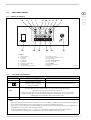
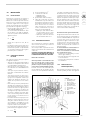
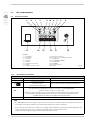
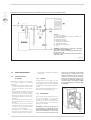
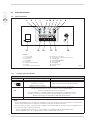
CONTROL PANEL
PT
3
2
1
7
9 16 8
4
5
6
GB
15
14
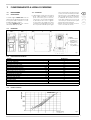
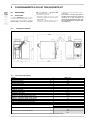
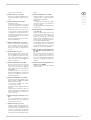
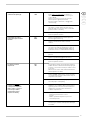
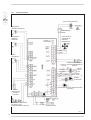
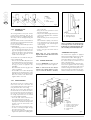
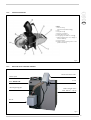
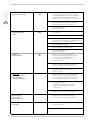
LEGEND
1 Led screw ON
2 Fan led
3 Pump led
4 Boiler led
5 Flame led
6 Pump active/winter
7 Electric coil led
8 Pump not active/summer
13
12
9
10
11
12
13
14
15
16
11
10
Recirculation Pump
Manual rearmament thermostat
ON/OFF key
Winter/summer key
Screw/set key
Menu key
Main switch
Display
Fig. 16
2.3.2
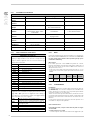
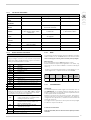
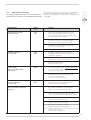
BUTTONS CONTROL PANEL
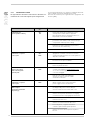
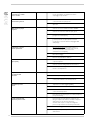
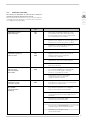
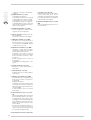
Button
(+) ON/OFF
(--)
SET
MENU
Buttons
5 sec pressed button
One click function
System ON/System OFF
Into the menu it allows to increase the parameters value
By pressing it only once it will
switch from summer to winter
Onto the menu it allows to decrease the parameters value
operation and to the contrary
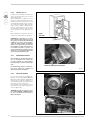
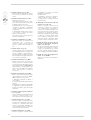
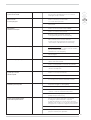
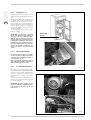
By pressing the key it’s possible to manually load the feeding screw.
This operation is allowed only when boiler’s off.
When manual loading is active the display shows “Load”.
By releasing the key the loading stops. The load has happened when the material begins to come down
from the self-extinguishing pipe, to this point to leave endured the push-button.
Into the Menu it shows code/value parameters.
This key allows to regulate boiler’s thermostat
NOTE:
• When the unit is off, by pressing the key ON/+ o quello OFF/– when an alert is shown it’s possible to reset alert. If the alert still is
active, the display shows it again.
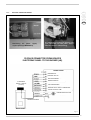
• During the setting of the system it’s, the display may shows the current flame luminosity.
– By pressing in the same time keys + and – 5 sec, the display will shows the flame luminosity.
– The data will be shown for 5 sec and the display shows the current data again.
84