1
GB
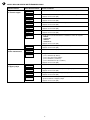
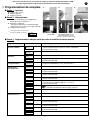
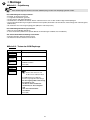
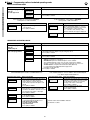
■ Step 5 - Programming the phone call type
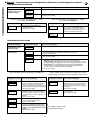
CALLING A PRIVATE NUMBER
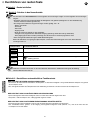
Operation made
Programming
the numbers to be dialled
Recording
customised vocal
messages
Drop-down menu shown
Steps to be followed
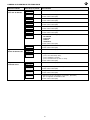
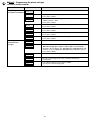
Programming
Call number prog
• Press (OK) to validate
Call number prog
#1
• Use keys ▲ ▼ to choose among call memories Nr1 to Nr9
• Press (OK) to validate
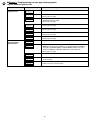
#1
Voice
• Use keys ▲ ▼ to choose among phone call types
SMS/Vocal/Vocal + SMS
• Press (OK) to validate
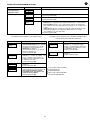
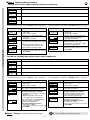
#1
without ack
• Use keys ▲ ▼ to turn ON/OFF the acknowledgement option
• Press (OK) to validate
#1
listening in OFF
• Use keys ▲ ▼ to turn ON/OFF listening
• Press (OK) to validate
#1
Call back OFF
• Use keys ▲ ▼ to turn ON/OFF the call-back option
• Press (OK) to validate
Enter 20char max
–
• Programme the phone number (max. 20 digits)
• Press (OK) to validate
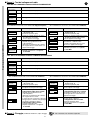
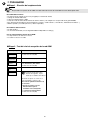
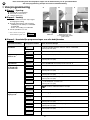
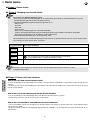
Programming
Recording mess
• Press (OK) to validate
Recording mess
Welcome message
• Choose customizable memories by using keys ▲ ▼ among:
Welcome message, Inp1 to Inp4 (from Inp1 to Inp8 for model G450-30X
fitted with a 901-21X adapter only) /Tech alarm #1 to Tech alarm #3 (if radio
TwinPass® is chosen) /Group #1 to Group #3 (if radio TwinBand® is chosen)
• Press (OK) to validate
Start ?
• Press (OK) to validate
Welcome message
......
• Record vocal message (10 secs max., otherwise interrupt it by
pressing OK)
Welcome message
Listening
• If recording is satisfactory, press (OK) to validate,
otherwise record the message again
38