1
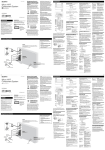
A USB connector
Connect your USB memory to this connector.
If an iPod shuffle is connected to this connector, it
cannot be played.
G POWER switch
After connecting the power cord to an AC wall
outlet, set this switch to ON.
H AC power cord
B AUX IN
You can connect a portable audio player to this
jack.
See page 25 for details.
C FM 75$ ANTENNA
D AM ANTENNA
Connect the supplied AM loop antenna to this
jack and position it for the best reception.
If you want, you can hook the AM antenna on a
wall as shown below:
I Battery compartment
The battery supplies a backup power to the builtin clock and memory, when the unit is
momentarily disconnected from the AC outlet.
Battery installation
1. Loosen the screw.
ENGLISH
While in FM mode, tune in an FM station and
extend the lead to find the best position for the
reception. This antenna may need to be
repositioned if you move your unit to a new
location.
Plug this AC power cord into an AC outlet.
2. Push the other end of the compartment cover to
open it.
3. Insert a CR2032 lithium-ion battery with it’s
positive + face facing outer side.
4. Close the cover.
Battery replacement
If the clock comes to indicate the wrong time,
replace the battery with a new one.
E BASS CONTROL
Use this knob to adjust the bass sound up or
down.
F Connector for iPod dock DS-22
Connect an iPod dock DS-22 (sold separately) .
< Make sure the label A side of the plug is up.
< Securely insert the plug until a slight “click” is
heard.
Precautions concerning button-shaped battery
< Be sure to insert the battery with correct positive
“+” and negative “_” polarities.
< Do not heat or disassemble battery and never
dispose of old battery by throwing them in a fire.
J PHONES
For private listening, insert the headphones plug
into this jack, and adjust the volume using the
VOLUME button or the VOLUME knob.
See page 15 for details.
Compatible iPod Software
In case your iPod will not work with the SL-D950
or with the remote control unit, software update
may solve the problem.
Visit the Apple website and download the latest
iPod Software.
http://www.apple.com/ipod/download/
9