1
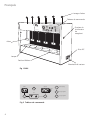
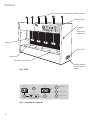
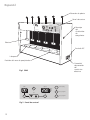
Turn the unit ON at the side mains On / Off
switch and observe the fluorescent lamp
illuminate.
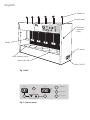
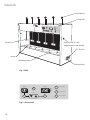
To position a beaker, lift the paddle up to its
maximum height using the paddle lift and place
the vessel over the illuminated base. Once all the
samples are in position, lower the paddles into
the beakers to the required depth.
Selecting a speed / time
Press the <MAN> button to selected the manual
mode. To set the speed, hold down the <SET>
key under the RPM display and use the <UP> and
<DOWN> arrow keys until the desired speed
appears on the digital display.
To set a running time, hold down the <SET> key
under the TIME display and use the <UP> and
<DOWN> arrow keys until the desired running
time in minutes appears on the digital display.
IF A RUNNING TIME IS NOT REQUIRED, SET
00 IN THE TIME DISPLAY.
To start the run press the <START / STOP> key.
The paddles will turn at the selected speed. If a
time has been set, the timer will count down.
When time zero is reached, the unit will beep
and the paddles stop rotating. The timer display
will then flash and count up, in minutes, to
indicate time elapsed since the paddles stopped.
The program can be halted at any time by
pressing the <START / STOP> key. To change the
settings, stop rotation and repeat the above
procedure.
Pre-set programs
In order to input a pre-set speed and time, press
and hold the <P1> key for 5 seconds. The green
P1 light will flash. To set the speed, hold down
the <SET> key under the RPM display and use the
<UP> and <DOWN> arrow keys until the desired
speed appears on the digital display. To set a
running time, hold down the <SET> key under
the TIME display and use the <UP> and <DOWN>
arrow keys until the desired time in minutes
appears on the digital display.
2
IF A RUNNING TIME IS NOT REQUIRED, SET
00 IN THE TIME DISPLAY.
Once the correct speed and time have been set,
press the <P1> key to confirm. The settings will
be held in the memory.
Pressing the <P1> key at any time during
operation will select the preset values. A green
LED shows that the P1 program has been
selected.
If another preset speed and time is required press
and hold down the <P2> key and repeat the
above setting procedure.
New P1 and P2 values can be inputted at any
time by repeating the above procedure.
Maintenance & Servicing
WARNING: Ensure the unit is disconnected
from the mains electricity supply before
attempting maintenance or servicing.
Periodically clean the instrument using a damp
cloth and mild detergent solution. Do not use
harsh or abrasive cleaning agents.
Any repairs or replacement of parts MUST be
undertaken by suitably qualified personnel.
The following spares and accessories are available
from your laboratory dealer.
Description
Catalogue Number
Pyrex ® glass beakers, (pk. 10)
1015/22D
Coagulant Dispenser
SW6/2
For a comprehensive list of parts required by
service engineers conducting internal repairs and
a service manual, please contact the Service
Department at Bibby Scientific Ltd. quoting both
the model and serial number.
Only spare parts supplied or specified by Bibby
Scientific Ltd. or its agents should be used. Fitting
of non-approved parts may affect the
performance and safety features designed into
the instrument.