1
piegh minitemper 11_2013_piegh minitemper 24/07/13 09.41 Pagina 14
CAUTION: “ALO” on the display
Whenever the probe (10) is tampered with and/or faulty and so can no longer detect the exact temperature, the
machine detects this and emits a continuous warning sound. At the same time the word “ALO” appears on the
display. You must switch the machine off (the buzzer stops) and replace the probe.
The PAVONI-ITALIA customer service is on hand at all times to provide any information or intervention you may require.
Hot-line: +39.035.4934111
TECHNICAL CHARACTERISTICS
-
Voltage rating: 230/240 Volt / 50 Hz (upon request: 110 Volt / 60 Hz)
Electrical input: 300 Watt
Machine dimensions: 420 x 400 mm 400 mm h
Total machine weight: 16 kg
- Packaging: dimensions: 520 x 500 mm 500 mm h
weight of machine+packaging: 20 kg
MAINTENANCE
The basic body of the machine is virtually maintenance-free: just keep all the external parts clean.
The basin and dividing wall should be cleaned regularly: wash with hot water, especially after each product change
and/or basin change
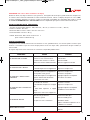
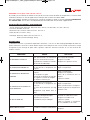
Trouble-shooting:
PROBLEM
THE
MACHINE DOESN’T SWITCH ON
CAUSE
REMEDY
The cable isn't connected to the machine Plug the cable in correctly
or isn't connected correctly
Change the fuse
The fuse has blown
Replace or mend circuit
Short-circuit or fuse blown
THE
THE
GLAZING DOESN’T MIX
GLAZING MIXES TOO SLOWLY
THE GLAZING
(HARDENING)
THE
DOESN’T COLL DOWN
GLAZING DOESN’T TURN
Not heated
Replace lamps
Temperature control set too low
Adjust temperature
Temperature control set too low
Adjust temperature
Lamps defective
Replace lamps
Level of glazing too low compared to Add more glazing
depth of bowl
Check motor
Bowl doesn't turn
Fan not working
Replace fan
Temperature control set too high
Adjust temperature
Level of glazing too low compared to Add more glazing
depth of bowl
Cool room to below 24°
Room temperature too high
No electricity
Plug in
Motor defective
Change any blown fuses
Glazing not mixed
Check motor
Remove and mix glazing (solidified on
scraper)
“ALO”
APPEARS ON THE DISPLAY
Probe not working properly
Check efficiency
Replace
14