1
G
G
G
1. wenn sichtbare Schäden am Gerät oder am
Netzkabel vorhanden sind,
2. wenn nach einem Sturz oder Ähnlichem der
Verdacht auf einen Defekt besteht,
3. wenn Funktionsstörungen auftreten.
Lassen Sie das Gerät in jedem Fall in einer Fachwerkstatt reparieren.
Ziehen Sie den Netzstecker nie am Kabel aus der
Steckdose, fassen Sie immer am Stecker an.
Verwenden Sie zum Reinigen nur ein trockenes,
weiches Tuch, niemals Wasser oder Chemikalien.
Wird das Gerät zweckentfremdet, nicht richtig
angeschlossen, falsch bedient oder nicht fachgerecht repariert, kann keine Garantie für das Gerät
und keine Haftung für daraus resultierende Sachoder Personenschäden übernommen werden.
Soll das Gerät endgültig aus dem Betrieb
genommen werden, übergeben Sie es zur
umweltgerechten Entsorgung einem örtlichen Recyclingbetrieb.
3
Einsatzmöglichkeiten
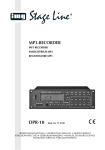
Mit dem MP3-Recorder DPR-110 lassen sich MP3und WMA-Dateien (Datenrate max. 256 kb / s) von
USB-Sticks und SD / MMC-Karten (bis 4 GB, FAT 32)
abspielen. Für Aufnahmen im MP3-Format kann ein
Audiogerät (Radio, CD-Player, Tape-Deck usw.)
angeschlossen werden. Außerdem lassen sich Titel
von einer SD / MMC-Karte auf einen USB-Stick
kopieren und umgekehrt.
Der DPR-110 ist somit für vielfältige Beschallungsaufgaben geeignet (z. B. im Theater, in Gaststätten, in Warteräumen) und bietet zahlreiche
Funktionen, wie z. B. Endloswiederholung, Zufallswiedergabe, Anspielen aller Titel und Programmierung einer eigenen Titelfolge.
G
G
G
G
G
Do not place any vessels filled with liquid, e. g.
drinking glasses, on the unit.
Do not set the unit into operation, or immediately
disconnect the mains plug from the mains socket
if
1. there is visible damage to the unit or to the
mains cable,
2. a defect might have occurred after a drop or
similar accident,
3. malfunctions occur.
The unit must in any case be repaired by skilled
personnel.
Never pull the mains cable to disconnect the
mains plug from the mains socket, always seize
the plug.
For cleaning only use a dry, soft cloth, never use
chemicals or water.
No guarantee claims for the unit and no liability for
any resulting personal damage or material damage will be accepted if the unit is used for other
purposes than originally intended, if it is not correctly connected or operated, or not repaired in an
expert way.
If the unit is to be put out of operation definitively, take it to a local recycling plant for a
disposal which is not harmful to the environment.
3
4
Gerät aufstellen und anschließen
Das Gerät ist für die Montage in ein Rack (482 mm/
19″) vorgesehen, kann aber auch als frei stehendes
Tischgerät verwendet werden. Für den Einbau in ein
Rack wird 1 HE benötigt (HE = Höheneinheit =
44,45 mm).
Vor dem Anschluss bzw. vor dem Verändern von
Anschlüssen den DPR-110 und die anzuschließenden Geräte ausschalten.
1) Die Buchsen LINE (19) über ein Cinch-Kabel mit
einem Line-Eingang z. B. an einem Mischpult
oder an einem Verstärker verbinden (L = linker
Kanal, R = rechter Kanal).
2) Sollen Aufnahmen auf eine SD / MMC-Karte oder
auf einen USB-Stick gemacht werden, ein Audiogerät mit Line-Ausgang (z. B. Radio, CD-Player,
Tape-Deck) an die Buchsen REC (20) anschließen.
3) Zum Schluss das beiliegende Netzkabel zuerst in
die Netzbuchse (21) und dann in eine Steckdose
(230 V~/50 Hz) stecken.
5
Bedienung
Das Gerät mit dem Netzschalter (1) einschalten. Auf
dem Display (2) erscheint die Anzeige NO USB,
wenn der USB-Anschluss (4) nicht mit einem Speichermedium verbunden ist.
5.1
Fernbedienung
1) Zum Einsetzen der Batterien (2 × 1,5 V, Größe
AAA = Mikro) auf der Rückseite der Fernbedienung auf den Pfeil des Deckels drücken und den
Deckel nach unten schieben. Die Batterien, wie
im Batteriefach angegeben, einsetzen. Das Fach
mit dem Deckel wieder schließen.
Bei längerem Nichtgebrauch die Batterien
herausnehmen, damit die Fernbedienung bei
einem eventuellen Auslaufen der Batterien nicht
beschädigt wird.
ous repeat, random replay, short playing of all title
beginnings, and programming of an individual title
sequence.
4
Setting up and Connecting the Unit
The unit is provided for mounting into a rack
(482 mm/ 19″) but it can also be used as a tabletop
unit. For the installation into a rack 1 rack space is
required (1 rack space = 44.45 mm).
Prior to the connection or changing the connections switch off the DPR-110 and the units to be connected.
1) Connect the jacks LINE (19) via a cable with
phono connectors to a line input e. g. at a mixer
or amplifier (L = left channel, R = right channel).
2) For recordings on an SD/MMC card or USB stick,
connect an audio unit with line output (e. g. radio,
CD player, tape deck) to the jacks REC (20).
3) Finally connect the supplied mains cable to the
mains jack (21) first and then to a socket (230 V~/
50 Hz).
5
Operation
Switch on the unit with the mains switch (1). The display (2) shows NO USB if the USB connection (4)
is not connected to a storage medium.
Applications
The MP3 recorder DPR-110 allows to replay MP3
and WMA files (data rate 256 kb / s max.) of USB
sticks and SD / MMC cards (up to 4 GB, FAT 32). For
recordings in the MP3 format an audio unit (radio,
CD player, tape deck etc.) may be connected. In
addition, it is possible to copy titles from an SD /
MMC card to a USB stick and vice versa.
The DPR-110 is thus suitable for versatile PA
applications (e. g. in the theatre, in pubs, waiting
rooms) and offers numerous functions, e. g. continu-
5.1
Remote control
1) To insert the batteries (2 × 1.5 V, size AAA), press
the arrow of the cover on the rear side of the
remote control and slide the cover downwards.
Insert the batteries as indicated in the battery
compartment. Close the compartment with the
cover.
Remove the batteries if the remote control will
not be used for a longer period of time so that it
2) Die Fernbedienung beim Betätigen einer Taste
immer in Richtung des Sensors IR (6) halten.
Dabei muss Sichtverbindung zwischen der Fernbedienung und dem Sensor bestehen.
D
A
CH
3) Lässt die Reichweite der Fernbedienung nach,
sind die Batterien fast verbraucht und müssen
ausgewechselt werden.
Werfen Sie verbrauchte Batterien nicht in
den Hausmüll, sondern geben Sie sie nur
in den Sondermüll (z. B. Sammelbehälter
bei Ihrem Elektrofachhändler).
5.2
Speichermedium anschließen
und anwählen
1) Zum Abspielen von Audio-Dateien auf einer SD/
MMC-Karte diese in den Schlitz SD MMC CARD
(3) stecken. Dabei muss die abgeschrägte Ecke
der Karte nach rechts und zum Gerät zeigen.
2) Zum Abspielen von Audio-Dateien auf einem
USB-Stick diesen in den USB-Anschluss (4)
stecken.
3) Nach dem Einschalten wählt das Gerät immer
den USB-Anschluss an. Dabei blinkt im Display
(2) die Anzeige USB. Ist kein Speichermedium
angeschlossen, erscheint die Anzeige NO USB.
Bei angeschlossenem USB-Speicher erscheint
nach dem Einlesen im Display die Anzahl der Titel
(große Zahl) und die Anzahl der Ordner (kleine,
obere Zahl). Zusätzlich wird STOP angezeigt, d. h.
das Gerät steht auf Stopp.
4) Zum Umschalten zwischen Speicherkarte und
USB-Speicher die Taste FUNC (18) drücken. Mit
dieser Taste wird auch der Eingang REC (20) für
MP3-Aufnahmen angewählt ( Kap. 5.11). Das
Display zeigt (kurz) die Auswahl an:
USB = USB-Anschluss
CARD = SD/ MMC-Karte
AUX = Eingang REC
will not be damaged in case the batteries should
leak.
GB
2) Always hold the remote control in the direction of
the sensor IR (6) when pressing a button. There
must be no obstacles between the remote control
and the sensor.
3) If the range of the remote control decreases, the
batteries are almost exhausted and have to be
replaced.
Do not put exhausted batteries into the
household rubbish. Always take them to a
special waste disposal (e. g. collecting container at your retailer).
5.2
Connecting and selecting
a storage medium
1) To replay audio files on an SD/ MMC card, insert
this card into the slot SD MMC CARD (3). The
bevelled corner of the card must show to the right
and to the unit.
2) To replay audio files on a USB stick, connect this
USB stick to the USB port (4).
3) After switching-on, the unit always selects the
USB connection. USB flashes in the display (2). If
no storage medium has been connected, NO
USB is displayed.
With the USB memory connected, the number
of the titles (large number) and the number of the
folders (small, upper number) are displayed after
reading in. In addition, STOP is displayed, i. e.
the unit is set to stop.
4) To switch between memory card and USB
memory, press the button FUNC (18). With this
button also the input REC (20) is selected for
MP3 recordings ( chapter 5.11). The display
(shortly) shows the selection:
USB = USB connection
CARD = SD/ MMC card
AUX = input REC
5