1
FUNZIONAMENTO
5.4
CONTROLLO
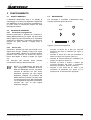
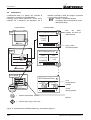
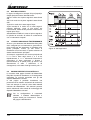
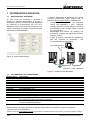
Il MasterView Easy è il display che consente di
monitorare e controllare la rete MasterBus.
Il display guida l’utente attraverso i diversi menu,
iniziando con la selezione del dispositivo che si
Livello sistema
Off
desidera monitorare. Nelle due pagine successive
se ne riportano alcuni esempi.
NOTA: Le schermate riportate
potrebbero differire da quelle del vostro
MasterView Easy.
Livello prodotto
MSH MasterShunt
Esci
dal
livello
prodotto ed entra nel
livello sistema
State of
Charge
100%
MASTERVOLT
Scorri i menu
del livello prodotto
On
MSH MasterShunt
Distribution
100%
MasterShunt
OK
MV Easy
On
Time
remaining
12:34:56
Cap.
consumed
0 Ah
MASTERVOLT
Locked
MasterShunt
100%
Distribution
MSH MasterShunt
OK
MV Easy
On
Mastership
Go to
Configuration
Go to
Alarm
Vai a
configurazione
prodotto
MASTERVOLT
Vai ad
allarmi prodotto
= Premere brevemente: 0-2 sec.
Sblocca
= Premere più a lungo: oltre 2 sec.
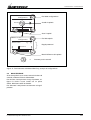
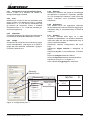
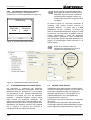
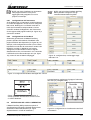
Figura 10: Funzionamento del MasterView Easy, schermate di apertura
130
Settembre 2010 / MasterView Easy MkII / IT