1
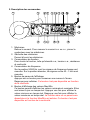
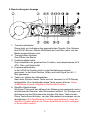
8.LCD
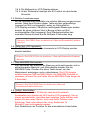
This is a 3 3/4 digit Liquid Crystal Display with maximum indication of
3999. Function symbols, units, bargraph, sign, decimal points, low
battery symbols, max/min symbols, and zero symbol are included.
9.Low Battery Symbol
When this symbol appears, it means the battery voltage drops below the
minimum required voltage. Refer to Section V for battery replacement.
10.Zero/Relative Symbol
When this symbol appears, it means a reference value has been
subtracted from the actual reading. The reading shown is a offseted
value. Press and hold the zero button for 2 seconds to disable this
function.
11.Data Hold Symbol
Once the hold button is pressed, this symbol appears on LCD.
12.Bargraph
Bargraph has forty segments. It displays segments proportional to the
actual reading. Each segment represent one count.
13.Max/Min Hold Symbol
Once the max/min button is pressed, either MAX or MIN shall be
displayed on LCD
14.Continuity Symbol
If ohm and continuity function is selected, this symbol shall appears on
LCD.
15.Units Symbols
Once a function is selected, corresponding unit (V, Ω, A, or Hz) shall be
displayed on LCD.
16.VΩ Input Terminal
This terminal is used as input for voltage, or ohm/continuity
measurements.
17.COM Terminal
This terminal is used as common reference input.
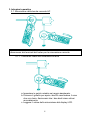
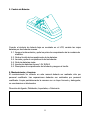
18.Hand Strap
Put your hand through the hole of hand strap to avoid accidental drop of
the clamp meter.
3