1
LAMPADA
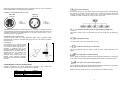
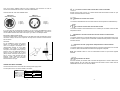
ROTATING GOBO WHEEL
Il PLML575SE deve operare con una lampada HSR 575 oppure MSR 575
Il PLML575SE permette di accendere spegnere il la lampada attraverso il pannello di
controllo sul lato anteriore o attraverso la vostra centralina.
The rotating gobo-wheel includes 3 metal gobos and 3 dichroic rotating in both
directions, indexable, rotating gobo wheel cont. rotation slow to fast. All gobos are
interchangeable. The gobos have an outside diameter of 27 mm and an image diameter
of 23 mm.
ACCENSIONE E SPEGNIMENTO DELLA LAMPADA ATTRAVERSO IL PANNELLO
DI CONTROLLO
1.
2.
3.
accendere il PLML575SE e attendere fino a quando la macchina abbia finito il
reset.
premere il tasto “MODE” per accedere al menu principale. Scorrere il menu
principale usando i tasti “UP” e “DOWN” fino a quando sul display non
appare “LAMP”. Confermare premendo il tasto “ENTER”
utilizzare i tasti “UP” e “DOWN” per selezione “ON” per accendere la lampada
e “OFF” per spegnere la lampada.
Note:
È importante notare che la lampada a scarica deve essersi raffreddata prima di poter
essere riaccesa. Per questa ragione bisogna aspettare almeno 5 minuti (se si è regolato
al massimo la velocità delle ventole) dallo spegnimento della lampada prima che sia
possibile riaccenderla. Se si tenta di accendere la lampada prima che i cinque minuti
siano trascorsi il PLML575SE registra questa informazione e quando sono passati 5
minuti accende la lampada, nel frattempo il messaggio “HEAt” apparirà sul display del
pannello anteriore del PLML575SE. Se l’accensione della lampada fallisce per sette
volte di seguito sul display appare il messaggio “LA.Er” che significa che la lampada può
essere danneggiata o può mancare, oppure l’accenditore può essersi rovinato.
3-FACET ROTATING PRISM
3-facet prism rotating in both directions at different speeds. Control via 16 prism-gobomacros.
IRIS
Motorized iris for different beam diameters
FOCUS / MULTISTEP ZOOM
Motorized focus enables the beam to be focused anywhere on stage at different beam
angles: 15°, 18°, 22°, provided by the special multistep zoom (3 steps).
DIMMER / SHUTTER / STROBE
Smooth 0 - 100 % dimming is provided by the combined mechanical dimmer / shutter
unit. This unit may also be used for strobe-effects (1 - 10 flashes per second).
RUOTE COLORI
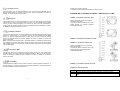
Il PLML575SE è dotato di due ruote colori entrambe con 10 posizioni: con 9 filtri dicroici
+ bianco. La ruota colori 1 può essere posizionata tra due colori adiacenti in qualsiasi
posizione. E’ inoltre possibile ruotare la ruota in maniera continua a differenti velocità
(effetto rainbow) in entrambe le direzioni. Sulla seconda ruota sono situati filtri
temperatura (3200K – 6000K e UV)
FAN
The PLML575SE is cooled by three axial fans - one each in the projector head and one
in the base. The speed of the fan (and of course the noise) can be continuously reduced
if very quiet performance is required.
By the Control Board using the “FAnS” function you can choose 5 types of low fan speed
operating. Please refer to the instructions under SPEC - Special functions.
RUOTA GOBO FISSA
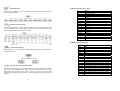
Questa ruota ha 9 gobo fissi più bianco. Tutti i gobo sono intercambiabili. I gobo hanno
un diametro esterno di 27 mm e un fuoco di 23 mm. La rotazione continua della ruota
(effetto rainbow) può essere regolata da lenta a veloce, inoltre per ogni gobo è prevista
la funzione “gobo shaking”
RUOTA GOBO ROTANTI
Questa ruota include tre gobo metallici e 3 dicroici rotanti in entrambe le direzioni con la
velocità di rotazione che può essere variata da lenta a veloce. Tutti i gobo sono
intercambiabili. Tutti i gobo hanno un diametro esterno di 27 mm e fuoco di 23 mm.
18
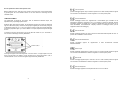
CONTROL BOARD
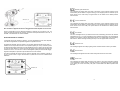
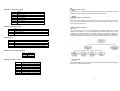
The Control Board situated on the top side of the PLML575SE offers several features.
You can simply set the lighting address, read the number of lamp or unit hours, switch on
and off the lamp, run demonstration sequences, make a reset and also use special
functions for manual control and service purposes. The main menu is accessed by
pressing the “MODE” key - press this one so many times until the display shows
message "A001" (with actually stored address). Browse through the menu by the
pressing “UP” and “DOWN” keys - the display shows step by step these messages:
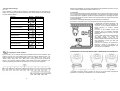
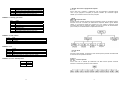
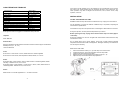
“A001”, “rPAn”, “rTilt”, “16br”, “Lati”, “Poti”, “LAMP”, “dEMo”, “rESE”, “SPEC”. Press
“ENTER” if you wish to select one of them. The functions provided are described in the
following sections and the function hierarchy is shown below:
51