1
MONAURAL MAC HEADSET
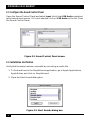
2.3 Configure the Sound Control Panel
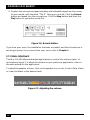
Open the Sound Control Panel and select Input. Verify that USB Audio is selected
as the sound input source. If it is not selected, click on USB Audio in the list. Close
the Sound Control Panel.
Figure 2-2. Sound Control Panel screen.
2.4 Installation Verification
Verify that the setup has been successful by recording an audio file.
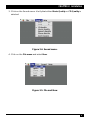
1. To find and launch the SimpleSound application, go to Apple Applications,
Apple Extras, and click on SimpleSound.
2. Close the Alert Sounds dialog box.
Figure 2-3. Alert Sounds dialog box.
8