1
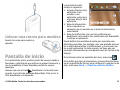
Nokia E75 User Guide
Issue 1.1
© 2009 Nokia. All rights reserved.
DECLARATION OF CONFORMITY
Hereby, NOKIA CORPORATION declares that this RM-413 product is in compliance with the essential requirements and other relevant
provisions of Directive 1999/5/EC. A copy of the Declaration of Conformity can be found at http://www.nokia.com/phones/
declaration_of_conformity/.
Nokia, Nokia Connecting People, Nokia Original Accessories logos, Eseries, Nokia E75, and N-Gage are trademarks or registered trademarks of Nokia Corporation. Nokia
tune is a sound mark of Nokia Corporation. Other product and company names mentioned herein may be trademarks or tradenames of their respective owners.
Reproduction, transfer, distribution, or storage of part or all of the contents in this document in any form without the prior written permission of Nokia is prohibited.
Nokia operates a policy of continuous development. Nokia reserves the right to make changes and improvements to any of the products described in this document
without prior notice.
US Patent No 5818437 and other pending patents. T9 text input software Copyright © 1997-2009. Tegic Communications, Inc. All rights reserved.
This product includes software licensed from Symbian Software Ltd ©1998-2009. Symbian and Symbian OS are trademarks of Symbian Ltd.
Java and all Java-based marks are trademarks or registered trademarks of Sun Microsystems, Inc.
Portions of the Nokia Maps software are © 1996-2009 The FreeType Project. All rights reserved.
This product is licensed under the MPEG-4 Visual Patent Portfolio License (i) for personal and noncommercial use in connection with information which has been
encoded in compliance with the MPEG-4 Visual Standard by a consumer engaged in a personal and noncommercial activity and (ii) for use in connection with MPEG-4
video provided by a licensed video provider. No license is granted or shall be implied for any other use. Additional information, including that related to promotional,
internal, and commercial uses, may be obtained from MPEG LA, LLC. See http://www.mpegla.com.
TO THE MAXIMUM EXTENT PERMITTED BY APPLICABLE LAW, UNDER NO CIRCUMSTANCES SHALL NOKIA OR ANY OF ITS LICENSORS BE RESPONSIBLE FOR ANY LOSS OF DATA OR
INCOME OR ANY SPECIAL, INCIDENTAL, CONSEQUENTIAL OR INDIRECT DAMAGES HOWSOEVER CAUSED.
THE CONTENTS OF THIS DOCUMENT ARE PROVIDED "AS IS". EXCEPT AS REQUIRED BY APPLICABLE LAW, NO WARRANTIES OF ANY KIND, EITHER EXPRESS OR IMPLIED, INCLUDING,
BUT NOT LIMITED TO, THE IMPLIED WARRANTIES OF MERCHANTABILITY AND FITNESS FOR A PARTICULAR PURPOSE, ARE MADE IN RELATION TO THE ACCURACY, RELIABILITY OR
CONTENTS OF THIS DOCUMENT. NOKIA RESERVES THE RIGHT TO REVISE THIS DOCUMENT OR WITHDRAW IT AT ANY TIME WITHOUT PRIOR NOTICE.
Reverse engineering of software in the device is prohibited to the extent permitted by applicable law. Insofar as this user guide contains any limitations on Nokia's
representations, warranties, damages and liabilities, such limitations shall likewise limit any representations, warranties, damages and liabilities of Nokia's licensors.
The availability of particular products and applications and services for these products may vary by region. Please check with your Nokia dealer for details and availability
of language options. This device may contain commodities, technology or software subject to export laws and regulations from the US and other countries. Diversion
contrary to law is prohibited.
FCC/INDUSTRY CANADA NOTICE
Your device may cause TV or radio interference (for example, when using a telephone in close proximity to receiving equipment). The FCC or Industry Canada can require
you to stop using your telephone if such interference cannot be eliminated. If you require assistance, contact your local service facility. This device complies with part
15 of the FCC rules. Operation is subject to the following two conditions: (1) This device may not cause harmful interference, and (2) this device must accept any
interference received, including interference that may cause undesired operation. Any changes or modifications not expressly approved by Nokia could void the user's
authority to operate this equipment.
Issue 1.1 EN-US
Contents
Safety...................................................................7
About your device......................................................................7
Office applications.....................................................................8
Network services.......................................................................8
Quick start guide..................................................9
SIM card, battery, charging, memory card..............................9
First start-up.............................................................................11
Keys and parts..........................................................................12
Lock the keys............................................................................14
Accessories...............................................................................15
Home screen............................................................................15
Nokia Switch............................................................................16
Set up your e-mail...................................................................17
Antennas...................................................................................18
Nokia PC Suite..........................................................................18
Tips for efficient use................................................................19
Find help............................................................20
Support.....................................................................................20
Remote configuration.............................................................20
Software updates using your PC............................................21
In-device help..........................................................................22
Accessibility solutions.............................................................22
Additional applications...........................................................22
Settings.....................................................................................22
Free memory............................................................................23
Nokia E75 - The basics........................................24
Phone setup.............................................................................24
Settings wizard........................................................................24
Menu.........................................................................................24
Display indicators....................................................................25
Write text.................................................................................26
Search.......................................................................................27
Common actions in several applications...............................28
Volume control........................................................................28
Personalization..................................................29
Profiles......................................................................................29
Select ringing tones.................................................................29
Customize profiles...................................................................30
Customize the home screen...................................................30
Change the display theme......................................................31
Download a theme..................................................................31
Change audio themes.............................................................31
3-D ringing tones.....................................................................32
New from Nokia Eseries.....................................33
Key features.............................................................................33
Home screen............................................................................34
One-touch keys........................................................................35
Calendar....................................................................................35
Contacts....................................................................................37
Multitasking.............................................................................39
Ovi Files.....................................................................................39
About Ovi Store........................................................................39
Messaging..........................................................41
Messaging folders....................................................................41
Organize messages..................................................................41
E-mail........................................................................................42
Nokia Messaging......................................................................46
Mail for Exchange.....................................................................46
Message reader........................................................................47
Speech.......................................................................................47
Text and multimedia messages.............................................47
Special message types............................................................51
Cell broadcast...........................................................................51
Messaging settings..................................................................52
Instant messaging...................................................................55
Phone.................................................................59
Voice calls.................................................................................59
Voice mail.................................................................................60
Video calls.................................................................................60
Video sharing...........................................................................61
Internet calls............................................................................63
1-touch dialing.........................................................................64
Call forward..............................................................................64
Call restrictions........................................................................65
Restrict net calls.......................................................................66
Send Touch tones....................................................................66
Talking theme..........................................................................66
Voice commands......................................................................67
Push to talk..............................................................................68
Log............................................................................................71
Internet..............................................................73
Browser....................................................................................73
Browse the intranet ...............................................................77
Download!................................................................................77
Connect your computer to web..............................................78
Traveling............................................................80
Positioning (GPS).....................................................................80
Maps..........................................................................................83
Nokia Office Tools..............................................91
Active notes..............................................................................91
Calculator..................................................................................91
File manager............................................................................92
Quickoffice................................................................................93
Converter..................................................................................93
Zip manager.............................................................................94
PDF reader................................................................................94
Printing.....................................................................................94
Clock..........................................................................................96
Barcode reader.........................................................................96
Dictionary.................................................................................97
Notes ........................................................................................97
Media..................................................................99
Camera......................................................................................99
Gallery.....................................................................................102
Share online...........................................................................103
Nokia Video Center................................................................106
Nokia Podcasting...................................................................108
Music player...........................................................................110
RealPlayer...............................................................................112
Recorder.................................................................................113
Flash player............................................................................113
FM radio..................................................................................113
Nokia Internet Radio.............................................................114
N-Gage....................................................................................116
Connectivity.....................................................121
Fast downloading..................................................................121
Data cable...............................................................................121
Bluetooth................................................................................122
SIM access profile..................................................................125
Wireless LAN...........................................................................126
Connection manager.............................................................127
Security and data management.......................129
Lock the device......................................................................129
Memory card security............................................................129
Encryption..............................................................................130
Fixed dialing...........................................................................130
Certificate manager...............................................................131
View and edit security modules...........................................132
Application manager.............................................................132
Application Update................................................................134
Licenses..................................................................................135
Sync.........................................................................................136
Mobile VPN.............................................................................136
Settings............................................................138
General settings.....................................................................138
Telephone settings................................................................142
Connection settings...............................................................143
Application settings..............................................................151
Shortcuts..........................................................152
General shortcuts..................................................................152
Glossary............................................................155
Troubleshooting..............................................158
Green tips.........................................................161
Save energy............................................................................161
Recycle....................................................................................161
Save paper..............................................................................161
Learn more.............................................................................161
Accessories.......................................................162
Battery..............................................................163
Battery and charger information.........................................163
Nokia battery authentication guidelines............................164
Taking care of your device...............................165
Recycle....................................................................................165
Additional safety information.........................166
Small children........................................................................166
Operating environment........................................................166
Medical devices......................................................................166
Vehicles...................................................................................167
Potentially explosive environments....................................167
Emergency calls.....................................................................168
Certification information (SAR)............................................168
Index................................................................170
Safety
Read these simple guidelines. Not following them may be
dangerous or illegal. Read the complete user guide for further
information.
SWITCH ON SAFELY
Do not switch the device on when wireless phone
use is prohibited or when it may cause interference
or danger.
ROAD SAFETY COMES FIRST
Obey all local laws. Always keep your hands free to
operate the vehicle while driving. Your first
consideration while driving should be road safety.
INTERFERENCE
All wireless devices may be susceptible to
interference, which could affect performance.
SWITCH OFF IN RESTRICTED AREAS
Follow any restrictions. Switch the device off in
aircraft, near medical equipment, fuel, chemicals,
or blasting areas.
QUALIFIED SERVICE
Only qualified personnel may install or repair this
product.
ACCESSORIES AND BATTERIES
Use only approved accessories and batteries. Do
not connect incompatible products.
© 2009 Nokia. All rights reserved.
WATER-RESISTANCE
Your device is not water-resistant. Keep it dry.
About your device
The wireless device described in this guide is approved for
use on the (E)GSM 850, 900, 1800, and 1900 networks, and
UMTS 850/1900/2100 HSDPA networks. Contact your service
provider for more information about networks.
Your device supports several connectivity methods and like
computers may be exposed to viruses and other harmful
content. Exercise caution with messages, connectivity
requests, browsing, and downloads. Only install and use
services and software from trustworthy sources that offer
adequate security and protection, such as applications that
are Symbian Signed or have passed the Java Verified™ testing.
Consider installing antivirus and other security software on
your device and any connected computer.
Your device may have preinstalled bookmarks and links for
third-party internet sites and may allow you to access thirdparty sites. These are not affiliated with Nokia, and Nokia
does not endorse or assume liability for them. If you access
such sites, take precautions for security or content.
7
Warning: To use any features in this device, other than
the alarm clock, the device must be switched on. Do not
switch the device on when wireless device use may cause
interference or danger.
When using this device, obey all laws and respect local
customs, privacy and legitimate rights of others, including
copyrights. Copyright protection may prevent some images,
music, and other content from being copied, modified, or
transferred.
Make back-up copies or keep a written record of all important
information stored in your device.
When connecting to any other device, read its user guide for
detailed safety instructions. Do not connect incompatible
products.
The images in this guide may differ from your device display.
Refer to the user guide for other important information about
your device.
networks; other features may require that you make specific
arrangements with your service provider to use them.
Network services involve transmission of data. Check with
your service provider for details about fees in your home
network and when roaming on other networks. Your service
provider can explain what charges will apply. Some networks
may have limitations that affect how you can use some
features of this device requiring network support such as
support for specific technologies like WAP 2.0 protocols (HTTP
and SSL) that run on TCP/IP protocols and languagedependent characters.
Your service provider may have requested that certain
features be disabled or not activated in your device. If so,
these features will not appear on your device menu. Your
device may also have customized items such as menu names,
menu order, and icons.
Office applications
The office applications support common features of Microsoft
Word, PowerPoint, and Excel (Microsoft Office 2000, XP, 2003,
and 2007). Not all file formats are supported.
Network services
To use the device you must have service from a wireless
service provider. Some features are not available on all
8
© 2009 Nokia. All rights reserved.
Quick start guide
Your Nokia E75 is a business device that adapts to your free
time, as well.
Read these first pages to get started, then use the rest of the
guide to explore what new features Nokia E75 brings to you.
SIM card, battery,
charging, memory card
Put the pieces together, and get started with your Nokia
E75.
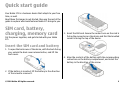
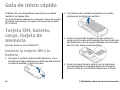
3. Insert the SIM card. Ensure the contact area on the card is
facing the connectors on the device and that the bevelled
corner is facing the top of the device.
Insert the SIM card and battery
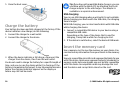
1. To open the back cover of the device, with the back facing
you, unlock the back cover release button, and lift the
back cover.
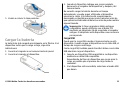
4. Align the contacts of the battery with the corresponding
connectors on the battery compartment, and insert the
battery in the direction of the arrow.
2. If the battery is inserted, lift the battery in the direction
of the arrow to remove it.
© 2009 Nokia. All rights reserved.
9
5. Close the back cover.
Tip: If you have old compatible Nokia chargers, you can
use them with the Nokia E75 by attaching the CA-44
charger adapter to the old charger. The adapter is
available as a separate enhancement.
USB charging
Charge the battery
Your battery has been partially charged at the factory. If the
device indicates a low charge, do the following:
1. Connect the charger to a wall outlet.
2. Connect the charger to the device.
You can use USB charging when a wall outlet is not available.
When charging your device with the USB cable, the charging
time is longer.
With USB charging, you can also transfer data with USB cable
while charging the device.
1. Connect a compatible USB device to your device using a
compatible USB cable.
Depending on the type of the device that is used for
charging, it may take a while for charging to start.
2. If the device is switched on, select the desired USB mode.
Insert the memory card
3. When the device indicates a full charge, disconnect the
charger from the device, then from the wall outlet.
You do not need to charge the battery for a specific length of
time, and you can use the device while it is charging. If the
battery is completely discharged, it may take several minutes
before the charging indicator appears on the display or
before any calls can be made.
10
Use a memory card to save the memory on your device. You
can also back up information from your device to the memory
card.
Use only compatible microSD cards approved by Nokia for use
with this device. Nokia uses approved industry standards for
memory cards, but some brands may not be fully compatible
with this device. Incompatible cards may damage the card
and the device and corrupt data stored on the card.
© 2009 Nokia. All rights reserved.
Keep all memory cards out of the reach of small
children.
Check the compatibility of a memory card with its
manufacturer or provider.
A compatible memory card may be included in the sales
package. The memory card may be already inserted in the
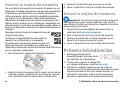
device. If not, do the following:
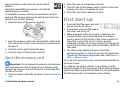
1. Open the cover of the memory card slot.
2. Insert the memory card in the slot with the contact area
first. Ensure the contact area is facing the connectors on
the device.
3. Push the card in until it locks into place.
4. Close the cover of the memory card slot.
Eject the memory card
Important: Do not remove the memory card during an
operation when the card is being accessed. Doing so may
damage the memory card and the device, and corrupt data
stored on the card.
1. Press the power key briefly, and select Remove memory
card.
© 2009 Nokia. All rights reserved.
2. Open the cover of the memory card slot.
3. Press the end of the memory card to release it from the
memory card slot, and remove the card.
4. Close the cover of the memory card slot.
First start-up
1. Press and hold the power key until
you feel the device vibrate.
2. If prompted, enter the PIN code or
lock code, and select OK.
3. When prompted, enter the country in which you are
located and the current date and time. To find your
country, enter the first letters of the country name. It is
important to select the correct country, because
scheduled calendar entries may change if you change the
country later and the new country is located in a different
time zone.
4. The Phone setup application opens. Select the
appropriate option, or select No to close the application.
To open the Phone setup application later, select Menu >
Help > Phone setup.
To set up chat and internet calls, use the wizard available in
the home screen.
To configure the various settings in your device, use the
wizards available in the home screen and the Settings wizard
application. When you switch the device on, it may recognize
the SIM card provider and configure some settings
11
automatically. You can also contact your service provider for
the correct settings.
You can switch the device on without inserting a SIM card.
The device starts up in the offline profile, and you cannot use
the network-dependent phone functions.
To switch the device off, press and hold the power key.
Keys and parts
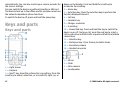
Keys and parts
1 — Light sensor
2 — Earpiece
3 — Navi™ key; hereafter referred to as scroll key. Press the
scroll key to make a selection, or to scroll left, right, up, or
12
down on the display. Press and hold the scroll key to
accelerate the scrolling.
4 — Home key
5 — Selection key. Press the selection key to perform the
function displayed above it.
6 — Call key
7 — Calendar key
8 — Charger connector
9 — E-mail key
10 — Power/End key. Press and hold the key to switch the
device on or off. During a call, press the end key to reject a
call or end active and held calls, or press and hold to end data
connections.
11 — Selection key
12 — Backspace key. Press the key to delete items.
13 — Secondary camera
14 — Headset connector
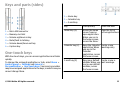
1 — Mirror
2 — Flash
3 — Main camera
4 — Loudspeaker
© 2009 Nokia. All rights reserved.
Keys and parts (sides)
1 — Home key
2 — Calendar key
3 — E-mail key
1 — Micro USB connector
2 — Memory card slot
3 — Volume up/Zoom in key
4 — Mute/Push to talk key
5 — Volume down/Zoom out key
6 — Capture key
Key
Press quickly
Press and hold
Home key (1)
Access the home
screen from an
open application.
When you are in
the home screen,
access the Menu.
View the list of
active applications
Calendar key (2)
Open the Calendar Create a new
application When meeting entry
you are in the
Calendar
application, access
the home screen.
E-mail key (3)
Open your default Create a new emailbox When you mail message.
are in your default
mailbox, access
the home screen.
One-touch keys
With One-touch keys, you can access applications and tasks
quickly.
To change the assigned application or task, select Menu >
Control panel > Settings and General >
Personalization > One-touch keys. Your service provider
may have assigned applications to the keys, in which case you
cannot change them.
© 2009 Nokia. All rights reserved.
13
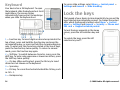
Keyboard
Your device has a full keyboard. To open
the keyboard, slide the keyboard out. In all
applications, the screen rotates
automatically from portrait to landscape
when you slide the keyboard out.
To access slide settings, select Menu > Control panel >
Settings and General > Slide handling.
Lock the keys
The keypad of your device locks automatically to prevent the
keys from being accidentally pressed. To change the period
after which the keypad is locked, select Menu > Control
panel > Settings and General > Security > Phone and
SIM card > Keypad autolock period.
To lock the keys manually in the home
screen, press the left selection key and
*.
1 — Function key. To insert digits or characters printed at the
top of keys, press and hold the function key and press the
corresponding key, or press and hold the corresponding key
only. To enter only the characters printed at the top of keys,
press the function key twice quickly. To return to normal
mode, press the function key again.
2 — Shift key. To switch between character cases, press the
shift key. To enter only uppercase or lowercase letters, press
the Shift key twice quickly.
3 — Chr key. When writing text, press the Chr key to insert
characters not shown on the keyboard.
4 — Space key
5 — Ctrl key. To access the shortcuts behind the Ctrl key, such
as Ctrl + C.
6 — Backspace key
14
To unlock the keys, press the left
selection key and *.
© 2009 Nokia. All rights reserved.
Accessories
You can connect your device to a range of compatible
accessories. Check the availability of the approved
accessories with your dealer.
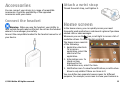
Connect the headset
Warning: When you use the headset, your ability to
hear outside sounds may be affected. Do not use the headset
where it can endanger your safety.
Connect the compatible headset to the headset connector of
your device.
© 2009 Nokia. All rights reserved.
Attach a wrist strap
Thread the wrist strap, and tighten it.
Home screen
In the home screen, you can quickly access your most
frequently used applications, and view at a glance if you have
missed calls or new messages.
icon, scroll right to access a list of
Whenever you see the
available actions. To close the list, scroll left.
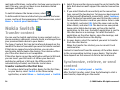
The home screen consists
of the following:
1. Application shortcuts.
To access an
application, select the
shortcut of the
application.
2. Information area. To
check an item
displayed in the
information area, select the item.
3. Notification area. To view the notifications, scroll to a box.
A box is only visible if there are items in it.
You can define two separate home screens for different
purposes, for example, one screen to show your business e-
15
mail and notifications, and another to show your personal email. This way, you do not have to see business-related
messages outside office hours.
To switch between the home screens, select
.
To define which items and shortcuts you want in the home
screen, and to set the appearance of the home screen, select
Menu > Control panel and Modes.
Nokia Switch
Transfer content
You can use the Switch application to copy content such as
phone numbers, addresses, calendar items, and images from
your previous Nokia device to your device.
The type of content that can be transferred depends on the
model of the device from which you want to transfer content.
If that device supports synchronization, you can also
synchronize data between the devices. Your device notifies
you if the other device is not compatible.
If the other device cannot be switched on without a SIM card,
you can insert your SIM card in it. When your device is
switched on without a SIM card, the Offline profile is
automatically activated, and transfer can be done.
Transfer content for the first time
1. To retrieve data from the other device for the first time,
on your device, select Switch in the Phone setup
application, or select Menu > Control panel > Switch.
16
2. Select the connection type you want to use to transfer the
data. Both devices must support the selected connection
type.
3. If you select Bluetooth connectivity as the connection
type, connect the two devices. To have your device search
for devices with Bluetooth connectivity, select Continue.
Select the device from which you want to transfer content.
You are asked to enter a code on your device. Enter a code
(1-16 digits), and select OK. Enter the same code on the
other device, and select OK. The devices are now paired.
Some earlier Nokia devices may not have the Switch
application. In this case, the Switch application is sent to
the other device as a message. To install the Switch
application on the other device, open the message, and
follow the instructions on the display.
4. On your device, select the content you want to transfer
from the other device.
When the transfer has started, you can cancel it and
continue later.
Content is transferred from the memory of the other device
to the corresponding location in your device. The transfer
time depends on the amount of data to be transferred.
Synchronize, retrieve, or send
content
Select Menu > Control panel > Switch.
After the first transfer, select from the following to start a
new transfer, depending on the model:
© 2009 Nokia. All rights reserved.
to synchronize content between your device and the
other device, if the other device supports synchronization.
The synchronization is two-way. If an item is deleted in one
device, it is deleted in both. You cannot restore deleted items
with synchronization.
to retrieve content from the other device to your device.
With retrieval, content is transferred from the other device
to your device. You may be asked to keep or delete the
original content in the other device, depending on the device
model.
to send content from your device to your other device
If you cannot send an item, depending on the type of the
other device, you can add the item to the Nokia folder, to C:
\Nokia or E:\Nokia in your device. When you select the folder
to transfer, the items are synchronized in the corresponding
folder in the other device, and vice versa.
Use shortcuts to repeat a transfer
After a data transfer, you can save a shortcut with the transfer
settings to the main view to repeat the same transfer later.
To edit the shortcut, select Options > Shortcut settings.
For example, you can create or change the name of the
shortcut.
A transfer log is shown after every transfer. To view the log
of the last transfer, select a shortcut in the main view and
Options > View log.
Handle transfer conflicts
If an item to be transferred has been edited in both devices,
the device attempts to merge the changes automatically. If
this is not possible, there is a transfer conflict. Select Check
© 2009 Nokia. All rights reserved.
one by one, Priority to this phone, or Priority to other
phone to solve the conflict.
Set up your e-mail
Your Nokia Eseries device works the same hours as you, and
at the same speed. Keep your e-mail, contacts, and calendar
synchronized - quickly and conveniently with high speed
connections.
When setting up your e-mail, you may be prompted for the
following information: user name, e-mail type, incoming
mail server, incoming mail server port, outgoing mail server,
outgoing mail server port, password, or access point.
With the E-mail wizard, you can set up business e-mail
accounts, such as Microsoft Exchange, or internet e-mail
accounts, such as Google's e-mail services. The wizard
supports POP/IMAP and ActiveSync protocols.
If you are setting up your business e-mail, contact your
company IT department for details before you begin the
setup. If you are setting up your internet e-mail, see your email service provider’s website for details.
To open the E-mail wizard, do the following:
1. In the home screen, select the E-mail wizard.
2. Enter your e-mail address and password. If the wizard is
not able to configure your e-mail settings automatically,
select your e-mail account type, and enter the related
settings.
Tip: If you have not configured your mailbox, press the
e-mail key to start the E-mail wizard.
17
If your device contains additional e-mail clients, those are
offered to you when you start the E-mail wizard.
Antennas
Your device may have internal and external antennas. Avoid
touching the antenna area unnecessarily while the antenna
is transmitting or receiving. Contact with antennas affects the
communication quality and may cause a higher power level
during operation and may reduce the battery life.
your device and compatible browsers, and transfer images
and video clips between your device and compatible PCs.
Note: Pay attention to synchronization settings. Data
deletion as part of normal synchronization process is
determined by the settings selected.
To use Nokia PC Suite, you need a PC that runs Microsoft
Windows XP (SP1 or SP2) or Windows Vista, and is compatible
with a USB data cable or with Bluetooth connectivity.
Nokia PC Suite does not work with Macintosh.
For further information on Nokia PC Suite, see its help
function or the Nokia website.
To install Nokia PC Suite:
Nokia PC Suite
Nokia PC Suite is a set of applications that you can install to
a compatible PC. Nokia PC Suite groups all available
applications in a launcher window from which you can run
the applications. You can install Nokia PC Suite from the
memory card in your device.
You can use Nokia PC Suite to synchronize contacts, calendar,
and to-do and other notes between your device and a
compatible PC application, such as Microsoft Outlook or Lotus
Notes. You can also use Nokia PC Suite to bookmark between
18
1. Ensure the memory card is inserted in your Nokia E75.
2. Connect the USB cable. Your PC recognizes the new device
and installs the necessary drivers. This can take several
minutes to complete.
3. Select Mass storage as the USB connection mode in your
device. Your device is displayed in Windows file browser
as a Removable Disk.
4. Open the root of the memory card drive with the Windows
file browser, and select the PC Suite installation.
5. The installation is started. Follow the displayed
instructions.
Tip: To update your Nokia PC Suite, or if you have
problems when installing Nokia PC Suite from the
memory card, copy the installation file to your PC, and
start the installation from your PC.
© 2009 Nokia. All rights reserved.
Tips for efficient use
To switch profiles, press the power key briefly.
To switch to the Silent profile, press and hold #.
To search for items in your device or on the internet (network
service), select Menu > Applications > Search.
When browsing web pages with the Web browser application
or maps in the Maps application, press * to zoom in and # to
zoom out.
© 2009 Nokia. All rights reserved.
19
Find help
For local services and warranty information, please refer to
the separate booklet.
Support
When you want to learn more about how to use your product
or you are unsure how your device should function, see the
support pages at www.nokia.com/support or your local
Nokia website, www.nokia.mobi/support (with a mobile
device), the Help application in the device, or the user guide.
If this does not resolve your issue, do one of the following:
• Restart the device: switch off the device, and remove the
battery. After about a minute, replace the battery, and
switch on the device.
• Restore the original factory settings as explained in the
user guide. Your documents and files will be deleted in the
reset, so back up your data first.
• Update your device software regularly for optimum
performance and possible new features, as explained in
the user guide.
If your issue remains unsolved, contact Nokia for repair
options. See www.nokia.com/repair, or in Latin America,
www.nokia-latinoamerica.com/centrosdeservicio. Before
sending your device for repair, always back up the data in
your device.
20
Remote configuration
Select Menu > Control panel > Phone > Device mgr..
With Device manager, you can manage settings, data, and
software on your device remotely.
You can connect to a server, and receive configuration
settings for your device. You may receive server profiles and
different configuration settings from your service providers
or company information management department.
Configuration settings may include connection and other
settings used by different applications in your device. The
available options may vary.
The remote configuration connection is usually started by the
server when the device settings need to be updated.
To create a new server profile, select Options > Server
profiles > Options > New server profile.
You may receive these settings from your service provider in
a configuration message. If not, define the following:
• Server name — Enter a name for the configuration
server.
• Server ID — Enter the unique ID to identify the
configuration server.
• Server password — Enter a password to identify your
device to the server.
• Access point — Select the access point to use for the
connection, or create a new access point. You can also
© 2009 Nokia. All rights reserved.
•
•
•
•
•
•
•
choose to be asked for the access point every time you
start a connection. This setting is available only if you have
selected Internet as the bearer type.
Host address — Enter the web address of the
configuration server.
Port — Enter the port number of the server.
User name and Password — Enter your user ID and
password for the configuration server.
Allow configuration — Select Yes to allow the server to
initiate a configuration session.
Auto-accept all requests — Select Yes if you do not want
the server to ask for your confirmation when it initiates a
configuration session.
Network authentication — Select whether to use http
authentication.
Network user name and Network password — Enter
your user ID and password for the http authentication.
This setting is available only if you have selected Network
authentication to be used.
To connect to the server and receive configuration settings
for your device, select Options > Start configuration.
To view the configuration log of the selected profile, select
Options > View log.
To update the device software over the air, select Options >
Check for updates. The update does not erase your settings.
When you receive the update package on your device, follow
the instructions on the display. Your device is restarted once
the installation is complete. Downloading software updates
may involve the transmission of large amounts of data
(network service). Make sure that the device battery has
© 2009 Nokia. All rights reserved.
enough power, or connect the charger before starting the
update.
Warning: If you install a software update, you cannot
use the device, even to make emergency calls, until the
installation is completed and the device is restarted. Be sure
to back up data before accepting installation of an update.
Software updates using
your PC
Software updates may include new features and enhanced
functions that were not available at the time of purchase of
your device. Updating the software may also improve the
device performance.
Nokia Software Updater is a PC application that enables you
to update your device software. To update your device
software, you need a compatible PC, broadband internet
access, and a compatible USB data cable to connect your
device to the PC.
To get more information, to check the release notes for the
latest software versions, and to download the Nokia Software
Updater application, see www.nokia.com/softwareupdate,
or in Latin America, www.nokia-latinoamerica.com/nsu.
To update the device software, do the following:
1. Download and install the Nokia Software Updater
application to your PC.
21
2. Connect your device to the PC using a USB data cable, and
open the Nokia Software Updater application. The Nokia
Software Updater application guides you to back up your
files, update the software, and restore your files.
In-device help
Your device contains instructions to help to use the
applications in your device.
To open help texts from the main menu, select Menu >
Help > Help and the application for which you want to read
instructions.
When an application is open, to access the help text for the
current view, select Options > Help.
Accessibility solutions
Nokia is committed to making mobile phones easy to use for
all individuals, including those with disabilities. For more
information, visit the Nokia website at
www.nokiaaccessibility.com.
Additional applications
There are various applications provided by Nokia and
different third-party software developers that help you do
more with your device. These applications are explained in
the guides that are available on the product support pages
of the Nokia website.
When you are reading the instructions, to change the size of
the help text, select Options > Decrease font size or
Increase font size.
Settings
When you are reading the instructions, to switch between
help texts and the application that is open in the background,
select Options > Show open apps. and the desired
application.
You can change the general settings in your device, such as
language, standby mode, display, and keypad lock settings.
You may find links to related topics at the end of the help text.
If you select an underlined word, a short explanation is
displayed. Help texts use the following indicators:
Link to
a related help topic.
Link to the application being
discussed.
22
Your device normally has MMS, GPRS, streaming, and mobile
internet settings automatically configured, based on your
network service provider information. You may have settings
from your service providers already installed in your device,
or you may receive or request the settings from the network
service providers as a special message.
© 2009 Nokia. All rights reserved.
Free memory
To view how much memory is available for different data
types, select Menu > Office > File mgr..
Many features of the device use memory to store data. The
device notifies you if available memory is low.
To free memory, transfer data to an alternative memory (if
available) or compatible computer.
To remove data you no longer need, use File manager or the
respective application. You can remove the following:
• Messages in the folders in Messaging and retrieved e-mail
messages from the mailbox
• Saved web pages
• Contact information
• Calendar notes
• Applications shown in Application manager that you do
not need
• Installation files (with .sis or .sisx file extensions) of
installed applications. Back up the installation files to a
compatible computer.
• Images and video clips in Gallery. Back up the files to a
compatible computer using Nokia PC Suite.
© 2009 Nokia. All rights reserved.
23
Nokia E75 - The basics
Phone setup
When you switch on your device for the first time, the Phone
setup application opens.
To access the Phone setup application later, select Menu >
Help > Phone setup.
To set up the device connections, select Settings wizard.
To transfer data to your device from a compatible Nokia
device, select Phone switch.
The available options may vary.
Settings wizard
Select Menu > Control panel > Sett. wizard.
Use Settings wizard to define e-mail and connection settings.
The availability of the items in Settings wizard depends on
the features of the device, SIM card, service provider, and the
data in the Settings wizard database.
To start Settings wizard, select Start.
To get the best results when using the settings wizard, keep
your SIM card inserted in the device. If the SIM card is not
inserted, follow the instructions on the display.
Select from the following:
24
• Operator — Define the operator-specific settings, such as
MMS, Internet, WAP, and streaming settings.
• E-mail setup — Configure a POP, IMAP, or Mail for
Exchange account.
• Push to talk — Configure push to talk settings.
• Video sharing — Configure video sharing settings.
The settings available for editing may vary.
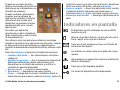
Menu
Select Menu.
The menu is a starting point from
which you can open all
applications in the device or on a
memory card.
The menu contains applications
and folders, which are groups of
similar applications. All
applications you install in the
device yourself are by default
saved in the Applications folder.
To open an application, select the
application, that is, scroll to it, and
press the scroll key.
To switch between the open applications, press and hold the
home key, and select an application. Leaving applications
© 2009 Nokia. All rights reserved.
running in the background increases the demand on battery
power and reduces the battery life.
Select Options and from the following:
• Change Menu view — View applications in a list or a grid.
• Memory details — View the memory consumption of
different applications and data stored on the device or
memory card and to check the amount of free memory.
• New folder — Create a new folder.
• Rename — Rename a new folder.
• Move — Rearrange the folder. Scroll to the application
you want to move, and select Move. A check mark is placed
beside the application. Scroll to a new location and select
OK.
• Move to folder — Move an application to a different
folder. Scroll to the application you want to move, and
select Move to folder, the new folder, and OK.
• Download applications — Download applications from
the web.
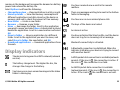
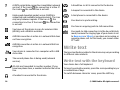
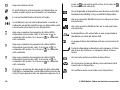
Display indicators
The device is being used in a UMTS network (network
service).
The battery charge level. The higher the bar, the
stronger the charge in the battery.
You have one or more unread messages in the Inbox
folder in Messaging.
© 2009 Nokia. All rights reserved.
You have received new e-mail in the remote
mailbox.
There are messages waiting to be sent in the Outbox
folder in Messaging.
You have one or more missed phone calls.
The keys of the device are locked.
An alarm is active.
You have activated the Silent profile, and the device
does not ring for an incoming call or message.
Bluetooth connectivity is activated.
A Bluetooth connection is established. When the
indicator is blinking, your device is trying to connect
with another device.
A GPRS packet data connection is available (network
service). If the icon is , the connection is active. If
the icon is , the connection is on hold.
An EGPRS packet data connection is available
(network service). If the icon is , the connection is
active. If the icon is , the connection is on hold.
25
A UMTS packet data connection is available (network
service). If the icon is , the connection is active. If
the icon is , the connection is on hold.
A handsfree car kit is connected to the device.
High-speed downlink packet access (HSDPA) is
supported and available (network service). The icon
may vary between regions. If the icon is , the
connection is active. If the icon is , the connection
is on hold.
A text phone is connected to the device.
You have set the device to scan for wireless LANs
(WLAN), and a WLAN is available.
A WLAN connection is active in a network that does
not have encryption.
A WLAN connection is active in a network that has
encryption.
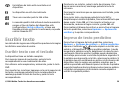
Your device is connected to a computer with a USB
data cable.
The second phone line is being used (network
service).
All calls are forwarded to another number. If you
have two phone lines, a number indicates the active
line.
A headset is connected to the device.
26
A loopset is connected to the device.
Your device is synchronizing.
You have an ongoing push-to-talk connection.
Your push-to-talk connection is in the do not disturb
mode, because the ringing type of your device is set
to Beep once or Silent, or you have an incoming or
ongoing phone call. In this mode, you cannot make
PTT calls.
Write text
The input methods provided in the device may vary according
to different sales markets.
Write text with the keyboard
Your device has a full keyboard.
To insert punctuation marks, press the corresponding key or
a combination of keys.
To switch between character cases, press the shift key.
© 2009 Nokia. All rights reserved.
To insert characters printed at the top of keys, press and hold
the corresponding key, or press and hold the function key and
press the corresponding key.
To erase a character, press the backspace key. To erase
several characters, press and hold the backspace key.
To insert characters not shown on the keyboard, press the chr
key.
To copy text, press and hold the shift key and scroll to
highlight the word, phrase, or line of text you want to copy.
Press Ctrl + C. To insert the text into a document, move to the
correct place, and press Ctrl + V.
To change the writing language, or to activate predictive text
input, select Options > Input options and the appropriate
option.
Predictive text input
To activate predictive text input, select Options > Input
options > Activate prediction. The indicator
is
displayed. When you start writing a word, your device
suggests possible words. When the correct word is found,
scroll right to confirm it. While writing, you can also scroll
down to access a list of suggested words. If the desired word
is on the list, select the word. If the word you are writing is
not in the dictionary of the device, the device suggests a
possible word, while the word you were writing is shown
above the suggested word. Scroll up to select your word. The
word is added to the dictionary when you start writing the
next word.
© 2009 Nokia. All rights reserved.
To deactivate predictive text input, select Options > Input
options > Deactivate prediction.
To define the settings for text input, select Options > Input
options > Settings.
To change the writing language, select Options > Input
options > Writing language.
Search
About Search
Select Menu > Applications > Search.
Search enables you to use various internet-based search
services to find, for example, websites, and images. The
content and availability of the services may vary.
Search settings
Select Menu > Applications > Search.
To change the Search application settings, select Options >
Settings and from the following:
• Country or region — Select the country or region from
which you want to search.
• Connection — Select the access point, and allow or deny
network connections.
• Search services — Select whether service providers and
search categories are shown.
• General — Enable or disable tooltips, and clear the search
history.
27
Common actions in
several applications
You can find the following actions in several applications:
To change the profile, or switch off or lock the device, press
the power key briefly.
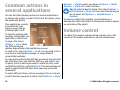
If an application consists
of several tabs (see
figure), open a tab by
scrolling right or left.
To save the settings that
you have configured in an
application, select Back.
Unmark > Mark to select one item or Options > Mark/
Unmark > Mark all to select all items.
Tip: To select almost all items, first select Options >
Mark/Unmark > Mark all, then select the items you
do not want, and Options > Mark/Unmark >
Unmark.
To select an object (for example, an attachment in a
document) scroll to the object so that square markers appear
on each side of the object.
Volume control
To adjust the earpiece volume during a phone call or the
volume of the media applications, use the volume keys.
To save a file, select
Options > Save. There
are different saving
options depending on the application you use.
To send a file, select Options > Send. You can send a file in
an e-mail or multimedia message, or using different
connectivity methods.
To copy, press and hold the shift key, and select the text with
the scroll key. Press and hold the shift key, and select Copy.
To paste, scroll to where you want to paste the text, press
and hold the shift key, and select Paste. This method may not
work in applications that have their own copy and paste
commands.
To select different items, such as messages, files or contacts,
scroll to the item you want to select. Select Options > Mark/
28
© 2009 Nokia. All rights reserved.
Personalization
You can customize your device by, for example, adjusting the
various tones, background images, and screen savers.
Profiles
Select Menu > Control panel > Profiles.
You can adjust and customize the ringing tones, alert tones,
and other device tones for different events, environments, or
caller groups. The active profile is shown at the top of the
display in the home screen. However, if the active profile is
General, only today's date is shown.
To create a new profile, select Options > Create new, and
define the settings.
To customize a profile, select a profile and Options >
Customize.
To change a profile, select a profile and Options >
Activate. The Offline profile prevents your device from
accidentally switching on, sending or receiving messages, or
using wireless LAN, Bluetooth connectivity, GPS, or FM radio;
it also closes any internet connection that may be in
operation when the profile is selected. The Offline profile
does not prevent you from establishing a wireless LAN or
Bluetooth connection at a later time, or from restarting the
GPS or FM radio, so comply with any applicable safety
requirements when establishing and using these features.
© 2009 Nokia. All rights reserved.
To set the profile to be active until a certain time within the
next 24 hours, scroll to the profile, select Options >
Timed, and set the time. When the time expires, the profile
changes back to the previously active non-timed profile.
When the profile is timed, is displayed in the home screen.
The Offline profile cannot be timed.
To delete a profile that you created, select Options > Delete
profile. You cannot delete the predefined profiles.
Select ringing tones
To set a ringing tone for a profile, select Options >
Customize > Ringing tone. Select a ringing tone from the
list, or select Download sounds to open a bookmark folder
containing a list of bookmarks for downloading tones using
the browser. Any downloaded tones are saved to Gallery.
To play the ringing tone for a selected contact group only,
select Options > Customize > Alert for, and select the
desired group. Phone calls coming from outside that group
have a silent alert.
To change the message tone, select Options > Customize >
Message alert tone.
29
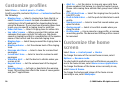
Customize profiles
Select Menu > Control panel > Profiles.
Scroll to a profile, and select Options > Customize and from
the following:
• Ringing tone — Select a ringing tone from the list, or
select Download sounds to open a bookmark folder
containing a list of bookmarks for downloading tones
using the browser. If you have two alternate phone lines
in use, you can specify a ringing tone for each line.
• Video call tone — Select a ringing tone for video calls.
• Say caller's name — When you select this option and
someone from your contacts list calls you, the device
sounds a ringing tone that is a combination of the spoken
name of the contact and the selected ringing tone.
• Ringing type — Select how you want the ringing tone to
alert you.
• Ringing volume — Set the volume level of the ringing
tone.
• Message alert tone — Select a tone for received text
messages.
• E-mail alert tone — Select a tone for received e-mail
messages.
• Vibrating alert — Set the device to vibrate when you
receive a call.
• Keypad tones — Set the volume level of the keypad
tones.
• Warning tones — Activate or deactivate the warning
tones. This setting also affects the tones of some games
and Java™ applications.
30
• Alert for — Set the device to ring only upon calls from
phone numbers that belong to a selected contact group.
Phone calls coming from outside that group have a silent
alert.
• PTT call alert tone — Select the ringing tone for push to
talk (PTT) calls.
• Push to talk status — Set the push to talk status to each
profile.
• Opening sound — Select a tone that sounds when you
open the slide.
• Closing sound — Select a tone that sounds when you
close the slide.
• Profile name — Give a name to a new profile, or rename
an existing profile. The Normal and Offline profiles cannot
be renamed.
Customize the home
screen
Select Menu > Control panel > Modes.
To change the name of the current home screen, select
Options > Rename mode.
To select which applications and notifications you want to
see in the home screen, select Home screen applications.
To change the theme of the home screen currently in use,
select General theme.
To change the background image of the home screen
currently in use, select Wallpaper.
© 2009 Nokia. All rights reserved.
To change from one home screen to another, scroll to Current
mode, and select Options > Change.
Change the display
theme
Select Menu > Control panel > Themes.
Select from the following:
• General — Change the theme used in all applications.
• Menu view — Change the theme used in the main menu.
• Home s. — Change the theme used in the home screen.
• Wallpaper — Change the background image in the home
screen.
• Power saver — Select an animation as the screen saver.
• Call image — Change the image displayed during calls.
To activate or deactivate the theme effects, select General >
Options > Theme effects.
Download a theme
Select Menu > Control panel > Themes.
To download a theme, select General > Download
themes > Options > Go to web address. Enter the Web
address from which you want to download your theme. Once
the theme is downloaded, you can preview or activate the
theme.
To preview a theme, select Options > Preview.
© 2009 Nokia. All rights reserved.
To activate a theme, select Options > Set.
Change audio themes
You can set sounds for various device events. The sounds can
be tones, speech, or a combination of both.
Select Menu > Control panel > Themes and Audio
themes.
To change the current audio theme, select Active audio
theme.
To add 3-D effects to the audio theme, select Options > 3D ringing tones.
To create a new audio theme, select Options > Save
theme.
To set a sound for an event, select an event group, such as
Messaging events. Select the desired event and from the
following:
• Silent — Deactivate the sound of the device event.
• Tone — Set a tone as the sound for the device event.
• Speech — Set a synthesized voice tag as the sound for the
device event. Enter the desired text, and select OK. This
option is not available if you have selected Say caller's
name in Profiles.
Select an event group, such as Messaging events. Select the
desired event, Options, and from the following:
• Play — Play the sound before activating it.
• Activate sounds — Activate all the sounds in the event
group.
31
• Deactivate sounds — Deactivate all the sounds in the
event group.
3-D ringing tones
Select Menu > Control panel > 3-D tones.
To enable three-dimensional (3-D) sound effects for ringing
tones, select 3-D ringing tone effects > On. Not all ringing
tones support 3–D effects.
To change the 3–D effect that is applied to the ringing tone,
select Sound trajectory and the desired effect.
To modify the 3–D effect, select from the following:
• Trajectory speed — Select the speed at which sound
moves from one direction to another. This setting is not
available for all effects.
• Reverberation — Select the desired effect to adjust the
amount of echo.
• Doppler effect — Select On to set the ringing tone sound
higher when you are closer to your device, and lower when
you are farther away. This setting is not available for all
effects.
To listen to the ringing tone with the 3–D effect, select
Options > Play tone.
To adjust the volume of the ringing tone, select Menu >
Control panel > Profiles and Options > Customize >
Ringing volume.
32
© 2009 Nokia. All rights reserved.
New from Nokia Eseries
Your new Nokia Eseries device contains new versions of the
Calendar, Contacts, and E-mail applications, as well as a new
home screen.
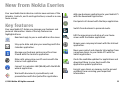
Key features
Your new Nokia E75 helps you manage your business and
personal information. Some of the key features are
highlighted here:
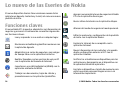
Read and reply to your e-mail while on the move.
Stay up-to-date and plan your meetings with the
Calendar application.
Manage your business partners and free time
friends with the Contacts application.
Make calls using voice over IP services with the
Internet call application.
Connect to a wireless LAN (WLAN) with the WLAN
wizard application.
Work with documents, spreadsheets, and
presentations with the Quickoffice application.
© 2009 Nokia. All rights reserved.
Add new business applications to your Nokia E75
with the Download! application.
Find points of interest with the Maps application.
Switch from business to personal mode.
Edit the appearance and setup of your home
screen with the Modes application.
Browse your company intranet with the Intranet
application.
Move your contact and calendar information from
a previous device to your Nokia E75 with the
Switch application.
Check the available updates for applications and
download them to your device with the
Application update application.
Encrypt your device or memory card to prevent
outsiders from accessing your important
information.
33
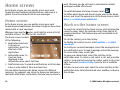
Home screen
In the home screen, you can quickly access your most
frequently used features and applications, and view at a
glance if you have missed calls or new messages.
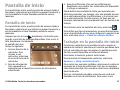
Home screen
In the home screen, you can quickly access your most
frequently used applications, and view at a glance if you have
missed calls or new messages.
icon, scroll right to access a list of
Whenever you see the
available actions. To close the list, scroll left.
The home screen consists
of the following:
1. Application shortcuts.
To access an
application, select the
shortcut of the
application.
2. Information area. To
check an item
displayed in the
information area, select the item.
3. Notification area. To view the notifications, scroll to a box.
A box is only visible if there are items in it.
You can define two separate home screens for different
purposes, for example, one screen to show your business email and notifications, and another to show your personal e34
mail. This way, you do not have to see business-related
messages outside office hours.
To switch between the home screens, select
.
To define which items and shortcuts you want in the home
screen, and to set the appearance of the home screen, select
Menu > Control panel and Modes.
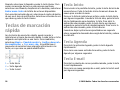
Work on the home screen
To search for contacts in the home screen, start entering the
contact's name. Select the desired contact from the list of
proposed matches. This feature may not be available in all
languages.
To call the contact, press the call key.
To disable the contact search, select Options > Contact
search off.
To check your received messages, select the message box in
the notification area. To read a message, select the message.
To access other tasks, scroll right.
To view your missed calls, select the calls box in the
notification area. To return a call, select a call, and press the
call key. To send a text message to a caller, select a call, scroll
right, and select Send text msg. from the list of available
actions.
To listen to your voice mail, select the voice mail box in the
notification area. Select the desired voice mailbox, and press
the call key.
© 2009 Nokia. All rights reserved.
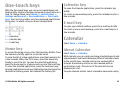
One-touch keys
With the One-touch keys, you can access applications and
tasks quickly. Each key has been assigned an application or a
task. To change these, select Menu > Control panel >
Settings and General > Personalization > One-touch
keys. Your service provider may have assigned applications
to the keys, in which case you cannot change them.
Calendar key
To open the Calendar application, press the calendar key
briefly.
To create a new meeting entry, press the calendar key for a
few seconds.
E-mail key
To open your default mailbox, press the e-mail key briefly.
To create a new e-mail message, press the e-mail key for a
few seconds.
1 — Home key
2 — Calendar key
3 — E-mail key
Home key
To access the home screen, press the home key briefly. Press
the home key briefly again to access the menu.
To view the list of active applications, press the home key for
a few seconds. When the list is open, press the home key
briefly to scroll the list. To open the selected application,
press the home key for a few seconds or press the scroll key.
To close the selected application, press the backspace key.
Leaving applications running in the background increases the
demand on battery power and reduces the battery life.
© 2009 Nokia. All rights reserved.
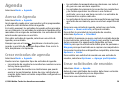
Calendar
Select Menu > Calendar.
About Calendar
Select Menu > Calendar.
With calendar, you can create and view scheduled events and
appointments, and switch between different calendar views.
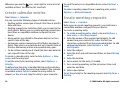
In the month view, calendar entries are marked with a
triangle. Anniversary entries are also marked with an
exclamation mark. The entries of the selected day are
displayed as a list.
To open calendar entries, select a calendar view and an entry.
35
Whenever you see the
icon, scroll right to access a list of
available actions. To close the list, scroll left.
Create calendar entries
Select Menu > Calendar.
You can create the following types of calendar entries:
• Meeting entries remind you of events that have a specific
date and time.
• Meeting requests are invitations that you can send to the
participants. Before you can create meeting requests you
must have a compatible mailbox configured to your
device.
• Memo entries are related to the whole day but not to a
specific time of the day.
• Anniversary entries remind you of birthdays and special
dates. They refer to a certain day but not a specific time of
the day. Anniversary entries are repeated every year.
• To-do entries remind you of a task that has a due date but
not a specific time of the day.
To create a calendar entry, select a date, Options > New
entry, and the entry type.
To set the priority for meeting entries, select Options >
Priority.
To define how the entry is handled during synchronization,
select Private to hide the entry from viewers if the calendar
is available online, Public to make the entry visible to
viewers, or None to not copy the entry to your computer.
36
To send the entry to a compatible device, select Options >
Send.
To make a meeting request from a meeting entry, select
Options > Add participants.
Create meeting requests
Select Menu > Calendar.
Before you can create meeting requests, you must have a
compatible mailbox configured for your device.
To create a meeting entry:
1. To create a meeting entry, select a day and Options >
New entry > Meeting request.
2. Enter the names of the required participants. To add
names from your contacts list, enter the first few
characters, and select from the proposed matches. To add
optional participants, select Options > Add
participants.
3. Enter the subject.
4. Enter the start and end times and dates, or select All-day
event.
5. Enter the location.
6. Set an alarm for the entry, if needed.
7. For a recurring meeting, set the recurrence time, and
enter the end date.
8. Enter a description.
To set the priority for the meeting request, select Options >
Priority.
© 2009 Nokia. All rights reserved.
To send the meeting request, select Options > Send.
Calendar views
Select Menu > Calendar.
You can switch between the following views:
• Month view shows the current month and the calendar
entries of the selected day in a list.
• Week view shows the events for the selected week in
seven day boxes.
• Day view shows the events for the selected day grouped
into time slots according to their starting time.
• To-do view shows all to-do items.
• Agenda view shows the events for the selected day in a
list.
Tip: To switch between views, press * .
To change the view, select Options > Change view and the
desired view.
Tip: To open the week view, select the week number.
To move to the next or the previous day in month, week, day,
and agenda view, select the desired day.
To change the default view, select Options > Settings >
Default view.
© 2009 Nokia. All rights reserved.
Contacts
Select Menu > Contacts.
About Contacts
Select Menu > Contacts.
With Contacts, you can save and update contact information,
such as phone numbers, home addresses, and e-mail
addresses of your contacts. You can add a personal ringing
tone or a thumbnail image to a contact. You can also create
contact groups, which allow you to communicate with
several contacts at the same time, and send contact
information to compatible devices.
Whenever you see the
icon, scroll right to access a list of
available actions. To close the list, scroll left.
Work with contacts
Select Menu > Contacts.
To create a contact, select Options > New contact, and
enter the details of the contact.
To copy contacts from the memory card, if available, select
Options > Create backup > Memory card to phone.
To search for contacts, start entering the contact's name in
the search field.
37
Create contact groups
Select Menu > Contacts.
1. To create a contact group, scroll to each contact you want
to add to the group, and select Options > Mark/
Unmark > Mark.
2. Select Options > Group > Add to group > Create new
group, and enter a name for the group.
If you want to make conference calls to the group using a
conference service, define the following:
• Conf. service number — Enter the conference call service
number.
• Conf. service ID — Enter the conference call ID.
• Conf. service PIN — Enter the conference call PIN code.
To make a conference call to the group using the conference
service, select the group, scroll right, and select Call conf.
service.
Search for contacts in a remote
database
To activate remote contact search, select Options >
Settings > Contacts > Remote search server.
To search for contacts in a remote database, select
Contacts > Options > Search from remote. Enter the
name of the contact you want to search for, and select
Search. The device establishes a data connection to the
remote database.
38
To search for contacts in the home screen, start entering
characters in the home screen, and select the database from
the proposed matches.
To change the remote contacts database, select Options >
Settings > Contacts > Remote search server. This setting
affects the database used in the Contacts and Calendar
applications and the home screen, but not the database that
is used for e-mail.
Add ringing tones for contacts
Select Menu > Contacts.
To add a ringing tone for a contact, select the contact,
Options > Ringing tone, and a ringing tone. The ringing
tone sounds when the contact calls you.
To add a ringing tone for a contact group, select the contact
group, Options > Group > Ringing tone, and a ringing
tone.
To remove the ringing tone, select Default tone from the list
of ringing tones.
Change Contacts settings
Select Menu > Contacts.
To change the settings of the Contacts application, select
Options > Settings and from the following:
• Contacts to display — Select the memories from where
contacts are displayed.
• Default saving memory — Select the default memory to
save contacts.
© 2009 Nokia. All rights reserved.
• Name display — Change the way the contacts' names are
displayed.
• Default contact list — Select which contacts directory
opens when you open the Contacts application.
• Remote search server — Change the remote contacts
database. This option is available only if remote contacts
database is supported by your service provider.
Multitasking
You can have several applications open at the same time. To
switch between active applications, press and hold the home
key, scroll to an application, and press the scroll key. To close
the selected application, press the backspace key.
Example: When you have an active phone call and
want to check your calendar, press the home key to
access the menu, and open the Calendar application.
The phone call remains active in the background.
Example: When you are writing a message and want
to check a web site, press the home key to access the
menu, and open the Web application. Select a
bookmark or enter the web address manually, and
select Go to. To return to your message, press and hold
the home key, scroll to the message and press the scroll
key.
Ovi Files
With Ovi Files, you can use your Nokia E75 to access content
on your computer if it is switched on and connected to the
© 2009 Nokia. All rights reserved.
internet. You will need to install the Ovi Files application on
every computer you want to access with Ovi Files.
You can try out Ovi Files for a limited trial period.
With Ovi Files, you can:
• Browse, search, and view your images. You do not need to
upload the images to the website but you can access your
computer content with your mobile device.
• Browse, search, and view your files and documents.
• Transfer songs from your computer to your device.
• Send files and folders from your computer without moving
them to and from your device first.
• Access files on your computer even when your computer
is switched off. Just choose which folders and files you
want to be available, and Ovi Files automatically keeps an
up-to-date copy stored in a protected, online storage for
access even when your computer is switched off.
For support, see files.ovi.com/support.
About Ovi Store
In Ovi Store, you can download mobile games, applications,
videos, images, and ringing tones to your device. Some of the
items are free of charge; others you need to purchase using
your credit card or through your phone bill. Ovi Store offers
you content that is compatible with your mobile device and
relevant to your tastes and location.
This service may not be available in all countries and regions.
The content in Ovi Store is sorted into the following
categories:
39
•
•
•
•
•
40
Recommended
Games
Personalization
Applications
Audio & video
© 2009 Nokia. All rights reserved.
Messaging
Select Menu > Messaging.
In Messaging (network service), you can send and receive text
messages, multimedia messages, audio messages, and email messages. You can also receive web service messages,
cell broadcast messages, and special messages containing
data, and send service commands.
Before sending or receiving messages, you may need to do
the following:
• Insert a valid SIM card in the device and be located in the
service area of a cellular network.
• Verify that the network supports the messaging features
you want to use and that they are activated on your SIM
card.
• Define the internet access point settings on the device.
• Define the e-mail account settings on the device.
• Define the text message settings on the device.
• Define the multimedia message settings on the device.
The device may recognize the SIM card provider and
automatically configure some of the message settings. If not,
you may need to define the settings manually; or contact your
service provider to configure the settings.
Messaging folders
Select Menu > Messaging.
© 2009 Nokia. All rights reserved.
Messages and data received using Bluetooth connectivity are
stored in the Inbox folder. E-mail messages are stored in the
Mailbox folder. Messages that you have been writing can be
stored in the Drafts folder. Messages that are waiting to be
sent are stored in the Outbox folder, and messages that have
been sent, excluding Bluetooth messages, are stored in the
Sent folder.
Tip: Messages are placed in the Outbox folder, for
example, when your device is outside network
coverage.
Note: The message sent icon or text on your device
screen does not indicate that the message is received at the
intended destination.
To request the network to send you a delivery report of the
text messages and multimedia messages you have sent
(network service), select Options > Settings > Text
message > Receive report or Multimedia message >
Receive reports. The reports are saved in the Reports folder.
Organize messages
Select Menu > Messaging and My folders.
To create a new folder to organize your messages, select
Options > New folder.
41
To rename a folder, select Options > Rename folder. You
can only rename folders that you have created.
To move a message to another folder, select the message,
Options > Move to folder, the folder, and OK.
2. Enter your e-mail address and password. If the wizard is
not able to configure your e-mail settings automatically,
you need to select your e-mail account type and enter the
related account settings.
If your device contains any additional e-mail clients, those
are offered to you when you start the E-mail wizard.
To view the properties of a message, select the message and
Options > Message details.
Send e-mail
To sort messages in a specific order, select Options > Sort
by.
E-mail
You can access your e-mail accounts in Menu > E-mail and
Menu > Messaging.
Set up your e-mail
With the Nokia e-mail wizard, you can set up your corporate
e-mail account, such as Microsoft Outlook, Mail for Exchange,
or Intellisync, and your internet e-mail account.
When setting up your corporate e-mail, you may be prompted
for the name of the server associated with your e-mail
address. Contact your company IT department for details
before you start setting up your corporate e-mail account.
When setting up your internet e-mail, you may need to
contact your e-mail service provider to obtain your e-mail
account type (POP or IMAP).
1. To start the wizard, go to the home screen, and select the
E-mail wizard.
42
Select Menu > Messaging.
1. Select your mailbox and Options > Create email.
2. In the To field, enter the recipient's e-mail address. If the
recipient's e-mail address can be found in Contacts, start
entering the recipient's name, and select the recipient
from the proposed matches. If you add several recipients,
insert ; to separate the e-mail addresses. Use the Cc field
to send a copy to other recipients, or the Bcc field to send
a blind copy to recipients. If the Bcc field is not visible,
select Options > More > Show Bcc field.
3. In the Subject field, enter the subject of the e-mail.
4. Enter your message in the text area.
5. Select Options and from the following:
• Add attachment — Add an attachment to the
message.
• Priority — Set the priority of the message.
• Flag — Flag the message for follow-up.
• Insert template — Insert text from a template.
• Add recipient — Add recipients to the message from
Contacts.
© 2009 Nokia. All rights reserved.
• Editing options — Cut, copy, or paste the selected
text.
• Input options — Activate or deactivate predictive text
input, or select the writing language.
6. Select Options > Send.
Add attachments
Select Menu > Messaging.
To write an e-mail message, select your mailbox and
Options > Create email.
To add an attachment to the e-mail message, select
Options > Add attachment.
To remove the selected attachment, select Options >
Remove attachment.
Read e-mail
To forward the message, select Options > Forward.
Download attachments
Select Menu > Messagingand a mailbox.
To view the attachments in a received e-mail message, scroll
to the attachment field, and select Options > Actions. If
there is one attachment in the message, select Open to open
the attachment. If there are several attachments, select View
list to see a list showing which attachments have been
downloaded or not.
To download the selected attachment or all the attachments
from the list to your device, select Options > Download or
Download all. The attachments are not saved in your device,
and are deleted when you delete the message.
To save the selected attachment or all the downloaded
attachments in your device, select Options > Save or Save
all.
Select Menu > Messaging.
To open the selected, downloaded attachment, select
Options > Actions > Open.
Important: Exercise caution when opening messages.
Messages may contain malicious software or otherwise be
harmful to your device or PC.
Reply to a meeting request
To read a received e-mail message, select the mailbox, and
select the message from the list.
To reply to the message sender, select Options > Reply. To
reply to the sender and all other recipients, select Options >
Reply to all.
© 2009 Nokia. All rights reserved.
Select Menu > Messagingand a mailbox.
Select a received meeting request, Options, and from the
following:
• Accept — Accept the meeting request.
• Decline — Decline the meeting request.
• Forward — Forward the meeting request to another
recipient.
43
• Remove from calendar — Remove a canceled meeting
from your calendar.
Disconnect from the mailbox
Search for e-mail messages
To cancel the synchronization between the device and the email server, and to work with e-mail without a wireless
connection, select Options > Disconnect. If your mailbox
does not have the Disconnect option, select Options >
Exit to disconnect from the mailbox.
Select Menu > Messagingand a mailbox.
To search for items within the recipients, subjects, and body
texts of the e-mail messages in the mailbox, select Options >
Search.
To stop the search, select Options > Stop search.
To start a new search, select Options > New search.
Delete e-mails
Select Menu > Messagingand a mailbox.
To delete an e-mail message, select the message and
Options > Actions > Delete. The message is placed in the
Deleted items folder, if available. If there is no Deleted items
folder available, the message is deleted permanently.
To empty the Deleted items folder, select the folder and
Options > Empty deleted items.
Switch between e-mail folders
Select Menu > Messagingand a mailbox.
To open another e-mail folder or mailbox, select Inbox at the
top of the display. Select the e-mail folder or mailbox from
the list.
44
Select Menu > Messagingand a mailbox.
To start the synchronization again, select Options >
Connect.
Set an out-of-office reply
Select Menu > E-mail.
To set an out-of-office reply, if available, select your mailbox
andOptions > Settings > Mailbox > Out of office >
On or Options > Settings > Mailbox settings > Out of
office > On.
To enter the text for the reply, select Out of office reply.
General e-mail settings
Select Menu > E-mail and Settings > Global settings.
Select from the following:
• Message list layout — Select whether the e-mail
messages in Inbox display one or two lines of text.
• Body text preview — Preview messages when scrolling
through the list of e-mail messages in Inbox.
• Title dividers — To be able to expand and collapse the
list of e-mail messages, select On.
© 2009 Nokia. All rights reserved.
• Download notifications — Set the device to display a
notification when an e-mail attachment has been
downloaded.
• Warn before delete — Set the device to display a
warning before you delete an e-mail message.
• Load HTML images — Automatically load HTML images
in e-mails.
• Home screen — Define how many lines of e-mail are
displayed in the home screen information area.
Synchronization settings
Select Menu > E-mail and Settings, and a mailbox.
To define the synchronisation settings for a POP/IMAP e-mail
account, select the e-mail account, What to sync, and from
the following:
• Retrieve — Retrieve headers only or entire e-mails.
• Emails to retrieve — Define how many e-mails are
retrieved and from which folders e-mails are retrieved.
• IMAP4 folder path — Define the folder path for folders
to be subscribed.
• Folder subscriptions — Subscribe to other folders in the
remote mailbox and retrieve content from those folders.
Select and e-mail account, When to sync, and from the
following:
• Connection days — Define the synchronization days.
• Connection hours — Define the synchronization hours.
• Update interval — Define the synchronization interval.
• Retrieve when abroad — Define whether
synchronization takes place when you are outside of your
© 2009 Nokia. All rights reserved.
home network. Contact your service provider for
information on data transfer costs when roaming.
To define the synchronization settings for a Mail for Exchange
e-mail account, select the e-mail account, What to sync, and
from the following:
• Sync e-mail — Define whether e-mail is synchronized.
• Remove e-m. older than — Define how long
synchronized e-mails are visible on your device. If you
want all your synchronized e-mails to be always visible,
select None.
Select an e-mail account, When to sync, and from the
following:
• Peak sync days — Define the synchronization days.
• Peak start time — Define the peak synchronization start
time.
• Peak end time — Define the peak synchronization end
time.
• Peak sync schedule — Define the peak synchronization
interval.
• Off-peak sync schedule — Define the off-peak
synchronization interval.
• Sync while roaming — Define whether synchronization
takes place when you are outside of your home network.
Contact your service provider for information on data
transfer costs when roaming.
The options available for editing may vary.
45
Nokia Messaging
The Nokia Messaging service automatically sends e-mail from
your existing e-mail address to your Nokia E75. You can read,
respond to, and organize your e-mails on the go. The Nokia
Messaging service works with a number of internet e-mail
providers that are often used for personal e-mail, such as
Google e-mail services.
The Nokia Messaging service may be chargeable. For
information on possible costs, contact your service provider
or the Nokia Messaging service.
The Nokia Messaging service must be supported by your
network and may not be available in all regions.
Install the Nokia messaging application
1. Select Menu > Email > New.
2. Read the information on the display, and select Start.
3. Select Connect to allow your device to access the
network.
4. Enter your e-mail address and password.
The Nokia Messaging service can run on your device even if
you have installed other e-mail applications, such as Mail for
Exchange.
Mail for Exchange
With Mail for Exchange, you can receive your work e-mail to
your device. You can read and reply to your e-mails, view and
edit compatible attachments, view calendar information,
46
receive and reply to meeting requests, schedule meetings,
and view, add, and edit contact information.
ActiveSync
Use of the Mail for Exchange is limited to over-the-air
synchronization of PIM information between the Nokia
device and the authorized Microsoft Exchange server.
Mail for Exchange can be set up only if your company has
Microsoft Exchange Server. In addition, your company's IT
administrator must have activated Mail for Exchange for your
account.
Before starting to set up Mail for Exchange, ensure that you
have the following:
• A corporate e-mail ID
• Your office network user name
• Your office network password
• Your network domain name (contact your company's IT
department)
• Your Mail for Exchange server name (contact your
company's IT department)
Depending on your company's Mail for Exchange server
configuration, you may need to enter other information in
addition to those listed. If you do not know the correct
information, contact your company's IT department.
With Mail for Exchange, the use of the lock code may be
mandatory. The default lock code of your device is 12345, but
your company's IT administrator may have set a different one
for you to use.
You can access and modify the Mail for Exchange profile and
settings in the Messaging settings.
© 2009 Nokia. All rights reserved.
Message reader
With Message reader you can listen to text, multimedia, and
audio messages and e-mail.
To listen to new messages or e-mail, in the home screen,
press and hold the left selection key until Message reader
starts.
To listen to a message from your Inbox or e-mail from your
Mailbox, scroll to the message, and select Options >
Listen. To stop the reading, press the end key.
To pause and continue the reading, press the scroll key. To
skip to the next message, scroll right. To replay the current
message or e-mail, scroll left. To skip to the previous
message, scroll left at the beginning of the message.
To view the current message or e-mail in text format without
the sound, select Options > View.
Speech
Select Menu > Control panel > Phone > Speech.
With Speech, you can set the language, voice, and voice
properties for the message reader.
To set the language for the message reader, select
Language. To download additional languages to your
device, select Options > Download languages.
Tip: When you download a new language, you must
download at least one voice for that language.
© 2009 Nokia. All rights reserved.
To set the speaking voice, select Voice. The voice depends on
the selected language.
To set the speaking rate, select Speed.
To set the speaking volume, select Volume.
To view details of a voice, open the voice tab, and select the
voice and Options > Voice details. To listen to a voice,
select the voice and Options > Play voice.
To delete languages or voices, select the item and Options >
Delete.
Message reader settings
To change the message reader settings, open the Settings
tab, and define the following:
• Language detection — Activate automatic reading
language detection.
• Continuous reading — Activate continuous reading of
all selected messages.
• Speech prompts — Set the message reader to insert
prompts in messages.
• Audio source — Listen to messages through the earpiece
or loudspeaker.
Text and multimedia
messages
Select Menu > Messaging.
47
Only devices that have compatible features can receive and
display multimedia messages. The appearance of a message
may vary depending on the receiving device.
A multimedia message (MMS) can contain text and objects
such as images, sound clips, or video clips. Before you can
send or receive multimedia messages on your device, you
must define the multimedia message settings. Your device
may recognize the SIM card provider and configure the
correct multimedia message settings automatically. If not,
contact your service provider for the correct settings, order
the settings from your service provider in a configuration
message, or use the Settings wizard application.
Write and send messages
Select Menu > Messaging.
Important: Exercise caution when opening messages.
Messages may contain malicious software or otherwise be
harmful to your device or PC.
Before you can create a multimedia message or write an email, you must have the correct connection settings in place.
The wireless network may limit the size of MMS messages. If
the inserted picture exceeds this limit, the device may make
it smaller so that it can be sent by MMS.
Check the size limit of e-mail messages with your service
provider. If you attempt to send an e-mail message that
exceeds the size limit of the e-mail server, the message is left
in the Outbox folder, and the device attempts to resend it
periodically. Sending an e-mail requires a data connection,
and continuous attempts to resend the e-mail may increase
48
your phone bill. In the Outbox folder, you can delete such a
message, or move it to the Drafts folder.
1. Select New message > Message to send a text or
multimedia message (MMS), Audio message to send a
multimedia message that includes one sound clip, or Email to send an e-mail message.
2. In the To field, press the scroll key to select recipients or
groups from the contacts list, or enter the recipient’s
phone number or e-mail address. To add a semicolon (;)
that separates the recipients, press *. You can also copy
and paste the number or address from the clipboard.
3. In the subject field, enter the subject of the e-mail. To
change the fields that are visible, select Options >
Message header fields.
4. In the message field, write the message. To insert a
template or note, select Options > Insert content >
Insert text > Template or Note.
5. To add a media file to a multimedia message, select
Options > Insert content, the file type or source, and
the desired file. To insert a business card, slide, note, or
some other file to the message, select Options > Insert
content > Insert other.
6. To capture an image or record a video or sound clip for a
multimedia message, select Options > Insert
content > Insert image > New, Insert video clip >
New, or Insert sound clip > New.
7. To add an attachment to an e-mail, select Options and
the attachment type. E-mail attachments are indicated by
.
© 2009 Nokia. All rights reserved.
8. To send the message, select Options > Send, or press
the call key.
To view SIM card messages, open the folder where you copied
the messages, and open a message.
Note: The message sent icon or text on your device
screen does not indicate that the message is received at the
intended destination.
Your device supports text messages beyond the limit for a
single message. Longer messages are sent as two or more
messages. Your service provider may charge accordingly.
Characters with accents, other marks, or some language
options take more space, and limit the number of characters
that can be sent in a single message.
You may not be able to send video clips that are saved in the
MP4 file format or that exceed the size limit of the wireless
network in a multimedia message.
Receive and reply to multimedia
messages
Text messages on the SIM card
Select Menu > Messaging and Options > SIM messages.
Text messages may be stored on your SIM card. Before you
can view SIM messages, you must copy the messages to a
folder in the device. After copying the messages to a folder,
you can view them in the folder or delete them from the SIM
card.
1. Select Options > Mark/Unmark > Mark or Mark all to
mark every message.
2. Select Options > Copy.
3. Select a folder and OK to begin copying.
© 2009 Nokia. All rights reserved.
Important: Exercise caution when opening messages.
Messages may contain malicious software or otherwise be
harmful to your device or PC.
Tip: If you receive multimedia messages that contain
objects unsupported by your device, you cannot open
them. Try to send these objects to another device such
as a computer, and open them there.
1. To reply to a multimedia message, open the message, and
select Options > Reply.
2. Select To sender to reply to the sender, To all to reply to
everyone included in the received message, Via audio
message to reply with an audio message, or Via e-mail
to reply with an e-mail message. E-mail message is
available only if a mailbox is configured and the message
is sent from an e-mail address.
Tip: To add recipients to your reply, select
Options > Add recipient to select the recipients
of the message from Contacts, or enter the
recipients' phone numbers or e-mail addresses
manually in the To field.
3. Enter the text of the message, and select Options >
Send.
49
Create presentations
Select Menu > Messaging.
Creating multimedia presentations is not possible if MMS
creation mode is set to Restricted. To change the setting,
select Options > Settings > Multimedia message > MMS
creation mode > Free or Guided.
1. To create a presentation, select New message >
Message. The message type is changed to multimedia
message based on the inserted content.
2. In the To field, enter a recipient's number or e-mail
address, or press the scroll key to add a recipient from the
contacts list. If you enter more than one number or e-mail
address, separate them with a semicolon.
3. Select Options > Insert content > Insert
presentation and a presentation template. A template
may define which media objects you can include in the
presentation, where they appear, and which effects are
displayed between images and slides.
4. Scroll to the text area, and enter the text.
5. To insert images, sound or video clips, or notes in your
presentation, scroll to the corresponding object area, and
select Options > Insert.
6. To add slides, select Options > Insert > New slide.
To select the background color for the presentation and
background images for different slides, select Options >
Background settings.
To set effects between images or slides, select Options >
Effect settings.
50
To preview the presentation, select Options > Preview.
Multimedia presentations may only be viewed in compatible
devices that support presentations. They may appear
different in different devices.
View presentations
To view a presentation, open the multimedia message from
the Inbox folder. Scroll to the presentation, and press the
scroll key.
To pause the presentation, press either selection key.
To resume playing the presentation, select Options >
Continue.
If the text or images are too large to fit on the display, select
Options > Activate scrolling, and scroll to see the entire
presentation.
To find phone numbers and e-mail or web addresses in the
presentation, select Options > Find. You may use these
numbers and addresses to make calls, send messages, or
create bookmarks, for example.
View and save multimedia
attachments
To view multimedia messages as complete presentations,
open the message, and select Options > Play
presentation.
© 2009 Nokia. All rights reserved.
Tip: To view or play a multimedia object in a
multimedia message, select View image, Play sound
clip, or Play video clip.
To view the name and size of an attachment, select the
message and Options > Objects.
To save a multimedia object, select Options > Objects, the
object, and Options > Save.
Special message types
Select Menu > Messaging.
You can receive special messages that contain data, such as
operator logos, ringing tones, bookmarks, or internet access
or e-mail account settings.
To save the contents of these messages, select Options >
Save.
Service messages
Service messages are sent to your device by service providers.
Service messages may contain notifications such as news
headlines, services, or links through which the message
content can be downloaded.
To define the service message settings, select Options >
Settings > Service message.
To download the service or message content, select
Options > Download message.
© 2009 Nokia. All rights reserved.
To view information about the sender, web address,
expiration date, and other details of the message before
downloading it, select Options > Message details.
Send service commands
You can send a service request message (also known as a
USSD command) to your service provider and request
activation for certain network services. Contact your service
provider for the service request text.
To send a service request message, select Options > Service
commands. Enter the service request text and select
Options > Send.
Cell broadcast
Select Menu > Messaging and Options > Cell broadcast.
With the cell broadcast network service, you can receive
messages on various topics from your service provider, such
as weather or traffic conditions in a particular region. For
available topics and relevant topic numbers, contact your
service provider. Cell broadcast messages cannot be received
when the device is in the remote SIM mode. A packet data
(GPRS) connection may prevent cell broadcast reception.
Cell broadcast messages cannot be received in UMTS (3G)
networks.
To receive cell broadcast messages, you may need to turn cell
broadcast reception on. Select Options > Settings >
Reception > On.
51
To view messages related to a topic, select the topic.
Messaging settings
Select Menu > Messaging and Options > Settings.
Open the message type in question, and define all fields
marked with Must be defined or with a red asterisk.
Your device may recognize the SIM card provider and
configure the correct text message, multimedia message,
and GPRS settings automatically. If not, contact your service
provider for the correct settings, order the settings from your
service provider in a configuration message, or use the
Settings wizard application.
• Message center in use — Select a message center to send
the message.
• Character encoding — Select Reduced support to use
automatic character conversion to another encoding
system when available.
• Receive report — Select Yes if you want the network to
send you delivery reports on your messages (network
service).
• Message validity — Select how long the message center
resends your message if the first attempt fails (network
service). If the recipient cannot be reached within the
validity period, the message is deleted from the message
center.
• Message sent as — Convert the message to another
format, for example, fax or e-mail. Change this option only
if you are sure that your message center is able to convert
text messages into these other formats. For more
information, contact your service provider.
• Preferred connection — Select the preferred method of
connection when sending text messages from your device.
• Reply via same center — Select whether you want the
reply message to be sent using the same text message
center number (network service).
Text message settings
Multimedia message settings
To receive messages related to a topic, select Options >
Subscribe.
Tip: You can set important topics as hot topics. You are
notified in the home screen, when you receive a
message related to a hot topic. Select a topic and
Options > Hotmark.
To add, edit, or delete topics, select Options > Topic.
Select Menu > Messaging and Options > Settings > Text
message.
Select from the following:
• Message centers — View the available message centers
for your device, or add a new one.
52
Select Menu > Messaging and Options > Settings >
Multimedia message.
Select from the following:
• Image size — Scale images in multimedia messages.
• MMS creation mode — Select Restricted to set your
device to prevent you from including content in
© 2009 Nokia. All rights reserved.
•
•
•
•
•
•
multimedia messages that may not be supported by the
network or the receiving device. To receive warnings
about including such content, select Guided. To create a
multimedia message with no restrictions on attachment
type, select Free. If you select Restricted, creating
multimedia presentations is not possible.
Access point in use — Select the default access point to
connect to the multimedia message center. You may not
be able to change the default access point if it is preset in
your device by your service provider.
Multimedia retrieval — Select how you want to receive
messages, if available. Select Always automatic to
receive multimedia messages always automatically, Auto
in home netw. to receive notification of a new
multimedia message that you can retrieve from the
message center (for example, when you are traveling
abroad and are outside your home network), Manual to
retrieve multimedia messages from the message center
manually, or Off to prevent receipt of any multimedia
messages. Automatic retrieval may not be supported in all
regions.
Allow anonymous msgs. — Receive messages from
unknown senders.
Receive ads — Receive messages defined as
advertisements.
Receive reports — Request for delivery and read reports
of sent messages (network service). Receiving a delivery
report of a multimedia message that has been sent to an
e-mail address may not be possible.
Deny report sending — Select Yes to not send delivery
reports from your device for received multimedia
messages.
© 2009 Nokia. All rights reserved.
• Message validity — Select how long the messaging
center tries to send the message (network service). If the
recipient of a message cannot be reached within the
validity period, the message is removed from the
multimedia messaging center. Maximum time is the
maximum amount of time allowed by the network.
The device requires network support to indicate that a sent
message has been received or read. Depending on the
network and other circumstances, this information may not
always be reliable.
E-mail account settings
Select Menu > Messaging and Options > Settings > Email.
If you try to edit mailbox settings but have not yet set up an
e-mail account, the E-mail wizard opens and helps you set up
your e-mail account.
If you have defined a mailbox, to edit the settings, select the
mailbox.
The settings available for editing may vary. Some settings
may be preset by your service provider.
Connection settings
Select Menu > Messaging and Options > Settings > Email.
To define the connection settings, select an e-mail account
and Options > Edit > Mailbox settings.
53
To edit the settings for e-mail you receive or send, select
Mailbox settings > Advanced mailb. settings >
Incoming email settings or Outgoing email settings.
The available options may vary.
Service message settings
Select Menu > Messaging and Options > Settings > Email.
To define the mailbox settings, select the account, Options >
Edit > User settings, and from the following:
• My name — Enter a name that is displayed before your
e-mail address when you send e-mail.
• Reply-to — Redirect replies to a different address. Select
On, and enter the e-mail address where to direct the
replies. You can only enter one address.
• Delete e-mails from — Delete e-mail messages from the
device only or from both the device and the server. To
delete e-mails after confirmation, select Always ask.
• Send message — Send the e-mail immediately or when
a connection is available.
• Send copy to self — Save a copy of the e-mail to your
remote mailbox and to the address defined in Outgoing
e-mail > My e-mail address.
• Include signature — Attach a signature to your e-mail
messages.
• New e-mail alerts — Set the device to notify you of new
received e-mail messages with a tone and note.
To select how to download services and service message
content, select Download messages > Automatically or
Manually. If you select Automatically, you may still need to
confirm some downloads since not all services can be
downloaded automatically.
Mailbox settings
54
Select Menu > Messaging and Options > Settings >
Service message.
To allow your device to receive service messages from your
service provider, select Service messages > On.
Cell broadcast settings
Select Menu > Messaging and Options > Settings > Cell
broadcast.
To receive cell broadcast messages, select Reception > On.
To select the languages in which you want to receive cell
broadcast messages, select Language.
To display new topics in the cell broadcast topics list, select
Topic detection > On.
Other settings
Select Menu > Messaging and Options > Settings >
Other.
Select from the following:
• Save sent messages — Select whether to save sent
messages in the Sent folder.
© 2009 Nokia. All rights reserved.
• Number of saved msgs. — Enter the number of sent
messages to save. When the limit is reached, the oldest
message is deleted.
• Memory in use — Select where to save your messages.
You can save messages to the memory card only if a
memory card is inserted.
Instant messaging
Select Menu > Applications > IM.
About Instant messaging
Instant messaging (IM) (network service) allows you to
converse with other people using instant messages and join
discussion forums (IM groups) with specific topics. Various
service providers maintain compatible IM servers that you
can log into after you register to an IM service. Service
providers may differ in their support of features.
Before you can use Instant messaging, you must save the
settings to access the service that you want to use. The
settings may be preconfigured in your device, or you may
receive the settings as a configuration message from the
service provider that offers the IM service. You can also enter
the settings manually.
IM views
In the application main view, select
• User ID — to view your own IM status and identity
© 2009 Nokia. All rights reserved.
• Conversations — to view a list of IM conversations, chat
groups, and received invitations, and to open a chat group,
conversation or invitation
To view your contacts, select a contact list name.
The following options are available:
• New conversation — Start or continue a conversation
with an IM user.
• New IM contact — Create, edit, or view the online status
of your IM contacts.
• Saved conversations — View a previous instant
messaging session that you saved.
When you open a conversation, the conversation view shows
the messages that have been sent and received. To send a
new message, type the message in the editing box at the
bottom of the screen.
Connect to an IM server
1. To connect to the instant messaging (IM) server in use,
open IM, and select Options > Log in.
2. Enter your user ID and password, and press the scroll key
to log in. You obtain the user ID and password for the IM
server from your service provider.
3. To log out, select Options > Log out.
Start a new conversation.
To start a new IM conversation, in the application main view,
scroll to an IM contact list. If the list is closed, press the scroll
key to expand it to show the contacts in the list.
55
Scroll to the desired contact in the contact list. An icon
indicates the availability of the contact. To start a
conversation with the contact, press the scroll key.
When you have selected a contact, the conversation view will
open with the editor box in focus, and you can start to type
your message in the editor box.
To select a new status, press the scroll key. Scroll to the new
status, and press the scroll key.
View and start conversations
Select Options > Settings > Preferences and from the
following:
• Use screen name (shown only if IM groups are supported
by the server) — To enter a nickname, select Yes.
• Show my availability — To allow others to see if you are
online, select To everyone.
• Allow messages from — To allow messages from all,
select All.
• Allow messages from — To allow messages only from
your contacts, select IM contacts only. IM invitations are
sent by contacts who want you to join their groups.
• Sort IM contacts — Select how your contacts are sorted:
Alphabetically or By online status.
• Availability reloading — To select how to update
information about whether your contacts are online or
offline, select Automatic or Manual.
• Offline contacts — Select whether contacts with an
offline status are shown in the contacts list.
• Own message color — Select the color of the instant
messages you send.
• Received message color — Select the color of the instant
messages you receive.
• Show date/ time info — To view the date and time of
the instant messages in conversations, select Yes.
Under the Conversations heading you can see a list of the
contacts with whom you have an ongoing conversation.
Ongoing conversations are automatically closed when you
exit IM.
To view a conversation, scroll to a participant, and press the
scroll key.
To continue the conversation when you are viewing it, write
your message, and press the scroll key.
To return to the conversations list without closing the
conversation, select Back.
To close the conversation, select Options > End
conversation.
To start a new conversation, select Options > New
conversation.
Change your own status
To change your own IM status that is seen by other IM users,
in the application main view, scroll to the first item.
56
Modify your personal IM
preferences
© 2009 Nokia. All rights reserved.
• IM alert tone — Change the tone that sounds when you
receive a new instant message.
Retrieve IM contact lists
You can retrieve contact lists from the server, or add a new
contact to a contact list. When you log into the server, the
previously used contact lists are retrieved from the server
automatically.
Record chats
When viewing the content of a conversation, to record the
messages that are exchanged during a conversation or while
you are joined to an IM group, select Options > Save
conversation.
To stop recording, select Options > Stop recording.
To view the recorded chats, in the main view, select
Options > Saved conversations.
Search for IM groups and users
To search for IM groups and users, in the IM community main
view, first scroll to an item such as one of your own status
items, or to an item within one of your IM contact lists.
To search for groups, select Options > New
conversation > Search for groups . You may be able to
search by group name, topic, and members (user ID).
© 2009 Nokia. All rights reserved.
To search for users, select Options > New IM contact >
Search from server. You may be able to search by user's
name, user ID, phone number, and e-mail address.
When a search is complete, select Options and from the
following:
• More results — To retrieve further search results.
• Previous results — To retrieve previous search results if
they are available.
• Add to IM contacts — To add a contact to your IM
contacts.
• Open conversation — To open a conversation with a
contact.
• Send invitation — To invite a contact to chat.
• Blocking options — To block messages from a contact,
add a contact to the blocked list, or view the list of blocked
contacts.
• Join — To join the chat group.
• Save — To save a retrieved chat group as a favorite visible
under the Conversations heading.
• New search — To start a new search with different
criteria.
The available options will vary depending on the IM server.
IM groups
To join an IM group saved under the Conversations heading,
scroll to the group you want to join and press the scroll key.
After you join an IM group, you can view the messages that
are exchanged there and send your own messages.
57
To send a message, write the message in the editing box at
the bottom of the screen, and press the scroll key.
To send a private message to a participant, select Options >
Send private message.
To reply to a private message sent to you, select the message
and Options > Reply.
To invite IM contacts who are online to join the IM group,
select Options > Send invitation.
To add a new server to your list of IM servers, select Servers >
Options > New server. Enter the following server settings:
• Server name — The name of the chat server.
• Access point in use — The access point you want to use
for the server.
• Web address — The URL address of the IM server.
• User ID — Your user ID.
• Password — Your login password.
To prevent receiving messages from certain participants,
select Back > Options > Blocking options.
To leave the IM group, select Options > Leave IM group.
IM server settings
Select Options > Settings. The settings may be
preconfigured in your device, or you may receive the settings
as a configuration message from the service provider that
offers the IM service. You obtain the user ID and password
from your service provider when you register to the service.
If you do not know your user ID and password, contact your
service provider.
The following settings are available:
• Preferences — Modify your IM settings.
• Servers — View a list of all defined IM servers.
• Default server — Change the IM server to which you want
to connect.
• IM login type — To log in automatically when you start
IM, select On app. start-up.
58
© 2009 Nokia. All rights reserved.
Phone
To make and receive calls, the device must be switched on, it
must have a valid SIM card installed, and you must be located
in the service area of a cellular network.
To make or receive a net call, your device must be connected
to a net call service. To connect to a net call service, your
device must be in the coverage of a connection network, such
as a wireless LAN (WLAN) access point.
Make a call
Voice calls
To end the call or cancel the call attempt, press the end key.
Note: The actual invoice for calls and services from your
service provider may vary, depending on network features,
rounding off for billing, taxes, and so forth.
Answer a call
To answer a call, press the call key.
To decline a call, press the end key.
To mute the ringing tone instead of answering a call, select
Silence.
When you have an active call and the call waiting function
(network service) is activated, press the call key to answer a
new incoming call. The first call is put on hold. To end the
active call, press the end key.
© 2009 Nokia. All rights reserved.
To make a call, enter the phone number, including the area
code, and press the call key.
Tip: For international calls, add the + character that
replaces the international access code, and enter the
country code, area code (omit the leading 0, if
necessary) and phone number.
To make a call using the saved contacts, open the contacts.
Enter the first letters of the name, scroll to the name and press
the call key.
To make a call using the log, press the call key to view up to
20 numbers that you last called or attempted to call. Scroll to
the desired number or name and press the call key.
To adjust the volume of an active call, use the volume keys.
To switch from a voice call to a video call, select Options >
Switch to video call. The device ends the voice call and
makes a video call to the recipient.
Make a conference call
1. To make a conference call, enter a participant's phone
number and press the call key.
59
2. When the participant answers, select Options > New
call.
3. When you have made a phone call to all the participants,
select Options > Conference to merge the calls into a
conference call.
To mute the microphone during the call, press the mute key.
To drop a participant from the conference call, select
Options > Conference > Drop participant and the
participant.
To discuss privately with a conference call participant, scroll
to the participant, and select Options > Conference >
Private.
Voice mail
Select Menu > Control panel > Phone > Call mailbox.
When you open the Voice mail application (network service)
for the first time, you are asked to enter the number of your
voice mailbox.
To call your voice mailbox, scroll to Voice mailbox, and select
Options > Call voice mailbox.
If you have configured net call settings to your device and
have an internet call mailbox, to call the mailbox, scroll to the
mailbox, and select Options > Call internet call mbx..
To call your mailbox in the home screen, press and hold 1; or
press 1 and then the call key. Select the mailbox you want to
call.
60
To change the mailbox number, select the mailbox and
Options > Change number.
Video calls
About video calls
To be able to make a video call, you need to be in the coverage
of a UMTS network. For availability and subscription to video
call services, contact your service provider. While talking, you
can see a real-time, two-way video between you and the
recipient of the call, if the recipient has a compatible device.
The video image recorded by the camera in your device is
shown to the video call recipient. A video call can only be
made between two parties.
Make a video call
To make a video call, enter the phone number or select the
recipient from the contacts list and Options > Call > Video
call. When the video call starts, the camera of the device is
activated. If the camera is already in use, video sending is
disabled. If the recipient of the call does not want to send
video back to you, a still image is shown instead. To define
the still image sent from your device instead of video, select
Menu > Control panel > Settings and Phone > Call >
Image in video call.
To disable the sending of audio, video, or video and audio,
select Options > Disable > Sending audio, Sending
video, or Sending aud. & video.
© 2009 Nokia. All rights reserved.
To adjust the volume of an active video call, use the volume
keys.
To use the loudspeaker, select Options > Activate
loudspeaker. To mute the loudspeaker and use the earpiece,
select Options > Activate handset.
To swap the places of images, select Options > Swap
images.
To zoom the image on the display, select Options > Zoom
and scroll up or down.
To end the video call and make a new voice call to the same
recipient, select Options > Switch to voice call.
Video sharing
Use video sharing (network service) to send live video or a
video clip from your mobile device to another compatible
mobile device during a voice call.
The loudspeaker is active when you activate video sharing. If
you do not want to use the loudspeaker for the voice call
while you share video, you can also use a compatible headset.
Warning: Continuous exposure to high volume may
damage your hearing. Listen to music at a moderate level,
and do not hold the device near your ear when the
loudspeaker is in use.
Video sharing requirements
Video sharing requires a UMTS connection. For more
information on the service, UMTS network availability, and
fees associated with using this service, contact your service
provider.
To use video sharing you must do the following:
• Ensure that your device is set up for person-to-person
connections.
• Ensure you have an active UMTS connection and are within
UMTS network coverage. If you move outside the UMTS
network during a video sharing session, the sharing stops
while your voice call continues.
• Ensure that both the sender and recipient are registered
to the UMTS network. If you invite someone to a sharing
session and the recipient’s device is not within UMTS
network coverage, does not have video sharing installed,
or person-to-person connections set up, the recipient does
not receive invitations. You receive an error message that
indicates that the recipient cannot accept the invitation.
Video sharing settings
To adjust video sharing settings, select Menu > Control
panel > Settings and Connection > Video sharing.
To set up video sharing, you need person-to-person and UMTS
connection settings.
Person-to-person connection settings
A person-to-person connection is also known as a session
initiation protocol (SIP) connection. The SIP profile settings
© 2009 Nokia. All rights reserved.
61
must be configured in your device before you can use video
sharing. Contact your service provider for the SIP profile
settings, and save them to your device. Your service provider
may send you the settings or give you a list of the needed
parameters.
To add a SIP address to a contact:
1. Select Menu > Contacts.
2. Select the contact, or create a new contact.
3. Select Options > Edit.
4. Select Options > Add detail > Share video.
5. Enter the SIP address in the format
username@domainname (you can use an IP address
instead of a domain name).
If you do not know the SIP address for the contact, you
can use the phone number of the recipient, including the
country code, to share video (if supported by the network
service provider).
UMTS connection settings
To set up your UMTS connection:
• Contact your service provider to establish an agreement
for you to use the UMTS network.
• Ensure that the UMTS access point connection settings for
your device are configured properly. For more information
about the settings, contact your service provider.
Share live video or video clips
During an active voice call, select Options > Share video.
62
1. To share live video during the call, select Live video.
To share a video clip, select Video clip and the clip you
want to share.
You may need to convert the video clip into a suitable
format to be able to share it. If your device notifies you
that the video clip must be converted, select OK. Your
device must have a video editor for the conversion to
work.
2. If the recipient has several SIP addresses or phone
numbers including the country code saved in the contacts
list, select the desired address or number. If the SIP
address or phone number of the recipient is not available,
enter the address or number of the recipient including the
country code, and select OK to send the invitation. Your
device sends the invitation to the SIP address.
Sharing begins automatically when the recipient accepts
the invitation.
Options during video sharing
Zoom the video (available for sender only).
Adjust the brightness (available for sender only).
or
Mute or unmute the microphone.
or
Pause and resume video sharing.
or
Turn the loudspeaker on and off.
Switch to full screen mode (available for receiver
only).
3. To end the sharing session, select Stop. To end the voice
call, press the end key. When you end the call, video
sharing also ends.
© 2009 Nokia. All rights reserved.
To save the live video you shared, select Yes when prompted.
The device notifies you of the memory location of the saved
video. To define the preferred memory location, select
Menu > Control panel > Settings and Connection >
Video sharing > Preferred saving memory.
If you access other applications while you are sharing a video
clip, the sharing is paused. To return to the video sharing
view, and to continue sharing, in the home screen, select
Options > Continue.
Accept an invitation
When someone sends you a video sharing invitation, the
invitation message displays the sender’s name or SIP
address. If your device is not set to silent, it rings when you
receive an invitation.
If someone sends you a share invitation and you are not
within UMTS network coverage, you will not know that you
received an invitation.
When you receive an invitation, select from the following:
• Yes — Accept the invitation, and activate the sharing
session.
• No — Reject the invitation. The sender receives a message
that you rejected the invitation. You can also press the end
key to reject the invitation and end the voice call.
To mute the video on your device, select Options > Mute.
To play the video at the original volume, select Options >
Original volume. This does not affect the audio playback of
the other party of the phone call.
© 2009 Nokia. All rights reserved.
To end the sharing session, select Stop. To end the voice call,
press the end key. When you end the call, also video sharing
ends.
Internet calls
About internet calls
With the internet call service (network service), you can make
and receive calls over the internet. Internet calls can be
established between computers, between mobile phones,
and between a VoIP device and a traditional telephone.
To be able to use the service, you must subscribe to the
service, and have a user account.
To make or receive an internet call, you must be in the service
area of a wireless LAN, and connected to an internet call
service.
Activate internet calls
Select Menu > Contacts. Scroll left, and select the Internet
calls service from the list.
To make or receive Internet calls, contact your service
provider to receive the internet call connection settings. To
connect to an Internet call service, your device must be in a
network service area.
To activate your Internet call service, select Options >
Activate service.
63
To search for available wireless LAN (WLAN) connections,
select Options > Search for WLAN.
Make internet calls
When you have activated the internet call feature, you can
make an internet call from all applications where you can
make a regular voice call, such as the contacts list or log. For
example, in the contacts list, scroll to the desired contact, and
select Options > Call > Internet call.
To make an internet call in the home screen, enter the phone
number or internet address, and select Net call.
1. To make an internet call to an internet address that does
not start with a digit, press any number key in the home
screen, then press # for a few seconds to clear the display
and to switch from number mode to letter mode.
2. Enter the internet address, and press the call key.
Internet call settings
Select Menu > Contacts. Scroll left, and select the Internet
calls service from the list.
To view or edit Internet call settings, select Options >
Settings and from the following:
• Service connectivity — Select the destination settings
for internet call connectivity, and edit destination details.
To change a destination, scroll to the service, and select
Change.
64
• Availability requests — Select whether to automatically
accept all incoming presence requests without a
confirmation query.
• Service information — View technical information
about the selected service.
1-touch dialing
1-touch dialing allows you to make a call by pressing and
holding a number key when in the home screen.
To activate 1-touch dialing, select Menu > Control panel >
Settings and Phone > Call > 1-touch dialing.
To assign a phone number to a number key, do the following:
1. Select Menu > Control panel > Phone > 1-touch.
2. Scroll to a number key (2 - 9) on the display, and select
Options > Assign.
3. Select the desired number from the contacts list.
To remove or change a phone number assigned to a number
key, scroll to the 1-touch dialling key, and select Options >
Remove or Change.
Call forward
Select Menu > Control panel > Settings and Phone >
Call forwarding.
Forward incoming calls to your voice mailbox or to another
phone number. For details, contact your service provider.
© 2009 Nokia. All rights reserved.
Select the type of calls to forward and from the following
options:
• All voice calls, All data and video calls or All fax
calls — Forward all incoming voice, data, video or fax calls.
You cannot answer the calls, only forward the calls to
another number.
• If busy — Forward incoming calls if you have an active
call.
• If not answered — Forward incoming calls after your
device rings for a specified period of time. Select the length
of time for the device to ring before forwarding the call.
• If out of reach — Forward calls when the device is
switched off or out of network coverage.
• If not available — Forward calls if you have an active call,
do not answer, or the device is switched off or out of
network coverage.
To forward calls to your voice mailbox, select a call type, a
forwarding option, andOptions > Activate > To voice
mailbox.
To forward calls to your voice mailbox, select a call type, a
forwarding option, andOptions > Activate > To other
number. Enter the number, or select Find to retrieve a
number saved in Contacts.
To check the current forwarding status, scroll to the
forwarding option, and select Options > Check status.
To stop forwarding calls, scroll to the forwarding option, and
select Options > Deactivate.
© 2009 Nokia. All rights reserved.
Call restrictions
Select Menu > Control panel > Settings and Phone >
Call restriction.
You can restrict the calls that can be made or received with
the device (network service). To change the settings, you
need the restricting password from your service provider. Call
restriction affects all call types.
Select from the following:
• Outgoing calls — Prevent making voice calls with your
device.
• International calls — Prevent calling to foreign countries
or regions.
• International calls except to home country — Prevent
calls to foreign countries or regions, but allow calls to your
home country.
• Incoming calls — Prevent incoming calls.
• Incoming calls if roaming — Prevent incoming calls
when outside your home country.
To check the status of voice call restrictions, select the
restriction option and Options > Check status.
To stop all voice call restrictions, select a restriction option
and Options > Deact. all restrictions.
To change the password used for restricting voice, fax, and
data calls, select Options > Edit restriction passwd.. Enter
the current code, then the new code twice. The restriction
password must be four digits long. For details, contact your
service provider.
65
Restrict net calls
Select Menu > Control panel > Settings and Phone >
Call restriction > Internet call restriction.
To reject net calls from anonymous callers, select Anonym.
call restriction > On.
Send Touch tones
You can send dual-tone multifrequency (DTMF) tones during
an active call to control your voice mailbox or other
automated phone services.
Send a Touch tone sequence
1. Make a call, and wait until the recipient answers.
2. Select Options > Send touch tones.
3. Enter the Touch tone sequence or select a predefined
sequence.
Attach a Touch tone sequence to a contact card
1. Select Menu > Contacts. Select a contact and Options >
Edit > Options > Add detail > Touch tones.
2. Enter the tone sequence. To insert a pause of about 2
seconds before or between Touch tones, enter p . To set
the device to send the Touch tones only after you select
Send touch tones during a call, enter w . To enter p and
w with the keypad, press * repeatedly.
3. Select Done.
66
Talking theme
Select Menu > Control panel > Themes and Home
screen > Talking theme.
When the talking theme is activated, a list of functions
supported by the talking theme is displayed in the home
screen. As you scroll through the functions, the device reads
the displayed functions aloud. Select the desired function.
To listen to the entries in your contacts list, select Call
features > Contacts.
To listen to information on your missed and received calls,
and dialled numbers, select Call features > Recent calls.
To make a call by entering the phone number, select Call
features > Dialer and the desired numbers. To enter a
phone number, scroll to the digits and select them one by
one.
To call your voice mailbox, select Call features > Voice
mailbox.
To use voice commands to make a call, select Voice
commands.
To have your received messages read aloud, select Message
reader.
To listen to the current time, select Clock. To listen to the
current date, scroll down.
If the calendar alarm expires when you are using voice aid,
the application reads the calendar alarm content aloud.
To listen to the available options, select Options.
© 2009 Nokia. All rights reserved.
Voice commands
Select Menu > Control panel > Phone > Voice comm..
Use voice commands to make phone calls and launch
applications, profiles, or other functions on the device. To
start voice recognition, press and hold the mute key.
The device creates a voice tag for the entries in Contacts and
for the functions designated in the Voice commands
application. When a voice command is spoken, the device
compares the spoken words to the voice tag stored in the
device. Voice commands are not dependent on a speaker’s
voice; however, the voice recognition in the device adapts to
the main user’s voice to recognize voice commands better.
Make a call
A voice tag for a contact is the name or nickname that is saved
for the contact in the contacts list.
Note: Using voice tags may be difficult in a noisy
environment or during an emergency, so you should not rely
solely upon voice dialing in all circumstances.
To listen to a voice tag, select a contact and Options > Voice
tag details > Play voice tag.
1. To make a call using a voice command, press and hold the
mute key.
2. When you hear the tone or see the visual display, clearly
say the name saved for the contact.
© 2009 Nokia. All rights reserved.
3. The device plays a synthesized voice tag for the
recognized contact in the selected device language, and
displays the name and number. After a time-out period of
1.5 seconds, the device dials the number. If the
recognized contact was not correct, select another
contact from the proposed matches, or select Quit to
cancel dialling.
If several numbers are saved for the contact, select the
contact and the desired number.
Launch an application
The device creates voice tags for the applications listed in the
Voice commands application.
To launch an application using a voice command, press and
hold the mute key, and clearly say the name of the
application. If the recognised application was not correct,
select another application from the proposed matches, or
select Quit to cancel.
To change the voice command of an application, select
Options > Change command, and enter the new
command.
Change profiles
Select Menu > Control panel > Phone > Voice comm..
The device creates a voice tag for each profile. To activate a
profile using a voice command, press and hold the mute key
in the home screen, and say the name of the profile.
67
To change the voice command, select Profiles > Options >
Change command.
Voice command settings
Select Menu > Control panel > Phone > Voice comm..
Select Options > Settings and from the following:
• Synthesizer — Activate the synthesizer that plays
recognized voice commands.
• Playback volume — Adjust the speech volume.
• Recognition sensitivity — Adjust the voice command
recognition sensitivity.
• Command verification — Select whether the voice
commands are accepted automatically, manually, or by
voice verification.
• Remove voice adapts. — Reset voice recognition
learning when the main user of the device has changed.
Push to talk
Some features may not be available in your region. For
availability, contact your service provider.
Select Menu > Applications > PTT.
About push to talk
Push to talk (PTT) (network service) is a real-time, voice-overIP service that uses a GSM or GPRS network. PTT provides
direct voice communication, with the push of a key. Use PTT
68
to have a conversation with one person or with a group of
people.
Before you can use PTT, you must define the PTT settings
(access point, PTT, SIP, XDM, and Presence). You may receive
the settings in a special text message from the service
provider that offers the PTT service. You can also use the
Settings wizard application to configure PTT, if supported by
your service provider. For more information on the PTT
application, see the user guide for your device or your local
Nokia website.
In PTT communication, one person talks while the others
listen through the built-in loudspeaker.
Speakers take turns responding to each other. Because only
one group member can talk at any time, the maximum
duration of a speech turn is limited. The maximum duration
is usually set to 30 seconds. For details of the speech turn
duration for your network, contact your service provider.
Phone calls always take priority over push to talk activities.
Log in and exit PTT
When you start the push to talk (PTT) service, you are
automatically logged in and connected to the channels that
were active the last time you closed the application. If the
connection fails, to attempt to log in again, select Options >
Log in to PTT.
To exit PTT, select Options > Exit.
To switch to another open application, press and hold the
menu key.
© 2009 Nokia. All rights reserved.
Make and receive a PTT call
To make a PTT call, press and hold the call key as long as you
talk. To listen to the response, release the call key.
To check the login status of your contacts, in PTT, select
Options > PTT contacts > Contacts and from the
following:
•
•
— person available
— person unknown
— person does not want to be disturbed, but can
receive callback request
•
— person has PTT switched off
•
This service depends on your network operator and is only
available for subscribed contacts. To subscribe a contact,
select Options > Show login status.
Make a one-to-one call
Select Options > PTT contacts > Contacts. Select the
contact you want to talk to and Options > Talk 1 to 1. Press
and hold the PTT key the entire time you are talking. When
you have finished, release the key.
To talk to a contact, press and hold the PTT key also in other
views in the PTT application, for example, the Contacts view.
To make a new phone call, first end the one-to-one call. Select
Disconnect.
Tip: Hold the device in front of you during a PTT call so
you can see the display. Speak towards the
microphone, and do not cover the loudspeaker with
your hands.
© 2009 Nokia. All rights reserved.
Make a group call
To call a group, select Options > PTT contacts >
Contacts, mark the contacts you want to call, and select
Options > Talk to many.
Answer a PTT call
To answer a one-to-one call, press the call key. To dismiss the
call, press the end key.
Tip: You can also make a one-to-one or group call from
Contacts. Select Options > PTT > Talk 1 to 1 or Talk
to many.
Callback requests
To send a callback request:
In the contacts list, scroll to the desired name, and select
Options > Send callback request.
When someone sends you a callback request, 1 new callback
request is displayed in the home screen.
To respond to a callback request:
Select Show, a contact, and Options > Talk 1 to 1 to start
a one-to-one call.
PTT groups
Channels
A PTT channel consists of a group of people (for example,
friends or a work team) who joined the channel after they
69
were invited. When you call a channel, all members joined to
the channel hear the call simultaneously.
You can join pre-configured channels. Public channels are
open to anyone who knows the URL for the channel.
When you are connected to a channel and talk, all members
joined to the channel hear you talking. Up to five channels
can be active at the same time.
Select Options > PTT contacts > Netw. grps./ channels.
To connect to a public pre-configured network group or
channel for the first time, you must first create the group or
channel. Select Options > Add existing, and enter the
required information. After the link to the group has been
created, you can attempt to join the group.
Network groups
Network groups consist of pre-configured lists of members
that are stored on the server. You can define participants by
adding them to the member list. When you want to talk to a
network group, you can select the group, and make a call to
it. The server calls each participant in the group, and the call
is ready when the first participant answers.
To make a call, select Options > PTT contacts > Netw.
grps./ channels, open the PTT groups tab, select a group,
and press the PTT key.
Create a channel group
To create a new configured network group or channel, select
Options > Create new, PTT network group, or PTT
channel.
70
You can create your own public channels, choose your own
channel name, and invite members. Those members can
invite more members to the public channel.
You may also set up private channels. Only users invited by
the host are allowed to join and use private channels.
For each channel, define Network group name,
Nickname, and Thumbnail (optional).
When you have successfully created a channel, you are asked
if you want to send channel invitations. Channel invitations
are text messages.
Talk to a channel or group
To talk to a channel after you log into the PTT service, press
the PTT key. A tone sounds, indicating that access is granted.
Continue to press and hold the PTT key the entire time you
are talking. When you finish talking, release the key.
If you try to respond to a channel by pressing the PTT key
while another member is talking, Wait is displayed. Release
the PTT key, wait for the other person to finish talking, and
press the PTT key again. Alternatively, press and hold the PTT
key, and wait for Talk to be displayed.
When you are talking in a channel, the first person to press
the PTT key when someone stops talking can talk next.
To view the currently active members of a channel during an
active call to the channel, select Options > Active
members.
When you have finished the PTT call, select Disconnect.
To invite new members to an active call, select the channel
when you are connected to it. Select Options > Send
invitation to open the invitation view. You can only invite
© 2009 Nokia. All rights reserved.
new members when you are the host of a private channel, or
when the channel is a public channel. Channel invitations are
text messages.
You can also advertise your channel, so that others may
become aware of it and then join. Select Options > Send
invitation, and enter the required information.
Respond to a channel invitation
To save a received channel invitation, select Options > Save
channel. The channel is added to your PTT contacts, channels
view.
After you save the channel invitation, you are asked if you
want to connect to the channel. Select Yes to open the PTT
sessions view. Your device logs into the service, if you are not
logged in already.
If you reject or clear the invitation, the invitation is stored in
your messaging inbox. To join the channel later, open the
invitation message, and save the invitation. Select Yes from
the dialog to connect to the channel.
View the PTT log
Select Options > PTT log and Missed PTT calls, Received
PTT calls, or Created PTT calls.
To make a one-to-one call from the PTT log, select a contact,
and press the PTT key.
© 2009 Nokia. All rights reserved.
PTT settings
To change your push to talk (PTT) user settings, select
Options > Settings > User settings and from the
following:
• Incoming calls — Allow or block PTT calls.
• Incoming callback reqs. — Receive or block incoming
callback requests.
• Accepted list calls — Set the device to notify you of
incoming PTT calls, or answer the calls automatically.
• Callback request tone — Select a ringing tone for
callback requests.
• Application start-up — Select if you want to log into the
PTT service when you switch on your device.
• Default nickname — Enter your default nickname that is
displayed to other users. You may not be able to edit this
setting.
• Show my PTT address — Select when to show you PTT
address to the other parties of the call. You may not be
able to select some of the options.
Log
Select Menu > Log.
The Log application stores information about the
communication history of the device. The device registers
missed and received calls only if the network supports these
functions, and if the device is switched on and within the
network service area.
71
Call and data registers
Select Menu > Log.
To view recently missed, received, and dialed calls, select
Recent calls.
Tip: To view the dialed numbers when in the home
screen, press the call key.
To view the approximate duration of calls to and from your
device, select Call timers.
To view the amount of data transferred during packet data
connections, select Packet data.
Monitor all communications
Select Menu > Log.
To monitor all voice calls, text messages, or data connections
.
registered by the device, open the general log tab
To view detailed information about a communication event,
select the event.
Tip: Subevents, such as sending a text message in
more than one part or opening a packet data
connection, are logged as one communication event.
Connections to your mailbox, multimedia messaging
center or web pages are shown as packet data
connections.
To add the phone number from a communication event to
Contacts, select Options > Save to Contacts, and create a
new contact, or add the phone number to an existing contact.
72
To copy the number, for example, to paste it to a text
message, select Options > Use number > Copy.
To view a single type of communication event or
communication events with one other party, select
Options > Filter and the desired filter.
To erase the contents of the log, recent calls register, and
messaging delivery reports permanently, select Options >
Clear log.
Call and send messages from
Log
Select Menu > Log.
To call back a caller, select Recent calls > Missed calls,
Received calls, or Dialed numbers. Select the caller and
Options > Call.
To reply to a caller with a message, select Recent calls >
Missed calls, Received calls, or Dialed numbers. Select the
caller and Options > Create message, and send a message.
Log settings
Select Menu > Log.
To set the time for keeping all communication events in the
log, select Options > Settings > Log duration and the
time. If you select No log, all log contents are permanently
deleted.
© 2009 Nokia. All rights reserved.
Internet
With your Nokia E75, you can browse both the internet and
your company's intranet, and download and install new
applications to your device. You can also use your device as
a modem and connect your PC to the internet.
To refresh the content of the web page, select Options >
Web page options > Reload.
Browser
To view snapshots of the web pages you have visited during
the current browsing session, select Back (available if
History list is activated in the browser settings and the
current web page is not the first web page you visit).
Browse the web
Select Menu > Web.
Shortcut: To start the browser, press and hold 0 in the
home screen.
To browse the web, in the bookmarks view, select a
bookmark, or start to enter a web address (the field opens
automatically), and select Go to.
Some web pages may contain material, such as graphics and
sounds, that requires a large amount of memory to view. If
your device runs out of memory while loading such a web
page, the graphics on the page are not shown.
To browse web pages with graphics disabled, to save
memory and increase the page loading speed, select
Options > Settings > Page > Load content > Text
only.
To enter a web address, select Options > Go to > New web
page.
© 2009 Nokia. All rights reserved.
To save the current web page as a bookmark, select
Options > Web page options > Save as bookmark.
To prevent or allow the automatic opening of multiple
windows, select Options > Web page options > Block
pop-ups or Allow pop-ups.
To view the shortcut key map, select Options > Keypad
shortcuts. To edit the shortcut keys, select Edit.
Tip: To minimize the browser without exiting the
application or connection, press the end key once.
Browser toolbar
The browser toolbar helps you select frequently used
functions of the browser.
To open the toolbar, press and hold the scroll key on a blank
spot on a web page. To move within the toolbar, scroll left or
right. To select a feature, press the scroll key.
From the toolbar, select from the following:
73
•
•
•
•
•
Recently visited pages — View a list of the web
addresses you visit frequently.
Overview — View an overview of the current web
page.
Search by keyword — Search on the current web
page.
Reload — Refresh the web page.
Subscribe to web feeds (if available) — View a list of
available web feeds on the current web page, and
subscribe to a web feed.
Navigate pages
Mini Map and Page overview help you navigate web pages
that contain a large amount of information.
To activate Mini Map, select Options > Settings >
General > Mini map > On. When you scroll through a large
web page, Mini Map opens and shows an overview of the
page.
To move in Mini Map, scroll left, right, up, or down. When you
find the desired location, stop scrolling. Mini Map disappears
and leaves you at the selected location.
When you are browsing a web page that contains a large
amount of information, you can also use Page overview to
view what kind of information the web page contains.
To see an overview of the current web page, press 8. To find
the desired spot on the web page, scroll up, down, left, or
right. Press 8 again to zoom in and view the desired section
of the web page.
74
Web feeds and blogs
Select Menu > Web.
Web feeds are XML files on web pages that are used to share,
for example, the latest news headlines or blogs. It is common
to find web feeds on web, blog, and wiki pages.
The browser application automatically detects if a web page
contains web feeds.
If web feeds are available, to subscribe to a web feed, select
Options > Subscribe to web feeds.
To update a web feed, in the Web feeds view, select a feed
and Options > Web feed options > Refresh.
To define whether the web feeds are updated automatically,
in the Web feeds view, select Options > Edit > Edit. This
option is not available if one or more feeds are marked.
Widgets
Your device supports widgets. Widgets are small,
downloadable web applications that deliver multimedia,
news feeds, and other information, such as weather reports,
to your device. Installed widgets appear as separate
applications in the Applications folder.
You can download widgets using the Download! application
or from the web.
You can also install widgets on a compatible memory card (if
available).
The default access point for widgets is the same as in the web
browser. When active in the background, some widgets may
update information automatically to your device.
© 2009 Nokia. All rights reserved.
Using widgets may involve the transmission of large amounts
of data through your service provider's network. For
information about data transmission charges, contact your
service provider.
Content search
To search for text, phone numbers, or e-mail addresses
within the current web page, select Options > Find
keyword and the desired option.
To go to the next match, scroll down.
To go to the previous match, scroll up.
Tip: To search for text within the current web page,
press 2.
The information or services you have accessed are stored in
the cache memory of the device.
A cache is a memory location that is used to store data
temporarily. If you have tried to access or have accessed
confidential information requiring passwords, empty the
cache after each use.
To empty the cache, select Options > Clear privacy data >
Cache.
End the connection
Bookmarks
Select Menu > Web.
Select Options > Go to > Bookmarks. You can select web
addresses from a list or from a collection of bookmarks in the
Recently visited pages folder.
field opens
indicates the homepage defined for the default access
point.
To go to a new web page, select Options > Go to > New
web page.
© 2009 Nokia. All rights reserved.
To edit, move, or delete bookmarks, select Options >
Bookmark manager.
Empty the cache
Select Menu > Web.
If you start to enter a web address, the
automatically.
To send and add bookmarks, or to set a bookmark as the
homepage, select Options > Bookmark options.
To end the connection and close the browser, select
Options > Exit.
To delete the information the network server collects about
your visits to various web pages, select Options > Clear
privacy data > Cookies.
Connection security
If the security indicator ( ) is displayed during a connection,
the data transmission between the device and the internet
gateway or server is encrypted.
75
The security icon does not indicate that the data transmission
between the gateway and the content server (where the data
is stored) is secure. The service provider secures the data
transmission between the gateway and the content server.
Security certificates may be required for some services, such
as banking services. You are notified if the identity of the
server is not authentic or if you do not have the correct
security certificate in your device. For more information,
contact your service provider.
Important: Even if the use of certificates makes the
risks involved in remote connections and software
installation considerably smaller, they must be used correctly
in order to benefit from increased security. The existence of
a certificate does not offer any protection by itself; the
certificate manager must contain correct, authentic, or
trusted certificates for increased security to be available.
Certificates have a restricted lifetime. If "Expired certificate"
or "Certificate not valid yet" is shown, even if the certificate
should be valid, check that the current date and time in your
device are correct.
Before changing any certificate settings, you must make sure
that you really trust the owner of the certificate and that the
certificate really belongs to the listed owner.
Web settings
Select Menu > Web and Options > Settings.
Select from the following:
General settings
76
• Access point — Change the default access point. Some or
all access points may be preset for your device by your
service provider; you may not be able to change, create,
edit, or remove them.
• Homepage — Define the homepage.
• Mini map — Activate the mini map.
• History list — While browsing, show the page history of
the current browsing session when you select Back.
• Security warnings — Show or hide security notifications.
• Java/ECMA script — Enable or disable the use of scripts.
• Open while downloading — Automatically open files
you download.
Page settings
• Load content — Select whether you want to load images
and other objects while browsing. If you select Text
only, to load images or objects later during browsing,
select Options > Tools > Load images.
• Selection keys — Show the selection keys.
• Default encoding — If text characters are not shown
correctly, you can select another encoding according to
the language of the current page.
• Block pop-ups — Allow or block automatic opening of
pop-ups while browsing.
• Automatic reload — Automatically update the web
pages you browse.
• Automatic find — Activate the automatic find.
• Font size — Define the font size that is used for web
pages.
Privacy settings
• Recently visited pages — Enable or disable automatic
bookmark collecting. If you want to continue saving the
© 2009 Nokia. All rights reserved.
addresses of the visited web pages in the Recently visited
pages folder, but hide the folder from the bookmarks view,
select Hide folder.
• Form data saving — If you do not want the data you
enter in forms on a web page to be saved and used the
next time you open the page, select Off.
• Cookies — Enable or disable the receiving and sending of
cookies.
Web feed settings
• Automatic updates — Define whether you want web
feeds to be updated automatically and how often you
want to update them. Setting the application to retrieve
web feeds automatically may involve the transmission of
large amounts of data through your service provider's
network. Contact your service provider for information
about data transmission charges.
• Acc. point for auto-update — Select the desired access
point for updating. This option is only available when
Automatic updates is activated.
Browse the intranet
Select Menu > Office > Intranet.
To connect to an intranet, open the Intranet application and
select Options > Connect. If you have several intranet
destinations defined in Connection settings, select Change
destination to select which intranet to browse.
To define the settings for the intranet connection, select
Options > Settings.
© 2009 Nokia. All rights reserved.
Download!
Select Menu > Download!.
With Download! (network service), you can browse,
download, and install items, such as latest applications and
related documents, to your device from the Web.
The items are categorized under catalogs and folders
provided by Nokia or independent service providers. Some
items may be chargeable, but you can usually preview them
free of charge.
Download! uses available network connections to access the
most up-to-date content. For information on additional items
available through Download!, contact your service provider,
or the supplier or manufacturer of the item.
The Download! service is being gradually replaced by the Ovi
Store service. Ovi Store also replaces Download! in the main
menu of your device.
Manage items
Select Menu > Download!.
To open an item or view the content of a folder or catalog,
select the item, folder, or catalog.
To buy the selected item, select Options > Buy.
To download an item that is free of charge, select Options >
Get.
To search for an item, select Options > Search.
77
To adjust the settings, select Options > Applications >
Settings.
To view a list of downloaded items, select Options > My
items.
Subscriptions
Select Menu > Download! and Options > My items > My
subscriptions.
To view file details of the selected item, select Options >
Open.
To renew or cancel a subscription, select Options and the
corresponding option.
Download! search
Select Menu > Download! and Options > Search.
Scroll to the catalogs from which you want to search for
items, select Mark, and enter the search keywords.
To start the search, select Options > Search.
Purchase history
Select Menu > Download! and My items > My
downloads.
To open the selected item with the corresponding
application, select Options > Open.
To view file details of the selected item, select Options >
View details.
78
To start, pause, resume or cancel the download of the
selected item, select Options and the corresponding option.
Download! settings
Select Menu > Download!.
To change the Download! settings, select Options >
Applications > Settings and from the following:
• Network connection — Select the network destination
used for the network connection.
• Automatic open — Select whether you want the
downloaded item or application to open automatically
after the download is completed.
• Preview confirmation — Select whether you want a
confirmation query to be shown before previewing an
item.
• Buy confirmation — Select whether you want a
confirmation query to be shown before buying an item.
• Subscript. confirmation — Select whether you want a
confirmation query to be shown before subscribing to an
item.
Connect your computer
to web
You can use your device to connect your PC to the web.
1. Connect the data cable to the USB connectors of your
device and your PC.
© 2009 Nokia. All rights reserved.
2. Select Connect PC to web. The necessary software is
automatically installed from your device to the PC.
3. Accept the installation in your PC. Accept also the
connection, if prompted. When the connection to the web
is established, the web browser of your PC opens.
You must have administrator rights to your PC, and the
autorun option enabled in the PC.
If you use Mac OS, select PC Suite as the connection method.
For more information, see www.nokia.com/support.
© 2009 Nokia. All rights reserved.
79
Traveling
Need directions? Looking for a restaurant? Your device has
the tools to get you where you want to be.
Positioning (GPS)
You can use applications such as GPS data to determine your
location, or measure distances and coordinates. These
applications require a GPS connection.
About GPS
The coordinates in the GPS are expressed using the
international WGS-84 coordinate system. The availability of
the coordinates may vary by region.
The Global Positioning System (GPS) is operated by the
government of the United States, which is solely responsible
for its accuracy and maintenance. The accuracy of location
data can be affected by adjustments to GPS satellites made
by the United States government and is subject to change
with the United States Department of Defense civil GPS policy
and the Federal Radionavigation Plan. Accuracy can also be
affected by poor satellite geometry. Availability and quality
of GPS signals may be affected by your location, buildings,
natural obstacles and weather conditions. GPS signals may
not be available inside buildings or underground and may be
impaired by materials such as concrete and metal.
80
GPS should not be used for precise location measurement,
and you should never rely solely on location data from the
GPS receiver and cellular radio networks for positioning or
navigation.
The trip meter has limited accuracy, and rounding errors may
occur. Accuracy can also be affected by availability and quality
of GPS signals.
Different positioning methods can be enabled or disabled in
positioning settings.
Assisted GPS (A-GPS)
Your device also supports assisted GPS (A-GPS).
A-GPS requires network support.
Assisted GPS (A-GPS) is used to retrieve assistance data over
a packet data connection, which assists in calculating the
coordinates of your current location when your device is
receiving signals from satellites.
When you activate A-GPS, your device receives useful satellite
information from an assistance data server over the cellular
network. With the help of assisted data, your device can
obtain the GPS position faster.
Your device is preconfigured to use the Nokia A-GPS service,
if no service provider-specific A-GPS settings are available.
The assistance data is retrieved from the Nokia A-GPS service
server only when needed.
© 2009 Nokia. All rights reserved.
To disable the A-GPS service, select Menu > Applications >
GPS > GPS data and Options > Positioning settings >
Positioning methods > Assisted GPS > Disable.
You must have an internet access point defined in the device
to retrieve assistance data from the Nokia A-GPS service over
a packet data connection. The access point for A-GPS can be
defined in positioning settings. A wireless LAN (WLAN) access
point cannot be used for this service. Only a packet data
internet access point can be used. Your device asks you to
select the internet access point when GPS is used for the first
time.
Hold your device correctly
When using the GPS receiver, ensure you do not cover the
antenna with your hand.
Establishing a GPS connection may take from a
couple of seconds to several minutes. Establishing
a GPS connection in a vehicle may take longer.
The GPS receiver draws its power from the device
battery. Using the GPS receiver may drain the
battery faster.
Tips on creating a GPS
connection
If your device cannot find the satellite signal, consider the
following:
• If you are indoors, go outdoors to receive a better signal.
© 2009 Nokia. All rights reserved.
• If you are outdoors, move to a more open space.
• Ensure that your hand does not cover the GPS antenna of
your device.
• If the weather conditions are bad, the signal strength may
be affected.
• Some vehicles have tinted (athermic) windows, which
may block the satellite signals.
Check satellite signal status
To check how many satellites your device has found, and
whether your device is receiving satellite signals, select
Menu > Applications > GPS > GPS data and Options >
Satellite status.
If your device has found satellites,
a bar for each satellite is displayed
in the satellite information view.
The longer the bar, the stronger
the satellite signal is. When your
device has received enough data
from the satellite signal to
calculate the coordinates of your
location, the bar color changes.
Initially, your device must receive signals from at least four
satellites to be able to calculate the coordinates of your
location. When the initial calculation has been made, it may
be possible to continue calculating the coordinates of your
location with three satellites. However, the accuracy is
generally better when more satellites are found.
81
Position requests
You may receive a request from a network service to receive
your position information. Service providers may offer
information about local topics, such as weather or traffic
conditions, based on the location of your device.
When you receive a position request, the service that is
making the request is displayed. Select Accept to allow your
position information to be sent or Reject to deny the request.
Landmarks
With Landmarks, you can save the position information of
specific locations in your device. You can sort the saved
locations into different categories, such as business, and add
other information to them, such as addresses. You can use
your saved landmarks in compatible applications, such as GPS
data.
Select Menu > Applications > GPS > Landmarks.
The coordinates in the GPS are expressed using the
international WGS-84 coordinate system.
Select Options and from the following:
• New landmark — Create a new landmark. To make a
positioning request for your current location, select
Current position. To select the location from the map,
select Select from map. To enter the position information
manually, select Enter manually.
• Edit — Edit or add information to a saved landmark (for
example, a street address).
82
• Add to category — Add a landmark to a category in
Landmarks. Select each category to which you want to add
the landmark.
• Send — Send one or several landmarks to a compatible
device. Your received landmarks are placed in the Inbox
folder in Messaging.
You can sort your landmarks into preset categories, and
create new categories. To edit and create new landmark
categories, open the categories tab, and select Options >
Edit categories.
GPS data
Select Menu > Applications > GPS > GPS data.
GPS data is designed to provide route guidance information
to a selected destination, position information about your
current location, and traveling information, such as the
approximate distance to the destination and the
approximate duration of travel.
The coordinates in the GPS are expressed in degrees and
decimal degrees format using the international WGS-84
coordinate system.
To use GPS data, the GPS receiver of your device must initially
receive position information from at least four satellites to
calculate the coordinates of your location. When the initial
calculation has been made, it may be possible to continue
calculating the coordinates of your location with three
satellites. However, the accuracy is generally better when
more satellites are found.
© 2009 Nokia. All rights reserved.
Route guidance
Select Menu > Applications > GPS > GPS data and
Navigation.
Start the route guidance outdoors. If started indoors, the GPS
receiver may not receive the necessary information from the
satellites.
Route guidance uses a rotating compass on the device
display. A red ball shows the direction to the destination, and
the approximate distance to it is shown inside the compass
ring.
Route guidance is designed to show the straightest route and
the shortest distance to the destination, measured in a
straight line. Any obstacles on the route, such as buildings
and natural obstacles, are ignored. Differences in altitude are
not taken into account when calculating the distance. Route
guidance is active only when you move.
To set your trip destination, select Options > Set
destination and a landmark as the destination, or enter the
latitude and longitude coordinates.
To clear the destination set for your trip, select Stop
navigation.
Retrieve position information
Select Menu > Applications > GPS > GPS data and
Position.
In the position view, you can view the position information
of your current location. An estimate of the accuracy of the
location is displayed.
To save your current location as a landmark, select Options >
Save position. Landmarks are saved locations with more
© 2009 Nokia. All rights reserved.
information, and they can be used in other compatible
applications and transferred between compatible devices.
Trip meter
Select Menu > Applications > GPS > GPS data and Trip
distance.
The trip meter has limited accuracy, and rounding errors may
occur. Accuracy can also be affected by availability and quality
of GPS signals.
To turn trip distance calculation on or off, select Options >
Start or Stop. The calculated values remain on the display.
Use this feature outdoors to receive a better GPS signal.
To set the trip distance and time and average and maximum
speeds to zero, and to start a new calculation, select
Options > Reset. To set the trip meter and total time to zero,
select Restart.
Maps
Maps
Select Menu > Applications > GPS > Maps.
With Maps, you can see your current location on the map,
browse maps for different cities and countries, search for
addresses and different points of interest, plan routes from
one location to another, and save locations and send them
to compatible devices. You can also purchase licenses for
extra services, such as travel guides, traffic information and
navigation service with voice guidance. These services are
not available for all countries or regions.
83
When you use Maps for the first time, you may need to select
an internet access point for downloading maps.
If you browse to an area which is not covered by maps already
downloaded in your device, a map for the area is
automatically downloaded through the internet. Some maps
may be available in your device or memory card. You can also
use the Nokia Map Loader PC software to download maps. To
install Nokia Map Loader to a compatible PC, see
www.nokia.com/maps.
Tip: To avoid data transfer costs, you can also use Maps
without an internet connection, and browse the maps
that are saved in your device or on a memory card.
Almost all digital cartography is inaccurate and incomplete
to some extent. Never rely solely on the cartography that you
download for use in this device.
Downloading maps and extra services may involve the
transmission of large amounts of data through your service
provider's network. For more information on data
transmission charges, contact your service provider.
Network positioning
Select Menu > Applications > GPS > Maps.
You can use the mobile network to find your current location,
even indoors. This is faster but less accurate than with GPS,
and you cannot use the location as a starting point for
navigation.
To use the mobile network for positioning, select the
network-based positioning method from the device settings.
When you start the Maps application and your GPS connection
84
is ready, GPS replaces mobile network as the positioning
method.
Move on a map
Select Menu > Applications > GPS > Maps.
To zoom into your GPS position or your last known location,
select Options > My position.
When the GPS connection is active,
location on the map.
shows your current
To move on the map, scroll up, down, left or right with the
scroll key. The map is oriented towards north by default.
When you have an active connection and browse the map, a
new map is automatically downloaded if you scroll to an area
that is not covered by maps already downloaded. The maps
are automatically saved in the device memory or on a
compatible memory card (if inserted).
To zoom in and out on the map with the keypad, press * and
#. To zoom in and out on the map with the keyboard, press
the Shift and backspace keys.
Display indicators
The GPS indicator
shows the availability of the
satellite signals. One bar is one satellite. When the device tries
to find satellite signals, the bar is yellow. When the device
receives enough data from the satellites for GPS to calculate
your location, the bar turns green. The more green bars, the
more reliable the location calculation.
© 2009 Nokia. All rights reserved.
Initially, your device must receive signals from at least four
satellites to calculate your location. After the initial
calculation, signals from three satellites may be enough.
The data transfer indicator
shows the internet
connection used, and the amount of data transferred since
the application started.
Find locations
Select Menu > Applications > GPS > Maps.
To find a location in the city or area displayed on the map,
enter the full or partial address of the location in the search
field, and press the scroll key. To find a location in another
city, enter the city and the full or partial address, such as
London Oxford Street, and press the scroll key. For the best
results, enter the name of the city in the local language.
Tip: If unsure of the name of the location, enter only
the first characters of the search word. For the best
search results, enter at least three characters.
To find a specific address, or an address in another country,
press the scroll key, and select Search > Addresses.
Country/Region * and City/Zip code* are mandatory.
Tip: To search for locations in another country using
the search field, enter also the name of the country in
the search field: Rome Italy. Enter the name of the
country in English, or use the three letter ISO-code (ITA
for Italy, GBR for Great Britain, CHN for China).
To import a location address from the Contacts application,
press the scroll key, and select Search > Addresses >
Options > Select from Contacts.
© 2009 Nokia. All rights reserved.
If you search for locations without an internet connection,
the search results are limited to a radius of 50 km (31 miles).
Search by categories
The search results are grouped by categories. To limit the
search to one category, select Options > Search > Places
and the category.
Example: To find restaurants close to your location,
select Options > Search > Places > Eat & Drink >
Restaurants.
Example: To find a specific hotel, select Options >
Search > Places > Accommodation. Enter the name
of the hotel in the search field, and select Search all.
Plan a route
Select Menu > Applications > GPS > Maps.
To plan a route, select your start point on the map or search
for a location, press the scroll key, and select Add > Add to
route.
To define the destination and add more locations for your
route, search for the location, and select Options > Add
route point.
To change the order of the locations in the route, select a
location, press the scroll key and select Move. Scroll to the
place where you want to move the location, and select
Select.
To edit the route, press the scroll key, and select Edit route.
To define the settings for the route, select Options >
Settings.
85
To show the route on the map, select Options > Show
route.
To navigate to the destination by car or on foot, if you have
purchased a license for these extra services, select Options >
Start driving or Start walking.
To save the route, select Options > Save route.
Save and send locations
Select Menu > Applications > GPS > Maps.
To save a location to your device, press the scroll key, and
select Add > Add to My places. The location is saved in
Favorites > My places.
To send a location to a compatible device, press the scroll key,
and select Send. If you send the location in a text message,
the information is converted to plain text.
View your saved items
To view the items you have saved to your device, select
Options > Favorites.
Places
To view the locations you have saved to your device, select
My places.
To organize the saved locations, select Options > Sort.
To view the selected location on the map, press the scroll key,
and select Show on map.
86
To add the location to a route, press the scroll key, and select
Add > Add to route.
History
To check which locations you have searched for on the map,
select History.
To view the selected location on the map, press the scroll key,
and select Show on map.
To send the location to a compatible device, press the scroll
key, and select Send.
Collections
To create a collection of your favorite places, such as
restaurants or museums, select Collections > Options >
New collection.
To add locations to your collection, open My places, select a
location, press the scroll key, and select Add > Add to
collection.
To view the selected location on the map, press the scroll key,
and select Show on map.
Routes
To view the routes you have saved, select Routes.
To open the selected route, select Options > Open.
Navigate to the destination
Select Menu > Applications > GPS > Maps .
To navigate to your destination, you must purchase a license
for the navigation service.
© 2009 Nokia. All rights reserved.
To purchase a license for pedestrian and car navigation with
voice guidance, select Options > Extras > Drive & Walk .
To purchase a license for pedestrian navigation only, select
Walk . The license is region-specific and can be used only in
the selected area. You can pay for the license through a credit
card or in your phone bill, if supported by your service
provider. You can transfer the license from your device to
another compatible device, but the license can only be used
in one device at a time.
When you use navigation for the first time, you are asked to
select the language of the voice guidance and download the
related voice guidance files. To change the language later, in
the main view, select Options > Tools > Settings >
Navigation > Voice guidance . Voice guidance is not
available for pedestrian navigation.
To start navigating, select a location and Drive to or Walk
to .
To stop navigating, select Options > Stop navigation .
Walk to your destination
The walking route ignores any possible limitations to car
navigation, such as one-way streets and turn restrictions, and
includes areas such as pedestrian zones and parks. It also
prioritizes walkways and smaller roads, and omits highways
and motorways.
The route is drawn to the map, and the arrow indicates the
direction. The dots show in which direction you are walking.
The length of a walking route is limited to a maximum of 50
kilometers (31 miles) and the traveling speed to a maximum
of 30 km/h (18 miles/h). If the speed limit is exceeded,
© 2009 Nokia. All rights reserved.
navigation stops and is resumed once the speed is back
within limits.
There is no voice guidance available for pedestrian
navigation.
To purchase a license for pedestrian navigation, select
Options > Extras > Walk. The license is region-specific and
can be used only in the selected area. You can pay for the
license through a credit card or in your phone bill, if
supported by your service provider.
To start navigating, scroll to a location, press the scroll key,
and select Walk to. This service is available when you have
purchased it.
To find an alternative route, select Options > Different
route.
To stop navigating, select Stop navigation.
Drive to your destination
To purchase a license for pedestrian and car navigation with
voice guidance, select Options > Extras > Drive & Walk.
The license is region-specific and can be used only in the
selected area.
To start navigating by car, scroll to a location, press the scroll
key, and select Drive to. When you use car navigation for the
first time, you are asked to select the language of the voice
guidance and download the related voice guidance files.
To switch between different views during the navigation,
press the scroll key, and select Maneuver view, Bird's-eye
view, or Arrow view.
87
To find an alternative route, select Options > Diff. route.
To repeat the voice guidance, select Options > Repeat.
To adjust the volume of the voice guidance, select Options >
Volume.
To view information about traffic events that may affect your
travel (extra service), select Options > Traffic info.
To stop navigating, select Stop navigation.
Traffic information
Select Menu > Applications > GPS > Maps.
The real-time traffic information service provides
information about traffic events that may affect your travel.
The traffic information service is an extra service that you can
purchase and download into your device, if available in your
country or region.
To purchase a licence for the traffic information service, select
Options > Extras > Traffic info.
To view information about traffic events, select Options >
Traffic info. The events are shown on the map as triangles
and lines.
To view the details of an event, including possible rerouting
options, select Options > Open.
To update the traffic information, select Update traffic
info.
Travel guides
Select Menu > Applications > GPS > Maps.
Travel guides provide information about attractions,
restaurants, hotels and other points of interest. Some guides
contain videos and audio clips. The guides must be purchased
and downloaded before use.
To purchase and download travel guides, or to view
downloaded ones, select Options > Extras > Guides. Select
a category and a guide, and then select Yes. You can pay for
the guides through a credit card or in your phone bill, if
supported by your service provider.
Maps settings
Select Menu > Applications > GPS > Maps.
Select Options > Tools > Settings and from the following:
• Internet — Define the internet settings, such as the
default access point to use and whether to be notified
when roaming.
• Navigation — Define the navigation settings, such as
voice guidance settings and traffic information updates.
• Route — Define the routing settings, such as the mode of
transportation and the method for calculating the route.
• Map — Define the map settings, such as the map colors
and the measurement system used.
Internet settings
Select Menu > Applications > GPS > Maps and Options >
Tools > Settings > Internet.
88
© 2009 Nokia. All rights reserved.
To select whether to allow Maps to open an internet
connection when you start the application, select Go online
at start-up.
To calculate the fastest route, select Route selection >
Faster route. This option is available only if you have
selected Drive as the mode of transportation.
To select the access point to be used when connecting to the
internet, select Default access point.
To calculate the shortest route, select Route selection >
Shorter route.
Navigation settings
Map settings
To select whether to be notified when your device registers
to a network other than your home network, select Roaming
warning.
To plan a route that combines the advantages of both the
shortest and the fastest route, select Route selection >
Optimized.
Select Menu > Applications > GPS > Maps and Options >
Tools > Settings > Navigation.
Select Menu > Applications > GPS > Maps and Options >
Tools > Settings > Map.
To define the backlight setting, select Backlight.
To optimize the color scheme for day or night usage, select
Colors.
To select the language of the voice guidance, select Voice
guidance. You may need to download the voice files before
you can select the language.
To select how often the information about traffic events is
updated, select Traffic info update.
To set the device to plan a new route to avoid traffic events,
select Reroute due to traffic.
Route settings
Select Menu > Applications > GPS > Maps and Options >
Tools > Settings > Route.
To select the categories of points of interest you want to
display on the map, select Categories. For example, to
display restaurants, select Restaurants.
To select how much of the device memory or space available
on the compatible memory card (if inserted) can be used to
store map data, select Maximum memory use. When the
memory limit is reached, the oldest data is removed.
To select whether to use the metric or imperial system, select
System of measurement.
To select the mode of transportation, select Transport
mode > Walk or Drive. If you select Walk, one-way streets
are regarded as normal streets and walkways can be used.
© 2009 Nokia. All rights reserved.
89
Update maps
To update the maps on your device, select Options >
Tools > Settings > Map > Options > Check for map
updates, or use Nokia Map Loader.
To update the Maps application, visit www.nokia.com/
maps.
Nokia Map Loader
With the Nokia Map Loader application, you can download
maps and voice guidance files from the internet to the device
memory or a compatible memory card. You must use the
Maps application and browse maps at least once before using
Nokia Map Loader, as Nokia Map Loader uses the Maps
information to check which version of the maps to download.
To add a stopover to the route in car navigation, press 7.
To view information about traffic incidents in car navigation,
press 8.
To check the route information in car navigation, press 9.
To zoom in on the map, press the left shift key.
To zoom out on the map, press the right shift key.
To repeat the voice guidance in car navigation, press 4.
To save the current place in car navigation, press 2.
To install Nokia Map Loader to a compatible computer, go to
www.nokia.com/maps, and follow the instructions on the
display.
Shortcuts
To change the map type, press 1.
To return to your current location, press 0.
To adjust the map for car navigation during daytime or nighttime, press 3.
To find a different route in car navigation, press 5.
To adjust the volume of voice guidance in car navigation,
press 6.
90
© 2009 Nokia. All rights reserved.
Nokia Office Tools
Nokia Office Tools support mobile business and enable
effective communication with work teams.
Active notes
Select Menu > Office > Active notes.
Active notes allows you to create, edit and view different
kinds of notes, for example, meeting memos, hobby notes or
shopping lists. You can insert images, videos and sound in
the notes. You can link notes to other applications, such as
Contacts, and send notes to others.
Create and edit notes
Select Menu > Office > Active notes.
To create a note, start writing.
To edit a note, select the note and Options > Editing
options.
To add boldface, italics, or underlining to your text or change
the font color, press and hold the Shift key, and scroll to select
the text. Then select Options > Text.
Select Options and from the following:
• Insert object — Insert images, sound or video clips,
business cards, web bookmarks, and files.
• Send — Send the note.
© 2009 Nokia. All rights reserved.
• Link note to call — Select Add contacts to link a note to
a contact. The note is displayed when making a call to or
receiving a call from the contact.
Settings for Active notes
Select Menu > Office > Active notes and Options >
Settings.
To select where to save notes, select Memory in use and the
desired memory.
To change the layout of active notes, or to view the notes as
a list, select Change view > Grid or List.
To see a note in the background when making or receiving
phone calls, select Show note during call > Yes.
Tip: If you temporarily do not want to see notes during
phone calls, select Show note during call > No. This
way you do not have to remove the links between
notes and contact cards.
Calculator
Select Menu > Office > Calculator.
This calculator has limited accuracy and is designed for
simple calculations.
91
To make a calculation, enter the first number of the
calculation. Select a function such as add or subtract from the
function map. Enter the second number of the calculation and
select = . The calculator performs operations in the order they
are entered. The result of the calculation remains in the editor
field and can be used as the first number of a new calculation.
The device saves the result of the last calculation in its
memory. Exiting the Calculator application or switching off
the device does not clear the memory. To recall the last saved
result the next time you open the Calculator application,
select Options > Last result.
To save the numbers or results of a calculation, select
Options > Memory > Save.
To retrieve the results of a calculation from the memory and
use them in a calculation, select Options > Memory >
Recall.
File manager
Select Menu > Office > File mgr..
About File manager
Select Menu > Office > File mgr..
With File manager, you can browse, manage, and open files.
The available options may vary.
To map or delete drives, or to define settings for a compatible
remote drive connected to your device, select Options >
Remote drives.
92
Find and organize files
Select Menu > Office > File mgr..
To find a file, select Options > Find. Enter a search term that
matches the file name.
To move and copy files and folders, or to create new folders,
select Options > Organize.
Shortcut: To apply actions to multiple items at once,
mark the items. To mark or unmark items, press #.
Manage a memory card
Select Menu > Office > File mgr..
These options are available only if a compatible memory card
is inserted in the device.
Select Options and from the following:
• Memory card options — Rename or format a memory
card.
• Memory card password — Password protect a memory
card.
• Unlock memory card — Unlock a memory card.
Back up files to a memory card
Select Menu > Office > File mgr..
To back up files to a memory card, select the file types you
want to back up, and Options > Back up phone memory.
Ensure that your memory card has enough free memory for
the files that you have chosen to back up.
© 2009 Nokia. All rights reserved.
Quickoffice
About Quickoffice
Select Menu > Office > Quickoffice.
Quickoffice consists of Quickword for viewing Microsoft Word
documents, Quicksheet for viewing Microsoft Excel
worksheets, Quickpoint for Microsoft PowerPoint
presentations, and Quickmanager for purchasing software.
You can view Microsoft Office 2000, XP, 2003, and 2007
documents (DOC, XLS, and PPT file formats) with Quickoffice.
If you have the editor version of Quickoffice, you can also edit
files.
Not all file formats or features are supported.
Work with files
Select Menu > Office > Quickoffice.
Open a file — Open the files tab, and select the file from the
list.
Sort files — Select Options > Sort by.
Send files to a compatible device — Select Options >
Send and the sending method.
Converter
Select Menu > Office > Converter.
The converter has limited accuracy, and rounding errors may
occur.
© 2009 Nokia. All rights reserved.
Convert measurements
Select Menu > Office > Converter.
1. Scroll to the type field, and select Options > Conversion
type to open a list of measures. Select the measurement
type to use (other than currency) and OK.
2. Scroll to the first unit field, and select Options > Select
unit. Select the unit from which to convert and OK. Scroll
to the next unit field, and select the unit to which to
convert.
3. Scroll to the first amount field, and enter the value to
convert. The other amount field changes automatically to
show the converted value.
Set base currency and exchange
rate
Select Menu > Office > Converter.
When you change base currency, you must enter new
exchange rates because all previously set exchange rates are
cleared.
Before you can make currency conversions, you must choose
a base currency and add exchange rates. The rate of the base
currency is always 1. The base currency determines the
conversion rates of the other currencies.
1. To set the exchange rate for the unit of currency, scroll to
the type field, and select Options > Currency rates.
2. Scroll to the currency type, and enter the exchange rate
you would like to set per single unit of currency.
93
3. To change the base currency, scroll to the currency, and
select Options > Set as base currency.
4. Select Done > Yes to save the changes.
After you have set all the necessary exchange rates, you can
make currency conversions.
Printing
Zip manager
File printing
Select Menu > Office > Zip.
With Zip manager, you can create new archive files to store
compressed ZIP formatted files; add single or multiple
compressed files or directories to an archive; set, clear, or
change the archive password for protected archives; and
change settings, such as compression level.
You can save the archive files in the device memory or on a
memory card.
PDF reader
Select Menu > Office > Adobe PDF.
With PDF reader, you can read PDF documents on the display
of your device; search for text in the documents; modify
settings, such as zoom level and page views; and send PDF
files using e-mail.
94
You can print documents, such as files, messages, images, or
web pages, from your device. You may not be able to print all
types of documents.
Print files
Select Menu > Control panel > Printers.
Before printing, ensure that all the necessary configurations
have been done to connect your device to the printer.
Select Options > Printing options and from the following:
• Print — Print a document. To print to a file, select Print
to file, and define the location for the file.
• Page setup — You can change the paper size and
orientation, define the margins, and insert a header or a
footer. The maximum length of the header and footer is
128 characters.
• Preview — Preview the document before printing.
Printing options
Open a document, such as a file or message, and select
Options > Printing options > Print.
Define the following options:
• Printer — Select an available printer from the list.
• Print — Select All pages, Even pages, or Odd pages as
the print range.
© 2009 Nokia. All rights reserved.
• Print range — Select All pages in range, Current
page, or Defined pages as the page range.
• Number of copies — Select the number of copies to print.
• Print to file — Select to print to a file and determine the
location for the file.
The available options may vary.
Printer settings
Select Menu > Control panel > Printers.
To add a new printer, select Options > Add.
Define the following:
• Printer — Enter a name for the printer.
• Driver — Select a driver for the printer.
• Bearer — Select a bearer for the printer.
• Access point — Select the access point.
• Port — Select the port.
• Host — Define the host.
• User — Enter the user.
• Queue — Enter the print queue.
• Orientation — Select the orientation.
• Paper size — Select the paper size.
• Media type — Select the media type.
• Color mode — Select the color mode.
• Printer model — Select the printer model.
The available options may vary.
© 2009 Nokia. All rights reserved.
Image print
You can print images from your device using a printer
compatible with PictBridge. You can only print images that
are in the JPEG file format.
To print images in Gallery, camera, or image viewer, mark the
images, and select Options > Print.
Connect to printer
Connect your device to a compatible printer with a
compatible data cable, and select Image transfer as the USB
connection mode.
To set your device to ask the purpose of the connection each
time the cable is connected, select Menu > Control panel
and Connectivity > USB > Ask on connection > Yes.
Print preview
After you select the printer, the selected images are displayed
using predefined layouts.
If the images do not fit on a single page, scroll up or down to
display the additional pages.
Image print view
After you select the images to print and the printer, define
the printer settings.
Select from the following:
• Layout — Select the layout for the images.
• Paper size — Select the paper size.
• Print quality — Select the print quality.
95
Clock
Select Menu > Applications > Clock.
In the Clock application, you can view your local time and time
zone information, set and edit alarms, or modify date and
time settings.
Alarm clock
Select Menu > Applications > Clock.
To view your active and inactive alarms, open the alarms tab.
To set a new alarm, select Options > New alarm. Define the
repetition, if needed. When an alarm is active, is displayed.
To turn off the sounding alarm, select Stop. To stop the alarm
for a certain time period, select Snooze. If your device is
switched off when an alarm is due, your device switches itself
on and starts sounding the alarm tone.
Tip: To define the time period after which the alarm
sounds again when you set it to snooze, select
Options > Settings > Alarm snooze time.
To cancel an alarm, select Options > Remove alarm.
To change the time, date, and clock type settings, select
Options > Settings.
To automatically update the time, date, and time zone
information to your device (network service), select
Options > Settings > Automatic time update > On.
World clock
Select Menu > Applications > Clock.
To view the time in different locations, open the world clock
tab. To add locations to the list, select Options > Add
location. You can add a maximum of 15 locations to the list.
To set your current location, scroll to a location, and select
Options > Set as current location. The location is displayed
in the clock main view, and the time in your device is changed
according to the selected location. Ensure that the time is
correct and matches your time zone.
Clock settings
Select Options > Settings.
To change the time or date, select Time or Date.
To change the clock shown on the home screen, select Clock
type > Analog or Digital.
To allow the mobile phone network to update the time, date
and time zone information to your device (network service),
select Automatic time update > On.
To change the alarm tone, select Clock alarm tone.
Barcode reader
About Barcode reader
Select Menu > Applications > Barcode.
96
© 2009 Nokia. All rights reserved.
Use the Barcode reader application to decode different types
of codes (such as codes in magazines). The codes may contain
information such as URL links, e-mail addresses, phone
numbers, and business cards. The Barcode reader does not
support 1D codes. The Barcode reader uses the camera in your
device to scan codes.
Scan codes
Select Menu > Applications > Barcode.
1. To scan a code, select Scan code.
2. Set the code to fit the display.
The application attempts to scan and decode the code,
and the decoded information is displayed.
3. To save the scanned data, select Options > Save.
The data is saved in the BCR file format in the Saved data
folder.
To select the memory where the information is saved,
select Options > Settings > Memory in use.
4. To use the decoded information, select Options and the
desired action.
The device reverts to the standby mode to save battery power
if the Barcode reader application cannot be activated or if no
keys are pressed for 1 minute.
Dictionary
Select Menu > Office > Dictionary.
© 2009 Nokia. All rights reserved.
To translate words from one language to another, enter text
in the search field. As you enter text, suggestions of words to
translate are displayed. To translate a word, select the word
from the list. All languages may not be supported.
Select Options and from the following:
• Listen — Listen to the selected word.
• History — Find previously translated words from the
current session.
• Languages — Change the source or target language,
download languages from the internet, or remove a
language from the dictionary. You cannot remove the
English language from the dictionary. You can have two
additional languages installed, besides English.
• Speech — Edit the voice feature settings. You can adjust
the speed and volume of the voice.
Notes
Select Menu > Applications > Notes.
You can create and send notes to other compatible devices,
and save received plain text files (TXT file format) to Notes.
To write a note, start entering the text. The note editor opens
automatically.
To open a note, select Open.
To send a note to other compatible devices, select Options >
Send.
To synchronize or to define synchronization settings for a
note, select Options > Synchronization. Select Start to
97
initialize synchronization or Settings to define the
synchronization settings for the note.
98
© 2009 Nokia. All rights reserved.
Media
Your device contains a variety of media applications for both
business and leisure time use.
Camera
Select Menu > Applications > Media > Camera.
Capture an image
Select Menu > Applications > Media > Camera, or press
the capture key to activate the camera.
Your device supports an image capture resolution of up to
2048 x 1536 pixels. The image resolution in this guide may
appear different.
To capture an image, use the display as a viewfinder, and
press the capture key. The device saves the image in Gallery.
The toolbar provides you with shortcuts to different items
and settings before and after capturing an image or
recording a video. Scroll to a toolbar item and press the scroll
key.
Switch to image mode.
Switch to video mode.
Select the scene.
Switch the video light off (video mode only)
© 2009 Nokia. All rights reserved.
Switch the video light on (video mode only)
Select the flash mode (images only).
Activate the self-timer (images only).
Activate sequence mode (images only).
Select a color tone.
Adjust the white balance.
Adjust the exposure compensation (images only).
The available options vary depending on the capture mode
and view you are in. The settings return to the default values
when you close the camera.
To customize the camera toolbar, switch to image mode, and
select Options > Customize toolbar.
To view the toolbar before and after capturing an image or
recording a video, select Options > Show toolbar.
To view the toolbar only when you need it, select Options >
Hide toolbar.
Scenes
Select Menu > Applications > Media > Camera.
A scene helps you to find the right color and lighting settings
for the current environment. The settings of each scene have
been set according to a certain style or environment.
99
To change the scene, select Scene modes in the toolbar.
To make your own scene, scroll to User defined, and select
Options > Change.
To copy the settings of another scene, select Based on scene
mode and the desired scene.
To activate your own scene, select User defined > Select.
Capture images in a sequence
Select Menu > Applications > Media > Camera.
To capture several images in a sequence, if enough memory
is available, select Sequence mode in the toolbar and press
the capture key.
The captured images are shown in a grid on the display. To
view an image, scroll to it and press the scroll key. If you used
a time interval, only the last image is shown on the display,
and the other images are available in Gallery.
To send the image, select Options > Send.
To send the image to a caller during an active call, select
Options > Send to caller.
To turn off sequence mode, select Sequence mode > Single
shot in the toolbar.
View captured image
Select Menu > Applications > Media > Camera.
The image you captured is automatically saved in Gallery. If
you do not want to keep the image, select Delete from the
toolbar.
Select from the following toolbar items:
• Send — Send the image to compatible devices.
• Send to caller — Send the image to the caller during an
active call.
• Post to — Send the image to your compatible online
album (network service).
To use the image as the background image, select Options >
Set as wallpaper.
To add the image to a contact, select Options > Assign to
contact.
Record videos
Select Menu > Applications > Media > Camera.
1. If the camera is in image mode, select video mode from
the toolbar.
2. To start recording, press the capture key.
3. To pause recording, select Pause. Select Continue to
resume recording.
4. To stop recording, select Stop. The video clip is
automatically saved in Gallery. The maximum length of
the video clip depends on the available memory.
Play a video clip
Select Menu > Applications > Media > Camera.
100
© 2009 Nokia. All rights reserved.
To play a recorded video clip, select Play from the toolbar.
Select from the following toolbar items:
• Send — Send the video clip to other compatible devices.
• Send to caller — Send the video clip to the caller during
an active call.
• Post to — Send the video to an online album (network
service).
• Delete — Delete the video clip.
To enter a new name for the video, select Options >
Rename video clip.
Image settings
Select Menu > Applications > Media > Camera.
To change the still image settings, select Options >
Settings and from the following:
• Image quality — Set the image quality. The better the
image quality, the more memory the image consumes.
• Show GPS info — To add the location information to the
captured image, if the information is available, select On.
• Add to album — Define to which album the captured
images are saved.
• Show captured image — To see the image after the
capture, select Yes. To continue capturing images
immediately, select Off.
• Default image name — Define the default name for the
captured images.
• Extended digital zoom — The On (continuous) option
allows the zoom increments to be smooth and continuous
between the digital and extended digital zoom. The Off
© 2009 Nokia. All rights reserved.
option allows a limited amount of zoom while retaining
the image resolution.
• Capture tone — Set the tone that sounds when you
capture an image.
• Memory in use — Choose where to store your images.
• Restore camera settings — Restore the camera settings
to the default values.
Video settings
Select Menu > Applications > Media > Camera.
To change the video mode settings, select Options >
Settings and from the following:
• Video quality — Set the quality of the video clip. Select
Sharing, if you want to send the video clip using a
multimedia message. The clip is recorded with OCIF
resolution, in the 3GPP file format, and the size is limited
to 300 kB (approximately 20 seconds). You may not be able
to send video clips saved in the MPEG-4 file format in a
multimedia message.
• Show GPS info — To add the location information to the
recorded video clip, if the information is available, select
On.
• Audio recording — Select Mute if you do not want to
record sound.
• Add to album — Define to which album the recorded
videos are saved.
• Show captured video — View the first frame of the
recorded video clip after the recording stops. To view the
entire video clip, select Play from the toolbar.
• Default video name — Define the default name for
recorded video clips.
101
• Memory in use — Choose where to store your video clips.
• Restore camera settings — Restore the camera settings
to the default values.
Gallery
Select Menu > Gallery.
Use Gallery to access different types of media, including
images, music, and video and sound clips. All viewed images
and videos, and received music and sound clips are
automatically saved to Gallery. Sound clips and music are
played in the Music player, and video clips and streaming links
in the RealPlayer application. Images are opened with the
image viewer.
Work with media files and
folders
Select Menu > Gallery.
To open a file or a folder, select the item.
To create a new folder, scroll to a file, and select Options >
Organize > New folder. You cannot create folders within
folders.
To copy or move files, scroll to a file, and selectOptions >
Organize and the desired option.
To download files into Gallery using the web browser, select
Downl. graphics, Downld. videos, Download songs, or
Downld. sounds. The web browser opens. Select a
bookmark, or enter the web address of the download site.
102
To search for a file, select Options > Find. Write the item
you are searching for. Matching files are displayed.
Shortcut: To select files, press #.
View images
Select Menu > Gallery.
To open an image for viewing, select Options > Open.
To open the next or previous image for viewing, scroll right
or left.
To zoom the image in or out, select Options > Zoom in
orZoom out.
To rotate the image clockwise or counterclockwise by 90
degrees, select Options > Rotate > Right orLeft.
Manage image files
To view detailed information about the image, select
Options > View details.
To send the image, select Options > Send and the method
for sending.
To rename the image, select Options > Rename.
To set the image as the display background, select Options >
Use image > Set as wallpaper.
To add the image to a contact, select Options > Use
image > Assign to contact. The Contacts application opens,
and you can select the contact for the image.
© 2009 Nokia. All rights reserved.
Share online
For the availability and cost of the third party services and
data transfer costs, contact your service provider or the
relevant third party.
Select Menu > Applications > Media > Share online.
With Share online (network service), you can post your
images, video clips, and sound clips from your device to
compatible online sharing services, such as albums and
blogs. You can also view and send comments to the posts in
these services, and download content to your compatible
Nokia device.
The supported content types and the availability of the Share
online service may vary.
Manage your accounts
About Share online
Subscribe to services
Select Menu > Applications > Media > Share online.
To subscribe to an online sharing service, go to the service
provider's website, and check that your Nokia device is
compatible with the service. Create an account as instructed
on the website. You receive a user name and password
needed to set up your device with the account.
1. To activate a service, open the Share online application in
your device, select a service and Options > Activate.
2. Allow the device to create a network connection. If you
are prompted for an internet access point, select one from
the list.
3. Sign in to your account as instructed on the service
provider’s website.
© 2009 Nokia. All rights reserved.
To view your accounts, select Options > Settings > My
accounts.
To create a new account, select Options > Add new
account.
To change your user name or password for an account, select
the account and Options > Open.
To set the account as the default when sending posts from
your device, select Options > Set as default.
To remove an account, select the account and Options >
Delete.
Create a post
Select Menu > Applications > Media > Share online.
To post media files to a service, select a service and
Options > New upload. If the online sharing service
provides channels for posting files, select the desired
channel.
To add an image, video clip, or sound clip to the post, select
Options > Insert.
Enter a title or description for the post, if available.
To add tags to the post, select Tags:.
103
To enable the posting of location information contained in
the file, select Location:.
Tags describe the content of the post, and help viewers find
content in the online sharing services.
To send the post to the service, select Options > Upload.
To add tags to your post, select a tag from the list and
Done. To add several tags to the post, select each tag and
Options > Mark/Unmark > Mark.
To set the level of privacy for a file, select Privacy:. To allow
everyone to view your file, select Public. To restrict others
from seeing your files, select Private. You can define the
Default setting on the service provider's website.
Post files from Gallery
You can post your files from Gallery to an online sharing
service.
1. Select Menu > Gallery and the files you want to post.
2. Select Options > Send > Upload and the desired
account.
3. Edit your post as required.
4. Select Options > Upload.
One-click upload
One-click upload lets you post images to an online sharing
service immediately after capturing them.
To use one-click upload, capture an image with your device
camera, and select the online sharing icon from the toolbar.
Tag list
Select Menu > Applications > Media > Share online.
104
To view the list of available tags when creating a post, select
Tags:.
To search for tags, enter the search text in the search field.
To add a tag to the tag list, select Options > New tag.
Manage posts in Outbox
Select Menu > Applications > Media > Share online.
Outbox shows the posts you are currently uploading, posts
that have failed to upload, and the posts you have sent.
To open Outbox, select Outbox > Options > Open.
To start uploading a post, select the post and Options >
Upload now.
To cancel uploading a post, select the post and Options >
Cancel.
To delete a post, select the post and Options > Delete.
View service content
Select Menu > Applications > Media > Share online.
To view the content of a service, select the service and
Options > Open.
© 2009 Nokia. All rights reserved.
To open a feed, select the feed. To open the feed in the
browser, select the service provider's website.
To view comments related to a file, select the file and
Options > View comments.
To view a file in full screen mode, select the file.
To update a feed, select the feed and Options > Update
now.
If you see an interesting file and want to download the entire
feed to your device, select the file and Options > Subscribe
to contact.
Service provider settings
Select Menu > Applications > Media > Share online.
To view the list of service providers, select Options >
Settings > Service providers.
To check the details of a service, select the service from the
list.
To delete the selected service, select Options > Delete.
Edit account settings
Select Menu > Applications > Media > Share online.
To edit your accounts, select Options > Settings > My
accounts and an account.
To change the user name for the account, select User
name.
To change the account name, select Account name.
To determine the size for images that you post, select Upload
image size > Original, Medium (1024 x 768 pixels), or
Small (640 x 480 pixels).
Edit advanced settings
Select Menu > Applications > Media > Share online.
To edit the advanced settings, select Options > Settings >
Advanced.
To only use a wireless LAN (WLAN) connection for sharing,
select Use cellular > Disabled. To also allow a GPRS
connection, select Enabled.
To allow sharing and downloading items while outside your
home network, select Allow roaming > Enabled.
To download new items from the service automatically,
select Download interval and the interval for the
downloads. To download items manually, select Manual.
Data counters
Select Menu > Applications > Media > Share online.
To check the amount of data you have uploaded and
downloaded, select Options > Settings > Data
transferred.
To reset the counters, select Options > Clear sent, Clear
received, or Clear all.
To change the password for an account, select Password.
© 2009 Nokia. All rights reserved.
105
Nokia Video Center
With Nokia Video Center (network service), you can download
and stream video clips over the air from compatible internet
video services using a packet data or wireless LAN (WLAN)
connection. You can also transfer video clips from a
compatible PC to your device and view them in Video center.
Using packet data access points to download videos may
involve the transmission of large amounts of data through
your service provider's network. Contact your service
provider for information about data transmission charges.
Your device may have predefined services.
Service providers may provide free content or charge a fee.
Check the pricing in the service or from the service provider.
View and download video clips
Connect to video services
1. Select Menu > Applications > Media > Video
center.
2. To connect to a service to install video services, select Add
new services and the desired video service from the
service catalog.
View a video clip
To browse the content of installed video services, select
Video feeds.
The content of some video services is divided into categories.
To browse video clips, select a category.
106
To search for a video clip in the service, select Video
search. Search may not be available in all services.
Some video clips can be streamed over the air, but others
must be first downloaded to your device. To download a
video clip, select Options > Download. Downloads
continue in the background if you exit the application. The
downloaded video clips are saved in My videos.
To stream a video clip or view a downloaded one, select
Options > Play. When the video clip is playing, use the
selection keys and the scroll key to control the player. To
adjust the volume, use the volume key.
Warning: Continuous exposure to high volume may
damage your hearing. Listen to music at a moderate level,
and do not hold the device near your ear when the
loudspeaker is in use.
Select Options and from the following:
• Resume download — Resume a paused or failed
download.
• Cancel download — Cancel a download.
• Preview — Preview a video clip. This option is available
if supported by the service.
• Feed details — View information about a video clip.
• Refresh list — Refresh the list of video clips.
• Open link in browser — Open a link in the web browser.
Schedule downloads
Setting the application to download video clips automatically
may involve the transmission of large amounts of data
through your service provider's network. For information
about data transmission charges, contact your service
© 2009 Nokia. All rights reserved.
provider. To schedule an automatic download for video clips
in a service, select Options > Schedule downloads. Video
center automatically downloads new video clips daily at the
time you define.
To cancel scheduled downloads, select Manual download as
the download method.
Video feeds
Select Menu > Applications > Media > Video center.
The content of the installed video services is distributed using
RSS feeds. To view and manage your feeds, select Video
feeds.
Select Options and from the following:
• Feed subscriptions — Check your current feed
subscriptions.
• Feed details — View information about a video.
• Add feed — Subscribe to new feeds. Select Via Video
directory to select a feed from the services in the video
directory.
• Refresh feeds — Refresh the content of all feeds.
• Manage account — Manage your account options for a
particular feed, if available.
• Move — Move video clips to a desired location.
To view the videos available in a feed, select a feed from the
list.
© 2009 Nokia. All rights reserved.
My videos
My videos is a storage place for all videos in the Video center
application. You can list downloaded videos and video clips
recorded with the device camera in separate views.
1. To open a folder and view video clips, use the scroll key.
To control the video player when the video clip is playing,
use the scroll key and the selection keys.
2. To adjust the volume, press the volume key.
Select Options and from the following:
• Resume download — Resume a paused or failed
download.
• Cancel download — Cancel a download.
• Video details — View information about a video clip.
• Find — Find a video clip. Enter a search term that matches
the file name.
• Memory status — View the amount of free and used
memory.
• Sort by — Sort video clips. Select the desired category.
• Move and copy — Move or copy video clips. Select Copy
or Move and the desired location.
Transfer videos from your PC
Transfer your own video clips to Video center from
compatible devices using a compatible USB data cable. Video
center will display only the video clips which are in a format
supported by your device.
1. To view your device on a PC as a mass memory device
where you can transfer any data files, make the
connection with a USB data cable.
107
2. Select Mass storage as the connection mode. A
compatible memory card needs to be inserted in the
device.
3. Select the video clips you want to copy from your PC.
4. Transfer the video clips to E:\My Videos in the memory
card.
The transferred video clips appear in the My videos folder
in Video center. Video files in other folders of your device
are not displayed.
demand services, videos which have the same or a higher
age limit than you have set, are hidden.
• Preferred memory — Select whether downloaded
videos are saved in the device memory or on a compatible
memory card.
• Thumbnails — Select whether to download and view
thumbnail images in video feeds.
Video center settings
Select Menu > Applications > Media > Podcasting.
Download podcasts to your device, and play them.
In the Video center main view, select Options > Settings
and from the following:
• Video service selection — Select the video services that
you want to appear in Video center. You can also add,
remove, edit, and view the details of a video service. You
cannot edit preinstalled video services.
• Connection settings — To define the network
destination used for the network connection, select
Network connection. To select the connection manually
each time Video center opens a network connection, select
Always ask.
To set GPRS connection on or off, select Allow GPRS
usage.
To set roaming on or off, select Allow roaming.
• Parental control — Set an age limit to videos. The
required password is the same as the device lock code. The
factory setting for the lock code is 12345. In video-on108
Nokia Podcasting
Play and manage podcasts
Podcasting delivers audio or video content over the internet
for playback on mobile devices and PCs.
With the Nokia Podcasting application, you can search,
discover, subscribe, and download podcasts over the air; and
play, manage, and share podcasts with your device.
Define the connection and downloading settings before
using the application. Select Options > Settings >
Connection and Download.
To search for new podcast episodes to subscribe to, select
Directories.
To search for podcasts using keywords and podcast show
titles, select Search.
To display the available episodes from the selected podcast,
open the Podcasts folder and select Open.
© 2009 Nokia. All rights reserved.
To download the selected episode, select Download.
To play the downloaded episode, select Play.
To update the selected podcast or marked podcasts, for a new
episode, select Options > Update.
To open the web site of the podcast (network service), select
Options > Open web page.
Some podcasts provide the opportunity to interact with the
creators by commenting and voting. To connect to the
internet to do this, select Options > View comments.
Directories
Select Directories.
Directories help you find new podcast episodes to which to
subscribe.
Contents of the directories change. Select the desired
directory folder to update it (network service). The color of
the folder changes, when the update is complete.
To subscribe to a podcast, scroll to the podcast title and select
Update. After you have subscribed to episodes of a podcast,
you can download, manage, and play them in the podcasts
menu.
To add a new directory or folder, select Options > New >
Web directory or Folder. Select a title, URL of the .opml
(outline processor markup language) file, andDone.
To import an .opml file stored on your device, select
Options > Import OPML file.
© 2009 Nokia. All rights reserved.
To save a received .opml file, open the file to save the file into
the Received folder in Directories. Open the folder to
subscribe to any of the links to add to your podcasts.
Search podcasts
Search helps you find podcasts by keyword or title.
The search engine uses the podcast search service you set up
in Podcasting > Options > Settings > Connection >
Search service URL.
To search for podcasts, select Search, and enter the desired
keywords.
Tip: Search looks for podcast titles and keywords in
descriptions, not specific episodes. General topics,
such as football or hip-hop, usually give better results
than a specific team or artist.
To subscribe to selected channels and add them to your
podcasts, select Subscribe.
To start a new search, select Options > New search.
To see the details of a podcast, select Options >
Description.
Podcasting settings
To edit the connection settings, select Options > Settings >
Connection.
To edit the download settings, select Options > Settings >
Download.
109
To restore the default settings, open the corresponding
settings and select Options > Restore default.
Music player
Select Menu > Applications > Media > Music player.
Music player supports files formats such as AAC, AAC+, eAAC+,
MP3, and WMA. Music player does not necessarily support all
features of a file format or all the variations of file formats.
You can also use Music player to listen to podcast episodes.
Podcasting is a method for delivering audio or video content
over the internet using either RSS or Atom technologies for
playback on mobile devices and PCs.
You can transfer music from other compatible devices to your
device. See "Transfer music from PC," p. 111.
Play a song or a podcast episode
To add all available songs and podcasts to the music library,
select Options > Refresh library.
To play a song or a podcast episode, select the desired
category, and the song or podcast episode.
To pause playback, press the scroll key; to resume, press the
scroll key again. To stop playback, scroll down.
To fast-forward or rewind, press and hold the scroll key to the
right or left.
To skip to the next item, scroll right. To return to the
beginning of the item, scroll left. To skip to the previous item,
110
scroll left again within 2 seconds after a song or podcast has
started.
To modify the tone of the music playback, select Options >
Equalizer.
To modify the balance and stereo image, or to enhance the
bass, select Options > Audio settings.
To return to the home screen and leave the player playing in
the background, press the end key.
Playlists
To view and manage playlists, select Music library >
Playlists.
To create a new playlist, select Options > New playlist.
To add songs to the playlist, select the song and Options >
Add songs > Saved playlist or New playlist.
To reorder songs in a playlist, scroll to the song you want to
move, and select Options > Reorder playlist.
Nokia Music Store
Select Menu > Applications > Media > Music store.
In the Nokia Music Store (network service) you can search,
browse, and purchase music to download to your device. To
purchase music, you first need to register for the service.
To access the Nokia Music Store, you must have a valid
internet access point defined in the device.
Nokia Music Store is not available for all countries or regions.
© 2009 Nokia. All rights reserved.
To find more music in the different categories, select
Options > Find in Music store.
To select the access point to use with the Nokia Music Store,
select Default access point.
Transfer music from PC
To transfer music from your PC, connect your device to the PC
using Bluetooth connectivity or a compatible USB data cable.
If you are using the USB cable, select Mass storage as the
connection mode. Make sure that a compatible memory card
is inserted in the device.
If you select PC Suite as the connection mode, you can use
Nokia Music to synchronize music between your device and
PC.
Transfer with Windows Media
Player
Music synchronization functions may vary between different
versions of the Windows Media Player application. For more
information, see the corresponding Windows Media Player
guides and help. The following instructions are for Windows
Media Player 11.
Manual synchronization
With manual synchronization, you can select the songs and
playlists that you want to move, copy, or remove.
© 2009 Nokia. All rights reserved.
1. After your device is connected with Windows Media
Player, select your device in the navigation pane on the
right, if more than one device is connected.
2. In the left navigation pane, browse the music files on your
PC which you want to synchronize.
3. Drag and drop songs to the Sync List on the right.
You can see the amount of available memory in your
device above the Sync List.
4. To remove songs or albums, select an item in the Sync
List, right-click, and select Remove from list.
5. To start the synchronization, click Start Sync.
Automatic synchronization
1. To activate the automatic synchronization function in
Windows Media Player, click the Sync tab, select Nokia
Handset > Set Up Sync..., and check the Sync this device
automatically check box.
2. Select the playlists you want to synchronize automatically
in the Available playlists pane, and click Add.
The selected items are transferred to the Playlists to
sync pane.
3. To finalize the setup for automatic synchronization, click
Finish.
When the Sync this device automatically check box is
checked and you connect your device to the PC, the music
library in your device is automatically updated based on the
playlists you select for synchronization in Windows Media
Player. If no playlists have been selected, the whole PC music
library is selected for synchronization. If there is not enough
111
free memory in your device, Windows Media Player selects
manual synchronization automatically.
To stop automatic synchronization, click the Sync tab, and
select Stop Sync to 'Nokia Handset'.
Preset frequency settings
Select Menu > Applications > Media > Music player and
Options > Go to Now playing > Options > Equalizer.
To use a preset frequency setting when playing music, select
the frequency setting you want to use and Options >
Activate.
To modify the frequency of a preset setting, select Options >
Edit and a frequency band, and scroll up or down to adjust
its value. You hear your frequency adjustment immediately
in the playback.
To reset the frequency bands to their original values, select
Options > Reset to defaults.
To create your own frequency setting, select Options > New
preset. Enter a name for the frequency setting. Scroll up or
down to move between the frequency bands, and set the
frequency for each band.
RealPlayer
Select Menu > Applications > Media > RealPlayer.
RealPlayer plays video and sound clips that are stored on your
device, transferred from an e-mail message, or a compatible
computer, or streamed to your device over the web.
112
Supported file formats include MPEG-4, MP4 (not streaming),
3GP, RV, RA, AMR, and Midi. RealPlayer does not necessarily
support all variations of a media file format.
Play video clips and stream links
To play a video clip, select Video clips, and a clip.
To list recently played files, in the application main view,
select Recently played.
To stream content over the air (network service), select
Streaming links and a link. RealPlayer recognizes two kinds
of links: an rtsp:// URL and an http:// URL that points to a RAM
file. Before the content begins streaming, your device must
connect to a website and buffer the content. If a network
connection problem causes a playback error, RealPlayer
attempts automatically to reconnect to the internet access
point.
To download video clips from the web, select Download
videos.
To adjust the volume during playback, use the volume keys.
To fast-forward during playback, scroll right and hold. To
rewind during play, scroll left and hold.
To stop the playback or streaming, select Stop. Buffering or
the connection to the streaming site stops, the playback of
the clip stops, and the clip rewinds to the beginning.
To view the video clip in normal screen mode, select
Options > Continue in normal scr..
© 2009 Nokia. All rights reserved.
View information about a
media clip
To view the properties of a video or sound clip, or web link,
select Options > Clip details. Information may include for
example the bit rate or the internet link of a streaming file.
RealPlayer settings
Select Menu > Applications > Media > RealPlayer.
You may receive RealPlayer settings in a message from your
service provider.
To define the settings manually, select Options >
Settings > Video or Streaming.
Select Menu > Applications > Media > Recorder.
With the Recorder application, you can record voice memos
and telephone conversations.
The recorder cannot be used when a data call or GPRS
connection is active.
.
To stop recording a sound clip, select
To listen to the sound clip, select
.
.
To select the recording quality or where you want to save
your sound clips, select Options > Settings.
© 2009 Nokia. All rights reserved.
Flash player
With Flash player, you can view, play, and interact with flash
files made for mobile devices.
To open Flash player and play a flash file, select the file.
To send a flash file to compatible devices, select Options >
Send. Copyright protection may prevent the sending of some
flash files.
To switch between flash files saved in the device memory or
on the memory card, scroll to the corresponding tabs.
Recorder
To record a sound clip, select
Recorded sound clips are saved in the Sound clips folder in
Gallery.
To record a telephone conversation, open the recorder during
a voice call, and select . Both parties hear a tone at regular
intervals during recording.
To change the flash file quality, select Options > Quality
when you are playing the flash file. If you select High, the
playback of some flash files may appear uneven and slow due
to their original settings. Change the quality setting of such
files to Normal or Low for improved playback.
To organize your flash files, select Options > Organize.
FM radio
The FM radio depends on an antenna other than the wireless
device antenna. A compatible headset or accessory needs to
113
be attached to the device for the FM radio to function
properly.
Select Menu > Applications > Media > Radio > FM
radio.
The quality of the radio broadcast depends on the coverage
of the radio station in that particular area.
Listen to the radio
Select Menu > Applications > Media > Radio > FM
radio.
The quality of the radio broadcast depends on the coverage
of the radio station in that particular area.
You can make a call or answer an incoming call while listening
to the radio. The radio is muted when there is an active call.
To start a station search, select
or
.
If you have saved radio stations in your device, to go to the
or
.
next or previous saved station, select
Select Options and from the following:
• Activate loudspeaker — Listen to the radio using the
loudspeaker.
• Manual tuning — Change the frequency manually.
• Station directory — View available stations based on
location (network service).
• Save station — Save the station to which you are
currently tuned to your station list.
• Stations — Open the list of your saved stations.
• Play in background — Return to the home screen while
listening to the FM radio in the background.
114
Saved stations
Select Menu > Applications > Media > Radio > FM
radio.
To open the list of your saved stations, select Options >
Stations.
To listen to a saved station, select Options > Station >
Listen.
To change station details, select Options > Station >
Edit.
FM radio settings
Select Menu > Applications > Media > Radio > FM
radio.
To automatically search for alternative frequencies if the
reception is weak, select Options > Settings > Alternative
frequencies > Auto scan on.
To set the default access point for the radio, select Options >
Settings > Access point.
To select the region where you currently are, select
Options > Settings > Current region. This setting is
displayed only if there is no network coverage when you start
the application.
Nokia Internet Radio
Select Menu > Applications > Media > Radio > Internet
radio.
© 2009 Nokia. All rights reserved.
With the Nokia Internet Radio application (network service),
you can listen to available radio stations on the internet. To
listen to radio stations, you must have a wireless LAN (WLAN)
or packet data access point defined in your device. Listening
to the stations may involve the transmission of large
amounts of data through your service provider's network.
The recommended connection method is WLAN. Check with
your service provider for terms and data service fees before
using other connections. For example, a flat rate data plan
can allow large data transfers for a set monthly fee.
To view station information, select Options > Station
information (not available if you have saved the station
manually).
Listen to internet radio stations
To view and listen to your favorite stations, select
Favorites.
Select Menu > Applications > Media > Radio > Internet
radio.
To listen to a radio station on the internet, do the following:
1. Select a station from your favorites or the station
directory, or search for stations by name from the Nokia
Internet Radio service.
To add a station manually, select Options > Add station
manually. You can also browse for station links with the
Web browser application. Compatible links are
automatically opened in the Internet Radio application.
2. Select Listen.
The Now playing view opens, displaying information
about the currently playing station and song.
To pause the playback, press the scroll key; to resume, press
the scroll key again.
© 2009 Nokia. All rights reserved.
If you are listening to a station saved in your favorites, scroll
left or right to listen to the previous or next saved station.
Favorite stations
Select Menu > Applications > Media > Radio > Internet
radio.
To add a station manually to favorites, select Options > Add
station manually. Enter the web address of the station and
a name that you want to appear in the favorites list.
To add the currently playing station to favorites, select
Options > Add to Favorites.
To view station information, to move a station up or down
in the list, or to delete a station from favorites, select
Options > Station and the desired option.
To view only stations beginning with particular letters or
numbers, start entering the characters. Matching stations are
displayed.
Search for stations
Select Menu > Applications > Media > Radio > Internet
radio.
115
To search for radio stations in the Nokia Internet Radio
service by name, do the following:
1. Select Search.
2. Enter a station name or the first letters of the name in the
search field, and select Search.
Matching stations are displayed.
To listen to a station, select the station and Listen.
To save a station to your favorites, select the station and
Options > Add to Favorites.
To make another search, select Options > Search again.
Station directory
Select Menu > Applications > Media > Radio > Internet
radio and Station directory.
The station directory is maintained by Nokia. If you want to
listen to internet radio stations outside the directory, add
station information manually or browse for station links on
the internet with the Web browser application.
Select from the following:
• Browse by genre — View the available radio station
genres.
• Browse by language — View the languages in which
there are stations broadcasting.
• Browse by country/region — View the countries in
which there are stations broadcasting.
• Top stations — View the most popular stations in the
directory.
116
Internet radio settings
Select Menu > Applications > Media > Radio > Internet
radio and Options > Settings.
To select the default access point to connect to the network,
select Default access point and from the available options.
If you want the device to ask you to select the access point
every time you open the application, select Always ask.
To change the connection speeds for different connection
types, select from the following:
• GPRS connection bitrate — GPRS packet data
connections
• 3G connection bitrate — 3G packet data connections
• Wi-Fi connection bitrate — WLAN connections
The quality of the radio broadcast depends on the selected
connection speed. The higher the speed, the better the
quality. To avoid buffering, use the highest quality only with
high speed connections.
N-Gage
About N-Gage
Select Menu > Applications > Media > N-Gage.
With N-Gage, you can download free game trials to try out
new games, and buy the ones you like. You can play the
games by yourself or with friends. N-Gage also provides a way
to keep in touch with other players, and to track and share
your scores and other gaming achievements.
© 2009 Nokia. All rights reserved.
Download games
Select Menu > Applications > Media > N-Gage.
To view a list of games available for download, open the store
tab, and select See All Games.
The store is updated automatically when you are connected
to the internet. To update it manually, select Options >
Update Now.
To view details of a game, select View Details. The about tab
contains a description of the game and pricing information.
The media tab contains screen shots and video clips of the
game. The review tab contains reviews and ratings.
To try out a game, select Options > Download Free Trial.
To purchase a game, select the buying option from within the
game.
You can also download and purchase games with a
compatible PC at www.n-gage.com.
To cancel the download of a game, open the games tab, and
select the download and Options > Cancel Download.
Purchase games
Select Menu > Applications > Media > N-Gage.
To purchase a game, do the following:
1. Open the store tab, select a game and Purchase Now.
2. Enter your credit card details and personal information.
Make sure you enter a valid e-mail address, because the
© 2009 Nokia. All rights reserved.
receipt is sent to you by e-mail, and the receipt contains
the game activation code.
3. Read and accept the terms and conditions, and check that
your billing details are correct.
4. Select Purchase. The licences for games that you
purchase are linked to your device.
Create a player name
Select Menu > Applications > Media > N-Gage.
When you start the N-Gage application and connect to the NGage service for the first time, you are prompted to create a
player name. A player name enables you to participate in the
N-Gage community, connect with other players, and share
your gaming achievements, recommendations, and reviews.
To create a new player name, do the following:
1. Select Register New Account.
2. Enter your date of birth, and make up a player name and
a password. If the player name is already reserved, N-Gage
suggests available similar names.
3. Enter your details, read and accept the terms and
conditions, and select Register.
You can also create a player name at www.n-gage.com.
Without a player name, you can still download, purchase, and
play games.
Find and add friends
Select Menu > Applications > Media > N-Gage.
117
To invite N-Gage players to your friends list, open the friends
tab, and enter the player names to the Add a Friend field.
Enter a message, and select Send. If the recipients accept the
invitation, their player names are added to your friends list.
To meet other players, visit the chat rooms and forums at
www.n-gage.com.
To view a friend’s profile, go to the friend in your friends list.
To see the online status of your friends, you must be
connected to the N-Gage service.
To remove a friend from your friends list, select Options >
Remove from Friends List.
To sort your friends by availability, player name, or total
points, select Options > Sort Friends By.
To rate a player, select Options > Rate Player.
Play and manage games
Select Menu > Applications > Media > N-Gage.
To play and manage your games, open the games tab.
There are five types of games:
• Full games that you have purchased with a full licence.
• Trial games that you can access only for a limited time or
that have limited content.
• Demo games that are smaller sections of a game with only
a very limited set of features and levels.
• Expired games that you have purchased with a limited
licence, which has now expired.
118
• Unavailable games that you have removed or installed
incompletely.
To install a game, select Options > Install Game.
To play a game, select Options > Start Game. To resume a
paused game, select Options > Resume Game.
To rate and review a game, select Options > Rate Game.
You can rate the game on a scale of one to five stars and write
a review. The maximum length of the review is 60 characters.
To submit the review, you must be logged in to the N-Gage
service with your player name.
To recommend a game to an N-Gage friend, select Options >
Send Recommendation.
Set availability
Select Menu > Applications > Media > N-Gage.
To set your availability through the N-Gage application, open
the profile tab, select Options > Set Online Status, and from
the following:
• Available to Play — You are logged in to the network and
available to play or chat.
• Not Available to Play — You are logged in, but currently
not available.
• Logged Out — You are not logged in to the network.
You can receive messages from your N-Gage friends even if
you are unavailable or offline.
To set an availability message for when you are available or
not available to play, select the message area, and enter your
message.
© 2009 Nokia. All rights reserved.
Read and send messages
To check for updates to the N-Gage application, select
Options > Check for updates.
To read the new messages from your N-Gage friends, open
the home tab, and select New Messages, a message, and
Options > View Message.
Manage your profile
Select Menu > Applications > Media > N-Gage.
To send a message to an N-Gage friend, open the friends tab,
and select Options > Send Message. The maximum length
of a message is 115 characters. To send the message, select
Submit.
Home tab
Select Menu > Applications > Media > N-Gage.
When you open the N-Gage application, the home tab is
displayed.
To start playing the game you last played, select Start
Game. To resume a paused game, select Options > Resume
Game.
To view your current N-Gage points total, select Track My
Progress.
To view your profile, select Options > View Profile.
To connect with N-Gage players and to invite them to a game,
select Play With Friends. N-Gage suggests a friend to play
with based on your gaming history and the availability of
your N-Gage friends.
To find a different friend to play with, select Options > View
My Friends.
To find out about new games, select Get More Games.
© 2009 Nokia. All rights reserved.
Select Menu > Applications > Media > N-Gage.
To view your profile, open the profile tab.
Your profile includes the following:
• Your N-Gage point level. This indicates your achievement
level, based on your total N-Gage points. N-Gage points are
earned by completing point pickups, playing multiplayer
matches, and participating in community activities. To
view your N-Gage points in detail, at the top of the profile
view, select Options > Profile details.
• Your Rep. This indicates your gaming reputation as rated
by other players.
• Your Gaming history. This displays a list of games you have
played.
To edit the profile details that can be viewed by everyone,
select Options > Edit Profile, open the public tab, and select
from the following:
• Icon — Add a profile image to represent you.
• Motto — Add a short personal message.
• Favorite Game(s) — Enter the names of your favorite
games.
• Device Model — This setting is defined automatically and
cannot be edited.
• Show Location — Display your city and country in your
public profile.
119
After you update your profile, log in to the N-Gage service
with your player name to synchronise the profile with the NGage server.
Delete games
Select Menu > Applications > Media > N-Gage.
to receive notifications from your N-Gage friends while
you are playing games.
• Connection Settings — Allow N-Gage to connect to the
network automatically when needed, and define your
preferred access point and the data transfer limit that
triggers an alert.
• Account Details — Select your purchase preferences.
To remove a game from your device, open the games tab, and
select Options > Remove Game. When you remove a game,
the game saves and other associated game data remain in
the device, and the removed game is shown as unavailable
in the games list. You can download and reinstall the game
again, if the license is still valid.
To remove a game completely from your device, select
Options > Delete Game. All associated game data is
removed from the device and N-Gage service, including your
rankings, N-Gage points, and point pickups.
Edit the N-Gage settings
Select Menu > Applications > Media > N-Gage.
Open the profile tab, select Options > N-Gage Settings, and
from the following:
• Player Name — Edit your player name. You can only edit
your player name before you log in to the N-Gage service
for the first time.
• Personal Settings — Define your personal details, which
are not shown in your public profile, and subscribe to the
N-Gage newsletter. You can also define whether you want
120
© 2009 Nokia. All rights reserved.
Connectivity
Your device offers several options to connect to the internet,
a corporate intranet, or to another device or computer.
Fast downloading
High-speed downlink packet access (HSDPA, also called 3.5G,
indicated by
) is a network service in UMTS networks and
provides high-speed data downloads. When HSDPA support
in the device is activated and the device is connected to a
UMTS network that supports HSDPA, downloading data such
as messages, e-mail, and browser pages through the cellular
network may be faster. An active HSDPA connection is
indicated by . The icon may vary between regions.
To turn HSDPA on or off, select Menu > Control panel >
Settings and Connection > Packet data > High speed
packet access. Some cellular networks do not allow
incoming voice calls when HSDPA is active, in which case you
need to deactivate HSDPA to receive calls. For more
information, contact your service provider.
For availability and subscription to data connection services,
contact your service provider.
HSDPA only affects the download speed; sending data to the
network, such as messages and e-mail, is not affected.
© 2009 Nokia. All rights reserved.
Data cable
To avoid damaging the data, do not remove the data cable
in the middle of a data transfer.
Transfer data between your device and a PC
1. Insert a memory card to your device, and connect the
device to a compatible PC with the USB data cable.
2. When the device asks which mode is used, select Mass
storage. In this mode, you can see your device as a
removable hard drive in your computer.
3. End the connection from the computer (for example, from
an Unplug or Eject Hardware wizard in Windows) to avoid
damaging the memory card.
To use Nokia PC Suite with your device, install Nokia PC Suite
on your PC, connect the data cable, and select PC Suite.
To use your device to connect your PC to the web, connect the
data cable, and select Connect PC to web.
To synchronize the music in your device with Nokia Music
Player, install the Nokia Music Player software on your PC,
connect the data cable, and select PC Suite.
To print images on a compatible printer, select Image
transfer.
121
To change the USB mode you normally use with the data
cable, select Menu > Control panel > Connectivity >
USB and USB connection mode, and the desired option.
To set the device to ask for the mode each time you connect
the USB data cable to the device, select Menu > Control
panel > Connectivity > USB and Ask on connection >
Yes.
Bluetooth
Select Menu > Control panel > Connectivity >
Bluetooth.
About Bluetooth
Bluetooth technology in your device enables wireless
connections between electronic devices within a range of 10
metres (33 feet). A Bluetooth connection can be used to send
images, videos, text, business cards, calendar notes, or to
connect wirelessly to devices that use Bluetooth technology.
Since devices using Bluetooth technology communicate
using radio waves, your device and the other devices do not
need to be in direct line-of-sight. The two devices only need
to be within a maximum of 10 metres (33 feet) of each other,
although the connection can be subject to interference from
obstructions such as walls or other electronic devices.
Several Bluetooth connections can be active at a time. For
example, if your device is connected to a headset, you can
also transfer files to another compatible device at the same
time.
122
This device is compliant with Bluetooth Specification 2.0 +
EDR supporting the following profiles: Advanced Audio
Distribution, Audio/Video Remote Control, Basic Imaging,
Basic Printing, Device ID, Dial-up Networking, File Transfer,
Generic Audio/Video Distribution, Generic Access, Generic
Object Exchange, Handsfree, Human Interface Device,
Headset, Object Push, Phone Book Access, Serial Port, and SIM
Access. To ensure interoperability between other devices
supporting Bluetooth technology, use Nokia approved
accessories for this model. Check with the manufacturers of
other devices to determine their compatibility with this
device.
Features using Bluetooth technology increase the demand on
battery power and reduce the battery life.
Send and receive data with
Bluetooth
Select Menu > Control panel > Connectivity >
Bluetooth.
1. When you activate Bluetooth connectivity for the first
time, you are asked to name your device. Give your device
a unique name to make it easy to recognize if there are
several Bluetooth devices nearby.
2. Select Bluetooth > On.
3. Select My phone's visibility > Shown to all or Define
period. If you select Define period, you need to define
the time during which your device is visible to others. Your
device and the name you entered can now be seen by
other users with devices using Bluetooth technology.
© 2009 Nokia. All rights reserved.
4. Open the application where the item you want to send is
stored.
5. Select the item and Options > Send > Via Bluetooth.
The device searches for other devices using Bluetooth
technology within range and lists them.
Tip: If you have sent data using Bluetooth
connectivity before, a list of the previous search
results is displayed. To search for more Bluetooth
devices, select More devices.
6. Select the device with which you want to connect. If the
other device requires pairing before data can be
transmitted, you are asked to enter a passcode.
When the connection has been established, Sending data is
displayed.
The Sent folder in the Messaging application does not store
messages sent using Bluetooth connectivity.
To receive data using Bluetooth connectivity, select
Bluetooth > On and My phone's visibility > Shown to
all to receive data from a non-paired device or Hidden to
receive data from a paired device only. When you receive data
through Bluetooth connectivity, depending on the settings
of an active profile, a tone sounds, and you are asked if you
want to accept the message in which the data is included. If
you accept, the message is placed in the Inbox folder in the
Messaging application.
Tip: You can access the files in the device or on the
memory card using a compatible accessory that
supports the File Transfer Profile Client service (for
example, a laptop computer).
© 2009 Nokia. All rights reserved.
A Bluetooth connection is disconnected automatically after
sending or receiving data. Only Nokia PC Suite and some
accessories such as headsets may maintain a connection even
if not actively used.
Pair devices
Select Menu > Control panel > Connectivity >
Bluetooth.
Open the paired devices tab.
Before pairing, decide on your own passcode (1-16 digits),
and agree with the user of the other device to use the same
code. Devices that do not have a user interface have a fixed
passcode. You need the passcode only when you connect the
devices for the first time. After pairing, it is possible to
authorize the connection. Pairing and authorizing the
connection makes connecting quicker and easier, as you do
not have to accept the connection between paired devices
every time you establish a connection.
The passcode for remote SIM access must have 16 digits.
When the wireless device is in the remote SIM mode, you can
only use a compatible connected accessory, such as a car kit,
to make or receive calls.
Your wireless device will not make any calls, except to the
emergency numbers programed into your device, while in
this mode.
To make calls, you must first leave the remote SIM mode. If
the device has been locked, enter the lock code to unlock it
first.
123
1. Select Options > New paired device. The device starts
to search for Bluetooth devices within range. If you have
sent data using Bluetooth connectivity before, a list of the
previous search results is displayed. To search for more
Bluetooth devices, select More devices.
2. Select the device with which you want to pair, and enter
the passcode. The same passcode must be entered to the
other device as well.
3. Select Yes to make the connection between your device
and the other device automatic, or No to confirm the
connection manually every time a connection attempt is
made. After pairing, the device is saved to the paired
devices page.
To give a nickname to the paired device, select Options >
Assign short name. The nickname is displayed in your
device.
To delete a pairing, select the device whose pairing you want
to delete and Options > Delete. To delete all pairings, select
Options > Delete all. If you are currently connected to a
device and cancel the pairing with that device, pairing is
removed immediately, and the connection is ended.
To allow a paired device to connect automatically to your
device, select Set as authorized. Connections between your
device and the other device can be made without your
knowledge. No separate acceptance or authorization is
needed. Use this status only for your own devices, such as
your compatible headset or computer, or devices that belong
to someone you trust. If you want to accept connection
requests from the other device separately every time, select
Set as unauthorized.
124
To use a Bluetooth audio accessory such as a Bluetooth
handsfree or headset, you need to pair your device with the
accessory. For the passcode and further instructions, see the
accessory user guide. To connect to the audio accessory,
switch on the accessory. Some audio accessories connect
automatically to your device. Otherwise, open the paired
devices tab, select the accessory and Options > Connect to
audio device.
Block devices
Select Menu > Control panel > Connectivity >
Bluetooth.
1. To block a device from establishing a Bluetooth
connection to your device, open the paired devices tab.
2. Select a device you want to block and Options > Block.
To allow the pairing of a device again after it was blocked,
delete it from the blocked devices list.
Open the blocked devices tab, and select Options >
Delete.
If you reject a pairing request from another device, you are
asked if you want to block all future connection requests from
this device. If you accept the query, the remote device is
added to the list of blocked devices.
Security tips
Operating the device in hidden mode is a safer way to avoid
malicious software. Do not accept Bluetooth connectivity
from sources you do not trust. Alternatively, switch off the
© 2009 Nokia. All rights reserved.
Bluetooth function. This does not affect other functions of the
device.
Select Menu > Control panel > Connectivity >
Bluetooth.
When you are not using Bluetooth connectivity, select
Bluetooth > Off or My phone's visibility > Hidden.
Do not pair with an unknown device.
SIM access profile
With the SIM access profile, you can access the SIM card of
your device from a compatible car kit device. This way, you
do not need a separate SIM card to access SIM card data and
connect to the GSM network.
To use the SIM access profile, you need the following:
• Compatible car kit device that supports Bluetooth wireless
technology
• Valid SIM card in your device
When the wireless device is in the remote SIM mode, you can
only use a compatible connected accessory, such as a car kit,
to make or receive calls.
Your wireless device will not make any calls, except to the
emergency numbers programed into your device, while in
this mode.
To make calls, you must first leave the remote SIM mode. If
the device has been locked, enter the lock code to unlock it
first.
© 2009 Nokia. All rights reserved.
For more information about car kit devices and compatibility
with your device, see the Nokia web site and your car kit user
guide.
Use the SIM access profile
1. Select Menu > Control panel > Connectivity >
Bluetooth and Remote SIM mode > On.
2. Activate Bluetooth connectivity in the car kit.
3. Use your car kit to start a search for compatible devices.
For instructions, see the user guide of your car kit.
4. Select your device from the list of compatible devices.
5. To pair the devices, enter the Bluetooth passcode shown
on the display of the car kit to your device.
Tip: If you have already accessed the SIM card from the
car kit with the active user profile, the car kit searches
automatically for a device with the SIM card. If it finds
your device, and automatic authorization is activated,
the car kit automatically connects to the GSM network
when you switch on the car ignition.
When you activate the remote SIM access profile, you can use
applications on your device that do not need network or SIM
services.
To make connections between your device and the car kit
without separate acceptance or authorization, select
Menu > Control panel > Connectivity > Bluetooth, and
open the paired devices tab. Select the car kit and Set as
authorized, and answer Yes to the confirmation query. If the
car kit is set as unauthorized, connection requests from it
must be accepted separately every time.
125
To end the remote SIM access connection from your device,
select Menu > Control panel > Connectivity >
Bluetooth and Remote SIM mode > Off.
Wireless LAN
There might be some restrictions for WLAN use in some
countries. Check with your local authorities for more
information.
Your device can detect and connect to a wireless local area
network (WLAN). To use WLAN, a network must be available
in the location and your device must be connected to it.
WLAN connections
To use a WLAN, you must create an internet access point in a
WLAN. Use the access point for applications that need to
connect to the internet. A WLAN connection is established
when you create a data connection using a WLAN access
point. The active WLAN connection is ended when you end
the data connection. You can also end the connection
manually.
You can use a WLAN during a voice call or when a packet data
connection is active. You can only be connected to one WLAN
access point device at a time, but several applications can use
the same internet access point.
When the device is in the Offline profile, you can still use a
WLAN, if available. Remember to comply with any applicable
safety requirements when establishing and using a WLAN
connection.
126
If you move the device to another location within the WLAN
and out of range of a WLAN access point, the roaming
functionality can automatically connect your device to
another access point that belongs to the same WLAN. As long
as you remain within range of access points that belong to
the same network, your device can stay connected to the
network.
Tip: To check the unique media access control (MAC)
address that identifies your device, for example to
configure the MAC address of your device to a WLAN
router, enter *#62209526# on the home screen. The
MAC address is displayed.
See WLAN availability
To set your device to show wireless LAN (WLAN) availability,
select Menu > Control panel > Settings and
Connection > Wireless LAN > Show WLAN availability.
If a WLAN is available,
is displayed.
WLAN wizard
Select Menu > Control panel > Connectivity > WLAN
wiz..
The WLAN wizard helps you find and connect to a wireless
LAN (WLAN). When you open the application, your device
starts to scan for available WLANs and lists them.
Select Options and from the following:
• Refresh — Update the list of available WLANs.
© 2009 Nokia. All rights reserved.
• Filter WLAN networks — Filter out WLANs in the list of
found networks. The selected networks are filtered out the
next time the application searches for WLANs.
• Start web browsing — Start browsing the web using the
access point of the WLAN.
• Cont. web browsing — Continue web browsing using
the currently active WLAN connection.
• Disconnect WLAN — Disconnect the active connection to
the WLAN.
• Details — View the details of the WLAN.
Important: Always enable one of the available
encryption methods to increase the security of your wireless
LAN connection. Using encryption reduces the risk of
unauthorized access to your data.
Use the WLAN wizard in the home screen
In the home screen, the WLAN wizard shows the status of
your WLAN connections and network searches. If the WLAN
wizard is not activated by default in the home screen, you can
activate it in the home screen settings. To view the available
options, select the row showing the status. Depending on the
status, you can start the web browser using a WLAN
connection, connect to your net call service, disconnect from
a WLAN, search for WLANs, or enable or disable network
scanning.
If WLAN scanning is disabled, and you are not connected to
any WLAN, WLAN scanning off is displayed in the home
screen. To enable WLAN scanning, and to search for available
WLANs, select the row showing the status.
© 2009 Nokia. All rights reserved.
To start a search for available WLANs, select the row showing
the status and Search for WLAN.
To disable WLAN scanning, select the row showing the status
and Switch WLAN scan off.
When Start web browsing or Use for is selected, the WLAN
wizard automatically creates an access point for the selected
WLAN. The access point can also be used with other
applications requiring WLAN connection.
If you select a secured WLAN, you are asked to enter the
relevant passcodes. To connect to a hidden network, you
must enter the correct service set identifier (SSID).
To use the found WLAN for a net call connection, select the
row showing the status, Use for, the desired net call service,
and the WLAN to be used.
Connection manager
Select Menu > Control panel > Connectivity > Conn.
mgr..
View and end active
connections
To see the open data connections, select Active data
connections.
To view detailed information about network connections,
select a connection from the list and Options > Details. The
type of information shown depends on the connection type.
127
To end the selected network connection, select Options >
Disconnect.
To end all active network connections simultaneously, select
Options > Disconnect all.
Search for WLAN
To search for WLANs available within range, select Available
WLAN networks. The available WLANs are listed with their
network mode (infrastructure or ad-hoc), signal strength,
and network encryption indicators, and whether your device
has an active connection with the network.
To view the details of a network, scroll to it and press the
scroll key.
To create an internet access point for a network, select
Options > Define access point.
128
© 2009 Nokia. All rights reserved.
Security and data management
Manage the data and software on your device, and take care
of the security of the device and its contents.
Important: Your device can only support one antivirus
application. Having more than one application with antivirus
functionality could affect performance and operation or
cause the device to stop functioning.
Lock the device
The lock code protects your device against unauthorized use.
The preset code is 12345.
To lock the device, in the home screen, press the power key,
and select Lock phone.
To unlock your device, select Unlock, enter the lock code, and
select OK.
To change the lock code, select Menu > Control panel >
Settings and General > Security > Phone and SIM card.
Enter the old code and then the new code twice. The new
code can be 4-255 characters long. Both letters and digits can
be used, and both uppercase and lowercase letters are
possible.
Write down the new code, and keep it secret and in a safe
place separate from your device. If you forget the lock code
and your device is locked, you must take the device to a Nokia
© 2009 Nokia. All rights reserved.
authorized service facility and additional charges may apply.
To unlock the device, the software must be reloaded, and the
data you have saved in the device may be lost.
You can also lock the device remotely by sending a text
message to the device. To enable remote locking, and to
define the text for the message, select Menu > Control
panel > Settings and General > Security > Phone and
SIM card > Remote phone locking > Enabled. Enter the
remote lock message, and confirm the message. The message
must be at least 5 characters long. Write down the text, as
you may need it later.
Memory card security
Select Menu > Office > File mgr..
You can protect a memory card with a password to prevent
unauthorized access. To set a password, select Options >
Memory card password > Set. The password can be up to
8 characters long and is case-sensitive. The password is
stored in your device. You do not need to enter it again while
you use the memory card on the same device. If you use the
memory card on another device, you are asked for the
password. Not all memory cards support password
protection.
To remove the memory card password, select Options >
Memory card password > Remove. When you remove the
129
password, the data on the memory card is not protected
against unauthorized use.
To open a locked memory card, select Options > Unlock
memory card. Enter the password.
If you cannot recall the password to unlock a locked memory
card, you may reformat the card, in which case the card is
unlocked and password removed. Formatting a memory card
destroys all data stored on the card.
Encryption
Select Menu > Control panel > Phone > Encryption.
Encrypt your device or memory card to prevent outsiders
from accessing your important information.
Encrypt device memory or
memory card
To encrypt the device memory, select Phone memory.
To encrypt the memory card, select Memory card and from
the following:
• Encrypt without saving key — Encrypt the memory card
without saving the encryption key. If you select this
option, you cannot use the memory card in other devices,
and if you restore factory settings, you cannot decrypt the
memory card.
• Encrypt and save key — Encrypt the memory card and
save the key manually in the default folder. For security,
store the key to a safe place outside the device. For
130
example, you can send the key to your computer. Enter a
pass phrase for the key and a name for the key file. The
pass phrase should be long and complex.
• Encrypt with restored key — Encrypt the memory card
with a key you have received. Select the key file and enter
the pass phrase.
Decrypt device memory or
memory card
Always remember to decrypt the device memory and/or the
memory card before updating the device software.
To decrypt the device memory, select Phone memory.
To decrypt the memory card without destroying the
encryption key, select Memory card > Decrypt.
To decrypt the memory card and destroy the encryption key,
select Memory card > Decrypt and turn off encryption.
Fixed dialing
Select Menu > Contacts and Options > SIM numbers >
Fixed dial contacts.
With the fixed dialing service, you can restrict calls from your
device to certain phone numbers. Not all SIM cards support
the fixed dialing service. For more information, contact your
service provider.
When security features that restrict calls are in use (such as
call barring, closed user group, and fixed dialing), calls may
be possible to the official emergency number programmed
© 2009 Nokia. All rights reserved.
into your device. Call restrictions and call forwarding cannot
be active at the same time.
You need your PIN2 code to activate and deactivate fixed
dialing or edit your fixed dialing contacts. Contact your
service provider for your PIN2 code.
Select Options and from the following:
• Activate fixed dialing — Activate the fixed dialing.
• Deactivate fixed dialing — Deactivate the fixed dialing.
• New SIM contact — Enter the contact name and phone
number to which calls are allowed.
• Add from Contacts — Copy a contact from the list of
contacts to the fixed dialing list.
To send text messages to the SIM contacts while the fixed
dialing service is active, you need to add the text message
centre number to the fixed dialing list.
Certificate manager
Select Menu > Control panel > Settings and General >
Security > Certificate management.
Digital certificates are used to verify the origins of software
but do not guarantee safety. There are four different types of
certificates: authority certificates, personal certificates,
trusted site certificates and device certificates. During a
secure connection, a server may send a server certificate to
your device. Upon receipt, it is checked through an authority
certificate stored in your device. You receive notification if
the identity of the server is not authentic or if you do not have
the correct certificate in your device.
© 2009 Nokia. All rights reserved.
You can download a certificate from a web site, or receive a
certificate as a message. Certificates should be used when
you connect to an online bank or a remote server to transfer
confidential information. They should also be used if you
want to reduce the risk of viruses or other malicious software,
and to check the authenticity of software when you
download and install software to your device.
Tip: When you add a new certificate, check its
authenticity.
View certificate details
You can only be sure of the correct identity of a server when
the signature and the validity period of a server certificate
have been checked.
To view certificate details, open a certificate folder, and select
a certificate and Options > Certificate details.
One of the following notes may appear:
• Certificate not trusted — You have not set any
application to use the certificate. You may want to change
the trust settings.
• Expired certificate — The period of validity has ended
for the selected certificate.
• Certificate not valid yet — The period of validity has not
yet begun for the selected certificate.
• Certificate corrupted — The certificate cannot be used.
Contact the certificate issuer.
131
Certificate trust settings
Select Menu > Control panel > Settings and General >
Security > Certificate management.
Trusting a certificate means that you authorize it to verify
web pages, e-mail servers, software packages and other data.
Only trusted certificates can be used to verify services and
software.
Important: Even if the use of certificates makes the
risks involved in remote connections and software
installation considerably smaller, they must be used correctly
in order to benefit from increased security. The existence of
a certificate does not offer any protection by itself; the
certificate manager must contain correct, authentic, or
trusted certificates for increased security to be available.
Certificates have a restricted lifetime. If "Expired certificate"
or "Certificate not valid yet" is shown, even if the certificate
should be valid, check that the current date and time in your
device are correct.
Before changing any certificate settings, you must make sure
that you really trust the owner of the certificate and that the
certificate really belongs to the listed owner.
To change the trust settings, select a certificate and
Options > Trust settings. Scroll to an application field, and
press the scroll key to select Yes or No. You cannot change
the trust settings of a personal certificate.
Depending on the certificate, a list of applications that can
use the certificate is displayed:
• Symbian installation — New Symbian operating system
application.
132
• Internet — E-mail and graphics.
• App. installation — New Java application.
• Online certif. check — Online certificate status protocol.
View and edit security
modules
Select Menu > Control panel > Settings and General >
Security > Security module.
To view or edit a security module, select the module from the
list.
To view detailed information about a security module, select
Options > Security details.
To edit the PIN codes for the security module, open the
module, and select Module PIN to edit the PIN code for the
security module or Signing PIN to edit the PIN code for digital
signatures. You may not be able to change these codes for all
security modules.
The key store contains the contents of the security module.
To delete the key store, select Options > Delete. You may
not be able to delete the key store of all security modules.
Application manager
With Application manager, you can see the software
packages installed in your device. You can view details of
installed applications, remove applications, and define
installation settings.
© 2009 Nokia. All rights reserved.
You can install two types of applications and software to your
device:
• JME applications based on Java technology with the .jad
or .jar file extensions
• Other applications and software suitable for the Symbian
operating system with the .sis or .sisx file extensions
Only install software that is compatible with your device.
Install applications and
software
You can transfer installation files to your device from a
compatible computer, download them during browsing, or
receive them in a multimedia message, as an e-mail
attachment, or using other connectivity methods, such as
Bluetooth connectivity. You can use Nokia Application
Installer in Nokia PC Suite to install an application to your
device.
Icons in Application manager indicate the following:
.sis or .sisx application
Java application
application not fully installed
application installed in the memory card
Important: Only install and use applications and other
software from trusted sources, such as applications that are
Symbian Signed or have passed the Java Verified™ testing.
Before installation, note the following:
© 2009 Nokia. All rights reserved.
• To view the application type, version number and the
supplier or manufacturer of the application, select
Options > View details.
To display the security certificate details of the application,
select Details: > Certificates: > View details.
• If you install a file that contains an update or repair to an
existing application, you can only restore the original
application if you have the original installation file or a full
backup copy of the removed software package. To restore
the original application, remove the application, and
install the application again from the original installation
file or the backup copy.
The .jar file is required for installing Java applications. If it
is missing, the device may ask you to download it. If there
is no access point defined for the application, you are
asked to select one. When you are downloading the .jar
file, you may need to enter a user name and password to
access the server. You obtain these from the supplier or
manufacturer of the application.
To install an application or software:
1. To locate an installation file, select
> Installations >
App. mgr.. Alternatively, search installation files using
File Manager, or select Messaging > Inbox, and open a
message that contains an installation file.
2. In Application Manager, select Options > Install. In
other applications, to start the installation, select the
installation file.
During installation, the device shows information about
the progress of the installation. If you install an
application without a digital signature or certification,
the device displays a warning. Continue installation only
133
if you are sure of the origin and contents of the
application.
To start an installed application, select the application. If the
application does not have a default folder defined, it is
installed in the Installations folder in the main menu.
To see which software packages are installed or removed and
when, select Options > View log.
Important: Your device can only support one antivirus
application. Having more than one application with antivirus
functionality could affect performance and operation or
cause the device to stop functioning.
After you install applications to a compatible memory card,
installation files (.sis, .sisx) remain in the device memory. The
files may use large amounts of memory and prevent you from
storing other files. To maintain sufficient memory, use Nokia
PC Suite to back up installation files to a compatible PC, then
use the file manager to remove the installation files from the
device memory.If the .sis file is a message attachment, delete
the message from the Messaging inbox.
Remove applications and
software
Select Menu > Control panel > App. mgr..
Scroll to a software package and select Options >
Uninstall. Select Yes to confirm.
If you remove software, you can only reinstall it if you have
the original software package or a full backup of the removed
134
software package. If you remove a software package, you
may no longer be able to open files created with that
software.
If another software package depends on the software
package that you removed, the other software package may
stop working. For more information, see the documentation
of the installed software package.
Application manager settings
Select Menu > Control panel > App. mgr..
Select Options > Settings and from the following:
• Software installation — Select whether Symbian
software that has no verified digital signature can be
installed.
• Online certificate check — Check the online certificates
before installing an application.
• Default web address — Set the default address used
when checking online certificates.
Some Java applications may require that a message be sent
or a network connection be made to a specific access point
to download extra data or components.
Application Update
Select Menu > Control panel > Phone > App. update.
With Application Update, you can check the available updates
for applications and download them to your device.
© 2009 Nokia. All rights reserved.
After updating your device software using Application
Update, the functional instructions related to the updated
applications in the user guide or the helps may not be up to
date.
To download the available updates, select Options > Start
update.
To unmark updates, select the updates.
To view information on an update, select Options > View
details.
To change the settings, select Options > Settings.
Licenses
About Licenses
Select Menu > Control panel > Phone > Licenses.
Some media files, such as images, music or video clips, are
protected by digital usage rights. The licenses for such files
may allow or restrict their usage. For example, with some
licenses you may listen to a song only a limited number of
times. During one playback session you may rewind, fastforward, or pause the song, but once you stop it, you have
used one of the instances allowed.
Use licenses
Digital rights management (DRM) protected content comes
with an associated activation key that defines your rights to
use the content.
© 2009 Nokia. All rights reserved.
If your device has OMA DRM-protected content, to back up
both the activation keys and the content, use the backup
feature of Nokia PC Suite.
If your device has WMDRM-protected content, both the
activation keys and the content will be lost if the device
memory is formatted. You may also lose the activation keys
and the content if the files on your device get corrupted.
Losing the activation keys or the content may limit your
ability to use the same content on your device again. For more
information, contact your service provider.
Some activation keys may be connected to a specific SIM card,
and the protected content can be accessed only if the SIM card
is inserted in the device.
To view your licenses by type, select Valid licenses, Invalid
licenses, or Not in use.
To view the key details, select Options > License details.
The following details are displayed for each media file:
• Status — The status is License is valid, License
expired or License not yet valid.
• Content sending — Allowed means that you can send
the file to another device. Not allowed means that you
cannot send the file to another device.
• Content in phone — Yes means that the file is in the
device and the path of the file is displayed. No means that
the related file is not currently in the device.
To activate a key, in the licenses main view, select Invalid
licenses > Options > Get license. Establish a network
connection at the prompt, and you are directed to a website
where you can purchase rights to the media.
135
To remove file rights, open the valid keys tab or the keys not
in use tab, scroll to the desired file, and select Options >
Delete. If there are several rights related to the same media
file, all the rights are deleted.
The group key view displays all of the files related to a group
right. If you have downloaded multiple media files with the
same rights, they are all displayed in this view. You can open
the group view from either the valid keys or invalid keys tabs.
To access these files, open the group rights folder.
Sync
Select Menu > Control panel > Sync.
Sync enables you to synchronize your notes, calendar entries,
text and multimedia messages, browser bookmarks, or
contacts with various compatible applications on a
compatible computer or on the internet.
You may receive synchronization settings in a special
message from your service provider.
A synchronization profile contains the necessary settings for
synchronization.
When you open the Sync application, the default or previously
used sync profile is displayed. To modify the profile, scroll to
a sync item, and select Mark to include it in the profile or
Unmark to leave it out.
To manage sync profiles, select Options and the desired
option.
To synchronize data, select Options > Synchronize. To
cancel synchronization before it finishes, select Cancel.
136
Mobile VPN
Select Menu > Control panel > Settings and
Connection > VPN.
The Nokia mobile virtual private network (VPN) client creates
a secure connection to compatible corporate intranet and
services, such as e-mail. Your device connects from a mobile
network, through the internet, to a corporate VPN gateway
that acts as a front door to the compatible corporate network.
The VPN client uses IP Security (IPSec) technology. IPSec is a
framework of open standards for supporting the secure
exchange of data over IP networks.
VPN policies define the method used by the VPN client and a
VPN gateway to authenticate each other, and the encryption
algorithms that they use to help protect the confidentiality
of data. For a VPN policy, contact your company's IT
department.
To install and configure the VPN client, certificates, and
policies, contact your company's IT department. After
installing a policy, a VPN connection method is automatically
created into Intranet Network destination.
To view your VPN policy installations, updates and
synchronisations, and other VPN connections, select VPN >
VPN log.
Edit VPN access points
Select Menu > Control panel > Settings and
Connection > Destinations.
© 2009 Nokia. All rights reserved.
An access point is where your phone connects to the network.
To use e-mail and multimedia services, or to browse web
pages, you must first define internet access points for these
services. Virtual private network (VPN) access points pair VPN
policies with regular internet access points to create secure
connections.
Your service provider may preset some or all access points for
your device, and you may not be able to create, edit, or
remove them.
Select a destination and Options > Edit, and define the
following:
• Connection name — Enter a name for the VPN access
point.
• VPN policy — Select the VPN policy to combine with the
internet access point.
• Internet access point — Select the internet access point
with which to combine the VPN policy to create secure
connections for data transfer.
• Proxy server address — Enter the proxy server address
of the private network.
• Proxy port number — Enter the proxy port number.
• Use access point — Select whether connections using
this access point are established automatically.
The settings available for editing may vary.
For the correct settings, contact your company's IT
department.
© 2009 Nokia. All rights reserved.
Use a VPN connection in an
application
You may have to prove your identity when you log on to the
enterprise network. Contact your company's IT department
for the credentials.
To use a VPN connection in an application, the application
must be associated with a VPN access point.
Tip: You can configure the application's connection
setting to Always ask, in which case you select the VPN
access point from a list of connections when a
connection is established.
1. In the application in which you want to create a VPN
connection, select a VPN access point as the access point.
2. If you are using legacy authentication, enter your VPN
user name and passcode or password. If the SecurID token
has become out of synchronization with the clock of the
ACE/Server, enter the next passcode. If you are using
certificate-based authentication, you may have to enter
the key store password.
137
Settings
Select Menu > Control panel > Settings.
You can define and modify various settings of your device.
Modifying these settings affects the operation of your device
across several applications.
Some settings may be preset for the device or sent to you in
a special message by your service provider. You may not be
able to change such settings.
Select the setting you want to edit to do the following:
• Switch between two values, such as on or off.
• Select a value from a list.
• Open a text editor to enter a value.
• Open a slider, and scroll left or right to adjust a value.
General settings
Select Menu > Control panel > Settings and General.
Select from the following:
• Personalization — Change the display settings, and
customize the device.
• Date and time — Change the date and time.
• Enhancement — Change the settings for your
accessories.
• Sensor settings — Change the sensor settings.
• Security — Change the security settings.
138
• Factory settings — Restore the original settings of the
device.
• Positioning — Define the positioning method and server
for GPS-based applications.
• Slide handling — Change the slide settings.
The available options may vary.
Personalization settings
Select Menu > Control panel > Settings and General >
Personalization.
Display settings
To define the level of light that the device needs before
switching on the backlight, select Display > Light sensor.
To change the text size, select Display > Font size.
To adjust the length of time the display can be left idle before
the screen saver is activated, select Display > Power saver
time-out.
To select a welcome note or logo for the display, select
Display > Welcome note / logo. You can either choose the
default welcome note, enter your own text, or select an
image.
To set how quickly the display dims after the last keypress,
select Display > Light time-out.
© 2009 Nokia. All rights reserved.
Tone settings
Select Menu > Control panel > Settings.
Select General > Personalization > Tones and from the
following:.
• Ringing tone — Select a ringing tone from the list, or
select Download sounds to open a bookmark folder
containing a list of bookmarks for downloading tones
using the browser. If you have two alternate phone lines
in use, you can specify a ringing tone for each line.
• Video call tone — Select a ringing tone for video calls.
• Say caller's name — If you select this setting and
someone from your contacts list calls you, the device
sounds a ringing tone that is a combination of the spoken
name of the contact and the selected ringing tone.
• Ringing type — Select how you want the ringing tone to
alert you.
• Ringing volume — Set the volume level of the ringing
tone.
• Message alert tone — Select a tone for received text
messages.
• E-mail alert tone — Select a tone for received e-mail
messages.
• Calendar alarm tone — Select a tone for calendar alerts.
• Clock alarm tone — Select a tone for clock alarms.
• Vibrating alert — Set the device to vibrate when you
receive a call or message.
• Keypad tones — Set the volume level of the keypad
tones.
• Warning tones — Turn the warning tones on or off.
• Opening sound or Closing sound — Select the tone that
sounds when you open or close the slide.
© 2009 Nokia. All rights reserved.
Language settings
Select Menu > Control panel > Settings and General >
Personalization > Language.
To set the device language, select Phone language.
To select the language in which you write notes and
messages, select Writing language.
To select whether to use predictive text input, select
Predictive text.
To define the settings for predictive text input, select Input
options.
Scroll key lights
Select Menu > Control panel > Settings and General >
Personalization > Notification lights.
To set the scroll key to blink slowly when you do not use the
device, select Standby br. light.
To set the scroll key to blink rapidly when you have missed
calls or received messages, select Notification light, set the
blinking time, and select the events you want to be notified
of.
Settings for One-touch keys
Select Menu > Control panel > Settings and General >
Personalization > One-touch keys.
To select which application and task is opened when you
press a One-touch key, select the key and Options > Open.
To restore the preset applications and tasks, select Restore
defaults.
139
Date and time settings
Select Menu > Control panel > Settings and General >
Date and time.
Select from the following:
• Date and Time — Set the current date and time.
• Time zone — Define your time zone.
• Date format and Date separator — Define the date
format and separator.
• Time format and Time separator — Select whether to
use the 12-hour or 24-hour clock system and with which
symbol to separate hours and minutes.
• Clock type — Define the clock type.
• Clock alarm tone — Select the tone for the alarm clock.
• Alarm snooze time — Define the snooze time for the
alarm clock.
• Workdays — Define the days of the week that are work
days for you.
• Automatic time update — Update the time, date, and
time zone information automatically (network service).
Common accessory settings
Select Menu > Control panel > Settings and General >
Enhancement.
With most accessories, you can do the following:
To define which profile is activated when you attach an
accessory to your device, select the accessory and Default
profile.
140
To set the device to answer phone calls automatically after 5
seconds when an accessory is attached, select Automatic
answer > On. If the ringing type is set to Beep once or
Silent in the selected profile, automatic answering is
disabled.
To illuminate the device while it is attached to an accessory,
select Lights > On.
Sensor settings
Select Menu > Control panel > Settings and General >
Sensors.
To set the display to rotate automatically according to the
device's orientation, select Display rotation.
Security settings
About security settings
Select Menu > Control panel > Settings and General >
Security.
Define the following security settings:
• Phone and SIM card — Adjust the security settings for
your device and SIM card.
• Certificate management — Manage your security
certificates.
• Protected content — Adjust your settings for DRMprotected content.
• Security module — Manage your security module.
© 2009 Nokia. All rights reserved.
Avoid using codes that are similar to emergency numbers to
prevent accidental dialing of the emergency number. Codes
are shown as asterisks. When you change a code, enter the
current code, then the new code twice.
Device and SIM card security
To change the PIN code, select Phone and SIM card > PIN
code. The new code must be 4 to 8 digits long. The PIN code
protects your SIM card against unauthorized use and is
provided with the SIM card. After three consecutive incorrect
PIN code entries, the code is blocked and you need to use the
PUK code to unblock it before you can use the SIM card again.
To set the keypad to lock automatically after a defined period,
select Phone and SIM card > Keypad autolock period.
To set a time-out after which the device is automatically
locked and can be used only if the correct lock code is entered,
select Phone and SIM card > Phone autolock period. Enter
a number for the time-out in minutes or select None to set
off the autolock period. When the device is locked, you can
still answer incoming calls, and calls may still be possible to
the official emergency number programed into your device.
To set a new lock code, select Phone and SIM card > Lock
code. The preset lock code is 12345. Enter the current code
and then the new code twice. The new code can be 4-255
characters long. Both alphabets and digits can be used, and
both uppercase and lowercase alphabets are possible. The
device notifies you if the lock code is not properly formatted.
Restore original settings
To restore the original device settings, select Menu >
Control panel > Settings and General > Factory
settings. To do this, you need your device lock code. After
resetting, the device may take a longer time to power on.
Documents, contact information, calendar entries, and files
are unaffected.
Positioning settings
Select Menu > Control panel > Settings and General >
Positioning.
To use a specific positioning method to detect the location of
your device, select Positioning methods.
To select a positioning server, select Positioning server.
To define the measurement system and coordinate format
for location notations, select Notation preferences.
Slide handling
Select Menu > Control panel > Settings and General >
Slide handling.
To select which application is opened when you open the
slide, select Opening the slide.
To set the device to keep the active application open when
you close the slide, select Closing the slide.
To set the device to activate the loudspeaker when you open
the slide, select Audio chng. when opened.
© 2009 Nokia. All rights reserved.
141
To set the device to deactivate the loudspeaker when you
close the slide, select Audio chng. when closed.
To set the device to lock the keypad when you close the slide,
select Keyguard activation.
To select a tone that sounds when you open or close the slide,
select Tones > Opening sound or Closing sound.
E-mail key settings
Select Menu > Control panel > Settings and General.
To select which mailbox to open with the e-mail key, select
E-mail key settings > E-mail key and press the scroll key.
Telephone settings
Select Menu > Control panel > Settings and Phone.
Select from the following:
• Call — Define general call settings.
• Call forwarding — Define your call forwarding settings.
See "Call forward," p. 64.
• Call restriction — Define your call restricting settings.
See "Call restrictions," p. 65.
• Network — Adjust the network settings.
Call settings
Select Menu > Control panel > Settings and Phone >
Call.
Select from the following:
142
• Send my caller ID — Display your phone number to the
person you are calling.
• Send my internet call ID — Display your internet call
address to the person you are calling using an internet call.
• Call waiting — Set the device to notify you of incoming
calls while you are in a call (network service).
• Internet call waiting — Set the device to notify you of
new incoming internet calls while you are in a call.
• Internet call alert — To set the device to notify you of
incoming internet calls, select On. If you select Off, you
receive only a notification if you missed a call.
• Decline call with msg. — Reject a call, and send a text
message to the caller.
• Message text — Write the standard text message that is
sent when you reject a call.
• Own video in recvd. call — Allow or deny video sending
during a video call from your device.
• Image in video call — Display a still image if video is not
sent during a video call.
• Automatic redial — Set your device to make a maximum
of 10 attempts to connect the call after an unsuccessful call
attempt. To stop automatic redialing, press the end key.
• Show call duration — Display the length of a call during
the call.
• Summary after call — Display the length of a call after
the call.
• 1-touch dialing — Activate 1-touch dialing.
• Anykey answer — Activate anykey answer.
• Contact search — Activate contact search in the home
screen.
• Line in use — This setting (network service) is shown only
if the SIM card supports two subscriber numbers, that is,
two phone lines. Select which phone line you want to use
© 2009 Nokia. All rights reserved.
for making calls and sending text messages. Calls on both
lines can be answered irrespective of the selected line. If
you select Line 2 and have not subscribed to this network
service, you are not able to make calls. When line 2 is
selected, is displayed in the home screen.
• Line change — Prevent line selection (network service),
if supported by your SIM card. To change this setting, you
need the PIN2 code.
Network settings
Select Menu > Control panel > Settings and Phone >
Network.
To select the network mode, select Network mode and Dual
mode, UMTS, or GSM. In dual mode, the device switches
automatically between networks.
Tip: Selecting UMTS enables faster data transfer, but
may increase the demand on battery power and reduce
the battery life. In regions close to both GSM and UMTS
networks, selecting Dual mode may cause constant
jumping between the two networks, which also
increases the demand on battery power.
To select the operator, select Operator selection and
Manual to select from available networks, or Automatic to
set the device to select the network automatically.
To set the device to indicate when it is used in a microcellular
network (MCN), select Cell info display > On.
© 2009 Nokia. All rights reserved.
Connection settings
Select Menu > Control panel > Settings and
Connection.
Select from the following:
• Bluetooth — Edit the Bluetooth settings.
• USB — Edit the data cable settings.
• Destinations — Set up new or edit existing access points.
Some or all access points may be preset for your device by
your service provider, and you may not be able to create,
edit or remove them.
• VPN — Manage the settings for virtual private
networking.
• Packet data — Define when packet data network is
attached, and enter the default packet switched access
point name if you use your device as a modem for a
computer.
• Wireless LAN — Set the device to display an indicator
when a wireless LAN (WLAN) is available, and define how
often the device searches for networks.
• Video sharing — Enable video sharing, select the SIP
profile for video sharing, and define the video saving
settings.
• SIP settings — View or create session initiation protocol
(SIP) profiles.
• XDM profile — Create an XDM profile. The XDM profile is
required for many communications applications, for
example, presence.
• Presence — Edit the settings for presence (network
service). To register for the service, contact your service
provider.
143
• Remote drives — Connect the device to a remote drive.
• Configurations — View and delete trusted servers from
which your device may receive configuration settings.
• APN control — Restrict packet data connections.
Access points
Create a new access point
Select Menu > Control panel > Settings and
Connection > Destinations.
You may receive access point settings in a message from a
service provider. Some or all access points may be preset for
your device by your service provider, and you may not be able
to change, create, edit, or remove them.
When you select one of the access point groups (
, ), you can see the access point types:
,
,
,
indicates a protected access point
indicates a packet data access point
indicates a wireless LAN (WLAN) access point
Tip: You can create internet access points in a WLAN
with the WLAN wizard.
To create a new access point, select Access point. The
device asks you to check for available connections. After the
search, connections that are already available are displayed
and can be shared by a new access point. If you skip this step,
you are asked to select a connection method and to define
the settings needed.
144
To edit the settings of an access point, select one of the access
point groups, scroll to an access point, and select Edit. Use
the instructions provided by your service provider to edit the
following:
• Connection name — Enter a name for the connection.
• Data bearer — Select the data connection type.
Depending on the data connection you select, only certain
setting fields are available. Fill in all fields marked with Must
be defined or with a red *. Other fields can be left empty,
unless your service provider has instructed otherwise.
To use a data connection, your service provider must support
this feature, and if necessary, activate it for your SIM card.
Create access point groups
Select Menu > Control panel > Settings and
Connection > Destinations.
Some applications allow you to use access point groups to
connect to a network.
To avoid selecting which access point to use every time the
device attempts to connect to a network, you can create a
group that contains various access points, and define the
order in which the access points are used to connect to a
network.
For example, you can add wireless LAN (WLAN) and packet
data access points to an internet access point group and use
the group for browsing the web. If you give the WLAN access
point the higher priority, the device connects to the internet
through a WLAN if available and through a packet data
connection if not.
© 2009 Nokia. All rights reserved.
To create a new access point group, select Options >
Manage > New destination.
To add access points to an access point group, select the
group and Options > New access point. To copy an existing
access point from another group, select the group, scroll to
an existing access point, and select Options > Organize >
Copy to other dest..
To change the priority order of access points within a group,
scroll to an access point, and select Options > Organize >
Change priority.
Packet data access points
Select Menu > Control panel > Settings and
Connection > Destinations > Access point, and follow
the instructions on the display. Or, open one of the access
point groups, select an access point marked with
, and
select Edit.
Use the instructions provided by your service provider to edit
the following:
• Access point name — The access point name is provided
by your service provider.
• User name — The user name may be needed to make a
data connection, and is usually provided by your service
provider.
• Prompt password — If you want to set the device to ask
for a password every time you log into a server, or if you
do not want to save your password in the device, select
Yes.
• Password — A password may be needed to make a data
connection and is usually provided by your service
provider.
© 2009 Nokia. All rights reserved.
• Authentication — Select Secure to always send your
password encrypted or Normal to send your password
encrypted when possible.
• Homepage — Depending on the access point type you
are setting up, enter the web address or the address of the
multimedia message center.
• Use access point — Select After confirmation to set the
device to ask for confirmation before the connection using
this access point is created, or Automatically to set the
device to connect to the destination using this access point
automatically.
Select Options > Advanced settings and from the
following:
• Network type — Select the internet protocol type to
transfer data to and from your device. The other settings
depend on the selected network type.
• Phone IP address (for IPv4 only) — Enter the IP address
of your device.
• DNS addresses — Enter the IP addresses of the primary
and secondary DNS servers, if required by your service
provider. To obtain these addresses, contact your internet
service provider.
• Proxy server address — Enter the address of the proxy
server.
• Proxy port number — Enter the port number of the proxy
server.
WLAN internet access points
Select Menu > Control panel > Settings and
Connection > Destinations > Access point, and follow
the instructions on the display. Or, open one of the access
145
point groups, select an access point marked with
select Edit.
, and
Use the instructions provided by your service provider to edit
the following:
• WLAN network name — Select Enter manually or
Search for networks. If you select an existing network,
WLAN network mode and WLAN security mode are
determined by the settings of its access point device.
• Network status — Define whether the network name is
displayed.
• WLAN network mode — Select Ad-hoc to create an ad
hoc network, and to allow devices to send and receive data
directly; a WLAN access point device is not needed. In an
ad hoc network, all devices must use the same WLAN
network name.
• WLAN security mode — Select the encryption used:
WEP, 802.1x, or WPA/WPA2. (802.1x and WPA/WPA2 are
not available for ad hoc networks.) If you select Open
network, no encryption is used. The WEP, 802.1x, and
WPA functions can be used only if the network supports
them.
• Use access point — Select After confirmation to set the
device to ask for confirmation before the connection using
this access point is created or Automatically to set the
device to connect to the destination using this access point
automatically.
To enter the settings for the selected security mode, select
WLAN security settings.
Advanced WLAN settings
Select Options > Advanced settings and from the
following:
146
• IPv4 settings — Enter the IP address of your device, the
subnet IP address, the default gateway, and the IP
addresses of the primary and secondary DNS servers.
Contact your internet service provider for these addresses.
• IPv6 settings — Define the type of DNS address.
• Ad-hoc channel (only for ad hoc networks) — To enter a
channel number (1-11) manually, select User defined.
• Proxy server address — Enter the address for the proxy
server.
• Proxy port number — Enter the proxy port number.
Packet data (GPRS) settings
Select Menu > Control panel > Settings and
Connection > Packet data.
Your device supports packet data connections, such as GPRS
in the GSM network. When you are using your device in GSM
and UMTS networks, it is possible to have multiple data
connections active at the same time; access points can share
a data connection, and data connections remain active, for
example, during voice calls.
To define the packet data settings, select Packet data
connection and When available to register the device to
the packet data network when you switch the device on in a
supported network, or When needed to register the device
to a packet data network only when an application or action
attempts to establish a packet data connection. This setting
affects all access points for packet data connections. To use
the device as a packet data modem for your computer, select
Access point, and enter the access point name provided by
your service provider. To use a high-speed data connection,
select High speed packet access > Enabled.
© 2009 Nokia. All rights reserved.
WLAN settings
Select Menu > Control panel > Settings and
Connection > Wireless LAN.
To have an indicator displayed when there is a wireless LAN
(WLAN) available in your current location, select Show WLAN
availability > Yes.
To select the interval for your device to scan for available
WLANs, and to update the indicator, select Scan for
networks. This setting is not available unless you select
Show WLAN availability > Yes.
To set the device to test the internet capability of the selected
WLAN automatically, to ask for permission every time, or to
never perform the connectivity test, select Internet
connectivity test > Run automatically, Ask every time,
or Never run. If you select Run automatically or allow the
test to be performed when the device asks for it, and the
connectivity test is performed successfully, the access point
is saved to internet destinations.
To check the unique media access control (MAC) address that
identifies your device, enter *#62209526# in the home
screen. The MAC address is displayed.
Advanced WLAN settings
Select Options > Advanced settings. The advanced WLAN
settings are normally defined automatically, and changing
them is not recommended.
To edit the settings manually, select Automatic
configuration > Disabledand define the following:
© 2009 Nokia. All rights reserved.
• Long retry limit — Enter the maximum number of
transmission attempts if the device does not receive a
receiving acknowledgement signal from the network.
• Short retry limit — Enter the maximum number of
transmission attempts if the device does not receive a
clear-to-send signal from the network.
• RTS threshold — Select the data packet size at which the
WLAN access point device issues a request to send before
sending the packet.
• TX power level — Select the power level of your device
when sending data.
• Radio measurements — Enable or disable the radio
measurements.
• Power saving — Select whether to use the WLAN power
saving mechanism to save the power in the device battery.
Using the power saving mechanism enhances the battery
performance but may weaken WLAN interoperability.
To restore all settings to their original values, select
Options > Restore defaults.
WLAN security settings
Select Menu > Control panel > Settings and
Connection > Destinations > Access point, and follow
the instructions on the display.
To edit a wireless LAN (WLAN) access point, open one of the
access point groups, and select an access point marked with
.
To enter the settings for the selected security mode, select
WLAN security settings.
147
WEP security settings
Select WEP as the WLAN security mode.
The wired equivalent privacy (WEP) encryption method
encrypts data before it is transmitted. Access to the network
is denied to users who do not have the required WEP keys.
When the WEP security mode is in use, and your device
receives a data packet not encrypted with the WEP keys, the
data is discarded.
In an ad-hoc network, all devices must use the same WEP key.
Select WLAN security settings and from the following:
• WEP key in use — Select the desired WEP key.
• Authentication type — Select Open or Shared.
• WEP key settings — Edit the settings for the WEP key.
WEP key settings
In an ad-hoc network, all devices must use the same WEP key.
Select WLAN security settings > WEP key settings and
from the following:
• WEP encryption — Select the desired WEP encryption key
length.
• WEP key format — Select whether you want to enter the
WEP key data in ASCII or Hexadecimal format.
• WEP key — Enter the WEP key data.
802.1x security settings
Select 802.1x as the WLAN security mode.
148
802.1x authenticates and authorizes devices to access a
wireless network, and prevents access if the authorization
process fails.
Select WLAN security settings and from the following:
• WPA/WPA2 — Select EAP (Extensible Authentication
Protocol) or Pre-shared key (a secret key used for device
identification).
• EAP plug-in settings — If you selected WPA/WPA2 >
EAP, select which EAP plug-ins defined in your device to
use with the access point.
• Pre-shared key — If you selected WPA/WPA2 > Preshared key, enter the shared private key that identifies
your device to the WLAN to which you connect.
WPA security settings
Select WPA/WPA2 as the WLAN security mode.
Select WLAN security settings and from the following:
• WPA/WPA2 — Select EAP (Extensible Authentication
Protocol) or Pre-shared key (a secret key used for device
identification).
• EAP plug-in settings — If you select WPA/WPA2 >
EAP, select which EAP plug-ins defined in your device to
use with the access point.
• Pre-shared key — If you select WPA/WPA2 > Preshared key, enter the shared private key that identifies
your device to the WLAN to which you connect.
• WPA2 only mode — To allow both TKIP and AES
(Advanced Encryption Standard) encryption, select Off. To
allow AES only, select On
© 2009 Nokia. All rights reserved.
Wireless LAN plugins
Select Menu > Control panel > Settings and
Connection > Destinations, and an access point group.
The extensible authentication protocol (EAP) plug-ins are
used in wireless networks to authenticate wireless devices
and authentication servers, and the different EAP plug-ins
make possible the use of various EAP methods (network
service).
You can view the EAP plug-ins currently installed in your
device (network service).
EAP plug-ins
1. To define the EAP plug-in settings, select Options > New
access point and define an access point that uses WLAN
as a data bearer.
2. Select 802.1x or WPA/WPA2 as the security mode.
3. Select WLAN security settings > WPA/WPA2 > EAP >
EAP plug-in settings.
Use EAP plug-ins
To use an EAP plug-in when you connect to a WLAN using the
access point, select the desired plug-in and Options >
Enable. The EAP plug-ins enabled for use with this access
point have a check mark next to them. To not use a plug-in,
select Options > Disable.
To edit the EAP plug-in settings, select Options > Edit.
To change the priority of the EAP plug-in settings, select
Options > Raise priority to attempt to use the plug-in
before other plug-ins when connecting to the network with
© 2009 Nokia. All rights reserved.
the access point, orOptions > Lower priority to use this
plug-in for network authentication after attempting to use
other plug-ins.
See the device help for more information on EAP plugins.
Session initiation protocol (SIP)
settings
Select Menu > Control panel > Settings and
Connection > SIP settings.
The session initiation protocol (SIP) is used for creating,
modifying, and terminating certain types of communication
sessions with one or more participants (network service).
Typical communication sessions are video sharing and net
calls. SIP profiles include settings for these sessions. The SIP
profile used by default for a communication session is
underlined.
To create a SIP profile, select Options > New SIP profile >
Use default profile or Use existing profile.
To select the SIP profile you want to use by default for
communication sessions, select Options > Default profile.
Edit SIP profiles
Select Menu > Control panel > Settings and
Connection > SIP settings.
Select Options > Edit and from the following:
• Profile name — Enter a name for the SIP profile.
• Service profile — Select IETF or Nokia 3GPP.
149
• Default destination — Select the destination to use for
the internet connection.
• Default access point — Select the access point to use for
the internet connection.
• Public user name — Enter your user name provided by
your service provider.
• Use compression — Select if compression is used.
• Registration — Select the registration mode.
• Use security — Select if security negotiation is used.
• Proxy server — Enter the proxy server settings for this
SIP profile.
• Registrar server — Enter the registration server settings
for this SIP profile.
Edit registration servers
Edit SIP proxy servers
Configuration settings
Select Options > New SIP profile or Edit > Proxy server.
Proxy servers are intermediate servers between a browsing
service and its users used by some service providers. These
servers may provide additional security and speed up access
to the service.
Select from the following:
• Proxy server address — Enter the host name or IP
address of the proxy server in use.
• Realm — Enter the proxy server realm.
• User name and Password — Enter your user name and
password for the proxy server.
• Allow loose routing — Select if loose routing is allowed.
• Transport type — Select UDP, Automatic or TCP.
• Port — Enter the port number of the proxy server.
150
Select Options > New SIP profile or Edit > Registrar
server.
Select from the following:
• Registrar server address — Enter the host name or IP
address of the registrar server in use.
• Realm — Enter the registrar server realm.
• User name and Password — Enter your user name and
password for the registrar server.
• Transport type — Select UDP, Automatic or TCP.
• Port — Enter the port number of the registrar server.
Select Menu > Control panel > Settings and
Connection > Configurations.
You can receive messages from your service provider or
company information management containing
configuration settings for trusted servers. These settings are
automatically saved in Configurations. You may receive
configuration settings for access points, multimedia, or email services, and instant messaging (IM) or synchronization
settings from trusted servers.
To delete configurations for a trusted server, select
Options > Delete. The configuration settings for other
applications provided by this server are also deleted.
© 2009 Nokia. All rights reserved.
Restrict packet data
Select Menu > Control panel > Settings and
Connection > APN control.
With the access point control service, you can restrict packet
data connections from your device to certain access points
only. Your SIM card may not support the access point control
service. For more information, contact your service provider.
To restrict packet data connections from your device, select
Options > Activate restrictions. You need your PIN2 code
to activate and deactivate access point control or to edit the
packet data access points on the control list.
To add access points that can be used for packet data
connections to the control list, select Options > Add name
manually. To enable connections to an operator-provided
access point, create an empty access point.
To remove access points from the list, select Options >
Remove.
Application settings
Select Menu > Control panel > Settings and
Applications.
Select an application from the list to adjust its settings.
© 2009 Nokia. All rights reserved.
151
Shortcuts
Here are some of the available keyboard shortcuts in your
device. Shortcuts can make the use of the applications more
efficient.
General shortcuts
0
Press and hold to open your homepage
in the Web browser.
1
Press and hold to call your voice
mailbox.
Number key (2–9) Call a phone number using 1-touch
dialing. You must first activate 1-touch
dialling in Menu > Control panel >
Settings andPhone > Call > 1-touch
dialing.
Power key
Press and hold to switch your device on
and off.
Press once to switch between profiles.
*
Press and hold to activate or deactivate
Bluetooth connectivity.
Web shortcuts for keypad
#
Press and hold to activate or deactivate
the Silent profile.
#
Zoom out the page.
1
Open the bookmarks folder.
3
Return to the previous page.
9
Open the dialog for entering a new web
address.
Ctrl + C
Copying text.
Ctrl + V
Pasting text
Ctrl + A
Select all
Ctrl + X
Cutting text
Home screen
Left selection key Lock and unlock the keypad and
+*
keyboard.
Call key
152
*
Zoom in the page.
0
Go to the homepage.
2
Open the search dialog.
8
View the page overview.
Open the call register.
© 2009 Nokia. All rights reserved.
Web shortcuts for keyboard
E-mail
+
Zoom in the page.
C
Create a new e-mail message.
h
Go to the homepage.
f
Open the search dialog.
o
View the page overview.
-
Zoom out the page.
b
Open the bookmarks folder.
p
Return to the previous page.
g
Open the dialog for entering a new web
address.
Gallery
Call key
Send the image.
*
Zoom in.
4
Scroll left in the zoomed image.
2
Scroll up in the zoomed image.
3
Rotate clockwise.
#
Zoom out.
6
Scroll right in the zoomed image.
8
Scroll down in the zoomed image.
© 2009 Nokia. All rights reserved.
D
Remove the selected e-mail messages.
R
Create a reply message to the sender of
the e-mail message.
A
Create a reply message to the sender
and all other recipients.
F
Forward the e-mail message.
P
Open the previous e-mail message.
N
Open the next e-mail message.
O
Open the selected e-mail message.
L
Change the follow-up status of the
message.
J
Move up one page in the e-mail
message.
K
Move down one page in the e-mail
message.
T
Move to the first e-mail message in the
mailbox or move to the beginning of an
e-mail message.
B
Move to the last e-mail message in the
mailbox or move to the end of an e-mail
message.
153
M
Open the list of e-mail folders for
moving messages.
U
Change the read or unread status of an
e-mail message.
E
Accept a meeting request.
V
Decline a meeting request.
I
Expand and collapse the messages.
S
Start the search.
G
Tentatively accept a meeting request.
W
Sort e-mail messages.
Z
Start the synchronization.
Calendar shortcuts for keyboard
A
Open the agenda view.
W
Open the week view.
T
Open the to-do view.
D
Open the day view.
M
Open the month view.
N
Add a new meeting.
154
© 2009 Nokia. All rights reserved.
Glossary
Glossary
3G
3rd generation mobile communications. A
digital system for mobile communications
which aims at global use and provides
increased bandwidth. 3G lets a mobile
device user access a wide variety of services,
such as multimedia.
Ad-hoc
operating
mode
A WLAN network mode where two or more
devices connect to each other using WLAN
directly without a WLAN access point.
Cookies
Cookies are little pieces of information,
given by the server to you, to store
information about your visits to a web site.
When you accept cookies, the server is able
to evaluate your use of the web site, what
you are interested in, what you want to
read and so on.
DNS
Domain name service. An internet service
that translates domain names such as
www.nokia.com into IP addresses such as
192.100.124.195. Domain names are easier
to remember but this translation is needed
because the internet is based on IP
addresses.
© 2009 Nokia. All rights reserved.
EAP
Extensible authentication protocol. EAP
plug-ins are used in wireless networks to
authenticate wireless devices and
authentication servers.
EGPRS
Enhanced GPRS. EGPRS is similar to GPRS,
but it enables faster connection. For
availability and data transfer speed, contact
your service provider.
GPRS
General packet radio service. GPRS enables
wireless access for mobile phones to data
networks (network service). GPRS uses
packet data technology where information
is sent in short bursts of data over the
mobile network. The benefit of sending
data in packets is that the network is
occupied only when sending or receiving
data. As GPRS uses the network efficiently,
it allows for quick data connection setup
and fast data transmission speeds.
You must subscribe to the GPRS service. For
availability and subscription to GPRS,
contact your service provider.
During a voice call, you cannot establish a
GPRS connection, and any existing GPRS
connection is put on hold unless the
network supports dual transfer mode.
155
GPS
Global positioning system. GPS is a
worldwide radio navigation system.
HSDPA
High-speed downlink packet access. HSDPA
brings high-speed data delivery to 3G
terminals, ensuring that users requiring
effective multimedia capabilities benefit
from data rates previously unavailable
because of limitations in the radio access
network.
HTTP
Hypertext transfer protocol. A document
transfer protocol used in the web.
HTTPS
HTTP over a secure connection.
IMAP4
Internet mail access protocol, version 4. A
protocol used for accessing your remote
mailbox.
Internet
access point
An access point is where your device
connects to a network. To use e-mail and
multimedia services or to connect to the
internet and browse web pages, you must
first define internet access points for these
services.
Infrastructure A WLAN network mode where devices are
operating
connected to WLAN using a WLAN access
mode
point.
PIN
156
code is required each time the device is
switched on. The PIN code must be 4 to 8
digits long.
PIN2
The PIN2 code is supplied with some SIM
cards. The PIN2 code is required to access
certain functions supported by the SIM card.
The length of the PIN2 code is 4 to 8 digits.
POP3
Post office protocol, version 3. A common
mail protocol that can be used for accessing
your remote mailbox.
PUK and PUK2 Personal Unblocking Key. PUK and PUK2
codes are required to change a blocked PIN
code or PIN2 code, respectively. The length
of the code is 8 digits.
SIP
Session Initiation Protocol. SIP is used for
creating, modifying and terminating
certain types of communication sessions
with one or more participants.
SSID
Service set identifier. SSID is the name that
identifies the specific WLAN.
Streaming
Streaming audio and video files means
playing them directly from the web without
downloading them first to your device.
Personal identity number. The PIN code
protects your device from unauthorized
use. The PIN code is supplied with the SIM
card. If the PIN code request is selected, the
© 2009 Nokia. All rights reserved.
UMTS
Universal Mobile Telecommunications
System. UMTS is a 3G mobile
communication system. Besides voice and
data, UMTS enables audio and video
delivery to wireless devices.
When you use your device in GSM and UMTS
networks, multiple data connections can be
active at the same time, and access points
can share a data connection. In the UMTS
network, data connections remain active
during voice calls. You can, for example,
browse the web faster than previously
possible while simultaneously speaking on
the phone.
VPN
Virtual private network. VPN creates a
secure connection to compatible corporate
intranet and services, such as e-mail.
WAP
Wireless application protocol. WAP is an
international standard for wireless
communication.
WEP
Wired equivalent privacy. WEP is an
encryption method that encrypts data
before it is transmitted in WLAN.
WLAN
Wireless local area network.
WPA
UPIN
PIN code used in UMTS network.
Wi-Fi Protected Access. Security method for
WLAN.
UPUK
UPIN Unblocking Key. UPUK code is required
to change a blocked UPIN code or PIN2 code.
The length of the code is 8 digits.
WPA2
Wi-Fi Protected Access 2. Security method
for WLAN.
USIM
SIM card used in UMTS network.
USSD
command
A service request, such as request to
activate an application or configure various
settings remotely, that you can send to your
operator or service provider with your
device.
VoIP
Voice over IP technology. VoIP is a set of
protocols that facilitate phone calls over an
IP network, such as the internet.
© 2009 Nokia. All rights reserved.
157
Troubleshooting
To view frequently asked questions about your device, see
the product support pages at www.nokia.com/support.
over 10 meters (33 feet) and that there are no walls or other
obstructions between the devices.
A: The default lock code is 12345. If you forget the lock code,
contact your device dealer. If you forget a PIN or PUK code, or
if you have not received such a code, contact your network
service provider.
A: If another device is connected to your device, you can close
the connection using the other device or by deactivating
Bluetooth connectivity. Select Menu > Control panel >
Connectivity > Bluetooth and Bluetooth > Off.
A: Press and hold the home key. Scroll to the application and
press the backspace key to close the application.
A: Check that the Offline profile is not in use in your device.
Q: What is my lock, PIN, or PUK code?
Q: How do I close an application that is not
responding?
Q: Why do images look smudgy?
A: Ensure that the camera lens protection windows are clean.
Q: Why do missing, discolored, or bright dots
appear on the screen every time I switch on my
device?
A: This is a characteristic of this type of display. Some displays
may contain pixels or dots that remain on or off. This is
normal, not a fault.
Q: Why can’t I find my friend’s device while using
Bluetooth connectivity?
A: Check that both devices are compatible, have activated
Bluetooth connectivity, and are not in the hidden mode.
Check also that the distance between the two devices is not
158
Q: Why can’t I close a Bluetooth connection?
Q: Why can't I see a WLAN access point even
though I know I'm within its range?
The wireless LAN (WLAN) access point may use a hidden
service set identifier (SSID). You can only access networks that
use a hidden SSID if you know the correct SSID and have
created a WLAN access point for the network on your Nokia
device
Check that the WLAN access point is not on channels 12-13,
as they cannot be associated with.
Q: How do I turn WLAN off on my Nokia device?
A: The WLAN on your Nokia device turns off when you are not
connected or trying to connect to another access point, or not
scanning for available networks. To further reduce battery
consumption, you can specify that your Nokia device does not
scan, or scans less often, for available networks in the
background. The WLAN is deactivated in between
background scans.
© 2009 Nokia. All rights reserved.
To stop the background scans, select Menu > Control
panel > Settings and Connection > Wireless LAN >
Show WLAN availability > Never. You can still manually
scan for available WLAN networks and connect to WLAN
networks as usual.
To increase the background scan interval, select Show WLAN
availability > Yes and define the interval in Scan for
networks.
Q: Why can't I browse the web even though the
WLAN connection is working and the IP settings
are correct?
A: Check that you have defined the HTTP/ HTTPS proxy
settings correctly in the advanced settings of your WLAN
access point.
Q: How do I check the signal quality of my WLAN
connection?
Select Menu > Control panel > Connectivity > Conn.
mgr. and Active data connections > Options > Details.
If the signal quality is weak or moderate, you may encounter
connection problems. Try again closer to the access point.
Q: Why do I have problems with the security
mode?
A: Check that you have configured the security mode
correctly, and that it is the same that the network uses. To
check the security mode the network uses, select Menu >
Control panel > Connectivity > Conn. mgr. and Active
data connections > Options > Details.
Check also the following: you have the correct WPA mode
(preshared key or EAP), you have disabled all EAP types that
© 2009 Nokia. All rights reserved.
are not needed, and all the EAP type settings are correct
(passwords, user names, certificates).
Q: Why can’t I select a contact for my message?
A: The contact card does not have a phone number, an
address, or an e-mail address. Select Menu > Contacts, and
edit the contact card.
Q: The note Retrieving message is shown briefly.
What is happening?
A: The device is trying to retrieve a multimedia message from
the multimedia messaging center. This note is shown if you
have selected Menu > Messaging and Options >
Settings > Multimedia message > Multimedia
retrieval > Always automatic. Check that the settings for
multimedia messaging are defined correctly and that there
are no mistakes in phone numbers or addresses.
Q: How can I end the data connection when the
device starts a data connection again and again?
A: The device may be trying to retrieve a multimedia message
from the multimedia message center. To stop the device from
making a data connection, select Menu > Messaging and
Options > Settings > Multimedia message >
Multimedia retrieval > Manual to have the multimedia
messaging center save messages to be retrieved later, or
Off to ignore all incoming multimedia messages. If you select
Manual, you receive a notification when there is a new
multimedia message that you can retrieve in the multimedia
message center. If you select Off, the device does not make
any network connections related to multimedia messaging.
To set the device to use a packet data connection only if you
start an application or action that needs it, select Menu >
159
Control panel > Settings and Connection > Packet
data > Packet data connection > When needed.
If this does not help, restart the device.
Q: How do I save battery power?
A: Many features in your device increase the demand on
battery power and reduce the battery life time. To save
battery power, do the following:
• Switch off Bluetooth when you do not need it.
• Stop the background scans for WLAN. Select Menu >
Control panel > Settings and Connection > Wireless
LAN > Show WLAN availability > Never. You can still
manually scan for available WLAN networks and connect
to WLAN networks as usual.
• Set the device to use a packet data connection only if you
start an application or action that needs it. Select Menu >
Control panel > Settings and Connection > Packet
data > Packet data connection > When needed.
• Prevent the device from automatically downloading new
maps in the Maps application. Select Menu >
Applications > GPS > Maps and Options > Tools >
Settings > Internet > Go online at start-up > No.
• Change the time-out period after which the backlight is
switched off. Select Menu > Control panel > Settings
and General > Personalization > Display > Light
time-out.
• Close the applications you are not using. Press and hold
the home key. Scroll to the application and press the
backspace key to close the application.
160
Q: I tried to create an e-mail account with the Email wizard but it failed. What should I do?
A: You may be able to create an e-mail account manually.
Remove the incomplete e-mail account. Switch to the Offline
profile. Select Menu > E-mail and Settings, the e-mail
account in question, and Options > Remove mailbox. In
the Offline profile, select the E-mail wizard. Whenever Select
connection is displayed, select Cancel. Enter your e-mail
address and password when prompted. Select Menu > Email and Settings. Select the new mailbox and Mailbox
settings, and enter the necessary settings manually. To save
your settings, select Back.
© 2009 Nokia. All rights reserved.
Green tips
Here are tips on how you can contribute to
protecting the environment.
werecycle, or with a mobile device, www.nokia.mobi/
werecycle.
Recycle packaging and user guides at your local recycling
scheme.
Save energy
Save paper
When you have fully charged the battery and disconnected
the charger from the device, unplug the charger from the wall
outlet.
You do not need to charge your battery so often if you do the
following:
• Close and disable applications, services, and connections
when not in use.
• Decrease the brightness of the screen.
• Set the device to enter the power saver mode after the
minimum period of inactivity, if available in your device.
• Disable unnecessary sounds, such as keypad and ringing
tones.
This user guide helps you get started with your device. For
more detailed instructions, open the in-device help (in most
applications, select Options > Help). For further support,
see www.nokia.com/support.
Learn more
For more information on the environmental attributes of
your device, see www.nokia.com/ecodeclaration.
Recycle
Most of the materials in a Nokia phone are recyclable. Check
how to recycle your Nokia products at www.nokia.com/
© 2009 Nokia. All rights reserved.
161
Accessories
Warning: Use only batteries, chargers, and accessories
approved by Nokia for use with this particular model. The use
of any other types may invalidate any approval or guarantee,
and may be dangerous. In particular, use of unapproved
chargers or batteries may present a risk of fire, explosion,
leakage, or other hazard.
For availability of approved accessories, please check with
your dealer. When you disconnect the power cord of any
accessory, grasp and pull the plug, not the cord.
162
© 2009 Nokia. All rights reserved.
Battery
Battery and charger
information
Your device is powered by a rechargeable battery. The battery
intended for use with this device is BL-4U. Nokia may make
additional battery models available for this device. This
device is intended for use when supplied with power from
the following chargers: AC-8. The exact charger model number
may vary depending on the type of plug. The plug variant is
identified by one of the following: E, EB, X, AR, U, A, C, K, or
UB.
The battery can be charged and discharged hundreds of
times, but it will eventually wear out. When the talk and
standby times are noticeably shorter than normal, replace
the battery. Use only Nokia approved batteries, and recharge
your battery only with Nokia approved chargers designated
for this device.
If a battery is being used for the first time or if the battery
has not been used for a prolonged period, it may be necessary
to connect the charger, then disconnect and reconnect it to
begin charging the battery. If the battery is completely
discharged, it may take several minutes before the charging
indicator appears on the display or before any calls can be
made.
Safe removal. Always switch the device off and disconnect the
charger before removing the battery.
© 2009 Nokia. All rights reserved.
Proper charging. Unplug the charger from the electrical plug
and the device when not in use. Do not leave a fully charged
battery connected to a charger, since overcharging may
shorten its lifetime. If left unused, a fully charged battery will
lose its charge over time.
Avoid extreme temperatures. Always try to keep the battery
between 59°F and 77°F (15°C and 25°C). Extreme
temperatures reduce the capacity and lifetime of the battery.
A device with a hot or cold battery may not work temporarily.
Battery performance is particularly limited in temperatures
well below freezing.
Do not short-circuit. Accidental short-circuiting can occur
when a metallic object such as a coin, clip, or pen causes
direct connection of the positive (+) and negative (-)
terminals of the battery. (These look like metal strips on the
battery.) This might happen, for example, when you carry a
spare battery in your pocket or purse. Short-circuiting the
terminals may damage the battery or the connecting object.
Disposal. Do not dispose of batteries in a fire as they may
explode. Dispose of batteries according to local regulations.
Please recycle when possible. Do not dispose as household
waste.
Leak. Do not dismantle, cut, open, crush, bend, puncture, or
shred cells or batteries. In the event of a battery leak, prevent
battery liquid contact with skin or eyes. If this happens, flush
the affected areas immediately with water, or seek medical
help.
163
Damage. Do not modify, remanufacture, attempt to insert
foreign objects into the battery or immerse or expose it to
water or other liquids. Batteries may explode if damaged.
Correct use. Use the battery only for its intended purpose.
Improper battery use may result in a fire, explosion, or other
hazard. If the device or battery is dropped, especially on a
hard surface, and you believe the battery has been damaged,
take it to a service center for inspection before continuing to
use it. Never use any charger or battery that is damaged. Keep
your battery out of the reach of small children.
Nokia battery
authentication
guidelines
Always use original Nokia batteries for your safety. To check
that you are getting an original Nokia battery, purchase it
from a Nokia authorized service center or dealer, and inspect
the hologram label using the following steps:
164
Authenticate hologram
1. When you look at the hologram on
the label, you should see the Nokia
connecting hands symbol from one
angle and the Nokia Original
Enhancements logo when looking
from another angle.
2. When you angle the hologram left,
right, down and up, you should see 1,
2, 3 and 4 dots on each side
respectively.
Successful completion of the steps is not
a total assurance of the authenticity of
the battery. If you cannot confirm
authenticity or if you have any reason to
believe that your Nokia battery with the
hologram on the label is not an authentic
Nokia battery, you should refrain from
using it, and take it to the nearest Nokia authorized service
center or dealer for assistance.
For additional information, refer to the warranty and
reference leaflet included with your Nokia device.
© 2009 Nokia. All rights reserved.
Taking care of your device
Your device is a product of superior design and craftsmanship
and should be treated with care. The following suggestions
will help you protect your warranty coverage.
• Keep the device dry. Precipitation, humidity, and all types
of liquids or moisture can contain minerals that will
corrode electronic circuits. If your device does get wet,
remove the battery, and allow the device to dry completely
before replacing it.
• Do not use or store the device in dusty, dirty areas. Its
moving parts and electronic components can be damaged.
• Do not store the device in high or cold temperatyre. High
temperatures can shorten the life of electronic devices,
damage batteries, and warp or melt certain plastics. When
the device warms to its normal temperature from a cold
temperature, moisture can form inside the device and
damage electronic circuit boards.
• Do not attempt to open the device other than as instructed
in this guide.
• Do not drop, knock, or shake the device. Rough handling
can break internal circuit boards and fine mechanics.
• Do not use harsh chemicals, cleaning solvents, or strong
detergents to clean the device. Only use a soft, clean, dry
cloth to clean the surface of the device.
• Do not paint the device. Paint can clog the moving parts
and prevent proper operation.
© 2009 Nokia. All rights reserved.
• Use only the supplied or an approved replacement
antenna. Unauthorized antennas, modifications, or
attachments could damage the device and may violate
regulations governing radio devices.
• Use chargers indoors.
• Backup all data you want to keep, such as contacts and
calendar notes.
• To reset the device from time to time for optimum
performance, power off the device and remove the
battery.
These suggestions apply equally to your device, battery,
charger, or any accessory.
Recycle
Always return your used electronic products, batteries, and
packaging materials to dedicated collection points. This way
you help prevent uncontrolled waste disposal and promote
the recycling of materials. Check product environmental
information and how to recycle your Nokia products at
www.nokia.com/werecycle, or www.nokia.mobi/werecycle.
165
Additional safety information
Small children
Your device and its accessories are not toys. They may contain
small parts. Keep them out of the reach of small children.
Operating environment
This device meets RF exposure guidelines in the normal use
position at the ear or at least 2.2 centimeters (7/8 inch) away
from the body. Any carry case, belt clip, or holder for bodyworn operation should not contain metal and should position
the device the above-stated distance from your body.
To send data files or messages requires a quality connection
to the network. Data files or messages may be delayed until
such a connection is available. Follow the separation distance
instructions until the transmission is completed.
Parts of the device are magnetic. Metallic materials may be
attracted to the device. Do not place credit cards or other
magnetic storage media near the device, because
information stored on them may be erased.
Medical devices
Operation of radio transmitting equipment, including
wireless phones, may interfere with the function of
166
inadequately protected medical devices. Consult a physician
or the manufacturer of the medical device to determine
whether they are adequately shielded from external RF
energy. Switch off your device when regulations posted
instruct you to do so. Hospitals or health care facilities may
use equipment sensitive to external RF energy.
Implanted medical devices
Manufacturers of medical devices recommend a minimum
separation of 15.3 centimeters (6 inches) between a wireless
device and an implanted medical device, such as a pacemaker
or implanted cardioverter defibrillator, to avoid potential
interference with the medical device. Persons who have such
devices should:
• Always keep the wireless device more than 15.3
centimeters (6 inches) from the medical device.
• Not carry the wireless device in a breast pocket.
• Hold the wireless device to the ear opposite the medical
device.
• Turn the wireless device off if there is any reason to
suspect that interference is taking place.
• Follow the manufacturer directions for the implanted
medical device.
© 2009 Nokia. All rights reserved.
If you have any questions about using your wireless device
with an implanted medical device, consult your health care
provider.
Hearing aids
Some digital wireless devices may interfere with some
hearing aids.
Your mobile device model complies with FCC rules governing
hearing aid compatibility. These require a M3 microphone or
higher value. Your device M-value is shown on the box. A
higher M-value generally indicates that a device model has a
lower RF emissions level, which may improve the likelihood
that the device will operate with certain hearing aids. Some
hearing aids are more immune than others to interference.
Please consult your hearing health professional to determine
whether your hearing aid will work with this device. More
information on accessibility can be found at
www.nokiaaccessibility.com.
Vehicles
RF signals may affect improperly installed or inadequately
shielded electronic systems in motor vehicles such as
electronic fuel injection, electronic antilock braking,
electronic speed control, and air bag systems. For more
information, check with the manufacturer of your vehicle or
its equipment.
Only qualified personnel should service the device or install
the device in a vehicle. Faulty installation or service may be
dangerous and may invalidate your warranty. Check regularly
© 2009 Nokia. All rights reserved.
that all wireless device equipment in your vehicle is mounted
and operating properly. Do not store or carry flammable
liquids, gases, or explosive materials in the same
compartment as the device, its parts, or accessories.
Remember that air bags inflate with great force. Do not place
your device or accessories in the air bag deployment area.
Switch off your device before boarding an aircraft. The use of
wireless teledevices in an aircraft may be dangerous to the
operation of the aircraft and may be illegal.
Potentially explosive
environments
Switch off your device in any area with a potentially explosive
atmosphere. Obey all posted instructions. Sparks in such
areas could cause an explosion or fire resulting in bodily
injury or death. Switch off the device at refueling points such
as near gas pumps at service stations. Observe restrictions in
fuel depots, storage, and distribution areas; chemical plants;
or where blasting operations are in progress. Areas with a
potentially explosive atmosphere are often, but not always,
clearly marked. They include areas where you would be
advised to turn off your vehicle engine, below deck on boats,
chemical transfer or storage facilities and where the air
contains chemicals or particles such as grain, dust, or metal
powders. You should check with the manufacturers of
vehicles using liquefied petroleum gas (such as propane or
butane) to determine if this device can be safely used in their
vicinity.
167
Emergency calls
Important: This device operates using radio signals,
wireless networks, landline networks and user-programmed
functions. If your device supports voice calls over the internet
(internet calls), activate both the internet calls and the
cellular phone. The device may attempt to make emergency
calls over both the cellular networks and through your
internet call provider if both are activated. Connections in all
conditions cannot be guaranteed. You should never rely
solely on any wireless device for essential communications
like medical emergencies.
To make an emergency call:
1. If the device is not on, switch it on. Check for adequate
signal strength. Depending on your device, you may also
need to complete the following:
• Insert a SIM card if your device uses one.
• Remove certain call restrictions you have activated in
your device.
• Change your profile from Offline or Flight profile to an
active profile.
2. Press the end key as many times as needed to clear the
display and ready the device for calls.
3. Enter the official emergency number for your present
location. Emergency numbers vary by location.
4. Press the call key.
When making an emergency call, give all the necessary
information as accurately as possible. Your wireless device
168
may be the only means of communication at the scene of an
accident. Do not end the call until given permission to do so.
Certification
information (SAR)
This mobile device meets guidelines for exposure to
radio waves.
Your mobile device is a radio transmitter and receiver. It is
designed not to exceed the limits for exposure to radio waves
recommended by international guidelines. These guidelines
were developed by the independent scientific organization
ICNIRP and include safety margins designed to assure the
protection of all persons, regardless of age and health.
The exposure guidelines for mobile devices employ a unit of
measurement known as the Specific Absorption Rate or SAR.
The SAR limit stated in the ICNIRP guidelines is 2.0 watts/
kilogram (W/kg) averaged over 10 grams of tissue. Tests for
SAR are conducted using standard operating positions with
the device transmitting at its highest certified power level in
all tested frequency bands. The actual SAR level of an
operating device can be below the maximum value because
the device is designed to use only the power required to reach
the network. That amount changes depending on a number
of factors such as how close you are to a network base station.
The highest SAR value under the ICNIRP guidelines for use of
the device at the ear is 0.99 W/kg.
Use of device accessories may result in different SAR values.
SAR values may vary depending on national reporting and
© 2009 Nokia. All rights reserved.
testing requirements and the network band. Additional SAR
information may be provided under product information at
www.nokia.com.
Your mobile device is also designed to meet the requirements
for exposure to radio waves established by the Federal
Communications Commission (USA) and Industry Canada.
These requirements set a SAR limit of 1.6 W/kg averaged over
one gram of tissue. The highest SAR value reported under this
standard during product certification for use at the ear is 1.21
W/kg and when properly worn on the body is 1.02 W/kg.
© 2009 Nokia. All rights reserved.
169
Index
Symbols/Numerics
1-touch dialing 64
3-D ringing tones 32
802.1x
security settings 148
A
access points 144
groups 144
VPN 136
accessories
settings 140
activation keys 135
active notes 91
settings 91
alarm clock 96
alert tones 139
antennas 18
application manager 132
application settings 151
applications 132
common actions 28
updating 134
assisted GPS (A-GPS) 80
attachments
multimedia messages 50
audio files
details 113
170
audio messages 48
audio themes 31
auto-update for time/date
autolock period 141
96
B
background image 31
backing up device memory
barcodes 96
battery
charge level 25
charging 10
inserting 9
blogs 74
Bluetooth
authorizing devices 123
pairing 123
passcode 123
receiving data 122
security 124
sending data 122
Bluetooth connectivity
blocking devices 124
bookmarks 75
browser 73
bookmarks 75
browsing pages 73, 74
cache memory 75
searching content 75
92
security
settings
toolbar
widgets
browsing
intranet
C
75
76
73
74
77
cable 121
cache memory 75
calculator 91
calendar 35
creating entries 36
meeting requests 36
views 37
calendar key 35
call forward 64
call restriction 65
net calls 66
caller ID 142
calls
answering 59
conference call 59
internet calls 64
making 59
making a call from log 72
muting the ringing tone 59
rejecting 59
restricting
© 2009 Nokia. All rights reserved.
See fixed dialing
restricting net calls 66
settings 142
voice commands 67
voice dialing 67
voice mail 60
camera
capturing images 99
image settings 101
playing videos 100
scenes 99
sequence mode 100
toolbar 99
video clips 100
video settings 101
viewing images 100
car kit
remote SIM access 125
cell broadcast 51
settings 54
certificates
details 131
settings 132
chat 55
Clock
settings 96
conference calls 59
configuration messages 150
connection methods
Bluetooth 122
data cable 121
connections
ending 127
© 2009 Nokia. All rights reserved.
PC connection 78
connectors 12
contacts 37
adding ringing tones 38
contact groups 38
searching 38
settings 38
synchronizing 136
content
synchronizing, sending, and
retrieving 16
converting
currencies 93
measurements 93
currency conversions 93
D
data connections
synchronization 136
date
settings 140
date and time 96
decrypting
device memory and memory
card 130
device manager 20
dictionary 97
display
indicators 25
settings 138
Download!
managing items 77
purchase history 78
E
search settings 78
settings 78
subscriptions 78
e-mail 46
accounts 44
adding attachments 43
deleting 44
disconnecting 44
downloading attachments 43
folders 44
mailbox 54
out-of-office reply 44
reading 43
searching 44
sending 42
settings 44, 53
setup 17, 42
synchronization 45
e-mail accounts 53
e-mail key 35
e-mail key settings 142
EAP
plug-in settings 149
using an EAP plug-in 149
encrypting
device memory and memory
card 130
ending
network connections 127
enhancements
remote SIM access 125
171
equalizer 112
F
feeds, news 74
file manager 92
files
downloading 102
flash files 113
fixed dialing 130
FM radio 113
G
gallery 102
GPRS
settings 146
GPS
position requests 82
GPS (global positioning
system) 80
H
headset
connecting 15
help application 22
home key 35
home screen 34
settings 30
HSDPA 121
I
IM
172
See instant messaging
images
adding to contacts 102
display background 102
rotating 102
sending 102
zooming 102
indicators 25
inserting
battery 9
memory card 10
SIM card 9
installing applications 133
instant messaging 55
changing your own status 56
connecting to an IM server 55
modifying your personal
preferences 56
recorded chats 57
retrieving IM contact lists 57
searching for groups and
users 57
server settings 58
starting a new conversation 55
using IM groups 57
viewing and starting
conversations 56
views 55
internet calls 63, 142
activating 63
making 64
settings 64
internet connection 73
See also browser
internet radio
favorites 115
listening 115
searching for stations 115
settings 116
station directory 116
intranet
browsing 77
J
Java applications 132
JME Java application support 132
K
key store 132
keyboard 26
keyguard 14
keypad
lock settings 141
locking 14
tones 139
keys 12, 13
WEP keys 148
L
landmarks 82
language
settings 139
licenses 135
location information
lock code 129, 141
80
© 2009 Nokia. All rights reserved.
locking
device 129
device autolock 141
keypad 14, 141
log 72
adding numbers to Contacts
deleting 72
making a call 72
sending messages 72
settings 72
logos
welcome logo 138
M
Mail for Exchange 46
making a call 59
Maps 83
driving 87
Favorites 86
finding locations 85
indicators 84
internet settings 88
keypad shortcuts 90
map settings 89
navigating 86
navigation settings 89
route settings 89
routes 85
saved items 86
saving locations 86
sending locations 86
settings 88
traffic information 88
© 2009 Nokia. All rights reserved.
72
travel guides 88
updating 90
walking 87
maps
browsing 84
network positioning 84
Nokia Map Loader 90
measurements
converting 93
media
radio 113
meeting requests
receiving 43
memory
clearing 23
web cache 75
memory card
ejecting 11
inserting 10
locking 129
passwords 129
menu 24
message reader 47
selecting voice 47
messages 41
cell broadcast settings 54
configuration messages 150
other settings 54
service messages 51
text message settings 52
messaging
folders 41
Mini Map 74
MMS (multimedia message
service) 48, 52
modem 78
multimedia messages 48, 52
attachments 50
creating presentations 50
receiving 49
replying to 49
multitasking 39
music player
playing 110
playlists 110
transferring music 111
N
N-Gage 116
availability 118
deleting games 120
downloading games 117
friends 117
home tab 119
messaging 119
player name 117
playing games 118
profile 119
purchasing 117
settings 120
navigation tools 80
net calls
restricting 66
network
settings 143
news feeds 74
173
Nokia Map Loader 90
Nokia support information 20
notes 97
O
One-touch keys 139
one-touch keys 13
operator
selecting 143
original settings 141
out-of-office reply 44
Ovi 39
Ovi Files 39
Ovi Store 39
P
packet data
restricting 151
settings 146
packet data connection
access point settings 145
page overview 74
pairing
devices 123
passcode 123
PDF reader 94
personalization
changing language 139
display 138
tones 139
phone setup 24
174
PIN code
changing 141
playing
messages 47
video and audio 112
podcasting 108
directories 109
searching 109
settings 109
positioning
settings 141
positioning information 80
predictive text input 27, 139
presentations 50
printer settings 95
printing 94
profiles
creating 29
customizing 29
personalizing 30
selecting ringing tones 29
proxy settings 145
PTT
See push to talk
Push to talk
creating a channel 70
push to talk 68
answering a PTT call 69
callback requests 69
channels 69
logging in and exiting 68
making a group call 69
making a one-to-one call 69
Q
network groups 70
responding to a channel
invitation 71
settings 71
talking to a channel 70
viewing the log 71
Quickoffice
R
93
radio 113
listening 114
settings 114
stations 114
RealPlayer
playing media clips 112
settings 113
viewing clip details 113
remote configuration 20
remote database search 38
remote lock 129
restoring original settings 141
ringing tones 139
3-D 32
contacts 38
in profiles 29
vibrating alert 139
S
saving
files
28
© 2009 Nokia. All rights reserved.
settings 28
screen saver 31, 138
scroll key 139
search
settings 27
searching 27
available WLANs 128
contacts 38
security
Bluetooth 124
device and SIM card 141
memory card 129
web browser 75
security code 129
security module 132
sending
files 28
using Bluetooth 122
sensor settings 140
service commands 51
service messages 51
settings 54
settings
access points 144
accessories 140
active notes 91
advanced WLAN 147
applications 151
browser 76
call 142
camera 101
cell broadcast 54
certificate 132
© 2009 Nokia. All rights reserved.
clock 96
contacts 38
date 140
display 138
Download! application 78
e-mail 53, 54
e-mail key 142
EAP plug-ins 149
FM radio 114
GPRS 146
internet calls 64
internet radio 116
keypad lock 141
language 139
lights 139
log 72
messages 52
network 143
packet data 146
packet data access points 145
podcasting 109
positioning 141
printer 95
RealPlayer 113
restoring 141
sensor 140
service messages 54
SIP 149
slide 141
synchronization 45
text messages 52
time 140
tones 139
video center 108
video sharing 61
voice commands 68
WEP security 148
WLAN 146, 147
WLAN internet access points 145
WLAN security 147
settings wizard 24
Share online 103
account settings 105
accounts 103
activating services 103
advanced settings 105
creating posts 103
data counters 105
one-click upload 104
Outbox 104
posting 104
service content 104
service provider settings 105
subscribing 103
tags 104
shared video 61
sharing media files online 103
shortcuts 152
side keys 13
signal strength 25
SIM access profile 125
SIM card
inserting 9
text messages 49
SIP
creating profiles 149
175
editing profiles 149
editing proxy servers 150
editing registration servers 150
settings 149
slide, device 141
SMS (short message service) 48
software applications 132
software updates 21
speech 47
support resources 20
Switch application 16
switching device on/off 11
Symbian applications 132
synchronization of data 136
tones 139
personalizing 31
settings 139
toolbar
camera 99
Touch tones 66
troubleshooting 158
tabs 28
talking theme 66
text
changing size 138
predictive input 27
text input 26
text messages
messages on SIM card 49
sending 48
settings 52
themes 31
downloading 31
time
settings 140
time and date 96
time zone settings 96
V
T
176
U
updates
device software 21
UPIN code
changing 141
uploading media files 103
USB data cable 121
vibrating alert 139
video
playing 100
video calls
making a call 60
switching to voice call 60
Video Center 106
video center
downloading 106
my videos 107
transferring videos 107
video feeds 107
viewing 106
video clips
details 113
playing 112
shared 61
video sharing
accepting invitation 63
sharing live video 62
sharing video clips 62
virtual private network
use in applications 137
voice aid
See talking theme
voice commands
changing profiles 67
launching an application 67
settings 68
voice mail
calling 60
changing number 60
volume 28
VPN
access points 136
use in applications 137
W
wallpaper 102
warning tones 139
web connection 73
web logs 74
welcome note 138
WEP
keys 148
security settings 148
widgets 74
© 2009 Nokia. All rights reserved.
WLAN
802.1x security settings 148
access points 126
advanced settings 147
availability 126
MAC address 126, 147
searching for networks 128
security settings 147
settings 147
WEP keys 148
WPA security settings 148
WLAN wizard 126
world clock 96
WPA security settings 148
Z
Zip manager 94
© 2009 Nokia. All rights reserved.
177
Manual del Usuario para Nokia E75
Edición 1.1
© 2009 Nokia. Todos los derechos reservados.
DECLARACIÓN DE CONFORMIDAD
Mediante la presente, NOKIA CORPORATION declara que el producto RM-413 cumple con los requisitos esenciales y otras disposiciones
pertinentes de la Directiva 1999/5/EC. Se puede consultar una copia de la Declaración de Conformidad en http://www.nokia.com/
phones/declaration_of_conformity/ (en inglés).
Nokia, Nokia Connecting People, los logos de Nokia Original Accessories, Eseries, Nokia E75 y N-Gage son marcas comerciales o marcas registradas de Nokia Corporation.
Nokia tune es una marca de sonido de Nokia Corporation. Otros nombres de productos y compañías aquí mencionados pueden ser marcas comerciales o nombres
comerciales de sus respectivos propietarios.
Se prohíbe la duplicación, la transferencia, la distribución o el almacenamiento parcial o total del contenido de este documento, de cualquier manera, sin el
consentimiento previo por escrito de Nokia. Nokia cuenta con una política de desarrollo continuo. Nokia se reserva el derecho de introducir cambios y mejoras en
cualquiera de los productos descritos en este documento sin previo aviso.
Número de patente de los EE. UU. 5818437 y otras patentes pendientes. Software de ingreso de texto T9. Copyright © 1997-2009. Tegic Communications, Inc. Todos
los derechos reservados.
Este producto incluye software bajo licencia de Symbian Software Ltd. © 1998-2009. Symbian y Symbian OS son marcas registradas de Symbian Ltd.
Java y todas las marcas basadas en Java son marcas comerciales o marcas registradas de Sun Microsystems, Inc.
Algunas partes del software Nokia Maps son © 1996-2009 The FreeType Project. Todos los derechos reservados.
Este producto está autorizado en virtud de la Licencia en Cartera de Patentes MPEG-4 Visual (i) para uso personal y no comercial en relación con la información codificada
por un consumidor que se dedica a una actividad personal y no comercial, de acuerdo con el Estándar Visual MPEG-4 y (ii) para uso en relación con el video MPEG-4
provisto por un proveedor de videos autorizado. No se otorga ninguna licencia para otro tipo de uso ni se la considerará implícita. Se puede obtener información
adicional de MPEG LA, LLC, incluyendo la información acerca de usos promocionales, internos y comerciales. Consulte http://www.mpegla.com (en inglés).
SEGÚN EL MÁXIMO ALCANCE PERMITIDO POR LA LEGISLACIÓN VIGENTE, EN NINGUNA CIRCUNSTANCIA, NOKIA O SUS LICENCIANTES SERÁN RESPONSABLES DE LAS PÉRDIDAS DE
DATOS O DE GANANCIAS NI DE LOS DAÑOS ESPECIALES, INCIDENTALES, RESULTANTES O INDIRECTOS, INDEPENDIENTEMENTE DE CÓMO HAYAN SIDO CAUSADOS.
EL CONTENIDO DE ESTE DOCUMENTO SE PROVEE “TAL COMO ESTÁ”. A MENOS QUE LO REQUIERA LA LEGISLACIÓN VIGENTE, NO SE OTORGARÁ NINGUNA GARANTÍA, SEA EXPRESA
O IMPLÍCITA, EN RELACIÓN CON LA PRECISIÓN, LA CONFIABILIDAD O EL CONTENIDO DE ESTE DOCUMENTO, INCLUIDAS, CON MERO CARÁCTER ENUNCIATIVO, LAS GARANTÍAS
IMPLÍCITAS DE COMERCIALIZACIÓN Y DE IDONEIDAD PARA UN FIN DETERMINADO. NOKIA SE RESERVA EL DERECHO DE MODIFICAR ESTE DOCUMENTO O DISCONTINUAR SU USO EN
CUALQUIER MOMENTO SIN PREVIO AVISO.
La aplicación de ingeniería inversa en el software del dispositivo está prohibida en el alcance establecido por la legislación local. En la medida en que este manual
contenga limitaciones acerca de las declaraciones, las garantías, los daños y las responsabilidades de Nokia, dichas limitaciones restringirán así mismo todas las
limitaciones, las garantías, los daños y las responsabilidades de los licenciantes de Nokia.
La disponibilidad de algunos productos y aplicaciones y servicios para estos productos puede variar dependiendo de la región. Consulte al distribuidor autorizado por
Nokia para obtener información adicional y consultar la disponibilidad de opciones de idiomas. Este dispositivo puede contener materias primas, tecnología o software
sujetos a leyes y regulaciones de exportación de los Estados Unidos y otros países. Se prohíbe su desvío contraviniendo las leyes.
AVISO DE LA FCC/INDUSTRY CANADA
Su dispositivo puede causar interferencia radioeléctrica o televisiva (por ejemplo, cuando se utiliza un teléfono en las cercanías de equipos receptores). La FCC o Industry
Canada puede exigirle que deje de usar su teléfono si no se puede eliminar tal interferencia. Si necesita ayuda, comuníquese con el centro de servicio local. Este
dispositivo cumple con lo establecido en la sección 15 de las normas de la FCC. El funcionamiento de este dispositivo está sujeto a las siguientes dos condiciones: (1)
este dispositivo no debe causar interferencia perjudicial, y (2) este dispositivo debe aceptar cualquier interferencia recibida, incluso una interferencia que pueda causar
un funcionamiento no deseado. Cualquier cambio o modificación que no haya sido expresamente aprobado por Nokia puede anular la legitimación del usuario de
utilizar este equipo.
Edición 1.1 ES-LAM
Contenido
Seguridad.............................................................8
Acerca de su dispositivo............................................................8
Aplicaciones de trabajo.............................................................9
Servicios de red..........................................................................9
Guía de inicio rápido..........................................10
Tarjeta SIM, batería, carga, tarjeta de memoria..................10
Primera inicialización..............................................................12
Teclas y partes.........................................................................13
Bloquear las teclas...................................................................16
Accesorios.................................................................................16
Pantalla de inicio.....................................................................17
Nokia Switch............................................................................18
Establecer su e-mail................................................................19
Antenas.....................................................................................20
Nokia PC Suite..........................................................................20
Sugerencias para un uso eficiente.........................................21
Buscar ayuda......................................................22
Soporte.....................................................................................22
Configuración remota.............................................................22
Actualizaciones de software con la PC..................................23
Ayuda en el dispositivo...........................................................24
Soluciones de accesibilidad....................................................24
Aplicaciones adicionales.........................................................25
Configuraciones.......................................................................25
Memoria disponible.................................................................25
Nokia E75 - Aspectos fundamentales.................26
Configuración del teléfono.....................................................26
Asistente de configuraciones.................................................26
Menú.........................................................................................26
Indicadores en pantalla..........................................................27
Escribir texto............................................................................29
Búsqueda..................................................................................30
Acciones comunes en varias aplicaciones.............................30
Control de volumen.................................................................31
Personalización..................................................32
Perfiles......................................................................................32
Seleccionar tonos de timbre...................................................32
Personalizar perfiles................................................................33
Personalizar la pantalla de inicio...........................................33
Cambiar el tema de la pantalla..............................................34
Descargar un tema..................................................................34
Cambiar temas de audio.........................................................34
Tonos de timbre 3-D................................................................35
Lo nuevo de las Eseries de Nokia.......................36
Funciones claves......................................................................36
Pantalla de inicio.....................................................................37
Teclas de marcación rápida....................................................38
Agenda......................................................................................39
Contactos..................................................................................40
Multitarea.................................................................................42
Archivos Ovi..............................................................................43
Acerca de Ovi Store..................................................................43
Mensajería..........................................................44
Carpetas de mensajes.............................................................44
Organizar mensajes.................................................................45
E-mail........................................................................................45
Mensajería Nokia.....................................................................49
Mail for Exchange.....................................................................50
Lector de mensajes..................................................................50
Voz.............................................................................................51
Mensajes de texto y multimedia............................................51
Tipos especiales de mensajes................................................55
Difusión celular........................................................................56
Configuraciones de mensajes.................................................56
Mensajería instantánea...........................................................60
Teléfono.............................................................65
Llamadas de voz......................................................................65
Buzón de voz............................................................................66
Llamadas de video...................................................................66
Video compartido....................................................................67
Llamadas de Internet..............................................................70
Marcación rápida.....................................................................71
Desvío de llamadas..................................................................71
Restricción de llamadas..........................................................72
Restringir llamadas por Internet...........................................73
Enviar tonos DTMF...................................................................73
Tema hablado..........................................................................73
Comandos de voz.....................................................................74
PTT.............................................................................................75
Registro....................................................................................79
Internet..............................................................81
Explorador................................................................................81
Explorar la intranet .................................................................86
Descargue.................................................................................86
Conectar el teléfono con la Web............................................87
Viajar..................................................................89
Posicionamiento (GPS)............................................................89
Mapas........................................................................................93
Nokia Office Tools............................................101
Notas activas..........................................................................101
Calculadora.............................................................................102
Administrador de archivos...................................................102
Quickoffice..............................................................................103
Convertidor............................................................................103
Administrador zip (Zip Manager).........................................104
Lector de documentos PDF...................................................105
Imprimir.................................................................................105
Reloj........................................................................................106
Lector de código de barras...................................................107
Diccionario.............................................................................108
Notas ......................................................................................108
Multimedia.......................................................110
Cámara....................................................................................110
Galería.....................................................................................113
Compartir en línea.................................................................114
Centro de Video Nokia..........................................................118
Nokia Podcasting...................................................................121
Reproductor de música.........................................................123
RealPlayer...............................................................................125
Grabadora...............................................................................126
Reproductor Flash.................................................................127
Radio FM.................................................................................127
Nokia Internet Radio.............................................................128
N-Gage....................................................................................131
Conectividad.....................................................136
Accesos directos...............................................172
Accesos directos generales...................................................172
Glosario............................................................175
Solución de problemas.....................................179
Descarga rápida.....................................................................136
Cable de datos........................................................................136
Bluetooth................................................................................137
Perfil de acceso SIM...............................................................140
LAN inalámbrica.....................................................................141
Administrador de conexiones..............................................143
Consejos para la protección del
medioambiente...............................................183
Seguridad y administración de datos..............144
Accesorios........................................................184
Bloquear el dispositivo.........................................................144
Seguridad de la tarjeta de memoria...................................144
Encriptación...........................................................................145
Marcación fija.........................................................................146
Administrador de certificados..............................................146
Ver y editar módulos de seguridad.....................................148
Administrador de aplicaciones............................................148
Actualización de Aplicación..................................................150
Licencias.................................................................................151
Sincronización........................................................................152
VPN móviles...........................................................................152
Configuraciones...............................................155
Configuraciones generales...................................................155
Configuraciones del teléfono...............................................160
Configuraciones de conexión...............................................161
Configuraciones de las aplicaciones....................................171
Ahorrar energía.....................................................................183
Reciclar...................................................................................183
Ahorrar papel.........................................................................183
Información adicional...........................................................183
Batería..............................................................185
Información sobre baterías y cargadores...........................185
Normas de autenticación de baterías Nokia......................186
Cuidado del dispositivo....................................187
Reciclar...................................................................................187
Información adicional de seguridad................189
Niños pequeños.....................................................................189
Entorno operativo.................................................................189
Dispositivos médicos.............................................................189
Vehículos................................................................................190
Zonas potencialmente explosivas........................................191
Llamadas de emergencia......................................................191
Información de certificación (SAR)......................................192
Índice...............................................................193
Seguridad
Lea estas sencillas indicaciones. Su incumplimiento puede ser
peligroso o ilegal. Lea todo el manual del usuario para
obtener más información.
ENCIENDA EL TELÉFONO EN FORMA SEGURA
No encienda el dispositivo donde el uso de
teléfonos móviles esté prohibido o pueda causar
interferencia o peligro.
LA SEGURIDAD VIAL ANTE TODO
Obedezca las leyes locales. Mantenga siempre las
manos libres para maniobrar el vehículo mientras
conduce. La seguridad vial debe ser su prioridad
cuando conduce.
INTERFERENCIA
Todos los dispositivos móviles pueden ser
sensibles a interferencias que pueden afectar su
rendimiento.
APAGUE EL DISPOSITIVO EN ÁREAS RESTRINGIDAS
Respete todas las restricciones existentes. Apague
el dispositivo cuando se encuentre en una
aeronave o cerca de equipos médicos,
combustibles, productos químicos o áreas donde
se realizan explosiones.
SERVICIO TÉCNICO CALIFICADO
Sólo personal calificado puede instalar o reparar
este producto.
8
ACCESORIOS Y BATERÍAS
utilice sólo baterías y accesorios aprobados. No
conecte productos incompatibles.
RESISTENCIA AL AGUA
Su dispositivo no es resistente al agua. Manténgalo
seco.
Acerca de su dispositivo
El dispositivo móvil descrito en este manual está aprobado
para su uso en las redes (E)GSM 850, 900, 1800 y 1900 y redes
UMTS 850/1900/2100 HSDPA . Comuníquese con su proveedor
de servicios para obtener información sobre redes.
Su dispositivo admite diversos métodos de conectividad y, al
igual que las computadoras, puede estar expuesto a virus y
otro contenido dañino. Tenga precaución con los mensajes,
las solicitudes de conectividad, la exploración y las descargas.
Instale y utilice sólo los servicios y programas de software de
fuentes confiables que ofrezcan seguridad y protección
adecuadas, como las aplicaciones Symbian Signed o las
aprobadas por Java Verified™. Considere la instalación de
software antivirus y de seguridad en su dispositivo y en
cualquier computadora conectada.
Su dispositivo puede incluir favoritos preinstalados y enlaces
a sitios de Internet de terceros, y también puede permitirle
el acceso a sitios de terceros. Estos sitios no están afiliados a
© 2009 Nokia. Todos los derechos reservados.
Nokia y Nokia no los patrocina ni asume responsabilidad
alguna por ellos. Si accede a dichos sitios, tome las
precauciones de seguridad o contenido.
Aviso: Para usar cualquier función de este dispositivo,
excepto la alarma, es necesario que el dispositivo esté
encendido. No encienda el dispositivo cuando el uso de
dispositivos móviles pueda causar interferencia o peligro.
Cuando use este dispositivo, obedezca todas las leyes y
respete las costumbres locales, la privacidad y los derechos
legítimos de los demás, incluidos los derechos de propiedad
intelectual. Es posible que la protección de los derechos de
propiedad intelectual impida la copia, la modificación o la
transferencia de determinadas imágenes, música y otros
contenidos.
Cree copias de seguridad o lleve un registro escrito de toda
la información importante almacenada en su dispositivo.
Antes de conectar el teléfono a otro dispositivo, lea el manual
del usuario para ver las instrucciones de seguridad
detalladas. No conecte productos incompatibles.
La resolución de la imagen en este manual puede verse
distinta.
Consulte el manual del usuario para obtener información
importante acerca de su dispositivo.
2003 y 2007). No todos los formatos de archivos son
compatibles.
Servicios de red
Para usar el dispositivo, debe estar suscrito a un proveedor
de servicios móviles. Algunas funciones no están disponibles
en todas las redes; el uso de otras funciones puede estar
sujeto a acuerdos específicos con su proveedor de servicios.
Los servicios de red involucran la transmisión de datos.
Consulte a su proveedor de servicios los detalles sobre cobros
en su red local y cuando está en roaming en otras redes. Su
proveedor de servicios puede explicarle cuáles son los cobros
que se aplican. Algunas redes pueden tener limitaciones que
afectan la manera en que utiliza algunas funciones de este
dispositivo que requieren soporte de la red, tales como
compatibilidad con tecnologías específicas como protocolos
WAP 2.0 (HTTP y SSL) que se ejecutan en protocolos TCP/IP y
caracteres que dependen del idioma.
Su proveedor de servicios puede haber solicitado la
desactivación o no activación de ciertas funciones de su
dispositivo. De ser así, éstas no aparecerán en el menú del
dispositivo. El dispositivo puede tener también elementos
personalizados, como nombres de menú, el orden de los
menús e iconos.
Aplicaciones de trabajo
Las aplicaciones de trabajo admiten funciones comunes de
Microsoft Word, PowerPoint y Excel (Microsoft Office 2000, XP,
© 2009 Nokia. Todos los derechos reservados.
9
Guía de inicio rápido
Su Nokia E75 es un dispositivo comercial que se adapta
también a su tiempo libre.
Lea estas primeras páginas para comenzar, luego use el resto
de la guía para explorar las nuevas funciones que el Nokia
E75 le ofrece.
Tarjeta SIM, batería,
carga, tarjeta de
memoria
Junte las piezas e inicie el Nokia E75.
2. Si la batería está insertada, levántela en el sentido
indicado por la flecha para quitarla.
3. Inserte la tarjeta SIM. Asegúrese de que el área de
contacto de la tarjeta está orientada hacia los conectores
del dispositivo y que la esquina biselada está orientada
hacia la parte superior del dispositivo.
Insertar la tarjeta SIM y la
batería
1. Para abrir la cubierta posterior del dispositivo, con el
teclado hacia abajo, desbloquee el botón de liberación de
la cubierta posterior, y levante la tapa.
10
4. Alinee los contactos de la batería con los conectores
correspondientes del compartimiento de la batería e
inserte la batería en el sentido indicado por la flecha.
© 2009 Nokia. Todos los derechos reservados.
5. Vuelva a colocar la tapa posterior.
Cargar la batería
La batería ha sido cargada parcialmente en la fábrica. Si el
dispositivo indica que la carga es baja, siga estas
indicaciones:
1. Conecte el cargador a un tomacorriente de pared.
2. Conecte el cargador al dispositivo.
© 2009 Nokia. Todos los derechos reservados.
3. Cuando el dispositivo indique una carga completa,
desconecte el cargador del dispositivo y, después, del
tomacorriente.
No necesita cargar la batería durante un tiempo
determinado, y puede seguir utilizando el dispositivo
mientras lo carga. Si la batería está completamente
descargada, es posible que pasen varios minutos antes de
que aparezca el indicador de batería o antes de poder realizar
alguna llamada.
Sugerencia: Si tiene cargadores Nokia antiguos
compatibles, puede utilizarlos con el Nokia E75
mediante un adaptador CA-44 conectado al cargador
antiguo. El adaptador está disponible como accesorio
por separado.
Carga USB
Puede usar la carga USB cuando el tomacorriente no está
disponible. Cuando cargue el dispositivo con el cable USB, el
tiempo de carga es más largo.
Con la carga USB, también puede transferir datos con el cable
USB mientras carga el dispositivo.
1. Conecte un dispositivo USB compatible a su dispositivo
mediante un cable USB compatible.
Dependiendo del tipo de dispositivo que se use para la
carga, es posible que el proceso de carga tarde en
comenzar.
2. Si el dispositivo está encendido, seleccione el modo USB
que desea.
11
Insertar la tarjeta de memoria
Use una tarjeta de memoria para guardar la memoria en el
dispositivo. También puede hacer una copia de seguridad de
la información del dispositivo en la tarjeta de memoria.
Utilice solamente tarjetas microSD compatibles aprobadas
por Nokia con este dispositivo. Nokia utiliza estándares
industriales aprobados para las tarjetas de memoria, pero
algunas marcas podrían no ser totalmente compatibles con
este dispositivo. Las tarjetas incompatibles pueden dañar la
tarjeta y el dispositivo, además de los datos almacenados en
la tarjeta.
Mantenga todas las tarjetas de memoria fuera del
alcance de los niños.
Verifique la compatibilidad de una tarjeta de
memoria con el fabricante o el proveedor.
Es posible que el paquete de ventas incluya una
tarjeta de memoria compatible. Es posible que el
dispositivo ya tenga una tarjeta de memoria insertada. De no
ser así, siga estas indicaciones:
1. Abra la tapa de la ranura de la tarjeta de memoria.
2. Inserte la tarjeta de memoria en la ranura con el área de
contacto primero. Asegúrese de que el área de contacto
está orientada hacia los conectores en el dispositivo.
12
3. Empuje la tarjeta hasta que se encaje en su sitio.
4. Cierre la tapa de la ranura de la tarjeta de memoria.
Extraer la tarjeta de memoria
Importante: No retire la tarjeta de memoria durante
una operación en que se esté accediendo a ella. Hacerlo
puede dañar la tarjeta y el dispositivo, además de los datos
almacenados en la tarjeta.
1. Pulse la tecla Encender/Apagar de manera breve y
seleccione Retirar tarjeta memoria.
2. Abra la tapa de la ranura de la tarjeta de memoria.
3. Presione el extremo de la tarjeta de memoria para
liberarla de la ranura y saque la tarjeta.
4. Cierre la tapa de la ranura de la tarjeta de memoria.
Primera inicialización
1. Mantenga pulsada la tecla
Encender/Apagar hasta que sienta
una vibración en el dispositivo.
2. Si se le indica, ingrese el código PIN
o el código de bloqueo y seleccione Aceptar.
3. Cuando se le indique, ingrese el país en el que se
encuentra y la hora y fecha actuales. Para buscar su país,
ingrese las primeras letras del nombre del país. Es
importante seleccionar el país correcto porque las
entradas programadas de la agenda pueden verse
© 2009 Nokia. Todos los derechos reservados.
afectadas si, posteriormente, cambia el país y el nuevo
país está ubicado en una zona horaria diferente.
4. La aplicación Configuración del teléfono se abre.
Seleccione la opción correspondiente o seleccione No
para cerrar la aplicación. Para abrir la aplicación de
Configuración del teléfono en otro momento, seleccione
Menú > Ayuda > Config. teléf..
Teclas y partes
Teclas y partes
Para configurar el chat y las llamadas de Internet, utilice el
asistente disponible en la pantalla de inicio.
Para ajustar las diferentes configuraciones en el dispositivo,
use los asistentes disponibles en la pantalla de inicio y la
aplicación de asistente de Configuraciones. Al encender el
dispositivo, éste puede reconocer al proveedor de la tarjeta
SIM y configurar de manera automática algunas
configuraciones. También puede comunicarse con su
proveedor de servicios para obtener las configuraciones
correctas.
Puede encender el dispositivo sin insertar una tarjeta SIM. El
dispositivo se inicia en el perfil desconectado y no puede usar
las funciones de teléfono que dependen de la red.
Para apagar el dispositivo, mantenga pulsada la tecla
Encender/Apagar.
© 2009 Nokia. Todos los derechos reservados.
1 — Sensor de luz
2 — Auricular
3 — Tecla Navi™; en adelante, denominada tecla de
desplazamiento. Pulse la tecla de desplazamiento para
seleccionar, o para desplazarse a la izquierda, a la derecha,
hacia arriba o hacia abajo en la pantalla. Mantenga pulsada
la tecla de desplazamiento para acelerar el desplazamiento.
4 — Tecla Inicio
5 — Tecla de selección. Pulse la tecla de selección para
realizar la función que indica.
6 — Tecla Llamar
13
7 — Tecla Agenda
8 — Conector del cargador
9 — Tecla E-mail
10 — Tecla Encender/Finalizar. Mantenga pulsada la tecla
para encender y apagar el dispositivo. Durante una llamada,
pulse la tecla Finalizar para rechazar una llamada o finalizar
llamadas activas y retenidas, o manténgala pulsada para
finalizar las conexiones de datos.
11 — Tecla de selección
12 — Tecla de Retroceso. Pulse la tecla para borrar elementos.
13 — Cámara secundaria
14 — Conector de auricular
1 — Espejo
2 — Flash
3 — Cámara principal
4 — Altavoz
14
Teclas y partes (costados)
1 — Conector micro USB
2 — Ranura de la tarjeta de memoria
3 — Tecla Subir volumen/Acercar
4 — Tecla Silencio/Push to talk
5 — Tecla Bajar volumen/Alejar
6 — Tecla Capturar
Teclas de marcación rápida
Con las teclas de marcación rápida, puede acceder a
aplicaciones y tareas de manera rápida.
Para cambiar las aplicaciones o tareas asignadas, seleccione
Menú > Panel de control > Config. y General >
Personalización > Tec. marc. ráp.. Es posible que el
proveedor de servicios haya asignado aplicaciones a las
teclas, en cuyo caso no puede modificarlas.
© 2009 Nokia. Todos los derechos reservados.
acceda a la
pantalla de inicio.
Teclado
1 — Tecla Inicio
2 — Tecla Agenda
3 — Tecla E-mail
Tecla
Pulsar
rápidamente
Tecla Inicio (1)
Acceder a la
Ver la lista de
pantalla de inicio aplicaciones
desde una
activas.
aplicación abierta.
Cuando esté la
pantalla de inicio,
acceda al Menú.
Tecla Agenda (2)
Abrir la aplicación Crear una nueva
Agenda. Cuando
entrada de
esté en la
reunión.
aplicación Agenda,
acceda a la
pantalla de inicio.
Tecla E-mail (3)
Abrir el buzón de
correo
predeterminado.
Cuando esté en el
buzón de correo
predeterminado,
Mantener pulsada
Crear un nuevo
mensaje de e-mail.
© 2009 Nokia. Todos los derechos reservados.
Su dispositivo tiene un teclado completo.
Para abrir el teclado, deslícelo hacia
afuera. En todas las aplicaciones, la
pantalla gira de manera automática de
modo retrato a modo paisaje cuando
desliza el teclado hacia afuera.
1 — Tecla de función. Para insertar dígitos o caracteres
impresos en la parte superior de las teclas, mantenga pulsada
la tecla de función y pulse la tecla correspondiente, o
mantenga pulsada sólo la tecla correspondiente. Para
ingresar sólo los caracteres impresos en la parte superior de
las teclas, pulse dos veces la tecla de función con rapidez. Para
regresar al modo normal, vuelva a pulsar cualquier tecla de
función.
2 — Tecla Shift. Para alternar entre mayúsculas y minúsculas,
pulse la tecla Shift. Para ingresar sólo mayúsculas o
minúsculas, pulse dos veces la tecla de Shift con rapidez.
15
3 — Tecla Chr. Cuando escriba texto, pulse la tecla Chr para
insertar caracteres que no aparecen en el teclado.
4 — Tecla Espacio
5 — Tecla Ctrl. Para acceder a los accesos directos de la tecla
Ctrl, como Ctrl + C.
6 — Tecla de Retroceso
Para acceder a las configuraciones de la tapa deslizante,
seleccione Menú > Panel de control > Config. y General >
Manejo de tapa.
Para bloquear las teclas de manera
manual en la pantalla de inicio, pulse
la tecla de selección izquierda y *.
Para desbloquear las teclas, pulse la
tecla de selección izquierda y *.
Bloquear las teclas
El teclado de su dispositivo se bloquea de manera automática
para evitar que teclas se pulsen de manera accidental. Para
cambiar el período después de cual el teclado se bloquea,
seleccione Menú > Panel de control > Config. y General >
Seguridad > Teléfono y tarjeta SIM > Per. bloq. auto.
teclado.
Accesorios
Puede conectar el dispositivo a una variedad de accesorios
compatibles. Verifique con su distribuidor la disponibilidad
de los accesorios aprobados.
Conectar el auricular
Aviso: Cuando utilice el auricular, su capacidad para oír
los sonidos exteriores puede verse afectada. No use el
auricular en condiciones que pongan su seguridad en peligro.
Conecte el auricular compatible al conector del auricular de
su dispositivo.
16
© 2009 Nokia. Todos los derechos reservados.
Colocar una correa para muñeca
Inserte la correa para muñeca y
ajústela.
Pantalla de inicio
En la pantalla de inicio, puede acceder de manera rápida a
funciones y aplicaciones que utiliza con mayor frecuencia, y
ver de inmediato si tiene llamadas perdidas o nuevos
mensajes.
La pantalla de inicio
incluye lo siguiente:
1. Accesos directos de la
aplicación. Para
acceder a una
aplicación, seleccione
el acceso directo de la
aplicación.
2. Área de información.
Para comprobar un
elemento que se muestra en el área de información,
selecciónelo.
3. Área de notificación. Para ver las notificaciones,
desplácese a una casilla. Una casilla sólo está disponible
si incluye un elemento.
Puede definir dos pantallas de inicio por separado para
distintos propósitos, por ejemplo, usar una pantalla para ver
los e-mail empresariales y notificaciones, y la otra para ver
los e-mail personales. De esta manera, no tiene que ver
mensajes relacionados con la empresa fuera de sus horas de
trabajo.
Para alternar entre las pantallas de inicio, seleccione
.
Para definir qué tipo de elementos y accesos directos desea
ver en la pantalla de inicio y para configurar la apariencia de
ésta, seleccione Menú > Panel de control e Perfiles.
Siempre que vea el icono , desplácese a la derecha para
acceder a una lista de opciones disponibles. Para cerrar la
lista, desplácese a la izquierda.
© 2009 Nokia. Todos los derechos reservados.
17
Nokia Switch
Transferir contenido
Puede utilizar la aplicación Transferir para copiar contenido
como números de teléfono, direcciones, elementos de
agenda e imágenes desde el dispositivo Nokia anterior al
nuevo dispositivo.
El tipo de contenido que puede transferir depende del
modelo del dispositivo del cual desea transferir contenido. Si
el otro dispositivo admite la sincronización, también puede
sincronizar datos entre los dispositivos. El dispositivo le
notifica si el otro dispositivo no es compatible.
Si el otro dispositivo no puede encenderse si no tiene una
tarjeta SIM, puede introducir la suya. Cuando se enciende el
dispositivo sin una tarjeta SIM, el perfil Desconectado se
activa de manera automática y puede realizar la
transferencia.
Transferir contenido por primera vez
1. Para recuperar datos desde el otro dispositivo por
primera vez, en el dispositivo, seleccione Transfer. en la
aplicación Configuración del teléfono o seleccione
Menú > Panel de control > Transfer..
2. Seleccione el tipo de conexión que desea usar para
transferir datos. Ambos dispositivos deben admitir el tipo
de conexión seleccionado.
3. Si selecciona la conectividad Bluetooth como el tipo de
conexión, conecte los dos dispositivos. Para que su
dispositivo busque dispositivos con conectividad
Bluetooth, seleccione Continuar. Seleccione el
18
dispositivo del cual desea transferir contenido. Se le
pedirá que ingrese un código en el dispositivo. Ingrese un
código (1 a 16 dígitos) y seleccione Aceptar. Ingrese el
mismo código en el otro dispositivo y seleccione
Aceptar. Los dispositivos ahora están vinculados.
Puede que algunos dispositivos anteriores de Nokia no
tengan la aplicación Transferir. En este caso, la aplicación
Alternar se envía al otro dispositivo como un mensaje.
Para instalar la aplicación Transferir en el otro dispositivo,
abra el mensaje y siga las instrucciones en pantalla.
4. En el dispositivo, seleccione el contenido que desea
transferir desde el otro dispositivo.
Cuando la transferencia se haya iniciado, puede cancelarla
y continuar en otro momento.
El contenido se transfiere de la memoria del otro dispositivo
a la ubicación correspondiente en su dispositivo. El tiempo
de transferencia depende de la cantidad de datos que se van
a transferir.
Sincronizar, recuperar o enviar
contenido
Seleccione Menú > Panel de control > Transfer..
Después de la primera transferencia, seleccione alguna de las
siguientes alternativas para iniciar una nueva transferencia,
dependiendo del modelo:
para sincronizar contenido entre su dispositivo y el otro,
siempre que el otro dispositivo admita la sincronización. La
sincronización es bidireccional. Si se elimina un elemento en
© 2009 Nokia. Todos los derechos reservados.
un dispositivo, se eliminará en ambos. No es posible restaurar
elementos eliminados a través de la sincronización.
para recuperar contenido desde el otro dispositivo a su
dispositivo. Con la recuperación, el contenido se transfiere
desde el otro dispositivo a su dispositivo. Es posible que se le
solicite guardar o eliminar el contenido original en el otro
dispositivo, dependiendo del modelo de ese dispositivo.
para enviar contenido desde su dispositivo al otro
dispositivo
Si no puede enviar un elemento, dependiendo del tipo del
otro dispositivo, puede agregar el elemento a la carpeta
Nokia, en C:\Nokia o E:\Nokia en el dispositivo. Cuando
selecciona la carpeta a transferir, se sincronizan los
elementos en la carpeta correspondiente en el otro
dispositivo, y viceversa.
Usar accesos directos para repetir una
transferencia
Después de una transferencia de datos, puede guardar un
acceso directo con las configuraciones de la transferencia en
la vista principal para repetir la misma transferencia en otro
momento.
Para editar los accesos directos, seleccione Opciones >
Config. acceso directo. Por ejemplo, puede crear o cambiar
el nombre del acceso directo.
Un registro de transferencia aparece después de cada
transferencia. Para ver el registro de la última transferencia,
seleccione un acceso directo en la vista principal y
Opciones > Ver registro.
© 2009 Nokia. Todos los derechos reservados.
Resolver conflictos de transferencia
Si un elemento que desea transferir fue editado en ambos
dispositivos, el dispositivo intenta mezclar automáticamente
los cambios. Si esto no es posible, se produce un conflicto de
transferencia. Seleccione Verificar uno a uno, Priorid. para
este teléf. o Priorid. para otro teléf. para solucionar el
conflicto.
Establecer su e-mail
El dispositivo Nokia Eseries trabaja las mismas horas que
usted, y a la misma velocidad. Mantenga sincronizados email, contactos y agenda, de manera rápida y conveniente
con conexiones de alta velocidad.
Cuando establezca su e-mail, es posible que se le solicite la
siguiente información: nombre de usuario, tipo de e-mail,
servidor de correo entrante, puerto del servidor de correo
entrante, servidor de correo saliente, puerto del servidor de
correo saliente, contraseña o punto de acceso.
Con el asistente de e-mail, puede establecer cuentas de email de negocios, como Microsoft Exchange o cuentas de email de Internet, como los servicios de e-mail de Google. El
asistente admite protocolos POP/IMAP y ActiveSync.
Si configura su e-mail de negocios, solicite al departamento
TI de su empresa los detalles antes de empezar. Si configura
su e-mail de Internet, consulte el sitio Web de su proveedor
de servicios de e-mail para obtener detalles.
Para abrir el asistente de e-mail, haga lo siguiente:
1. En la pantalla de inicio, seleccione el asistente de e-mail.
19
2. Ingrese su dirección y contraseña de e-mail. Si el asistente
no puede establecer las configuraciones de e-mail de
manera automática, seleccione el tipo de cuenta de e-mail
e ingrese las configuraciones relacionadas.
Sugerencia: Si no ha configurado el buzón de correo,
pulse la tecla de e-mail para iniciar el asistente de email.
Si el dispositivo tiene clientes de e-mail adicionales, cuando
inicie el asistente de e-mail tendrá la opción de elegir alguno.
Antenas
Su dispositivo puede tener una antena interna y una externa.
Evite tocar el área de la antena innecesariamente durante la
transmisión o la recepción. El contacto con las antenas afecta
la calidad de la comunicación y puede aumentar el nivel de
energía durante el funcionamiento, lo que puede reducir la
duración de la batería.
Nokia PC Suite
Nokia PC Suite es un conjunto de aplicaciones que puede
instalar en una PC compatible. Nokia PC Suite agrupa todas
las aplicaciones disponibles en una ventana de inicio donde
puede ejecutar las aplicaciones. Puede instalar Nokia PC Suite
desde la tarjeta de memoria del dispositivo.
Puede usar Nokia PC Suite para sincronizar contactos, agenda
y tareas, y otras notas entre el dispositivo y una aplicación de
PC compatible, como Microsoft Outlook o Lotus Notes.
También puede usar Nokia PC Suite para establecer favoritos
entre el dispositivo y exploradores compatibles, y transferir
imágenes y videoclips entre el dispositivo y una PC
compatible.
Nota: Preste atención a las configuraciones de
sincronización. La eliminación de datos es parte del proceso
normal de sincronización y se determina por las
configuraciones seleccionadas.
Para usar Nokia PC Suite, necesita una PC con Microsoft
Windows XP (SP1 o SP2) o Windows Vista, y que sea
compatible con un cable de datos USB o conectividad
Bluetooth.
Nokia PC Suite no funciona con Macintosh.
Para obtener más información sobre Nokia PC Suite, consulte
la función de ayuda o el sitio Web de Nokia.
Para instalar Nokia PC Suite:
1. Asegúrese de que la tarjeta de memoria esté insertada en
Nokia E75 .
20
© 2009 Nokia. Todos los derechos reservados.
2. Conecte el cable USB. La PC reconoce el nuevo dispositivo
e instala los controladores necesarios. Esto puede tomar
varios minutos.
3. Seleccione Almacenam. masivo como el modo de
conexión USB en el dispositivo. El dispositivo aparece en
el explorador de archivos de Windows como un Disco
extraíble.
4. Abra la raíz del controlador de la tarjeta de memoria con
el explorador de archivos de Windows, y seleccione
Instalación de PC Suite.
5. Se inicia la instalación. Siga las instrucciones en pantalla.
Sugerencia: Para actualizar Nokia PC Suite, o si tiene
problemas cuando instala Nokia PC Suite desde la
tarjeta de memoria, copie el archivo de instalación en
la PC, e inicie la instalación desde la computadora.
Sugerencias para un uso
eficiente
Para alternar perfiles, pulse brevemente la tecla Encender/
Apagar.
Para alternar al perfil Silencio, mantenga pulsada la tecla #.
Para buscar elementos en el dispositivo y en Internet (servicio
de red), seleccione Menú > Aplicaciones > Búsqueda.
Para explorar páginas Web con la aplicación Explorador Web
o mapas con la aplicación Mapas, pulse la tecla * para acercar
y la tecla # para alejar.
© 2009 Nokia. Todos los derechos reservados.
21
Buscar ayuda
Para conocer centros de servicios locales e información de
garantía, consulte el folleto adicional.
Soporte
Si desea obtener más información acerca del uso de su
producto o no está seguro de cómo funciona, visite las
páginas de soporte en www.nokia.com/support o el sitio
Web local de Nokia, www.nokia.mobi/support (con un
dispositivo móvil), la aplicación de Ayuda en el dispositivo o
el manual del usuario.
Si esto no resuelve su problema, siga una de estas
indicaciones:
• Reinicie el dispositivo: apague el dispositivo y saque la
batería. Después de aproximadamente un minuto, vuelva
a colocar la batería y encienda el dispositivo.
• Restaure las configuraciones originales de fábrica como se
explica en el manual del usuario. Sus documentos y
archivos se eliminarán cuando restablece su dispositivo,
así que en primer lugar haga copias de seguridad de toda
la información importante almacenada.
• Actualice regularmente el software de su dispositivo para
alcanzar un óptimo desempeño y contar con posibles
nuevas funciones, como se explica en el manual del
usuario.
22
Si esto no resuelve el problema, comuníquese con Nokia para
obtener opciones de reparación. Consulte www.nokia.com/
repair o www.nokia-latinoamerica.com/centrosdeservicio
para Latinoamérica. Antes de enviar a reparar su dispositivo,
recuerde hacer copias de seguridad de toda la información
importante almacenada en su dispositivo.
Configuración remota
Seleccione Menú > Panel de control > Teléfono > Adm.
disp..
Con el Administrador de dispositivos, puede administrar
configuraciones, datos y software en su dispositivo
remotamente.
Puede conectarse a un servidor y recibir los ajustes de
configuración para su dispositivo. Puede recibir perfiles de
servidor y diferentes ajustes de configuración de parte de sus
proveedores de servicios o del departamento de
administración de información de la empresa. Los ajustes de
configuración pueden incluir opciones de conexión y otros
ajustes usados por diferentes aplicaciones de su dispositivo.
Las opciones disponibles pueden variar.
El servidor generalmente inicia la conexión de configuración
remota cuando es necesario actualizar las configuraciones
del dispositivo.
© 2009 Nokia. Todos los derechos reservados.
Para crear un nuevo perfil de servidor, seleccione Opciones >
Perfiles del servidor > Opciones > Nuevo perfil del
servidor.
Su proveedor de servicios podría enviarle las configuraciones
en un mensaje de configuración. En caso contrario, defina lo
siguiente:
• Nombre de servidor — Ingrese un nombre para el
servidor de configuración.
• ID de servidor — Ingrese el ID exclusivo para identificar
el servidor de configuración.
• Contraseña servidor — Ingrese una contraseña para
identificar su dispositivo con el servidor.
• Punto de acceso — Seleccione el punto de acceso que
usará para la conexión o cree un nuevo punto de acceso.
También puede elegir que se le solicite el punto de acceso
cada vez que inicia una conexión. Esta configuración sólo
está disponible si seleccionó Internet como tipo de
portador.
• Dirección de servidor — Ingrese la dirección Web del
servidor de configuración.
• Puerto — Ingrese el número de puerto del servidor.
• Nombre de usuario y Contraseña — Ingrese el ID de
usuario y la contraseña para el servidor de configuración.
• Permitir config. — Seleccione Sí para que el servidor
inicie una sesión de configuración.
• Aceptar auto. solicit. — Seleccione Sí si no desea que el
servidor le solicite su confirmación cuando inicie una
sesión de configuración.
• Autenticación de red — Seleccione si desea usar la
autenticación HTTP.
• Nombre usuario red y Contraseña de red — Ingrese el
ID de usuario y la contraseña para la autenticación HTTP.
© 2009 Nokia. Todos los derechos reservados.
Esta configuración sólo está disponible si seleccionó
Autenticación de red.
Para conectarse al servidor y recibir ajustes de configuración
para su dispositivo, seleccione Opciones > Iniciar config..
Para ver el registro de configuración del perfil seleccionado,
seleccione Opciones > Ver registro.
Para actualizar el software del dispositivo por aire, seleccione
Opciones > Buscar actualizaciones. La actualización no
borra sus configuraciones. Cuando reciba el paquete de
actualización en su dispositivo, siga las instrucciones de la
pantalla. Su dispositivo se reinicia cuando se completa la
instalación. La descarga de actualizaciones de software
puede involucrar la transmisión de grandes cantidades de
datos (servicio de red). Asegúrese de que la batería del
dispositivo tenga energía suficiente o conecte el cargador
antes de comenzar la actualización.
Aviso: Cuando instale una actualización de software,
no podrá usar el dispositivo, ni para realizar llamadas de
emergencia, hasta que concluya la instalación y se reinicie el
dispositivo. Asegúrese de hacer una copia de seguridad de
sus datos antes de autorizar la instalación de una
actualización.
Actualizaciones de
software con la PC
Las actualizaciones de software pueden incluir nuevas
características y funciones mejoradas que no estaban
23
disponibles en el momento de la compra del dispositivo. La
actualización del software también puede mejorar el
rendimiento del dispositivo.
Nokia Software Updater es una aplicación para PC que le
permite actualizar el software del dispositivo. Para actualizar
el software del dispositivo, necesita una PC compatible,
acceso a Internet por banda ancha y un cable de datos
compatible para conectar el dispositivo a la PC.
Para obtener más información, revise las notas de versión
para las versiones más recientes de software, y para
descargar la aplicación Nokia Software Updater, consulte
www.nokia.com/softwareupdate para Estados Unidos o
www.nokia-latinoamerica.com/nsu para Latinoamérica.
Para actualizar el software del dispositivo, realice lo
siguiente:
1. Descargue e instale la aplicación Nokia Software Updater
en la PC.
2. Conecte el dispositivo a la computadora con un cable de
datos USB y abra la aplicación Nokia Software Updater. La
aplicación Nokia Software Updater lo guía para hacer
copias de seguridad de sus archivos, actualizar el software
y restaurar archivos.
Ayuda en el dispositivo
Para acceder a los textos de ayuda desde el menú principal,
seleccione Menú > Ayuda > Ayuda y la aplicación para la
que desea leer las instrucciones.
Cuando se abre una aplicación, para acceder al texto de ayuda
de la vista actual, seleccione Opciones > Ayuda.
Mientras lee las instrucciones, para cambiar el tamaño del
texto de ayuda, seleccione Opciones > Reducir tamaño de
letra o Aumentar tamaño letra.
Puede encontrar enlaces a temas relacionados al final del
texto de ayuda. Si selecciona una palabra subrayada, se
muestra una breve explicación. Los textos de ayuda usan los
siguientes indicadores:
Enlace a un tema de ayuda
relacionado.
Enlace a la aplicación analizada.
Mientras lee las instrucciones, para alternar entre los textos
de ayuda y la aplicación abierta en segundo plano, seleccione
Opciones > Mostrar aplic. abiertas y la aplicación deseada.
Soluciones de
accesibilidad
Nokia está comprometida a desarrollar teléfonos móviles
fáciles de usar para todas las personas, incluidas las que
tengan alguna discapacidad. Para obtener más información,
consulte el sitio Web de Nokia en
www.nokiaaccessibility.com (en inglés).
El dispositivo incluye instrucciones que brindan ayuda para
usar las aplicaciones de su dispositivo.
24
© 2009 Nokia. Todos los derechos reservados.
Aplicaciones adicionales
Existen diversas aplicaciones proporcionadas por Nokia y por
diferentes desarrolladores de software de terceros que le
permiten aprovechar mejor las capacidades de su dispositivo.
El uso de estas aplicaciones se explica en las guías disponibles
en las páginas de soporte del producto en el sitio Web de
Nokia.
Configuraciones
Las opciones de MMS, GPRS, streaming e Internet móvil de su
teléfono normalmente se configuran automáticamente de
acuerdo con la información del proveedor de servicios de red.
Puede tener configuraciones de sus proveedores de servicios
ya instaladas en el dispositivo, o puede recibirlas o solicitarlas
a los proveedores de servicios de red como un mensaje
especial.
Puede cambiar las configuraciones generales en su
dispositivo, tales como la configuración de idioma, modo en
espera, pantalla y bloqueo del teclado.
Para liberar memoria, transfiera datos a una memoria
alternativa (si está disponible) o a una computadora
compatible.
Para eliminar datos que ya no necesita, use el Administrador
de archivos o la aplicación correspondiente. Puede eliminar:
• Mensajes de las carpetas en Mensajes y mensajes de e-mail
recuperados del buzón de correo.
• Páginas Web guardadas.
• Información de contacto.
• Notas de Agenda.
• Aplicaciones del Administrador de aplicaciones que ya no
necesita.
• Archivos de instalación (con extensión de archivo .sis
o .sisx) de aplicaciones instaladas. Haga copias de
seguridad de los archivos de instalación en una
computadora compatible.
• Imágenes y videoclips de Galería. Haga copias de
seguridad de los archivos en una computadora compatible
con Nokia PC Suite.
Memoria disponible
Para ver cuánta memoria hay disponible para los diferentes
tipos de datos, seleccione Menú > Oficina > Adm. arch..
Muchas funciones del dispositivo utilizan memoria para
almacenar datos. El dispositivo le avisa si la memoria
disponible no es suficiente.
© 2009 Nokia. Todos los derechos reservados.
25
Nokia E75 - Aspectos fundamentales
Configuración del
teléfono
Al encender su dispositivo por primera vez, se abre la
aplicación Configuración del teléfono.
Para acceder a la aplicación Configuración del teléfono en
otro momento, seleccione Menú > Ayuda > Config.
teléf..
Para establecer las conexiones del dispositivo, seleccione
Asistente config..
Para transferir datos a su dispositivo desde un dispositivo
Nokia compatible, seleccione Transfer. teléf..
Las opciones disponibles pueden variar.
Asistente de
configuraciones
Seleccione Menú > Panel de control > Asist. conf..
Use el Asistente de configuraciones para definir las
configuraciones de e-mail y de conexión. La disponibilidad
de los elementos del Asistente de configuraciones depende
de las funciones del dispositivo, la tarjeta SIM, el proveedor
26
de servicios y los datos en la base de datos del Asistente de
configuraciones.
Para iniciar el Asistente de configuraciones, seleccione
Iniciar.
Para obtener los mejores resultados al usar el Asistente de
configuraciones, mantenga la tarjeta SIM insertada en el
dispositivo. Si la tarjeta SIM no está insertada, siga las
instrucciones de la pantalla.
Seleccione alguna de las siguientes opciones:
• Operador — Defina las configuraciones específicas del
operador, como MMS, Internet, WAP y streaming.
• Config. de e-mail — Configure una cuenta POP, IMAP o
Mail for Exchange.
• PTT — Configure los valores de push to talk.
• Video compart. — Configure las opciones de video
compartido.
Las configuraciones disponibles para editar pueden variar.
Menú
Seleccione Menú.
© 2009 Nokia. Todos los derechos reservados.
El menú es un punto de inicio
desde el cual puede abrir todas las
aplicaciones en el dispositivo o en
la tarjeta de memoria.
El menú contiene aplicaciones y
carpetas, que son grupos de
aplicaciones similares. Todas las
aplicaciones que instale en el
dispositivo se guardan en forma
predeterminada en la carpeta
Aplicaciones.
Para abrir una aplicación,
selecciónela, es decir, desplácese
hasta la aplicación, y pulse la tecla
de desplazamiento.
Para alternar entre las aplicaciones abiertas, mantenga
pulsada la tecla de inicio y seleccione una aplicación. Cuando
se dejan aplicaciones ejecutándose en segundo plano,
aumenta la demanda de energía de la batería y reduce su vida
útil.
Seleccione Opciones y alguna de las siguientes opciones:
• Cambiar vista Menú — Ver aplicaciones en una lista o
cuadrícula
• Detalles de memoria — Ver el consumo de memoria de
diferentes aplicaciones y datos almacenados en el
dispositivo o en la tarjeta de memoria, y verificar la
cantidad de memoria disponible.
• Nueva carpeta — Crear una nueva carpeta.
• Renombrar — Renombrar una nueva carpeta.
• Mover — Reorganizar la carpeta. Desplácese hasta la
aplicación que desea mover y seleccione Mover. Junto a la
© 2009 Nokia. Todos los derechos reservados.
aplicación aparece una marca de verificación. Desplácese
hasta una nueva ubicación y seleccione Aceptar.
• Mover a carpeta — Mover una aplicación a otra carpeta.
Desplácese hasta la aplicación que desea mover, y
seleccione Mover a carpeta, la nueva carpeta y Aceptar.
• Descargas aplicaciones — Descargar aplicaciones de la
Web.
Indicadores en pantalla
El dispositivo se está utilizando en una red UMTS
(servicio de red).
Nivel de carga de la batería. Cuanto más alta sea la
barra, mayor es la carga de la batería.
Tiene uno o más mensajes sin leer en el Buzón de
entrada en Mensajería.
Ha recibido un e-mail nuevo en el buzón de correo
remoto.
Hay mensajes a la espera de su envío en el Buzón de
salida en Mensajería.
Tiene una o más llamadas perdidas.
Las teclas del dispositivo están bloqueadas.
27
Hay una alarma activa.
El perfil Silencio está activado y el dispositivo no
suena cuando entra una llamada o un mensaje.
La conectividad Bluetooth está activada.
Se estableció una conexión Bluetooth. Cuando el
indicador parpadea significa que su dispositivo está
intentando conectarse a otro dispositivo.
Hay una conexión de paquetes de datos GPRS
disponible (servicio de red). Si el icono es , la
conexión está activa. Si el icono es , la conexión
está retenida.
Hay una conexión de paquetes de datos EGPRS
disponible (servicio de red). Si el icono es , la
conexión está activa. Si el icono es , la conexión
está retenida.
Hay una conexión de paquetes de datos UMTS
disponible (servicio de red). Si el icono es , la
conexión está activa. Si el icono es , la conexión
está retenida.
El acceso a paquetes de descarga de alta velocidad
(HSDPA) es compatible y está disponible (servicio de
red). El icono puede variar en algunas regiones. Si el
28
icono es , la conexión está activa. Si el icono es
la conexión está retenida.
,
Ha configurado el dispositivo para buscar redes LAN
inalámbricas (WLAN) y hay una WLAN disponible.
Hay una conexión WLAN activa en la red que no tiene
encriptación.
Hay una conexión WLAN activa en la red que tiene
encriptación.
Su dispositivo está conectado a una computadora
mediante un cable de datos USB.
La segunda línea de teléfono está en uso (servicio de
red).
Todas las llamadas se desvían a otro número. Si tiene
dos líneas de teléfono, el número indica la línea
activa.
Un auricular está conectado al dispositivo.
Un accesorio de manos libres para automóvil está
conectado al dispositivo.
Un audífono está conectado en el dispositivo.
© 2009 Nokia. Todos los derechos reservados.
Un teléfono de texto está conectado en el
dispositivo.
Su dispositivo se está sincronizando.
Tiene una conexión push to talk activa.
La conexión push to talk está en el modo no molestar
porque el tipo de timbre del dispositivo está
configurado en Un bip o Silencio, o tiene una
llamada entrante o saliente. En este modo, no puede
realizar llamadas PTT.
Escribir texto
Los métodos de ingreso en el dispositivo pueden variar según
los distintos mercados de ventas.
Escribir texto con el teclado
Su dispositivo tiene un teclado completo.
Para ingresar signos de puntuación, pulse la tecla
correspondiente o una combinación de ellas.
Para alternar entre mayúsculas y minúsculas, pulse la tecla
Shift.
Para insertar los caracteres impresos en la parte superior de
las teclas, mantenga pulsada la tecla correspondiente o
mantenga pulsada la tecla de función y pulse la tecla
correspondiente.
© 2009 Nokia. Todos los derechos reservados.
Para borrar un carácter, pulse la tecla de retroceso. Para
borrar varios caracteres, mantenga pulsada la tecla de
retroceso.
Para insertar caracteres que no aparecen en el teclado, pulse
la tecla Chr.
Para copiar texto, mantenga pulsada la tecla Shift y
desplácese para resaltar la palabra, frase o línea del texto que
desea copiar. Pulse Ctrl + C. Para insertar el texto en un
documento, muévase al lugar correcto y pulse Ctrl + V.
Para cambiar el idioma de escritura o para activar el ingreso
de texto predictivo, seleccione Opciones > Opciones de
escritura y la opción correspondiente.
Ingreso de texto predictivo
Para activar el ingreso de texto predictivo, seleccione
Opciones > Opciones de escritura > Activar predicción.
Aparece el indicador
. Cuando empieza a escribir una
palabra, el dispositivo le sugiere posibles palabras. Cuando
encuentra la palabra correcta, desplácese a la derecha para
confirmarla. Mientras escribe, también puede desplazarse
hacia abajo para acceder a una lista de palabras sugeridas. Si
la palabra que desea está en la lista, seleccione la palabra. Si
la palabra que está escribiendo no está en el diccionario del
dispositivo, éste le sugiere una palabra, mientras que la
palabra que estaba escribiendo aparece arriba de la palabra
sugerida. Desplácese hacia arriba para seleccionar su palabra.
La palabra se agrega en el diccionario cuando empieza a
escribir la siguiente palabra.
29
Para desactivar el ingreso de texto predictivo, seleccione
Opciones > Opciones de escritura > Desactivar
predicción.
Para definir las configuraciones para el ingreso de texto,
seleccione Opciones > Opciones de escritura >
Configuraciones.
Para cambiar el idioma de escritura, seleccione Opciones >
Opciones de escritura > Idioma de escritura.
Búsqueda
Acerca de Buscar
Seleccione Menú > Aplicaciones > Búsqueda.
Buscar le permite usar diversos servicios de búsqueda en
Internet, por ejemplo, sitios Web e imágenes. El contenido y
la disponibilidad de los servicios pueden variar.
Configuraciones de búsqueda
Seleccione Menú > Aplicaciones > Búsqueda.
Para cambiar las configuraciones de la aplicación Búsqueda,
seleccione Opciones > Configuraciones y alguna de las
siguientes opciones:
• País o región — Seleccionar el país o región en el que
desea buscar.
• Conexión — Seleccionar el punto de acceso y permitir o
rechazar conexiones de red.
30
• Servicios de búsqueda — Seleccionar que aparezcan los
proveedores de servicios y categorías de búsqueda.
• General — Activar o desactivar las sugerencias y borrar
el historial de búsqueda.
Acciones comunes en
varias aplicaciones
Las siguientes acciones son comunes a varias aplicaciones:
Para cambiar el perfil, o apagar o bloquear el dispositivo,
pulse la tela Encender/Apagar de manera breve.
Si una aplicación tiene
varias fichas (consulte
imagen), abra una al
desplazarse hacia la
derecha o hacia la
izquierda.
Para guardar los ajustes
configurados en una
aplicación, seleccione
Atrás.
Para guardar un archivo, seleccione Opciones > Guardar.
Existen distintas opciones de almacenamiento dependiendo
de la aplicación que usa.
Para enviar un archivo, seleccione Opciones > Enviar.
Puede enviar un archivo en un mensaje de e-mail o
multimedia, o utilizar distintos métodos de conectividad.
© 2009 Nokia. Todos los derechos reservados.
Para copiar, mantenga pulsada la tecla Shift y seleccione el
texto con la tecla de desplazamiento. Mantenga pulsada la
tecla Shift y seleccione Copiar. Para pegar, desplácese hasta
donde desea pegar el texto, mantenga pulsada la tecla Shift
y seleccione Pegar. Es posible que este método no funcione
en aplicaciones que tienen sus propios comandos para copiar
y pegar.
Para seleccionar distintos elementos, como mensajes,
archivos o contactos, desplácese hasta el elemento que desea
elegir. Seleccione Opciones > Marcar/Desmarcar >
Marcar para elegir un elemento u Opciones > Marcar/
Desmarcar > Marcar todo para elegir todos.
Sugerencia: Para seleccionar la mayoría de los
elementos, primero elija Opciones > Marcar/
Desmarcar > Marcar todo, después seleccione los
elementos que no desea y Opciones > Marcar/
Desmarcar > Desmarcar.
Para seleccionar un objeto (por ejemplo, un archivo adjunto
en un documento), desplácese hasta éste de modo que
aparezca entre unas marcas cuadradas.
Control de volumen
Para ajustar el volumen del audífono durante una llamada de
teléfono, o el volumen de las aplicaciones de multimedia,
utilice las teclas de volumen.
© 2009 Nokia. Todos los derechos reservados.
31
Personalización
Puede personalizar el dispositivo, por ejemplo, según el
ajuste de varios tonos, las imágenes de fondo y los
protectores de pantalla.
Perfiles
Seleccione Menú > Panel de control > Modos.
Puede ajustar y personalizar los tonos de timbre, los tonos
de aviso y otros tonos del dispositivo para diferentes eventos,
entornos o grupos de personas que llaman. El perfil activo
aparece en la parte superior de la pantalla en la pantalla de
inicio. Sin embargo, si el perfil activo es General, sólo aparece
la fecha actual.
Para crear un nuevo perfil, seleccione Opciones > Crear
nuevo y defina las configuraciones:
Para personalizar un perfil, seleccione el perfil y Opciones >
Personalizar.
Para cambiar un perfil, selecciónelo y seleccione Opciones >
Activar. El perfil Desconectado evita que accidentalmente el
dispositivo se encienda, se envíen o reciban mensajes o se
use la LAN inalámbrica, la conectividad Bluetooth, el GPS o la
radio FM; también cierra cualquier conexión a Internet que
pueda estar en funcionamiento cuando se seleccione el perfil.
El perfil Desconectado no evita que posteriormente
establezca una conexión LAN inalámbrica o Bluetooth, o que
reinicie el GPS o la radio FM; por lo tanto, cumpla con
32
cualquier requerimiento de seguridad que corresponda
cuando establezca y use las funciones de seguridad.
Para configurar el perfil para que esté activo durante una
cierta cantidad de tiempo dentro de las próximas 24 horas,
seleccione Opciones > Programado, y configure la hora.
Cuando el tiempo expira, el perfil regresa al perfil no
programado que estaba activo previamente. Cuando el perfil
está programado, aparece
en la pantalla de inicio. No se
puede programar el perfil Desconectado.
Para eliminar un perfil que haya creado, seleccione
Opciones > Eliminar perfil. No se pueden eliminar perfiles
predefinidos.
Seleccionar tonos de
timbre
Para seleccionar un tono de timbre para un perfil, seleccione
Opciones > Personalizar > Tono de timbre. Seleccione
un tono de la lista o seleccione Descargas sonidos para abrir
una carpeta de favoritos con la lista para descargar los tonos
por el explorador. Todos los tonos descargados se guardan
en Galería.
Para reproducir un tono de timbre solamente para un grupo
de contactos seleccionado, seleccione Opciones >
Personalizar > Aviso para y seleccione el grupo deseado.
© 2009 Nokia. Todos los derechos reservados.
Las llamadas telefónicas que provienen de otro grupo que no
sea ese grupo tienen una alarma silenciosa.
Para cambiar el tono del mensaje, seleccione Opciones >
Personalizar > Tono aviso mensaje.
Personalizar perfiles
Seleccione Menú > Panel de control > Modos.
Desplácese hasta un perfil y seleccione Opciones >
Personalizar y elija entre las siguientes alternativas:
• Tono de timbre — Seleccionar un tono de timbre de la
lista o seleccionar Descargas sonidos para abrir una
carpeta de favoritos con una lista de favoritos para
descargar tonos usando el explorador. Si tiene dos líneas
telefónicas alternativas en uso, puede especificar un tono
de timbre para cada línea.
• Tono llamada video — Seleccionar un tono de timbre
para las llamadas de video.
• Decir nombre llamante — Cuando selecciona esta
opción y alguien de su lista de contactos le llama, el
dispositivo emite un tono de timbre que es una
combinación del nombre hablado del contacto con el tono
de timbre seleccionado.
• Tipo de timbre — Seleccionar cómo desea que el tono
de timbre le alerte.
• Volumen de timbre — Configurar el nivel de volumen
del tono de timbre.
• Tono aviso mensaje — Seleccionar un tono para los
mensajes de texto recibidos.
• Tono de alerta e-mail — Seleccionar un tono para los
mensajes de e-mail recibidos.
© 2009 Nokia. Todos los derechos reservados.
• Alerta vibrante — Configurar el dispositivo para que
vibre cuando reciba una llamada.
• Tonos del teclado — Establecer el nivel de volumen de
los tonos del teclado.
• Tonos de aviso — Activar o desactivar los tonos de
advertencia. Esta configuración también afecta los tonos
de algunos juegos y aplicaciones Java™.
• Aviso para — Configurar el dispositivo para que suene
sólo cuando reciba llamadas de números de teléfono que
pertenecen a un grupo de contactos seleccionado. Las
llamadas telefónicas que provienen de otro grupo que no
sea ese grupo tienen una alarma silenciosa.
• Tono aviso llamada PTT — Seleccionar un tono de
timbre para llamadas push to talk.
• Estado de PTT — Configurar el estado push to talk para
cada perfil.
• Sonido de apertura — Seleccionar un tono que suene
cuando abra la tapa deslizante.
• Sonido de cierre — Seleccionar un tono que suene
cuando cierre la tapa deslizante.
• Nombre de modo — Ingresar un nombre para el nuevo
perfil o cambiarle el nombre a un perfil existente. No se
puede cambiar el nombre de los perfiles General y
Silencioso.
Personalizar la pantalla
de inicio
Seleccione Menú > Panel de control > Perfiles.
33
Para cambiar el nombre de la pantalla de inicio actual,
seleccione Opciones > Renombrar perfil.
Para seleccionar qué tipo de aplicaciones y notificaciones
desea que aparezcan en la pantalla de inicio, seleccione
Aplicaciones pant. princip..
Para cambiar el tema de la pantalla de inicio actualmente en
uso, seleccione Tema general.
Para cambiar la imagen de fondo de la pantalla de inicio
actualmente en uso, seleccione Imagen de fondo.
Para alternar entre pantallas de inicio, desplácese hasta
Perfil actual y seleccione Opciones > Cambiar.
Cambiar el tema de la
pantalla
Seleccione Menú > Panel de control > Temas.
Seleccione entre las siguientes alternativas:
• General — Cambiar el tema que se utiliza en todas las
aplicaciones
• Vista Menú — Cambiar el tema que se utiliza en el menú
principal
• Pant. in. — Cambiar el tema que se utiliza en la pantalla
de inicio.
• Imagen fondo — Cambiar la imagen de fondo de la
pantalla de inicio.
• Ahorro energ. — Seleccionar una animación para el
protector de pantalla.
34
• Imagen llam. — Cambiar la imagen de fondo durante las
llamadas.
Para activar o desactivar los efectos de tema, seleccione
General > Opciones > Efectos de tema.
Descargar un tema
Seleccione Menú > Panel de control > Temas.
Para descargar un tema, seleccione General > Descargas
de temas > Opciones > Ir a dirección Web. Escriba la
dirección Web desde la que desea descargar el tema. Una vez
descargado, puede obtener una vista previa del tema o
activarlo.
Para obtener una vista previa de un tema, seleccione
Opciones > Vista previa.
Para activar un tema, seleccione Opciones > Definir.
Cambiar temas de audio
Puede configurar sonidos para varios eventos de dispositivo.
Los sonidos pueden ser tonos, trozos de conversaciones o una
combinación de ambos.
Seleccione Menú > Panel de control > Temas y Temas de
audio.
Para cambiar el tema de audio actual, seleccione Tema de
audio activo.
Para agregar efectos 3-D al tema de audio, seleccione
Opciones > Tonos de timbre 3-D.
© 2009 Nokia. Todos los derechos reservados.
Para crear un nuevo tema de audio, seleccione Opciones >
Guardar tema.
Para configurar un sonido para un evento, seleccione un
grupo de evento, como eventos de Mensajería. Seleccione el
evento que desea y elija entre las siguientes alternativas:
• Silencio — Desactivar el sonido del evento de dispositivo.
• Tono — Utilizar un tono como el sonido para el evento
de dispositivo.
• Voz — Utilizar una etiqueta de voz sintetizada como el
sonido para el evento de dispositivo. Ingrese el texto que
desea y seleccione Aceptar. Esta opción no está disponible
si ha seleccionado Decir nombre llamante en Perfiles.
Seleccione un grupo de eventos, como eventos de Mensajería.
Seleccione el evento que desea, Opciones, y elija entre las
siguientes alternativas:
• Reproducir — Reproducir el sonido antes de activarlo.
• Activar sonidos — Activar todos los sonidos en el grupo
de eventos.
• Desactivar sonidos — Desactivar todos los sonidos en el
grupo de eventos.
Para modificar el efecto 3-D, elija entre las siguientes
opciones:
• Velocidad trayectoria — Seleccione la velocidad en la
que el sonido viaja de una dirección a otra. Esta
configuración no está disponible para todos los efectos.
• Reverberación — Seleccione el efecto que desea para
ajustar la cantidad de eco.
• Efecto Doppler — Seleccione Activar para que el tono de
timbre suene más fuerte cuando está más cerca del
dispositivo y más bajo cuando está más lejos. Esta
configuración no está disponible para todos los efectos.
Para escuchar el tono de timbre con efecto 3-D, seleccione
Opciones > Reproducir tono.
Para ajustar el volumen del tono del timbre, seleccione
Menú > Panel de control > Modos y Opciones >
Personalizar > Volumen de timbre.
Tonos de timbre 3-D
Seleccione Menú > Panel de control > Tonos 3-D.
Para activar efectos de sonido tridimensionales (3-D) para los
tonos de timbre, seleccione Efectos tono timbre 3-D >
Activar. No todos los tonos de timbre admiten efectos 3-D.
Para cambiar el efecto 3-D que se aplica al tono de timbre,
seleccione Trayectoria del sonido y el efecto deseado.
© 2009 Nokia. Todos los derechos reservados.
35
Lo nuevo de las Eseries de Nokia
El nuevo dispositivo Eseries tiene versiones nuevas de las
aplicaciones Agenda, Contactos y E-mail, así como una nueva
pantalla de inicio.
Funciones claves
El nuevo Nokia E75 le ayuda a administrar su información de
negocios y personal. A continuación se resaltan algunas de
sus funciones claves:
Leer y responder a su e-mail en cualquier lugar.
Mantenerse actualizado y planificar reuniones con
la aplicación Agenda.
Administrar sus socios de negocios y sus amigos
de tiempo libre con la aplicación Contactos.
Realizar llamadas con los servicios de voz por IP
con la aplicación de llamada de Internet.
Conectarse a una LAN inalámbrica (WLAN) con la
aplicación asistente de WLAN.
Trabajar con documentos, hojas de cálculo y
presentaciones con la aplicación Quickoffice.
36
Agregar nuevas aplicaciones de negocios al Nokia
E75 con la aplicación Descargue.
Buscar sitios de interés con la aplicación Mapas.
Alternar del modo de negocios al modo personal.
Editar la apariencia y configuración de la pantalla
de inicio con la aplicación Modos.
Explorar la intranet de su compañía con la
aplicación Intranet.
Mover información de los contactos y la agenda
desde un dispositivo anterior al E75 con la
aplicación Cambiar.
Verificar las actualizaciones disponibles para las
aplicaciones y descargarlas en el dispositivo con
la aplicación Actualizar aplicación.
Encripte su dispositivo o tarjeta de memoria para
evitar que otras personas tengan acceso a su
información importante.
© 2009 Nokia. Todos los derechos reservados.
Pantalla de inicio
En la pantalla de inicio, puede acceder de manera rápida a
funciones y aplicaciones que utiliza con mayor frecuencia, y
ver de inmediato si tiene llamadas perdidas o nuevos
mensajes.
Pantalla de inicio
En la pantalla de inicio, puede acceder de manera rápida a
funciones y aplicaciones que utiliza con mayor frecuencia, y
ver de inmediato si tiene llamadas perdidas o nuevos
mensajes.
Siempre que vea el icono , desplácese a la derecha para
acceder a una lista de opciones disponibles. Para cerrar la
lista, desplácese a la izquierda.
La pantalla de inicio
incluye lo siguiente:
1. Accesos directos de la
aplicación. Para
acceder a una
aplicación, seleccione
el acceso directo de la
aplicación.
2. Área de información.
Para comprobar un
elemento que se muestra en el área de información,
selecciónelo.
© 2009 Nokia. Todos los derechos reservados.
3. Área de notificación. Para ver las notificaciones,
desplácese a una casilla. Una casilla sólo está disponible
si incluye un elemento.
Puede definir dos pantallas de inicio por separado para
distintos propósitos, por ejemplo, usar una pantalla para ver
los e-mail empresariales y notificaciones, y la otra para ver
los e-mail personales. De esta manera, no tiene que ver
mensajes relacionados con la empresa fuera de sus horas de
trabajo.
Para alternar entre las pantallas de inicio, seleccione
.
Para definir qué tipo de elementos y accesos directos desea
ver en la pantalla de inicio y para configurar la apariencia de
ésta, seleccione Menú > Panel de control e Perfiles.
Trabajar en la pantalla de inicio
Para buscar contactos en la pantalla de inicio, ingrese el
nombre del contacto. Seleccione el contacto que desea de la
lista de coincidencias que se sugieren. Es posible que esta
función no esté disponible en todos los idiomas.
Para llamar al contacto, pulse la tecla Llamar.
Para desactivar la búsqueda de contactos, seleccione
Opciones > Búsq. contactos desact..
Para revisar sus mensajes recibidos, seleccione el cuadro de
mensajes en el área de notificación. Para leer un mensaje,
seleccione el mensaje. Para acceder a otras tareas, desplácese
hacia la derecha.
Para ver sus llamadas perdidas, seleccione el cuadro de
llamadas en el área de notificación. Para volver a una
37
llamada, seleccione la llamada y pulse la tecla Llamar. Para
enviar un mensaje de texto a una persona que llama,
seleccione una llamada, desplácese a la derecha y seleccione
Enviar mens. texto de la lista de acciones disponibles.
Para escuchar su buzón de voz, seleccione el cuadro de buzón
de voz en el área de notificación. Seleccione el buzón de voz
que desea y pulse la tecla Llamar.
Teclas de marcación
rápida
Con las teclas de marcación rápida, puede acceder a
aplicaciones y tareas de manera rápida. A cada tecla se la ha
asignado una aplicación o una tarea. Para cambiarlas,
seleccione Menú > Panel de control > Config. y General >
Personalización > Tec. marc. ráp.. Es posible que el
proveedor de servicios haya asignado aplicaciones a las
teclas, en cuyo caso no puede modificarlas.
1 — Tecla Inicio
2 — Tecla Agenda
3 — Tecla E-mail
38
Tecla Inicio
Para acceder a la pantalla de inicio, pulse la tecla de inicio de
manera breve. Pulse la tecla de inicio de manera breve de
nuevo para acceder al menú.
Para ver la lista de aplicaciones activas, pulse la tecla Inicio
por algunos segundos. Cuando la lista se abre, pulse la tecla
Inicio rápidamente para desplazar la lista. Para abrir la
aplicación seleccionada, pulse la tecla Inicio por algunos
segundos o pulse la tecla de desplazamiento. Para cerrar la
aplicación seleccionada, pulse la tecla Borrar.
Cuando se dejan aplicaciones ejecutándose en segundo
plano, aumenta la demanda de energía de la batería y reduce
su vida útil.
Tecla Agenda
Para abrir la aplicación Agenda, pulse la tecla Agenda
rápidamente.
Para crear una nueva entrada de reunión, pulse la tecla
Agenda por algunos segundos.
Tecla E-mail
Para abrir su buzón de correo predeterminado, pulse la tecla
E-mail rápidamente.
Para crear un nuevo mensaje de e-mail, pulse la tecla E-mail
por algunos segundos.
© 2009 Nokia. Todos los derechos reservados.
Agenda
Seleccione Menú > Agenda.
Acerca de Agenda
Seleccione Menú > Agenda.
Con la agenda, puede crear y ver eventos y citas programadas,
y alternar entre distintas vistas de agenda.
En la vista mensual, las entradas de agenda están marcadas
con un triángulo. Las entradas de aniversario también están
marcadas con un signo de exclamación. Las entradas del día
seleccionado aparecen en una lista.
Para abrir entradas de agenda, seleccione una vista de
agenda y una entrada.
Siempre que vea el icono , desplácese a la derecha para
acceder a una lista de opciones disponibles. Para cerrar la
lista, desplácese a la izquierda.
Crear entradas de agenda
Seleccione Menú > Agenda.
Puede crear los siguientes tipos de entradas de agenda:
• Las entradas de reunión le recuerdan los eventos con una
fecha y hora específicas.
• Las solicitudes de reunión son invitaciones que puede
enviar a los participantes. Antes de crear solicitudes de
reunión, debe tener un buzón compatible configurado en
su dispositivo.
© 2009 Nokia. Todos los derechos reservados.
• Las entradas de memorándum se relacionan con todo el
día, pero no con una hora específica.
• Las entradas de aniversario le recuerdan los cumpleaños
y las fechas especiales. Se refieren a una fecha en
particular, pero no a una hora concreta. Las entradas de
aniversario se repiten cada año.
• Las entradas de tarea le recuerdan aquella tarea que tiene
una fecha de vencimiento, pero no una hora específica del
día.
Para crear una entrada de agenda, seleccione una fecha,
Opciones > Nueva entrada y el tipo de entrada.
Para definir la prioridad de las entradas de reunión,
seleccione Opciones > Prioridad.
Para definir la manera en que se controla la entrada durante
la sincronización, seleccione Privada para ocultar la entrada
de las personas si la agenda está disponible en línea,
Pública para que la entrada esté visible para las personas o
Ninguna para que la entrada no se copie en su computadora.
Para enviar la entrada a un dispositivo compatible, seleccione
Opciones > Enviar.
Para realizar una solicitud de reunión en una entrada de
reunión, seleccione Opciones > Agregar participantes.
Crear solicitudes de reunión
Seleccione Menú > Agenda.
Antes de crear solicitudes de reunión, debe tener un buzón
compatible configurado para su dispositivo.
Para crear una entrada de reunión:
39
1. Para crear una entrada de reunión, seleccione un día y
Opciones > Nueva entrada > Solicitud de reunión.
2. Ingrese los nombres de los participantes requeridos. Para
agregar nombres de su lista de contactos, ingrese los
primeros caracteres y realice la selección a partir de las
coincidencias sugeridas. Para agregar participantes
opcionales, seleccione Opciones > Agregar
participantes.
3. Ingrese el asunto.
4. Ingrese la hora y la fecha de inicio y de finalización, o bien
seleccione Evento todo el día.
5. Ingrese la ubicación.
6. Fije una alarma para la entrada, si es necesario.
7. Para que se repita una reunión, fije la hora de repetición
e ingrese la fecha de finalización.
8. Ingrese una descripción.
Para definir la prioridad de la solicitud de reunión, seleccione
Opciones > Prioridad.
Para enviar la solicitud de reunión, seleccione Opciones >
Enviar.
Vistas de la Agenda
Seleccione Menú > Agenda.
Puede alternar entre las siguientes vistas:
• La vista mensual muestra el mes actual y en una lista las
entradas de agenda del día seleccionado.
40
• La vista semanal muestra los eventos para la semana
seleccionada en siete casillas diarias.
• La vista diaria muestra los eventos para el día seleccionado
agrupado en intervalos de tiempo de acuerdo a sus horas
de inicio.
• La vista de tareas exhibe todos los elementos de tareas.
• La vista de agenda muestra los eventos para el día
seleccionado en una lista.
Sugerencia: Para alternar entre vistas, pulse la tecla
*.
Para cambiar la vista, seleccione Opciones > Cambiar
vista y la vista deseada.
Sugerencia: Para abrir la vista de semana, seleccione
el número de la semana.
Para moverse al día siguiente o anterior en las vistas
mensual, semanal, diaria y de calendario, seleccione el día
que desea.
Para cambiar la vista predeterminada, seleccione
Opciones > Configuraciones > Vista predeterminada.
Contactos
Seleccione Menú > Contactos.
Acerca de Contactos
Seleccione Menú > Contactos.
© 2009 Nokia. Todos los derechos reservados.
Con Contactos, puede guardar y actualizar informaciones de
contactos, como números de teléfono, direcciones
particulares o direcciones de e-mail de los contactos. Puede
agregar un tono de timbre personal o una imagen miniatura
a un contacto. También puede crear grupos de contactos, los
cuales le permiten comunicarse con varios contactos a la vez
y enviar informaciones de contacto a dispositivos
compatibles.
Siempre que vea el icono , desplácese a la derecha para
acceder a una lista de opciones disponibles. Para cerrar la
lista, desplácese a la izquierda.
Trabajar con contactos
Seleccione Menú > Contactos.
Para crear un contacto, seleccione Opciones > Nuevo
contacto, e ingrese los detalles del contacto.
Para copiar contactos desde la tarjeta de memoria, si está
disponible, seleccione Opciones > Crear copia
seguridad > Tarj. memoria a teléf..
Para buscar contactos, inicie el ingreso del nombre del
contacto en el campo de búsqueda.
Crear grupos de contactos
Seleccione Menú > Contactos.
1. Para crear un grupo de contactos, desplácese hasta cada
contacto que desee agregar al grupo y seleccione
Opciones > Marcar/Desmarcar > Marcar.
© 2009 Nokia. Todos los derechos reservados.
2. Seleccione Opciones > Grupo > Agregar a grupo >
Crear nuevo grupo, e ingrese un nombre para el grupo.
Si desea realizar llamadas de multiconferencia al grupo
mediante un servicio de conferencia, defina lo siguiente:
• Núm. serv. multiconf. — Ingresar el número del servicio
de llamada de multiconferencia.
• ID servicio multiconf. — Ingresar la ID de llamada de
multiconferencia.
• PIN servicio multiconf. — Ingresar el código PIN de la
llamada de multiconferencia.
Para realizar una llamada de multiconferencia al grupo
mediante el servicio de conferencia, seleccione el grupo,
desplácese a la derecha y seleccione Llamar serv. conf..
Buscar contactos en una base de
datos remota
Para activar la búsqueda de contactos remota, seleccione
Opciones > Configuraciones > Contactos > Servidor
búsq. remota.
Para buscar contactos en una base de datos remota,
seleccione Contactos > Opciones > Buscar desde
remoto. Ingrese el nombre del contacto que desea buscar y
seleccione Buscar. El dispositivo establece una conexión de
datos en la base de datos remota.
Para buscar contactos en la pantalla de inicio, empiece a
ingresar caracteres en la pantalla de inicio y seleccione la
base de datos desde las coincidencias propuestas.
41
Para cambiar la base de datos de contactos remota,
seleccione Opciones > Configuraciones > Contactos >
Servidor búsq. remota. Esta configuración afecta la base de
datos que se usó en las aplicaciones Contactos y Agenda y en
la pantalla de inicio, pero no a la base de datos que se usa
para e-mail.
Agregar tonos de timbre a
contactos
Seleccione Menú > Contactos.
Para agregar un tono de timbre para un contacto, seleccione
el contacto Opciones > Tono de timbre y un tono de
timbre. El tono de timbre suena cuando le llama un contacto.
Para agregar un tono de timbre para un grupo de contacto,
seleccione el grupo de contacto Opciones > Grupo > Tono
de timbre y un tono de timbre.
Para eliminar el tono de timbre, seleccione Tono predeter.
de la lista de tonos de timbre.
Cambiar configuraciones
Contactos
Seleccione Menú > Contactos.
Para cambiar las configuraciones de la aplicación Contactos,
seleccione Opciones > Configuraciones y alguna de las
siguientes opciones:
• Contactos para mostrar — Seleccionar las memorias
desde donde se muestran los contactos.
42
• Mem. para guard. pred. — Seleccionar la memoria
predeterminada para guardar contactos.
• Mostrar nombres — Cambiar la manera en que aparecen
los nombres de los contactos.
• Lista contactos predet. — Seleccionar el directorio de
contactos que se abre cuando abre la aplicación Contactos.
• Servidor búsq. remota — Cambiar la base de datos de
contactos remota. Esta opción está disponible sólo si el
proveedor de servicios admite la base de datos de
contactos remota.
Multitarea
Puede tener varias aplicaciones abiertas simultáneamente.
Para alternar entre las aplicaciones activas, mantenga
pulsada la tecla Inicio, desplácese hasta la aplicación y pulse
la tecla de desplazamiento. Para cerrar la aplicación
seleccionada, pulse la tecla Borrar.
Ejemplo: Cuando hay una llamada activa y quiere
mirar la agenda, pulse la tecla Inicio para acceder al
menú y abra la aplicación Agenda. La llamada
permanece activa en segundo plano.
Ejemplo: Cuando está escribiendo un mensaje y quiere
mirar un sitio Web, pulse la tecla Inicio para acceder al
menú y abra la aplicación Web. Seleccione un favorito
o ingrese la dirección Web manualmente, y seleccione
Ir a. Para volver al mensaje, mantenga pulsada la tecla
Inicio, desplácese hasta el mensaje y pulse la tecla de
desplazamiento.
© 2009 Nokia. Todos los derechos reservados.
Archivos Ovi
Con Archivos Ovi, puede utilizar Nokia E75 para acceder al
contenido de su computadora si está encendida o conectada
a Internet. Deberá instalar la aplicación Archivos Ovi en todas
las computadoras a las que desee tener acceso con Archivos
Ovi.
Puede probar Archivos Ovi durante un período de prueba
limitado.
Con Archivos Ovi, puede realizar las siguientes acciones:
• Explorar, buscar y ver imágenes. No es necesario cargar las
imágenes al sitio Web, pero puede acceder al contenido
de la computadora mediante el dispositivo móvil.
• Explorar, buscar y ver archivos y documentos.
• Transferir canciones de la computadora al dispositivo.
• Enviar archivos y carpetas de la computadora sin la
necesidad de moverlos antes al dispositivo o desde él.
• Acceder a archivos en la computadora hasta cuando la
computadora está desactivada. Sólo elija las carpetas y los
archivos que desee que estén disponibles y Archivos Ovi
automáticamente conservará una copia actualizada en un
sitio de almacenamiento protegido en línea para que
pueda acceder aún cuando la computadora esté
desactivada.
Para obtener soporte, consulte files.ovi.com/support (en
inglés).
© 2009 Nokia. Todos los derechos reservados.
Acerca de Ovi Store
En Ovi Store, puede descargar juegos móviles, aplicaciones,
videos, imágenes y tonos de timbre en su dispositivo.
Algunos elementos son gratuitos; hay otros que deberá
comprar con su tarjeta de crédito o por medio de su cuenta
telefónica. Ovi Store le ofrece contenido compatible con su
dispositivo móvil y acorde a sus gustos y localidad.
Es posible que este servicio no esté disponible en todos los
países y regiones.
El contenido de Ovi Store está clasificado en las siguientes
categorías:
• Recomendado
• Juegos
• Personalización
• Aplicaciones
• Audio y video
43
Mensajería
Seleccione Menú > Mensajes.
En Mensajes (servicio de red), puede enviar y recibir mensajes
de texto, multimedia, de audio y e-mail. También puede
recibir mensajes de servicio Web, mensajes de difusión
celular y mensajes especiales que contienen datos, y enviar
comandos de servicio.
Antes de enviar o recibir mensajes, es posible que necesite
realizar las siguientes acciones:
• Insertar una tarjeta SIM válida en el dispositivo y ubicarse
en el área de servicio de una red celular.
• Verificar que la red admita las funciones de mensajes que
desea usar y que se activen en la tarjeta SIM.
• Definir las configuraciones del punto de acceso a Internet
en el dispositivo.
• Definir las configuraciones de la cuenta de e-mail en el
dispositivo.
• Definir las configuraciones de mensajes de texto en el
dispositivo.
• Definir las configuraciones de mensajes multimedia en el
dispositivo.
El dispositivo puede reconocer el proveedor de la tarjeta SIM
y ajustar de manera automática algunas de las
configuraciones de mensajes. De lo contrario, es posible que
tenga que definir las configuraciones manualmente; o
comunicarse con el proveedor de servicios para ajustarlas.
44
Carpetas de mensajes
Seleccione Menú > Mensajes.
Los mensajes y los datos recibidos mediante conectividad
Bluetooth se almacenan en la carpeta Buzón de entrada. Los
e-mail se almacenan en la carpeta Buzón de entrada. Los
mensajes creados se pueden guardar en la carpeta
Borradores. Los mensajes que esperan ser enviados se
guardan en la carpeta Buzón de salida, y los mensajes que se
enviaron, excluyendo los mensajes Bluetooth, se guardan en
la carpeta Enviados.
Sugerencia: Los mensajes se colocan en la carpeta
Buzón de salida, por ejemplo, cuando el dispositivo
está fuera de la cobertura de red.
Nota: El icono de mensaje enviado o el texto en la
pantalla de su dispositivo no indican que el mensaje haya
sido recibido por el destinatario deseado.
Para pedir a la red que le envíe un informe de entrega de los
mensajes de texto y multimedia que envió (servicio de red),
seleccione Opciones > Configuraciones > Mensaje
texto > Informe de recepción o Mensaje multimedia >
Recibir informes. Los informes se guardan en la carpeta
Informes.
© 2009 Nokia. Todos los derechos reservados.
Organizar mensajes
Seleccione Menú > Mensajes y Mis carpetas.
Para crear una carpeta nueva y organizar los mensajes,
seleccione Opciones > Nueva carpeta.
Para cambiar el nombre de una carpeta, seleccione
Opciones > Renombrar carpeta. Sólo puede cambiar el
nombre de las carpetas que usted creó.
Para mover un mensaje a otra carpeta, seleccione el mensaje
Opciones > Mover a carpeta, la carpeta y Aceptar.
Para ordenar los mensajes de manera específica, seleccione
Opciones > Ordenar por.
Para ver las propiedades de un mensaje, seleccione el
mensaje y Opciones > Detalles de mensaje.
E-mail
Puede acceder a sus cuentas de e-mail en Menú > E-mail y
Menú > Mensajes.
Configurar su e-mail
Con el asistente de e-mail, puede configurar cuentas de email corporativas, como Mail for Exchange y su cuenta de email de Internet.
Cuando configure su e-mail corporativo, es posible que se le
pida el nombre del servidor asociado con su dirección de email. Comuníquese con el departamento de TI de su empresa
© 2009 Nokia. Todos los derechos reservados.
para conocer los detalles antes de configurar su cuenta de email corporativa.
Cuando configure su e-mail de Internet, es posible que deba
comunicarse con su proveedor de servicios de e-mail para
obtener su tipo de cuenta de e-mail (POP o IMAP).
1. Para iniciar el asistente, vaya a la pantalla de inicio y
seleccione el asistente de e-mail.
2. Ingrese su dirección y contraseña de e-mail. Si el asistente
no puede establecer las configuraciones de e-mail de
manera automática, debe seleccionar el tipo de cuenta de
e-mail e ingresar las configuraciones relacionadas.
Si el dispositivo tiene clientes de e-mail adicionales, cuando
inicie el asistente de e-mail tendrá la opción de elegir alguno.
Enviar un e-mail
Seleccione Menú > Mensajes.
1. Seleccione el buzón de correo y Opciones > Crear
email.
2. En el campo Para, ingrese la dirección de e-mail del
destinatario. Si la dirección de e-mail del destinatario se
puede encontrar en Contactos, ingrese el nombre del
destinatario y seleccione entre las coincidencias
propuestas. Si agrega varios destinatarios, inserte ; para
separar las direcciones de e-mail. Use el campo Cc para
enviar una copia a otros destinatarios, o el campo Cco para
enviarles una copia oculta. Si el campo Cco no está visible,
seleccione Opciones > Más > Mostrar Cco.
3. En el campo Asunto, ingrese el asunto del e-mail.
4. Ingrese el mensaje en el área de texto.
45
5. Seleccione Opciones y alguna de las siguientes opciones:
• Agregar archivo adjunto — Agregar un archivo
adjunto al mensaje.
• Prioridad — Establecer la prioridad del mensaje.
• Indicador — Marcar el mensaje para darle
seguimiento.
• Insertar plantilla — Insertar texto desde una
plantilla.
• Agregar destinatario — Agregar destinatarios al
mensaje desde Contactos.
• Opciones de edición — Cortar, copiar o pegar el texto
seleccionado.
• Opciones de escritura — Activar o desactivar el
ingreso de texto predictivo o seleccionar el idioma de
escritura.
6. Seleccione Opciones > Enviar.
Agregar archivos adjuntos
Seleccione Menú > Mensajes.
Para escribir un e-mail, seleccione el buzón de correo y
Opciones > Crear email.
Para agregar un archivo adjunto al e-mail, seleccione
Opciones > Agregar archivo adjunto.
Para eliminar el archivo adjunto elegido, seleccione
Opciones > Eliminar arch. adjunto.
Leer e-mail
Seleccione Menú > Mensajes.
46
Importante: Tenga precaución al abrir los mensajes.
Los mensajes pueden contener software malicioso o dañar
de alguna manera el dispositivo o la PC.
Para leer un e-mail recibido, seleccione el buzón de entrada
y el mensaje de la lista.
Para responder al remitente del mensaje, seleccione
Opciones > Responder. Para responder al remitente y a los
demás destinatarios, seleccione Opciones > Responder a
todos.
Para desviar el mensaje, seleccione Opciones > Reenviar.
Descargar archivos adjuntos
Seleccione Menú > Mensajes y un buzón de correo.
Para ver los archivos adjuntos en un e-mail recibido,
desplácese hasta el campo del archivo adjunto y seleccione
Opciones > Acciones. Si hay un archivo adjunto en el
mensaje, seleccione Abrir para abrir el archivo adjunto. Si hay
varios archivos adjuntos, seleccione Ver lista para ver una
lista que muestra los archivos adjuntos que se descargaron y
los que no.
Para descargar el archivo adjunto seleccionado o todos los
archivos adjuntos de la lista en el dispositivo, seleccione
Opciones > Descargar o Descargar todos. Los archivos
adjuntos no se guardan en su dispositivo y se eliminan
cuando borra el mensaje.
Para guardar el archivo adjunto seleccionado o todos los
archivos adjuntos descargados en su dispositivo, seleccione
Opciones > Guardar o Guardar todos.
© 2009 Nokia. Todos los derechos reservados.
Para abrir el archivo adjunto que seleccionó y descargó,
seleccione Opciones > Acciones > Abrir.
Eliminar e-mails
Responder una solicitud de
reunión
Para eliminar un e-mail, seleccione el mensaje y Opciones >
Acciones > Eliminar. El mensaje se coloca en la carpeta de
Elementos eliminados, si está disponible. Si no hay una
carpeta de Elementos eliminados, el mensaje se elimina
permanentemente.
Seleccione Menú > Mensajes y un buzón de correo.
Seleccione una solicitud de reunión recibida, Opciones y
alguna de las siguientes alternativas:
• Aceptar — Aceptar la solicitud de reunión.
• Rechazar — Rechazar la solicitud de reunión.
• Reenviar — Desviar la solicitud de reunión a otro
destinatario.
• Eliminar de la agenda — Eliminar una reunión cancelada
de la agenda.
Seleccione Menú > Mensajes y un buzón de correo.
Para vaciar la carpeta de Elementos eliminados, seleccione la
carpeta y Opciones > Vaciar elem. elim..
Alternar entre carpetas de email
Seleccione Menú > Mensajes y un buzón de correo.
Buscar mensajes de e-mail
Para abrir otra carpeta de e-mail o buzón de correo,
seleccione Buzón entrada en la parte superior de la pantalla.
Seleccione la carpeta de e-mail o el buzón de correo de la lista.
Para buscar elementos dentro de los destinatarios, los
asuntos y los textos de los e-mail en el buzón de entrada,
seleccione Opciones > Buscar.
Desconectarse del buzón de
correo
Seleccione Menú > Mensajes y un buzón de correo.
Para detener la búsqueda, seleccione Opciones > Detener
búsqueda.
Para iniciar una búsqueda nueva, seleccione Opciones >
Nueva búsqueda.
© 2009 Nokia. Todos los derechos reservados.
Seleccione Menú > Mensajes y un buzón de correo.
Para cancelar la sincronización entre el dispositivo y el
servidor de e-mail y para trabajar con e-mail sin una conexión
inalámbrica, seleccione Opciones > Desconectarse. Si su
buzón de correo no tiene la opción Desconectarse,
seleccione Opciones > Salir para desconectarse del buzón.
47
Para volver a iniciar la sincronización, seleccione Opciones >
Conectarse.
Configurar una respuesta de
fuera de la oficina
Seleccione Menú > E-mail.
Para configurar una respuesta de fuera de la oficina, si está
disponible, seleccione su buzón de correo yOpciones >
Config. > Buzón > Fuera de la oficina > Activada o
Opciones > Config. > Configuraciones buzón > Fuera
de la oficina > Activada.
Para establecer el texto para la respuesta, seleccione
Respuesta fuera oficina.
Configuraciones de e-mail
generales
Seleccione Menú > E-mail y Config. > Config. globales.
Seleccione entre las siguientes alternativas:
• Distribución lista mens. — Seleccionar si los e-mail en
el Buzón de entrada muestran una o dos líneas de texto.
• Vist. prev. cuerpo texto — Acceder a una vista previa de
los mensajes cuando se desplace por la lista de e-mail en
el Buzón de entrada.
• Divisores de título — Para poder aumentar y reducir la
lista de e-mail, seleccione Activados.
48
• Descarg. notificaciones — Ajustar el dispositivo para
que muestre una notificación cuando se haya descargado
un archivo adjunto de e-mail.
• Advertir antes de elim. — Ajustar el dispositivo para que
muestre una advertencia antes de eliminar un e-mail.
• Cargar imágenes HTML — Cargar automáticamente
imágenes HTML en e-mails.
• Pantalla de inicio — Definir cuantas líneas de e-mail
aparecen en el área de información de la pantalla de inicio.
Configuraciones de
sincronización
Seleccione Menú > E-mail y Config. y un buzón de correo.
Para definir las configuraciones de sincronización para una
cuenta de e-mail POP/IMAP, seleccione la cuenta de e-mail,
Qué sincronizar, y elija entre las siguientes alternativas:
• Recuperar — Recuperar solamente encabezados o emails completos.
• Emails para recuperar — Definir cuántos e-mails se
recuperarán y de qué carpetas.
• Ruta de carpeta IMAP4 — Definir la ruta para las carpetas
suscritas.
• Suscripc. de carpeta — Suscribirse a otras carpetas en el
buzón de correo remoto y recuperar sus contenidos.
Seleccione una cuenta de e-mail, Cuándo sincronizar, y elija
entre las siguientes alternativas:
• Días de conexión — Definir los días de sincronización.
• Horas de conexión — Definir las horas de sincronización.
© 2009 Nokia. Todos los derechos reservados.
• Actualizar intervalo — Definir el intervalo de
sincronización.
• Recup. en el extranjero — Definir si la sincronización se
realizará cuando esté fuera de la red doméstica.
Comuníquese con el proveedor de servicios para obtener
información acerca de los costos de la transferencia de
datos durante el roaming.
Para definir las configuraciones de sincronización para un
correo para una cuenta de e-mail Exchange, seleccione la
cuenta de e-mail, Qué sincronizar, y elija entre las siguientes
alternativas:
• Sincronizar e-mail — Definir si el e-mail se sincronizará.
• Elim. e-mails de más de — Definir por cuánto tiempo los
e-mail sincronizados permanecen visibles en el
dispositivo. Si desea que todos sus e-mails sincronizados
estén siempre visibles, seleccione Ninguno.
Seleccione una cuenta de e-mail, Cuándo sincronizar, y elija
entre las siguientes alternativas:
• Días de mucha sincr. — Definir los días de sincronización.
• Hora de inicio punta — Definir la hora punta de inicio
de la sincronización.
• Hora finalización punta — Definir la hora punta de
término de la sincronización.
• Prog. alto vol. sincr. — Definir el intervalo punta de
sincronización.
• Prog. sincr. baja deman. — Definir el intervalo
intermedio de sincronización.
• Sincronizar en roaming — Definir si la sincronización se
realizará cuando esté fuera de la red doméstica.
Comuníquese con el proveedor de servicios para obtener
© 2009 Nokia. Todos los derechos reservados.
información acerca de los costos de la transferencia de
datos durante el roaming.
Las opciones disponibles de edición pueden variar.
Mensajería Nokia
El servicio de Mensajería Nokia envía automáticamente email desde su dirección de correo electrónico actual hasta su
Nokia E75 . Puede leer, responder y organizar sus e-mails en
forma ininterrumpida. El servicio de Mensajería Nokia
funciona con varios proveedores de e-mail en Internet que a
menudo se usan para e-mail personal, como los servicios de
e-mail de Google.
Es posible que se apliquen cargos por el servicio de
Mensajería Nokia. Para obtener información sobre los
posibles costos, póngase en contacto con su proveedor de
servicio o con el servicio de Mensajería Nokia.
Su red debe ser compatible con el servicio de Mensajería
Nokia y es posible que el servicio no esté disponible en todas
las regiones.
Instalar la aplicación de mensajería de Nokia
1. Seleccione Menú > Email > Nuevo.
2. Lea la información en pantalla y seleccione Iniciar.
3. Seleccione Conectar para que su dispositivo acceda a la
red.
4. Ingrese su dirección y contraseña de e-mail.
El servicio de Mensajería Nokia puede ejecutarse en su
dispositivo si tiene otras aplicaciones de e-mail instaladas,
como Mail for Exchange.
49
Mail for Exchange
Con Mail for Exchange, puede recibir los e-mail de trabajo en
el dispositivo. Puede leer y responder los e-mail, ver y editar
archivos adjuntos compatibles, ver información de agenda,
recibir y responder solicitudes de reunión, programar
reuniones, y ver, agregar y editar información de contacto.
ActiveSync
El uso de Mail for Exchange está limitado a la sincronización
por aire de la información PIM entre el dispositivo Nokia y el
servidor Microsoft Exchange autorizado.
Mail for Exchange sólo se puede configurar si la empresa
cuenta con Microsoft Exchange Server. Además, el
administrador TI de la empresa debe tener activado Mail for
Exchange en su cuenta.
Antes de comenzar a configurar Mail for Exchange, asegúrese
de tener lo siguiente:
• Una ID de e-mail corporativo
• El nombre de usuario de la red de la oficina
• La contraseña de red de la oficina
• El nombre de dominio de la red (comuníquese con el
departamento de TI de la empresa)
• El nombre de servidor de Mail for Exchange (comuníquese
con el departamento deTI de la empresa)
Dependiendo de la configuración del servidor de Mail for
Exchange de la empresa, es posible que necesite ingresar otra
información además de la mencionada. Si no conoce la
información correcta, comuníquese con el departamento de
TI de la empresa.
50
Con Mail for Exchange, es posible que el uso del código de
bloqueo sea obligatorio. El código de bloqueo
predeterminado del dispositivo es 12345, pero el
administrador de IT de la empresa puede haber configurado
uno distinto.
Puede acceder y modificar el perfil y las configuraciones de
Mail for Exchange en las configuraciones de Mensajería.
Lector de mensajes
Con el lector de mensajes, puede escuchar mensajes de texto,
multimedia, de audio y de e-mail.
Para escuchar nuevos mensajes o e-mail, en la pantalla de
inicio, mantenga pulsada la tecla de selección izquierda hasta
que se inicie el lector de mensajes.
Para escuchar un mensaje desde el buzón de entrada o un email desde el buzón, desplácese hasta el mensaje y seleccione
Opciones > Escuchar. Para detener la lectura, pulse la tecla
Finalizar.
Para hacer una pausa y continuar con la lectura, pulse la tecla
de desplazamiento. Para ir al siguiente mensaje, desplácese
hacia la derecha. Para volver a reproducir el mensaje o e-mail
actual, desplácese hacia la izquierda. Para ir al mensaje
anterior, desplácese hacia la izquierda en el inicio del
mensaje.
Para ver el mensaje o e-mail actual en formato de texto sin
sonido, seleccione Opciones > Ver.
© 2009 Nokia. Todos los derechos reservados.
Voz
Seleccione Menú > Panel de control > Teléfono > Voz.
Con Voz, puede definir el idioma, la voz y las propiedades de
voz para el lector de mensajes.
Para definir el idioma para el lector de mensajes, seleccione
Idioma. Para descargar idiomas adicionales en su
dispositivo, seleccione Opciones > Descargar idiomas.
Sugerencia: Cuando descarga un nuevo idioma, debe
descargar por lo menos una voz para el idioma.
Para definir la voz del hablante, seleccione Voz. La voz
depende del idioma seleccionado.
Para definir la velocidad del hablante, seleccione
Velocidad.
Para definir el volumen del hablante, seleccione Volumen.
Para ver información de una voz, abra la ficha Voz y seleccione
la voz y Opciones > Detalles de voz. Para escuchar una voz,
seleccione la voz y Opciones > Reproducir voz.
Para eliminar idiomas o voces, seleccione el elemento y
Opciones > Eliminar.
Configuraciones del lector de mensajes
Para cambiar las configuraciones del lector de mensajes, abra
la ficha Configuracion. y defina lo siguiente:
• Detección de idioma — Activar la detección automática
del idioma de lectura.
• Lectura continua — Activar la lectura continua de todos
los mensajes seleccionados.
© 2009 Nokia. Todos los derechos reservados.
• Solicitudes de voz — Configurar el lector de mensajes
para insertar avisos en los mensajes.
• Origen de audio — Escuchar los mensajes a través del
audífono o altavoz.
Mensajes de texto y
multimedia
Seleccione Menú > Mensajes.
Sólo los dispositivos con funciones compatibles pueden
recibir y mostrar mensajes multimedia. La apariencia de un
mensaje podrá variar dependiendo del dispositivo receptor.
Un mensaje multimedia (MMS) puede contener texto y
objetos como imágenes, clips de sonido o videoclips. Antes
de enviar o recibir mensajes multimedia en el dispositivo,
debe definir las configuraciones del mensaje multimedia. El
dispositivo puede reconocer el proveedor de la tarjeta SIM y
ajustar de manera automática las configuraciones correctas
de mensajes multimedia. De no ser así, comuníquese con su
proveedor de servicios para obtener las configuraciones
correctas, ordenar las configuraciones de su proveedor de
servicios en un mensaje de configuración o usar la aplicación
de asistente de Configuraciones.
Escribir y enviar mensajes
Seleccione Menú > Mensajes.
51
Importante: Tenga precaución al abrir los mensajes.
Los mensajes pueden contener software malicioso o dañar
de alguna manera el dispositivo o la PC.
Antes de crear un mensaje multimedia o de escribir un e-mail,
debe contar con las configuraciones de conexión adecuadas.
La red celular puede limitar el tamaño de los mensajes MMS.
Si la imagen insertada excede ese límite, el dispositivo podrá
reducir su tamaño para enviarla por MMS.
Verifique el límite de tamaño de los mensajes de e-mail con
su proveedor de servicios. Si intenta enviar un mensaje de email que excede el límite de tamaño del servidor de e-mail,
el mensaje permanece en la carpeta Buzón de salida y el
dispositivo intenta volver a enviarlo de forma periódica. El
envío de un e-mail requiere una conexión de datos, y los
continuos intentos de reenvío de un e-mail pueden aumentar
la factura de su teléfono. Puede eliminar dicho mensaje de la
carpeta Buzón de salida o moverlo a la carpeta Borradores.
1. Seleccione Nuevo mensaje > Mensaje para enviar un
mensaje de texto o multimedia (MMS), Mensaje de voz
para enviar un mensaje multimedia que incluya un clip de
sonido o E-mail para enviar un mensaje de e-mail.
2. En el campo Para, pulse la tecla de desplazamiento para
seleccionar los destinatarios o grupos de la lista de
contactos, o bien ingrese el número de teléfono o la
dirección de e-mail del destinatario. Para agregar un
punto y coma (;) que separe los destinatarios, pulse la
tecla *. También puede copiar y pegar el número o la
dirección del portapapeles.
52
3. En el campo Asunto, ingrese el asunto del e-mail. Para
cambiar los campos que se encuentran visibles,
seleccione Opciones > Campos encab. mensaje.
4. En el campo Mensaje, escriba el mensaje. Para insertar
una plantilla o una nota, seleccione Opciones > Insertar
contenido > Insertar texto > Plantilla o Nota.
5. Para agregar un archivo multimedia a un mensaje
multimedia, seleccione Opciones > Insertar
contenido, el origen o tipo de archivo, y el archivo que
desee. Para insertar una tarjeta de negocios, una
diapositiva, una nota o algún otro archivo en el mensaje,
seleccione Opciones > Insertar contenido > Insertar
otros.
6. Para capturar una imagen o grabar un videoclip o un clip
de sonido para un mensaje multimedia, seleccione
Opciones > Insertar contenido > Insertar imagen >
Nuevo, Insertar videoclip > Nuevo o Insertar clip de
sonido > Nuevo.
7. Para agregar un archivo adjunto a un e-mail, seleccione
Opciones y el tipo de archivo adjunto. Los archivos
adjuntos de e-mail se indican mediante .
8. Para enviar el mensaje, seleccione Opciones > Enviar o
pulse la tecla Llamar.
Nota: El icono de mensaje enviado o el texto en la
pantalla de su dispositivo no indican que el mensaje haya
sido recibido por el destinatario deseado.
Su dispositivo puede enviar mensajes de texto que excedan
el límite de caracteres para un único mensaje. Los mensajes
más largos se envían como una serie de dos o más mensajes.
© 2009 Nokia. Todos los derechos reservados.
Es posible que su proveedor de servicios le cobre los cargos
correspondientes. Los caracteres con tilde u otros signos, y
los caracteres especiales de algunos idiomas ocupan más
espacio, lo que limita el número de caracteres que se pueden
enviar en un solo mensaje.
Es posible que no pueda enviar los videoclips guardados en
formato de archivo MP4 o que exceden el límite de tamaño
de la red inalámbrica en un mensaje multimedia.
Mensajes de texto en la tarjeta
SIM
Seleccione Menú > Mensajes y Opciones > Mensajes
SIM.
Los mensajes de texto se pueden almacenar en la tarjeta SIM.
Antes de ver los mensajes SIM, debe copiarlos en una carpeta
del dispositivo. Después de copiar los mensajes en una
carpeta, puede verlos en la carpeta o eliminarlos de la tarjeta
SIM.
1. Seleccione Opciones > Marcar/Desmarcar > Marcar o
Marcar todo para marcar cada mensaje.
2. Seleccione Opciones > Copiar.
3. Seleccione una carpeta y Aceptar para iniciar la copia.
Para ver los mensajes de la tarjeta SIM, abra la carpeta en la
que copió el mensaje y abra un mensaje.
© 2009 Nokia. Todos los derechos reservados.
Recibir y responder mensajes
multimedia
Importante: Tenga precaución al abrir los mensajes.
Los mensajes pueden contener software malicioso o dañar
de alguna manera el dispositivo o la PC.
Sugerencia: Si recibe mensajes multimedia que
contengan objetos que no son admitidos por el
dispositivo, no los podrá abrir. Intente enviar estos
objetos a otro dispositivo, como una computadora, y
ábralos ahí.
1. Para responder a un mensaje multimedia, abra el mensaje
y seleccione Opciones > Responder.
2. Seleccione Al remitente para responder al remitente, A
todos para responder a todos los que están incluidos en
el mensaje recibido, Vía mensaje de voz para responder
con un mensaje de audio o Vía e-mail para responder con
un mensaje de e-mail. El mensaje de e-mail está
disponible solamente si hay un buzón de correo
configurado y el mensaje se envía desde una dirección de
e-mail.
Sugerencia: Para agregar destinatarios a la
respuesta, seleccione Opciones > Agregar
destinatario para seleccionar los destinatarios del
mensaje desde Contactos, o bien ingrese
manualmente los números telefónicos o las
direcciones de e-mail en el campo Para.
3. Ingrese el texto del mensaje y seleccione Opciones >
Enviar.
53
Crear presentaciones
Seleccione Menú > Mensajes.
Las presentaciones multimedia no se pueden crear si Modo
creación MMS se configuró en Restringido. Para cambiar la
configuración, seleccione Opciones > Configuraciones >
Mensaje multimedia > Modo creación MMS > Libre o
Dirigido.
1. Para crear una presentación, seleccione Nuevo
mensaje > Mensaje. El tipo de mensaje cambia a
mensaje multimedia según el contenido insertado.
2. En el campo Para, ingrese el número o la dirección de email de un destinatario, o pulse la tecla de
desplazamiento para agregar un destinatario de la lista
de contactos. Si ingresa más de un número o dirección de
e-mail, sepárelos con un punto y coma.
3. Seleccione Opciones > Insertar contenido > Insertar
presentación y una plantilla de presentación. Una
plantilla puede definir qué objetos multimedia se pueden
incluir en la presentación, dónde pueden aparecer y qué
efectos se exhiben entre las imágenes y las diapositivas.
4. Desplácese hasta el área de texto y escriba el texto.
5. Para insertar imágenes, clips de sonido, videoclips o notas
en su presentación, desplácese hasta el área de objeto
correspondiente y seleccione Opciones > Insertar.
6. Para agregar diapositivas, seleccione Opciones >
Insertar > Nueva diapositiva.
Para definir los efectos entre las imágenes o las diapositivas,
seleccione Opciones > Configurac. efecto.
Para obtener una vista previa de la presentación, seleccione
Opciones > Vista previa. Es posible que las presentaciones
multimedia sólo se puedan ver en dispositivos compatibles
que admitan presentaciones. Es posible que aparezcan de un
modo diferente en otros dispositivos.
Ver presentaciones
Para ver una presentación, abra el mensaje multimedia desde
la carpeta Buzón de entrada. Desplácese hasta la
presentación y pulse la tecla de desplazamiento.
Para poner en pausa la presentación, pulse cualquier tecla de
selección.
Para volver a reproducir la presentación, seleccione
Opciones > Continuar.
Si el texto o las imágenes son demasiado grandes para
ajustarse en la pantalla, seleccione Opciones > Activar
desplaz. y desplácese para ver toda la presentación.
Para buscar números telefónicos y direcciones Web o de email que la presentación pueda contener, seleccione
Opciones > Buscar. Puede utilizar estos números y
direcciones por ejemplo, para realizar llamadas, enviar
mensajes o crear favoritos.
Para seleccionar el color de fondo para la presentación y las
imágenes de fondo para las distintas diapositivas, seleccione
Opciones > Configuraciones fondo.
54
© 2009 Nokia. Todos los derechos reservados.
Ver y guardar archivos adjuntos Mensajes de servicio
Los proveedores de servicio envían los mensajes de servicio
multimedia
al dispositivo. Los mensajes de servicio pueden contener
Para ver mensajes multimedia como presentaciones
completas, abra el mensaje y seleccione Opciones >
Reprod. present..
Sugerencia: Para ver o reproducir un objeto
multimedia de un mensaje multimedia, seleccione Ver
imagen, Reprod. clip sonido o Reproduc.
videoclip.
Para ver el nombre y tamaño de un archivo adjunto,
seleccione el mensaje y Opciones > Objetos.
Para guardar un objeto multimedia, seleccione Opciones >
Objetos, el objeto y Opciones > Guardar.
Tipos especiales de
mensajes
Seleccione Menú > Mensajes.
Puede recibir mensajes especiales que contengan datos,
como logotipos del operador, tonos de timbre, favoritos o
configuraciones de acceso a Internet o de cuenta de e-mail.
Para guardar el contenido de esos mensajes, seleccione
Opciones > Guardar.
© 2009 Nokia. Todos los derechos reservados.
notificaciones como, titulares de noticias, servicios, o enlaces
a través de los cuales se puede descargar el contenido del
mensaje.
Para definir las configuraciones de mensajes de servicio,
seleccione Opciones > Configuraciones > Mensaje de
servicio.
Para descargar el contenido del mensaje o servicio,
seleccione Opciones > Descargar mensaje.
Para ver la información acerca del remitente, la dirección
Web, la fecha de vencimiento y otros detalles del mensaje
antes de descargarlo, seleccione Opciones > Detalles de
mensaje.
Enviar comandos de servicio
Puede enviar un mensaje de solicitud de servicio (conocida
también por comando USSD) a su proveedor de servicios y
solicitar la activación de determinados servicios de red.
Comuníquese con su proveedor de servicios para obtener el
texto de solicitud de servicio.
Para enviar el mensaje de solicitud de servicio, seleccione
Opciones > Comandos de servicio. Ingrese el texto de
solicitud de servicio y seleccione Opciones > Enviar.
55
Difusión celular
Seleccione Menú > Mensajes y Opciones > Difusión
celular.
Con el servicio de red de difusión celular se pueden recibir
mensajes sobre diversos temas a través de su proveedor de
servicios como, por ejemplo, las condiciones meteorológicas
o de tránsito en una región en particular. Para obtener los
temas y números de temas relevantes disponibles,
comuníquese con su proveedor de servicios. Los mensajes de
difusión celular no se pueden recibir cuando el dispositivo
está en modo SIM remoto. Una conexión de paquetes de
datos (GPRS) puede impedir la recepción de mensajes de
difusión celular.
Los mensajes de difusión celular no se pueden recibir en
redes UMTS (3G).
Para recibir mensajes de difusión celular, es posible que
necesite activar la función de recepción de difusión celular.
Seleccione Opciones > Configuraciones > Recepción >
Activar.
Para ver mensajes relacionados con un tema, seleccione el
tema.
Para recibir mensajes relacionados con un tema, seleccione
Opciones > Suscribirse.
Sugerencia: Puede configurar temas importantes
como temas actuales. Se le notifica en la pantalla de
inicio, cuando reciba un mensaje relacionado con un
tema de actualidad. Seleccione un tema y Opciones >
Marcar.
56
Para agregar, editar o eliminar temas, seleccione Opciones >
Tema.
Configuraciones de
mensajes
Seleccione Menú > Mensajes y Opciones >
Configuración.
Abra el tipo de mensaje en cuestión y defina todos los campos
marcados con Debe definirse o con un asterisco rojo.
Su dispositivo puede reconocer el proveedor de la tarjeta SIM
y ajustar de manera automática las configuraciones correctas
de mensajes de texto, mensajes multimedia y GPRS. De no ser
así, comuníquese con su proveedor de servicios para obtener
las configuraciones correctas, ordenar las configuraciones de
su proveedor de servicios en un mensaje de configuración o
usar la aplicación de asistente de Configuraciones.
Configuraciones de mensajes de
texto
Seleccione Menú > Mensajes y Opciones >
Configuración > Mensaje texto.
Seleccione entre las siguientes opciones:
• Centros de mensajes — Ver los centros de mensaje
disponibles para el dispositivo, o agregar uno nuevo.
• Centro mensajes en uso — Seleccione un centro de
mensajes para enviar el mensaje.
© 2009 Nokia. Todos los derechos reservados.
• Codificac. caracteres — Seleccione Soporte reducido
para usar la conversión automática de caracteres a otro
sistema de codificación cuando esté disponible.
• Informe de recepción — Seleccione Sí si desea que la
red le envíe informes de entrega de los mensajes (servicios
de red).
• Validez de mensajes — Seleccione durante cuánto
tiempo el centro de mensajes debe reenviar sus mensajes
si se produce un error en el primer intento (servicio de
red). Si el destinatario no puede recibir el mensaje dentro
del período de validez, el mensaje se elimina del centro de
mensajes.
• Mensaje enviado como — Cambie el formato del
mensaje por otro, por ejemplo, fax o e-mail. Cambie esta
opción sólo si está seguro de que el centro de mensajes
puede convertir los mensajes de texto a esos otros
formatos. Comuníquese con su proveedor de servicios
para obtener más información.
• Conexión preferida — Seleccione el método preferido
de conexión cuando envíe mensajes de texto desde el
dispositivo.
• Resp. mismo centro — Seleccione si desea que la
respuesta del mensaje se envíe mediante el mismo
número del centro de mensajes de texto (servicio de red).
Configuraciones de mensajes
multimedia
Seleccione Menú > Mensajes y Opciones >
Configuraciones > Mensaje multimedia.
Seleccione entre las siguientes opciones:
© 2009 Nokia. Todos los derechos reservados.
• Tamaño de imagen — Escalar imágenes en mensajes
multimedia.
• Modo creación MMS — Seleccione Restringido para que
el dispositivo no le permita incluir contenido en mensajes
multimedia que pudieran no ser compatibles con la red o
el dispositivo receptor. Para recibir advertencias sobre
este tipo de contenido, seleccione Dirigido. Para crear un
mensaje multimedia sin restricciones sobre el tipo de
archivo adjunto, seleccione Libre. Si selecciona
Restringido, no podrá crear presentaciones multimedia.
• Punto acceso en uso — Seleccione el punto de acceso
predeterminado para conectarse con el centro de
mensajes multimedia. Es posible que no pueda cambiar el
punto de acceso predeterminado si éste está
preconfigurado por su proveedor de servicios.
• Recuperación multim. — Seleccionar cómo desea recibir
mensajes, si está disponible. Seleccione Siempre
automático para recibir mensajes multimedia siempre de
manera automática, Auto. en red dom. para recibir
notificación de un nuevo mensaje multimedia que pueda
recuperar desde el centro de mensajes (por ejemplo,
cuando viaja al extranjero y está fuera de la red
doméstica), Manual para recuperar mensajes multimedia
desde el centro de mensajes de manera manual o
Desactivada para no recibir ningún mensaje multimedia.
Es posible que la recuperación automática no esté
disponible en todas las regiones.
• Permitir mens. anónimos — Recibir mensajes de
destinatarios desconocidos.
• Recibir publicidad — Recibir mensajes definidos como
publicidad.
• Recibir informes — Solicitar informes de entrega y de
lectura de los mensajes enviados (servicio de red). Es
57
posible que no se pueda recibir el informe de entrega de
un mensaje multimedia que se haya enviado a una
dirección de e-mail.
• Denegar envío infs. — Seleccione Permitido para que
no se envíen informes de entrega desde su dispositivo de
los mensajes multimedia recibidos.
• Validez de mensajes — Seleccione el tiempo en que el
centro de mensajes intentará enviar el mensaje (servicio
de red). Si el destinatario de un mensaje no lo puede
recibir dentro del período de validez, el mensaje se elimina
del centro de mensajes multimedia. Tiempo máximo es
la cantidad máxima de tiempo que permite la red.
El dispositivo requiere soporte de la red para indicar que un
mensaje enviado ha sido recibido o leído. Dependiendo de la
red y otras circunstancias, es posible que esta información no
siempre sea confiable.
Configuraciones de cuenta de email
Seleccione Menú > Mensajes y Opciones >
Configuraciones > E-mail.
Si intenta editar las configuraciones del buzón de correo sin
antes haber creado una cuenta de e-mail, se abrirá el
asistente de e-mail y le ayudará a configurar la cuenta.
Si tiene un buzón de correo definido, para editar las
configuraciones, seleccione el buzón de correo.
Las opciones disponibles de edición pueden variar. Es posible
que el proveedor de servicios haya predefinido algunas
configuraciones.
58
Configuraciones de conexión
Seleccione Menú > Mensajes y Opciones >
Configuraciones > E-mail.
Para definir las configuraciones de conexión, seleccione una
cuenta de e-mail y Opciones > Editar > Configuraciones
buzón.
Para editar las configuraciones para los e-mail que recibe o
envía, seleccione Configuraciones buzón > Config.
avanzadas buzón > Configur. email entrantes o
Configur. email salientes.
Las opciones disponibles pueden variar.
Configuraciones del buzón de correo
Seleccione Menú > Mensajes y Opciones >
Configuraciones > E-mail.
Para definir las configuraciones del buzón de correo,
seleccione la cuenta, Opciones > Editar >
Configuraciones usuario, y elija entre las siguientes
alternativas:
• Mi nombre — Ingresar el nombre que aparece antes de
su dirección de e-mail cuando envíe mensajes.
• Responder a — Redirigir respuestas a una dirección
diferente. Seleccione Activar e ingrese la dirección de email a la que se deben dirigir las respuestas. Sólo puede
ingresar una dirección.
• Eliminar e-mails de — Eliminar mensajes de e-mail sólo
del dispositivo, o tanto del dispositivo como del servidor.
Para eliminar mensajes de e-mail después de la
confirmación, seleccione Preguntar siempre.
© 2009 Nokia. Todos los derechos reservados.
• Enviar mensaje — Enviar el e-mail de inmediato o
cuando una conexión está disponible.
• Enviar copia a sí mismo — Guardar una copia del e-mail
en su buzón de correo remoto y en la dirección definida
en E-mail saliente > Mi dirección e-mail.
• Incluir firma — Adjuntar una firma a los mensajes de email.
• Nuevas alertas de e-mail — Configurar el dispositivo
para que avise con un tono y una nota cuando se reciban
nuevos mensajes de e-mail.
Configuraciones de la difusión
celular
Configuraciones de los
mensajes de servicio
Para que aparezcan temas nuevos en la lista de temas de
difusión celular, seleccione Detección de temas >
Activada.
Seleccione Menú > Mensajes y Opciones >
Configuraciones > Mensaje de servicio.
Para que el dispositivo reciba mensajes de servicio del
proveedor de servicios, seleccione Mensajes de servicio >
Activar.
Para seleccionar cómo descargar servicios y contenidos de
mensajes de servicio, seleccione Descargar mensajes >
Automáticamente o Manualmente. Si selecciona
Automáticamente, es posible que aun necesite confirmar
algunas descargas, ya que no todos los servicios se pueden
descargar de manera automática.
© 2009 Nokia. Todos los derechos reservados.
Seleccione Menú > Mensajes y Opciones >
Configuraciones > Difusión celular.
Para recibir mensajes de difusión celular, seleccione
Recepción > Activar.
Para seleccionar los idiomas en los que desea recibir los
mensajes de difusión celular, seleccione Idioma.
Otras configuraciones
Seleccione Menú > Mensajes y Opciones >
Configuraciones > Otras.
Seleccione entre las siguientes opciones:
• Guardar mens. env. — Seleccione si desea guardar los
mensajes enviados en la carpeta Enviados.
• Nº mensajes guardados — Ingresar el número de
mensajes enviados que desea guardar. Cuando alcanza el
límite, el mensaje más antiguo será eliminado.
• Memoria en uso — Seleccionar dónde desea guardar los
mensajes. Puede guardar mensajes en la tarjeta de
memoria sólo si hay una tarjeta de memoria en el
dispositivo.
59
Mensajería instantánea
Seleccione Menú > Aplicaciones > MI.
Acerca de la mensajería
instantánea
Mensajería instantánea (MI) (servicio de red), le permite
conversar con otras personas con mensajes instantáneos y
unirse a foros (grupos MI) con temas específicos. Distintos
proveedores de servicios mantienen servidores de MI
compatibles en los que puede iniciar sesión después de
registrarse en un servicio de MI. Los proveedores de servicios
pueden diferir en la compatibilidad de funciones.
Antes de que pueda utilizar la Mensajería instantánea, debe
guardar las configuraciones para acceder al servicio que
desea utilizar. Las configuraciones pueden estar
preconfiguradas en el dispositivo o puede recibirlas como un
mensaje de configuración del proveedor de servicios que
proporciona el servicio de MI. También puede ingresar
manualmente las configuraciones.
Vistas de MI
En la vista principal de la aplicación, seleccione
• Id. de usuario — para ver su estado de MI propio e
identidad.
• Conversaciones — para ver una lista de conversaciones
de MI, grupos de chat e invitaciones recibidas, y para abrir
un grupo, conversación o invitación de chat.
60
Para ver sus contactos, seleccione un nombre de una lista de
contactos.
Las siguientes opciones están disponibles:
• Nueva conversación — Iniciar o continuar una
conversación con un usuario de MI.
• Nuevo contacto MI — Crear, editar o ver el estado de
conexión de sus contactos de MI.
• Convers. guardadas — Ver una sesión de mensajería
instantánea previa que haya guardado.
Cuando abre una conversación, la vista de conversación
exhibe los mensajes enviados y recibidos. Para enviar un
nuevo mensaje, escriba el mensaje en el cuadro de edición
en la parte inferior de la pantalla.
Conectarse a un servidor de MI
1. Para conectarse al servidor de mensajería instantánea
(MI) en uso, abra MI y seleccione Opciones > Iniciar
sesión.
2. Ingrese su ID y contraseña de usuario y para conectarse,
pulse la tecla de desplazamiento. Su proveedor de
servicios le proporciona su ID y contraseña de usuario
para el servidor de MI.
3. Para desconectarse, seleccione Opciones > Finalizar
sesión.
Iniciar una nueva conversación
Para iniciar una nueva conversación de MI, en la vista
principal de la aplicación, desplácese hasta una lista de
© 2009 Nokia. Todos los derechos reservados.
contactos de MI. Si la lista está cerrada, pulse la tecla de
desplazamiento para ampliarla y exhibir los contactos en la
lista.
Desplácese hasta el contacto deseado en la lista de contactos.
Un icono indica la disponibilidad del contacto. Para iniciar
una conversación con el contacto, pulse la tecla de
desplazamiento.
Cuando seleccione un contacto, la vista de la conversación se
abrirá con el cuadro del editor como objetivo y podrá
comenzar a escribir su mensaje en él.
Ver e iniciar conversaciones
En el encabezado de Conversaciones puede ver una lista de
los contactos con los que tiene una conversación activa. Las
conversaciones activas se cierran de manera automática
cuando sale de MI.
Para ver una conversación, desplácese hasta un participante
y pulse la tecla de desplazamiento.
Para continuar la conversación, escriba su mensaje y pulse la
tecla de desplazamiento.
Para regresar a la lista de conversaciones sin cerrar la
conversación, seleccione Atrás.
Para cerrar la conversación, seleccione Opciones >
Finalizar conversación.
Para iniciar una nueva conversación, seleccione Opciones >
Nueva conversación.
© 2009 Nokia. Todos los derechos reservados.
Cambiar su estado propio
Para cambiar su estado propio de MI que aparece para los
demás usuarios de MI, en la vista principal de la aplicación,
desplácese hasta el primer elemento.
Para seleccionar un nuevo estado, pulse la tecla de
desplazamiento. Desplácese hasta el nuevo estado y pulse la
tecla de desplazamiento.
Modificar sus preferencias de MI
personales
Seleccione Opciones > Configuraciones > Preferencias y
alguna de las siguientes opciones:
• Usar alias (aparece sólo si los grupos de MI son
compatibles con el servidor). — Para ingresar un
sobrenombre, seleccione Sí.
• Mostrar mi disponibilidad — Para permitir que otros
vean cuando está conectado, seleccione Para todos.
• Permitir mensajes de — Para permitir todos los
mensajes, seleccione Todos.
• Permitir mensajes de — Para permitir sólo los mensajes
de sus contactos, seleccione Sólo contactos MI. Las
invitaciones de MI las envían contactos que desean que se
una a sus grupos.
• Ordenar contactos MI — Seleccionar cómo se ordena sus
contactos: Alfabéticamente o Por est. en línea.
• Recarga disponibilidad — Para seleccionar cómo
actualizar la información acerca de si los contactos están
conectados o desconectados, seleccione Automático o
Manual.
61
• Contactos desconec. — Seleccionar si desea que los
contactos que están con estado desconectado aparezcan
en la lista de contactos.
• Propio color de mensaje — Seleccionar el color de los
mensajes instantáneos que envía.
• Color mensaje recibido — Seleccionar el color de los
mensajes instantáneos que recibe.
• Mostrar info. fecha/hora — Para ver la hora y fecha de
los mensajes instantáneos en conversaciones, seleccione
Sí.
• Tono de alerta de MI — Cambiar el tono que se emite
cuando recibe un mensaje instantáneo nuevo.
Recuperar listas de contactos de
MI
Puede recuperar listas de contactos del servidor o agregar un
contacto nuevo a una lista de contactos. Cuando se conecta
al servidor, las listas de contactos usadas con anterioridad se
recuperan del servidor de manera automática.
Grabar chats
Mientras ve el contenido de una conversación, para grabar
los mensajes que se intercambian durante una conversación
o mientras está unido a un grupo de MI, seleccione
Opciones > Guardar conversación.
Para detener la grabación, seleccione Opciones > Parar
grabación.
62
Para ver chats grabados, en la vista principal, seleccione
Opciones > Convers. guardadas.
Buscar grupos y usuarios de MI
Para buscar grupos y usuarios de MI, en la vista principal de
la comunidad de MI, primero desplácese hasta un elemento
como alguno de sus propios elementos de estado, o hasta un
elemento en alguna de sus listas de contactos de MI.
Para buscar grupos, seleccione Opciones > Nueva
conversación > Buscar grupos . Es posible que pueda
realizar la búsqueda por nombre de grupo, tema y miembros
(ID de usuario).
Para buscar usuarios, seleccione Opciones > Nuevo
contacto MI > Buscar desde servidor . Es posible que
pueda realizar la búsqueda por nombre de usuario, ID de
usuario, número de teléfono y dirección de e-mail.
Cuando complete una búsqueda, seleccione Opciones y de
las siguientes opciones:
• Más resultados — Para recuperar más resultados de
búsqueda.
• Resultados anteriores — Para recuperar resultados de
búsqueda previos si los hay.
• Agregar a contactos MI — Para agregar un contacto en
sus contactos de MI.
• Abrir conversación — Para abrir una conversación con
un contacto.
• Enviar invitación — Para invitar un contacto a chatear.
• Opciones de bloqueo — Para bloquear mensajes de un
contacto, agregar un contacto a la lista bloqueada o ver la
lista de contactos bloqueados.
© 2009 Nokia. Todos los derechos reservados.
• Participar — Para unirse al grupo de chat.
• Guardar — Para guardar un grupo de chat recuperado
como un favorito visible en el encabezado de
Conversaciones.
• Nueva búsqueda — Para iniciar una búsqueda nueva con
diferente criterio.
Las opciones disponibles pueden variar dependiendo del
servidor de MI.
Grupos de MI
Para unirse a un grupo de MI guardado en el encabezado de
Conversaciones, desplácese hasta el grupo al que desea
unirse y pulse la tecla de desplazamiento.
Después de unirse, puede ver los mensajes intercambiados y
enviar sus propios mensajes.
Para enviar un mensaje, escríbalo en el cuadro de edición en
la parte inferior de la pantalla y pulse la tecla de
desplazamiento.
Para enviar un mensaje privado a un participante, seleccione
Opciones > Enviar mensaje privado.
Para responder un mensaje privado recibido, selecciónelo y
Opciones > Responder.
Para invitar a los contactos de MI que están conectados a
unirse en el grupo de MI, seleccione Opciones > Enviar
invitación.
Para evitar la recepción de mensajes de ciertos participantes,
seleccione Atrás > Opciones > Opciones de bloqueo.
© 2009 Nokia. Todos los derechos reservados.
Para salir del grupo de MI, seleccione Opciones > Salir de
grupo MI.
Configuraciones del servidor de
MI
Seleccione Opciones > Configuraciones. Las
configuraciones pueden estar previamente establecidas en
su dispositivo, o puede recibirlas en un mensaje de
confirmación del proveedor de servicios que ofrece el servicio
de MI. Usted recibe su ID de usuario y contraseña de su
proveedor de servicios cuando se registra en el servicio. Si no
conoce su ID de usuario y contraseña, comuníquese con su
proveedor de servicios.
Las siguientes configuraciones están disponibles:
• Preferencias — Modificar sus configuraciones de MI.
• Servidores — Ver una lista de todos los servidores de MI
definidos.
• Servidor predet. — Cambiar el servidor de MI al que
desea conectarse.
• Tipo inicio sesión MI — Para conectarse de manera
automática cuando inicia MI, seleccione Al iniciar
aplicac..
Para agregar un nuevo servidor en su lista de servidores de
MI, seleccione Servidores > Opciones > Nuevo servidor.
Ingrese las siguientes configuraciones del servidor:
• Nombre de servidor — El nombre del servidor de chat.
• Punto acceso en uso — El punto de acceso que desea
usar para el servidor.
• Dirección Web — La dirección URL del servidor de MI.
63
• Id. de usuario — Su ID de usuario.
• Contraseña — Su contraseña de inicio de sesión.
64
© 2009 Nokia. Todos los derechos reservados.
Teléfono
Para realizar y recibir llamadas, el dispositivo debe estar
encendido, debe tener una tarjeta SIM válida instalada, y
usted debe estar en el área de servicio de una red celular.
Para realizar o recibir una llamada por Internet, su dispositivo
debe estar conectado a un servicio de llamada por Internet.
Para conectarse a un servicio de llamada por Internet, el
dispositivo debe estar en la cobertura de una red de
conexión, como un punto de acceso de LAN inalámbrica
(WLAN).
Llamadas de voz
Nota: La facturación real de las llamadas y los servicios
de parte de su proveedor puede variar según las funciones
de red, el redondeo de la facturación, los impuestos, etc.
Responder una llamada
Para responder una llamada, pulse la tecla Llamar.
Para rechazar una llamada, pulse la tecla Finalizar.
Para silenciar el tono de timbre en lugar de contestar una
llamada, seleccione Silenciar.
Cuando tiene una llamada activa y la función de llamada en
espera (servicio de red) está activada, pulse la tecla Llamar
© 2009 Nokia. Todos los derechos reservados.
para responder la nueva llamada entrante. La primera
llamada queda retenida. Para finalizar la llamada activa,
pulse la tecla Finalizar.
Realizar una llamada
Para realizar una llamada, ingrese el número de teléfono,
incluyendo el código de área y pulse la tecla Llamar.
Sugerencia: Para llamadas internacionales, agregue
el carácter + que reemplaza el código de acceso
internacional, e ingrese el código de país, el código de
área (omita el 0, si es necesario), y el número de
teléfono.
Para finalizar la llamada o cancelar el intento de llamada,
pulse la tecla Finalizar.
Para realizar una llamada mediante los contactos guardados,
abra los contactos. Escriba las primeras letras del nombre,
desplácese hasta el nombre y pulse la tecla Llamar.
Para realizar una llamada mediante el registro, pulse la tecla
Llamar para ver hasta los 20 últimos números que llamó o
intentó llamar. Desplácese hasta el número o el nombre que
desea y pulse la tecla Llamar.
Para ajustar el volumen de una llamada activa, use las teclas
de volumen.
Para cambiar de una llamada de voz a una de video,
seleccione Opciones > Alternar a llam. video. El
65
dispositivo finaliza la llamada de voz y realiza una llamada
de video al destinatario.
Realizar una llamada de
multiconferencia
1. Para realizar una llamada de multiconferencia, ingrese el
número de un participante y pulse la tecla Llamar.
2. Cuando el participante conteste, seleccione Opciones >
Nueva llamada.
3. Cuando haya realizado una llamada telefónica a todos los
participantes, seleccione Opciones >
Multiconferencia para combinar las llamadas en una
llamada de multiconferencia.
Para silenciar el micrófono durante la llamada, pulse la tecla
Silencio.
Para desconectar a un participante de la llamada de
conferencia, seleccione Opciones > Multiconferencia >
Excluir participante y el participante.
Para conversar en forma privada con un participante de la
llamada de multiconferencia, seleccione Opciones >
Multiconferencia > Privada y el participante.
Buzón de voz
Seleccione Menú > Panel de control > Teléfono > Buzón
llam..
66
Cuando abra la aplicación de correo de voz (servicio de red)
por primera vez, se le pedirá que introduzca el número de su
buzón de voz.
Para llamar a su buzón de voz, desplácese hasta Buzón de
voz y seleccione Opciones > Llamar a buzón voz.
Si estableció configuraciones de llamadas por Internet en el
dispositivo y tiene un buzón de llamadas por Internet, para
llamar al buzón, desplácese al buzón y seleccione Opciones >
Llamar buz. llam. Int..
Para llamar al buzón de voz en la pantalla de inicio, mantenga
pulsado 1, o pulse 1, y después la tecla Llamar. Seleccione el
buzón al que desea llamar.
Para cambiar el número de buzón, seleccione el buzón y
Opciones > Cambiar número.
Llamadas de video
Acerca de las llamadas de video
Para poder realizar una llamada de video, necesita estar en
la cobertura de la red UMTS. Para conocer la disponibilidad y
suscribirse a los servicios de llamada de video, comuníquese
con el proveedor de servicios. Mientras habla, puede ver un
video bidireccional en tiempo real entre usted y el
destinatario de la llamada, si el destinatario tiene un
dispositivo compatible. La imagen de video grabada con la
cámara del dispositivo se muestra al destinatario de la
llamada de video. Una llamada de video sólo puede realizarse
entre dos participantes.
© 2009 Nokia. Todos los derechos reservados.
Realizar una llamada de video
Para realizar una llamada de video, ingrese el número de
teléfono o seleccione el destinatario desde la lista de
contactos y Opciones > Llamar > Llamada de video.
Cuando comienza la llamada de video, la cámara del
dispositivo se activa. Si la cámara ya está en uso, el envío de
video se deshabilita. Si el destinatario de la llamada no desea
enviarle video, en su lugar verá una imagen fija. Para definir
la imagen fija enviada desde el dispositivo en lugar del video,
seleccione Menú > Panel de control > Config. y
Teléfono > Llamada > Imagen en llamada video.
Para desactivar el envío de audio, video, o audio y video,
seleccione Opciones > Desactivar > Enviando audio,
Enviando video o Enviando audio/video.
Para ajustar el volumen de una llamada de video activa, use
las teclas de volumen.
Para usar el altavoz, seleccione Opciones > Activar
altavoz. Para silenciar el altavoz y usar el auricular,
seleccione Opciones > Activar teléfono.
Para cambiar las ubicaciones de las imágenes, seleccione
Opciones > Cambiar imágenes.
Para hacer zoom en la imagen que aparece en la pantalla,
seleccione Opciones > Zoom y desplácese hacia arriba o
hacia abajo.
Para finalizar la llamada de video y realizar una nueva
llamada de voz al mismo destinatario, seleccione
Opciones > Alternar a llamada voz.
© 2009 Nokia. Todos los derechos reservados.
Video compartido
Utilice video compartido (servicio de red) para enviar video
en vivo o un videoclip desde el dispositivo móvil a otro
dispositivo móvil compatible durante una llamada de voz.
El altavoz está activo cuando activa el video compartido. Si
no desea utilizar el altavoz para la llamada de voz mientras
comparte video, también puede utilizar un auricular
compatible.
Aviso: La exposición prolongada a un nivel de volumen
alto puede perjudicar su capacidad auditiva. Escuche música
a un volumen moderado y no sostenga el dispositivo cerca
del oído cuando utilice el altavoz.
Requisitos de video compartido
Video compartido requiere una conexión UMTS. Para obtener
más información del servicio, disponibilidad de red UMTS y
cargos relacionados con el uso de este servicio, comuníquese
con su proveedor de servicios.
Para usar la función de compartir video, siga estas
indicaciones:
• Asegúrese de que su dispositivo esté configurado para
conexiones de persona a persona.
• Asegúrese de tener una conexión UMTS activa y de estar
dentro de la cobertura de red UMTS. Si se sale de la red
UMTS durante una sesión de video compartido, ésta se
detiene mientras que su llamada de voz continúa.
67
• Asegúrese de que tanto la persona que envía como la
persona que recibe estén registrados en la red UMTS. Si
invita a alguien a una sesión compartida y el dispositivo
del destinatario no está dentro de la cobertura de red
UMTS, no tiene la función de video compartido instalada,
o no está establecida la función de conexiones de persona
a persona, éste no recibirá invitaciones. Recibirá un
mensaje de error indicando que el receptor no pudo
aceptar la invitación.
Configuraciones de video
compartido
Para ajustar las configuraciones de video compartido,
seleccione Menú > Panel de control > Config. y
Conexión > Video compart..
Para ajustar el video compartido, requiere configuraciones
de conexión persona a persona y UMTS.
Configuraciones de conexiones persona a persona
Una conexión persona a persona también se conoce como
una conexión de protocolo de inicio de sesión (SIP) Las
configuraciones del perfil SIP se deben configurar en el
dispositivo antes de que pueda utilizar video compartido.
Comuníquese con el proveedor de servicios para obtener las
configuraciones del perfil SIP y para guardarlas en el
dispositivo. El proveedor de servicios le puede enviar las
configuraciones o proporcionarle una lista de los parámetros
necesarios.
Para agregar una dirección SIP a un contacto:
1. Seleccione Menú > Contactos.
68
2. Seleccione el contacto o cree un contacto nuevo.
3. Seleccione Opciones > Editar.
4. Seleccione Opciones > Agregar info. > Compartir
video.
5. Ingrese la dirección SIP en el formato
nombredeusuario@nombredeldominio (puede utilizar
una dirección IP en lugar del nombre del dominio).
Si no conoce la dirección SIP del contacto, puede utilizar
el número de teléfono del destinatario, incluyendo el
código del país, para compartir video (si la red del
proveedor de servicios lo admite).
Configuraciones de la conexión UMTS
Para configurar la conexión UMTS:
• Comuníquese con el proveedor de servicios para
establecer un acuerdo para el uso de la red UMTS.
• Asegúrese de que las configuraciones de conexión al
punto de acceso UMTS para el dispositivo estén
correctamente configuradas. Para obtener más
información acerca de las configuraciones, comuníquese
con el proveedor de servicios.
Compartir video en vivo o
videoclips
Durante una llamada de voz activa, seleccione Opciones >
Compartir video.
1. Para compartir video en vivo durante la llamada,
seleccione Video en vivo.
© 2009 Nokia. Todos los derechos reservados.
Para compartir un videoclip, seleccione Videoclip y el clip
que desea compartir.
Es posible que necesite convertir el videoclip en un
formato adecuado para poder compartirlo. Si el
dispositivo le notifica que se debe convertir el video,
seleccione Aceptar. El dispositivo debe tener un editor de
video para que funcione la conversión.
2. Si el destinatario tiene varias direcciones SIP o números
de teléfono incluyendo el código del país guardado en la
lista de contactos, seleccione la dirección o el número que
desea. Si la dirección SIP o el número de teléfono del
destinatario no están disponibles, ingrese la dirección o
el número de teléfono del destinatario incluyendo el
código del país, y seleccione Aceptar para enviar la
invitación. Su dispositivo envía la invitación a la dirección
SIP.
La función de compartir comienza de manera automática
cuando el destinatario acepta la invitación.
Opciones durante video compartido
Acercar o alejar el video (disponible sólo para el
remitente).
Ajustar el brillo (disponible sólo para el remitente).
o bien,
o bien,
Silenciar o activar el micrófono.
Activar o desactivar el altavoz.
o bien,
Poner en pausa y reanudar video
compartido.
Cambiar al modo de pantalla completa (disponible
sólo para el destinatario).
© 2009 Nokia. Todos los derechos reservados.
3. Para finalizar la sesión de video compartido, seleccione
Detener. Para finalizar la llamada de voz, pulse la tecla
Finalizar. Cuando finaliza la llamada, también termina la
sesión de video compartido.
Para guardar el video en vivo compartido, seleccione Sí
cuando se le indique. El dispositivo le notifica la ubicación del
video guardado en la memoria. Para definir la ubicación
preferida de la memoria, seleccione Menú > Panel de
control > Config. y Conexión > Video compart. >
Memoria guardar pref..
Si accede a otras aplicaciones mientras comparte un
videoclip, la función de compartir hace una pausa. Para
regresar a la vista de video compartido y para seguir
compartiendo, en la pantalla de inicio, seleccione
Opciones > Continuar.
Aceptar una invitación
Cuando alguien le envía una invitación para compartir video,
el mensaje de la invitación muestra el nombre y la dirección
SIP del remitente. Si el dispositivo no está configurado en
Silencio, cuando recibe la invitación, suena.
Si alguien le envía una invitación para compartir y no se
encuentra dentro de la cobertura de la red UMTS, no sabrá
que recibió una invitación.
Cuando reciba una invitación, seleccione entre las siguientes
opciones:
• Sí — Aceptar la invitación y activar la sesión para
compartir.
• No — Rechazar la invitación. El remitente recibe un
mensaje indicando que rechazó la invitación. También
69
puede pulsar la tecla Finalizar para rechazar la invitación
y finalizar la llamada de voz.
Para silenciar el video en el dispositivo, seleccione
Opciones > Silenciar.
Para reproducir el video al volumen original, seleccione
Opciones > Volumen original. Esto no afecta la
reproducción de audio del otro participante de la llamada
telefónica.
Para finalizar la sesión de video compartido, seleccione
Detener. Para finalizar la llamada de voz, pulse la tecla
Finalizar. Cuando finaliza la llamada, también termina la
sesión de video compartido.
Llamadas de Internet
Acerca de llamadas de Internet
Con el servicio de llamadas de Internet (servicio de red),
puede realizar y recibir llamadas de Internet. Se pueden
establecer llamadas de Internet entre computadoras, entre
teléfonos móviles y entre un dispositivo con VoIP y un
teléfono tradicional.
Para usar el servicio, debe suscribirse a éste y tener una
cuenta de usuario.
Para realizar o recibir una llamada de Internet, debe estar
dentro del área de servicio de una LAN inalámbrica y debe
estar conectado a un servicio de llamadas de Internet.
70
Activar llamadas de Internet
Seleccione Menú > Contactos. Desplácese hacia la izquierda
y seleccione de la lista el servicio de llamadas de Internet.
Para realizar o recibir llamadas de Internet, comuníquese con
su proveedor de servicios para recibir las configuraciones de
la conexión de llamadas de Internet. Para conectarse a un
servicio de llamadas de Internet, su dispositivo debe estar
dentro del área de servicio de la red.
Para activar el servicio de llamadas de Internet, seleccione
Opciones > Activar servicio.
Para buscar las conexiones LAN inalámbricas (WLAN)
disponibles, seleccione Opciones > Buscar WLAN.
Realizar llamadas de Internet
Cuando haya activado la función de llamada de Internet,
puede realizar una llamada de Internet desde todas las
aplicaciones en las que puede realizar una llamada de voz
regular, como la lista de contactos o el registro. Por ejemplo,
en la lista de contactos, desplácese al contacto que desea y
seleccione Opciones > Llamar > Llamada de Internet.
Para realizar una llamada de Internet en la pantalla de inicio,
ingrese el número de teléfono o la dirección de Internet y
seleccione Llam. red.
1. Para realizar una llamada de Internet a una dirección de
Internet que no comienza con un dígito, pulse cualquier
tecla numérica en la pantalla de inicio, luego pulse la tecla
# durante algunos segundos para borrar la pantalla y para
cambiar del modo numérico al alfabético.
© 2009 Nokia. Todos los derechos reservados.
2. Ingrese la dirección de Internet y pulse la tecla Llamar.
Configuraciones de llamadas de
Internet
Seleccione Menú > Contactos. Desplácese hacia la izquierda
y seleccione de la lista el servicio de llamadas de Internet.
Para ver o editar las configuraciones de llamadas de Internet,
seleccione Opciones > Configuraciones y alguna de las
siguientes opciones:
• Conectividad de servicio — Seleccione las
configuraciones de destino para conectividad de llamadas
de Internet y edite detalles del destino.
Para modificar un destino, desplácese al servicio y
seleccione Cambiar.
• Solicitudes disponibilid. — Seleccione si desea aceptar
de manera automática todas las solicitudes de presencia
entrantes sin su confirmación.
• Información de servicio — Vea información técnica
sobre el servicio seleccionado.
Marcación rápida
La marcación rápida le permite realizar una llamada al
mantener pulsada una tecla numérica en la pantalla de inicio.
Para activar la marcación rápida, seleccione Menú > Panel
de control > Config. y Teléfono > Llamada > Marcación
rápida.
© 2009 Nokia. Todos los derechos reservados.
Para asignar un número de teléfono a una tecla numérica,
realice lo siguiente:
1. Seleccione Menú > Panel de control > Teléfono >
Marc. ráp..
2. Desplácese a una tecla numérica (2 a 9) en la pantalla y
seleccione Opciones > Asignar.
3. Seleccione el número que desea desde la lista de
contactos.
Para eliminar o cambiar el número de teléfono asignado a
una tecla numérica, desplácese hasta la tecla de marcación
rápida y seleccione Opciones > Eliminar o Cambiar.
Desvío de llamadas
Seleccione Menú > Panel de control > Config. y
Teléfono > Desvío llamadas.
Desvíe llamadas entrantes al buzón de voz o a otro número
de teléfono. Si desea obtener más detalles, comuníquese con
el proveedor de servicios.
Seleccione el tipo de llamadas que se desviará y una de las
siguientes opciones:
• Todas las llamadas de voz, Todas las llamadas de
datos y video o Todas las llamadas de fax — Desviar
todas las llamadas entrantes de voz, datos, video o de fax.
No puede contestar las llamadas, sólo desviarlas a otro
número.
• Si está ocupado — Desviar llamadas entrantes cuando
tiene una llamada activa.
71
• Si no contesta — Desviar las llamadas entrantes después
de que el dispositivo timbra durante un período de tiempo
definido. Seleccione el tiempo que sonará el dispositivo
antes de desviar la llamada.
• Si está fuera de cobertura — Desviar las llamadas
cuando el dispositivo esté apagado o fuera del área de
cobertura de la red.
• Si no está disponible — Desviar las llamadas si tiene una
llamada activa, no contesta o el dispositivo está apagado
o fuera del área de cobertura de la red.
Para desviar llamadas al buzón de voz, seleccione un tipo de
llamada, una opción de desvío y Opciones > Activar > Al
buzón de voz.
Para desviar llamadas a otro número de teléfono, seleccione
un tipo de llamada, una opción de desvío y Opciones >
Activar > A otro número. Ingrese el número o seleccione
Buscar para recuperar un número guardado en Contactos.
Para verificar el estado de desvío actual, desplácese hasta la
opción de desvío y seleccione Opciones > Verificar
estado.
Para dejar de desviar llamadas, desplácese hasta la opción de
desvío y seleccione Opciones > Desactivar.
Restricción de llamadas
proveedor de servicios. La restricción de llamadas afecta
todos los tipos de llamadas.
Seleccione entre las siguientes alternativas:
• Llamadas salientes — Evita que se realicen llamadas de
voz con su dispositivo.
• Llamadas internacionales — Evita que se llame a países
o regiones extranjeras.
• Llamadas internacionales salvo a propio país — Evita
las llamadas a países o regiones extranjeras, pero permite
las llamadas a su país.
• Llamadas entrantes — Restringe las llamadas entrantes.
• Llamadas entrantes si está en roaming — Evita las
llamadas entrantes cuando se encuentra fuera del país.
Para verificar el estado de las restricciones de llamada de voz,
seleccione una opción de restricción y Opciones > Verificar
estado.
Para detener todas las restricciones de llamada de voz,
seleccione una opción de restricción y Opciones >
Desactivar todas restric..
Para cambiar la contraseña que se usa para restringir
llamadas de voz, fax y datos, seleccione Opciones > Editar
contraseña restr.. Ingrese el código actual y luego el nuevo
código dos veces. La contraseña de restricción debe tener
cuatro dígitos. Para conocer detalles, comuníquese con su
proveedor de servicios.
Seleccione Menú > Panel de control > Config. y
Teléfono > Restricción llam..
Puede restringir las llamadas que se pueden realizar o recibir
con el dispositivo (servicio de red). Para cambiar las
configuraciones, necesita la contraseña de bloqueo de su
72
© 2009 Nokia. Todos los derechos reservados.
Restringir llamadas por
Internet
2. Ingresar una secuencia de tonos. Para insertar una pausa
de dos segundos aproximadamente o entre tonos DTMF,
ingrese p. Para configurar el dispositivo para que envíe
tonos DTMF sólo después de que selecciona Enviar
DTMF durante una llamada, ingrese w. Para ingresar p y
w con el teclado, pulse * varias veces.
3. Seleccione Listo.
Para rechazar las llamadas por Internet de personas
anónimas, seleccione Restric. llam. anónimas >
Activado.
Tema hablado
Seleccione Menú > Panel de control > Config. y
Teléfono > Restricción llam. > Restricción de llamadas
de Internet.
Enviar tonos DTMF
Puede enviar tonos de multifrencuencia de doble tono (DTMF)
durante una llamada activa para controlar el buzón de voz y
otros servicios automatizados de telefonía.
Enviar una secuencia de tonos DTMF
1. Realizar una llamada y esperar hasta que el destinatario
conteste.
2. Seleccione Opciones > Enviar DTMF.
3. Ingresar la secuencia de tonos DTMF o seleccionar una
secuencia predefinida.
Adjuntar una secuencia de tonos DTMF a una
tarjeta de contacto
1. Seleccione Menú > Contactos. Seleccione un contacto y
Opciones > Editar > Opciones > Agregar info. >
DTMF.
© 2009 Nokia. Todos los derechos reservados.
Seleccione Menú > Panel de control > Temas y Pantalla
inicio > Tema Hablar.
Cuando el tema hablado está activado, en la pantalla de inicio
se muestra una lista de funciones admitidas por el tema
hablado. Al desplazarse a través de las funciones, el
dispositivo lee en voz alta las funciones que se muestran.
Seleccione la función que desea.
Para escuchar las entradas de la lista de contactos, seleccione
Funciones llamada > Contactos.
Para escuchar información acerca de las llamadas perdidas y
recibidas y números marcados, seleccione Funciones
llamada > Últimas llam..
Para realizar una llamada al ingresar el número de teléfono,
seleccione Funciones llamada > Marcación y los números
que desea. Para ingresar un número telefónico, desplácese a
los dígitos y selecciónelos uno por uno.
Para llamar al buzón de voz, seleccione Funciones
llamada > Buzón de voz.
73
Para usar comandos de voz para realizar una llamada,
seleccione Comandos de voz.
Realizar una llamada
Para escuchar la hora actual, seleccione Reloj. Para escuchar
la fecha actual, desplácese hacia abajo.
Si la alarma de la agenda expira mientras utiliza la ayuda de
voz, la aplicación lee en voz alta el contenido de la alarma de
la agenda.
Nota: El uso de etiquetas de voz puede resultar difícil
en un entorno ruidoso o durante una situación de
emergencia, por lo que no se debe depender sólo de la
marcación por voz en todas las circunstancias.
Para que sus mensajes recibidos se lean en voz alta,
seleccione Lector de mensajes.
Para escuchar las opciones disponibles, seleccione
Opciones.
Comandos de voz
Seleccione Menú > Panel de control > Teléfono >
Coman. voz.
Utilice comandos de voz para realizar llamadas de voz e
iniciar aplicaciones, perfiles u otras funciones en el
dispositivo. Para iniciar el reconocimiento de voz, mantenga
pulsada la tecla silenciar.
El dispositivo crea una etiqueta de voz para las entradas que
hay en Contactos y para las funciones designadas en la
aplicación Comandos de voz. Cuando se dice un comando de
voz, el dispositivo compara las palabras dichas con la etiqueta
de voz que está almacenada en el dispositivo. Los comandos
de voz no dependen de la voz de quien los dice, sin embargo,
el reconocimiento de voz del dispositivo se adapta a la voz
del usuario principal para reconocer mejor los comandos de
voz.
74
Una etiqueta de voz de un contacto es el nombre o
sobrenombre que se guarda para el contacto en la lista de
contactos.
Para escuchar una etiqueta de voz, seleccione un contacto y
Opciones > Detalles etiqueta de voz > Reproducir
etiqueta voz.
1. Para realizar una llamada mediante un comando de voz,
mantenga pulsada la tecla silenciar.
2. Cuando escuche el tono o vea la pantalla visual, diga
claramente el nombre que guardó para el contacto.
3. El dispositivo reproduce una etiqueta de voz sintetizada
para el contacto reconocido en el idioma seleccionado del
dispositivo y exhibe el nombre. Después de un tiempo de
espera de 1,5 segundos, el dispositivo marca el número.
Si el contacto reconocido no es correcta, seleccione otro
contacto desde las coincidencias propuestas, o seleccione
Cancelar para cancelar.
Si se guardan varios números para el contacto, seleccione
el contacto y el número que desea.
© 2009 Nokia. Todos los derechos reservados.
Iniciar una aplicación
El dispositivo crea etiquetas de voz para las aplicaciones que
aparecen en la lista en la aplicación de Comandos de voz.
Para iniciar una aplicación con un comando de voz, mantenga
pulsada la tecla silenciar y diga claramente el nombre de la
aplicación. Si la aplicación reconocida no es correcta,
seleccione otra aplicación desde las coincidencias
propuestas, o seleccione Cancelar para cancelar.
Para cambiar el comando de voz para una aplicación,
seleccione Opciones > Cambiar comando e ingrese el
nuevo comando.
Cambiar perfiles
Seleccione Menú > Panel de control > Teléfono >
Coman. voz.
El dispositivo crea una etiqueta de voz para cada perfil. Para
activar un perfil con un comando de voz, mantenga pulsada
la tecla silenciar en la pantalla de inicio y diga el nombre del
perfil.
Para cambiar el comando de voz, seleccione Modos >
Opciones > Cambiar comando.
Configuraciones de los
comandos de voz
Seleccione Menú > Panel de control > Teléfono >
Coman. voz.
© 2009 Nokia. Todos los derechos reservados.
Seleccione Opciones > Configuraciones y seleccione
alguna de las siguientes opciones:
• Sintetizador — Activar el sintetizador que reproduce los
comandos de voz reconocidos.
• Volumen reproducción — Ajustar el volumen de voz.
• Sensibilidad reconocim. — Ajustar la sensibilidad de
reconocimiento del comando de voz.
• Verificación de comando — Seleccionar si los comandos
de voz se aceptan automáticamente, manualmente o
mediante verificación de voz.
• Eliminar adaptac. de voz — Reiniciar el aprendizaje del
reconocimiento de voz cuando el usuario principal del
dispositivo cambia.
PTT
Es posible que algunas funciones no estén disponibles en su
región. Para conocer la disponibilidad, comuníquese con el
proveedor de servicios.
Seleccione Menú > Aplicaciones > PTT.
Acerca de PTT
El servicio de red Push to talk (PTT) es un servicio de voz por
IP en tiempo real que utiliza la red celular. PTT proporciona
una comunicación de voz directa con sólo pulsar una tecla.
Utilice PTT para conversar con una persona o con un grupo
de personas.
Antes de que pueda usar PTT, debe definir las configuraciones
del servicio (punto de acceso, PTT, SIP, XDM y Presencia). Es
75
posible que reciba las configuraciones en un mensaje de
texto especial de parte del proveedor que ofrece el servicio
PTT. Si el proveedor de servicio lo admite, también puede
configurar PTT mediante la aplicación Asistente de
configuraciones. Para obtener más información acerca de la
aplicación PTT, consulte el manual del usuario del dispositivo
o su sitio Web Nokia local.
En comunicación PTT, una persona habla mientras las otras
escuchan mediante el altavoz incorporado.
Los hablantes se turnan para responder. Debido a que sólo
puede hablar un miembro de grupo cada vez, la duración
máxima del turno de conversación es limitada. La duración
máxima es habitualmente de 30 segundos. Para obtener más
detalles sobre la duración de los turnos de conversación para
su red, comuníquese con su proveedor de servicios.
Las llamadas telefónicas siempre tienen prioridad sobre las
actividades PTT.
Conectarse y salir de PTT
Cuando inicia el servicio de PTT, inicia la sesión y se conecta
de manera automática a los canales que estaban abiertos la
última vez que cerró la aplicación. Si no se logra la conexión,
para volver a intentarla, seleccione Opciones > Iniciar
sesión en PTT.
Para salir de PTT, seleccione Opciones > Salir.
Para alternar a otra aplicación abierta, mantenga pulsada la
tecla Menú.
76
Realizar y recibir una llamada
PTT
Para realizar una llamada PTT, mantenga pulsada la tecla
Llamar durante el tiempo que esté hablando. Para escuchar
la respuesta, suelte la tecla Llamar.
Para verificar el estado de conexión de sus contactos, en PTT,
seleccione Opciones > Contactos PTT > Contactos y
alguna de las siguientes opciones:
•
•
— persona disponible.
— persona desconocida.
— la persona no desea que se le moleste pero puede
recibir solicitudes de devolución de llamada.
•
— la persona tiene PTT desactivada.
•
Este servicio depende de su operador de red y sólo está
disponible para los contactos suscritos. Para suscribir un
contacto, seleccione Opciones > Mostrar estado inicio.
Realizar una llamada individual
Seleccione Opciones > Contactos PTT > Contactos.
Seleccione el contacto con el que desea hablar y Opciones >
Conversar individualm.. Mantenga pulsada la tecla PTT
durante todo el tiempo que esté hablando. Cuando termine,
suelte la tecla.
Para hablar con un contacto, también mantenga pulsada la
tecla PTT en otras vistas de la aplicación PTT, por ejemplo, la
vista Contactos.
Para realizar una nueva llamada telefónica, primero finalice
la llamada individual. Seleccione Desconec..
© 2009 Nokia. Todos los derechos reservados.
Sugerencia: Mantenga el dispositivo frente a usted
durante una llamada PTT, para que pueda ver la
pantalla. Hable hacia el micrófono, y no cubra el altavoz
con las manos.
Realizar una llamada de grupo
Para llamar a un grupo, seleccione Opciones > Contactos
PTT > Contactos, marque los contactos a los que desea
llamar y seleccione Opciones > Conversar con varios.
Contestar una llamada PTT
Para contestar una llamada individual, pulse la tecla Llamar.
Para ignorar la llamada, pulse la tecla Finalizar.
Sugerencia: También puede realizar una llamada
individual o una llamada de grupo desde Contactos.
Seleccione Opciones > PTT > Conversar
individualm. o Conversar con varios.
Solicitudes de devolución de
llamada
Para enviar una solicitud de devolución de llamada:
En la lista de contactos, desplácese al nombre que desea y
seleccione Opciones > Env. solic. dev. llamada.
Cuando alguien le envía una solicitud de devolución de
llamada, 1 nva. sol. dev. llamada aparece en la pantalla de
inicio.
Para responder una solicitud de devolución de llamada:
© 2009 Nokia. Todos los derechos reservados.
Seleccione Mostrar, un contacto y Opciones > Conversar
individualm. para iniciar una llamada individual.
Grupos PTT
Canales
Un canal PTT consiste en un grupo de personas (por ejemplo,
amigos o un equipo de trabajo) que se unieron al canal
después de recibir una invitación. Cuando llama a un canal,
todos los miembros unidos en el canal escuchan la llamada
de manera simultánea.
Puede unir canales preconfigurados. Los canales públicos
están abiertos para cualquier persona que conozca la URL
para el canal.
Cuando está conectado a un canal y habla, todos los
miembros unidos en el canal lo escuchan hablar. Pueden
estar activos hasta cinco canales al mismo tiempo.
Seleccione Opciones > Contactos PTT > Canales/Grupos
de red.
Para conectarse a un grupo público de red preconfigurado o
a un canal por primera vez, debe primero crear el grupo o el
canal. Seleccione Opciones > Agregar existente e ingrese
la información requerida. Después de que el enlace al grupo
se creó, puede intentar unirse al grupo.
Grupos de red
Los grupos de red consisten de listas de miembros
previamente configuradas que se almacenan en el servidor.
Para definir los participantes, puede agregarlos a la lista de
miembros. Cuando desee hablar en un grupo de red, puede
77
seleccionar el grupo y llamarlo. El servidor llama a cada
participante en el grupo, y la llamada está lista cuando el
primer participante responde.
Para realizar una llamada, seleccione Opciones > Contactos
PTT > Canales/Grupos de red, abra la ficha de grupos PTT,
seleccione un grupo y pulse la tecla PTT.
Crear un grupo de canal
Para crear un nuevo grupo o canal de red configurado,
seleccione Opciones > Crear nuevo, Grupo de red PTT o
Canal de PTT.
Puede crear sus propios canales públicos, escoger su propio
nombre de canal e invitar miembros. Esos miembros pueden
invitar a más miembros al canal público.
También puede establecer canales privados. Sólo los usuarios
invitados por el anfitrión pueden unirse y usar canales
privados.
Para cada canal, defina Nombre de grupo de red,
Sobrenombre e Imagen en miniatura (opcional).
Cuando logre crear un canal, se le pregunta si desea enviar
invitaciones del canal. Las invitaciones del canal son
mensajes de texto.
Hablar a un canal o grupo
Para hablar en un canal después de registrarse en el servicio
PTT, pulse la tecla PTT. Suena un tono, que indica que el
acceso fue otorgado. Siga manteniendo pulsada la tecla PTT
durante todo el tiempo que esté hablando. Cuando termine
de hablar, suelte la tecla.
78
Si para responder a un canal pulsa la tecla PTT mientras otro
miembro está hablando, aparece Espere. Suelte la tecla PTT,
espere que la otra persona termine de hablar y vuelva a
pulsarla. También puede mantener pulsada la tecla PTT y
esperar a ver Hable en la pantalla.
Cuando esté hablando en un canal, la primera persona en
pulsar la tecla PTT cuando alguien deja de hablar, hablará a
continuación.
Para ver los miembros actualmente activos de un canal
durante una llamada activa en el canal, seleccione
Opciones > Miembros activos.
Cuando termine la llamada PTT, seleccione Desconec..
Para invitar a nuevos miembros a una llamada activa,
seleccione el canal cuando se conecte. Seleccione
Opciones > Enviar invitación para abrir la vista de
invitación. Sólo puede invitar nuevos miembros cuando sea
el anfitrión de un canal privado, o cuando el canal sea un canal
público. Las invitaciones de canal son mensajes de texto.
También puede publicitar el canal, para que otros lo conozcan
y se unan. Seleccione Opciones > Enviar invitación, e
ingrese la información requerida.
Responder a una invitación de canal
Para guardar una invitación de canal recibida, seleccione
Opciones > Guardar canal. El canal se agrega en su
contactos PTT, vista de canales.
Después de guardar la invitación del canal, se le pregunta si
desea conectarse con el canal. Seleccione Sí para abrir la vista
de sesiones PTT. Su dispositivo se registra en el servicio, si no
está registrado.
© 2009 Nokia. Todos los derechos reservados.
Si rechaza o borra la invitación, ésta se almacena en su buzón
de mensajería. Para unirse al canal en otro momento, abra el
mensaje de la invitación y guárdela. Seleccione Sí del diálogo
para conectarse con el canal.
Ver el registro PTT
Seleccione Opciones > Registro de PTT y Llamadas PTT
perdidas, Llamadas PTT recibidas o Llamadas PTT
creadas.
Para realizar una llamada individual desde el registro PTT,
seleccione un contacto y pulse la tecla PTT.
Configuraciones PTT
Para cambiar sus configuraciones de usuario de push to talk
(PTT), seleccione Opciones > Configuraciones >
Configuraciones usuario y elija entre las siguientes
alternativas:
• Llamadas entrantes — Permitir o bloquear las llamadas
PTT.
• Solic. dev. llam. entrante — Recibir o bloquear las
solicitudes de devolución de llamadas entrantes.
• Llamadas lista aceptados — Configurar el dispositivo
para que envíe una notificación de las llamadas PTT
entrantes o contestar las llamadas automáticamente.
• Tono solic. devoluc. llam. — seleccionar un tono de
timbre para solicitudes de devolución de llamadas.
• Inicio de aplicación — seleccionar si desea conectarse
en el servicio PTT cuando su dispositivo está encendido.
© 2009 Nokia. Todos los derechos reservados.
• Sobrenombre predet. — ingresar su sobrenombre
predeterminado que aparece para otros usuarios. Es
posible que no pueda editar esta configuración.
• Mostrar mi dirección PTT — seleccionar si desea que
aparezca su dirección PTT para otros participantes de la
llamada. Es posible que no pueda seleccionar algunas de
las opciones.
Registro
Seleccione Menú > Registro.
La aplicación Registro almacena información sobre el
historial de comunicación del dispositivo. El dispositivo
registra las llamadas perdidas y recibidas sólo si la red admite
estas funciones, y si el dispositivo está encendido y dentro
del área de servicio de la red.
Registros de llamadas y datos
Seleccione Menú > Registro.
Para ver llamadas recientemente perdidas, recibidas y
marcadas, seleccione Últimas llam..
Sugerencia: Para ver números marcados cuando está
en la pantalla de inicio, pulse la tecla Llamar.
Para ver la duración aproximada de las llamadas hacia y
desde el dispositivo, seleccione Duración llam..
Para ver la cantidad de datos transferidos durante las
conexiones de paquetes de datos, seleccione Paquete
datos.
79
Control de todas las
comunicaciones
Llamar y enviar mensajes desde
el Registro
Para monitorear todas las llamadas de voz, los mensajes de
texto o las conexiones de datos registradas por el dispositivo,
.
abre la ficha de registro general
Para devolver una llamada, seleccione Últimas llam. >
Llam. perdidas, Llam. recibidas o Llam. realizadas.
Seleccione el llamante y Opciones > Llamar.
Seleccione Menú > Registro.
Para ver información detallada sobre un evento de
comunicación, seleccione el evento.
Sugerencia: Los subeventos, como cuando envía un
mensaje de texto en más de una parte o abre una
conexión de paquete de datos, se registran como un
solo evento de comunicación. Las conexiones al buzón
de entrada, el centro de mensajes multimedia o las
páginas Web se muestran como conexiones de
paquete de datos.
Para agregar el número de teléfono desde un evento de
comunicación en Contactos, seleccione Opciones > Guardar
en Contactos, y cree un nuevo contacto, o agregue el número
de teléfono al contacto existente.
Para copiar el número, por ejemplo, para pegarlo en un
mensaje de texto, seleccione Opciones > Utilizar
número > Copiar.
Seleccione Menú > Registro.
Para responder a un llamante con un mensaje, seleccione
Últimas llam. > Llam. perdidas, Llam. recibidas o Llam.
realizadas. Seleccione el llamante y Opciones > Crear
mensaje, y envíe un mensaje.
Configuraciones de registro
Seleccione Menú > Registro.
Para definir el tiempo que permanecen todos los eventos de
comunicación en el registro, seleccione Opciones >
Configuraciones > Duración del registro y el tiempo. Si
selecciona Ningún registro, todo el contenido del registro
se borra de manera permanente.
Para ver un solo tipo de evento de comunicación o eventos
de comunicación con otro participante, seleccione
Opciones > Filtrar y el filtro que desea.
Para borrar el contenido del registro, el registro de llamadas
recientes y los informes de entrega de mensajes de manera
permanente, seleccione Opciones > Borrar registro.
80
© 2009 Nokia. Todos los derechos reservados.
Internet
Con Nokia E75, puede explorar tanto la Internet como la
intranet de la compañía y descargar e instalar aplicaciones
nuevas en el dispositivo. También puede usar su dispositivo
como un módem y conectar su PC en la Internet.
Para escribir una dirección Web, seleccione Opciones > Ir
a > Nueva página Web.
Explorador
Para guardar la página Web actual como un favorito,
seleccione Opciones > Opciones página Web > Guardar
como favorito.
Explorar la Web
Seleccione Menú > Web.
Acceso directo: Para iniciar el explorador, mantenga
pulsada la tecla 0 en la pantalla de inicio.
Para explorar la Web, en la vista de favoritos, seleccione un
favorito, o comience a escribir una dirección Web (se abrirá
automáticamente el campo ) y seleccione Ir a.
Es posible que algunas páginas Web contengan materiales,
como gráficos y sonidos, que requieren una gran cantidad de
memoria para poder visualizarlos. Si el dispositivo no tiene
suficiente memoria al cargar la página Web, no se mostrarán
los gráficos de la página.
Para explorar páginas Web con los gráficos desactivados,
ahorrar memoria y aumentar la velocidad de carga de las
páginas, seleccione Opciones > Configuraciones >
Página > Cargar contenido > Sólo texto.
© 2009 Nokia. Todos los derechos reservados.
Para actualizar el contenido de la página Web, seleccione
Opciones > Opciones página Web > Cargar de nuevo.
Para ver instantáneas de las páginas Web visitadas durante
la sesión de exploración actual, seleccione Atrás (disponible
si se activó Historial en las configuraciones del explorador y
la página Web actual no es la primera página que visita).
Para evitar o permitir que se abran varias ventanas de
manera automática, seleccione Opciones > Opciones
página Web > Bloq. vent. emerg. o Perm. vent.
emergen..
Para ver el mapa de las teclas de acceso rápido, seleccione
Opciones > Accesos direc. teclado. Para editar las teclas
de acceso rápido, seleccione Editar.
Sugerencia: Para minimizar el explorador sin salir de
la aplicación o la conexión, pulse la tecla Finalizar una
vez.
81
Barra de herramientas del
explorador
La barra de herramientas del explorador le ayuda a
seleccionar las funciones que utiliza con mayor frecuencia del
explorador.
Para abrir la barra de herramientas, mantenga pulsada la
tecla de desplazamiento en un punto en blanco en una página
Web. Para moverse por la barra de herramientas, desplácese
a la izquierda o derecha. Para seleccionar una función, pulse
la tecla de desplazamiento.
En la barra de herramientas, seleccione alguna de las
siguientes opciones:
•
•
•
•
•
Pág. visitadas recient. — Vea una lista de las
direcciones Web que visita con frecuencia.
Descripción — Obtener una vista previa de la página
Web actual.
Buscar por palabra clave — Buscar en la página Web
actual.
Cargar de nuevo — Actualizar la página Web.
Suscrib. vínculos Web (si está disponible) — Vea una
lista de vínculos Web disponibles de la página Web actual
y suscríbase a uno.
Navegar por las páginas
Mini mapa y la Descripción de página le ayudan navegar en
páginas Web que contienen una gran cantidad de
información.
82
Para activar Mini mapa, seleccione Opciones >
Configuraciones > General > Mini mapa > Activado.
Cuando se desplaza a través de una página Web grande, se
abre el Mini mapa y muestra una descripción general de la
página.
Para moverse en el Mini mapa, desplácese a la izquierda, a la
derecha, hacia arriba o hacia abajo. Cuando encuentre la
ubicación que desea, deje de desplazarse. El Mini mapa
desaparece y lo deja en la ubicación que seleccionó.
Cuando explora una página Web que contiene gran cantidad
de información, también puede utilizar la Descripción de
página para ver qué clase de información contiene la página
Web.
Para ver una descripción de la página Web actual, pulse la
tecla 8. Para buscar el lugar deseado en la página Web ,
desplácese hacia arriba, hacia abajo, hacia la derecha o hacia
la izquierda. Pulse la tecla 8 nuevamente para acercar y ver
la sección deseada de la página Web.
Vínculos Web y blogs
Seleccione Menú > Web.
Los vínculos Web son archivos XML en páginas Web que se
utilizan para compartir, por ejemplo, los titulares de las
noticias más recientes o de blogs. Es común encontrar
vínculos Web en páginas Web, blogs y wiki.
La aplicación del explorador detecta automáticamente si una
página contiene vínculos Web.
© 2009 Nokia. Todos los derechos reservados.
Si los vínculos Web están disponibles, para suscribirse a un
vínculo Web, seleccione Opciones > Suscrib. vínculos
Web.
Para actualizar un vínculo Web, en la vista Vínculos Web,
seleccione un vínculo y Opciones > Opciones vínculo
Web > Actualizar.
Para definir si los vínculos Web se actualizan
automáticamente, en la vista Vínculos Web, seleccione
Opciones > Editar > Editar. Esta opción no está disponible
si uno o más vínculos están marcados.
Widgets
El dispositivo admite widgets. Los widgets son pequeñas
aplicaciones descargables de la Web que entregan a su
dispositivo contenido multimedia, vínculos de noticias y
otras informaciones, como informes meteorológicos. Los
widgets instalados se ven como aplicaciones independientes
en la carpeta Aplicaciones.
Puede descargar widgets con la aplicación Descargue o desde
la Web.
También puede instalar widgets en una tarjeta de memoria
compatible (si está disponible).
El punto de acceso predeterminado para widgets es el mismo
que en el explorador Web. Cuando están activos en segundo
plano, algunos widgets pueden actualizar información de
manera automática en el dispositivo.
El uso de widgets puede ocasionar la transmisión de grandes
volúmenes de datos a través de la red del proveedor de
servicios. Comuníquese con su proveedor de servicios para
© 2009 Nokia. Todos los derechos reservados.
obtener información acerca de los costos correspondientes a
la transmisión de datos.
Búsqueda de contenido
Seleccione Menú > Web.
Para buscar texto, números de teléfono o direcciones de email en la página Web actual, seleccione Opciones > Buscar
palabra clave y la opción correspondiente.
Para ir a la coincidencia siguiente, desplácese hacia abajo.
Para ir a la coincidencia anterior, desplácese hacia arriba.
Sugerencia: Para buscar texto en la página Web
actual, pulse 2.
Favoritos
Seleccione Menú > Web.
Seleccione Opciones > Ir a > Favoritos. Puede seleccionar
las direcciones Web en una lista o en una colección de
favoritos en la carpeta Páginas visitadas rec..
Si comienza a escribir una dirección Web, el campo
automáticamente.
se abre
indica la página de inicio definida para el punto de acceso
predeterminado.
Para ir a una nueva página Web, seleccione Opciones > Ir
a > Nueva página Web.
83
Para enviar y agregar favoritos, o para definir un favorito
como página de inicio, seleccione Opciones > Opciones de
favorito.
Para editar, mover o eliminar favoritos, seleccione
Opciones > Administr. favoritos.
Vaciar la caché
La información o los servicios a los cuales ha accedido se
guardan en la memoria caché del dispositivo.
Una memoria caché es una parte de la memoria en la cual se
almacenan datos en forma temporal. Si ha intentado acceder
o ha accedido a información confidencial que exige
contraseñas, vacíe la memoria caché después de cada uso.
Para vaciar la memoria caché, seleccione Opciones > Borrar
datos privacidad > Caché.
Finalizar la conexión
Para finalizar la conexión y cerrar el explorador, seleccione
Opciones > Salir.
Para eliminar la información que el servidor de red recopila
sobre sus visitas a diversas páginas Web, seleccione
Opciones > Borrar datos privacidad > Cookies.
Seguridad de conexión
Si aparece el indicador de seguridad ( ) durante una
conexión, la transmisión de datos entre el dispositivo y el
gateway o el servidor de Internet está encriptada.
84
El icono de seguridad no indica que la transmisión de datos
entre el gateway y el servidor de contenido (donde se
almacenan los datos) sea segura. El proveedor de servicios
asegura la transmisión de datos entre el gateway y el servidor
de contenido.
Se podrán requerir certificados de seguridad para ciertos
servicios, como para los de cuentas bancarias. Se le notifica
si la identidad del servidor no es auténtica o si usted no tiene
el certificado de seguridad correcto en su dispositivo.
Comuníquese con su proveedor de servicios para obtener más
información.
Importante: Si bien el uso de certificados reduce
considerablemente los riesgos implícitos relacionados con
las conexiones remotas y la instalación de software, es
necesario usarlos de manera correcta para obtener los
beneficios derivados de la seguridad mejorada. La existencia
de un certificado no proporciona ninguna protección por sí
sola; el administrador de certificados debe contar con
certificados correctos, auténticos y confiables como medida
de seguridad adicional. Los certificados tienen una duración
limitada. Si aparecen mensajes como ''Certificado caducado''
o ''Certificado no válido aún'', incluso cuando el certificado
debe ser válido, verifique que la fecha y la hora actuales de
su dispositivo sean correctas.
Antes de cambiar cualquier configuración del certificado,
asegúrese de poder confiar totalmente en el propietario del
certificado y de que éste realmente pertenezca al propietario
indicado.
© 2009 Nokia. Todos los derechos reservados.
Configuraciones Web
Seleccione Menú > Web y Opciones > Configuraciones.
Seleccione entre las siguientes alternativas:
Configuraciones generales
• Punto de acceso — Cambiar el punto de acceso
predeterminado. Es posible que el proveedor de servicios
haya preconfigurado algunos o todos los puntos de acceso
y que no pueda cambiarlos, crearlos, editarlos ni
eliminarlos.
• Página de inicio — Definir la página de inicio.
• Mini mapa — Activar el mini mapa.
• Historial — Mientras explora, mostrar el historial de
páginas de la sesión actual cuando selecciona Atrás.
• Adv. de seguridad — Mostrar u ocultar notificaciones de
seguridad.
• Script Java/ECMA — Activar o desactivar el uso de scripts.
• Abrir mientras descarga — Abrir automáticamente los
archivos que descarga.
Configuraciones de página
• Cargar contenido — Seleccionar si desea cargar
imágenes y otros objetos durante la exploración. Si
selecciona Sólo texto, para cargar imágenes u objetos
posteriormente durante la exploración, seleccione
Opciones > Herramientas > Cargar imágenes.
• Teclas de selección — Mostrar las teclas de selección.
• Codificación predet. — Si los caracteres de texto no
aparecen correctamente, puede seleccionar otra
codificación de acuerdo al idioma de la página actual.
© 2009 Nokia. Todos los derechos reservados.
• Bloq. mens. emerg. — Permitir o bloquear la apertura
automática de ventanas emergentes durante la
exploración.
• Recarga automática — Actualizar automáticamente las
páginas Web que explora.
• Búsqueda automática — Activar la búsqueda
automática.
• Tamaño de letra — Definir el tamaño de la letra que se
utiliza para las páginas Web.
Configuraciones de privacidad
• Páginas visitadas recien. — Activar o desactivar la
recolección automática de favoritos. Si desea continuar
guardando las direcciones de las páginas Web visitadas en
la carpeta Páginas visitadas recientemente, pero desea
ocultar la carpeta de la vista de favoritos, seleccione
Ocultar carpeta.
• Guardar datos formul. — Si no desea que se guarden los
datos que ingresa en formularios de una página Web y que
se utilicen la próxima vez que abra la página, seleccione
Desactivar.
• Cookies — Activar o desactivar la recepción y envío de
cookies.
Configuraciones de vínculo Web
• Actualizaciones auto. — Definir si desea que los vínculos
se actualicen automáticamente y con qué frecuencia
desea actualizarlos. La configuración de la aplicación para
recuperar vínculos Web automáticamente puede
ocasionar la transmisión de grandes volúmenes de datos
a través de la red del proveedor de servicios. Comuníquese
con el proveedor de servicios para obtener información
acerca de los costos de la transmisión de datos.
85
• Pto. acc. actualizac. auto. — Seleccione el punto de
acceso que desea para actualizar. Esta opción sólo está
disponible cuando está activada Actualizaciones auto..
Explorar la intranet
Seleccione Menú > Oficina > Intranet.
Para establecer conexión a la intranet, abra la aplicación
Intranet y seleccione Opciones > Conectar. Si tiene varios
destinos de intranet definidos en las configuraciones de
Conexión, seleccione Cambiar destino para seleccionar la
intranet que explorará.
Para definir las configuraciones para la conexión a una
intranet, seleccione Opciones > Configuraciones.
Descargue
Seleccione Menú > Descargue.
Con la función Descargue (servicio de red), puede explorar,
descargar e instalar elementos, como las aplicaciones más
actuales y los documentos relacionados, en su dispositivo
desde la Web.
Estos elementos están clasificados en catálogos y carpetas
proporcionados por Nokia o por proveedores de servicios
independientes. Algunos elementos pueden tener algún
cargo. Sin embargo, por lo general, es posible obtener una
vista previa de éstos sin ningún costo.
La función Descargue utiliza las conexiones de red
disponibles para acceder al contenido más actualizado. Para
86
obtener información sobre los elementos adicionales
disponibles mediante Descargue, comuníquese con su
proveedor de servicios o con el proveedor o fabricante del
elemento.
El servicio Tienda Ovi está reemplazando gradualmente al
servicio Descargue. Además, Tienda Ovi reemplaza a
Descargue en el menú principal del dispositivo.
Administrar elementos
Seleccione Menú > Descargue.
Para abrir un elemento o ver el contenido de una carpeta o
un catálogo, seleccione el elemento, la carpeta o el catálogo.
Para comprar el elemento seleccionado, elija Opciones >
Comprar.
Para descargar un elemento gratuito, seleccione Opciones >
Obtener.
Para buscar un elemento, seleccione Opciones > Buscar.
Para ajustar las configuraciones, seleccione Opciones >
Aplicaciones > Configuraciones.
Para ver una lista de elementos descargados, seleccione
Opciones > Mis elementos.
Suscripciones
Seleccione Menú > Descargue y Opciones > Mis
elementos > Mis suscripciones.
Para ver detalles de archivo del elemento seleccionado, elija
Opciones > Abrir.
© 2009 Nokia. Todos los derechos reservados.
Para renovar o cancelar una suscripción, seleccione
Opciones y la opción correspondiente.
Búsqueda Descargue
Seleccione Menú > Descargue y Opciones > Buscar.
Desplácese a los catálogos desde los que desea buscar
elementos, seleccione Marcar e ingrese las palabras clave de
búsqueda.
Para iniciar la búsqueda, seleccione Opciones > Buscar.
Historial de compra
Seleccione Menú > Descargue y Mis elementos > Mis
descargas.
Para abrir el elemento seleccionado con la aplicación
correspondiente, seleccione Opciones > Abrir.
Para ver detalles de archivo del elemento seleccionado, elija
Opciones > Ver detalles.
Para iniciar, hacer una pausa, continuar o cancelar la
descarga del elemento que seleccionó, elija Opciones y la
opción correspondiente.
Configuraciones de Descargue
Seleccione Menú > Descargue.
Para cambiar las configuraciones de Descargue, seleccione
Opciones > Aplicaciones > Configuraciones y alguna de
las siguientes opciones:
© 2009 Nokia. Todos los derechos reservados.
• Conexión de red — Seleccionar el destino de la red
utilizada para la conexión de red.
• Apertura automática — Seleccionar si desea que el
elemento o la aplicación descargada se abra de manera
automática después de que la descarga esté completa.
• Confirmación vista previa — Seleccionar si desea que
una solicitud de confirmación aparezca antes de tener una
vista previa de un elemento.
• Confirmación compra — Seleccionar si desea que una
solicitud de confirmación aparezca antes de comprar un
elemento.
• Confirmación suscripción — Seleccionar si desea que
una solicitud de confirmación aparezca antes de
suscribirse a un elemento.
Conectar el teléfono con
la Web
Puede usar su dispositivo para conectar su PC en la Web.
1. Conecte el cable de datos en los conectores USB de su
dispositivo y de su PC.
2. Seleccione Conectar PC a la red. El software necesario se
instala automáticamente desde el dispositivo a la PC.
3. Acepte la instalación en su PC. Acepte también la
conexión, si se le solicita. Cuando se establece la conexión
con la Web, se abre el explorador Web de la PC.
Debe tener derechos de administrador en su PC y la opción
de ejecución automática debe estar activada en la PC.
87
Si utiliza el sistema operativo Mac, seleccione PC Suite como
método de conexión. Para obtener mas información, visite
www.nokia-latinoamerica.com/soporte.
88
© 2009 Nokia. Todos los derechos reservados.
Viajar
¿Necesita direcciones? ¿Está buscando un restaurante? Su
dispositivo tiene las herramientas necesarias para llevarlo a
su destino.
Posicionamiento (GPS)
Puede utilizar aplicaciones tales como datos GPS para
determinar su ubicación o medir distancias y coordenadas.
Estas aplicaciones requieren una conexión GPS.
Acerca de GPS
Las coordenadas en el GPS están expresadas mediante el
sistema de coordenadas WGS-84. La disponibilidad de las
coordenadas puede variar de una región a otra.
El Gobierno de los Estados Unidos es el operador del Sistema
de Posicionamiento Global (GPS, Global Positioning System),
y el único responsable de su precisión y mantenimiento. La
precisión de localización de datos puede verse afectada por
los ajustes en los satélites GPS que realice el Gobierno de los
Estados Unidos y está sujeta a cambios en la política civil de
GPS del Departamento de Defensa de los Estados Unidos y del
Plan de Radionavegación Federal (Federal Radionavigation
Plan). La precisión de los datos también puede verse afectada
por una mala geometría satelital. La ubicación, la presencia
de edificios y de obstáculos naturales, y las condiciones
climáticas pueden afectar la disponibilidad y la calidad de las
© 2009 Nokia. Todos los derechos reservados.
señales GPS. Es posible que las señales de GPS no estén
disponibles dentro de edificios o en construcciones
subterráneas y pueden verse afectadas por materiales como
concreto y metal.
No se debe usar GPS como una medición de ubicación precisa
y nunca debe depender solamente de los datos de ubicación
del receptor GPS y de las redes celulares de radio para
determinar el posicionamiento o la navegación.
La precisión del medidor es limitada y pueden producirse
errores de redondeo. La disponibilidad y la calidad de las
señales GPS también pueden afectar la precisión.
Los distintos métodos de posicionamiento pueden activarse
o desactivarse en las configuraciones de posicionamiento.
GPS asistido (A-GPS)
El dispositivo también admite GPS asistido (A-GPS).
El GPS asistido requiere soporte de la red.
Se usa el GPS asistido (A-GPS) para recuperar datos de
asistencia mediante una conexión de paquetes de datos, que
ayudan a calcular las coordenadas de su ubicación actual
cuando su dispositivo recibe señales de los satélites.
Cuando activa A-GPS, su dispositivo recibe información de
satélite útil de un servidor de datos de asistencia mediante
la red celular. Con la ayuda de los datos de asistencia, su
89
dispositivo puede obtener su ubicación GPS con mayor
rapidez.
Su dispositivo está preconfigurado para utilizar el servicio AGPS de Nokia, en caso de que no estén disponibles las
configuraciones A-GPS específicas del proveedor de servicios.
Los datos de asistencia se recuperan del servidor de servicio
A-GPS de Nokia sólo cuando se necesitan.
Para deshabilitar el servicio A-GPS, seleccione Menú >
Aplicaciones > GPS > Datos GPS y Opciones > Config.
posicionamiento > Métodos posicionam. > GPS
asistido > Desactivar.
En el dispositivo, debe tener definido un punto de acceso a
Internet para recuperar los datos de asistencia del servicio AGPS de Nokia mediante una conexión de paquete de datos. El
punto de acceso para A-GPS se puede definir en las
configuraciones de posicionamiento. Para este servicio no se
puede utilizar un punto de acceso a LAN inalámbrica (WLAN).
Sólo se puede utilizar un punto de acceso a Internet por
paquete de datos. Cuando utilice GPS por primera vez, el
dispositivo le solicitará que seleccione el punto de acceso a
Internet.
Sostener el dispositivo de
manera correcta
Cuando use el receptor GPS, asegúrese de no cubrir la antena
con la mano.
90
Establecer una conexión GPS puede tardar algunos
segundos o varios minutos. Establecer una
conexión en un vehículo puede tomar más tiempo.
El receptor GPS recibe alimentación de energía de
la batería del dispositivo. El uso del receptor GPS
puede agotar la batería con más rapidez.
Sugerencias para crear una
conexión GPS
Si su dispositivo no puede encontrar la señal del satélite,
considere lo siguiente:
• Si está bajo techo, salga para recibir una mejor señal.
• Si está afuera, vaya a un lugar más abierto.
• Asegúrese de que su mano no esté tapando la antena GPS
del dispositivo.
• Si las condiciones climáticas son malas, la intensidad de la
señal también puede verse afectada.
• Algunos vehículos tienen ventanas polarizadas, lo cual
puede bloquear las señales de satélite.
Verificar el estado de la señal de satélite
Para verificar cuántos satélites encontró su dispositivo y si el
dispositivo está recibiendo señales de satélites, seleccione
Menú > Aplicaciones > GPS > Datos GPS y Opciones >
Estado del satélite.
© 2009 Nokia. Todos los derechos reservados.
Si el dispositivo encuentra
satélites, aparece una barra para
cada satélite en la vista de
información satelital. Cuanto más
alta sea la barra, más intensa es la
señal del satélite. Cuando su
dispositivo recibe datos
suficientes de la señal del satélite
para calcular las coordenadas de su ubicación, la barra
cambia de color.
Inicialmente, el dispositivo debe recibir señales de al menos
cuatro satélites para poder calcular las coordenadas de su
ubicación. Cuando el cálculo inicial se realiza, puede ser
posible continuar el cálculo de las coordenadas de su
ubicación con tres satélites. Pero la precisión es
generalmente mejor cuando se encuentran más satélites.
Solicitudes de posición
Puede recibir una solicitud del servicio de red sobre su
información de posición. Los proveedores de servicios
pueden ofrecer información sobre temas locales, como
condiciones climáticas o de tránsito, según la ubicación de su
dispositivo.
Cuando recibe una solicitud de posición, se muestra el
servicio que está haciendo la solicitud. Seleccione Aceptar
para permitir el envío de la información de su ubicación o
Rechazar para rechazar la solicitud.
© 2009 Nokia. Todos los derechos reservados.
Marcas
Con Marcas, puede guardar la información de posición de
ubicaciones específicas en el dispositivo. Puede clasificar las
ubicaciones guardadas en diferentes categorías, como
negocio, y agregarles información, como la dirección. Puede
usar marcas guardadas en aplicaciones compatibles, como
datos GPS.
Seleccione Menú > Aplicaciones > GPS > Marcas.
Las coordenadas en el GPS están expresadas mediante el
sistema de coordenadas WGS-84.
Seleccione Opciones y alguna de las siguientes opciones:
• Nueva marca — Crear una nueva marca. Para hacer una
solicitud de posicionamiento para la ubicación actual,
seleccione Posición actual. Para seleccionar la ubicación
desde el mapa, seleccione Seleccionar de mapa. Para
ingresar la información de posición de manera manual,
seleccione Ingresar manual..
• Editar — Editar o agregar información a una marca
guardada (por ejemplo, una dirección de calle).
• Agregar a categoría — Agregar una marca a una
categoría en Marcas. Seleccione cada categoría a la que
desea agregar la marca.
• Enviar — Enviar una o varias marcas a un dispositivo
compatible. Las marcas que recibió se guardan en la
carpeta de Buzón de entrada en Mensajes.
Puede clasificar las marcas en categorías predefinidas, y crear
nuevas categorías. Para editar y crear nuevas categorías de
marcas, abra la ficha categorías y seleccione Opciones >
Editar categorías.
91
Datos de GPS
Seleccione Menú > Aplicaciones > GPS > Datos GPS.
Los datos GPS están diseñados para proporcionar
información de guía de rutas a un destino seleccionado,
información de ubicación sobre la ubicación actual e
información de ruta, como la distancia y la duración
aproximada de viaje al destino.
Las coordenadas en el GPS están expresadas en grados y
grados decimales usando el sistema de coordenadas WGS-84.
Para usar datos GPS, el receptor GPS de su dispositivo debe
inicialmente recibir información de ubicación de por lo
menos cuatro satélites para calcular las coordenadas de su
ubicación. Cuando el cálculo inicial se realiza, puede ser
posible continuar calculando las coordenadas de su ubicación
con tres satélites. Sin embargo, la precisión es generalmente
mejor cuando se encuentran más satélites.
Guía de ruta
Seleccione Menú > Aplicaciones > GPS > Datos GPS y
Navegación.
Inicie la guía de ruta en exteriores. Si la inicia en un lugar
cubierto, es posible que el receptor GPS no reciba la
información necesaria de los satélites.
La guía de ruta utiliza una brújula giratoria en la pantalla de
su dispositivo. Una bola roja muestra la dirección hacia su
destino, y la distancia aproximada hasta el mismo se muestra
dentro del círculo de la brújula.
La guía de ruta está diseñada para mostrar la ruta más directa
y la distancia más corta a su destino, medida en línea recta.
Cualquier obstáculo en la ruta, como edificios y obstáculos
92
naturales, es ignorado. Las diferencias en altitud no se tienen
en cuenta para el cálculo de distancias. La guía de ruta está
activa sólo cuando usted se desplaza.
Para configurar su destino de viaje, seleccione Opciones >
Definir destino y una marca como destino, o ingrese las
coordenadas de latitud y longitud.
Para borrar el destino que definió para su viaje, seleccione
Detener navegación.
Recuperar información de posición
Seleccione Menú > Aplicaciones > GPS > Datos GPS y
Posición.
En la vista de posición, puede ver la información de posición
de su ubicación actual. En pantalla, aparece una estimación
de la precisión de ubicación.
Para guardar la ubicación actual como una marca, seleccione
Opciones > Guardar posición. Las marcas son ubicaciones
guardadas con más información, y se pueden utilizar en otras
aplicaciones compatibles y transferirse entre dispositivos
compatibles.
Contador de viaje
Seleccione Menú > Aplicaciones > GPS > Datos GPS y
Distancia viaje.
La precisión del medidor es limitada y pueden producirse
errores de redondeo. La disponibilidad y la calidad de las
señales GPS también pueden afectar la precisión.
Para activar o desactivar el cálculo de distancia de viaje,
seleccione Opciones > Iniciar o Parar. Los valores
© 2009 Nokia. Todos los derechos reservados.
calculados permanecen en pantalla. Use esta función en
exteriores para recibir una mejor señal GPS.
Para configurar la distancia y el tiempo de viaje y las
velocidades promedio y máxima en cero, e iniciar un nuevo
cálculo, seleccione Opciones > Restablecer. Para
configurar el medidor de viaje y el tiempo total en cero,
seleccione Reiniciar.
Mapas
Mapas
Seleccione Menú > Aplicaciones > GPS > Mapas.
Con Mapas, puede ver su ubicación actual en el mapa,
explorar mapas de diferentes ciudades y países, buscar
direcciones y diferentes puntos de interés, planificar rutas
desde una ubicación a otra y guardar ubicaciones y enviarlas
a dispositivos compatibles. También puede adquirir licencias
para servicios adicionales, como guías de viaje, información
de tráfico y servicios de navegación con guía de voz. Estos
servicios no se encuentran disponibles para todos los países
o regiones.
Cuando use Mapas por primera vez, es posible que deba
seleccionar un punto de acceso a Internet para descargar
mapas.
Si se desplaza hasta un área que no está cubierta por los
mapas que ya ha descargado en el dispositivo, se descarga
automáticamente un mapa del área desde Internet. Algunos
mapas pueden estar disponibles en su dispositivo o en la
tarjeta de memoria. También puede usar el software para PC
© 2009 Nokia. Todos los derechos reservados.
Nokia Map Loader para descargar mapas. Para instalar Nokia
Map Loader en una computadora compatible, vaya a
www.nokia.com/maps (en inglés).
Sugerencia: Para evitar costos de transferencia de
datos, también puede usar Mapas sin conexión a
Internet y explorar los mapas que están almacenados
en su dispositivo o en la tarjeta de memoria.
En cierta medida, casi todos los sistemas de cartografía
digital son imprecisos e incompletos. Nunca dependa
únicamente de la cartografía que descarga para este
dispositivo.
Descargar mapas y servicios adicionales puede involucrar la
transmisión de grandes cantidades de datos a través de la red
de su proveedor de servicios. Para obtener más información
sobre los cargos de transmisión de datos, comuníquese con
el proveedor de servicios.
Posicionamiento de red
Seleccione Menú > Aplicaciones > GPS > Mapas.
Puede usar la red móvil para buscar su ubicación actual,
incluso en interiores. Esto es más rápido, pero menos exacto
que con el GPS, y no puede usar la ubicación como un punto
de inicio para la navegación.
Para usar la red móvil para el posicionamiento, seleccione el
método de posicionamiento basado en la red desde las
configuraciones del dispositivo. Cuando inicie la aplicación
Mapas y la conexión GPS esté lista, GPS reemplaza a la red
móvil como método de posicionamiento.
93
Moverse en el mapa
Seleccione Menú > Aplicaciones > GPS > Mapas.
Para hacer un acercamiento a su ubicación GPS o su última
ubicación, seleccione Opciones > Mi posición.
Cuando la conexión GPS está activa,
actual en el mapa.
exhibe su ubicación
Para moverse en el mapa, desplácese hacia arriba, abajo,
izquierda o derecha con la tecla de desplazamiento. El mapa
está orientado hacia el norte en forma predeterminada.
Cuando tiene una conexión activa y explora el mapa, un mapa
nuevo se descarga de manera automática si se desplaza a un
área que no está cubierta por los mapas antes descargados.
Los mapas se guardan de manera automática en la memoria
del dispositivo o en una tarjeta de memoria compatible (si
está insertada).
Para acercar o alejar el mapa con el teclado, pulse la tecla * y
la tecla #. Para acercar y alejar el mapa con el teclado, pulse
la tecla Shift y la tecla de retroceso.
Indicadores de pantalla
El indicador GPS
muestra la disponibilidad de las
señales satelitales. Una barra es un satélite. Cuando el
dispositivo intenta buscar señales satelitales, la barra es de
color amarillo. Cuando el dispositivo recibe suficientes datos
de los satélites para que el GPS calcule su ubicación, la barra
cambia a color verde. Cuando más barras verdes haya, más
confiable será el cálculo de la ubicación.
94
Inicialmente, el dispositivo debe recibir las señales de, al
menos, cuatro satélites para calcular su ubicación. Una vez
realizado el cálculo inicial, las señales de los tres satélites
pueden ser suficientes.
El indicador de transferencia de datos
muestra
la conexión a Internet utilizada y la cantidad de datos
transferidos desde que se inició la aplicación.
Buscar ubicaciones
Seleccione Menú > Aplicaciones > GPS > Mapas.
Para buscar una ubicación en la ciudad o el área que aparece
en el mapa, ingrese la dirección completa o parcial de la
ubicación en el campo de búsqueda, y pulse la tecla de
desplazamiento. Para buscar una ubicación en otra cuidad,
ingrese la ciudad y la dirección completa o parcial, como
London Oxford Street y pulse la tecla de desplazamiento.
Para obtener mejores resultados, ingrese el nombre de la
ciudad en el idioma local.
Sugerencia: Si no está seguro del nombre de la
ubicación, ingrese sólo los primeros caracteres de la
palabra de la búsqueda. Para obtener mejores
resultados, ingrese al menos tres caracteres.
Para buscar una dirección específica, o una dirección en otro
país, pulse la tecla desplazamiento y seleccione Buscar >
Direcciones. País/Región * y Ciudad/Código postal * son
obligatorios.
Sugerencia: Para buscar ubicaciones en otro país con
el campo de búsqueda, ingrese también el nombre del
país: Roma Italia. Ingrese el nombre del país en inglés,
© 2009 Nokia. Todos los derechos reservados.
o use el código ISO de tres letras (ITA para Italia, GBR
para Gran Bretaña, CHN para China).
Para importar la dirección de una ubicación desde la
aplicación Contactos, pulse la tecla desplazamiento y
seleccione Buscar > Direcciones > Opciones > Selec. de
Contactos.
Si busca ubicaciones sin conexión a Internet, los resultados
de búsqueda se limitan a un radio de 50 km (31 millas).
Buscar por categorías
Los resultados de búsqueda se agrupan por categorías. Para
limitar la búsqueda a una categoría, seleccione Opciones >
Buscar > Lugares y la categoría.
Ejemplo: para buscar restaurantes cercanos a su
ubicación, seleccione Opciones > Buscar >
Lugares > Comida y Bebidas > Restaurantes.
Ejemplo: para buscar un hotel específico, seleccione
Opciones > Buscar > Lugares > Alojamiento.
Ingrese el nombre del hotel en el campo de búsqueda
y seleccione Buscar todo.
Planificar una ruta
Seleccione Menú > Aplicaciones > GPS > Mapas.
Para planificar una ruta, seleccione el punto de inicio en el
mapa o busque una ubicación, pulse la tecla de
desplazamiento y seleccione Agregar > Agregar a ruta.
Para definir el destino y agregar más ubicaciones a la ruta,
busque la ubicación y seleccione Opciones > Agregar
punto de ruta.
© 2009 Nokia. Todos los derechos reservados.
Para cambiar el orden de las ubicaciones en la ruta, seleccione
una ubicación, pulse la tecla de desplazamiento y seleccione
Mover. Desplácese hacia donde desea mover la ubicación y
seleccione Seleccionar.
Para editar la ruta, pulse la tecla de desplazamiento y
seleccione Editar ruta.
Para definir las configuraciones de la ruta, seleccione
Opciones > Configuraciones.
Para ver la ruta en el mapa, seleccione Opciones > Mostrar
ruta.
Para navegar al destino en auto o a pie, si compró una licencia
para estos servicios adicionales, seleccione Opciones >
Comenzar a conducir o Comenzar a caminar.
Para guardar la ruta, seleccione Opciones > Guardar ruta.
Guardar y enviar ubicaciones
Seleccione Menú > Aplicaciones > GPS > Mapas.
Para guardar una ubicación en su dispositivo, pulse la tecla
de desplazamiento y seleccione Agregar > Agregar a Mis
lugares. La ubicación se guarda en Favoritos > Mis
lugares.
Para guardar una ubicación en un dispositivo compatible,
pulse la tecla de desplazamiento y seleccione Enviar. Si envía
la ubicación en un mensaje de texto, la información se
convierte en texto sin formato.
95
Ver los elementos guardados
Para ver la ubicación seleccionada en el mapa, pulse la tecla
de desplazamiento y seleccione Mostrar en mapa.
Lugares
Para ver las rutas guardadas, seleccione Rutas.
Para ver los elementos que guardó en el dispositivo,
seleccione Opciones > Favoritos.
Para ver las ubicaciones que guardó en el dispositivo,
seleccione Mis lugares.
Para organizar las ubicaciones guardadas, seleccione
Opciones > Clasificar.
Para ver la ubicación seleccionada en el mapa, pulse la tecla
de desplazamiento y seleccione Mostrar en mapa.
Para agregar la ubicación a una ruta, pulse la tecla de
desplazamiento y seleccione Agregar > Agregar a ruta.
Historial
Para verificar las ubicaciones que ha buscado en el mapa,
seleccione Historial.
Para ver la ubicación seleccionada en el mapa, pulse la tecla
de desplazamiento y seleccione Mostrar en mapa.
Para enviar la ubicación a un dispositivo compatible, pulse la
tecla de desplazamiento y seleccione Enviar.
Colecciones
Para crear una colección de sus lugares favoritos, como
restaurantes o museos, seleccione Colecciones >
Opciones > Nueva colección.
Para agregar ubicaciones a la colección, abra Mis lugares,
seleccione una ubicación, pulse la tecla desplazamiento y
seleccione Agregar > Agregar a colección.
96
Rutas
Para abrir la ruta que eligió, seleccione Opciones > Abrir.
Navegar hacia un destino
Seleccione Menú > Aplicaciones > GPS > Mapas.
Para navegar a su destino, debe comprar una licencia para el
servicio de navegación.
Para comprar una licencia para navegación de peatones y
autos con guía de voz, seleccione Opciones > Extras >
Conducir y A pie. Para comprar una licencia sólo para
navegación peatonal, seleccione A pie. La licencia es
específica de la región y sólo se puede utilizar en el área
seleccionada. Puede pagar la licencia con tarjeta de crédito o
en su cuenta telefónica, si lo admite el proveedor de servicios.
Puede transferir la licencia desde su dispositivo a otro
dispositivo compatible, pero la licencia sólo se puede usar en
un dispositivo cada vez.
Cuando use la navegación por primera vez, se le solicitará que
seleccione el idioma de la guía de voz, y que descargue los
archivos de guía de voz relacionados. Para cambiar el idioma
en otro momento, seleccione Opciones > Herramientas >
Configuraciones > Navegación > Guía de voz. La guía de
voz no está disponible para la navegación peatonal.
Para iniciar la navegación, seleccione una ubicación y
Conducir hasta allí o Caminar a.
© 2009 Nokia. Todos los derechos reservados.
Para detener la navegación, seleccione Opciones > Detener
navegación.
Para detener la navegación, seleccione Detener
navegación.
Caminar hacia su destino
Conducir hacia su destino
La ruta del peatón ignora cualquier limitación posible de la
navegación en auto, como calles de un sentido y restricciones
de viraje, e incluye áreas como zonas peatonales y parques.
También tienen prioridad pasarelas y calles más pequeñas, y
omite carreteras y autopistas.
La ruta se dibuja en el mapa y la flecha indica la dirección. Los
puntos muestran en qué dirección está caminando.
La extensión de la ruta para peatones está limitada a un
máximo de 50 kilómetros (31 millas) y la velocidad de viaje
a un máximo de 30 km/h (18 millas/h). Si se supera el límite
de velocidad, la navegación se detiene y se reanuda una vez
que la velocidad vuelve al límite establecido.
La guía de voz no está disponible para la navegación de
peatones.
Para comprar una licencia para navegación de peatones,
seleccione Opciones > Extras > A pie. La licencia es
específica para la región y sólo se puede utilizar en el área
seleccionada. Puede pagar la licencia con tarjeta de crédito o
en su cuenta telefónica, si lo admite el proveedor de servicios.
Para iniciar la navegación, desplácese a una ubicación, pulse
la tecla de desplazamiento y seleccione Caminar a. Este
servicio está disponible cuando lo compra.
Para buscar una ruta alternativa, seleccione Opciones >
Ruta diferente.
© 2009 Nokia. Todos los derechos reservados.
Para comprar una licencia para navegación de peatones y
autos con guía de voz, seleccione Opciones > Extras >
Conducir y A pie. La licencia es específica para la región y
sólo se puede utilizar en el área seleccionada.
Para iniciar la navegación por auto, desplácese a una
ubicación, pulse la tecla de desplazamiento y seleccione
Conducir hasta allí. Cuando use la navegación en auto por
primera vez, se le solicitará que seleccione el idioma de la
guía de voz, y que descargue los archivos de guía de voz
relacionados.
Para alternar entre las diferentes vistas durante la
navegación, pulse la tecla de desplazamiento y seleccione
Vista de maniobra, Vista aérea, o Vista de flecha.
Para buscar una ruta alternativa, seleccione Opciones >
Ruta difer..
Para repetir la guía de voz, seleccione Opciones > Repetir.
Para ajustar el volumen de la guía de voz, seleccione
Opciones > Volumen.
Para ver la información de los eventos de tráfico que pueden
afectar el viaje (servicios adicionales), seleccione Opciones >
Info tráfico.
Para detener la navegación, seleccione Detener
navegación.
97
Información de tráfico
Seleccione Menú > Aplicaciones > GPS > Mapas.
El servicio de información en tiempo real de tráfico
proporciona informaciones sobre los sucesos de tráfico que
pueden afectar su viaje. El servicio de información de tráfico
es un servicio adicional que puede comprar y descargar en su
dispositivo, si está disponible en su país o región.
Para comprar una licencia para el servicio de información de
tráfico, seleccione Opciones > Extras > Info. tráf..
Para ver informaciones sobre los sucesos de tráfico,
seleccione Opciones > Info tráfico. Estos sucesos aparecen
en el mapa como triángulos y líneas.
Para ver detalles de un suceso, incluyendo posibles opciones
de una nueva ruta, seleccione Opciones > Abrir.
Para actualizar la información del tráfico, seleccione
Actualizar info tráfico.
Guías de viaje
Seleccione Menú > Aplicaciones > GPS > Mapas.
Las guías de viaje proporcionan información sobre
atracciones, restaurantes, hoteles y otros puntos de interés.
Algunas guías tienen videoclips y clips de audio. Las guías se
deben comprar y descargar antes de usarlas.
Para comprar y descargar guías de viaje o para ver las que
están descargadas, seleccione Opciones > Extras >
Guías. Seleccione una categoría y una guía, y seleccione Sí.
Puede pagar por las guías con una tarjeta de crédito o en la
factura de su teléfono, si su proveedor de servicios lo admite.
98
Configuraciones de mapas
Seleccione Menú > Aplicaciones > GPS > Mapas.
Seleccione Opciones > Herramientas >
Configuraciones y alguna de las siguientes opciones:
• Internet — Definir configuraciones de Internet, como el
punto de acceso predeterminado a usar y si recibirá
notificación cuando esté en roaming.
• Navegación — Definir las configuraciones de
navegación, como las configuraciones de guía de voz y las
actualizaciones de información de tráfico.
• Ruta — Definir las configuraciones de ruta, como el modo
de transporte y el método para calcular la ruta.
• Mapa — Definir las configuraciones de mapa, como los
colores y el sistema de medición que se utilizará.
Configuraciones de Internet
Seleccione Menú > Aplicaciones > GPS > Mapas y
Opciones > Herramientas > Configuraciones >
Internet.
Para seleccionar si desea permitir que los Mapas abran una
conexión de Internet cuando inicie la aplicación, seleccione
Conectarse al inicio.
Para seleccionar el punto de acceso que se usará cuando se
establezca la conexión a Internet, seleccione Punto acceso
predet..
Para seleccionar si desea recibir notificaciones cuando el
dispositivo se registre en una red que no es la de su red
doméstica, seleccione Advertencia de roaming.
© 2009 Nokia. Todos los derechos reservados.
Configuraciones de navegación
Seleccione Menú > Aplicaciones > GPS > Mapas y
Opciones > Herramientas > Configuraciones >
Navegación.
Para seleccionar el idioma de la guía de voz, seleccione Guía
de voz. Es posible que sea necesario descargar los archivos
de voz antes de que pueda seleccionar el idioma.
Para definir las configuraciones de luz de fondo, seleccione
Luz de fondo.
Para seleccionar con qué frecuencia se actualiza la
información de los eventos de tráfico, seleccione
Actualización de información de tráfico.
Para que el dispositivo planifique una nueva ruta para evitar
eventos de tráfico, seleccione Modificar ruta por tráfico.
Configuraciones de la ruta
Seleccione Menú > Aplicaciones > GPS > Mapas y
Opciones > Herramientas > Configuraciones > Ruta.
Para seleccionar el modo de transporte, seleccione Modo de
transporte > A pie o Conducir. Si selecciona A pie, las calles
de un solo sentido se consideran calles regulares y se puede
usar el paso de tránsito.
Para calcular la ruta más rápida, seleccione Selección de
ruta > Ruta más rápida. Esta opción sólo está disponible si
seleccionó Conducir como el modo de transporte.
Para calcular la ruta más corta, seleccione Selección de
ruta > Ruta más corta.
© 2009 Nokia. Todos los derechos reservados.
Para planificar una ruta que combine las ventajas tanto de la
ruta más corta como de la más segura, seleccione Selección
de ruta > Optimizado.
Configuraciones de mapas
Seleccione Menú > Aplicaciones > GPS > Mapas y
Opciones > Herramientas > Configuraciones > Mapa.
Para seleccionar las categorías de los puntos de interés que
desea que aparezcan en el mapa, seleccione Categorías. Por
ejemplo, para que aparezcan restaurantes, seleccione
Restaurantes.
Para optimizar el esquema de color para el uso de día o de
noche, seleccione Colores.
Para seleccionar la cantidad de memoria del dispositivo o el
espacio disponible en la tarjeta de memoria compatible (si
se insertó) que se puede usar para almacenar datos del mapa,
seleccione Uso máximo de memoria. Cuando ya no hay más
memoria disponible, se eliminan los datos más antiguos.
Para seleccionar si usará el sistema métrico o el imperial,
seleccione Sistema de medición.
Actualizar mapas
Para actualizar los mapas en el dispositivo, seleccione
Opciones > Herramientas > Configuraciones > Mapa >
Opciones > Buscar actualiz. mapa o use Nokia Map Loader.
Para actualizar la aplicación Mapas, visite www.nokia.com/
maps (en inglés).
99
Nokia Map Loader
Con la aplicación Nokia Map Loader, puede descargar mapas
y archivos de guía de voz desde Internet a la memoria del
dispositivo o a una tarjeta de memoria compatible. Debe usar
la aplicación Mapas y explorar mapas al menos una vez antes
de usar Nokia Map Loader, puesto que esta aplicación usa la
información de Mapas para comprobar la versión de los
mapas que debe descargar.
Para acercar el mapa, pulse la tecla Shift izquierda.
Para alejar el mapa, pulse la tecla Shift derecha.
Para repetir la guía de voz en la navegación en auto, pulse
4.
Para guardar el lugar actual en la navegación en auto, pulse
2.
Para instalar Nokia Map Loader en una computadora
compatible, vaya a www.nokia.com/maps (en inglés) y siga
las instrucciones que aparecen en la pantalla.
Accesos directos
Para cambiar el tipo de mapa, pulse 1.
Para volver a la ubicación actual, pulse 0.
Para ajustar el mapa para la navegación en auto durante el
día o la noche, pulse 3.
Para buscar una ruta diferente en la navegación en auto,
pulse 5.
Para ajustar el volumen de la guía de voz en la navegación en
auto, pulse 6.
Para agregar una detención en la ruta en la navegación en
auto, pulse 7.
Para ver información acerca de los incidentes del tráfico en
la navegación en auto, pulse 8.
Para verificar la información de la ruta en la navegación en
auto, pulse 9.
100
© 2009 Nokia. Todos los derechos reservados.
Nokia Office Tools
Herramientas de Nokia Office admite función de empresa
móvil y permite comunicación efectiva con equipos de
trabajo.
Notas activas
Seleccione Menú > Oficina > Notas activ..
Las notas activas le permiten crear, editar y ver diferentes
tipos de notas, por ejemplo, memorándums de reunión,
notas de pasatiempos o listas de compra. Puede insertar
imágenes, videos y sonidos en las notas. Puede enlazar las
notas a otras aplicaciones, como Contactos, y enviar notas a
otras personas.
Crear y editar notas
Seleccione Menú > Oficina > Notas activ..
Para crear una nota, empiece a escribir.
Para editar una nota, selecciónela y Opciones > Opciones
de edición.
Para agregar negritas, cursivas o subrayar el texto o cambiar
el color de la letra, mantenga pulsada la tecla Shift y
desplácese para seleccionar el texto. Luego, seleccione
Opciones > Texto.
Seleccione Opciones y alguna de las siguientes opciones:
© 2009 Nokia. Todos los derechos reservados.
• Insertar — Insertar imágenes, clips de sonidos o
videoclips, tarjetas de negocios, favoritos Web y archivos.
• Enviar — Enviar la nota.
• Enlazar nota a llamada — Seleccione Agregar
contactos para enlazar una nota a un contacto. La nota
aparece cuando realiza o recibe una llamada del contacto.
Configuraciones de Notas
activas
Seleccione Menú > Oficina > Notas activ. y Opciones >
Configuraciones.
Para seleccionar dónde guardar notas, seleccione Memoria
en uso y la memoria que desea.
Para cambiar el diseño de las notas activas, o para ver las
notas como una lista, seleccione Cambiar vista >
Cuadrícula o Lista.
Para ver una nota en segundo plano cuando realice o reciba
llamadas telefónicas, seleccione Most. nota durante
llam. > Sí.
Sugerencia: Si temporalmente no desea ver notas
durante las llamadas telefónicas, seleccione Most.
nota durante llam. > No. De esta manera, no tiene
que eliminar los enlaces entre las notas y las tarjetas
de contacto.
101
Calculadora
Seleccione Menú > Oficina > Calculad..
La calculadora tiene una precisión limitada y está diseñada
para cálculos sencillos.
Para realizar un cálculo, ingrese el primer número de la
operación. Seleccione una función como sumar o restar del
mapa de funciones. Ingrese el segundo número de la
operación y seleccione =. La calculadora realiza operaciones
en el orden en que se ingresan. El resultado de la operación
permanece en el campo del editor y se puede usar como el
primer número de una nueva operación.
El dispositivo guarda el resultado del último cálculo en la
memoria. Salir de la aplicación Calculadora o apagar el
dispositivo no borra la memoria. Para recuperar los últimos
resultados guardados la próxima vez que abra la aplicación
Calculadora, seleccione Opciones > Último resultado.
Para guardar los números o resultados de la operación,
seleccione Opciones > Memoria > Guardar.
Para recuperar los resultados de una operación desde la
memoria y usarlos en un cálculo, seleccione Opciones >
Memoria > Recuperar.
Administrador de
archivos
Seleccione Menú > Oficina > Adm. arch..
102
Acerca del Administrador de
archivos
Seleccione Menú > Oficina > Adm. arch..
Con el Administrador de archivos, puede explorar,
administrar y abrir archivos.
Las opciones disponibles pueden variar.
Para asignar o eliminar unidades, o para definir
configuraciones para una unidad remota compatible
conectada en su dispositivo, seleccione Opciones >
Unidades remotas.
Buscar y organizar archivos
Seleccione Menú > Oficina > Adm. arch..
Para buscar un archivo, seleccione Opciones > Buscar.
Ingrese un término de búsqueda que coincida con el nombre
del archivo.
Para mover y copiar archivos y carpetas, o para crear nuevas
carpetas, seleccione Opciones > Organizar.
Acceso directo: Para aplicar acciones a varios
elementos a la vez, marque los elementos. Para marcar
o desmarcar elementos, pulse la tecla #.
Administrar una tarjeta de
memoria
Seleccione Menú > Oficina > Adm. arch..
© 2009 Nokia. Todos los derechos reservados.
Estas opciones están disponibles sólo si se insertó una tarjeta
de memoria compatible en el dispositivo.
Seleccione Opciones y alguna de las siguientes opciones:
• Opciones tarj. memoria — Renombrar o formatear una
tarjeta de memoria.
• Contraseña tarj. mem. — Proteger con contraseña una
tarjeta de memoria.
• Desbloquear tarj. mem. — Desbloquear una tarjeta de
memoria
Hacer copias de seguridad de
archivos en una tarjeta de
memoria
Seleccione Menú > Oficina > Adm. arch..
Para hacer copias de seguridad de archivos en una tarjeta de
memoria, seleccione los tipos de archivo para los que desea
hacer copias de seguridad y Opciones > Copia seg. mem.
tel.. Asegúrese de que la tarjeta de memoria tenga suficiente
memoria disponible para las copias de seguridad de los
archivos que eligió.
Quickoffice
Acerca de Quickoffice
Quickoffice incluye Quickword para ver documentos de
Microsoft Word, Quicksheet para ver hojas de trabajo de
Microsoft Excel, Quickpoint para presentaciones en Microsoft
PowerPoint y Quickmanager para comprar software. Con
Quickoffice, puede ver documentos de Microsoft Office 2000,
XP, 2003 y 2007 (formatos de archivo DOC, XLS y PPT). SI tiene
la versión de edición de Quickoffice, también puede editar
archivos.
Todos los formatos o las funciones de archivos no son
compatibles.
Trabajar con archivos
Seleccione Menú > Oficina > Quickoffice.
Abrir un archivo — Abra la ficha de archivos y seleccione el
archivo de la lista.
Ordenar archivos — Seleccione Opciones > Ordenar
por.
Enviar archivos a un dispositivo compatible — Seleccione
Opciones > Enviar y el método de envío.
Convertidor
Seleccione Menú > Oficina > Convertid..
El convertidor de medidas ofrece una exactitud limitada por
lo que se pueden producir errores de aproximación.
Seleccione Menú > Oficina > Quickoffice.
© 2009 Nokia. Todos los derechos reservados.
103
Convertir medidas
Seleccione Menú > Oficina > Convertid..
1. Desplácese hasta el campo de tipo y seleccione
Opciones > Tipo de conversión para abrir la lista de
medidas. Seleccione el tipo de medida que usará (distinto
a la moneda) y Aceptar.
2. Desplácese hasta el primer campo de unidad y seleccione
Opciones > Seleccionar unidad. Seleccione la unidad
desde la que hará la conversión y Aceptar. Desplácese
hasta el siguiente campo de unidad y seleccione la unidad
a la que desea hacer la conversión.
3. Desplácese hasta el primer campo de monto e ingrese el
valor que desea convertir. El otro campo de monto se
modifica de manera automática para mostrar el valor
convertido.
Configurar la moneda base y el
tipo de cambio
Seleccione Menú > Oficina > Convertid..
Cuando cambie la moneda base, deberá ingresar nuevas
tasas de cambio ya que se borran todas las tasas de cambio
ingresadas previamente.
Antes de realizar conversiones de divisas, debe seleccionar
una moneda base y agregar los tipos de cambio. La tasa de
la moneda base es siempre uno. La moneda base determina
las tasas de conversión de las otras monedas.
104
1. Para configurar la tasa de cambio para la unidad de la
moneda, desplácese hasta el campo de tipo y seleccione
Opciones > Cambios monedas.
2. Desplácese hasta el tipo de cambio e ingrese la tasa de
cambio que desea configurar por cada unidad de moneda.
3. Para cambiar la moneda base, desplácese hasta la
moneda y seleccione Opciones > Fijar moneda base.
4. Seleccione Listo > Sí para guardar los cambios.
Después de que configure todas las tasas de cambio
necesarias, puede convertir monedas.
Administrador zip (Zip
Manager)
Seleccione Menú > Oficina > Zip.
Con el Administrador Zip, puede crear nuevos archivos para
guardar archivos comprimidos en formato ZIP, agregar uno
o varios archivos comprimidos o directorios en un archivo;
configurar, borrar o cambiar la contraseña del archivo para
archivos protegidos, y cambiar configuraciones, como el nivel
de compresión.
Puede guardar los archivos en la memoria del dispositivo o
en una tarjeta de memoria.
© 2009 Nokia. Todos los derechos reservados.
Lector de documentos
PDF
Seleccione Menú > Oficina > Adobe PDF.
Con el lector de PDF, puede leer documentos PDF en la
pantalla del dispositivo; buscar texto en documentos;
modificar configuraciones, como nivel de zoom o vistas de
páginas; y enviar archivos PDF mediante e-mail.
Imprimir
Puede imprimir documentos, como archivos, mensajes,
imágenes o páginas Web, desde el dispositivo. Es posible que
no pueda imprimir todos los tipos de documentos.
Impresión de archivos
Impresión de archivos
Seleccione Menú > Panel de control > Impresoras.
Antes de imprimir, asegúrese de que se realizaron todas las
configuraciones necesarias para conectar el dispositivo a la
impresora.
Seleccione Opciones > Opciones impresión y alguna de las
siguientes opciones:
• Imprimir — Imprimir un documento. Para imprimir en
un archivo, seleccione Imprimir a archivo y defina la
ubicación para el archivo.
© 2009 Nokia. Todos los derechos reservados.
• Config. página — Puede cambiar el tamaño del papel y
la orientación, definir márgenes e insertar un encabezado
o un pie de página. La longitud máxima para el
encabezado y el pie de página es de 128 caracteres.
• Vista previa — Ver el documento antes de imprimirlo.
Opciones de impresión
Abra un documento, como un archivo o un mensaje y
seleccione Opciones > Opciones impresión > Imprimir.
Defina las siguientes opciones:
• Impresora — Seleccione una impresora disponible en la
lista.
• Imprimir — Seleccione Todas las páginas, Páginas
pares o Páginas impares como el límite de impresión.
• Intervalo de impresión — Seleccione Todas pág.
intervalo, Página actual o Páginas definidas como el
límite de impresión.
• Número de copias — Seleccione el número de copias a
imprimir.
• Imprimir a archivo — Seleccione imprimir en un archivo
y determine su ubicación.
Las opciones disponibles pueden variar.
Configuraciones de la impresora
Seleccione Menú > Panel de control > Impresoras.
Para agregar una nueva impresora, seleccione Opciones >
Agregar.
Defina lo siguiente:
• Impresora — Ingrese un nombre para la impresora.
105
• Controlador — Seleccione un controlador para la
impresora.
• Portador — Seleccione un portador para la impresora.
• Punto de acceso — Seleccione el punto de acceso.
• Puerto — Seleccione el puerto.
• Host — Defina el host.
• Usuario — Ingrese el usuario.
• Cola — Ingrese la fila de impresión.
• Orientación — Seleccione la orientación.
• Tamaño de papel — Seleccione el tamaño del papel.
• Tipo de medios — Seleccionar el tipo de multimedia.
• Modo de color — Seleccionar el modo de color.
• Modelo de impresora — Seleccionar el modelo de
impresora.
Las opciones disponibles pueden variar.
Impresión de imagen
Puede imprimir imágenes desde el dispositivo con una
impresora compatible con PictBridge. Sólo puede imprimir
imágenes que estén en el formato de archivo JPEG.
Para imprimir imágenes que están en la Galería, en la cámara
o en el visor de imágenes, marque las imágenes y seleccione
Opciones > Imprimir.
Conexión a una impresora
Conecte el dispositivo a una impresora compatible con un
cable de datos compatible y seleccione Transferencia
imág. como el modo de conexión USB.
Para configurar el dispositivo para que pregunte el propósito
de la conexión cada vez que se conecte el cable, seleccione
106
Menú > Panel de control y Conect. > USB > Preguntar
al conect. > Sí.
Vista previa de impresión
Después de seleccionar la impresora, las imágenes
seleccionadas se muestran con los diseños predefinidos.
Si las imágenes no caben en una sola página, desplácese
hacia arriba o hacia abajo para ver las páginas adicionales.
Vista de Impresión de imagen
Después de seleccionar las imágenes que desea imprimir y la
impresora, defina las configuraciones de la impresora.
Seleccione alguna de las siguientes opciones:
• Diseño — Seleccionar el diseño de las imágenes.
• Tamaño de papel — Seleccionar el tamaño del papel.
• Calidad de impresión — Seleccionar la calidad de
impresión.
Reloj
Seleccione Menú > Aplicaciones > Reloj.
En la aplicación Reloj, puede ver la información de hora local
y zona horaria, configurar y editar alarmas o modificar las
configuraciones de fecha y hora.
Alarma
Seleccione Menú > Aplicaciones > Reloj.
© 2009 Nokia. Todos los derechos reservados.
Para ver las alarmas activas e inactivas, abra la ficha de
alarmas. Para fijar una nueva alarma, seleccione Opciones >
Nueva alarma. Si es necesario, defina la repetición. Cuando
una alarma está activada,
aparece en la pantalla.
Para desactivar el sonido de la alarma, seleccione Parar. Para
detener la alarma un período de tiempo determinado,
seleccione Pausa. Si el dispositivo está apagado cuando
vence una alarma, el dispositivo se encenderá
automáticamente y comenzará a emitir el tono de alarma.
Sugerencia: Para definir el período de tiempo después
del cual la alarma vuelve a sonar cuando la pone en
pausa, seleccione Opciones > Configuraciones >
Tiempo pausa alarma.
Para cancelar una alarma, seleccione Opciones > Eliminar
alarma.
Para cambiar las configuraciones hora, fecha y tipo de reloj,
seleccione Opciones > Configuraciones.
Para actualizar automáticamente la información de hora,
fecha y zona horaria en el dispositivo (servicio de red),
seleccione Opciones > Configuraciones > Actualización
auto. hora > Activar.
Reloj mundial
Seleccione Menú > Aplicaciones > Reloj.
Para ver la hora en diferentes lugares, abra la ficha de reloj
mundial. Para agregar lugares a la lista, seleccione
Opciones > Agregar ubicación. Puede agregar un máximo
de 15 lugares a la lista.
© 2009 Nokia. Todos los derechos reservados.
Para configurar la ubicación actual, desplácese a una
ubicación y seleccione Opciones > Como ubicación
actual. La ubicación aparece en la vista principal del reloj, y
la hora del dispositivo cambia según la ubicación
seleccionada. Asegúrese de que la hora sea correcta y que
coincida con su zona horaria.
Ajustes del reloj
Seleccione Opciones > Configuraciones.
Para cambiar la hora o la fecha, seleccione Hora o Fecha.
Para cambiar el reloj que aparece en la pantalla de inicio,
seleccione Tipo de reloj > Analógico o Digital.
Para permitir que la red de telefonía móvil actualice las
informaciones de la hora, fecha y zona horaria del dispositivo
(servicio de red), seleccione Actualización auto. hora >
Activar.
Para cambiar el tono de la alarma, seleccione Tono de
alarma reloj.
Lector de código de
barras
Acerca del lector de código de
barras
Seleccione Menú > Aplicaciones > Códig. barras.
107
Utilice la aplicación Lector de código de barras para
decodificar distintos tipos de códigos, por ejemplo, códigos
de revistas. Los códigos pueden contener información tal
como direcciones Web y de e-mail, números de teléfono y
tarjetas de negocio. La aplicación Lector de código de barras
no admite códigos 1D. La aplicación Lector de código de
barras usa la cámara de su dispositivo para escanear códigos.
Escanear códigos
Seleccione Menú > Aplicaciones > Códig. barras.
1. Para escanear un código, seleccione Escanear código.
2. Ajuste el código a la pantalla.
La aplicación intenta escanear y decodificar el código,
posteriormente, la información decodificada aparecerá
en pantalla.
3. Para guardar los datos escaneados, seleccione
Opciones > Guardar.
Los datos se guardan en el formato de archivo BCR, en la
carpeta Datos guardados.
Para seleccionar la memoria donde se guardará la
información, seleccione Opciones > Configuraciones >
Memoria en uso.
4. Para usar la información decodificada, seleccione
Opciones y el tipo de acción que desea.
El dispositivo restaura el modo en espera para ahorrar
energía de la batería cuando la aplicación Lector de código
de barras no se puede activar o después de un minuto sin
pulsar teclas.
108
Diccionario
Seleccione Menú > Oficina > Diccionario.
Para traducir palabras de un idioma a otro, ingrese texto en
el campo de búsqueda. Durante el ingreso de texto, aparecen
sugerencias de palabras para traducir. Para traducir una
palabra, seleccione la palabra de la lista. Es posible que no
todos los idiomas sean compatibles.
Seleccione Opciones y alguna de las siguientes opciones:
• Escuchar — Escuchar la palabra seleccionada.
• Historial — Buscar palabras traducidas anteriormente
desde la sesión actual.
• Idiomas — Cambie el idioma de origen o de destino,
descargue idiomas desde Internet o elimine un idioma del
diccionario. El idioma inglés no se puede eliminar del
diccionario. Además del inglés, puede tener dos idiomas
adicionales instalados.
• Voz — Editar las configuraciones de la función de voz.
Puede ajustar la velocidad y el volumen de la voz.
Notas
Seleccione Menú > Aplicaciones > Notas.
Puede crear y enviar notas a otros dispositivos compatibles,
y guardar archivos recibidos de texto sin formato (formato
de archivo TXT) en Notas.
Para escribir una nota, ingrese el texto. El editor de notas se
abre de manera automática.
Para abrir una nota, abra Abrir.
© 2009 Nokia. Todos los derechos reservados.
Para enviar una nota a otros dispositivos compatibles,
seleccione Opciones > Enviar.
Para sincronizar o definir las configuraciones de
sincronización para una nota, seleccione Opciones >
Sincronización. Seleccione Iniciar para iniciar la
sincronización o Configuraciones para definir las
configuraciones de sincronización para la nota.
© 2009 Nokia. Todos los derechos reservados.
109
Multimedia
Su dispositivo tiene una variedad de aplicaciones multimedia
para uso tanto en tiempo empresarial como en tiempo de
ocio.
Cámara
Seleccione Menú > Aplicaciones > Medios > Cámara.
Capturar una imagen
Seleccione Menú > Aplicaciones > Medios > Cámara o
pulse la tecla Capturar para activar la cámara.
Su dispositivo admite una resolución de captura de imágenes
de hasta 2048 x 1536 píxeles. La resolución de la imagen en
este manual puede verse distinta.
Para capturar una imagen, use la pantalla como visor y pulse
la tecla Capturar. El dispositivo guarda la imagen en Galería.
La barra de herramientas le proporciona accesos directos a
diferentes elementos y configuraciones, antes y después de
capturar una imagen o de grabar un video. Seleccione un
elemento de la barra de herramientas y pulse la tecla de
desplazamiento.
Cambiar al modo imagen.
Cambiar al modo de video.
110
Seleccionar la escena.
Desactivar la luz de video (sólo modo de video)
Activar la luz de video (sólo modo de video)
Seleccionar el modo de flash (sólo imágenes).
Activar el temporizador (sólo imágenes).
Activar el modo de secuencia (sólo imágenes)
Seleccionar un tono de color.
Ajustar el balance de blancos.
Ajustar la compensación de exposición (sólo imágenes).
Las opciones disponibles varían dependiendo del modo de
captura y de la vista en la que se encuentre. Las
configuraciones regresan a los valores predeterminados
después de que cierra la cámara.
Para personalizar la barra de herramientas de la cámara,
cambie al modo imagen y seleccione Opciones >
Personalizar barra herr..
Para ver la barra de herramientas antes y después de capturar
una imagen o de grabar un video, seleccione Opciones >
Mostrar barra de tareas.
Para ver la barra de herramientas sólo cuando lo necesite,
seleccione Opciones > Ocultar barra de tareas.
© 2009 Nokia. Todos los derechos reservados.
Escenas
Seleccione Menú > Aplicaciones > Medios > Cámara.
Una escena le ayuda a encontrar las configuraciones
apropiadas de color y luz para el entorno actual. Las
configuraciones de cada escena se han definido en función
de un estilo específico o entorno.
Para cambiar la escena, seleccione Modos de escena en la
barra de herramientas.
Para crear su propia escena, desplácese hasta Definida por
usuario y seleccione Opciones > Cambiar.
Para copiar las configuraciones de otra escena, seleccione
Basado en modo escena y la escena que desea.
Para activar su propia escena, seleccione Def. usuar. >
Seleccionar.
Capturar una secuencia de
imágenes
Seleccione Menú > Aplicaciones > Medios > Cámara.
Para capturar varias imágenes seguidas, si hay suficiente
memoria disponible, seleccione Modo de secuencia en la
barra de herramientas y pulse la tecla Capturar.
Las imágenes capturadas se muestran en una cuadrícula en
la pantalla. Para ver una imagen, desplácese hasta la imagen
y pulse la tecla de desplazamiento. Si usó un intervalo de
tiempo, en pantalla se muestra solamente la última imagen
y las demás están disponibles en la Galería.
© 2009 Nokia. Todos los derechos reservados.
Para enviar la imagen, seleccione Opciones > Enviar.
Para enviar la imagen a una persona que llama durante una
llamada activa, seleccione Opciones > Enviar a llamante.
Para desactivar el modo de secuencia, seleccione Modo de
secuencia > Toma única en la barra de herramientas.
Ver imagen capturada
Seleccione Menú > Aplicaciones > Medios > Cámara.
La imagen que capturó se guarda automáticamente en
Galería. Si no desea conservar la imagen, seleccione
Eliminar en la barra de herramientas.
Seleccione alguno de los siguientes elementos de la barra de
herramientas:
• Enviar — Enviar la imagen a dispositivos compatibles.
• Enviar a llamante — Enviar la imagen a la persona que
llama durante una llamada activa.
• Registrar en — Enviar la imagen a su álbum en línea
compatible (servicio de red).
Para usar la imagen como imagen de fondo, seleccione
Opciones > Como imagen de fondo.
Para agregar la imagen a un contacto, seleccione Opciones >
Asignar a contacto.
Grabar videos
Seleccione Menú > Aplicaciones > Medios > Cámara.
1. Si la cámara está en modo de imagen, seleccione el modo
de video en la barra de herramientas.
111
2. Para iniciar la grabación, pulse la tecla Capturar.
3. Para hacer una pausa en la grabación, seleccione Pausa.
Seleccione Continuar para reanudar la grabación.
4. Para detener la grabación, seleccione Parar. El videoclip
se guarda automáticamente en Galería. La duración
máxima del videoclip depende de la memoria disponible.
Reproducir un videoclip
Seleccione Menú > Aplicaciones > Medios > Cámara.
Para reproducir un videoclip guardado, seleccione
Reproducir de la barra de herramientas.
Seleccione alguno de los siguientes elementos de la barra de
herramientas:
• Enviar — Enviar el videoclip a otros dispositivos
compatibles.
• Enviar a llamante — Enviar el videoclip a la persona que
llama durante una llamada activa.
• Registrar en — Enviar el videoclip a un álbum en línea
(servicio de red).
• Eliminar — Eliminar el videoclip.
Para ingresar un nombre nuevo para el video, seleccione
Opciones > Renombrar videoclip.
Configuraciones de imágenes
Seleccione Menú > Aplicaciones > Medios > Cámara.
112
Para cambiar las configuraciones de imagen fija, seleccione
Opciones > Configuraciones y alguna de las siguientes
opciones:
• Calidad de imagen — Definir la calidad de imagen.
Cuanto mejor sea la calidad de la imagen, mayor será el
consumo de memoria.
• Mostrar info. GPS — Para agregar informaciones de
ubicación a la imagen capturada, si la información está
disponible, seleccione Activar.
• Agregar a álbum — Definir en qué álbum se guardarán
las imágenes capturadas.
• Mostrar imagen captur. — Para ver la imagen después
de capturarla, seleccione Sí. Para continuar la captura de
imágenes, seleccione Desactivar.
• Nombre imagen predet. — Definir el nombre
predeterminado para las imágenes capturadas.
• Zoom digital extendido — La opción Activado
(continuo) permite que los incrementos de zoom sean
ligeros y continuos, entre el zoom digital y el zoom digital
extendido. La opción Desactivar permite limitar el zoom
para mantener la resolución de la imagen.
• Tono de captura — Configurar el tono que desea que se
emita cuando capture una imagen.
• Memoria en uso — Elegir dónde guardar sus imágenes.
• Restab. config. cámara — Reestablecer los valores
predeterminados de las configuraciones de la cámara.
Configuraciones de video
Seleccione Menú > Aplicaciones > Medios > Cámara.
© 2009 Nokia. Todos los derechos reservados.
Para cambiar las configuraciones de modo de video,
seleccione Opciones > Configuraciones y alguna de las
siguientes opciones:
• Calidad de video — Definir la calidad del videoclip.
Seleccione Compartir, si desea enviar el videoclip
mediante un mensaje multimedia. El clip se graba con
resolución OCIF, en formato de archivo 3GPP, y el tamaño
se limita a 300 kB (aproximadamente 20 segundos). Es
posible que no pueda enviar videoclips guardados en
formato de archivo MPEG-4 en un mensaje multimedia.
• Mostrar info. GPS — Para agregar la información de
ubicación al videoclip grabado, si la información está
disponible, seleccione Activar.
• Grabación de audio — Seleccionar Silenciar si no desea
grabar sonido.
• Agregar a álbum — Definir en qué álbum se guardarán
las videos grabados.
• Mostrar video capturado — Ver la primera imagen del
videoclip grabado una vez que se detenga. Para ver el
videoclip completo, seleccione Reproducir de la barra de
herramientas.
• Nombre video predeter. — Definir el nombre
predeterminado para los videoclips grabados.
• Memoria en uso — Elegir dónde guardar los videoclips.
• Restab. config. cámara — Reestablecer los valores
predeterminados de las configuraciones de la cámara.
Galería
Seleccione Menú > Galería.
© 2009 Nokia. Todos los derechos reservados.
Use Galería para acceder a diferentes tipos de medios,
incluidas imágenes, música, y videoclips y clips de sonido.
Todos las imágenes y los videos vistos, y la música y los clips
de sonido recibidos se guardan automáticamente en Galería.
Los clips de sonido y la música se reproducen en el
Reproductor de música, y los clips de video y enlaces de
streaming en la aplicación RealPlayer. Las imágenes se abren
con el visor de imágenes.
Trabajar con archivos y carpetas
multimedia
Seleccione Menú > Galería.
Para abrir un archivo o una carpeta, seleccione el elemento.
Para crear una carpeta nueva, desplácese a un archivo y
seleccione Opciones > Organizar > Nueva carpeta. No
puede crear carpetas dentro de carpetas.
Para copiar o mover archivos, desplácese hasta un archivo y
seleccione Opciones > Organizar y la opción que desea.
Para descargar archivos en la Galería mediante el explorador
Web, seleccione Descargas gráf., Descargas vid.,
Descargar canciones o Descargas son.. Se abre el
explorador Web. Seleccione un favorito o ingrese la dirección
Web del sitio de descarga.
Para buscar un archivo, seleccione Opciones > Buscar.
Escriba el elemento que está buscando. En pantalla verá los
archivos coincidentes.
113
Acceso directo: Para seleccionar archivos, pulse la
tecla #.
Procedimiento para ver
imágenes
Seleccione Menú > Galería.
Para abrir y ver una imagen, seleccione Opciones > Abrir.
Para abrir y ver la imagen anterior o siguiente, desplácese
hacia la izquierda o hacia la derecha.
Para acercar o alejar la imagen,seleccione Opciones >
Acercar o Alejar.
Para girar la imagen hacia la derecha o hacia la izquierda 90
grados, seleccione Opciones > Girar > Derecha o
Izquierda.
Administración de archivos de
imagen
Para ver informaciones detalladas acerca de la imagen,
seleccione Opciones > Ver detalles.
Para enviar la imagen, seleccione Opciones > Enviar y
también el método de envío.
Para cambiar el nombre de la imagen, seleccione Opciones >
Renombrar.
114
Para configurar la imagen como imagen de fondo de la
pantalla, seleccione Opciones > Usar imagen > Como
imagen de fondo.
Para agregar la imagen a un contacto, seleccione Opciones >
Usar imagen > Asignar a contacto. Se abre la aplicación
Contactos y puede seleccionar el contacto para la imagen.
Compartir en línea
Acerca de Compartir en línea
Seleccione Menú > Aplicaciones > Medios > Com. en
lín..
Con Compartir en línea (servicio de red), puede publicar
imágenes, videoclips y clips de sonido del dispositivo a
servicios para compartir en línea compatibles, como álbumes
y blogs. También puede ver y enviar comentarios a las
publicaciones en estos servicios, y descargar contenido en el
dispositivo Nokia compatible.
Los tipos de contenido compatible y la disponibilidad del
servicio Compartir en línea pueden variar.
Suscribirse a servicios
Seleccione Menú > Aplicaciones > Medios > Com. en
lín..
Para suscribirse a un servicio para compartir en línea, vaya al
sitio Web del proveedor de servicios y verifique que el
dispositivo Nokia sea compatible con el servicio. Cree una
cuenta como se indica en el sitio Web. Recibirá un nombre de
© 2009 Nokia. Todos los derechos reservados.
usuario y una contraseña necesarios para configurar el
dispositivo con la cuenta.
1. Para activar un servicio, abra la aplicación Compartir en
línea del dispositivo, seleccione un servicio y Opciones >
Activar.
2. Permita que el dispositivo cree una conexión de red. Si se
le pide un punto de acceso a Internet, seleccione uno de
la lista.
3. Inicie sesión como se indica en el sitio Web del proveedor
de servicios.
Para conocer la disponibilidad y el costo de los servicios de
terceros y los costos de la transferencia de datos,
comuníquese con el proveedor de servicios correspondiente.
Administrar las cuentas
Para ver las cuentas, seleccione Opciones >
Configuraciones > Mis cuentas.
Crear una publicación
Seleccione Menú > Aplicaciones > Medios > Com. en
lín..
Para publicar archivos de medios en un servicio, seleccione
un servicio y Opciones > Nueva carga. Si el servicio para
compartir en línea ofrece canales para registrar archivos,
seleccione el canal que desea.
Para agregar una imagen, un videoclip o un clip de sonido a
la publicación, seleccione Opciones > Insertar.
Ingrese un título o descripción para la publicación, si está
disponible.
Para agregar etiquetas a la publicación, seleccione
Etiquetas:.
Para habilitar la publicación de la información de ubicación
contenida en el archivo, seleccione Ubicación:.
Para cambiar el nombre de usuario o la contraseña de una
cuenta, seleccione la cuenta y Opciones > Abrir.
Para configurar el nivel de privacidad para un archivo,
seleccione Privacid.:. Para permitir que todos vean el
archivo, seleccione Pública. Para restringir a otras personas
para que no vean los archivos, seleccione Privada. Puede
definir la configuración Predeterminada en el sitio Web del
proveedor de servicio.
Para eliminar una cuenta, selecciónela y Opciones >
Eliminar.
Registre archivos de Galería
Para crear una nueva cuenta, seleccione Opciones >
Agregar nueva cuenta.
Para configurar la cuenta como predeterminada al enviar
publicaciones desde el dispositivo, seleccione Opciones >
Establecer como predet..
© 2009 Nokia. Todos los derechos reservados.
Para enviar la publicación al servicio, seleccione Opciones >
Cargar.
Puede registrar sus archivos de Galería en un servicio para
compartir en línea.
115
1. Seleccione Menú > Galería y los archivos que desea
registrar.
2. Seleccione Opciones > Enviar > Cargar y la cuenta que
desea.
3. Edite su registro según se requiera.
4. Seleccione Opciones > Cargar.
Carga de un clic
La carga de un clic le permite publicar imágenes en un servicio
para compartir en línea inmediatamente después de
capturarlas.
Para usar la carga de un clic, capture una imagen con la
cámara del dispositivo y seleccione el icono para compartir
en línea en la barra de herramientas.
Lista de etiquetas
Seleccione Menú > Aplicaciones > Medios > Com. en
lín..
Las etiquetas describen el contenido del registro, y ayuda a
que las personas puedan encontrar contenido en los servicios
para compartir en línea.
Para ver la lista de etiquetas disponibles cuando crea un
registro, seleccione Etiquetas:.
Para agregar etiquetas al registro, seleccione una etiqueta de
la lista y Listo. Para agregar varias etiquetas al registro,
seleccione cada etiqueta y Opciones > Marcar/
Desmarcar > Marcar.
116
Para buscar etiquetas, ingrese el texto de búsqueda en el
campo correspondiente.
Para agregar una etiqueta a la lista de etiquetas, seleccione
Opciones > Nueva etiqueta.
Administrar registros en el
Buzón de salida
Seleccione Menú > Aplicaciones > Medios > Com. en
lín..
El Buzón de salida muestra los registros que se están
cargando actualmente, los registros que no se pudieron subir
y los que envió.
Para abrir el Buzón de salida, seleccione Buzón de salida >
Opciones > Abrir.
Para comenzar a cargar un registro, seleccione el registro y
Opciones > Cargar ahora.
Para cancelar la carga de un registro, seleccione el registro y
Opciones > Cancelar.
Para eliminar un registro, seleccione el registro y Opciones >
Eliminar.
Ver contenido de servicio
Seleccione Menú > Aplicaciones > Medios > Com. en
lín..
Para ver el contenido de un servicio, seleccione el servicio y
Opciones > Abrir.
© 2009 Nokia. Todos los derechos reservados.
Para abrir un vínculo, selecciónelo. Para abrir el vínculo en el
explorador, seleccione el sitio Web del proveedor de
servicios.
Para ver comentarios relacionados con un archivo, seleccione
el archivo y Opciones > Ver comentarios.
Para ver un archivo en pantalla completa, seleccione el
archivo.
Para actualizar un vínculo, seleccione el vínculo y Opciones >
Actualizar ahora.
Si ve un archivo interesante y desea descargar el vínculo
completo en el dispositivo, seleccione el archivo y
Opciones > Suscribirse a contacto.
Configuraciones de
proveedores de servicios
Seleccione Menú > Aplicaciones > Medios > Com. en
lín..
Para ver la lista de proveedores de servicio, seleccione
Opciones > Configuraciones > Proveed. servicio.
Para revisar los detalles de un servicio, seleccione el servicio
de la lista.
Para eliminar el servicio elegido, seleccione Opciones >
Eliminar.
Editar configuraciones de
cuenta
Seleccione Menú > Aplicaciones > Medios > Com. en
lín..
Para editar las cuentas, seleccione Opciones >
Configuraciones > Mis cuentas y una cuenta.
Para cambiar el nombre de usuario para la cuenta, seleccione
Nombre de usuario.
Para cambiar la contraseña para una cuenta, seleccione
Contraseña.
Para cambiar el nombre de una cuenta, seleccione Nombre
de cuenta.
Para determinar el tamaño de las imágenes que publica,
seleccione Tamaño imagen de carga > Original,
Mediana (1024 x 768 píxeles) o Pequeño (640 x 480 píxeles).
Editar configuraciones
avanzadas
Seleccione Menú > Aplicaciones > Medios > Com. en
lín..
Para editar las configuraciones avanzadas, seleccione
Opciones > Configuraciones > Avanzadas.
Para utilizar solamente una conexión LAN inalámbrica
(WLAN) para compartir, seleccione Usar celular >
Desactivado. Para permitir también una conexión de
paquetes de datos, seleccione Activado.
© 2009 Nokia. Todos los derechos reservados.
117
Para permitir el uso compartido y la descarga de elementos
mientras está fuera de la red doméstica, seleccione Permitir
roaming > Activado.
Para descargar automáticamente nuevos elementos desde el
servicio, seleccione Intervalo de descarga y el intervalo para
las descargas. Para descargar elementos manualmente,
seleccione Manual.
volúmenes de datos a través de la red de su proveedor de
servicios. Comuníquese con su proveedor para obtener
información acerca de los costos de transmisión de datos.
Es posible que su dispositivo tenga servicios predefinidos.
Los proveedores de servicios pueden proporcionar
contenidos gratuitos o con cargo. Verifique el precio en el
servicio o con el proveedor del servicio.
Contadores de datos
Ver y descargar videoclips
Para verificar la cantidad de datos que cargó o descargó,
seleccione Opciones > Configuraciones > Datos
transferidos.
1. Seleccione Menú > Aplicaciones > Medios > Video
center.
2. Para conectarse a un servicio para instalar servicios de
video, seleccione Agregar nuevos servicios y el servicio
de video que desea en el catálogo de servicios.
Seleccione Menú > Aplicaciones > Medios > Com. en
lín..
Para reiniciar los contadores, seleccione Opciones > Borrar
enviados, Borrar recibidos o Borrar todo.
Centro de Video Nokia
Con Centro de Video Nokia (servicio de red), puede descargar
y transmitir videoclips por aire desde servicios de video por
Internet compatibles mediante paquetes de datos o conexión
LAN inalámbrica (WLAN). También puede transferir videoclips
de una PC compatible a su dispositivo y verlos en el Centro de
video.
El uso de puntos de acceso de paquete de datos para
descargar videos puede ocasionar la transmisión de grandes
118
Conectarse a servicios de video
Ver un videoclip
Para explorar el contenido de los servicios de video
instalados, seleccione Vínculos de video.
El contenido de algunos servicios de video está dividido en
categorías. Para explorar videoclips, seleccione una
categoría.
Para buscar un videoclip en el servicio, seleccione Búsqueda
de video. Es posible que la función de búsqueda no este
disponible en todos los servicios.
Algunos videoclips pueden transmitirse por aire; sin
embargo, otros se deben primero descargar en su
dispositivo. Para descargar un videoclip, seleccione
Opciones > Descargar. Las descargas continúan en
© 2009 Nokia. Todos los derechos reservados.
segundo plano si sale de la aplicación. Los videoclips
descargados se guardan en Mis videos.
Para transmitir un videoclip o ver uno descargado, seleccione
Opciones > Reproducir. Cuando se reproduce el videoclip,
use las teclas de selección y la tecla de desplazamiento para
controlar el reproductor. Para ajustar el volumen, use la tecla
de volumen.
Aviso: La exposición prolongada a un nivel de volumen
alto puede perjudicar su capacidad auditiva. Escuche música
a un volumen moderado y no sostenga el dispositivo cerca
del oído cuando utilice el altavoz.
Seleccione Opciones y alguna de las siguientes opciones:
• Continuar descarga — Reanude una descarga en pausa
o que no se logró.
• Cancelar descarga — Cancele una descarga.
• Vista previa — Obtenga una vista previa de un videoclip.
Esta opción está disponible si el servicio lo admite.
• Detalles de vínculo — Vea información acerca de un
videoclip.
• Actualizar lista — Actualice la lista de videoclips.
• Abrir enlace en explor. — Abra un enlace en el
explorador Web.
Programar descargas
La configuración de la aplicación para descargar videoclips
de manera automática puede ocasionar la transmisión de
grandes volúmenes de datos a través de la red de su
proveedor de servicios. Comuníquese con su proveedor para
obtener información acerca de los costos de transmisión de
datos. Para programar una descarga automática de
© 2009 Nokia. Todos los derechos reservados.
videoclips en un servicio, seleccione Opciones > Programar
descargas. El Centro de video descarga de manera
automática nuevos videoclips diariamente a la hora que
especifique.
Para cancelar descargas programadas, seleccione Descarga
manual como el método de descarga.
Vínculos de video
Seleccione Menú > Aplicaciones > Medios > Video
center.
El contenido de los servicios de video instalados se distribuye
con vínculos RSS. Para ver y administrar los vínculos,
seleccione Vínculos de video.
Seleccione Opciones y alguna de las siguientes opciones:
• Suscripciones de vínculo — Verificar las suscripciones
actuales a vínculos.
• Detalles de vínculo — Ver información acerca de un
video.
• Agregar vínculo — Suscribirse a nuevos vínculos.
Seleccione Vía Directorio videos para escoger un vínculo
desde los servicios del directorio de videos.
• Actualizar vínculos — Actualizar el contenido de todos
los vínculos.
• Administrar cuenta — Administrar las opciones de
cuenta para un vínculo en particular, si está disponible.
• Mover — Mover videoclips a una ubicación que desee.
Para ver videos disponibles en un vínculo, seleccione un
vínculo en la lista.
119
Mis videos
Mis videos es un lugar de almacenamiento para todos los
videoclips en la aplicación Centro de video. Puede tener una
lista de videoclips descargados y videoclips grabados con la
cámara del dispositivo en vistas separadas.
1. Para abrir carpetas y ver videoclips, utilice la tecla de
desplazamiento. Para controlar el reproductor de video
cuando el videoclip se reproduce, utilice las teclas de
desplazamiento y de selección.
2. Para ajustar el volumen, pulse la tecla de volumen.
Seleccione Opciones y alguna de las siguientes opciones:
• Continuar descarga — Reanudar una descarga en pausa
o que no se logró.
• Cancelar descarga — Cancelar una descarga.
• Detalles de video — Ver información acerca de un
videoclip.
• Buscar — Buscar un videoclip. Ingrese el término de
búsqueda que coincida con el nombre del archivo.
• Estado de memoria — Ver la cantidad de memoria
disponible y en uso.
• Ordenar por — Ordenar los videoclips. Seleccione la
categoría que desea.
• Mover y copiar — Mover o copiar videoclips. Seleccione
Copiar o Mover y la ubicación que desee.
Transferir videos desde su PC
Transfiera sus propios videoclips al Centro de video desde
dispositivos compatibles mediante un cable de datos USB
120
compatible. El Centro de video mostrará sólo los videoclips
que tienen un formato compatible con el dispositivo.
1. Para ver el dispositivo en una PC como un dispositivo de
memoria masiva al que puede transferir cualquier archivo
de datos, establezca una conexión con un cable de datos
USB.
2. Seleccione Almacenam. masivo como el modo de
conexión. El dispositivo debe tener una tarjeta de
memoria compatible.
3. Seleccione los videoclips que desee copiar desde la PC.
4. Transfiera los videoclips a E:\Mis videos en la tarjeta de
memoria.
Los videoclips transferidos aparecen en la carpeta Mis
videos del Centro de video. No se muestran los archivos
de video de otras carpetas del dispositivo.
Configuraciones del Centro de
video
En la vista principal del Centro de video, seleccione
Opciones > Configuraciones y alguna de las siguientes
opciones:
• Selección servicio video — Seleccionar los servicios de
video que desea que aparezcan en el Centro de video.
Además, puede agregar, eliminar, editar y ver los detalles
de un servicio de video. No puede editar los servicios de
video preinstalados.
• Configurac. de conexión — Para definir el destino de red
que se utiliza para la conexión a la red, seleccione
Conexión de red. Para seleccionar la conexión
© 2009 Nokia. Todos los derechos reservados.
manualmente cada vez que el Centro de video abra una
conexión de red, seleccione Preguntar siempre.
Para activar o desactivar la conexión GPRS, seleccione
Permitir uso GPRS.
Para activar o desactivar el roaming, seleccione Permitir
roaming.
• Control de padres — Configurar un límite de edad para
los videos. La contraseña que se requiere es la misma que
el código de bloqueo del dispositivo. El código de bloqueo
predeterminado es 12345. En servicios de video a
solicitud, los videos que tienen el mismo límite de edad o
uno mayor que el que configuró, están ocultos.
• Memoria preferida — Seleccionar si los videos
descargados se guardan en la memoria del dispositivo o
en una tarjeta de memoria compatible.
• Miniaturas — Seleccionar si desea descargar y ver
imágenes en miniatura en los vínculos de video.
Nokia Podcasting
Seleccione Menú > Aplicaciones > Medios >
Podcasting.
Descargue podcasts en el dispositivo y reprodúzcalos.
Reproducir y administrar
podcasts
Con la aplicación Nokia Podcasting, puede buscar, descubrir,
suscribirse y descargar podcasts por aire, y también
reproducir, administrar y compartir podcasts con su
dispositivo.
Defina las configuraciones de conexión y de descarga antes
de usar la aplicación. Seleccione Opciones >
Configuraciones > Conexión y Descargar.
Para buscar episodios de podcast nuevos a los cuales
suscribirse, seleccione Directorios.
Para buscar podcasts con palabras claves y títulos de
presentaciones de podcast, seleccione Buscar.
Para ver los episodios disponibles del podcast elegido, abra
la carpeta Podcasts y seleccione Abrir.
Para descargar el episodio seleccionado, elija Descargar.
Para reproducir el episodio descargado, seleccione
Reproducir.
Para actualizar el podcast seleccionado o los podcasts
marcados, para un nuevo episodio, seleccione Opciones >
Actualizar.
Para abrir el sitio Web del podcast (servicio de red), seleccione
Opciones > Abrir página Web.
Algunos podcasts permiten interactuar con los creadores
mediante comentarios y votaciones. Para conectarse a
Internet para interactuar, seleccione Opciones > Ver
comentarios.
La función de podcasting proporciona contenido de audio o
de video por Internet para su reproducción en dispositivos
móviles y PC.
© 2009 Nokia. Todos los derechos reservados.
121
Directorios
Seleccione Directorios.
Los directorios le ayudan a buscar nuevos episodios de
podcast para suscribirse.
El contenido de los directorios cambia. Seleccione la carpeta
del directorio que desea para actualizarla (servicio de red). El
color de la carpeta cambia cuando la actualización se
completa.
Para suscribirse a un podcast, desplácese hasta el título y
seleccione Actualizar. Después de suscribirse a episodios de
un podcast, puede descargarlos, administrarlos y
reproducirlos en el menú de podcasts.
Para agregar un directorio o una carpeta nueva, seleccione
Opciones > Nuevo > Directorio Web o Carpeta.
Seleccione un título, la URL del archivo. opml (lenguaje de
marcado para procesamiento de esquemas), y Listo.
Para importar un archivo .opml almacenado en su
dispositivo, seleccione Opciones > Importar archivo
OPML.
Para guardar un archivo .opml recibido, abra el archivo para
guardarlo en la carpeta Recibidos en Directorios. Abra la
carpeta para suscribirse a cualquiera de los enlaces para
agregar a los podcasts.
Buscar podcasts
La búsqueda le ayuda a encontrar podcasts por palabra clave
o título.
122
El buscador usa el servicio de búsqueda de podcasts que
programa en Podcasting > Opciones >
Configuraciones > Conexión > Buscar URL de servicio.
Para buscar podcasts, seleccione Búsqueda e ingrese las
palabras clave deseadas.
Sugerencia: La búsqueda busca títulos de podcasts y
palabras clave en descripciones, no en episodios
específicos. Los temas generales, como fútbol o hiphop, normalmente dan mejores resultados que un
equipo o artista específicos.
Para suscribirse a los canales seleccionados y agregarlos en
sus podcasts, seleccione Suscribir.
Para comenzar una nueva búsqueda, seleccione Opciones >
Nueva búsqueda.
Para ver los detalles de un podcast, seleccione Opciones >
Descripción.
Configuraciones de podcasting
Para editar las configuraciones de conexión, seleccione
Opciones > Configuraciones > Conexión.
Para editar la configuración de descarga, seleccione
Opciones > Configuraciones > Descargar.
Para reestablecer las configuraciones predeterminadas, abra
las configuraciones correspondientes y seleccione
Opciones > Restaurar predeter..
© 2009 Nokia. Todos los derechos reservados.
Reproductor de música
Seleccione Menú > Aplicaciones > Medios > Repr.
mús..
El reproductor de música admite formatos de archivo como
AAC, AAC+, eAAC+, MP3 y WMA. El reproductor de música no
admite necesariamente todas las funciones de un formato de
archivo ni todas sus variaciones.
También puede utilizar el reproductor de música para
escuchar episodios de podcast. Podcasting es un método que
entrega contenidos de audio o video por Internet mediante
tecnologías RSS o ATOM para su reproducción en dispositivos
móviles y PC.
Puede transferir música a su dispositivo desde otros
dispositivos compatibles. Consulte "Transferir música desde
la PC", pág. 124.
Reproducir una canción o un
episodio podcast
Para agregar todas las canciones y podcasts disponibles en la
biblioteca musical, seleccione Opciones > Actualizar
biblioteca.
Para reproducir una canción o un episodio de podcast,
seleccione la categoría deseada, y la canción o el episodio de
podcast.
© 2009 Nokia. Todos los derechos reservados.
Para hacer una pausa en la reproducción, pulse la tecla de
desplazamiento; para continuar, vuelva a pulsar la tecla de
desplazamiento. Para detener la reproducción, desplácese
hacia abajo.
Para avanzar rápido o retroceder, mantenga pulsada la tecla
de desplazamiento hacia la derecha o izquierda.
Para pasar al siguiente elemento, desplácese hacia abajo.
Para ir al inicio del elemento, desplácese a la izquierda. Para
saltar al elemento anterior, vuelva a desplazarse a la
izquierda en dos segundos después de que la canción o el
podcast haya iniciado.
Para modificar el tono de la reproducción musical, seleccione
Opciones > Ecualizador.
Para modificar el balance e imagen estéreo o para realzar los
graves, seleccione Opciones > Configuraciones de audio.
Para regresar a la pantalla de inicio y dejar el reproductor de
música en segundo plano, pulse la tecla Finalizar.
Listas de reproducción
Para ver y administrar listas de reproducción, seleccione
Bibliot. mus. > Listas de reproducción.
Para crear una nueva lista de reproducción, seleccione
Opciones > Nueva lista reproduc..
Para agregar canciones en la lista de reproducción, seleccione
la canción y Opciones > Agregar canciones > Lista
reprod. guardada o Nueva lista reproduc..
123
Para reorganizar canciones en una lista de reproducción,
desplácese hasta la canción que desea mover y seleccione
Opciones > Reordenar lista repr..
Si selecciona PC Suite como el modo de conexión, puede usar
Nokia Music para sincronizar música entre su dispositivo y la
PC.
Nokia Music Store
Transferir con Reproductor
Multimedia de Windows
Seleccione Menú > Aplicaciones > Medios > Tienda
mús..
En la Nokia Music Store (servicios de red) puede buscar,
explorar y comprar música para descargar en su dispositivo.
Para comprar música, primero debe registrarse en el servicio.
Para acceder a la Nokia Music Store, debe tener un punto de
acceso a Internet válido en el dispositivo.
La Nokia Music Store no está disponible en todos los países o
regiones.
Para buscar más música en las distintas categorías,
seleccione Opciones > Buscar en Tienda música.
Para seleccionar el punto de acceso que desea utilizar con la
Nokia Music Store, seleccione Punto acceso predeterm..
Transferir música desde la PC
Para transferir música desde la PC, conecte su dispositivo a la
PC mediante una conexión Bluetooth o un cable de datos USB
compatible. Si utiliza un cable de datos USB, seleccione
Almacenam. masivo como el modo de conexión. Asegúrese
de que el dispositivo tenga una tarjeta de memoria
compatible.
124
Es posible que las funciones de sincronización varíen entre
las diferentes versiones de la aplicación Reproductor
Multimedia de Windows. Para obtener más información,
consulte las correspondientes guías y ayuda del Reproductor
Multimedia de Windows. Las siguientes instrucciones son
para el Reproductor Multimedia de Windows 11.
Sincronización manual
Con la sincronización manual, puede seleccionar las
canciones y las listas de reproducción que desea mover,
copiar o eliminar.
1. Después de conectar el dispositivo con el Reproductor
Multimedia de Windows, seleccione su dispositivo en el
panel de navegación a la derecha, en caso de que haya
más de un dispositivo conectado.
2. En el panel de navegación de la izquierda, explore en su
PC los archivos de música que desea sincronizar.
3. Arrastre y suelte canciones en la Lista de
sincronización en la derecha.
Puede ver la cantidad de memoria disponible del
dispositivo arriba de la Lista de sincronización.
© 2009 Nokia. Todos los derechos reservados.
4. Para eliminar canciones o álbumes, elija un elemento de
la Lista de sincronización, haga clic derecho y seleccione
Eliminar de la lista.
5. Para iniciar la sincronización, haga clic en Iniciar
sincronización.
Configuraciones de frecuencia
predeterminada
1. Para activar la función de sincronización automática en el
Reproductor Multimedia de Windows, haga clic en la ficha
Sync, seleccione Teléfono Nokia > Programar sinc., y
marque la casilla Sinc. dispositivo auto.
2. Seleccione la lista de reproducción que desea sincronizar
de manera automática en el panel Listas de rep.
disponibles y haga clic en Agregar.
Los elementos seleccionados se transfieren en el panel
Lista reproduc. para sinc.
3. Para terminar la programación de la sincronización
automática, haga clic en Finalizar.
Cuando la casilla Sinc. dispositivo auto. tiene una marca de
verificación y conecta su dispositivo en la PC, la biblioteca
musical en su dispositivo se actualiza de manera automática
en función de las listas de reproducción que selecciona para
su sincronización en el Reproductor Multimedia de Windows.
Si no hay listas de reproducción seleccionadas, la biblioteca
musical completa de la PC se selecciona para su
sincronización. Si no hay suficiente memoria disponible en
su dispositivo, el Reproductor Multimedia de Windows
selecciona la sincronización manual de manera automática.
Para usar una configuración de frecuencia predefinida
cuando reproduce música, seleccione la configuración de
frecuencia que desea usar y Opciones > Activar.
Sincronización automática
Para detener la sincronización automática, haga clic en la
ficha Sinc. y seleccione Detener sinc. en 'Teléfono Nokia'.
© 2009 Nokia. Todos los derechos reservados.
Seleccione Menú > Aplicaciones > Medios > Repr.
mús. y Opciones > Ir a En reproducción > Opciones >
Ecualizador.
Para modificar la frecuencia de una configuración
predefinida, seleccione Opciones > Editar, seleccione una
banda de frecuencia, y desplácese hacia arriba o abajo para
ajustar el valor. Escuchará el ajuste de frecuencia de manera
inmediata en la reproducción.
Para volver a establecer las bandas de frecuencia a sus valores
originales, seleccione Opciones > Restaurar a
predetermin..
Para crear su propia configuración de frecuencia, seleccione
Opciones > Nuevo favorito. Ingrese un nombre para la
configuración de frecuencia. Desplácese hacia arriba o abajo
para moverse entre las bandas de frecuencia y configure la
frecuencia de cada una.
RealPlayer
Seleccione Menú > Aplicaciones > Medios >
RealPlayer.
RealPlayer reproduce videoclips y clips de sonido que se
almacenan en el dispositivo, se transfieren desde un e-mail,
125
o una computadora compatible, o se reproducen al
dispositivo por la Web. Los formatos de archivo admitidos
incluyen MPEG-4, MP4 (sin streaming), 3GP, RV, RA, AMR y Midi.
RealPlayer no necesariamente admite todas las variaciones
de un formato de archivo multimedia.
Reproducción de videoclips y
enlaces de streaming
Para reproducir un videoclip, seleccione Videoclips y un clip.
Para ver los archivos reproducidos recientemente, en la vista
principal de la aplicación, seleccione Reprod. recien..
Para reproducir contenido por aire (servicio de red),
seleccione Enl. streaming y un enlace. RealPlayer reconoce
dos tipos de enlaces: una URL rtsp:// y una URL http:// que
apunta a un archivo RAM. Antes de comenzar la reproducción
del contenido, el dispositivo debe estar conectado a un sitio
Web y procesar el búfer del contenido. Si un problema de
conexión de red provoca un error de reproducción, RealPlayer
intenta reconectarse automáticamente al punto de acceso de
Internet.
Para descargar videoclips de la Web, seleccione Descargas
de videos.
Para ajustar el volumen durante la reproducción, use las
teclas de volumen.
Para adelantar durante la reproducción, desplácese hacia la
derecha y mantenga pulsado. Para retroceder durante la
reproducción, desplácese hacia la izquierda y mantenga
pulsado.
126
Para detener la reproducción o el streaming, seleccione
Parar. El almacenamiento de búfer o la conexión con el sitio
de streaming se detiene, la reproducción del clip también se
detiene y retrocede hasta el comienzo.
Para ver el videoclip en el modo de pantalla normal,
seleccione Opciones > Continuar pant. normal.
Ver informaciones sobre un clip
multimedia
Para ver las propiedades de un videoclip o clip de sonido, o
enlace Web, seleccione Opciones > Detalles clip. La
información puede incluir, por ejemplo, la velocidad de bits
o el enlace de Internet de un archivo de streaming.
Configuraciones de RealPlayer
Seleccione Menú > Aplicaciones > Medios >
RealPlayer.
Su proveedor de servicios podría enviarle las configuraciones
de RealPlayer en un mensaje.
Para definir las configuraciones manualmente, seleccione
Opciones > Configuraciones > Video o Streaming.
Grabadora
Seleccione Menú > Aplicaciones > Medios >
Grabadora.
© 2009 Nokia. Todos los derechos reservados.
Con la aplicación Grabadora, puede grabar notas de voz y
conversaciones telefónicas.
No se puede utilizar la grabadora cuando haya una llamada
de datos o una conexión GPRS activa.
Para grabar un clip de sonido, seleccione
.
Para detener la grabación de un clip de sonido, seleccione
.
Para escuchar el clip de sonido, seleccione
.
Para seleccionar la calidad de grabación o el lugar donde
guardará los clips de sonido, seleccione Opciones >
Configuraciones.
Los clips de sonido grabados se guardan en la carpeta Clips
de sonido en Galería.
Para grabar una conversación telefónica, abra la grabadora
durante una llamada de voz y seleccione . Los dos
participantes escuchan un tono a intervalos regulares
durante la grabación.
Reproductor Flash
Con el reproductor Flash, puede ver, reproducir e interactuar
con archivos flash creados para dispositivos móviles.
Para abrir el reproductor Flash y reproducir un archivo flash,
seleccione el archivo.
Para enviar un archivo flash a dispositivos compatibles,
seleccione Opciones > Enviar. La protección de copyright
puede impedir el envío de algunos archivos flash.
© 2009 Nokia. Todos los derechos reservados.
Para alternar entre archivos flash que guardó en la memoria
del dispositivo o en la tarjeta de memoria, desplácese a las
fichas correspondientes.
Para cambiar la calidad del archivo flash, seleccione
Opciones > Calidad cuando esté reproduciendo el archivo
flash. Si selecciona Alta, la reproducción de algunos archivos
flash puede ser irregular y lenta debido a las configuraciones
originales. Cambie la configuración de calidad de dichos
archivos a Normal o Baja para mejorar la reproducción.
Para organizar sus archivos flash, seleccione Opciones >
Organizar.
Radio FM
La radio FM depende de una antena distinta a la antena del
dispositivo móvil. Para que la radio FM funcione
adecuadamente, conecte al dispositivo un auricular o un
accesorio compatible.
Seleccione Menú > Aplicaciones > Medios > Radio >
Radio FM.
La calidad de la difusión de radio depende de la cobertura de
la estación de radio en esa área específica.
Escuchar la radio
Seleccione Menú > Aplicaciones > Medios > Radio >
Radio FM.
La calidad de la difusión de radio depende de la cobertura de
la estación de radio en esa área específica.
127
Puede realizar y contestar llamadas mientras escucha la
radio. La radio se silencia cuando hay una llamada activa.
Para comenzar una búsqueda de estación, seleccione
.
o
Si guardó estaciones de radio en su dispositivo, para ir a la
o
.
estación siguiente o anterior, seleccione
Seleccione Opciones y alguna de las siguientes opciones:
• Activar altavoz — Escuche la radio con el altavoz.
• Ajuste manual — Cambie la frecuencia manualmente.
• Directorio estaciones — Vea las estaciones disponibles
en función de la ubicación (servicio de red).
• Guardar estación — Guarde la estación sintonizada
actualmente en su lista de estaciones.
• Estaciones — Abra la lista de estaciones guardadas.
• Reproducir en 2° plano — Regrese a la pantalla de inicio
mientras escucha la radio FM en segundo plano.
Estaciones guardadas
Seleccione Menú > Aplicaciones > Medios > Radio >
Radio FM.
Para abrir la lista de sus estaciones guardadas, seleccione
Opciones > Estaciones.
Para escuchar una estación guardada, seleccione Opciones >
Estación > Escuchar.
Para cambiar los detalles de la estación, seleccione
Opciones > Estación > Editar.
128
Configuraciones de radio FM
Seleccione Menú > Aplicaciones > Medios > Radio >
Radio FM.
Para buscar automáticamente frecuencias alternativas si la
recepción es débil, seleccione Opciones >
Configuraciones > Frecuencias alternativas > Explor.
auto. activada.
Para configurar el punto de acceso predeterminado para la
radio, seleccione Opciones > Configuraciones > Punto de
acceso.
Para seleccionar la región en la que se encuentra
actualmente, seleccione Opciones > Configuraciones >
Región actual. Esta configuración se muestra sólo si no hay
cobertura de red al iniciar la aplicación.
Nokia Internet Radio
Seleccione Menú > Aplicaciones > Medios > Radio >
Radio de Internet.
Con la aplicación Nokia Internet Radio (servicio de red), puede
escuchar estaciones de radio disponibles en Internet. Para
escuchar estaciones de radio, debe tener una LAN
inalámbrica (WLAN) o un punto de acceso de paquete de
datos definido en el dispositivo. Escuchar las estaciones
puede implicar la transmisión de grandes volúmenes de
datos mediante la red de su proveedor de servicios. Se
recomienda el método de conexión de WLAN. Verifique con
su proveedor de servicios los términos y los cargos por
servicios de datos antes de usar otras conexiones. Por
© 2009 Nokia. Todos los derechos reservados.
ejemplo, un plan de datos de tarifa única puede permitir
grandes transferencias de datos por un cargo mensual.
Si está escuchando una estación que guardó en sus favoritos,
desplácese hacia la izquierda o hacia la derecha para
escuchar la estación anterior o siguiente que guardó.
Escuchar estaciones de radio de
Estaciones favoritas
Internet
Seleccione Menú > Aplicaciones > Medios > Radio >
Seleccione Menú > Aplicaciones > Medios > Radio >
Radio de Internet.
Para escuchar una estación de radio en Internet, siga estas
indicaciones:
1. Seleccione una estación de sus favoritos o del directorio
de estaciones, o busque estaciones por nombre desde el
servicio de Radio de Internet Nokia
Para agregar una estación de manera manual, seleccione
Opciones > Agreg. estación manual.. También puede
explorar enlaces de estaciones con la aplicación del
explorador Web. Los enlaces compatibles se abren de
manera automática en la aplicación de Radio de Internet.
2. Seleccione Escuchar.
La vista En reproducción se abre y puede ver información
sobre la estación y canción que se está reproduciendo.
Radio de Internet.
Para ver información sobre una estación, seleccione
Opciones > Información de estación (no está disponible
si guardó la estación de manera manual).
Buscar estaciones
Para hacer una pausa en la reproducción, pulse la tecla de
desplazamiento; para continuar, vuelva a pulsar la tecla de
desplazamiento.
© 2009 Nokia. Todos los derechos reservados.
Para ver y escuchar las estaciones favoritas, seleccione
Favoritos.
Para agregar una estación de manera manual a sus favoritos,
seleccione Opciones > Agreg. estación manual.. Ingrese
la dirección Web de la estación y el nombre que desea que
aparezca en la lista de favoritos.
Para agregar la estación que está reproduciéndose
actualmente a sus favoritos, seleccione Opciones >
Agregar a Favoritos.
Para ver información de la estación, para mover una estación
arriba o abajo en la lista, o para borrar una estación de los
favoritos, seleccione Opciones > Estación y la opción que
desea.
Para ver sólo estaciones que comienzan con ciertas letras o
números, ingrese los caracteres. Las estaciones que coinciden
aparecen en la pantalla.
Seleccione Menú > Aplicaciones > Medios > Radio >
Radio de Internet.
129
Para buscar estaciones de radio en el servicio Nokia Internet
Radio por nombre, siga estas indicaciones:
1. Seleccione Buscar.
2. Ingrese un nombre de estación o las primeras letras del
nombre en el campo de búsqueda, y seleccione Buscar.
Las estaciones que coinciden aparecen en la pantalla.
• Estaciones principales — Ver las estaciones más
populares en el directorio.
Para guardar una estación en los favoritos, seleccione la
estación y Opciones > Agregar a Favoritos.
Para seleccionar el punto de acceso predeterminado para
conectarse a la red, seleccione Pto. acceso predetermin. y
una de las opciones disponibles. Si desea que el dispositivo
le pida que seleccione el punto de acceso cada vez que abra
la aplicación, seleccione Siempre preguntar.
Para cambiar las velocidades de conexión para los diferentes
tipos de conexión, seleccione alguna de las siguientes
opciones:
• Velocid. bits conex. GPRS — Conexiones de paquetes de
datos GPRS
• Velocidad bits conexión 3G — Conexiones de paquetes
de datos 3G
• Velocid. bits conex. Wi-Fi — Conexiones WLAN
Para escuchar una estación, selecciónela y seleccione
Escuchar.
Para realizar otra búsqueda, seleccione Opciones > Buscar
otra vez.
Directorio de estaciones
Seleccione Menú > Aplicaciones > Medios > Radio >
Radio de Internet y Directorio de estaciones.
Nokia mantiene el directorio de la estación. Si desea escuchar
estaciones de radio de Internet fuera del directorio, agregue
la información de la estación de manera manual o explore
enlaces de la estación en Internet con la aplicación del
explorador Web.
Seleccione alguna de las siguientes opciones:
• Explorar por género — Ver los géneros de las estaciones
de radio disponibles.
• Explorar por idioma — Ver los idiomas en los que hay
difusión de las estaciones.
• Explorar por país/región — Ver los países en los que hay
difusión de las estaciones.
130
Configuraciones de radio de
Internet
Seleccione Menú > Aplicaciones > Medios > Radio >
Radio de Internet y Opciones > Configuraciones.
La calidad de la difusión de la radio depende de la velocidad
de conexión que seleccionó. Cuanto mayor es la velocidad,
mejor es la calidad. Para evitar el almacenamiento, utilice la
calidad más alta sólo con conexiones de alta velocidad.
© 2009 Nokia. Todos los derechos reservados.
N-Gage
Acerca de N-Gage
Seleccione Menú > Aplicaciones > Medios > N-Gage.
Con N-Gage puede descargar juegos de prueba gratis para
probar los nuevos juegos y comprar los que le gusten. Puede
jugar los juegos solo o con sus amigos. N-Gage también
ofrece una manera de estar en contacto con otros jugadores
y de mantener un registro y compartir sus puntuaciones y
otros logros en los juegos.
Descargar juegos
Seleccione Menú > Aplicaciones > Medios > N-Gage.
Para ver una lista de juegos disponibles para descarga, abra
la ficha de tienda y seleccione See All Games.
La tienda se actualiza automáticamente cuando se conecta a
Internet. Para actualizarla manualmente, seleccione
Options > Update Now.
Para ver información de un juego, seleccione View Details.
La ficha "acerca de" contiene una descripción del juego e
información sobre el precio. La ficha de medios contiene
capturas de pantalla y videoclips del juego. La ficha de
opiniones contiene opiniones y calificaciones.
Para probar un juego, seleccione Options > Download Free
Trial.
Para comprar un juego, seleccione la opción de compra
dentro del juego.
© 2009 Nokia. Todos los derechos reservados.
También puede descargar y comprar juegos mediante una PC
compatible en www.n-gage.com (en inglés).
Para cancelar la descarga de un juego, abra la ficha de juegos,
seleccione la descarga y Options > Cancel Download.
Comprar juegos
Seleccione Menú > Aplicaciones > Medios > N-Gage.
Para comprar un juego, siga estos pasos:
1. Abra la ficha de tienda, seleccione un juego y Purchase
Now.
2. Ingrese los datos de su tarjeta de crédito e información
personal. Asegúrese de ingresar una dirección de e-mail
válida, ya que el recibo se le envía a través del e-mail y
contiene el código de activación del juego.
3. Lea y acepte los términos y condiciones, y compruebe que
la información de facturación sea correcta.
4. Seleccione Purchase. Las licencias de los juegos que
compre se vincularán con su dispositivo.
Crear un nombre de jugador
Seleccione Menú > Aplicaciones > Medios > N-Gage.
Cuando inicie la aplicación N-Gage y se conecte al servicio NGage por primera vez, se le solicitará que cree un nombre de
jugador. El nombre de jugador le permite participar en la
comunidad N-Gage, conectarse con otros jugadores y
compartir sus logros en los juegos, sus recomendaciones y
opiniones.
131
Para crear un nuevo nombre de jugador, siga estos pasos:
1. Seleccione Register New Account.
2. Ingrese su fecha de nacimiento y cree un nombre de
jugador y una contraseña. Si el nombre de jugador ya
existe, N-Gage le sugiere nombres similares que están
disponibles.
3. Ingrese su información, lea y acepte los términos y
condiciones, y seleccione Register.
También puede crear un nombre de jugador en www.ngage.com (en inglés).
Aunque no tenga nombre de jugador, de todos modos puede
descargar, comprar y jugar juegos.
Buscar y agregar amigos
Seleccione Menú > Aplicaciones > Medios > N-Gage.
Para invitar jugadores de N-Gage a su lista de amigos, abra
la ficha de amigos e ingrese los nombres de jugador en el
campo Add a Friend. Escriba un mensaje y seleccione Send.
Si los destinatarios aceptan la invitación, sus nombres de
jugador se agregarán a su lista de amigos.
Para conocer a otros jugadores, visite las salas de chat y foros
en www.n-gage.com (en inglés).
Para ver el perfil de un amigo, búsquelo en su lista de amigos.
Para ver el estado de conexión de sus amigos, usted debe
estar conectado al servicio N-Gage.
Para eliminar un amigo de su lista de amigos, seleccione
Options > Remove from Friends List.
132
Para ordenar a sus amigos por disponibilidad, nombre de
jugador o puntuación total, seleccione Options > Sort
Friends By.
Para calificar a un jugador, seleccione Options > Rate
Player.
Jugar y administrar juegos
Seleccione Menú > Aplicaciones > Medios > N-Gage.
Para jugar y administrar sus juegos, abra la ficha de juegos.
Hay cinco tipos de juegos:
• Juegos que compró con una licencia completa.
• Juegos de prueba a los que sólo puede acceder por un
tiempo limitado o que tienen un contenido limitado.
• Juegos de demostración que son secciones reducidas de
un juego con sólo un conjunto muy limitado de funciones
y niveles.
• Juegos caducados que compró con una licencia limitada
que ya caducó.
• Juegos no disponibles que eliminó o no instaló
completamente.
Para instalar un juego, seleccione Options > Install Game.
Para jugar un juego, seleccione Options > Start Game. Para
reanudar un juego en pausa, seleccione Options > Resume
Game.
Para calificar y compartir su opinión sobre un juego,
seleccione Options > Rate Game. Puede calificar el juego
en una escala de una a cinco estrellas y escribir una opinión.
© 2009 Nokia. Todos los derechos reservados.
La longitud máxima para la opinión es de 60 caracteres. Para
enviar la opinión, debe iniciar sesión en el servicio de N-Gage
con su nombre de jugador.
Para recomendar un juego a un amigo de N-Gage, seleccione
Options > Send Recommendation.
Definir la disponibilidad
Seleccione Menú > Aplicaciones > Medios > N-Gage.
Para definir su disponibilidad a través de la aplicación NGage, abra la ficha de perfil, seleccione Options > Set Online
Status y alguna de las siguientes opciones:
• Available to Play — Está conectado a la red y está
disponible para jugar o conversar por chat.
• Not Available to Play — Está conectado, pero no está
disponible actualmente.
• Logged Out — No está conectado a la red.
Puede recibir mensajes de sus amigos de N-Gage incluso si
no está disponible o si está desconectado.
Para definir un mensaje de disponibilidad para cuando esté
disponible o no para jugar, seleccione el área del mensaje y
escriba su mensaje.
Leer y enviar mensajes
Seleccione Menú > Aplicaciones > Medios > N-Gage.
Para leer los nuevos mensajes de sus amigos de N-Gage, abra
la ficha de inicio y seleccione New Messages, un mensaje y
Options > View Message.
© 2009 Nokia. Todos los derechos reservados.
Para enviar un mensaje a un amigo de N-Gage, abra la ficha
de amigos y seleccione Options > Send Message. La
longitud máxima de un mensaje es de 115 caracteres. Para
enviar el mensaje, seleccione Submit.
Ficha de inicio
Seleccione Menú > Aplicaciones > Medios > N-Gage.
Cuando abra la aplicación N-Gage, aparecerá la ficha de inicio.
Para comenzar a jugar el juego que activó la última vez,
seleccione Start Game. Para reanudar un juego en pausa,
seleccione Options > Resume Game.
Para ver su total actual de puntos N-Gage, seleccione Track
My Progress.
Para ver su perfil, seleccione Options > View Profile.
Para conectarse con otros jugadores N-Gage e invitarlos a
jugar, seleccione Play With Friends. N-Gage recomienda a
un amigo para jugar basado en su historial de juegos y la
disponibilidad de sus amigos N-Gage.
Para buscar a otro amigo con el cual jugar, seleccione
Options > View My Friends.
Para obtener información sobre nuevos juegos, seleccione
Get More Games.
Para revisar las actualizaciones para la aplicación N-Gage,
seleccione Options > Check for updates.
Administrar su perfil
Seleccione Menú > Aplicaciones > Medios > N-Gage.
133
Para ver su perfil, abra la ficha de perfil.
Su perfil incluye lo siguiente:
• Su nivel de puntuación N-Gage. Esto indica su nivel de
éxito, basado en su total de puntos N-Gage. Los puntos NGage se ganan al completar logros, jugar contra varios
jugadores y participar en actividades comunitarias. Para
ver el detalle de sus puntos N-Gage, en la parte superior
de la vista de perfil, seleccione Options > Profile
details.
• Su rep. Esto indica su reputación en los juegos, según la
calificación de otros jugadores.
• Su historia de juegos. Aquí se muestra una lista de los
juegos que ha jugado.
Para editar los detalles del perfil que todos pueden ver,
seleccione Options > Edit Profile, abra la ficha pública y
elija entre las siguientes alternativas:
• Icon — Agregar una imagen de perfil que lo represente a
usted.
• Motto — Agregar un mensaje personal breve.
• Favorite Game(s) — Ingresar los nombres de sus juegos
favoritos.
• Device Model — Esta configuración se define
automáticamente y no se puede editar.
• Show Location — Mostrar su ciudad y país en su perfil
público.
Después de actualizar su perfil, conéctese al servicio N-Gage
con su nombre de jugador para sincronizar el perfil con el
servidor N-Gage.
134
Eliminar juegos
Seleccione Menú > Aplicaciones > Medios > N-Gage.
Para eliminar un juego de su dispositivo, abra la ficha de
juegos y seleccione Options > Remove Game. Cuando
elimina un juego, los datos guardados y otros datos
asociados con el juego permanecen en el dispositivo, y el
juego eliminado aparece como no disponible en la lista de
juegos. Si la licencia aún es válida, puede volver a descargar
el juego y reinstalarlo.
Para eliminar completamente un juego del dispositivo,
seleccione Options > Delete Game. Todos los datos
asociados con el juego se eliminan del dispositivo y del
servicio N-Gage, incluso sus clasificaciones, puntos N-Gage y
logros.
Editar las configuraciones NGage
Seleccione Menú > Aplicaciones > Medios > N-Gage.
Abra la ficha de perfil, seleccione Options > N-Gage
Settings y elija entre las siguientes alternativas:
• Player Name — Editar su nombre de jugador. Solamente
puede editar su nombre de jugador antes de conectarse al
servicio N-Gage por primera vez.
• Personal Settings — Definir sus detalles personales, los
cuales no aparecen en su perfil público, y suscribirse al
boletín N-Gage. También puede definir si desea recibir
notificaciones de sus amigos de N-Gage mientras juega.
© 2009 Nokia. Todos los derechos reservados.
• Connection Settings — Permitir que N-Gage se conecte
automáticamente a la red cuando sea necesario y definir
su punto de acceso preferido y el límite de transferencia
de datos que active una alerta.
• Account Details — Configurar sus preferencias de
compra.
© 2009 Nokia. Todos los derechos reservados.
135
Conectividad
El dispositivo ofrece varias opciones para conectarse a
Internet, a una intranet corporativa o a otro dispositivo o
computadora.
Descarga rápida
El acceso a paquetes de descarga de alta velocidad (HSDPA,
también denominado 3.5G, que se indica con
) es un
servicio de red en las redes UMTS y ofrece descargas de datos
de alta velocidad. Cuando el soporte HSDPA del dispositivo
está activado y el dispositivo está conectado a una red UMTS
que admite HSDPA, es posible que la descarga de datos como
mensajes, e-mail y páginas del explorador a través de la red
celular sea más rápida. Una conexión HSDPA activa se indica
con . El icono puede variar en algunas regiones.
Para activar o desactivar HSDPA, seleccione Menú > Panel
de control > Config. y Conexión > Paquete datos >
Acceso paq. alta veloc.. Algunas redes celulares no permiten
llamadas de voz entrantes cuando HSDPA está activa, y en tal
caso debe desactivar HSDPA para recibir llamadas.
Comuníquese con su proveedor de servicios para obtener más
información.
Para conocer la disponibilidad y suscribirse a los servicios de
conexión de datos, comuníquese con el proveedor de
servicios.
136
HSDPA sólo afecta la velocidad de descarga; el envío de datos
a la red, como mensajes y e-mail, no sufre alteraciones.
Cable de datos
Para evitar daños en los datos, no retire el cable de datos en
medio de una transferencia de datos.
Transferir datos entre el dispositivo y la PC
1. Inserte una tarjeta de memoria en su dispositivo y
conéctelo a una PC compatible con el cable de datos USB.
2. Cuando el dispositivo pregunte qué modo se está usando,
seleccione Almacenam. masivo. En ese modo, puede ver
su dispositivo como un disco duro removible en la
computadora.
3. Finalice la conexión desde la computadora (por ejemplo,
desde un asistente para desconectar o quitar hardware
en Windows) para evitar daños en la tarjeta de memoria.
Para usar Nokia PC Suite con el dispositivo, instale Nokia PC
Suite en la PC, conecte el cable de datos y seleccione PC
Suite.
Para usar el dispositivo para conectar la PC a la Web, conecte
el cable de datos y seleccione Conectar PC a la red.
Para sincronizar la música del dispositivo con el Reproductor
de música Nokia, instale el software del Reproductor de
© 2009 Nokia. Todos los derechos reservados.
música Nokia en la PC, conecte el cable de datos y seleccione
PC Suite.
Para imprimir imágenes en una impresora compatible,
seleccione Transferencia imág..
Para cambiar el modo USB que normalmente usa con el cable
de datos, seleccione Menú > Panel de control > Conect. >
USB y Modo de conexión USB, y la opción que desee.
Si desea configurar el dispositivo para que solicite el modo
siempre que el cable de datos USB se conecte al dispositivo,
seleccione Menú > Panel de control > Conect. > USB y
Preguntar al conect. > Sí.
Bluetooth
Seleccione Menú > Panel de control > Conect. >
Bluetooth.
Acerca de Bluetooth
La tecnología Bluetooth del dispositivo permite las
conexiones inalámbricas entre los dispositivos electrónicos
dentro de un alcance de 10 metros. Se puede usar una
conexión Bluetooth para enviar imágenes, videos, textos,
tarjetas de negocios y notas de agenda, o para conectarse de
manera inalámbrica con dispositivos mediante la tecnología
Bluetooth.
Dado que los dispositivos que usan la tecnología Bluetooth
se comunican por medio de ondas de radio, ni su dispositivo
ni los demás necesitan estar directamente enfrentados. Los
dos dispositivos solamente deben estar a una distancia
© 2009 Nokia. Todos los derechos reservados.
máxima de 10 metros. Sin embargo, la conexión puede recibir
interferencias a causa de obstrucciones, como paredes, u
otros dispositivos electrónicos.
Puede haber varias conexiones Bluetooth activas a la vez. Por
ejemplo, si su dispositivo está conectado a un auricular,
también puede transferir archivos a otro dispositivo
compatible al mismo tiempo.
Este dispositivo cumple con la especificación 2.0 + EDR de
Bluetooth que admite los siguientes perfiles: Distribución de
audio avanzado, Control remoto de audio/v, Imagen básica,
Impresión básica, ID del dispositivo, Acceso telefónico a
redes, Transferencia de archivo, Distribución de audio/video
genérico, Acceso genérico, Intercambio de objeto genérico,
Manos libres, Dispositivo de interfaz humana, Auricular,
Objeto Push, Acceso al directorio, Puerto serial y Acceso SIM.
Para asegurar el funcionamiento con otros dispositivos que
admiten tecnología Bluetooth, utilice los accesorios
aprobados por Nokia para este modelo. Consulte con los
fabricantes de otros dispositivos para determinar su
compatibilidad con este dispositivo.
Las funciones que usan tecnología Bluetooth aumentan la
demanda de energía de la batería y reducen su vida útil.
Envío y recepción de datos con
Bluetooth
Seleccione Menú > Panel de control > Conect. >
Bluetooth.
1. Al activar la conectividad Bluetooth por primera vez, se le
solicita que proporcione un nombre para su dispositivo.
137
Asigne un nombre exclusivo a su dispositivo para facilitar
su reconocimiento si hay varios dispositivos Bluetooth
cerca.
2. Seleccione Bluetooth > Activado.
3. Seleccione Visibilidad mi tel. > Mostrado a todos o
Definir período. Si selecciona Definir período, debe
definir el período durante el cual su dispositivo estará
visible para otros. Ahora, los demás usuarios que utilicen
la tecnología Bluetooth podrán ver su dispositivo y el
nombre que ingresó.
4. Abra la aplicación donde está guardado el elemento que
desea enviar.
5. Seleccione el elemento y Opciones > Enviar > Vía
Bluetooth. El dispositivo busca otros dispositivos que
utilicen la tecnología Bluetooth dentro del alcance y los
enumera.
Sugerencia: Si previamente envió datos mediante
la conectividad Bluetooth, se muestra una lista con
los resultados de la búsqueda anterior. Para buscar
más dispositivos Bluetooth, seleccione Más
dispositivos.
6. Seleccione el dispositivo al que desea conectarse. Si el
otro dispositivo depende de la vinculación para poder
transmitir datos, se le solicitará que ingrese un código de
acceso.
Una vez establecida la conexión, se muestra Enviando
datos.
La carpeta Enviados de la aplicación Mensajes no almacena
los mensajes enviados mediante la conectividad Bluetooth.
138
Para recibir datos mediante la conectividad Bluetooth,
seleccione Bluetooth > Activado y Visibilidad mi tel. >
Mostrado a todos para recibir datos de un dispositivo no
vinculado u Oculto para recibir datos de un dispositivo
vinculado únicamente. Cuando recibe datos mediante la
conectividad Bluetooth, según las configuraciones del perfil
activo, se emite un tono y se le pregunta si desea aceptar el
mensaje con los datos incluidos. Si acepta el mensaje, éste se
coloca en la carpeta Buzón de entrada de la aplicación
Mensajes.
Sugerencia: Puede acceder a los archivos del
dispositivo o la tarjeta de memoria mediante un
accesorio compatible que admita el servicio de cliente
Perfil de transferencia de archivos (por ejemplo, una
computadora portátil).
La conexión Bluetooth se desconecta automáticamente
después de enviar o recibir datos. Sólo Nokia PC Suite y
algunos accesorios, como auriculares, pueden mantener una
conexión incluso si no se usan de forma activa.
Vincular dispositivos
Seleccione Menú > Panel de control > Conect. >
Bluetooth.
Abra la ficha de dispositivos vinculados.
Antes de realizar la vinculación, defina su propio código de
acceso (de 1 a 16 dígitos) y póngase de acuerdo con el usuario
del otro dispositivo para usar el mismo código. Los
dispositivos que no tienen una interfaz de usuario poseen un
código de acceso definido. Sólo necesita el código de acceso
cuando se conecta con los dispositivos por primera vez.
© 2009 Nokia. Todos los derechos reservados.
Después de realizar la vinculación, se puede autorizar la
conexión. La vinculación y la autorización de la conexión
hacen que ésta sea más rápida y sencilla, ya que no es
necesario aceptar la conexión entre los dispositivos
vinculados cada vez que establece una conexión.
El código de acceso para SIM remota debe tener 16 dígitos.
Cuando el dispositivo móvil está en modo SIM remoto, sólo
se puede usar un accesorio de conexión compatible, como un
equipo para auto, para realizar o recibir llamadas.
Si este modo está activado, su dispositivo móvil no realizará
ninguna llamada, excepto a los números de emergencia
programados en ese dispositivo.
Para realizar llamadas, primero debe desactivar el modo SIM
remoto. Si el dispositivo está bloqueado, ingrese el código de
bloqueo para desbloquearlo.
1. Seleccione Opciones > Vincular nuevo dispos.. El
dispositivo comienza a buscar los dispositivos Bluetooth
dentro del alcance. Si previamente envió datos mediante
la conectividad Bluetooth, se muestra una lista con los
resultados de la búsqueda anterior. Para buscar más
dispositivos Bluetooth, seleccione Más dispositivos.
2. Seleccione el dispositivo con el que desea vincularse e
ingrese el código de acceso. Se debe ingresar el mismo
código de acceso en el otro dispositivo.
3. Seleccione Sí para establecer la conexión entre su
dispositivo y el otro de manera automática o No para
confirmar la conexión manualmente cada vez que se
intente realizar una conexión. Después de la vinculación,
se guarda el dispositivo en la página de dispositivos
vinculados.
© 2009 Nokia. Todos los derechos reservados.
Para asignar un alias al dispositivo vinculado, seleccione
Opciones > Asign. nombre corto. El alias se muestra en su
dispositivo.
Para eliminar una vinculación, seleccione el dispositivo cuya
vinculación desea eliminar y Opciones > Eliminar. Para
eliminar todas las vinculaciones, seleccione Opciones >
Eliminar todos. Si actualmente está conectado a un
dispositivo y cancela la vinculación con ese dispositivo, ésta
se elimina inmediatamente y finaliza la conexión.
Para permitir que un dispositivo vinculado se conecte
automáticamente a su dispositivo, seleccione Fijar como
autorizado. Se pueden establecer conexiones entre su
dispositivo y el otro sin su conocimiento. No se necesita una
aceptación o autorización por separado. Utilice este estado
únicamente para sus propios dispositivos, como un auricular
o una computadora compatibles, o dispositivos de una
persona de su confianza. Si desea aceptar las solicitudes de
conexión del otro dispositivo de forma independiente en
cada conexión, seleccione Fijar no autorizado.
Para utilizar un accesorio de audio Bluetooth, como un
auricular o un dispositivo de manos libres Bluetooth, debe
vincular su dispositivo con el accesorio. Para conocer los
detalles del código de acceso y otras instrucciones, consulte
el manual del usuario del accesorio. Para conectar el
accesorio de audio, encienda el accesorio. Algunos accesorios
de audio se conectan automáticamente a su dispositivo. De
lo contrario, abra la ficha de dispositivos vinculados,
seleccione el accesorio y Opciones > Conectar a dispos.
audio.
139
Bloquear dispositivos
Seleccione Menú > Panel de control > Conect. >
Bluetooth.
1. Para bloquear un dispositivo para que no establezca
conexiones Bluetooth con su dispositivo, abra la ficha de
dispositivos vinculados.
2. Seleccione el dispositivo que desea bloquear y
Opciones > Bloquear.
Para volver a permitir la vinculación de un dispositivo una vez
que se bloqueó, elimínelo de la lista de dispositivos
bloqueados.
Abra la ficha de dispositivos bloqueados y seleccione
Opciones > Eliminar.
Si rechaza una solicitud de vinculación de otro dispositivo, se
le pregunta si desea bloquear todas las futuras solicitudes de
conexión de este dispositivo. Si acepta, el dispositivo remoto
se agrega a la lista de los dispositivos bloqueados.
Sugerencias para la seguridad
Utilice el dispositivo en modo oculto como una medida más
segura para evitar software maliciosos. No acepte
conectividad Bluetooth de fuentes no confiables. De manera
alternativa, puede desactivar la función Bluetooth; esto no
afectará las otras funciones del dispositivo.
Seleccione Menú > Panel de control > Conect. >
Bluetooth.
Cuando no utilice la conectividad Bluetooth, seleccione
Bluetooth > Desactivado o Visibilidad mi tel. > Oculto.
140
No vincule el dispositivo con uno desconocido.
Perfil de acceso SIM
Con el perfil de acceso SIM, puede acceder a la tarjeta SIM del
dispositivo desde un dispositivo de equipo para auto
compatible. De esta forma, no necesita otra tarjeta SIM para
acceder a los datos de la tarjeta SIM y conectarse a la red GSM.
Para utilizar el perfil de acceso SIM, necesitará:
• Un dispositivo accesorio compatible para automóviles que
sea compatible con la tecnología inalámbrica Bluetooth
• Una tarjeta SIM válida en el dispositivo
Cuando el dispositivo móvil está en modo SIM remoto, sólo
se puede usar un accesorio de conexión compatible, como un
equipo para auto, para realizar o recibir llamadas.
Si este modo está activado, su dispositivo móvil no realizará
ninguna llamada, excepto a los números de emergencia
programados en ese dispositivo.
Para realizar llamadas, primero debe desactivar el modo SIM
remoto. Si el dispositivo está bloqueado, ingrese el código de
bloqueo para desbloquearlo.
Para obtener más información acerca de dispositivos de
equipos para auto y la compatibilidad con el dispositivo,
visite el sitio Web Nokia y la guía del usuario del equipo para
auto.
Usar el perfil de acceso SIM
1. Seleccione Menú > Panel de control > Conect. >
Bluetooth y Modo remoto de SIM > Activado.
© 2009 Nokia. Todos los derechos reservados.
2. Active la conectividad Bluetooth en el equipo para auto.
3. Use el equipo para auto para iniciar una búsqueda de
dispositivos compatibles. Para obtener instrucciones,
consulte la guía del usuario del equipo para auto.
4. Seleccione su dispositivo en la lista de dispositivos
compatibles.
5. Para vincular dispositivos, ingrese el código de acceso
Bluetooth que aparece en la pantalla del equipo para auto
en el dispositivo.
Sugerencia: Si ya accedió a la tarjeta SIM desde el
equipo para auto con el perfil de usuario activo, el
equipo para auto busca automáticamente un
dispositivo con la tarjeta SIM. Si lo encuentra, y se
activa la autorización automática, el equipo para auto
se conecta automáticamente a la red GSM cuando
enciende el auto.
Cuando activa el perfil de acceso SIM remoto, puede usar las
aplicaciones en el dispositivo que no necesitan servicios de
red o SIM.
Para establecer conexiones entre el dispositivo y el equipo
para auto sin aceptación o autorización adicional, seleccione
Menú > Panel de control > Conect. > Bluetooth, y abra
la ficha de dispositivos vinculados. Seleccione el equipo para
auto y Fijar como autorizado, y responda Sí a la pregunta
de confirmación. Si el equipo para auto está configurado
como no autorizado, las solicitudes de conexión que
provienen del equipo deben aceptarse de manera separada
cada vez.
Para finalizar la conexión de acceso SIM remoto del
dispositivo, seleccione Menú > Panel de control >
© 2009 Nokia. Todos los derechos reservados.
Conect. > Bluetooth y Modo remoto de SIM >
Desactivado.
LAN inalámbrica
Es posible que existan algunas restricciones para el uso de
WLAN en algunos países. Para obtener información, consulte
a las autoridades locales.
El dispositivo puede detectar y conectarse a una red de área
local inalámbrica (WLAN). Para usar WLAN, una red debe estar
disponible en la ubicación y el dispositivo debe estar
conectado a ésta.
Conexiones WLAN
Para usar una WLAN, se debe crear un punto de acceso a
Internet (IAP) en una WLAN. Use el punto de acceso para las
aplicaciones que deben conectarse a Internet. Se establece
una conexión WLAN al crear una conexión de datos con un
punto de acceso WLAN. La conexión WLAN activa termina
cuando finaliza la conexión de datos. También puede
finalizar la conexión manualmente.
Puede usar una WLAN durante una llamada de voz o cuando
la conexión de paquete de datos está activa. Sólo puede estar
conectado a un dispositivo de punto de acceso WLAN a la vez,
pero varias aplicaciones pueden usar el mismo punto de
acceso a Internet.
Cuando el dispositivo esté en el perfil Desconectado, podrá
utilizar una WLAN de todos modos, si está disponible.
Recuerde cumplir con todos los requisitos de seguridad
141
correspondientes cuando establezca y use una conexión
WLAN.
Si mueve el dispositivo a otra ubicación dentro de la WLAN y
está fuera del alcance de un punto de acceso WLAN, la
funcionalidad de roaming puede conectar automáticamente
el dispositivo a otro punto de acceso de la misma WLAN.
Siempre que permanezca dentro del alcance de los puntos de
acceso que pertenecen a la misma red, el dispositivo puede
seguir conectado a la red.
Sugerencia: Para verificar la dirección única de control
de acceso de medios (MAC) que identifica su
dispositivo, por ejemplo, para configurar la dirección
MAC de su dispositivo en un enrutador de WLAN,
escriba *#62209526# en la pantalla de inicio.
Aparecerá la dirección MAC.
Consultar la disponibilidad de
WLAN
Para configurar el dispositivo para que muestre la
disponibilidad de LAN inalámbrica (WLAN), seleccione
Menú > Panel de control > Config. y Conexión > LAN
inalámbrica > Mostrar disponib. WLAN.
SI hay una WLAN disponible, en pantalla aparece
Asistente de WLAN
.
Seleccione Menú > Panel de control > Conect. > Asist.
WLAN.
142
El asistente de WLAN ayuda a buscar y a conectarse a una LAN
inalámbrica (WLAN). Cuando abre la aplicación, el dispositivo
empieza a buscar las WLAN disponibles y las enumera.
Seleccione Opciones y alguna de las siguientes opciones:
• Actualizar — Actualice la lista de WLAN disponibles.
• Filtrar redes WLAN — Filtre las WLAN en la lista de redes
encontradas. Las redes seleccionadas se filtran la próxima
vez que la aplicación busca WLAN.
• Iniciar exploración Web — Comience a explorar la Web
mediante el punto de acceso de la WLAN.
• Cont. exploración Web — Continúe la exploración Web
mediante la conexión WLAN actualmente activa.
• Desconectar WLAN — Desconecte la conexión activa de
la WLAN.
• Detalles — Vea los detalles de la WLAN.
Importante: Siempre active uno de los métodos de
encriptación disponibles para aumentar la seguridad de su
conexión a LAN móvil. El uso de encriptación reduce el riesgo
de que se acceda de manera no autorizada a sus datos.
Usar el asistente de WLAN en la pantalla de inicio
En la pantalla de inicio, el asistente de WLAN muestra el
estado de las conexiones WLAN y las búsquedas de redes. Si
el asistente de WLAN no está activado de forma
predeterminada en la pantalla de inicio, puede activarlo en
las configuraciones de la pantalla de inicio. Para ver las
opciones disponibles, seleccione la fila que muestra el
estado. Según el estado, puede iniciar el explorador Web
mediante una conexión WLAN, conectarse al servicio de
llamadas de Internet, desconectarse de una WLAN, buscar
redes WLAN, o activar o desactivar la búsqueda de redes.
© 2009 Nokia. Todos los derechos reservados.
Si la búsqueda de WLAN está desactivada y no está conectado
a ninguna WLAN, Escaneo WLAN desact. aparece en la
pantalla de inicio. Para activar la búsqueda de WLAN y
conocer las WLAN disponibles, seleccione la fila que muestra
el estado.
Para iniciar una búsqueda de las WLAN disponibles,
seleccione la fila que muestra el estado y Buscar WLAN.
Para desactivar la búsqueda de WLAN, seleccione la fila que
muestra el estado y Desac. escaneo WLAN.
Cuando se selecciona Iniciar exploración Web o Usar
para, el asistente de WLAN crea un punto de acceso de
manera automática para la WLAN seleccionada. El punto de
acceso también puede usarse con otras aplicaciones que
requieran una conexión WLAN.
Si selecciona una WLAN segura, se le pide que ingrese los
códigos de acceso correspondientes. Para conectarse a una
red oculta, debe ingresar el identificador de red SSID correcto.
Para usar la WLAN detectada para una conexión de llamadas
de Internet, seleccione la fila que muestra el estado, Usar
para, el servicio de llamadas de Internet que desee y la WLAN
que se usará.
Administrador de
conexiones
Ver y finalizar conexiones
activas
Para ver las conexiones de datos abiertas, seleccione
Conexiones de datos activas.
Para ver información detallada sobre conexiones de red,
seleccione una de la lista y Opciones > Detalles. El tipo de
información que aparece depende del tipo de conexión.
Para finalizar la conexión de red seleccionada, elija
Opciones > Desconectar.
Para finalizar las conexiones de red activas de manera
simultánea, seleccione Opciones > Desconectar todas.
Buscar WLAN
Para buscar las WLAN disponibles en el rango, seleccione
Redes WLAN disponibles. Las WLAN disponibles se
muestran en una lista con su modo de red (infraestructura o
ad hoc), indicador de intensidad de la señal e indicadores de
encriptación de red y muestra si su dispositivo está en una
conexión activa con la red.
Para ver los detalles de una red, desplácese hasta la red y
pulse la tecla de desplazamiento.
Para crear un punto de acceso a Internet en una red,
seleccione Opciones > Definir punto de acceso.
Seleccione Menú > Panel de control > Conect. > Adm.
con..
© 2009 Nokia. Todos los derechos reservados.
143
Seguridad y administración de datos
Administre datos y software en el dispositivo, y preocúpese
de la seguridad del dispositivo y el contenido.
Importante: Su dispositivo admite sólo una aplicación
antivirus. La instalación de más de una aplicación con
funcionalidad antivirus puede afectar el desempeño y el
funcionamiento de su dispositivo, incluso, puede hacer que
su dispositivo deje de funcionar.
Bloquear el dispositivo
El código de bloqueo protege su dispositivo contra el uso no
autorizado. El código predeterminado es 12345.
Para bloquear el dispositivo, en la pantalla de inicio, pulse la
tecla Encender/Apagar y seleccione Bloquear teléfono.
Para desbloquear el dispositivo, seleccione Desbloq., ingrese
el código de bloqueo y seleccione Aceptar.
Para cambiar el código de bloqueo, seleccione Menú >
Panel de control > Config. y General > Seguridad >
Teléfono y tarjeta SIM. Ingrese el código anterior y luego el
nuevo código dos veces. El nuevo código puede tener de 4 a
255 caracteres. Se pueden utilizar tanto letras como
números, así como mayúsculas y minúsculas.
Escriba el código nuevo y manténgalo en secreto y en un lugar
seguro separado del dispositivo. Si olvida el código de
144
bloqueo y el dispositivo está bloqueado, debe llevarlo a un
centro de servicio autorizado y es posible que le apliquen
cargos adicionales. Para desbloquear el dispositivo, debe
volver a cargar el software y es posible que los datos que haya
guardado en el dispositivo se pierdan.
También puede bloquear el dispositivo en forma remota
enviando un mensaje de texto al dispositivo. Para activar el
bloqueo remoto y definir el texto para el mensaje, seleccione
Menú > Panel de control > Config. y General >
Seguridad > Teléfono y tarjeta SIM > Bloqueo remoto
teléfono > Activado. Ingrese el mensaje de bloqueo
remoto y confirme el mensaje. El mensaje debe tener al
menos 5 caracteres de longitud. Escriba el texto, puesto que
puede necesitarlo más tarde.
Seguridad de la tarjeta
de memoria
Seleccione Menú > Oficina > Adm. arch..
Puede proteger una tarjeta de memoria con una contraseña
para evitar el acceso no autorizado. Para configurar una
contraseña, seleccione Opciones > Contraseña tarj.
mem. > Fijar. La contraseña puede tener hasta ocho
caracteres y distingue mayúsculas de minúsculas. La
contraseña se guarda en el dispositivo. No es necesario que
la ingrese nuevamente cuando usa la tarjeta de memoria en
© 2009 Nokia. Todos los derechos reservados.
el mismo dispositivo. Si usa la tarjeta de memoria en otro
dispositivo, se le pedirá la contraseña. No todas las tarjetas
de memoria admiten la protección de contraseñas.
Para eliminar la contraseña de la tarjeta de memoria,
seleccione Opciones > Contraseña tarj. mem. >
Eliminar. Cuando elimina la contraseña, los datos de la
tarjeta de memoria no están protegidos ante uso no
autorizado.
Para abrir una tarjeta de memoria bloqueada, seleccione
Opciones > Desbloq. tarj. mem.. Ingrese la contraseña.
Si no puede recuperar la contraseña para desbloquear una
tarjeta de memoria bloqueada, puede volver a formatear la
tarjeta, en cuyo caso la tarjeta se desbloquea y la contraseña
se elimina. Cuando formatea una tarjeta de memoria elimina
todos los datos almacenados en la tarjeta.
Encriptación
Seleccione Menú > Panel de control > Teléfono >
Encriptación.
Encripte su dispositivo o tarjeta de memoria para evitar que
otras personas tengan acceso a su información importante.
© 2009 Nokia. Todos los derechos reservados.
Encriptar la memoria del
dispositivo o tarjeta de
memoria
Para encriptar la memoria del dispositivo, seleccione
Memoria del teléfono.
Para encriptar la tarjeta de memoria, seleccione Tarjeta de
memoria y alguna de las siguientes opciones:
• Encriptar sin guardar clave — Encriptar la tarjeta de
memoria sin guardar la clave de encriptación. Si selecciona
esta opción, no podrá usar la tarjeta de memoria en otros
dispositivos, y si reestablece las configuraciones de
fábrica, no podrá desencriptar la tarjeta de memoria.
• Encriptar y guardar clave — Encriptar la tarjeta de
memoria y guardar la clave de manera manual en la
carpeta predeterminada. Por seguridad, guarde la clave en
un lugar seguro fuera del dispositivo. Por ejemplo, puede
enviar la clave a su computadora. Ingrese una frase de
ingreso para la clave y un nombre para el archivo clave. La
frase de ingreso debe ser larga y compleja.
• Encriptar con clave restaurada — Encriptar la tarjeta de
memoria con una clave que haya recibido. Seleccione el
archivo clave e ingrese la frase de ingreso.
145
Desencriptar la memoria del
dispositivo o la tarjeta de
memoria
Siempre acuérdese de desencriptar la memoria del
dispositivo y/o la tarjeta de memoria antes de actualizar el
software del dispositivo.
Para desencriptar la memoria del dispositivo, seleccione
Memoria del teléfono.
Para desencriptar la tarjeta de memoria sin destruir la clave
de encriptación, seleccione Tarjeta de memoria >
Desencriptar.
Para desencriptar la tarjeta de memoria y destruir la clave de
encriptación, seleccione Tarjeta de memoria >
Desencriptar y desactivar encriptación.
Marcación fija
Seleccione Menú > Contactos y Opciones > Números
SIM > Contac. marcación fija.
Con el servicio de marcación fija, puede restringir las
llamadas de su dispositivo a determinados números de
teléfono. No todas las tarjetas SIM admiten el servicio de
marcación fija. Comuníquese con su proveedor de servicios
para obtener más información.
Cuando se usan las funciones de seguridad que restringen
llamadas (por ejemplo, bloqueo de llamadas, grupo cerrado
de usuarios y marcación fija), es posible llamar al número de
146
emergencia oficial programado en su dispositivo. Las
funciones de bloqueo y de desvío de llamadas no pueden
estar activadas al mismo tiempo.
Necesita el código PIN2 para activar y desactivar la marcación
fija o editar sus contactos de marcación fija. Comuníquese
con su proveedor de servicios para obtener el código PIN2.
Seleccione Opciones y alguna de las siguientes opciones:
• Activar marcación fija — Active la marcación fija.
• Desact. marcación fija — Desactive la marcación fija.
• Nuevo contacto SIM — Ingrese el nombre del contacto y
el número de teléfono para los que se permiten las
llamadas.
• Agregar de Contactos — Copie un contacto de la lista de
contactos a la lista de marcación fija.
Para enviar mensajes de texto a los contactos de SIM cuando
está activo el servicio de marcación fija, debe agregar el
número del centro de mensajes de texto a la lista de
marcación fija.
Administrador de
certificados
Seleccione Menú > Panel de control > Config. y General >
Seguridad > Gestión certificados.
Los certificados digitales se utilizan para verificar los
orígenes del software, aunque no garantizan la seguridad.
Existen cuatro tipos diferentes de certificados: certificados de
autoridad, certificados personales, certificados de sitios de
confianza y certificados de dispositivo. Durante una conexión
© 2009 Nokia. Todos los derechos reservados.
segura, un servidor puede enviar un certificado de servidor a
su dispositivo. A la recepción, éste se verifica mediante un
certificado de autoridad almacenado en su dispositivo. Se
emite una notificación si la identidad del servidor no es
auténtica o si el dispositivo no tiene el certificado correcto.
Puede descargar un certificado desde un sitio Web o recibirlo
como un mensaje. Los certificados se deberían utilizar para
la conexión con un banco en línea o con un servidor remoto
para transferir información confidencial. Asimismo, se deben
emplear si desea reducir el riesgo de virus u otro software
perjudicial, así como para verificar la autenticidad del
software cuando lo descarga y lo instala en su dispositivo.
Sugerencia: Cuando agregue un certificado nuevo,
compruebe su autenticidad.
Ver los detalles del certificado
Puede asegurarse de la identidad correcta de un servidor sólo
cuando la firma y el periodo de validez de un certificado de
servidor haya sido verificado.
Para ver detalles de certificado, abra una carpeta de
certificado y seleccione uno y Opciones > Detalles
certificado.
Puede aparecer una de las siguientes notas:
• Certificado no seguro — No ha establecido ninguna
aplicación para usar el certificado. Es posible que desee
cambiar las configuraciones de confianza.
• Certificado caducado — El período de validez del
certificado seleccionado ha finalizado.
© 2009 Nokia. Todos los derechos reservados.
• Certificado no válido aún — El período de validez no ha
iniciado para el certificado seleccionado.
• Certificado dañado — El certificado no se puede utilizar.
Comuníquese con el emisor del certificado.
Configuraciones de seguridad
del certificado
Seleccione Menú > Panel de control > Config. y General >
Seguridad > Gestión certificados.
Confiar en un certificado significa que lo autoriza a verificar
páginas Web, servidores de e-mail, paquetes de software y
otros datos. Sólo los certificados seguros se pueden utilizar
para verificar servicios y software.
Importante: Si bien el uso de certificados reduce
considerablemente los riesgos implícitos relacionados con
las conexiones remotas y la instalación de software, es
necesario usarlos de manera correcta para obtener los
beneficios derivados de la seguridad mejorada. La existencia
de un certificado no proporciona ninguna protección por sí
sola; el administrador de certificados debe contar con
certificados correctos, auténticos y confiables como medida
de seguridad adicional. Los certificados tienen una duración
limitada. Si aparecen mensajes como ''Certificado caducado''
o ''Certificado no válido aún'', incluso cuando el certificado
debe ser válido, verifique que la fecha y la hora actuales de
su dispositivo sean correctas.
Antes de cambiar cualquier configuración del certificado,
asegúrese de poder confiar totalmente en el propietario del
147
certificado y de que éste realmente pertenezca al propietario
indicado.
Para cambiar las configuraciones de seguridad, seleccione un
certificado y Opciones > Configurac. seguridad.
Desplácese a un campo de aplicación y pulse la tecla de
desplazamiento para seleccionar Sí o No. No puede cambiar
las configuraciones de seguridad de un certificado personal.
Dependiendo del certificado, aparece una lista de las
aplicaciones que el certificado puede usar.
• Instalación Symbian — Nueva aplicación del sistema
operativo Symbian.
• Internet — E-mail y gráficos.
• Instalación aplicac. — Nueva aplicación Java.
• Verif. certif. en línea — Protocolo del estado del
certificado en línea.
Ver y editar módulos de
seguridad
Seleccione Menú > Panel de control > Config. y General >
Seguridad > Módulo seguridad.
Para ver o editar un módulo de seguridad, seleccione el
módulo de la lista.
Para ver información detallada acerca de un módulo de
seguridad, seleccione Opciones > Detalles de seguridad.
Para editar los códigos PIN para el módulo de seguridad, abra
el módulo, y seleccione PIN de módulo para editar el código
PIN para el módulo de seguridad, o PIN de firma para editar
148
el código PIN para las firmas digitales. Es posible que no
pueda cambiar estos códigos para todos los módulos de
seguridad.
El almacén de claves tiene los contenidos del módulo de
seguridad. Para eliminar la protección de clave, seleccione
Opciones > Eliminar. Es posible que no pueda eliminar el
almacén de claves de todos los módulos de seguridad.
Administrador de
aplicaciones
Con el Administrador de aplicaciones, puede ver los paquetes
de software instalados en el dispositivo. Puede ver los
detalles de las aplicaciones instaladas, eliminarlas y definir
las configuraciones de la instalación.
Puede instalar dos tipos de aplicaciones y software en el
dispositivo.
• Aplicaciones JME basadas en la tecnología Java con
extensiones de archivo.jad o .jar
• Otras aplicaciones y software apropiados para el sistema
operativo Symbian con extensiones de archivo .sis o .sisx
Sólo instale software compatible con el dispositivo.
Instalar aplicaciones y software
Puede transferir archivos de instalación a su dispositivo
desde una computadora compatible, descargarlos durante la
exploración, o puede recibirlos en un mensaje multimedia
© 2009 Nokia. Todos los derechos reservados.
como un archivo adjunto de e-mail o mediante otros
métodos de conectividad, como conectividad Bluetooth.
Puede utilizar Nokia Application Installer con Nokia PC Suite
para instalar una aplicación en su dispositivo.
Los iconos en el Administrador de aplicaciones indican lo
siguiente:
aplicación .sis o .sisx
Aplicación Java
aplicación sin instalar completamente
aplicación instalada en la tarjeta de memoria
Importante: Instale y utilice sólo las aplicaciones y el
software de fuentes confiables que ofrezcan seguridad, como
las aplicaciones Symbian Signed o las aprobadas por Java
Verified™.
Antes de la instalación, tenga en cuenta la siguiente:
• Para ver el tipo de aplicación, el número de versión y el
proveedor o fabricante de la aplicación, seleccione
Opciones > Ver detalles.
Para ver los detalles del certificado de seguridad de la
aplicación, seleccione Detalles: > Certificados: > Ver
detalles.
• Si instala un archivo que actualiza o repara una aplicación
existente, sólo podrá restaurar la aplicación original si
dispone del archivo de instalación original o una copia de
seguridad completa del paquete de software eliminado.
Para restaurar la aplicación original, elimine la aplicación
y vuelva a instalarla desde el archivo de instalación
original o la copia de seguridad.
© 2009 Nokia. Todos los derechos reservados.
Para instalar las aplicaciones Java, se necesita el
archivo .jar. Si el archivo no está, el dispositivo le pedirá
que lo descargue. Si no existe un punto de acceso definido
para la aplicación, deberá seleccionar uno. Es posible que
cuando descargue el archivo .jar, deba ingresar un nombre
de usuario y una contraseña para acceder al servidor.
Tanto el nombre de usuario como la contraseña puede
solicitarlos al proveedor o fabricante de la aplicación.
Para instalar una aplicación o software, realice lo siguiente:
1. Para ubicar un archivo de instalación, seleccione
>
Instalac. > Adm. aplic.. Como alternativa, busque
archivos de instalación con el Administrador de archivos
o seleccione Mensajes > Buzón entrada y abra un
mensaje que contenga un archivo de instalación.
2. En el Administrador de aplicaciones, seleccione
Opciones > Instalar. En otras aplicaciones, para iniciar
la instalación, seleccione el archivo de instalación.
Durante el proceso, el dispositivo muestra información
acerca del progreso de la instalación. Cuando instala una
aplicación sin tener una firma digital o un certificado, el
dispositivo muestra una advertencia. Sólo continúe la
instalación si está seguro del origen y contenido de la
aplicación.
Para iniciar una aplicación instalada, seleccione la aplicación.
Si la aplicación no tiene una carpeta predeterminada
definida, se instala en la carpeta Instalac. en el menú
principal.
Para ver los paquetes de software instalados o eliminados y
su fecha correspondiente, seleccione Opciones > Ver
registro.
149
Importante: Su dispositivo admite sólo una aplicación
antivirus. La instalación de más de una aplicación con
funcionalidad antivirus puede afectar el desempeño y el
funcionamiento de su dispositivo, incluso, puede hacer que
su dispositivo deje de funcionar.
Después de instalar aplicaciones en una tarjeta de memoria
compatible, los archivos de instalación (.sis, .sisx) quedarán
en la memoria del dispositivo. Los archivos pueden usar
grandes cantidades de memoria y limitar el almacenamiento
de otros archivos. Para tener suficiente memoria, utilice
Nokia PC Suite para hacer copias de seguridad de los archivos
de instalación en una PC compatible; luego use el
administrador de archivos para eliminar los archivos de
instalación de la memoria del dispositivo. Si el archivo .sis es
el adjunto de un mensaje, elimine el mensaje del buzón de
entrada de Mensajes.
Eliminar aplicaciones y
software
Seleccione Menú > Panel de control > Adm. aplic..
Desplácese hasta un paquete de software y seleccione
Opciones > Desinstalar. Seleccione Sí para confirmar.
Si elimina el software, sólo podrá volver a instalarlo cuando
cuente con el paquete de software original o la
correspondiente copia de seguridad completa. Si elimina un
paquete de software, es posible que ya no pueda abrir
documentos creados con ese software.
150
Si hay otro paquete de software que depende del eliminado,
es posible que ese otro paquete de software deje de
funcionar. Para obtener más información, consulte la
documentación del paquete de software instalado.
Configuraciones del
Administrador de aplicaciones
Seleccione Menú > Panel de control > Adm. aplic..
Seleccione Opciones > Configuraciones y alguna de las
siguientes opciones:
• Instalación software — Seleccione si se puede instalar
software Symbian sin ninguna firma digital verificada.
• Verificar certif. en línea — Verifique los certificados en
línea antes de instalar una aplicación.
• Dirección Web predet. — Configure la dirección
predeterminada que se utiliza al verificar los certificados
en línea.
Es posible que algunas aplicaciones Java requieran enviar un
mensaje o establecer una conexión de red en un punto de
acceso específico para descargar datos o componentes
adicionales.
Actualización de
Aplicación
Seleccione Menú > Panel de control > Teléfono >
Actual. aplic..
© 2009 Nokia. Todos los derechos reservados.
Con Actualización de Aplicación, puede revisar las
actualizaciones disponibles para las aplicaciones y
descargarlas en el dispositivo.
Después de actualizar el software del dispositivo con
Actualización de Aplicación, es posible que las instrucciones
funcionales relacionadas con las aplicaciones actualizadas en
el manual del usuario o las ayudas no estén actualizadas.
Para descargar las actualizaciones disponibles, seleccione
Opciones > Iniciar actualización.
Para desmarcar actualizaciones, seleccione las
actualizaciones.
Para ver informaciones sobre una actualización, seleccione
Opciones > Ver detalles.
Para cambiar las configuraciones, seleccione Opciones >
Configuraciones.
Licencias
Acerca de Licencias
Seleccione Menú > Panel de control > Teléfono >
Licencias.
Algunos archivos multimedia, como imágenes, música o
videoclips, están protegidos con derechos de uso digitales.
Las licencias para esos archivos pueden permitir o restringir
su uso. Por ejemplo, con algunas licencias es posible escuchar
una canción sólo un número limitado de veces. Durante una
sesión de reproducción puede retroceder, adelantar o poner
© 2009 Nokia. Todos los derechos reservados.
en pausa la canción, pero una vez que la detenga, habrá
utilizado la instancia permitida.
Usar licencias
El contenido protegido con administración de derechos
digitales (DRM) viene con una clave de activación asociada
que define sus derechos de uso del contenido.
Si su dispositivo tiene contenido protegido por OMA DRM,
para hacer una copia de seguridad de las claves de activación
y del contenido, use la función de copia de seguridad de Nokia
PC Suite.
Si su dispositivo tiene contenido protegido con WMDRM, al
formatear la memoria del dispositivo se perderán tanto las
claves de activación como el contenido. También se podrían
perder las claves de activación y el contenido si se dañan los
archivos de su dispositivo. La pérdida de las claves de
activación o del contenido podría impedir que usted siga
utilizando el mismo contenido de su dispositivo.
Comuníquese con su proveedor de servicios para obtener más
información.
Algunas claves de activación pueden estar conectadas a una
tarjeta SIM específica y sólo se podrá acceder al contenido
protegido si se insertó la tarjeta SIM en el dispositivo.
Para ver las licencias por tipo, seleccione Licenc. válidas,
Licenc. inválidas o Sin usar.
Para ver los detalles de clave, seleccione Opciones >
Detalles de licencia.
Para cada archivo multimedia se muestran los siguientes
detalles:
151
• Estado — El estado es Licencia válida, Licencia
expirada, o La licencia aún no es válida.
• Envío de contenido — Permitido significa que puede
enviar el archivo a otro dispositivo. No permitido
significa que no puede enviar el archivo a otro dispositivo.
• Contenido teléfono — Sí significa que el archivo está en
el dispositivo y aparece la vía de acceso al archivo. No
significa que el archivo relacionado no está actualmente
en el dispositivo.
Para activar una clave, en la vista principal de las licencias,
seleccione Licenc. inválidas > Opciones > Obtener
licencia. Establezca una conexión de red cuando se le
indique, y será redireccionado a un sitio Web donde puede
comprar derechos para el medio.
Para eliminar los derechos de archivo, abra la ficha de claves
válidas o la ficha de claves que no están en uso, desplácese
hasta el archivo que desea y seleccione Opciones >
Eliminar. Si hay varios derechos relacionados con el mismo
archivo de medios, se eliminan todos los derechos.
La vista de clave de grupo muestra todos los archivos
relacionados con un derecho de grupo. Si descargó múltiples
archivos de medios con los mismos derechos, se verán todos
en la misma vista. Puede abrir la vista de grupo desde las
fichas de claves válidas o no válidas. Para acceder a estos
archivos, abra la carpeta de derechos de grupo.
Sincronización
Seleccione Menú > Panel de control > Sinc..
152
La Sincronización le permite sincronizar las notas, entradas
de agenda, mensajes de texto y multimedia, favoritos del
explorador o contactos con diversas aplicaciones
compatibles en una computadora compatible o en Internet.
Puede recibir las configuraciones de sincronización en un
mensaje especial del proveedor de servicios.
Un perfil de sincronización tiene las configuraciones
necesarias para sincronización.
Cuando abre la aplicación Sincronización, se muestra el perfil
de sincronización predeterminado o el que utilizó
previamente. Para modificar el perfil, desplácese hasta un
elemento de sincronización y seleccione Marcar para
incluirlo en el perfil o Desmarcar parea dejarlo fuera.
Para administrar perfiles de sincronización, seleccione
Opciones y la opción que desea.
Para sincronizar datos, seleccione Opciones >
Sincronizar. Para cancelar la sincronización antes de que
termine, seleccione Cancelar.
VPN móviles
Seleccione Menú > Panel de control > Config. y
Conexión > VPN.
La red privada virtual móvil de Nokia (VPN) crea una conexión
segura a intranet y servicios corporativos compatibles, como
e-mail. Su dispositivo se conecta de una red móvil, por
Internet, a un gateway VPN corporativo que actúa como la
puerta a la red corporativa compatible. El cliente VPN usa
tecnología de Seguridad IP (IPSec). IPSec es un cuadro de
© 2009 Nokia. Todos los derechos reservados.
estándares abiertos que admiten el intercambio de datos
seguros por redes IP.
Las políticas VPN definen el método usado por el cliente VPN
y un gateway VPN para autenticarse mutuamente, y los
algoritmos de encriptación que usan para ayudar a la
protección de la confidencialidad de los datos. Para obtener
una política VPN, comuníquese con el departamento de IT de
la empresa.
Para instalar y configurar el cliente VPN, certificados y
políticas, comuníquese con el departamento de TI de su
empresa. Después de instalar una política, se crea
automáticamente un método de conexión VPN en el destino
de la red de Intranet.
Para ver las instalaciones de la política de VPN,
actualizaciones y sincronizaciones y otras conexiones VPN,
seleccione VPN > Registro VPN.
Editar puntos de acceso VPN
Seleccione Menú > Panel de control > Config. y
Conexión > Destinos.
Un punto de acceso es donde el teléfono se conecta a la red.
Para usar servicios multimedia y de e-mail o para navegar por
páginas Web, primero debe definir los puntos de acceso a
Internet para estos servicios. Los puntos de acceso de red
privada virtual (VPN) vinculan políticas VPN con puntos de
acceso a Internet normales para crear conexiones de
confianza.
Es posible que su proveedor de servicios haya preconfigurado
algunos o todos los puntos de acceso en el dispositivo y que
no pueda crear, editar o eliminar los que ya existen.
© 2009 Nokia. Todos los derechos reservados.
Seleccione un destino y Opciones > Editar y defina lo
siguiente:
• Nombre de conexión — Ingresar un nombre para el
punto de acceso VPN.
• Política de VPN — Seleccionar la política VPN para
combinar con el punto de acceso a Internet.
• Punto de acceso Internet — Seleccionar el punto de
acceso a Internet con el cual combinar la política VPN para
crear conexiones de confianza para transferencia de datos.
• Dirección de proxy — Ingresar la dirección del servidor
proxy de la red privada.
• Número de puerto proxy — Ingresar el número de
puerto proxy.
• Usar punto de acceso — Seleccionar si las conexiones
que utilizan este punto de acceso se establecen
automáticamente.
Las opciones disponibles de edición pueden variar.
Para conocer las configuraciones correctas, comuníquese con
el departamento de TI de la empresa.
Usar una conexión VPN en una
aplicación
Es posible que tenga que comprobar su identidad cuando se
registre en la red empresarial. Comuníquese con el
departamento de IT de su compañía para obtener las
credenciales.
Para usar una conexión VPN en una aplicación, ésta debe
estar relacionada con un punto de acceso VPN.
153
Sugerencia: Puede configurar la configuración de
conexión de la aplicación en Preguntar siempre, en
ese caso selecciona el punto de acceso VPN de una lista
de conexiones cuando se establece una conexión.
1. En la aplicación que desea crear una conexión VPN,
seleccione un punto de acceso VPN como el punto de
acceso.
2. Si está usando autenticación de sistemas antiguos,
ingrese su nombre de usuario y código de contraseña o
contraseña VPN. Si la llave SecurID está fuera de
sincronización con el reloj del Servidor/ACE, ingrese el
código de contraseña siguiente. Si está usando
autenticación en base de certificados, es posible que
tenga que ingresar la contraseña de la clave almacenada.
154
© 2009 Nokia. Todos los derechos reservados.
Configuraciones
Seleccione Menú > Panel de control > Config..
Puede definir y modificar varias opciones de configuraciones
del dispositivo. La modificación de estas configuraciones
afecta la operación del dispositivo en varias aplicaciones.
Es posible que algunas opciones de configuraciones sean
predeterminadas para el dispositivo o que el proveedor de
servicios las envíe en un mensaje especial de configuración.
Es posible que no pueda cambiar estas opciones.
Seleccione la configuración que desea editar para hacer lo
siguiente:
• Alternar entre dos valores, como encendido o apagado.
• Seleccionar un valor de una lista.
• Abrir un editor de textos para ingresar un valor.
• Abrir un control deslizante, y desplácese a la izquierda o
derecha para ajustar un valor.
Configuraciones
generales
Seleccione Menú > Panel de control > Config. y
General.
Seleccione alguna de las siguientes opciones:
© 2009 Nokia. Todos los derechos reservados.
• Personalización — Modificar las configuraciones de la
pantalla y personalizar el dispositivo.
• Fecha y hora — Cambiar la fecha y la hora.
• Accesorio — Modificar las configuraciones para los
accesorios.
• Config. sensor — Modificar las configuraciones del
sensor.
• Seguridad — Modificar las configuraciones de seguridad.
• Config. fábrica — Restaurar las configuraciones
originales del dispositivo.
• Posicionam. — Definir el método de posicionamiento y
el servidor para aplicaciones con base en GPS.
• Manejo con tapa — Modificar las configuraciones de la
tapa deslizante.
Las opciones disponibles pueden variar.
Configuraciones de
personalización
Seleccione Menú > Panel de control > Config. y General >
Personalización.
Configuraciones de pantalla
Para definir el nivel de luz que necesita el dispositivo antes
de encender la luz de fondo, seleccione Pantalla > Sensor
de luz.
155
Para cambiar el tamaño del texto, seleccione Pantalla >
Tamaño de letra.
Para ajustar el período de tiempo que la pantalla tiene que
quedarse inactiva antes de que la protección de pantalla se
active, seleccione Pantalla > Tiempo ahorro energía.
Para seleccionar un saludo inicial o un logotipo para la
pantalla, seleccione Pantalla > Saludo inicial o logo.
Puede elegir el saludo inicial predeterminado o ingresar su
propio texto, o seleccionar una imagen.
Para definir la rapidez con la que se atenúa la pantalla
después de la última pulsación, seleccione Pantalla >
Tiempo espera luz.
Configuraciones de tono
Seleccione Menú > Panel de control > Config..
Seleccione General > Personalización > Tonos y elija una
de las siguientes opciones:
• Tono de timbre — Seleccionar un tono de timbre de la
lista o seleccionar Descargas sonidos para abrir una
carpeta de favoritos con una lista de favoritos para
descargar tonos usando el explorador. Si tiene dos líneas
telefónicas alternativas en uso, puede especificar un tono
de timbre para cada línea.
• Tono llamada video — Seleccionar un tono de timbre
para las llamadas de video.
• Decir nombre llamante — Si selecciona esta
configuración y alguien de su lista de contactos le llama,
el dispositivo emite un tono de timbre que es una
combinación del nombre hablado del contacto con el tono
de timbre seleccionado.
156
• Tipo de timbre — Seleccionar cómo desea que el tono
de timbre le alerte.
• Volumen de timbre — Configurar el nivel de volumen
del tono de timbre.
• Tono aviso mensaje — Seleccionar un tono para los
mensajes de texto recibidos.
• Tono de alerta e-mail — Seleccionar un tono para los
mensajes de e-mail recibidos.
• Tono de alarma agenda — Seleccionar un tono para
alertas de la agenda.
• Tono de alarma de reloj — Seleccionar un tono para
alarmas.
• Alerta vibrante — Configurar el dispositivo para que
vibre cuando reciba una llamada o un mensaje.
• Tonos del teclado — Establecer el nivel de volumen de
los tonos del teclado.
• Tonos de aviso — Activar o desactivar los tonos de
advertencia.
• Sonido de apertura o bien, Sonido de
cierre — Seleccionar un tono que suene cuando abra o
cierre la tapa deslizante.
Configuraciones de idioma
Seleccione Menú > Panel de control > Config. y General >
Personalización > Idioma.
Para configurar el idioma del dispositivo, seleccione Idioma
del teléfono.
Para seleccionar el idioma con el que se escriben notas y
mensajes, seleccione Idioma de escritura.
Para seleccionar el uso del ingreso de texto predictivo,
seleccione Texto predictivo.
© 2009 Nokia. Todos los derechos reservados.
Para definir las configuraciones del ingreso de texto
predictivo, seleccione Opciones de escritura.
Luces de la tecla de desplazamiento
Seleccione Menú > Panel de control > Config. y General >
Personalización > Luces de notificación.
Para configurar la tecla de desplazamiento para que
parpadee lentamente cuando no use el dispositivo,
seleccione Luz titilante esp..
Para configurar la tecla de desplazamiento para que
parpadee rápidamente cuando pierda una llamada o reciba
un mensaje, seleccione Luz de notificación, configure el
tiempo de parpadeo y los eventos en los que desea recibir la
notificación.
Configuraciones de las teclas de
marcación rápida
Seleccione Menú > Panel de control > Config. y General >
Personalización > Tec. marc. ráp..
Para seleccionar la aplicación y tarea que se abren cuando
pulsa la tecla Marcación rápida, seleccione la tecla y
Opciones > Abrir.
Para restaurar las aplicaciones y tareas predeterminadas,
seleccione Restaurar valores pred..
Configuraciones de fecha y hora
Seleccione Menú > Panel de control > Config. y General >
Fecha y hora.
Seleccione alguna de las siguientes opciones:
© 2009 Nokia. Todos los derechos reservados.
• Fecha y Hora — Configurar la fecha y hora actuales.
• Zona horaria — Definir la zona horaria.
• Formato de fecha y Separador de fecha — Defina el
formato de fecha y el separador.
• Formato de hora y Separador de hora — Seleccione si
usará el sistema de reloj de 12 horas o 24 horas y el
símbolo con el que separará horas y minutos.
• Tipo de reloj — Definir tipo de reloj.
• Tono de alarma reloj — Seleccionar el tono para la
alarma.
• Tiempo pausa alarma — Definir el tiempo de pausa de
la alarma.
• Días hábiles — Definir los días de la semana que son días
laborales para usted.
• Actualización auto. hora — Actualizar
automáticamente la información de hora, fecha y zona
horaria (servicio de red).
Configuraciones de accesorios
comunes
Seleccione Menú > Panel de control > Config. y General >
Accesorio.
En la mayoría de los accesorios, puede hacer lo siguiente:
Para definir el perfil activo cuando conecta un accesorio al
dispositivo, seleccione el accesorio y Modo predet..
Para configurar el dispositivo para que responda
automáticamente llamadas telefónicas después de cinco
segundos cuando hay un accesorio conectado, seleccione
Respuesta automática > Activar. Si el tono de timbre está
157
configurado en Un bip o Silencio en el perfil seleccionado, la
función de contestación automática se desactiva.
Para iluminar el dispositivo mientras está conectado a un
accesorio, seleccione Luces > Activadas.
Configuraciones de sensor
Seleccione Menú > Panel de control > Config. y General >
Sensores.
Para configurar la pantalla para que gire automáticamente
según la orientación del dispositivo, seleccione Giro de la
pantalla.
Configuraciones de seguridad
Acerca de las configuraciones de
seguridad
Seleccione Menú > Panel de control > Config. y General >
Seguridad.
Defina las siguientes configuraciones de seguridad:
• Teléfono y tarjeta SIM — Ajustar las configuraciones de
seguridad para el dispositivo y la tarjeta SIM.
• Gestión certificados — Administrar los certificados de
seguridad.
• Contenido protegido — Ajuste sus configuraciones para
contenido protegido con DRM.
• Módulo seguridad — Administrar los módulos de
seguridad.
158
Evite el uso de códigos similares a los números de emergencia
para evitar la marcación accidental del número de
emergencia. Los códigos se muestran como asteriscos.
Cuando cambie un código, ingrese el código actual, luego el
nuevo código dos veces.
Seguridad del dispositivo y tarjeta SIM
Para cambiar el código PIN, seleccione Teléfono y tarjeta
SIM > Código PIN. El nuevo código debe contener entre 4 y
8 dígitos como máximo. El código PIN protege la tarjeta SIM
contra el uso no autorizado y se proporciona con la tarjeta
SIM. Después de ingresar tres veces el código PIN de forma
incorrecta, el código se bloquea y debe desbloquearlo con un
código PUK (Clave de desbloqueo personal) antes de poder
utilizar nuevamente la tarjeta SIM.
Para que el teclado se bloquee automáticamente después de
un período definido de tiempo, seleccione Teléfono y
tarjeta SIM > Per. bloq. auto. teclado.
Para definir un plazo de tiempo que debe transcurrir antes
de que el dispositivo se bloquee automáticamente y haga
falta ingresar el código de bloqueo correcto para
desbloquearlo, seleccione Teléfono y tarjeta SIM >
Período bloq. auto. teléf.. Ingrese un número para el
período de espera o seleccione Ninguno para apagar el
período de bloqueo automático. Cuando se bloquea el
dispositivo, aún es posible responder a llamadas entrantes y
también es posible llamar al número de emergencia oficial
programado en su dispositivo.
Para definir un nuevo código de bloqueo, seleccione
Teléfono y tarjeta SIM > Código de bloqueo. El código de
bloqueo predeterminado es 12345. Ingrese el código actual
© 2009 Nokia. Todos los derechos reservados.
y, a continuación, el nuevo código dos veces. El nuevo código
puede tener de 4 a 255 caracteres de largo. Pueden usarse
letras y números tanto en mayúsculas como en minúsculas.
El dispositivo le avisa si el código de bloqueo no tiene el
formato correcto.
Para definir el sistema de medida y el formato de
coordenadas para las notaciones de ubicación, seleccione
Preferencias de notación.
Restaurar las configuraciones
originales
Seleccione Menú > Panel de control > Config. y General >
Manejo de tapa.
Para restaurar las configuraciones originales del dispositivo,
seleccione Menú > Panel de control > Config. y General >
Config. fábrica. Para hacerlo, necesita el código de bloqueo
del dispositivo. Después de restaurar, es posible que el
dispositivo tarde más en encenderse. Los documentos, la
información de contacto, las entradas de agenda y los
archivos no se modifican.
Configuraciones de
posicionamiento
Seleccione Menú > Panel de control > Config. y General >
Posicionam..
Para usar un método de posicionamiento específico para
detectar la ubicación de su dispositivo, seleccione Métodos
posicionam..
Para seleccionar un servidor de posicionamiento, seleccione
Servidor posicionam..
© 2009 Nokia. Todos los derechos reservados.
Manejo de la tapa deslizante
Para seleccionar la aplicación que se abrirá cuando abra la
tapa deslizante, seleccione Apertura de tapa.
Para configurar el dispositivo para que mantenga la
aplicación activa abierta cuando cierre la tapa, seleccione
Cierre de tapa.
Para que el dispositivo active el altavoz cuando abra la tapa
deslizante, seleccione Camb. audio cdo. abierto.
Para que el dispositivo desactive el altavoz cuando cierre la
tapa deslizante, seleccione Camb. audio cdo. cerrado.
Para que el dispositivo bloquee el teclado cuando cierra la
tapa, seleccione Activación de bloqueo.
Para seleccionar un tono que suene cuando abra o cierre la
tapa deslizante, seleccione Tonos > Sonido de apertura o
Sonido de cierre.
Configuraciones de tecla E-mail
Seleccione Menú > Panel de control > Config. y
General.
159
Para seleccionar cuál buzón abrir con la tecla e-mail,
seleccione Config. tecla e-mail > Tecla de e-mail y pulse
la tecla de desplazamiento.
Configuraciones del
teléfono
Seleccione Menú > Panel de control > Config. y
Teléfono.
Seleccione entre las siguientes opciones:
• Llamada — Definir las configuraciones generales de
llamada.
• Desvío llamadas — Defina las configuraciones de desvío
de llamadas. Consulte "Desvío de llamadas", pág. 71.
• Restricción llam. — Definir las configuraciones de
restricción de llamadas. Consulte "Restricción de
llamadas", pág. 72.
• Red — Ajustar las configuraciones de red.
Configuraciones de llamadas
Seleccione Menú > Panel de control > Config. y
Teléfono > Llamada.
Seleccione entre las siguientes alternativas:
• Envío de su número — Mostrar el número de teléfono a
la persona que llama.
• Env. mi ID llam. Internet — Mostrar la dirección de
llamada de Internet a la persona a quien llama con una
llamada de Internet.
160
• Llamada en espera — Configurar el dispositivo para que
envíe una notificación de las llamadas entrantes durante
una llamada (servicio de red).
• Llam. Internet en esp. — Configurar el dispositivo para
que envíe una notificación de una nueva llamada de
Internet entrante durante una llamada.
• Alerta llamada Internet — Para configurar el dispositivo
para que envíe una notificación de las llamadas de
Internet entrantes, seleccione Activado. Si selecciona
Desactivado, sólo recibirá una notificación si pierde una
llamada.
• Rechazar llam. con mens. — Rechazar una llamada y
enviar un mensaje de texto a la persona que llama.
• Texto de mensaje — Escribir el mensaje de texto
estándar que se envía cuando rechaza una llamada.
• Propio video en llam. rec. — Permitir o impedir el envío
de video durante una llamada de video desde el
dispositivo.
• Imagen en llamada video — Mostrar una imagen fija si
no se envía video durante una llamada de video.
• Marcación automática — Configurar el dispositivo para
que realice un máximo de diez intentos para conectar la
llamada después de un intento de llamada sin éxito. Para
detener la remarcación automática, pulse la tecla
Finalizar.
• Mostrar duración llam. — Mostrar la duración de una
llamada durante la llamada.
• Resumen tras llam. — Mostrar la duración de una
llamada después de la llamada.
• Marcación rápida — Activar la marcación rápida.
• Cualquier tecla contesta — Activar la respuesta con
cualquier tecla.
© 2009 Nokia. Todos los derechos reservados.
• Buscar contactos — Activar la búsqueda de contactos en
la pantalla de inicio.
• Línea en uso — Esta configuración (servicio de red)
aparece sólo si la tarjeta SIM admite dos números de
suscripción, es decir, dos líneas telefónicas. Seleccione la
línea telefónica que desea utilizar para realizar llamadas
y enviar mensajes de texto. Se pueden contestar las
llamadas de ambas líneas sin importar la línea
seleccionada. Si selecciona Línea 2 y no se ha suscrito a
este servicio red, no podrá realizar llamadas. Cuando
selecciona la línea 2, se muestra en la pantalla de inicio.
• Cambio de línea — Evitar la selección de línea (servicio
de red), si la tarjeta SIM lo admite. Para cambiar esta
configuración, se necesita el código PIN2.
Configuraciones de red
Seleccione Menú > Panel de control > Config. y
Teléfono > Red.
Para seleccionar el modo de red, seleccione Modo de red y
Modo dual, UMTS o GSM. En el modo dual, el dispositivo
alterna automáticamente entre las redes.
Sugerencia: Cuando selecciona UMTS permite una
transferencia de datos más rápida; sin embargo puede
aumentar la demanda de la alimentación de la batería
y reducir su vida útil. En regiones cercanas a redes GSM
y UMTS, la selección de Modo dual puede causar un
constante intercambio entre las dos redes, lo cual
también aumenta la demanda en la alimentación de la
batería.
© 2009 Nokia. Todos los derechos reservados.
Para seleccionar el operador, seleccione Selección
operador y Manual para seleccionar entre las redes
disponibles, o Automática para que el dispositivo seleccione
automáticamente la red.
Para que el dispositivo indique cuándo se usa en una red
microcelular (MCN), seleccione Mostrar info. célula >
Activar.
Configuraciones de
conexión
Seleccionar Menú > Panel de control > Config. y
Conexión.
Seleccionar entre las siguientes opciones:
• Bluetooth — Editar las configuraciones de Bluetooth.
• USB — Editar las configuraciones de cable de datos.
• Destinos — Configurar puntos de accesos nuevos o editar
existentes. Es posible que el proveedor de servicios haya
preconfigurado algunos o todos los puntos de acceso y que
no pueda crearlos, editarlos ni eliminarlos.
• VPN — Administrar las configuraciones para la red
privada virtual.
• Paquete datos — Definir cuándo se conecta la red de
paquete de datos e ingresar el nombre del punto de acceso
de paquete conmutado predeterminado si usa el
dispositivo como un módem para la computadora.
• LAN inalámbrica — Configurar el dispositivo para que
muestre un indicador cuando una LAN inalámbrica (WLAN)
161
•
•
•
•
•
•
•
esté disponible, y definir con qué frecuencia busca redes
el dispositivo.
Video compart. — Activar la función de video
compartido, seleccionar el perfil SIP para el video
compartido y definir las configuraciones para guardar
video.
Configurac. SIP — Vea o cree perfiles de protocolo de
inicio de sesión (SIP).
Perfil XDM — Crear un perfil XDM. El perfil XDM se necesita
para muchas aplicaciones de comunicación, por ejemplo,
presencia.
Presencia — Editar las configuraciones de presencia
(servicio de red). Para registrarse en el servicio,
comuníquese con el proveedor de servicios.
Unid. remotas — Conectar el dispositivo a una unidad
remota.
Config. — Ver y eliminar servidores de confianza de los
cuales es posible que el dispositivo reciba ajustes de
configuración.
Control APN — Restringir conexiones de paquetes de
datos.
Puntos de acceso
Crear un punto de acceso nuevo
Seleccione Menú > Panel de control > Config. y
Conexión > Destinos.
Puede recibir configuraciones de punto de acceso en un
mensaje del proveedor de servicios. Es posible que su
proveedor de servicios haya preconfigurado algunos o todos
162
los puntos de acceso y que usted no pueda cambiarlos,
crearlos, editarlos ni eliminarlos.
Cuando selecciona uno de los grupos de punto de acceso
( , , , , ), puede ver los tipos de punto de acceso:
indica un punto de acceso protegido.
indica un punto de acceso de paquete de datos.
indica un punto de acceso de LAN inalámbrica (WLAN)
Sugerencia: Con el asistente WLAN, puede crear
puntos de acceso a Internet en una WLAN.
Para crear un punto de acceso nuevo, seleccione Punto de
acceso. El dispositivo le pide que compruebe las conexiones
disponibles. Después de buscar, las conexiones que están
disponibles aparecen y pueden compartirse mediante un
punto de acceso nuevo. Si ignora este paso, se le pide que
seleccione un método de conexión y que defina las
configuraciones necesarias.
Para editar las configuraciones de un punto de acceso,
seleccione uno de los grupos de puntos de acceso, desplácese
hasta un punto de acceso y seleccione Editar. Use las
instrucciones proporcionadas por el proveedor de servicios
para editar lo siguiente:
• Nombre de conexión — Ingrese un nombre para la
conexión.
• Portador de datos — Seleccione el tipo de conexión de
datos.
Dependiendo de la conexión de datos que seleccione, estarán
disponibles sólo determinados campos de configuración.
Complete todos los campos marcados con Debe definirse o
© 2009 Nokia. Todos los derechos reservados.
con un * rojo. Puede dejar otros campos en blanco, a menos
que su proveedor de servicios le indique lo contrario.
Para usar una conexión de datos, su proveedor de servicios
debe admitir esta función y, de ser necesario, activarla en su
tarjeta SIM.
Crear grupos de punto de acceso
Seleccione Menú > Panel de control > Config. y
Conexión > Destinos.
Algunas aplicaciones le permiten utilizar grupos de punto de
acceso para conectarse a una red.
Para evitar la selección del punto de acceso a usar cada vez
que el dispositivo intenta establecer conexión en una red,
puede crear un grupo con varios puntos de acceso y definir
el orden en que estos se utilizan para conectarse a una red.
Por ejemplo, puede agregar LAN inalámbrica (WLAN) y puntos
de acceso de paquete de datos en un grupo de punto de
acceso a Internet y utilizar el grupo para explorar la Web. Si
da la mayor prioridad al punto de acceso WLAN, el dispositivo
se conecta a Internet mediante una WLAN si está disponible,
y mediante una conexión de datos si no la hay.
Para crear un grupo de punto de acceso nuevo, seleccione
Opciones > Administrar > Nuevo destino.
Para agregar puntos de acceso a un grupo de punto de acceso,
seleccione el grupo y Opciones > Nuevo punto de
acceso. Para copiar un punto de acceso existente de otro
grupo, seleccione el grupo, desplácese hasta un punto de
acceso existente y seleccione Opciones > Organizar >
Copiar a otro destino.
© 2009 Nokia. Todos los derechos reservados.
Para cambiar el orden de prioridad de puntos de acceso
dentro de un grupo, desplácese hasta un punto de acceso y
seleccione Opciones > Organizar > Cambiar prioridad.
Puntos de acceso al paquete de datos
Seleccione Menú > Panel de control > Config. y
Conexión > Destinos > Punto de acceso, y siga las
instrucciones en pantalla. O bien, abra alguno de los grupos
de punto de acceso, elija un punto de acceso con
y
seleccione Editar.
Use las instrucciones proporcionadas por el proveedor de
servicios para editar lo siguiente:
• Nombre punto acceso — El nombre de punto de acceso
lo proporciona el proveedor de servicios.
• Nombre de usuario — Es posible que necesite el nombre
de usuario para establecer una conexión de datos que,
generalmente, se obtiene del proveedor de servicios.
• Petición contraseña — Si desea configurar el dispositivo
para que pida una contraseña cada vez que se conecta a
un servidor, o si no desea guardar la contraseña en el
dispositivo, seleccione Sí.
• Contraseña — Es posible que necesite una contraseña
para establecer una conexión de datos que, generalmente,
se obtiene del proveedor de servicios.
• Autenticación — seleccione Segura para que siempre
se envíe su contraseña encriptada o Normal para que se
envíe encriptada cuando sea posible.
• Página de inicio — Dependiendo del tipo de punto de
acceso que esté configurando, ingrese la dirección Web o
la dirección del centro de mensajes multimedia.
• Usar punto de acceso — Seleccione Después de
confirmar para configurar el dispositivo para que pida la
163
confirmación antes de que se cree la conexión mediante
este punto de acceso, o Automáticamente para que el
dispositivo se conecte automáticamente al destino
mediante este punto de acceso.
Seleccione Opciones > Configurac. avanzadas y alguna de
las siguientes opciones:
• Tipo de red — seleccione el tipo de protocolo de Internet
para transferir datos hacia y desde su dispositivo. Las otras
configuraciones dependen del tipo de red seleccionado.
• Dirección IP teléfono (sólo para IPv4). — ingrese la
dirección IP del dispositivo.
• Direcciones DNS — ingrese las direcciones IP de los
servidores DNS primario y secundario, en caso de que lo
solicite el proveedor de servicios. Para obtener estas
direcciones, comuníquese con su proveedor de servicios
de Internet.
• Dirección de proxy — ingrese la dirección del servidor
proxy.
• Número de puerto proxy — ingrese el número de
puerto del servidor proxy.
Puntos de acceso a Internet WLAN
Seleccione Menú > Panel de control > Config. y
Conexión > Destinos > Punto de acceso, y siga las
instrucciones en pantalla. O bien, abra alguno de los grupos
de punto de acceso, elija un punto de acceso con
y
seleccione Editar.
Use las instrucciones proporcionadas por el proveedor de
servicios para editar lo siguiente:
• Nombre de red WLAN — Seleccione Ingresar
manualm. o Buscar redes. Si selecciona una red
164
•
•
•
•
existente, Modo de red WLAN y Modo seguridad
WLAN son determinados por las configuraciones del
dispositivo de punto de acceso.
Estado de red — Defina si desea que el nombre de la red
se vea en pantalla.
Modo de red WLAN — Seleccione Ad-hoc para crear una
red ad hoc, y para permitir que los dispositivos envíen y
reciban datos directamente; no se necesita un dispositivo
con punto de acceso WLAN. En una red ad hoc, todos los
dispositivos deben usar el mismo nombre de red de WLAN.
Modo de seguridad WLAN — Seleccione la encriptación
utilizada: WEP, 802.1x o WPA/WPA2. (802.1x y WPA/
WPA2 no están disponibles para las redes ad hoc.) Si
selecciona Red abierta, no se utilizará encriptación. Las
funciones WEP, 802.1x y WPA se pueden utilizar sólo si la
red las admite.
Usar punto de acceso — Seleccione Después de
confirmar para configurar el dispositivo para que pida la
confirmación antes de que se cree la conexión mediante
este punto de acceso, o Automáticamente para que el
dispositivo se conecte automáticamente al destino
mediante este punto de acceso.
Para ingresar las configuraciones para el modo de seguridad
elegido, seleccione Config. seguridad WLAN.
Configuraciones WLAN avanzadas
Seleccione Opciones > Configurac. avanzadas y alguna de
las siguientes opciones:
• Configuraciones IPv4 — Ingrese la dirección IP del
dispositivo, la dirección IP de subred, el gateway
predeterminado, y la dirección IP de los servidores DNS
© 2009 Nokia. Todos los derechos reservados.
•
•
•
•
primario y secundario. Comuníquese con su proveedor de
servicios de Internet para obtener estas direcciones.
Configuraciones IPv6 — Defina el tipo de dirección DNS.
Canal ad-hoc (sólo para redes ad hoc). — Para ingresar
manualmente un número de canal (1-11), seleccione
Defin. por usuario.
Dirección de proxy — Ingrese la dirección para el
servidor proxy.
Número de puerto proxy — Ingrese el número de puerto
proxy.
Configuraciones de paquetes de
datos (GPRS)
Seleccione Menú > Panel de control > Config. y
Conexión > Paquete datos.
El dispositivo admite conexiones de paquetes de datos, como
GPRS en la red GSM. Cuando utilice el dispositivo en las redes
GSM y UMTS, es posible tener varias conexiones de datos
activas simultáneamente; los puntos de acceso pueden
compartir una conexión de datos y las conexiones de datos
permanecen activas, por ejemplo, durante llamadas de voz.
Para definir las configuraciones de paquete de datos,
seleccione Conex. paq. de datos y Si está disponible para
registrar el dispositivo en la red del paquete de datos cuando
encienda el dispositivo en una red compatible, o Si es
necesario para registrar el dispositivo en una red de paquete
de datos sólo cuando lo requiera una aplicación o acción para
establecer una conexión de paquete de datos. Esta
configuración afecta a todos los puntos de acceso de las
conexiones de paquetes de datos. Para utilizar el dispositivo
© 2009 Nokia. Todos los derechos reservados.
como un módem de paquete de datos para la computadora,
seleccione Punto de acceso e ingrese el nombre del punto
de acceso proporcionado por el proveedor de servicios. Para
usar una conexión de datos de alta velocidad, seleccione
Acceso paq. alta veloc. > Activado.
Configuraciones de WLAN
Seleccione Menú > Panel de control > Config. y
Conexión > LAN inalámbrica.
Para que aparezca un indicador cuando haya una LAN
inalámbrica (WLAN) disponible en su ubicación actual,
seleccione Mostrar disponib. WLAN > Sí.
Para seleccionar el intervalo para que el dispositivo busque
WLAN disponibles, y actualizar el indicador, seleccione
Buscar redes. Esta configuración no está disponible a menos
que seleccione Mostrar disponib. WLAN > Sí.
Para que el dispositivo pruebe automáticamente la
capacidad de Internet de la WLAN seleccionada, para pedir
permiso cada vez o para no realizar nunca la prueba de
conectividad, seleccione Prueba conect. Internet >
Ejecutar automátic., Preguntar siempre o No ejecutar
nunca. Si selecciona Ejecutar automátic. o permite que la
prueba se realice cuando el dispositivo la pide, y la prueba de
conectividad se realiza correctamente, el punto de acceso se
guarda en los destinos de Internet.
Para verificar la dirección de control de acceso multimedia
(MAC) exclusiva que identifica el dispositivo, ingrese
*#62209526# en la pantalla de inicio. Aparece la dirección
MAC.
165
Configuraciones avanzadas de
WLAN
Seleccione Opciones > Configurac. avanzadas. Las
configuraciones avanzadas de WLAN normalmente son
definidas de modo automático y no se recomienda
cambiarlas.
Para editar las configuraciones manualmente, seleccione
Configuración auto. > Desactivada y defina lo siguiente:
• Límite prol. reintentos — ingrese el número máximo de
intentos de transmisión si el dispositivo no recibe una
señal de reconocimiento de recepción de la red.
• Límite corto reintentos — ingrese el número máximo de
intentos de transmisión si el dispositivo no recibe una
señal de borrar para enviar de la red.
• Umbral RTS — Seleccione el tamaño del paquete de datos
en que el dispositivo del punto de acceso de WLAN envía
una solicitud antes de enviar el paquete.
• Nivel de potencia TX — Seleccione el nivel de potencia
de su dispositivo al enviar los datos.
• Medidas de radio — Active o desactive las medidas de
radio.
• Ahorro de energía — Seleccione si quiere usar el
mecanismo de ahorro de energía de WLAN para ahorrar
energía de la batería del dispositivo. Usar el mecanismo
de ahorro de energía mejora el desempeño de la batería,
pero puede perjudiciar la interoperabilidad de WLAN.
Para restaurar todas las configuraciones a sus valores
originales, seleccione Opciones > Restaurar
predetermin..
166
Configuraciones de seguridad
de WLAN
Seleccione Menú > Panel de control > Config. y
Conexión > Destinos > Punto de acceso, y siga las
instrucciones en pantalla.
Para editar un punto de acceso LAN inalámbrico (WLAN), abra
uno de los grupos de punto de acceso y seleccione un punto
de acceso marcado con
Para ingresar las configuraciones para el modo de seguridad
elegido, seleccione Config. seguridad WLAN.
Configuraciones de seguridad
WEP
Seleccione WEP como modo de seguridad de WLAN.
El método de encriptación de privacidad equivalente a vía
cable (WEP) encripta los datos antes de transmitirlos. El
acceso a la red es negado a los usuarios que no tienen las
claves de WEP necesarias. Cuando se usa el modo de
seguridad WEP, si su dispositivo recibe un paquete de datos
no encriptado con las claves WEP, los datos son desechados.
En una red ad hoc, todos los dispositivos deben usar la misma
clave WEP.
Seleccione Config. seguridad WLAN y entre las siguientes
opciones:
• Clave WEP en uso — Seleccionar la clave WEP deseada.
© 2009 Nokia. Todos los derechos reservados.
• Tipo de autenticación — Seleccionar Abierto o
Compartido.
• Config. de clave WEP — Editar las configuraciones para
la clave WEP.
Configuraciones de la clave WEP
En una red ad hoc, todos los dispositivos deben usar la misma
clave WEP.
Seleccione Config. seguridad WLAN > Config. de clave
WEP y entre las siguientes opciones:
• Encriptación WEP — Seleccione la longitud de la clave de
encriptación WEP deseada.
• Formato clave WEP — Seleccione si desea poner los datos
de la clave WEP en formato ASCII o Hexadecimal.
• Clave WEP — Ingrese los datos de la clave WEP.
Configuraciones de seguridad
de 802.1x
Seleccione 802.1x como el modo de seguridad WLAN.
802.1x autentica y autoriza a los dispositivos para acceder a
la red inalámbrica e impide el acceso si falla el proceso de
autorización.
Seleccione Config. seguridad WLAN y elija entre las
siguientes alternativas:
• WPA/WPA2 — seleccione EAP (protocolo de
autenticación extensible) o Clave prev. compart. (una
© 2009 Nokia. Todos los derechos reservados.
clave secreta que se utiliza para la identificación de
dispositivos).
• Config. plug-in EAP — Si seleccionó WPA/WPA2 >
EAP, seleccione los programas complementarios de EAP
definidos en su dispositivo que se deben utilizar con el
punto de acceso.
• Clave prev. compart. — Si seleccionó WPA/WPA2 >
Clave prev. compart., ingrese la clave privada compartida
que identifica su dispositivo en la WLAN a la que se
conecta.
Configuraciones de seguridad
WPA
Seleccione WPA/WPA2 como el modo de seguridad WLAN.
Seleccione Config. seguridad WLAN y elija entre las
siguientes alternativas:
• WPA/WPA2 — seleccione EAP (protocolo de
autenticación extensible) o Clave prev. compart. (una
clave secreta que se utiliza para la identificación de
dispositivos).
• Config. plug-in EAP — si selecciona WPA/WPA2 >
EAP, seleccione los programas complementarios de EAP
definidos en su dispositivo que se deben utilizar con el
punto de acceso.
• Clave prev. compart. — Si selecciona WPA/WPA2 >
Clave prev. compart., ingrese la clave privada compartida
que identifica su dispositivo en la WLAN a la que se
conecta.
• Modo sólo WPA2 — Para permitir encriptación TKIP y AES
(norma de encriptación avanzada), seleccione
167
Desactivado. Para permitir solamente AES, seleccione
Activado
Accesorios complementarios de
LAN inalámbrica
Seleccione Menú > Panel de control > Config. y
Conexión > Destinos y un grupo de puntos de acceso.
Los plug-ins del protocolo de autenticación extensible (EAP)
se usan en redes celulares para autenticar dispositivos
inalámbricos y servidores de autenticación, y los distintos
plug-ins EAP hacen posible el uso de varios métodos EAP
(servicio de red)
Puede ver los plug-ins EAP actualmente instalados en su
dispositivo (servicio de red).
Acessorios complementarios de EAP
1. Para definir las configuraciones de accesorio
complementario de EAP, seleccione Opciones > Nuevo
punto de acceso y defina un punto de acceso que utilice
WLAN como un portador de datos.
2. Seleccione 802.1x o WPA/WPA2 como modo de
seguridad.
3. Seleccione Config. seguridad WLAN > WPA/WPA2 >
EAP > Config. plug-in EAP.
168
Uso de acessorios complementarios de
EAP
Para usar un accesorio complementario de EAP al conectarse
a WLAN con un punto de acceso, seleccione el accesorio
complementario deseado y Opciones > Activar. Los
accesorios complementarios de EAP habilitados para uso con
este punto de acceso tienen una marca de verificación al lado.
Para no usar un accesorio complementario, seleccione
Opciones > Desactivar.
Para editar las configuraciones del accesorio
complementario de EAP, seleccione Opciones > Editar.
Para cambiar la prioridad del accesorio complementario de
EAP, seleccione Opciones > Aumentar prioridad para
intentar usar el accesorio complementario antes de otros al
conectarse a la red con el punto de acceso u Opciones >
Disminuir prioridad para usar este accesorio
complementario para la autenticación de red después de
intentar utilizar otros accesorios complementarios.
Consulte la ayuda del dispositivo para tener más
informaciones sobre los accesorios complementarios de EAP.
Configuraciones de protocolo
de inicio de sesión (SIP)
Seleccione Menú > Panel de control > Config. y
Conexión > Configurac. SIP.
El protocolo de inicio de sesión (SIP) se utiliza para crear,
modificar y terminar ciertos tipos de sesiones de
comunicación con uno o más participantes (servicio de red).
© 2009 Nokia. Todos los derechos reservados.
Las sesiones más comunes de comunicación son video
compartido y llamadas de red. Los perfiles SIP incluyen
configuraciones para estas sesiones. El perfil SIM que se
utiliza de manera predeterminada para una sesión de
comunicación está subrayado.
• Servidor proxy — Ingrese las configuraciones del
servidor proxy para este perfil SIP.
• Servidor registrar — Ingrese las configuraciones del
servidor de registro para este perfil SIP.
Para seleccionar el perfil SIP que desea usar de manera
predeterminada para las sesiones de comunicación,
seleccione Opciones > Perfil predeterminado.
Seleccione Opciones > Nuevo perfil SIP o Editar >
Servidor proxy.
Los servidores proxy, que utilizan algunos proveedores de
servicio, son servidores intermedios entre un servicio de
exploración y los usuarios. Estos servidores pueden
proporcionar seguridad adicional y acelerar el acceso al
servicio.
Seleccione entre las siguientes opciones:
• Dirección servidor proxy — Ingresar el nombre de host
o dirección IP del servidor proxy que está en uso.
• Dominio de seguridad — Ingresar el dominio de
seguridad del servidor proxy.
• Nombre de usuario y Contraseña — Ingresar el nombre
de usuario y la contraseña para el servidor proxy.
• Permitir ruta libre — Seleccione esta opción para
permitir la ruta libre.
• Tipo de transporte — Seleccione UDP, Automático, o
TCP.
• Puerto — Ingresar el número de puerto del servidor
proxy.
Para crear un perfil SIP, seleccione Opciones > Nuevo perfil
SIP > Usar perfil predeter. o Usar perfil existente.
Edición de perfiles SIP
Seleccione Menú > Panel de control > Config. y
Conexión > Configurac. SIP.
Seleccione Opciones > Editar y alguna de las siguientes
opciones:
• Nombre de perfil — Ingresar un nombre para el perfil
SIP.
• Perfil de servicio — Seleccione IETF o Nokia 3GPP.
• Destino predeterminado — Seleccionar el destino que
usará para la conexión de Internet.
• Pto. acceso predeter. — Seleccione el punto de acceso
que se utilizará para la conexión a Internet.
• Nombre usuario público — Ingresar el nombre de
usuario que recibió del proveedor de servicios.
• Usar compresión — Seleccione esta opción para utilizar
compresión.
• Registro — Seleccione el modo de registro.
• Usar seguridad — Seleccione esta opción si se utiliza la
negociación de seguridad.
© 2009 Nokia. Todos los derechos reservados.
Edición de servidores proxy SIP
169
Edición de los servidores de
registro
Seleccione Opciones > Nuevo perfil SIP o Editar >
Servidor registrar.
Seleccione entre las siguientes opciones:
• Direc. serv. registrar — Ingresar el nombre de host o
dirección IP del servidor de registrar en uso.
• Dominio de seguridad — Ingresar el dominio de
seguridad del servidor de registro.
• Nombre de usuario y Contraseña — Ingresar su nombre
de usuario y contraseña para el servidor de registro.
• Tipo de transporte — Seleccione UDP, Automático, o
TCP.
• Puerto — Ingresar el número de puerto del servidor de
registro.
Configuraciones
Seleccione Menú > Panel de control > Config. y
Conexión > Config..
Puede recibir mensajes del proveedor de servicios o de la
administración de información de la compañía que contienen
ajustes de configuración para servidores seguros. Estas
configuraciones se guardan automáticamente en
Configuraciones. Es posible que reciba ajustes de
configuración para puntos de acceso, multimedia o servicios
de e-mail, y ajustes de mensajería instantánea (IM) o
sincronización de servidores seguros.
170
Para eliminar las configuraciones de servidores seguros,
seleccione Opciones > Eliminar. También se eliminan los
ajustes de configuración para otras aplicaciones
proporcionadas por este servidor.
Restricción de paquetes de
datos
Seleccione Menú > Panel de control > Config. y
Conexión > Control APN.
Con el servicio de control de punto de acceso, puede restringir
las conexiones de paquetes de datos desde el dispositivo sólo
a ciertos puntos de acceso. Es posible que la tarjeta SIM no
admita el servicio de control de punto de acceso.
Comuníquese con su proveedor de servicios para obtener más
información.
Para restringir las conexiones de paquete de datos desde el
dispositivo, seleccione Opciones > Activar restricciones.
Necesita el código PIN2 para activar y desactivar el control de
punto de acceso o para editar los puntos de accesos de
paquetes de datos en la lista de control.
Para agregar puntos de acceso que se puedan usar para
conexiones de paquete de datos en la lista de control,
seleccione Opciones > Agregar nomb. manual.. Para
habilitar conexiones en un punto de acceso proporcionado
por un operador, cree un punto de acceso vacío.
Para eliminar puntos de acceso de la lista, seleccione
Opciones > Eliminar.
© 2009 Nokia. Todos los derechos reservados.
Configuraciones de las
aplicaciones
Seleccione Menú > Panel de control > Config. y
Aplicaciones.
Seleccione una aplicación de la lista para ajustar sus
configuraciones.
© 2009 Nokia. Todos los derechos reservados.
171
Accesos directos
A continuación se detallan algunos de los accesos directos del
teclado disponibles en su dispositivo. Los accesos directos
hacen que el uso de las aplicaciones sea más eficiente.
Pantalla de inicio
Accesos directos
generales
Tecla Llamar
Abre el registro de llamadas.
0
Mantenga pulsada para abrir la página
de inicio en el explorador Web.
1
Mantenga pulsada para llamar a su
buzón de voz.
Tecla Encender/
Apagar
Mantenga pulsada para encender y
apagar su dispositivo.
Pulse una sola vez para alternar entre
perfiles.
*
Manténgala pulsada para activar o
desactivar la conectividad Bluetooth.
#
Manténgala pulsada para activar o
desactivar el perfil Silencio.
Ctrl + C
Copiar texto.
Ctrl + X
Cortar texto.
Ctrl + V
Pegar texto.
Ctrl + A
Seleccionar todo.
172
Tecla de selección Bloquea y desbloquea el teclado.
izquierda + *
Tecla numérica (2 Llame a un número de teléfono usando
a la 9)
la marcación rápida. Primero debe
activar la marcación rápida en Menú >
Panel de control > Config. y
Teléfono > Llamada > Marcación
rápida.
Accesos directos Web para el teclado
*
Acercar en la página.
0
Ir a la página de inicio.
2
Abrir el diálogo de búsqueda.
#
Alejar en la página.
1
Abrir la carpeta de favoritos.
3
Volver a la página anterior.
© 2009 Nokia. Todos los derechos reservados.
8
9
Ver la página en general.
Abrir el diálogo para el ingreso de una
dirección Web nueva.
Accesos directos Web para el teclado
+
Acercar en la página.
h
Ir a la página de inicio.
f
Abrir el diálogo de búsqueda.
o
-
Alejar en la página.
b
Abrir la carpeta de favoritos.
p
Volver a la página anterior.
g
2
Desplazarse hacia arriba en la imagen
con acercamiento.
8
Desplazarse hacia abajo en la imagen
con acercamiento.
3
Girar a la derecha.
E-mail
C
Crear un nuevo mensaje de e-mail.
D
Eliminar los mensajes de e-mail
seleccionados.
R
Crear un mensaje de respuesta para el
remitente del mensaje de e-mail.
Ver la página en general.
A
Abrir el diálogo para el ingreso de una
dirección Web nueva.
Crear un mensaje de respuesta para el
remitente u otros destinatarios.
F
Desviar el mensaje de e-mail.
P
Escribir el mensaje del e-mail anterior.
Galería
Tecla Llamar
Enviar la imagen.
*
Acercar.
#
Alejar.
4
Desplazarse a la izquierda en la imagen
con acercamiento.
6
Desplazarse a la derecha en la imagen
con acercamiento.
© 2009 Nokia. Todos los derechos reservados.
N
Escribir el siguiente mensaje de e-mail.
O
Abrir el mensaje del e-mail
seleccionado.
L
Cambiar el estado de seguimiento del
mensaje.
J
Moverse una página hacia arriba en el email.
173
K
Moverse una página hacia abajo en el email.
T
Moverse al primer mensaje de e-mail en
el buzón de correo o moverse al
principio de un mensaje de e-mail.
B
Moverse al último mensaje de e-mail en
el buzón de correo o moverse al final de
un mensaje de e-mail.
M
Abrir la lista de carpetas de e-mail para
mover mensajes.
U
Cambiar el estado de leído o no leído de
un e-mail.
E
Aceptar una solicitud de reunión.
G
Aceptar una solicitud de reunión
tentativa.
V
Rechazar una solicitud de reunión.
I
Aumentar o reducir los mensajes.
S
Iniciar la búsqueda.
W
Clasificar mensajes de e-mail
Z
Iniciar la sincronización.
W
Abrir la vista de la semana.
T
Abrir la vista de tareas.
M
Abrir la vista del mes.
N
Agregar una nueva reunión.
Accesos directos de la Agenda para el teclado
A
D
174
Abrir la vista de la agenda.
Abrir la vista del día.
© 2009 Nokia. Todos los derechos reservados.
Glosario
Glosario
3G
Comunicaciones móviles de tercera
generación. Un sistema digital para
comunicaciones móviles para uso global y
que proporciona mayor ancho de banda. 3G
le permite al usuario de un dispositivo
móvil tener acceso a una gran variedad de
servicios, como multimedia.
Modo
operacional
ad-hoc
Un modo de red WLAN donde dos o más
dispositivos se conectan entre sí mediante
el uso de WLAN directamente, sin un punto
de acceso WLAN.
Cookies
Cookies son pequeños fragmentos de
información que le proporciona el servidor
para almacenar información sobre sus
visitas a un sitio Web. Cuando acepta las
cookies, el servidor puede evaluar su uso
del sitio Web, sus intereses, lo que desea
leer y más.
DNS
Servicio de nombre de dominio. Un servicio
de Internet que traduce nombres de
dominio como www.nokia.com (en inglés)
en direcciones IP como 192.100.124.195.
Los nombres de dominio son más fáciles de
recordar, sin embargo su traducción es
© 2009 Nokia. Todos los derechos reservados.
necesaria ya que Internet está basada en
direcciones IP.
EAP
Protocolo de autenticación extensible. Los
plug-ins EAP se utilizan en redes
inalámbricas para autenticar dispositivos y
servidores de autenticación inalámbrica.
EGPRS
GPRS mejorado. EGPRS es similar a GPRS, sin
embargo éste permite conexiones más
rápidas. Comuníquese con su proveedor de
servicios para obtener información sobre la
disponibilidad y la velocidad de
transferencia de datos.
175
GPRS
Servicio general de radio por paquete. GPRS
activa el acceso inalámbrico para teléfonos
móviles a redes de datos (servicio de red).
GPRS utiliza tecnología de paquete de datos
donde la información se envía en pequeñas
ráfagas de datos por la red móvil. La ventaja
de enviar paquetes de datos es que la red
sólo se ocupa cuando se envían o reciben
los datos. Como GPRS utiliza la red con
eficiencia, permite una configuración
rápida de la conexión de datos y una
transmisión de datos de alta velocidad.
Debe suscribirse al servicio GPRS. Para
conocer la disponiilidad y susbribirse a
GPRS, comuníquese con su proveedor de
servicios.
Durante una llamada de voz, no se puede
establecer una conexión GPRS y cualquier
conexión GPRS existente queda retenida a
menos que la red admita el modo de doble
transferencia.
GPS
Sistema de posicionamiento global. GPS es
un sistema mundial de navegación por
radio.
HSDPA
Acceso a paquete downlink de alta
velocidad. HSDPA proporciona transmisión
de datos en alta velocidad a terminales 3G,
asegurando que los usuarios que requieren
recursos multimedia efectivos se beneficien
de velocidades de transferencia de datos
176
que antes no estaban disponibles debido a
limitaciones en la red de acceso por radio.
HTTP
Protocolo de transferencia de hipertexto.
Un protocolo de transferencia de
documentos utilizado en la Web.
HTTPS
HTTP sobre una conexión segura.
IMAP4
Protocolo de acceso a correo de Internet,
versión 4. Un protocolo utilizado para
acceder a su buzón de correo remoto.
Punto de
acceso a
Internet
Un punto de acceso es donde su dispositivo
se conecta a una red. Para utilizar los
servicios de e-mail y multimedia o para
conectarse a Internet y explorar las páginas
Web, primero debe definir los puntos de
acceso a Internet para estos servicios.
Modo
Un modo de red WLAN donde dispositivos
operacional de se conectan a WLAN mediante un punto de
infraestructur acceso WLAN.
a
PIN
Número de identidad personal. El código
PIN protege su dispositivo de uso no
autorizado. El código PIN se proporciona
con la tarjeta SIM. Si se selecciona la
solicitud del código PIN, éste se solicitará
cada vez que el dispositivo se encienda. El
código PIN debe tener de cuatro a ocho
dígitos.
© 2009 Nokia. Todos los derechos reservados.
PIN2
El código PIN2 se proporciona con ciertas
tarjetas SIM. El código PIN2 se requiere para
acceder a ciertas funciones compatibles con
la tarjeta SIM. El código PIN2 debe tener de
cuatro a ocho dígitos.
POP3
Protocolo de correo, versión 3. Un protocolo
de correo común que se puede utilizar para
acceder a su buzón de correo remoto.
PUK y PUK2
Tecla de Desbloqueo Personal. Los códigos
PUK y PUK2 se requieren para cambiar un
código PIN o PIN2 bloqueado,
respectivamente. El código debe tener ocho
dígitos.
SIP
Protocolo de Inicio de Sesión. SIP se utiliza
para crear, modificar y finalizar
determinados tipos de sesiones de
comunicación con uno o más participantes.
SSID
Identificador de servicio. SSID es el nombre
que identifica la WLAN específica.
Streaming
Los archivos de audio y video de streaming
pueden reproducirse directamente desde la
Web sin tener que descargarlos primero a
su dispositivo.
UMTS
Sistema de Telecomunicaciones Móviles
Universal. UMTS es un sistema de
comunicación móvil 3G. Además de la voz y
los datos, UMTS permite la distribución de
audio y video a dispositivos móviles.
© 2009 Nokia. Todos los derechos reservados.
Cuando utiliza su dispositivo en redes GSM
y UMTS, pueden estar activas varias
conexiones de datos al mismo tiempo y los
puntos de acceso pueden compartir una
conexión de datos. En la red UMTS, las
conexiones de datos permanecen activas
durante llamadas de voz. Puede, por
ejemplo, explorar la Web más rápido que
antes mientras habla en el teléfono.
UPIN
Código PIN usado en red UMTS.
UPUK
Tecla de Desbloqueo UPIN. El código UPUK
es necesario para cambiar un código UPIN
o PIN2 bloqueado. El código debe tener
ocho dígitos.
USIM
Tarjeta SIM usada en red UMTS.
Comando
USSD
Una solicitud de servicio, como activar una
aplicación o ajustar varias configuraciones
de manera remota, que puede enviar con su
dispositivo a su operador o proveedor de
servicios.
VoIP
Tecnología IP por voz. VOiP es un conjunto
de protocolos que facilita las llamadas
telefónicas por una red IP, como Internet.
VPN
Red privada virtual. VPN crea una conexión
segura a la intranet corporativa y servicios
compatibles, como e-mail.
177
WAP
Prorotocolo de aplicación inalámbrica. WAP
es un estándar internacional para
comunicación inalámbrica.
WEP
Privacidad equivalente via cable. WEP es un
método de encriptación que encripta datos
antes de ser transmitidos en WLAN.
WLAN
Red de área local inalámbrica.
WPA
Acceso Protegido por Wi-Fi. Método de
seguridad para WLAN.
WPA2
Acceso Protegido por Wi-Fi 2. Método de
seguridad para WLAN.
178
© 2009 Nokia. Todos los derechos reservados.
Solución de problemas
Para ver las preguntas frecuentes acerca del dispositivo, visite
las páginas de soporte del producto en el sitio Web de Nokia.
P: ¿Qué es el código de bloqueo, código PIN o
código PUK?
R: El código de bloqueo predeterminado es 12345. Si olvida
el código de bloqueo, comuníquese con el distribuidor del
dispositivo. Si olvida un código PIN o PUK, o si no recibió
dichos códigos, comuníquese con el proveedor de servicios
de red.
P: ¿Cómo cierro una aplicación que no está
respondiendo?
R: Mantenga pulsada la tecla Inicio. Desplácese hasta la
aplicación y pulse la tecla de retroceso para cerrar la
aplicación.
P: ¿Por qué se ven borrosas las imágenes?
R: Asegúrese de que los vidrios de protección del lente de la
cámara estén limpios.
P: ¿Por qué aparecen puntos faltantes,
decolorados o brillantes en la pantalla cada vez
que enciendo el dispositivo?
R: Esto es una característica de este tipo de pantalla. Algunas
pantallas pueden tener píxeles o puntos que permanecen
activados o desactivados. Esto es normal, no una falla.
© 2009 Nokia. Todos los derechos reservados.
P: ¿Por qué no puedo encontrar el dispositivo de
mi amigo mientras utilizo la conectividad
Bluetooth?
R: Verifique que ambos dispositivos sean compatibles,
tengan activada la conectividad Bluetooth y que no estén en
modo oculto. Verifique además que la distancia entre los dos
dispositivos no sea superior a 10 metros (33 pies) y que no
haya murallas u otras obstrucciones entre los dispositivos.
P: ¿Por qué no puedo cerrar una conexión
Bluetooth?
R: Si otro dispositivo está conectado a su dispositivo, puede
cerrar la conexión desde el otro dispositivo o al desactivar la
conectividad Bluetooth. Seleccione Menú > Panel de
control > Conect. > Bluetooth y Bluetooth >
Desactivado.
P: ¿Por qué no puedo ver el punto de acceso WLAN
a pesar de que sé que estoy dentro del alcance?
R: Verifique que el perfil Desconectado no esté en uso en el
dispositivo.
El punto de acceso LAN inalámbrico (WLAN) puede usar un
identificador de configuración de servicio oculto (SSID). Sólo
puede acceder a las redes que utilizan un SSID oculto si
conoce el SSID correcto y ha creado un punto de acceso WLAN
para la red en el dispositivo Nokia.
179
Verifique que el punto de acceso WLAN no esté en los canales
12 13, ya que ellos no se pueden asociar.
encontrar problemas de conexión. Reintente más cerca del
punto de acceso.
R: La WLAN se desactiva en el dispositivo Nokia cuando no
intenta establecer conexión, cuando no está conectado a otro
punto de acceso o no está buscando redes disponibles. Para
reducir el consumo de batería, puede especificar que su
dispositivo Nokia no busque, o que busque redes disponibles
en segundo plano con menos frecuencia. La WLAN se
desactiva entre las búsquedas en segundo plano.
R: Verifique que configuró correctamente el modo de
seguridad y que es el mismo que utiliza la red. Para verificar
el modo de seguridad que utiliza la red, seleccione Menú >
Panel de control > Conect. > Adm. con. y Conexiones de
datos activas > Opciones > Detalles.
P: ¿Cómo desactivo WLAN en mi dispositivo Nokia?
Para detener las búsquedas en segundo plano, seleccione
Menú > Panel de control > Config. y Conexión > LAN
inalámbrica > Mostrar disponib. WLAN > Nunca.
Todavía puede buscar de manera manual redes WLAN
disponibles y conectarse a ellas como de costumbre.
Para aumentar el intervalo de búsqueda en segundo plano,
seleccione Mostrar disponib. WLAN > Sí y defina el
intervalo en Buscar redes.
P: ¿Por qué no puedo explorar la Web a pesar de
que la conexión WLAN está funcionando y las
configuraciones IP son correctas?
R: Verifique que definió las configuraciones proxy HTTP/
HTTPS correctamente en las configuraciones avanzadas del
punto de acceso WLAN.
P: ¿Cómo verifico la calidad de la señal de mi
conexión WLAN?
Seleccione Menú > Panel de control > Conect. > Adm.
con. y Conexiones de datos activas > Opciones >
Detalles. Si la calidad de la señal es débil o moderada, puede
180
P: ¿Por qué tengo problemas con el modo de
seguridad?
Además verifique lo siguiente: que tenga el modo WPA
correcto (clave precompartida o EAP), que ha desactivado
todos los tipos de EAP que no son necesarios y que todas las
configuraciones de tipos de EAP sean correctas (contraseñas,
nombres de usuario, certificados).
P: ¿Por qué no puedo seleccionar un contacto para
mi mensaje?
R: La tarjeta del contacto no tiene un número de teléfono,
una dirección o una dirección de e-mail. Seleccione Menú >
Contactos y edite la tarjeta del contacto.
P: Se muestra brevemente la nota Recuperando
mensaje. ¿Qué ocurre?
R: El dispositivo está intentando recuperar un mensaje
multimedia desde el centro de mensajería multimedia. Esta
nota se muestra si seleccionó Menú > Mensajes y
Opciones > Configuraciones > Mensaje multimedia >
Recuperación multim. > Siempre automático. Asegúrese
de que las configuraciones para mensajería multimedia están
definidas correctamente y que no hay errores en números de
teléfono o direcciones.
© 2009 Nokia. Todos los derechos reservados.
P: ¿Cómo puedo finalizar la conexión de datos
cuando el dispositivo inicia una conexión de datos
una y otra vez?
R: El dispositivo puede estar intentando recuperar un
mensaje multimedia desde el centro de mensajes
multimedia. Para detener el dispositivo de hacer una
conexión de datos, seleccione Menú > Mensajes y
Opciones > Configuraciones > Mensaje multimedia >
Recuperación multim. > Manual para que el centro de
mensajería multimedia guarde los mensajes para
recuperarlos después, o Desactivada para ignorar todos los
mensajes multimedia entrantes. Si selecciona Manual, recibe
una notificación cuando haya un nuevo mensaje multimedia
que puede recuperar en el centro de mensajería multimedia.
Si selecciona Desactivada, el dispositivo no realiza ninguna
conexión de red relacionada a mensajería multimedia.
Para configurar el dispositivo para que utilice una conexión
de paquetes de datos sólo si inicia una aplicación o una acción
que la necesita, seleccione Menú > Panel de control >
Config. y Conexión > Paquete datos > Conex. paq. de
datos > Si es necesario.
Si esto no ayuda, reinicie el dispositivo.
P: ¿Cómo ahorro energía de la batería?
R: Muchas funciones en su dispositivo aumentan la demanda
de energía de la batería y reducen su vida útil. Para ahorrar
energía de la batería, realice lo siguiente:
• Desactive la conectividad Bluetooth cuando no la necesite.
• Detenga las búsquedas de WLAN en segundo plano.
Seleccione Menú > Panel de control > Config. y
Conexión > LAN inalámbrica > Mostrar disponib.
© 2009 Nokia. Todos los derechos reservados.
•
•
•
•
WLAN > Nunca. Todavía puede buscar de manera
manual redes WLAN disponibles y conectarse a ellas como
de costumbre.
Configure el dispositivo para que utilice una conexión de
paquetes de datos sólo si inicia una aplicación o una acción
que la necesita. Seleccione Menú > Panel de control >
Config. y Conexión > Paquete datos > Conex. paq. de
datos > Si es necesario.
Impida que el dispositivo descargue automáticamente
nuevos mapas en la aplicación Mapas. Seleccione Menú >
Aplicaciones > GPS > Mapas y Opciones >
Herramientas > Configuraciones > Internet >
Conectarse al inicio > No.
Cambie el tiempo de espera después del cual se apaga la
luz de fondo. Seleccione Menú > Panel de control >
Config. y General > Personalización > Pantalla >
Tiempo espera luz.
Cierre las aplicaciones que no esté utilizando. Mantenga
pulsada la tecla Inicio. Desplácese hasta la aplicación y
pulse la tecla de retroceso para cerrar la aplicación.
P: Intenté crear una cuenta de e-mail con el
asistente de e-mail, pero se produjo un error. ¿Qué
debo hacer?
R: Puede crear una cuenta de e-mail en forma manual. Elimine
la cuenta de e-mail incompleta. Cambie al perfil
Desconectado. Seleccione Menú > E-mail y
Configuraciones, la cuenta de e-mail en cuestión y
Opciones > Eliminar buzón. En el perfil Desconectado,
seleccione el asistente de e-mail. Cada vez que aparezca
Seleccionar conex., seleccione Cancelar. Ingrese su
181
dirección y contraseña de e-mail cuando se le indique.
Seleccione Menú > E-mail y Configuraciones. Seleccione el
nuevo buzón de correo y Configuraciones buzón, e ingrese
manualmente las configuraciones necesarias. Para guardar
las configuraciones, seleccione Atrás.
182
© 2009 Nokia. Todos los derechos reservados.
Consejos para la protección del
medioambiente
Estos son algunos consejos para contribuir a la
protección del medioambiente.
Ahorrar energía
Cuando haya cargado completamente la batería y haya
desconectado el cargador del dispositivo, desenchufe el
cargador del tomacorriente.
Para no cargar la batería con tanta frecuencia, realice lo
siguiente:
• Cierre y deshabilite las aplicaciones, los servicios y las
conexiones cuando no estén en uso.
• Baje el brillo de la pantalla.
• Configure el dispositivo para que ingrese al modo de
ahorro de energía después de un período mínimo de
inactividad, si la función está disponible.
• Desactive los sonidos innecesarios, como el teclado y los
tonos de timbre.
© 2009 Nokia. Todos los derechos reservados.
Reciclar
La mayoría de los materiales de un teléfono Nokia son
reciclables. Sepa cómo reciclar los productos Nokia en
www.nokia.com/werecycle (en inglés), o con un dispositivo
móvil en www.nokia.mobi/werecycle (en inglés).
Recicle paquetes y manuales de usuario con su programa de
reciclaje local.
Ahorrar papel
Este manual del usuario le ayuda a comenzar a usar el
dispositivo. Para obtener instrucciones más detalladas, abra
la ayuda que se incluye en el dispositivo (en la mayoría de las
aplicaciones, seleccione Opciones > Ayuda). Para obtener
asistencia adicional, visite www.nokia.com/support.
Información adicional
Para obtener más información acerca de los atributos
medioambientales del dispositivo, visite www.nokia.com/
ecodeclaration (en inglés).
183
Accesorios
Aviso: Use sólo baterías, cargadores y accesorios
aprobados por Nokia para este modelo en particular. El uso
de otros accesorios puede anular toda aprobación o garantía
aplicables y puede resultar peligroso. En particular, el uso de
baterías o de cargadores no aprobados podría generar riesgo
de incendio, explosión, filtración u otro peligro.
Comuníquese con su distribuidor para obtener información
acerca de la disponibilidad de accesorios aprobados. Cuando
desconecte el cable de alimentación de cualquier accesorio,
sujételo y tírelo del enchufe, no del cable.
184
© 2009 Nokia. Todos los derechos reservados.
Batería
Información sobre
baterías y cargadores
Su dispositivo recibe alimentación eléctrica a través de una
batería recargable. La batería indicada para este dispositivo
es BL-4U. Es posible que Nokia tenga disponibles modelos de
batería adicionales para este dispositivo. Este dispositivo
está diseñado para su uso con los siguientes cargadores:
AC-8. Es posible que el número exacto de modelo de cargador
varíe según el tipo de enchufe. La variante de enchufe se
identifica con una de las siguientes opciones: E, EB, X, AR, U,
A, C, K o UB.
La batería se puede cargar y descargar cientos de veces, pero
con el tiempo se gastará. Cuando los tiempos de conversación
y de standby sean notablemente más cortos que lo normal,
reemplace la batería. Utilice únicamente baterías aprobadas
por Nokia, y recárguelas sólo con los cargadores aprobados
por Nokia y diseñados para este dispositivo.
Si se usa una batería por primera vez, o si no se usó la batería
durante un tiempo prolongado, tal vez sea necesario
conectar el cargador, desconectarlo y reconectarlo para
iniciar la carga de la batería. Si la batería está completamente
descargada, es posible que pasen varios minutos antes de
que el indicador de carga aparezca en la pantalla o antes de
poder hacer alguna llamada.
© 2009 Nokia. Todos los derechos reservados.
Retiro seguro. Apague siempre el dispositivo y desconecte el
cargador antes de retirar la batería.
Carga correcta. Desconecte el cargador del enchufe eléctrico
y del dispositivo cuando no esté en uso. No deje la batería
conectada al cargador después de haberla cargado
completamente, puesto que la sobrecarga puede acortar su
vida útil. Si no se la utiliza, una batería completamente
cargada se descargará paulatinamente.
Evite las temperaturas extremas. Intente mantener la batería
siempre entre los 15 °C y 25 °C (59 °F y 77 °F). Las
temperaturas extremas reducen la capacidad y la vida útil de
la batería. Un dispositivo con una batería caliente o fría puede
dejar de funcionar temporalmente. El rendimiento de la
batería se ve particularmente limitado en temperaturas
inferiores al punto de congelación.
No provoque cortocircuito. Puede producirse un cortocircuito
accidental si un objeto metálico, como una moneda, un clip
o un bolígrafo ocasionan la conexión directa de los
terminales positivo (+) y negativo (-) de la batería (éstos
parecen tiras metálicas en la batería). Puede ocurrir, por
ejemplo, cuando lleva una batería de repuesto en su bolsillo
o bolso. El cortocircuito de los terminales puede dañar la
batería o el objeto que esté conectado a ella.
Eliminación. No arroje las baterías al fuego, ya que pueden
explotar. Elimine las baterías conforme a las normativas
locales. Recíclelas siempre que sea posible. No las deseche
junto con los desechos domésticos.
185
Filtración. No desmantele, corte, abra, aplaste, doble, perfore
ni destruya las celdas o las baterías. Si se produce una
filtración en la batería, evite que el líquido de la batería entre
en contacto con la piel o los ojos. Si esto sucede, enjuague las
áreas afectadas inmediatamente con agua o solicite
asistencia médica.
Daños. No modifique ni reacondicione la batería; no intente
insertar objetos extraños en ella ni la sumerja o exponga al
agua o a otros líquidos. Las baterías pueden explotar si están
dañadas.
Uso correcto. Utilice la batería solamente para el propósito
para el que fue diseñada. El uso inapropiado de la batería
podría ocasionar un incendio, una explosión u otro peligro.
Si el dispositivo o la batería se caen, especialmente en una
superficie dura, y cree que la batería se dañó, llévela a un
centro de servicios para su inspección antes de continuar
usándola. No utilice nunca el cargador o la batería si están
dañados. Mantenga la batería fuera del alcance de los niños.
Normas de autenticación
de baterías Nokia
Autenticación del holograma
1. Al mirar el holograma en la etiqueta,
deberá ver el símbolo de las manos
conectadas Nokia desde un ángulo y
el logo Nokia Original Enhancements
desde otro ángulo.
2. Cuando mueva el holograma hacia la
izquierda y la derecha, y hacia arriba
y abajo, verá 1, 2, 3 y 4 puntitos en
cada lado respectivamente.
Completar con éxito los pasos no asegura
totalmente la autenticidad de la batería.
Si no puede confirmar la autenticidad o
si tiene alguna razón para creer que su
batería con el holograma en la etiqueta
no es una batería auténtica y original de
Nokia, evite usarla y llévela al centro de
servicio autorizado por Nokia más
cercano o a un distribuidor Nokia para pedir asistencia.
Para obtener información adicional, consulte la garantía y el
folleto de referencia incluidos con el dispositivo Nokia.
Siempre use baterías Nokia originales para su seguridad. Para
asegurarse de haber adquirido una batería Nokia original,
cómprela en un centro de servicio o con un distribuidor
autorizado por Nokia e inspeccione el holograma siguiendo
estos pasos:
186
© 2009 Nokia. Todos los derechos reservados.
Cuidado del dispositivo
Su dispositivo es un producto de diseño y fabricación
superiores, y se le debe tratar con cuidado. Las siguientes
sugerencias lo ayudarán a mantener la cobertura de su
garantía.
• Mantenga el dispositivo seco. Las precipitaciones, la
humedad y todos los tipos de líquidos o humedad
contienen minerales que corroen los circuitos
electrónicos. Si su dispositivo se moja, retire la batería y
espere a que el dispositivo esté completamente seco para
volver a colocarla.
• No utilice ni guarde el dispositivo en lugares sucios o
polvorientos. Las piezas movibles y los componentes
electrónicos podrían dañarse.
• No guarde el dispositivo en temperaturas altas o bajas. Las
temperaturas altas pueden reducir la duración de los
dispositivos electrónicos, dañar las baterías y deformar o
derretir algunos tipos de plástico. Cuando el dispositivo
recupera su temperatura normal después de estar
expuesto a una temperatura baja, puede formarse
humedad en su interior, lo cual puede dañar las tarjetas
de circuitos electrónicos.
• Abra siempre el dispositivo de acuerdo con las
instrucciones que figuran en este manual.
• No deje caer, no golpee ni sacuda bruscamente el
dispositivo. Los manejos bruscos pueden dañar las tarjetas
de circuitos internos y los mecanismos delicados.
© 2009 Nokia. Todos los derechos reservados.
• No utilice productos químicos abrasivos, solventes de
limpieza ni detergentes fuertes para limpiarlo. Utilice
solamente paños suaves, limpios y secos para limpiar la
superficie del dispositivo.
• No pinte el dispositivo. La pintura puede obstruir las
piezas movibles e impedir la operación apropiada.
• Utilice sólo la antena suministrada o una de repuesto
aprobada. El uso de antenas, modificaciones o accesorios
no aprobados podría dañar el dispositivo e infringir los
reglamentos sobre el uso de dispositivos de radio.
• Use los cargadores en interiores.
• Cree una copia de seguridad de todos los datos que desea
conservar, tales como contactos y notas del calendario.
• Para reiniciar el dispositivo periódicamente y optimizar su
desempeño, apáguelo y quite la batería.
Estas recomendaciones se aplican de igual manera al
dispositivo, la batería, el cargador o cualquier accesorio.
Reciclar
Devuelva siempre los productos electrónicos, las baterías y
los materiales de embalaje usados a los puntos de recolección
dedicados. De esta forma, ayuda a evitar la eliminación no
controlada de desechos y promueve el reciclaje de
materiales. Consulte la información del producto relacionada
con el medioambiente y sobre cómo reciclar los productos
187
Nokia en www.nokia.com/werecycle (en inglés) o en
nokia.mobi/werecycle (en inglés).
188
© 2009 Nokia. Todos los derechos reservados.
Información adicional de seguridad
Niños pequeños
El dispositivo y los accesorios no son juguetes. Pueden
contener piezas pequeñas. Manténgalos fuera del alcance de
los niños.
Entorno operativo
Este dispositivo cumple con lo establecido en las normas de
exposición RF cuando se lo usa en la posición normal en el
oído o a una distancia mínima de 2,2 centímetros (7/8
pulgada) del cuerpo. Los estuches, clips para cinturón o
soportes para portar el dispositivo no deben contener metal
y deben mantener el dispositivo a la distancia del cuerpo
indicada anteriormente.
Para enviar archivos de datos o mensajes, se requiere una
conexión de calidad a la red. Los archivos de datos o mensajes
pueden quedar suspendidos hasta que se encuentre una
conexión con las características correctas. Siga las
instrucciones sobre las distancias de separación hasta que la
transmisión haya finalizado.
Algunas piezas del dispositivo son magnéticas. Su dispositivo
puede atraer materiales metálicos. No coloque tarjetas de
crédito ni otros medios magnéticos de almacenamiento de
datos cerca del dispositivo, pues la información que
almacenen puede perderse.
© 2009 Nokia. Todos los derechos reservados.
Dispositivos médicos
Los aparatos de radiotransmisión, incluidos los teléfonos
móviles, pueden interferir con el funcionamiento de
dispositivos médicos que no estén protegidos
adecuadamente. Consulte a un médico o al fabricante del
dispositivo médico para determinar si está correctamente
protegido contra las señales externas de RF. Apague el
dispositivo si se le indica hacerlo. Los hospitales o centros de
salud pueden utilizar equipos sensibles a las señales externas
de radiofrecuencia.
Dispositivos médicos
implantados
Los fabricantes de dispositivos médicos recomiendan que se
mantenga una separación mínima de 15,3 cm (6 pulgadas)
entre un dispositivo móvil y el dispositivo médico
implantado, por ejemplo, marcapaso o desfibrilador
cardioversor implantado, a fin de evitar posibles
interferencias con el dispositivo médico. Quienes tengan
dichos dispositivos deben:
• Mantener siempre el dispositivo móvil a una distancia
superior a 15,3 cm (6 pulgadas) del dispositivo médico.
• No llevar el dispositivo móvil en el bolsillo superior de la
ropa.
189
• Utilizar el dispositivo móvil en el oído del lado contrario al
que se encuentra el dispositivo médico.
• Apagar el dispositivo móvil si existe alguna razón para
sospechar que se están produciendo interferencias.
• Seguir las instrucciones del fabricante para el dispositivo
médico implantado.
Si tiene alguna pregunta acerca del uso de su dispositivo
móvil con un dispositivo médico implantado, consulte a su
médico.
Auxiliares auditivos
Algunos dispositivos móviles digitales pueden interferir con
determinados auxiliares auditivos.
Este modelo de dispositivo móvil cumple con lo establecido
en las normas de la FCC que rigen la compatibilidad de
auxiliares auditivos. Según estas normas, se requiere un
micrófono M3 o superior. El valor M de su dispositivo se indica
en la caja. Un valor M mayor, en general, indica que el modelo
del dispositivo tiene un nivel más bajo de emisión de RF, lo
que aumenta la probabilidad de que el dispositivo pueda
funcionar con determinados auxiliares auditivos. Algunos
auxiliares auditivos son más inmunes a interferencias que
otros. Consulte a un profesional especializado en el área de
auxiliares auditivos para determinar si su auxiliar auditivo
funcionará con este dispositivo. Puede obtener información
sobre la accesibilidad en www.nokiaaccessibility.com (en
inglés).
190
Vehículos
Las señales de radiofrecuencia pueden afectar los sistemas
electrónicos instalados o protegidos en forma inadecuada en
los automóviles, por ejemplo, sistemas electrónicos de
inyección directa, sistemas electrónicos de frenos
antibloqueo, sistemas electrónicos de control de velocidad y
sistemas de bolsas de aire. Para obtener más información,
consulte con el fabricante de su vehículo o de los equipos
correspondientes.
Sólo personal especializado debe reparar el dispositivo o
instalarlo en su vehículo. Una instalación o reparación
defectuosa puede resultar peligrosa y anular la garantía.
Compruebe con regularidad que el equipo completo del
dispositivo móvil de su vehículo esté correctamente montado
y funcionando debidamente. No almacene ni transporte
líquidos inflamables, gases o materiales explosivos en el
mismo compartimiento destinado al dispositivo, sus piezas
o accesorios. Recuerde que las bolsas de aire se inflan con una
gran fuerza. No coloque el dispositivo o accesorios en el área
en que se inflan las bolsas de aire.
Apague su dispositivo antes de abordar el avión. Su uso
puede resultar peligroso para el funcionamiento del avión y
puede ser ilegal.
© 2009 Nokia. Todos los derechos reservados.
Zonas potencialmente
explosivas
Apague el dispositivo en las áreas donde puedan producirse
explosiones. Obedezca todas las instrucciones publicadas.
Las chispas en dichas áreas pueden producir explosiones o
incendios que causan lesiones físicas o la muerte. Apague el
dispositivo en los lugares de abastecimiento de combustible,
como las áreas cercanas a las bombas de combustible en las
estaciones de servicio. Respete las restricciones indicadas en
depósitos y áreas de almacenamiento y distribución de
combustible, plantas químicas o en lugares donde se realicen
explosiones. Las áreas con atmósferas potencialmente
explosivas suelen estar marcadas, pero no siempre de
manera clara. Entre ellas se incluyen áreas donde se le indica
que apague el motor de su vehículo, bajo la cubierta de los
barcos, instalaciones de transferencia o almacenamiento de
productos químicos y áreas donde el aire contiene elementos
químicos o partículas, como granos, polvo o partículas
metálicas. Debe consultar a los fabricantes de vehículos que
usan gas licuado de petróleo (como propano o butano) para
determinar si se puede usar este dispositivo en forma segura
en su cercanía.
Llamadas de emergencia
Importante: Este dispositivo funciona con señales de
radio, redes celulares, redes terrestres y funciones
programadas por el usuario. Si su dispositivo admite
© 2009 Nokia. Todos los derechos reservados.
llamadas de voz por Internet (llamadas por Internet), active
las llamadas por Internet y el teléfono celular. El dispositivo
puede intentar realizar llamadas de emergencia tanto a
través de la red celular como de su proveedor de servicios de
llamadas por Internet, si ambos están activados. No se
pueden garantizar las conexiones en todas las condiciones.
Nunca dependa únicamente de un dispositivo móvil para las
comunicaciones importantes, como emergencias médicas.
Para realizar una llamada de emergencia:
1. Si el dispositivo está apagado, enciéndalo. Compruebe
que la intensidad de la señal sea adecuada. Dependiendo
de su dispositivo, también puede ser necesario hacer lo
siguiente:
• Insertar una tarjeta SIM si su dispositivo la usa.
• Eliminar ciertas restricciones de llamadas que haya
activado en su dispositivo.
• Cambiar el perfil de Desconectado o de Vuelo a un perfil
activo.
2. Pulse la tecla Finalizar tantas veces como sea necesario
para borrar la pantalla y preparar el dispositivo para las
llamadas.
3. Ingrese el número de emergencia oficial de la localidad
en la que se encuentre. Los números de emergencia
pueden variar de una localidad a otra.
4. Pulse la tecla Llamar.
Cuando realice una llamada de emergencia, recuerde dar
toda la información necesaria de la forma más exacta posible.
Su dispositivo móvil puede ser el único medio de
comunicación en el lugar de un accidente. No finalice la
llamada hasta que reciba instrucciones de hacerlo.
191
Información de
certificación (SAR)
Este dispositivo móvil cumple las normas referentes a la
exposición a ondas de radio.
Su dispositivo móvil es radiotransmisor y receptor. Está
diseñado para no exceder los límites de exposición a ondas
de radio recomendados por las normas internacionales. La
organización científica independiente ICNIRP ha desarrollado
estas normas e incluido márgenes de seguridad diseñados
para asegurar la protección de todas las personas,
independientemente de su edad o estado de salud.
Las normas de exposición para dispositivos móviles emplean
una unidad de medida conocida como Tasa Específica de
Absorción (SAR, Specific Absorption Rate). El límite de la SAR
que las normas ICNIRP establecen es un promedio de 2 Vatios/
kilogramo (W/kg) en 10 gramos de tejido corporal. Se
realizan las pruebas de SAR mediante el uso en posiciones de
manejo estándar, con el dispositivo transmitiendo al nivel
más alto de potencia certificado en todas las bandas de
frecuencia comprobadas. El nivel de SAR real de un dispositivo
en funcionamiento puede estar debajo del valor máximo, ya
que el dispositivo está diseñado para usar sólo la potencia
requerida para alcanzar la red. La cantidad cambia según
varios factores, por ejemplo, su proximidad a una estación
base de red.
El valor de SAR más alto que las normas ICNIRP establecen
para la posición de este dispositivo cerca del oído es de 0,99
W/kg.
192
El uso de los accesorios del dispositivo puede generar
distintos valores de SAR. Es posible que los valores de SAR
varíen, dependiendo de los requisitos nacionales de emisión
de informes y de pruebas, además de la banda de la red. Se
puede proporcionar información adicional sobre SAR junto
con la información del producto en www.nokia.com (en
inglés).
Su dispositivo móvil también está diseñado para cumplir con
los requisitos relacionados con la exposición a ondas de radio
que establecen la FCC (EE.UU.) e Industry Canada. Estos
requisitos determinan un límite SAR de un promedio de 1,6
W/kg en un gramo de tejido corporal. El valor de SAR más
elevado informado según este estándar durante la
certificación del producto para uso cerca del oído es de 1,21
W/kg y cuando se lleva cerca del cuerpo es de 1,02 W/kg.
© 2009 Nokia. Todos los derechos reservados.
Índice
Símbolos/Números
802.1x
configuraciones de seguridad
¡Descargue!
confs. búsqueda 87
A
167
accesorios
acceso SIM remoto 140
configuraciones 157
accesos directos 172
actualizaciones
software de dispositivo 23
actualizaciones de software 23
actualizar automáticamente la hora
y la fecha 106
administrador de
aplicaciones 148
administrador de archivos 102
Administrador de archivos
comprimidos 104
administrador de dispositivos 22
agenda 39
crear entradas 39
solicitudes de reunión 39
vistas 40
ajustes
reloj 107
alarma 106
alerta vibratoria 156
almacenamiento de claves 148
antenas 20
aplicación Transferir 18
aplicaciones 148
actualizar 150
opciones comunes 30
aplicaciones de software 148
aplicaciones Java 148
aplicaciones Symbian 148
archivos
archivos flash 127
descarga 113
archivos adjuntos
mensajes multimedia 55
archivos de audio
detalles 126
archivos Ovi 43
asistente de configuraciones 26
asistente de voz
Consulte tema hablado
Asistente de WLAN 142
auricular
conexión 16
ayuda de aplicación 24
© 2009 Nokia. Todos los derechos reservados.
B
barra de herramientas
cámara 110
batería
carga 11
insertar 10
nivel de carga 27
blogs 82
bloqueo
bloqueo automático del
dispositivo 158
dispositivo 144
teclado 16, 158
bloqueo del teclado 16
bloqueo remoto 144
Bluetooth
autorizar dispositivos 138
código de acceso 138
enviar datos 137
recibir datos 137
seguridad 140
vincular 138
buscar 30
configuraciones 30
Búsqueda
WLAN disponibles 143
búsqueda
contactos 41
193
búsqueda de base de datos
remota 41
buzón de voz
cambiar número 66
llamando 66
C
Cable 136
Cable de datos USB 136
calculadora 102
cámara
barra de herramientas 110
capturando imágenes 110
configuraciones de video 112
confs. imagen 112
escenas 111
modo de secuencia 111
reproducir videos 112
ver imágenes 111
videoclips 111
cargar archivos de medios 114
centro de video
descarga 118
mis videos 120
transferencia de videos 120
ver 118
vínculos de video 119
certificados
configuraciones 147
detalles 147
claves de activación 151
Código de bloqueo 158
código de bloqueo 144
194
código de seguridad 144
código PIN
cambio 158
Código UPIN
cambio 158
códigos de barras 107
Comandos de servicio 55
comandos de voz
cambio de perfiles 75
confs. 75
inicio de una aplicación 75
compartir archivos de medios en
línea 114
Compartir en línea 114
activación de servicios 114
buzón de salida 116
carga de un clic 116
configuraciones de proveedores de
servicios 117
confs. avanzadas 117
confs. cuenta 117
contadores de datos 118
contenido de servicio 116
creación de publicaciones 115
etiquetas 116
registro 115
suscripción 114
compartir en línea
cuentas 115
Conectividad Bluetooth
bloqueo de dispositivos 140
conectores 13
conexión a Internet 81
Véase también explorador
conexión de paquete de datos
configuraciones de punto de
acceso 163
conexión Web 81
conexiones
conexión de PC 87
finalizar 143
conexiones de datos
sincronización 152
configuración del teléfono 26
configuración remota 22
configuraciones
accesorios 157
acessorios complementarios de
EAP 168
aplicaciones 171
bloqueo del teclado 158
centro de video 120
certificado 147
e-mail 58
explorador 85
fecha 157
GPRS 165
hora 157
idioma 156
llamada 160
llamadas de Internet 71
luces 157
mensajes 56, 57
mensajes de servicio 59
mensajes de texto 56
notas activas 101
© 2009 Nokia. Todos los derechos reservados.
pantalla 155
paquete de datos 165
posicionamiento 159
puntos de acceso 163
puntos de acceso al paquete de
datos 163
radio FM 128
RealPlayer 126
red 161
seguridad WEP 166
sensor 158
sincronización 48
SIP 168
tecla e-mail 159
tonos 156
WLAN 165
WLAN avanzada 166
configuraciones de aplicación 171
configuraciones de la
impresora 105
configuraciones de seguridad
WPA 167
configuraciones de sensor 158
configuraciones de zona
horaria 107
configuraciones originales 159
configuraciones proxy 164
configuraciones tecla e-mail 159
confs.
Aplicación Descargue 87
cámara 112
comandos de voz 75
contactos 42
difusión celular 59
impresora 105
podcasting 122
puntos de acceso 162
Puntos de acceso de Internet
WLAN 164
radio de Internet 130
registro 80
restaurar 159
seguridad WLAN 166
tapa deslizante 159
video compartido 68
WLAN 164
contactos 40, 41
agregar tonos de timbre 42
búsqueda 41
confs. 42
grupos de contactos 41
sincronización 152
contenido
sincronización, envío y
recuperación 18
conversiones de monedas 104
convertir
medidas 104
monedas 104
cuentas de e-mail 58
CH
chat 60
© 2009 Nokia. Todos los derechos reservados.
D
Descargue
adm. elementos 86
confs. 87
historial de compra 87
suscripciones 86
descripción de página 82
desencriptar
mem. dispositivo y tarj.
mem. 146
desvío de llamadas 71
diccionario 108
difusión celular 56
configuraciones 59
E
e-mail 50
agregando archivos adjuntos
búsqueda 47
buzón de correo 58
carpetas 47
configuraciones 48, 58
configurar 19, 45
cuentas 47
desc. arch. adj. 46
desconectarse 47
eliminación 47
enviando 45
leer 46
respuesta de fuera de la
oficina 48
sincronización 48
46
195
EAP
configuraciones de accesorios
complementarios 168
uso de un accesorio
complementario de EAP 168
ecualizador 125
encender y apagar el
dispositivo 12
encriptar
memoria del dispositivo y tarjeta de
memoria 145
entrada de texto predictivo 29
enviar
archivos 30
mediante Bluetooth 137
equipo para auto
acceso SIM remoto 140
exploración
intranet 86
explorador 81
barra de herramientas 82
buscar contenido 83
configuraciones 85
explorar páginas 81, 82
favoritos 83
memoria caché 84
seguridad 84
widgets 83
F
favoritos 83
fecha
configuraciones 157
196
fecha y hora 106
fichas 30
finalizar
conexiones de red 143
G
galería 113
GPRS
configuraciones 165
GPS
solicitudes de posición 91
GPS (sistema de posicionamiento
global) 89
GPS asistido (A-GPS) 89
guardar
archivos 30
configuraciones 30
H
hacer copias de seguridad de la
memoria del dispositivo 102
herramientas de navegación 89
hora
configuraciones 157
hora y fecha 106
HSDPA 136
I
ID de la persona que llama 160
idioma
configuraciones 156
Imagen de fondo 114
imagen de fondo 34
imágenes
acercar 114
agregar a contactos 114
enviando 114
girar 114
imagen de fondo de la
pantalla 114
Impresión 105
imprimir 105
indicadores 27
información de asistencia de
Nokia 22
información de
posicionamiento 89
información de ubicación 89
ingreso de texto 29
ingreso de texto predictivo 156
insertar
batería 10
tarjeta de memoria 12
tarjeta SIM 10
instalación, aplicaciones 148
Intensidad de señal 27
intranet
exploración 86
L
lector de mensajes 50
seleccionar voz 51
lector de PDF 105
licencias 151
© 2009 Nokia. Todos los derechos reservados.
llamada de Internet
configuraciones 71
llamadas
buzón de voz 66
comandos de voz 74
configuraciones 160
contestar 65
llamada de multiconferencia 66
llamadas de Internet 70
marcación por voz 74
realizar 65
realizar una llamada desde el
registro 80
rechazar 65
restricción de llamadas de red 73
restringir
Consulte marcación fija
silenciar el tono de timbre 65
llamadas de Internet 160
realizar 70
llamadas de internet 70
activar 70
llamadas de multiconferencia 66
llamadas de video
cambiar a llamada de voz 67
realizar una llamada 67
llamadas por Internet
restricción 73
Logotipos
logotipo del saludo inicial 155
M
Mail for Exchange
50
Mapas 93
actualización 99
configuraciones de Internet 98
configuraciones de mapas 99
configuraciones de
navegación 99
configuraciones de ruta 99
confs. 98
enviar ubicaciones 95
guardar ubicaciones 95
guías de viaje 98
inf. tráfico 98
mapas
accesos directos del teclado 100
búsqueda de ubicaciones 94
caminar 97
conducir 97
elementos guardados 96
exploración 94
favoritos 96
indicadores 94
navegación 96
Nokia Map Loader 100
posicionamiento de red 93
rutas 95
marcación fija 146
marcación rápida 71
marcas 91
medidas
convertir 104
memoria
borrar 25
caché de Web 84
© 2009 Nokia. Todos los derechos reservados.
memoria caché 84
mensaje de respuesta de fuera de la
oficina 48
mensajería
carpetas 44, 45
mensajería instantánea 60
buscar grupos y usuarios 62
cambiar su estado propio 61
conectarse a un servidor de MI 60
configuraciones del servidor 63
grabar chats 62
iniciar una nueva
conversación 60
modificar sus preferencias
personales 61
recuperar listas de contactos de
MI 62
usar grupos de MI 63
ver e iniciar conversaciones 61
vistas 60
mensajes 44
configuraciones de difusión
celular 59
configuraciones de mensajes de
texto 56
mensajes de configuración 170
mensajes de servicio 55
otras configuraciones 59
mensajes de audio 51
mensajes de configuración 170
mensajes de servicio 55
configuraciones 59
197
mensajes de texto
configuraciones 56
enviar 51
mensajes en la tarjeta SIM 53
mensajes multimedia 51, 57
archivos adjuntos 55
crear presentaciones 54
recepción 53
respuesta a 53
menú 26
Métodos de conexión
cable de datos 136
métodos de conexión
Bluetooth 137
MI
Consulte mensajería instantánea
mini mapa 82
MMS (servicio de mensajes
multimedia) 51, 57
módem 87
módulo de seguridad 148
multimedia
radio 127
Multitarea 42
N
N-Gage 131
amigos 132
comprar 131
configuraciones 134
descargar juegos 131
disponibilidad 133
eliminar juegos 134
198
ficha de inicio 133
jugar 132
mensajería 133
nombre de jugador 131
perfil 133
Nokia Map Loader 100
notas 108
notas activas 101
configuraciones 101
O
operador
seleccionar 161
Ovi 43
Ovi Store 43
P
pantalla
configuraciones 155
indicadores 27
pantalla de inicio 37
configuraciones 33
paquete de datos
configuraciones 165
restricción 170
perfil de acceso SIM 140
perfiles
creación 32
personalización 33
personalizar 32
seleccionar tonos de timbre 32
Período de bloqueo
automático 158
personalización
cambiar idioma 156
pantalla 155
tonos 156
podcasting 121
búsqueda 122
confs. 122
directorios 122
posicionamiento
configuraciones 159
presentaciones 54
prot. pant. 34
Protector de pantalla 155
PTT 75
canales 77
conect. y salir 76
contestar una llam. PTT 77
crear un canal 78
grupos de red 77
hablar a un canal 78
realizar llam. grupo 77
realizar llam. ind. 76
resp. invitación canal 78
sol. dev. llam. 77
ver registro 79
Consulte PTT
puntos de acceso 162
grupos 163
VPN 153
push to talk
configuraciones 79
© 2009 Nokia. Todos los derechos reservados.
Q
Quickoffice
R
103
radio 127
configuraciones 128
escuchar 127
estaciones 128
radio de Internet
búsqueda de estaciones 129
configuraciones 130
directorio de estaciones 130
escuchar 129
favoritos 129
radio FM 127
realizar una llamada 65
RealPlayer
configuraciones 126
reproducción de clips
multimedia 126
ver detalles del clip 126
recursos de soporte 22
red
configuraciones 161
red privada virtual
usar en aplics. 153
registro 79
agregar números a Contactos 80
confs. 80
eliminación 80
enviar mensajes 80
realizar una llamada 80
Reloj
ajustes 107
reloj mundial 107
reproducción
video y audio 126
reproducir
mensajes 50
reproductor de música
listas de reproducción 123
reproducción 123
transferir música 124
restaurar configuraciones
originales 159
restricción de llamada 72
llamadas por Internet 73
S
Saludo inicial 155
seguridad
Bluetooth 140
dispositivo y tarjeta SIM 158
explorador Web 84
tarjeta de memoria 144
sincronización de datos 152
SIP
configuraciones 168
crear perfiles 168
edición de servidores de
registro 170
edición de servidores proxy 169
editar perfiles 169
SMS (servicio de mensajes
cortos) 51
© 2009 Nokia. Todos los derechos reservados.
solicitudes de reunión
recepción 47
solución de problemas 179
Soporte para la Aplicación Java
JME 148
T
tapa deslizante, dispositivo 159
tarjeta de memoria
bloqueo 144
contraseñas 144
extraer 12
insertar 12
tarjeta SIM
insertar 10
mensajes de texto 53
tecla agenda 38
tecla de desplazamiento 157
tecla e-mail 38
tecla inicio 38
teclado 29
bloqueo 16
configuraciones del bloqueo 158
tonos 156
teclas 13, 14
claves WEP 167
Teclas de marcación rápida 157
teclas de marcación rápida 14
teclas del costado 14
tema hablado 73
temas 34
descargar 34
temas de audio 34
199
Texto
cambiar el tamaño 155
texto
ingreso predictivo 29
tonos 156
configuraciones 156
personalización 34
tonos de advertencia 156
tonos de alerta 156
tonos de timbre 156
3-D 35
alerta vibratoria 156
contactos 42
en perfiles 32
Tonos de timbre 3-D 35
Tonos DTMF 73
V
video
reproducción 112
Video Centre 118
video compartido 67
aceptación de invitación 69
compartir video en vivo 68
compartir videoclips 68
videoclips
compartido 67
detalles 126
reproducción 126
vincular
código de acceso 138
dispositivos 138
vínculos de noticias 82
200
vínculos, noticias 82
volumen 31
voz 51
VPN
puntos de acceso 153
usar en aplicaciones 153
W
Web logs 82
WEP
configuraciones de seguridad 166
teclas 167
widgets 83
WLAN
búsqueda de redes 143
claves WEP 167
configuraciones 165
configuraciones avanzadas 166
configuraciones de seguridad 166
Configuraciones de seguridad
802.1x 167
configuraciones de seguridad
WPA 167
dirección MAC 141, 165
disponibilidad 142
puntos de acceso 142
© 2009 Nokia. Todos los derechos reservados.