1
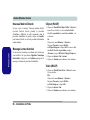
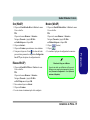
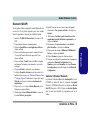
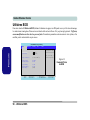
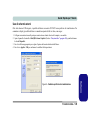
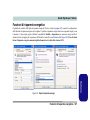
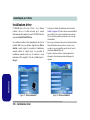
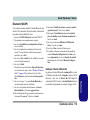
Introduction (English)
Introducción (Español)
This Concise User’s Guide introduces the main features
of your computer. The English version of this guide begins on page 1. The expanded User’s Manual is on the
Device Drivers & Utilities + User’s Manual CD-ROM.
Esta Guía del Usuario Concisa le presenta las características principales de su ordenador. La versión española de
esta guía comienza en la página 97. El Manual del usuario completo se encuentra en el CD-ROM de Controladores del dispositivo y Utilidades + Manual del usuario
(CD-ROM Device Drivers & Utilities + User's Manual).
Einführung (Deutsch)
Dieses Ausführliche Benutzerhandbuch führt Sie in die
Hauptfunktionen des Notebooks ein. Die deutsche Version des Handbuchs beginnt auf Seite 33. Das erweiterte
Benutzerhandbuch finden Sie auf der CD-ROM für die
Gerätetreiber und Hilfsprogramme (CD-ROM Device
Drivers & Utilities + User's Manual).
Présentation (Français)
Introduzione (Italiano)
La presente Guida Rapida per l'Utente introduce le caratteristiche principali del computer. La versione italiana
di questa guida inizia da pagina 129. Il Manuale utente
completo si trova nel CD contenente driver e utilità +
Manuale utente (CD-ROM Device Drivers & Utilities +
User's Manual).
Ce Guide Utilisateur Concis présente les fonctionnalités
principales de votre ordinateur. La version française de
ce guide commence à la page 65. Le Manuel de l'Utilisateur étendu se trouve sur le CD-ROM de Pilotes &
Utilitaires + Manuel de l'Utilisateur (CD-ROM Device
Drivers & Utilities + User's Manual).
I
Contents
Notice ................................................................................................1
About this Concise User Guide .........................................................2
Instructions for Care and Operation ..................................................3
Quick Start Guide .............................................................................6
Not Included ......................................................................................6
System Software ...............................................................................6
Model Types and Design Differences ...............................................7
System Map: Front View ..................................................................8
System Map: Left View ..................................................................12
System Map: Right View ................................................................13
System Map: Rear View .................................................................14
Windows XP Start Menu & Control Panel .....................................15
Video Features ................................................................................16
Power Management Features ..........................................................19
Driver Installation ...........................................................................20
BIOS Utilities ..................................................................................26
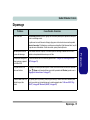
Troubleshooting ..............................................................................27
Specifications ..................................................................................28
Inhalt
Hinweis ...........................................................................................33
Über das Ausführliche Benutzerhandbuch .....................................34
Hinweise zu Pflege und Betrieb ......................................................35
Schnellstart ......................................................................................38
II
Nicht enthalten ................................................................................38
Modell-Typen und unterschiedliche Designs ..................................39
Systemübersicht: Ansicht von vorne ...............................................40
Systemübersicht: Ansicht von links ................................................44
Systemübersicht: Ansicht von rechts ..............................................45
Systemübersicht: Rückansicht .........................................................46
Windows XP Startmenü und Systemsteuerung ...............................47
Grafikfunktionen .............................................................................48
Energieverwaltungsfunktionen ........................................................51
Installation der Treiber ....................................................................52
BIOS-Hilfsprogramme ....................................................................58
Fehlerbehebung ...............................................................................59
Technische Daten ............................................................................60
Sommaire
Avertissement ..................................................................................65
A propos de ce Guide Utilisateur Concis ........................................66
Instructions d’Entretien et d’Utilisation ..........................................67
Guide de Démarrage Rapide ...........................................................70
Non Inclus .......................................................................................70
Différences entre les Types de Modèles et Designs ........................71
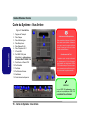
Carte du Système : Vue de Face ......................................................72
Carte du Système : Vue Gauche ......................................................76
Carte du Système : Vue Droite ........................................................77
Carte du Système : Vue Arrière ......................................................78
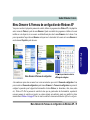
Menu Démarrer & Panneau de configuration de Windows XP ......79
Caractéristiques Vidéo ....................................................................80
Caractéristiques de Gestion de l’Alimentation ...............................83
Installation du Pilote .......................................................................84
Utilitaires BIOS ..............................................................................90
Dépannage .......................................................................................91
Spécifications ..................................................................................92
Contenidos
Aviso ...............................................................................................97
Acerca de esta Guía del Usuario Concisa .......................................98
Instrucciones de cuidado y uso .......................................................99
Guía rápida para empezar .............................................................102
No incluido ....................................................................................102
Tipos de modelos y diferencias de diseño ....................................103
Mapa del sistema: Vista frontal ....................................................104
Mapa del sistema: Vista izquierda ................................................108
Mapa del sistema: Vista derecha ...................................................109
Mapa del sistema: Vista posterior .................................................110
Menú Inicio y Panel de control de Windows XP ..........................111
Parámetros de vídeo ......................................................................112
Funciones de administración de energía .......................................115
Instalación de controladores .........................................................116
Utilidades de la BIOS ...................................................................122
Solución de problemas ..................................................................123
Especificaciones ............................................................................124
Sommario
Avvertenza ....................................................................................129
Informazioni sulla Guida Rapida per l’Utente ..............................130
Istruzioni per la manutenzione e l’uso ..........................................131
Guida di avvio rapido ....................................................................134
Non compreso ...............................................................................134
Tipologie di modelli e differenze nei Design ................................135
Descrizione del sistema: Vista anteriore .......................................136
Descrizione del sistema: Vista sinistra ..........................................140
Descrizione del sistema: Vista destra ............................................141
Descrizione del sistema: Vista posteriore .....................................142
Menu Start e Pannello di controllo di Windows XP .....................143
Funzioni video ...............................................................................144
Funzioni di risparmio energetico ...................................................147
Installazione driver ........................................................................148
Utilità del BIOS .............................................................................154
Risoluzione dei problemi ..............................................................155
Specifiche tecniche ........................................................................156
III
Concise User’s Guide
Notice
This publication and any accompanying software may not, in whole or in part, be reproduced, translated, transmitted
or reduced to any machine readable form without prior consent from the vendor, manufacturer or creators of this publication, except for copies kept by the user for backup purposes.
Brand and product names mentioned in this publication may or may not be copyrights and/or registered trademarks
of their respective companies. They are mentioned for identification purposes only and are not intended as an endorsement of that product or its manufacturer.
©July 2005
Trademarks
This product incorporates copyright protection technology that is protected by method claims of certain U.S. patents
and other intellectual property rights owned by Macrovision Corporation and other rights owners. Use of this copyright protection technology must be authorized by Macrovision Corporation, and is intended for home or other limited
viewing uses only unless otherwise authorized by Macrovision Corporation. Reverse engineering or disassembly is
prohibited.
Intel®, Pentium® and Celeron® are US registered trademarks of Intel Corporation.
Notice - 1
English
The company reserves the right to revise this publication or to change its contents without notice. Information contained herein is for reference only and does not constitute a commitment on the part of the manufacturer or any subsequent vendor. They assume no responsibility or liability for any errors or inaccuracies that may appear in this
publication nor are they in anyway responsible for any loss or damage resulting from the use (or misuse) of this publication.
Concise User’s Guide
English
About this Concise User Guide
This quick guide is a brief introduction to getting your system started. This is a supplement, and not a substitute for
the expanded English language User’s Manual in Adobe Acrobat format on the Device Drivers & Utilities + User’s
Manual CD-ROM supplied with your computer. This CD-ROM also contains the drivers and utilities necessary for
the proper operation of the computer.
Some or all of the computer’s features may already have been setup. If they aren’t, or you are planning to re-configure
(or re-install) portions of the system, refer to the expanded User’s Manual. The Device Drivers & Utilities + User’s
Manual CD-ROM does not contain an operating system.
Regulatory Information
Regulatory notices and information are contained in the expanded User’s Manual on the Device Drivers & Utilities
+ User’s Manual CD-ROM.
2 - About this Concise User Guide
Concise User’s Guide
Instructions for Care and Operation
1.
Don’t drop it, or expose it to shock. If the computer falls, the case and the components could be damaged.
2.
Keep it dry, and don’t overheat it. Keep the computer and power supply away from any kind of heating element. This is an
electrical appliance. If water or any other liquid gets into it, the computer could be badly damaged.
3.
Avoid interference. Keep the computer away from high capacity transformers, electric motors, and other strong magnetic
fields. These can hinder proper performance and damage your data.
4.
Follow the proper working procedures for the computer. Shut the computer down properly and don’t forget to save your
work. Remember to periodically save your data as data may be lost if the battery is depleted.
5.
Take care when using peripheral devices.
Instructions for Care and Operation - 3
English
The notebook computer is quite rugged, but it can be damaged. To prevent this, follow these suggestions:
Concise User’s Guide
English
Power Safety
The computer has specific power requirements:
• When you want to unplug the power cord, be sure to disconnect it by the plug head, not by its wire.
• Make sure the socket and any extension cord(s) you use can support the total current load of all the connected devices.
• Before cleaning the computer, make sure it is disconnected from any external power supplies.
Mainboard Battery Note
CAUTION: Danger of explosion if battery is incorrectly replaced. Replace only with the same or equivalent type
recommended by the manufacturer. Discard a used battery according to the manufacturer’s instructions.
Power Safety Warning
Before you undertake any upgrade procedures, make sure that you have turned off the power, and disconnected
all peripherals and cables (including telephone lines).
4 - Instructions for Care and Operation
Concise User’s Guide
Cleaning
Servicing
Do not attempt to service the computer yourself. Doing so may violate your warranty and expose you and the computer to electric shock. Refer all servicing to authorized service personnel. Unplug the computer from the power supply. Refer servicing to qualified service personnel under any of the following conditions:
•
•
•
•
•
When the power cord is damaged or frayed.
If the computer has been exposed to rain or other liquids.
If the computer does not work normally when you follow the operating instructions.
If the computer has been dropped or damaged (do not touch the poisonous liquid if the LCD panel breaks).
If there is an unusual odor, heat or smoke coming from your computer.
Instructions for Care and Operation - 5
English
Do not apply cleaner directly to the computer, use a soft clean cloth. Do not use volatile (petroleum distillates) or
abrasive cleaners on any part of the computer.
Concise User’s Guide
English
Quick Start Guide
This guide assumes that you are already familiar with computers and can tell at a glance what and where all the key
components are. If you are not that comfortable with this type of device, then please refer to the following pages,
which give an overview of the system.
1.
Remove all packing materials.
2.
Securely attach any peripherals you want to use with the computer (e.g. keyboard and mouse) to their ports.
3.
Attach the AC power cord to the AC Power-In port on the right of the computer. Then plug the AC power cord into an outlet.
4.
Push the power button to turn the computer “on”.
Not Included
Operating Systems (e.g. Windows XP) have their own manuals as do applications (e.g. word processing, spreadsheet
and database programs). If you have questions about the operating systems or programs then please consult the appropriate manuals.
System Software
Your computer may already come with system software pre-installed. Where this is not the case, or where you are reconfiguring your computer for a different system, you will find this manual refers to the Microsoft Windows XP (Professional & Home Edition) operating system. Further information on installing the drivers and utilities is available in
Chapter 3 of the expanded User’s Manual on the Device Drivers & Utilities + User’s Manual CD-ROM.
6 - Quick Start Guide
Concise User’s Guide
Model Types and Design Differences
Model A
Model A
(Design I)
(Design II)
Model B
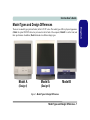
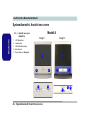
Figure 1 - Model Types & Design Differences
Model Types and Design Differences - 7
English
There are two model types (pictured below) in this LCD PC series. The model types differ in physical appearance
(Model A’s optical CD/DVD device bay is located on the left side of the computer; Model B’s is at the front) and
their specifications. In addition, Model A includes two different design types.
Concise User’s Guide
English
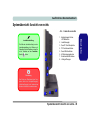
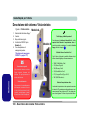
System Map: Front View
Model A
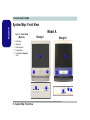
Figure 2 - Front View
(Model A)
1.
2.
3.
4.
5.
Design I
LCD Panel
Speakers
LED Indicators
Power Button
Reset Button (Design II
Only)
Design II
1
1
2
2
3
2
2
4
3
8 - System Map: Front View
5
4
Concise User’s Guide
Figure 3 - Front View (Model B)
1.
2.
3.
4.
5.
6.
7.
LCD Panel
Speakers
LED Indicators
Power Button
Optical (CD/DVD) Device Bay
Emergency Eject Hole
Keyboard Holder
1
CD/DVD Emergency Eject
If you need to manually eject a CD/DVD (e.g. due to
an unexpected power interruption) you may push the
end of a straightened paper clip into the emergency
eject hole. Do not use a sharpened pencil or similar
object that may break and become lodged in the
hole.
2
7
3
4
5
6
Media Warning
2
7
Don’t try to remove a floppy disk/CD/DVD while the
system is accessing it. This may cause the system to
“crash”.
System Map: Front View - 9
English
Model B
English
Concise User’s Guide
LED Indicators
Power Button
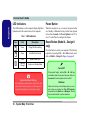
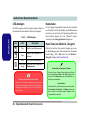
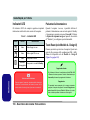
The LED indicators on the computer display helpful information about the current status of the computer.
When the computer is on, you can use the power button
as a Standby or Hibernate hot-key button when pressed
for less than 4 seconds. Use Power Options in the “Windows” Control Panel to configure this feature.
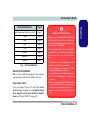
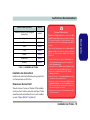
Table 1 - LED Indicators
Icon
Color
Description
Green
Floppy Disk Drive Activity
Green
Hard Disk Drive Activity
Green
System Power is On
Flashing
Orange
System is in Standby Mode
Reset Button (Model A - Design II
only)
Press this button to restart your computer. This button is
equivalent to pressing Ctrl + Alt + Del and only available on Model A - Design II (Figure 2 on page 8).
Forced Off
System Shutdown Warning
After shutting the computer down, allow time for the
system to shut down properly (i.e. the fan stops turning) before attempting to turn the system on again.
10 - System Map: Front View
If the system “hangs”, and the Ctrl + Alt + Del key
combination doesn’t work, press the power button for
4 seconds to force the system to turn itself off.
Shutdown
Please note that you should always shut your computer down by choosing the Turn Off Computer
command from the Start menu in Windows. This will
help prevent hard disk or system problems.
Concise User’s Guide
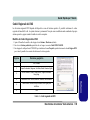
DVD Regional Codes
Changing DVD Regional Codes
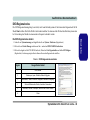
1.
Go to the Control Panel and double-click System > Hardware (tab).
2.
Click Device Manager, then click the + next to DVD/CD-ROM drives.
3.
Double-click on the DVD-ROM device to bring up the Properties dialog box, and select the DVD Region (tab) to bring up the
control panel to allow you to adjust the regional code.
Region
Geographical Location
1
USA, Canada
2
Western Europe, Japan, South Africa, Middle East & Egypt
3
South-East Asia, Taiwan, South Korea, The Philippines, Indonesia, Hong Kong
4
South & Central America, Mexico, Australia, New Zealand
5
N Korea, Russia, Eastern Europe, India & Most of Africa
6
China
Table 2 - DVD Regional Coding
System Map: Front View - 11
English
DVD region detection is device dependent, not OS-dependent. You can select your module’s region code 5 times.
The fifth selection is permanent. This cannot be altered even if you change your operating system or you use the module in another computer.
Concise User’s Guide
English
System Map: Left View
Figure 4 - Left View
1.
2.
3.
4.
5.
Model A
Floppy Disk Drive Module*
Vent
Hard Disk Drive Bay
Optical (CD/DVD) Device Bay
(Model A Only)
Emergency Eject Hole (see
“CD/DVD Emergency Eject”
on page 9)
*Floppy Disk Drive & Optional Modules
1
Model B
2
4
1
Media Warning
2
2
3
Overheating
To prevent your computer
from overheating make sure
nothing blocks the vent/fan
intake while the computer is
in use.
12 - System Map: Left View
If you have either the optional 6-in-1 Card Reader, or the optional Video Capture Card, then the
optional module will replace the floppy disk drive
module in the slot at point 1 .
6-in-1 Card Reader Formats
The card reader allows you to use the most popular digital storage card formats:
5
Don’t try to remove a floppy
disk while the system is accessing it. This may cause
the system to “crash”.
2
3
•
•
•
•
•
•
MMC (MultiMedia Card)
SD (Secure Digital)
MS (Memory Stick)
SM (SmartMedia Card)
CF (Compact Flash Types I & II)
MD (IBM Microdrive)
Video Capture Card
The optional video capture card allows you to
watch TV, video conference and capture still images and video on your PC. The card has an SVideo-In port and Audio/Video ports.
Concise User’s Guide
System Map: Right View
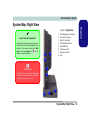
1.
2.
3.
4.
5.
6.
7.
8.
Sound Volume Adjustment
How high the sound volume can be set using the volume control knob depends on the
setting of the volume control within Windows. Click the Volume icon
on the
taskbar to check the setting.
8
1
LCD Brightness Control Knob
Volume Control Knob
Dual PC Card Slots
PC Card Eject Buttons
Dual USB Ports
AC Power-In Port
Security Lock Slot
Vent
2
3
Overheating
To prevent your computer from overheating
make sure nothing blocks the vent/fan intake while the computer is in use.
4
5
6
7
System Map: Right View - 13
English
Figure 5 - Right View
Concise User’s Guide
English
System Map: Rear View
Figure 6 - Rear View
1.
2.
3.
4.
5.
6.
7.
8.
9.
10.
11.
12.
13.
14.
13
13
Carrying Handle
Headphone-Out Jack
Line-In Jack
Microphone-In Jack
RJ-45 LAN Jack
RJ-11 Phone Jack
Dual USB Ports
Unpowered - IEEE 1394 Port
(optional with Mini PCI IEEE
1394 Module)
PS/2 Mouse & Keyboard
Ports
Printer/Parallel Port
Serial Port
External Monitor Port
Vents
Hard Disk Bay Screw
2 3 4
5
6
7
8
1
Handle Warning
We strongly recommend using
both hands to move the computer
(one hand gripping the handle and
the other gripping the base) to
avoid accidentally dropping it.
13
Port Warning
The computer can only accept one
keyboard at a time. Don’t try to install a USB and a PS/2 keyboard at
the same time. Doing so may
cause resource conflicts and make
the system unstable.
13
14
13
9
10
11
12
IEEE 1394
The IEEE 1394 port only supports SELF
POWERED IEEE 1394 devices.
14 - System Map: Rear View
Concise User’s Guide
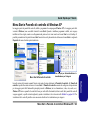
Windows XP Start Menu & Control Panel
Click here to toggle Category View
Figure 7 - Start Menu & Control Panel
In many instances throughout this manual you will see an instruction to open the Control Panel. The Control Panel
is accessed from the Start menu, and it allows you to configure the settings for most of the key features in Windows
(e.g. power, video, network, audio etc.). Windows XP provides basic controls for many of the features, however many
new controls are added (or existing ones are enhanced) when you install the drivers listed in Table 3, on page 21. To
see all controls it may be necessary to toggle off Category View.
Windows XP Start Menu & Control Panel - 15
English
Most of the control panels, utilities and programs within Windows XP (and most other Windows versions) are accessed from the Start menu. When you install programs and utilities they will be installed on your hard disk drive, and a
shortcut will usually be placed in the Start menu and/or the desktop. To customize the look of the Start menu, rightclick Start, and select Properties from the menu.
Concise User’s Guide
English
Video Features
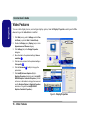
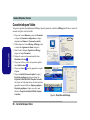
You can switch display devices, and configure display options, from the Display Properties control panel in Windows as long as the video driver is installed.
1.
Click Start (menu), point to Settings and click Control Panel (or just click Start > Control Panel).
2.
Double-click Display (icon); Display (icon) is in the
Appearances and Themes category.
3.
Click Settings (tab) in the Display Properties
dialog box.
4.
Move the slider to the preferred setting in Screen
resolution 1 .
5.
Click the arrow, and scroll to the preferred setting in
Color quality 2 .
6.
Click the Advanced 3 (button) to bring up the
options tabs.
7.
Click Intel(R) Extreme Graphics 2 (tab) >
Graphics Properties (button) to get to the Intel(R)
82865G Graphics Controller Properties. (Or click
on the icon in the taskbar to bring up the menu and
scroll to Graphics Options > Graphics Properties
and click on it to get to the Intel(R) 82865G
Graphics Controller Properties.)
1
2
3
Figure 8 - Display Properties
16 - Video Features
Concise User’s Guide
Using External Displays
1.
Plug the external display into the external monitor port at the rear of the computer, and power it on.
2.
Go to the Intel(R) Extreme Graphics 2 control panel (see “Video Features” on page 16) and select Devices (tab).
3.
Click the appropriate icon to choose the display option from the list.
4.
Click Apply > OK to confirm the settings change.
Figure 9 - Switching Displays
Video Features - 17
English
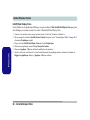
Besides the built-in LCD, you can also use an external CRT/LCD monitor as your display device. With the video
driver installed, you can use its built-in controls to switch between the displays as follows:
Concise User’s Guide
English
Intel(R) Dual Display Clone
In addition to using a single display device, you can use Intel(R) Dual Display Clone Mode to drive two displays
with the same content. To enable Intel(R) Dual Display Clone Mode:
1.
Plug the external display into the external monitor port at the rear of the computer, and power it on.
2.
Go to the Intel(R) Extreme Graphics 2 control panel (see “Video Features” on page 16) and select Devices (tab).
3.
Click Intel(R) Dual Display Clone (icon) in the Devices (tab).
4.
Choose one device to be the Primary/Secondary display.
5.
Click Apply > OK to confirm the settings change.
6.
Adjust the Color, Screen Area and Refresh Rate (of the Primary device only) by clicking Device Settings (button), and
Apply > OK to confirm.
18 - Video Features
Concise User’s Guide
Power Management Features
Figure 10 - Power Options
Power Management Features - 19
English
The Power Options control panel in Windows (see page 15) allows you to configure power management features for
your computer. You may conserve power through individual components such as the monitor or hard disk (by means
of Power Schemes), or you may use either Standby or Hibernate mode to conserve power throughout the system
(enable Hibernate support from the control panel pictured in Figure 10). Using some form of power management
greatly increases the life span of the LCD.
Concise User’s Guide
English
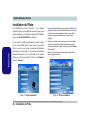
Driver Installation
The Device Drivers & Utilities + User’s Manual CDROM contains the drivers and utilities necessary for the
proper operation of the computer. Insert the CD-ROM
and click Install WinXP Drivers (button).
If you wish to install the drivers manually, click the Exit
button to quit the Drivers Installer application, then follow the manual installation procedure for each driver.
The manual installation procedure begins with instructions on how to browse to the executable file; “Click
Start (menu) > Run...”.
Figure 11 - Drivers Installer Screen 1
20 - Driver Installation
1.
Check the driver installation order from Table 3, on
page 21 (the drivers must be installed in this order)
which is the same as that listed in the Drivers Installer
menu.
2.
Click to select the driver you wish to install, after installing
each driver it will become greyed out (if you need to
reinstall any driver, click the Unlock button).
3.
Follow the instructions for each individual driver
installation procedure as listed in the following pages.
Figure 12 - Drivers Installer Screen 2
Concise User’s Guide
Page #
Install the appropriate Service Pack for WinXP
page 21
Chipset
Page 22
Video
Page 22
Audio
Page 23
LAN
Page 23
Modem
Page 23
Wireless LAN
Page 24
Bluetooth
Page 24
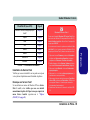
Table 3 - Driver Installation
Service Pack Installation
Make sure you install the appropriate service pack for
your operating system before installing any drivers.
Service Pack 1 Note
If you are running a Windows XP version with Service
Pack 1 installed, then make sure you install the Chipset
driver manually and not from the Drivers Installer
menu (see “Chipset (WinXP)” on page 22).
Windows XP Service Pack 2
Make sure you install Windows XP Service Pack 2
(or a Windows XP version which includes Service
Pack 2) before installing any drivers. Service Pack
2 includes support for USB 2.0.
If you have upgraded the system by installing Service Pack 2 (i.e. your Windows XP version does not
include Service Pack 2) then follow these instructions:
1. Click Start (menu), point to Settings and click Control Panel (or click Start > Control Panel).
2. Double-click System (icon); System (icon) is in Performance and Maintenance (category).
3. Click the Hardware (tab) > Device Manager (button).
4. Click “+” next to Other Devices (if its sub-items are
not shown).
5. Right-click Universal Serial Bus (USB) Controller
and select Uninstall > OK (if you don’t see the item
then there is no need to take any further action).
6. Restart the computer and it will find the USB 2.0 controller.
Driver Installation - 21
English
WinXP (with SP2) Driver
English
Concise User’s Guide
New Hardware Found
Chipset (WinXP)
If you see the message “New Hardware Found”
(Found New Hardware Wizard) during the installation
procedure (other than when outlined in the driver install
procedure), click Cancel to close the window, and follow
the installation procedure as directed.
1. Click 1.Install Intel Chipset Utility > Yes from the
Drivers Installer menu (if you have Service Pack 1
installed do not use the Drivers Installer menu - see
below).
OR
Click Start (menu) > Run... and navigate (Browse..) to
D:\Drivers\Chipset\Setup.exe and click OK. If you
have Service Pack 1 installed, navigate (Browse..) to
D:\Drivers\Chip_sp1\Setup.exe.
2. Click Next > Yes > Next.
3. Click Finish to restart the computer.
Authorized Driver Message
If you receive a message telling you that the driver you
are installing is not authorized (Digital Signature Not
Found), just click Continue Anyway to ignore the message and continue the installation procedure.
Video (WinXP)
1. Click 2.Install Video Driver > Yes from the Drivers
Installer menu.
OR
Click Start (menu) > Run... and navigate (Browse..) to
D:\Drivers\Video\Setup.exe and click OK.
2. Click Next > Yes.
3. Click Finish to restart the computer.
22 - Driver Installation
Concise User’s Guide
Modem (WinXP)
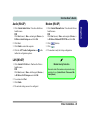
1. Click 3.Install Audio Driver > Yes from the Drivers
Installer menu.
1. Click 5.Install Modem Driver > Yes from the Drivers
Installer menu.
OR
Click Start (menu) > Run... and navigate (Browse..) to
D:\Drivers\Audio\Setup.exe and click OK.
2. Click Next.
3. Click Finish to restart the computer.
4. Click the AC97 Audio Configuration icon in the
taskbar for configuration options.
LAN (WinXP)
1. Click 4.Install LAN Driver > Yes from the Drivers
Installer menu.
OR
Click Start (menu) > Run... and navigate (Browse...)
to D:\Drivers\LAN\Setup.exe and click OK.
2. To continue click Next.
3. Click Finish.
4. The network settings can now be configured.
OR
Click Start (menu) > Run... and navigate (Browse...)
to D:\Drivers\Modem\SETUP.EXE and click OK.
(button).
2. Click
3. Click
.
4. The modem is ready for dial-up configuration.
Modem Country Selection
Be sure to check if the modem country selection is appropriate for you (Control Panel > Phone and Modem Options).
Driver Installation - 23
English
Audio (WinXP)
Concise User’s Guide
English
802.11b/g Wireless LAN (WinXP)
If your purchase option includes the 802.11b/g Wireless
LAN module, you will be provided with the appropriate
driver CD for your module. Follow the procedure below
to install the driver.
1.
2.
3.
4.
Insert the WLAN CD-ROM into the CD/DVD drive.
Click Start (menu) > Run...
Navigate (Browse..) to D:\SETUP.EXE and click OK.
Click Next > Next (click Continue Anyway if a
Hardware Installation warning appears).
5. Click Finish.
6. The settings can now be configured. The Wireless
Configuration utility may be run from the Start menu
(Start > Programs/All Programs > Wireless LAN
Utility > SISCFG), or may be accessed from the icon
/ in the taskbar.
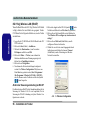
Changing the WLAN Control Setting in WinXP
The operating system is the default setting for WLAN
control in Windows XP. It is recommended that you
switch to use the Wireless Configuration to control
your WLAN connection.
24 - Driver Installation
1.
Double-click the WLAN icon
click Site Scan (tab).
/
in the taskbar and
2.
Click to remove the tick in the tickbox “Use Windows XP
to configure my wireless network settings”.
3.
Click Re-Fresh (button) to see any available networks.
4.
Click to select an access point from the list, then click
Connect (button) to connect to the wireless network.
Figure 13 - Wireless Configuration
Concise User’s Guide
Bluetooth (WinXP)
1. Insert the Bluetooth CD-ROM into the CD/DVD drive.
2. The program will run automatically.
3. Click Install Drivers and Application Software and
click Next.
4. Click the button to accept the license agreement, then
click Next.
5. Click Next > Install (click OK/Continue Anyway if
asked if you want to continue).
6. Click Finish.
7. The System Properties window should be open (if the
window is not open see “Windows XP Service Pack 2”
on page 21 for instructions); click Device Manager
(button) from the Hardware (tab).
8. Click “+” next to Bluetooth Radios (if its sub-items are
not shown).
9. Right-click Generic Bluetooth Radio and select
Update Driver.
10.When the Hardware Update Wizard appears, select
“No, not this time” and click Next.
11. Select “Install from a list or specific location
(Advanced)” then click Next.
12.Select “Don’t search. I will choose the driver to
install.” and click Next.
13.Click to select Billionton USB Bluetooth Device, and
click Next.
14.Click Finish and close the open windows.
15.You can configure the settings in the Bluetooth
Configuration control panel (Start menu and point to
Settings and click Control Panel then double-click the
Bluetooth Configuration icon).
Bluetooth Manual
The Bluetooth Manual (readme.pdf) is on the Bluetooth
CD-ROM in the Userguide folder (insert the Bluetooth
CD-ROM and click Browse this CD). Click Acrobat
Reader from the menu to install the program to read the
file.
Driver Installation - 25
English
If your purchase option includes the Bluetooth module,
you will be provided with the appropriate driver CD for
your module. Follow the procedure below to install the
driver.
Concise User’s Guide
English
BIOS Utilities
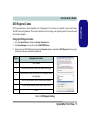
To enter the BIOS Utilities, press F2 when you see the prompt at startup. Screen navigation instructions are in the
box at the bottom of the screen. There is one general rule: Don’t make any changes unless you are sure of what
you are doing. Many of the settings are required by the system, and changing them could cause it to become
unstable or worse.
PhoenixBIOS Setup Utility
Main
Main
Advanced
Security
Boot
Exit
Item Specific Help
System Time:
System Date:
13
[22:11:05]
[02/22/2005]
Legacy Diskette A:
[1.44/1.25 MB 31/2"]
Primary Master
Secondary Master
41174MB
CD-ROM
System Memory:
Extended Memory:
Share Memory:
640 MB
478 MB
[32MB]
F1
Esc
Help
Exit
26 - BIOS Utilities
Select Item
Select Menu
-/+
Enter
<Tab>, <Shift Tab>, or
<Enter> selects field.
Change Values
Select Sub-Menu
F9 Setup Defaults
F10 Save and Exit
Figure 14 - BIOS
Screen Example
Concise User’s Guide
Troubleshooting
Nothing appears on
screen.
Possible Cause - Solution
The screen saver is activated. Press any key or move the mouse to return to your display.
The system is in a power saving mode. Press the power button for less than 4 seconds. If the
computer does not turn on again then it was most likely shut down, or has no power source.
Check the cables, outlets, power strips etc.
You forget the boot
password.
If you forget the password, you may have to discharge the battery of the CMOS. Contact your
service representative for help.
The DVD regional codes
can no longer be
changed.
The code has been changed the maximum 5 times. See “Changing DVD Regional Codes” on
page 11.
The sound cannot be
heard or the volume is
very low.
The volume might be set too low. Check the volume control knob, and click the Volume icon
on the taskbar to check the Windows setting (see “Sound Volume Adjustment” on page 13).
The Wireless LAN/
Bluetooth modules
cannot be detected/
configured.
The driver(s) for the module(s) have not been installed. Make sure you have installed the driver
for the appropriate module (see the instructions for the appropriate module in “802.11b/g
Wireless LAN (WinXP)” on page 24/“Bluetooth (WinXP)” on page 25).
Troubleshooting - 27
English
Problem
Concise User’s Guide
English
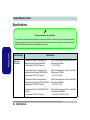
Specifications
Latest Specification Information
The specifications listed in this Appendix are correct at the time of going to press. Certain items (particularly processor types/speeds and CD/DVD device types) may be changed or updated due to the manufacturer's release schedule. Check with your service center for details.
Feature
Processor Types
Specification
Intel® Pentium® 4 (630/ 640/ 650) Processor with
HT Technology
LGA775 Package (775-pin)
(90nm) 90 Nanometer Process Technology, 2MB
On-Die L2 Cache & 800MHz Front Side Bus
- 3.0/ 3.2/ 3.4 GHz
Intel® Pentium® 4 (520/ 530/ 540/ 550) Processor
with HT Technology
LGA775 Package (775-pin)
(90nm) 90 Nanometer Process Technology, 1MB
On-Die L2 Cache & 800MHz Front Side Bus
- 2.8/ 3.0/ 3.2/ 3.4 GHz
Intel® Pentium® 4 (520J/ 530J/ 540J/ 550J)
Processor with HT Technology
LGA775 Package (775-pin)
(90nm) 90 Nanometer Process Technology, 1MB
On-Die L2 Cache & 800MHz Front Side Bus
- 2.8/ 3.0/ 3.2/ 3.4 GHz
Intel® Celeron® D (325J/ 330J/ 335J/ 340J/ 345J/
350J) Processor
LGA775 Package (775-pin)
(90nm) 90 Nanometer Process Technology,
256KB On-Die L2 Cache & 533MHz Front Side
Bus - 2.53/ 2.66/ 2.8/ 2.93/ 3.06/ 3.2 GHz
28 - Specifications
Concise User’s Guide
Feature
Specification
English
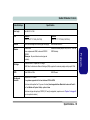
Core Logic
Intel 865GV + ICH5
LCD
Model A
Model B
15.0" XGA Flat Panel TFT (1024*768)
17.0" SXGA Flat Panel TFT (1280*1024)
Security
Security (Kensington® Type) Lock Slot
BIOS Password
Memory
Dual Channel
Two 200-Pin SODIMM Sockets, Supporting DDR
333 / DDR 400 MHz Modules
(Note: Do Not Use Other Module Types)
Memory Expandable up to 2GB (256/ 512/ 1024
MB DDR Modules)
Video
Video Controller - built-in 865GV Chipset
Video Memory - Shared Memory Architecture (Supports up to 32MB of Shared Memory as Video
Memory)
BIOS
512KB Flash ROM
Storage
One Fixed 3.5", 25.4mm Height Hard Disk Drive*
* The System Supports both PATA and SATA Interfaces.
Phoenix BIOS
One 3.5", 1.44MB 3-Mode Floppy Disk Drive (Exchangeable With 6-in-1 Card Reader Module or
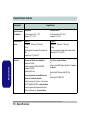
Video Capture Card Module) - Factory Option
One changeable 12.7mm(h) Optical Device (CD/DVD) Type Drive (see “Optional” on page 31 for
drive options)
Specifications - 29
Concise User’s Guide
English
Feature
Specification
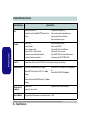
Audio
AC’97 2.2 Compliant
Sound Blaster™ Compatible
Windows Sound System™ Compatible
2 * Built-In 2W Speakers
One Headphone-Out Jack
One Microphone-In Jack
One Line-In Jack
Interface
One Serial Port
One Parallel Port
One External Monitor Port
Two PS/2 Ports (Keyboard & Mouse)
One Headphone-Out Jack
One Microphone-In Jack
One Line-In Jack
Four USB 2.0 Ports
One RJ-45 Jack for LAN
One RJ-11 Jack for Modem
One IEEE 1394 Port (Un-Powered) Enabled by
Mini-PCI IEEE 1394 Module (Optional)
PC Card Sockets
Supports Two Type II PCMCIA Slots or One Type III PCMCIA Slot (Cardbus Support)
Communication
Built-in 1000Mb Base-T Gigabit LAN (10/100Mb
Base-T Compliant)
56K MDC Modem (V.90 & V.92 Compliant) Factory Option
OR
56K MDC Modem (V.90 & V.92 Compliant) &
Bluetooth 1.1 Combo Module (Factory Option)
Power
Management
Supports ACPI
Supports Hibernate Mode
30 - Specifications
802.11 b/g Mini-PCI Wireless LAN Module
(Optional)
OR
Mini-PCI IEEE 1394 Module (Optional)
Supports Standby Mode
Concise User’s Guide
Feature
Specification
Internal Switching Power Supply - Full Range -160W
Environmental
Spec
Temperature
Operating:
Non-Operating:
Physical
Characteristics
Model A
Model B
369mm (W) * 384mm (H) * 188 (D)
8.9Kg
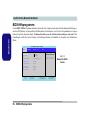
Fan Bearing: Two Ball Bearings
Tilt (0-15 deg), Swivel (270 deg)
395mm (W) * 418mm (H) * 179mm (D)
10.2Kg
Fan Bearing: Two Ball Bearings
Tilt (0-15 deg), Swivel (270 deg)
Optional
Optical Drive Module Options:
CD-ROM Drive Module
Combo Drive Module
DVD-ROM Drive Module
DVD-Dual Drive Module
MDC Modem (Factory Option)
OR
MDC & Bluetooth Modem Combo Module
(Factory Option)
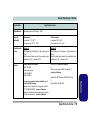
5°C ~ 35°C
-20°C ~ 60°C
Options Below Exchangeable with Floppy Disk
Drive Module:
6-in-1 Card Reader Module - For MD/ CF/ SM/
MS/ SD/ MMC Formats (Factory Option)
Relative Humidity
Operating:
Non-Operating:
20% ~ 80%
10% ~ 90%
802.11 b/g Mini-PCI Wireless LAN Module
OR
Mini-PCI IEEE 1394 Module
Video Capture Card Module Supporting S-VideoIn and AV Terminal (Factory Option)
Specifications - 31
English
Power
English
Concise User’s Guide
32
Ausführliches Benutzerhandbuch
Hinweis
Die Publikation und alle beiliegende Software darf nicht, ganz oder in Teilen, ohne vorheriges Einverständnis des
Verkäufers, Herstellers oder Autors dier Publikation reproduziert, übersetzt, übertragen oder in maschinenlesbare Form
umgewandelt werden, abgesehen von Kopien, die für Archivzwecke erstellt werden.
In dier Publikation erwähnte Marken- und Produktnamen können Copyrights und/oder eingetragene Warenzeichen ihrer
jeweiligen Firmen in. Sie werden nur zu Identifikationszwecken erwähnt und sind nicht als Werbung für die Produkte oder
ihre Hersteller gedacht.
© Juli 2005
Warenzeichen
Dies Produkt beinhaltet durch Urheberrechte geschützte Technologie, die durch Ansprüche bestimmter US-Patente und andere geistige Eigentumsrechte geschützt ist, welche der Macrovision Corporation und anderen Rechtsbesitzern gehört. Die
Verwendung dier durch Urheberrechte geschützten Technologie muß von der Macrovision Corporation genehmigt werden
und dient nur für den Heimgebrauch bzw. andere beschränkte Ansichtszwecke, wenn nicht anderweitig von der Macrovision Corporation genehmigt. Reverse Engineering oder Auseinandernehmen ist untersagt.
Intel, Pentium und Celeron sind in den USA eingetragenes Warenzeichen der Intel Corporation.
Hinweis - 33
Deutsche
Das Unternehmen behält sich das Recht vor, diese Publikation ohne Vorankündigung zu überarbeiten und den Inhalt zu
verändern. Alle enthaltenen Informationen sind nur Anhaltspunkte und stellen keine Verpflichtung seitens des Herstellers
oder Wiederverkäufers dar. Sie übernehmen weder Verantwortung oder Haftung für mögliche Fehler oder Ungenauigkeiten dieser Publikation noch sind sie in irgendeiner Weise verantwortlich für Verluste oder Schäden aus der Nutzung (oder fehlerhaften Nutzung) dieser Publikation.
Ausführliches Benutzerhandbuch
Über das Ausführliche Benutzerhandbuch
Deutsche
Diese Kurzanleitung soll einen Überblick über die Schritte geben, die dazu notwendig sind, das System zu starten. Dieses
ist nur eine Ergänzung und kein Ersatz für das erweiterte englischsprachige Benutzerhandbuch, das auf der mitgelieferten
CD-ROM Device Drivers & Utilities + User's Manual im Adobe-Acrobat-Format vorliegt. Diese CD-ROM enthält auch
die Treiber und Utility-Programme, die für einen einwandfreien Betrieb des Computers notwendig sind.
Einige oder alle Funktionen des Computers sind bereits eingerichtet worden. Falls das nicht der Fall ist oder wenn Sie einzelne Teile des Systems neu konfigurieren (oder neu installieren) möchten, finden Sie eine Anleitung im erweiterten Benutzerhandbuch. Die CD-ROM Device Drivers & Utilities + User's Manual enthält nicht das Betriebssystem.
Informationen zu gesetzlichen Vorschriften
Die Informationen zu gesetzlichen Vorschriften finden Sie im erweiterten Benutzerhandbuch auf der CD-ROM Device
Drivers & Utilities + User's Manual.
34 - Über das Ausführliche Benutzerhandbuch
Ausführliches Benutzerhandbuch
Hinweise zu Pflege und Betrieb
Der Computer ist zwar sehr stabil, kann aber dennoch beschädigt werden. Damit es nicht dazu kommt, sollten Sie die folgenden Hinweise beachten:
2. Halten Sie den Computer trocken, Das Gerät darf nichtüberhitzt werden. Computer und Netzteil dürfen nicht in der Nähe von
Wärmequellen stehen oder gelagert werden. Dies ist ein elektrisches Gerät. Wenn Wasser oder andere Flüssigkeiten eindringen,
kann der Computer stark beschädigt werden.
3. Vermeiden Sie Interferenzen mit anderen Geräten. Halten Sie den Computer fern von magnetischen Feldern, die von
Stromquellen, Monitoren, Magneten etc. erzeugt werden. Die können die Leistung beeinträchtigen und Ihre Daten beschädigen.
4. Achten Sie auf die richtige Bedienung des Computers. Schalten Sie ihn erst aus, wenn alle Programme geschlossen wurden
(speichern Sie Ihre Daten!). Speichern Sie regelmäßig Ihre Daten.
5. Seien Sie vorsichtig bei der Verwendung von Peripheriegeräten.
Hinweise zu Pflege und Betrieb - 35
Deutsche
1. Das Gerät darf nicht herunterfallen und in anderer Form Stößen ausgesetzt werden. Wenn der Computer fällt, können das
Gehäuse und andere Komponenten beschädigt werden.
Ausführliches Benutzerhandbuch
Stromsicherheit
Deutsche
Für dieses Computer werden bestimmte Stromanforderungen gestellt:
• Fassen Sie das Netzkabel am Stecker und nicht am Kabel an, wenn Sie es vom Stromnetz trennen möchten.
• Achten Sie darauf, daß die Steckdose und alle verwendeten Verlängerungskabel die Gesamtstromlast aller angeschlossenen
Geräte trägt.
• Trennen Sie den Computer vor dem Reinigen von allen externen Stromquellen.
Hinweis zur Mainboard-Batterie
ACHTUNG: Wenn eine falsche Batterie eingesetzt wird, besteht Explosionsgefahr. Tauschen Sie die Batterie nur durch
eine andere des gleichen oder eines baugleichen Typs aus, der vom Hersteller empfohlen wird. Entsorgen Sie eine verbrauchte Batterie entsprechend der Anweisungen des Herstellers.
Warnung zur Stromsicherheit
Bevor Sie Schritte zum Aufrüsten des Computers unternehmen, müssen Sie zunächst das Gerät ausschalten und alle
Peripheriegeräte und Kabel (einschließlich Telefonkabel) abtrennen.
36 - Hinweise zu Pflege und Betrieb
Ausführliches Benutzerhandbuch
Reinigung
Tragen Sie Reinigungsmittel nicht direkt auf das Computer auf. Reinigen Sie es mit einem weichen, sauberen Tuch. Verwenden Sie keine flüchtigen Reinigungsmittel (Petroleumdestillate) oder Scheuermittel zum Reinigen des Computers.
Reparatur
•
•
•
•
Wenn das Netzkabel beschädigt oder zerschlissen sind.
Wenn der Computer Regen ausgesetzt war oder mit Flüssigkeiten in Berührung gekommen ist.
Wenn der Computer unter Beachtung der Bedienungsanweisungen nicht korrekt arbeitet.
Wenn der Computer heruntergefallen ist oder beschädigt wurde (berühren Sie nicht die giftige Flüssigkeit des LCD-Bildschirms).
• Wenn ein ungewöhnlicher Geruch, Hitze oder Rauch aus dem Computer entweicht.
Hinweise zu Pflege und Betrieb - 37
Deutsche
Reparieren Sie das Gerät nicht selbst. Damit verstoßen Sie gegen die Garantiebedingungen und Sie können Schäden am
Gerät und an der eigenen Gesundheit verursachen. Überlassen Sie alle Reparaturen autorisiertem Fachpersonal. Trennen
Sie den Computer vom Stromnetz. Unter den folgenden Umständen sollten Sie das Gerät zur Reparatur geben:
Ausführliches Benutzerhandbuch
Schnellstart
Deutsche
Bei diesem Handbuch wird davon ausgegangen, daß Sie sich bereits mit Computern auskennen und wissen, was die wichtigsten Teile sind und wo sie sich befinden. Wenn Sie mit dieser Art von Gerät noch nicht vertraut sind, können Sie sich
auf den folgenden Seiten einen Überglick über das gesamte System verschaffen.
1. Entfernen Sie das gesamte Verpackungsmaterial.
2. Schließen Sie alle Peripheriegeräte, die Sie mit dem Computer verwenden wollen (z. B. Tastatur und Maus), an die
entsprechenden Schnittstellen an.
3. Schließen Sie das AC-Netzkabel an die AC-Netzeingangsbuchse an, die sich an der rechten Seite des Computers befindet.
Schließen Sie dann das AC-Netzkabel an eine Netzsteckdose an.
4. Drücken Sie dann auf den Netzschalter, um das Gerät einzuschalten.
Nicht enthalten
Zu den Betriebssystemen (z.B. Windows XP) und zu den Programmen (z.B. Textverarbeitung, Kalkulationsprogramme
und Datenbanken) gibt es eigene Handbücher. Wenn Sie Fragen zu den Betriebssystemen oder Programmen haben,
schauen Sie in den entsprechenden Handbüchern nach.
Systemsoftware
Ihr Computer wird möglicherweise schon mit vorinstallierter Systemsoftware geliefert. Ist das nicht der Fall, oder wenn
Sie Ihren Computer für ein anderes System neu konfigurieren möchten, finden Sie dazu eine Anleitung in diesem Handbuch zum Betriebssystem Microsoft Windows XP (Professional & Home Edition). Weitere Informationen zur Installation
der Treiber und Hilfsprogramme finden Sie in Kapitel 3 des erweiterten Benutzerhandbuchs auf der CD-ROM Device Drivers & Utilities + User's Manual.
38 - Schnellstart
Ausführliches Benutzerhandbuch
Modell-Typen und unterschiedliche Designs
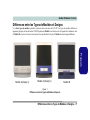
Bei dieser LCD-PC-Serie werden zwei Modell-Typen (Abbildung unten) angeboten. Die Modelle unterscheiden sich in
ihrem Aufbau (der optische CD/DVD-Laufwerkschacht befindet sich bei Modell A befindet sich an der linken Seite des
Computers, bei Modell B ist es an der Vorderseite) und den technischen Daten. Modell A verfügt zusätzlich über zwei
verschiedene Designs.
Deutsche
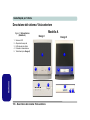
Modell A (Design I)
Modell A (Design II)
Modell B
Abb. 1
Modell-Typen und unterschiedliche Designs
Modell-Typen und unterschiedliche Designs - 39
Ausführliches Benutzerhandbuch
Systemübersicht: Ansicht von vorne
Modell A
Deutsche
Abb. 2 - Ansicht von vorne
(Modell A)
1.
2.
3.
4.
5.
Design II
Design I
LCD-Bildschirml
Lautsprecher
LED-Aktivitätsanzeigen
Netzschalter
Reset-Taste (nur Design II)
1
1
2
2
3
2
2
4
3
40 - Systemübersicht: Ansicht von vorne
5
4
Ausführliches Benutzerhandbuch
Modell B
Abb. 3 - Ansicht von vorne (Modell B)
1
LCD-Bildschirml
Lautsprecher
LED-Aktivitätsanzeigen
Netzschalter
Optisches CD/DVD-Gerät
Notauswurfloch
Tastaturhalterung
CD/DVD-Notauswurf
Wenn eine CD/DVD manuell entnommen werden muß
(z.B. wegen eines Stromausfalls) können Sie mit dem
Ende einer geradegebogenen Büroklammer in das Notauswurfloch drücken. Verwenden Sie hierzu aber keinen
spitzen Bleistift oder ähnliche Objekte, die im Loch abbrechen und darin steckenbleiben könnten.
3
5
2
7
4
Warnung zu Datenträgern
6
7
2
Entnehmen Sie keine Diskette/CD/DVD, wenn das System gerade darauf zugreift. Dadurch könnte es zu einem
“Systemzusammen-bruch” kommen.
Systemübersicht: Ansicht von vorne - 41
Deutsche
1.
2.
3.
4.
5.
6.
7.
Ausführliches Benutzerhandbuch
LED-Anzeigen
Netzschalter
Die LED-Anzeigen auf dem Computer zeigen wichtige Informationen über den aktuellen Status des Computers.
Ist der Computer eingeschaltet, können Sie den Netzschalter als Hotkey-Taste für das Standby oder den Ruhezustand
benutzen, wenn sie kürzer als 4 Sekunden gedrückt wird.
Diese Funktion können Sie in der "Windows" Systemsteuerung bei den Energieoptionen konfigurieren.
Deutsche
Tabelle 1 - LED-Anzeigen
Icon
Color
Description
Grün
Zugriff auf das Diskettenlauferk.
Grün
Zugriff auf das Festplatten-/CDLaufwerk.
Grün
Der Computer ist angeschaltet.
Lampe blinkt
orange
Das System ist im konfigurierten
Standbymodus.
Warnung zum Ausschalten des Systems
Wenn Sie den Computer ausgeschaltet haben und ihn
wieder einschalten möchten, warten Sie ab, bis das System
vollständig heruntergefahren ist (d. h. der Lüfter hört auf,
sich zu drehen).
42 - Systemübersicht: Ansicht von vorne
Reset-Taste (nur Modell A - Design II)
Drücken Sie auf diese Taste, um den Computer neu zu starten. Die Betätigung dieser Taste entspricht der Tastenkombination Strg + Alt + Entf und ist nur bei Modell A Design II verfügbar (Abb. 2 auf Seite 40).
Ausschalten bei "hängendem" System
Wenn das System “hängen” bleibt und auch das Drücken
der Tastenkombination Strg + Alt + Entf erfolglos bleibt,
drücken Sie 4 Sekunden lang auf den Netzschalter, um
das System auszuschalten.
Herunterfahren
Bitte beachten Sie, daß der Computer immer mit dem Befehl Ausschalten im Start Menü in Windows heruntergefahren werden muß. Dadurch werden Festplatten- bzw.
Systemprobleme vermieden.
Ausführliches Benutzerhandbuch
DVD-Regionalcodes
Die DVD-Regionserkennung hängt vom Gerät, nicht vom Betriebssystem ab. Sie können den Regionalcode für Ihr
Modul 5mal wählen. Die fünfte Wahl ist nicht mehr änderbar. Sie kann auch bei Wechsel des Betriebssystems oder
bei Verwendung des Moduls in einem anderen Computer verändert werden.
2. Klicken Sie auf Geräte-Manager und dann auf das + neben den DVD/CD-ROM-Laufwerken.
3. Klicken Sie doppelt auf das DVD-ROM-Laufwerk, öffnen das Menü Eigenschaften und wählen DVD-Region
(Registerkarte). In dem angezeigten Fenster können Sie nun den Regionalcode einstellen.
Tabelle 2 - DVD-Regionalcode einstellen
Region
Geografisches Gebiet
1
USA, Kanada
2
Westeuropa, Japan, Südafrika, Nahost & Ägypten
3
Südostasien, Taiwan, Südkorea, Philippinen, Indonesien, Hongkong
4
Süd- und Mittelamerika, Mexiko, Australien, Neuseeland
5
Nordkorea, Rußland, Osteuropa, Indien und der Großteil Afrikas
6
China
Systemübersicht: Ansicht von vorne - 43
Deutsche
Die DVD-Regionalcodes ändern
1. Gehen Sie auf Systemsteuerung und doppelklicken Sie auf System > Hardware (Registerkarte).
Ausführliches Benutzerhandbuch
Systemübersicht: Ansicht von links
Deutsche
Abb. 4 - Ansicht von links
Modell A
1.
2.
3.
4.
Diskettenlauferk-Modul*
Lüftungsöffnungen
Festplattenschacht
Optisches CD/DVD-Gerät (nur
Modell A)
5. Notauswurfloch (siehe “CD/
DVD-Notauswurf” auf Seite 41)
*Diskettenlaufwerk und optionale Module
1
Wenn Sie entweder das 6-in-1 KartenleserModul oder das Video-Capture-Kartenmodul
haben, ersetzt dieses optionale Modul das Diskettenlauferk-Modul im Steckplatz bei Punkt 1 .
2
Modell B
4
Mit dem Kartenleser können Sie die handelsüblichen digitalen Speicherkarten verwenden :
1
5
Warnung zu Datenträgern
Entnehmen Sie keine Diskette,
wenn das System gerade darauf
zugreift. Dadurch könnte es zu
einem “Systemzusammen-bruch”
kommen.
2
2
3
44 - Systemübersicht: Ansicht von links
•
•
•
•
•
•
MMC (MultiMedia Card)
SD (Secure Digital)
MS (Memory Stick)
SM (SmartMedia Card)
CF (Compact Flash Types I & II)
MD (IBM Microdrive)
Video-Capture-Karte
Überhitzung
Zum Schutz vor Überhitzung Ihres
Computers dürfen die Luftungsoffnung(en)/Luftzufuhroffnung(en)
nicht während das Notebook in
Betrieb ist verdeckt werden.
6-in-1 Kartenleser-Modul
2
3
Mit der optionalen Video-Capture-Karte können
Sie fernsehen, Videokonferenzen halten und Fotos/Videos auf dem PC aufzeichnen. Die Karte hat
einen S-Video-Eingangsanschluß und Audio-/Video-Anschlüsse.
Ausführliches Benutzerhandbuch
Systemübersicht: Ansicht von rechts
Abb. 5 - Ansicht von rechts
Lautstärkeeinstellung
Die Höhe der Lautstärke hängt von der
Lautstärkeeinstellung bei Windows ab.
Überprüfen Sie die Einstellung, indem Sie
in der Taskleiste auf das LautstärkeSymbol
klicken.
8
1
2
3
4
Überhitzung
Zum Schutz vor Überhitzung Ihres Computers dürfen die Luftungsoffnung(en)/
Luftzufuhroffnung(en) nicht während das
Notebook in Betrieb ist verdeckt werden.
5
6
7
Systemübersicht: Ansicht von rechts - 45
Deutsche
1. Helligkeitsregler für den
LCD-Bildschirm
2. Lautstärkeregler
3. Zwei PC Card-Steckplatze
4. PC Card-Auswurftasten
5. Zwei USB Anschlüsse
6. AC-Netzeingangsbuchse
7. Sicherheitsschloß-Buchse
8. Lüftungsöffnungen
Ausführliches Benutzerhandbuch
Systemübersicht: Rückansicht
Deutsche
Abb. 6 - Rückansicht
13
13
1.
2.
3.
4.
5.
6.
7.
8.
Tragegriff
Kopfhörer-Ausgangsbuchse
Audio-Eingangsbuchse
Mikrofon-Eingangsbuchse
RJ-45 LAN-Buchse
RJ-11-Telefonbuchse
Zwei USB Anschlüsse
IEEE 1394 Anschluss - Nicht
versorgte (optional mit MiniPCI IEEE-1394-Modul)
9. Anschlüsse für PS/2-Maus und
-Tastatur
10. Parallele Schnittstelle
11. Serielle Schnittstelle
12. Schnittstelle für externen Monitor
13. Lüftungsöffnungen
14. Schraube für den Festplattenschacht
2 3 4
5
6
7
8
1
Warnung zum Transport
Es wird empfohlen, den Computer beim
Transport mit beiden Händen anzufassen (wobei eine Hand am Griff und die
andere Hand am Fuß greift), damit er
nicht aus Versehen herunterfallen kann.
13
Warnung zu den Anschlüssen
An den Computer kann nur immer jeweils eine Tastatur/Maus angeschlossen
werden. Schließen Sie nicht gleichzeitig
eine USB- und eine PS/2-Tastatur an.
Dadurch können Ressourcenkonflikte
entstehen, durch die das System instabil wird.
13
14
13
IEEE 1394
9
46 - Systemübersicht: Rückansicht
10
11
12
Der optionale IEEE 1394-Anschluss unterstützt nur SELBSTVERSORGTE (SELFPOWERED) IEEE 1394-Geräte.
Ausführliches Benutzerhandbuch
Windows XP Startmenü und Systemsteuerung
Abb. 7 - Startmenü und Systemsteuerung
Klicken Sie hier, um in die Kategorieansicht zu wechseln
In diesem Benutzerhandbuch finden Sie wiederholt die Aufforderung, die Systemsteuerung zu öffnen. Zur Systemsteuerung gelangen Sie über das Start-Menü. In der Systemsteuerung können Sie die Einstellungen für die meisten wichtigen Windows-Funktionen (z.B. Strom, Video, Netzwerk, Audio) vornehmen. Windows XP bietet für viele dieser
Funktionen Einstellfenster, wobei viele neue Fenster bereits hinzugefügt werden (oder die bestehenden verbessert werden),
wenn Sie die in Tabelle 3 auf Seite 53 aufgeführten Treiber installieren. Wenn Sie alle Einstelloptionen anzeigen lassen
möchten, müssen Sie in die Kategorieansicht wechseln.
Windows XP Startmenü und Systemsteuerung - 47
Deutsche
Die meisten Einstellfenster, Utilitys und Programme erreichen Sie in Windows XP (und bei den meisten anderen Versionen
von Windows) über das Start-Menü. Wenn Sie Programme und Utilitys installieren, werden diese auf der Festplatte installiert. Eine Verknüpfung davon wird in das Start-Menü und/oder auf dem Desktop erstellt. Sie können das Erscheinungsbild des Start-Menüs ändern, indem Sie mit der rechten Maustaste auf Start klicken und aus dem Menü die Option
Eigenschaften wählen.
Ausführliches Benutzerhandbuch
Grafikfunktionen
Deutsche
Wenn der richtige Grafiktreiber installiert ist, können Sie bei Windows im Einstellfenster Eigenschaften von Anzeige
die Anzeigegeräte wechseln und Anzeigeoptionen konfigurieren.
1. Klicken Sie Start (Menü), zeigen auf Einstellungen und
klikken Systemsteuerung (oder klicken Sie einfach auf
Start > Systemsteuerung).
2. Doppelklicken Sie auf Anzeige (Symbol); Anzeige
(Symbol) befindet sich bei Darstellung und Designs
(Kategorie).
3. Im Dialogfeld Eigenschaften von Anzeige klicken Sie
auf Einstellungen (Registerkarte).
4. Verschieben Sie den Regler auf die gewünschte
Einstellung für die Bildschirmauflösung 1 .
5. Klicken Sie auf den Pfeil, und wählen Sie die gewünschte
Einstellung für die Farbqualität 2 .
6. Klicken Sie auf Erweitert 3 , um die Optionen
anzuzeigen.
7. Klicken Sie auf Intel(R) Extreme Graphics 2
(Registerkarte) > Grafikeigenschaften (Schaltfläche), um
das Einstellfenster Eigenschaften von Intel(R) 82865G
Graphics Controller zu öffnen. (Oder klicken Sie auf das
Symbol in der Taskleiste. Wählen Sie aus dem Menü die
option Grafik-Optionen > Grafikeigenschaften und
klicken darauf, um das Einstellfenster Eigenschaften von
Intel(R) 82865G Graphics Controller zu öffnen.)
48 - Grafikfunktionen
Abb. 8 - Eigenschaften von Anzeige
Ausführliches Benutzerhandbuch
Using External Displays
Neben dem integrierten LCD-Monitor können Sie auch einen externen CRT-Monitor/LCD-Monitor als Anzeigegerät anschließen. Sie können mit Hilfe der integrierten Funktionen des Grafiktreibers zischen den Anzeigen folgendermaßen wechseln:
Abb. 9 - Wechseln Anzeigen
Grafikfunktionen - 49
Deutsche
1. Schließen Sie den externen Monitor an die Schnittstelle für externen Monitor an der Rückseite des Computers an, und
schalten Sie ihn ein.
2. Gehen Sie in das Einstellfenster Intel(R) Extreme Graphics 2 (siehe “Grafikfunktionen” auf Seite 48) und wählen Geräte
(Registerkarte).
3. Wählen Sie aus der Liste der Anzeigegeräte das entsprechende Symbol.
4. Klicken auf Übernehmen > OK um die Änderung zu bestätigen.
Ausführliches Benutzerhandbuch
Intel(R) Dual Display Clone
Deutsche
Mit diesem Gerät können Sie nicht nur ein einzelnes Anzeigegerät verwenden, Sie können mit dem Intel(R) Dual Display
Clone-Modus auch zwei Monitore mit demselben Inhalt verwenden. Den Dual Display Clone-Modus aktivieren:
1. Schließen Sie den externen Monitor an die Schnittstelle für externen Monitor an der Rückseite des Computers an, und
schalten Sie ihn ein.
2. Gehen Sie zum Einstellfenster Intel(R) Extreme Graphics 2 (siehe “Grafikfunktionen” auf Seite 48) und wählen die
Option Geräte (Registerkarte).
3. Klicken Sie auf das Symbol "Intel(R) Dual Display Clone" in der Registerkarte Geräte.
4. Wählen Sie das Primäre/Sekundäre Gerät aus.
5. Klicken auf Übernehmen > OK um die Änderung zu bestätigen.
6. Klicken Sie auf Geräteeinstellungen (Schaltfläche), und legen Sie Farbe, Bildschirmbereich und Bildwiederholfrequenz
(nur des primären Geräts) fest. Klicken Sie dann zum Bestätigen auf Übernehmen > OK.
50 - Grafikfunktionen
Ausführliches Benutzerhandbuch
Energieverwaltungsfunktionen
Abb. 10 - Energieoptionen
Energieverwaltungsfunktionen - 51
Deutsche
Die Energieoptionen von Windows (siehe Seite 47) ermöglichen Ihnen die Konfiguration der Optionen für das Energiemanagement des Computers. Sie können durch einzelne Komponenten wie dem Monitor oder der Festplatte, oder mit der
Standby-Funktion oder dem Ruhezustand mit dem gesamten System Strom sparen (die Unterstützung des Ruhezustands
wird in der Systemsteuerung wie in Abb. 10 aktiviert). Mit jeder Art des Energiemanagement kann die Lebensdauer
des LCD-Monitors bedeutend verlängert werden.
Ausführliches Benutzerhandbuch
Deutsche
Installation der Treiber
Die CD-ROM "Device Drivers & Utilities + User's Manual" enthält die Treiber und Hilfsprogramme, die für das einwandfreie Funktionieren des Computers notwendig sind.
Legen Sie die CD-ROM und klicken Sie Install WinXP
Drivers (Schaltfläche).
Wenn Sie die Treiber manuell installieren möchten, klicken
Sie auf die Schaltfläche Exit (Beenden), um das Programm
Drivers Installer zu beenden. Installieren Sie dann jeden
Treiber manuell. Die manuelle Installation beginnt mit dem
Anklicken der Ausführbaren Datei "Klicken Sie auf Start
(Menü) > Ausführen..."
Abb. 11 - Drivers Installer 1
52 - Installation der Treiber
1. Die Reihenfolge für die Installation der Treiber finden Sie auf
Tabelle 3 auf Seite 53 (die Treiber müssen in dieser
Reihenfolge installiert werden). Diese Tabelle entspricht der
Anordnung im Menü Drivers Installer.
2. Wählen Sie den Treiber, der installiert werden soll, durch
Anklicken aus. Nachdem ein Treiber installiert wurde, wird er
grau dargestellt (wenn einer dieser Treiber ein weiteres Mal
installiert werden soll, klicken Sie auf die Schaltfläche Unlock
(Freigeben)).
3. Befolgen Sie für jeden einzelnen Treiber, der auf den
nachfolgenden Seiten aufgeführt ist, die entsprechenden
Anweisungen.
Abb. 12 - Drivers Installer 2
Ausführliches Benutzerhandbuch
Seite #
Installieren Sie das für WinXP geeignete
Service Pack
Seite 53
Chipset
Seite 54
Video
Seite 54
Audio
Seite 55
LAN
Seite 55
Modem
Seite 55
Wireless LAN
Seite 56
Bluetooth
Seite 56
Tabelle 3 - Installation der Treiber
Installation des Service-Pack
Installieren Sie zuerst das für Betriebssystem geeignete Service Pack und dann erst die Treiber.
Hinweis zum Service-Pack 1
Wenn Sie mit einer Version von Windows XP mit installiertem Service-Pack 1 arbeiten, müssen Sie den Chipset-Treiber
manuell und nicht aus dem Menü Drivers Installer installieren (siehe “Chipset (WinXP)” auf Seite 54).
Windows XP Service-Pack 2
Bevor Sie die Treiber installieren, müssen Sie das Windows XP Service-Pack 2 (oder eine Version von Windows
XP, die das Service-Pack 2 enthält) installieren. Im Windows XP Service-Pack 2 ist die Unterstützung für USB 2.0
enthalten.
Wenn Sie das Betriebssystem mit dem Service-Pack 2
aktualisiert haben (z.B. wenn Ihre Version von Windows
XP nicht das Service-Pack 2 enthält) führen Sie diese
Schritte aus:
1. Klicken Sie Start (Menü), zeigen auf Einstellungen und
klikken Systemsteuerung (oder klicken Sie einfach auf
Start > Systemsteuerung).
2. Doppelklicken Sie auf System (Symbol); System (Symbol)
befindet sich bei Leistung und Wartung (Kategorie).
3. Klicken Sie auf Hardware (Registerkarte) > GeräteManager (Schaltfläche).
4. klicken Sie auf das "+" neben Andere Geräte (wenn seine
Unterelemente nicht angezeigt werden).
5. Klicken Sie mit der rechten Maustaste auf USB (Universal
Serial Bus)-Controller und wählen Deinstallieren, dann
OK (wenn dieser Eintrag nicht angezeigt wird, müssen Sie
keine weiteren Schritte unternehmen).
6. Starten Sie den Computer neu, wird automatisch der USB2.0-Controller erkannt.
Installation der Treiber - 53
Deutsche
WinXP-Treiber (mit SP2)
Deutsche
Ausführliches Benutzerhandbuch
Neue Hardware Gefunden
Chipset (WinXP)
Wenn während des Installationsvorgangs die Meldung
"Neue Hardware Gefunden" (Assistent für das Suchen
neuer Hardware) erscheint (anders als während der
Treiberinstallation angezeigt), klicken Sie auf Abbrechen,
um das Fenster zu schließen. Befolgen Sie dann die Installationsanweisungen.
1. Klicken Sie im Menü Drivers Installer auf die Option
1.Install Intel Chipset Utility > Ja (wenn auf Ihrem
Computer das Service-Pack 1 installiert ist, dürfen Sie
nicht das Menü Drivers Installer verwenden - siehe unten).
Oder
Klicken Sie Start (Menü) > Ausführen...
Wechseln Sie (Durchsuchen...) zum Verzeichnis D:\Drivers\Chipset \Setup.exe und klicken auf OK. Wenn auf
Ihrem Computer das Service-Pack 1 installiert ist, wechseln Sie (Durchsuchen...) zum Verzeichnis D:\Drivers\Chip_sp1\Setup.exe.
2. Klicken Sie Weiter > Ja > Weiter.
3. Klicken Sie auf Finish, um den Computer neu zu starten..
Meldung "Autorisierte Treiber"
Wenn Sie eine Meldung erhalten, die Ihnen mitteilt, daß die
von Ihnen installierten Treiber nicht autorisiert sind (Digitale Signatur nicht gefunden), klicken Sie Installation
fortsetzen, um die Meldung zu ignorieren und mit dem Installationsvorgang fortzufahren.
Video (WinXP)
1. Klicken Sie im Menü Drivers Installer auf die Option
2.Install Video Driver > Ja.
Oder
Klicken Sie Start (Menü) > Ausführen...
Wechseln Sie (Durchsuchen...) zum Verzeichnis D:\Drivers\Video\Setup.exe und klikken auf OK.
2. Klicken Sie Weiter > Ja.
3. Klicken Sie auf Fertigstellen, um den Computer neu zu
starten.
54 - Installation der Treiber
Ausführliches Benutzerhandbuch
Modem (WinXP)
1. Klicken Sie im Menü Drivers Installer auf die Option
3.Install Audio Driver > Ja.
Oder
Klikken Sie Start (Menü) > Ausführen...
Wechseln Sie (Durchsuchen...) zum Verzeichnis
D:\Drivers\Audio\Setup.exe und klikken auf OK.
2. Klicken Sie Weiter .
3. Klicken Sie auf Fertigstellen, um den Computer neu zu
starten.
4. Klicken Sie in der Taskleiste auf das AC97
Audiokonfiguration-Symbol um die Optionen für die
Audio-Konfiguration zu öffnen.
1. Klicken Sie im Menü Drivers Installer auf die Option
5.Install Modem Driver > Ja.
Oder
Klicken Sie Start (Menü) > Ausführen...
Wechseln Sie (Durchsuchen...) zum Verzeichnis D:\Drivers\Modem\SETUP.EXE und klicken auf OK.
2. Klicken Sie
(Schaltfläche).
3. Klicken Sie
.
4. Ihr Modem ist nun bereit zur Konfiguration.
Modem - Auswahl des Landes
LAN (WinXP)
1. Klicken Sie im Menü Drivers Installer auf die Option
4.Install LAN Driver > Ja.
Oder
Klicken Sie Start (Menü) > Ausführen...
Wechseln Sie (Durchsuchen...) zum Verzeichnis D:\Drivers\LAN\Setup.exe und klicken auf OK.
2. Klicken Sie zum Fortfahren auf Weiter.
3. Klicken Sie auf Fertigstellen.
4. Nun können die Netzwerkeinstellungen konfiguriert
werden.
Prüfen Sie, ob die Landesauswahl für das Modem mit
Ihrem übereinstimmt (Systemsteuerung > Symbol Telefon- und Modemoptionen).
Installation der Treiber - 55
Deutsche
Audio (WinXP)
Ausführliches Benutzerhandbuch
802.11b/g Wireless LAN (WinXP)
Deutsche
Wenn Ihr Modell über das 802.11b/g Wireless LAN-Modul
verfügt, erhalten Sie zum Modul eine geeignete TreiberCD. Führen Sie die folgenden Schritte aus, um den Treiber
zu installieren.
1. Legen Sie die CD-ROM für das WLAN-Modul in das CD/
DVD-Laufwerk.
2. Klicken Sie Start (Menü) > Ausführen...
3. Wechseln Sie (Durchsuchen...) zum Verzeichnis
D:\Setup.exe und klicken auf OK.
4. Klicken Sie Weiter > Weiter (wenn während der
Hardware-Installation eine Warnung angezeigt wird,
klicken Sie auf Installation fortstzen).
5. Klicken Sie auf Fertigstellen.
6. Nun können die Netzwerkeinstellungen konfiguriert
werden. Das Wireless Configuration Utility kann vom
Menü Start aus gestartet werden (Start >Programme/
Alle Programme >Wireless LAN Utility > SISCFG),
oder Sie können von der Taskleiste aus über das Symbol
/
darauf zugreifen.
1. Klicken Sie doppelt auf das WLAN-Symbol
/
in der
Taskleiste und klicken Sie auf Site Scan (Registerkarte).
2. Klicken Sie auf das Kontrollfeld, um das Häkchen bei
"Use Windows XP to configure my wireless network
settings".
3. Klicken Sie auf Re-Fresh (Schaltfläche), um alle
verfügbaren Netzwerk aufzurufen.
4. Wählen Sie aus der Liste einen Zugangspunkt durch
Anklicken aus und klicken Sie dann auf Connect
(Schaltfläche), um die Verbindung zum WirelessNetzwerk herzustellen.
Ändern der Steuerungseinstellung bei WinXP
Das Betriebssystem WinXP ist die Standardeinstellung für die
Steuerung des Wireless LAN. Es wird empfohlen, für die
Steuerung der WLAN-Verbindung zur Option Wireless Configuration zu wechseln.
56 - Installation der Treiber
-
Abb. 13 - Wireless Configuration
Ausführliches Benutzerhandbuch
Bluetooth (WinXP)
Wenn Ihr Modell über das Bluetooth-Modul verfügt, erhalten Sie zum Modul eine geeignete Treiber-CD. Führen Sie
die folgenden Schritte aus, um den Treiber zu installieren.
Bluetooth-Benutzerhandbuch
Das Bluetooth-Benutzerhandbuch (readme.pdf) befindet
sich auf der CD-ROM für das Bluetooth-Modul im Ordner
Userguide (legen Sie die CD-ROM für das Bluetooth-Modul
ein und klicken Sie auf Browse this CD (CD durchsuchen)).
Klicken Sie im Menü auf Acrobat Reader, um das Programm zu installieren, mit dem Sie die Datei lesen können.
Installation der Treiber - 57
Deutsche
1. Legen Sie die CD-ROM für das Bluetooth-Modul (Bluetooth) in das CD/DVD-Laufwerk.
2. Das Programm startet automatisch.
3. Klicken Sie auf Install Drivers and Application
Software und klicken Sie auf Next.
4. Klicken Sie auf die Schaltfläche, um die Lizenzvereinbarung anzunehmen ("I accept the terms in the license
agreement"/"Ich stimme mit den Bedingungen der Lizenzvereinbarung überein"). Klicken Sie dann auf Next.
5. Klicken Sie auf Next > Install (klicken Sie auf OK/
Installation fortstzen, um beliebig fortzufahren).
6. Klicken Sie auf Finish.
7. Das Fenster Systemeigenschaften wird angezeigt (wenn
nicht, finden Sie eine Anleitung unter “Windows XP
Service-Pack 2” auf Seite 53); klicken Sie auf Hardware
(Registerkarte), dann auf Geräte-Manager (Schaltfläche).
8. Klicken Sie auf das "+" neben Bluetooth-Funkgeräte
(wenn seine Unterelemente nicht angezeigt werden).
9. Klicken Sie mit der rechten Maustaste auf “Generic
Bluetooth Radio” und wählen Sie “Treiber
aktualisieren”.
10. Klicken Sie auf “Nein, diesmal nicht” und klicken Sie
auf Weiter.
11. Wenn der Hardwareupdate-Assistent erscheint, wählen
Sie“Software von einer Liste oder bestimmten Quelle
installieren (für fortgeschrittene Benutzer)”, und
klicken Sie dann auf Weiter.
12. Wählen Sie “Nicht suchen, sondern den zu
installierenden Treiber selbst wählen”, und klicken Sie
auf Weiter.
13. Klicken Sie auf “Billionton USB Bluetooth Device”, und
klicken Sie auf Weiter.
14. Klicken Sie auf Fertig stellen und schließen Sie die
Fenster.
15. Die Einstellungen können bei der Option Bluetooth
Configuration in der Systemsteuerung konfiguriert
werden (zeigen Sie im Start-Menü, auf Einstellungen,
klicken auf Systemsteuerung und klicken dann doppelt
auf das Bluetooth Configuration-Symbol).
Ausführliches Benutzerhandbuch
Deutsche
BIOS-Hilfsprogramme
Um das BIOS Utilities Programm aufzurufen, müssen Sie den Computer starten und sobald die Eingabeaufforderung erscheint auf F2 drücken. Am unteren Rand des Bildschirms wird beschrieben, wie Sie sich im Programmfenster bewegen
können. Es gilt eine allgemeine Regel: Verändern Sie nichts, wenn Sie sich Ihrer Sache nicht ganz sicher sind. Viele
Einstellungen sind für das System wichtig, und Änderungen könnten zu Instabilität des Computers oder Schlimmeren
führen.
PhoenixBIOS Setup Utility
Main
Main
Advanced
Security
Boot
Exit
Item Specific Help
System Time:
System Date:
13
[22:11:05]
[02/22/2005]
Legacy Diskette A:
[1.44/1.25 MB 31/2"]
Primary Master
Secondary Master
41174MB
CD-ROM
System Memory:
Extended Memory:
Share Memory:
640 MB
478 MB
[32MB]
F1
Esc
Help
Exit
Select Item
Select Menu
58 - BIOS-Hilfsprogramme
-/+
Enter
<Tab>, <Shift Tab>, or
<Enter> selects field.
Change Values
Select Sub-Menu
F9 Setup Defaults
F10 Save and Exit
Abb. 14
Beispiel für BIOSFenster
Ausführliches Benutzerhandbuch
Fehlerbehebung
Problem
Der Bildschirmschoner ist aktiviert. Drücken Sie auf eine beliebige Taste oder bewegen die
Maus, um die Bildschirmanzeige wieder zu aktivieren.
Das System ist in einem Energiesparmodus. Drücken Sie weniger als 4 Sekunden auf den
Netzschalter. Wenn der Computer sich nicht einschaltet, wurde er wahrscheinlich
ausgeschaltet oder er wird nicht mit Strom versorgt. Überprüfen Sie die Kabel, Steckdosen,
Steckerleisten usw.
Sie vergessen das Boot-Paßwort.
Wenn Sie das Paßwort vergessen, müssen Sie eventuell die CMOS- Batterie entladen.
Wenden Sie sich an Ihren Servicevertreter.
Ich kann die Regionscodes mit dem
DVD-Hilfsprogramm nicht mehr
ändern.
Der Regionscode wurde schon 5mal geändert. Siehe “Die DVD-Regionalcodes ändern”
auf Seite 43.
Kein Ton oder zu leise.
Der Lautstärkeregler könnte zu leise einegstellt sein. Prüfen Sie den Lautstärkeregler, und
klicken Sie auf das Lautstärke-Symbol
in der Taskleiste, um die Einstellungen in
Windows zu prüfen (siehe “Lautstärkeeinstellung” auf Seite 45).
Das Wireless-LAN- oder das
Bluetooth-Modul werden nicht
erkannt.
Der/die Treiber des/der Module wurde(n) nicht richtig installiert. Überprüfen Sie, ob die
richtigen Treiber installiert wurden (siehe Anweisungen für das geeigneten Modul bei
“802.11b/g Wireless LAN (WinXP)” auf Seite 56/“Bluetooth (WinXP)” auf Seite 57).
Fehlerbehebung - 59
Deutsche
Es ist nichts auf dem Bildschirm zu
sehen.
Mögliche Ursache - Lösung
Ausführliches Benutzerhandbuch
Technische Daten
Deutsche
Aktualität der technischen Daten
Die in diesem Anhang aufgeführten technischen Daten sind zum Zeitpunkt der Druckstellung richtig. Bestimmte Elemente (insbesondere
Prozessortypen/-geschwindigkeiten) können im Rahmen des Entwicklungsplans des Herstellers zwischenzeitlich geändert oder aktualisiert werden. Detailinformationen erhalten Sie bei Ihrem Servicezentrum.
Funktion
Prozessor-Optionen
Spezifikation
Für die Hyper-Threading-Technologie geeigneter
Intel Pentium 4 Prozessor (630/640/650)
LGA775 Paket (775-pin)
(µ0,09) 0,09 Nanometer-Prozesstechnologie,
2 MB L2 Cache & 800-MHz-Systembus (FSB)
- 3,0/ 3,2/ 3,4 GHz
Für die Hyper-Threading-Technologie geeigneter
Intel Pentium 4 Prozessor (520/530/540/550)
LGA775 Paket (775-pin)
(µ0,09) 0,09 Nanometer-Prozesstechnologie,
1 MB L2 Cache & 800-MHz-Systembus (FSB)
- 2,8/ 3,0/ 3,2/ 3,4 GHz
Für die Hyper-Threading-Technologie geeigneter
Intel Pentium 4 Prozessor (520J/530J/540J/550J)
LGA775 Paket (775-pin)
(µ0,09) 0,09 Nanometer-Prozesstechnologie,
1 MB L2 Cache & 800-MHz-Systembus (FSB)
- 2,8/ 3,0/ 3,2/ 3,4 GHz
Intel Celeron D Prozessor (325J/330J/335J/340J/
345J/350J)
LGA775 Paket (775-pin)
(µ0,09) 0,09 Nanometer-Prozesstechnologie,
256 KB L2 Cache & 533-MHz-Systembus (FSB)
- 2,53/ 2,66/ 2,8/ 2,93/ 3,06/ 3,2 GHz
60 - Technische Daten
Ausführliches Benutzerhandbuch
Funktion
Spezifikation
Intel 865-GV + ICH5
LCD-Bildschirm
Modell A
Modell B
TFT 15” XGA LCD-Farbbildschirm mit einer
Auflösung von 1024*768
TFT 17” SXGA LCD-Farbbildschirm mit einer
Auflösung von 1280*1024
Sicherheit
BIOS-Paßwort
Öffnung für Sicherheitsschloß (Typ Kensington)
Umgebungsbedingungen
Zwei Kanäle
Zwei 200-Pin DDR SODIMM-Sockel, Unterstützung
von DDR SDRAM SODIMM DDR 333/ DDR 400kompatibel
(Hinweis: Verwenden Sie keine anderen ModulTypen)
Bildschirm
Video-Controller: einbebauter 865-GV-Chipsatz
Grafikspeicher: Shared-Memory-Architektur (SMA), gemeinsame Verwendung bis zu 32 MB Grafikspeicher
BIOS
512KB Flash-ROM
Speicher
Ein 3,5” Festplattenlaufwerk, 25,4 mm Höhe*
* Das System unterstützt die Schnittstellen PATA und SATA.
Ein 3,5” 1,44 MB Diskettenlaufwerk, unterstützt 3 Modi (austauschbar durch ein 6-in-1
Kartenlesermodul oder ein Video-Capture-Modul) - werkseitige Option
Ein Austauschbares optisches Laufwerk (12,7 mm Höhe) für CDs/DVDs (Laufwerksoptionen finden Sie
unter “Optional” auf Seite 63)
Speicher erweiterbar auf bis zu 2 GB (256/ 512/
1024GB DDR Modul)
Phoenix BIOS
Technische Daten - 61
Deutsche
Core Logic
Ausführliches Benutzerhandbuch
Deutsche
Funktion
Spezifikation
Audio
AC’97 kompatibles Interface
Kompatibel mit SoundBlaster™/Windows Sound
System™
2 eingebaute Lautsprecher (2W)
Eine Lautsprecher/Kopfhörer-Ausgangsbuchse
Eine Mikrofon-Eingangsbuchse
Eine Line-Eingangsbuchse
Schnittstellen
Eine serielle Schnittstelle
Eine Parallelschnittstelle
Eine Schnittstelle für externen Monitor
Zwei PS/2-Anschlüsse (Tastatur und Maus)
Eine Lautsprecher/Kopfhörer-Ausgangsbuchse
Eine Mikrofon-Eingangsbuchse
Eine Line-Eingangsbuchse
Vier USB 2.0-Anschlüsse
Eine RJ-45-Buchse für LAN
Eine RJ-11 Buchse für ein Plug-and-Play-fähiges
Modem
Ein IEEE1394-Anschluss (6-polig, nicht
eigenversorgt), das vom optionalen Mini-PCI IEEE
1394-Modul aktiviert wird
PC Card
Unterstützt zwei Steckplätze Typ II PCMCIA oder einen Steckplatz Typ III (CardBus-Unterstützung)
Kommunikation
1 Gbit PCI-Express Fast-Ethernet-LAN
56K MDC MODEM (V.90- und V.92-kompatibel) werkseitige Option
Oder
Kombiniertes MDC-Modem- und Bluetooth 1.1Modul (werkseitige Option)
802.11b+g Mini-PCI Wireless LAN-Modul
(optional)
Oder
Mini-PCI IEEE1394-Modul (optional)
Energieverwaltung
Unterstützt ACPI
Unterstützt Ruhezustand
Unterstützt Standbymodus
Stromversorgung
Intern gesteuerte Stromversorgung
Gesamter Spannungsbereich -160 W
62 - Technische Daten
Ausführliches Benutzerhandbuch
Funktion
Spezifikation
Relative Luftfeuchtigkeit
In Betrieb: 5ºC - 35ºC
Bei Aufbewahrung: -20ºC - 60ºC
In Betrieb: 20 – 80 %
Bei Lagerung: 10 – 90 %
Physische Eigenschaften
Modell A
Modell B
369mm (W) * 384mm (H) * 188mm (D)
8,9kg
Lüfterart: Mit zwei Kugellagern
Neigungswinkel (0 - 15°), Schwenkwinkel (270°)
395mm (W) * 418mm (H) * 179mm (D)
10,2kg
Lüfterart: Mit zwei Kugellagern
Neigungswinkel (0 - 15°), Schwenkwinkel (270°)
Optional
Optionen für optische Laufwerks-Module:
MDC-Modem (werkseitige Option)
Oder
Kombiniertes MDC-Modem- und Bluetooth 1.1Modul (werkseitige Option)
CD-ROM-Laufwerk
Kombiniertes Laufwerk
DVD-ROM-Laufwerk
DVD-Dual-Laufwerk
Nachfolgende Optionen sind durch ein
Diskettenlaufwerksmodul austauschbar:
802.11b+g Mini-PCI Wireless LAN-Modul
Oder
Mini-PCI IEEE1394-Modul
6-in-1 Kartenleser-Modul (liest die Formate MD/
CF/ SM/ MS/ SD/ MMC) - werkseitige Option
Video-Capture-Karte (unterstützt Sie-VideoEingang und AV-Anschluß) - werkseitige Option
Technische Daten - 63
Deutsche
Temperatur
Umgebungsbedingungen
Deutsche
Ausführliches Benutzerhandbuch
64
Guide Utilisateur Concis
Avertissement
La compagnie se réserve le droit de revoir cette publication ou de modifier son contenu sans préavis. Les informations
qu’elle contient sont pour référence seulement et n’engagent pas la responsabilité du fabricant ou d’aucun distributeur. Ils
n’assument aucune responsabilité en cas d’erreurs ou d’imprécisions qui pourraient se trouver dans cette publication et ne
sont en aucun cas responsable d’aucunes pertes ou dommages résultant de l’utilisation (correcte ou incorrecte) de cette
publication.
© Juillet 2005
Marques Déposées
Ce produit incorpore une technologie de protection des droits d'auteur protégée par certains brevets américains et autres
droits sur la propriété intellectuelle appartenant à Macrovision Corporation et d’autres propriétaires légitimes. L’utilisation
de cette technologie de protection des droits d'auteur doit être autorisé par Macrovision Corporation, et n’est prévu que dans
un cadre privé ou limité, à moins d’obtenir l’autorisation de Macrovision Corporation. L'ingénierie inverse et le
désassemblage sont interdits.
Intel, Pentium et Celeron sont des marques commerciales d’Intel Corporation déposées aux Etats-Unis.
Avertissement - 65
Français
Cette publication et les logiciels qui l’accompagnent ne peuvent pas, dans leur intégrité ou en partie, être reproduits,
traduits, transmits ou convertis en format électronique sans l’autorisation préalable du vendeur, du fabricant ou des
créateurs de cette publication, à l’exception de copies conservées par l’utilisateur pour archive.
Les noms de marques ou de produits mentionnés dans cette publication peuvent ou pas être protégés et/ou être des marques
déposées par leur compagnies respectives. Ils sont mentionnés dans un but d’identification seulement et ne signifient pas
l’approbation de ce produit ou de son fabricant.
Guide Utilisateur Concis
A propos de ce Guide Utilisateur Concis
Ce guide rapide est une brève introduction à la mise en route de votre système. l s’agit d’un supplément, et non pas d’une
alternative au Manuel de l’Utilisateur en Anglais complet au format Adobe Acrobat sur le CD-ROM Device Drivers &
Utilities + User's Manual fourni avec votre ordinateur. Ce CD-ROM contient aussi les pilotes et utilitaires nécessaires au
fonctionnement correct de votre ordinateur.
Francais
Certains ou tous les éléments de l’ordinateur peuvent avoir été déjà installés. Si ce n’est pas le cas, ou si vous avez
l’intention de reconfigurer (ou réinstaller) des portions du système, reportez-vous au Manuel de l’Utilisateur complet. Le
CD-ROM Device Drivers & Utilities + User’s Manual ne contient pas de système d’exploitation.
Informations de Contrôle
Des mises en garde et informations de contrôle sont incluses dans le Manuel de l'Utilisateur complet qui se trouve sur le
CD-ROM Device Drivers & Utilities +User’s Manual.
66 - A propos de ce Guide Utilisateur Concis
Guide Utilisateur Concis
Instructions d’Entretien et d’Utilisation
L’ordinateur est robuste, mais il peut toutefois être endommagé. Afin d’éviter ceci, veuillez suivre ces recommandations :
Ne le laissez pastomber. Ne l’exposez à aucun choc ou vibration. Si l’ordinateur tombe, le boîtier et d’autres éléments pourraient être endommagés.
2.
Gardez-le sec. Ne le laisser pas surchauffer. Tenez l’ordinateur et son alimentation externe à distance de toute source de chaleur.
Il s’agit d’un appareil électrique. Si de l’eau ou tout autre liquide venait à pénétrer à l’intérieur de votre ordinateur, il pourrait être
sérieusement endommagé.
Evitez les interférences. Tenez l’ordinateur à distance de transformateurs à haute capacité, moteurs électriques, et autres
appareils générateurs de champs magnétiques importants. Ceux-ci peuvent gêner ses performances normales et endommager vos
données.
Suivez les procédures appropriées d’utilisation de votre ordinateur. Arrêtez l’ordinateur correctement, et fermez tous vos
programmes (n’oubliez pas d’enregistrer votre travail). N’oubliez pas d’enregistrer vos données régulièrement.
Soyez prudent lorsque vous utilisez des périphériques.
3.
4.
5.
Instructions d’Entretien et d’Utilisation - 67
Français
1.
Guide Utilisateur Concis
Sécurité Electrique
Votre ordinateur possède des besoins en énergie propre :
•
•
•
Quand vous voulez débrancher le cordon d’alimentation, ne tirez pas sur le fil, mais attrapez la tête de la prise.
Assurez-vous que la prise murale et la (les) rallonge(s) que vous utilisez peuvent supporter la consommation électrique de
tous les appareils qui y sont reliées.
Avant de nettoyez votre ordinateur, assurez-vous qu’il n’est relié à aucune source de courant.
Francais
Remarque sur la Batterie de la Carte Mère
ATTENTION Il y a danger d'explosion si la batterie est remplacée de façon incorrecte. Remplacez-la uniquement par une batterie
de même type ou de type équivalent, recommandé par le fabricant. Eliminez toute batterie usagée conformément aux instructions
du fabricant.
Mise en Garde pour le Sécurité Electrique
Avant d’entreprendre des procédures de mise à niveau, assurez-vous d’avoir éteint l’ordina-teur, et déconnecté tous les périphériques et câ-bles (y compris les cor-dons téléphoniques).
68 - Instructions d’Entretien et d’Utilisation
Guide Utilisateur Concis
Nettoyage
N’appliquez pas de produit de nettoyage directement sur l’ordinateur, utilisez un bout de tissu propre et souple. N’utilisez
pas de produit de nettoyage volatil (des distillés pétrôle) ou abrasifs sur aucun des éléments de l’ordinateur.
Révision
N’essayez pas de réaliser les opérations de révision de votre ordinateur par vous-même. Le faire pourrait annulez votre
garantie et vous exposez à des chocs électriques. Pour toute opération de révision, adressez-vous à des personnes agrées.
Débranchez votre ordinateur de toute source d’alimentation. Puis adressez-vous à des professionnels agréés si vous
rencontrez l’une des situations suivantes :
•
Si le cordon d’alimentation est endommagé, abimé ou effiloché.
Si votre ordinateur a été exposé à la pluie ou tout autre liquide.
Si votre ordinateur ne fonctionne pas normalement bien que vous ayez suivi les instructions de mise en marche à la lettre.
Si votre ordinateur est tombé par terre ou a été endommagé de quelque manière que ce soit (ne touchez pas le liquide qui
sortirait de l’écran LCD au cas où celui-ci serait cassé : il est très dangereux et contient des produits qui pourraient vous
empoisonner).
Si une odeur inhabituel, de la chaleur ou de la fumée apparaissait sortant de votre ordinateur.
Instructions d’Entretien et d’Utilisation - 69
Français
•
•
•
•
Guide Utilisateur Concis
Guide de Démarrage Rapide
Francais
Ce guide suppose que vous êtes déjà familier avec les ordinateurs et que vous pouvez d’un coup d’oeil dire quels sont et
où se trouvent les éléments clés. Si vous n'êtes pas familiarisé avec ce type de matériel, reportez-vous alors aux pages
suivantes, qui vous donneront une vue d'ensemble du système.
1. Enlevez tous les emballages.
2. Connectez fermement les périphériques que vous souhaitez utiliser avec votre ordinateur (par ex. clavier et souris) à leurs
ports respectifs.
3. Branchez le cordon d'alimentation CA au port d'entrée d'alimentation CA situé sur le côté droit de l'ordinateur. Puis branchez
le cordon d'alimentation CA à une prise de courant.
4. Pressez le bouton de mise en marche pour allumer.
Non Inclus
Les Systèmes d’Exploitation (par ex. Windows XP, etc.) ainsi que les applications (par ex. programmes de traitement de
texte, tableur et base de données) ont leurs propres manuels. Pour toute question concernant un système d’exploitation ou
un programme, veuillez vous reporter au manuel approprié.
Logiciel Système
Votre ordinateur peut être livré avec un logiciel système pré-installé. Si ce n’est pas le cas, ou si vous re-configurez votre
ordinateur pour un système différent, vous constaterez que ce manuel fait référence au système d’exploitation Microsoft
Windows XP (Professional and Home Edition). De plus amples informations sur l’installation des pilotes et utilitaires sont
disponibles au Chapitre 3 du Manuel de l’Utilisateur sur le CD-ROM Device Drivers & Utilities + User’s Manual.
70 - Guide de Démarrage Rapide
Guide Utilisateur Concis
Différences entre les Types de Modèles et Designs
Il y a deux types de modèles (présentés ci-dessous) dans cette série de LCD PC. Les types de modèles diffèrent en
apparence physique (la baie du lecteur CD/DVD optique du Modèle A est située sur le côté gauche de l'ordinateur, celle
du Modèle B se trouve à l'avant) et au niveau de leurs spécifications. De plus, le Modèle A a deux designs différents.
Français
Modèle A (Design I)
Modèle A (Design II)
Modèle B
Figure 1
Différences entre les Types de Modèles et Aspects
Différences entre les Types de Modèles et Designs - 71
Guide Utilisateur Concis
Carte du Système : Vue de Face
Modèle A
Francais
Figure 2 - Vue De
Face (Modèle A)
Design II
Design I
1. Écran LCD
2. Haut-Parleurs
3. Indicateurs d'Activité
LED
4. Bouton de Mise en
Marche
5. Bouton Redémarrage
(Design II
seulement)
1
1
2
2
3
2
2
4
3
72 - Carte du Système : Vue de Face
5
4
Guide Utilisateur Concis
Modèle B
Figure 3 - Vue De Face (Modèle B)
1.
2.
3.
4.
5.
6.
7.
Ejection d’Urgence du CD/DVD
Si vous devez éjecter manuellement un CD ou DVD (par
ex. suite à une coupure de courant) vous pouvez enfoncer
l’extrémité d’un trombone redressé dans le trou d’ejection
d’urgence. N’utilisez pas la pointe d’un crayon, ou tout autre objet similaire qui pourrait se casser et rester coincé
dans le trou.
2
7
3
4
5
6
Mise en Garde Média
2
7
N’essayer pas d’enlever une disquette/un CD/DVD pendant que le système est en train de la lire ou d’y écrire.
Vous pourriez faire « planter » le système.
Carte du Système : Vue de Face - 73
Français
1
Écran LCD
Haut-Parleurs
Indicateurs LED
Bouton de Mise en Marche
Lecteur CD/DVD Optique
Trou d’Ejection d’Urgence
Support de Clavier
Guide Utilisateur Concis
Indicateurs LED
Bouton de Mise en Marche
Les Indicateurs LED affichent des informations utiles sur
l’état actuel de votre ordinateur.
Quand l’ordinateur est allumé, le bouton de mise en marche
peut être utilisé comme bouton de Mise en Veille/Mise en
Veille Prolongée en le maintenant enfoncé moins de 4
secondes. Utilisez Options d'alimentation dans le
Panneau de contrôle de "Windows" pour configurer cette
fonctionnalité.
Tableau 1 - Indicateurs LED
Francais
Icône
Couleur
Description
Vert
Le lecteur de disquettes est en
cours d'utilisation.
Bouton Redémarrage (Modèle A Design II seulement)
Vert
Le disque dur/lecteur CD est en
cours d'utilisation.
Vert
L’ordinateur est allumé.
Appuyez sur ce bouton pour redémarrer votre ordinateur.
Ce bouton est équivalent à la combinaison de touches Ctrl
+ Alt + Suppr et est seulement disponible sur le Modèle A
- Design II (Figure 2 à la page 72).
Orange
clignotant
Le système est dans le mode de
Veille configuré.
Arrêt Forcé
Avertissement de Fermeture du Système
Après avoir éteint votre ordinateur, laissez le temps au
système de s'éteindre correctement (c.-à-d. que le ventilateur s'arrête de tourner) avant d'essayer de rallumer le
système.
74 - Carte du Système : Vue de Face
Si le système est « bloqué », et la combinaison des touches Ctrl
+ Alt + Suppr ne fonctionne pas, enfoncez le bouton de mise en
marche pendant 4 secondes pour forcer le système à s’éteindre.
Arrêt
Veuillez noter que vous devriez toujours éteindre votre ordinateur en utilisant la commande Arrêter l’ordinateur du menu Démarrer de Windows. Cette précaution évite des problèmes de
disque dur ou de système.
Guide Utilisateur Concis
Codes Régionaux des DVD
La détection de codes régionaux est liée à l'appareil, pas au système d’exploitation. Vous pouvez changer le code régional
de votre module 5 fois. La cinquième sélection est permanente. Elle ne peut pas être changée même si vous changez votre
système d’exploitation ou si vous utilisez le module dans un autre ordinateur.
Changer les Codes Régionaux des DVD
1. Allez au Panneau de configuration et double-cliquez sur Système > Matériel (onglet).
2. Cliquez sur Gestionnaire de périphériques, et cliquez le + à côté de Lecteurs DVD/CD-ROM.
3. Double-cliquez sur le périphérique DVD-ROM pour afficher le menu Propriétés, et sélectionnez l'onglet Région du DVD
pour afficher le panneau de configuration pour vous permettre d'ajuster le code régional.
Region
Emplacement Géographique
1
USA, Canada
2
Europe Occidentale, Japon, Afrique du Sud, Moyen Orient et
Egypte
3
Asie du Sud-Est, Taïwan, Corée du Sud, Les Philippines,
Indonésie, Hong Kong
4
Amérique Centrale et du Sud, Mexique, Australie, NouvelleZélande
5
Corée du Nord, Russie, Europe de l'Est, Inde et la majorité de
l'Afrique
6
Chine
Carte du Système : Vue de Face - 75
Français
Tableau 2 - Codes Régionaux des DVD
Guide Utilisateur Concis
Carte du Système : Vue Gauche
Figure 4 - Vue Gauche
Modèle A
Francais
1.
2.
3.
4.
Module de lecteur de disquette*
Ventilations
Baie du disque dur
Lecteur CD/DVD Optique (Modèle
A seulement)
5. Trou d’Ejection d’Urgence (reportezvous à “Ejection d’Urgence du
CD/DVD” à la page 73)
*Lecteur de Disquettes & Modules Optionnels
1
Modèle B
2
Lecteur de Carte 6-en-1
4
1
5
Mise en Garde Média
N’essayer pas d’enlever un CD
pendant que le système est en
train de la lire ou d’y écrire. Vous
pourriez faire « planter » le
système.
Si vous avez en option le Lecteur de Carte 6 en 1,
ou la Carte de Capture Vidéo, alors le module optionnel remplacera le module de lecteur de disquette dans le logement au point 1 .
2
2
3
76 - Carte du Système : Vue Gauche
•
•
•
•
•
•
MMC (MultiMedia Card)
SD (Secure Digital)
MS (Memory Stick)
SM (SmartMedia Card)
CF (Compact Flash Types I & II)
MD (IBM Microdrive)
Carte de Capture Vidéo
Surchauffe
Afin de ne pas causer une surchauffe de votre ordinateur, verifiez que rien ne bouche la (les)
ventilation(s)/entree(s) de ventilateur quand le systeme est allume.
Le lecteur de carte vous permet d'utiliser les cartes
de stockage numériques les plus courantes :
2
3
La carte de capture vidéo optionnelle vous permet de regarder la TV, de faire de la conférence
vidéo et de capturer des images fixes et de la
vidéo sur votre PC. La carte possède un port d'Entrée S-Vidéo et des ports Audio/Vidéo.
Guide Utilisateur Concis
Carte du Système : Vue Droite
Figure 5 - Vue Droite
Réglages du Volume Sonore
Le niveau maximum du volume sonore avec le
bouton de volume dépend du réglage du volume sonore dans Windows. Cliquez sur l'icône
Volume
dans la barre des tâches pour vérifier le réglage.
8
1
2
3
Surchauffe
4
Afin de ne pas causer une surchauffe de votre
ordinateur, verifiez que rien ne bouche la (les)
ventilation(s)/entree(s) de ventilateur quand le
systeme est allume.
5
6
7
Carte du Système : Vue Droite - 77
Français
1. Bouton de Contrôle de
Luminosité
2. Bouton de Contrôle du
Volume
3. 2 Emplacements Carte PC
4. Boutons d’Ejection Carte PC
5. 2 Ports USB
6. Port d'Entrée d'Alimentation
7. Fente de Verrouillage de
Sécurité
8. Ventilations
Guide Utilisateur Concis
Carte du Système : Vue Arrière
Francais
Figure 6 - Vue Arrière
1.
2.
3.
4.
5.
6.
7.
8.
Poignée de Transport
Prise Casque
Prise d'Entrée Ligne
Prise Microphone
Prise Réseau RJ-45
Prise Téléphone RJ-11
2 Ports USB
Port IEEE 1394 (sans
Alimentation) - optionnel avec
le Module Mini PCI IEEE 1394
9. Ports Souris et Clavier PS/2
10. Port Parallèle
11. Port Série
12. Port Moniteur Externe
13. Ventilations
14. Vis de la baie de disque dur
13
13
1
Avertissement de Manipulation
Nous conseillons fortement d'utiliser les
deux mains pour déplacer l'ordinateur
(une main tenant la poignée et l'autre
tenant la base) pour éviter de le faire
tomber accidentellement.
13
Avertissement de Port
L'ordinateur peut accepter seulement
un clavier/souris à la fois. N'essayez
pas d'installer un clavier/souris USB et
PS/2 en même temps. Sinon vous risquez de rencontrer des conflits de ressource et de rendre le système instable.
13
14
13
2 3 4
5
6
7
8
9
78 - Carte du Système : Vue Arrière
10
11
12
IEEE 1394
Le port IEEE 1394 optionnel ne supporte que des périphériques IEEE 1394
A ALIMENTATION AUTONOME.
Guide Utilisateur Concis
Menu Démarrer & Panneau de configuration de Windows XP
Vous pouvez accéder à la plupart des panneaux de contrôle, utilitaires et programmes dans Windows XP (et la plupart des
autres versions de Windows) à partir du menu Démarrer. Quand vous installez des programmes et utilitaires ils seront
installés sur votre disque dur, et un raccourci sera habituellement placé dans le menu Démarrer et/ou le bureau. Vous
pouvez personnaliser l'aspect du menu Démarrer en cliquant avec le bouton droit de la souris sur le menu Démarrer et
en sélectionnant Propriétés à partir du menu.
Français
Figure 7
Menu Démarrer & Panneau de configuration
Cliquez ici pour basculer entre les
affichages de catégories
A de nombreuses reprises dans ce manuel vous verrez une instruction pour ouvrir le Panneau de configuration. Vous
pouvez accéder au Panneau de configuration à partir du menu Démarrer. Le Panneau de configuration vous permet de
configurer les paramètres pour la plupart des fonctionnalités clés dans Windows (ex. alimentation, vidéo, réseau, audio
etc.). Windows XP offre les panneaux de contrôles de base pour un grand nombre des fonctionnalités, cependant de
nouveaux panneaux de contrôles sont ajoutés (ou certains existants sont améliorés) quand vous installez les pilotes
énumérés dans le Tableau 3 à la page 85. Pour voir tous les contrôles il est nécessaire de désactiver Afficher les catégories.
Menu Démarrer & Panneau de configuration de Windows XP - 79
Guide Utilisateur Concis
Caractéristiques Vidéo
Francais
Vous pouvez permuter les périphériques d'affichage depuis le panneau de contrôle de Affichage dans Windows, à partir du
moment où le pilote vidéo est installé.
1. Cliquez sur le menu Démarrer, pointez sur Paramètres
et cliquez sur Panneau de configuration (ou cliquez
simplement sur Démarrer > Panneau de contrôle).
2. Double-cliquez sur l’icône Affichage; Affichage (icône)
se trouve dans Apparence et thèmes (catégorie).
3. Dans la boîte de dialogue Propriétés de Affichage,
cliquez sur l'onglet Paramètres.
4. Déplacez le curseur sur le paramètre préféré dans
Résolution de l'écran 1 .
5. Cliquez sur la flèche, et allez sur le paramètre préféré
dans Qualité couleur 2 .
6. Cliquez sur Avancé 3 pour faire apparaître les onglets
d'options.
7. Cliquez sur Intel(R) Extreme Graphics 2 (onglet) >
Propriétés graphiques (bouton) pour obtenir les
Propriétés de Intel(R) 82865G Graphics Controller.
(Ou cliquez sur l'icône dans la barre des tâches pour faire
apparaître le menu et défiler sur Options graphiques >
Propriétés graphiques et cliquez sur celui-ci pour
obtenir les Propriétés de Intel(R) 82865G Graphics
Controller.)
80 - Caractéristiques Vidéo
Figure 8 - Propriétés de Affichage
Guide Utilisateur Concis
Utilisation d'Affichages Externes
En plus du LCD intégré, vous pouvez aussi utiliser un moniteur CRT/LCD externe comme périphérique d'affichage. Vous
pouvez utiliser les commandes intégrées du pilote vidéo pour basculer entre les affichages comme suit :
1. Connectez votre moniteur externe au port moniteur externe à l’arrière de l’ordinateur, et allumez-le.
2. Allez au panneau de contrôle de Intel(R) Extreme Graphics 2 (reportez-vous à “Caractéristiques Vidéo” à la page 80) et
sélectionnez Périphériques (onglet).
3. Cliquez sur l'icône appropriée pour choisir l'option d'affichage dans la liste.
4. Cliquez sur Appliquer > OK pour confirmer la modification des paramètres.
Français
Figure 9
Permutation Affichages
Caractéristiques Vidéo - 81
Guide Utilisateur Concis
Intel(R) Dual Display Clone
Francais
En plus d'utiliser un seul périphérique d'affichage, vous pouvez utiliser le Mode Intel(R) Dual Display Clone pour piloter
deux affichages avec le même contenu. Pour activer le Mode Intel(R) Dual Display Clone:
1. Connectez votre moniteur externe au port moniteur externe à l’arrière de l’ordinateur, et allumez-le.
2. Allez au panneau de contrôle de Intel(R) Extreme Graphics 2 (reportez-vous à “Caractéristiques Vidéo” à la page 80) et
sélectionnez Périphériques (onglet).
3. Cliquez sur l'icône Intel(R) Dual Display Clone dans l'onglet Périphériques.
4. Choisissez un périphérique comme affichage Principal/Secondaire.
5. Cliquez sur Appliquer > OK pour confirmer la modification des paramètres.
6. Ajustez la couleur, la zone d'écran et la vitesse de rafraîchissement (du périphérique primaire seulement) en cliquant sur
Réglages de périphérique (bouton), et Appliquer > OK pour confirmer.
82 - Caractéristiques Vidéo
Guide Utilisateur Concis
Caractéristiques de Gestion de l’Alimentation
Le panneau de configuration Options d'alimentation de votre système Windows (voir la page 79) vous permet de
configurer la gestion d'alimentation de votre ordinateur. Vous pouvez économiser de l'énergie par éléments individuels tels
que le moniteur ou le disque dur, ou vous pouvez utiliser les modes Veille et Veille prolongée pour économiser l'énergie
au niveau système (Activez la prise en charge de la mise en veille prolongée à partir du panneau de configuration comme
indiqué sur la la Figure 10). L'utilisation d'une forme de gestion d'alimentation augmente considérablement la durée
de vie du LCD.
Français
Figure 10 - Options d’alimentation
Caractéristiques de Gestion de l’Alimentation - 83
Guide Utilisateur Concis
Francais
Installation du Pilote
Le CD-ROM Device Drivers & Utilities + User’s Manual
contient les pilotes et les utilitaires nécessaires pour un bon
fonctionnement de votre ordinateur. Insérez le CD-ROM et
cliquez sur Install WinXP Drivers (bouton).
1.
Voyez l'ordre d'installation des pilotes dans le Tableau 3 à la
page 85 (les pilotes doivent être installés dans cet ordre) qui
est le même que celui apparaissant dans le menu Drivers
Installer (prenez note des pilotes que vous avez déjà
installés).
Si vous désirez installer manuellement les pilotes, cliquez
sur le bouton Exit (Quitter) pour quitter l'application
Drivers Installer, puis suivez la procédure d'installation
manuelle pour chaque pilote. La procédure d'installation
manuelle commence avec les instructions sur la manière
d'aller sur le fichier exécutable; "Cliquez sur Démarrer
(menu) > Exécuter...".
2.
Cliquez pour sélectionner le pilote que vous voulez installer.
Après avoir installé chaque pilote il apparaîtra en grisé (si
vous devez réinstaller un pilote, cliquez sur le bouton Unlock
(Déverrouiller)).
Suivez les instructions pour chaque pilote comme indiqué
dans les pages suivantes.
Figure 11 - Drivers Installer 1
84 - Installation du Pilote
3.
Figure 12 - Drivers Installer 2
Guide Utilisateur Concis
Pilote WinXP (avec SP2)
Page #
Installez le Service Pack approprié pour
WinXP
page 85
Chipset
Page 86
Video
Page 86
Son
Page 87
Réseau
Page 87
Modem
Page 87
LAN sans fil
Page 88
Bluetooth
Page 88
Windows XP Service Pack 2
Installation du Service Pack
Vérifiez que vous avez installé le service pack correct pour
votre système d'exploitation avant d'installer des pilotes.
Remarque sur Service Pack 1
Si vous utilisez une version de Windows XP avec Service
Pack 1 installé, alors vérifiez que vous avez installé
manuellement le pilote du Chipset et non pas à partir du
menu Drivers Installer (reportez-vous à “Chipset
(WinXP)” à la page 86).
Si vous avez mis à niveau le système en installant le Service Pack 2 (c.-à-d. si votre version de Windows XP ne
comporte pas Service Pack 2) alors suivez ces instructions:
1. Cliquez sur le menu Démarrer, pointez sur Paramètres
et cliquez sur Panneau de configuration (ou cliquez
simplement sur Démarrer > Panneau de contrôle).
2. Double-cliquez sur l’icône Système; Système (icône) se
trouve dans Performances et maintenance (catégorie).
3. Cliquez sur l’onglet Matériel > le bouton Gestionnaire
de périphériques.
4. Cliquez sur le « + » à côté de Autres périphériques (si
ses éléments ne sont pas affichés).
5. Cliquez avec le bouton droit de la souris sur Contrôleur
de bus USB et sélectionnez Désinstaller > OK (si vous
ne voyez pas l'élément, il n'est alors pas nécessaire
d'entreprendre d'autres actions).
6. Redémarrez l’ordinateur et il trouvera le contrôleur USB
2.0.
Installation du Pilote - 85
Français
Tableau 3 - Procédure d'Installation
Prenez soin d'installer Windows XP Service Pack 2 (ou
une version de Windows XP comprenant Service Pack 2),
avant d'installer tout pilote. Service Pack 2 comprend le
support pour USB 2.0.
Guide Utilisateur Concis
Nouveau Matériel Détecté
Chipset (WinXP)
Si vous voyez ce message "Nouveau matériel détecté"
(Assistant Matériel détecté) pendant la procédure
d'installation (différente de celle mentionnée dans la
procédure d'installation du pilote), cliquez sur Annuler
pour fermer la fenêtre, et suivez la procédure d'installation
comme indiqué.
1. Cliquez sur 1.Install Intel Chipset Utility > Oui dans le
menu Drivers Installer (si vous avez Service Pack 1
d'installé ne pas utiliser le menu Drivers Installer - voir
ci-dessous).
Ou
Cliquez sur le menu Démarrer > Exécuter...
Naviguez (Parcourir...) jusqu’à D:\Drivers\Chipset\Setup.exe et cliquez OK. Si vous avez Service Pack 1 d'installé ne pas utiliser, naviguez
(Parcourir...) jusqu’à D:\Drivers\Chip_sp1\Setup.exe.
2. Cliquez sur Suivant > Oui > Suivant.
3. Cliquez sur Terminer pour redémarrer votre ordinateur.
Francais
Message Lecteur Autorisé
Si vous recevez un message vous disant que le lecteur que
vous installez n’est pas autorisé (Signature Numérique
Introuvable), cliquez juste sur Continuer pour ignorer le
message et continuer la procédure d’installation.
Video (WinXP)
1. Cliquez sur 2.Install Video Driver > Oui dans le menu
Drivers Installer.
Ou
Cliquez sur le menu Démarrer > Exécuter...
Naviguez (Parcourir...) jusqu’à D:\Drivers\Video\Setup.exe et cliquez OK.
2. Cliquez sur Suivant > Oui.
3. Cliquez sur Terminer pour redémarrer votre ordinateur.
86 - Installation du Pilote
Guide Utilisateur Concis
Son (WinXP)
Modem (WinXP)
1. Cliquez sur 3.Install Audio Driver > Oui dans le menu
Drivers Installer.
1. Cliquez sur 5.Install Modem Driver > Oui dans le menu
Drivers Installer.
Ou
Réseau WinXP)
1. Cliquez sur 4.Install LAN Driver > Oui dans le menu
Drivers Installer.
Ou
Cliquez sur le menu Démarrer > Exécuter...
Naviguez (Parcourir...) jusqu’à D:\Drivers\LAN\Setup.exe et cliquez OK.
2. Pour continuer cliquez sur Suivant.
3. Cliquez sur Terminer.
4. La carte réseau est maintenant prête à être configurée.
Ou
Cliquez sur le menu Démarrer > Exécuter...
Naviguez (Parcourir...) jusqu’à D:\Drivers\Modem\Setup.exe et cliquez OK.
2. Cliquez
(bouton).
3. Cliquez
.
4. Le modem est prêt pour la configuration de connexion.
Sélection du Pays pour le Modem
Soyez sûr de vérifier que la Sélection du Pays pour le
Modem que vous avez choisi est appropriée à votre situation (Panneau de Configuration > icône Options de
modems et téléphonie).
Installation du Pilote - 87
Français
Cliquez sur le menu Démarrer > Exécuter...
Naviguez (Parcourir...) jusqu’à D:\Drivers\Audio\Setup.exe et cliquez OK.
2. Cliquez sur Suivant .
3. Cliquez sur Terminer pour redémarrer votre ordinateur.
4. Vous pouvez cliquer sur l’icône de la barre de tâches
pour accéder au panneau de configuration Configuration
Son AC97 pour les options de configuration audio.
Guide Utilisateur Concis
LAN sans fil 802.11b/g (WinXP)
Francais
Si votre option d'achat comprend le module LAN sans fil
802.11b/g, vous recevrez le CD de pilotes approprié pour
votre module. Suivez la procédure ci-dessous pour installer
le pilote.
1. Insérez le CD-ROM de WLAN dans le lecteur de CD/DVD.
2. Cliquez sur le menu Démarrer > Exécuter....
3. Naviguez (Parcourir...) jusqu’à D:\SETUP.EXE et
cliquez OK.
4. Cliquez sur Suivant > Suivant (cliquez sur Continuer si
vous voyez l'avertissement "Installation matérielle").
5. Cliquez sur Terminer.
6. La carte réseau est maintenant prête à être configurée.
L'utilitaire Wireless Configuration peut être exécuté à
partir du menu Démarrer (Démarrer > Programmes/
Tous les programmes > Utilitaire LAN sans fil >
SISCFG), ou vous pouvez y accéder à partir de l'icône
/
dans la barre des tâches.
1. Double-cliquez sur l'icône de WLAN
/ dans la barre
des tâches et sélectionnez Site Scan (onglet).
2. Cliquez pour retirer la sélection dans la case à cocher «
Use Windows XP to configure my wireless network
settings ».
3. Cliquez sur le bouton Re-Fresh (Actualiser) pour voir les
réseaux disponibles.
4. Cliquez pour sélectionner un point d'accès dans la liste,
puis cliquez sur le bouton Connect (Connecter) pour
connecter au réseau sans fil.
Changer le Paramètre de Contrôle dans WinXP
Le système d'exploitation WinXP est le paramètre par
défaut pour le contrôle LAN sans fil. Il est recommandé de
permuter pour utiliser l'Wireless Configuration pour
contrôler votre connexion WLAN.
88 - Installation du Pilote
Figure 13 - Wireless Configuration
Guide Utilisateur Concis
Bluetooth (WinXP)
Si votre option d'achat comprend le module Bluetooth, vous
recevrez le CD de pilotes approprié pour votre module.
Suivez la procédure ci-dessous pour installer le pilote.
Guide de l’Utilisateur Bluetooth
Le guide de l’utilisateur Bluetooth (readme.pdf) est sur le
CD-ROM de Bluetooth dans le répertoire Userguide
(insérez le CD-ROM de Bluetooth et cliquez sur Browse
this CD (Parcourir ce CD)). Cliquez sur Acrobat Reader
dans le menu pour installer le programme pour lire le
fichier.
Installation du Pilote - 89
Français
1. Insérez le CD-ROM de Bluetooth dans le lecteur de CD/
DVD.
2. Le programme démarrera automatiquement.
3. Cliquez sur Install Drivers and Application Software,
cliquez sur Next.
4. Cliquez sur le bouton pour accepter le contrat de licence
("I accept the terms in the license agreement"), puis
cliquez sur Next.
5. Cliquez sur Next > Install (cliquez sur OK si n’importe
quel moment l’ordinateur vous demande si vous voulez
continuer).
6. Cliquez sur Finish et redémarrez votre ordinateur.
7. La fenêtre Propriétés Système devrait être ouverte (si la
fenêtre n'est pas ouverte, voir “Windows XP Service Pack
2” à la page 85 pour les instructions); cliquez sur l’onglet
Matériel, puis cliquez sur le bouton Gestionnaire de
périphériques.
8. Cliquez sur le « + » à côté de Radios Bluetooth (si ses
éléments ne sont pas affichés).
9. Double-cliquez Generic Bluetooth Radio et cliquez sur
le bouton Mettre à jour le pilote.
10. Quand l’Assistant de mise à jour du matériel apparaît,
sélectionnez « Non, pas pour cette fois » et cliquez sur
Suivant.
11. Sélectionnez « Installer à partir d’une liste ou d’un
emplacement spécifié (utilisateurs expérimentés) », et
cliquez sur Suivant.
12. Sélectionnez « Ne pas rechercher. Je vais choisir le
pilote à installer. », et cliquez sur Suivant.
13. Cliquez pour sélectionner « Billionton USB Bluetooth
Device », et cliquez sur Suivant.
14. Cliquez Terminer et fermez les fenêtres ouvertes.
15. Vous pouvez configurer les paramètres dans le panneau de
configuration Bluetooth Configuration (Menu
Démarrer, pointez sur Paramètres et cliquez Panneau
de configuration puis double-cliquez l’icône Bluetooth
Configuration).
Guide Utilisateur Concis
Utilitaires BIOS
Pour entrer dans les Utilitaires du BIOS, allumez l'ordinateur et appuyez sur F2 quand vous voyez l'invite au démarrage.
Les instructions de navigation d'Ecran se trouvent dans la boîte en bas de l'écran. Il n'y a qu'une règle générale : N'effectuez
aucune modification sans être sûr de ce que vous faites. De nombreux paramètres sont nécessaires à votre système, et les
modifier peut le rendre instable ou pire encore.
PhoenixBIOS Setup Utility
Main
Main
Advanced
Security
Boot
Exit
Item Specific Help
Francais
System Time:
System Date:
13
[22:11:05]
[02/22/2005]
Legacy Diskette A:
[1.44/1.25 MB 31/2"]
Primary Master
Secondary Master
41174MB
CD-ROM
System Memory:
Extended Memory:
Share Memory:
640 MB
478 MB
[32MB]
F1
Esc
Help
Exit
90 - Utilitaires BIOS
Select Item
Select Menu
-/+
Enter
<Tab>, <Shift Tab>, or
<Enter> selects field.
Change Values
Select Sub-Menu
Figure 14
Exemple d'Ecran
du BIOS
F9 Setup Defaults
F10 Save and Exit
Guide Utilisateur Concis
Dépannage
Problème
L’écran reste vide.
Cause Possible - Résolution
L’ économiseur d’écran est activé. Appuyez sur une touche quelconque ou déplacez la souris pour
revenir à un affichage normal.
Le système est en mode d'économie d'énergie. Appuyez sur le bouton de mise en marche pendant
moins de 4 secondes. Si l'ordinateur ne se rallume pas cela signifie qu'il était sûrement éteint, ou qu'il
n'a pas de source d'alimentation. Vérifiez les cordons, prises, prises multiples etc.
Si vous oubliez votre mot de passe, il vous faudra peut-être décharger la batterie de votre CMOS.
Contacter votre représentant de service pour de l’aide.
Je ne peux plus changer les
codes régionaux en passant
par l’utilitaire DVD.
Le code a été modifié les 5 fois maximum (reportez-vous à “Changer les Codes Régionaux des
DVD” à la page 75).
Il n’y a pas de son, ou le
volume est très bas.
Le réglage du volume est peut-être trop bas. Vérifiez le bouton de contrôle du volume, et cliquez sur
l'icône
Volume sur la barre des tâches pour vérifier le paramètre de Windows (reportez-vous à
“Réglages du Volume Sonore” à la page 77).
Le module réseau sans fil ou
Bluetooth ne peut être
détecté.
Le(s) pilote(s) pour le(s) module(s) n’est(sont) pas installé(s). Assurez-vous d’avoir installé le pilote
pour le bon module (voir les instructions pour le module approprié dans “LAN sans fil 802.11b/g
(WinXP)” à la page 88/“Bluetooth (WinXP)” à la page 89).
Dépannage - 91
Français
Vous avez perdu votre mot
de passe de démarrage.
Guide Utilisateur Concis
Spécifications
Dernières informations de spécification
Francais
Les spécifications énumérées dans cet Appendice sont correctes à l'heure de la mise sous presse. Certains éléments (particulièrement les types de processeur/vitesse unique) peuvent être modifiés ou mis à niveau en fonction du calendrier des parutions
du fabricant. Voyez auprès de votre service clientèle pour les détails.
Caractéristique
Options de
Processeur
Specification
Processeur Intel Pentium 4 avec gestion de la
technologie Hyper-Threading (630/640/650)
Conditionnement LGA775 (775 broches)
(90nm) Procédé de gravure en 90 nm, cache 2Mo L2
& Bus principal à 800MHz
- 3,0/ 3,2/ 3,4 GHz
Processeur Intel Pentium 4 avec gestion de la
technologie Hyper-Threading (520/530/540/550)
Conditionnement LGA775 (775 broches)
(90nm) Procédé de gravure en 90 nm, cache 1Mo L2
& Bus principal à 800MHz
- 2,8/ 3,0/ 3,2/ 3,4 GHz
Processeur Intel Pentium 4 avec gestion de la
technologie Hyper-Threading (520J/530J/540J/550J)
Conditionnement LGA775 (775 broches)
(90nm) Procédé de gravure en 90 nm, cache 1Mo L2
& Bus principal à 800MHz
- 2,8/ 3,0/ 3,2/ 3,4 GHz
Processeur Intel Celeron D (325J/330J/335J/340J/
345J/350J)
Conditionnement LGA775 (775 broches)
(90nm) Procédé de gravure en 90 nm, cache 256Ko
L2 & Bus principal à 533MHz
- 2,53/ 2,66/ 2,8/ 2,93/ 3,06/ 3,2 GHz
92 - Spécifications
Guide Utilisateur Concis
Caractéristique
Specification
Intel 865-GV + ICH5
LCD
Modèle A
Modèle B
Ecran Plat TFT 15" XGA (1024*768)
Ecran Plat TFT 17" SXGA (1280*1024)
Sécurité
Fente de Verrouillage de Sécurité (type Kensington)
Mot de Passe du BIOS
Mémoire
Double canal
Deux emplacements DIMM, conforme DDR333/
DDR400
(Remarque : Ne pas utiliser les autres types de
modules)
Mémoire extensible jusqu’à 2GB (256/ 512/ 1024 MB
DDR Modules)
Affichage
Contrôleur Vidéo : Chipset 865-GV intégré
RAM Vidéo: Architecture de Mémoire Partagée (SMA) supportant la mémoire partagée vidéo jusqu'à 32Mo
BIOS
Flash ROM de 512Ko
Stockage de
Données
Disque Dur 3,5" 25,4mm*
* Le système supporte à la fois les interfaces PATA et SATA.
BIOS Phoenix
Un lecteur de disquettes fixe 3,5 pouces 3 modes (Interchangeable Avec Module de Lecteur de Carte 6en-1 ou Module de Capture Vidéo) - option d’usine
Un lecteur de type unité optique (CD/DVD) 12,7mm(h) remplaçable (reportez-vous à “Options” à la page 95
pour les options de lecteur)
Spécifications - 93
Français
Core Logic
Guide Utilisateur Concis
Francais
Caractéristique
Specification
Son
Interface conforme AC'97
Compatible avec SoundBlaster™/Windows Sound
System
2 haut-parleurs intégrés (2W)
Une prise de sortie haut-parleurs/casque
Une prise d'entrée de microphone
Une prise d'entrée de Ligne
Interface
Un port Série
Un port Parallèle
Un port moniteur externe
Deux ports PS/2 - Clavier & Souris
Une prise de sortie haut-parleurs/casque
Une prise d'entrée de microphone
Une prise d'entrée de Ligne
Quatre ports USB 2.0
Une prise RJ-45 pour Fast Ethernet
Une prise RJ-11 pour modem
Un port IEEE 1394 (non alimenté) activé par le
module optionnel Mini-PCI IEEE 1394
Carte PC
Supporte Deux Slots de Type II PCMCIA ou Un Slot de Type III (Support de Card bus)
Communication
1Gbit réseau Ethernet intégré (PCI Express)
Modem MDC 56K conforme V.90 & V.92 - option
d’usine
ou
Module combo modem MDC & Bluetooth 1.1 (option
d’usine)
Module Mini-PCI LAN sans fil 802.11b/g (option)
ou
Module Mini-PCI IEEE 1394 (option)
Gestion de l’alimentation
Supporte ACPI
Supporte la mise en veille
Mise en Marche
Plage complète d'Alimentation à Commutation Interne - 160W
94 - Spécifications
Supporte la mise en veille prolongée
Guide Utilisateur Concis
Caractéristique
Specification
Température
Humidité Relative
En Fonction : 5°C~ 35°C
Eteint : -20°C ~ 60°C
En Fonction : 20% ~ 80%
Eteint : 10% ~ 90%
Caractéristiques
physiques
Modèle A
Modèle B
369mm (W) * 384mm (H) * 188mm (D)
8,9kgs
Type de Ventilateur à roulement - Deux Roulements
à Billes
Inclinaison (0-15°), Rotation (270°)
395mm (W) * 418mm (H) * 179mm (D)
10,2kgs
Type de Ventilateur à roulement - Deux Roulements
à Billes
Inclinaison (0-15°), Rotation (270°)
Options
Options de module de lecteur optique :
MDC Modem (option d’usine)
ou
Module combo modem MDC & Bluetooth 1.1 (option
d’usine)
Lecteur CD-ROM
Lecteur combo (DVD-ROM et CD-RW)
Lecteur DVD-ROM
Lecteur Dual DVD
Options ci-dessous échangeables avec le lecteur
de disquettesModule de lecteur :
Module Mini-PCI LAN sans fil 802.11b/g
ou
Module Mini-PCI IEEE 1394
Module de Lecteur de Carte 6-en-1 (lit les formats
MD/ CF/ SM/ MS/ SD/ MMC) - option d’usine
Carte de Capture Vidéo (Supportant l'Entrée SVidéo-et le Terminal AV) - option d’usine
Spécifications - 95
Français
Spécifications
Environnementales
Francais
Guide Utilisateur Concis
96
Guía del Usuario Concisa
Aviso
La compañía se reserva el derecho de revisar esta publicación y cambiar sus contenidos sin aviso previo. La información
contenida en este documento sirve únicamente como referencia y no implica ningún compromiso para el fabricante o el
revendedor, quienes no asumen ninguna responsabilidad u obligación por los errores o imprecisiones que puedan aparecer
en la publicación ni se hacen responsables en ningún caso por pérdidas o daños causados por su uso (o mal uso).
Está prohibido reproducir, traducir, transmitir o reducir a soporte legible de manera total o parcial esta publicación o el
software que se suministre con la misma sin el consentimiento previo del distribuidor, del fabricante o del autor de la
publicación, salvo si el usuario desea guardar copias de reserva.
Los nombres de marcas y de productos mencionados en esta publicación pueden o no ser copyrights y/o marcas comerciales
registradas de sus respectivas compañías. Se mencionan sólo con propósitos de identificación y no intentan ser un endoso
del producto o fabricante en cuestión.
© Julio de 2005
Este producto incorpora tecnología para la protección del copyright protegida por reivindicaciones de método de ciertas
patentes estadounidenses y otros derechos de propiedad intelectual pertenecientes a Microvision Corporation y otros
propietarios de derechos. El uso de esta tecnología para la protección del copyright debe ser autorizada por Macrovision
Corporation y está destinada a usos de visualización limitados de tipo doméstico o similar, a no ser que exista otro tipo de
autorización por parte de Macrovision Corporation. Prohibida la ingeniería inversa o el desensamblaje.
Intel, Pentium y Celeron son marcas registradas en los EE.UU. de Intel Corporation.
Aviso - 97
Español
Marcas comerciales
Guía del Usuario Concisa
Acerca de esta Guía del Usuario Concisa
Esta guía rápida es una breve introducción para poner su sistema en funcionamiento. Es un suplemento y no un sustituto
del Manual del usuario completo en inglés en formato Adobe Acrobat del CD-ROM Device Drivers & Utilities + User's
Manual suministrado con el ordenador. En este CD-ROM también se encuentran los controladores y utilitarios necesarios
para utilizar el ordenador correctamente.
Es posible que algunos o todos los parámetros del ordenador estén configurados. Si no están configurados o si desea
reconfigurar (o reinstalar) partes del sistema, consulte el Manual del usuario completo. El CD-ROM Device Drivers &
Utilities + User’s Manual no contiene ningún sistema operativo.
Información reglamentaria
Español
La información y las notas reglamentarias están contenidas en el Manual del usuario completo en el CD-ROM Device
Drivers & Utilities + User’s Manual.
98 - Acerca de esta Guía del Usuario Concisa
Guía del Usuario Concisa
Instrucciones de cuidado y uso
Este ordenador es muy sólido, pero puede dañarse. Para prevenir daños aplique las siguientes sugerencias:
1.
No lo deje caer ni lo exponga a impactos. Si el ordenador cae, pueden dañarse los componentes o la caja.
2.
Téngalo en un sitio seco y no lo recaliente. Mantenga el ordenador y la toma de alimentación lejos de fuentes de calor.
Éste es un dispositivo eléctrico. El agua o cualquier otro líquido podrían dañarlo severamente.
3.
Evite las interferencias. Mantenga el ordenador lejos de transformadores de alta capacidad, motores eléctricos y otros
campos magnéticos fuertes. Estos elementos pueden obstaculizar el rendimiento y dañar los datos.
4.
Siga los procedimientos de uso adecuados. No olvide guardar su trabajo y apague el sistema correctamente. Guarde sus
datos periódicamente.
5.
Tenga cuidado al utilizar dispositivos periféricos.
Español
Instrucciones de cuidado y uso - 99
Guía del Usuario Concisa
Seguridad eléctrica
El ordenador tiene exigencias eléctricas específicas:
•
•
•
Cuando desee desconectar la corriente, no tire del cable sino de la clavija.
Compruebe que la toma y cualquier alargadera que utilice puedan soportar la carga de corriente total de todos los dispositivos conectados.
Antes de limpiar el ordenador, asegúrese de que esté desconectado de cualquier fuente de alimentación externa.
Nota sobre la pila de la placa base
Español
PRECAUCIÓN: Peligro de explosión si la pila no se sustituye correctamente. Sustituya la pila sólo por otra del mismo tipo
o equivalente recomendada por el fabricante. Deshágase de la pila usada según las instrucciones del fabricante.
Advertencia sobre la seguridad eléctrica
Antes de realizar procedimientos de actualización verifique si ha desconectado la alimentación eléctrica, los periféricos y
los cables (incluidas las líneas de teléfono).
100 - Instrucciones de cuidado y uso
Guía del Usuario Concisa
Limpieza
No aplique ningún limpiador directamente sobre el ordenador. Utilice un paño suave y limpio. No aplique limpiadores
abrasivos o volátiles (destilados de petróleo) a ninguna parte del ordenador.
Reparaciones
No intente reparar el ordenador. Podría dejar la garantía sin efecto y exponer su persona y el ordenador a descargas
eléctricas. Deje las reparaciones en manos de personal de servicio autorizado. Desconecte el ordenador de la toma de
alimentación eléctrica. Deje las reparaciones en manos de personal de servicio cualificado si se presenta alguna de las
siguientes condiciones:
El cable de alimentación está dañado o pelado.
El ordenador ha estado expuesto a lluvia u otros líquidos.
El ordenador no funciona normalmente aunque siga las instrucciones de uso.
El ordenador ha caído o se ha dañado (si se rompe el LCD no toque el líquido ya que es venenoso).
El ordenador emite un olor extraño, calor o humo.
Instrucciones de cuidado y uso - 101
Español
•
•
•
•
•
Guía del Usuario Concisa
Guía rápida para empezar
Esta guía presupone que usted tiene familiaridad con los ordenadores y sabe qué son y dónde están sus principales
componentes. Si no conoce bien este tipo de dispositivos consulte las páginas siguientes, que ofrecen una descripción
general del sistema.
1. Quite todos los materiales del embalaje.
2. Conecte en los puertos correspondientes los periféricos que desee utilizar con el ordenador (p. ej. teclado y mouse).
3. Conecte el cable de alimentación CA al puerto de entrada CA de alimentación que está del lado derecho del ordenador, y
luego conecte el cable de alimentación CA en un eschufe.
4. Presione el botón de encendido para “encender”.
Español
No incluido
Sistemas operativos (p. ej. Windows XP) tienen sus propios manuales, al igual que las aplicaciones (p. ej. procesadores de
texto, planillas de cálculo y bases de datos). Si tiene dudas sobre los sistemas operativos o programas consulte los manuales
correspondientes.
Software de sistema
Puede ser que su ordenador tenga instalado un software de sistema. Si no es el caso, o si desea reconfigurarlo con otro
sistema, este manual considera Microsoft Windows XP (Professional and Home Edition) como sistema operativo. Si desea
más información sobre cómo instalar controladores y utilitarios consulte el capítulo 3 del Manual del usuario completo,
que se encuentra en el CD-ROM Device Drivers & Utilities + User’s Manual.
102 - Guía rápida para empezar
Guía del Usuario Concisa
Tipos de modelos y diferencias de diseño
Existen dos tipos de modelos (imágenes de abajo) en esta serie de LCD PC. Los tipos de modelo difieren en su aspecto
físico (la bahía del dispositivo óptico de CD/DVD del Modelo A está situada a la izquierda del ordenador, la del Modelo
B está en la parte frontal) y en sus especificaciones. Además, el Modelo A tiene dos diseños diferentes.
Modelo A (Diseño II)
Modelo B
Figura 1
Tipos de modelos y diferencias de diseño
Tipos de modelos y diferencias de diseño - 103
Español
Modelo A (Diseño I)
Guía del Usuario Concisa
Mapa del sistema: Vista frontal
Modelo A
Figura 2 - Vista frontal
(Modelo A)
Diseño I
Español
1. Panel LCD
2. Altavoces incorporados
3. Indicadores LED de
actividad
4. Botón de encendido
5. Botón reinicio (sólo
Diseño II)
Diseño II
1
1
2
2
3
2
2
4
3
5
104 - Mapa del sistema: Vista frontal
4
Guía del Usuario Concisa
Modelo B
Figura 3 - Vista frontal (Modelo B)
1.
2.
3.
4.
5.
6.
7.
1
Panel LCD
Altavoces incorporados
Indicadores LED
Botón de encendido
Dispositivo óptico de CD/DVD
Orificio de expulsión de emergencia
Soporte para teclado
Expulsión de emergencia de CD/DVD
2
7
3
4
5
6
Advertencia sobre soportes extraíbles
2
No intente extraer un disquete o CD/DVD mientras el sistema esté accediendo al mismo. Esto puede causar un fallo.
7
Mapa del sistema: Vista frontal - 105
Español
Si necesita expulsar un CD/DVD manualmente (p. ej. por
un corte de corriente inesperado) puede introducir la punta
de un clip en el orificio de expulsión de emergencia. No
utilice la punta de un lápiz u otros objetos que puedan
romperse y quedar atrapados en el orificio.
Guía del Usuario Concisa
Indicadores LED
Botón de encendido
Los indicadores LED en su ordenador muestran una
valiosa información sobre el estado actual del ordenador.
Cuando el ordenador esté encendido, podrá utilizar el
botón de encendido para Suspender/Hibernar si mantiene
pulsado el botón durante menos de 4 segundos. Utilice
las Opciones de energía en el Panel de Control de
Windows para configurar esta característica.
Tabla 1 - Indicadores LED
Icono
Color
Verde
Verde
Verde
Español
Naranja
parpadeante
Descripción
La unidad de disquete está en uso.
El disco duro/CD está en uso.
El ordenador está encendido.
El ordenador está en modo Suspensión.
Aviso de apagado del sistema
Tras apagar el ordenador, deje que el sistema se apague
correctamente (es decir, el ventilador deje de girar) antes de
volver a encenderlo.
106 - Mapa del sistema: Vista frontal
Botón reinicio (sólo Modelo A - Diseño II)
Pulse este botón para reiniciar su ordenador. Este botón
equivale a pulsar Ctrl + Alt + Supr y sólo está disponible
en el Modelo A - Diseño II (Figura 2 on pagina 104).
Guía del Usuario Concisa
Apagado forzado
Si el sistema se queda “colgado” y la combinación de teclas
Ctrl + Alt + Supr no funciona, pulse el botón de encendido
durante 4 segundos para forzar al sistema a apagarse.
Apagar
Por favor, tenga en cuenta que debería siempre apagar el
ordenador eligiendo la opción Apagar equipo desde el
menú Inicio en Windows. Esto le ayudará a evitar problemas con el disco duro o el sistema.
Español
Mapa del sistema: Vista frontal - 107
Guía del Usuario Concisa
Códigos regionales para DVD
La detección de la región DVD depende del dispositivo, no del SO. Puede seleccionar el código de región de su módulo 5
veces. La quinta selección es permanente. Esto no se puede alterar incluso si cambia el sistema operativo o utiliza el módulo
en otro ordenador.
Cambiar los códigos regionales para DVD
Español
1. Vaya al Panel de control y haga doble clic en Sistema > Hardware (ficha).
2. Haga clic en Administrador de dispositivos, luego en + junto a Unidades de DVD/CD-ROM.
3. Haga doble clic en el dispositivo de DVD-ROM para abrir el menú Propiedades y seleccione Región DVD (ficha) para
abrir el panel de control y permitirle ajustar el código regional.
Región
Ubicación geográfica
1
EE.UU., Canadá
2
Europa Occidental, Japón, Sudáfrica, Oriente Medio y Egipto
3
Sudeste de Asia, Taiwán, Corea del sur, Las Filipinas, Indonesia, Hong Kong
4
América del Sur y Central, Méjico, Australia, Nueva Zelanda
5
Corea del norte, Rusia, Europa Oriental, India y mayor parte de África
6
China
Tabla 2 - Introducir código regional para DVD
108 - Mapa del sistema: Vista frontal
Guía del Usuario Concisa
Mapa del sistema: Vista izquierda
Figura 4 - Vista izquierda
Modelo A
1.
2.
3.
4.
Módulo de la unidad de disquete*
Rejillas
Bahía del disco duro
Dispositivo óptico de CD/DVD
(sólo Modelo A )
5. Orificio de expulsión de
emergencia (consulte
“Expulsión de emergencia de
CD/DVD” en la página 105)
1
1
5
2
2
3
El lector de tarjetas le permite utilizar las tarjetas
digitales de almacenamiento más populares :
•
•
•
•
•
•
MMC (MultiMedia Card)
SD (Secure Digital)
MS (Memory Stick)
SM (SmartMedia Card)
CF (Compact Flash Types I & II)
MD (IBM Microdrive)
Tarjeta de captura de vídeo
2
3
La tarjeta de captura de vídeo opcional le permite
ver la televisión, realizar videoconferencia y capturar imágenes instantáneas y vídeo en su PC. La tarjeta tiene un puerto de entrada de S-Vídeo y puertos
de Audio/Vídeo.
Mapa del sistema: Vista izquierda - 109
Español
Para evitar que su ordenador se
recaliente compruebe que nada
bloquea la(s) rejilla(s)/la(s) entrada(s) del ventilador con el
equipo encendido.
Si tiene la opción lector de tarjetas 6 en 1 o tarjeta
de captura de vídeo, entonces el módulo opcional
reemplazará el módulo de la unidad de disquete
en la ranura en el punto 1 .
Módulo lector de tarjetas 6 en 1
4
Advertencia sobre soportes
extraíbles
Recalentamiento
Modelo B
2
No intente extraer un disquete
mientras el sistema esté accediendo al mismo. Esto puede
causar un fallo.
*Unidad de disquete y módulos opcionales
Guía del Usuario Concisa
Mapa del sistema: Vista derecha
Figura 5 - Vista derecha
1. Botón de control del brillo del
LCD
2. Botón de control del volumen
3. 2 Ranuras para tarjeta PC
4. Botones de expulsión de
tarjeta PC
5. 2 Puertos USB
6. Puerto de entrada de
alimentación CA
7. Ranura de bloqueo de
seguridad
8. Rejillas
Ajuste del volumen del sonido
Lo alto que se puede establecer el volumen usando el botón de control del volumen dependerá de la configuración del control del
volumen en Windows. Haga clic en el icono del
Volumen
de la barra de tareas para comprobar la configuración.
8
1
2
Español
3
Recalentamiento
Para evitar que su ordenador se recaliente
compruebe que nada bloquea la(s) rejilla(s)/
la(s) entrada(s) del ventilador con el equipo encendido.
4
5
110 - Mapa del sistema: Vista derecha
6
7
Guía del Usuario Concisa
Mapa del sistema: Vista posterior
Figura 6 - Vista posterior
13
13
1. Asa de transporte
2. Conector de salida de
auriculares
3. Conector de entrada de línea
4. Conector de entrada para
micrófono
5. Conector LAN RJ-45
6. Conector de teléfono RJ-11
7. 2 Puertos USB
8. Puerto IEEE 1394 (sin
corriente) - opcional con
Módulo Mini PCI IEEE 1394
9. Puertos mouse y teclado PS/2
10. Puerto paralelo
11. Puerto serie
12. Puerto para monitor externo
13. Rejillas
14. Tornillo para la bahía del disco
duro
1
Aviso de manipulación
Se recomienda utilizar las dos manos
para mover el ordenador (una mano
para agarrar el asa y la otra para la
base) para evitar que se caiga por accidente.
13
Aviso sobre el puerto
13
14
13
IEEE 1394
2 3 4
5
6
7
8
9
10
11
12
El puerto IEEE 1394 opcional soporta
sólo dispositivos IEEE 1394 AUTOALIMENTADOS.
Mapa del sistema: Vista posterior - 111
Español
El ordenador sólo acepta un teclado o
mouse a la vez. No intente instalar un
teclado o mouse USB y un PS/2 al mismo tiempo. Si lo hace, puede provocar
conflictos de recursos y el sistema se
volverá inestable.
Guía del Usuario Concisa
Menú Inicio y Panel de control de Windows XP
Español
La mayoría de paneles de control, utilidades y programas en Windows XP (y la mayoría de versiones de Windows) pueden
accederse a través del menú Inicio. Cuando instala programas y utilidades, se instalarán en su unidad de disco duro y
normalmente aparecerá un acceso directo en el menú Inicio y/o escritorio. Puede personalizar el aspecto del menú Inicio
haciendo clic con el botón derecho en el menú Inicio y seleccionando Propiedades desde el menú.
Figura 7
Menú Inicio y Panel de control
Haga clic aquí para cambiar la vista de
categorías
En muchos ejemplos a lo largo de este manual verá una ilustración para abrir Panel de control. El Panel de control se
accede desde el menú Inicio. El Panel de control le permite establecer la configuración de la mayoría de características
principales en Windows (p. ej. energía, vídeo, redes, audio, etc.). Windows XP ofrece paneles de control básicos para
muchas de las características, sin embargo, se añaden muchos paneles de control nuevos (o mejoran los existentes) cuando
instale los controladores listados en la Tabla 3 en la página 118. Para ver todos los controles puede que sea necesario
desactivar la Vista por categorías.
112 - Menú Inicio y Panel de control de Windows XP
Guía del Usuario Concisa
Parámetros de vídeo
Puede cambiar los dispositivos de pantalla desde el panel de control Pantalla en Windows, siempre que tenga instalado el
controlador de vídeo.
Parámetros de vídeo - 113
Español
Figura 8 - Propiedades de pantalla
1.Haga clic en Inicio (menú), vaya a Configuración y
haga clic en Panel de control (o sólo haga clic en
Inicio > Panel de control).
2.Haga doble clic en Pantalla (icono); Pantalla (icono)
está en Apariencia y temas (categoría).
3.En el cuadro de diálogo Propiedades de Pantalla,
haga clic en Configuración (ficha).
4.En Resolución de pantalla, mueva el control
deslizante a la configuración predeterminada para
resolución 1 .
5.En Calidad del color, haga clic en la flecha y
desplace hasta la configuración preferida para la
profundidad del color 2 .
6.Haga clic en Opciones avanzadas 3 para abrir las
fichas de opciones.
7.Haga clic en Intel(R) Extreme Graphics 2 (ficha) >
Propiedades de gráficos (botón) para ir a Propiedades
de Intel(R) 82865G Graphics Controller. (O haga clic
en el icono de la barra de tareas para abrir el menú y
moverse hasta Opciones de gráficos > Propiedades de
gráficos y hacer clic para ir a Propiedades de Intel(R)
82865G Graphics Controller.)
Guía del Usuario Concisa
Utilizar dispositivos externos
Además del LCD incorporado, también puede utilizar un monitor CRT/LCD como dispositivo de pantalla. Es posible
utilizar los controles incorporados del controlador de vídeo para cambiar de pantalla de la siguiente manera:
Español
1. Conecte su monitor externo al puerto para monitor externo que está del lado posterior del ordenador, y enciéndalo.
2. Vaya al panel de control Intel(R) Extreme Graphics 2 (consulte “Parámetros de vídeo” en la página 113) y seleccione
Dispositivos (ficha).
3. Haga clic en el icono apropiado para elegir la opción de pantalla de la lista.
4. Haga clic en Aplicar > Aceptar para confirmar el cambio de configuración.
Figura 9 - Cambio entre pantallas
114 - Parámetros de vídeo
Guía del Usuario Concisa
Intel(R) Dual Display Clone
Además de utilizar un sólo dispositivo de pantalla también puede utilizar el Modo Intel(R) Dual Display Clone para
trabajar con dos pantallas con el mismo contenido. Para habilitar el Modo Intel(R) Dual Display Clone:
1. Conecte su monitor externo al puerto para monitor externo que está del lado posterior del ordenador, y enciéndalo.
2. Vaya al panel de control Intel(R) Extreme Graphics 2 (consulte “Parámetros de vídeo” en la página 113) y seleccione
Dispositivos (ficha).
3. Haga clic en el icono Intel(R) Dual Display Clone en la ficha Dispositivos.
4. Elija un dispositivo para que sea la pantalla Primaria o Secundaria.
5. Haga clic en Aplicar > Aceptar para confirmar el cambio de configuración.
6. Ajuste el color, área de pantalla y frecuencia de actualización (sólo del dispositivo Primario) haciendo clic en
Configuraciones de dispositivo (botón) y Aplicar > Aceptar para confirmar.
Español
Parámetros de vídeo - 115
Guía del Usuario Concisa
Funciones de administración
de energía
Español
El panel de control de las opciones de energía de Windows
(consulte la página 112) permite configurar las funciones
de administración de energía del ordenador. Es posible
conservar energía a través de componentes individuales
como el monitor o el disco duro, o a través del sistema,
utilizando el modo Suspensión o Hibernación (habilitar el
soporte de hibernación desde el panel de control como se
indica en la Figura 10). El uso de cualquier método de
administración de energía aumenta enormemente la
duración del LCD.
Figura 10 - Opciones de energía
116 - Funciones de administración de energía
Guía del Usuario Concisa
Instalación de controladores
El CD-ROM Device Drivers & Utilities + User’s Manual
contiene los controladores y utilitarios necesarios para
utilizar el ordenador correctamente. Inserte el CD-ROM y
haga clic en Install WinXP Drivers (botón).
Si desea instalar los controladores manualmente, haga clic
en el botón Exit (Salir) para salir de la aplicación Drivers
Installer, luego siga el procedimiento de instalación manual
para cada controlador. El procedimiento de instalación
manual comienza con las instrucciones sobre cómo buscar
el archivo ejecutable; "Haga clic en Inicio (menú) > Ejecutar...".
1. Copruebe el orden de la instalación del controlador en la
Tabla 3 en la página 118 (los controladores deben
instalarse en este orden) que es el mismo que el listado en
el menú Drivers Installer (tome nota de los controladores
ya instalados).
2. Haga clic para seleccionar el controlador que desee
instalar. Tras instalar cada controlador, quedará en gris (si
necesita volver a instalar un controlador, haga clic en el
botón Unlock (Desbloquear)).
3. Siga las instrucciones para cada controlador individual
como aparecen en las páginas siguientes.
Español
Figura 11 - Drivers Installer 1
Figura 12 - Drivers Installer 2
Instalación de controladores - 117
Guía del Usuario Concisa
página 120).
Controlador para WinXP (con SP2)
Página #
Instale el Service Pack apropiado para WinXP
página 118
Chipset
página 120
Vídeo
página 120
Sonido
página 120
LAN
página 120
Módem
página 121
Wireless LAN
página 122
Bluetooth
página 123
Español
Tabla 3 - Procedimiento de instalación
Instalación del Service Pack
Asegúrese de instalar el Service Pack apropiado para su
sistema operativo antes de instalar algún controlador.
Nota sobre el Service Pack 1
Si está ejecutando una versión de Windows XP con el
Service Pack 1 instalado, entonces asegúrese de instalar el
controlador del Chipset manualmente y no desde el
menú Drivers Installer (consulte “Chipset (WinXP)” en la
118 - Instalación de controladores
Guía del Usuario Concisa
Nuevo hardware encontrado
Windows XP Service Pack 2
Asegúrese de haber instalado el Service Pack 2 para Windows XP (o una versión de Windows XP que incluya el Service
Pack 2), antes de instalar cualquier controlador. Windows
XP Service Pack 2 incluye el soporte para USB 2.0.
Si ha actualizado el sistema instalando el Service Pack 2 (es
decir, si su versión de Windows XP no incluye el Service Pack
2) siga estas instrucciones:
1. Haga clic en Inicio (menú), vaya a Configuración y haga
clic en Panel de control (o sólo haga clic en Inicio > Panel
de control).
Si durante el procedimiento de instalación aparece el
mensaje “Nuevo hardware encontrado” (aparte del descrito
en el procedimiento de instalación del controlador), haga
clic en Cancelar y siga con el procedimiento de instalación.
Mensaje de controladores autorizados
Si recibe un mensaje diciéndole que el controlador que está
instalando no está autorizado (No se encuentra firma
digital), haga clic en Continuar para ignorar el mensaje y
continuar con el proceso de instalación.
Español
2. Haga doble clic en Sistema (icono); Sistema (icono) está
en Rendimiento y mantenimiento (categoría).
3. Haga clic en Hardware (ficha) > Administrador de
dispositivos (botón).
4. Haga clic en “+” junto a Otros dispositivos (si no se ven las
subopciones).
5. Haga clic con el botón derecho en Controladora de bus
serie universal (USB) y seleccione Desinstalar > Aceptar
(si no ve la opción, no hay necesidad de realizar ninguna
otra opción).
6. Reinicie el ordenador y encontrará el controlador USB 2.0.
Instalación de controladores - 119
Español
Guía del Usuario Concisa
Chipset (WinXP)
Sonido (WinXP)
1. Haga clic en 1.Install Intel Chipset Utility > Sí en el
menú Drivers Installer (Si tiene instalado el Service Pack
1, no utilice el menú Drivers Installer - ver más abajo).
O
Haga clic en Inicio (menú) > Ejecutar...
Vaya a (Examinar...)
D:\Drivers\Chipset \Setup.exe y haga clic en Aceptar. Si
tiene instalado el Service Pack 1, vaya a (Examinar...)
D:\Drivers\Chip_sp1\Setup.exe.
2. Haga clic en Siguiente > Sí > Siguiente.
3. Haga clic en Finalizar para reiniciar el sistema.
1. Haga clic en 3.Install Audio Driver > Sí en el menú
Drivers Installer.
O
Haga clic en Inicio (menú) > Ejecutar...
Vaya a (Examinar...)
D:\Drivers\Audio\Setup.exe y haga clic en Aceptar
2. Haga clic en Siguiente
3. Haga clic en Finalizar para reiniciar el sistema.
4. Puede hacer clic en el icono Configuración de audio de
AC97 de la barra de tareas para las opciones de
configuración del audio.
Vídeo (WinXP)
LAN (WinXP)
1. Haga clic en 2.Install Video Driver > Sí en el menú
Drivers Installer.
O
Haga clic en Inicio (menú) > Ejecutar...
Vaya a (Examinar...)
D:\Drivers\Video\Setup.exe y haga clic en Aceptar.
2. Haga clic en Siguiente > Sí.
3. Haga clic en Finalizar para reiniciar el sistema.
1. Haga clic en 4.Install LAN Driver > Sí en el menú
Drivers Installer.
O
Haga clic en Inicio (menú) > Ejecutar...
Vaya a (Examinar...)
D:\Drivers\LAN\Setup.exe y haga clic en Aceptar.
2. Haga clic en Siguiente.
3. Haga clic en Finalizar.
4. Ahora se pueden configurar los parámetros de red.
120 - Instalación de controladores
Guía del Usuario Concisa
Módem (WinXP)
1. Haga clic en 5.Install Modem Driver > Sí en el menú
Drivers Installer.
O
Haga clic en Inicio (menú) > Ejecutar...
Vaya a (Examinar...)
D:\Drivers\Modem\Setup.exe y haga clic en Aceptar.
2. Haga clic en
(botón).
3. Haga clic en
.
4. El módem está listo para la configuración del acceso
telefónico.
Selección de país del módem
Español
Es posible cambiar la selección de país del módem en el
panel de control (Panel de Control > icono Opciones de
teléfono y módem).
Instalación de controladores - 121
Guía del Usuario Concisa
Wireless LAN 802.11b/g (WinXP)
Si su opción de compra incluye el módulo de Wireless LAN 802.11b/g, se le incluirá el CD de controladores apropiado
para su módulo. Siga el siguiente procedimiento para instalar el controlador.
1. Inserte el CD-ROM de WLAN en la unidad de CD/DVD.
2. Haga clic en Inicio (menú) > Ejecutar...
3. Vaya a (Examinar...)
D:\Setup.exe y haga clic en Aceptar.
4. Haga clic en Siguiente > Siguiente (haga clic en Continuar si ve un aviso de Instalación de hardware).
5. Haga clic en Finalizar.
6. Ahora se pueden configurar los parámetros de red. La utilidad de Wireless Configuration puede ejecutarse desde el menú
Inicio (Inicio > Programas/Todos los programas > Wireless LAN Utility > SISCFG) o puede accederse desde el icono
/
en la barra de tareas.
Español
Cambiar la configuración de control en WinXP
El sistema operativo WinXP es la configuración predeterminada para el control de LAN inalámbrica. Se recomienda que
cambie y use la utilidad de red inalámbrica Wireless Configuration para controlar su conexión WLAN.
1.
2.
3.
4.
Haga doble clic en el icono WLAN
/
en la barra de tareas y seleccione Site Scan (ficha).
Haga clic para quitar la marca en la casilla de verificación “Use Windows XP to configure my wireless network settings”.
Haga clic en el botón Re-Fresh (Actualizar) para ver las redes disponibles.
Haga clic para seleccionar un punto de acceso de la lista, y haga clic en el botón Connect (Conectar) para conectarse a la red
inalámbrica.
122 - Instalación de controladores
Guía del Usuario Concisa
Figura 13 - Wireless Configuration
Si su opción de compra incluye el módulo Bluetooth, se le incluirá el CD de controladores apropiado para su módulo. Siga
el siguiente procedimiento para instalar el controlador.
1.
2.
3.
4.
Inserte el CD-ROM de Bluetooth en la unidad de CD/DVD.
El programa se ejecutará automáticamente.
Haga clic en Install Drivers and Application Software, haga clic en Next.
Haga clic en el botón para aceptar el acuerdo de licencia ("I accept the terms in the license agreement"), luego haga clic en
Next.
5. Haga clic en Next > Install (haga clic en OK si se le pregunta si desea continuar).
6. Haga clic en Finish.
Instalación de controladores - 123
Español
Bluetooth (WinXP)
Guía del Usuario Concisa
7. La ventana Propiedades del sistema debería estar abierta (si la ventana no está abierta, vea “Windows XP Service Pack 2”
en la página 119 para instrucciones); haga clic en Hardware (ficha) y luego en Administrador de dispositivos (botón).
8. Haga clic en el signo “+” de Dispositivos de ondas de radio Bluetooth (si no se visualizan los subelementos).
9. Haga doble clic en Generic Bluetooth Radio y haga clic en Actualizar controlador.
10. Cuando aparezca el Asistente para actualización de hardware, seleccione “No por el momento” y haga clic en Siguiente.
11. Seleccione “Instalar desde una lista o ubicación específica (avanzado)” y haga clic en Siguiente.
12. Seleccione “No buscar. Seleccionaré el controlador que se va a instalar”, y haga clic en Siguiente.
13. Haga clic para seleccionar Billionton USB Bluetooth Device, y haga clic en Siguiente.
14. Haga clic en Finalizar y cierre las ventanas.
15. Puede configurar los valores en el panel de control Bluetooth Configuration (menú Inicio y vaya a Configuración y haga
clic en Panel de control luego haga doble clic en el icono Bluetooth Configuration).
Español
Guía del usuario de Bluetooth
La guía del usuario de Bluetooth (readme.pdf) está en el CD-ROM de Bluetooth en la carpeta Userguide (inserte el CDROM de Bluetooth y haga clic en Browse this CD (Examinar este CD)). Haga clic en Acrobat Reader desde el menú
para instalar el programa para leer el archivo.
124 - Instalación de controladores
Guía del Usuario Concisa
Utilidades de la BIOS
Para entrar en las Utilidades de la BIOS, encienda el ordenador y pulse F2 cuando vea el símbolo del sistema al iniciar. Las
instrucciones de navegación se encuentran en el cuadro en la parte inferior de la pantalla. Existe otra norma general: No
realice ningún cambio a menos que esté seguro de lo que está haciendo. Muchas de las configuraciones son necesarias
para el sistema y si las cambia podría provocar que se vuelva inestable o algo peor.
PhoenixBIOS Setup Utility
Main
Main
Advanced
Security
Boot
Exit
Item Specific Help
System Time:
Legacy Diskette A:
[1.44/1.25 MB 31/2"]
Primary Master
Secondary Master
41174MB
CD-ROM
System Memory:
Extended Memory:
Share Memory:
640 MB
478 MB
[32MB]
F1
Esc
Help
Exit
Select Item
Select Menu
<Tab>, <Shift Tab>, or
<Enter> selects field.
Figura 14
BIOS
Pantalla Ejemplo
-/+
Enter
Change Values
Select Sub-Menu
F9 Setup Defaults
F10 Save and Exit
Utilidades de la BIOS - 125
Español
System Date:
13
[22:11:05]
[02/22/2005]
Guía del Usuario Concisa
Solución de problemas
Problema
No aparece nada en la
pantalla.
Posible causa - Solución
El protector de pantalla está activado. Pulse cualquier tecla o mueva el mouse para regresar a su
pantalla.
Español
El sistema está en un modo de ahorro de energía. Pulse el botón de encendido durante menos de 4
segundos. Si el ordenador no se vuelve a encender, entonces lo más probable es que estuviera
apagado o que no recibe alimentación. Compruebe los cables, enchufes, cintas de alimentación, etc.
No recuerdo la contraseña
de arranque (Password on
boot).
Si ha olvidado la contraseña, deberá descargar la pila del CMOS.Contacte con su servicio de
asistencia para más ayuda.
El código regional de DVD
no puede volver a
cambiarse.
El código se ha cambiado 5 veces, que es el máximo. Consulte “Cambiar los códigos regionales
para DVD” en la página 108.
El sonido no puede
escucharse o el volumen
está muy bajo.
Puede que el volumen esté muy bajo. Compruebe el botón de control del volumen y haga clic en el
icono de Volumen
en la barra de tareas para comprobar la configuración de Windows
(consulte “Ajuste del volumen del sonido” en la página 110).
No hay respuesta del
módulo LAN inalámbrico ni
del módulo Bluetooth.
El/los controlador(es) para el/los módulo(s) no se ha(n) instalado. Asegúrese de haber instalado el
controlador para el módulo apropiado (consulte las instrucciones para el módulo apropiado en
“Wireless LAN 802.11b/g (WinXP)” en la página 122 y/o “Bluetooth (WinXP)” en la
página 123).
126 - Solución de problemas
Guía del Usuario Concisa
Especificaciones
Información actualizada de especificaciones
Las especificaciones listadas en este Apéndice son correctas en el momento de publicación. Ciertas opciones (particularmente tipos/
velocidades de procesadores) pueden cambiar o actualizarse según la fecha de lanzamiento del fabricante. Diríjase a su centro de
servicios para más detalles.
Característica
Tipos de
procesadores
Especificación
(90nm) tecnología de proceso de 90 nm, caché de
nivel 2 de 2MB & bus de sistema de 800MHz
-3,0/ 3,2/ 3,4 GHz
Procesador Intel Pentium 4 con soporte para
tecnología Hyper-Threading (520/530/540/550)
Encapsulado LGA775 (775 contactos)
(90nm) tecnología de proceso de 90 nm, caché de
nivel 2 de 1MB & bus de sistema de 800MHz
-2,8/ 3,0/ 3,2/ 3,4 GHz
Procesador Intel Pentium 4 con soporte para
tecnología Hyper-Threading (520J/530J/540J/550J)
Encapsulado LGA775 (775 contactos)
(90nm) tecnología de proceso de 90 nm, caché de
nivel 2 de 1MB & bus de sistema de 800MHz
-2,8/ 3,0/ 3,2/ 3,4 GHz
Procesador Intel Celeron D (325J/330J/335J/340J/
345J/350J)
Encapsulado LGA775 (775 contactos)
(90nm) tecnología de proceso de 90 nm, caché de
nivel 2 de 256KB & bus de sistema de 533MHz
-2,53/ 2,66/ 2,8/ 2,93/ 3,06/ 3,2 GHz
Especificaciones - 127
Español
Procesador Intel Pentium 4 con soporte para
tecnología Hyper-Threading (630/640/650)
Encapsulado LGA775 (775 contactos)
Guía del Usuario Concisa
Español
Característica
Especificación
Núcleo Logic
Intel Chipset 865-GV + ICH5
Opciones de LCD
Modelo A
Modelo B
Pantalla plana TFT XGA de 15" (1024*768)
Pantalla plana TFT SXGA de 17" (1280*1024)
Seguridad
Ranura para cierre de seguridad (tipo Kensington®)
Contraseña de BIOS
Memoria
Dos canales
Dos zócalos de 200 contactos DDR SODIMM - compatibles con DDR 333/ DDR 400
Memoria expansible hasta 2GB (128MB/ 256MB/ 512 MB/ 1GB DDR Módulos)
(Nota: No use otros tipos de módulos)
Pantalla
Controlador de vídeo: chipset 865-GV incorporado
Memoria de Vídeo: Arquitectura de memoria compartida (soporta hasta 32MB de memoria compartida)
BIOS
BIOS de 512KB Flash ROM Phoenix
Dispositivos de
almacenamiento
Unidad de disco duro cambiable 3,5" 25,4 mm (h)*
* El sistema soporta las interfaces PATA y SATA.
Unidad de disquete 3,5" de 3 modos (Intercambiable con el Módulo lector de tarjetas 6-en-1 o con el
módulo de Captura de vídeo) - opción de fábrica
Una unidad de dispositivo óptico (CD/DVD) de 12,7mm(h) intercambiable (consulte “Opciones” en la
página 130 para las opciones del módulo de unidad óptica)
128
Guía del Usuario Concisa
Característica
Especificación
Interface compatible con AC'97 2.2
Compatible con SoundBlaster™
Compatible con Windows Sound System™
2 altavoces incorporados (2W)
Un conector de salida de altavoces/auriculares
Un conector de entrada para micrófono
Un conector de entrada de línea
Interfaz
Un puerto serie
Un puerto paralelo
Un puerto para monitor externo
Dos puertos tipo PS/2 - teclado & mouse
Un conector de salida de altavoces/auriculares
Un conector de entrada para micrófono
Un conector de entrada de línea
Cuatro puertos USB 2.0
Un conector RJ-45 para LAN
Un conector RJ-11 para módem
Un puerto IEEE 1394 (6 contactos, sin corriente)
activado por el módulo opcional Mini-PCI IEEE 1394
Tarjeta PC
Soporta dos ranuras PCMCIA Tipo II o una ranura Tipo III (soporte para Cardbus)
Interfaz
LAN Ethernet de 1Gbit PCI-Express incorporada
Módem MDC 56K compatible con V.90 & V.92
(opción de fábrica)
O
Módulo combo MDC Módem y Bluetooth 1.1
(opción de fábrica)
Módulo Mini-PCI Wireless LAN 802.11b/g (opcional)
O
Módulo Mini-PCI IEEE 1394 (opcional)
Soporta modo Suspensión
Administración de
energía
Soporta ACPI
Soporta modo Hibernación
Alimentación
Cambio interno de potencia de la fuente de alimentación - 160W
Especificaciones - 129
Español
Audio
Guía del Usuario Concisa
Característica
Español
Especificaciones
del ambiente
Especificación
Temperatura
Humedad relativa
En funcionamiento: 5°C ~ 35°C
Apagado: -20°C ~ 60°C
En funcionamiento: 20% ~ 80%
Apagado: 10% ~ 90%
Características
físicas
Modelo A
Modelo B
369mm (W) * 384mm (H) * 188mm (D)
8,9kgs
Tipo de soporte del ventilador: Dos soportes de
bola
Inclinación (0-15°), Giro (270°)
395mm (W) * 418mm (H) * 179mm (D)
10,2kgs
Tipo de soporte del ventilador: Dos soportes de bola
Inclinación (0-15°), Giro (270°)
Opciones
Opciones del módulo de unidad óptica:
MDC Módem (opción de fábrica)
O
Módulo combo MDC Módem y Bluetooth 1.1 (opción
de fábrica)
Unidad de CD-ROM
Unidad combinada (CD-RW+DVD-ROM)
Unidad de CD-ROM
Unidad de DVD-Dual
Opciones siguientes intercambiables con el
módulo de la unidad de disquete:
Module de Lecteur de Carte 6-en-1 (lee formatos
MD/ CF/ SM/ MS/ SD/ MMC) - opción de fábrica
Carte de Capture Vidéo (supportant l'Entrée SVidéo-et le Terminal AV) - opción de fábrica
130 - Especificaciones
Módulo Mini-PCI Wireless LAN 802.11b/g
O
Módulo Mini-PCI IEEE 1394
Guida Rapida per l'Utente
Avvertenza
L’azienda si riserva il diritto di modificare questa pubblicazione o di cambiarne i contenuti senza preavviso. Le
informazioni ivi contenute servono solo come riferimento e non costituiscono alcun impegno da parte del produttore, o di
qualsiasi venditore successivo, che non si assumono alcuna responsabilità per errori o imprecisioni presenti nella
pubblicazione, né per perdite o danni derivanti dall’uso (o dall’impiego improprio) della pubblicazione stessa.
Questa pubblicazione e il software eventuale di accompagnamento non possono essere, per intero o in parte, riprodotti,
tradotti, trasmessi o ridotti in forma riproducibile a macchina, senza previo consenso del venditore, produttore o creatore
della pubblicazione, eccetto per le copie conservate dall’utente per scopo di back-up.
I nomi di marchio e di prodotto contenuti nella presente pubblicazione possono o non possono essere copyright e/o marchi
registrati delle aziende corrispondenti. Sono citati a solo scopo informativo e non intendono rappresentare un diritto di quel
prodotto o del produttore corrispondente.
© Luglio 2005
Marchio di fabbrica
Intel, Pentium e Celeron sono marchi registrati negli Stati Uniti della Intel Corporation.
Avvertenza - 129
Italiano
Questo prodotto incorpora una tecnologia di protezione del copyright protetta da richieste metodologiche di alcuni brevetti
statunitensi o di altri diritti di proprietà intellettuale della Macrovision Corporation e di altri proprietari di diritti. L’uso di
questa tecnologia di protezione del copyright deve essere autorizzato dalla Macrovision Corporation e si intende per uso
domestico, o altro impiego di visualizzazione limitata, eccetto dove autorizzato diversamente dalla Macrovision
Corporation. Sono proibiti modifiche tecniche o smontaggio.
Guida Rapida per l'Utente
Informazioni sulla Guida Rapida per l’Utente
Questo manuale rappresenta un’introduzione rapida all’avvio del sistema. Si tratta di un supplemento e non di una
sostituzione del Manuale per l'utente esteso in lingua inglese nel formato Adobe Acrobat, memorizzato sul CD-ROM
Device Drivers & Utilities + User's Manual fornito a corredo del computer. Inoltre, questo CD-ROM contiene i driver e
le utilità necessari per il corretto uso del computer.
È possibile che alcune o tutte le funzioni del computer siano già state installate. In caso contrario, oppure se si desidera
riconfigurare (o reinstallare) parti del sistema, consultare il Manuale per l’utente esteso. Il CD-ROM Device Drivers &
Utilities + User’s Manual non contiene un sistema operativo.
Informazioni legislative
Italiano
Le avvertenze e le informazioni legislative sono contenute nel Manuale per l’utente esteso del CD-ROM Device Drivers
& Utilities + User’s Manual.
130 - Informazioni sulla Guida Rapida per l’Utente
Guida Rapida per l'Utente
Istruzioni per la manutenzione e l’uso
Il computer è resistente, però è possibile che subisca danni. Per prevenire questa possibilità, osservare questi consigli:
1.
Non farlo cadere né esporlo agli urti. Se il computer cade, è possibile che la parte esterna e i componenti vengano
danneggiati.
2.
Mantenerlo asciutto e non surriscaldarlo. Conservare il computer e l’alimentazione elettrica lontano da elementi
riscaldanti. Questo è un apparecchio elettrico. Se acqua o liquidi penetrano al suo interno, il computer ne risulta
gravemente danneggiato.
3.
Evitare le interferenze. Allontanare il computer da trasformatori ad alta capacità, motori elettrici ed altri campi
magnetici potenti, che possono compromettere le prestazioni corrette e danneggiare i dati.
4.
Seguire le procedure operative corrette per il computer. Spegnere correttamente il computer e non dimenticare di
salvare il lavoro svolto. Ricordare di salvare periodicamente i dati.
5.
Prestare attenzione durante l’uso di periferiche.
Italiano
Istruzioni per la manutenzione e l’uso - 131
Guida Rapida per l'Utente
Sicurezza di alimentazione
Il computer presenta precisi requisiti di alimentazione:
•
•
•
Quando si desidera scollegare il cavo di alimentazione, accertarsi di scollegarlo dalla presa e non tirando il cavo.
Verificare che la presa e l’eventuale prolunga usate possano sostenere il carico elettrico totale di tutti i dispositivi collegati.
Prima di pulire il computer, verificare che sia scollegato da qualsiasi fonte di alimentazione.
Note sulla batteria della scheda madre
ATTENZIONE: Pericolo di esplosione in caso di batteria non correttamente sostituita. Sostituire solo con lo stesso tipo o con
uno equivalente consigliato dal produttore. Smaltire una batteria usata in accordo con le istruzioni del produttore.
Avvertenza di sicurezza di alimentazione
Italiano
Prima di eseguire procedure di aggiornamento, verificare di avere spento l’alimentazione e scollegato tutte le periferiche e i
cavi (comprese le linee telefoniche).
132 - Istruzioni per la manutenzione e l’uso
Guida Rapida per l'Utente
Pulizia
•
•
Non applicare il detergente direttamente sul computer, utilizzare un panno morbido e pulito.
Non utilizzare detergenti volatili (distillati di petrolio) o abrasivi su qualunque parte del computer.
Assistenza
Non tentare di eseguire da soli le operazioni di assistenza sul computer. Questo può comportare una violazione della
garanzia ed esporre l’utente e il computer a scossa elettrica. Per l’assistenza rivolgersi solamente a tecnici autorizzati.
Scollegare il computer dall’alimentazione. Rivolgersi a tecnici dell’assistenza qualificati nel caso si verifichino le seguenti
condizioni:
•
•
•
•
•
Quando il cavo di alimentazione è danneggiato o fallato.
Se il computer è stato esposto a pioggia o ad altri liquidi.
Se il computer non funziona normalmente seguendo le istruzioni per l’uso.
Se il computer è caduto o è stato danneggiato (non toccare il liquido velenoso se il pannello LCD si rompe).
In caso di odore inconsueto, calore o fumo provenienti dal computer.
Italiano
Istruzioni per la manutenzione e l’uso - 133
Guida Rapida per l'Utente
Guida di avvio rapido
Il presente manuale presume che l’utente sia già in grado di usare i computer e capisca al volo la funzione e l’ubicazione
dei componenti chiave. Se l’utente non è sicuro dell’uso di questo tipo di dispositivo, consultare le pagine seguenti, che
offrono una panoramica del sistema. Consultare questi passaggi, prima di qualunque azione.
1. Eliminare tutti i materiali di imballo.
2. Collegare bene le periferiche che si desidera usare con il computer (per esempio tastiera e mouse) alle porte corrispondenti.
3. Collegare il cavo di alimentazione CA alla porta di ingresso dell'alimentazione CA situata a destra del computer, quindi
inserire il cavo di alimentazione CA in una presa.
4. Premere il pulsante di alimentazione per accendere.
Non compreso
I sistemi operativi (per esempio Windows XP) sono dotati di manuali propri, come pure le applicazioni (per esempio,
programmi di elaborazione testo, fogli di calcolo e database). In caso di domande sui sistemi operativi o sui programmi,
consultare pertanto i manuali corrispondenti.
Italiano
Software del sistema
È possibile che il software sia già pre-installato sul computer. In caso contrario, oppure in casi di riconfigurazione del
computer per un sistema diverso, questo manuale si riferisce al sistema operativo Microsoft Windows XP (Professional &
Home Edition). Ulteriori informazioni sull’installazione di driver e utilità sono disponibili nel capitolo 3 del Manuale per
l’utente esteso oppure nel CD-ROM Device Drivers & Utilities + User’s Manual.
134 - Guida di avvio rapido
Guida Rapida per l'Utente
Tipologie di modelli e differenze nei Design
Sono disponibili due tipologie di modelli (illustrate sotto) per questa serie di PC LCD. Le tipologie di modelli differiscono
nell'aspetto fisico (la bay dell'unità ottica CD/DVD del Modello A si trova sulla sinistra del computer, mentre quella del
Modello B si trova davanti) e nelle caratteristiche tecniche. Inoltre, il Modello A presenta due Design differenti.
Modello A (Design II)
Modello B
Figura 1
Tipologie di modelli e differenze nei Design
Tipologie di modelli e differenze nei Design - 135
Italiano
Modello A (Design I)
Guida Rapida per l'Utente
Descrizione del sistema: Vista anteriore
Modello A
Figura 2 - Vista anteriore
(Modello A)
1.
2.
3.
4.
5.
Design I
Design II
Schermo LCD
Altoparlanti incorporati
LED indicatori di attività
Pulsante di alimentazione
Tasto Reset (solo Design II)
1
1
2
Italiano
2
3
4
2
2
3
5
136 - Descrizione del sistema: Vista anteriore
4
Guida Rapida per l'Utente
Figura 3 - Vista anteriore (Modello B)
Modello B
1.
2.
3.
4.
5.
6.
7.
Schermo LCD
Altoparlanti incorporati
LED indicatori di attività
Pulsante di alimentazione
Unità ottica CD/DVD
Foro di espulsione di emergenza
Supporto tastiera
1
Espulsione di emergenza CD/DVD
Se si desidera estrarre manualmente un CD/DVD (per
esempio a causa di un'inaspettata interruzione
dell'alimentazione) è possibile spingere l'estremità di una
graffetta per carta raddrizzata nel foro di espulsione di
emergenza. Non usare una matita appuntita o un oggetto
analogo che potrebbe rompersi oppure rimanere incastrato
nel foro.
7
4
5
6
Avvertenza supporti
2
7
Non cercare di estrarre un disco floppy/CD/DVD durante
l’accesso del sistema. Ciò può provocare un arresto del
sistema.
Descrizione del sistema: Vista anteriore - 137
Italiano
2
3
Guida Rapida per l'Utente
Indicatori LED
Pulsante di alimentazione
Gli indicatori LED sul computer segnalano importanti
informazioni relative allo stato corrente del computer.
Quando il computer è acceso, è possibile utilizzare il
pulsante di alimentazione come un tasto rapido di Standby
o Sospensione se premuto per meno di 4 secondi. Utilizzare
le Opzioni di risparmio energia nel pannello di controllo
di "Windows" per configurare questa funzionalità.
Tabella 1 - Indicatori LED
Icona
Colore
Descrizione
Verde
Il disco floppy è in uso.
Verde
Il disco rigido/CD è in uso.
Verde
Il computer è acceso.
Arancione
lampeggiante
Il computer è in modalità Standby.
Tasto Reset (solo Modello A - Design II)
Premere questo tasto per riavviare il computer. Questo tasto
equivale alla pressione della combinazione Ctrl + Alt +
Canc ed è disponibile solo sul Modello A - Design II
(Figura 2 a pagina 136).
Spegnimento forzato
Italiano
Avviso arresto del sistema
Dopo aver spento il computer, attendere qualche istante per
consentire il corretto arresto del sistema (ovvero che la
ventola smetta di ruotare) prima di provare a riaccenderlo.
138 - Descrizione del sistema: Vista anteriore
Se il sistema si blocca e la combinazione di tasti Ctrl + Alt
+ Canc non funziona, premere il tasto di alimentazione per
4 secondi per forzare lo spegnimento del sistema.
Spegnimento
È importante tenere presente che è sempre necessario
spegnere il computer scegliendo il comando Spegni computer disponibile dal menu Start di Windows. In questo
modo si evitano problemi al sistema o al disco rigido.
Guida Rapida per l'Utente
Codici Regionali dei DVD
La rilevazione regionale DVD dipende dal dispositivo e non dal sistema operativo. È possibile selezionare il codice
regionale del modulo 5 volte. La quinta selezione è permanente. Non può essere modificata anche cambiando il proprio
sistema operativo, oppure usando il modulo in un altro computer.
Modifica dei Codici Regionali dei DVD
1. Aprire il Pannello di controllo e fare doppio clic su Sistema > Hardware (scheda).
2. Fare clic su Gestione periferiche, quindi fare clic sul segno + accanto a Unità DVD/CD-ROM.
3. Fare doppio clic sulla periferica DVD-ROM per visualizzare il menu Proprietà, quindi selezionare la scheda Regione DVD
per avviare il pannello che consente di selezionare il codice regionale.
Posizione geografica
1
USA, Canada
2
Europa Occidentale, Giappone, Sud Africa, Medio Oriente ed Egitto
3
Sud Est Asiatico, Taiwan, Corea del Sud, Filippine, Indonesia,
Hong Kong
4
America del Sud e Centrale, Messico, Australia, Nuova Zelanda
5
Corea del Nord, Russia, Europa Orientale, India e gran parte
dell'Africa
6
Cina
Tabella 2 - Codici regionali dei DVD
Descrizione del sistema: Vista anteriore - 139
Italiano
Regione
Guida Rapida per l'Utente
Descrizione del sistema: Vista sinistra
Figura 4 - Vista sinistra
1.
2.
3.
4.
5.
Modello A
Modulo dell'unità disco floppy*
Ventole
Bay unità disco rigido
Unità ottica CD/DVD (solo
Modello A)
Foro di espulsione di
emergenza (vedere
“Espulsione di emergenza
CD/DVD” a pagina 137)
*Unità floppy e Moduli opzionali
1
4
2
2
3
Surriscaldamento
Per prevenire il surriscaldamento
del computer, accertarsi che non
vi sia nulla che ostruisca la (le)
ventola (ventole)/presa (prese)
d'aria durante l’uso del computer.
Se si dispone o del Lettore di schede 6-in-1, o delle
opzioni della Scheda di acquisizione video, il
modulo opzionale sostituisce il modulo dell'unità
floppy nello slot al punto 1 .
Modulo lettore di schede 6-in-1
1
5
Avvertenza supporti
Italiano
Modello B
2
Non cercare di estrarre un disco
floppy durante l’accesso del
sistema. Ciò può provocare un
arresto del sistema.
Con il lettore di schede è possibile utilizzare le più
diffuse schede digitali per la memorizzazione:
•
•
•
•
•
•
MMC (MultiMedia Card)
SD (Secure Digital)
MS (Memory Stick)
SM (SmartMedia Card)
CF (Compact Flash Types I & II)
MD (IBM Microdrive)
2
Scheda di acquisizione video
3
La scheda di acquisizione video opzionale consente
di vedere la TV, partecipare a videoconferenze e catturare immagini fisse e video sul PC. La scheda dispone di un ingresso S-Video e di porte Audio/Video.
140 - Descrizione del sistema: Vista sinistra
Guida Rapida per l'Utente
Descrizione del sistema: Vista destra
Figura 5 - Vista destra
1.
Regolazione del volume audio
2.
3.
4.
L'intensità massima del volume audio che è possibile impostare con la
manopola di controllo del volume
dipende dall'impostazione del controllo volume interno a Windows.
Fare clic sull'icona Volume
nella
barra delle applicazioni per controllare l'impostazione.
5.
6.
8
1
7.
8.
2
Manopola controllo
luminosità LCD
Manopola controllo volume
2 Slot PC Card
Pulsanti di espulsione slot
PC Card
2 Porte USB
Porta di ingresso
dell'alimentazione CA
Slot blocco di sicurezza
Ventole
3
4
Surriscaldamento
5
6
7
Descrizione del sistema: Vista destra - 141
Italiano
Per prevenire il surriscaldamento
del computer, accertarsi che non vi
sia nulla che ostruisca la (le) ventola
(ventole)/presa
(prese)
d'aria
durante l’uso del computer.
Guida Rapida per l'Utente
Descrizione del sistema: Vista posteriore
Figura 6 - Vista posteriore
1.
2.
3.
4.
5.
6.
7.
8.
Italiano
9.
10.
11.
12.
13.
14.
13
13
Maniglia di trasporto
Jack uscita delle cuffie
Jack ingresso segnale esterno
(Line-In)
Jack ingresso del microfono
Jack di rete tipo RJ-45
Jack telefonico tipo RJ-11
2 Porte USB
Porta IEEE 1394 (non
alimentata) - opzionale con
Modulo Mini PCI IEEE 1394
Porte mouse e tastiera PS/2
Porta parallela
Porta seriale
Porta per monitor esterno
Ventole
Vite bay disco rigido
1
Avviso manipolazione
È vivamente consigliato di utilizzare
entrambe le mani per spostare il
computer (una mano afferra la maniglia e
l'altra la base) per evitare una caduta
accidentale.
13
Avvertenza porta
Il computer è in grado di accettare solo
una tastiera/mouse alla volta. Non provare a installare contemporaneamente
tastiera/mouse USB e PS/2. Ciò può
causare un conflitto di risorse e rendere
instabile il sistema.
13
14
13
2 3 4
5
6
7
8
9
10
11
142 - Descrizione del sistema: Vista posteriore
12
IEEE 1394
La porta IEEE 1394 opzionale supporta solamente dispositivi IEEE 1394 AUTOALIMENTATI.
Guida Rapida per l'Utente
Menu Start e Pannello di controllo di Windows XP
La maggior parte dei pannelli di controllo, utilità e programmi che compongono Windows XP (e la maggior parte delle
versioni di Windows) sono accessibili tramite il menu Start. Quando si installano programmi e utilità, essi vengono
installati sul disco rigido, mentre un collegamentoche punta ad essi viene inserito nel menu Start e/o sul desktop. È
possibile personalizzare l'aspetto del menu Start facendo clic con il pulsante destro del mouse sul menu Start e scegliendo
Proprietà dal menu di scelta rapida visualizzato.
Figura 7
Menu Start & Pannello di controllo
Fare clic qui per attivare/disattivare la
visualizzazione per Categorie
Menu Start e Pannello di controllo di Windows XP - 143
Italiano
In molte sezioni del presente manuale l'utente avrà modo di notare riferimenti al Pannello di controllo. Al Pannello di
controllo è possibile accedere attraverso il menu Start. Il Pannello di controllo consente di configurare le impostazioni
per la maggior parte delle funzionalità principali presenti in Windows (ad es. alimentazione, video, rete, audio, ecc.).
Windows XP fornisce pannelli di controllo di base per molte delle funzionalità, tuttavia molti altri pannelli di controlli
vengono aggiunti (o quelli esistenti migliorati) quando si installano i driver elencati nella Tabella 3 a pagina 149. Per
visualizzare tutti i controlli potrebbe essere necessario disattivare la visualizzazione per categorie.
Guida Rapida per l'Utente
Funzioni video
Italiano
È possibile modificare le proprietà di visualizzazione dal pannello di controllo Schermo in ambiente Windows, purché sia
installato il driver video.
1. Fare clic su Start (menu), scegliere Impostazioni, e
fare clic su Pannello di controllo (oppure fare clic
solo su Start > Pannello di controllo).
2. Fare doppio clic sull'icona Schermo; Schermo (icona)
si trova in Aspetto e temi (categoria).
3. Nella finestra di dialogo Proprietà - Schermo, fare
clic su Impostazioni (scheda).
4. Scorrere l'indicatore nella posizione desiderata in
Risoluzione dello schermo 1 .
5. Fare clic sulla freccia e selezionare l'impostazione
desiderata in profondità di colore 2 .
6. Fare clic su Avanzate per visualizzare le schede delle
opzioni.
7. Fare clic sul pulsante Proprietà grafiche nella scheda
Intel(R) Extreme Graphics 2 per visualizzare le
proprietà dell'interfaccia Intel(R) 82865G Graphics
Controller (oppure fare clic sull'icona della barra delle
applicazioni per visualizzare l'apposito menu, quindi
selezionare Opzioni di grafica > Proprietà grafica e
fare clic su questa voce per visualizzare le proprietà
dell'interfaccia Intel(R) 82865G Graphics
Controller).
144 - Funzioni video
Figura 8 - Proprietà dello schermo
Guida Rapida per l'Utente
Uso di schermi esterni
Oltre allo schermo LCD integrato, è possibile utilizzare un monitor CRT/LCD come periferica di visualizzazione. Per
commutare i display è possibile utilizzare i comandi incorporati del driver video, come segue:
1. Collegare un monitor esterno alla porta per monitor esterno situata sul retro del computer, e accenderlo.
2. Aprire il pannello di controllo di Intel(R) Extreme Graphics 2 (vedere “Funzioni video” a pagina 144), quindi selezionare
la scheda Dispositivi.
3. Fare clic sull'icona appropriata per scegliere l'opzione del monitor desiderata dall'elenco.
4. Fare clic su Applica > OK per confermare la modifica delle impostazioni.
Funzioni video - 145
Italiano
Figura 9 - Cambiare periferica di visualizzazione
Guida Rapida per l'Utente
Doppia visualizzazione Intel(R) Clone (Dual Display Clone)
Oltre a poter utilizzare un unico schermo, è possibile utilizzare la modalità Intel(R) Dual Display Clone per pilotare due
schermi con lo stesso contenuto. Per attivare la modalità Intel Dual Display Clone:
Italiano
1. Collegare un monitor esterno alla porta per monitor esterno situata sul retro del computer, e accenderlo.
2. Aprire il pannello di controllo di Intel(R) Extreme Graphics 2 (vedere “Funzioni video” a pagina 144), quindi selezionare
la scheda Dispositivi.
3. Fare clic sull'icona Intel(R) Dual Display Clone nella scheda Dispositivi.
4. Scegliere un monitor da impostare come dispositivo Primario/Secondario.
5. Fare clic su Applica > OK per confermare la modifica delle impostazioni.
6. Regolare il colore, l'area dello schermo e la frequenza di aggiornamento (solo dello schermo Primario) facendo clic sul
pulsante Impostazioni dispositivo, quindi su Applica > OK per confermare.
146 - Funzioni video
Guida Rapida per l'Utente
Funzioni di risparmio energetico
Il pannello di controllo delle Opzioni risparmio energia di Windows (vedere la pagina 143) consente la configurazione
delle funzioni di risparmio energetico del computer. È possibile risparmiare energia attraverso componenti singoli, come
il monitor o il disco rigido, oppure utilizzare la modalità di Standby o Sospensione per conservare energia in tutto il
sistema (attivare il supporto di sospensione dal Pannello di controllo come illustrato nella Figura 10). L'uso di alcune
forme di risparmio energetico aumenta significativamente la vita utile dello schermo LCD.
Funzioni di risparmio energetico - 147
Italiano
Figura 10 - Opzioni risparmio energia
Guida Rapida per l'Utente
Installazione driver
Il CD-ROM Device Drivers & Utilities + User’s Manual
contiene i driver e le utilità necessari per il corretto
funzionamento del computer. Inserire il CD-ROM e fare clic
sul pulsante Install WinXP Drivers.
Figura 11 - Drivers Installer 1
Figura 12 - Drivers Installer 2
Italiano
Se si desidera installare i driver manualmente, fare clic sul
pulsante Exit (esci) per chiudere l'applicazione Drivers
Installer, quindi seguire la procedura di installazione
manuale relativa ai singoli driver. La procedura di
installazione manuale inizia con le istruzioni si come
individuare il file eseguibile; "Fare clic su Start (menu) >
Esegui...".
1. Verificare che l'ordine di installazione dei driver dalla
Tabella 3 a pagina 149 (i driver devono essere installati in
questo ordine) sia lo stesso di quello elencato nel menu
Drivers Installer (prendere nota dei driver che sono già
stati installati).
2. Fare clic per selezionare il driver che si desidera installare.
Dopo l'installazione di ciascun driver, lo stesso viene
oscurato (se occorre reinstallare uno dei driver, fare clic
sul pulsante Unlock (Sblocca)).
3. Seguire le istruzioni relative a ciascun singolo driver
attenendosi alle istruzioni riportate nella pagine che
seguono.
148 - Installazione driver
Guida Rapida per l'Utente
Driver per Windows XP (con SP2)
Pagina n.
Installare il Service Pack appropriato per WinXP
pagina 149
Windows XP Service Pack 2
Chipset
pagina 150
Video
pagina 150
Audio
pagina 151
Accertarsi di installare il Service Pack 2 di Windows XP
(o una versione di Windows XP che include il Service Pack
2) prima di installare qualsiasi driver. Service Pack 2 di
Windows XP include il supporto per lo standard USB 2.0.
LAN
pagina 151
Modem
pagina 151
Wireless LAN
pagina 152
Bluetooth
pagina 153
Tabella 3 - Installazione Driver
Installazione del Service Pack
Assicurarsi di installare il Service Pack appropriato nel
sistema operativo prima di installare alcun driver.
1. Fare clic su Start (menu), scegliere Impostazioni, e
fare clic su Pannello di controllo (oppure fare clic solo
su Start > Pannello di controllo).
2. Fare doppio clic sull'icona Sistema; Sistema (icona) si
trova in Prestazioni e manutenzione (categoria).
3. Fare clic sulla scheda Hardware > pulsante Gestione
periferiche.
4. Fare clic sul segno "+" accanto a Altre periferiche (se
i sui sottoelementi non sono visualizzati).
5. Fare clic con il pulsante destro del mouse su
Controller USB (Universal Serial Bus), quindi
selezionare Disinstalla > OK(se la voce non è visibile,
non c'è necessità di intraprendere altre azioni).
6. Riavviare il computer per consentire il rilevamento del
controller USB 2.0.
Installazione driver - 149
Italiano
Nota per Service Pack 1
Se si esegue una versione di Windows XP con il Service
Pack 1 installato, installare il driver del chipset
manualmente e non dal menu Drivers Installer (vedere
“Chipset (WinXP)” a pagina 150).
Se si è aggiornato il sistema installando il Service Pack 2
(cioè se la propria versione di Windows XP non include il
Service Pack 2), seguire le istruzioni riportate:
Guida Rapida per l'Utente
Trovato nuovo hardware
Chipset (WinXP)
Se compare il messaggio “Trovato nuovo hardware”
(Installazione guidata nuovo hardware) durante la
procedura di installazione (diversamente da quanto spiegato
nella procedura di installazione del driver), fare clic su
Annulla per chiudere la finestra e seguire la procedura di
installazione come descritto.
1. Fare clic su 1.Install Intel Chipset Utility > Sì dal menu
Drivers Installer (se è installato il Service Pack 1, non
utilizzare il meno Drivers Installer - vedere sotto).
O
Cercare (Sfoglia...) D:\Drivers\Chipset\Setup.exe e fare
clic su OK. Se è installato il Service Pack 1, cercare
(Sfoglia...) D:\Drivers\Chip_sp1\Setup.exe.
2. Fare clic su Avanti > Sì > Avanti.
3. Fare clic su Fine per riavviare il computer.
Messaggio di Driver autorizzato
Italiano
Se si riceve un messaggio che afferma che il driver che si
sta installando non è autorizzato (firma digitale non trovata), è sufficiente fare clic su Continua per ignorare il messaggio e continuare la procedura di installazione.
150 - Installazione driver
Video (WinXP)
1. Fare clic su 2.Install Video Driver > Sì dal menu Drivers
Installer.
O
Cercare (Sfoglia...) D:\Drivers\Video\Setup.exe e fare
clic su OK.
2. Fare clic su Avanti > Sì.
3. Fare clic su Fine per riavviare il computer.
Guida Rapida per l'Utente
Audio (WinXP)
Modem (WinXP)
1. Fare clic su 3.Install Audio Driver > Sì dal menu Drivers
Installer.
O
Fare clic su Start (menu) > Esegui..., cercare (Sfoglia...)
D:\Drivers\Audio\Setup.exe e fare clic su OK.
2. Fare clic su Avanti > Fine per riavviare il computer.
3. È possibile fare clic sull’icona Configurazione audio
AC97 nella barra delle applicazioni per le opzioni di
configurazione dell'audio.
1. Fare clic su 5.Install Modem Driver > Sì dal menu
Drivers Installer.
O
Cercare (Sfoglia...) D:\Drivers\Modem\Setup.exe e fare
clic su OK.
2. Fare clic su
(pulsante).
3. Fare clic su
.
4. Il modem è pronto per la configurazione della
connessione.
LAN (WinXP)
Selezione Paese modem
È possibile modificare la selezione del Paese del modem sul
pannello di controllo (Pannello di controllo > icona Opzioni modem e telefono).
Italiano
1. Fare clic su 4.Install LAN Driver > Sì dal menu Drivers
Installer.
O
Cercare (Sfoglia...) D:\Drivers\LAN\Setup.exe e fare
clic su OK.
2. Fare clic su Avanti.
3. Fare clic su Fine.
4. Ora è possibile configurare le impostazioni di rete.
Installazione driver - 151
Guida Rapida per l'Utente
Wireless LAN 802.11b/g (WinXP)
Se il prodotto acquistato include il modulo Wireless LAN
802.11b/g, sarà fornito il CD contenente il driver del
modulo. Attenersi alla procedura sotto per installare il
driver.
Italiano
1. Inserire il CD-ROM di WLAN nell’unità CD/DVD.
2. Fare clic su Start (menu) > Esegui...
3. Cercare (Sfoglia...) D:\Setup.exe e fare clic su OK.
4. Fare clic su Avanti > Avanti (fare clic su Continua se
viene visualizzato un avviso dell'Installazione hardware).
5. Fare clic su Fine.
6. Ora è possibile configurare le impostazioni di rete.
L'utilità Wireless Configuration può essere eseguita dal
menu Start (Start > Programmi/Tutti i programmi >
Wireless LAN Utility > SISCFG) oppure dall'icona
/
dell'area di notifica.
1. Fare doppio clic sull'icona della WLAN
/
nella barra
delle applicazioni, quindi selezionare Site Scan (scheda).
2. Deselezionare l'opzione “Use Windows XP to configure
my wireless network settings” rimuovendo il segno di
spunta.
3. Fare clic sul pulsante Re-Fresh per vedere tutte le reti
disponibili.
4. Selezionare un Access Point dall'elenco, quindi fare clic
sul pulsante Connect per connettersi alla rete wireless.
Modifica delle impostazioni di controllo in
Windows XP
Il sistema operativo Windows XP è l'impostazione
predefinita per il controllo LAN wireless. Si consiglia di
passare all'uso del programma Wireless Configuration per
controllare la connessione WLAN.
152 - Installazione driver
Figura 13 - Wireless Configuration
Guida Rapida per l'Utente
Bluetooth (WinXP)
Se il prodotto acquistato include il modulo Bluetooth, sarà
fornito il CD contenente il driver del modulo. Attenersi alla
procedura sotto per installare il driver.
Guida per l'utente di Bluetooth
La guida per l'utente di Bluetooth (readme.pdf) si trova sul
CD di Bluetooth nella cartella Userguide (inserire il CD di
Bluetooth e fare clic su Browse this CD (Sfoglia il
contenuto del CD)). Fare clic su Acrobat Reader dal menu
per installare il programma che consente di leggere il file.
Installazione driver - 153
Italiano
1. Inserire il CD-ROM di Bluetooth nell’unità CD/DVD.
2. Il programma viene automaticamente eseguito.
3. Fare clic su Install Drivers and Application Software, e
fare clic su Next.
4. Fare clic sul pulsante di accettazione dell’accordo di
licenza (“I accept the terms in the license agreement”),
quindi fare clic su Next.
5. Fare clic su Next > Install (fare clic su OK se viene richiesto se si desidera continuare).
6. Fare clic su Finish.
7. Dovrebbe essere aperta la finestra Proprietà del sistema
(se la finestra non è aperta, vedere “Windows XP Service
Pack 2” a pagina 149 per istruzioni); fare clic sulla
scheda Hardware, quindi sul pulsante Gestione periferiche.
8. Fare clic sul segno "+" accanto a Radio Bluetooth (se i
sui sottoelementi non sono visualizzati).
9. Fare clic con il pulsante destro del mouse su Generic
Bluetooth Radio e selezionare Aggiorna driver.
10. Alla visualizzazione di Aggiornamento guidato hardware,
selezionare“No, non ora” e fare clic su Avanti.
11. Selezionare “Installa da un elenco o percorso specifico
(per utenti esperti)", e fare clic su Avanti.
12. Selezionare “Non effettuare la ricerca. La scelta del
driver da installare verrà effecttuata manualmente”, e
fare clic su Avanti.
13. Fare clic per selezionare Billionton USB Bluetooth
Device, e fare clic su Avanti.
14. Fare clic su Fine e chiudere le finestre aperte.
15. È possibile configurare le impostazioni nel pannello di
controllo Bluetooth Configuration (Menu Start e puntare su Impostazioni, fare clic su Pannello di controllo
quindi doppio clic sull’icona di Bluetooth Configuration).
Guida Rapida per l'Utente
Utilità del BIOS
Per accedere alle utilità del BIOS, accendere il computer e premere F2 quando si vede il prompt in fase di avvio. Le
istruzioni di navigazione delle schermate si trova nel riquadro in basso. Rispettare una regola generale: non eseguire
alcuna modifica se non si è certi di cosa si sta facendo. Molte delle impostazioni sono necessarie al sistema e
modificandole si può rendere il sistema instabile o provocare conseguenze peggiori.
PhoenixBIOS Setup Utility
Main
Main
Advanced
Security
Boot
Exit
Item Specific Help
System Time:
System Date:
13
[22:11:05]
[02/22/2005]
Legacy Diskette A:
[1.44/1.25 MB 31/2"]
Primary Master
Secondary Master
41174MB
CD-ROM
System Memory:
Extended Memory:
Share Memory:
640 MB
478 MB
[32MB]
Help
Exit
Select Item
Select Menu
Italiano
F1
Esc
154 - Utilità del BIOS
-/+
Enter
<Tab>, <Shift Tab>, or
<Enter> selects field.
Figura 14
Esempio di schermate del BIOS
Change Values
Select Sub-Menu
F9 Setup Defaults
F10 Save and Exit
Guida Rapida per l'Utente
Risoluzione dei problemi
Problema
Possibile causa - Soluzione
Sullo schermo non appare
nulla.
È attivo lo Screen Saver. Premere un tasto qualsiasi o spostare il mouse per visualizzare nuovamente
l'immagine.
Il sistema si trova in una modalità di risparmio energetico. Premere il pulsante di alimentazione per
meno di 4 secondi. Se il computer non si riaccende, è probabilmente spento oppure non ha
alimentazione. Controllare i cavi, le prese, prese multiple, ecc.
Se si è dimenticata la password, potrebbe essere necessario scaricare la batteria della CMOS. Rivolgersi al servizio di assistenza tecnica per aiuto.
Non è più possibile
modificare i codici regionali
DVD.
Il codice è stato modificato per un massimo di 5 volte. Vedere “Modifica dei Codici Regionali dei
DVD” a pagina 139.
Non si sente audio o il
volume è molto basso.
Il volume potrebbe essere stato impostato troppo basso. Controllare la manopola di controllo del
volume e fare clic sull'icona del Volume
nell'area di notifica per verificare le impostazioni di
Windows (vedere “Regolazione del volume audio” a pagina 141).
Non è possibile rilevare/
configurare il modulo LAN
senza fili o Bluetooth.
Non è/sono stato/i installato/i il/i driver per il/i modulo/i. Verificare che sia stato installato il driver per il
modulo idoneo (vedere le istruzioni relative al modulo in oggetto in “Wireless LAN 802.11b/g
(WinXP)” a pagina 152/“Bluetooth (WinXP)” a pagina 153).
Risoluzione dei problemi - 155
Italiano
Si dimentica la password
di avvio.
Guida Rapida per l'Utente
Specifiche tecniche
Ultimi aggiornamenti delle specifiche tecniche
Le specifiche tecniche elencate in questa appendice sono corrette al momento di andare in stampa. Alcuni elementi (in particolare tipi
di processore e velocità) possono essere modificati o aggiornati causa la programmazione del produttore. Per dettagli rivolgersi al
proprio centro di assistenza.
Funzionalità
Italiano
Tipi di
processore
Specifiche tecniche
Processore Intel Pentium 4 con supporto per la
tecnologia Hyper-Threading (630/640/650)
Pacchetto LGA775 (775-pin)
(90nm) tecnologia di processo a 90 nm, cache L2 da
2MB & FSB a 800MHz
- 3,0/ 3,2/ 3,4 GHz
Processore Intel Pentium 4 con supporto per la
tecnologia Hyper-Threading (520/530/540/550)
Pacchetto LGA775 (775-pin)
(90nm) tecnologia di processo a 90 nm, cache L2 da
1MB & FSB a 800MHz
- 2,8/ 3,0/ 3,2/ 3,4 GHz
Processore Intel Pentium 4 con supporto per la
tecnologia Hyper-Threading (520J/530J/540J/550J)
Pacchetto LGA775 (775-pin)
(90nm) tecnologia di processo a 90 nm, cache L2 da
1MB & FSB a 800MHz
- 2,8/ 3,0/ 3,2/ 3,4 GHz
Processore Intel Celeron D (325J/330J/335J/340J/
345J/350J)
Pacchetto LGA775 (775-pin)
(90nm) tecnologia di processo a 90 nm, cache L2 da
256KB & FSB a 533MHz
- 2,53/ 2,66/ 2,8/ 2,93/ 3,06/ 3,2 GHz
156 - Specifiche tecniche
Guida Rapida per l'Utente
Funzionalità
Specifiche tecniche
Logica del core
Intel 865GV + ICH5
LCD
Modello A
Modello B
15.0" XGA TFT (1024*768)
17.0" SXGA TFT (1280*1024)
Sicurezza
Slot blocco di sicurezza (tipo Kensington®)
Password del BIOS
Memoria
Canale doppio
Due prese DDR SODIMM 200 pin, conformità DDR 333 / DDR 400
(Nota: Non utilizzare altri tipi di moduli)
Memoria espandibile fino a 2 GB (moduli DDR da 256/ 512/ 1024 MB)
Visualizzazione
Controller video - chipset 865GV incorporato
RAM Video - Architettura a memoria condivisa (supporta fino a 32 MB di memoria condivisa)
BIOS
Flash ROM da 512 KB
Periferiche di
memorizzazione
Unità disco rigido facilmente sostituibile da 3,5" 25,4 mm (altezza)*
* Il sistema supporta sia l'interfaccia PATA sia SATA.
Unità floppy da 3,5" 1.44MB modo 3 (intercambiabile con modulo Lettore di schede 6-in-1 o modulo di
acquisizione video) - opzione di fabbrica
Unità di tipo ottico (CD/DVD) da 12,7 mm (altezza) - vedere “Opzioni” a pagina 159 per le opzioni dell'unità
Phoenix BIOS
Italiano
Specifiche tecniche - 157
Guida Rapida per l'Utente
Italiano
Funzionalità
Specifiche tecniche
Audio
Interfaccia conforme AC'97 2.2
Compatibile con SoundBlaster™/ Windows Sound
System™
2 altoparlanti integrati (2W)
Un jack uscita delle cuffie
Un jack ingresso del microfono
Un jack di ingresso di linea
Interfaccia
Una porta seriale
Una porta parallela
Una porta per monitor esterno
Due porte di tipo PS/2 (Tastiera & Mouse)
Un jack uscita delle cuffie
Un jack ingresso del microfono
Un jack di ingresso di linea
Quattro porte USB
Un jack RJ-45 per LAN
Un jack RJ-11 Plug & Play per modem
Una porta IEEE 1394 (6 Pin, non alimentata) attivata
mediante il modulo IEEE 1394 Mini-PCI opzionale
PC Card
Supporto per due slot PCMCIA Type II o uno slot Type III (supporto Cardbus)
Comunicazione
1000Base-T (Gigabit) LAN integrato su scheda
(compatibile 10/ 100 Base-T)
Modem MDC da 56K conforme V.90 & V.92 (opzione
di fabbrica)
O
Modulo combo modem MDC & Bluetooth 1.1
(opzione di fabbrica)
Risparmio
energetico
Supporta ACPI
Supporta modalità di sospensione
158 - Specifiche tecniche
Modulo Mini-PCI Wireless LAN IEEE 802.11b/g
(opzione)
O
Modulo IEEE 1394 Mini-PCI (opzione)
Supporta modalità di standby
Guida Rapida per l'Utente
Funzionalità
Specifiche tecniche
Alimentazione
Alimentatore interno Full Range - 160W
Requisiti
ambientali
Temperatura
Umidità relativa
In esercizio: 5°C ~ 35°C
Non in esercizio: -20°C ~ 60°C
In esercizio: 20% ~ 80%
Non in esercizio: 10% ~ 90%
Caratteristiche
fisiche
Modello A
Modello B
369 (larghezza) x 384(altezza) x 188 (profondità) mm
8,9kg
Tipo di cuscinetti della ventola: Due cuscinetti a sfera
Inclinazione (0-15°), rotazione (270°)
395 (larghezza) x 418 (altezza) x 179 (profondità) mm
10,2kg
Tipo di cuscinetti della ventola: Due cuscinetti a sfera
Inclinazione (0-15°), rotazione (270°)
Opzioni
Opzioni modulo unità ottica:
Modem MDC (opzione di fabbrica)
O
Modulo combo modem MDC & Bluetooth 1.1
(opzione di fabbrica)
Unità CD-ROM
Unità combinazione
Unità DVD-ROM
Unità DVD-Dual
Modulo Mini-PCI Wireless LAN IEEE 802.11b/g
O
Modulo IEEE 1394 Mini-PCI
Modulo lettore di schede 6-in-1 (legge formati MD/
CF/ SM/ MS/ SD/ MMC) - opzione di fabbrica
Scheda di acquisizione video (supporto per ingresso
S-Video e terminale AV) - opzione di fabbrica
Specifiche tecniche - 159
Italiano
Le opzioni seguenti sono intercambiabili con il
modulo dell'unità floppy:
Italiano
Guida Rapida per l'Utente
160