1
• The audible alarm can be disabled if you prefer to wake to the sunrise feature without buzzer.
• Power fail backup is provided on all functions for short power cuts to the home electricity
supply or if the Sunrise System is inadvertently disconnected for a short time.
• Full seven day alarm is provided to allow the user to set different times (if desired) on the alarm
for different days of the week.The factory programmed time for all seven days is 07:00am.
• Easy to read text display shows time and date.
• The day of the week and Leap years are automatically calculated.
• Option to select a language (English, French, German, Spanish and Swedish).
• LCD contrast and backlight adjustment
IMPORTANT Safety Instructions
• NEVER immerse the clock or the wiring of the clock in water.
• Do NOT connect anything but a regular home lamp to the Sunrise System 100 (use light bulb
up to 200W USA, up to 300W Europe) NOT for use with any other appliance!
• Do NOT attempt to replace the bulb in the lamp connected to the Sunrise System whilst the
power supply is connected or plugged in to either the lamp or the clock. The Sunrise System will
retain all settings and maintain the operating clock for 10 minutes if there is no power supply to
the clock.
• Use ONLY regular tungsten light/lamp bulbs in the lamp connected to the Sunrise System.
Do NOT use power saving bulbs or non standard bulbs in the lamp when connected to the
Sunrise System 100. Do NOT use with a dimming lamp.
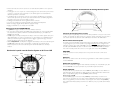
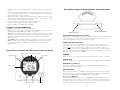
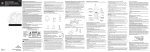
Sunrise System Front and LCD Display Layout
alarm
night light
speaker
sunrise / sunset
snooze mode
security mode
Sunrise System Clock Top and Set Up Buttons
SET BUTTON
ALARM ON/OFF
Connecting the Sunrise System to your lamp
The Sunrise System 100 (SRS 100) is supplied with a specially designed cable. One end of the cable
has a socket, insert the plug of your bedside lamp into this socket.The other end of the cable is the
mains plug for use with the wall socket.
Setting Up the Sunrise System
The first time the Sunrise System Dawn Simulator 100 (SRS 100) is switched on, the time will flash
ON and OFF; the time shown will be 13:00 or (1PM), indicating that the time is not set.
Please Note: When altering the settings ensure the ALARM clock symbol is not visible as you
cannot enter SETUP MODE to alter the settings with the alarm clock enabled.
The SRS 100 will come out of SETUP MODE automatically if no button is pressed for 12 seconds
or if you press the zzZ (SNOOZE) button.
BUTTONS
The SRS 100 has 5 buttons, each button has a unique function as described below:
Set Button
This button is used to enter and scroll through the SETUP Mode programming menu.
Plus (+) and Minus (-) Buttons
These buttons are used to set the level of your lamp and in SETUP mode these buttons adjust the
selected option.
12 hour
mode
plus and minus buttons
4
snooze button
zzZ Snooze Button
When the SRS 100 is in NORMAL mode (Alarm Off) this button will switch the lamp either ON
or OFF. This can be used at night to quickly illuminate the room. If the lamp is already on, pressing
zzZ (SNOOZE) will switch the lamp off.
Snooze Button and SUNRISE
During a SUNRISE, pressing the zzZ (SNOOZE) button will switch the lamp off and the sunrise
time will then start again for the remaining sunrise period e.g. if the sunrise time is set for 30
minutes and the zzZ (SNOOZE) button is pressed after only 8 minutes, the lamp will switch off and
then ‘fade up’ over the remaining 22 minutes.
Snooze Button and ALARM mode
If the SRS 100 is in ALARM mode, the alarm is sounding and the lamp is on, the zzZ SNOOZE
5