1
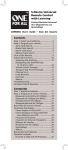
3-Device
Universal
Remote Control
Control Remoto Universal
de 3 Dispositivos
OARN03S User’s Guide • Guía del Usuario
Contents
Step 1: Install your batteries....................... 2
Step 2: Program your remote..................... 2
Auto Code Search..................................... 3
Brand Code Search................................... 4
Direct Code Entry..................................... 5
Manual Code Search................................ 6
Tour of the Remote..................................... 8
Advanced Functions.................................... 9
Reassigning the DVD•VCR Key to
Control a VCR........................................ 9
Volume Punch-Through........................... 9
Transport Key Punch-Through................. 9
Code Retrieval........................................ 10
Channel Lock.......................................... 10
Troubleshooting........................................ 11
Limited Lifetime Warranty....................... 24
Contenido
Paso 1: Instale las baterías........................ 13
Paso 2: Programe el control remoto........ 13
Búsqueda Automática de Códigos........ 14
Búsqueda de Códigos por Marca.......... 15
Entrada Directa de Códigos................... 16
Búsqueda Manual de Códigos............... 17
Recorrido del control remoto................... 19
Funciones Avanzadas................................ 20
Cómo Reasignar la Tecla DVD•VCR
para Manejar una VCR........................ 20
Irrupción de Volumen............................ 20
Irrupción de Teclas de Transporte......... 20
Bloqueo de Canales................................ 21
Recuperación de Códigos...................... 21
Resolución de Problema........................... 22
Garantía Limitada
Durante la Vida Útil del Producto......... 24
The OARN03S Universal Remote Control by One For All is a
perfect way to simplify home entertainment. It lets you control
up to three of your home entertainment devices from a single,
easy-to-use remote.
Step 1: Install your batteries
Your universal remote requires two AAA alkaline batteries (not
included).
To install the batteries:
1. Press and push the battery compartment cover to remove
it.
2. Insert the batteries, matching the batteries to the (+) and
(–) marks inside the battery compartment.
3. Push the battery cover back into place.
Battery Precautions:
• Do not mix old and new batteries.
• Do not mix alkaline, standard (carbon-zinc) or rechargeable
(nickel-cadmium) batteries.
• Always remove old, weak or worn-out batteries promptly
and recycle or dispose of them in accordance with Local
and National Regulations.
Step 2: Program your remote
To use this universal remote with your home entertainment
system, first you need to program it to control your devices.
There are four ways you can program the universal remote to
operate your devices:
•
The Auto Code Search goes automatically through all the
codes for the device you’re trying to control. It’s the easiest
method, but it can sometimes take longer than some of the
other programming methods.
• The Brand Code Search searches through the codes for
select brands of devices. It’s not as easy as the auto code
search, but it can be faster.
• The Direct Code Entry lets you enter a code from the
accompanying code list for your brand of device. It’s not as
easy as the other methods, but it’s potentially the fastest
method.
• The Manual Code Search lets you manually go through all
the codes for the device you’re trying to control.
Care and Maintenance
•
•
•
•
•
Keep the remote dry. If it gets wet, wipe it dry immediately.
Use and store the remote only in normal temperature environments.
Handle the remote gently and carefully. Don’t drop it.
Keep the remote away from dust and dirt.
Wipe the remote with a damp cloth occasionally to keep it looking
new.
• Modifying or tampering with the remote’s internal components can
cause malfunction and invalidate its warranty.
2
The Auto Code Search goes automatically through all the codes
for the device you’re trying to control. When you find the one
that operates your device, you can stop the search and store
that code.
TIPS: Each device key is associated with a type of device—the
TV is preset to search for TVs, SAT•CBL•DTC for satellite
receivers, cable boxes or digital TV converters, and DVD•VCR
for DVD players. To program the DVD•VCR key to control a PVR
or VCR, see the Reassigning the DVD•VCR Key to Control a VCR
section.
To exit without saving a new code at any point in the Auto
Code Search, press the EXIT key.
1. Manually turn on the device you want to control.
2. Press and hold the device key you want to program. The
POWER key illuminates.
While you’re holding down the device key, use your other
hand to press and hold the remote’s POWER key at the
same time. The POWER key turns off.
3. Wait until the POWER key comes on and stays on. Then
release both keys.
4. Point the remote directly at the front panel of the device
you want to control. Press PLAY on the remote and wait 5
seconds. The remote is testing a batch of 10 codes on your
device.
Did your device turn off?
YES: Go to step 5.
NO: Press PLAY again. The remote tests the next batch of
10 codes.
Keep pressing PLAY every 5 seconds until your device turns
off.
5. When your device turns off, press the REVERSE key on the
remote and wait at least 2 seconds. The remote tries the
last of the previous ten codes.
Did your device turn on?
YES: Press the STOP key. You’re done! You’ve programmed
this device key.
NO: Press REVERSE again. The remote tests the next code in
the batch.
Keep pressing REVERSE every 2 seconds until your device
turns back on. When it does, press STOP.
Note: If you accidentally press the REVERSE key after your
device turns on, press the FORWARD key. Then, wait two
seconds to see if your device turns off again.
NOTES
Throughout the programming of each key, be sure to keep the
remote pointed at the IR sensor of the device you are currently
programming the remote to control.
Test the remote with the device to make sure the device key is
programmed with the correct code for maximum functionality.
If some features don’t work, try a different code. See the
“Testing the Code for Maximum Functionality” section on the
next page for more information.
continues on next page...
3
English
Auto Code Search
During the Auto Code Search, the remote ignores keypresses
that aren’t part of the search.
The search times out after two minutes (the POWER key blinks
four times and turns off, and the last programmed code under
that device key is retained).
The POWER key blinks four times and turns off when the
remote has gone through all the codes. The remote exits the
Auto Code Search. If your device hasn’t turned off yet, try a
different search method.
Testing the Code for Maximum Functionality
1. Try a variety of the device’s functions with the remote. If
some device features don’t work, go to the next step to try
a different code.
2. Repeat the Auto Code Search Method from the beginning.
When your device turns off, do not stop searching. Instead,
with the unit now off, continue to press the PLAY key every
5 seconds until the unit turns back on.
3. Once the unit turns back on, press the REVERSE key on the
remote every 2 seconds until your device turns off again.
When your device turns off again, press the STOP key.
4. Test the key’s functionality again by attempting to control
a variety of the device’s functions. If the code that has
been stored controls the majority of the device’s functions,
programming is complete. If the code stored does not give
maximum functionality, try another code.
Brand Code Search
The Brand Code Search goes through only the codes for one of
the select brands listed in the accompanying code list. If your
brand of device is listed, this search can be very quick and easy.
TIPS: Each device key is associated with a type of device—the
TV is preset to search for TVs, SAT•CBL•DTC for satellite
receivers, cable boxes or digital TV converters, and DVD•VCR
for DVD players. To program the DVD•VCR key to control a PVR
or VCR, see the Reassigning the DVD•VCR Key to Control a VCR
section.
To exit without saving a new code at any point in the Brand
Code Search, press the EXIT key.
1. Manually turn on the device you want to control.
2. Find your device’s brand in the Brand Code list section of
the accompanying code list. Circle the number for your
brand and keep the list handy.
3. Press and hold the device key you want to program. The
POWER key illuminates.
While you’re holding down the device key, use your other
hand to press and hold the remote’s POWER key at the
same time. The POWER key turns off.
4. Wait until the POWER key comes on and stays on. Then
release both keys.
5. Look at the numbers you circled for your device’s brand
code number. Press those numbers on the remote keypad.
Note: For single-digit brand codes, press the 0 key first (for
example, 0-5 for 5).
4
6. Point the remote directly at the front panel of the device
English
you want to control. Press POWER on the remote and wait
2 seconds. The remote is testing a single code for your
device’s brand.
Did your device turn off?
YES: Press the STOP key to store the code. You’re done!
You’ve programmed this device key.
NO: Press POWER again. The remote tests the next code for
your brand.
Keep pressing POWER every 2 seconds until your device
turns off. When it does, press STOP.
NOTES
Throughout the programming of each key, be sure to keep the
remote pointed at the IR sensor of the device you are currently
programming the remote to control.
Test the remote with the device to make sure the device key is
programmed with the correct code for maximum functionality.
If some features don’t work, try a different code. See the
“Testing the Code for Maximum Functionality” section below
for more information.
During the Brand Code Search, the remote ignores keypresses
that aren’t part of the search.
The search times out after two minutes (the POWER key blinks
four times and turns off, and the last programmed code under
that device key is retained).
The POWER key blinks four times and turns off when the
remote has gone through all the codes. The remote exits the
Brand Code Search. If your device hasn’t turned off yet, try a
different search method.
Testing the Code for Maximum Functionality
1. Try a variety of the device’s functions with the remote. If
some device features don’t work, go to the next step to try
a different code.
2. Repeat the Brand Code Search from the beginning. When
the device turns off for the first time, don’t press the STOP
key, which would store the same code. Instead, with the
unit now off, continue to press the POWER key repeatedly
until the unit turns back on.
3. Once the unit turns back on, you have found another code
that operates the device. Press the STOP key.
4. Test the key’s functionality again by attempting to control
a variety of the device’s functions. If the code that has
been stored controls the majority of the device’s functions,
programming is complete. If the code stored does not give
maximum functionality, try another code.
Direct Code Entry
Direct Code Entry lets you enter a code from the accompanying
code list for your brand of device. It’s not as easy as the other
methods, but it’s potentially the fastest method.
TIP: Each device key is associated with a type of device—the TV
is preset to search for TVs, SAT•CBL•DTC for satellite receivers,
cable boxes or digital TV converters, and DVD•VCR for DVD
players. To program the DVD•VCR key to control a PVR or VCR,
see the Reassigning the DVD•VCR Key to Control a VCR section.
1. Manually turn on the device you want to control.
2. Find the Code List that came with the remote. Locate the
section for the type of device you’re trying to program, and
find your brand in that section. Circle the codes for your
brand and keep them handy.
continues on next page...
5
3. Press and hold the device key you want to program (the
POWER key illuminates).
While you’re holding down the device key, use your other
hand enter the first five-digit code for your brand in the
code list (the POWER key turns off after the first digit).
4. When you’ve finished entering the five-digit code, keep
holding down the device key and look at the POWER key.
Is the POWER key illuminated?
YES: You’re done! You’ve programmed this device key.
NO, it blinked four times and turned off: You have
either entered a code number that is not in the code lists or
missed a step in the code entry procedure. Try step 3 again.
NOTES
Test the remote with the device to make sure the device key is
programmed with the correct code for maximum functionality.
If some features don’t work, try a different code in the list.
Remember to enter the code for future reference in the box
provided in the Code Retrieval section of this manual.
If your brand isn’t listed in the code list, use one of the Code
Search methods to program the remote control. (Refer to the
Auto and Manual Code Search methods.)
If you release the device key any time during the Direct Code
Entry procedure, the POWER key blinks four times, and the
process is exited. The last programmed code under the device
key is retained.
Manual Code Search
The Manual Code Search lets you go one-by-one through all
the codes for the device you’re trying to control. When you find
the one that operates your device, you can stop the search and
store that code.
TIPS: The Manual Code Search method may take a long time
because the remote searches through all of the codes in its
memory one-by-one. If your brand is listed in the Brand Codes
or the Code Lists, first try the Brand Code Search or the Direct
Code Entry method.
Each device key is associated with a type of device—the TV is
preset to search for TVs, SAT•CBL•DTC for satellite receivers,
cable boxes or digital TV converters, and DVD•VCR for DVD
players. To program the DVD•VCR key to control a PVR or VCR,
see the Reassigning the DVD•VCR Key to Control a VCR section.
To exit without saving a new code at any point in the Manual
Code Search, press the EXIT key.
1. Manually turn on the device you want to control.
2. Press and hold the device key you want to program. The
POWER key illuminates
6
While you’re holding down the device key, use your other
hand to press and hold the remote’s POWER key at the
same time. The POWER key turns off.
3. Wait until the remote’s POWER key comes on and stays on.
Then release both keys.
English
4. Point the remote directly at the front panel of the device
you want to control. Press POWER on the remote and wait
2 seconds. The remote is testing a single code for your
device.
Did your device turn off?
YES: Press the STOP key to store the code. You’re done!
You’ve programmed this device key.
NO: Press POWER again. The remote tests the next code for
your device.
Keep pressing POWER every 2 seconds until your device
turns off. When it does, press STOP.
TIP: Because there are so many codes, you may have to
press the POWER key many times—possibly hundreds of
times.
NOTES
Throughout the programming of each key, keep the remote
pointed at the IR sensor of the device you are programming the
remote to control.
Test the remote with the device to make sure the device key is
programmed with the correct code for maximum functionality.
If some features don’t work, try a different code. See the
“Testing the Code for Maximum Functionality” section below
for more information.
During the Manual Code Search, the remote ignores keypresses
that aren’t part of the search.
The search times out after two minutes (the POWER key blinks
four times and turns off, and the last programmed code under
that device key is retained).
The POWER key blinks four times and turns off when the
remote has gone through all the codes. The remote exits the
Brand Code Search. If your device hasn’t turned off yet, try a
different search method.
Testing the Code for Maximum Functionality
1. Try a variety of the device’s functions with the remote. If
some features of your devices don’t work, go to the next
step to try a different code.
2. Repeat the Manual Code Search and Entry Method from
the beginning. When the device turns off for the first time,
don’t press the STOP key, which would store the same
code. Instead, with the unit now off, continue to press the
POWER key repeatedly until the unit turns back on.
3. Once the unit turns back on, you have found another code
that operates the device. Press the STOP key.
4. Test the key’s functionality again by trying a variety of
functions. If the code controls the majority of the device’s
functions, programming is complete. If the code stored
does not give maximum functionality, try another code.
7
Tour of the Remote
In most cases, the keys on this remote perform the same
functions as the keys on your original remotes once you’ve
programmed this remote to operate your components. Many
keys on this remote have other functions as well.
Illuminated POWER key
serves as an indicator light to
provide feedback.
Device keys (TV,
SAT•CBL•DTC, DVD•VCR)
put the remote in the right
mode to control your device.
GUIDE and MENU put the
remote in menu/guide mode;
they also access the same
features as the keys on your
original remotes.
EXIT exits remote
programming; it also
performs the same functions
as on your original remotes.
Arrow keys act as navigation
keys in device guides and
menu systems.
The INPUT•DIGITAL and
— (dash) key has three
functions: (1) it toggles
through all the video sources
connected to your TV; (2)
when the remote is in VCR
mode, this button toggles
between VCR and the TV
input; (3) when you’re
entering digital channel
numbers directly, this button
lets you separate the main
channel number from the
sub-channel number (such as
59.1).
IMPORTANT
Because this remote controls more than one device, you must
first “tell” the remote which device you wish to operate. That
means, if you wish to operate your TV, you must first press the
TV key to put the remote in the TV Mode. The remote stays
in that device mode until you press a different device key. For
example, if your remote is in TV Mode and you want to operate
the DVD player, you must press the DVD•VCR key to change
device modes.
8
English
Advanced Functions
Reassigning the DVD•VCR Key to
Control a VCR
The DVD•VCR key defaults to control a DVD player. If you want
the DVD•VCR key to control a VCR, you must reassign it.
1. Press and hold the DVD•VCR key. The POWER key
illuminates. Keep holding down the DVD•VCR key.
2. While holding down the DVD•VCR key, press and release
the number 2 key on the keypad. The POWER key turns off.
3. Release the DVD•VCR key. The POWER key blinks four times
and then turns off. The DVD•VCR key is now set to control
a VCR.
4. Follow the directions in the auto, brand, direct entry, or
manual code search to program the DVD•VCR key for your
VCR.
Volume Punch-Through
Volume punch-through allows the VOL and MUTE keys, when
pressed in SAT•CBL•DTC or DVD•VCR modes, to “punch
through” to TV. Volume punch-through occurs automatically
and allows you to control the volume without exiting the
current mode.
Note: Volume punch-through does not occur in cases where
the component code has its own volume/mute controls, such as
some satellite receivers.
Transport Key Punch-Through
Transport key punch-through allows the transport keys
(REVERSE, PLAY, FORWARD, RECORD, STOP, PAUSE, SKIP BACK,
SLOW, and SKIP FWD), when pressed in TV or SAT•CBL•DTC
modes, to “punch through” to DVD•VCR mode. Transport key
punch-through occurs automatically and allows you to use the
transport keys without exiting the current mode. For example,
if the transport keys were last used in DVD mode and accessed
again after pressing the TV key, they will punch through to the
DVD.
Note: Transport key punch-through does not occur in cases
where the device code has its own transport key data, such as a
satellite receiver with a built-in DVR.
9
Channel Lock
Channel lock automatically sends channel commands, like the
CH, LAST, and 0–9 number keys, to your satellite receiver, cable
box, or digital TV converter when you’re in TV mode. This can
save you keypresses if you use a device other than your TV to
change channels.
To turn channel lock on:
1. Press and hold the device key for the device you use to
change channels. While you’re holding down this device
key, use your other hand to press and hold the remote’s CH
up key at the same time.
2. Wait until the remote’s POWER key comes on and stays on.
Then release both keys.
3. Press ENTER to lock channel commands to this device.
To turn channel lock off:
1. Press and hold the TV key. While you’re holding down the
TV key, use your other hand to press and hold the remote’s
CH down key at the same time.
2. Wait until the remote’s POWER key comes on and stays on.
Then release both keys.
3. Press ENTER to start changing channels with your TV.
Code Retrieval
Once you’ve programmed the remote to control your devices,
you may want to record the codes for future reference. If
you used the Direct Code Entry method, this is easy. Just find
the codes you entered and make a note of them in the boxes
below. If you used one of the Code Search methods to program
your remote or if you used the Direct Entry method but don’t
remember the code, you will need to retrieve each device’s fivedigit code. Retrieving the actual code and writing it down will
save you time if you ever need to program the remote again. If
the codes are recorded, you can use the Direct Entry method to
reprogram your remote to control your devices, which is quick
and easy.
1. Press and hold the device key (TV, SAT•CBL•DTC, DVD•VCR)
whose code you wish to retrieve. The POWER key
illuminates. Keep pressing the device key.
2. While holding the device key down, press and hold the
INFO key. The POWER key turns off. After holding down
both keys for three seconds, the POWER key turns back on.
3. Release both keys. The POWER key remains on.
4. Starting with the number 1 key, press and release each
number key on the keypad in the following order: 1-9, then
0. The number that causes the POWER key to blink is the
first number of the code. As you find each number of the
code, write it down for future reference.
Note: All TV codes begin with the number 1; all VCR
and DVR codes begin with the number 2; all DVDs, the
number 3; and all satellite receivers, cable boxes and DTV
converters, the number 5.
5. Repeat step 4 until you have retrieved all five numbers in
the code. After the fifth number is retrieved, the POWER
key blinks briefly, then turns off.
TIP: To exit the Code Retrieval Mode at any time, press the
EXIT key.
10
Quick Code Reference
Device Type
Code
Troubleshooting
Problem: The remote does not operate your device.
• Make sure the remote is in the correct mode by pressing the
corresponding device key (TV, SAT•CBL•DTC, DVD•VCR). This
tells the remote which device to operate.
• Remove any obstacles between the remote and the device.
Make sure you’re aiming the remote at the device’s IR sensor.
• Make sure the batteries are fresh and are properly installed.
Replace the batteries with two new AAA batteries, if
necessary (see the Battery Installation section).
Problem: The remote can’t be programmed to operate
your device.
• If you are testing the remote while programming it, you may
be too far away from the device or at a wrong angle. There
must be an unobstructed path between the remote and the
IR sensor on the device. Move closer and make sure you point
the remote at the device you’re trying to control.
• If you’re using the Direct Entry programming method to
enter the codes for your brand and the unit is still not
functioning properly, try the auto, brand, or manual search
method.
• To control combo units, like TV/VCRs or TV/DVDs, you must
program the individual corresponding device keys to control
each part of the combo unit. Once programmed successfully,
the TV key controls the TV functions, and the DVD•VCR key
controls the VCR or DVD functions.
• Make sure the batteries are fresh and are properly installed.
Problem: The remote doesn’t perform commands
properly.
• Make sure the remote is in the correct mode by pressing the
corresponding device key (TV, SAT•CBL•DTC, DVD•VCR). This
tells the remote which device to operate.
• Make sure device is ready (for example, the DVD player has a
disc loaded).
• You may have pressed an invalid key for the mode the
remote is in.
• If you’re trying to enter a channel number directly, try
pressing the ENTER key after entering the channel number as
this is a requirement of certain models and brands.
• There is a possibility that a programmed code may only be
able to control some of your device features (for example,
only turns a device on and off). To confirm that the device
key is programmed with the correct code for maximum
functionality, test the device. Attempt to control a variety
of the device’s functions with the remote. If some of the
11
English
Note: If you press an invalid key during the Code Retrieval
process, the remote will not respond. If you do not press a valid
Code Retrieval key (TV, SAT•CBL•DTC, DVD•VCR, INFO, EXIT),
Code Retrieval times out after 15 seconds. The POWER key
blinks four times, and then turns off.
features of your devices don’t work, try programming the
remote with a different code in the list using the Direct Code
Entry Method, until you find the code that allows the remote
to control the majority of your device’s functions. Different
codes can provide different levels of functionality.
Problem: The POWER key does not light when you press
a key.
• You may have pressed an invalid key for the mode the
remote is in.
• Make sure the remote is in the correct mode by pressing the
corresponding device key (TV, SAT•CBL•DTC, DVD•VCR). This
tells the remote which device to operate.
• Make sure the batteries are fresh and are properly installed.
Replace the batteries with two new AAA batteries, if
necessary (see the Battery Installation section).
Problem: The remote will not change channels on device.
• Make sure the remote is in the correct mode by pressing the
corresponding device key (TV, SAT•CBL•DTC, DVD•VCR). This
tells the remote which device to operate.
• Press the ENTER key after you enter a channel number.
• Remove any obstacles between the remote and the device.
Make sure to aim the remote at the IR sensor on the device.
Problem: The device’s menu does not appear on the TV
screen.
• Make sure you have connected the device to your TV
properly and selected the correct input. (See your devices’
Owner’s Manuals for proper connection procedures.)
• Make sure the remote is in the correct mode by pressing the
corresponding device key (TV, SAT•CBL•DTC, DVD•VCR). This
tells the remote which device to operate.
• Menu access isn’t supported for all brands. You may need to
use your original remote control to access menu functions for
some devices.
For more information, please visit www.oneforall.com
Consumer Help Line: 1 (800) 315-0990
Additional Information
ONE FOR ALL® is the registered trademark of Universal Electronics Inc.
Audiovox Accessories Corporation is the Licensee of the ONE FOR ALL® brand
for North America.
© 2010 by Universal Electronics Inc. No part of this publication may be
reproduced, transmitted, transcribed, stored in any retrieval system, or
translated to any language, in any form or by any means, electronic,
mechanical, magnetic, optical, manual, or otherwise, without the prior
written permission of Universal Electronics Inc.
The One For All® 3-Device Universal Remote Control is compatible for use in
North America, excluding Mexico.
This One For All® 3-Device Universal Remote Control is covered by one or
more of the following US Patents:
6,587,067 6,496,135 5,515,052 5,959,751 6,587,067 5,481,256
OARN03S 1/10
12
El Control Remoto Universal OARN03S de One For All es una manera
perfecta de simplificar el entretenimiento en el hogar. Esta unidad le
permite manejar hasta 3 dispositivos de entretenimiento en el hogar
desde un solo control remoto fácil de usar.
Paso 1: Instale las baterías
Español
El control remoto necesita dos baterías alcalinas AAA (no
suministradas).
Para instalar las baterías:
1. Oprima y empuje la tapa del compartimiento de las baterías
para removerla.
2. Inserte las baterías, cerciorándose de que las polaridades
(+) y (–) correspondan con el diagrama que aparece en el
compartimiento de las baterías.
3. Vuelva a colocar la tapa del compartimiento de las baterías en
su posición.
Precauciones sobre las Baterías:
•
No combine baterías nuevas y viejas.
•
No combine diferentes tipos de baterías: alcalinas, estándar
(carbón-zinc) o recargables (níquel-cadmio).
•
Siempre remueva de inmediato baterías viejas, débiles o
desgastadas, y recíclelas o deséchelas según lo disponen las
normas locales y nacionales.
Paso 2: Programe el control remoto
Para utilizar este control remoto universal con su sistema de
entretenimiento en el hogar, necesitará primero programarlo para
manejar sus dispositivos. Para programar el control remoto universal
para manejar sus dispositivos, utilice uno de los cuatro métodos a
continuación.
•
La Búsqueda Automática de Códigos recorre
automáticamente todos los códigos del dispositivo que desea
manejar. Éste es el método más fácil, pero a veces toma más
tiempo que algunos de los demás métodos de programación.
•
La Búsqueda de Códigos por Marca busca a través de los
códigos según la marca de dispositivos seleccionada. No es tan
fácil como la búsqueda de códigos automática, pero muchas
veces puede ser más rápida.
•
La Entrada Directa de Códigos le permite ingresar un
código de la lista de códigos suministrada para la marca de
su dispositivo. No es tan fácil como los otros métodos, pero es
posiblemente el más rápido.
•
La Búsqueda Manual de Códigos le permite recorrer
manualmente todos los códigos del dispositivo que desea
manejar.
Cuidado y Mantenimiento
• Mantenga el control remoto seco. Si se moja, séquelo
inmediatamente.
• Utilice y almacene el control remoto únicamente en entornos de
temperatura normal.
• Maneje el control remoto de forma cuidadosa.
No lo deje caer.
• Mantenga el control remoto resguardado del polvo y la suciedad.
• Limpie el control remoto con un paño húmedo de vez en cuando
para mantenerlo en buenas condiciones de operación.
• Modificar o sabotear los componentes internos del control remoto
podría ocasionar desperfectos y anular la garantía.
13
Búsqueda Automática de Códigos
La Búsqueda Automática de Códigos recorre automáticamente todos
los códigos del dispositivo que desea manejar. Cuando encuentre el
que maneja su dispositivo, puede detener la búsqueda y guardar el
código.
CONSEJOS: Cada tecla de dispositivo está asociada a un tipo de
dispositivo—TV está configurada para buscar TV, SAT•CBL•DTC para
receptores de satélite, aparatos de cable o convertidores de TV
digital y DVD•VCR para lectores de DVD. Para programar la tecla
DVD•VCR para manejar un PVR o VCR, consulte la sección Cómo
Reasignar la Tecla DVD•VCR para Manejar una VCR.
Para salir en cualquier momento de la Búsqueda Automática de
Códigos sin guardar un código nuevo, oprima la tecla EXIT.
1. Encienda manualmente el dispositivo que desea manejar.
2. Oprima y sostenga la tecla de dispositivo que desea programar.
La tecla POWER se ilumina.
A la vez que sostiene la tecla de dispositivo, utilice la otra mano
para oprimir y sostener simultáneamente la tecla POWER del
control remoto. La tecla POWER se apaga.
3. Espere hasta que la tecla POWER se ilumine y permanezca
iluminada. Luego, suelte ambas teclas.
4. Mantenga el control remoto apuntado directamente al panel
frontal del dispositivo que desea manejar. Oprima la tecla PLAY
del control remoto y espere 5 segundos. El control remoto está
probando un grupo de 10 códigos para el dispositivo.
¿Se apagó el dispositivo?
SÍ: Vaya al Paso 5.
NO: Oprima PLAY nuevamente. El control remoto prueba el
próximo grupo de 10 códigos.
Continúe oprimiendo PLAY cada 5 segundos hasta que el
dispositivo se apague.
5. Cuando el dispositivo se apague, oprima la tecla REVERSE del
control remoto y espere por lo menos 2 segundos. El control
remoto prueba el último código del grupo anterior de 10
códigos.
¿Se encendió el dispositivo?
SÍ: Oprima la tecla STOP. ¡Listo! La tecla de dispositivo está
programada.
NO: Oprima REVERSE nuevamente. El control remoto prueba el
próximo código en el grupo de códigos.
Continúe oprimiendo REVERSE cada 2 segundos hasta que el
dispositivo se encienda. Cuando se encienda, oprima STOP.
Aviso: Si oprime accidentalmente la tecla REVERSE luego de
que el dispositivo se encienda, oprima la tecla FORWARD.
Luego, espere dos segundos para ver si su dispositivo se vuelve
a apagar.
NOTAS
A través de la programación de cada tecla, asegúrese de mantener
el control remoto apuntado directamente al sensor infrarrojo del
dispositivo que está actualmente programando con el control
remoto.
Pruebe el control remoto con el dispositivo para asegurarse que
la tecla de dispositivo esté programada con el código correcto y
garantizar así su máxima funcionalidad. Si no puede utilizar alguna
de las funciones, intente con otro código. Para obtener mayor
información, consulte la sección “Cómo Probar el Código para
Obtener Máxima Funcionalidad” a continuación.
14
Durante la Búsqueda Automática de Códigos, el control remoto
ignora la opresión de teclas que no son parte de la búsqueda.
La búsqueda se detendrá luego de dos minutos (la tecla POWER
parpadea cuatro veces y se apaga, y se retiene el último código
programado bajo la tecla de dispositivo).
La tecla POWER parpadea cuatro veces y se apaga cuando el control
remoto ha recorrido todos los códigos. El control remoto sale del
método de Búsqueda Automática de Códigos. Si su dispositivo aún
no se ha apagado, intente un método de búsqueda diferente.
1. Pruebe una variedad de funciones del dispositivo con el control
remoto. Si no puede utilizar alguna de las funciones del
dispositivo, vaya al próximo paso e intente un código diferente.
2. Repita la Búsqueda Automática de Códigos desde el comienzo.
Cuando su dispositivo se apague, no detenga la búsqueda. En
vez, con la unidad apagada, continúe oprimiendo la tecla PLAY
cada 5 segundos hasta que la unidad se vuelva a encender.
3. Cuando se vuelva a encender la unidad, oprima la tecla REVERSE
en el control remoto cada 2 segundos hasta que el dispositivo
se vuelva a apagar. Cuando el dispositivo se vuelva a apagar,
oprima la tecla STOP.
4. Nuevamente, pruebe la funcionalidad de la tecla intentando
controlar una variedad de funciones del dispositivo. Si el código
que se ha almacenado controla la mayoría de las funciones del
dispositivo, entonces habrá concluido la programación. Si el
código guardado no brinda una máxima funcionalidad, intente
otro código.
Búsqueda de Códigos por Marca
La Búsqueda de Códigos por Marca recorre sólo los códigos de una
de las marcas seleccionadas que aparecen en la lista de códigos
suministrada. Si la marca del dispositivo aparece en la lista,
posiblemente la búsqueda se llevará a cabo de manera fácil y rápida.
CONSEJOS: Cada tecla de dispositivo está asociada a un tipo de
dispositivo—TV está configurada para buscar TV, SAT•CBL•DTC para
receptores de satélite, aparatos de cable o convertidores de TV
digital y DVD•VCR para lectores de DVD. Para programar la tecla
DVD•VCR para manejar un PVR o VCR, consulte la sección Cómo
Reasignar la Tecla DVD•VCR para Manejar una VCR.
Para salir en cualquier momento de la Búsqueda de Códigos por
Marca sin guardar un código nuevo, oprima la tecla EXIT.
1. Encienda manualmente el dispositivo que desea manejar.
2. Encuentre la marca del dispositivo en la sección de Códigos por
Marca de la lista de códigos suministrada. Marque con un círculo
el número de la marca y mantenga la lista a mano.
3. Oprima y sostenga la tecla de dispositivo que desea programar.
La tecla POWER se ilumina.
A la vez que sostiene la tecla de dispositivo, utilice la otra mano
para oprimir y sostener simultáneamente la tecla POWER del
control remoto. La tecla POWER se apaga.
4. Espere hasta que la tecla POWER del control remoto se ilumine
y permanezca iluminada. Luego, suelte ambas teclas.
5. Fíjese en los números que marcó para el número de código de la
marca del dispositivo. Oprima dichos números en el teclado del
control remoto.
Aviso: Para los códigos de marca de un solo dígito, oprima la
tecla 0 primero (por ejemplo, 0-5 para 5).
continúa en la página siguiente...
15
Español
Cómo Probar el Código para Obtener Máxima Funcionalidad
6. Mantenga el control remoto apuntado directamente al panel
frontal del dispositivo que desea manejar. Oprima la tecla
POWER del control remoto y espere 2 segundos. El control
remoto está probando un código para la marca del dispositivo.
¿Se apagó el dispositivo?
SÍ: Oprima la tecla STOP para guardar el código. ¡Listo! La tecla
de dispositivo está programada.
NO: Oprima POWER nuevamente. El control remoto prueba el
próximo código para su marca.
Continúe oprimiendo POWER cada 2 segundos hasta que el
dispositivo se apague. Cuando se apague, oprima STOP.
NOTAS
A través de la programación de cada tecla, asegúrese de mantener
el control remoto apuntado directamente al sensor infrarrojo del
dispositivo que está actualmente programando con el control remoto.
Pruebe el control remoto con el dispositivo para asegurarse que
la tecla de dispositivo esté programada con el código correcto y
garantizar así su máxima funcionalidad. Si no puede utilizar alguna
de las funciones, intente con otro código. Para obtener mayor
información, consulte la sección “Cómo Probar el Código para
Obtener Máxima Funcionalidad” a continuación.
Durante la Búsqueda de Códigos por Marca, el control remoto ignora
la opresión de teclas que no son parte de la búsqueda.
La búsqueda se detendrá luego de dos minutos (la tecla POWER
parpadea cuatro veces y se apaga, y se retiene el último código
programado bajo la tecla de dispositivo).
La tecla POWER parpadea cuatro veces y se apaga cuando el control
remoto ha recorrido todos los códigos. El control remoto sale del
método de Búsqueda de Códigos por Marca. Si su dispositivo aún no
se ha apagado, intente un método de búsqueda diferente.
Testing the Code for Maximum Functionality
1. Pruebe una variedad de funciones del dispositivo con el control
remoto. Si no puede utilizar alguna de las funciones de sus
dispositivos, vaya al próximo paso e intente un código diferente.
2. Repita la Búsqueda de Códigos por Marca desde el comienzo.
Cuando el dispositivo se apague por primera vez, no oprima
la tecla STOP, con la cual quedaría guardado el mismo código.
En vez, con la unidad apagada, continúe oprimiendo la
tecla POWER repetidamente hasta que la unidad se vuelva a
encender.
3. Si se vuelve a encender la unidad, habrá encontrado otro código
que puede manejar ese dispositivo. Oprima STOP.
4. Pruebe la funcionalidad de la tecla nuevamente intentando
una variedad de funciones. Si el código controla la mayoría
de las funciones del dispositivo, entonces habrá concluido la
programación. Si el código guardado no brinda una máxima
funcionalidad, intente otro código.
Entrada Directa de Códigos
La Entrada Directa de Códigos le permite ingresar un código de la lista
de códigos suministrada para la marca de su dispositivo. No es tan fácil
como los otros métodos, pero es posiblemente el más rápido.
CONSEJO: Cada tecla de dispositivo está asociada a un tipo de
dispositivo—TV está configurada para buscar TV, SAT•CBL•DTC para
receptores de satélite, aparatos de cable o convertidores de TV
digital y DVD•VCR para lectores de DVD. Para programar la tecla
DVD•VCR para manejar un PVR o VCR, consulte la sección Cómo
Reasignar la Tecla DVD•VCR para Manejar una VCR.
1. Encienda manualmente el dispositivo que desea manejar.
2. Encuentre la Lista de Códigos suministrada con el control
remoto. Encuentre la sección para el tipo de dispositivo que
desea programar, y localice la marca en esa sección. Marque con
un círculo los códigos para la marca y manténgalos a mano.
16
3. Oprima y sostenga la tecla de dispositivo que desea programar
Mientras oprime la tecla de dispositivo, ingrese con la otra
mano el primer código de cinco dígitos para la marca de la lista
de códigos (la tecla POWER se apaga luego del primer dígito).
4. Cuando haya ingresado el código de cinco dígitos, continúe
oprimiendo la tecla de dispositivo y observe la tecla POWER.
¿Se iluminó la tecla POWER?
SÍ: ¡Listo! La tecla de dispositivo está programada.
No, parpadeó cuatro veces y se apagó: Ha ingresado un
número de código que no se encuentra en las listas de códigos
u omitió un paso en el procedimiento de entrada de códigos.
Intente el paso 3 nuevamente.
NOTAS
Pruebe el control remoto con el dispositivo para asegurarse que
la tecla de dispositivo esté programada con el código correcto y
garantizar así su máxima funcionalidad. Si no puede utilizar alguna
de las funciones, intente con otro código de la lista.
Recuerde ingresar el código para referencia futura en el recuadro
provisto en la sección Recuperación de Códigos de este manual.
Si la marca de su dispositivo no aparece en la lista de códigos, utilice
uno de los métodos de Búsqueda de Códigos para programar el
control remoto. (Consulte los métodos de Búsqueda Automática y
Manual de Códigos)
Si suelta la tecla de dispositivo en cualquier momento durante el
proceso de Entrada Directa de Códigos, la tecla POWER parpadea
cuatro veces, y se sale del proceso. Se retendrá el último código
programado bajo la tecla de dispositivo.
Búsqueda Manual de Códigos
La Búsqueda Manual de Códigos le permite recorrer uno por
uno todos los códigos del dispositivo que desea manejar. Cuando
encuentre el que maneja su dispositivo, puede detener la búsqueda
y guardar el código.
CONSEJOS: El método de Búsqueda Manual de Códigos podría
tomar más tiempo porque el control remoto busca a través de todos
los códigos en su memoria uno por uno. Si su marca aparece en las
Listas de Códigos por Marca o Listas de Códigos, intente primero la
Búsqueda de Códigos por Marca o el método de Entrada Directa de
Códigos.
Cada tecla de dispositivo está asociada a un tipo de dispositivo—TV
está configurada para buscar TV, SAT•CBL•DTC para receptores de
satélite, aparatos de cable o convertidores de TV digital y DVD•VCR
para lectores de DVD. Para programar la tecla DVD•VCR para
manejar un PVR o VCR, consulte la sección Cómo Reasignar la Tecla
DVD•VCR para Manejar una VCR.
Para salir en cualquier momento de la Búsqueda Manual de Códigos
sin guardar un código nuevo, oprima la tecla EXIT.
1. Encienda manualmente el dispositivo que desea manejar.
continúa en la página siguiente...
17
Español
(la tecla POWER se ilumina).
2. Oprima y sostenga la tecla de dispositivo que desea programar.
La tecla POWER se ilumina.
A la vez que sostiene la tecla de dispositivo, utilice la otra mano
para oprimir y sostener simultáneamente la tecla POWER del
control remoto. La tecla POWER se apaga.
3. Espere hasta que la tecla POWER del control remoto se ilumine
y permanezca iluminada. Luego, suelte ambas teclas.
4. Mantenga el control remoto apuntado directamente al panel
frontal del dispositivo que desea manejar. Oprima la tecla
POWER del control remoto y espere 2 segundos.
¿Se apagó el dispositivo?
SÍ: Oprima la tecla STOP para guardar el código. ¡Listo! La tecla
de dispositivo está programada.
NO: Oprima POWER nuevamente. El control remoto prueba el
próximo código para su dispositivo.
Continúe oprimiendo POWER cada 2 segundos hasta que el
dispositivo se apague. Cuando se apague, oprima STOP.
CONSEJO: Debido a la gran cantidad de códigos, quizás
necesite oprimir la tecla POWER varias veces-posiblemente
cientos de veces.
NOTAS
A través de la programación de cada tecla, mantenga el control
remoto apuntado directamente al sensor infrarrojo del dispositivo
que está programando con el control remoto.
Pruebe el control remoto con el dispositivo para asegurarse que
la tecla de dispositivo esté programada con el código correcto y
garantizar así su máxima funcionalidad. Si no puede utilizar alguna
de las funciones, intente con otro código. Para obtener mayor
información, consulte la sección “Cómo Probar el Código para
Obtener Máxima Funcionalidad” a continuación.
Durante la Búsqueda Manual de Códigos, el control remoto ignora la
opresión de teclas que no son parte de la búsqueda.
La búsqueda se detendrá luego de dos minutos (la tecla POWER
parpadea cuatro veces y se apaga, y se retiene el último código
programado bajo la tecla de dispositivo).
La tecla POWER parpadea cuatro veces y se apaga cuando el control
remoto ha recorrido todos los códigos. El control remoto sale del
método de Búsqueda Manual de Códigos. Si su dispositivo aún no se
ha apagado, intente un método de búsqueda diferente.
Cómo Probar el Código para Obtener Máxima Funcionalidad
1. Pruebe una variedad de funciones del dispositivo con el control
remoto. Si no puede utilizar alguna de las funciones del
dispositivo, vaya al próximo paso e intente un código diferente.
2. Repita el Método de Búsqueda Manual de Códigos desde el
comienzo. Cuando haya encontrado el código que vuelva a
encender el dispositivo, no oprima la tecla STOP, con la cual
quedaría guardado el mismo código. En vez, con la unidad
apagada, continúe oprimiendo la tecla POWER repetidamente
hasta que la unidad se vuelva a encender.
3. Si se vuelve a encender la unidad, habrá encontrado otro código
que puede manejar ese dispositivo. Oprima la tecla STOP.
4. Nuevamente, pruebe la funcionalidad de la tecla intentando
controlar una variedad de funciones del dispositivo. Si el código
que se ha almacenado controla la mayoría de las funciones del
dispositivo, entonces habrá concluido la programación. Si el
código guardado no brinda una máxima funcionalidad, intente
otro código.
18
Recorrido del control remoto
La tecla POWER iluminada sirve
de luz indicadora para ofrecer
retroalimentación.
Las teclas de dispositivo (TV,
SAT•CBL•DTC, DVD•VCR)
ponen el control remoto en el
modo correcto para manejar el
dispositivo.
GUIDE y MENU ponen el
control remoto en el modo
menú/guía; además logran
acceso a las mismas funciones
que las teclas de los controles
remotos originales.
EXIT sale de la programación
del control remoto; además,
desempeña las mismas
funciones que en los controles
remotos originales.
Las teclas de flechas se utilizan
para navegar a través de los
sistemas de menús y guías de los
componentes
La tecla INPUT•DIGITAL y —
(guión) tiene tres funciones: (1)
alterna entre todas las fuentes
de video conectadas al televisor;
(2) cuando el control remoto
se encuentra en el modo VCR,
este botón alterna entre la
entrada VCR y TV; (3) cuando
ingresa directamente números
de canales digitales, este botón
le permite separar el número
del canal principal del número
del canal secundario (tal como
59.1).
IMPORTANTE
Dado que este control remoto maneja más de un dispositivo, deberá
primero “indicarle” al control remoto cuál dispositivo desea manejar.
En otras palabras, si desea manejar el televisor, deberá primero
oprimir la tecla TV para poner el control remoto en el Modo TV. El
control remoto permanece en ese modo de dispositivo hasta que
oprima una tecla de dispositivo diferente. Por ejemplo, si el control
remoto se encuentra en el Modo TV y desea manejar el Lector de
DVD, deberá oprimir la tecla DVD•VCR para cambiar los modos de
dispositivo.
19
Español
En la mayoría de los casos, las teclas del control remoto desempeñan
las mismas funciones que las teclas de los controles remotos originales
una vez programa este control remoto para manejar los componentes.
La mayoría de las teclas de este control remoto tienen otras funciones.
Funciones Avanzadas
Cómo Reasignar la Tecla DVD•VCR para
Manejar una VCR
La tecla DVD•VCR viene preestablecida de fábrica para manejar un
Lector de DVD. Si desea que la tecla DVD•VCR maneje una VCR,
deberá reasignarla.
1. Oprima y sostenga la tecla DVD•VCR. La tecla POWER se
encenderá. Continúe sosteniendo la tecla de DVD•VCR
2. Mientras sostiene la tecla DVD•VCR, oprima y suelte la tecla
numérica 2 en el teclado. La tecla POWER se apagará.
3. Suelte la tecla DVD•VCR. La tecla POWER parpadea cuatro veces
y luego se apaga. La tecla DVD•VCR está ahora configurada
para manejar una VCR.
4. Observe las instrucciones de la búsqueda de códigos automática,
por marca, manual o entrada directa para programar la tecla
DVD•VCR para su VCR.
Irrupción de Volumen
Irrupción de volumen le permite a las teclas VOL y MUTE, cuando se
oprimen en los modos SAT•CBL•DTC o DVD•VCR “irrumpir” al TV.
Irrupción de volumen ocurre automáticamente y le permite controlar
el volumen sin tener que salir del modo actual.
Aviso: Irrupción de Volumen no ocurre en casos donde el código
del componente tiene sus propios controles de volumen/silencio, tal
como algunos receptores de satélite.
Irrupción de Teclas de Transporte
La irrupción de teclas de transporte les permite a las teclas de
transporte (REVERSE, PLAY, FORWARD, RECORD, STOP, PAUSE, SKIP
BACK, SLOW, y SKIP FWD), cuando se oprimen en los modos TV o
SAT•CBL•DTC, “irrumpir” al modos DVD•VCR. La irrupción de teclas
de transporte ocurre automáticamente y le permite utilizar las teclas
de transporte sin tener que salir del modo actual. Por ejemplo, si la
última vez que se utilizaron las teclas de transporte fue en el modo
DVD y se accesaron nuevamente luego de oprimir la tecla TV, éstas
irrumpirán al DVD.
Aviso: La Irrupción de Teclas de Transporte no ocurre donde el
código del componente tenga su propia información de tecla de
transporte, tal como un receptor de satélite con un DVR integrado.
20
Bloqueo de Canales
Bloqueo de Canales envía automáticamente comandos de canal,
tales como CH, LAST y las teclas numéricas 0-9, a su receptor de
satélite, aparato de cable o convertidor de TV digital cuando se
encuentra en el modo TV. Esto puede ahorrarle opresiones de teclas
si utiliza un dispositivo diferente a su televisor para cambiar canales.
Para activar el bloqueo de canales:
que utiliza para cambiar canales. A la vez que sostiene esta
tecla de dispositivo, utilice la otra mano para oprimir y sostener
simultáneamente la tecla CH arriba del control remoto.
2. Espere hasta que la tecla POWER del control remoto se ilumine
y permanezca iluminada. Luego, suelte ambas teclas.
3. Oprima ENTER para bloquear los comandos de canal para este
dispositivo.
Para desactivar el bloqueo de canales:
1. Oprima y sostenga la tecla TV. A la vez que sostiene la tecla TV,
utilice la otra mano para oprimir y sostener simultáneamente la
tecla CH abajo del control remoto.
2. Espere hasta que la tecla POWER del control remoto se ilumine
y permanezca iluminada. Luego, suelte ambas teclas.
3. Oprima ENTER para comenzar a cambiar canales con su
televisor.
Recuperación de Códigos
Una vez haya programado el control remoto para manejar sus
dispositivos, se recomienda anotar los códigos para futura referencia.
Si utilizó el método de Entrada Directa de Códigos, es muy sencillo.
Simplemente encuentre los códigos que ingresó y anótelos en los
recuadros a continuación. Si utilizó uno de los métodos de Búsqueda
de Códigos para programar el control remoto o si utilizó el método
de Entrada Directa pero no recuerda el código, necesitará recuperar
el código de cinco dígitos de cada uno de los dispositivos. Recuperar
y anotar el código real le ahorrará tiempo si alguna vez necesita
volver a programar el control remoto. Si anota los códigos, puede
utilizar el método de Entrada Directa para volver a programar el
control remoto a fin de manejar otros dispositivos, un proceso rápido
y sencillo.
1. Oprima y sostenga la tecla de dispositivo (TV, SAT•CBL•DTC,
DVD•VCR) cuyo código desea recuperar. La tecla POWER se
encenderá. Continúe oprimiendo la tecla de dispositivo.
2. Mientras sostiene la tecla de dispositivo, oprima y sostenga
la tecla INFO. La tecla POWER se apagará. Luego de sostener
ambas teclas durante tres segundos, la tecla POWER se
encenderá nuevamente.
3. Suelte ambas teclas. La tecla POWER permanece encendida.
4. Comenzando con la tecla numérica 1, oprima y suelte cada tecla
numérica en el teclado en el siguiente orden 1-9, luego 0. El
número que hace que la tecla POWER parpadee es el primer
número del código. Mientras encuentra los números del código,
anótelos para referencia futura.
Aviso: Todos los códigos de TV comienzan con el número 1;
todos los códigos de VCR y DVR comienzan con el número
2; todos los códigos de lectores de DVD, con el número 3; y
todos los códigos de receptores de satélite, aparatos de cable y
convertidores de TV digital, con el número 5.
5. Repita el paso 4 hasta haber recuperado los cinco números del
código. Luego de recuperar el quinto número, la tecla POWER
parpadea brevemente, y luego se apaga.
CONSEJO: Para salir del Modo de Recuperación de Códigos en
cualquier momento, oprima la tecla EXIT.
continúa en la página siguiente...
21
Español
1. Oprima y sostenga la tecla de dispositivo para el dispositivo
Aviso: Si oprime una tecla inválida durante el proceso de
Recuperación de Códigos, el control remoto no responderá. Si
no oprime una tecla de Recuperación de Códigos válida, (TV,
SAT•CBL•DTC, DVD•VCR, INFO, EXIT), la Recuperación de Códigos se
detendrá al cabo de 15 segundos. La tecla POWER parpadea cuatro
veces y luego se apaga.
Referencia Rápida de Códigos
Tipo de Dispositivo
Código
Resolución de Problema
Problema: El control remoto no maneja su dispositivo.
• Asegúrese que el control remoto se encuentre en el modo
correcto oprimiendo la tecla de dispositivo correspondiente (TV,
SAT•CBL•DTC, DVD•VCR). Esto le indica al control remoto el
dispositivo que debe manejar.
• Retire los obstáculos ubicados entre el control remoto y el
dispositivo. Asegúrese de apuntar el control remoto directamente
al sensor infrarrojo del dispositivo.
• Asegúrese que las baterías estén cargadas y debidamente
instaladas. Reemplace las baterías con dos baterías AAA nuevas,
de ser necesario (consulte la sección Instalación de las Baterías).
Problema: El control remoto no puede programarse para
manejar su dispositivo.
• Si está probando el control remoto mientras lo está programando,
podría estar demasiado alejado del dispositivo o en un ángulo
incorrecto. Deberá haber una trayectoria sin obstáculos entre el
control remoto y el sensor infrarrojo del dispositivo. Acérquese
más y asegúrese de apuntar directamente al dispositivo que está
intentando manejar.
• Si está utilizando el método de programación de Entrada
Directa para ingresar los códigos para su marca y la unidad
aún no funciona debidamente, intente el método de búsqueda
automática, por marca o manual.
• Para manejar unidades de combinación tales como TV/VCR o TV/
DVD, deberá programar las teclas de dispositivo correspondientes
individuales para manejar cada parte de la unidad de
combinación. Una vez programadas de manera exitosa, la tecla TV
maneja las funciones del televisor, y la tecla DVD•VCR maneja las
funciones del Lector de DVD y VCR.
• Asegúrese que las baterías estén cargadas y debidamente
instaladas.
Problema: El control remoto no ejecuta los comandos
debidamente.
• Asegúrese que el control remoto se encuentre en el modo
correcto oprimiendo la tecla de dispositivo correspondiente (TV,
SAT•CBL•DTC, DVD•VCR). Esto le indica al control remoto el
dispositivo que debe manejar.
• Asegúrese que el dispositivo se encuentre listo (por ejemplo, el
Lector de DVD tenga un disco cargado).
• Puede haber oprimido una tecla inválida para el modo en que se
encuentra el control remoto.
• Si está tratando de ingresar directamente un número de canal,
intente oprimir la tecla ENTER luego de ingresar el número del
canal ya que algunas marcas y modelos requieren esta acción.
• Existe la posibilidad de que un código programado pueda
manejar únicamente algunas de las funciones del dispositivo
(por ejemplo, sólo enciende y apaga un dispositivo). Para
confirmar que la tecla de dispositivo ha sido programada con
el código correcto para obtener máxima funcionalidad, pruebe
el dispositivo. Intente manejar una variedad de funciones del
dispositivo con el control remoto. Si algunas de las funciones
de sus dispositivos no trabajan, intente programar el control
remoto con un código diferente en la lista a través del Método de
Entrada Directa de Códigos hasta que encuentre el código que le
22
Problema: La tecla POWER no se ilumina cuando oprime una
tecla.
• Puede haber oprimido una tecla inválida para el modo en que se
encuentra el control remoto.
• Asegúrese que el control remoto se encuentre en el modo
correcto oprimiendo la tecla de dispositivo correspondiente (TV,
SAT•CBL•DTC, DVD•VCR). Esto le indica al control remoto el
dispositivo que debe manejar.
• Asegúrese que las baterías estén cargadas y debidamente
instaladas. Reemplace las baterías con dos baterías AAA nuevas,
de ser necesario (consulte la sección Instalación de las Baterías).
Problema: El control remoto no cambia canales en el
dispositivo.
• Asegúrese que el control remoto se encuentre en el modo
correcto oprimiendo la tecla de dispositivo correspondiente (TV,
SAT•CBL•DTC, DVD•VCR). Esto le indica al control remoto el
dispositivo que debe manejar.
• Oprima la tecla ENTER luego de haber ingresado un número de
canal.
• Retire los obstáculos ubicados entre el control remoto y el
dispositivo. Asegúrese de apuntar el control remoto directamente
al sensor IR del dispositivo.
Problema: El menú del dispositivo no aparece en la pantalla
del televisor.
• Asegúrese de haber conectado debidamente el dispositivo al
televisor y haber seleccionado la entrada correcta. (Consulte el
Manual del Propietario de los dispositivos para informarse sobre
los procedimientos de conexión correctos.)
• Asegúrese que el control remoto se encuentre en el modo
correcto oprimiendo la tecla de dispositivo correspondiente (TV,
SAT•CBL•DTC, DVD•VCR). Esto le indica al control remoto el
dispositivo que debe manejar.
• El acceso a los menús no es respaldado por todas las marcas.
Posiblemente sea necesario utilizar el control remoto original para
lograr acceso a las funciones de menú de algunos dispositivos.
Para obtener mayor información, visite www.oneforall.com
Línea de Ayuda para el Cliente: 1 (800) 315-0990
Información Adicional
ONE FOR ALL® es la marca comercial registrada de Universal Electronics
Inc. Audiovox Accessories Corporation es la concesionaria de la marca ONE
FOR ALL® para EE.UU. y Canadá.
Copyright 2010 por Universal Electronics Inc. Ninguna parte de esta
publicación puede ser reproducida, transmitida, transcrita, almacenada
en ningún sistema de recuperación, o traducida a cualquier idioma,
en ninguna forma o medio, ya sea electrónico, mecánico, magnético,
óptico, manual o de otro tipo, sin el consentimiento previo por escrito de
Universal Electronics Inc.
El Control Remoto Universal One For All® para 3 dispositivos es
compatible para su uso en América del Norte, excepto México.
Este Control Remoto Universal One For All® para 3 dispositivos está
cubierto por una o más de las siguientes patentes estadounidenses:
6,587,067 6,496,135 5,515,052 5,959,751 6,587,067 5,481,256
OARN03S 1/10
23
Español
permita al control remoto manejar la mayoría de las funciones del
dispositivo. Diferentes códigos pueden proporcionar diferentes
niveles de funcionalidad.
Code Lists / Liste des
codes / Lista de Códigos
Brand Code List / Liste des codes de marque /
Lista de Códigos de Marcas
Brand Codes are used for programming using the Brand Code Search
and Entry method outlined in the User’s Guide.
Les codes de marques sont utilisés pour la programmation à l’aide de la
recherche du code de marque et de la méthode d’entrée décrite dans le
Guide de l’utilisateur.
Los códigos de las marcas son utilizados para programar utilizando los
métodos de búsqueda y entrada de códigos de marcas, resaltado en la
guía del usuario.
Code
TV
DVD
VCR/DVR
SAT/CBL
01
RCA, GE,
PROSCAN
RCA, GE,
PROSCAN
RCA, GE,
PROSCAN
RCA, GE,
PROSCAN
02
Hitachi
Apex
JVC
Motorola
DirecTV
03
Insignia
Insignia
Magnavox,
Philips
04
JVC
JVC
Mitsubishi
Dish
Network
System/
Echostar
05
LG
LG
Panasonic
General
Instruments
06
Magnavox,
Philips
Magnavox,
Philips
Samsung
Hughes
Network
Systems
07
Mitsubishi
Memorex
Sharp
Scientific
Atlanta,
Cisco
08
Panasonic
Panasonic
Sony
Magnavox,
Philips
09
Samsung
Pioneer
TIVO
Amino, ADB
10
Sanyo
Samsung
Toshiba
Panasonic
11
Sharp
Sanyo
12
Sony
Sharp
13
Sylvania,
Emerson
Sony
14
Toshiba
Sylvania
15
Vizio
Toshiba
TV
Admiral........................................................................ 10093, 10463
Advent..................................................................................... 10761
Akai.................................................................. 11675, 10702, 10672
AOC...................................................... 11365, 11589, 12014, 12087
Apex Digital......................................... 10156, 10748, 10767, 12397
Astar......................................................................................... 11738
Audiovox......... 10451, 10802, 10846, 10875, 11937, 11951, 11952
Aventura.................................................................................. 10171
Axion........................................................................................ 11937
Broksonic................................................................................. 10463
Carver....................................................................................... 10054
Celebrity.................................................................................. 10000
Coby............................ 12306, 12315, 12340, 12343, 12344, 12345,
......................................................................... 12347, 12348, 12350
Commercial Solutions................................................. 11447, 10047
Crosley......................................................................... 10000, 10054
Curtis........................................................................................ 12352
Curtis Mathes......................... 10047, 10054, 10451, 10093, 10702,
............................................................. 10145, 11661, 11147, 11347
Daewoo............................................... 10451, 11661, 10661, 10672
Dell................................................................... 11264, 11080, 11863
Denon...................................................................................... 10145
Dish Network.......................................................................... 11948
Dumont.................................................................................... 10017
Durabrand........................................... 10463, 10178, 10171, 11034
Dynex....................................... 11463, 11785, 11810, 12049, 12184
Electroband............................................................................. 10000
Electrograph............................................................................ 11755
Electrohome............................................................................ 10463
Emerson.................................. 11864, 10017, 10451, 10463, 10178,
................................................. 10171, 11661, 11394, 11944, 11963
Emprex..................................................................................... 11422
Envision................................... 10813, 11365, 11589, 12014, 12087
ESA................................................................... 10171, 11944, 11963
Fujitsu...................................................................................... 10809
Funai.................................................... 10000, 10171, 11271, 11963
Gateway...................................................................... 11755, 11756
GE............................................. 11447, 10047, 10451, 10178, 11347
GFM.................................................................. 10171, 11963, 12167
Gibralter................................................................................... 10017
Go Video.................................................................................. 10886
GoldStar................................................................................... 10178
Haier..................................................... 11034, 11748, 11749, 12309
Hallmark.................................................................................. 10178
Hannspree................................................................... 11348, 11745
Harman/Kardon...................................................................... 10054
Havermy.................................................................................. 10093
Helios....................................................................................... 10865
Hello Kitty................................................................................ 10451
Hewlett Packard.......................................................... 11494, 11502
Hisense................................................. 10748, 11314, 12098, 12419
Hitachi.............................................................. 11643, 11145, 10145
HP................................................................................. 11494, 11502
iLo................................................................................. 11684, 11990
Infinity..................................................................................... 10054
Initial........................................................................................ 11990
Insignia............................................... 11423, 11564, 10171, 11204,
................................................. 11517, 11892, 11963, 12002, 12049
Inteq......................................................................................... 10017
JBL............................................................................................ 10054
JCB............................................................................................ 10000
Jensen...................................................................................... 10761
JVC.................... 10463, 10053, 10731, 11253, 11601, 11774, 12271
KDS........................................................................................... 11498
KLH........................................................................................... 10767
LG................................. 11423, 10017, 10178, 10856, 12358, 12424
LXI........................................................ 10047, 10054, 10156, 10178
MAG......................................................................................... 11498
Magnavox............................... 11454, 11866, 10054, 10802, 11198,
..................................... 11254, 11365, 11944, 11963, 11990, 12372
Marantz....................................................................... 11454, 10054
Matsushita............................................................................... 10250
Maxent..................................................................................... 11755
Megatron..................................................................... 10178, 10145
Memorex............................................. 10463, 10150, 10178, 11892
MGA............................................................................. 10150, 10178
Midland........................................................................ 10047, 10017
Mintek...................................................................................... 11990
Mitsubishi............................................ 11250, 10093, 10150, 10178
Motorola.................................................................................. 10093
NAD.................................................................. 10156, 10178, 11156
NEC............................................................................... 11704, 11797
NetTV....................................................................................... 11755
Nikko........................................................................................ 10178
Norcent............................................................ 10748, 11365, 11589
Olevia................................................... 11610, 11144, 11240, 11331
Optimus................................................................................... 10250
Optoma.................................................................................... 11348
Optonica.................................................................................. 10093
Orion............................................................................ 10463, 11463
Panasonic..................... 10250, 11480, 11457, 11271, 11941, 11946
PARK......................................................................................... 12104
Penney................................................. 10047, 10156, 10178, 11347
Petters...................................................................................... 11523
Philco........................................ 10054, 10171, 11271, 11394, 11963
Philips........................... 11454, 11866, 10054, 10690, 11867, 12372
Pioneer............................................................. 11457, 10679, 11260
Polaroid............................................... 11523, 10865, 11276, 11314,
............................................................. 11498, 11766, 12002, 12121
Portland....................................................................... 10451, 11661
Prima............................................................................ 10761, 11785
Proscan..................................... 11447, 10047, 11347, 12147, 12256
Proton...................................................................................... 10178
Proview.................................................................................... 11498
Pulsar....................................................................................... 10017
Quasar...................................................................................... 10250
RadioShack.................................................................. 10047, 10178
RCA...... 11547, 11447, 10047, 10093, 10679, 11047, 11147, 11247,
............. 11347, 11781, 11948, 11953, 12002, 12187, 12247, 12434
Realistic.................................................................................... 10178
Runco....................................................................................... 10017
Sampo...................................................................................... 11755
Samsung.............................................. 10702, 10178, 11060, 12051
Sansui............................................................... 10463, 10171, 11409
Sanyo........................................................................... 10054, 11142
Sceptre......................................................................... 11360, 11599
Scotch....................................................................................... 10178
Scott............................................................................. 10178, 11711
Sears......................................... 10047, 10054, 10156, 10178, 10171
Sharp............................................................................ 10818, 10093
Sheng Chia............................................................................... 10093
Sherwood................................................................................ 11399
Sony............................................................................. 10000, 10810
Soundesign.............................................................................. 10178
Sova......................................................................................... 11952
Soyo............................................................................. 11520, 11826
Spectroniq............................................................................... 11498
Squareview.............................................................................. 10171
SunBrite................................................................................... 12337
Superscan........................................................ 10093, 10864, 11944
Supreme................................................................................... 10000
SVA................................................................... 10748, 10865, 11963
Sylvania.................................. 11864, 10054, 10171, 11271, 11314,
............................................................. 11394, 11886, 11944, 11963
Symphonic................................................................... 10171, 11944
Syntax.................................................. 11610, 11144, 11240, 11331
Tandy........................................................................................ 10093
Tatung...................................................................................... 11756
Technics.................................................................................... 10250
Techview.................................................................................. 10847
Teknika......................................................................... 10054, 10150
Telefunken............................................................................... 10702
TMK.......................................................................................... 10178
TNCi.......................................................................................... 10017
Toshiba.................................... 11524, 10156, 11256, 10845, 11156,
................................................. 11356, 11656, 11704, 11945, 12006
TruTech..................................................................................... 11723
TVS........................................................................................... 10463
Venturer................................................................................... 11865
Victor....................................................................................... 10053
Vidikron................................................................................... 10054
Vidtech..................................................................................... 10178
Viewsonic........................................... 11755, 10857, 10864, 10885,
............................................................. 11627, 11742, 12014, 12087
Viore................................................................. 11684, 12104, 12352
Vizio..................................................... 11758, 10864, 10885, 11756
Wards............................................................... 10054, 10178, 11156
Waycon.................................................................................... 10156
Westinghouse............. 11712, 10451, 10885, 10889, 11300, 11577
White Westinghouse.................................................. 10463, 11661
Wyse........................................................................................ 11365
Zenith...................................... 10000, 11423, 10047, 10017, 10463,
............................................................. 10178, 11145, 10145, 11661
VCR-DVR / Magnétoscope - DVR
For a three-component remote control, program the DVR Codes on
the DVD•VCR key. For a four-component remote control, program
the DVR Codes on the DVR•AUX keys.
Pour une télécommande à trois composants, programmez les codes
DVR sur la touche DVD•VCR. Pour une télécommande à quatre
composants, programmez les codes DVR sur les touches DVR•AUX.
En los controles remotos para tres aparatos, programe los códigos
DVR en la tecla DVD•VCR. En los controles remotos para cuatro
aparatos, programe los códigos DVR en las teclas DVR•AUX.
Accurian................................................................................... 20000
Admiral.................................................................................... 20048
Adventura................................................................................ 20000
Aiko.......................................................................................... 20278
Aiwa............................................................................. 20037, 20000
Allegro..................................................................................... 20039
America Action........................................................................ 20278
American High......................................................................... 20035
Audiovox..................................................................... 20037, 20278
Calix......................................................................................... 20037
Canon....................................................................................... 20035
Carver....................................................................................... 20081
CCE........................................................................................... 20278
Citizen.......................................................................... 20037, 20278
Craig......................................................................................... 20037
Crosley......................................................................... 20081, 20000
Curtis Mathes...................................... 20060, 20035, 20162, 20278
Daewoo....................................................................... 20045, 20278
Denon...................................................................................... 20042
DirecTV......................................................................... 20739, 20740
Durabrand................................................................... 20039, 20038
Dynatech.................................................................................. 20000
Electrohome................................................................ 20037, 20043
Electrophonic........................................................................... 20037
Emerex..................................................................................... 20032
Emerson....................... 20037, 20000, 20043, 20278, 20593, 21593
Fuji............................................................................................ 20035
Funai................................................................ 20000, 20593, 21593
Garrard..................................................................................... 20000
GE..................................................................... 20060, 20035, 20202
GFM.......................................................................................... 21593
Go Video.................................................................................. 20614
GoldStar....................................................................... 20037, 20038
Gradiente................................................................................. 20000
Harley Davidson...................................................................... 20000
Harman/Kardon.......................................................... 20081, 20038
Headquarter............................................................................ 20046
Hitachi.......................................................................... 20000, 20042
Hughes Network Systems.............................. 20739, 20042, 20740
Humax...................................................................................... 20739
Instant Replay......................................................................... 20035
JVC............................................................................................ 20067
KEC............................................................................... 20037, 20278
Kenwood..................................................................... 20067, 20038
Kodak........................................................................... 20035, 20037
Lloyd’s...................................................................................... 20000
LXI............................................................................................ 20037
Magnasonic............................................................................. 20593
Magnavox.................... 20035, 20039, 20081, 20000, 20593, 21593
Marantz....................................................................... 20035, 20081
Marta....................................................................................... 20037
Matsushita................................................................... 20035, 20162
MEI........................................................................................... 20035
Memorex......... 20035, 20162, 20037, 20048, 20039, 20000, 20046
MGA......................................................................................... 20043
Minolta.................................................................................... 20042
Mitsubishi.................................................................... 20067, 20043
Motorola...................................................................... 20035, 20048
MTC.......................................................................................... 20000
Multitech................................................................................. 20000
NEC............................................................................... 20067, 20038
Nikko........................................................................................ 20037
Olympus................................................................................... 20035
Optimus................................... 21062, 20162, 20037, 20048, 20593
Panasonic................................. 21062, 20035, 20162, 20614, 20616
Penney................................................. 20035, 20037, 20042, 20038
Pentax...................................................................................... 20042
Philco........................................................................................ 20035
Philips................................................... 20739, 20035, 20081, 20618
Pilot.......................................................................................... 20037
Pioneer..................................................................................... 20067
Polk Audio............................................................................... 20081
Portland................................................................................... 20278
Presidian.................................................................................. 21593
Proscan......................................................................... 20060, 20202
Pulsar....................................................................................... 20039
Quarter.................................................................................... 20046
Quartz...................................................................................... 20046
Quasar.......................................................................... 20035, 20162
RadioShack.............................................................................. 20000
Radix........................................................................................ 20037
Randex..................................................................................... 20037
RCA....................................................... 20060, 20042, 20202, 20880
Realistic.................................... 20035, 20037, 20048, 20000, 20046
ReplayTV...................................................................... 20614, 20616
Runco....................................................................................... 20039
Samsung...................................................................... 20739, 20045
Sanky........................................................................... 20048, 20039
Sansui........................................................................... 20000, 20067
Sanyo....................................................................................... 20046
Scott............................................................................. 20045, 20043
Sears......................................... 20035, 20037, 20000, 20042, 20046
Sharp............................................................................ 20048, 20848
Sonic Blue.................................................................... 20614, 20616
Sony..................................................... 20032, 20035, 20000, 20636
STS........................................................................................... 20042
Sylvania....................... 20035, 20081, 20000, 20043, 20593, 21593
Symphonic....................................................... 20000, 20593, 21593
Tashiko..................................................................................... 20037
Teac.......................................................................................... 20000
Technics........................................................................ 20035, 20162
Teknika............................................................. 20035, 20037, 20000
Thomas.................................................................................... 20000
Tivo...................................................... 20739, 20618, 20636, 20740
Toshiba............................................................. 20045, 20043, 21008
Totevision................................................................................ 20037
Vector....................................................................................... 20045
Vector Research....................................................................... 20038
Video Concepts....................................................................... 20045
Videomagic.............................................................................. 20037
Villain....................................................................................... 20000
Wards........................... 20060, 20035, 20048, 20081, 20000, 20042
XR-1000........................................................................ 20035, 20000
Yamaha.................................................................................... 20038
Zenith............................................................... 20037, 20039, 20000
DVD
Accurian................................................................................... 30675
Aiwa......................................................................................... 30641
Akai.......................................................................................... 30695
Alco.......................................................................................... 30790
Allegro..................................................................................... 30869
Apex Digital................. 30672, 30794, 30796, 30797, 31056, 31061
Audiovox......................................................... 30790, 31041, 31071
Axion........................................................................................ 31071
Blue Parade.............................................................................. 30571
Broksonic................................................................................. 30695
California Audio Labs............................................................. 30490
Cinea........................................................................................ 30831
CineVision................................................................................ 30869
Citizen...................................................................................... 30695
Coby......................................... 30778, 31086, 31107, 31177, 31628
Craig......................................................................................... 30831
Curtis Mathes.......................................................................... 31087
CyberHome.............................................................................. 30816
Daewoo....................................................................... 30869, 31169
Denon.......................................................................... 30490, 30634
Disney.......................................................................... 30675, 31270
Emerson....................................................................... 30591, 30675
Enterprise................................................................................ 30591
Funai........................................................................................ 30675
GE................................................................................. 30522, 30815
GFM.......................................................................................... 30675
Go Video.................................. 30744, 30715, 30741, 30869, 31075
Go Vision................................................................................. 31071
GoldStar....................................................................... 30741, 30869
Grundig.................................................................................... 30539
Harman/Kardon.......................................................... 30582, 31229
Hello Kitty................................................................................ 30831
Hitachi.......................................................................... 30573, 30664
Hiteker..................................................................................... 30672
Insignia................................................ 30675, 32095, 32428, 32596
Integra......................................................................... 30571, 31769
JVC........................................................ 30558, 30623, 30867, 32365
Kawasaki................................................................................. 30790
Kenwood..................................................................... 30490, 30534
KLH........................................................................................... 30790
LG..................................................................... 30591, 30741, 30869
Magnavox........ 30503, 30539, 30646, 30675, 31177, 31354, 31506
Marantz................................................................................... 30539
Memorex............................................. 30695, 30831, 31270, 32213
Microsoft..................................................................... 30522, 32083
Mitsubishi................................................................................ 31521
NAD.......................................................................................... 30741
Norcent.................................................................................... 31107
Olevia....................................................................................... 32331
Onkyo.......................................................................... 30503, 31769
Oppo........................................................................................ 30575
Panasonic..................... 30490, 30503, 30703, 31579, 31641, 31762
Philco........................................................................................ 30675
Philips.......................... 30503, 30539, 32056, 30646, 30675, 31267,
................................................. 31340, 31354, 31506, 32084, 32434
Pioneer..................................... 30525, 30571, 30142, 30631, 32442
Polaroid........................................................................ 31061, 31086
Polk Audio............................................................................... 30539
Presidian.................................................................................. 30675
Proceed.................................................................................... 30672
Proscan..................................................................................... 30522
ProVision.................................................................................. 30778
RCA............................... 30522, 30571, 30790, 30822, 31769, 32213
Rio............................................................................................ 30869
Rotel......................................................................................... 30623
Samsung......... 30490, 30573, 30199, 30820, 31075, 31470, 32329,
32489
Sansui....................................................................................... 30695
Sanyo....................................................................................... 30695
Schneider................................................................................. 30646
Sharp................................................................ 30630, 30675, 32250
Sherwood................................................................................ 31043
Shinsonic.................................................................................. 30533
Sonic Blue................................................................................ 30869
Sony................. 30533, 30864, 31033, 31070, 31431, 31516, 31633
Sylvania................................................................................... 30675
Symphonic............................................................................... 30675
Teac.......................................................................................... 30790
Technics........................................................................ 30490, 30703
Theta Digital............................................................................ 30571
Toshiba..................................... 30503, 30695, 31154, 31769, 32277
Urban Concepts....................................................................... 30503
Venturer................................................................................... 30790
Viore......................................................................................... 32553
Vizio......................................................................................... 32563
Xbox............................................................................. 30522, 32083
Yamaha.................................... 30490, 30539, 30646, 30545, 30497
Zenith................................................... 30503, 30591, 30741, 30869
Satellite/Satélite
Bell ExpressVu......................................................................... 50775
Crossdigital.............................................................................. 51109
DirecTV........................ 51377, 50392, 50566, 50639, 51142, 50247,
......................... 50749, 51749, 51856, 51076, 51109, 51442, 51609
Dish Network.............................................................. 50775, 51775
Dishpro........................................................................ 50775, 51775
Echostar....................................................................... 50775, 51775
Expressvu..................................................................... 50775, 51775
GE............................................................................................. 50566
General Instrument................................................................. 50869
GOI............................................................................... 50775, 51775
HTS............................................................................... 50775, 51775
Hughes Network Systems.................. 51142, 50749, 51749, 51442
Jerrold...................................................................................... 50869
JVC................................................................................ 50775, 51775
Mitsubishi................................................................................ 50749
Motorola.................................................................................. 50869
Next Level................................................................................ 50869
Panasonic..................................................................... 50247, 50701
Philips....................................... 51142, 50749, 51749, 51076, 51442
Proscan......................................................................... 50392, 50566
RadioShack.............................................................................. 50869
RCA....................................................... 50392, 50566, 50855, 50143
Samsung.................................. 51377, 51276, 51109, 51442, 51609
Sony......................................................................................... 50639
Star Choice............................................................................... 50869
Tivo.............................................................................. 51142, 51442
Toshiba............................................................. 50749, 51749, 50790
Voom........................................................................................ 50869
Zenith....................................................................................... 51856
Cable / Câble
Amino.......................................................................... 51602, 51822
Bright House................................................................ 51376, 51877
Cable One.................................................................... 51376, 51877
Cablevision...................................................... 51376, 51877, 51006
Charter............................................................. 51376, 51877, 52187
Cisco................................................................. 51877, 50877, 51982
Comcast............................................... 51376, 51877, 51982, 52576
Cox............................................................................... 51376, 51877
Digeo............................................................................ 51187, 52187
Director.................................................................................... 50476
General Instrument................................................................. 50476
i3 Micro.................................................................................... 51602
Insight.......................................................................... 51376, 51877
Jerrold...................................................................................... 50476
Knology................................................................................... 51877
Mediacom.................................................................... 51376, 51877
Motorola.......................................................... 51376, 50476, 51187
Myrio............................................................................ 51602, 51822
Pace.................................................................. 51376, 51877, 51982
Panasonic................................................................................. 51982
Pioneer......................................................................... 51877, 50877
Rogers...................................................................................... 51877
Scientific Atlanta......................................................... 51877, 50877
Sejin......................................................................................... 51602
Shaw........................................................................................ 51376
Sony......................................................................................... 51006
Suddenlink................................................................... 51376, 51877
Time Warner.................................................... 51376, 51877, 52187
Tivo.......................................................................................... 52576
WideOpenWest....................................................................... 51877
Video Accessories (Media Centers, Videogames, etc.) /
Accessoires de vidéo (centres de médias, jeux vidéo, etc.) /
Accessorios de vídeo (Centros de entretenimiento, videoconsolas, etc.)
Access HD................................................................................ 52185
ADB.......................................................................................... 52254
Airlink 101............................................................................... 52491
Alpha Digital........................................................................... 52185
Amino.......................................................................... 51481, 52482
AMTC....................................................................................... 52185
Apex Digital............................................................................. 52478
Apple........................................................................................ 52615
Artec......................................................................................... 52490
AT&T......................................................................................... 50858
CASTi........................................................................................ 52305
Channel Master....................................................................... 52365
Cisco......................................................................................... 52345
Coby......................................................................................... 52667
Coship...................................................................................... 52487
Daewoo................................................................................... 52338
Daytek...................................................................................... 52305
Digital Stream......................................................................... 52303
Dish Network.......................................................................... 52470
Echostar................................................................................... 52470
Epson....................................................................................... 51563
Evolution................................................................................. 52479
GE................................................................................. 52360, 52450
Goodmind................................................................................ 52450
Gridlink.................................................................................... 52348
Insignia.................................................................................... 51415
KoolConnect............................................................................ 51481
Lasonic..................................................................................... 52348
LG............................................................................................. 51415
Magnavox................................................................................ 51563
Memorex................................................................................. 52486
MicroGEM................................................................................ 52489
Motorola...................................................................... 50858, 52378
Philco........................................................................................ 51563
RCA............................................................................... 52325, 52454
Samsung...................................................................... 51490, 52592
Sansonic................................................................................... 52348
Scientific Atlanta......................................................... 50858, 52345
SureWest................................................................................. 51481
Sylvania................................................................................... 51563
Tivax........................................................................................ 52185
Ventura.................................................................................... 52454
Venturer................................................................................... 52454
Verizon..................................................................................... 52378
Winegard................................................................................. 52454
Zenith....................................................................................... 51415
Zentech.................................................................................... 52491
Zinwell..................................................................................... 52488
Digital TV Converter Boxes /
Boîtes de conversion pour TV numérique /
Convertidores Digitales
Access HD................................................................................ 52185
Airlink 101............................................................................... 52491
Alpha Digital........................................................................... 52185
AMTC....................................................................................... 52185
Apex Digital............................................................................. 52478
Artec......................................................................................... 52490
CASTi........................................................................................ 52305
Channel Master....................................................................... 52365
Coby......................................................................................... 52667
Coship...................................................................................... 52487
Daewoo................................................................................... 52338
Daytek...................................................................................... 52305
Digital Stream......................................................................... 52303
Dish Network.......................................................................... 52470
Echostar................................................................................... 52470
Evolution................................................................................. 52479
GE................................................................................. 52360, 52450
Goodmind................................................................................ 52450
Gridlink.................................................................................... 52348
Insignia.................................................................................... 51415
Lasonic..................................................................................... 52348
Magnavox................................................................................ 51563
Memorex................................................................................. 52486
MicroGEM................................................................................ 52489
Philco........................................................................................ 51563
RCA............................................................................... 52325, 52454
Samsung.................................................................................. 52592
Sansonic................................................................................... 52348
Sylvania................................................................................... 51563
Tivax........................................................................................ 52185
Ventura.................................................................................... 52454
Venturer................................................................................... 52454
Winegard................................................................................. 52454
Zenith....................................................................................... 51415
Zentech.................................................................................... 52491
Zinwell..................................................................................... 52488
© 2010 Audiovox Accessories Corporation
UEI_2010_36K_Codes_00
Trademark(s) ® Registered / Marque(s) de commerce déposée(s)® /
Marca(s) Registrada(s)