1
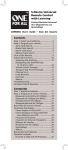
The OARN03S Universal Remote Control by One For All is a
perfect way to simplify home entertainment. It lets you control
up to three of your home entertainment devices from a single,
easy-to-use remote.
Step 1: Install your batteries
Your universal remote requires two AAA alkaline batteries (not
included).
To install the batteries:
1. Press and push the battery compartment cover to remove
it.
2. Insert the batteries, matching the batteries to the (+) and
(–) marks inside the battery compartment.
3. Push the battery cover back into place.
Battery Precautions:
• Do not mix old and new batteries.
• Do not mix alkaline, standard (carbon-zinc) or rechargeable
(nickel-cadmium) batteries.
• Always remove old, weak or worn-out batteries promptly
and recycle or dispose of them in accordance with Local
and National Regulations.
Step 2: Program your remote
To use this universal remote with your home entertainment
system, first you need to program it to control your devices.
There are four ways you can program the universal remote to
operate your devices:
•
The Auto Code Search goes automatically through all the
codes for the device you’re trying to control. It’s the easiest
method, but it can sometimes take longer than some of the
other programming methods.
• The Brand Code Search searches through the codes for
select brands of devices. It’s not as easy as the auto code
search, but it can be faster.
• The Direct Code Entry lets you enter a code from the
accompanying code list for your brand of device. It’s not as
easy as the other methods, but it’s potentially the fastest
method.
• The Manual Code Search lets you manually go through all
the codes for the device you’re trying to control.
Care and Maintenance
•
•
•
•
•
Keep the remote dry. If it gets wet, wipe it dry immediately.
Use and store the remote only in normal temperature environments.
Handle the remote gently and carefully. Don’t drop it.
Keep the remote away from dust and dirt.
Wipe the remote with a damp cloth occasionally to keep it looking
new.
• Modifying or tampering with the remote’s internal components can
cause malfunction and invalidate its warranty.
2