1
5
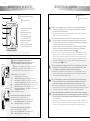
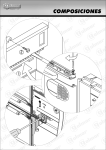
DESCRIPCIÓN DE LAS REGLETAS
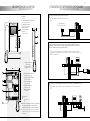
DESCRIPCIÓN DEL MONITOR
MONITOR CONNECTORS DESCRIPTION
D
MONITOR DESCRIPTION
P
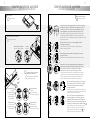
ulsadores de función
escripción de las partes de fijación.
a
F
2
ixing parts description.
F
unction push buttons
b
c
Pulsador de encendido-apagado del monitor. Después de cualquier reinicialización del monitor,
y durante los 30 segundos siguientes, no se podrá realizar ninguna operación con el mismo,
a excepción de la recepción de llamadas.
On-off push button. After a monitor reset, and during 30 seconds, all the monitor functions will be
disabled, with the exception of call reception.
a. Tornillo de sujeción del monitor.
a. Monitor fixing screw.
b. Enganche guía sujeción (x4).
b. Attachment hook (x4).
c. Orificio sujeción vertical (x2).
c. Vertical attachment hole (x2).
d. Zócalo conector del monitor.
d. Monitor base conector.
e. Orificio sujeción horizontal (x2).
e. Horizontal attachment hole (x2).
d
e
c
1
escripción de los terminales de conexión. Existen dos
modelos de regletas: RCSH Plus, para instalación con cable
coaxial, y RCSH-Plus/2H para instalación con par trenzado.
RCSH Plus
OA1
SA
HZ- IA1
CTO
INT
+
A D 2C A1
Vin 75W Vout
RCSH Plus/2H
VP MP
100W
SA INT CTO OA1 IA1 HZ-
escription of the connection terminals. There are two models of
monitor connector: RCSH Plus for installations with coaxial
cable, and RCSH Plus/2H for installations with twisted pair.
Terminales comunes / Common terminals:
-,+:
negativo, positivo / ground, positive.
A,D:
comunicación audio, digital / audio, digital communication.
2C :
salida activación 2ª cámara / 2nd camera activation output.
A1 :
salida activación dispositivo aux. / optional device activation output.
HZ- :
entrada pulsador timbre de puerta / door bell push button input.
SA :
salida sonería auxiliar / auxiliary calling device output.
CTO :
salida activación distribuidor / video distributor activation output.
INT :
intercomunicación / intercom.
IA1, OA1 :no conectar / don't connect.
Terminales específicos para instalación con cable coaxial
Specific terminals for coaxial cable installations:
Vin , Vout : entrada, salida de video / input, output video signal.
borne malla cable coaxial / coaxial shield terminal.
75W :
resistencia final de línea / end line resistor.
+
A D 2C A1
D
D
Terminales específicos para instalación con par trenzado
Specific terminals for twisted pair installations:
VP , MP : señal de video balanceada / balanced video signal.
100W : resistencia final de línea / end line resistor.
2
Con el auricular descolgado, permite realizar la función de intercomunicación, o la activación
de la segunda cámara, dependiendo de la configuración del monitor (ver dibujo 3, página 3).
La función de intercomunicación requiere unir los bornes INT de los monitores a intercomunicar
en la misma vivienda (principal y uno de los secundarios).
Si durante un proceso de intercomunicación se recibe una llamada, se escucharán unos tonos
acústicos en los auriculares, apareciendo la imagen en el monitor principal. Para establecer
comunicación con el llamante, bastará con presionar el pulsador
.
If the handset is not on the craddle enables the intercom function, or the second camera activation,
depending on the monitor configuration (see picture 3, page 3). To enable the intercom function,
the INT terminals of both monitors (master and slave at the same apartment), must be linked.
If a call is received during a intercom conversation, acoustic tones will be heard on the handsets,
and the picture will appears on the master monitor. To stablish communication with the person
who is calling, press the
push button.
Con el auricular colgado activa el dispositivo auxiliar. Con el auricular descolgado, permite realizar
una llamada a la central de conserjería secundaria, o activar el dispositivo auxiliar. En ambos
casos, depende de la configuración del monitor (ver dibujo 3 de la página 3).
If the handset is on the craddle activates the optional device. If is not on the craddle, allows to call
to the slave porter's exchange, or the optional device activation. On both situations, it depends
on the monitor configuration (see picture 3, page 3).
Con el auricular colgado permite visualizar la imagen procedente de la placa configurada con la
función de autoencendido. Con el auricular descolgado, permite establecer comunicación de
audio y video con dicha placa. Sólo es operativo si no existe una comunicación en curso.
If the handset is on the craddle, allows to see the picture from the door panel configurated with the
autoswitch-on function. If it is not on the craddle, enables to establish audio and video communication
with such panel. This function is disabled when a communication is already established.
Con el auricular colgado realiza una llamada de pánico a las centrales de conserjería configuradas
para recibir este tipo de llamada. Con el auricular descolgado, permite realizar una llamada normal
a la central principal. Durante los procesos de recepción de llamada o comunicación, permite
activar el abrepuertas.
If the handset is on the craddle, sends an alert message to the porter's exchanges configurated for the
reception of this type of call. If the handset is not on the craddle, allows to call to the master porter's
exchange. During call reception and communication progresses, activates the door release.