1
HEM-712CN Final 9-20
9/20/05
4:06 PM
Page 7
BATTERY INSTALLATION
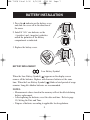
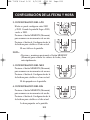
1. Press the ▲ indicator on the battery cover
and slide the cover off in the direction of
the arrow.
2. Install 4 “AA” size batteries so the
+ (positive) and - (negative) polarities
match the polarities of the battery
compartment as indicated.
3. Replace the battery cover.
BATTERY REPLACEMENT
Low Battery Symbol
Initial Set-Up
When the Low Battery Symbol ( ) appears on the display screen
remove all the batteries. Replace with four new batteries at the same
time. When the Low Battery Symbol ( ) blinks a brief period of usage
remains. Long-life alkaline batteries are recommended.
NOTES:
• Measurement values stored in the memory will not be deleted during
battery replacement.
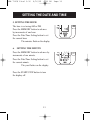
• After replacing the batteries, reset the date and time. Refer to page
10, Setting the Date and Time.
• Dispose of batteries according to applicable local regulations.
8