1
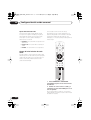
NS03_ZDR/ZPW.book 1 ページ 2003年6月30日 月曜日 午後4時6分
Operating Instructions
Manual de instrucciones
NS03_ZDR/ZPW.book 2 ページ 2003年6月30日 月曜日 午後4時6分
CONGRATULATIONS ON YOUR PURCHASE OF THIS FINE PIONEER PRODUCT.
Pioneer is on the leading edge of DVD research for consumer products and this
unit incorporates the latest technological developments.
We are sure you will be fully satisfied with this system.
Thank you for your support.
Location: underside of the unit
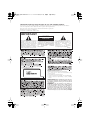
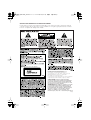
IMPORTANT
CAUTION
RISK OF ELECTRIC SHOCK
DO NOT OPEN
The lightning flash with arrowhead
symbol, within an equilateral
triangle, is intended to alert the
user to the presence of uninsulated
"dangerous voltage" within the
product's enclosure that may be of
sufficient magnitude to constitute
a risk of electric shock to persons.
CAUTION:
TO PREVENT THE RISK OF ELECTRIC
SHOCK, DO NOT REMOVE COVER
(OR BACK). NO USER-SERVICEABLE
PARTS INSIDE. REFER SERVICING
TO
QUALIFIED
SERVICE
PERSONNEL.
The exclamation point within an
equilateral triangle is intended to
alert the user to the presence of
important
operating
and
maintenance
(servicing)
instructions in the literature
accompanying the appliance.
H002_En
Operating Environment H045 En
Operating environment temperature and humidity:
+5°C – +35°C (+41°F – +95°F); less than 85%RH (cooling
vents not blocked)
Do not install in the following locations
• Location exposed to direct sunlight or strong artificial light
• Location exposed to high humidity, or poorly ventilated
location
VENTILATION: When installing this unit, make sure
to leave space around the unit for ventilation to improve
heat radiation (at least 28 cm at top, 10 cm at rear, and 15
cm at each side).
WARNING:
Slot and openings in the cabinet are
provided for ventilation and to ensure reliable operation
of the product and to protect it from overheating, to
prevent fire hazard, the openings should never be
blocked and covered with items, such as newspapers,
table-cloths, curtains, etc. Also do not put the apparatus
on the thick carpet, bed, sofa, or fabric having a thick pile.
H040 En
NS03_ZDR/ZPW.book 3 ページ 2003年6月30日 月曜日 午後4時6分
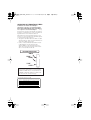
LINE VOLTAGE SELECTOR SWITCH
Only multi-voltage model is provided with
this switch.
XV-DV700(Australian model) is not
H014 En
provided with this switch.
The line voltage selector switch is located on
the rear panel. Check that it is set properly
before plugging the power cord into the
outlet. If the voltage is properly set or if you
move to an area where the voltage
requirements differ, adjust the selector
switch as follows:
• Be sure to disconnect the power cord from
its outlet before making this adjustment.
• Use a medium-sized(flat blade) screwdriver.
Insert the tip of the screwdriver into the
groove of the selector switch and turn it so
that the power voltage marking of your
area points to the arrow.
VOLTAGE SELECTOR
240 V
220V
–230V
[For South American models]
110V
–127V
On the inside cover of the unit
CAUTION
: VISIBLE AND INVISIBLE LASER RADIATION WHEN OPEN. AVOID EXPOSURE TO BEAM.
UND UNSICHTBARE LASERSTRAHLUNG, WENNABDECKUNG GEÖFFNET
VORSICHT : SICHTBARE
NICHT DEM STRAHL AUSSETZEN!
ADVARSEL :
SYNLIG OG USYNLIG LASERSTRÅLING VED ÅBNING UNDGÅ UDSÆTTELSE FOR
STRÀLING.
VARNING
:
SYNLIG OCH OSYNLIG LASERSTRÅLNING NÄR DENNA DEL ÄR ÖPPNAD BETRAKTA
EJ STRÅLEN.
VARO!
ALTISTUT NÄKYVÄ JA NÄKYMÄTTÖMÄLLE LASERSATEIL YLLE. ÄLÄ
: AVATTAESSA
KATSO SÄTEESEN.
CUIDADO :
RADIACIÓN LÁSER VISIBLE E INVISIBLE AL ESTAR ABIERTO. EVITAR EXPOSICIÓN AL
RAYO.
VRW1872
[For South American models]
CAUTION 240 V
Power source voltage is factory adjusted
240 volts. If your area is different, change
voltage selectors settings.
H038En
NS03_ZDR/ZPW.book 4 ページ 2003年6月30日 月曜日 午後4時6分
These labels can be found on the
DVD/CD tuner rear panel and bottom
panel and on the powered subwoofer
rear panel.
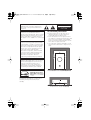
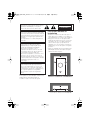
• Install components so that there are no
obstructions above or either side, and
nothing blocking ventilation holes.
• Leave at least 5 cm of free space around
the subwoofer and at least 28cm above and
15cm to the left and right of the DVD/CD
Tuner, as shown below. Remember to also
leave 15cm of space at the rear.
• Use a vacuum cleaner periodically to clean
the port of the subwoofer to keep it free of
dust.
5 cm
5 cm
This product incorporates copyright
protection technology that is protected by
method claims of certain U.S. patents and
other intellectual property rights owned by
Macrovision Corporation and other rights
owners. Use of this copyright protection
technology must be authorized by
Macrovision Corporation, and is intended
for home and other limited viewing uses
only unless otherwise authorized by
Macrovision Corporation. Reverse
engineering or disassembly is prohibited.
Installation precaution
5 cm
Please read through these operating
instructions so you will know how to
operate your model properly. After you have
finished reading the instructions, put them
away in a safe place for future reference.
This player is not suitable for commercial
use.
CAUTION
RISK OF ELECTRIC SHOCK
DO NOT OPEN
This product is for general household
purposes. Any failure due to use for other
than household purposes (such as longterm use for business purposes in a
restaurant or use in a car or ship) and
which requires repair will be charged for
even during the warranty period. K041_En
[For Australian model]
Powered subwoofer unit (S-DV900/700SW)
K001C_En
15 cm
28 cm
15 cm
Energy-saving design
This system is designed to use 0.83 W of
electricity when power is switched to
standby.
DVD/CD Tuner unit (XV-DV900/700)
NS03_ZDR/ZPW.book 5 ページ 2003年6月30日 月曜日 午後4時6分
Wall-mounting the center and
surround speaker system
Thank you for buying this
Pioneer product.
Before mounting
Please read through these operating instructions so that you will know how to operate
your model properly. After you have finished
reading the instructions, put them in a safe
place for future reference.
• Remember that the speaker system is
heavy and that its weight could cause the
wood screws to work loose, or the wall
material to fail to support it, resulting in
the speaker falling. Make sure that the
wall you intend to mount the speakers on
is strong enough to support them. Do not
mount on plywood or soft surface walls.
• Mounting screws are not supplied. Use
screws that are suitable for the wall
material and that will support the weight
of the speaker.
5 mm
10 mm
5 mm
Wood screw
Protrusion: 5-7mm
Contents
Wall-mounting the center and surround
speaker system . . . . . . . . . . . . . . . . . . . . . 5
01 Before you start
Features . . . . . . . . . . . . . . . . . . . . . . . . . . . 8
Introduction to home theater . . . . . . . . . . . . 9
General disc compatibility . . . . . . . . . . . . . . 9
CD-R/RW compatibility . . . . . . . . . . . . . . 10
DVD-R/RW compatibility . . . . . . . . . . . . . 10
PC-created disc compatibility . . . . . . . . . 10
Compressed audio compatibility . . . . . . . 10
JPEG file compatibility . . . . . . . . . . . . . . 11
02 Controls and displays
• If you are unsure of the qualities and
strength of the walls, consult a
professional for advice.
• Pioneer is not responsible for any
accidents or damage that result from
improper installation.
Front panel . . . . . . . . . . . . . . . . . . . . . . . . 12
Display unit . . . . . . . . . . . . . . . . . . . . . . . . 12
Display . . . . . . . . . . . . . . . . . . . . . . . . . . . 13
Remote control . . . . . . . . . . . . . . . . . . . . . 15
03 Getting started
Switching on and setting up . . . . . . . . . . . 18
Setting the clock . . . . . . . . . . . . . . . . . . . 19
Setting up the remote to control your TV .20
Using the Room Setup . . . . . . . . . . . . . . . 20
Using the on-screen displays . . . . . . . . . . . 21
Playing discs . . . . . . . . . . . . . . . . . . . . . . . 22
Basic playback controls . . . . . . . . . . . . . 23
Resume and Last Memory . . . . . . . . . . . 24
DVD disc menus . . . . . . . . . . . . . . . . . . . 25
Video CD/Super VCD PBC menus . . . . . . 26
Listening to the radio . . . . . . . . . . . . . . . . . 27
Improving poor FM reception . . . . . . . . . 28
Memorizing stations . . . . . . . . . . . . . . . . 28
Listening to station presets . . . . . . . . . . . 29
Listening to other sources . . . . . . . . . . . . . 29
5
En
NS03_ZDR/ZPW.book 6 ページ 2003年6月30日 月曜日 午後4時6分
04 Home theater sound
06 Viewing JPEG discs
Auto listening mode . . . . . . . . . . . . . . . . . 30
Listening in surround sound . . . . . . . . . . 30
Dolby Pro Logic II Music settings . . . . . . 31
Listening in stereo . . . . . . . . . . . . . . . . . . 31
Listening with headphones . . . . . . . . . . . 32
Using the Advanced Surround effects . . . 32
Adjusting the Advanced Surround effect
level . . . . . . . . . . . . . . . . . . . . . . . . . . . . 33
Enhancing dialogue . . . . . . . . . . . . . . . . . 33
Listening with a virtual surround back
speaker . . . . . . . . . . . . . . . . . . . . . . . . . . 34
Using Quiet and Midnight listening modes 34
Adjusting the bass and treble. . . . . . . . . . 35
Boosting the bass level . . . . . . . . . . . . . . 35
Muting the sound . . . . . . . . . . . . . . . . . . . 36
Playing a JPEG slideshow . . . . . . . . . . . . . 52
Using the JPEG Disc Navigator and Photo
Browser . . . . . . . . . . . . . . . . . . . . . . . . . . . 52
Zooming the screen . . . . . . . . . . . . . . . . . . 53
6
En
Setting the wake-up timer . . . . . . . . . . . . . 54
Turning the wake-up timer on/off . . . . . . 55
Setting the sleep timer . . . . . . . . . . . . . . . 56
08 Surround sound setup
Setting up surround sound . . . . . . . . . . . . 57
System Setup menu options . . . . . . . . . . 57
Setting the channel levels . . . . . . . . . . . . 59
09 Video Adjust menu
05 Playing discs
Introduction . . . . . . . . . . . . . . . . . . . . . . .
Using the Disc Navigator to browse the
contents of a disc . . . . . . . . . . . . . . . . . . .
Scanning discs . . . . . . . . . . . . . . . . . . . .
Playing in slow motion . . . . . . . . . . . . . . .
Frame advance/frame reverse . . . . . . . . .
Looping a section of a disc . . . . . . . . . . . .
Using repeat play . . . . . . . . . . . . . . . . . . .
Using the OSD . . . . . . . . . . . . . . . . . . . .
Using the display unit . . . . . . . . . . . . . .
Using random play . . . . . . . . . . . . . . . . . .
Using the OSD . . . . . . . . . . . . . . . . . . . .
Creating a program list . . . . . . . . . . . . . .
Using the OSD . . . . . . . . . . . . . . . . . . . .
Using the unit display . . . . . . . . . . . . . .
Clearing the program list . . . . . . . . . . . .
Searching a disc . . . . . . . . . . . . . . . . . . .
Playing DVD-Audio ‘Bonus Groups’ . . . . .
Switching subtitles . . . . . . . . . . . . . . . . . .
Switching DVD-Video audio language . . .
Switching DVD-Audio audio channels . . .
Switching Video CD/Super VCD audio
channel . . . . . . . . . . . . . . . . . . . . . . . . . .
Zooming the screen . . . . . . . . . . . . . . . . .
Switching camera angles . . . . . . . . . . . . .
Displaying disc information . . . . . . . . . . .
OSD disc information . . . . . . . . . . . . . .
Display unit information . . . . . . . . . . . .
07 Using the timer
37
37
38
39
39
40
40
41
41
42
42
43
43
46
46
46
47
47
47
48
48
48
49
49
49
51
Video Adjust . . . . . . . . . . . . . . . . . . . . . . . 60
Creating your own presets. . . . . . . . . . . . 60
10 Initial Settings menu
Using the Initial Settings menu . . . . . . . . . 62
Digital Audio Mode Settings . . . . . . . . . . . 62
Dolby Digital Out. . . . . . . . . . . . . . . . . . . 62
DTS Out . . . . . . . . . . . . . . . . . . . . . . . . . 62
Linear PCM Out . . . . . . . . . . . . . . . . . . . 63
Video Output settings . . . . . . . . . . . . . . . . 63
TV Screen . . . . . . . . . . . . . . . . . . . . . . . . 63
Component Out . . . . . . . . . . . . . . . . . . . 64
S-Video Out . . . . . . . . . . . . . . . . . . . . . . . 65
Language settings . . . . . . . . . . . . . . . . . . . 65
Audio Language . . . . . . . . . . . . . . . . . . . 65
Subtitle Language . . . . . . . . . . . . . . . . . . 65
DVD Menu Language . . . . . . . . . . . . . . . 66
Subtitle Display . . . . . . . . . . . . . . . . . . . . 66
Display settings . . . . . . . . . . . . . . . . . . . . . 66
OSD Language . . . . . . . . . . . . . . . . . . . . 66
On Screen Display . . . . . . . . . . . . . . . . . 66
Angle Indicator . . . . . . . . . . . . . . . . . . . . 67
Options . . . . . . . . . . . . . . . . . . . . . . . . . . . 67
Parental Lock . . . . . . . . . . . . . . . . . . . . . 67
Bonus Group. . . . . . . . . . . . . . . . . . . . . . 69
Auto Disc Menu . . . . . . . . . . . . . . . . . . . 70
Group Playback . . . . . . . . . . . . . . . . . . . . 70
DVD Playback Mode . . . . . . . . . . . . . . . . 70
SACD Playback . . . . . . . . . . . . . . . . . . . . 71
PhotoViewer . . . . . . . . . . . . . . . . . . . . . . 71
NS03_ZDR/ZPW.book 7 ページ 2003年6月30日 月曜日 午後4時6分
11 Other connections
Connecting external antennas . . . . . . . . .
Connecting auxiliary components . . . . . .
Reducing the TV and line signal levels . .
Recording mode . . . . . . . . . . . . . . . . . .
Connecting using the S-video output . . . .
Connecting using the component video
output . . . . . . . . . . . . . . . . . . . . . . . . . . .
72
72
73
74
74
75
12 Additional information
Switching off the demo . . . . . . . . . . . . . . 76
Child Lock . . . . . . . . . . . . . . . . . . . . . . . . 76
Changing the clock format . . . . . . . . . . . . 76
Changing the frequency step . . . . . . . . . . 76
Setting the TV format . . . . . . . . . . . . . . . . 77
Watching NTSC on a PAL TV
(MOD. PAL) . . . . . . . . . . . . . . . . . . . . . . . 77
Resetting the system . . . . . . . . . . . . . . . . 77
Dimming the display . . . . . . . . . . . . . . . . 78
Using and taking care of discs . . . . . . . . . 78
Titles, groups, chapters and tracks . . . . 78
DVD Video regions . . . . . . . . . . . . . . . . . 78
Handling discs. . . . . . . . . . . . . . . . . . . . 78
Storing discs . . . . . . . . . . . . . . . . . . . . . 79
Discs to avoid . . . . . . . . . . . . . . . . . . . . 79
Proper installation and maintenance of this
system . . . . . . . . . . . . . . . . . . . . . . . . . . . 79
Hints on installation. . . . . . . . . . . . . . . . 79
Cleaning the pickup lens . . . . . . . . . . . . 80
Problems with condensation . . . . . . . . . 80
Moving the system unit . . . . . . . . . . . . . 80
Power cord caution . . . . . . . . . . . . . . . . 80
Troubleshooting . . . . . . . . . . . . . . . . . . . . 81
General . . . . . . . . . . . . . . . . . . . . . . . . . 81
DVD/CD/Video CD/Super VCD player . . . 82
MP3/JPEG discs . . . . . . . . . . . . . . . . . . 83
Tuner . . . . . . . . . . . . . . . . . . . . . . . . . . . 84
Error Messages . . . . . . . . . . . . . . . . . . . 84
Screen sizes and disc formats . . . . . . . . . 86
Widescreen TV users . . . . . . . . . . . . . . . 86
Standard TV users . . . . . . . . . . . . . . . . . 86
Selecting languages using the language code
list . . . . . . . . . . . . . . . . . . . . . . . . . . . . . . 86
Language code list . . . . . . . . . . . . . . . . . . 87
Country code list . . . . . . . . . . . . . . . . . . . 87
Preset code list . . . . . . . . . . . . . . . . . . . . 88
Glossary . . . . . . . . . . . . . . . . . . . . . . . . . . 90
Specifications . . . . . . . . . . . . . . . . . . . . . . 93
Amplifier Section . . . . . . . . . . . . . . . . . . 93
Disc section . . . . . . . . . . . . . . . . . . . . . . 93
FM tuner section . . . . . . . . . . . . . . . . . . . 93
AM tuner section . . . . . . . . . . . . . . . . . . 93
Miscellaneous . . . . . . . . . . . . . . . . . . . . . 93
Accessories . . . . . . . . . . . . . . . . . . . . . . 93
Satellite Speaker System
(S-DV700ST) . . . . . . . . . . . . . . . . . . . . . . 94
Satellite Speaker System
(S-DV900ST) . . . . . . . . . . . . . . . . . . . . . . 94
Powered subwoofer
(S-DV700SW, S-DV900SW) . . . . . . . . . . . 94
7
En
NS03_ZDR/ZPW.book 8 ページ 2003年6月30日 月曜日 午後4時6分
01
Before you start
Chapter 1
Before you start
Features
Picture zoom
DVD-Audio and SACD compatible
While a DVD or Video CD/Super VCD is
playing, you can zoom in on any part of the
picture at up to 4x magnification for a closer
look. See Zooming the screen on page 48.
Experience the super high-quality audio
performance of DVD-Audio and Super Audio
CD (SACD).
The on-board 24-bit/192kHz DAC means that
this player is fully compatible with high
sampling-rate discs, capable of delivering
exceptional sound quality in terms of dynamic
range, low-level resolution and highfrequency detail.
Excellent audio performance with
Dolby Digital, Dolby Pro Logic, Dolby
Pro Logic II*1 and DTS*2 software
MP3 compatibility
This system is compatible with CD-R, CD-RW
and CD-ROM discs that contain MP3 audio
tracks. See also Compressed audio
compatibility on page 10.
Graphical on-screen displays
Setting up and using your DVD home theater
system is made very easy using the graphical
on-screen displays.
Energy saving design
Built-in Dolby Digital and DTS decoders let
you enjoy true discrete multi-channel home
theater sound with Dolby Digital and DTS
encoded DVD discs.
Dolby Pro Logic and Dolby Pro Logic II
decoding adds excitement to two-channel
source material with surround sound
playback.
Simple Room Setup for surround sound
Setting up basic surround sound is made a
simple two step process with the Room Setup
feature. Tell the unit the size of your listening
room and your listening position, and the
system automatically configures the
surround sound.
8
En
This system is designed to use 0.83 W of
power when in standby mode.
*1 Manufactured under license from Dolby
Laboratories. “Dolby”, “Pro Logic” and the
double-D symbol are trademarks of Dolby
Laboratories.
*2 “DTS” and “DTS Digital Surround” are
registered trademarks of Digital Theater
Systems, Inc.
NS03_ZDR/ZPW.book 9 ページ 2003年6月30日 月曜日 午後4時6分
01
Before you start
General disc compatibility
You are probably used to using stereo
equipment to listen to music, but may not be
used to home theater systems that give you
many more options (such as surround sound)
when listening to soundtracks.
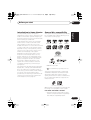
This system was designed and engineered to
be compatible with software bearing one or
more of the following logos:
DVD-Audio DVD-Video
Audio CD
CD-R
CD-RW
Super Audio CD
Fujicolor CD
• KODAK Picture CD
•
is a trademark of Fuji Photo Film Co.
Deutsch
Ltd.
This player supports the IEC’s Super VCD
standard. Compared to the Video CD standard, Super VCD offers superior picture
quality, and allows two stereo soundtracks to
be recorded. Super VCD also supports the
widescreen size.
CD
Super Video CD (Super VCD)
Other formats, including but not limited to the
following, are not playable in this system:
Español
VIDEO
Nederlands
This system will automatically decode Dolby
Digital, DTS, or Dolby Surround DVD-Video
discs, according to your speaker setup. In
most cases, you won’t have to make changes
for realistic surround sound, but other
possibilities (like listening to a CD with multichannel surround sound) are explained in
Home theater sound on page 30.
DVD-RW
Français
DVD-Video has become the basic source
material for home theater due to its size,
quality, and ease of use. Depending on the
DVD, you can have up to six different audio
tracks coming from one disc, all of them
being sent to different speakers in your
system. This is what creates a surround
sound effect and gives you the feeling of
‘being there’.
Video CD
DVD-R
Italiano
Home theater refers to the use of multiple
audio tracks to create a surround sound
effect, making you feel like you're in the
middle of the action or concert. The surround
sound you get from a home theater system
depends not only on the speakers you have
set up in your room, but also on the source
and the sound settings of the system.
English
Introduction to home theater
DVD-RAM / DVD-ROM / CD-ROM *
* Except those that contain MP3 or JPEG.
See also Compressed audio compatibility
and JPEG file compatibility below.
9
En
NS03_ZDR/ZPW.book 10 ページ 2003年6月30日 月曜日 午後4時6分
01
Before you start
DVD-R/RW and CD-R/RW discs (Audio CDs
and Video CDs) recorded using a DVD
recorder, CD recorder or personal computer
may not be playable on this system. This may
be caused by a number of possibilities,
including but not limited to: the type of disc
used; the type of recording; damage, dirt or
condensation on either the disc or the
player’s pick-up lens. See below for notes
about particular software and formats.
CD-R/RW compatibility
• This system will play CD-R and CD-RW
discs recorded in CD Audio or Video CD
format, or as a CD-ROM containing MP3
or JPEG files. However, any other content
may cause the disc not to play, or create
noise/distortion in the output.
• This system cannot record CD-R or CDRW discs.
• Unfinalized CD-R/RW discs recorded as
CD Audio can be played, but the full Table
of Contents (playing time, etc.) will not be
displayed.
DVD-R/RW compatibility
• This unit will play DVD-R/RW discs
recorded using the DVD-Video format that
have been finalized using a DVD-recorder.
• This unit will play DVD-RW discs recorded
using the Video Recording (VR) format.
• DVD-RW shows in the display when a VR
format DVD-RW disc is loading.
• When playing a VR format DVD-RW discs
that was edited on a DVD recorder, the
screen may go momentarily black at
edited points and/or you may see scenes
from immediately before the edited point.
• This unit cannot record DVD-R/RW discs.
• Unfinalized DVD-R/RW discs cannot be
played in this player.
10
En
PC-created disc compatibility
• If you record a disc using a personal
computer, even if it is recorded in a
“compatible format” as listed above, there
will be cases in which the disc may not be
playable in this machine due to the
setting of the application software used to
create the disc. In these particular
instances, check with the software
publisher for more detailed information.
• Check the DVD-R/RW or CD-R/RW
software disc boxes for additional
compatibility information.
Compressed audio compatibility
• This unit will play CD-ROM, CD-R, and
CD-RW discs containing files saved in the
MPEG-1 Audio Layer 3 (MP3) format with
a sampling rate of 32, 44.1 or 48kHz.
Incompatible files will not play and the
message Can’t play this format will be
displayed (No Play in the Display unit).
• Fixed bit-rate MP3 files are
recommended. Variable bit-rate (VBR)
MP3 files are playable, but playing time
may not be shown correctly.
• The CD-ROM used to compile your MP3
files must be ISO 9660 Level 1 or 2
compliant. CD physical format: Mode1,
Mode2 XA Form1. Romeo and Joliet file
systems are both compatible with this
player.
• Use CD-R or CD-RW media for recording
your files. The disc must be finalized (i.e.
the session must be closed) in order to
play in this unit. This player is not
compatible with multi-session discs. Only
the first session of a multi-session disc
will be recognized.
• This player only plays tracks that are
named with the file extension .mp3 or
.MP3.
NS03_ZDR/ZPW.book 11 ページ 2003年6月30日 月曜日 午後4時6分
Before you start
01
• When naming MP3 files, add the
corresponding file name extension
(.mp3). Files are played according to the
file extension. To prevent noise and
malfunctions, do not use these
extensions for other kinds of files.
English
• This player can recognize up to 999 files
(MP3/JPEG) and up to 499 folders. If a
disc exceeds these limits, only files and
folders up to these limits will be playable.
Files and folders are read/ displayed in
alphabetical order. Note that if the file
structure is very complex, you may not be
able to read/play all files on the disc.
Italiano
Deutsch
• There are many different recording bitrates available to encode MP3 files. This
unit was designed to be compatible with
all of them. Audio encoded at 128Kbps
should sound close to regular CD Audio
quality. This player will play lower bit-rate
files, but please note that the sound
quality becomes noticeably worse at
lower bit-rates.
Français
• Folder and track names (excluding the file
extension) are displayed.
JPEG file compatibility
• This player only displays files that are
named with the file extension .jpg or
.JPG.
Español
• The CD-ROM used to compile your JPEG
files must be ISO 9660 Level 1 or 2
compliant. CD physical format: Mode1,
Mode2 XA Form1. Romeo and Joliet file
systems are both compatible with this
player.
Nederlands
• Baseline JPEG and EXIF 2.1* still image
files up to 8 mega-pixels are supported
(maximum vertical and horizontal
resolution is 5120 pixels). (*File format
used by digital still cameras)
11
En
NS03_ZDR/ZPW.book 12 ページ 2003年6月30日 月曜日 午後4時6分
02
Controls and displays
Chapter 2
Controls and displays
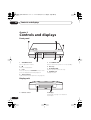
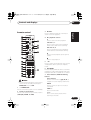
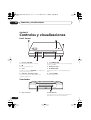
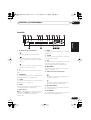
Front panel
1
2
3
TIMER
STANDBY/ON
4
OPEN/CLOSE
6
7
5
8
1 VOLUME buttons
Use to adjust the volume.
5 STANDBY/ON
Press to switch the system on or into standby.
2 Press to stop playback.
6
3 Press to switch to the DVD/CD function. Also
press to start/pause/resume playback.
Disc tray
7 OPEN/CLOSE
Press to open/close the disc tray.
8 PHONES jack
Headphone jack.
4 Timer indicator
Lights when the wake-up timer is set (page 54).
Display unit
9
9
12
En
Remote sensor
10
10 Display
See Display on page 13 for detailed
information.
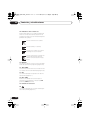
NS03_ZDR/ZPW.book 13 ページ 2003年6月30日 月曜日 午後4時6分
02
Controls and displays
1 2
3
4
MIDNIGHT QUIET
5
6
7
8
9
PGM
RPT -1
RDM
V.PART
ATT
10 11
REC MODE
20
1
19
13
14
PRO LOGIC
DIGITAL
ADV.SURR.
PRGSVE
18 17 16 15
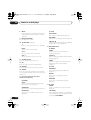
8 V.PART
Light when playing a video part of a DVD disc.
Lights when a broadcast is being
received.
9 ATT
Lights when the input attenuator is active for
the currently selected analog input (page 73).
Lights when a stereo FM broadcast is
being received in auto stereo mode.
10 REC MODE
Lights when Rec Mode is active (page 74).
Lights when FM mono reception is
selected.
2 Lights when a disc is playing.
4 QUIET
Lights when the Quiet mode is selected
(page 34).
6 RPT and RPT-1
RPT lights during repeat play. RPT-1 lights
during repeat one-track play (page 40).
12 2 PRO LOGIC II
Lights during Dolby Pro Logic decoding
(page 30).
13 2 DIGITAL
Lights during playback of a Dolby Digital
source (page 30).
Español
5 PGM
Lights when a program list has been
programmed (page 43).
Lights when the sleep timer is active
(page 56).
Nederlands
3 MIDNIGHT
Lights when the Midnight mode is selected
(page 34).
Lights when the wake-up timer is set
(page 54).
Deutsch
11 Timer indicators
Français
Tuner indicators
Italiano
kHz
MHz
12
English
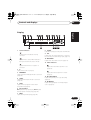
Display
7 RDM
Lights during random play (page 42).
13
En
NS03_ZDR/ZPW.book 14 ページ 2003年6月30日 月曜日 午後4時6分
02
Controls and displays
14 Speaker indicators
These show which speakers are being used to
output the current source. The illustrations
below show some example displays.
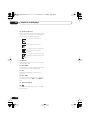
5.1 channel surround sound
Stereo (2.1 channel) sound
3.1 channel sound with Dialogue
enhancement on the center
channel
5.1 channel surround sound with
Virtual Surround Back mode active
15 PRGSVE
Lights when progressive scan video output is
selected (page 64).
16 ADV.SURR.
Lights when one of the Advanced Surround
listening modes is selected (page 32).
17 DTS
Lights during playback of a DTS source
(page 30).
18 kHz / MHz
Indicates the unit of the frequency shown in
the character display (kHz for AM, MHz for
FM).
19 Character display
20
Lights during multi-angle scenes on a DVD
disc (page 49).
14
En
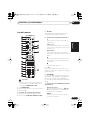
NS03_ZDR/ZPW.book 15 ページ 2003年6月30日 月曜日 午後4時6分
02
Controls and displays
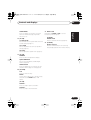
3 DISPLAY
Press to display/change disc information
shown on-screen (page 49).
STANDBY/ON
1
2
CD
FM/AM
DVD
TUNER
DISPLAY
12
RETURN
DVD MENU
6
13
TUNE+
ST–
7
11
ST+
ENTER
MUTE
TUNE–
SOUND
8
14
15
17
18
19
21
BASS MODE DIALOGUE
AUTO
SURROUND
VOL
VIRTUAL SB
ADVANCED
PROGRAM
AUDIO
REPEAT
SUBTITLE
RANDOM
ANGLE
ZOOM
TOP MENU
HOME
MENU
1
2
3
SYSTEM
SETUP
TEST TONE
CH LEVEL
4
5
6
DIMMER
QUIET/
MIDNIGHT
TIMER/
CLOCK
7
CLR
MAIN
8
9
FOLDER–
FOLDER+
0
ENTER
SUB
Press to stop playback.
5 Press to jump to the beginning of the current
chapter/track, then to previous chapters/
tracks.
22
ROOM SETUP
6 DVD MENU
Press to display a DVD disc menu, or the Disc
Navigator if a VR format DVD-RW, CD, Video
CD/Super VCD, MP3 or JPEG disc is loaded.
7 Cursor buttons, ENTER and tuning
buttons
Cursor buttons
Use the cursor buttons (///) to
navigate on-screen displays and menus.
1 STANDBY/ON
Press to switch the system on or into standby.
2 Function select buttons
Press to select the source you want to listen to
(DVD (CD). TUNER, TV, LINE)
ENTER
Press to select an option or execute a
command.
TUNE +/–
Use to tune the radio.
Español
• Functions printed in green on the remote
control are accessed by switching the
MAIN/SUB switch to SUB.
Nederlands
20
INPUT
and /
Use for forward slow motion playback,
frame advance and forward scanning.
Deutsch
16
CH
and /
Use for reverse slow motion playback,
frame reverse and reverse scanning.
Press to pause playback; press again to
restart.
MASTER
VOLUME
TV CONTROL
10
Press to start or resume playback.
Français
9
Disc playback controls
Italiano
5
LINE
OPEN/CLOSE
3
4
4
L1/L2
TV
English
Remote control
ST +/–
Use to select station presets when
listening to the radio.
15
En
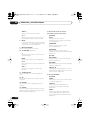
NS03_ZDR/ZPW.book 16 ページ 2003年6月30日 月曜日 午後4時6分
02
Controls and displays
8
MUTE
Press to mute all sound from the speakers
and headphones (press again to cancel)
(page 36).
9 MASTER VOLUME
Use to adjust the volume.
10 TV CONTROL (page 20)
Press to switch the TV on or into standby.
INPUT
Press to switch the TV input.
CH +/–
Use to select channels on the TV.
VOL +/–
Use to adjust the volume on the TV.
11 OPEN/CLOSE
Press to open/close the disc tray.
12 Press to jump to the next chapter/track.
13 RETURN
Press to return to a previous menu screen.
14 SOUND
Press to access the sound menu, from which
you can adjust the DSP effect level, bass and
treble, etc.
15 Surround sound mode/sound
enhancement buttons
(In MAIN)
AUTO
Press to select the default decoding for
the current source (page 30).
SURROUND
Use to select a Surround mode (page 30).
ADVANCED
Use to select an Advanced Surround
(page 32).
16
En
(In SUB)
BASS MODE
Use to select a Bass Mode (page 35).
DIALOGUE
Use to select a Dialogue mode (page 33).
VIRTUAL SB
Press to switch the Virtual Surround Back
speaker effect on/off (page 34).
16 DVD/CD buttons
(In MAIN)
AUDIO
Press to select an audio channel or
language (page 47).
SUBTITLE
Press to display/change the DVD subtitle
display (page 47).
ANGLE
Press to change camera angle during
DVD multi-angle scene playback
(page 49).
(In SUB)
PROGRAM
Use to program/play a program list
(page 43).
REPEAT
Use to select a repeat play mode
(page 40).
RANDOM
Use to select a random play mode
(page 42).
17 (In SUB)
ZOOM
Press to change the screen zoom level
(page 48).
TOP MENU
Use to display the top menu of a DVD disc
in the play position (this may be the same
as pressing DVD MENU).
NS03_ZDR/ZPW.book 17 ページ 2003年6月30日 月曜日 午後4時6分
02
Controls and displays
18 (In SUB)
TEST TONE
Use to output the test tone (for speaker
setup) (page 59).
(In MAIN)
ROOM SETUP
Press to start Room Setup (page 20).
22 (In MAIN)
Number buttons
Use the number buttons for selecting
titles/chapters/tracks from a disc directly.
Italiano
SYSTEM SETUP
Use to make various system and surround
sound settings (page 57).
21 MAIN / SUB
Change from MAIN to SUB to access
functions printed in green.
English
HOME MENU
Press to display (or exit) the on-screen
menu for Initial Settings, Play Mode
functions, etc.
CH LEVEL
Use to adjust the speaker level (page 59).
DIMMER
Press to dim or brighten the display.
TIMER/CLOCK
Press to display the clock and to access
the timer menu (page 19 and page 54).
Deutsch
QUIET/MIDNIGHT
Use to select the Quiet and Midnight
modes (page 34).
Français
19 (In SUB)
20 (In MAIN)
ENTER
Selects menu options, etc. (works exactly
the same as the ENTER button in 7
above).
Nederlands
CLR
Press to clear an entry.
(In SUB)
FOLDER +
Press to jump to the next folder.
Español
FOLDER –
Press to jump to previous folders.
17
En
NS03_ZDR/ZPW.book 18 ページ 2003年6月30日 月曜日 午後4時6分
03
Getting started
Chapter 3
Getting started
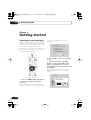
Switching on and setting up
After making sure everything is connected up
properly, you’re ready to switch on. The first
thing to do is to tell the system what kind of TV
you’re using, standard or widescreen.
You should see the welcome screen
displayed.
Welcome to Pioneer DVD!
Thank you for purchasing this Pioneer DVD player.
After that you can set up the surround sound
for your room, and set the clock so that you
can use the timer features.
Before using, please take a little time
to setup your DVD player
Put the batteries into the remote control
Next, press the [ENTER] button on the remote control
and start the Let's Get Started Menu
Next
STANDBY/ON
CD
FM/AM
DVD
TUNER
L1/L2
TV
LINE
DISPLAY
OPEN CLOSE
RETURN
DVD MENU
TUNE+
ST–
ST+
ENTER
MUTE
TUNE–
SOUND
MASTER
VOLUME
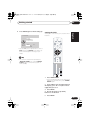
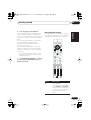
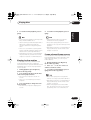
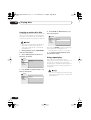
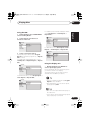
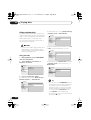
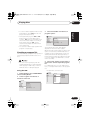
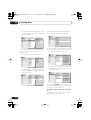
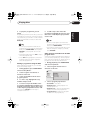
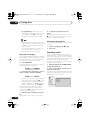
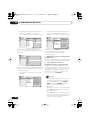
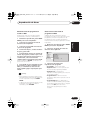
2 Press ENTER to move on to the next
screen.
3 Use the / (cursor left/right)
buttons to select either ‘Wide screen
(16:9)’ or ‘Standard size screen (4:3)’
according to the kind of TV you have, then
press ENTER.
See also Screen sizes and disc formats on
page 86 if you’re not sure which one to
choose.
TV CONTROL
Let's Get Started Menu
CH
INPUT
VOL
What kind of TV do you have?
1 Press STANDBY/ON (on the remote
or on the front panel) to switch the
system on.
Also make sure that your TV is switched on
and that the video input is set to this system.
18
En
Use the
/
cursor buttons
to choose, then press [ENTER]
Wide screen (16:9)
Standard size screen (4:3)
NS03_ZDR/ZPW.book 19 ページ 2003年6月30日 月曜日 午後4時6分
03
Getting started
4
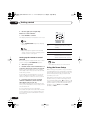
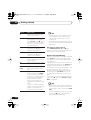
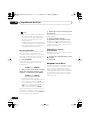
Press ENTER again to finish setting up.
Setting the clock
Setup complete
STANDBY/ON
English
Setting the clock allows you to use the timer
features.
Let's Get Started Menu
If you're finished setting up,
choose [Complete],
to start again choose [Back]
CD
FM/AM
DVD
TUNER
L1/L2
TV
LINE
DISPLAY
OPEN CLOSE
Back
• Use the (cursor right) button to select
Back then press ENTER if you want to go
back and change the setting you just
made.
Italiano
Complete
RETURN
DVD MENU
TUNE+
ST–
ST+
ENTER
TUNE–
SOUND
MASTER
VOLUME
TV CONTROL
CH
INPUT
BASS MODE DIALOGUE
AUTO
SURROUND
VIRTUAL SB
ADVANCED
REPEAT
SUBTITLE
RANDOM
ANGLE
ZOOM
TOP MENU
HOME
MENU
1
2
3
SYSTEM
SETUP
TEST TONE
CH LEVEL
4
5
6
DIMMER
QUIET/
MIDNIGHT
TIMER/
CLOCK
7
8
9
FOLDER–
FOLDER+
0
ENTER
MAIN
SUB
ROOM SETUP
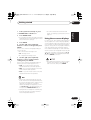
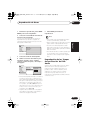
Press TIMER/CLOCK.
• If you are adjusting the clock, rather then
setting it for the first time, press TIMER/
CLOCK again.
3
Press ENTER.
Español
2 If ‘Clock ADJ?’ isn’t already showing in
the display, press or (cursor left or
right) until you see it.
Nederlands
PROGRAM
AUDIO
CLR
1
VOL
Deutsch
• You can also use the function buttons
(DVD/CD, TUNER, etc.) or the OPEN/
CLOSE button to switch the system on
from standby.
Français
MUTE
4 Use the / (cursor up/down)
buttons to set the hour.
5
Press ENTER.
19
En
NS03_ZDR/ZPW.book 20 ページ 2003年6月30日 月曜日 午後4時6分
03
Getting started
6 Use the / (cursor up/down)
buttons to set the minute.
MASTER
VOLUME
TV CONTROL
7 Press ENTER to confirm.
The display flashes to indicate the clock is set.
CH
INPUT
BASS MODE DIALOGUE
AUTO
SURROUND
PROGRAM
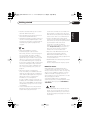
• Press TIMER/CLOCK anytime to display
the clock.
• If you unplug the system from the wall
outlet, or there is a power outage, you will
need to set the clock again.
Setting up the remote to control
your TV
REPEAT
VOL
VIRTUAL SB
ADVANCED
RANDOM
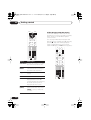
Button
What it does
Switches your TV on or into
standby.
CH +/–
Changes the TV channel.
VOL +/–
Adjusts the TV volume.
INPUT
Switches the TV’s input
between the built in TV tuner
and an external video source.
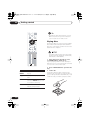
You can set up the supplied remote to control
your TV using the TV CONTROL buttons.
1
Switch on your TV.
2 Find the name of the manufacturer of
your TV in the Preset code list on page 88
Next to each manufacturer is one or more
three digit codes. These tell the remote what
kind of TV you have.
If the name of the manufacturer of your TV
does not appear in the table, you won’t be
able to set up this remote to control your TV.
3 Point the remote at your TV, hold
down the CLR button, then enter the
three digit code for your TV.
The remote transmits an on/off signal to the
TV. If you’ve entered the correct code, your TV
should switch off.
If your TV doesn’t turn off, repeat the
procedure using the next code in the list until
your TV switches off successfully. Once set,
you can then use the individual TV controls
shown below.
20
En
• The default setting is for a Pioneer TV.
Using the Room Setup
Before using your system to enjoy surround
sound playback, we recommend you spend a
few minutes using the Room Setup. This is a
quick and easy way to get good surround
sound for your room.
Depending on the distance of the surround
speakers from your main listening position,
choose between S (small), M (medium), or L
(large) room, then depending on your seating
position relative to the front and surround
speakers, choose Fwd (forward), Mid
(middle), or Back.
NS03_ZDR/ZPW.book 21 ページ 2003年6月30日 月曜日 午後4時6分
03
Getting started
2
3
Press ROOM SETUP.
• If you have previously set up the room type
and seating position, the display will show
the current room settings.
Press ENTER.
• S – Smaller than average room
• L – Larger than average room
• Fwd – If you are nearer to the front
speakers than the surround speakers
• Mid – If you are equal distance from the
front and surround speakers
Español
• The Room Setup automatically sets up
both channel level and speaker distance.
If you have already set the channel levels
manually (see page 59) or speaker
distance settings (see page 58), you will
see Room Set? in the display when you
first press the ROOM SETUP button.
• Throughout this manual, ‘Select’ means
use the cursor buttons to highlight an
item on-screen, then press ENTER.
Nederlands
• Back – If you are nearer to the surround
speakers than the front speakers
All the screens are navigated in basically the
same way, using the cursor buttons (, ,
, ) to change the highlighted item and
pressing ENTER to select it.
Deutsch
5 Use the / (cursor up/down)
buttons to select a seating position
setting, then press ENTER.
Choose one of the following depending on
where your main listening position is:
For ease of use, this system makes extensive
use of graphical on-screen displays (OSDs).
You should get used to the way these work as
you’ll need to use them when setting up the
system, using some of the playback features,
such as program play, and when making
more advanced settings for audio and video.
Français
• M – Average room
Using the on-screen displays
Italiano
4 Use the / (cursor up/down)
buttons to select a room type then press
ENTER.
Choose one of the following depending on
your room size:
• For a more detailed surround sound
setup, see Setting up surround sound on
page 57.
English
1 If the system isn’t already on, press
STANDBY/ON to switch it on.
• Using the Room Setup will overwrite any
previous settings you had for channel
level and speaker distance.
21
En
NS03_ZDR/ZPW.book 22 ページ 2003年6月30日 月曜日 午後4時6分
03
Getting started
DISPLAY
OPEN CLOSE
RETURN
DVD MENU
Playing discs
ENTER
MUTE
SOUND
MASTER
VOLUME
TV CONTROL
CH
INPUT
BASS MODE DIALOGUE
AUTO
SURROUND
PROGRAM
AUDIO
ZOOM
VIRTUAL SB
ADVANCED
REPEAT
SUBTITLE
RANDOM
ANGLE
TOP MENU
HOME
MENU
1
2
3
TEST TONE
CH LEVEL
4
5
6
DIMMER
QUIET/
MIDNIGHT
TIMER/
CLOCK
7
8
9
FOLDER–
CLR
0
SUB
The basic playback controls for playing DVD,
CD, SACD, Video CD/Super VCD and MP3
discs are covered here. Further functions are
detailed in the chapter 5.
VOL
SYSTEM
SETUP
MAIN
• The button guide at the bottom of every
OSD screen shows you which buttons
you’ll need to use for that screen.
FOLDER+
ENTER
ROOM SETUP
Throughout this manual, the term ‘DVD’
means any kind of DVD disc (DVD-Video,
DVD-Audio or DVD-R/RW).
1 If the player isn’t already on, press
STANDBY/ON to switch it on.
If you’re playing a DVD or Video CD/Super
VCD also turn on your TV and make sure that
it is set to the correct video input.
2 Press OPEN/CLOSE to open the disc
tray.
22
En
Button
What it does
HOME
MENU
Displays/exits the on-screen
display
Changes the highlighted menu
item
ENTER
Selects the highlighted menu
item (both ENTER buttons work
in exactly the same way)
RETURN
Returns to the main menu
without saving changes
3 Load a disc.
Load a disc with the label side facing up,
using the disc tray guide to align the disc (if
you’re loading a double-sided DVD disc, load
it with the side you want to play face down).
NS03_ZDR/ZPW.book 23 ページ 2003年6月30日 月曜日 午後4時6分
03
Getting started
Basic playback controls
The table below shows the basic controls on
the remote for playing discs. You can find
other playback features in the chapter 5.
English
4 Press (play) to start playback.
If you’re playing a DVD or Video CD/Super
VCD, a menu may appear. See DVD disc
menus on page 25 and Video CD/Super VCD
PBC menus on page 26 for how to navigate
these.
STANDBY/ON
CD
FM/AM
DVD
TUNER
L1/L2
TV
LINE
DISPLAY
OPEN CLOSE
If you loaded a CD/CD-R/RW containing
JPEGs, a slideshow will start. See Viewing
JPEG discs on page 52 for more on playing
these discs.
Italiano
If you’re playing an MP3 disc, it may take a
few seconds before playback starts,
depending on the complexity of the file
structure on the disc.
RETURN
DVD MENU
TUNE+
ST+
ENTER
MUTE
TUNE–
SOUND
MASTER
VOLUME
5 Use the MASTER VOLUME – / + button
(or the top panel VOLUME buttons) to
adjust the volume.
Français
ST–
• See also PhotoViewer on page 71 if the
disc contains both MP3 audio files and
JPEG picture files.
TV CONTROL
CH
INPUT
VIRTUAL SB
ADVANCED
PROGRAM
AUDIO
REPEAT
SUBTITLE
RANDOM
ANGLE
ZOOM
TOP MENU
HOME
MENU
2
3
TEST TONE
CH LEVEL
4
5
6
DIMMER
QUIET/
MIDNIGHT
TIMER/
CLOCK
7
8
9
FOLDER–
FOLDER+
0
ENTER
CLR
MAIN
SUB
ROOM SETUP
What it does
Starts playback.
DVD and Video CD: If the display
shows Resume or Last Mem
playback starts from the resume
or last memory point (see also
Resume and Last Memory
below.)
Español
Button
Nederlands
1
SYSTEM
SETUP
Deutsch
BASS MODE DIALOGUE
AUTO
SURROUND
VOL
23
En
NS03_ZDR/ZPW.book 24 ページ 2003年6月30日 月曜日 午後4時6分
03
Getting started
Button
What it does
Pauses a disc that’s playing, or
restarts a paused disc.
Stops playback.
DVD and Video CD: The display
shows Resume. Press again if
you want to cancel the resume
function. (See also Resume and
Last Memory below.)
Press to start fast reverse
scanning. Press (play) to
resume normal playback.
Press to start fast forward
scanning. Press (play) to
resume normal playback.
Skips to the start of the current
track or chapter, then to previous
tracks/chapters.
Skips to the next track or chapter.
FOLDER +/– Skips to the next/previous folder
when playing a JPEG or MP3
(SUB)
disc.
Numbers
Use to enter a title/track/group/
chapter number. Press ENTER to
select (or wait a few seconds).
• If the disc is stopped, playback
starts from the selected title/
group (for DVD-Video/DVDAudio) or track number (for
SACD/CD/Video CD/Super VCD/
MP3).
• If the disc is playing, playback
jumps to the start of the selected
chapter or track (within the
current group for DVD-Audio).
• You may find with some DVD discs that
some playback controls don’t work in
certain parts of the disc. This is not a
malfunction.
• Track skip and number buttons for track
selection do not work with unfinalized CDR/RW discs.
Using the top panel controls
The OPEN/CLOSE, and (stop)
buttons on the top panel work the same way
as the remote control equivalents.
Resume and Last Memory
When you stop playback of a DVD or Video CD
disc, Resume is shown in the display indicating that you can resume playback again
from that point.
If the disc tray is not opened, the next time you
start playback the display shows Resume and
playback resumes from the resume point.
For DVD discs only: If you take the disc out of
the player, the play position is stored in
memory. When you load the disc next time,
the display shows Last Mem and you can
resume playback (this works for up to five
discs).
If you want to clear the resume/last memory
point, press (stop) while Resume or Last
Mem is displayed.
• When a Video CD is loaded, the Resume
point is lost if the system is switched off,
or switched to a function other than DVD
(CD).
• For the Last Memory function to work, you
must press (stop) to stop playback
before opening the disc tray.
24
En
NS03_ZDR/ZPW.book 25 ページ 2003年6月30日 月曜日 午後4時6分
03
Getting started
• The Last Memory function doesn’t work
with VR format DVD-RW discs.
• After I load a DVD disc, it ejects
automatically after a few seconds!
• Why won’t the disc I loaded play?
• I have a widescreen TV so why are there
black bars at the top and bottom of the
screen when I play some discs?
• My DVD-Audio disc starts playing, but then
suddenly stops!
The disc may have been illegally copied.
DVD disc menus
Many DVD-Video and DVD-Audio discs
contain menus from which you can select
what you want to watch or listen to. They may
give access to additional features, such as
subtitle and audio language selection, or
special features such as slideshows. See the
disc packaging for details.
Sometimes DVD menus are displayed
automatically when you start playback; others
only appear when you press DVD MENU or
TOP MENU.
• Some DVD-Audio discs feature a bonus
group. To access this group you have to
input a password which you can find on
the disc packaging. See page 69 for more
information.
Español
If a disc loaded correctly won’t play, it’s
probably an incompatible format or disc
type, such as DVD-ROM. See General disc
compatibility on page 9 for more on disc
compatibility.
DVD-Audio and SACD audio is only
available through the analog outputs. This
is not a malfunction.
Nederlands
First check that you loaded the disc the
right way up (label side up), and that it’s
clean and not damaged. See Using and
taking care of discs on page 78 for
information on cleaning discs.
• Why can’t I hear DVD-Audio and SACD
audio through the digital outputs?
Deutsch
If the region number is OK, it may be that
the disc is damaged or dirty. Clean the
disc and look for signs of damage. See
also Using and taking care of discs on
page 78.
Some discs override the display
preferences of the system, so even if you
have 4:3 (Pan & Scan) selected, those
discs will still be shown in letterbox
format. This is not a malfunction.
Français
Most likely, the disc is the wrong region
for your system. The region number
should be printed on the disc; check it
against the region number of the system
(which you can find on the rear panel).
See also DVD Video regions on page 78.
• I have a standard (4:3) TV and set the
system to show widescreen DVDs in pan &
scan format, so why do I still get black bars
top and bottom with some discs?
Italiano
• With MP3 format discs, playback does not
resume. Instead, playback begins of the
first track of the folder containing the file
that was playing when playback was
stopped.
Some movie formats are such that even
when played on a widescreen TV, black
bars are necessary at the top and bottom
of the screen. This is not a malfunction.
English
• Resume and Last Memory are not available with DVD-Audio discs.
25
En
NS03_ZDR/ZPW.book 26 ページ 2003年6月30日 月曜日 午後4時6分
03
Getting started
RETURN
DVD MENU
ENTER
MUTE
SOUND
MASTER
VOLUME
TV CONTROL
CH
INPUT
BASS MODE DIALOGUE
AUTO
SURROUND
VOL
VIRTUAL SB
ADVANCED
PROGRAM
AUDIO
REPEAT
SUBTITLE
RANDOM
ANGLE
ZOOM
TOP MENU
HOME
MENU
1
2
3
SYSTEM
SETUP
TEST TONE
CH LEVEL
4
5
6
DIMMER
QUIET/
MIDNIGHT
TIMER/
CLOCK
7
8
9
FOLDER–
FOLDER+
CLR
MAIN
0
SUB
ENTER
Video CD/Super VCD PBC menus
Some Video CD/Super VCDs have menus
from which you can choose what you want to
watch. These are called PBC (Playback
control) menus.
You can play a PBC Video CD/Super VCD
without having to navigate the PBC menu by
pressing (stop) then starting playback
using a number button to select a track,
rather than (play) (or on the top panel).
RETURN
DVD MENU
TUNE+
ST–
ST+
ENTER
MUTE
TUNE–
SOUND
ROOM SETUP
MASTER
VOLUME
TV CONTROL
Button
What it does
CH
INPUT
VOL
TOP MENU Displays the ‘top menu’ of a DVD
disc—this varies with the disc.
DVD
MENU
Displays a DVD disc menu—this
varies with the disc and may be
the same as the ‘top menu’.
Moves the cursor around the
screen.
BASS MODE DIALOGUE
AUTO
SURROUND
REPEAT
SUBTITLE
RANDOM
ANGLE
ZOOM
TOP MENU
HOME
MENU
1
2
3
SYSTEM
SETUP
TEST TONE
CH LEVEL
4
5
6
DIMMER
QUIET/
MIDNIGHT
TIMER/
CLOCK
7
8
9
FOLDER–
FOLDER+
0
ENTER
CLR
26
En
ENTER
Selects the current menu option.
RETURN
Returns to the previously
displayed menu screen. On
some DVD-Audio discs featuring
browsable pictures, press to
display the browser screen.
Numbers
(MAIN)
Highlights a numbered menu
option (some discs only). Press
ENTER to select (or wait a few
seconds).
VIRTUAL SB
ADVANCED
PROGRAM
AUDIO
MAIN
SUB
ROOM SETUP
NS03_ZDR/ZPW.book 27 ページ 2003年6月30日 月曜日 午後4時6分
03
Getting started
What it does
RETURN
Displays the PBC menu.
Numbers
Selects a numbered menu
option.
Displays the previous menu page
(if there is one).
ENTER
Displays the next menu page (if
there is one).
Press to select highlighted menu
option.
The tuner can receive both FM and AM
broadcasts, and lets you memorize your
favorite stations so you don’t have to manually
tune in every time you want to listen.
STANDBY/ON
CD
FM/AM
DVD
TUNER
L1/L2
TV
LINE
DISPLAY
OPEN CLOSE
RETURN
DVD MENU
ST+
ENTER
TUNE–
SOUND
Français
TUNE+
ST–
MUTE
Italiano
Listening to the radio
English
Button
MASTER
VOLUME
TV CONTROL
INPUT
BASS MODE DIALOGUE
AUTO
SURROUND
VOL
VIRTUAL SB
ADVANCED
PROGRAM
AUDIO
REPEAT
SUBTITLE
RANDOM
ANGLE
ZOOM
TOP MENU
HOME
MENU
2
3
TEST TONE
CH LEVEL
4
5
6
DIMMER
QUIET/
MIDNIGHT
TIMER/
CLOCK
7
8
9
FOLDER–
CLR
MAIN
0
SUB
FOLDER+
ENTER
ROOM SETUP
2 Press TUNER to switch to the tuner,
then press repeatedly to select the AM or
FM band.
The display indicates the tuner band and the
frequency.
Español
1 If the system isn’t already on, press
STANDBY/ON to switch on.
Nederlands
1
SYSTEM
SETUP
Deutsch
CH
3 Tune to a frequency.
There are three tuning modes—manual, auto,
and high-speed:
27
En
NS03_ZDR/ZPW.book 28 ページ 2003年6月30日 月曜日 午後4時6分
03
Getting started
• Manual tuning: Press TUNE +/–
repeatedly to change the displayed
frequency.
• Auto tuning: Press and hold TUNE +/–
until the frequency display starts to move,
then release. The tuner will stop on the
next station it finds. Repeat to search for
other stations.
• High-speed tuning: Press and hold
TUNE +/– until the frequency display
starts to move rapidly. Keep the button
held down until you reach the frequency
you want. If necessary, fine tune the
frequency using the manual tuning
method.
Memorizing stations
You can save up to 30 station presets so that
you always have easy access to your favorite
stations without having to tune in manually
each time.
STANDBY/ON
CD
FM/AM
DVD
TUNER
L1/L2
TV
LINE
DISPLAY
OPEN CLOSE
RETURN
DVD MENU
TUNE+
ST–
ST+
ENTER
Improving poor FM reception
MUTE
If you’re listening to an FM station in stereo
but the reception is weak, you can improve
the sound quality by switching to mono.
1
Tune to an FM radio station.
2
Press SYSTEM SETUP.
3 Use the / (cursor left/right)
buttons to choose ‘FM Mode?’ then press
ENTER.
4 Use the / (cursor up/down)
buttons to select ‘FM Mono’ then press
ENTER.
The mono indicator ( ) lights when the tuner
is in mono reception mode.
Select FM Auto above to switch back to autostereo mode (the stereo indicator ( ) lights
when receiving a stereo broadcast).
28
En
TUNE–
SOUND
MASTER
VOLUME
TV CONTROL
CH
INPUT
BASS MODE DIALOGUE
AUTO
SURROUND
VOL
VIRTUAL SB
ADVANCED
PROGRAM
AUDIO
REPEAT
SUBTITLE
RANDOM
ANGLE
ZOOM
TOP MENU
HOME
MENU
1
2
3
SYSTEM
SETUP
TEST TONE
CH LEVEL
4
5
6
DIMMER
QUIET/
MIDNIGHT
TIMER/
CLOCK
7
8
9
FOLDER–
CLR
MAIN
0
SUB
FOLDER+
ENTER
ROOM SETUP
1 Tune to an AM or FM radio station.
For the FM band, select mono or auto-stereo
reception as necessary. This setting is saved
along with the preset.
NS03_ZDR/ZPW.book 29 ページ 2003年6月30日 月曜日 午後4時6分
03
Getting started
2
Press SYSTEM SETUP.
5
You can connect up to three external sources
(TV, satellite receiver, etc.) to this system,
including one digital source. See also
Connecting auxiliary components on page 72.
STANDBY/ON
CD
FM/AM
DVD
TUNER
DISPLAY
Listening to station presets
2 Use the ST +/– buttons to select a
station preset.
1 If the system isn’t already on, press STANDBY/ON to switch on.
Also make sure that the external source (TV,
satellite receiver, etc.) is switched on.
2
Select the source you want to listen to.
• Press TV to select the TV input, or use the
LINE (L1/L2) button to select the LINE 1
ANA, LINE1 DIG or LINE 2 ANA input.
3 If necessary, start playback of the
external source.
Deutsch
1 Make sure the TUNER function is
selected.
Français
• If the system is unplugged from the power
supply completely, saved stations will
remain for several days, after which you’ll
have to save them again.
LINE
OPEN CLOSE
Press ENTER to save the station preset.
L1/L2
TV
Italiano
4 Use the / (cursor up/down)
buttons to select the station preset you
want.
There are 30 preset locations; each can store
one station preset.
Listening to other sources
English
3 Use the / (cursor left/right)
buttons to choose ‘St. Memory?’ then
press ENTER.
Nederlands
Español
29
En
NS03_ZDR/ZPW.book 30 ページ 2003年6月30日 月曜日 午後4時6分
04
Home theater sound
Chapter 4
Home theater sound
Using this system you can enjoy listening to
sources, analog or digital, in either stereo or
surround sound.
Auto listening mode
The Auto listening mode is the simplest way
to listen to any source as it was mastered: the
output from the speakers mirrors the
channels in the source material.
BASS MODE DIALOGUE
AUTO
SURROUND
VIRTUAL SB
ADVANCED
PROGRAM
AUDIO
REPEAT
SUBTITLE
RANDOM
ANGLE
ZOOM
TOP MENU
HOME
MENU
1
2
3
SYSTEM
SETUP
TEST TONE
CH LEVEL
4
5
6
DIMMER
QUIET/
MIDNIGHT
TIMER/
CLOCK
7
8
9
FOLDER–
CLR
MAIN
0
SUB
Listening in surround sound
You can listen to any source—stereo or
multichannel, analog or digital—in surround
sound. Surround sound is generated from
stereo sources (except SACD and DVD-Audio)
using one of the Dolby Pro Logic decoding
modes.
BASS MODE DIALOGUE
AUTO
SURROUND
PROGRAM
AUDIO
REPEAT
SUBTITLE
ZOOM
TOP MENU
VIRTUAL SB
ADVANCED
RANDOM
ANGLE
HOME
MENU
1
2
3
SYSTEM
SETUP
TEST TONE
CH LEVEL
4
5
6
DIMMER
QUIET/
MIDNIGHT
TIMER/
CLOCK
7
8
9
FOLDER–
FOLDER+
0
ENTER
CLR
MAIN
SUB
ROOM SETUP
FOLDER+
ENTER
ROOM SETUP
• Press AUTO to select the ‘Auto’
listening mode.
If the source is Dolby Digital or DTS, the
2 DIGITAL or DTS indicator on the display
unit lights.
• Any previously active Dolby Pro Logic or
Advanced Surround mode is canceled
when Auto listening mode is selected.
• Press SURROUND repeatedly to select
a listening mode (or press SURROUND
then use the / (cursor up/down)
buttons).
The listening mode choices that appear in the
display will vary according to the type of
source that’s playing.
• Auto – Auto listening mode (see above)
• Dolby Digital / DTS – Dolby Digital or
DTS decoding (depending on the source).
For a multichannel source, this will be the
same as Auto.
• Pro Logic – 4.1 channel surround sound
for use with any two-channel source
• PL II Movie – Pro Logic II 5.1 channel
surround sound, especially suited to
movie sources, for use with any twochannel source
30
En
NS03_ZDR/ZPW.book 31 ページ 2003年6月30日 月曜日 午後4時6分
04
Home theater sound
• Stereo – See Listening in stereo below
1 With Dolby Pro Logic II Music mode
active, press SOUND.
• Dimen. (Dimension): Makes the sound
more distant (minus settings), or more
forward (positive settings)
• See also Using the Advanced Surround
effects below, for further stereo and
surround playback options.
• When headphones are connected, only
the Stereo option is available.
Dolby Pro Logic II Music settings
When listening in Dolby Pro Logic II Music
mode, there are three further parameters you
can adjust: Center Width, Dimension, and
Panorama.
C Width: 3
Dimen.: 0
Listening in stereo
You can listen to any source—stereo or
multichannel, analog or digital—in stereo.
When playing a multichannel source, stereo
sound is created by downmixing all channels
to the front left/right speakers and the
subwooofer.
BASS MODE DIALOGUE
AUTO
SURROUND
PROGRAM
AUDIO
REPEAT
SUBTITLE
ZOOM
TOP MENU
VIRTUAL SB
ADVANCED
RANDOM
ANGLE
HOME
MENU
1
2
3
SYSTEM
SETUP
TEST TONE
CH LEVEL
4
5
6
DIMMER
QUIET/
MIDNIGHT
TIMER/
CLOCK
7
8
9
FOLDER–
FOLDER+
0
ENTER
CLR
MAIN
SUB
ROOM SETUP
Pnrm.: Off
Español
Default Settings:
Press ENTER to confirm.
Nederlands
• Dolby Digital / DTS sources that use only
the center channel cannot be played back
in surround sound.
4
Deutsch
• When listening in Dolby Digital / DTS
mode, two-channel material will
automatically be played in surround
sound using Dolby Pro Logic decoding.
3 Use the / (cursor up/down)
buttons to adjust the setting.
Center Width is adjustable between 0 and 7;
Dimension between –3 and +3. Panorama is
On or Off.
Français
• You can’t use the Surround modes with
SACD, DVD-Audio and 96 kHz PCM
sources.
• Pnrm. (Panorama): Creates more
spacious surround sound
Italiano
2 Use the / (cursor left/right)
buttons to select ‘C Width’, ‘Dimen.’ or
‘Pnrm.’
• C Width (Center Width): Makes the
center channel wider (higher settings) or
narrower (lower settings)
English
• PL II Music – Pro Logic II 5.1 channel
surround sound, especially suited to
music sources, for use with any twochannel source (see also Dolby Pro Logic
II Music settings below)
• Press SURROUND repeatedly until
‘Stereo’ shows in the display.
Any active Advanced Surround mode is
canceled.
31
En
NS03_ZDR/ZPW.book 32 ページ 2003年6月30日 月曜日 午後4時6分
04
Home theater sound
Using the Advanced Surround
effects
• See also Using the Advanced Surround
effects below, for further stereo and
surround playback options.
Listening with headphones
When headphones are connected, only the
Stereo (default) and Phones Surround
(virtual surround sound for headphones)
modes are available.
Advanced Surround effects can be used with
multichannel or stereo sources for a variety of
additional surround sound effects.
DISPLAY
OPEN CLOSE
RETURN
DVD MENU
TUNE+
• With headphones connected, press
ADVANCED to select ‘Phones Surround’ or
SURROUND to select ‘Stereo’.
ST–
ST+
ENTER
MUTE
TUNE–
SOUND
MASTER
VOLUME
TV CONTROL
CH
INPUT
BASS MODE DIALOGUE
AUTO
SURROUND
VOL
ADVANCED
PROGRAM
AUDIO
REPEAT
SUBTITLE
RANDOM
ANGLE
ZOOM
TOP MENU
HOME
MENU
1
2
3
SYSTEM
SETUP
TEST TONE
CH LEVEL
4
5
6
DIMMER
QUIET/
MIDNIGHT
TIMER/
CLOCK
7
CLR
MAIN
8
9
FOLDER–
FOLDER+
0
ENTER
SUB
ROOM SETUP
• Press ADVANCED to select an
Advanced Surround mode (or press
ADVANCED then use the / (cursor up/
down) bottons).
Press repeatedly to select from:
• Adv. Music – Gives a concert hall-type
sound
• Adv. Movie – Gives a movie theater-type
sound
• Expanded – Creates an extra wide stereo
field
• TV Surr. – Designed for mono or stereo TV
broadcasts and other sources
32
En
NS03_ZDR/ZPW.book 33 ページ 2003年6月30日 月曜日 午後4時6分
04
Home theater sound
• Game – Creates surround sound from
video game sources
• ExPwrSurr. (Extra Power Surround) –
Gives additional energy and width to
stereo sources
• 5ch Stereo – Designed to give powerful
surround sound to stereo music sources
• Default setting: Dialog Off
The Dialogue Enhancement feature is
designed to make the dialog stand out from
other background sounds in a TV or movie
soundtrack.
BASS MODE DIALOGUE
AUTO
SURROUND
REPEAT
SUBTITLE
RANDOM
ANGLE
ZOOM
TOP MENU
HOME
MENU
2
3
TEST TONE
CH LEVEL
4
5
6
DIMMER
QUIET/
MIDNIGHT
TIMER/
CLOCK
7
8
9
FOLDER–
FOLDER+
0
ENTER
MAIN
• When headphones are connected, only
the Phones Surround option is available.
You can emphasize or reduce the effect of the
Advanced Surround modes as you like. For
each Advanced Surround mode you can set
the effect level independently.
1 With one of the Advanced Surround
modes active, press SOUND.
3 Use the / (cursor up/down)
buttons to adjust the effect level.
The effect level can be adjusted from 10 (min)
to 90 (max).
4
• Dialog Off – No dialog enhancement
• Dialog Mid – Moderate dialog
enhancement
• Dialog Max – Strong dialog
enhancement
• You can’t use Dialog Enhancement with
SACD, DVD-Audio and 96 kHz PCM
sources.
Español
2 Use the / (cursor left/right)
buttons to select ‘Effect’.
• Press DIALOGUE to select the amount
dialog enhancement.
Press repeatedly to select from:
Nederlands
Adjusting the Advanced Surround
effect level
ROOM SETUP
Deutsch
• You can use any of the above Advanced
Surround modes with any type of source.
The descriptions are given only as a guide.
SUB
Français
1
SYSTEM
SETUP
CLR
• You can’t use the Advanced Surround
modes with SACD, DVD-Audio and 96 kHz
PCM sources.
VIRTUAL SB
ADVANCED
PROGRAM
AUDIO
Italiano
• Virtual – Creates the impression of
surround sound from just the front
speakers
Enhancing dialogue
English
• Sports – Designed for sports and other
programs based on commentary
Press ENTER to confirm.
33
En
NS03_ZDR/ZPW.book 34 ページ 2003年6月30日 月曜日 午後4時6分
04
Home theater sound
Listening with a virtual
surround back speaker
• Default setting: Vir. SB Off
The Virtual Surround Back feature can be
used when listening in surround sound to
simulate an added surround back channel. In
a real theater the surround back speaker
would be directly behind you, creating more
cohesive and realistic surround sound.
BASS MODE DIALOGUE
AUTO
SURROUND
PROGRAM
AUDIO
REPEAT
SUBTITLE
ZOOM
TOP MENU
VIRTUAL SB
ADVANCED
RANDOM
ANGLE
2
3
TEST TONE
CH LEVEL
4
5
6
DIMMER
QUIET/
MIDNIGHT
TIMER/
CLOCK
7
8
9
FOLDER–
FOLDER+
0
ENTER
MAIN
SUB
ROOM SETUP
• Press VIRTUAL SB repeatedly to switch
between ‘Vir. SB On’ and ‘Vir. SB Off’.
• You can’t use Virtual Surround Back
when listening in Stereo or Virtual
listening modes.
• You can’t use Virtual Surround Back
when headphones are connected.
• If there is no surround channel, Virtual
Surround Back has no effect.
• You can’t use the Virtual Surround
Back effect with SACD, DVD-Audio and
96 kHz PCM sources.
34
En
• Default setting: Off
The Quiet listening feature reduces excessive
bass or treble in a sound source. You can use
this feature if the music is a little bit harsh and
you would like a smoother sound.
The Midnight listening feature allows you to
hear effective surround sound of movies at
low volume levels. The effect automatically
adjusts according to the volume at which
you’re listening.
HOME
MENU
1
SYSTEM
SETUP
CLR
Using Quiet and Midnight
listening modes
BASS MODE DIALOGUE
AUTO
SURROUND
VIRTUAL SB
ADVANCED
PROGRAM
AUDIO
REPEAT
SUBTITLE
RANDOM
ANGLE
ZOOM
TOP MENU
HOME
MENU
1
2
3
SYSTEM
SETUP
TEST TONE
CH LEVEL
4
5
6
DIMMER
QUIET/
MIDNIGHT
TIMER/
CLOCK
7
8
9
FOLDER–
FOLDER+
0
ENTER
CLR
MAIN
SUB
ROOM SETUP
• Press QUIET/MIDNIGHT repeatedly to
switch between ‘Quiet’, ‘Midnight’ and
‘Off’.
When the headphones are connected, you
can't set Quiet/Midnight in the following
cases:
• When an SACD or DVD-Audio disc is
loaded.
NS03_ZDR/ZPW.book 35 ページ 2003年6月30日 月曜日 午後4時6分
04
Home theater sound
• Default setting: Treble: 0, Bass: 0
Use the bass and treble controls to adjust the
overall tone. Bass and treble adjustment is
not possible when the Quiet or Midnight
modes are active.
DISPLAY
DIALOGUE
SURROUND
VIRTUAL SB
ADVANCED
PROGRAM
AUDIO
REPEAT
SUBTITLE
RANDOM
ANGLE
ZOOM
TOP MENU
HOME
MENU
1
2
3
SYSTEM
SETUP
TEST TONE
CH LEVEL
4
5
6
DIMMER
QUIET/
MIDNIGHT
TIMER/
CLOCK
7
8
9
FOLDER–
FOLDER+
0
ENTER
CLR
MAIN
RETURN
DVD MENU
BASS MODE
AUTO
SUB
ROOM SETUP
Italiano
There are three bass modes you can use to
enhance the bass in a source.
OPEN CLOSE
Boosting the bass level
English
Adjusting the bass and treble
TUNE+
ST–
ST+
ENTER
TUNE–
SOUND
MASTER
VOLUME
1
Press SOUND.
3 Use the / (cursor up/down)
buttons to adjust the sound.
The bass and treble can be adjusted from –3
to +3.
• P. Bass – Can be used with music sources
to bring the beat of the music (or
soundtrack) to the forefront
• Off
Press ENTER to confirm.
• You can’t use the bass mode with SACD
and DVD-Audio sources.
When the headphones are connected, you
can't adjust treble/bass in the following
cases:
• When an SACD or DVD-Audio disc is
loaded.
Español
• When Recording Mode is ON
• You can't use the bass mode when the
headphones are connected.
Nederlands
4
• Cinema – Good for action movies or
movies with lots of sound effects
Deutsch
2 Use the / (cursor left/right)
buttons to select ‘Bass’ or ‘Treble’.
• Press BASS MODE repeatedly to
choose an option that fits the source
you’re listening to.
• Music – Can be used with music to give a
deeper bass sound
Français
MUTE
35
En
NS03_ZDR/ZPW.book 36 ページ 2003年6月30日 月曜日 午後4時6分
04
Home theater sound
Muting the sound
Use the MUTE button if you need to
momentarily turn off all sound from the
speakers.
RETURN
DVD MENU
TUNE+
ST–
ST+
ENTER
MUTE
TUNE–
SOUND
MASTER
VOLUME
• Press MUTE to mute the volume.
To cancel, adjust the volume or press MUTE
again.
36
En
NS03_ZDR/ZPW.book 37 ページ 2003年6月30日 月曜日 午後4時6分
05
Playing discs
English
Chapter 5
Playing discs
Introduction
HOME MENU
DVD
Some DVD discs restrict the use of some
functions (random or repeat, for example).
This is not a malfunction.
Video Adjust
Initial Settings
Disc Navigator
2 Select what you want to play.
Depending on the type of disc you have loaded,
the Disc Navigator looks slightly different.
The screen for DVD-Video discs shows the
titles on the left and the chapters on the right.
Select a title, or a chapter within a title.
Disc Navigator
DVD
Using the Disc Navigator to
browse the contents of a disc
Chapter 1-3
Title 01
Title 02
Title 03
Title 04
Title 05
Title 06
Title 07
Title 08
Chapter 001
Chapter 002
Chapter 003
For DVD-Audio, select a group or a track
within a group.
Disc Navigator
DVD-Audio
Group 1-3
Group 01
Group 02
Group 03
Track 1-36
Track 01
Track 02
Track 03
Track 04
Track 05
Track 06
Track 07
Track 08
Español
Use the Disc Navigator to browse through the
contents of a disc to find the part you want to
play. You can use the Disc Navigator when a
disc is playing or stopped.
Title 1-10
Nederlands
• To access functions printed in green on
the remote, move the slider switch from
MAIN to SUB.
Deutsch
When playing Video CD/Super VCDs, some of
the functions are not available during PBC
playback. If you want to use them, start the
disc playing using a number button to select
a track.
Play Mode
Français
Many of the functions covered in this chapter
apply to DVD and SACD discs, Video CD/
Super VCDs, CDs and MP3/JPEG discs,
although the exact operation of some varies
slightly with the kind of disc loaded.
1 Press HOME MENU and select ‘Disc
Navigator’ from the on-screen display.
Alternatively, if a VR format DVD-RW, CD,
Video CD/Super VCD or MP3/JPEG disc is
loaded, you can press DVD MENU, which
takes you straight to the Disc Navigator
screen.
Italiano
Most of the features described in this chapter
make use of on-screen displays. For an explanation of how to navigate these, see Using the
on-screen displays on page 21.
37
En
NS03_ZDR/ZPW.book 38 ページ 2003年6月30日 月曜日 午後4時6分
05
Playing discs
For SACD, select a track within the current
playback area.
Disc Navigator
2ch Area
Track 1-14
Track 001
Track 002
Track 003
Track 004
Track 005
Track 006
Track 007
Track 008
The screen for an MP3 disc shows the folder
names on the left and the track names on the
right (note that if there are more than 16
folders or names that contain accented or
non-roman characters, tracks and folders
may show up with generic names – F_033,
T_035, etc.).
Select a folder, or a track within a folder.
Disc Navigator
For a VR (Video Recording) mode DVD-RW
disc select beween the Playlist and Original
areas of the disc, or a title. Press (cursor
right) to preview the title.
• It’s not possible to switch between Original and Playlist during playback.
• Not all VR format DVD-RW discs have a
Playlist.
MP3
Folder 1-17
Track 1-10
001. ACP
002. Nth Degree
003. Pfeuti
004. Live
005. Glitch music
006. CodHead
007. Thermo
008. Missing Man
001. Gravity deluxe
002. Tesla's patent
003. Border dispute
004. Delayed by rain
005. Accident incident
006. Pigeon post
007. Outernational
008. Vacuum tube
Playback starts after you press ENTER.
Disc Navigator
DVD-RW
Original
Play List
Title(1-3)
01. 3/31 FIRST LEAGUE
02. 4/28 SECOND LEAGUE
03. 4/29 FINAL ROUND
• The Disc Navigator is not available unless
there is a disc loaded.
• It’s not possible to use the Disc Navigator
when playing a Video CD/Super VCD in
PBC mode, or an unfinalized CD-R/RW
disc.
The screen for CDs and Video CD/Super VCDs
shows a list of tracks. (The screen below
shows a CD loaded.)
• Another way to find a particular place on
a disc is to use one of the search modes.
See Searching a disc on page 46.
Disc Navigator
Track 1-10
CD
Track 01
Track 02
Track 03
Track 04
Track 05
Track 06
Track 07
Track 08
Scanning discs
You can fast-scan discs forward or backward
at various different speeds.
1 During playback, press or to
start scanning.
2 Press repeatedly to increase the scanning speed.
• MP3 tracks can only be scanned at one
speed.
• The scanning speed is shown on-screen.
38
En
NS03_ZDR/ZPW.book 39 ページ 2003年6月30日 月曜日 午後4時6分
05
Playing discs
4 To resume normal playback, press (play).
• Video CD/Super VCD only supports
forward slow motion playback.
• When scanning a Video CD/Super VCD or
MP3 track, playback automatically
resumes at the end or beginning of the
track.
• The picture quality during slow motion
playback is not as good as during normal
playback.
• There is no sound while scanning DVDVideos and Video CD/Super VCDs, and no
subtitles while scanning DVD-Videos.
Playing in slow motion
Frame advance/frame reverse
You can advance or back up DVD-Video or VR
format DVD-RW discs frame-by-frame. With
Video CD/Super VCDs, you can only use
frame advance.
1 During playback, press (pause)
( on the top panel).
3 To resume normal playback, press (play) ( on the top panel).
2 Press and hold / or / until
slow motion playback starts.
• The slow motion speed is shown onscreen.
• There is no sound during slow motion
playback.
• Depending on the disc, normal playback
may automatically resume when a new
chapter is reached.
• When changing direction with a DVD
disc, the picture may ‘move’ in an unexpected way. This is not a malfunction.
Español
3 Press repeatedly to change the slow
motion speed.
• The slow motion speed is displayed onscreen.
• The picture quality when using frame
reverse is not as good as frame advance.
Nederlands
2 Press / or / to reverse or
advance a frame at a time.
1 During playback, press (pause)
( on the top panel).
Deutsch
You can play DVD-Video, DVD-R/RW and
Video CD/Super VCDs at four different
forward slow motion speeds. DVD-Videos and
DVD-R/RW discs can also be played at two
reverse speeds.
Français
• Depending on the disc, normal playback
may automatically resume when a new
chapter is reached on a DVD-Video disc.
• Depending on the disc, normal playback
may automatically resume when a new
chapter is reached.
Italiano
• Sound can be heard while scanning audio
CDs, SACD and MP3 discs.
English
3 To resume normal playback, press (play).
39
En
NS03_ZDR/ZPW.book 40 ページ 2003年6月30日 月曜日 午後4時6分
05
Playing discs
Looping a section of a disc
The A-B Repeat function allows you to specify
two points (A and B) within a track (CD and
Video CD) or title (DVD-Video and DVD-RW)
that form a loop which is played over and over.
• You can’t use A-B Repeat with MP3 discs,
DVD-Audio, SACD, Super VCD discs,
Video CDs in PBC mode or unfinalized
CD-R/RW discs.
1 During playback, press HOME MENU
and select ‘Play Mode’.
2 Select ‘A-B Repeat’ from the list of
functions on the left.
4 Press ENTER on ‘B(End Point)’ to set
the loop end point.
Play Mode
A-B Repeat
Repeat
Random
Program
Search Mode
A(Start Point)
B(End Point)
Off
After pressing ENTER, playback jumps back
to the start point and plays the loop.
• The minimum loop time is 2 seconds.
5 To resume normal playback, select
‘Off’ from the menu.
Using repeat play
Play Mode
A-B Repeat
Repeat
Random
Program
Search Mode
A(Start Point)
B(End Point)
Off
There are various repeat play options,
depending on the kind of disc loaded. It’s also
possible to use repeat play together with
program play to repeat the tracks/chapters in
the program list (see Creating a program list
on page 43).
3 Press ENTER on ‘A(Start Point)’ to set
the loop start point.
Play Mode
A-B Repeat
Repeat
Random
Program
Search Mode
40
En
A(Start Point)
B(End Point)
Off
• You can’t use Repeat play with Video CD/
Super VCDs in PBC mode, or unfinalized
CD-R/RW discs.
NS03_ZDR/ZPW.book 41 ページ 2003年6月30日 月曜日 午後4時6分
05
Playing discs
Using the OSD
2 Select ‘Repeat’ from the list of
functions on the left.
Play Mode
A-B Repeat
Repeat
Random
Program
Search Mode
Disc Repeat
Track Repeat
Repeat Off
Title Repeat
Chapter Repeat
Repeat Off
For MP3 discs, select Disc Repeat, Folder
Repeat or Track Repeat (or Repeat Off).
Italiano
A-B Repeat
Repeat
Random
Program
Search Mode
Play Mode
English
1 During playback, press HOME MENU
and select ‘Play Mode’.
For SACDs, CDs and Video CD/Super VCDs,
select Disc Repeat or Track Repeat (or
Repeat Off).
Play Mode
A-B Repeat
Repeat
Random
Program
Search Mode
Disc Repeat
Folder Repeat
Track Repeat
Repeat Off
For DVD-Video and DVD-RW discs, select
Title Repeat or Chapter Repeat (or Repeat
Off).
A-B Repeat
Repeat
Random
Program
Search Mode
Title Repeat
Chapter Repeat
Repeat Off
• During playback, press REPEAT to
select a repeat play option.
Press repeatedly until the repeat play option
you want is shown in the display.
For DVD-Audio discs, select Group Repeat or
Track Repeat (or Repeat Off).
Play Mode
Group Repeat
Track Repeat
Repeat Off
• If you’ve created a program list, Program
Repeat is also available.
• During playback, you can cancel repeat
play by pressing CLR.
Español
A-B Repeat
Repeat
Random
Program
Search Mode
Nederlands
The repeat options are the same as those
available from the OSD (see above).
Deutsch
Using the display unit
Play Mode
Français
3 Select a repeat play option.
If program play is active, select Program
Repeat to repeat the program list, or Repeat
Off to cancel.
• You can’t use repeat and random play at
the same time.
• If you switch camera angle during repeat
play, repeat play is canceled.
41
En
NS03_ZDR/ZPW.book 42 ページ 2003年6月30日 月曜日 午後4時6分
05
Playing discs
Using random play
Use the random play function to play titles or
chapters (DVD-Video), groups or tracks (DVDAudio), or tracks (SACD, CD, Video CD/Super
VCD and MP3 discs) in a random order.
You can set the random play option when a
disc is playing or stopped.
• You can’t use random play with VR format
DVD-RW discs, Video CD/Super VCDs
playing in PBC mode or while a DVD disc
menu is being displayed.
Using the OSD
1 During playback, press HOME MENU
and select ‘Play Mode’.
2 Select ‘Random’ from the list of
functions on the left.
For DVD-Audio discs, select Random Group
or Random Track (or Random Off).
Play Mode
A-B Repeat
Repeat
Random
Program
Search Mode
Random Group
Random Track
Random Off
For CDs and Video CD/Super VCDs, select On
or Off to switch random play on or off.
Play Mode
A-B Repeat
Repeat
Random
Program
Search Mode
On
Off
For MP3 discs, select Random All (all folders)
or Random Track (current folder only), (or
Random Off).
Play Mode
A-B Repeat
Repeat
Random
Program
Search Mode
Random Title
Random Chapter
Random Off
Play Mode
A-B Repeat
Repeat
Random
Program
Search Mode
Random All
Random Track
Random Off
3 Select a random play option.
For DVD-Video discs, select Random Title or
Random Chapter, (or Random Off).
Play Mode
A-B Repeat
Repeat
Random
Program
Search Mode
Random Title
Random Chapter
Random Off
• You can also use the RANDOM button on
the remote to select a random play mode.
The random mode is indicated in the
display unit and on-screen. The random
modes available are the same as when
choosing from the Play Mode menu.
Press ENTER to start random play.
• To stop the disc and cancel random playback, press (stop).
42
En
NS03_ZDR/ZPW.book 43 ページ 2003年6月30日 月曜日 午後4時6分
05
Playing discs
This feature lets you program the play order of
titles/groups/chapters/folders tracks on a
disc.
• You can’t use Program play with VR
format DVD-RW discs, Video CD/Super
VCDs playing in PBC mode, or while a
DVD disc menu is being displayed.
On the left side is the program list, then to the
right is a list of titles (if a DVD-Video disc is
loaded), groups (for DVD-Audio), tracks (for
SACDs, CDs and Video CD/Super VCD), or
folder names (for MP3 discs). On the far right
is a list of chapters (for DVD-Video) or track
names (for MP3).
4 Select a title, chapter, group, folder or
track for the current step in the program
list.
For a DVD-Video disc, you can add a whole
title, or a chapter within a title to the program
list.
2 Select ‘Program’ from the list of
functions on the left.
Play Mode
Title 1~38
Chapter 1~4
01. 01
02.
03.
04.
05.
06.
07.
08.
Title 01
Title 02
Title 03
Title 04
Title 05
Title 06
Title 07
Title 08
Chapter 001
Chapter 002
Chapter 003
Chapter 004
Español
Off
Program
Program Step
Nederlands
1 During playback, press HOME MENU
and select ‘Play Mode’.
Create/Edit
Playback Start
Playback Stop
Program Delete
Program Memory
The Program edit screen that appears
depends on the kind of disc loaded.
• To add a title, select the title.
Using the OSD
A-B Repeat
Repeat
Random
Program
Search Mode
Off
Deutsch
Creating a program list
Create/Edit
Playback Start
Playback Stop
Program Delete
Program Memory
Français
• You can't use random play together with
program or repeat play.
Play Mode
A-B Repeat
Repeat
Random
Program
Search Mode
Italiano
• During random play, the and buttons function a little differently to
normal: returns to the beginning of
the current track/chapter. You can't go
back further than this. selects
another track/chapter at random from
those remaining.
3 Select ‘Create/Edit’ from the list of
program options.
English
• To cancel random playback without stopping playback, press CLR. The disc will
play to the end, then stop.
43
En
NS03_ZDR/ZPW.book 44 ページ 2003年6月30日 月曜日 午後4時6分
05
Playing discs
• To add a chapter, first highlight the title,
then press (cursor right) and select a
chapter from the list.
For an SACD, CD or Video CD/Super VCD,
select a track to add to the program list.
Program
Program
Program Step
Title 1-38
Chapter 1-4
01. 01-003
02.
03.
04.
05.
06.
07.
08.
Title 01
Title 02
Title 03
Title 04
Title 05
Title 06
Title 07
Title 08
Chapter 001
Chapter 002
Chapter 003
Chapter 004
For a DVD-Audio disc, you can add a whole
group, or a track within a group to the
program list.
• To add a group, select the group.
Program
Program Step
Group 1~38
Track 1~4
01. 01
02.
03.
04.
05.
06.
07.
08.
Group 01
Group 02
Group 03
Group 04
Group 05
Group 06
Group 07
Group 08
Track 01
Track 02
Track 03
Track 04
• To add a track, first highlight the group,
then press (cursor right) and select a
track from the list.
Program
Program Step
Group 1-38
Track 1-4
01. 01-003
02.
03.
04.
05.
06.
07.
08.
Group 01
Group 02
Group 03
Group 04
Group 05
Group 06
Group 07
Group 08
Track 01
Track 02
Track 03
Track 04
Program Step
Track 1~12
01. 04
02.
03.
04.
05.
06.
07.
08.
Track 01
Track 02
Track 03
Track 04
Track 05
Track 06
Track 07
Track 08
For an MP3 disc, you can add a whole folder,
or a track within a folder to the program list.
• To add a folder, select the folder.
Program
Program Step
Folder 1-6
Track 1-10
01. 001
02.
03.
04.
05.
06.
07.
08.
001. ACP
002. Nth Degree
003. Pfeuti
004. Live
005. Glitch music
006. CodHead
001. Gravity deluxe
002. Tesla's patent
003. Border dispute
004. Delayed by rain
005. Accident incident
006. Pigeon post
007. Outernational
008. Vacuum tube
• To add a track, first find the folder, then
press (cursor right) and select a track
name from the list.
Program
Program Step
Folder 1-6
Track 1-10
01. 001-003
02.
03.
04.
05.
06.
07.
08.
001. ACP
002. Nth Degree
003. Pfeuti
004. Live
005. Glitch music
006. CodHead
001. Gravity deluxe
002. Tesla's patent
003. Border dispute
004. Delayed by rain
005. Accident incident
006. Pigeon post
007. Outernational
008. Vacuum tube
After pressing ENTER to select the title/
chapter/group/folder/track, the step number
automatically moves down one.
5 Repeat step 4 to build up a program
list.
A program list can contain up to 24 titles/
chapters/group/folders/tracks.
44
En
NS03_ZDR/ZPW.book 45 ページ 2003年6月30日 月曜日 午後4時6分
05
Playing discs
6 To add a step to the end of the
program list, highlight the next free step
then select a title/chapter/group/folder/
track to add.
• During program play, press to skip to
the next program step.
• Press CLR during playback to switch off
program play. Press while stopped to
erase the program list.
After creating a program list, you can add,
delete and change steps.
1 During playback, press HOME MENU
and select ‘Play Mode’.
Other functions available from the OSD
program menu
As well as creating and editing a program list,
you can start program play, cancel program
play, erase the program list, and memorize a
program list from the Play Mode menu.
1 During playback, press HOME MENU
and select ‘Play Mode’.
2 Select ‘Program’ from the list of
functions on the left.
Play Mode
A-B Repeat
Repeat
Random
Program
Search Mode
3 Select ‘Create/Edit’ from the list of
program options.
3
Off
Select a program play function.
• Create/Edit – See above
• Playback Start – Starts playback of a
saved program list
• Playback Stop – Turns off program play,
but does not erase the program list
Español
5 To insert a step in the middle of the
program list, highlight the step where you
want the new step to appear, then select
a title/chapter/group/folder/track to add.
After pressing ENTER, the new step is
inserted into the list.
Create/Edit
Playback Start
Playback Stop
Program Delete
Program Memory
Nederlands
2 Select ‘Program’ from the list of
functions on the left.
4 To clear a step, highlight the step
number and press CLR.
Deutsch
Editing a program list using the OSD
• If you want to exit the program edit screen
without saving the changes you made,
press RETURN.
Français
• To save your program list and exit the
program edit screen without starting playback, press HOME MENU. (Don’t press
RETURN – your program list won’t be
saved.)
Italiano
• To save your program list and exit the
program edit screen without starting playback, press HOME MENU.
English
6 To play the program list, press (play).
Program play remains active until you turn off
program play (see below), erase the program
list (see below), eject the disc or switch off the
player or switched to a function other than
DVD (CD).
• Program Delete – Erases the program
list and turns off program play
45
En
NS03_ZDR/ZPW.book 46 ページ 2003年6月30日 月曜日 午後4時6分
05
Playing discs
• Program Memory (DVD-Video only) –
Select On to save the program list for the
disc loaded. (Select Off to cancel the
program memory for the disc loaded)
• Program lists are saved for the DVD disc
loaded. When you load a disc with a saved
program list, program play is automatically turned on.
• You can save program lists for up to 24
discs. After that, the oldest one is
replaced with the new one saved.
Using the unit display
Even though the OSD is available for SACDs,
CDs and MP3 discs, the Display unit provides
enough information to make a program list
easily. If a disc is playing, stop it first.
1 Press PROGRAM.
You’re prompted to enter a track or folder for
the first step in the program list.
P -00
0 00
2 Use / (cursor up/down) to select a
track or a folder, then press ENTER.
P -01
5 37
• For MP3 discs only: To select an individual
track within a folder, use the / (cursor
up/down) buttons to select the folder,
then press , then use / (cursor up/
down) to select a track. Press ENTER.
Wait for the display to prompt you after
completing each selection. If you make a
mistake, press CLR to delete the last (most
recently) programmed track.
3 Repeat step 2 to build up a program
list.
A program list can contain up to 24 steps.
46
En
4 To play the program list, press (play).
Program play remains active until you press
(stop), clear the playlist (see below), eject
the disc or switch off the player.
Clearing the program list
You must clear the program list to program a
new one.
1
If a disc is playing, press (stop).
2
Press CLR.
Searching a disc
You can search DVD-Video discs by title or
chapter number, or by time. DVD-Audio discs
can be searched by group or track, or by page.
SACDs, CD/Super VCDs can be searched by
track number, and Video CDs by track
number or time. MP3 discs can be searched
by folder or track number.
1 During playback, press HOME MENU
and select ‘Play Mode’.
2 Select ‘Search Mode’ from the list of
functions on the left.
The search options that appear depend on the
kind of disc loaded. The screen below shows
the DVD-Video search options.
Play Mode
A-B Repeat
Repeat
Random
Program
Search Mode
Title Search
Chapter Search
Time Search
NS03_ZDR/ZPW.book 47 ページ 2003年6月30日 月曜日 午後4時6分
05
Playing discs
3
Select a search mode.
Play Mode
Title Search
Chapter Search
Time Search
Input Chapter
0 0 1
Switching subtitles
Some DVD-Video discs have subtitles in one
or more languages; the disc box will usually
tell you which subtitle languages are available. You can switch subtitle language during
playback.
• Press SUBTITLE repeatedly to select a
subtitle option.
Current / Total
Subtitle
1/ 2
English
Press ENTER to start playback.
• Some discs only allow you to change
subtitle language from the disc menu.
Press TOP MENU to access.
• The disc must be playing in order to use
time search.
• To set subtitle preferences, see Subtitle
Language on page 65.
• With more than two SACD discs you may
not be able to select the first track of discs
after the second disc.
Switching DVD-Video audio
language
When playing a DVD-Video disc recorded with
dialog in two or more languages, you can
switch audio language during playback.
Español
• Search functions are not available with
Video CD/Super VCDs in PBC mode, or
unfinalized CD-R/RW discs.
Nederlands
• You can only use time search with DVDVideo and Video CD discs.
Deutsch
• Some DVD-Audio discs feature pages of
browsable pictures. Enter the page
number you want.
1 Use the number buttons to enter the
4-digit key number.
• It’s also possible to enter the key number
from the Options menu. See page 69.
Français
• For a time search, enter the number of
minutes and seconds into the currently
playing title (DVD-Video/DVD-RW) or
track (Video CD) you want playback to
resume from.
For example, press 4, 5, 0, 0 to have playback start from 45 minutes into the disc.
For 1 hour, 20 minutes and 30 seconds,
press 8, 0, 3, 0.
5
Some DVD-Audio discs have an extra ‘bonus’
group that requires a 4-digit key number to
access. See the disc packaging for details
and the key number. When you try and play
the bonus group, the player will automatically
ask you for the key number.
Italiano
A-B Repeat
Repeat
Random
Program
Search Mode
Playing DVD-Audio ‘Bonus
Groups’
English
4 Use the number buttons to enter a
title, group, chapter, folder or track
number, or a time or a page.
47
En
NS03_ZDR/ZPW.book 48 ページ 2003年6月30日 月曜日 午後4時6分
05
Playing discs
• Press AUDIO repeatedly to select an
audio language option.
Audio
Current /Total
1/2
French
Dolby Digital 3/2.1CH
• Press AUDIO repeatly to select an
audio channel option.
Audio
Stereo
Zooming the screen
• Some discs only allow you to change
audio language from the disc menu.
Press TOP MENU to access.
• To set audio language preferences, see
Audio Language on page 65.
Switching DVD-Audio audio
channels
Depending on the disc, you may be able to
switch channels when playing DVD-Audio
discs—see the disc box for details.
Using the zoom feature you can magnify a
part of the screen by a factor of 2 or 4, while
watching a DVD-Video, DVD-Audio or Video
CD/Super VCD.
1 During playback, use the ZOOM
button to select the zoom factor.
• Normal
• 2x
• 4x
Normal
1 Press AUDIO repeatedly to select an
audio channel option.
Audio
1
Digital Out Converted
Linear PCM 192kHz24bit
2CH
• Some discs only allow you to change
audio channel from the disc menu. Press
TOP MENU to access.
Zoom 2x
Zoom 4x
Zoom 2x
Zoom 4x
• To set audio language preferences, see
Audio Language on page 65.
Switching Video CD/Super
VCD audio channel
When playing a Video CD/Super VCD you can
switch between stereo, just the left channel or
just the right channel.
48
En
• Since DVD-Video, DVD-Audio and Video
CD/Super VCD have a fixed resolution,
picture quality will deteriorate, especially
at 4x zoom. This is not a malfunction.
2 Use the cursor buttons to change the
zoomed area.
You can change the zoom factor and the
zoomed area freely during playback.
NS03_ZDR/ZPW.book 49 ページ 2003年6月30日 月曜日 午後4時6分
05
Playing discs
• If you are displaying subtitles, these will
disappear when the screen is zoomed.
They will reappear when you return the
screen to normal.
DVD
Play
Current / Total Elapsed
Remain
11/38
2.05
4.57
Title
French
English
Audio Dolby Digital 3/2.1CH
Subtitle
Current / Total
11/38
Play
Track
Current / Total
1/14
DVD-Audio
Elapsed
3.20
Elapsed
3.21
Remain
53.20
Total
56.41
9.5Mbps
• VR format DVD-RW displays
DVD-RW
Play
Current / Total
1/32
Title
1
Audio Dolby Digital
Original
Elapsed
0.08
2/0CH
DVD-RW
Play
Chapter
Tr. Rate
Remain
30.22
--
Total
30.30
Subtitle
Original
Current / Total
1/1
4.3Mbps
• SACD displays
Play
Track
Current / Total
1/14
SACD
Elapsed
0.13
Remain
4.21
Total
4.34
(During multichannel playback only)
Play
Track
• To show/switch the information
displayed, press DISPLAY.
When a disc is playing, the information
appears at the top of the screen. Keep
pressing DISPLAY to change the displayed
information.
DVD -Audio
Current / Total
Group
1/3
Tr. Rate :
Current / Total
1/9
SACD
Elapsed
0.22
Remain
3.38
Total
4.00
3/2.1CH
Audio
Play
Disc
SACD
Elapsed
0.05
Remain
73.00
Español
OSD disc information
1
Angle
Nederlands
Various track, chapter and title information,
as well as the video transmission rate for DVD
discs, can be displayed on-screen while a disc
is playing.
Subtitle
Total
6.01
Deutsch
Displaying disc information
Play
Remain
2.41
--
Français
• During playback (or when paused),
press ANGLE to switch angle.
Total
Remain
4.57
7.02
8.6Mbps
Elapsed
2.05
• DVD-Audio displays
Switching camera angles
When a multi-angle scene is playing, a
icon appears on screen to let you know that
other angles are available (this can be
switched off if you prefer—see Angle Indicator
on page 67).
1
Angle
DVD
Play
Chapter
Tr. Rate
1 Linear PCM
Audio 192kHz 24bit 2/0CH
Some DVD-Video discs feature scenes shot
from two or more angles—check the disc box
for details.
Total
7.02
Italiano
• We do not recommend using DVD disc
menus when the screen is zoomed as
menu options will not be highlighted.
• DVD-Video displays
English
• If the navigation square at the top of the
screen disappears, press ZOOM again to
display it.
Total
73.05
49
En
NS03_ZDR/ZPW.book 50 ページ 2003年6月30日 月曜日 午後4時6分
05
Playing discs
• CD and Video CD displays
CD
Play
Track
Current / Total
2/16
Elapsed
1.07
Remain
4.40
Total
5.47
Elapsed
28.00
Remain
30.20
Total
58.20
CD
Play
Disc
• (During PBC playback only.)
VCD
Play
• Super VCD displays
CD
Play
Track
Current / Total
2/16
Elapsed
1.07
• MP3 disc displays
MP3
Play
Current / Total
Elapsed
Track
1/17
0.18
Track Name
Outernational
Remain
12.42
Total
13.00
MP3
Play
Current / Total
Folder
2/7
Folder Name ACP
• JPEG disc displays
JPEG
Play
File
Current / Total
1/40
File Name
FL000001
Play
JPEG
Current / Total
Folder
2/6
Folder Name Holiday
• You can see disc information (number of
titles/chapters, tracks, groups, folders
and so on) from the Disc Navigator
screen. See Using the Disc Navigator to
browse the contents of a disc on page 37.
50
En
NS03_ZDR/ZPW.book 51 ページ 2003年6月30日 月曜日 午後4時6分
05
Playing discs
Display unit information
• DVD-Video / DVD-RW displays
2
2
8 49
Title no.
Remaining title time
2
Title no.
Chapter no.
Remaining chapter
time
2
0 42
11 1 6
Track no.
Elapsed disc time
Disc
53 15
Remaining disc time
4
3 20
Track no.
Remaining track time
• Super VCD displays
4
1 16
Track no.
Elapsed track time
• MP3 disc displays
2
0 35
Track no.
Elapsed track time
• DVD-Audio displays
2
2
8 49
3 15
2 GRP 1 4 7 0 0
Group no.
Track no.
Elapsed track time
Group no.
Track no.
Remaining track time
Group no.
Remaining group time
1 16
Track no.
Elapsed track time
4
3 20
Track no.
Remaining track time
Disc
53 15
Remaining disc time
B E S T _O F _
Folder name
• JPEG disc displays
T I G E R_ 0 1
File name
Z OO _ T R I P
Folder name
Español
4
Track name
Nederlands
• SACD / CD displays
E V E R Y B OD
Deutsch
2
2
Français
2 TTL 1 0 7 0 0
4
Italiano
Title no.
Chapter no.
Elapsed title time
• Video CD displays
English
Limited disc information also appears in the
display unit. Press DISPLAY to change the
displayed information.
51
En
NS03_ZDR/ZPW.book 52 ページ 2003年6月30日 月曜日 午後4時6分
06
Viewing JPEG discs
Chapter 6
Viewing JPEG discs
Playing a JPEG slideshow
After loading a CD/CD-R/RW containing
JPEG pictures, press to start a slideshow
from the first folder/picture on the disc. The
player displays the pictures in each folder in
alphabetical order.
Pictures are automatically adjusted so that
they fill as much of the screen as possible (if
the aspect ratio of the picture is different to
your TV screen you may notice black bars at
the sides, or at the top and bottom of the
screen).
While the slideshow is running:
Button
What it does
Pauses the slideshow; press
again to restart.
Displays the previous picture.
Displays the next picture.
ANGLE
Pauses the slideshow and
rotates the currently displayed
picture 90º clockwise. Press (play) to restart slideshow).
ZOOM
Pauses the slideshow and zooms
the screen (see below). Press (play) to restart slideshow).
DVD
MENU
Displays the Disc Navigator
screen (see below).
FOLDER +/ Skip to the next/previous folder
FOLDER – when playing a JPEG disc.
52
En
• The , ANGLE and ZOOM buttons do not
work while the display shows Loading.
• The time it takes for the player to load a file
increases with large file sizes.
• Up to 999 files are viewable on a disc. If
there are more files than this on a disc,
only the first 999 files are viewable.
Using the JPEG Disc Navigator
and Photo Browser
Use the JPEG Disc Navigator to find a
particular folder or picture by filename on the
disc in the play position; use the Photo
Browser to find a picture within a folder by
thumbnail image.
1 Press DVD MENU to display the Disc
Navigator screen.
Disc Navigator
Folder 1-2
JPEG
001. F_001
002. F_002
File 1-40
001. FL000001
002. FL000002
003. FL000003
004. FL000004
005. FL000005
006. FL000006
007. FL000007
008. FL000008
The left column shows the folders on the disc,
the right column shows the files in a folder.
2 Use the cursor buttons (///) to
navigate.
When a file is highlighted, a thumbnail image
is displayed.
NS03_ZDR/ZPW.book 53 ページ 2003年6月30日 月曜日 午後4時6分
06
Viewing JPEG discs
3 To resume the slideshow from the
highlighted file, press ENTER.
1 During sldeshow playback, use the
ZOOM button to select the zoom factor.
• Normal
• 2x
• 4x
English
• When a folder is highlighted you can
press ENTER to open the Photo Browser
screen for that folder. See below for more
on using the Photo Browser.
Normal
The Photo Browser displays nine thumbnail
images at a time from the current folder.
Photo Browser
2 / 40
Live at Soft
Zoom 2x
Zoom 4x
• To return to the Disc Navigator screen,
press RETURN.
Zooming the screen
2 Use the cursor buttons (///) to
change the zoomed area.
You can change the zoom factor and the
zoomed area freely.
3 To resume the slideshow, press (play).
Español
3 Press ENTER to display the selected
thumbnail full size on screen.
The slideshow resumes from the selected
picture.
• Since JPEG pictures have a fixed
resolution, picture quality may
deteriorate, especially at 4x zoom. This is
not a malfunction.
Nederlands
2 Use the cursor buttons (///) to
highlight a thumbnail picture.
• Use the track skip buttons ( and )
to see the previous / next page of
thumbnails. Keep the button pressed if
you want to skip several pages; release
when you reach the page you want.
Deutsch
• The slideshow is paused when the screen
is zoomed.
Français
1 From the Disc Navigator screen,
highlight a folder to display then press
ENTER.
The Photo Browser screen opens with the first
nine pictures displayed as thumbnails.
Italiano
Using the Photo Browser
Using the zoom feature you can magnify a
part of the screen by a factor of 2 or 4, while
viewing pictures from a JPEG disc.
53
En
NS03_ZDR/ZPW.book 54 ページ 2003年6月30日 月曜日 午後4時6分
07
Using the timer
Chapter 7
Using the timer
Setting the wake-up timer
Use the wake-up timer to set the system to
switch on at any time and start playing
whatever source you want.
• The clock must be set to the correct time
for the wake-up timer to work properly
(see Setting the clock on page 19).
STANDBY/ON
CD
FM/AM
DVD
TUNER
L1/L2
TV
OPEN CLOSE
RETURN
DVD MENU
TUNE+
ST–
ST+
ENTER
MUTE
TUNE–
SOUND
MASTER
VOLUME
TV CONTROL
CH
INPUT
BASS MODE DIALOGUE
AUTO
SURROUND
PROGRAM
AUDIO
ZOOM
REPEAT
SUBTITLE
TOP MENU
RANDOM
ANGLE
HOME
MENU
2
3
TEST TONE
CH LEVEL
4
5
6
DIMMER
QUIET/
MIDNIGHT
TIMER/
CLOCK
7
8
9
MAIN
54
VIRTUAL SB
ADVANCED
1
FOLDER–
En
VOL
SYSTEM
SETUP
CLR
0
SUB
2 Prepare the source.
For example, tune in the radio station you
want to wake up to.
3
Set the volume.
4 Press TIMER/CLOCK twice to reach the
timer menu.
5 Use the / (cursor left/right)
buttons to select ‘Wake-Up?’ then press
ENTER.
LINE
DISPLAY
1 Select the source you want played.
For example, press TUNER to select the radio
as your source.
FOLDER+
ENTER
ROOM SETUP
6 Use the / (cursor left/right)
buttons to select ‘TimerEdit?’ then press
ENTER.
7 Set the switch-on time.
Use the / (cursor up/down) buttons to set
the hour, then press ENTER. Set the minute in
the same way, pressing ENTER when you’re
done.
8 Set the switch-off time.
Use the / (cursor up/down) buttons to set
the hour, then press ENTER. Set the minute in
the same way, pressing ENTER when you’re
done.
After pressing ENTER this last time, the wakeup indicator lights, and the switch-on, switchoff times, the function (DVD/CD, etc.) and
volume are confirmed in the display.
9 Switch the system into standby mode.
The wake-up timer will not work if the system
is left on!
NS03_ZDR/ZPW.book 55 ページ 2003年6月30日 月曜日 午後4時6分
Using the timer
If the wake-up timer is on, it will switch on the
system everyday at the time you have set.
1 Press TIMER/CLOCK twice to reach the
timer menu.
4
Press ENTER.
Nederlands
• The wake-up timer will automatically be
canceled if the clock is reset.
Deutsch
3 Use the / (cursor left/right)
buttons to select ‘Timer On?’ or ‘Timer
Off?’.
• You must have the timer set (see above) to
select ON. The wake-up timer switches on
and off according to your previous
settings.
Français
2 Use the / (cursor left/right)
buttons to select ‘Wake-Up?’ then press
ENTER.
Italiano
Turning the wake-up timer on/off
English
• You can check the timer settings in
standby by pressing TIMER/CLOCK twice.
(Press TIMER/CLOCK once to display the
current time.)
07
Español
55
En
NS03_ZDR/ZPW.book 56 ページ 2003年6月30日 月曜日 午後4時6分
07
Using the timer
Setting the sleep timer
The sleep timer switches off the system after
a specified time so you can fall asleep without
worrying about it.
• If you set the sleep timer while either the
wake-up timer is active, the earlier switch
off time takes priority.
STANDBY/ON
CD
FM/AM
DVD
TUNER
L1/L2
TV
LINE
DISPLAY
OPEN CLOSE
RETURN
DVD MENU
TUNE+
ST–
ST+
TUNE–
2 Use the / (cursor left/right)
buttons to select ‘Sleep?’ then press
ENTER.
3 Use the / (cursor up/down)
buttons to select a switch-off time then
press ENTER.
Choose between the following options:
• Sleep Auto – System switches off
automatically after the currently playing
SACD, CD, Video CD/Super VCD or MP3
disc has finished.
• Sleep 90 – System switches off after 90
minutes
• Sleep 60 – System switches off after an
hour
• Sleep 30 – System switches off after 30
minutes
• Sleep Off – cancels the sleep timer
ENTER
MUTE
1 Press TIMER/CLOCK twice to reach the
timer menu.
SOUND
MASTER
VOLUME
4 To check how much time is left, repeat
steps 1 and 2.
The remaining time is displayed momentarily.
TV CONTROL
CH
INPUT
BASS MODE DIALOGUE
AUTO
SURROUND
REPEAT
SUBTITLE
RANDOM
ANGLE
ZOOM
TOP MENU
HOME
MENU
1
2
3
SYSTEM
SETUP
TEST TONE
CH LEVEL
4
5
6
DIMMER
QUIET/
MIDNIGHT
TIMER/
CLOCK
7
8
9
FOLDER–
FOLDER+
0
ENTER
MAIN
56
VIRTUAL SB
ADVANCED
PROGRAM
AUDIO
CLR
En
VOL
SUB
ROOM SETUP
• Sleep Auto will not work with Video CD/
Super VCDs during PBC playback or CDs
in repeat play.
NS03_ZDR/ZPW.book 57 ページ 2003年6月30日 月曜日 午後4時6分
08
Surround sound setup
Surround sound setup
English
Chapter 8
Setting up surround sound
• When you change speaker distance and
channel level settings, these settings will
override settings you made in the Room
Setup.
1
STANDBY/ON
FM/AM
TUNER
L1/L2
TV
LINE
DISPLAY
OPEN CLOSE
RETURN
DVD MENU
ST–
TUNE–
SOUND
BASS MODE DIALOGUE
AUTO
SURROUND
PROGRAM
AUDIO
ZOOM
REPEAT
SUBTITLE
TOP MENU
VOL
VIRTUAL SB
ADVANCED
RANDOM
ANGLE
HOME
MENU
2
3
TEST TONE
CH LEVEL
4
5
6
DIMMER
QUIET/
MIDNIGHT
TIMER/
CLOCK
CLR
MAIN
8
9
FOLDER–
FOLDER+
0
SUB
ENTER
ROOM SETUP
System Setup menu options
Below are all the available settings in the
setup menu. The first setting in each section
is the default. See also the notes in each
section for additional information about the
settings.
Español
1
SYSTEM
SETUP
7
• The System Setup menu is exited
automatically after 5 minutes of inactivity.
Nederlands
INPUT
4 Repeat steps 2 and 3 to make other
settings.
5 When you’re done, press ENTER to
leave the System Setup menu.
MASTER
VOLUME
TV CONTROL
CH
3 Use the / (cursor up/down)
buttons to adjust the setting.
ST+
ENTER
MUTE
2 Use the / (cursor left/right)
buttons to choose the setting you want to
adjust.
The current setting is shown for each option
as you cycle through the display. See below
for a full list and description of each.
Deutsch
TUNE+
Press SYSTEM SETUP.
Français
CD
DVD
Italiano
The Room Setup feature (page 20) is
designed to give you a basic surround sound
setup, however you can make the more
detailed settings that may improve the
surround sound in your listening room.
57
En
NS03_ZDR/ZPW.book 58 ページ 2003年6月30日 月曜日 午後4時6分
08
Surround sound setup
Front speakers distance setting
Dual mono setting
Specifies the distance from your listening
position to the front speakers:
Specifies how dual mono encoded Dolby
Digital or DTS soundtracks should be played.
You can also use this setting to switch the
audio channel on DVD-RW discs recorded
with two separate soundtracks.
• Front 0.3 m ~ Front 9 m – Distance can
be set in increments of 0.3 m. The default
is 3 m.
Center speaker distance setting
• L-Ch1 R-Ch2 – Both channels are played
through the front speakers
Specifies the distance from your listening
position to the center speaker:
• Ch2 Mono – Only channel 2 is played
• Ch1 Mono – Only channel 1 is played
• Center 0.3 m ~ Center 9 m – Distance
can be set in increments of 0.3 m. The
default is 3 m.
Surround speakers distance setting
Specifies the distance from your listening
position to the surround speakers:
• Surr. 0.3 m ~ Surr. 9 m – Distance can
be set in increments 0.3 m. The default is
3 m.
• On the Ch1 Mono and Ch2 Mono
settings the sound comes only from the
center speaker (or from the front speakers
if listening in STEREO mode).
• This setting works only with dual mono
encoded Dolby Digital or DTS
soundtracks. See the disc packaging for
channel information.
Dynamic Range Control
Specifies the amount of dynamic range
adjustment to Dolby Digital or DTS
soundtracks:
• DRC Off – No dynamic range adjustment
(use when listening at higher volume)
• DRC Mid – Mid setting
• DRC High – Dynamic range is reduced
(loud sounds are reduced in volume while
quieter sounds are increased)
LFE attenuator setting
Dolby Digital and DTS audio sources include
ultra-low bass tones. Set the LFE attenuator
as needed to prevent the ultra-low bass from
distorting the sound.
• LFE ATT 0 – The LFE channel is played
with no attenuation
• LFE ATT 10 – LFE channel is attenuated
by 10dB
• LFE Off – LFE channel is not played
• This setting works only with Dolby Digital
and some DTS soundtracks. For other
sources you can create a similar effect
using the Midnight mode (see Using
Quiet and Midnight listening modes on
page 34).
58
En
NS03_ZDR/ZPW.book 59 ページ 2003年6月30日 月曜日 午後4時6分
08
Surround sound setup
Setting the channel levels
• L – Front left speaker
• C – Center speaker
• R – Front right speaker
• RS – Right surround speaker
STANDBY/ON
• LS – Left surround speaker
CD
FM/AM
DVD
TUNER
L1/L2
TV
LINE
DISPLAY
• SW – Subwoofer
OPEN CLOSE
RETURN
DVD MENU
ENTER
MUTE
SOUND
4 Use the / (cursor up/down)
buttons to adjust the speaker levels in
turn.
You should hear the test tone at the same
volume from each speaker when seated in the
main listening position. The channel level
range is ± 10 dB.
TV CONTROL
CH
INPUT
VIRTUAL SB
ADVANCED
PROGRAM
AUDIO
REPEAT
SUBTITLE
RANDOM
ANGLE
ZOOM
TOP MENU
HOME
MENU
1
2
3
SYSTEM
SETUP
TEST TONE
CH LEVEL
4
5
6
DIMMER
QUIET/
MIDNIGHT
TIMER/
CLOCK
7
8
9
FOLDER–
FOLDER+
0
ENTER
CLR
SUB
ROOM SETUP
1 Press SURROUND or ADVANCED
repeatedly to select a listening mode.
• The speaker volume can be adjusted
while listening to any sound source you
want by pressing CH LEVEL and then
using the / (cursor up/down) buttons
to adjust the channel levels. After you’re
finished with one channel, use the /
(cursor left/right) buttons to move to the
next.
Español
MAIN
5 When you’re done, press ENTER to exit
test tone setup.
Nederlands
BASS MODE DIALOGUE
AUTO
SURROUND
VOL
Deutsch
MASTER
VOLUME
3 Use the MASTER VOLUME +/– button
to adjust the volume to an appropriate
level.
Français
Italiano
If you used the Room Setup feature (page 20),
the channel levels for each listening mode
will already be set. However, you can still finetune the levels here if you need to.
2 Switch the remote control to SUB,
then press TEST TONE to hear the test
tone.
The test tone is output in the following order
(from the speakers active in the current
listening mode):
English
You can set the relative channel levels from
your main listening position for each listening
mode, including all the Surround and
Advanced Surround modes.
• Since the subwoofer produces ultra-low
frequencies its sound may seem quieter
than it actually is.
59
En
NS03_ZDR/ZPW.book 60 ページ 2003年6月30日 月曜日 午後4時6分
9
Video Adjust menu
Chapter 9
Video Adjust menu
Video Adjust
Creating your own presets
• Default setting: Standard
From the Video Adjust screen you can select
the standard video presentation or define
presets of your own.
1 Press HOME MENU and select ‘Video
Adjust’ from the on-screen display.
You can create up to two presets of your own.
1 Select one of the Memory presets (see
above).
2 Press (cursor down) to select
‘Detailed Settings’ then press ENTER.
Video Adjust
Memory1
HOME MENU
DVD
Detailed Settings
Play Mode
Video Adjust
Initial Settings
Disc Navigator
3
Adjust the picture quality settings.
Memory1
Recall Settings
2 Use the / (cursor left/right)
buttons to select a preset.
Memory1
Contrast
min
max
Brightness
min
min
max
max
Chroma Level
Video Adjust
Standard
• Standard – Normal
• Memory1–2 – Use for saving your own
presets (see below)
3 Press ENTER to make the setting and
exit the Video Adjust screen.
• Depending on the disc and the TV/
monitor, you may not see the effect
clearly.
60
En
• Use the / (cursor up/down) buttons to
select a setting.
• Use the / (cursor left/right) buttons
to adjust the current setting.
• Press DISPLAY to switch between full and
single view.
• You can change the preset number from
the Recall Settings menu item.
NS03_ZDR/ZPW.book 61 ページ 2003年6月30日 月曜日 午後4時6分
Video Adjust menu
• Contrast – Adjusts the contrast between
light and dark.
• Brightness – Adjusts the overall brightness.
4 Press ENTER to save the preset and
exit the Video Adjust screen.
Italiano
• Chroma Level – Adjusts how saturated
colors appear.
English
You can adjust any or all of the following
picture quality settings:
9
Français
Deutsch
Nederlands
Español
61
En
NS03_ZDR/ZPW.book 62 ページ 2003年6月30日 月曜日 午後4時6分
10
Initial Settings menu
Chapter 10
Initial Settings menu
Using the Initial Settings
menu
The Initial Settings menu gives you complete
control in setting up your DVD system,
including video output settings and parental
lock settings, among others.
If an option is grayed out it means that it
cannot be changed at the current time. This is
usually because a disc is playing. Stop the
disc, then change the setting.
1 Press HOME MENU and select ‘Initial
Settings’ from the on-screen display.
Digital Audio Mode Settings
Make these settings if you connect an
external digital component to the optical
digital output. Note that DVD-Audio and
SACD audio is not output through this jack.
Dolby Digital Out
• Default setting: Dolby Digital
Initial Settings
Digital Audio Mode
Video Output
Language
Display
Options
Dolby Digital Out
DTS Out
Linear PCM Out
Dolby Digital
Dolby Digital > PCM
HOME MENU
DVD
Play Mode
Video Adjust
Initial Settings
Disc Navigator
2 Select the setup category from the list
on the left, then select an item from the
menu list to the right.
3
Make the setting you want.
If the connected component is Dolby Digital
compatible, set to Dolby Digital, otherwise
set to Dolby Digital > PCM. Check the
manual that came with the other component
if you’re unsure whether it is Dolby Digital
compatible.
DTS Out
• Default setting: DTS
Initial Settings
Digital Audio Mode
• The language options shown in the onscreen display illustrations on the
following pages may not correspond to
those available in your country or region.
62
En
Video Output
Language
Display
Options
Dolby Digital Out
DTS Out
Linear PCM Out
DTS
DTS > PCM
If the connected component has a built-in
DTS decoder, set this to DTS, otherwise set to
DTS > PCM. Check the manual that came
with the other component if you’re unsure
whether it is DTS compatible.
NS03_ZDR/ZPW.book 63 ページ 2003年6月30日 月曜日 午後4時6分
10
Initial Settings menu
• If you set to DTS with non-DTS compatible
equipment, noise will be output when you
play a DTS disc.
• DTS-CDs are always output as DTS digital
audio regardless of this setting.
• Default setting: Down Sample Off
• Default setting: 16:9 (Wide)
Initial Settings
Digital Audio Mode
Video Output
Language
Display
Options
TV Screen
Component Out
S-Video Out
4:3 (Letter Box)
4:3 (Pan&Scan)
16:9 (Wide)
Initial Settings
Dolby Digital Out
DTS Out
Linear PCM Out
Down Sample On
Down Sample Off
Nederlands
• Even when set to Down Sample Off,
some discs will still output down-sampled
audio through the digital outputs (you
only get full sampling rate audio through
the analog outputs).
If you have a conventional TV, select either 4:3
(Letter Box) or 4:3 (Pan & Scan). In Letter
Box mode, widescreen software is shown with
black bars at the top and bottom of the
screen. Pan & Scan chops the sides off
widescreen material to make it fit the 4:3
screen (so even though the image looks
larger on the screen, you’re actually seeing
less of the picture). See also Screen sizes and
disc formats on page 86.
Deutsch
If the connected component is compatible
with high sampling rates (96 kHz), set this to
Down Sample Off, otherwise set it to Down
Sample On (96 kHz audio is converted to a
more compatible 48 kHz). Check the manual
that came with the other component if you’re
unsure whether it is 96 kHz compatible.
If you have a widescreen TV, select the 16:9
(Wide) setting—widescreen DVD software is
then shown using the full screen area. When
playing software recorded in conventional
(4:3) format, the settings on your TV will
determine how the material is presented—
see the manual that came with your TV for
details on what options are available.
Français
Digital Audio Mode
Video Output
Language
Display
Options
Italiano
Linear PCM Out
TV Screen
English
Video Output settings
Español
63
En
NS03_ZDR/ZPW.book 64 ページ 2003年6月30日 月曜日 午後4時6分
10
Initial Settings menu
Component Out
You only need to make this setting if you
connected this system to your TV using the
component video outputs.
• Default setting: Interlace
Initial Settings
Video Output
Language
Display
Options
TV Screen
Component Out
S-Video Out
Progressive
Interlace
If you have a progressive-scan compatible TV,
set this to Progressive for flicker-free video
output. If your TV is not compatible with
progressive-scan video, set to Interlace.
Check the operating instructions that came
with your TV if you’re unsure about its
compatibility.
When setting to Progressive, you have to
press ENTER once more to confirm (or
RETURN to cancel). See also below for
important information on progressive scan
video.
About progressive scan video
Compared to interlace video, progressive
scan video effectively doubles the scanning
rate of the picture, resulting in a very stable,
flicker-free image. Progressive scan video is
available only from the component video
output.
• When Component Out (above) is set to
Progressive, there is no video output
from the VIDEO and S-VIDEO jacks. If you
want to display video on more than one
monitor simultaneously, make sure that it
is set to Interlace.
64
En
• If you connect a TV that is not compatible
with a progressive scan signal and switch
the system to progressive, you will not be
able to see any picture at all. In this case,
press STANDBY/ON to put the system
in standby, then press and hold the front
panel (stop) button for about 8 seconds
until the display shows Mem.Clr.?. Press
the front panel VOL – or + button so that
the display shows Interlace?. Press the
front panel button to set to interlace
and switch the system back on.
Compatibility of this system with
progressive-scan TVs.
This system is compatible with progressive
video Macro Vision System Copy Guard.
CONSUMERS SHOULD NOTE THAT NOT ALL HIGH
DEFINITION TELEVISION SETS ARE FULLY
COMPATIBLE WITH THIS PRODUCT AND MAY
CAUSE ARTIFACTS TO BE DISPLAYED IN THE
PICTURE. IN CASE OF 525 PROGRESSIVE SCAN
PICTURE PROBLEMS, IT IS RECOMMENDED THAT
THE USER SWITCH THE CONNECTION TO THE
“STANDARD DEFINITION” OUTPUT. IF THERE ARE
QUESTIONS REGARDING OUR TV SET
COMPATIBILITY WITH THIS MODEL 525p DVD
PLAYER, PLEASE CONTACT OUR CUSTOMER
SERVICE CENTER.
This system is compatible with the following
Pioneer displays and monitors: PDP-503HDG,
PDP-433HDG progressive scan-compatible
TVs.
NS03_ZDR/ZPW.book 65 ページ 2003年6月30日 月曜日 午後4時6分
10
Initial Settings menu
S-Video Out
• Default setting: S2
Initial Settings
TV Screen
Component Out
S-Video Out
S1
S2
• Discs with two or more audio languages
usually allow you to select the audio
language from the disc menu. Press DVD
MENU to access the disc menu.
Subtitle Language
• Default setting: English
Language settings
Français
• If you find that the picture is stretched or
distorted on the default S2 setting, try
changing it to S1.
• Some DVD-Video discs set the audio
language automatically when loaded,
overriding the Audio Language setting.
Italiano
Digital Audio Mode
Video Output
Language
Display
Options
• You can switch between the languages
recorded on a DVD-Video disc during
playback using the AUDIO button. (This
does not affect this setting.) See
Switching DVD-Video audio language on
page 47.
English
You only need to make this setting if you
connected this system to your TV using an
S-video cable.
Initial Settings
Digital Audio Mode
Video Output
Language
Display
Options
• Default setting: English
Initial Settings
Audio Language
Subtitle Language
DVD Menu Lang.
Subtitle Display
English
French
Spanish
Chinese
Other Language
The DVD-Video format recognizes 136
different languages. Select Other Language
if you want to specify a language other than
those listed. See also Selecting languages
using the language code list on page 86.
This setting is your preferred subtitle
language for DVD-Video discs. If the language
you specify here is recorded on a disc, the
system automatically plays the disc with
those subtitles.
The DVD-Video format recognizes 136
different languages. Select Other Language
if you want to specify a language other than
those listed. See also Selecting languages
using the language code list on page 86.
Español
This setting is your preferred audio language
for DVD-Video discs. If the language you
specify here is recorded on a disc, the system
automatically plays the disc in that language.
English
French
Spanish
Chinese
Other Language
Nederlands
Digital Audio Mode
Video Output
Language
Display
Options
Audio Language
Subtitle Language
DVD Menu Lang.
Subtitle Display
Deutsch
Audio Language
65
En
NS03_ZDR/ZPW.book 66 ページ 2003年6月30日 月曜日 午後4時6分
10
Initial Settings menu
Subtitle Display
• Default setting: On
• You can usually change or switch off the
subtitles on a DVD-Video disc during
playback using the SUBTITLE button.
(This does not affect this setting.) See
Switching subtitles on page 47.
• Some DVD-Video discs set the subtitle
language automatically when loaded,
overriding the Subtitle Language
setting.
• Discs with two or more subtitle
languages usually allow you to select the
subtitle language from the disc menu.
Press DVD MENU to access the disc
menu.
Initial Settings
Digital Audio Mode
Video Output
Language
Display
Options
Audio Language
Subtitle Language
DVD Menu Lang.
Subtitle Display
On
Off
When set to On, the player displays subtitles
according to the Subtitle Language setting.
Set to Off to switch subtitles off altogether.
Display settings
OSD Language
DVD Menu Language
• Default setting: w/Subtitle Lang.
• Default setting: English
Initial Settings
Initial Settings
Digital Audio Mode
Video Output
Language
Display
Options
Audio Language
Subtitle Language
DVD Menu Lang.
Subtitle Display
w/Subtitle Lang.
English
French
Spanish
Chinese
Other Language
Some multilingual discs have disc menus in
several languages. This setting specifies in
which language the disc menus should
appear. Leave on the default setting for
menus to appear in the same language as
your Subtitle Language —see above.
The DVD-Video format recognizes 136
different languages. Select Other Language
if you want to specify a language other than
those listed. See also Selecting languages
using the language code list on page 86.
66
En
Digital Audio Mode
Video Output
Language
Display
Options
OSD Language
On Screen Display
Angle Indicator
English
fran ais
Español
This sets the language of this system’s onscreen displays.
On Screen Display
• Default setting: On
Initial Settings
Digital Audio Mode
Video Output
Language
Display
Options
OSD Language
On Screen Display
Angle Indicator
On
Off
NS03_ZDR/ZPW.book 67 ページ 2003年6月30日 月曜日 午後4時6分
10
Initial Settings menu
• Not all discs that you may consider
inappropriate for your children use the
Parental Lock feature. These discs will
always play without requiring the
password first.
Angle Indicator
• Default setting: On
Digital Audio Mode
Video Output
Language
Display
Options
OSD Language
On Screen Display
Angle Indicator
On
Off
Italiano
• If you forget your password, you’ll need to
reset the system to its factory settings
(see Resetting the system on page 77),
then register a new password.
Initial Settings
English
This sets whether operation displays are
shown on-screen (Play, Resume, Scan and so
on).
Registering a new password
Options
• Default level: Off
1
Select ‘Password’.
Initial Settings
Digital Audio Mode
Video Output
Language
Display
Options
• Default password: none
• Default Country code: us (2119)
Before you can set the Parental Lock level or
the Country code you must register a
password. As the password owner, you can
change the Parental Lock level or Country
code whenever you like. You can also change
the password.
2 Use the number buttons to enter a 4digit password.
Initial Settings
Digital Audio Mode
Video Output
Language
Display
Options
Parental Lock: Register Code Number
* * * *
The numbers you enter show up as asterisks
(*) on-screen.
Español
Some discs also support the Country code
feature. The player does not play certain
scenes on these discs, depending on the
Country code you set.
Password
Level Change
Country Code
Nederlands
Some DVD-Video discs feature a Parental
Lock level. If the player is set to a lower level
than the disc, the disc won’t play. This gives
you some control about what your children
watch on your DVD system.
Parental Lock
Bonus Group
Auto Disc Menu
Group Playback
DVD Playback Mode
SACD Playback
Photo Viewer
Deutsch
Parental Lock
You must register a password before you can
change the Parental Lock level or enter a
Country code.
Français
If you prefer not to see the camera icon onscreen during multi-angle scenes on DVD
discs, change this setting to Off.
67
En
NS03_ZDR/ZPW.book 68 ページ 2003年6月30日 月曜日 午後4時6分
10
Initial Settings menu
3 Press ENTER to register the password
and return to the Options menu screen.
If you forget your password, you can reset the
system then register a new one. See Resetting
the system on page 77 for how to reset the
system.
4 Press ENTER to register the new
password and return to the Options menu
screen.
Setting/changing the Parental Lock level
1
Changing your password
Initial Settings
To change your password, confirm your
existing password then enter a new one.
1
Select ‘Level Change’.
Digital Audio Mode
Video Output
Language
Display
Options
Select ‘Password Change’.
Initial Settings
Digital Audio Mode
Video Output
Language
Display
Options
Parental Lock
Bonus Group
Auto Disc Menu
Group Playback
DVD Playback Mode
SACD Playback
Photo Viewer
Password Change
Level Change
Country Code
Initial Settings
Initial Settings
3
Digital Audio Mode
Video Output
Language
Display
Options
Parental Lock : Level Change
Password
* * * *
1 2 3 4 5 6 7 8 off
3
Select a new level.
Parental Lock: Password Change
Password
* * * *
New Password
Initial Settings
Digital Audio Mode
Video Output
Language
Display
Options
Parental Lock : Level Change
Password
* * * *
1 2 3 4 5 6 7 8 off
Enter a new password.
Initial Settings
Digital Audio Mode
Video Output
Language
Display
Options
Password Change
Level Change
Country Code
2 Use number buttons to enter your
password, then press ENTER.
2 Use the number buttons to enter your
existing password, then press ENTER.
The numbers appear as asterisks as you enter
them.
Digital Audio Mode
Video Output
Language
Display
Options
Parental Lock
Bonus Group
Auto Disc Menu
Group Playback
DVD Playback Mode
SACD Playback
Photo Viewer
Parental Lock: Password Change
Password
* * * *
New Password
* * * *
Press (cursor left) repeatedly to lock more
levels (more discs will require the password);
press (cursor right) to unlock levels. You
can’t lock level 1.
4 Press ENTER to set the new level and
return to the Options menu screen.
68
En
NS03_ZDR/ZPW.book 69 ページ 2003年6月30日 月曜日 午後4時6分
10
Initial Settings menu
Setting/changing the Country code
1
Select ‘Country Code’.
• Select by code number: Press (cursor
right) then use the number buttons to
enter the 4-digit Country code (you can
find the Country code list on page 87.)
English
You may also want to refer to the Country code
list on page 87.
Initial Settings
Initial Settings
Parental Lock
Bonus Group
Auto Disc Menu
Group Playback
DVD Playback Mode
SACD Playback
Photo Viewer
Password Change
Level Change
Country Code
Parental Lock: Country Code
* * * *
Password
Country Code List
Code
us
4 Press ENTER to set the new Country
code and return to the Options menu
screen.
Initial Settings
Digital Audio Mode
Video Output
Language
Display
Options
Parental Lock Change: Country Code
Password
* * * *
Country Code List
Code
us
2 1 1 9
• Select by code letter: Use / (cursor
up/down) to change the Country code.
Digital Audio Mode
Video Output
Language
Display
Options
Bonus Group
Initial Settings
Digital Audio Mode
Video Output
Language
Display
Options
Parental Lock: Country Code
Password
Parental Lock
Bonus Group
Auto Disc Menu
Group Playback
DVD Playback Mode
SACD Playback
Photo Viewer
Off (us)
On
Single
DVD-Audio
2ch Area
* * * *
Country Code List
Code
us
2 1 1 9
Initial Settings
Digital Audio Mode
Video Output
Language
Display
Options
Bonus Group : Key Number Input
Español
Some DVD-Audio discs have an extra ‘bonus’
group that requires a 4-digit key number to
access. See the disc packaging for details
and the key number.
Nederlands
Initial Settings
Deutsch
3 Select a Country code.
There are two ways you can do this.
• Changing the Country code does not take
effect until the next disc is loaded (or the
current disc is reloaded).
Français
2 Use number buttons to enter your
password, then press ENTER.
2 1 1 9
Italiano
Digital Audio Mode
Video Output
Language
Display
Options
Digital Audio Mode
Video Output
Language
Display
Options
_ _ _ _
69
En
NS03_ZDR/ZPW.book 70 ページ 2003年6月30日 月曜日 午後4時6分
10
Initial Settings menu
When you play a DVD-Audio disc that has a
bonus group, the key number input screen
appears automatically. You can also access
the same screen here.
• If you eject the disc, switch the power off,
or unplug the player, you will need to reenter the key number.
Auto Disc Menu
• Default setting: On
Initial Settings
Digital Audio Mode
Video Output
Language
Display
Options
Parental Lock
Bonus Group
Auto Disc Menu
Group Playback
DVD Playback Mode
SACD Playback
Photo Viewer
On
Off
This specifies whether the menu (Top menu)
is automatically displayed after loading a
disc. Set to On if you want the menu displayed
automatically, or Off if you don’t want it
displayed.
Group Playback
• Default setting: Single
Initial Settings
Digital Audio Mode
Video Output
Language
Display
Options
Parental Lock
Bonus Group
Auto Disc Menu
Group Playback
DVD Playback Mode
SACD Playback
Photo Viewer
All
Single
DVD-Audio discs can have up to 9 groups of
tracks. When set to Single, the selected
group plays and then the disc stops, or
returns to the menu screen. Use the search
function (page 46) to select the group to play.
(You cannot use the track skip / or
scan buttons / in this mode.)
Set to All if you want to play all the groups on
a disc consecutively.
• Even if the player is set to All but you
select a group to play from the disc menu,
only that group will play. If you stop
playback, all groups will play again when
you restart playback.
DVD Playback Mode
• Some DVD discs display a menu
automatically regardless of this setting. If
you press while a disc is loading, this
setting is ignored.
• Default setting: DVD-Audio
Initial Settings
Digital Audio Mode
Video Output
Language
Display
Options
Parental Lock
Bonus Group
Auto Disc Menu
Group Playback
DVD Playback Mode
SACD Playback
Photo Viewer
DVD-Audio
DVD-Video
Some DVD-Audio discs contain DVD-Video
content in addition to the DVD-Audio. Set to
DVD-Video to play a DVD-Audio disc as if it
were a DVD-Video disc. Note that in this case
only the DVD-Video part of the disc will play.
70
En
NS03_ZDR/ZPW.book 71 ページ 2003年6月30日 月曜日 午後4時6分
10
Initial Settings menu
PhotoViewer
• Default setting: Multi-ch Area
Initial Settings
Parental Lock
Bonus Group
Auto Disc Menu
Group Playback
DVD Playback Mode
SACD Playback
Photo Viewer
2ch Area
Multi-ch Area
CD Area
Parental Lock
Bonus Group
Auto Disc Menu
Group Playback
DVD Playback Mode
SACD Playback
Photo Viewer
On
Off
This setting is important if you load a disc that
contains both MP3 audio files and JPEG
picture files.
The default On setting allows you to view only
the JPEG files on this kind of disc. Set to Off
to be able to play the MP3 audio files.
• Changing the PhotoViewer setting does
not take effect until the next disc is loaded
(or the current disc is reloaded).
Nederlands
• If you select an area that isn’t on the disc
loaded, a different area will play. For
example, if you choose standard CD audio
but the disc loaded is not a hybrid SACD,
the stereo SACD area will play.
Digital Audio Mode
Video Output
Language
Display
Options
Deutsch
SACD discs can be divided up into several
different areas — stereo audio (2ch Area),
multi-channel audio (Multi-ch Area) and, for
hybrid SACDs, standard CD audio (CD Area).
Select which you want to listen to.
Initial Settings
Français
Digital Audio Mode
Video Output
Language
Display
Options
Default setting: On
Italiano
SACD Playback
English
•
• This setting reverts to DVD-Audio when
the function is changed, the disc tray is
opened, or the power is switched into
standby.
Español
71
En
NS03_ZDR/ZPW.book 72 ページ 2003年6月30日 月曜日 午後4時6分
11
Other connections
Chapter 11
Other connections
Connecting external antennas
Connecting auxiliary
components
External AM antenna
This system has both stereo analog inputs
and outputs, as well as one optical digital
inputs and one optical digital output. Use
these to connect external components, such
as your VCR, MD or CD-R recorder.
Use 5–6 meters of vinyl-insulated wire and set
up either indoors or outdoors. Leave the AM
loop antenna connected.
Outdoor antenna
Indoor
antenna
(vinyl-coated
wire)
ENNA
5–6 m
BAL
AM LOOP
ANTENNA
• Connect the TV (IN) jacks to the audio
outs of your TV (or VCR).
This will enable you to hear the TV (or VCR)
through this system. Connect using RCA pinplug stereo cables. See also Reducing the TV
and line signal levels below.
External FM antenna
Use a 75Ω coaxial cable to hook up an
external FM antenna.
AUDIO
OUTPUT
75Ω coaxial cable
LINE1
S-VIDEO
OUT
VIDEO
VIDEO
OUT
L
ANTENNA
AUDIO
R
LINE1
OUT
FM UNBAL
75
72
En
AM LOOP
ANTENNA
TV
IN
XV-DV900/XV-DV700
LINE1
IN
LINE2
IN
NS03_ZDR/ZPW.book 73 ページ 2003年6月30日 月曜日 午後4時6分
11
Other connections
AUDIO
OUTPUT
VIDEO
VIDEO
OUT
AUD
R
LINE1
OUT
1
Switch the system into standby.
2
Press SYSTEM SETUP.
L
AUDIO
R
Some sources may produce a high signal
level which may produce unpleasant
distortion from the speakers. In such cases,
you may need to reduce the signal level of the
auxiliary source (connected to the TV or LINE
1 or LINE 2 analog inputs) by switching on the
attenuator.
TV
IN
LINE1
IN
LINE2
IN
XV-DV900/XV-DV700
4 Use the / (cursor up/down)
buttons to select ‘ATT Off’, ‘ATT 6dB’ or
‘ATT 10dB’.
If the ATT 6dB setting still results in distorted
sound, try the ATT 10dB setting.
5
Press ENTER to confirm.
Español
• Connect the OPTICAL DIGITAL OUT
jack on the rear panel to the optical digital
input of an external recording
component.
3 Use the / (cursor left/right)
buttons to select ‘TV ATT?’ or ‘LINE1 ATT?’
or ‘LINE2 ATT?’, then press ENTER.
Nederlands
S-VIDEO
OUT
• Default setting: ATT 6dB
Deutsch
CAL
TAL
N
LINE1
These include digital components such as an
MD player, digital satellite, or a game system.
Connect using a optical digital cable (not
supplied).
Reducing the TV and line signal
levels
AUDIO
INPUT
L
LINE1
Français
Tape deck, etc.
OPTIC
DIGIT AL
A
IN L
Italiano
• Connect the LINE 1 (OUT) jacks to the
analog inputs of an external recording
component.
These include components such as a
cassette deck, VCR, MD or another recorder
with analog inputs. Connect using RCA pinplug stereo cables.
• Connect the LINE 1 (OPTICAL IN) jack
on the rear panel to the optical digital
output of an external playback
component.
English
• Connect the LINE 1 (IN) jacks to the
analog outputs of an external playback
component.
These include components such as a VCR or
cassette deck. Connect using RCA pin-plug
stereo cables. See also Reducing the TV and
line signal levels below.
OPTIC
DIGIT AL
OUTAL
73
En
NS03_ZDR/ZPW.book 74 ページ 2003年6月30日 月曜日 午後4時6分
11
Other connections
Recording mode
The Recording mode allows you to make
analog recordings from the LINE 1 (OUT)
jacks.
When Recording mode is on, most soundrelated functions (including SURROUND,
ADVANCED, AUTO, SYSTEM SETUP)
become inactive. The display will briefly blink
RecMode On if you try and use a prohibited
function while Recording mode is on.
When Recording mode is off, the audio from
the analog output may be interrupted,
depending on the operation.
1
Connecting using the S-video
output
If your TV has an S-video input, you can use
this instead of the standard video output for a
better quality picture.
• Use an S-video cable (not supplied) to
connect the S-VIDEO OUT to an S-video
input on your TV.
Line up the small triangle above the jack with
the same mark on the plug before plugging
in.
Press SOUND.
2 Use the / (cursor left/right)
buttons to select ‘Rec Mode?’.
3
4 Use the / (cursor up/down)
buttons to select ‘R.Mode On’ or ‘R.Mode
Off’.
• When Recording Mode is On a stereo
downmix of multi-channel DVD-Audio
and SACD discs is output from the
speakers and from the analog audio
jacks. Note that with some DVD-Audio
disc, only the front left/right channels are
output. When set to Off, multi-channel
DVD-Audio and SACD discs are played
through all the speakers, but front L/R
audio is output from the analog audio
jack.
• When R.Mode On is selected while
playing SACD, the unit will loose speaker
SW output and bass will become
inaudible.
74
En
S-VIDEO
INPUT
Press ENTER.
TV
ANTENNA
NE1
S-VIDEO
OUT
VIDEO
VIDEO
OUT
FM UNBAL
75Ω
L
AUDIO
PR
PB
AM LO
ANTEN
Y
R
NE1
UT
TV
IN
LINE1
IN
LINE2
IN
COMPONENT
VIDEO OUT
XV-DV900/XV-DV700
• The S-video ouptut is switchable between
S1 and S2 formats for compatibility with
all TVs. See S-Video Out on page 65 for
more on this.
NS03_ZDR/ZPW.book 75 ページ 2003年6月30日 月曜日 午後4時6分
Other connections
If your TV has component video inputs, you
can use these instead of the standard video
output to connect this system to your TV. This
should give you the best quality picture from
the three types of video output available.
FM UNBAL
75Ω
PB
AM LOOP
ANTENNA
Y
XV-DV900/XV-DV700
• The component video ouptut is
switchable between interlaced and
progressive formats. See Component Out
on page 64 for more on this.
Español
PR
Nederlands
AUDIO
Deutsch
ANTENNA
Français
COMPONENT
INPUT
Italiano
• Use a component video cable (not
supplied) to connect the COMPONENT
VIDEO OUT to a set of component inputs
on your TV.
English
Connecting using the
component video output
11
E1
LINE2
IN
COMPONENT
VIDEO OUT
75
En
NS03_ZDR/ZPW.book 76 ページ 2003年6月30日 月曜日 午後4時6分
12
Additional information
Chapter 12
Additional information
Switching off the demo
• Default setting: Demo On
This system has an automatic demo feature
that starts when the system is plugged in for
the first time.
1
Switch the system into standby.
2
Press SYSTEM SETUP.
3 Use the / (cursor left/right)
buttons to select ‘Demo Mode?’, then
press ENTER.
4 Use the / (cursor up/down)
buttons to select ‘Demo Off?’ then press
ENTER to confirm.
• After setting the clock, the demo mode
switches off automatically. However, if
you unplug the system from the wall
outlet, the demo mode will revert to Demo
On (and the clock will be reset).
4 Use the / (cursor up/down)
buttons to select ‘Lock On?’ or ‘Lock Off?’.
5
Press ENTER to confirm.
Changing the clock format
• Default setting: 12-Hour
You can choose to display the clock in either
12 or 24 hour formats.
1
Switch the system into standby.
2
Press SYSTEM SETUP.
3 Use the / (cursor left/right)
buttons to select ‘12/24 Hour?’, then press
ENTER.
4 Use the / (cursor up/down)
buttons to select either ‘12-Hour?’ or ‘24Hour?’.
5
Press ENTER to confirm.
Changing the frequency step
• Default setting: FM 100 AM 10
Child Lock
• Default setting: Lock Off
This system has a child lock feature that
makes the front panel buttons and controls
inoperative.
1
Switch the system into standby.
2
Press SYSTEM SETUP.
3 Use the / (cursor left/right)
buttons to select ‘Child Lock?’, then press
ENTER.
76
En
If you find that you can’t tune into stations
successfully, the frequency step may not be
suitable for your country/region.
1
Switch the system into standby.
2
Press SYSTEM SETUP.
3 Use the / (cursor left/right)
buttons to select ‘FM AM Step?’, then
press ENTER.
4 Use the / (cursor up/down)
buttons to select ‘FM 50 AM 9?’ or ‘FM 100
AM 10?’ then press ENTER to confirm.
NS03_ZDR/ZPW.book 77 ページ 2003年6月30日 月曜日 午後4時6分
12
Additional information
Watching NTSC on a PAL TV
(MOD. PAL)
• Default setting: AUTO
Switch the system into standby.
2
Press SYSTEM SETUP.
3 Use the / (cursor left/right)
buttons to select ‘TV System?’, then press
ENTER.
Disc
Player setting
Format NTSC
PAL
DVD
NTSC
NTSC
MOD.PAL NTSC
PAL
NTSC
PAL
NTSC
NTSC
MOD.PAL NTSC
PAL
NTSC
PAL
PAL
—
NTSC
PAL
NTSC or
PAL
Video CD
CD/no disc
AUTO
PAL
Resetting the system
Use this procedure to reset all system
settings (except for station memory) to the
factory default.
1
Switch the system into standby.
2 Press and hold the top panel (Stop)
button for about 8 seconds until the
display shows ‘Mem.Clr.?’.
3 Press the top panel button.
The system’s settings are now reset, and you
should see the ‘Welcome to Pioneer DVD !’
screen.
Nederlands
Type
On some TVs, the picture may shrink
vertically, leaving black bands at the top and
bottom of the screen. This is not a
malfunction; it is caused by the NTSC to PAL
conversion.
Deutsch
4 Use the / (cursor up/down)
buttons to select Auto, PAL or NTSC, then
press ENTER to confirm.
If your PAL TV does not have a V-Hold control,
you may not be able to watch NTSC discs
because of picture roll. If the TV has a V-Hold
control, adjust it until the picture stops
rolling.
Français
1
Most models of the newly developed
countdown PAL TV system detect 50 Hz
(PAL)/60 Hz (NTSC) and automatically switch
vertical amplitude, resulting in a display
without vertical shrinkage. However, in some
cases, the image may appear without color.
Italiano
The default setting of this system is AUTO,
and unless you notice that the picture is
distorted when playing some discs, you
should leave it set to AUTO. If you experience
picture distortion with some discs, set the TV
system to match your country or region’s
system. Doing this, however, may restrict the
kinds of disc you can watch. The table below
shows what kinds of disc are compatible with
each setting (AUTO, PAL and NTSC).
English
Setting the TV format
Español
77
En
NS03_ZDR/ZPW.book 78 ページ 2003年6月30日 月曜日 午後4時6分
12
Additional information
Dimming the display
DVD Video regions
Using and taking care of discs
All DVD Video discs carry a region mark on
the case somewhere that indicates which
region(s) of the world the disc is compatible
with. Your DVD system also has a region
mark, which you can find on the rear panel.
Discs from incompatible regions will not play
in this player. Discs marked ALL will play in
any player.
Titles, groups, chapters and tracks
The diagram below shows the various DVD
regions of the world.
• Default setting: 3
The display has three brightness levels (1–3).
1 Press DIMMER to change the
brightness level of the display unit.
DVD discs are generally divided into one or
more titles. Titles may be further subdivided
into chapters.
Title 1
Title 2
Title 3
Chapter 1 Chapter 2 Chapter 3 Chapter 1 Chapter 1 Chapter 2
DVD-Audio discs are divided into one or more
groups that can each contain a number of
tracks.
Group 1
Track 1
Track 2
Track 3
Group 2
Group 3
Track 1
Track 1
Track 2
CDs, SACDs and Video CD/Super VCDs are
divided into tracks.
Track 1
Track 2
Track 3 Track 4
Track 5
En
Track 2
Track 3
Track 6
Folder C
Track 1
File 1
.jpg
.jpg
.mp3
.mp3
.mp3
.mp3
Track 1
78
Folder B
File 2
When holding discs of any type, take care not
to leave fingerprints, dirt or scratches on the
disc surface. Hold the disc by its edge or by
the center hole and edge.
Damaged or dirty discs can affect playback
performance. Take care also not to scratch
the label side of the disc. Although not as
fragile as the recorded side, scratches can
still result in a disc becoming unusable.
Should a disc become marked with
fingerprints, dust, etc., clean using a soft, dry
cloth, wiping the disc lightly from the center
to the outside edge as shown in the diagram
below.
CD-ROMs contain folders and files. MP3 files
are referred to as tracks. Folders may contain
further folders.
Folder A
Handling discs
NS03_ZDR/ZPW.book 79 ページ 2003年6月30日 月曜日 午後4時6分
12
Additional information
Discs to avoid
Discs spin at high speed inside the player. If
you can see that a disc is cracked, chipped,
warped, or otherwise damaged, don't risk
using it in your player—you could end up
damaging the unit.
Storing discs
Hints on installation
We want you to enjoy using this system for
years to come, so please bear in mind the
following points when choosing a suitable
location for it:
Do...
Use in a well-ventilated room.
For more detailed care information see the
instructions that come with discs.
Don’t...
Use in a place exposed to high
temperatures or humidity, including near
radiators and other heat-generating
appliances.
Place on a window sill or other place
where the system will be exposed to direct
sunlight.
Español
Do not load more than one disc into the player
at a time.
Place on a solid, flat, level surface, such
as a table, shelf or stereo rack.
Nederlands
Don't glue paper or put stickers onto the disc,
or use a pencil, ball-point pen or other sharptipped writing instrument. These could all
damage the disc.
Proper installation and
maintenance of this system
Deutsch
Although CDs and DVD discs are more
durable than vinyl records, you should still
take care to handle and store discs correctly.
When you're not using a disc, return it to its
case and store upright. Avoid leaving discs in
excessively cold, humid, or hot environments
(including under direct sunlight).
This unit is designed for use with
conventional, fully circular discs only. Use of
shaped discs is not recommended for this
product. Pioneer disclaims all liability arising
in connection with the use of shaped discs.
Français
If necessary, use a cloth soaked in alcohol, or
a commercially available CD/DVD cleaning kit
to clean a disc more thoroughly. Never use
benzine, thinner or other cleaning agents,
including products designed for cleaning
vinyl records.
Italiano
Don’t wipe the disc surface using circular
strokes.
English
Wipe lightly from the center of the disc using
straight strokes.
Use in an excessively dusty or damp
environment.
79
En
NS03_ZDR/ZPW.book 80 ページ 2003年6月30日 月曜日 午後4時6分
12
Additional information
Place directly on top of an amplifier, or
other component in your stereo system
that becomes hot in use.
Use near a television or monitor as you
may experience interference—especially
if the television uses an indoor antenna.
Use in a kitchen or other room where the
system may be exposed to smoke or
steam.
Use on a thick rug or carpet, or cover with
cloth—this may prevent proper cooling of
the system.
Place on an unstable surface, or one that
is not large enough to support all four of
the unit’s feet.
Cleaning the pickup lens
The DVD player’s lens should not become
dirty in normal use, but if for some reason it
should malfunction due to dust or dirt,
consult your nearest Pioneer authorized
service center. Although lens cleaners are
commercially available, we do not
recommend using them since some may
damage the lens.
Problems with condensation
Condensation may form inside the player if it
is brought into a warm room from outside, or
if the temperature of the room rises quickly.
Although the condensation won’t damage the
player, it may temporarily impair its
performance. For this reason you should
leave it to adjust to the warmer temperature
for about an hour before switching on and
using.
Moving the system unit
If you need to move the main unit, first remove
a disc if there’s one in the player, then press
STANDBY/ON on the front panel to turn
the system off. Wait for Good Bye to
80
En
disappear from the display, then unplug the
power cable. Never lift or move the unit during
playback—discs rotate at a high speed and
may be damaged.
• Unplugging the unit before Good Bye
disappears from the display may cause
the system to return to the factory
settings.
Power cord caution
Handle the power cord by the plug. Do not
pull out the plug by tugging the cord and
never touch the power cord when your hands
are wet as this could cause a short circuit or
an electric shock. Do not place this unit, a
piece of furniture, etc., on the power cord, or
pinch the cord. Never make a knot in the cord
or tie it with other cords. The power cords
should be routed such that they are not likely
to be stepped on. A damaged power cord can
cause a fire or give you an electrical shock.
Check the power cord once in a while. When
you find it damaged, ask your nearest Pioneer
authorized service center or your dealer for a
replacement.
NS03_ZDR/ZPW.book 81 ページ 2003年6月30日 月曜日 午後4時6分
Additional information
Incorrect operations are often mistaken for trouble and malfunctions. If you think that there is
something wrong with this component, check the points below. Sometimes the trouble may lie
in another component. Investigate the other components and electrical appliances being used.
If the trouble cannot be rectified even after exercising the checks listed below, ask your nearest
Pioneer authorized service center or your dealer to carry out repair work.
• Connect the power plug to the wall outlet.
• Disconnect the power plug from the outlet, and insert again.
• Make sure there are no loose strands of speaker wire touching the rear
panel. This could cause the system to shut off automatically.
No sound is output
when a function is
selected.
• If you’re using the line input, make sure the component is connected
correctly (see Connecting auxiliary components on page 72).
• Press MUTE on the remote control to turn muting off.
• Adjust the VOLUME.
No image is output
when playing discs.
• Make sure the TV is connected correctly (refer to the Setup Guide).
• Reset the video output to interlace (see Component Out on page 64)
No sound from
surround or center
speakers.
• Refer to Setting the channel levels on page 59 to check the speaker levels.
• Check that you haven’t selected the STEREO sound mode (see Listening
in surround sound on page 30).
• Check that the Virtual mode is not on (Using the Advanced Surround
effects on page 32).
• Connect the speakers properly (refer to the Setup Guide).
Can’t operate the
remote control.
• Replace the batteries (refer to the Setup Guide).
• Operate within 7 m, 30° of the remote sensor on the display unit (refer to
the Setup Guide).
• Remove any obstacles or operate from another position.
• Avoid exposing the remote sensor on the display unit to direct light.
No display
• Make sure everything is connected properly.
Español
The power does not
turn on.
Nederlands
Remedy
Deutsch
Problem
Français
General
Italiano
• If the system does not operate normally due to external effects such as static electricity
disconnect the power plug from the outlet and insert again to return to normal operating
conditions.
English
Troubleshooting
12
81
En
NS03_ZDR/ZPW.book 82 ページ 2003年6月30日 月曜日 午後4時6分
12
Additional information
Problem
Remedy
Timer indicator is
blinking and the
system will not switch
on.
• Unplug the unit, then plug back in. Wait for one minute then switch on.
• Make sure the fan at the AMP section of the unit is not being blocked.
• Check that the speakers are connected correctly.
• If the problem persists, take it to your nearest Pioneer
authorized service center or your dealer for servicing.
DVD/CD/Video CD/Super VCD player
Problem
Remedy
The disc is ejected
automatically after
loading.
• Clean the disc.
• Align the disc properly in the disc guide.
• If the region number on a DVD-video disc does not match the number on
the player, the disc cannot be used (see DVD Video regions on page 78).
• Allow time for any condensation inside the player to evaporate. Avoid
using the player near an air-conditioning unit.
Playback is not
possible.
• If the disc is loaded upside down, reload the disc with the label side face
up.
Picture playback stops
• Press (stop), then (play) to start playback again.
and the operation
• Switch the power off once, then on again using the front panel
buttons cannot be
STANDBY/ON button.
used.
Settings are canceled. • When the power is cut due to power failure or by unplugging the power
cable, settings will be canceled.
No picture/No color.
Screen is stretched or
aspect does not
change.
• Check that connections are correct and that plugs are inserted fully.
• Check the instruction manual of the TV/monitor to make sure the TV/
monitor settings are incorrect.
• If your TV/monitor is connected using an S-video cable, try changing the
S-Video Out setting (see S-Video Out on page 65).
• The TV Screen setting is incorrect. Set the TV Screen option to match the
TV/monitor you're using (see TV Screen on page 63).
When recorded on a
• This system uses copy-protection technology which may prevent
VCR or passed through recording or cause picture problems when connected through a VCR or AV
an AV selector, there is selector. This is not a malfunction.
disturbance in the
playback picture.
82
En
NS03_ZDR/ZPW.book 83 ページ 2003年6月30日 月曜日 午後4時6分
Additional information
• This player is compatible with Macro-Vision System copy guard. Some
discs include a copy prevention signal, and when this type of disc is played
back, stripes etc., may appear on some sections of the picture depending
on the TV. This is not a malfunction.
• Discs respond differently to particular player functions. This may result in
the screen becoming black for a brief instant or shaking slightly when the
function is executed. These problems are largely due to differences
between discs and disc content and are not malfunctions of this player.
Noticeable difference
in DVD and CD
volume.
• DVDs and CDs use different recording methods. This is not a
malfunction.
MP3/JPEG discs
CD-ROM disc is not
recognized by the
system.
• Make sure that the CD-ROM was recorded using the ISO 9660 disc
format. See General disc compatibility on page 9 for other disc compatibility
information.
Files don’t show up in
the Disc Navigator/
Photo Browser.
• The files on the disc must be named with the correct file extention: .mp3
for MP3 files; .jpg for JPEG files (upper or lower-case is OK). See General
disc compatibility on page 9 for other disc compatibility information.
JPEG files appear, but
MP3 files don’t show
up.
• Set the PhotoViewer menu option in the Initial Settings menu to Off to
be able to access the MP3 files. See PhotoViewer on page 71.
Nederlands
Remedy
Deutsch
Problem
Français
Incomplete sound from
headphones when
• Some multichannel DVD-Audio discs only output the front/right
listening to a DVDchannels through headphones.
Audio disc.
Italiano
Remedy
Picture disturbance
during playback or
dark.
English
Problem
12
Español
83
En
NS03_ZDR/ZPW.book 84 ページ 2003年6月30日 月曜日 午後4時6分
12
Additional information
Tuner
Problem
Remedy
Considerable noise in
radio broadcasts.
• Connect the antenna (refer to the Setup Guide).
• Fully extend the FM wire antenna, position for best reception, and secure
to a wall.
• Connect an outdoor FM antenna (see Connecting external antennas on
page 72).
• Adjust the direction and position for best reception.
• Connect an additional internal or external AM antenna (refer to the Setup
Guide and Connecting external antennas on page 72).
• Turn off any other equipment that may be causing the noise or move it
away from the main unit.
• The tuning interval is incorrect for your country or region. Try switching
the tuning interval (frequency step) (see Changing the frequency step on
page 76).
Auto tuning does not • The radio signal is weak. Auto tuning will only detect radio stations with a
pick up some stations. good signal. For more sensitive tuning, connect an outdoor antenna.
Sound is mono only.
• Check that the tuner is not set to FM mono (see Improving poor FM
reception on page 28).
Error Messages
84
En
Message
Desciption
Child Lock
• This message appears when the front panel buttons are pressed when
the child lock feature is active. See Child Lock on page 76 for more on
switching on/off the child lock.
Rec Mode On
• Blinks rapidly for 2 seconds when an operation is prohibited because the
Recording Mode is on (see Recording mode on page 74).
Phones In
• Blinks rapidly for 2 seconds when an operation is prohibited because
headphones are connected.
96K Stereo
• Blinks rapidly for 2 seconds when an operation is prohibited because the
source is digital 88.2 or 96kHz PCM.
No Surr. SP
• Blinks rapidly for 2 seconds when an operation is prohibited because
there is no surround speaker output.
Muting
• Blinks rapidly for 2 seconds when an operation is prohibited because the
sound is muted (see Muting the sound on page 36).
Exit
• Appears briefly when a menu is automatically exited after a set period of
inactivity.
NS03_ZDR/ZPW.book 85 ページ 2003年6月30日 月曜日 午後4時6分
Additional information
DVD-AUDIO
• Blinks rapidly when one of the below buttons is pressed while a DVDAudio disc is loaded.
·AUTO ·SURROUND ·ADVANCED ·DIALOGUE ·VIRTUAL SB
·BASS MODE
SACD
• Blinks rapidly when one of the below buttons is pressed while a SACD
disc is loaded.
·AUTO ·SURROUND ·ADVANCED ·DIALOGUE ·VIRTUAL SB
·BASS MODE
Italiano
Desciption
English
Message
12
Français
Deutsch
Nederlands
Español
85
En
NS03_ZDR/ZPW.book 86 ページ 2003年6月30日 月曜日 午後4時6分
12
Additional information
Screen sizes and disc formats
DVD-Video discs come in several different
screen aspects, ranging from TV programs,
which are generally 4:3, to CinemaScope
widescreen movies, with an aspect ratio of up
to about 7:3.
Set to 4:3 (Pan&Scan), widescreen discs are
shown with the left and right sides cropped.
Although the picture looks larger, you don’t
actually see the whole picture.
Televisions also come in different aspect
ratios; ‘standard’ 4:3 and widescreen 16:9.
Widescreen TV users
If you have a widescreen TV, the TV Screen
setting (page 63) of this system should be set
to 16:9 (Wide).
Please note that many widescreen discs
override the system’s settings so that the disc
is shown in letterbox format regardless of the
setting.
When you watch discs recorded in 4:3 format,
you can use the TV controls to select how the
picture is presented. Your TV may offer
various zoom and stretch options; see the
instructions that came with your TV for
details.
Please note that some movie aspect ratios are
wider than 16:9, so even though you have a
widescreen TV, these discs will still play in a
‘letterbox’ style with black bars at the top and
bottom of the screen.
Standard TV users
If you have a standard TV, the TV Screen
setting (page 63) of this system should be set
to 4:3 (Letter Box) or 4:3 (Pan&Scan),
depending on which you prefer.
Set to 4:3 (Letter Box), widescreen discs are
shown with black bars top and bottom.
• Using the 16:9 (Wide) setting with a
standard 4:3 TV, or either of the 4:3
settings with a widescreen TV, will result
in a distorted picture.
Selecting languages using the
language code list
Some of the language options (see Language
settings on page 65) allow you to set your
prefered language from any of the 136
languages listed in the Language code list on
page 87.
1
Select ‘Other Language’.
2 Use the / (cursor left/right)
buttons to select either a code letter or a
code number.
3 Use the / (cursor up/down)
buttons to select a code letter or a code
number.
See the Language code list on page 87 (next
page) for a complete list of languages and
codes.
86
En
NS03_ZDR/ZPW.book 87 ページ 2003年6月30日 月曜日 午後4時6分
12
Additional information
Language (Language code letter), Language code
Lithuanian (lt), 1220
Latvian (lv), 1222
Malagasy (mg), 1307
Maori (mi), 1309
Macedonian (mk), 1311
Malayalam (ml), 1312
Mongolian (mn), 1314
Moldavian (mo), 1315
Marathi (mr), 1318
Malay (ms), 1319
Maltese (mt), 1320
Burmese (my), 1325
Nauru (na), 1401
Nepali (ne), 1405
Norwegian (no), 1415
Occitan (oc), 1503
Oromo (om), 1513
Oriya (or), 1518
Panjabi (pa), 1601
Polish (pl), 1612
Pashto, Pushto (ps), 1619
Portuguese (pt), 1620
Quechua (qu), 1721
Rhaeto-Romance (rm),
1813
Kirundi (rn), 1814
Romanian (ro), 1815
Kinyarwanda (rw), 1823
Sanskrit (sa), 1901
Sindhi (sd), 1904
Sangho (sg), 1907
Serbo-Croatian (sh), 1908
Sinhalese (si), 1909
Slovak (sk), 1911
Slovenian (sl), 1912
Samoan (sm), 1913
Shona (sn), 1914
Somali (so), 1915
Albanian (sq), 1917
Serbian (sr), 1918
Siswati (ss), 1919
Sesotho (st), 1920
Sundanese (su), 1921
Swedish (sv), 1922
Swahili (sw), 1923
Tamil (ta), 2001
Telugu (te), 2005
Tajik (tg), 2007
Thai (th), 2008
Tigrinya (ti), 2009
Turkmen (tk), 2011
Tagalog (tl), 2012
Setswana (tn), 2014
Tonga (to), 2015
Turkish (tr), 2018
Tsonga (ts), 2019
Tatar (tt), 2020
Twi (tw), 2023
Ukrainian (uk), 2111
Urdu (ur), 2118
Uzbek (uz), 2126
Vietnamese (vi), 2209
Volapük (vo), 2215
Wolof (wo), 2315
Xhosa (xh), 2408
Yoruba (yo), 2515
Zulu (zu), 2621
Mexico, 1324, mx
Netherlands, 1412, nl
New Zealand, 1426, nz
Norway, 1415, no
Pakistan, 1611, pk
Philippines, 1608, ph
Portugal, 1620, pt
Russian Federation, 1821,
ru
Singapore, 1907, sg
Spain, 0519, es
Switzerland, 0308, ch
Sweden, 1905, se
Taiwan, 2023, tw
Thailand, 2008, th
United Kingdom, 0702, gb
United States of America,
2119, us
Deutsch
Nederlands
Country code list
Français
Basque (eu), 0521
Persian (fa), 0601
Finnish (fi), 0609
Fiji (fj), 0610
Faroese (fo), 0615
Frisian (fy), 0625
Irish (ga), 0701
Scots-Gaelic (gd), 0704
Galician (gl), 0712
Guarani (gn), 0714
Gujarati (gu), 0721
Hausa (ha), 0801
Hindi (hi), 0809
Croatian (hr), 0818
Hungarian (hu), 0821
Armenian (hy), 0825
Interlingua (ia), 0901
Interlingue (ie), 0905
Inupiak (ik), 0911
Indonesian (in), 0914
Icelandic (is), 0919
Hebrew (iw), 0923
Yiddish (ji), 1009
Javanese (jw), 1023
Georgian (ka), 1101
Kazakh (kk), 1111
Greenlandic (kl), 1112
Cambodian (km), 1113
Kannada (kn), 1114
Kashmiri (ks), 1119
Kurdish (ku), 1121
Kirghiz (ky), 1125
Latin (la), 1201
Lingala (ln), 1214
Laothian (lo), 1215
Italiano
Japanese (ja), 1001
English (en), 0514
French (fr), 0618
German (de), 0405
Italian (it), 0920
Spanish (es), 0519
Dutch (nl), 1412
Russian (ru), 1821
Chinese (zh), 2608
Korean (ko), 1115
Greek (el), 0512
Afar (aa), 0101
Abkhazian (ab), 0102
Afrikaans (af), 0106
Amharic (am), 0113
Arabic (ar), 0118
Assamese (as), 0119
Aymara (ay), 0125
Azerbaijani (az), 0126
Bashkir (ba), 0201
Byelorussian (be), 0205
Bulgarian (bg), 0207
Bihari (bh), 0208
Bislama (bi), 0209
Bengali (bn), 0214
Tibetan (bo), 0215
Breton (br), 0218
Catalan (ca), 0301
Corsican (co), 0315
Czech (cs), 0319
Welsh (cy), 0325
Danish (da), 0401
Bhutani (dz), 0426
Esperanto (eo), 0515
Estonian (et), 0520
English
Language code list
Country, Country code, Country code letter
France, 0618, fr
Germany, 0405, de
Hong Kong, 0811, hk
India, 0914, in
Indonesia, 0904, id
Italy, 0920, it
Japan, 1016, jp
Korea, Republic of, 1118,
kr
Malaysia, 1325, my
Español
Argentina, 0118, ar
Australia, 0121, au
Austria, 0120, at
Belgium, 0205, be
Brazil, 0218, br
Canada, 0301, ca
Chile, 0312, cl
China, 0314, cn
Denmark, 0411, dk
Finland, 0609, fi
87
En
NS03_ZDR/ZPW.book 88 ページ 2003年6月30日 月曜日 午後4時6分
12
Additional information
Preset code list
Please note that there are cases where only certain functions may be controllable after
assigning the proper preset code, or the codes for the manufacturer in the list will not work for
the model that you are using.
MANUFACTURER Code(s)
ACURA 644
ADMIRAL 631
AIWA 660
AKAI 632, 635, 642
AKURA 641
ALBA 607, 639, 641, 644
AMSTRAD 642, 644, 647
ANITECH 644
ASA 645
ASUKA 641
AUDIOGONIC 607, 636
BASIC LINE 641, 644
BAUR 631, 607, 642
BEKO 638
BEON 607
BLAUPUNKT 631
BLUE SKY 641
BLUE STAR 618
BPL 618
BRANDT 636
BTC 641
BUSH 607, 641, 642, 644,
647, 656
CASCADE 644
CATHAY 607
CENTURION 607
CGB 642
CIMLINE 644
CLARIVOX 607
CLATRONIC 638
CONDOR 638
CONTEC 644
CROSLEY 632
CROWN 638, 644
CRYSTAL 642
CYBERTRON 641
DAEWOO 607, 644, 656
DAINICHI 641
DANSAI 607
DAYTON 644
DECCA 607, 648
DIXI 607, 644
DUMONT 653
ELIN 607
ELITE 641
ELTA 644
EMERSON 642
88
En
ERRES 607
FERGUSON 607, 636, 651
FINLANDIA 635, 643, 655
FINLUX 632, 607, 645, 648,
653, 654, 655
FIRSTLINE 640, 644
FISHER 632, 635, 638, 645
FORMENTI 632, 607, 642
FRONTECH 631, 642, 646
FRONTECH/PROTECH 632
FUJITSU 648, 629
FUNAI 640, 646, 658
GBC 632, 642
GE 601, 608, 607, 610, 617,
602, 628, 618
GEC 607, 634, 648
GELOSO 632, 644
GENEXXA 631, 641
GOLDSTAR 610, 623, 621,
602, 607, 650
GOODMANS 607, 639,
647, 648, 656
GORENJE 638
GPM 641
GRAETZ 631, 642
GRANADA 607, 635, 642,
643, 648
GRADIENTE 630, 657
GRANDIN 618
GRUNDIG 631, 653
HANSEATIC 607, 642
HCM 618, 644
HINARI 607, 641, 644
HISAWA 618
HITACHI 631, 633, 634,
636, 642, 643, 654, 606,
610, 624, 625, 618
HUANYU 656
HYPSON 607, 618, 646
ICE 646, 647
IMPERIAL 638, 642
INDIANA 607
INGELEN 631
INTERFUNK 631, 632, 607,
642
INTERVISION 646, 649
ISUKAI 641
ITC 642
ITT 631, 632, 642
JEC 605
JVC 613, 623
KAISUI 618, 641, 644
KAPSCH 631
KENDO 642
KENNEDY 632, 642
KORPEL 607
KOYODA 644
LEYCO 607, 640, 646, 648
LIESENK&TTER 607
LOEWE 607
LUXOR 632, 642, 643
M-ELECTRONIC 631, 644,
645, 654, 655, 656, 607,
636, 651
MAGNADYNE 632, 649
MAGNAFON 649
MAGNAVOX 607, 610,
603, 612, 629
MANESTH 639, 646
MARANTZ 607
MARK 607
MATSUI 607, 639, 640,
642, 644, 647, 648
MCMICHAEL 634
MEDIATOR 607
MEMOREX 644
METZ 631
MINERVA 631, 653
MITSUBISHI 609, 610, 602,
621, 631
MULTITECH 644, 649
NEC 659
NECKERMANN 631, 607
NEI 607, 642
NIKKAI 605, 607, 641, 646,
648
NOBLIKO 649
NOKIA 632, 642, 652
NORDMENDE 632, 636,
651, 652
OCEANIC 631, 632, 642
ORION 632, 607, 639, 640
OSAKI 641, 646, 648
OSO 641
OSUME 648
OTTO VERSAND 631, 632,
607, 642
PALLADIUM 638
PANAMA 646
PANASONIC 631, 607,
608,642, 622
PATHO CINEMA 642
PAUSA 644
PHILCO 632, 642
PHILIPS 631, 607, 634, 656
PHOENIX 632
PHONOLA 607
PROFEX 642, 644
PROTECH 607, 642, 644,
646, 649
QUELLE 631, 632, 607, 642,
645, 653
R-LINE 607
RADIOLA 607
RADIOSHACK 610, 623,
621, 602
RBM 653
RCA 601, 610, 615, 616,
617, 618, 661, 662, 609
REDIFFUSION 632, 642
REX 631, 646
ROADSTAR 641, 644, 646
SABA 631, 636, 642, 651
SAISHO 639, 644, 646
SALORA 631, 632, 642, 643
SAMBERS 649
SAMSUNG 607, 638, 644,
646
SANYO 635, 645, 648, 621,
614
SBR 607, 634
SCHAUB LORENZ 642
SCHNEIDER 607, 641, 647
SEG 642, 646
SEI 632, 640, 649
SELECO 631, 642
SHARP 602, 619, 627
SIAREM 632, 649
SIEMENS 631
SINUDYNE 632, 639, 640,
649
NS03_ZDR/ZPW.book 89 ページ 2003年6月30日 月曜日 午後4時6分
12
Additional information
THORN 631, 607, 642, 645,
648
TOMASHI 618
TOSHIBA 605, 602, 626,
621, 653
TOWADA 642
ULTRAVOX 632, 642, 649
UNIVERSUM 631, 607,
638, 642, 645, 646, 654, 655
VESTEL 607
VICTOR 613
VOXSON 631
WALTHAM 643
WATSON 607
WATT RADIO 632, 642,
649
WHITE
WESTINGHOUSE 607
YOKO 607, 642, 646
ZENITH 603, 620
PIONEER 600, 631, 632,
607, 636, 642, 651
Italiano
TANDY 631, 641, 648
TASHIKO 634
TATUNG 607, 648
TEC 642
TELEAVIA 636
TELEFUNKEN 636, 637,
652
TELETECH 644
TENSAI 640, 641
THOMSON 636, 651, 652,
663
English
SKANTIC 643
SOLAVOX 631
SONOKO 607, 644
SONOLOR 631, 635
SONTEC 607
SONY 604
SOUNDWAVE 607
STANDARD 641, 644
STERN 631
SUSUMU 641
SYSLINE 607
Français
Deutsch
Nederlands
Español
89
En
NS03_ZDR/ZPW.book 90 ページ 2003年6月30日 月曜日 午後4時6分
12
Additional information
Glossary
Dolby Digital
Analog audio
1
An electrical signal that directly represents
sound. Compare this to digital audio which
can be an electrical signal, but is an indirect
representation of sound. See also Digital
audio.
Using a maximum of 5.1 channels of audio,
this high quality surround system is used in
many of the finer movie theaters around the
world.
Aspect ratio
The width of a TV screen relative to its height.
Conventional TVs are 4:3 (in other words, the
screen is almost square); widescreen models
are 16:9 (the screen is almost twice as wide as
it is high).
The on-screen display shows which channels
are active, for example showing 3/2.1. The 3
being the two front channels and the center
channel; the 2 being the surround channels,
and the .1 being the LFE channel.
Dolby Pro Logic / Pro Logic II
Bonus Group (DVD-Audio only)
An ‘extra’ group on some DVD-Audio discs
that requires a key number to access. See
also Bonus Group on page 69.
Browsable pictures (DVD-Audio only)
A feature of some DVD-Audio discs in which
the user can browse still pictures recorded on
the disc as the audio is played. See also Slideshow.
Digital audio
An indirect representation of sound by
numbers. During recording, the sound is
measured at discrete intervals (44,100 times a
second for CD audio) by an analog-to-digital
converter, generating a stream of numbers.
On playback, a digital-to-analog converter
generates an analog signal based on these
numbers. See also Sampling frequency and
Analog audio.
90
En
A matrix decoding system that extracts 4.1
(Dolby Pro Logic) or 5.1 (Dolby Pro Logic II)
channel surround sound from a two channel
source.
DTS
R
DTS stands for Digital Theater Systems. DTS
is a surround system different from Dolby
Digital that has become a popular surround
sound format for movies.
Dynamic range
The difference between the quietest and
loudest sounds possible in an audio signal
(without distorting or getting lost in noise).
Dolby Digital and DTS soundtracks are
capable of a very wide dynamic range, delivering dramatic cinema-like effects.
NS03_ZDR/ZPW.book 91 ページ 2003年6月30日 月曜日 午後4時6分
12
Additional information
The video format used for Video CDs and
DVDs. Video CD uses the older MPEG-1 standard, while DVD uses the newer and much
better quality MPEG-2 standard.
File extension
A system of navigating a Video CD/Super VCD
through on-screen menus recorded onto the
disc. Especially good for discs that you would
normally not watch from beginning to end all
at once—karaoke discs, for example.
A tag added to the end of a filename to indicate the type of file. For example, “.mp3” indicates an MP3 file.
PBC (PlayBack Control) (Video CD/Super
VCD only)
Italiano
MPEG video
A file format developed by Fuji Photo Film for
digital still cameras. Digital cameras from
various manuafcturers use this compressed
file format which carries date, time and
thumbnail information, as well as the picture
data.
English
EXIF (Exchangeable Image File)
ISO 9660 format
JPEG
MP3
MP3 (MPEG1 audio layer 3) is a compressed
audio file format. Files are recognized by their
file extension “.mp3” or “.MP3”.
A lossless compression system that enables
more PCM audio to be stored on a DVDAudio disc than would otherwise be possible.
MPEG audio
These associate discs and players with particular areas of the world. This system will only
play discs that have compatible region codes.
You can find the region code of your system
by looking on the rear panel. Some discs are
compatible with more than one region (or all
regions).
S1 S-video output
This S-video signal format includes aspect
ratio information (4:3 or 16:9) within the video
signal.
S2 S-video output
S2 is an enhanced version of S-video which, in
addition to aspect ratio information, contains
letterbox / pan & scan information.
Widescreen TVs which are compatible with
S2 S-video automatically switch to the
appropriate mode according to the signal.
Español
An audio format used on Video CDs and some
DVD discs. This system can convert MPEG
audio to PCM format for wider compatibility
with digital recorders and AV amplifiers. See
also PCM (Pulse Code Modulation).
Regions (DVD-Video only)
Nederlands
MLP / Packed PCM (DVD-Audio only)
The most common system of encoding digital
audio, found on CDs and DAT. Excellent
quality, but requires a lot of data compared to
formats such as Dolby Digital and MPEG
audio. See also Digital audio.
Deutsch
A file format used for still images, such as
photographs and illustrations. JPEG files are
identified by the file extension “.jpg” or “.JPG”.
Most digital cameras use this format.
PCM (Pulse Code Modulation)
Français
International standard for the volume and file
structure of CD-ROM discs.
91
En
NS03_ZDR/ZPW.book 92 ページ 2003年6月30日 月曜日 午後4時6分
12
Additional information
Sampling frequency
The rate at which sound is measured to be
turned into digital audio data. The higher the
rate, the better the sound quality, but the
more digital information is generated. Standard CD audio has a sampling frequency of
44.1kHz, which means 44,100 samples
(measurements) per second. See also Digital
audio.
Slide show (DVD, Video CD/Super VCD)
A feature of some DVD discs and Video-CD/
Super VCDs in which still pictures recorded
on the disc cycle automatically as the audio is
played. See also Browsable pictures.
Super Audio CD (SACD)
Super Audio CD is a high quality audio disc
format that can accomodate high sampling
rate stereo and multi-channel audio, as well
as conventional CD audio all on the same
disc.
92
En
NS03_ZDR/ZPW.book 93 ページ 2003年6月30日 月曜日 午後4時6分
12
Additional information
Amplifier Section
Continuous Power (RMS) . . . . . 75 W / channel
. . . . . . . . . . . . . . . . . . . . . (1 kHz, THD 10%, 6 Ω)
Frequency Range. . . . . . . . . . . . . 87.5 - 108MHz
Antenna . . . . . . . . . . . . . . . . . 75 Ω, unbalanced
AM tuner section
Miscellaneous
Español
Power Requirements
XV-DV900
. . AC 110–127 V/220–230 V/240 V, 50/60 Hz
XV-DV700
Australian model . . . . . . . . AC 240 V, 50 Hz
South American models
. . AC 110–127 V/220–230 V/240 V, 50/60 Hz
Power Consumption
Australian model . . . . . . . . . . . . . . . . 172 W
South American models . . . . . . . . . . 179 W
Nederlands
Frequency Range
. . . . . . . . . . . . 531 kHz to 1,602 kHz (9 kHz step)
. . . . . . . . . . . 530 kHz to 1,700 kHz (10 kHz step)
Antenna . . . . . . . . . . . . . . . . . . . . .Loop antenna
Operating Instructions . . . . . . . . . . . . . . . . . . . . 1
Setup guide . . . . . . . . . . . . . . . . . . . . . . . . . . . . . 1
Display unit . . . . . . . . . . . . . . . . . . . . . . . . . . . . . 1
Remote control unit . . . . . . . . . . . . . . . . . . . . . 1
Power cord
XV-DV900 . . . . . . . . . . . . . . . . . . . . . . . . . . . 2
Australian model (XV-DV700) . . . . . . . . . . . 1
South American models (XV-DV700) . . . . . 2
Video Cord (yellow plugs) . . . . . . . . . . . . . . . . . 1
Display cable (gray plugs) . . . . . . . . . . . . . . . . . 1
Control cable A (blue plugs) . . . . . . . . . . . . . . . 1
Control cable B (black plugs) . . . . . . . . . . . . . . 1
FM antenna . . . . . . . . . . . . . . . . . . . . . . . . . . . 1
AM loop antenna . . . . . . . . . . . . . . . . . . . . . . . . 1
Dry cell batteries (AA/R6) . . . . . . . . . . . . . . . . . 2
Speaker cords (5 m) . . . . . . . . . . . . . . . . . . . . . . 3
Speaker cords (10 m) . . . . . . . . . . . . . . . . . . . . . 2
Non-skid pads (center speaker)
(S-DV700ST only) . . . . . . . . . . . . . . . . . . . . . 3
Non-skid pads (subwoofer) . . . . . . . . . . . . . . . . 4
Speaker stands (front/surround speakers) . . . 4
Speaker stand (center speaker)
(S-DV900ST only) . . . . . . . . . . . . . . . . . . . . . 1
Large screw (S-DV900ST only). . . . . . . . . . . . . . 8
Medium screw (S-DV900ST only) . . . . . . . . . . 16
Small screw (S-DV900ST only). . . . . . . . . . . . . 16
Cover plate (S-DV900ST only) . . . . . . . . . . . . . . 4
Power plug adaptor
XV-DV900 . . . . . . . . . . . . . . . . . . . . . . . . . . . 1
South American models (XV-DV700) . . . . . 1
Deutsch
FM tuner section
Accessories
Français
Digital audio
characteristics . . . . . . . . DVD fs: 96 kHz, 24-bit
Type. . . . . . DVD system, Video CD system and
Compact Disc digital audio system
Frequency response
48 kHz sampling . . . . . . . . . . . 4 Hz – 22 kHz
96 kHz sampling . . . . . . . . . . . 4 Hz – 44 kHz
192 kHz sampling . . . . . . . . . . 4 Hz – 88 kHz
S/N ratio . . . . . . . . . . . . . . . . . . . . . . . . . . 108 dB
Dynamic range . . . . . . . . . . . . . . . . . . . . . 95 dB
Total harmonic distortion . . . . . . . . . . . .0.005 %
Wow and Flutter. . . . . . . Limit of measurement
(±0.001 % W.PEAK) or less (JEITA)
Weight:
DVD/CD Tuner . . . . . . . . . . . . . . . . . . . . . . 3.2 kg
Display Unit. . . . . . . . . . . . . . . . . . . . . . . . . 0.2 kg
Italiano
Disc section
Power Consumption in standby mode
Australian model . . . . . . . . . . . . . . . . 0.53 W
South American models . . . . . . . . . . 0.64 W
Dimensions:
DVD/CD Tuner . 360 (W) x 74 (H) x 270 (D) mm
Display Unit. . . . . 274 (W) x 44 (H) x 35 (D) mm
English
Specifications
93
En
NS03_ZDR/ZPW.book 94 ページ 2003年6月30日 月曜日 午後4時6分
12
Additional information
Satellite Speaker System
(S-DV700ST)
Powered subwoofer
(S-DV700SW, S-DV900SW)
Type Sealed, antimagnetic
Speaker . . . . . . . . . . . . . . . . . 8.7 cm (cone type)
. . . . . . . . . . . . . . . . . . . . . . . . 5.2 cm (cone type)
Nominal impedence . . . . . . . . . . . . . . . . . . . . 6 Ω
Frequency range . . . . . . . . . . . . . 80 – 20,000 Hz
Max. input . . . . . . . . . . . . . . . . . . . . 75 W (JEITA)
Front / Surround speakers
Dimensions . . . . . 110 (W) x 59 (D) x 284 (H) cm
Weight . . . . . . . . . . . . . . . . . . . . . . . . . . . . . 0.7 kg
Center speaker
Dimensions . . . . . 284 (W) x 59 (D) x 110 (H) cm
Weight . . . . . . . . . . . . . . . . . . . . . . . . . . . . . 0.7 kg
Type . . . . . . Bass reflex floor type, antimagnetic
Speaker. . . . . . . . . . . . . . . . . . 18 cm (cone type)
Nominal impedence . . . . . . . . . . . . . . . . . . . 6 Ω
Frequency range . . . . . . . . . . . . . . 25 – 2,300 Hz
Max. input. . . . . . . . . . . . . . . . . . . . 75 W (JEITA)
Dimensions . . . 192 (W) x 436 (D) x 395 (H) cm
Weight . . . . . . . . . . . . . . . . . . . . . . . . . . . 12.5 kg
Satellite Speaker System
(S-DV900ST)
Type . . . . . . . . . . . . . . .Flat panel type bookshelf
Speaker
Exciter . . . . . . . . . . . . . . . . . 2.5 cm exciter x 3
Tweeter . . . . . . . . . . 2.6 cm (semi-dome type)
Nominal impedence . . . . . . . . . . . . . . . . . . . . 6 Ω
Frequency range . . . . . . . . . . . . 100 – 35,000 Hz
Max. input . . . . . . . . . . . . . . . . . . . . 75 W (JEITA)
Front / Surround speakers
Dimensions . . . . . 120 (W) x 30 (D) x 450 (H) cm
Weight . . . . . . . . . . . . . . . . . . . . . . . . . . . . . 0.9 kg
Center speaker
Dimensions . . . . . 420 (W) x 32 (D) x 120 (H) cm
Weight . . . . . . . . . . . . . . . . . . . . . . . . . . . . . 0.9 kg
The S-DV900ST satellite speakers are flat-paneltype units that use NXT® speaker technology.
These slim style speakers allow for easy
installation anywhere.
NXT and the
logo are registered
trademarks of New Transducers Limited.
94
En
• Specifications and design subject to
possible modification without notice, due
to improvements.
This product includes FontAvenue®
fonts licenced by NEC corporation.
FontAvenue is a registered trademark
of NEC Corporation.
NS03_ZDR/ZPW.book 95 ページ 2003年6月30日 月曜日 午後4時6分
Additional information
12
English
Italiano
Français
Deutsch
Nederlands
Español
95
En
NS03_ZDR/ZPW_SP.book 2 ページ 2003年6月30日 月曜日 午後4時3分
GRACIAS POR COMPRAR ESTE PRODUCTO PIONEER.
Lea las instrucciones de funcionamiento para saber como hacer funcionar el modelo de manera
correcta. Despues de leer las instrucciones, guardelas en un lugar seguro para futuras consultas.
Posicion: en la parte de debajo de la unidad.
Parte inferior del aparato.
Condiciones de Funcionamiento H045_Sp
Temperatura y humedad ambiental durante el
funcionamiento: +5 C - +35 (+41 F - +95 F); menos de
85%RH (aperturas de aireacion no obstruidas)
No instalar en los siguientes lugares
• lugar expuesto a la luz directa del sol o a fuerte luz artificial
• lugar expuesto a alta humedad, o lugar poco aireado
VENTILACION: Cuando se instala esta unidad,
asegurese de dejar espacio alrededor de la unidad para
proporcionar ventilacion y mejorar asi la radiacion del
calor (por lo menos 28 cm en la parte superior, 10 cm en
la parte trasera y 15 cm de cada lado).
ADVERTENCIA: Las rendijas en el aparato es necesario
para la ventilacion para permitir el funcionamento del
producto y para proteger este de sobrecalentamiento,
para evitar incendio. Las rendijas no deberian ser nunca
cubiertas con objectos, como periodicos, manteles,
tiendas, etc. Tambiem no poner el aparato sobre
alfombra espesa, cama, sofa o construcion de pila espesa.
H040 Sp
NS03_ZDR/ZPW_SP.book 3 ページ 2003年6月30日 月曜日 午後4時3分
SELECTOR DE TENSIÓN DE LÍNEA
Solamente el modelo de múltiples
tensiones se provee con este interruptor.
El modelo XV-DV700 (modelo australiano)
no se provee con este interruptor.
H014 Sp
El selector de tensión está situado en el panel
posterior. Compruebe que esté correctamente
ajustado antes de enchufar el cable de
alimentación a la toma de alimentación. Si la
tensión no está correctamente ajustada, ajuste
el selector del modo siguiente:
• Asegúrese de haber desenchufado el cable
de alimentación de la toma de alimentación
antes de realizar este ajuste.
• Utilice un destornillador de tamaño medio
(cabeza plana). Inserte la punta del
destornillador en la ranura del selector y
gírelo de modo que la marca de la tensión
de su zona señale a la flecha.
VOLTAGE SELECTOR
240 V
220V
–230V
110V
–127V
PRECAUCIÓN 240 V
La tensión de alimentación se ha ajustado
en fábrica a 240 voltios. Si la tensión de su
localidad es distinta, cambie los ajustes de
los selectores de tensión. H038_Sp
En la cubierta interior de la unidad
CAUTION
: VISIBLE AND INVISIBLE LASER RADIATION WHEN OPEN. AVOID EXPOSURE TO BEAM.
UND UNSICHTBARE LASERSTRAHLUNG, WENNABDECKUNG GEÖFFNET
VORSICHT : SICHTBARE
NICHT DEM STRAHL AUSSETZEN!
ADVARSEL :
SYNLIG OG USYNLIG LASERSTRÅLING VED ÅBNING UNDGÅ UDSÆTTELSE FOR
STRÀLING.
VARNING
:
SYNLIG OCH OSYNLIG LASERSTRÅLNING NÄR DENNA DEL ÄR ÖPPNAD BETRAKTA
EJ STRÅLEN.
VARO!
ALTISTUT NÄKYVÄ JA NÄKYMÄTTÖMÄLLE LASERSATEIL YLLE. ÄLÄ
: AVATTAESSA
KATSO SÄTEESEN.
CUIDADO :
RADIACIÓN LÁSER VISIBLE E INVISIBLE AL ESTAR ABIERTO. EVITAR EXPOSICIÓN AL
RAYO.
VRW1872
NS03_ZDR/ZPW_SP.book 4 ページ 2003年6月30日 月曜日 午後4時3分
Se pueden encontrar estas etiquetas en el
panel trasero y panel inferior del receptor y
reproductor de DVD/CD y en el panel
trasero del subwoofer autoalimentado.
•Instale los componentes de modo que no
haya obstrucciones arriba o en los lados, ni
que nada bloquee los orificios de ventilacion.
•Deje por lo menos 5 cm de espacio libre
alrededor del subwoofer y por lo menos 28
cm arriba y 15 cm en los lados izquierdo y
derecho del receptor y reproductor de
DVD/CD, como se muestra a continuacion.
Tambien deje 15 cm de espacio en la parte
posterior.
•Utilice un aspirador al vacio periodicamente
para limpiar el orificio del subwoofer para
mantenerlo libre de polvo.
5 cm
5 cm
Este producto incorpora tecnologia de
proteccion de los derechos de autor
(antipirateria) que esta protegido por el
metodo de demandas propiedad de
Macrovision Corporation y otros
propietarios de derechos. El uso de esta
tecnologia de proteccion de los derechos
de autor debe estar autorizado por
Macrovision Corporation y solo tiene como
intencion el uso en casa y otros usos de
visionado limitados excepto en el caso que
lo autorice Macrovision Corporation. Queda
prohibida la ingenieria inversa o el
desmontaje.
Precaucion durante la
instalacion
5 cm
Sirvase leer completamente estas
instrucciones de funcionamiento para saber
como hacer funcionar su modelo de manera
correcta. Despues de leer las instrucciones,
guardelas en un lugar seguro para futuras
consultas.
Este reproductor no es adecuado para uso
comercial.
CAUTION
RISK OF ELECTRIC SHOCK
DO NOT OPEN
Este producto es para uso general en el
hogar. Cualquier fallo que se produzca y
que no este relacionado con el uso en el
hogar (como uso comercial continuado en
un restaurante, automovil o embarcacion) y
que requiera reparacion sera gravable
incluso durante el periodo de garantia.
KO41_Sp
Subwoofer autoalimentado (S-DV900/700SW)
28 cm
15 cm
15 cm
Diseno que ahorra energia
Este aparato fue disenado para utilizar menos
de 0,83 W de electricidad cuando el
tocadiscos esta en el modo de espera.
Sintonizador de DVD/CD (XV-DV900/700)
NS03_ZDR/ZPW_SP.book 5 ページ 2003年6月30日 月曜日 午後4時3分
Montaje en pared de los altavoces
central y surround
Gracias por comprar este
producto Pioneer.
Antes de montar
Lea las instrucciones de funcionamiento para
saber cómo hacer funcionar el modelo de
manera correcta. Después de leer las
instrucciones, guárdelas en un lugar seguro
para futuras consultas.
• Tenga en miente que los altavoces son
pesados y que su peso podría aflojar los
tornillos de rosca para madera, o derribar
el material de la pared que los soportan,
resultando en la queda de los altavoces.
Asegúrese de que la pared donde intenta
montar los altavoces sea suficientemente
fuerte para soportarlos. No monte en
paredes de contrachapado o de superficie
suave.
• Los tornillos de montaje no se
suministran. Utilice tornillos que sean
adecuados al material de la pared y que
puedan soportar el peso de los altavoces.
5 mm
10 mm
Tornillo de rosca
para madera
5 mm
índice
Montaje en pared de los altavoces central y
surround . . . . . . . . . . . . . . . . . . . . . . . . . . 5
01 Antes de comenzar
Funciones . . . . . . . . . . . . . . . . . . . . . . . . . . 8
Introducción al cine en casa . . . . . . . . . . . . 9
Compatibilidad con discos generales . . . . . 9
Compatibilidad de CD-R/RW . . . . . . . . . . 10
Compatibilidad con DVD-R/RW . . . . . . . . 10
Compatibilidad con discos creados en
PC . . . . . . . . . . . . . . . . . . . . . . . . . . . . . . 10
Compatibilidad con audio comprimido . .10
Compatibilidad con archivos JPEG . . . . . 11
Proyección: 5-7 mm
02 Controles y visualizaciones
Nota
• Si no está seguro de las calidades y
resistencia de las paredes, consulte un
profesional para consejos.
• Pioneer no es responsable por
cualesquiera accidentes o daños que
resulten de una instalación incorrecta.
Panel frontal . . . . . . . . . . . . . . . . . . . . . . . 12
Visualizador . . . . . . . . . . . . . . . . . . . . . . . . 12
Pantalla . . . . . . . . . . . . . . . . . . . . . . . . . . . 13
Control remoto . . . . . . . . . . . . . . . . . . . . . 15
03 Operaciones a realizar
Encendido y configuración . . . . . . . . . . . . 18
Ajuste del reloj . . . . . . . . . . . . . . . . . . . . 19
Cómo ajustar el mando a distancia para que
controle su televisor . . . . . . . . . . . . . . . . 20
Cómo usar la función Room Setup
(Configuración de la sala) . . . . . . . . . . . . . 20
Uso de las visualizaciones en pantalla . . . . 21
Reproducción de discos . . . . . . . . . . . . . . 22
Controles de reproducción básicos . . . . . 23
Punto de reanudación y último punto
memorizado . . . . . . . . . . . . . . . . . . . . . . 25
Menús de disco de DVD . . . . . . . . . . . . . 26
Menús PBC de Video CD/Super VCD . . .27
5
Sp
NS03_ZDR/ZPW_SP.book 6 ページ 2003年6月30日 月曜日 午後4時3分
Cómo escuchar la radio . . . . . . . . . . . . . .
Cómo mejorar una mala recepción de
emisiones en FM . . . . . . . . . . . . . . . . . .
Cómo memorizar emisoras . . . . . . . . . .
Cómo escuchar presintonías . . . . . . . . .
Cómo escuchar otras fuentes . . . . . . . . .
28
28
29
29
30
04 Sonido de cine en casa
Modo de escucha automática . . . . . . . . . 31
Escucha en sonido surround . . . . . . . . . . 31
Ajustes del modo Dolby Pro Logic II
Music . . . . . . . . . . . . . . . . . . . . . . . . . . 32
Escucha en estéreo . . . . . . . . . . . . . . . . . 32
Escucha con auriculares . . . . . . . . . . . . . 33
Uso de los efectos del modo Advanced
Surround . . . . . . . . . . . . . . . . . . . . . . . . . 33
Cómo ajustar el nivel del efecto del modo
Advanced Surround . . . . . . . . . . . . . . . . 34
Mejora de diálogo . . . . . . . . . . . . . . . . . . 34
Escucha con un altavoz surround trasero
virtual . . . . . . . . . . . . . . . . . . . . . . . . . . . . 35
Uso de los modos de audición Quiet (silencio)
y Midnight (medianoche) . . . . . . . . . . . . . 35
Ajuste de graves y agudos . . . . . . . . . . . . 36
Cómo elevar el nivel de graves . . . . . . . . . 36
Enmudecimiento del sonido . . . . . . . . . . . 37
05 Reproducción de discos
Introducción. . . . . . . . . . . . . . . . . . . . . . . 38
Uso de Disc Navigator para explorar el
contenido de un disco . . . . . . . . . . . . . . . 38
Exploración de discos . . . . . . . . . . . . . . . 40
Reproducción a velocidad lenta . . . . . . . . 40
Avance de cuadro/retroceso de cuadro . . 41
Reproducción en bucle de una sección de
un disco . . . . . . . . . . . . . . . . . . . . . . . . . . 41
Uso de la reproducción de repetición . . . . 42
Uso del OSD . . . . . . . . . . . . . . . . . . . . . 42
Uso del visualizador . . . . . . . . . . . . . . . . 43
Uso de la reproducción aleatoria . . . . . . . 43
Uso del OSD . . . . . . . . . . . . . . . . . . . . . 43
Creación de una lista de programa . . . . . 44
Uso del OSD . . . . . . . . . . . . . . . . . . . . . 45
Uso del visualizador . . . . . . . . . . . . . . . . 48
Cómo borrar la lista de programación . . 48
Búsqueda en un disco . . . . . . . . . . . . . . . 48
Reproducción de los ‘Grupos de bonificación’
de DVD-Audio . . . . . . . . . . . . . . . . . . . . . 49
6
Sp
Cambio de subtítulos. . . . . . . . . . . . . . . . . 50
Cambio del idioma de audio de
DVD-Video . . . . . . . . . . . . . . . . . . . . . . . . . 50
Cambio de los canales de audio de
DVD-Audio . . . . . . . . . . . . . . . . . . . . . . . . 50
Cambio de canal de audio de Video CD/
Super VCD . . . . . . . . . . . . . . . . . . . . . . . . . 50
Ampliación de la imagen . . . . . . . . . . . . . . 51
Cambio de ángulos de cámara . . . . . . . . . 51
Visualización de la información de disco . .51
Información de disco OSD . . . . . . . . . . . 52
Información en el visualizador. . . . . . . . . 53
06 Visualización de los archivos
JPEG de un disco
Reproducción de una presentación de
imágenes en JPEG . . . . . . . . . . . . . . . . . . 54
Utilización del JPEG Disc Navigator y Photo
Browser. . . . . . . . . . . . . . . . . . . . . . . . . . . 55
Ampliación de la imagen. . . . . . . . . . . . . . 56
07 Uso del temporizador
Ajuste del despertador . . . . . . . . . . . . . . . 57
Activación/desactivación del
despertador. . . . . . . . . . . . . . . . . . . . . . . 58
Ajuste del temporizador de apagado . . . . .58
08 Configuración del sonido
surround
Cómo configurar el sonido surround . . . . .60
Opciones del menú System Setup . . . . .61
Ajuste del nivel relativo de cada canal. . .62
09 Menú Video Adjust
Video Adjust . . . . . . . . . . . . . . . . . . . . . . . 64
Creación de su propios preajustes . . . . .64
10 Menú Initial Settings
Cómo usar el menú de ajustes iniciales . .66
Parámetros de Digital Audio Mode (Modo de
sonido digital) . . . . . . . . . . . . . . . . . . . . . . 66
Dolby Digital Out (Salida Dolby Digital). .66
DTS Out (Salida DTS) . . . . . . . . . . . . . . . 66
Linear PCM Out (Salida PCM Lineal). . . .67
NS03_ZDR/ZPW_SP.book 7 ページ 2003年6月30日 月曜日 午後4時3分
Configuración de Video Output . . . . . . . .
TV Screen . . . . . . . . . . . . . . . . . . . . . . .
Component Out . . . . . . . . . . . . . . . . . . .
S-Video Out . . . . . . . . . . . . . . . . . . . . . .
Configuración de Language (Idioma) . . . .
Audio Language . . . . . . . . . . . . . . . . . .
Subtitle Language . . . . . . . . . . . . . . . . .
DVD Menu Language. . . . . . . . . . . . . . .
Subtitle Display . . . . . . . . . . . . . . . . . . .
Configuración de Display . . . . . . . . . . . . .
OSD Language . . . . . . . . . . . . . . . . . . .
On Screen Display . . . . . . . . . . . . . . . . .
Angle Indicator . . . . . . . . . . . . . . . . . . .
Options . . . . . . . . . . . . . . . . . . . . . . . . . .
Parental Lock . . . . . . . . . . . . . . . . . . . . .
Bonus Group (Grupo de bonificación) . .
Auto Disc Menu
(Menú de disco automático) . . . . . . . . .
Group Playback
(Reproducción de grupo) . . . . . . . . . . . .
DVD Playback Mode
(Modo de reproducción de DVD) . . . . . .
SACD Playback
(Reproducción de SACD) . . . . . . . . . . . .
PhotoViewer . . . . . . . . . . . . . . . . . . . . .
67
67
68
69
69
69
69
70
70
70
70
71
71
71
71
74
74
74
75
75
76
11 Otras conexiones
Conexión de antenas externas . . . . . . . . . 77
Conexión de los componentes auxiliares . 77
Reducción de niveles de señal del televisor y
de la línea . . . . . . . . . . . . . . . . . . . . . . . 78
Modo de grabación . . . . . . . . . . . . . . . . 79
Conexión usando la salida S-video . . . . . . 79
Conexión utilizando la salida de vídeo
compuesto . . . . . . . . . . . . . . . . . . . . . . . . 80
12 Información adicional
Desactivación de la pantalla demo . . . . . .
Bloqueo infantil . . . . . . . . . . . . . . . . . . . .
Cómo cambiar el formato del reloj . . . . . .
Cambio del paso de frecuencia . . . . . . . .
Ajuste del formato del televisor . . . . . . . .
Visionado de NTSC en un televisor PAL
(MOD. PAL) . . . . . . . . . . . . . . . . . . . . . . .
Reinicio del sistema . . . . . . . . . . . . . . . . .
Oscurecimiento del visualizador . . . . . . .
81
81
81
82
82
83
83
83
Uso y cuidado de los discos . . . . . . . . . . . 83
Títulos, grupos, capítulos y pistas . . . . . . 83
Regiones de DVD-Vídeo . . . . . . . . . . . . . 84
Manejo de discos . . . . . . . . . . . . . . . . . . 84
Para guardar los discos . . . . . . . . . . . . . 84
Discos a evitar . . . . . . . . . . . . . . . . . . . . 85
Instalación y mantenimiento adecuados de
este sistema . . . . . . . . . . . . . . . . . . . . . . . 85
Consejos sobre la instalación . . . . . . . . . 85
Limpieza de la lente de lectura . . . . . . . . 86
Problemas con la condensación . . . . . . . 86
Cómo mover la unidad del sistema . . . . . 86
Precaución con el cable de
alimentación . . . . . . . . . . . . . . . . . . . . . . 86
Resolución de problemas . . . . . . . . . . . . . 87
General . . . . . . . . . . . . . . . . . . . . . . . . . . 87
Reproductor de DVD/CD/Vídeo CD/Super
VCD. . . . . . . . . . . . . . . . . . . . . . . . . . . . . 88
Discos MP3/JPEG . . . . . . . . . . . . . . . . . . 90
Sintonizador . . . . . . . . . . . . . . . . . . . . . . 90
Mensajes de error . . . . . . . . . . . . . . . . . . 91
Tamaños de pantalla y formatos de
disco . . . . . . . . . . . . . . . . . . . . . . . . . . . . . 92
Para los usuarios de televisor con pantalla
ancha . . . . . . . . . . . . . . . . . . . . . . . . . . . 92
Para los usuarios de televisor con pantalla
estándar . . . . . . . . . . . . . . . . . . . . . . . . . 92
Selección de idiomas mediante la lista de
código de idiomas . . . . . . . . . . . . . . . . . . . 93
Lista del código de idioma . . . . . . . . . . . . . 94
Lista del código de país . . . . . . . . . . . . . . . 94
Lista de códigos preajustados . . . . . . . . . . 95
Glosario . . . . . . . . . . . . . . . . . . . . . . . . . . . 97
Especificaciones . . . . . . . . . . . . . . . . . . . 100
Sección del amplificador. . . . . . . . . . . . 100
Sección del disco . . . . . . . . . . . . . . . . . 100
Sección del sintonizador de FM . . . . . . 100
Sección del sintonizador de AM . . . . . . 100
Miscelánea . . . . . . . . . . . . . . . . . . . . . . 100
Accesorios . . . . . . . . . . . . . . . . . . . . . . 100
Sistema de altavoces satélite
(S-DV700ST) . . . . . . . . . . . . . . . . . . . . . 101
Sistema de altavoces satélite
(S-DV900ST) . . . . . . . . . . . . . . . . . . . . . 101
Altavoz subwoofer auto-alimentado
(S-DV700SW, S-DV900SW) . . . . . . . . . . 101
7
Sp
NS03_ZDR/ZPW_SP.book 8 ページ 2003年6月30日 月曜日 午後4時3分
01
Antes de comenzar
Capítulo 1
Antes de comenzar
Funciones
Compatibilidad con DVD-Audio y SACD
Experimente el rendimiento de audio de
altísima calidad de DVD-Audio y Super Audio
CD (SACD).
El convertidor de DA de 24 bits/192 kHz
incorporado significa este reproductor es
totalmente compatible con discos de alta
frecuencia de muestreo, capaz de producir
una calidad de sonido excepcional en cuanto
a gama dinámica, resolución de nivel bajo y
detalle de alta frecuencia.
Excelente rendimiento de audio con
software Dolby Digital, Dolby Pro Logic,
Dolby Pro Logic II*1 y DTS*2
Imagen ampliada
Mientras se reproduce un DVD o Video CD/
Super VCD, puede ampliar cualquier parte de
la imagen hasta 4 veces para una tener una
vista más cercana. Véase Ampliación de la
imagen en la página 51.
Compatibilidad MP3
Este sistema es compatible con discos CD-R,
CD-RW y CD-ROM que contienen pistas de
audio MP3. Véase también Compatibilidad
con audio comprimido en la página 10.
Visualizaciones gráficas en pantalla
La configuración y uso del sistema de DVD de
cine en casa resulta muy sencilla si usa las
visualizaciones gráficas en pantalla.
Diseño que ahorra energía
Los decodificadores incorporados Dolby
Digital y DTS le permiten disfrutar del
auténtico y discreto sonido multicanal del
cine en casa con discos DVD codificados en
Dolby Digital y DTS.
La decodificación Dolby Pro Logic y Dolby Pro
Logic II añade entusiasmo al material de
origen de dos canales con la reproducción de
sonido surround.
Configuración de ambiente simple para
sonido surround
8
Sp
La configuración básica para sonido
surround se hace por un procedimiento
simple de dos pasos con la función Room
Setup. Informe a la unidad el tamaño de su
ambiente de escucha y su posición de
escucha, y el sistema configurará
automáticamente el sonido surround.
Este sistema ha sido designado para utilizar
0,83 W en el estado de espera.
*1 Fabricado bajo licencia de Dolby
Laboratories. “Dolby”, “Pro Logic” y el símbolo
con una doble D son marcas registradas de
Dolby Laboratories.
*2 “DTS” y “DTS Digital Surround” son
marcas registradas de Digital Theater Systems,
Inc.
NS03_ZDR/ZPW_SP.book 9 ページ 2003年6月30日 月曜日 午後4時3分
01
Antes de comenzar
Audio CD
Video CD
DVD-R
DVD-RW
CD-R
CD-RW
Super Audio CD
Fujicolor CD
• KODAK Picture CD
•
es una marca registrada de Fuji Film
Co. Ltd.
VIDEO
CD
Español
Este reproductor es compatible con el
estandar Super VCD de IEC. Comparado con
el Video CD estandar, el Super VCD ofrece
una calidad de imagen superior y permite la
grabacion de dos bandas sonoras estereo. El
Super VCD tambien es compatible con el
formato de pantalla ancha.
Nederlands
Este sistema decodifica automáticamente
discos de DVD-Video con Dolby Digital, DTS o
Dolby Surround. En la mayoría de los casos
no será necesario que haga cambios para
conseguir un sonido surround real, pero
dispone de otras posibilidades (como
escuchar un CD con sonido surround multicanal) que se describen en Sonido de cine en
casa en la página 31.
DVD-Audio DVD-Video
Deutsch
El DVD-Video se ha convertido en el material
fuente básico para el home theater debido a
su tamaño, calidad y fácil uso. Dependiendo
del DVD, puede disponer de hasta seis pistas
de audio diferentes procedentes de un mismo
disco, que se envían a diferentes altavoces del
sistema. De este modo se crea un efecto de
sonido surround dándole la sensación de
encontrarse allí.
Este sistema ha sido diseñado y fabricado
para ser compatible con el software que
contiene uno o varios de los siguientes
logotipos:
Français
El cine en casa consiste en el uso de
múltiples pistas de audio que crean un efecto
de sonido surround, dando la sensación de
encontrarse en medio de la acción o el
concierto. El sonido surround que se
consigue de un sistema de cine en casa
depende no sólo de los altavoces que ha
configurado en la sala, sino también de la
fuente y de los ajustes del sonido del receptor.
Compatibilidad con discos
generales
Español
Probablemente esté acostumbrado a utilizar
un equipo estéreo para escuchar música,
pero tal vez no esté acostumbrado a los
sistemas de cine en casa que le proporcionan
muchas más ventajas (como el sonido
surround) cuando se escuchan bandas
sonoras.
Español
Introducción al cine en casa
Super Video CD (Super VCD)
El resto de los formatos, incluyendo, pero sin
limitarse a, los siguientes, no se puede
reproducir en este sistema:
9
Sp
NS03_ZDR/ZPW_SP.book 10 ページ 2003年6月30日 月曜日 午後4時3分
01
Antes de comenzar
DVD-RAM / DVD-ROM / CD-ROM *
* Excepto aquellos que contienen MP3 o
JPEG. Véase también Compatibilidad con
audio comprimido y Compatibilidad con
archivos JPEG más abajo.
Es posible que los discos DVD-R/RW y CD-R/
RW (Audio CD y Video CD) grabados con una
grabadora de DVD, una grabadora de CD o un
ordenador personal no se puedan reproducir
en este sistema. Esto puede deberse a
distintos factores, entre los que se incluyen,
pero sin limitarse a: el tipo de disco utilizado;
el tipo de grabación; o la presencia de daños,
suciedad o condensación en el disco o en las
lentes de lectura del reproductor. Véase más
abajo las notas relacionadas con softwares y
formatos particulares.
Compatibilidad de CD-R/RW
• Este sistema reproduce discos CD-R y
CD-RW grabados en formato CD Audio o
Video CD, o discos CD-ROM que
contengan archivos de MP3 o JPEG. Sin
embargo, el disco podría no reproducirse
o causar ruidos o distorsiones si tuviese
cualquier otro contenido.
• Este sistema no puede grabar discos CDR o CD-RW.
• Los discos CD-R/RW sin finalizar
grabados en formato CD Audio se pueden
reproducir, pero no aparecerá el índice
completo (tiempo de reproducción, etc.).
Compatibilidad con DVD-R/RW
• Esta unidad reproducirá discos DVD-R/
RW grabados utilizando el formato DVDVídeo que hayan sido finalizados
utilizando una grabadora DVD.
• Esta unidad reproducirá discos DVD-RW
grabados utilizando el formato Video
Recording (VR).
10
Sp
• DVD-RW aparece en el visualizador
cuando se carga un disco DVD-RW del
formato VR.
• Cuando reproduzca un disco DVD-RW del
formato VR que haya sido editado en una
grabadora DVD, la pantalla podrá ponerse
momentáneamente negra en los puntos
editados y/o tal vez se vean escenas
inmediatamente anteriores al punto
editado.
• Esta unidad no puede grabar discos DVDR/RW.
• Los discos DVD-R/RW sin finalizar no se
pueden reproducir en este reproductor.
Compatibilidad con discos creados
en PC
• Si se graba un disco con un ordenador
personal, aunque esté grabado en un
“formato compatible” de los enumerados
anteriormente, habrá casos en los que el
disco no se reproduzca en esta máquina,
debido a la configuración del software de
aplicación utilizado para crear el disco.
En estos casos particulares, póngase en
contacto con el distribuidor de software
para obtener información detallada.
• También encontrará información
adicional sobre compatibilidad en la caja
de los discos de software DVD-R/RW y
CD-R/RW.
Compatibilidad con audio
comprimido
• Esta unidad puede reproducir discos CDROM, CD-R y CD-RW que contienen
archivos guardados con el formato
MPEG-1 Audio Layer 3 (MP3) con una
frecuencia de muestreo de 32, 44,1 o
48kHz. Los archivos incompatibles no se
reproducirán y se visualizará el mensaje
Can’t play this format (No Play en el
visualizador).
NS03_ZDR/ZPW_SP.book 11 ページ 2003年6月30日 月曜日 午後4時3分
01
Antes de comenzar
• Este reproductor sólo muestra archivos
cuyos nombres tienen la extensión .jpg o
.JPG.
Español
• Este reproductor puede reproducir hasta
999 archivos (MP3/JPEG) y hasta 499
carpetas. Si un disco supera estos límites,
sólo se reproducirán los archivos y
carpetas hasta estos límites. Los archivos
y carpetas se leen y muestran en orden
alfabético. Tenga en cuenta que, si la
estructura de archivos es muy compleja,
es posible que no pueda leer o reproducir
todos los archivos del disco.
• El CD-ROM utilizado para compilar sus
archivos JPEG debe cumplir el Nivel 1 o 2
de la norma ISO 9660. Formato físico del
CD: Modo1, Modo2 XA Forma 1. Los
sistemas de archivo Romeo y Joliet son
ambos compatibles con este reproductor.
Nederlands
• Cuando ponga nombre a los archivos
MP3, agregue la extensión del nombre de
archivo correspondiente (.mp3). Los
archivos se reproducen según la
extensión del archivo. Para impedir ruidos
y fallos en el funcionamiento, no utilice
estas extensiones para otras clases de
archivos.
• Compatible con archivos de imagen fija
Baseline JPEG y EXIF 2.1* de hasta 8
megapíxeles (la resolución horizontal y
vertical máxima es de 5.120 píxeles).
(*Formato de archivo empleado en las
cámaras fotográficas digitales)
Deutsch
• Este reproductor sólo reproducirá las
pistas cuyo nombre tenga la extensión de
archivo .mp3 o .MP3.
Compatibilidad con archivos JPEG
Français
• Utilice discos CD-R o CD-RW para grabar
sus. Para poder reproducir en esta
unidad, el disco debe estar finalizado (es
decir, la sesión debe estar cerrada). Este
reproductor no es compatible con discos
de múltiples sesiones. Sólo se reconocerá
la primera sesión de un disco de
múltiples sesiones.
• Existen muchas velocidades de bits de
grabación distintas disponibles para
codificar sus archivos MP3. Esta unidad
ha sido diseñada para ser compatible con
todas ellas. El audio codificado a 128Kbps
debería sonar de forma muy similar a la
calidad de CD Audio normal. Este
reproductor reproducirá archivos con una
velocidad de bits inferior, pero debe tener
en cuenta que, a velocidades de bits
inferiores, la calidad del sonido será
significativamente peor.
Español
• El CD-ROM utilizado para compilar sus
archivos MP3 debe cumplir el Nivel 1 o 2
de la norma ISO 9660. Formato físico del
CD: Modo1, Modo2 XA Forma 1. Los
sistemas de archivo Romeo y Joliet son
ambos compatibles con este reproductor.
• Se muestran los nombres de las carpetas
y las pistas (sin la extensión del archivo).
Español
• Se recomiendan los archivos MP3 de
velocidad de bits fija. Los archivos MP3 de
velocidad de bits variable (VBR, Variable
Bit-Rate) se pueden reproducir, pero
puede que el tiempo de reproducción no
se indique correctamente.
11
Sp
NS03_ZDR/ZPW_SP.book 12 ページ 2003年6月30日 月曜日 午後4時3分
02
Controles y visualizaciones
Capítulo 2
Controles y visualizaciones
Panel frontal
1
2
3
TIMER
STANDBY/ON
4
OPEN/CLOSE
6
7
5
1 Botones VOLUME
Utilícela para adjustar el volumen.
2 Detiene la reproducción.
8
5 STANDBY/ON
Enciende el reproductor o lo pone en modo de
espera (standby).
6
Bandeja de disco
3 Cambia a la función DVD/CD e inicia/pausa/
reinicia la reproducción.
7 OPEN/CLOSE
Púlselo para abrir o cerrar la bandeja del
disco.
4 Indicador del temporizador
Se ilumina cuando el despertador está
ajustado (página 57).
8 Toma PHONES
Toma de auriculares.
Visualizador
9
9
12
Sp
Sensor remoto
10
10 Visualizador
Consulte la sección Pantalla en la página 13
para obtener información detallada.
NS03_ZDR/ZPW_SP.book 13 ページ 2003年6月30日 月曜日 午後4時3分
02
Controles y visualizaciones
1 2
3
4
MIDNIGHT QUIET
5
6
7
8
9
PGM
RPT -1
RDM
V.PART
ATT
10 11
REC MODE
20
1
19
Indicadores del sintonizador
Se ilumina cuando se recibe en modo
estéreo automático una emisión de FM en
estéreo.
3 MIDNIGHT
Se ilumina cuando está seleccionado el modo
Midnight (Medianoche) (página 35).
5 PGM
Se ilumina cuando se ha programado una
lista de programación (página 44).
6 RPT y RPT-1
RPT se ilumina durante la repetición de la
reproducción. RPT-1 se ilumina durante la
reproducción repetida de una pista
(página 42).
18 17 16 15
7 RDM
Se ilumina durante la reproducción aleatoria
(página 43).
8 V.PART
Se ilumina cuando se reproduce la parte de
vídeo de un disco DVD.
9 ATT
Se ilumina cuando el atenuador de entrada
está activo para la entrada analógica
seleccionada actualmente (página 78).
10 REC MODE
Se ilumina cuando está activo el modo de
grabación (página 79).
11 Indicadores del temporizador
Se ilumina cuando el despertador está
ajustado (página 57).
Se ilumina cuando el temporizador de
apagado está activo (página 58).
12 2 PRO LOGIC II
Se ilumina durante la decodificación Dolby
Pro Logic (página 31).
Español
4 QUIET
Se ilumina cuando está seleccionado el modo
Quiet (Silencio) (página 35).
ADV.SURR.
PRGSVE
Nederlands
2 Se ilumina cuando se está reproduciendo un
disco.
PRO LOGIC
DIGITAL
Deutsch
Se ilumina cuando se ha seleccionado la
recepción monoaural en FM.
14
Français
Se ilumina al recibirse una emisión.
13
Español
kHz
MHz
12
Español
Pantalla
13 2 DIGITAL
Se ilumina durante la reproducción de una
fuente Dolby Digital (página 31).
13
Sp
NS03_ZDR/ZPW_SP.book 14 ページ 2003年6月30日 月曜日 午後4時3分
02
Controles y visualizaciones
14 Indicadores de los altavoces
Indican qué altavoces se están usando para
emitir el sonido de la fuente actual. En las
siguientes ilustraciones se muestran algunas
pantallas de ejemplo.
Sonido surround de 5.1 canales
Sonido estéreo (2.1 canales)
Sonido de 3.1 canales con mejora
de diálogo en el canal central
Sonido surround de 5.1 canales con
el modo Virtual Surround Back
(Altavoz surround trasero virtual)
activo
15 PRGSVE
Se ilumina cuando se selecciona la salida de
vídeo de exploración progresiva (página 68).
16 ADV.SURR.
Se ilumina cuando se ha seleccionado uno de
los modos de surround avanzado (página 33).
17 DTS
Se ilumina durante la reproducción de una
fuente DTS (página 31).
18 kHz / MHz
Indica la unidad de la frecuencia que se
muestra en la pantalla de caracteres (kHz
para AM y MHz para FM).
19 Pantalla de caracteres
20
Se ilumina durante las escenas multiángulo
de un disco DVD (página 51).
14
Sp
NS03_ZDR/ZPW_SP.book 15 ページ 2003年6月30日 月曜日 午後4時3分
02
Controles y visualizaciones
3 DISPLAY
Muestra/cambia la información de disco
visualizada en la pantalla (página 51).
STANDBY/ON
1
2
CD
FM/AM
DVD
TUNER
DISPLAY
12
RETURN
DVD MENU
6
13
TUNE+
ST–
7
11
ST+
TUNE–
SOUND
8
14
MASTER
VOLUME
TV CONTROL
17
18
19
21
INPUT
BASS MODE DIALOGUE
AUTO
SURROUND
VIRTUAL SB
ADVANCED
PROGRAM
AUDIO
REPEAT
SUBTITLE
RANDOM
ANGLE
ZOOM
TOP MENU
HOME
MENU
1
2
3
SYSTEM
SETUP
TEST TONE
CH LEVEL
4
5
6
DIMMER
QUIET/
MIDNIGHT
7
8
9
FOLDER–
FOLDER+
0
ENTER
CLR
MAIN
SUB
Púlselo para poner la reproducción en el
modo de pausa; vuelva a pulsarlo para
reiniciarla.
VOL
TIMER/
CLOCK
Detiene la reproducción.
22
ROOM SETUP
Importante
1 STANDBY/ON
Enciende el reproductor o lo pone en modo de
espera (standby).
2 Botones de selección de la función
Púlselo para seleccionar la fuente a la que
desea escuchar (DVD (CD). TUNER, TV, LINE).
6 DVD MENU
Púlselo para que se muestre un menú de
disco DVD o Disc Navigator (Navegador de
Disco) si se carga un disco DVD-RW del
formato VR, CD, Video CD/Super VCD, MP3 o
JPEG.
7 Botones de cursor, ENTER y botones de
sintonización
Botones de cursor
Utilice los botones de cursor (///
) para desplazarse por los menús y
visualizaciones en pantalla.
Español
• A las funciones impresas en verde en el
control remoto se accede cambiando el
conmutador MAIN/SUB a SUB.
5 Púlselo para saltar hasta el principio del
capítulo o pista actual, y después a capítulos/
pistas anteriores.
Nederlands
20
CH
y /
Úselo para la reproducción en avance
lento, avance de cuadro y exploración en
avance.
Deutsch
16
y /
Se usa para la reproducción en retroceso
lento, retroceso de cuadro y exploración
en retroceso.
Français
9
15
Púlselo para comenzar o reanudar la
reproducción.
ENTER
MUTE
10
Controles de reproducción del disco
Español
5
LINE
OPEN/CLOSE
3
4
4
L1/L2
TV
Español
Control remoto
ENTER
Púlselo para seleccionar una opción o
ejecutar un comando.
15
Sp
NS03_ZDR/ZPW_SP.book 16 ページ 2003年6月30日 月曜日 午後4時3分
02
Controles y visualizaciones
TUNE +/–
Utilícelo para sintonizar la radio.
ST +/–
Utilícelo para seleccionar las emisoras
programadas cuando escuche la radio.
8
MUTE
Púlselo para enmudecer todo el sonido de
los altavoces y los auriculares (púlselo de
nuevo para cancelar) (página 37).
9 MASTER VOLUME
Utilícela para adjustar el volumen.
AUTO
Púlselo para seleccionar la
decodificación por defecto de la fuente
actual (página 31).
SURROUND
Úselo para seleccionar un modo
Surround (página 31).
Púlselo para encender la TV o ponerla en
modo de espera.
(En SUB)
INPUT
Púlselo para cambiar a la entrada de TV.
BASS MODE
Úselo para seleccionar un modo Bass
(Graves) (página 36).
CH +/–
Utilícela para seleccionar los canales del
televisor.
VOL +/–
Utilícela para ajustar el volumen del
televisor.
11 OPEN/CLOSE
Púlselo para abrir o cerrar la bandeja del
disco.
12 Púlselo para saltar hasta el capítulo o pista
siguiente.
13 RETURN
Púlselo para volver a la pantalla de menú
anterior.
14 SOUND
Presiónelo para acceder al menú de sonido,
desde el que puede ajustar el nivel del efecto
DSP, los graves y agudos, etc.
Sp
(En MAIN)
ADVANCED
Úselo para seleccionar un modo
Advanced Surround (Surround avanzado)
(página 33).
10 TV CONTROL (página 20)
16
15 Botones de modo de sonido
envolvente y mejora del sonido
DIALOGUE
Úselo para seleccionar un modo Dialogue
(Diálogo) (página 34).
VIRTUAL SB
Púlselo para activar/desactivar el efecto
Virtual Surround Back (altavoz surround
trasero virtual) (página 35).
16 Botones DVD/CD
(En MAIN)
AUDIO
Púlselo para seleccionar el canal de audio
o el idioma (página 50).
SUBTITLE
Púlselo para mostrar/modificar la
visualización de subtítulos del DVD
(página 50).
ANGLE
Púlselo para cambiar el ángulo de la
cámara durante la reproducción de
escenas de múltiples ángulos de DVD
(página 51).
NS03_ZDR/ZPW_SP.book 17 ページ 2003年6月30日 月曜日 午後4時3分
02
Controles y visualizaciones
(En SUB)
19 (En SUB)
REPEAT
Úselo un modo de repetición de la
reproducción (página 42).
QUIET/MIDNIGHT
Úselo para seleccionar los modos Quiet
(Silencio) y Midnight (Medianoche)
(página 35).
RANDOM
Úselo un modo de reproducción aleatorio
(página 43).
17 (En SUB)
TOP MENU
Úselo para mostrar el menú superior de
un DVD en la posición de reproducción
(esto puede ser equivalente a pulsar DVD
MENU).
ENTER
Selecciona las opciones del menú, etc.
(funciona exactamente como el botón
ENTER del punto 7 anterior).
(En SUB)
FOLDER –
Púlselo para saltar a las carpetas
anteriores.
FOLDER +
Púlselo para saltar a la siguiente carpeta.
21 MAIN / SUB
Cambie de MAIN a SUB para acceder a las
funciones impresas en verde.
TEST TONE
Úselo para emitir el tono de prueba (para
la configuración de los altavoces)
(página 62).
(En MAIN)
ROOM SETUP
Púlselo para iniciar la función Room
Setup (Configuración de la sala)
(página 20).
CH LEVEL
Úselo para ajustar el nivel de los altavoces
(página 62).
22 (En MAIN)
Botones numerados
Utilice los botones numerados para
seleccionar directamente títulos/
capítulos/pistas de un disco.
Español
SYSTEM SETUP
Úselo para realizar diversos ajustes en el
sistema y en el sonido surround
(página 60).
Nederlands
18 (En SUB)
CLR
Púlselo para borrar una entrada.
Deutsch
HOME MENU
Púlselo para mostrar (o cerrar) el menú
en pantalla de las funciones Initial
Settings (Configuración inicial), Play
Mode (Modo de reproducción), etc.
20 (En MAIN)
Français
ZOOM
Púlselo para cambiar el nivel de zoom de
la pantalla (página 51).
TIMER/CLOCK
Púlselo para mostrar el reloj y acceder al
menú de temporizador (página 19 and
página 57).
Español
DIMMER
Pulse para oscurecer o aclarar el
visualizador.
Español
PROGRAM
Úselo para programar/reproducir una
lista de programación (página 44).
17
Sp
NS03_ZDR/ZPW_SP.book 18 ページ 2003年6月30日 月曜日 午後4時3分
03
Operaciones a realizar
Capítulo 3
Operaciones a realizar
Encendido y configuración
Tras asegurarse de que todo está
correctamente conectado, está listo para
encender el sistema. Lo primero que debe
hacer es indicar al sistema el tipo de televisor
que va a utilizar: estándar o panorámico.
A continuación, puede configurar el sonido
surround para la sala y ajustar el reloj para
poder usar la funciones de temporizador.
Ahora debe ver la pantalla de bienvenido.
Welcome to Pioneer DVD!
Thank you for purchasing this Pioneer DVD player.
Before using, please take a little time
to setup your DVD player
Put the batteries into the remote control
Next, press the [ENTER] button on the remote control
and start the Let's Get Started Menu
Next
STANDBY/ON
CD
FM/AM
DVD
TUNER
L1/L2
TV
LINE
DISPLAY
OPEN CLOSE
RETURN
DVD MENU
TUNE+
ST–
ST+
ENTER
MUTE
TUNE–
SOUND
2 Pulse ENTER para mover a la pantalla
siguiente.
3 Utilice los botones / (cursor
izquierdo/derecho) para seleccionar ‘Wide
screen (16:9)’ o ‘Standard size screen (4:3)’
según el tipo de televisor que tenga y, a
continuación, pulse ENTER.
Véase también Tamaños de pantalla y
formatos de disco en la página 92 si no está
seguro sobre cuál elegir.
MASTER
VOLUME
Let's Get Started Menu
TV CONTROL
CH
INPUT
VOL
What kind of TV do you have?
Use the
/
cursor buttons
to choose, then press [ENTER]
1 Pulse STANDBY/ON (en el control
remoto o en el panel frontal) para
encender el sistema.
Asegúrese también de que el televisor está
encendido y de que la entrada de vídeo está
configurada para este sistema.
18
Sp
Wide screen (16:9)
Standard size screen (4:3)
NS03_ZDR/ZPW_SP.book 19 ページ 2003年6月30日 月曜日 午後4時3分
03
Operaciones a realizar
Ajuste del reloj
Si configura el reloj, podrá usar las funciones
de temporizador.
Let's Get Started Menu
STANDBY/ON
Setup complete
If you're finished setting up,
CD
FM/AM
DVD
TUNER
Español
4 Vuelva a pulsar ENTER para finalizar la
configuración.
L1/L2
TV
LINE
choose [Complete],
to start again choose [Back]
DISPLAY
OPEN CLOSE
Complete
Back
RETURN
DVD MENU
• Utilice el botón (cursor derecho) para
seleccionar Back y, a continuación, pulse
ENTER si desea volver y cambiar la
configuración que acaba de realizar.
Español
TUNE+
ST–
ST+
ENTER
TUNE–
SOUND
MASTER
VOLUME
TV CONTROL
Consejo
CH
INPUT
BASS MODE DIALOGUE
AUTO
SURROUND
VIRTUAL SB
ADVANCED
REPEAT
SUBTITLE
RANDOM
ANGLE
ZOOM
TOP MENU
HOME
MENU
1
2
3
SYSTEM
SETUP
TEST TONE
CH LEVEL
4
5
6
DIMMER
QUIET/
MIDNIGHT
TIMER/
CLOCK
7
8
9
FOLDER–
FOLDER+
0
ENTER
MAIN
SUB
ROOM SETUP
Pulse TIMER/CLOCK.
• Si, en lugar de configurar el reloj por
primera vez, desea ajustarlo, vuelva a
pulsar TIMER/CLOCK.
3
Pulse ENTER.
Español
2 Si aún no aparece ‘Clock ADJ?’ en la
pantalla, pulse o (cursor izquierdo o
derecho) hasta que aparezca.
Nederlands
PROGRAM
AUDIO
CLR
1
VOL
Deutsch
• También puede usar los botones de
función (DVD/CD, TUNER, etc.) o el botón
OPEN/CLOSE para que el sistema se
encienda y deje de estar en modo de
espera.
Français
MUTE
4 Utilice los botones / (cursor arriba/
abajo) para ajustar la hora.
5
Pulse ENTER.
19
Sp
NS03_ZDR/ZPW_SP.book 20 ページ 2003年6月30日 月曜日 午後4時3分
03
Operaciones a realizar
6 Utilice los botones / (cursor arriba/
abajo) para ajustar el minuto.
7 Pulse ENTER para confirmar.
La pantalla parpadea para indicar que el reloj
ya ha quedado ajustado.
Si su televisor no se apaga, repita el
procedimiento usando el código siguiente de
la lista hasta que logre apagar su televisor.
Una vez configurado el código, podrá usar los
siguientes controles de TV particulares.
MASTER
VOLUME
Consejo
TV CONTROL
• Pulse TIMER/CLOCK en cualquier
momento para visualizar el reloj.
CH
INPUT
BASS MODE DIALOGUE
AUTO
SURROUND
Nota
• Si se va la luz o desenchufa el sistema de
la toma de corriente, tendrá que volver a
configurar el reloj.
Cómo ajustar el mando a distancia
para que controle su televisor
Puede configurar el control remoto
suministrado para controlar su televisor
usando los botones TV CONTROL.
1
Si el nombre del fabricante de su televisor no
aparece en la tabla, no podrá configurar este
mando a distancia con su televisor.
3 Apunte con el mando a distancia a su
televisor, mantenga pulsado el botón CLR
y, a continuación, introduzca el código de
tres dígitos de su televisor.
El mando a distancia transmite una señal de
encendido/apagado al televisor. Si ha
introducido el código correcto, su televisor
debería estar apagado.
Sp
REPEAT
VIRTUAL SB
ADVANCED
RANDOM
Botón
Función
Enciende su televisor o lo pone
en modo de espera.
CH +/–
Cambia el canal del televisor.
VOL +/–
Ajusta el volumen del televisor.
INPUT
Cambia la entrada del televisor
entre el sintonizador
incorporado del televisor y una
fuente de vídeo externa.
Encienda su televisor.
2 Encuentre el nombre del fabricante de
su televisor en la lista de códigos
preajustados de la página 95.
Al lado de cada fabricante hay uno o más códigos de tres dígitos. Estos le indican al
mando a distancia qué tipo de televisor tiene
Ud.
20
PROGRAM
VOL
Nota
• El valor de ajuste por defecto es para un
televisor Pioneer.
Cómo usar la función Room
Setup (Configuración de la
sala)
Antes de usar el sistema para disfrutar de la
reproducción de sonido surround, le
recomendamos que dedique unos minutos a
usar la función Room Setup (Configuración
de la sala). Se trata de una forma rápida y fácil
de conseguir un buen sonido surround en su
sala.
NS03_ZDR/ZPW_SP.book 21 ページ 2003年6月30日 月曜日 午後4時3分
03
Operaciones a realizar
2
Pulse ENTER.
• S – Más pequeña que una sala normal
• M – Sala normal
• L – Más grande que una sala normal
• Mid – Si está a la misma distancia de los
altavoces frontales que de los altavoces
surround
• Back – Si está más cerca de los altavoces
surround que de los altavoces frontales
Para que el uso del reproductor sea fácil, se
utilizan visualizaciones gráficas en pantalla
(OSD). Debería familiarizarse con ellas, ya
que las usará al configurar el sistema, al usar
algunas de las funciones de reproducción,
como reproducción de programas, y al
configurar valores más avanzados para audio
y vídeo.
La forma de navegación por las pantallas es
prácticamente la misma: usando los botones
del puntero (, , , ) para cambiar el
elemento resaltado y pulsando ENTER para
seleccionarlo.
Importante
• En el manual, ‘seleccionar’ significa usar
los botones del puntero para resaltar un
elemento en pantalla y, a continuación,
pulsar ENTER.
Español
• Fwd – Si está más cerca de los altavoces
frontales que de los altavoces surround
Uso de las visualizaciones en
pantalla
Nederlands
5 Utilice los botones / (cursor arriba/
abajo) para seleccionar una posición del
asiento y, a continuación, pulse ENTER.
Seleccione una de las siguientes opciones
dependiendo de dónde se encuentre su
posición de audición principal:
• Para realizar una configuración más
detallada del sonido surround, véase
Cómo configurar el sonido surround en la
página 60.
Deutsch
4 Utilice los botones / (cursor arriba/
abajo) para seleccionar un tipo de sala y, a
continuación, pulse ENTER.
Seleccione una de las siguientes opciones
dependiendo del tamaño de la sala:
• El uso de la función Room Setup
sobrepondrá cualquier ajuste anterior
hecho para el nivel de los canales y
distancia de los altavoces.
Français
3
Pulse ROOM SETUP.
• Si ya ha configurado antes el tipo de sala
y la posición del asiento, la pantalla
mostrará la configuración actual de la
sala.
• La función Room Setup (Configuración de
la sala) configura automáticamente el
nivel de los canales y la distancia de los
altavoces. Si ya ha configurado los niveles
de canal manualmente (véase página 62)
o la distancia de los altavoces (véase
página 61), se visualizará Room Set? al
pulsar el botón ROOM SETUP por
primera vez.
Español
1 Si el sistema no está todavía
encendido, pulse STANDBY/ON para
encenderlo.
Nota
Español
Dependiendo de la distancia entre los
altavoces surround y la posición de audición
principal, debe elegir entre una sala S
(pequeña), M (mediana) o L (grande). A
continuación, dependiendo de la posición del
asiento en relación con los altavoces
frontales y surround, debe elegir entre Fwd
(delante), Mid (medio) o Back (detrás).
21
Sp
NS03_ZDR/ZPW_SP.book 22 ページ 2003年6月30日 月曜日 午後4時3分
03
Operaciones a realizar
DISPLAY
OPEN CLOSE
RETURN
DVD MENU
SOUND
MASTER
VOLUME
TV CONTROL
INPUT
BASS MODE DIALOGUE
AUTO
SURROUND
Sp
VIRTUAL SB
ADVANCED
REPEAT
SUBTITLE
RANDOM
ANGLE
ZOOM
TOP MENU
HOME
MENU
1
2
3
SYSTEM
SETUP
TEST TONE
CH LEVEL
4
5
6
DIMMER
QUIET/
MIDNIGHT
TIMER/
CLOCK
7
8
9
FOLDER–
FOLDER+
0
ENTER
MAIN
22
VOL
PROGRAM
AUDIO
CLR
SUB
• La guía de botones en la parte inferior de
las pantallas OSD muestra los botones
que debe usar para esa pantalla.
Reproducción de discos
ENTER
MUTE
CH
Consejo
ROOM SETUP
Botón
Función
HOME
MENU
Muestra/sale de la visualización
en pantalla.
Cambia el elemento de menú
resaltado.
ENTER
Selecciona el elemento de menú
resaltado (los dos botones
ENTER funcionan de la misma
manera).
RETURN
Vuelve al menú principal sin
guardar los cambios.
En esta sección se trata de los controles de
reproducción básicos para reproducción de
discos DVD, CD, SACD, Video CD/Super VCD
y MP3. En el 5 capítulo se detallan más
funciones.
Importante
En este manual, el término ‘DVD’
significa cualquier tipo de disco DVD
(DVD-Video, DVD-Audio o DVD-R/RW).
1 Si el reproductor no está todavía
encendido, pulse STANDBY/ON para
encenderlo.
Si está reproduciendo un DVD o Video CD/
Super VCD, encienda también el televisor y
compruebe que está configurado en la
entrada de vídeo correcta.
2 Pulse OPEN/CLOSE para abrir la
bandeja de disco.
NS03_ZDR/ZPW_SP.book 23 ページ 2003年6月30日 月曜日 午後4時3分
03
Operaciones a realizar
Controles de reproducción básicos
En la tabla siguiente se muestran los
controles básicos del control remoto para la
reproducción de discos. En el capítulo 5 se
tratan otras funciones de reproducción.
Español
3 Cargue un disco.
Cargue un disco con la cara de la etiqueta
hacia arriba, usando la guía de la bandeja del
disco para alinear el disco (si va a cargar un
disco DVD de doble cara, colóquelo con la
parte que desee reproducir boca abajo).
STANDBY/ON
FM/AM
DVD
TUNER
L1/L2
TV
LINE
DISPLAY
OPEN CLOSE
RETURN
DVD MENU
ST–
ST+
ENTER
MASTER
VOLUME
TV CONTROL
CH
BASS MODE DIALOGUE
AUTO
SURROUND
VIRTUAL SB
ADVANCED
REPEAT
SUBTITLE
RANDOM
ANGLE
ZOOM
TOP MENU
HOME
MENU
1
2
3
SYSTEM
SETUP
TEST TONE
CH LEVEL
4
5
6
DIMMER
QUIET/
MIDNIGHT
TIMER/
CLOCK
7
8
9
FOLDER–
FOLDER+
0
ENTER
CLR
SUB
ROOM SETUP
Español
• Véase también PhotoViewer en la
página 76 si el disco tiene archivos de
audio MP3 y archivos de imágenes JPEG.
VOL
PROGRAM
AUDIO
MAIN
Si ha introducido un disco CD, CD-R o CD-RW
que contenga archivos JPEG, comenzará una
presentación de imágenes. Para saber más
sobre reproducción de ese tipo de discos,
véase la Visualización de los archivos JPEG de
un disco en la página 54.
INPUT
Nederlands
Si está reproduciendo un disco MP3, la
reproducción puede tardar unos segundos
antes de iniciarse, según la complejidad de la
estructura del archivo del disco.
SOUND
Deutsch
4 Pulse (reproducción) para iniciar la
reproducción.
Si está reproduciendo un DVD o Video CD/
Super VCD, es posible que aparezca un
menú. Véanse Menús de disco de DVD en la
página 26 y Menús PBC de Video CD/Super
VCD en la página 27 para saber cómo navegar
por ellos.
TUNE–
Français
TUNE+
MUTE
Español
CD
5 Utilice el botón MASTER VOLUME +/–
(o los botones VOLUME del panel
superior) para ajustar el volumen.
23
Sp
NS03_ZDR/ZPW_SP.book 24 ページ 2003年6月30日 月曜日 午後4時3分
03
Operaciones a realizar
Botón
Función
Botón
Inicia la reproducción
DVD y Video CD: Si el
visualizador muestra Resume o
Last Mem la reproducción
empezará desde el punto de
reanudación o el que fue
memorizado por última vez
(véase también Punto de
reanudación y último punto
memorizado abajo).
FOLDER +/– Salta a la carpeta siguiente/
(SUB)
anterior cuando se esté
reproduciendo una imagen JPEG
o un disco MP3.
Pone el disco que se está
reproduciendo en modo de
pausa, o reinicia un disco en
modo de pausa.
Detiene la reproducción.
DVD y Video CD: El visualizador
muestra Resume. Vuelva a
pulsar (parada) para cancelar
la función de reanudación (véase
también Punto de reanudación y
último punto memorizado abajo).
Púlselo para iniciar la
exploración en retroceso rápido.
Pulse (reproducción) para
reanudar la reproducción
normal.
24
Sp
Púlselo para iniciar la
exploración en avance rápido.
Pulse (reproducción) para
reanudar la reproducción
normal.
Se desplaza hasta el principio de
la pista o el capítulo actual y
después, a capítulos y pistas
anteriores.
Se desplaza hasta la siguiente
pista o capítulo.
Función
Números
Utilice para introducir un
número de título/pista/grupo/
capítulo. Pulse ENTER para
seleccionar (o espere algunos
segundos).
• Si el disco está parado, la
reproducción comienza desde el
título/grupo seleccionado (para
DVD-Video/DVD-Audio) o
número de pista (para SACD/CD/
Video CD/Super VCD/MP3).
• Si el disco está siendo
reproducido, la reproducción
salta al inicio del capítulo o pista
que se ha seleccionado (dentro
del grupo actual para DVDAudio).
Nota
• Puede encontrarse con algunos discos
DVD en los que algunos controles de
reproducción no funcionan en ciertas
partes del disco. Esto no es un fallo de
funcionamiento.
• Los botones para desplazarse por pistas y
los botones de número para seleccionar
pistas no funcionan con discos CD-R/RW
sin finalizar.
Uso de los controles del panel superior
Los botones OPEN/CLOSE, y (parada) en el panel superior funcionan del
mismo modo que los botones equivalentes
del control Remoto.
NS03_ZDR/ZPW_SP.book 25 ページ 2003年6月30日 月曜日 午後4時3分
03
Operaciones a realizar
Cuando detenta la reproducción de un disco
DVD o Video CD, Resume se mostrará en el
visualizador indicando que usted puede
reanudar de nuevo la reproducción desde ese
punto.
Nota
• Para la función del último punto
memorizado, tendrá que pulsar (parada) para detener la reproducción
antes de abrir la bandeja del disco.
• La función del último punto memorizado
no funciona con discos DVD-RW del
formato VR.
Compruebe primero si ha cargado el disco
con la cara correcta hacia arriba (etiqueta
hacia arriba) y que esté limpio y no esté
dañado. Véase Uso y cuidado de los discos
en la página 83 para más información
sobre la limpieza de los discos.
Si un disco que está cargado
correctamente no se reproduce, es posible
que haya incompatibilidad de formato o
tipo de disco, como DVD-ROM. Véase
Compatibilidad con discos generales en la
página 9 para más información sobre la
compatibilidad de los discos.
Español
• La reanudación y último punto
memorizado no están disponibles con
discos DVD-Audio.
• ¿Por qué no se reproduce el disco que he
cargado?
Nederlands
• Cuando se carga un Video CD, se pierde
el punto de reanudación si se apaga el
sistema, o si se cambia a una función
distinta del DVD (CD).
Si el número de región es correcto, puede
que el disco esté dañado o sucio. Límpielo
y mire si está dañado. Véase también Uso
y cuidado de los discos en la página 83.
Deutsch
Si desea borrar de la memoria el punto de
reanudación y el último punto memorizado,
pulse (parada) mientras se visualiza
Resume o Last Mem.
Con toda seguridad, la región del disco es
incorrecta para el sistema. El número de
región debería estar impreso en el disco;
compruebe que es el mismo que el
número de región del sistema (puede
encontrarlo en el panel posterior). Véase
también Regiones de DVD-Vídeo en la
página 84.
Français
Para discos DVD solamente: Si saca el disco
del reproductor, la posición de reproducción
se guardará en la memoria. Cuando cargue el
disco la próxima vez, la pantalla mostrará
Last Mem y usted podrá reanudar la
reproducción (esto funciona para un máximo
de cinco discos).
• Después de cargar un disco DVD, éste se
expulsa automáticamente después de
unos segundos.
Español
Si no se abre la bandeja del disco, la próxima
vez que inicie la reproducción, el visualizador
mostrará Resume y la reproducción se
reanuará desde el punto de reanudación.
• Con los discos MP3, la reproducción no
se reanuda. En cambio, la reproducción
comienza a partir de la primera pista de la
carpeta que contiene el archivo que
estaba siendo reproducido cuando se
interrumpió la reproducción.
Español
Punto de reanudación y último
punto memorizado
• Tengo un televisor de pantalla ancha, ¿por
qué aparecen barras negras en la parte
superior e inferior de la pantalla cuando
reproduzco algunos discos?
25
Sp
NS03_ZDR/ZPW_SP.book 26 ページ 2003年6月30日 月曜日 午後4時3分
03
Operaciones a realizar
Algunos formatos de películas están
configurados de tal manera que, incluso
al reproducirse en un televisor de pantalla
ancha, las barras negras son necesarias
en la parte superior e inferior de la
pantalla. No se trata de un mal
funcionamiento.
• Tengo un televisor estándar (4:3) y he
configurado el reproductor para que
muestre DVD en pantalla ancha en
formatos Pan & Scan (Panorámica y
Exploración). Aún así, ¿por qué aparecen
barras negras en la parte superior e inferior
con algunos discos?
A veces, los menús de DVD se muestran
automáticamente al iniciar la reproducción;
otros aparecen sólo al pulsar DVD MENU o
TOP MENU.
Importante
• Algunos discos DVD-Audio tienen un
grupo de bonificación. Para acceder a ese
grupo, tiene que introducir una
contraseña que puede encontrar en el
embalaje del disco. Véase página 74 para
más información.
RETURN
DVD MENU
Algunos discos anulan las preferencias
de visualización del reproductor, por lo
que si ha seleccionado 4:3 (Pan & Scan),
esos discos se mostrarán en el formato de
buzón. No se trata de un mal
funcionamiento.
ENTER
MUTE
MASTER
VOLUME
TV CONTROL
• ¿Por qué no puedo escuchar el audio de
DVD-Audio y SACD por las salidas
digitales?
CH
• ¡Mi disco DVD-Audio comienza a
reproducirse, pero se detiene
repentinamente!
26
Sp
VIRTUAL SB
ADVANCED
REPEAT
SUBTITLE
RANDOM
ANGLE
ZOOM
TOP MENU
HOME
MENU
1
2
3
SYSTEM
SETUP
TEST TONE
CH LEVEL
4
5
6
DIMMER
QUIET/
MIDNIGHT
TIMER/
CLOCK
7
8
9
FOLDER–
FOLDER+
0
ENTER
MAIN
Botón
VOL
PROGRAM
AUDIO
CLR
Puede que el disco tenga sido copiado
ilegalmente.
Muchos discos DVD-Video y DVD-Audio
contienen menús desde los cuales puede
seleccionar lo que desea ver o escuchar.
Pueden dar acceso a otras funciones, como
selección de subtítulos e idioma de sonido, o
funciones especiales como presentaciones.
Véase el paquete del disco para más detalles.
INPUT
BASS MODE DIALOGUE
AUTO
SURROUND
El audio de DVD-Audio y SACD sólo está
disponible mediante las salidas
analógicas. No se trata de un mal
funcionamiento.
Menús de disco de DVD
SOUND
SUB
ROOM SETUP
Función
TOP MENU Muestra el ‘menú principal’ de
un disco DVD; varía según el
disco.
DVD
MENU
Muestra un menú de disco DVD;
varía según el disco y puede que
sea el mismo que el ‘menú
principal’.
NS03_ZDR/ZPW_SP.book 27 ページ 2003年6月30日 月曜日 午後4時3分
03
Operaciones a realizar
Función
Desplaza el puntero por la
pantalla.
RETURN
DVD MENU
TUNE+
ENTER
RETURN
Selecciona la opción de menú
actual.
ST–
ST+
ENTER
MUTE
MASTER
VOLUME
TV CONTROL
CH
INPUT
Menús PBC de Video CD/Super VCD
VIRTUAL SB
ADVANCED
PROGRAM
AUDIO
REPEAT
SUBTITLE
RANDOM
ANGLE
ZOOM
TOP MENU
HOME
MENU
1
2
3
SYSTEM
SETUP
TEST TONE
CH LEVEL
4
5
6
DIMMER
QUIET/
MIDNIGHT
TIMER/
CLOCK
7
8
9
FOLDER–
FOLDER+
0
ENTER
CLR
MAIN
SUB
ROOM SETUP
Función
RETURN
Visualiza el menú PBC.
Números
Selecciona una opción
numerada de menú.
Visualiza la página del menú
anterior (si la hay).
Visualiza la página del menú
siguiente (si la hay).
ENTER
Púlselo para seleccionar la
opción de menú resaltada.
Nederlands
Botón
Deutsch
Se puede reproducir un Video CD/Super VCD
con PBC sin tener que navegar por el menú
PBC, pulsando (parada) y, a continuación,
iniciando la reproducción utilizando un botón
de número para seleccionar una pista, en
lugar del botón (reproducción) (o en el
panel superior).
VOL
Français
Resalta una opción de menú
numerada (sólo algunos discos).
Pulse ENTER para seleccionar (o
espere algunos segundos).
Algunos Video CD/Super VCD tienen menús
desde los que puede elegir lo que quiere ver.
Se denominan menús PBC (Control de
reproducción).
SOUND
Español
Vuelve a la pantalla de menú
mostrada anteriormente. En
algunos discos DVD-Audio con
imágenes explorables, pulse
para visualizar la pantalla de
búsqueda.
TUNE–
BASS MODE DIALOGUE
AUTO
SURROUND
Números
(MAIN)
Español
Botón
Español
27
Sp
NS03_ZDR/ZPW_SP.book 28 ページ 2003年6月30日 月曜日 午後4時3分
03
Operaciones a realizar
Cómo escuchar la radio
El sintonizador puede recibir tanto emisiones
de FM como de AM, y puede memorizar sus
emisoras favoritas para que no tenga que
sintonizarlas manualmente cada vez que
quiera escucharlas.
3 Sintonice una frecuencia.
Hay tres modos de sintonización—manual,
automático y a alta velocidad:
• Sintonización manual: Pulse TUNE +/–
repetidamente para cambiar la
frecuencia en la pantalla.
• Sintonización automática: Mantenga
pulsado TUNE +/– hasta que la
frecuencia de la pantalla empiece a
moverse, y luego suéltelo. El sintonizador
se detendrá en la próxima emisora que
encuentre. Repita este proceso para
buscar otras emisoras.
STANDBY/ON
CD
FM/AM
DVD
TUNER
L1/L2
TV
LINE
DISPLAY
OPEN CLOSE
• Sintonización a alta velocidad:
Mantenga pulsado TUNE +/– hasta que la
frecuencia de la pantalla empiece a
moverse rápidamente. Mantenga pulsado
el botón hasta que encuentre la
frecuencia que busca. Si fuera necesario,
ajuste la frecuencia con el método de
sintonización manual.
RETURN
DVD MENU
TUNE+
ST–
ST+
ENTER
MUTE
TUNE–
SOUND
MASTER
VOLUME
TV CONTROL
CH
INPUT
BASS MODE DIALOGUE
AUTO
SURROUND
VOL
VIRTUAL SB
ADVANCED
PROGRAM
AUDIO
REPEAT
SUBTITLE
RANDOM
ANGLE
ZOOM
TOP MENU
HOME
MENU
1
2
3
SYSTEM
SETUP
TEST TONE
CH LEVEL
4
5
6
DIMMER
QUIET/
MIDNIGHT
TIMER/
CLOCK
7
8
9
FOLDER–
FOLDER+
0
ENTER
CLR
MAIN
SUB
2 Presione TUNER para activar el
sintonizador, y a continuación presiónelo
repetidamente para seleccionar la banda
AM o FM.
La pantalla indica la banda y la frecuencia del
sintonizador.
Sp
Si está escuchando una emisora de FM en
estéreo pero la recepción no es muy buena,
puede mejorar la calidad del sonido
cambiando a monoaural.
1
Sintonice una emisora de radio de FM.
2
Pulse SYSTEM SETUP.
ROOM SETUP
1 Si el sistema no está todavía
encendido, pulse STANDBY/ON para
encenderlo.
28
Cómo mejorar una mala recepción
de emisiones en FM
3 Utilice los botones / (cursor
izquierdo/derecho) para elegir ‘FM
Mode?’ y, a continuación, pulse ENTER.
4 Utilice los botones / (cursor arriba/
abajo) para elegir ‘FM Mono’ y, a
continuación, pulse ENTER.
El indicador ( ) se ilumina cuando el
sintonizador está en el modo de recepción
monoaural.
NS03_ZDR/ZPW_SP.book 29 ページ 2003年6月30日 月曜日 午後4時3分
03
Operaciones a realizar
Cómo memorizar emisoras
FM/AM
DVD
TUNER
TV
LINE
RETURN
DVD MENU
TUNE+
ST–
ST+
Nota
• Si se desenchufa completamente la
sistema de la toma de corriente de pared,
las emisoras se guardarán durante varios
días, transcurridos los cuales tendrá que
volver a grabarlas.
TUNE–
SOUND
Cómo escuchar presintonías
MASTER
VOLUME
1 Compruebe que la función TUNER esté
seleccionada.
TV CONTROL
CH
INPUT
VIRTUAL SB
ADVANCED
PROGRAM
AUDIO
REPEAT
SUBTITLE
RANDOM
ANGLE
ZOOM
TOP MENU
HOME
MENU
1
2
3
SYSTEM
SETUP
TEST TONE
CH LEVEL
4
5
6
DIMMER
QUIET/
MIDNIGHT
TIMER/
CLOCK
7
8
9
0
SUB
FOLDER+
ENTER
ROOM SETUP
1 Sintonice una emisora de radio de AM
o FM.
Si se trata de una emisora de FM, seleccione
la recepción monoaural o automática en
estéreo según sea necesario. Este ajuste se
guardará junto con la presintonía.
Español
FOLDER–
CLR
MAIN
2 Utilice los botones ST +/– para
seleccionar una presintonía.
Nederlands
BASS MODE DIALOGUE
AUTO
SURROUND
VOL
Deutsch
ENTER
MUTE
Français
OPEN CLOSE
4 Utilice los botones / (cursor arriba/
abajo) para seleccionar la presintonía que
quiera.
Hay 30 posiciones para presintonías, en cada
una de las cuales puede guardarse una
presintonía.
L1/L2
DISPLAY
3 Utilice los botones / (cursor
izquierdo/derecho) para elegir ‘St.
Memory?’ y, a continuación, pulse ENTER.
5 Pulse ENTER para guardar la
presintonía.
STANDBY/ON
CD
Pulse SYSTEM SETUP.
Español
Puede guardar hasta 30 presintonías para
poder escucharlas siempre que quiera sin
tener que sintonizarlas manualmente cada
vez.
2
Español
Seleccione FM Auto en el paso anterior para
volver al modo automático en estéreo (el
indicador de estéreo ( ) se ilumina al
recibirse una emisión en estéreo).
29
Sp
NS03_ZDR/ZPW_SP.book 30 ページ 2003年6月30日 月曜日 午後4時3分
03
Operaciones a realizar
Cómo escuchar otras fuentes
Puede conectar a este sistema un máximo de
tres fuentes externas (TV, receptor de satélite,
etc.), incluyendo una fuente digital. Véase
también Conexión de los componentes
auxiliares en la página 77.
STANDBY/ON
CD
FM/AM
DVD
TUNER
DISPLAY
LINE
OPEN CLOSE
L1/L2
TV
1 Si el sistema no está todavía
encendido, pulse STANDBY/ON para
encenderlo.
Asegúrese también de que la fuente externa
(TV, receptor de satélite, etc.) está encendida.
2 Seleccione la fuente que desea
escuchar.
• Pulse TV para seleccionar la entrada TV ,
o utilice el botón LINE (L1/L2) para
seleccionar la entrada LINE 1 ANA, LINE1
DIG o LINE 2 ANA.
3 Si es necesario, inicie la reproducción
de la fuente externa.
30
Sp
NS03_ZDR/ZPW_SP.book 31 ページ 2003年6月30日 月曜日 午後4時3分
04
Sonido de cine en casa
Sonido de cine en casa
Con este sistema, puede escuchar fuentes
analógicas o digitales en sonido estéreo o
surround.
BASS MODE
AUTO
PROGRAM
AUDIO
DIALOGUE
SURROUND
REPEAT
SUBTITLE
VIRTUAL SB
ADVANCED
RANDOM
ANGLE
BASS MODE DIALOGUE
AUTO
SURROUND
PROGRAM
AUDIO
REPEAT
SUBTITLE
ZOOM
TOP MENU
2
3
TEST TONE
CH LEVEL
4
5
6
DIMMER
QUIET/
MIDNIGHT
TIMER/
CLOCK
7
8
9
FOLDER–
FOLDER+
0
ENTER
TOP MENU
HOME
MENU
2
3
CLR
SYSTEM
SETUP
TEST TONE
CH LEVEL
MAIN
5
6
DIMMER
TIMER/
CLOCK
MAIN
8
9
FOLDER–
FOLDER+
0
ENTER
SUB
ROOM SETUP
Nota
• Pulse SURROUND repetidamente para
seleccionar un modo de escucha (o
presione SURROUND y luego use los
botones/ (cursor arriba/abajo)).
Las opciones de modo de escucha que
aparecen en la pantalla variarán según el tipo
de fuente que se esté reproduciendo.
• Auto – Modo de escucha automática
(véase arriba)
• Dolby Digital / DTS – Decodificación
Dolby Digital o DTS (según la fuente).
Para una fuente multicanal, esta opción
será la misma que Auto
• Pro Logic – sonido surround de 4.1
canales para usarlo con cualquier fuente
de dos canales
• PL II Movie – sonido surround de 5.1
canales Pro Logic II (especialmente
indicado para películas) para usarlo con
cualquier fuente de dos canales
Español
• Cuando se selecciona el modo de
Escucha automática, se cancela
cualquier modo Dolby Pro Logic o
Advanced Surround que estuviera activo
anteriormente.
ROOM SETUP
Nederlands
• Pulse AUTO para seleccionar el modo
de escucha ‘Auto’.
Si la fuente es Dolby Digital o DTS, se
iluminará el indicador 2 DIGITAL o DTS en
el visualizador.
SUB
Deutsch
7
CLR
HOME
MENU
1
1
QUIET/
MIDNIGHT
RANDOM
ANGLE
SYSTEM
SETUP
ZOOM
4
VIRTUAL SB
ADVANCED
Français
El modo de escucha automática es la forma
más sencilla de escuchar cualquier fuente tal
y como fue masterizada: la emisión de sonido
de los altavoces refleja los canales del
material de origen.
Puede escuchar cualquier fuente (ya sea
estéreo o multicanal, analógica o digital) en
sonido surround. El sonido surround se
genera a partir de fuentes estéreo (excepto
SACD y DVD-Audio) usando uno de los
modos de decodificación Dolby Pro Logic.
Español
Modo de escucha automática
Escucha en sonido surround
Español
Capítulo 4
31
Sp
NS03_ZDR/ZPW_SP.book 32 ページ 2003年6月30日 月曜日 午後4時3分
04
Sonido de cine en casa
• PL II Music – sonido surround de canal
5.1 Pro Logic II (especialmente indicado
para música) para usarlo con cualquier
fuente de dos canales (véase también
Ajustes del modo Dolby Pro Logic II Music
abajo)
• Stereo – Véase Escucha en estéreo abajo
1 Con el modo Dolby Pro Logic II Music
activo, pulse SOUND.
2 Utilice los botones / (cursor
izquierdo/derecho) para seleccionar ‘C
Width’, ‘Dimen.’ o ‘Pnrm.’.
• C Width (Center Width): Aumenta
(valores más altos) o reduce (valores más
bajos) la anchura del canal central
• Dimen. (Dimension): Hace que el sonido
parezca más distante (valores negativos)
o más cercano (valores positivos)
Consejo
• Véase también Uso de los efectos del
modo Advanced Surround abajo, para
obtener información sobre opciones
adicionales de reproducción estéreo y
surround.
Nota
• Los modos Surround no se pueden usar
con fuentes SACD, DVD-Audio y PCM de
96 kHz.
4
• En el modo Dolby Digital / DTS, el
material de dos canales se reproducirá
automáticamente en sonido surround
usando la decodificación Dolby Pro Logic.
Escucha en estéreo
Ajustes del modo Dolby Pro Logic II
Music
En el modo Dolby Pro Logic II Music, puede
ajustar tres parámetros adicionales: Center
Width (Anchura central), Dimension
(Dimensión) y Panorama.
Valores de ajuste por defecto:
C Width: 3
Dimen.: 0
Pnrm.: Off
Sp
3 Utilice los botones / (cursor arriba/
abajo) para modificar el ajuste.
La opción Center Width (Anchura central) se
puede ajustar entre 0 y 7; la opción de
Dimension (Dimensión), entre –3 y +3. La
opción de Panorama puede estar activada
(On) o desactivada (Off).
• Con los auriculares conectados, sólo está
disponible la opción Stereo.
• Las fuentes Dolby Digital / DTS que sólo
usan el canal central no se pueden
reproducir en sonido surround.
32
• Pnrm. (Panorama): Crea un sonido
surround más espacioso
Pulse ENTER para confirmar.
Puede escuchar en estéreo cualquier
fuente—ya sea estéreo o multicanal,
analógica o digital. Cuando se reproduce una
fuente multicanal, el sonido estéreo se crea
mezclando todos los canales en los altavoces
izquierdo/derecho y en el realzador de graves.
BASS MODE DIALOGUE
AUTO
SURROUND
PROGRAM
AUDIO
REPEAT
SUBTITLE
ZOOM
TOP MENU
VIRTUAL SB
ADVANCED
RANDOM
ANGLE
HOME
MENU
1
2
3
SYSTEM
SETUP
TEST TONE
CH LEVEL
4
5
6
DIMMER
QUIET/
MIDNIGHT
TIMER/
CLOCK
7
8
9
FOLDER–
FOLDER+
0
ENTER
CLR
MAIN
SUB
ROOM SETUP
NS03_ZDR/ZPW_SP.book 33 ページ 2003年6月30日 月曜日 午後4時3分
04
Sonido de cine en casa
Consejo
Los efectos del modo Advanced Surround
(Surround avanzado) se pueden usar con
fuentes multicanal o estéreo para conseguir
una gran variedad de efectos de sonido
surround adicionales.
DISPLAY
OPEN CLOSE
RETURN
DVD MENU
TUNE+
ST+
ENTER
MUTE
TUNE–
SOUND
MASTER
VOLUME
TV CONTROL
CH
INPUT
BASS MODE DIALOGUE
AUTO
SURROUND
VOL
ADVANCED
REPEAT
SUBTITLE
RANDOM
ANGLE
ZOOM
TOP MENU
HOME
MENU
1
2
3
SYSTEM
SETUP
TEST TONE
CH LEVEL
4
5
6
DIMMER
QUIET/
MIDNIGHT
TIMER/
CLOCK
7
CLR
MAIN
8
9
FOLDER–
FOLDER+
0
ENTER
SUB
ROOM SETUP
• Adv. Music – Otorga un sonido tipo sala
de conciertos
Español
• Pulse ADVANCED para seleccionar un
modo Advanced Surround (o presione
ADVANCED y luego use los botones /
(cursor arriba/abajo)).
Pulse repetidamente para elegir entre:
Nederlands
PROGRAM
AUDIO
Deutsch
• Con los auriculares conectados, pulse
ADVANCED para seleccionar ‘Phones
Surround’ o SURROUND para seleccionar
‘Stereo’.
ST–
Français
Escucha con auriculares
Con los auriculares conectados, sólo están
disponibles los modos Stereo (por defecto) y
Phones Surround (sonido surround virtual
con auriculares).
Español
• Véase también Uso de los efectos del
modo Advanced Surround abajo, para
obtener información sobre opciones
adicionales de reproducción estéreo y
surround.
Uso de los efectos del modo
Advanced Surround
Español
• Pulse SURROUND repetidamente
hasta que aparezca ‘Stereo’ en la pantalla.
Se cancelará cualquier modo Advanced
Surround (Surround avanzado) que esté
activo.
• Adv. Movie – Otorga un sonido tipo sala
de cine
• Expanded – Crea un campo estéreo
extra-ancho
33
Sp
NS03_ZDR/ZPW_SP.book 34 ページ 2003年6月30日 月曜日 午後4時3分
04
Sonido de cine en casa
• TV Surr. – Diseñado para emisiones de TV
monoaural o estéreo y otras fuentes
1 Con uno de los modos Advanced
Surround activos, pulse SOUND.
• Sports – Diseñado para deportes y otros
programas basados en comentarios
2 Utilice los botones / (cursor
izquierdo/derecho) para seleccionar
‘Effect’ (Efecto).
• Game – Crea sonido surround a partir de
fuentes de videojuegos
• ExPwrSurr. (Extra Power Surround) –
Otorga una energía y amplitud
adicionales a las fuentes estéreo
3 Utilice los botones / (cursor arriba/
abajo) para ajustar el nivel del efecto.
El nivel del efecto se puede ajustar entre 10
(mín.) y 90 (máx.).
• Virtual – Crea la impresión de sonido
surround sólo desde los altavoces
frontales
4
• 5ch Stereo – Diseñado para otorgar un
potente sonido surround a fuentes de
música estéreo
Nota
• Los modos Advanced Surround
(Surround avanzado) no se pueden usar
con fuentes SACD, DVD-Audio y PCM de
96 kHz.
Pulse ENTER para confirmar.
Mejora de diálogo
• Valor de ajuste por defecto: Dialog Off
La función Dialogue Enhancement (Mejora
de diálogo) está diseñada para que el diálogo
destaque del resto de sonidos de fondo en
una pista de sonido de TV o película.
BASS MODE DIALOGUE
AUTO
SURROUND
• Puede usar cualquiera de los modos
Advanced Surround (Surround avanzado)
anteriores con cualquier tipo de fuente.
Las descripciones se ofrecen únicamente
a modo de guía.
VIRTUAL SB
ADVANCED
PROGRAM
AUDIO
REPEAT
SUBTITLE
RANDOM
ANGLE
ZOOM
TOP MENU
HOME
MENU
1
2
3
SYSTEM
SETUP
TEST TONE
CH LEVEL
4
5
6
DIMMER
QUIET/
MIDNIGHT
TIMER/
CLOCK
7
8
9
FOLDER–
FOLDER+
0
ENTER
CLR
MAIN
SUB
ROOM SETUP
• Con los auriculares conectados, sólo está
disponible la opción Phones Surround.
Cómo ajustar el nivel del efecto del
modo Advanced Surround
Puede aumentar o reducir el efecto de los
modos Advanced Surround como desee.
Para cada modo Advanced Surround
(Surround avanzado), puede configurar un
nivel de efecto independiente.
• Pulse DIALOGUE para seleccionar el
nivel de mejora de diálogo.
Pulse repetidamente para elegir entre:
• Dialog Off – Sin mejora de diálogo
• Dialog Mid – Mejora de diálogo
moderada
• Dialog Max – Mejora de diálogo fuerte
Nota
• La función Dialog Enhancement (Mejora
de diálogo) no se puede usar con fuentes
SACD, DVD-Audio y PCM de 96 kHz.
34
Sp
NS03_ZDR/ZPW_SP.book 35 ページ 2003年6月30日 月曜日 午後4時3分
04
Sonido de cine en casa
• Valor de ajuste por defecto: Vir. SB Off
BASS MODE DIALOGUE
AUTO
SURROUND
REPEAT
SUBTITLE
ZOOM
TOP MENU
VIRTUAL SB
ADVANCED
RANDOM
ANGLE
HOME
MENU
1
2
3
SYSTEM
SETUP
TEST TONE
CH LEVEL
4
5
6
DIMMER
QUIET/
MIDNIGHT
TIMER/
CLOCK
7
CLR
MAIN
8
9
FOLDER–
FOLDER+
0
ENTER
SUB
La función de audición Midnight le permite
escuchar un sonido surround adecuado en
las películas a un nivel de volumen bajo. El
efecto se ajusta automáticamente de acuerdo
con el volumen al que está escuchando.
BASS MODE DIALOGUE
AUTO
SURROUND
ROOM SETUP
RANDOM
ANGLE
ZOOM
TOP MENU
HOME
MENU
1
2
3
SYSTEM
SETUP
TEST TONE
CH LEVEL
4
5
6
DIMMER
QUIET/
MIDNIGHT
TIMER/
CLOCK
7
8
9
FOLDER–
FOLDER+
0
ENTER
Nota
• No se puede utilizar la función Virtual
Surround Back (Altavoz surround trasero
virtual) con los auriculares conectados.
ROOM SETUP
• Pulse QUIET/MIDNIGHT
repetidamente para alternar entre ‘Quiet’,
‘Midnight’ y ‘Off’.
Nota
Con los auriculares conectados, no se
puede seleccionar Quiet/Midnight en los
siguientes casos:
• Cuando hay un disco SACD o DVD-Audio
cargado.
Español
• Si no hay ningún canal surround, la
función Virtual Surround Back (Altavoz
surround trasero virtual) no tendrá
ningún efecto.
SUB
Nederlands
• La función Virtual Surround back (Altavoz
surround trasero virtual) no se puede usar
cuando utilice los modos Stereo o
Virtual.
MAIN
Deutsch
REPEAT
SUBTITLE
CLR
• Pulse VIRTUAL SB repetidamente para
cambiar entre ‘Vir. SB On’ y ‘Vir. SB Off’.
VIRTUAL SB
ADVANCED
PROGRAM
AUDIO
Français
PROGRAM
AUDIO
• Valor de ajuste por defecto: Off
La función de audición Quiet reduce el exceso
de graves o agudos de una fuente de sonido.
Puede usar esta función si la música es algo
estridente y prefiere un sonido más suave.
Español
La función Virtual Surround Back (Altavoz
surround trasero virtual) se puede usar
cuando se escuche una fuente en sonido
surround para simular un canal trasero
surround. En un cine real, el altavoz trasero
surround estaría directamente detrás de
usted, creando un sonido surround más
unido y realista.
Uso de los modos de audición
Quiet (silencio) y Midnight
(medianoche)
Español
Escucha con un altavoz
surround trasero virtual
• La función Virtual Surround Back
(Surround trasero virtual) no se puede
usar con fuentes SACD, DVD-Audio y
PCM de 96 kHz.
35
Sp
NS03_ZDR/ZPW_SP.book 36 ページ 2003年6月30日 月曜日 午後4時3分
04
Sonido de cine en casa
Ajuste de graves y agudos
• Valor de ajuste por defecto: Treble: 0,
Bass: 0
Utilice los controles de graves y agudos para
ajustar el tono general. El ajuste de graves y
agudos no es posible cuando están activos
los modos Quiet (Silencio) o Midnight
(Medianoche).
DISPLAY
Existen tres modos de graves que puede usar
para mejorar los graves en una fuente.
BASS MODE DIALOGUE
AUTO
SURROUND
OPEN CLOSE
Cómo elevar el nivel de
graves
VIRTUAL SB
ADVANCED
PROGRAM
AUDIO
REPEAT
SUBTITLE
RANDOM
ANGLE
ZOOM
TOP MENU
HOME
MENU
1
2
3
SYSTEM
SETUP
TEST TONE
CH LEVEL
4
5
6
DIMMER
QUIET/
MIDNIGHT
TIMER/
CLOCK
7
8
9
FOLDER–
FOLDER+
0
ENTER
CLR
MAIN
SUB
ROOM SETUP
RETURN
DVD MENU
TUNE+
ST–
ST+
ENTER
MUTE
TUNE–
SOUND
MASTER
VOLUME
1
Pulse SOUND.
2 Utilice los botones / (cursor
izquierdo/derecho) para seleccionar ‘Bass’
o ‘Treble’.
3 Utilice los botones / (cursor arriba/
abajo) para ajustar el sonido.
Los graves y los agudos se pueden ajustar de
–3 a +3.
4
Pulse ENTER para confirmar.
Nota
Con los auriculares conectados, no se
pueden ajustar los agudos/graves en los
siguientes casos:
• Cuando el modo de grabación está
activado.
• Cuando hay un disco SACD o DVD-Audio
cargado.
36
Sp
• Pulse BASS MODE repetidamente para
elegir una opción que se ajuste a la fuente
que está escuchando.
• Music – Puede utilizarse con música para
obtener un sonido con graves más
profundos
• Cinema – Ideal para películas de acción o
con muchos efectos de sonido
• P. Bass – Puede utilizarse con fuentes de
sonido para destacar el ritmo de la
música (o de la banda sonora)
• Off
Nota
• No se puede utilizar el modo de graves
con fuentes SACD y DVD-Audio.
• No se puede utilizar este modo con los
auriculares conectados.
NS03_ZDR/ZPW_SP.book 37 ページ 2003年6月30日 月曜日 午後4時3分
Sonido de cine en casa
Utilice el botón de MUTE si necesita apagar el
sonido de los altavoces durante unos
instantes.
Español
Enmudecimiento del sonido
04
RETURN
DVD MENU
TUNE+
ST–
ST+
ENTER
TUNE–
SOUND
MASTER
VOLUME
Français
• Pulse MUTE para enmudecer el
volumen.
Para cancelar, ajuste el volumen o pulse
MUTE.
Español
MUTE
Deutsch
Nederlands
Español
37
Sp
NS03_ZDR/ZPW_SP.book 38 ページ 2003年6月30日 月曜日 午後4時3分
05
Reproducción de discos
Capítulo 5
Reproducción de discos
Introducción
La mayoría de las funciones descritas en este
capítulo usan visualizaciones en pantalla.
Véase Uso de las visualizaciones en pantalla
en la página 21 para saber cómo navegar por
ellas.
Muchas de las funciones tratadas en este
capítulo se aplican a discos DVD y SACD,
Video CD/Super VCD, CD y MP3/JPEG,
aunque el funcionamiento exacto de algunos
varía ligeramente con el tipo de disco
cargado.
Algunos discos DVD restringen el uso de
algunas funciones (aleatoria o de repetición,
por ejemplo). No se trata de un mal
funcionamiento.
Al reproducir Video CD/Super VCD, algunas
de las funciones no están disponibles durante
la reproducción PBC. Si desea usarlas, inicie
la reproducción del disco mediante un botón
de número para seleccionar una pista.
Recuerde
• Para acceder a las funciones impresas en
verde en el control remoto, mueva el
conmutador de MAIN a SUB.
Uso de Disc Navigator para
explorar el contenido de un
disco
Use Disc Navigator para explorar el contenido
de un disco para encontrar la parte que desea
reproducir. Puede usar Disc Navigator
cuando se reproduce o detiene un disco.
38
Sp
1 Pulse HOME MENU y seleccione ‘Disc
Navigator’ en la visualización en pantalla.
De forma alternativa, si se carga un disco
DVD-RW del formato VR, CD, Video CD/Super
VCD o MP3/JPEG , usted podrá pulsar DVD
MENU, lo que le llevará directamente a la
pantalla Disc Navigator.
HOME MENU
DVD
Play Mode
Video Adjust
Initial Settings
Disc Navigator
2 Seleccione lo que desea reproducir.
Según el tipo de disco que ha cargado, Disc
Navigator (Navegador Disco) puede ser
diferente.
La pantalla para discos DVD-Video muestra
los títulos a la izquierda y los capítulos a la
derecha. Seleccione un título, o un capítulo
dentro de un título.
Disc Navigator
DVD
Title 1-10
Chapter 1-3
Title 01
Title 02
Title 03
Title 04
Title 05
Title 06
Title 07
Title 08
Chapter 001
Chapter 002
Chapter 003
NS03_ZDR/ZPW_SP.book 39 ページ 2003年6月30日 月曜日 午後4時3分
05
Reproducción de discos
La pantalla para CD y Video CD/Super VCD
muestra una lista de pistas. (La pantalla a
continuación muestra un CD cargado.)
Disc Navigator
DVD-Audio
Group 1-3
Group 01
Group 02
Group 03
Para SACD, seleccione una pista dentro del
área de reproducción actual.
Disc Navigator
Track 1-14
Track 001
Track 002
Track 003
Track 004
Track 005
Track 006
Track 007
Track 008
Track 01
Track 02
Track 03
Track 04
Track 05
Track 06
Track 07
Track 08
La pantalla para un disco MP3 muestra los
nombres de carpetas a la izquierda y los
nombres de las pistas a la derecha (tenga en
cuenta que si hay más de 16 carpetas o si los
nombres contienen caracteres acentuados o
caracteres no latinos, las pistas y carpetas
pueden mostrarse con nombres genéricos—
F_033, T_035, etc.).
Seleccione una carpeta o una pista dentro de
una carpeta.
Disc Navigator
MP3
• Durante la reproducción no se puede
cambiar entre Original y Playlist.
001. Gravity deluxe
002. Tesla's patent
003. Border dispute
004. Delayed by rain
005. Accident incident
006. Pigeon post
007. Outernational
008. Vacuum tube
La reproducción se inicia después de pulsar
ENTER.
Disc Navigator
DVD-RW
Original
Play List
Track 1-10
001. ACP
002. Nth Degree
003. Pfeuti
004. Live
005. Glitch music
006. CodHead
007. Thermo
008. Missing Man
Title(1-3)
01. 3/31 FIRST LEAGUE
02. 4/28 SECOND LEAGUE
03. 4/29 FINAL ROUND
Nederlands
• No todos los discos DVD-RW del formato
VR tienen una lista de reproducción.
Folder 1-17
Deutsch
Para grabar un disco DVD-RW del modo VR
(Grabación de Vídeo) seleccione entre las
áreas del disco Playlist y Original, o un título.
Pulse (puntero hacia la derecha) para
presentar preliminarmente el título.
Track 1-10
CD
Français
2ch Area
Disc Navigator
Español
Track 1-36
Track 01
Track 02
Track 03
Track 04
Track 05
Track 06
Track 07
Track 08
Español
Para DVD-Audio, seleccione un grupo o una
pista dentro de un grupo.
Consejo
• No es posible utilizar Disc Navigator
cuando se reproduce un Video CD/Super
VCD en el modo PBC o un disco CD-R/RW
sin finalizar.
Español
• Disc Navigator no está disponible a no ser
que haya un disco cargado.
39
Sp
NS03_ZDR/ZPW_SP.book 40 ページ 2003年6月30日 月曜日 午後4時3分
05
Reproducción de discos
• Otra forma de buscar un lugar concreto
en un disco consiste en usar uno de los
modos de búsqueda. Véase Búsqueda en
un disco en la página 48.
Puede explorar discos hacia delante o hacia
atrás a varias velocidades.
Puede reproducir DVD-Video, DVD-R/RW y
Video CD/Super VCD a cuatro velocidades de
avance lento diferentes. Los discos DVDVideo y DVD-R/RW también se pueden
reproducir a dos velocidades de retroceso
lento.
1 Durante la reproducción, pulse o
para iniciar la exploración.
1 Durante la reproducción, pulse (pausa) ( en el panel superior).
2 Pulse varias veces para aumentar la
velocidad de exploración.
• Los discos MP3 sólo pueden ser
explorados a una velocidad.
2 Mantenga pulsados / o /
hasta que comience la reproducción a
velocidad lenta.
• La velocidad de exploración se muestra
en pantalla.
Exploración de discos
• La velocidad de exploración se muestra
en pantalla.
3 Para reanudar la reproducción normal,
pulse (reproducción).
Nota
• Puede oír el sonido mientras busca
discos CD, SACD y MP3 de audio.
• Al explorar un Video CD/Super VCD o una
pista MP3, la reproducción se reanuda
automáticamente al final o al principio de
la pista.
• No hay sonido mientras se exploran DVDVideo y Video CD/Super VCD; y al explorar
discos DVD-Video, no se muestran
subtítulos.
• Según el disco, la reproducción normal
puede reanudarse automáticamente
cuando llegue a un capítulo nuevo de un
disco DVD-Video.
40
Sp
Reproducción a velocidad
lenta
• No hay sonido durante la reproducción a
velocidad lenta.
3 Pulse varias veces para cambiar la
velocidad lenta.
• La velocidad de exploración se muestra
en pantalla.
4 Para reanudar la reproducción normal,
pulse (reproducción).
Nota
• Los discos Video CD/Super VCD sólo
admiten la reproducción a cámara lenta
hacia adelante.
• La calidad de la imagen durante la
reproducción a velocidad lenta no es tan
buena como durante la reproducción
normal.
• Según el disco, la reproducción normal
puede reanudarse automáticamente al
llegar a un capítulo nuevo.
NS03_ZDR/ZPW_SP.book 41 ページ 2003年6月30日 月曜日 午後4時3分
05
Reproducción de discos
1 Durante la reproducción, pulse HOME
MENU y seleccione ‘Play Mode’.
Puede hacer avanzar o retroceder un disco
DVD-RW del formato DVD-Video o VR cuado a
cuadro. Con Video-CD/Super VCD, sólo se
puede utilizar el avance de cuadro.
2 Seleccione ‘A-B Repeat’ de la lista de
funciones de la izquierda.
2 Pulse / o / para avanzar o
retroceder cuadro a cuadro.
A-B Repeat
Repeat
Random
Program
Search Mode
A(Start Point)
B(End Point)
Off
3 Pulse ENTER en ‘A(Start Point)’ para
configurar el punto de inicio del bucle.
Play Mode
Nota
• La calidad de la imagen al usar el
retroceso de cuadro no es tan buena
como en el avance de cuadro.
Reproducción en bucle de una
sección de un disco
Importante
• La función A-B Repeat no está disponible
para discos MP3, DVD-Audio, SACD,
discos Super VCD, Video CD en el modo
PBC o para discos CD-R/RW sin finalizar.
Play Mode
A-B Repeat
Repeat
Random
Program
Search Mode
A(Start Point)
B(End Point)
Off
Después de pulsar ENTER, la reproducción
retrocede hasta el punto de inicio y reproduce
el bucle.
• El tiempo mínimo de bucle es de 2
segundos.
5 Para reanudar la reproducción normal,
seleccione ‘Off’ en el menú.
Español
La función A-B Repeat permite definir dos
puntos (A y B) en una pista (CD y Video CD) o
título (DVD-Video y DVD-RW) que forman un
bucle que se reproduce una y otra vez.
4 Pulse ENTER en ‘B(End Point)’ para
configurar el punto de fin del bucle.
Nederlands
• Cuando se cambia la dirección en un
disco DVD, la imagen puede ‘moverse’ de
forma inesperada. No se trata de un mal
funcionamiento.
A(Start Point)
B(End Point)
Off
Deutsch
• Según el disco, la reproducción normal
puede reanudarse automáticamente al
llegar a un capítulo nuevo.
A-B Repeat
Repeat
Random
Program
Search Mode
Français
3 Para reanudar la reproducción normal,
pulse (reproducción) ( en el panel
superior).
Play Mode
Español
1 Durante la reproducción, pulse (pausa) ( en el panel superior).
Español
Avance de cuadro/retroceso
de cuadro
41
Sp
NS03_ZDR/ZPW_SP.book 42 ページ 2003年6月30日 月曜日 午後4時3分
05
Reproducción de discos
Uso de la reproducción de
repetición
Existen varias opciones de reproducción de
repetición, dependiendo del tipo de disco que
se cargue. Puede usar la función de
reproducción de repetición junto con la
reproducción de programa para repetir
pistas/capítulos en la lista de programa
(véase Creación de una lista de programa en la
página 44).
Importante
• La función de repetición de reproducción
no está disponible para discos Video CD/
Super VCD en el modo PBC o para discos
CD-R/RW sin finalizar.
Uso del OSD
1 Durante la reproducción, pulse HOME
MENU y seleccione ‘Play Mode’.
2 Seleccione ‘Repeat’ de la lista de
funciones de la izquierda.
Para discos DVD-Video y DVD-RW, seleccione
Title Repeat o Chapter Repeat (o Repeat
Off).
Play Mode
A-B Repeat
Repeat
Random
Program
Search Mode
Title Repeat
Chapter Repeat
Repeat Off
Para discos DVD-Audio, seleccione Group
Repeat o Track Repeat (o Repeat Off).
Play Mode
A-B Repeat
Repeat
Random
Program
Search Mode
Group Repeat
Track Repeat
Repeat Off
Para SACD, CD y Video CD/Super VCD,
seleccione Disc Repeat o Track Repeat (o
Repeat Off).
Play Mode
Play Mode
A-B Repeat
Repeat
Random
Program
Search Mode
Title Repeat
Chapter Repeat
Repeat Off
3 Seleccione una opción de reproducción
de repetición.
Si la reproducción de programa está activa,
seleccione Program Repeat para repetir la
lista de programa o Repeat Off para
cancelar.
42
Sp
A-B Repeat
Repeat
Random
Program
Search Mode
Disc Repeat
Track Repeat
Repeat Off
Para discos MP3, seleccione Disc Repeat,
Folder Repeat o Track Repeat (o Repeat
Off).
Play Mode
A-B Repeat
Repeat
Random
Program
Search Mode
Disc Repeat
Folder Repeat
Track Repeat
Repeat Off
NS03_ZDR/ZPW_SP.book 43 ページ 2003年6月30日 月曜日 午後4時3分
05
Reproducción de discos
Uso del visualizador
Consejo
• Durante la reproducción, puede cancelar
la repetición de la reproducción pulsando
CLR.
1 Durante la reproducción, pulse HOME
MENU y seleccione ‘Play Mode’.
2 Seleccione ‘Random’ de la lista de
funciones de la izquierda.
Play Mode
A-B Repeat
Repeat
Random
Program
Search Mode
Random Title
Random Chapter
Random Off
• No es posible usar reproducción de
repetición y aleatoria al mismo tiempo.
Uso de la reproducción
aleatoria
Puede configurar la opción de reproducción
aleatoria cuando se reproduce o detiene un
disco.
A-B Repeat
Repeat
Random
Program
Search Mode
Random Title
Random Chapter
Random Off
Español
Use la función de reproducción aleatoria para
reproducir títulos o capítulos (DVD-Vídeo),
grupos o pistas (DVD-Audio), o pistas (SACD,
CD, Video CD/Super VCD y discos MP3) de
forma aleatoria.
Play Mode
Nederlands
• Si cambia el ángulo de la cámara durante
la reproducción de repetición, ésta se
cancela.
3 Seleccione una opción de reproducción
de repetición.
Para discos DVD-Video, seleccione Random
Title o Random Chapter (o Random Off).
Deutsch
Nota
Français
• Si ha creado una lista de programación,
también está disponible Program Repeat
(Repetir programación).
Uso del OSD
Español
Las opciones de repetición son las mismas
que las que están disponibles desde el OSD
(véase más arriba).
• No puede utilizar la reproducción
aleatoria con discos DVD-RW del formato
VR, Video CD/Super VCD que se
reproduce en el modo PBC o mientras se
muestra un menú de disco DVD.
Español
• Durante la reproducción, pulse REPEAT
y seleccione una opción de repe-tición de
la reproducción.
Pulse repetidamente hasta que aparezca en
la pantalla la opción de repetición de la
reproducción que desee.
Importante
43
Sp
NS03_ZDR/ZPW_SP.book 44 ページ 2003年6月30日 月曜日 午後4時3分
05
Reproducción de discos
Para discos DVD-Audio, seleccione Random
Group o Random Track (o Random Off).
Play Mode
A-B Repeat
Repeat
Random
Program
Search Mode
Random Group
Random Track
Random Off
Play Mode
On
Off
Play Mode
Random All
Random Track
Random Off
Consejo
• También puede usar el botón RANDOM
del control remoto para seleccionar un
modo de reproducción aleatorio. El modo
aleatorio aparece indicado en el
visualizador y en la pantalla. Los modos
aleatorios disponibles son los mismos
44
Sp
• Durante la reproducción aleatoria, los
botones y funcionan de manera
un poco diferente a lo normal: vuelve
al principio de la pista/capítulo actuales.
No puede ir más allá. selecciona otra
pista/capítulo aleatoriamente entre los
que quedan.
• No es posible usar la reproducción
aleatoria junto con la reproducción de
programa o de repetición.
Para discos MP3, seleccione Random All
(Todas las Carpetas) o Random Track
(Carpeta Actual Solamente), (o Random Off).
A-B Repeat
Repeat
Random
Program
Search Mode
• Para detener el disco y cancelar la
reproducción aleatoria, pulse (parada).
• Para cancelar la reproducción aleatoria
sin detener la reproducción, pulse CLR. El
disco se reproducirá hasta el final, y se
detendrá.
Para CD y Video CD/Super VCD, seleccione
On u Off para activar o desactivar la
reproducción aleatoria.
A-B Repeat
Repeat
Random
Program
Search Mode
que los que se seleccionan del menú Play
Mode (Modo de reproducción). Pulse
ENTER para iniciar la reproducción
aleatoria.
Creación de una lista de
programa
Esta función permite programar el orden de
reproducción de títulos/grupos/capítulos/
carpetas/pistas de un disco.
Importante
• No puede utilizar la reproducción de
programa con discos DVD-RW del
formato VR, Video CD/Super VCD que se
reproduce en el modo PBC, o mientras se
muestra un menú de disco DVD.
NS03_ZDR/ZPW_SP.book 45 ページ 2003年6月30日 月曜日 午後4時3分
05
Reproducción de discos
Uso del OSD
• Para añadir un título, seleccione el título.
2 Seleccione ‘Program’ de la lista de
funciones de la izquierda.
Play Mode
Create/Edit
Playback Start
Playback Stop
Program Delete
Program Memory
Off
Play Mode
Create/Edit
Playback Start
Playback Stop
Program Delete
Program Memory
Chapter 001
Chapter 002
Chapter 003
Chapter 004
• Para añadir un capítulo, primero resalte el
título y, a continuación, pulse (cursor
derecho) y seleccione un capítulo de la
lista.
Program
Program Step
Title 1-38
Chapter 1-4
01. 01-003
02.
03.
04.
05.
06.
07.
08.
Title 01
Title 02
Title 03
Title 04
Title 05
Title 06
Title 07
Title 08
Chapter 001
Chapter 002
Chapter 003
Chapter 004
Off
4 Seleccione un título, capítulo, grupo,
carpeta o pista para el paso
correspondiente de la lista de programa.
Para un disco DVD-Video, puede añadir un
título completo, o un capítulo dentro de un
título a la lista de programa.
• Para añadir un grupo, seleccione el
grupo.
Program
Program Step
Group 1~38
Track 1~4
01. 01
02.
03.
04.
05.
06.
07.
08.
Group 01
Group 02
Group 03
Group 04
Group 05
Group 06
Group 07
Group 08
Track 01
Track 02
Track 03
Track 04
Español
A la izquierda se encuentra la lista de
programa y a la derecha una lista de títulos (si
se ha cargado un disco DVD-Video), grupos
(para DVD-Audio), pistas (para SACD, CD y
Video CD/Super VCD) o nombres de carpetas
(para discos MP3). En el extremo derecho hay
una lista de capítulos (para DVD-Video) o
nombres de pistas (para MP3).
Nederlands
La pantalla de edición de programa de
reproducción que aparece depende del tipo
de disco cargado.
Para un disco DVD-Audio, puede añadir un
grupo completo, o una pista dentro de un
grupo a la lista de programa.
Deutsch
A-B Repeat
Repeat
Random
Program
Search Mode
Chapter 1~4
Title 01
Title 02
Title 03
Title 04
Title 05
Title 06
Title 07
Title 08
Français
3 Seleccione ‘Create/Edit’ en la lista de
opciones de programa.
Title 1~38
01. 01
02.
03.
04.
05.
06.
07.
08.
Español
A-B Repeat
Repeat
Random
Program
Search Mode
Program
Program Step
Español
1 Durante la reproducción, pulse HOME
MENU y seleccione ‘Play Mode’.
45
Sp
NS03_ZDR/ZPW_SP.book 46 ページ 2003年6月30日 月曜日 午後4時3分
05
Reproducción de discos
• Para añadir una pista, busque primero la
carpeta, pulse (cursor derecho) y
seleccione un nombre de pista de la lista.
Program
• Para añadir una pista, busque primero la
carpeta, pulse (cursor derecho) y
seleccione un nombre de pista de la lista.
Program
Program Step
Group 1-38
Track 1-4
Program Step
Folder 1-6
Track 1-10
01. 01-003
02.
03.
04.
05.
06.
07.
08.
Group 01
Group 02
Group 03
Group 04
Group 05
Group 06
Group 07
Group 08
Track 01
Track 02
Track 03
Track 04
01. 001-003
02.
03.
04.
05.
06.
07.
08.
001. ACP
002. Nth Degree
003. Pfeuti
004. Live
005. Glitch music
006. CodHead
001. Gravity deluxe
002. Tesla's patent
003. Border dispute
004. Delayed by rain
005. Accident incident
006. Pigeon post
007. Outernational
008. Vacuum tube
Para SACD, CD o Video CD/Super VCD,
seleccione una pista para añadir a la lista de
programa.
Después de pulsar ENTER para seleccionar el
título/capítulo/grupo/carpeta/pista, el
número de pasos baja una unidad
automáticamente.
Program
Program Step
Track 1~12
01. 04
02.
03.
04.
05.
06.
07.
08.
Track 01
Track 02
Track 03
Track 04
Track 05
Track 06
Track 07
Track 08
5 Repita el paso 4 para crear una lista de
programación.
Una lista de programa puede contener hasta
24 títulos/capítulos/groupo/carpetas/pistas.
Para un disco MP3, puede añadir una carpeta
completa o una pista dentro de una carpeta a
la lista de programa.
• Para añadir una carpeta, seleccione la
carpeta.
6 Para reproducir la lista de
programación, pulse (reproducción).
La reproducción de programa permanece
activa hasta que desconecte la reproducción
de programa (véase abajo), borre la lista de
programa (véase abajo), expulse el disco o
desactive el reproductor, o cambie a una
función que no sea DVD (CD).
Consejo
Program
Program Step
Folder 1-6
Track 1-10
01. 001
02.
03.
04.
05.
06.
07.
08.
001. ACP
002. Nth Degree
003. Pfeuti
004. Live
005. Glitch music
006. CodHead
001. Gravity deluxe
002. Tesla's patent
003. Border dispute
004. Delayed by rain
005. Accident incident
006. Pigeon post
007. Outernational
008. Vacuum tube
• Para guardar la lista de programa y salir
de la pantalla de edición de programa sin
iniciar la reproducción pulse HOME
MENU. (No pulse RETURN—ya que si lo
hace no se guardará su lista de
programa.)
• Durante la reproducción de un programa,
pulse para desplazarse al siguiente
paso de programa.
46
Sp
• Pulse CLR durante la reproducción para
desactivar la reproducción de programa.
Pulse mientras se haya detenido para
borrar la lista de programa.
NS03_ZDR/ZPW_SP.book 47 ページ 2003年6月30日 月曜日 午後4時3分
05
Reproducción de discos
Otras funciones del menú de
programación OSD
Después de crear una lista de programa,
puede añadir, eliminar y cambiar pasos.
Además de crear y editar una lista de
programas, puede iniciar la reproducción de
programas, cancelar la reproducción de
programas, borrar la lista de programa y
memorizar una lista de programa en el menú
Play Mode.
1 Durante la reproducción, pulse HOME
MENU y seleccione ‘Play Mode’.
3 Seleccione ‘Create/Edit’ en la lista de
opciones de programa.
4 Para borrar un paso, resalte el número
de paso y pulse CLR.
1 Durante la reproducción, pulse HOME
MENU y seleccione ‘Play Mode’.
2 Seleccione ‘Program’ de la lista de
funciones de la izquierda.
• Para guardar la lista de programa y salir
de la pantalla de edición de programa sin
iniciar la reproducción pulse HOME
MENU.
3 Seleccione una función de
reproducción de programa.
• Create/Edit – Véase más arriba
• Playback Start – Inicia la reproducción
de una lista de programa guardada
• Playback Stop – Desactiva la
reproducción de programa, pero no borra
la lista de programa
• Program Delete – Borra la lista de
programa y desactiva la reproducción de
programa
• Program Memory (sólo DVD-Video) –
Seleccione On (Encendido) para guardar
la lista de programa para el disco cargado
(Seleccione Off para cancelar la
memoria de programa para el disco
cargado)
Español
• Si desea salir de la pantalla de edición de
programa sin guardar los cambios
realizados, pulse RETURN.
Off
Nederlands
Consejo
Create/Edit
Playback Start
Playback Stop
Program Delete
Program Memory
Deutsch
6 Para añadir un paso al final de la lista
de programa, resalte el siguiente paso
libre y, a continuación, seleccione un
título/capítulo/grupo/carpeta/pista para
añadir.
A-B Repeat
Repeat
Random
Program
Search Mode
Français
Play Mode
5 Para introducir un paso en el medio de
la lista de programa, resalte el paso en el
que desea que aparezca el paso nuevo y, a
continuación, seleccione un título/
capítulo/grupo/carpeta/pista para añadir.
Después de pulsar ENTER, se introduce el
paso nuevo en la lista.
Español
2 Seleccione ‘Program’ de la lista de
funciones de la izquierda.
Español
Edición de listas de programación
usando el OSD
47
Sp
NS03_ZDR/ZPW_SP.book 48 ページ 2003年6月30日 月曜日 午後4時3分
05
Reproducción de discos
Nota
• Las listas de programa se guardan para el
disco DVD cargado. Al cargar un disco
con una lista de programa guardada, la
reproducción de programa se activa
automáticamente.
• Puede guardar listas de programas hasta
un máximo de 24 discos. Si se supera esa
cifra, la lista más antigua se sustituye con
la guardada más recientemente.
Uso del visualizador
Aunque el OSD se puede utilizar con SACD,
CD y discos MP3, el visualizador ofrece
información suficiente para crear una lista de
programación de forma sencilla. Si hay un
disco reproduciéndose, párelo primero.
1 Pulse PROGRAM.
Se le pedirá que introduzca una pista o una
carpeta en el primer paso de la lista de
programación.
P -00
0 00
2 Utilice los botones / (cursor arriba/
abajo) para seleccionar una pista o una
carpeta y, a continuación, pulse ENTER.
P -01
5 37
• Sólo para discos MP3: Si desea
seleccionar una pista individual dentro de
una carpeta, use los botones /
(cursor arriba/abajo) para seleccionar la
carpeta y, a continuación, pulse , y use
/ (cursor arriba/abajo) para
seleccionar una pista. Pulse ENTER.
Espere a que aparezca una indicación en la
pantalla que le indique que la selección se ha
llevado a cabo. Si se equivoca, pulse CLR para
borrar la última pista programada.
48
Sp
3 Repita el paso 2 para crear una lista de
programación.
Una lista de programación puede constar de
hasta 24 pasos.
4 Para reproducir la lista de
programación, pulse (reproducción).
La reproducción programada sigue activa
hasta que pulse (parada), borre la lista de
reproducción (véase abajo), expulse el disco o
apague el reproductor.
Cómo borrar la lista de
programación
Deberá borrar la lista de programación para
programar una nueva.
1 Si hay un disco reproduciéndose, pulse
(parada).
2
Pulse CLR.
Búsqueda en un disco
Puede buscar en discos DVD-Video por título
o número de capítulo, o por tiempo. Puede
buscar en discos DVD-Audio por grupo o
pista, o por página. Puede buscar en discos
SACD, CD/Super VCD por número de pista y
en Video CD por número de pista o tiempo.
Puede buscar en discos MP3 por carpeta o
número de pista.
NS03_ZDR/ZPW_SP.book 49 ページ 2003年6月30日 月曜日 午後4時3分
05
Reproducción de discos
Title Search
Chapter Search
Time Search
Seleccione un modo de búsqueda.
Play Mode
Title Search
Chapter Search
Time Search
Input Chapter
0 0 1
Reproducción de los ‘Grupos
de bonificación’ de DVDAudio
Algunos discos DVD-Audio tienen un grupo
de ‘bonificación’ extra que requiere un
número llave de 4 dígitos para que se lo
pueda acceder. Para los detalles, vea el
embalaje y el número llave. Al intentar
reproducir el grupo de bonificación, el
reproductor le preguntará automáticamente
el número llave.
Nederlands
Español
• Para una búsqueda de tiempo, introduzca
el número de minutos y segundos en el
título (DVD-Video/DVD-RW) o pista (Video
CD) que se está reproduciendo y en el que
desea que se reanude la reproducción.
Por ejemplo, pulse 4, 5, 0, 0 para que la
reproducción se inicie a los 45 minutos en
el disco. Para 1 hora, 20 minutos y 30
segundos, pulse 8, 0, 3, 0.
• Con más de dos discos SACD, puede que
no sea posible seleccionar la primera
pista de los discos después del segundo
disco.
Deutsch
4 Utilice los botones de números para
introducir un título, grupo, capítulo,
carpeta o número de pista, o un tiempo o
una página.
A-B Repeat
Repeat
Random
Program
Search Mode
• El disco debe estar en reproducción para
poder utilizar la búsqueda de tiempo.
Français
3
• Sólo puede usar la búsqueda de tiempo
con discos DVD-Video y Video CD.
• Las funciones de búsqueda no están
disponibles para discos Video CD/Super
VCD en el modo PBC o para discos CD-R/
RW sin finalizar.
Play Mode
A-B Repeat
Repeat
Random
Program
Search Mode
Nota
Español
2 Seleccione ‘Search Mode’ de la lista de
funciones de la izquierda.
Las opciones de búsqueda que aparecen
dependen del tipo de disco cargado. La
siguiente pantalla muestra las opciones de
búsqueda en DVD-Video.
5 Pulse ENTER para iniciar la
reproducción.
Español
1 Durante la reproducción, pulse HOME
MENU y seleccione ‘Play Mode’.
• Algunos discos DVD-Audio con páginas
de imágenes explorables. Introduzca el
número de la página deseada.
49
Sp
NS03_ZDR/ZPW_SP.book 50 ページ 2003年6月30日 月曜日 午後4時3分
05
Reproducción de discos
1 Utilice los botones numerados para
introducir el número llave de 4 dígitos.
• También es posible introducir el número
llave a partir del menú Options
(Opciones). Véase página 74.
Cambio de subtítulos
Algunos discos DVD-Video tienen subtítulos
en uno o más idiomas; la caja del disco le dirá
los idiomas disponibles para los subtítulos.
Puede cambiar el idioma de subtítulo durante
la reproducción.
• Pulse SUBTITLE varias veces para
seleccionar una opción de subtítulo.
Current / Total
Subtitle
1/2
English
• Algunos discos sólo le permiten cambiar
el idioma de los subtítulos desde el menú
del disco. Pulse TOP MENU para
seleccionar.
• Para configurar las preferencias de
subtítulo, véase Subtitle Language en la
página 69.
Cambio del idioma de audio
de DVD-Video
Al reproducir un disco DVD-Video grabado
con diálogo en dos o más idiomas, puede
cambiar el idioma de audio durante la
reproducción.
• Pulse AUDIO varias veces para
seleccionar una opción de idioma de
audio.
50
Sp
Current /Total
1/2
• Algunos discos sólo le permiten cambiar
el idioma de los subtítulos desde el menú
del disco. Pulse TOP MENU para
seleccionar.
• Para configurar las preferencias de
idioma de audio, véase Audio Language
en la página 69.
Cambio de los canales de
audio de DVD-Audio
Dependiendo del disco, puede que sea
posible cambiar los canales al reproducir
discos DVD-Audio - vea la caja del disco para
los detalles.
1 Pulse AUDIO varias veces para
seleccionar una opción de canal de audio.
Nota
Audio
Nota
French
Dolby Digital 3/2.1CH
Audio
1
Digital Out Converted
Linear PCM 192kHz24bit
2CH
Nota
• Algunos discos sólo le permiten cambiar
el idioma de los subtítulos desde el menú
del disco. Pulse TOP MENU para
seleccionar.
• Para configurar las preferencias de
idioma de audio, véase Audio Language
en la página 69.
Cambio de canal de audio de
Video CD/Super VCD
Al reproducir un Video CD/Super VCD, podrá
cambiar entre estéreo, sólo el canal izquierdo
o sólo el canal derecho.
NS03_ZDR/ZPW_SP.book 51 ページ 2003年6月30日 月曜日 午後4時3分
05
Reproducción de discos
Audio
• Si el cuadro de navegación en la parte
superior de la pantalla desaparece, vuelva
a pulsar ZOOM para que aparezca.
Stereo
Nota
Ampliación de la imagen
1 Durante la reproducción, use el botón
ZOOM para seleccionar el factor de zoom.
• Normal
Cambio de ángulos de cámara
• 4x
Algunos discos DVD-Video ofrecen escenas
rodadas desde dos o más ángulos
(compruebe la caja del disco para más
detalles).
Zoom 2x
Cuando se está reproduciendo una escena de
varios ángulos, aparece el icono
en
pantalla para hacerle saber que hay otros
ángulos disponibles (esta opción puede
desactivarse si lo prefiere; véase la Angle
Indicator en la página 71).
Zoom 4x
Visualización de la
información de disco
Durante la reproducción de un disco se
puede mostrar en pantalla información de
varias pistas, capítulos y títulos, así como la
velocidad de transmisión de vídeo para discos
DVD.
Español
• Debido a que los discos DVD-Video, DVDAudio y Video CD/Super VCD tienen una
resolución fija, la calidad de la imagen se
deteriorará, especialmente en el zoom 4x.
No se trata de un mal funcionamiento.
• Durante la reproducción (o en modo
de pausa), pulse ANGLE para cambiar el
ángulo.
Nederlands
Zoom 4x
Zoom 2x
Deutsch
Normal
Français
• 2x
• Si ha activado los subtítulos, éstos
desaparecerán al aplicar zoom a la
pantalla. Volverán a aparecer cuando
reponga la pantalla al estado normal.
Español
La función de zoom permite ampliar parte de
la pantalla con un factor de 2 o 4 mientras ve
un DVD-Video, DVD-Audio o Video CD/Super
VCD.
• No es recomendable el uso de menús de
disco DVD cuando se ha usado el zoom
en pantalla ya que las opciones de menú
no aparecerán resaltadas.
Español
• Pulse AUDIO varias veces para
seleccionar una opción de canal de audio.
2 Utilice los botones del puntero para
modificar la zona ampliada.
Puede cambiar el factor de zoom y la zona
ampliada durante la reproducción.
51
Sp
NS03_ZDR/ZPW_SP.book 52 ページ 2003年6月30日 月曜日 午後4時3分
05
Reproducción de discos
Información de disco OSD
(Sólo durante reproducción multicanal)
• Para mostrar/cambiar la información
mostrada, pulse DISPLAY.
Cuando un disco está reproduciéndose, la
información aparece en la parte superior de la
pantalla. Siga pulsando DISPLAY para
cambiar la información mostrada.
• Visualizaciones de DVD-Video
Play
Play
Track
Current / Total Elapsed
Remain
11/38
2.05
4.57
French
English
Audio Dolby Digital 3/2.1CH
Subtitle
Play
Elapsed
2.05
Elapsed
0.05
Track
Current / Total
1/14
1
Track
Current / Total
2/16
1 Linear PCM
Audio 192kHz 24bit 2/0CH
Subtitle
Play
1
DVD-RW
Total
56.41
9.5Mbps
Title
1
Audio Dolby Digital
Original
Elapsed
0.08
2/0CH
Remain
30.22
--
Total
58.20
CD
Play
Current / Total
2/16
Total
30.30
Elapsed
1.07
• Visualizaciones de disco MP3
MP3
Play
Current / Total
1/32
Remain
30.20
• Visualizaciones de Super VCD
Total
6.01
• Visualizaciones de DVD-RW del formato
VR
Play
Elapsed
28.00
VCD
Play
Angle
Remain
53.20
Total
5.47
• (Sólo durante reproducción PBC)
DVD -Audio
Elapsed
3.21
Remain
4.40
CD
Disc
Track
Current / Total
Group
1/3
Tr. Rate :
Elapsed
1.07
Angle
Total
Remain
4.57
7.02
8.6Mbps
Remain
2.41
--
Total
73.05
CD
Play
Total
7.02
DVD-Audio
Elapsed
3.20
Remain
73.00
• Visualizaciones de CD y Video CD
• Visualizaciones de DVD-Audio
Play
Total
4.00
SACD
Disc
DVD
Current / Total
11/38
Chapter
Tr. Rate
Remain
3.38
Audio
Play
Play
Elapsed
0.22
3/2.1CH
DVD
Title
SACD
Current / Total
1/9
Track
Current / Total
1/17
Elapsed
0.18
Track Name
Outernational
Play
MP3
Folder
Remain
12.42
Total
13.00
Current / Total
2/7
Folder Name
ACP
Subtitle
• Visualizaciones de disco JPEG
Play
Chapter
Tr. Rate
DVD-RW
Original
Current / Total
1/1
Play
4.3Mbps
JPEG
Current / Total
File
1/40
File Name
FL000001
• Visualizaciones de SACD
52
Sp
Play
Play
Track
Current / Total
1/14
SACD
Elapsed
0.13
Remain
4.21
Total
4.34
JPEG
Current / Total
Folder
2/6
Folder Name Holiday
NS03_ZDR/ZPW_SP.book 53 ページ 2003年6月30日 月曜日 午後4時3分
05
Reproducción de discos
• Puede ver la información de disco
(número de títulos/capítulos, pistas,
grupos, carpetas, etc.) en la pantalla del
Disc Navigator (Navegador Disco). Véase
Uso de Disc Navigator para explorar el
contenido de un disco en la página 38.
Una información limitada del disco también
aparece en el visualizador. Pulse DISPLAY
para modificar la información visualizada.
1 16
Nº de la pista
Tiempo transcurido de
la pista
4
3 20
Nº de la pista
Tiempo restante de la
pista
Disc
53 15
• Visualizaciones de Video CD
11 1 6
Nº de la pista
Tiempo transcurido
del disco
Nº de título
Nº de capítulo
Tiempo transcurrido
del título
Disc
53 15
Tiempo restante del
disco
2 TTL 1 0 7 0 0
Nº de título
Tiempo restante del
título
4
3 20
2
Nº de título
Nº de capítulo
Tiempo restante del
capítulo
Nº de la pista
Tiempo restante de la
pista
• Visualizaciones de Super VCD
2
0 42
2
8 49
Nº de grupo
Nº de la pista
Tiempo transcurrido
de la pista
2
2
3 15
Nº de grupo
Nº de la pista
Tiempo restante de la
pista
2 GRP 1 4 7 0 0
Nº de grupo
Tiempo restante de
grupo
Nº de la pista
Tiempo transcurido de
la pista
• Visualizaciones de disco MP3
2
0 35
Nº de la pista
Tiempo transcurido de
la pista
E V E R Y B OD
Nombre de la pista
B E S T _O F _
Nombre de la carpeta
• Visualizaciones de disco JPEG
T I G E R_ 0 1
Nombre de archivo
Z OO _ T R I P
Nombre de la carpeta
Español
2
1 16
Nederlands
• Visualizaciones de DVD-Audio
4
Deutsch
8 49
2
Français
4
• Visualizaciones de DVD-Video/DVD-RW
2
Tiempo restante del
disco
Español
Información en el visualizador
4
Español
• Visualizaciones de SACD/CD
Nota
53
Sp
NS03_ZDR/ZPW_SP.book 54 ページ 2003年6月30日 月曜日 午後4時3分
06
Visualización de los archivos JPEG de un disco
Capítulo 6
Visualización de los archivos
JPEG de un disco
Reproducción de una
presentación de imágenes en
JPEG
Después de introducir un disco CD, CD-R o
CD-RW que contenga imágenes en formato
JPEG, pulse para iniciar una presentación
de imágenes desde la primera carpeta o
imagen del disco. El reproductor muestra las
imágenes de cada carpeta en orden
alfabético.
Las imágenes se ajustan automáticamente
para ocupar el máximo espacio posible de la
pantalla. (Si el formato de la imagen es
diferente al de su aparato de TV, aparecerán
unas franjas negras en los lados, o en las
partes superior e inferior de su pantalla.)
Durante la presentación de imágenes:
54
Sp
Botón
Función
Activa el modo de pausa en la
presentación de imágenes. Pulse
este botón de nuevo para
reiniciar.
Muestra la imagen anterior.
Muestra la imagen siguiente.
ANGLE
Activa el modo de pausa en la
presentación de imágenes, y gira
la imagen visualizada 90 grados
en el sentido de las agujas del
reloj. Pulse (reproducción)
para iniciar la presentación de
imágenes.
Botón
Función
ZOOM
Activa el modo de pausa en la
presentación de imágenes y
amplia una parte de la pantalla
(véase más abajo). Pulse (reproducción) para iniciar la
presentación de imágenes.
DVD
MENU
Muestra la imagen pantalla Disc
Navigator (véase más abajo).
FOLDER +/ Salta a la carpeta siguiente /
FOLDER – anterior al reproducir un disco
JPEG.
Nota
• Los botones , ANGLE y ZOOM no
funcionan cuando Loading aparece en el
visualizador.
• Cuanto más grande sea el archivo, más
tiempo empleará el reproductor en
cargarlo.
• En un disco se pueden visualizar hasta
999 archivos. Si un disco contiene más
archivos, sólo se podrán ver los primeros
999 archivos.
NS03_ZDR/ZPW_SP.book 55 ページ 2003年6月30日 月曜日 午後4時3分
06
Visualización de los archivos JPEG de un disco
Photo Browser
2 / 40
Live at Soft
Español
Utilice JPEG Disc Navigator para encontrar
una carpeta o imagen particular mediante el
nombre de archivo en el disco en la posición
de reproducción; utilice Photo Browser para
encontrar una imagen de una carpeta
mediante imagen miniatura.
1 Desde la pantalla Disc Navigator,
resalte la carpeta que quiera mostrar y, a
continuación pulse ENTER.
La pantalla Photo Browser se abre con las
primeras nueve imágenes mostradas como
imágenes en miniatura.
Español
Utilización del JPEG Disc
Navigator y Photo Browser
1 Pulse DVD MENU para mostrar la
pantalla Disc Navigator.
Disc Navigator
Folder 1-2
JPEG
File 1-40
001. FL000001
002. FL000002
003. FL000003
004. FL000004
005. FL000005
006. FL000006
007. FL000007
008. FL000008
2 Utilice los botones del cursor (///
) para navegar.
Cuando hay un archivo resaltado se muestra
una imagen en miniatura.
Utilización del Photo Browser
El Photo Browser muestra al mismo tiempo
nueve imágenes en miniatura de la carpeta
actual.
Español
3 Para reiniciar la presentación de
imágenes desde el archivo resaltado,
pulse ENTER.
3 Pulse ENTER para visualizar en
pantalla la imagen en miniatura a tamaño
máximo.
La presentación de imágenes se reinicia a
partir de la imagen seleccionada.
Nederlands
• Cuando hay una carpeta resaltada, puede
pulsar ENTER para abrir la pantalla Photo
Browser para esa carpeta. Véase más
abajo para saber más sobre como utilizar
Photo Browser.
• Pulse RETURN para volver a la pantalla
Disc Navigator.
Deutsch
La columna de la izquierda muestra las
carpetas del disco, la de la derecha muestra
los archivos de una carpeta.
2 Utilice los botones del cursor (///
) para resaltar una imagen en
miniatura.
• Use los botones de salto de pista ( y
) para ver la página de imágenes en
miniatura siguiente o anterior. Si desea
saltar varias páginas, mantenga pulsado
el botón. Suelte el botón cuando llegue a
la página que desea.
Français
001. F_001
002. F_002
55
Sp
NS03_ZDR/ZPW_SP.book 56 ページ 2003年6月30日 月曜日 午後4時3分
06
Visualización de los archivos JPEG de un disco
Ampliación de la imagen
Al visualizar imágenes en disco JPEG puede
emplear la función Zoom (Ampliación) para
ampliar una parte de la pantalla en un factor
de 2 ó 4.
1 Durante la reproducción, use el botón
ZOOM para seleccionar el factor de zoom.
• Normal
• 2x
• 4x
Normal
Zoom 2x
Zoom 4x
• La presentación de imágenes se detiene
cuando se amplía una imagen.
• Puesto que las imágenes JPEG tienen
una resolución fija, la calidad de la
imagen podría reducirse
considerablemente, especialmente en
ampliación 4x. No se trata de un mal
funcionamiento.
2 Utilice los botones del cursor (///
) para cambiar la zona ampliada.
Puede cambiar a su antojo el factor de
ampliación y la zona ampliada de la imagen.
3 Para reanudar la reproducción normal,
pulse (reproducción).
56
Sp
NS03_ZDR/ZPW_SP.book 57 ページ 2003年6月30日 月曜日 午後4時3分
07
Uso del temporizador
Uso del temporizador
Ajuste del despertador
1 Seleccione la fuente que quiera que se
reproduzca.
Por ejemplo, pulse TUNER para seleccionar
la radio como fuente.
2 Prepare la fuente.
Por ejemplo, sintonice la emisora que quiera
que le despierte.
Importante
STANDBY/ON
CD
FM/AM
DVD
TUNER
L1/L2
TV
LINE
DISPLAY
OPEN CLOSE
RETURN
DVD MENU
TUNE+
ST–
ST+
ENTER
TUNE–
SOUND
MASTER
VOLUME
TV CONTROL
CH
INPUT
BASS MODE DIALOGUE
AUTO
SURROUND
VOL
VIRTUAL SB
ADVANCED
REPEAT
SUBTITLE
RANDOM
ANGLE
ZOOM
TOP MENU
HOME
MENU
1
2
3
SYSTEM
SETUP
TEST TONE
CH LEVEL
4
5
6
DIMMER
QUIET/
MIDNIGHT
TIMER/
CLOCK
7
8
9
FOLDER–
CLR
MAIN
0
SUB
FOLDER+
ENTER
ROOM SETUP
5 Utilice los botones / (cursor
izquierdo/derecho) para seleccionar
‘Wake-Up?’ y, a continuación, pulse ENTER.
6 Utilice los botones / (cursor
izquierdo/derecho) para seleccionar
‘TimerEdit?’ y, a continuación, pulse
ENTER.
7 Ajuste la hora de encendido.
Utilice los botones / (cursor arriba/abajo)
para ajustar la hora y, a continuación, pulse
ENTER. Ajuste los minutos con el mismo
procedimiento, y pulse ENTER cuando haya
acabado.
8 Ajuste la hora de apagado.
Utilice los botones / (cursor arriba/abajo)
para ajustar la hora y, a continuación, pulse
ENTER. Ajuste los minutos con el mismo
procedimiento, y pulse ENTER cuando haya
acabado.
Tras pulsar ENTER esta última vez, se
encenderá el indicador del despertador, y las
horas de encendido y apagado, la función
(DVD/CD, etc.) y el volumen se confirmarán
en la pantalla.
Español
PROGRAM
AUDIO
4 Pulse TIMER/CLOCK dos veces para
acceder al menú del temporizador.
Nederlands
MUTE
Ajuste el volumen.
Deutsch
3
Français
• El reloj deberá estar en hora para que el
despertador funcione correctamente
(véase Ajuste del reloj en la página 19).
Español
Use el despertador para programar el sistema
de modo que se active a una hora
determinada con la fuente que quiera.
Español
Capítulo 7
57
Sp
NS03_ZDR/ZPW_SP.book 58 ページ 2003年6月30日 月曜日 午後4時3分
07
Uso del temporizador
9 Ponga el sistema en modo de espera
(standby).
El despertador no funcionará si se deja el
sistema encendido!
Consejo
• Puede comprobar los ajustes del
despertador en modo de espera pulsando
TIMER/CLOCK dos veces. (Pulse TIMER/
CLOCK una vez para visualizar la hora
actual.)
Activación/desactivación del
despertador
Si el despertador está activo, se encenderá
todos los días a la hora en que lo haya
programado.
1 Pulse TIMER/CLOCK dos veces para
acceder al menú del temporizador.
2 Utilice los botones / (cursor
izquierdo/derecho) para seleccionar
‘Wake-Up?’ y, a continuación, pulse
ENTER.
3 Utilice los botones / (cursor
izquierdo/derecho) para seleccionar
‘Timer On?’ o ‘Timer Off?’.
• Deberá tener el despertador activado
(con-sulte el apartado anterior) para
seleccionar ON. El despertador se
encenderá y apagará según los ajustes
que haya hecho.
4
Pulse ENTER.
Nota
• La función de despertador se anulará
automáticamente al cambiar la hora del
reloj.
58
Sp
Ajuste del temporizador de
apagado
El temporizador de apagado apaga el sistema
transcurrido un tiempo especificado, de
modo que puede volver a dormirse sin
necesidad de preocuparse.
Importante
• Si ajusta el temporizador de apagado
mientras el despertador está activo,
tendrá prioridad el tiempo de apagado
que transcurra antes.
STANDBY/ON
CD
FM/AM
DVD
TUNER
L1/L2
TV
LINE
DISPLAY
OPEN CLOSE
RETURN
DVD MENU
TUNE+
ST–
ST+
ENTER
MUTE
TUNE–
SOUND
MASTER
VOLUME
TV CONTROL
CH
INPUT
BASS MODE DIALOGUE
AUTO
SURROUND
VOL
VIRTUAL SB
ADVANCED
PROGRAM
AUDIO
REPEAT
SUBTITLE
RANDOM
ANGLE
ZOOM
TOP MENU
HOME
MENU
1
2
3
SYSTEM
SETUP
TEST TONE
CH LEVEL
4
5
6
DIMMER
QUIET/
MIDNIGHT
TIMER/
CLOCK
7
8
9
FOLDER–
FOLDER+
0
ENTER
CLR
MAIN
SUB
ROOM SETUP
NS03_ZDR/ZPW_SP.book 59 ページ 2003年6月30日 月曜日 午後4時3分
Uso del temporizador
2 Utilice los botones / (cursor
izquierdo/derecho) para seleccionar
‘Sleep?’ y, a continuación, pulse ENTER.
• Sleep 90 – El sistema se apaga
transcurridos 90 minutos
• Sleep 60 – El sistema se apaga
transcurrida una hora
Français
• Sleep Auto – El sistema se apaga
automáticamente una vez que ha
finalizado el disco SACD, CD, Video CD/
Super VCD o MP3 que se está
reproduciendo actualmente.
Español
3 Utilice los botones / (cursor arriba/
abajo) para seleccionar un tiempo de
apagado y, a continuación, pulse ENTER.
Elija entre las siguientes opciones:
Español
1 Pulse TIMER/CLOCK dos veces para
acceder al menú del temporizador.
07
• Sleep 30 – El sistema se apaga
transcurridos 30 minutos
Nota
• Sleep Auto no funcionará durante la
reproducción de Video CD/Super VCD en
modo PBC, ni durante la repetición de un
CD.
Nederlands
4 Para ver cuánto tiempo queda, repita
los pasos 1 y 2.
Aparecerá el tiempo que queda durante unos
instantes.
Deutsch
• Sleep Off – Anula el temporizador de
apagado
Español
59
Sp
NS03_ZDR/ZPW_SP.book 60 ページ 2003年6月30日 月曜日 午後4時3分
08
Configuración del sonido surround
Capítulo 8
Configuración del sonido surround
Cómo configurar el sonido
surround
La función Room Setup (Configuración de la
sala) (página 20) está diseñada para
proporcionarle una configuración básica del
sonido surround; sin embargo, puede realizar
unos ajustes más específicos que pueden
mejorar el sonido surround de la sala de
audición.
STANDBY/ON
CD
FM/AM
DVD
TUNER
L1/L2
TV
LINE
DISPLAY
OPEN CLOSE
• Cuando cambie los ajustes de la distancia
de los altavoces y del nivel de canales,
esos ajustes sobrepondrán los ajustes
hechos en Room Setup (Configuración de
ambiente).
1
Pulse SYSTEM SETUP.
2 Utilice los botones / (cursor
izquierdo/derecho) para elegir la opción
que quiera ajustar.
A medida que avance por la pantalla, verá el
valor actual de cada ajuste. A continuación,
se incluye una lista completa con la
descripción de cada ajuste.
3 Utilice los botones / (cursor arriba/
abajo) para modificar el ajuste.
RETURN
DVD MENU
4 Repita los pasos 2 y 3 para hacer más
ajustes.
TUNE+
ST–
ST+
ENTER
MUTE
Nota
TUNE–
SOUND
MASTER
VOLUME
5 Cuando haya acabado, pulse ENTER
para salir del menú System Setup
(Configuración del sistema).
TV CONTROL
CH
INPUT
BASS MODE DIALOGUE
AUTO
SURROUND
REPEAT
SUBTITLE
RANDOM
ANGLE
ZOOM
TOP MENU
HOME
MENU
1
2
3
SYSTEM
SETUP
TEST TONE
CH LEVEL
4
5
6
DIMMER
QUIET/
MIDNIGHT
TIMER/
CLOCK
7
8
9
FOLDER–
FOLDER+
0
ENTER
MAIN
Sp
VIRTUAL SB
ADVANCED
PROGRAM
AUDIO
CLR
60
VOL
SUB
ROOM SETUP
Nota
• El menú System Setup (Configuración del
sistema) se cierra automáticamente
cuando transcurren 5 minutos de
inactividad.
NS03_ZDR/ZPW_SP.book 61 ページ 2003年6月30日 月曜日 午後4時3分
08
Configuración del sonido surround
Opciones del menú System Setup
Especifique la distancia desde la posición de
audición a los altavoces frontal:
Ajuste de la distancia del altavoz central
Especifica la distancia desde la posición de
audición a los altavoz central:
Ajuste de la distancia de los altavoces
surround
• Surr. 0.3 m ~ Surr. 9 m – La distancia se
puede ajustar en incrementos de 0,3 m. El
valor por defecto es 3 m.
Control de la gama dinámica
• DRC Off – Sin ajuste de la gama dinámica
(usar cuando se escuche el sonido a un
volumen alto)
• DRC Mid – Ajuste medio
• L-Ch1 R-Ch2 – Ambos canales se
reproducen a través de los altavoces
delanteros
• Ch1 Mono – Sólo se reproduce el canal 1
• Ch2 Mono – Sólo se reproduce el canal 2
Nota
• En los ajustes Ch1 Mono y Ch2 Mono, el
sonido proviene únicamente del altavoz
central (o de los altavoces frontales si se
escucha en el modo STEREO).
• Este ajuste sólo funciona con pistas de
sonido Dolby Digital o DTS con
codificación monoaural dual. Consulte la
caja del disco para obtener información
sobre el canal.
Español
Especifica el ajuste de la gama dinámica para
pistas de sonido Dolby Digital o DTS:
Especifica el modo en que se deben
reproducir las pistas de sonido Dolby Digital o
DTS con codificación monoaural dual.
También puede usar este ajuste para cambiar
el canal de audio en discos DVD-RW
grabados con dos pistas de sonido
independientes.
Nederlands
Especifique la distancia desde la posición de
audición a los altavoces surround:
Ajuste dual monoaural
Deutsch
• Center 0.3 m ~ Center 9 m – La
distancia se puede ajustar en
incrementos de 0,3 m. El valor por defecto
es 3 m.
• Este ajuste sólo funciona con pistas de
sonido Dolby Digital y algunas pistas de
sonido DTS. Para otras fuentes, puede
crear un efecto similar usando el modo
Midnight (véase Uso de los modos de
audición Quiet (silencio) y Midnight
(medianoche) en la página 35).
Français
• Front 0.3 m ~ Front 9 m – La distancia
se puede ajustar en incrementos de 0,3
m. El valor por defecto es 3 m.
Nota
Español
Ajuste de la distancia del altavoz frontal
• DRC High – Se reduce la gama dinámica
(se reduce el volumen de los sonidos altos
mientras que aumentan los sonidos más
suaves)
Español
A continuación se presentan todos los
ajustes disponibles del menú de
configuración. El primer valor de cada
sección es el valor de ajuste por defecto.
Consulte también las notas de cada sección
para obtener información adicional sobre los
ajustes.
61
Sp
NS03_ZDR/ZPW_SP.book 62 ページ 2003年6月30日 月曜日 午後4時3分
08
Configuración del sonido surround
Ajuste del atenuador LFE
Las fuentes de audio Dolby Digital y DTS
incluyen tonos graves ultrabajos. Ajuste el
atenuador LFE según sea necesario para
evitar que los tonos graves ultrabajos
distorsionen el sonido.
Si ha usado la función Room Setup
(Configuración de la sala) (página 20), ya
estará configurado el nivel relativo de cada
canal para cada modo de audición. Sin
embargo, si lo necesita, aún puede ajustar los
niveles aquí.
• LFE ATT 0 – El canal LFE se reproduce sin
atenuación
• LFE ATT 10 – El canal LFE se atenúa en
10dB
STANDBY/ON
CD
FM/AM
DVD
TUNER
L1/L2
TV
LINE
DISPLAY
OPEN CLOSE
Ajuste del nivel relativo de cada
canal
Puede ajustar el nivel relativo de cada canal
desde su posición de audición principal para
cada modo de audición, incluidos todos los
modos Surround y Advanced Surround
(Surround avanzado).
• LFE Off – El canal LFE no se reproduce
RETURN
DVD MENU
ENTER
SOUND
MUTE
MASTER
VOLUME
TV CONTROL
CH
INPUT
BASS MODE DIALOGUE
AUTO
SURROUND
VOL
VIRTUAL SB
ADVANCED
PROGRAM
AUDIO
REPEAT
SUBTITLE
RANDOM
ANGLE
ZOOM
TOP MENU
HOME
MENU
1
2
3
SYSTEM
SETUP
TEST TONE
CH LEVEL
4
5
6
DIMMER
QUIET/
MIDNIGHT
TIMER/
CLOCK
7
8
9
FOLDER–
FOLDER+
0
ENTER
CLR
MAIN
SUB
ROOM SETUP
1 Pulse SURROUND o ADVANCED
repetidamente para seleccionar un modo
de audición.
2 Cambie el control remoto a SUB y, a
continuación, pulse TEST TONE para oír el
tono de prueba.
El tono de prueba se emite en el siguiente
orden (desde los altavoces activos en el modo
de audición actual):
62
Sp
NS03_ZDR/ZPW_SP.book 63 ページ 2003年6月30日 月曜日 午後4時3分
Configuración del sonido surround
08
• L – Altavoz frontal izquierdo
• R – Altavoz frontal derecho
• RS – Altavoz surround derecho
Español
• C – Altavoz central
• LS – Altavoz surround izquierdo
• SW – Realzador de graves
5 Cuando haya terminado, pulse ENTER
para salir de la configuración del tono de
prueba.
• Debido a que el realzador de graves emite
frecuencias ultrabajas, el sonido puede
parecer más bajo de lo que en realidad es.
Español
Nota
Nederlands
• El volumen del altavoz se puede ajustar
mientras escucha cualquier fuente de
sonido pulsando CH LEVEL y luego
usando los botones / (cursor arriba/
abajo) para ajustar los niveles de los
canales. En cuanto haya terminado con
un canal, use los botones / (cursor
izquierdo/derecho) para pasar al
siguiente.
Deutsch
Consejo
Français
4 Utilice los botones / (cursor arriba/
abajo) para ajustar los niveles de los
altavoces uno a uno.
Deberá escuchar el tono de prueba al mismo
volumen de cada altavoz sentado en la
posición de audición principal. La gama del
nivel de canal es ± 10 dB.
Español
3 Utilice la botón MASTER VOLUME +/–
para ajustar el volumen a un nivel
adecuado.
63
Sp
NS03_ZDR/ZPW_SP.book 64 ページ 2003年6月30日 月曜日 午後4時3分
09
Menú Video Adjust
Capítulo 9
Menú Video Adjust
Video Adjust
Creación de su propios preajustes
• Valor de ajuste por defecto: Standard
Desde la pantalla Video Adjust (Ajuste Vídeo)
usted puede seleccionar la presentación de
vídeo estándar o establecer sus propios
preajustes.
1 Pulse HOME MENU y seleccione ‘Video
Adjust’ en la visualización en pantalla.
Puede crear un máximo de dos preajustes
propios.
1 Seleccione uno de los preajustes de
memoria (véase más arriba).
2 Pulse (cursor abajo) para seleccionar
‘Detailed Settings’ y, a continuación, pulse
ENTER.
Video Adjust
HOME MENU
DVD
Memory1
Play Mode
Video Adjust
Initial Settings
Disc Navigator
Detailed Settings
3
Ajuste la calidad de la imagen.
Memory1
Recall Settings
2 Utilice los botones / (cursor
izquierdo/derecho) para seleccionar un
ajuste previo.
Memory1
Contrast
min
max
Brightness
min
min
max
max
Chroma Level
Video Adjust
Standard
• Standard –Normal
• Memory1–2 – Se usan para guardar sus
propios preajustes (véase más abajo)
3 Pulse ENTER para cambiar el valor y
salir de la pantalla Video Adjust.
Nota
• Dependiendo del disco y del TV/monitor,
puede que no vea el efecto claramente.
64
Sp
• Utilice los botones / (cursor arriba/
abajo) para seleccionar un valor.
• Utilice los botones / (cursor
izquierdo/derecho) para ajustar el valor
actual.
• Pulse DISPLAY para cambiar entre vista
completa y sencilla.
• Puede cambiar el número de preajuste
desde el elemento de menú Recall
Settings.
NS03_ZDR/ZPW_SP.book 65 ページ 2003年6月30日 月曜日 午後4時3分
Menú Video Adjust
• Contrast – Ajusta el contraste entre claro
y oscuro.
• Brightness – Ajusta el brillo general.
Español
Puede ajustar cualquiera o todos los ajustes
de calidad de imagen siguientes:
09
• Chroma Level – Ajusta lo saturados que
van a aparecer los colores.
Español
4 Pulse ENTER para guardar el preajuste
y salir de la pantalla Video Adjust.
Français
Deutsch
Nederlands
Español
65
Sp
NS03_ZDR/ZPW_SP.book 66 ページ 2003年6月30日 月曜日 午後4時3分
10
Menú Initial Settings
Capítulo 10
Menú Initial Settings
Cómo usar el menú de ajustes
iniciales
El menú de ajustes iniciales le brinda el
control total para configurar ajustes del
sistema de DVD, como la salida de vídeo o el
bloqueo paterno, entre otros.
Si una opción aparece en color gris, esto
significa que no puede cambiarse en ese
momento. Esto es debido a que se está
reproduciendo un disco. Detenga el disco y
cambie la configuración.
1 Pulse HOME MENU y seleccione ‘Initial
Settings’ en el visualizador en pantalla.
HOME MENU
DVD
Play Mode
Video Adjust
Initial Settings
Disc Navigator
2 Seleccione la categoría de
configuración en la lista de la izquierda y,
a continuación, seleccione un elemento de
la lista de menú de la derecha.
3
Configure el valor que desea.
Parámetros de Digital Audio
Mode (Modo de sonido
digital)
Haga estos ajustes si conecta un
componente digital externo a la salida digital
óptica. Tenga en cuenta que el DVD-Audio y
SACD no salen a través de esta toma.
Dolby Digital Out (Salida Dolby
Digital)
• Ajuste predeterminado: Dolby Digital
Initial Settings
Digital Audio Mode
Video Output
Language
Display
Options
Dolby Digital Out
DTS Out
Linear PCM Out
Dolby Digital
Dolby Digital > PCM
Si el componente conectado es compatible
con Dolby Digital, ajuste a Dolby Digital; de
lo contrario ajuste a Dolby Digital > PCM.
Consulte el manual de instrucciones del otro
componente si no está seguro si es
compatible con Dolby Digital.
DTS Out (Salida DTS)
• Ajuste predeterminado: DTS
Nota
Initial Settings
• Puede que las opciones de idioma que se
muestran en las ilustraciones en pantalla
en las páginas siguientes no
correspondan con las que se encuentran
disponibles en su país o región.
66
Sp
Digital Audio Mode
Video Output
Language
Display
Options
Dolby Digital Out
DTS Out
Linear PCM Out
DTS
DTS > PCM
NS03_ZDR/ZPW_SP.book 67 ページ 2003年6月30日 月曜日 午後4時3分
10
Menú Initial Settings
Configuración de Video
Output
TV Screen
Español
Si el componente conectado tiene un
decodificador DTS incorporado, ajuste a DTS;
de lo contrario ajuste a DTS > PCM. Consulte el
manual de instrucciones del otro componente
si no está seguro de si es compatible con DTS.
• Valor de ajuste por defecto: 16:9 (Wide)
Nota
• Los discos DTS-CD siempre se entregan
como sonido digital DTS, sea cual sea el
ajuste.
• Ajuste predeterminado: Down Sample
Off
Initial Settings
Dolby Digital Out
DTS Out
Linear PCM Out
Down Sample On
Down Sample Off
• Incluso cuando ajuste a Down Sample
Off, algunos discos seguirán entregando
una señal de audio sub-muestrada a
través de las salidas digitales. (Sólo se
consigue una frecuencia de muestreo
máxima a través de las salidas
analógicas).
Si tiene un televisor de pantalla ancha,
seleccione el valor 16:9 (Wide): el software
de DVD de pantalla ancha se muestra usando
la superficie de toda la pantalla. Al reproducir
software grabado en formato convencional
(4:3), la configuración del televisor
determinará la presentación del material—
véase el manual del televisor para tener más
información sobre las opciones disponibles.
Si tiene un televisor convencional, seleccione
4:3 (Letter Box) o 4:3 (Pan & Scan). En el
modo Letter Box (Buzón), el software de
pantalla ancha aparece con franjas negras en
la parte superior e inferior de la pantalla. Pan &
Scan (Panorámica y Exploración) corta los
lados del material de pantalla ancha para que
se ajuste a la pantalla de 4:3 (Aunque la
imagen parece más grande en la pantalla, se
ve menos imagen). Véase también Tamaños
de pantalla y formatos de disco en la página 92.
Español
Nota
4:3 (Letter Box)
4:3 (Pan&Scan)
16:9 (Wide)
Nederlands
Si el componente conectado es compatible
con frecuencias altas de muestreo (96 kHz),
ajuste a Down Sample Off; de lo contrario
ajuste a Down Sample On (el audio de 96
kHz se convierte a 48 kHz, que es más
compatible). Consulte el manual de
instrucciones del otro componente si no está
seguro de si es compatible con 96 kHz.
S-Video Out
Deutsch
Digital Audio Mode
Video Output
Language
Display
Options
TV Screen
Component Out
Français
Linear PCM Out (Salida PCM Lineal)
Digital Audio Mode
Video Output
Language
Display
Options
Español
Initial Settings
• Si ajusta a DTS con un amplificador no
compatible con DTS, se oirá ruido cuando
reproduzca un disco DTS.
67
Sp
NS03_ZDR/ZPW_SP.book 68 ページ 2003年6月30日 月曜日 午後4時3分
10
Menú Initial Settings
Component Out
Importante
Necesita hacer este ajuste solamente si ha
conectado este sistema a su TV utilizando las
salidas de vídeo compuesto.
• Valor de ajuste por defecto: Interlace
Initial Settings
Video Output
Language
Display
Options
TV Screen
Component Out
S-Video Out
Progressive
Interlace
Si tiene un TV compatible con exploración
progresiva, ajuste esto a Progressive para
una salida de vídeo sin parpadeo. Si su TV no
es compatible con vídeo de exploración
progresiva, ajuste a Interlace. Consulte el
manual de instrucciones que viene con su TV
si no está seguro acerca de su
compatibilidad.
Al ajustar a Progressive, tiene que pulsar
ENTER una vez más para confirmar (o
RETURN para cancelar). Consulte también a
continuación la sección con importantes
informaciones acerca de vídeo de exploración
progresiva.
Acerca de vídeo de exploración
progresiva
En comparación con vídeo de exploración
entrelazada, el vídeo de exploración
progresiva duplica efectivamente la velocidad
de exploración de la imagen, produciendo
una imagen más estable, libre de parpadeo.
El vídeo de exploración progresiva está
disponible solamente desde la salida de vídeo
compuesto.
68
Sp
• Cuando se ajusta la opción Component
Out (arriba) a Progressive, no hay salida
de vídeo desde las tomas VIDEO y SVIDEO. Si desea visualizar vídeo en más
de un monitor simultáneamente,
asegúrese de que ajuste a Interlace.
• Si conecta un TV que no es compatible
con la señal de exploración progresiva y
cambia el sistema a exploración
progresiva, no podrá ver ninguna imagen.
En este caso, pulse STANDBY/ON
para poner el sistema en modo de espera
y, a continuación, mantenga pulsado el
botón (parada) del panel frontal
durante unos 8 segundos hasta que
aparezca Mem.Clr.?. Pulse el botón VOL
– o + del panel frontal de modo que
aparezca Interlace?. Pulse el botón del panel frontal para ajustar a
exploración entrelazada y encienda el
sistema nuevamente.
Compatibilidad de este sistema con TV
de exploración progresiva
Este sistema es compatible con la protección
antipiratería Macro Vision Systema para vídeo
de exploración progresiva.
LOS CONSUMIDORES DEBEN OBSERVAR QUE NO
TODOS LOS TELEVISORES DE ALTA DEFINICIÓN SON
COMPLETAMENTE COMPATIBLES CON ESTE
PRODUCTO Y, POR LO TANTO, PUEDEN CAUSAR LA
VISUALIZACIÓN DE ARTEFACTOS EN LA IMAGEN.
EN EL CASO DE PROBLEMAS CON LA IMAGEN DE
EXPLORACIÓN PROGRESIVA 525, SE RECOMIENDA
QUE EL USUARIO CAMBIE LA CONEXIÓN A SALIDA
"STANDARD DEFINITION" (DEFINICIÓN ESTÁNDAR).
SI TIENE DUDAS CON RESPECTO A LA
COMPATIBILIDAD DE SU TELEVISOR CON ESTE
REPRODUCTOR DE DVD MODELO 525p, PÓNGASE
EN CONTACTO CON EL CENTRO DE SERVICIO DEL
CONSUMIDOR.
NS03_ZDR/ZPW_SP.book 69 ページ 2003年6月30日 月曜日 午後4時3分
10
Menú Initial Settings
S-Video Out
• Valor de ajuste por defecto: S2
Initial Settings
TV Screen
Component Out
S-Video Out
S1
S2
• Si la imagen está extendida o
distorsionada en el ajuste S2, intente
cambiar a S1.
• Algunos discos DVD-Video establecen
automáticamente el idioma de audio
cuando se cargan, anulando el ajuste
vigente de Audio Language.
• Los discos con más de un idioma de
audio le permiten seleccionar el idioma
desde el menú del disco. Pulse DVD
MENU para acceder al menú del disco.
Subtitle Language
Deutsch
Configuración de Language
(Idioma)
• Puede cambiar los idiomas grabados en
un disco DVD-Video durante la
reproducción mediante el botón AUDIO.
(Esto no afecta a este valor.) Véase
Cambio del idioma de audio de DVD-Video
en la página 50.
Français
Digital Audio Mode
Video Output
Language
Display
Options
Consejo
Español
Sólo necesita hacer este ajuste si ha conectado
este sistema a su TV usando un cable S-video.
El formato DVD-Video reconoce 136 idiomas
diferentes. Si desea especificar un idioma
que no está en la lista, seleccione Other
Language. Véase también Selección de
idiomas mediante la lista de código de idiomas
en la página 93.
Español
Este sistema es compatible con las siguientes
pantallas y monitores Pioneer: Televisores
compatibles con exploración progresiva PDP503HDG, PDP-433HDG.
• Valor de ajuste por defecto: English
Audio Language
Initial Settings
Digital Audio Mode
Video Output
Language
Display
Options
Audio Language
Subtitle Language
DVD Menu Lang.
Subtitle Display
English
French
Spanish
Chinese
Other Language
Digital Audio Mode
Video Output
Language
Display
Options
Audio Language
Subtitle Language
DVD Menu Lang.
Subtitle Display
English
French
Spanish
Chinese
Other Language
Esta configuración es el idioma de subtítulo
preferido para los discos DVD-Video. Si el
idioma que especifique aquí está grabado en
un disco, el reproductor reproduce
automáticamente el disco con esos
subtítulos.
Español
Esta configuración es el idioma de audio
preferido para discos DVD-Video. Si el idioma
que especifique aquí está grabado en un
disco, el reproductor automáticamente
reproduce el disco en ese idioma.
Initial Settings
Nederlands
• Valor de ajuste por defecto: English
69
Sp
NS03_ZDR/ZPW_SP.book 70 ページ 2003年6月30日 月曜日 午後4時3分
10
Menú Initial Settings
El formato DVD-Video reconoce 136 idiomas
diferentes. Si desea especificar un idioma
que no está en la lista, seleccione Other
Language. Véase también Selección de
idiomas mediante la lista de código de idiomas
en la página 93.
Consejo
• Normalmente puede cambiar o
desactivar los subtítulos de un disco DVDVideo durante la reproducción mediante
el botón SUBTITLE. (Esto no afecta a este
valor.) Véase Cambio de subtítulos en la
página 50.
• Algunos discos DVD-Video establecen
automáticamente el idioma de subtítulos
cuando se cargan, anulando el ajuste
vigente de Subtitle Language.
• Los discos con más de un idioma de
subtítulos le permiten seleccionar el
idioma desde el menú del disco. Pulse
DVD MENU para acceder al menú del
disco.
DVD Menu Language
• Valor de ajuste por defecto: w/Subtitle
Lang.
Audio Language
Subtitle Language
DVD Menu Lang.
Subtitle Display
w/Subtitle Lang.
English
French
Spanish
Chinese
Other Language
Algunos discos multilingües tienen menús de
disco en varios idiomas. Esta configuración
especifica en qué idioma deberían aparecer
los menús de disco. Deje el valor
70
Sp
El formato DVD-Video reconoce 136 idiomas
diferentes. Si desea especificar un idioma
que no está en la lista, seleccione Other
Language. Véase también Selección de
idiomas mediante la lista de código de idiomas
en la página 93.
Subtitle Display
• Valor de ajuste por defecto: On
Initial Settings
Digital Audio Mode
Video Output
Language
Display
Options
Audio Language
Subtitle Language
DVD Menu Lang.
Subtitle Display
On
Off
Configurado en On, el reproductor muestra
subtítulos según la configuración de Subtitle
Language. Configure en Off para desactivar
todos los subtítulos.
Configuración de Display
OSD Language
Initial Settings
Digital Audio Mode
Video Output
Language
Display
Options
predeterminado para que los menús
aparezcan en el mismo idioma que el
configurado en Subtitle Language—véase
arriba.
• Valor de ajuste por defecto: English
Initial Settings
Digital Audio Mode
Video Output
Language
Display
Options
OSD Language
On Screen Display
Angle Indicator
English
fran ais
Español
Configura el idioma de las visualizaciones en
pantalla de este reproductor.
NS03_ZDR/ZPW_SP.book 71 ページ 2003年6月30日 月曜日 午後4時3分
10
Menú Initial Settings
On Screen Display
Initial Settings
OSD Language
On Screen Display
Angle Indicator
On
Off
Esto configura si se muestran en pantalla los
visualizaciones de funcionamiento (Play,
Resume, Scan, etc).
Antes de configurar las funciones Parental
Lock o Country Code, debe registrar una
contraseña. Como propietario de la
contraseña, puede cambiar el nivel de la
opción Parental Lock o Country Code cuando
lo desee. También puede cambiar la
contraseña.
Nota
• Valor de ajuste por defecto: On
Initial Settings
OSD Language
On Screen Display
Angle Indicator
Registro de una contraseña nueva
Debe registrar una contraseña antes de poder
cambiar el nivel de la opción Parental Lock o
introducir un valor en Country code.
1
Seleccione ‘Password’.
Options
Initial Settings
Parental Lock
• Contraseña por defecto: ninguna
• Código de país por defecto: us (2119)
Algunos discos de DVD-Vídeo tienen la
función de nivel Parental Lock (Bloqueo
Padres). Si el reproductor se ha configurado a
un nivel más bajo que el disco, el disco no se
reproducirá. Esto le permite controlar lo que
ven sus hijos en el sistema de DVD.
Parental Lock
Bonus Group
Auto Disc Menu
Group Playback
DVD Playback Mode
SACD Playback
Photo Viewer
Password
Level Change
Country Code
Español
• Nivel por defecto: Off
Digital Audio Mode
Video Output
Language
Display
Options
Nederlands
Si prefiere no ver el icono de cámara en
pantalla durante las escenas de varios
ángulos en los discos DVD, cambie este valor
a Off.
Deutsch
• Si olvida la contraseña, deberá
restablecer el reproductor a la
configuración de fábrica (véase Reinicio
del sistema en la página 83), y registrar
una contraseña nueva.
On
Off
Français
• No todos los discos que considere
inapropiados para sus hijos usan la
función Parental Lock. Estos discos se
reproducirán siempre sin requerir la
contraseña.
Angle Indicator
Digital Audio Mode
Video Output
Language
Display
Options
Español
Digital Audio Mode
Video Output
Language
Display
Options
Algunos discos admiten la función Country
Code. El reproductor no reproduce ciertas
escenas en los discos, según el código de
país que ha configurado.
Español
• Valor de ajuste por defecto: On
71
Sp
NS03_ZDR/ZPW_SP.book 72 ページ 2003年6月30日 月曜日 午後4時3分
10
Menú Initial Settings
2 Utilice los botones de número para
introducir una contraseña de 4 dígitos.
Initial Settings
Digital Audio Mode
Video Output
Language
Display
Options
2 Utilice los botones de número para
introducir la contraseña existente y, a
continuación, pulse ENTER.
Los números aparecen como asteriscos a
medida que los introduce.
Parental Lock: Register Code Number
Initial Settings
* * * *
Digital Audio Mode
Video Output
Language
Display
Options
Los números que introduce se muestran
como asteriscos (*) en pantalla.
3 Pulse ENTER para registrar la
contraseña y volver a la pantalla del menú
Options.
Si olvida la contraseña, puede restablecer el
sistema y registrar una nueva. Véase Reinicio
del sistema en la página 83 para saber cómo
restablecer el sistema.
3
Parental Lock: Password Change
Password
* * * *
New Password
Introduzca una contraseña nueva.
Initial Settings
Digital Audio Mode
Video Output
Language
Display
Options
Parental Lock: Password Change
Password
* * * *
New Password
* * * *
Cambio de contraseña
Para cambiar la contraseña, confirme la
contraseña existente y, a continuación,
introduzca una nueva.
1
Seleccione ‘Password Change’.
Configuración/cambio del nivel de la
opción Parental Lock
Initial Settings
Digital Audio Mode
Video Output
Language
Display
Options
72
Sp
4 Pulse ENTER para registrar la
contraseña y volver a la pantalla del menú
Options.
Parental Lock
Bonus Group
Auto Disc Menu
Group Playback
DVD Playback Mode
SACD Playback
Photo Viewer
Password Change
Level Change
Country Code
1
Seleccione ‘Level Change’.
Initial Settings
Digital Audio Mode
Video Output
Language
Display
Options
Parental Lock
Bonus Group
Auto Disc Menu
Group Playback
DVD Playback Mode
SACD Playback
Photo Viewer
Password Change
Level Change
Country Code
NS03_ZDR/ZPW_SP.book 73 ページ 2003年6月30日 月曜日 午後4時3分
10
Menú Initial Settings
Initial Settings
Initial Settings
Parental Lock : Level Change
Password
* * * *
Digital Audio Mode
Video Output
Language
Display
Options
1 2 3 4 5 6 7 8 off
3
Seleccione un nivel nuevo.
Initial Settings
Parental Lock : Level Change
Password
* * * *
Password
* * * *
Country Code List
Code
us
2 1 1 9
3 Seleccione un código de país.
Hay dos maneras de hacer esto.
• Seleccione por letra de código: Use /
(cursor arriba/abajo) para cambiar el
código de país.
Initial Settings
1 2 3 4 5 6 7 8 off
Configuración/cambio de Country code
Si lo desea, consulte Lista del código de país
en la página 94.
1
Seleccione ‘Country Code’.
Code
us
2 1 1 9
• Seleccione por número de código: Pulse
(cursor la derecho) y, a continuación,
use los botones de número para
introducir el código de país de 4 dígitos
(encontrará Lista del código de país en la
página 94.)
Initial Settings
Digital Audio Mode
Video Output
Language
Display
Options
Parental Lock: Country Code
Password
Country Code List
us
Digital Audio Mode
Video Output
Language
Display
Options
Parental Lock
Bonus Group
Auto Disc Menu
Group Playback
DVD Playback Mode
SACD Playback
Photo Viewer
Password Change
Level Change
Country Code
* * * *
Country Code List
* * * *
Code
2 1 1 9
Español
Initial Settings
Password
Nederlands
4 Pulse ENTER para registrar la
contraseña y volver a la pantalla del menú
Options.
Parental Lock: Country Code
Deutsch
Pulse (cursor izquierdo) varias veces para
bloquear más niveles (más discos requerirán
la contraseña); pulse (cursor derecho)
para desbloquear niveles. No puede bloquear
el nivel 1.
Digital Audio Mode
Video Output
Language
Display
Options
Français
Digital Audio Mode
Video Output
Language
Display
Options
Parental Lock Change: Country Code
Español
Digital Audio Mode
Video Output
Language
Display
Options
2 Utilice los botones de número para
introducir la contraseña existente y, a
continuación, pulse ENTER.
Español
2 Utilice los botones de número para
introducir la contraseña existente y, a
continuación, pulse ENTER.
73
Sp
NS03_ZDR/ZPW_SP.book 74 ページ 2003年6月30日 月曜日 午後4時3分
10
Menú Initial Settings
4 Pulse ENTER para registrar la
contraseña y volver a la pantalla del menú
Options.
Nota
• El cambio del Country code no es efectivo
hasta que se carga el siguiente disco (o se
vuelve a cargar el disco actual).
Bonus Group (Grupo de bonificación)
Nota
• Si expulsa el disco, apaga la
alimentación, o desconecta el
reproductor, tendrá que introducir
nuevamente el número llave.
Auto Disc Menu
(Menú de disco automático)
• Valor de ajuste por defecto: On
Initial Settings
Initial Settings
Digital Audio Mode
Video Output
Language
Display
Options
Parental Lock
Bonus Group
Auto Disc Menu
Group Playback
DVD Playback Mode
SACD Playback
Photo Viewer
Off (us)
On
Single
DVD-Audio
2ch Area
Algunos discos DVD-Audio tienen un grupo
de ‘bonificación’ extra que requiere un
número llave de 4 dígitos para que se lo
pueda acceder. Para los detalles, vea el
embalaje y el número llave.
Bonus Group : Key Number Input
_ _ _ _
Cuando se reproduce un disco DVD-Audio
que tenga un grupo de bonificación, la
pantalla de introducción del número llave
aparece automáticamente. También puede
acceder la misma pantalla aquí.
Sp
On
Off
Esto especifica si el menú (Menú superior) se
visualiza automáticamente después que se
carga un disco. Aj a On si desea que el menú
se visualice autom, o Off si no desea que se
visualice.
• Algunos discos DVD visualizan un menú
automáticamente, independientemente
de este ajuste. Si pulsa mientras el
disco está siendo cargado, este ajuste se
ignora.
Group Playback
(Reproducción de grupo)
• Valor de ajuste por defecto: Single
Initial Settings
Digital Audio Mode
Video Output
Language
Display
Options
74
Parental Lock
Bonus Group
Auto Disc Menu
Group Playback
DVD Playback Mode
SACD Playback
Photo Viewer
Nota
Initial Settings
Digital Audio Mode
Video Output
Language
Display
Options
Digital Audio Mode
Video Output
Language
Display
Options
Parental Lock
Bonus Group
Auto Disc Menu
Group Playback
DVD Playback Mode
SACD Playback
Photo Viewer
All
Single
NS03_ZDR/ZPW_SP.book 75 ページ 2003年6月30日 月曜日 午後4時3分
10
Menú Initial Settings
Ajuste a All si desea reproducir todos los
grupos en un disco consecutivamente.
SACD Playback
(Reproducción de SACD)
• Valor de ajuste por defecto: Multi-ch
Area
Initial Settings
Nota
• Valor de ajuste por defecto: DVD-Audio
Initial Settings
Parental Lock
Bonus Group
Auto Disc Menu
Group Playback
DVD Playback Mode
SACD Playback
Photo Viewer
2ch Area
Multi-ch Area
CD Area
Los discos SACD pueden dividirse en varias
áreas diferentes - audio estéreo (2ch Area),
audio multicanal (Multi-ch Area) y, para
SACD híbrido, audio de CD estándar (CD
Area). Seleccione el área que desea
escuchar.
DVD-Audio
DVD-Video
Español
Algunos discos DVD-Audio contienen un
contenido de DVD-Video en adición al DVDAudio. Ajuste a DVD-Video para reproducir un
disco DVD-Audio como se fuera un disco
DVD-Video. Tenga en cuenta que en este caso
sólo la parte de DVD-Video del disco se
reproducirá.
• Si se selecciona un área que no está
incluida en el disco, se reproducirá un
área diferente. Por ejemplo, al
seleccionar CD audio estándar pero el
disco cargado no es un SACD híbrido, se
reproducirá el área SACD estéreo.
Nederlands
Nota
Parental Lock
Bonus Group
Auto Disc Menu
Group Playback
DVD Playback Mode
SACD Playback
Photo Viewer
Deutsch
DVD Playback Mode
(Modo de reproducción de DVD)
Digital Audio Mode
Video Output
Language
Display
Options
Français
• Aunque el reproductor esté ajustado a
All, si se selecciona un grupo para
reproducir desde el menú de disco, sólo
tal grupo se reproducirá. Si interrumpe la
reproducción, todos los grupos se
reproducirán nuevamente al reiniciar la
reproducción.
Digital Audio Mode
Video Output
Language
Display
Options
• Este ajuste revierte a DVD-Audio cuando
se cambia la función, cuando se abre la
bandeja de disco, o cuando se cambia la
alimentación al modo de espera.
Español
(No se puede utilizar los botones de salto de
pista / o de exploración / en este modo.)
Nota
Español
Los discos DVD-Audio tienen hasta 9 grupos
de pistas. Al ajustar a Single, el grupo
seleccionado se reproduce y se detiene al
final, o vuelve a la pantalla de menú. Utilice la
función de búsqueda (página 48) para
seleccionar el grupo que desea reproducir.
75
Sp
NS03_ZDR/ZPW_SP.book 76 ページ 2003年6月30日 月曜日 午後4時3分
10
Menú Initial Settings
PhotoViewer
•
Valor de ajuste por defecto: On
Initial Settings
Digital Audio Mode
Video Output
Language
Display
Options
Parental Lock
Bonus Group
Auto Disc Menu
Group Playback
DVD Playback Mode
SACD Playback
Photo Viewer
On
Off
Esta configuración es importante si usted ha
cargado un disco que tiene archivos de audio
MP3 y archivos de imagen JPEG.
El valor predeterminado de On le permite ver
solamente los archivos JPEG de este tipo de
disco. Ponga Off para poder reproducir
archivos de audio MP3.
Nota
• El cambio de la configuración de Photo
Viewer no es efectivo hasta que se carga
el siguiente disco (o se vuelve a cargar el
disco actual).
76
Sp
NS03_ZDR/ZPW_SP.book 77 ページ 2003年6月30日 月曜日 午後4時3分
11
Otras conexiones
Español
Capítulo 11
Otras conexiones
Conexión de los componentes
auxiliares
Antena AM externa
Este sistema tiene tanto entradas como
salidas analógicas estéreo, además de una
entrada óptica digital y una salida óptica
digital. Úselas para conectar componentes
externos como VCR, MD o una grabadora
CD-R.
Use 5-6 metros de cable aislado con vinilo e
instale dentro de casa o fuera. Deje
conectada la antena de cuadro AM.
Antena AM externa
ANTENNA
AM LOOP
ANTENNA
Utilice un cable coaxial de 75Ω para conectar
una antena FM externa.
Televisor
Cable coaxial de 75Ω
LINE1
S-VIDEO
OUT
VIDEO
VIDEO
OUT
Nederlands
AUDIO
OUTPUT
Deutsch
Antena externa de FM
• Conecte las tomas TV (IN) a las salidas
de audio de su TV (o VCR).
Esto le permitirá escuchar el sonido de su
televisor (o VCR) a través de este sistema.
Conecte usando cables estéreo con
conectores del tipo RCA. Véase también
Reducción de niveles de señal del televisor y de
la línea abajo.
Français
Antena interna
(cable con
revestimiento de
vinilo)
Español
Conexión de antenas externas
L
AUDIO
R
TV
IN
LINE1
IN
XV-DV900/XV-DV700
LINE2
IN
Español
LINE1
OUT
77
Sp
NS03_ZDR/ZPW_SP.book 78 ページ 2003年6月30日 月曜日 午後4時3分
11
Otras conexiones
• Conecte las tomas LINE 1 (IN) a las
salidas analógicas de un componente de
reproducción externo.
Entre estos componentes se incluyen un VCR
o una platina de casetes. Conecte usando
cables estéreo con conectores del tipo RCA.
Véase también Reducción de niveles de señal
del televisor y de la línea abajo.
• Conecte las tomas LINE 1 (OUT) a las
entradas analógicas de un componente de
grabación externo.
Entre estos componentes se incluyen una
platina de casetes, un VCR, MD u otra
grabadora con entradas analógicas. Conecte
usando cables estéreo con conectores del
tipo RCA.
• Conecte la toma OPTICAL DIGITAL OUT
en el panel trasero a la entrada óptica
digital de un componente de grabación
externo.
OPTIC
DIGIT AL
OUTAL
• Conecte la toma LINE 1 (OPTICAL IN)
del panel posterior a la salida óptica
digital de un componente de reproducción
auxiliar.
OPTIC
DIGIT AL
A
IN L
platina de cinta, etc.
LINE1
AUDIO
INPUT
AUDIO
OUTPUT
Entre estos componentes se incluyen un
reproductor de MDs, un decodificador de
señal de antena parabólica o un sistema de
vídeojuegos. Conecte utilizando un cable
óptico digital (no suministrado).
Reducción de niveles de señal del
televisor y de la línea
CAL
TAL
N
LINE1
S-VIDEO
OUT
VIDEO
L
• Valor de ajuste por defecto: ATT 6dB
VIDEO
OUT
L
AUDIO
AUD
R
R
LINE1
OUT
TV
IN
XV-DV900/XV-DV700
78
Sp
LINE1
IN
LINE2
IN
Puede que algunas fuentes produzcan un
nivel de señal alto que provoque una
distorsión desagradable en los altavoces. En
tales casos, puede reducir el nivel de señal de
la fuente auxiliar (conectada a la entrada del
TV o de la LINE 1 o LINE 2) encendiendo el
atenuador.
NS03_ZDR/ZPW_SP.book 79 ページ 2003年6月30日 月曜日 午後4時3分
11
Otras conexiones
2
Pulse SYSTEM SETUP.
3 Utilice los botones / (cursor
izquierdo/derecho) para seleccionar ‘TV
ATT?’ o ‘LINE1 ATT?’ o ‘LINE2 ATT?’, y, a
continuación, pulse ENTER.
Pulse ENTER para confirmar.
Modo de grabación
El modo de grabación le permite realizar
grabaciones analógicas desde las tomas
LINE 1 (OUT).
Pulse ENTER.
4 Utilice los botones / (cursor arriba/
abajo) para seleccionar ‘R.Mode On’ o
‘R.Mode Off’.
Nota
• Cuando se ajusta el modo de grabación a
On, una conversión estéreo se produce
de los discos DVD-Audio y SACD
multicanal desde los altavoces y desde
las tomadas de audio analógicas. Tenga
en cuenta que con algunos discos DVDAudio, sólo se emiten los canales
frontales izquierdo/derecho. Cuando se
ajusta a Off, los discos DVD-Audio y
SACD se reproducen a través de todos los
altavoces, pero el audio L/R frontal se
emite desde la toma de audio analógica.
• Cuando se selecciona R.Mode On
mientras se reproduce un SACD, la
unidad perderá la salida SW de altavoz y
los graves se quedarán inaudibles.
Conexión usando la salida Svideo
Español
Si su televisor tiene una entrada S-video,
puede utilizar esa salida en lugar de la salida
de video estándar para una mejor calidad de
imagen.
Nederlands
Cuando el modo de grabación está
desactivado, se puede interrumpir el audio de
la salida analógica, dependiendo de la
operación.
3
Deutsch
Cuando el modo de grabación está activo, la
mayor parte de las funciones relacionadas
con el sonido (incluyendo SURROUND,
ADVANCED, AUTO, SYSTEM SETUP) se
vuelven inactivas. Si trata de usar una función
prohibida mientras está activado el modo de
grabación, la pantalla parpadeará
brevemente mostrando RecMode On.
2 Utilice los botones / (cursor
izquierdo/derecho) para seleccionar ‘Rec
Mode?’.
Français
5
Pulse SOUND.
Español
4 Utilice los botones / (cursor arriba/
abajo) para seleccionar ‘ATT Off’, ‘ATT
6dB’ o ‘ATT 10dB’.
Si el ajuste ATT 6dB sigue produciendo un
sonido distorsionado, pruebe el ajuste ATT
10dB.
1
Español
1 Ponga el sistema en modo de espera
(standby).
79
Sp
NS03_ZDR/ZPW_SP.book 80 ページ 2003年6月30日 月曜日 午後4時3分
11
Otras conexiones
• Utilice un cable S-video (no
suministrado) para conectar la salida SVIDEO OUT a una entrada S-video en su
televisor.
Alinee el triángulo pequeño sobre la toma con
la misma marca en el enchufe antes de
conectar.
Conexión utilizando la salida
de vídeo compuesto
Si su TV tiene entradas de vídeo compuesto,
puede utilizar esas entradas en lugar de la
salida de vídeo estándar para conectar este
sistema a su TV. Con esto se obtiene una
imagen de mejor calidad de los tres tipos de
salida de vídeo disponibles.
• Utilice un cable de vídeo compuesto
(no suministrado) para conectar la salida
COMPONENT VIDEO OUT a un conjunto de
entradas de vídeo compuesto en su TV.
S-VIDEO
INPUT
Televisor
COMPONENT
INPUT
ANTENNA
Televisor
NE1
S-VIDEO
OUT
VIDEO
OUT
VIDEO
FM UNBAL
75
L
AUDIO
PR
PB
AM LO
ANTEN
Y
ANTENNA
R
NE1
UT
TV
IN
LINE1
IN
LINE2
IN
COMPONENT
VIDEO OUT
XV-DV900/XV-DV700
FM UNBAL
75
AUDIO
Nota
• La salida S-video es conmutable entre los
formatos S1 y S2 para compatibilidad con
todos los televisores. Para los detalles,
véase Salida S-Video Out en la página 69.
E1
LINE2
IN
PR
PB
AM LOOP
ANTENNA
Y
COMPONENT
VIDEO OUT
XV-DV900/XV-DV700
Nota
• La salida de vídeo compuesto es
conmutable entre los formatos
entrelazado y progresivo. Para los
detalles, consulte Component Out en la
página 68.
80
Sp
NS03_ZDR/ZPW_SP.book 81 ページ 2003年6月30日 月曜日 午後4時3分
12
Información adicional
Información adicional
• Valor de ajuste por defecto: Demo On
1 Ponga el sistema en modo de espera
(standby).
2
Pulse SYSTEM SETUP.
3 Utilice los botones / (cursor
izquierdo/derecho) para seleccionar ‘Child
Lock?’y, a continuación, pulse ENTER.
1 Ponga el sistema en modo de espera
(standby).
4 Utilice los botones / (cursor arriba/
abajo) para seleccionar ‘Lock On?’ o ‘Lock
Off?’.
2
Pulse SYSTEM SETUP.
3 Utilice los botones / (cursor
izquierdo/derecho) para seleccionar
‘Demo Mode?’y, a continuación, pulse
ENTER.
Nota
• Valor de ajuste por defecto: Lock Off
Este sistema posee una función de bloqueo
infantil que hace que los botones y controles
del panel frontal dejen de funcionar.
• Valor de ajuste por defecto: 12-Hour
Puede elegir visualizar el reloj en formato de
12 ó 24 horas.
1 Ponga el sistema en modo de espera
(standby).
2
Pulse SYSTEM SETUP.
3 Utilice los botones / (cursor
izquierdo/derecho) para seleccionar ‘12/
24 Hour?’y, a continuación, pulse ENTER.
4 Utilice los botones / (cursor arriba/
abajo) para seleccionar ‘12-Hour?’ o ‘24Hour?’.
5
Pulse ENTER para confirmar.
Español
Bloqueo infantil
Cómo cambiar el formato del
reloj
Nederlands
• Una vez ajustado el reloj, el modo demo
se desactiva automáticamente. Sin
embargo, si desenchufa el sistema de la
toma de corriente, el modo de
demostración volverá a Demo On (y el
reloj se reiniciará).
Pulse ENTER para confirmar.
Deutsch
4 Utilice los botones / (cursor arriba/
abajo) para seleccionar ‘Demo Off?’ y, a
continuación, pulse ENTER para confirmar.
5
Français
Este sistema tiene una función de demo
adicional que arranca al enchufar el sistema
por primera vez.
Español
Desactivación de la pantalla
demo
Español
Capítulo 12
81
Sp
NS03_ZDR/ZPW_SP.book 82 ページ 2003年6月30日 月曜日 午後4時3分
12
Información adicional
Cambio del paso de
frecuencia
• Valor de ajuste por defecto: FM 100 AM
10
Si no se puede sintonizar emisoras con éxito,
es posible que el paso de frecuencia no esté
adecuado para su país/región.
1
Ponga el sistema en modo de espera.
2
Pulse SYSTEM SETUP.
3 Utilice los botones / (cursor
izquierdo/derecho) para seleccionar ‘FM
AM Step?’ y, a continuación, pulse ENTER.
4 Utilice los botones / (cursor arriba/
abajo) para seleccionar ‘FM 50 AM 9?’ o
‘FM 100 AM 10?’ y, a continuación, pulse
ENTER para confirmar.
Ajuste del formato del
televisor
• Valor de ajuste por defecto: AUTO
La configuración predeterminada de este
sistema es AUTO, y a menos que noto que la
imagen aparece distorsionada al reproducir
algunos discos, debería dejarla en AUTO. Si
la imagen aparece distorsionada con algunos
discos, configure el televisor para que
coincida con la región o país del sistema.
Aunque si lo hace, puede restringir los tipos
de disco que puede ver. La tabla inferior
muestra qué tipos de discos son compatibles
con cada configuración (AUTO, PAL y NTSC).
1 Ponga el sistema en modo de espera
(standby).
2
Pulse SYSTEM SETUP.
3 Utilice los botones / (cursor
izquierdo/derecho) para seleccionar ‘TV
System?’y, a continuación, pulse ENTER.
4 Utilice los botones / (cursor arriba/
abajo) para seleccionar Auto, PAL o NTSC
y, a continuación, pulse ENTER para
confirmar.
Reproductor adjuste
Disco
Tipo
Sp
PAL
AUTO
DVD/
NTSC
NTSC
MOD.PAL NTSC
Super VCD
PAL
NTSC
PAL
Vídeo CD
NTSC
NTSC
MOD.PAL NTSC
PAL
NTSC
PAL
PAL
—
NTSC
PAL
NTSC o
PAL
CD/sin
disco
82
Formato NTSC
PAL
NS03_ZDR/ZPW_SP.book 83 ページ 2003年6月30日 月曜日 午後4時3分
12
Información adicional
3 Presione el botón del panel
superior.
Ahora los valores del sistema están
reiniciados, y debe ver la pantalla ‘Welcome
to Pioneer DVD!’ (Bievenido a DVD de
Pioneer).
Los discos DVD se dividen por lo general en
uno o más títulos. Los títulos pueden dividirse
a su vez en capítulos.
Título 1
Título 2
Título 3
Capitulo 1 Capitulo 2 Capitulo 3 Capitulo 1 Capitulo 1 Capitulo 2
Los discos DVD-Audio se dividen en uno o
más grupos que pueden contener, cada uno,
un cierto número de pistas.
Grupo 1
Pista 1
Pista 2
Pista 3
Grupo 2
Grupo 3
Pista 1
Pista 1
Pista 2
Los discos CD, SACD y Video CD/Super VCD
se dividen en pistas.
Pista 1
Pista 2
Pista 3
Pista 4
Pista 5
Pista 6
Español
2 Mantenga pulsado el botón (parada) del panel superior durante unos
8 segundos hasta que la pantalla muestre
‘Mem.Clr.?’(¿Borrar memoria?).
Títulos, grupos, capítulos y pistas
Nederlands
1 Ponga el sistema en modo de espera
(standby).
Uso y cuidado de los discos
Deutsch
Utilice este procedimiento para reiniciar
todos valores del sistema (excepto la
memoria de emisoras) a sus ajustes por
defecto instalados de fábrica.
1 Pulse DIMMER para cambiar el nivel
del brillo del visualizador.
Français
Reinicio del sistema
• Valor de ajuste por defecto: 3
El visualizador tiene tres niveles de brillo (1–3).
Español
La mayoría de los nuevos modelos de
televisores con la norma PAL detectan la
señal de 50 Hz (PAL)/60 Hz (NTSC) y
automáticamente conmutan la amplitud
vertical, lo que da como resultado una
imagen sin contracción vertical. Sin
embargo, en algunos casos, la imagen podrá
aparecer sin color.
Si su televisor PAL no dispone de un control
V-Hold, es posible que no pueda ver discos
NTSC debido al desplazamiento sucesivo de
la imagen. Si el televisor dispone de un
control V-Hold (retención vertical), ajústelo
hasta que la imagen deje de desplazarse.
En algunos televisores, las imágenes pueden
contraerse verticalmente dejando franjas
negras en la parte superior e inferior de la
pantalla. Esto no es un fallo de
funcionamiento; se debe a la conversión de
NTSC a PAL.
Oscurecimiento del
visualizador
Español
Visionado de NTSC en un
televisor PAL (MOD. PAL)
83
Sp
NS03_ZDR/ZPW_SP.book 84 ページ 2003年6月30日 月曜日 午後4時3分
12
Información adicional
Carpeta A
Pista 1
En el caso en que un disco tenga marcas de
dedos, polvo, etc., límpielo con un trapo suave
y seco, sin apretar, desde el centro hacia los
extremos, como se muestra en el dibujo.
.jpg
.jpg
.mp3
.mp3
.mp3
.mp3
Los CD-ROM contienen carpetas y archivos.
Los archivos MP3 se refieren como pistas. Las
carpetas pueden contener más carpetas.
Carpeta B Carpeta C
Pista 2
Pista 3
Pista 1
Archivo 1 Archivo 2
Regiones de DVD-Vídeo
Todos los discos de DVD-Vídeo tienen una
marca de región en la funda que indica las
regiones del mundo con las que el disco es
compatible. El sistema de DVD tiene también
una marca de región, que podrá encontrar en
el panel posterior. Los discos de regiones no
compatibles no se reproducirán en este
reproductor. Los discos marcados ALL se
reproducirán en cualquier reproductor.
El siguiente dibujo muestra las distintas
regiones DVD del mundo.
Limpie sin apretar desde el centro del disco
hacia los extremos con movimientos suaves.
No limpie la superficie del disco mediante
movimientos circulares.
Si necesita limpiar el disco más a fondo, use
un trapo con alcohol o un equipo de limpieza
para CD/DVD disponible en tiendas. No use
nunca bencina, disolvente u otros agentes de
limpieza, incluidos los productos diseñados
para la limpieza de discos de vinilo.
Para guardar los discos
Manejo de discos
Al manipular discos de cualquier tipo,
procure no dejar huellas de dedos, suciedad
o rayas en la superficie del disco. Sujete el
disco por los lados o por el agujero central y
el extremo.
Los discos sucios o dañados influyen en el
rendimiento de la reproducción. Ponga
cuidado en no rayar la cara de la etiqueta del
disco. Aunque no es tan frágil como la cara
grabada, las rayas pueden dar como
resultado un disco inservible.
84
Sp
Aunque los discos CD y DVD duran más que
los discos de vinilo, debe poner especial
cuidado al manipularlos y almacenarlos.
Cuando no use un disco, introdúzcalo en su
funda y almacénelo en posición vertical. Evite
dejar los discos en ambientes demasiado
fríos, húmedos o calientes (y bajo la luz solar
directa).
No pegue papel ni coloque pegatinas en el
disco, ni use un lápiz, bolígrafo ni ningún otro
instrumento de escritura de punta afilada.
Podrían dañar el disco.
NS03_ZDR/ZPW_SP.book 85 ページ 2003年6月30日 月曜日 午後4時3分
12
Información adicional
No cargue más de un disco en el reproductor
al mismo tiempo.
Colocar sobre una superficie sólida, plana
y nivelada, como por ejemplo una tabla,
estantería o rack para equipos estéreo.
Discos a evitar
Evite...
Usar en un lugar expuesto a altas
temperaturas o humedad, incluyendo
cerca de radiadores u otros
electrodomésticos que generen calor.
Los discos giran a alta velocidad en el interior
del reproductor. Si observa que el disco tiene
grietas, está marcado o tiene pequeñas
roturas, está ondulado, etc., no se arriesgue a
utilizarlo en su reproductor porque podría
provocar daños en la unidad.
Situar en la repisa de una ventana o en
otro lugar en el que el sistema quede
expuesto a la luz solar directa.
Consejos sobre la instalación
Usar sobre una moqueta o alfombra de
tamaño grueso, ni tapar con un paño
puesto que ello puede perjudicar el buen
enfriamiento de este sistema.
Colocar sobre una superficie inestable u
otra que no sea lo suficientemente
grande como para soportar las cuatro
patas de la unidad.
Español
Deseamos que disfrute usando este sistema
du-rante años, por lo que recomendamos que
siga estos puntos al elegir el lugar en el que
situará el equipo:
Usar dentro de una cocina u otra sala en
la que el sistema pueda quedar expuesto
a humos o vapores.
Nederlands
Instalación y mantenimiento
adecuados de este sistema
Usar cerca de un televisor o monitor, ya
que puede experimentar interferencias,
especialmente si el televisor usa una
antena de interior.
Deutsch
Esta unidad está diseñada para ser usada
única-mente con discos convencionales con
una forma totalmente circular. No se
recomienda con este producto el uso de
discos de forma distinta. Pioneer no aceptará
ninguna responsabilidad por da-ños que
ocurran como consecuencia del uso de
discos deformados o con otra forma que la
ante-riormente mencionada.
Colocar directamente sobre un
amplificador ni ningún otro componente
de su sistema estéreo que pueda
recalentarse con el uso.
Français
Usar en ambientes con una presencia
excesiva de polvo o humedad.
Español
Recomendamos...
Usar en una sala bien ventilada.
Español
Para más información sobre los cuidados del
disco, lea las instrucciones del disco.
85
Sp
NS03_ZDR/ZPW_SP.book 86 ページ 2003年6月30日 月曜日 午後4時3分
12
Información adicional
Limpieza de la lente de lectura
No debería permitirse que la lente lectora del
DVD se ensucie durante el uso normal, pero
si por cualquier razón llegara a ensuciarse
debido a la presencia de polvo o suciedad, le
recomen-damos que se ponga en contacto
rápidamente con su centro de servicio
Pioneer más cercano. Pese a que los
limpiadores están disponibles fácilmente en
las tiendas, no recomendamos utilizarlos
porque puede dañar la lente.
Problemas con la condensación
Puede formarse condensación en el interior
del reproductor si se lleva a una sala desde
otra o si la temperatura de la sala sube
rápidamente. Pese a que la condensación en
sí misma no dañará al reproductor, sí que
puede perjudicar temporalmente su buen
funcionamiento. Por esta razón, le
recomendamos que deje al reproductor un
breve período de tiempo para que se ajuste a
la temperatura más caliente de su nueva
ubicación durante una hora
aproximadamente antes de encender el
aparato y usarlo.
Cómo mover la unidad del sistema
Si necesita trasladar la unidad principal,
saque primero el disco que haya en el
reproductor (si hay alguno) y, a continuación,
pulse STANDBY/ON en el panel frontal
para apagar el sistema. Espere a que
desaparezca el mensaje Good Bye de la
pantalla y, a continuación, desenchufe el
cable de alimentación de la toma. Nunca
levante ni mueva la unidad durante la
reproducción porque los discos pueden rotar
a alta velocidad y dañarse.
86
Sp
Nota
• Desenchufar la unidad antes de que
desaparezca el mensaje Good Bye
(Adiós) de la pantalla puede hacer que el
sistema recupere los valores de fábrica.
Precaución con el cable de
alimentación
Manipule el cable de alimentación tomándolo
por el enchufe. No tire del enchufe estirando
del cable y no lo toque nunca con las manos
mojadas, ya que podría provocar un cortocircuito o descarga eléctrica. No coloque el aparato, muebles, etc., sobre el cable de
alimentación, ni permita que quede atrapado.
No anude el cable ni lo ate a otros cables. Los
cables de alimentación deberían ir
entroncados para evitar pisarlos. Un cable
alimentación dañado puede provocar un
incendio o provocar una descarga eléctrica.
Compruebe de vez en cuando que el cable
está en buenas condiciones. Si lo encontrase
dañado, solicite un cable de repuesto en su
centro de servicio autorizado o distribuidor de
productos Pioneer más próximo.
NS03_ZDR/ZPW_SP.book 87 ページ 2003年6月30日 月曜日 午後4時3分
Información adicional
Importante
• Si el sistema no funciona normalmente debido a efectos externos tales como electricidad
estática, desconecte el enchufe de la toma e insértelo de nuevo para volver a las
condiciones operativas normales.
Cuando se selecciona
una función no se
emite sonido.
• Si está utilizando la entrada de la línea, asegúrese de que el componente
está conectado correctamente (véase Conexión de los componentes
auxiliares en la página 77).
• Pulse MUTE en el mando a distancia.
• Ajuste el VOLUME.
No aparece ninguna
imagen al intentar
reproducir discos.
• Asegúrese de que el televisor está correctamente conectado (consulte la
Guía de configuración).
• Reinicie la salida de vídeo a vídeo entrelazado (véase Component Out en
la página 68).
Español
No se emite sonido por • Consulte Ajuste del nivel relativo de cada canal en la página 62 para
los altavoces surround comprobar los niveles de los altavoces.
o centrales.
• Compruebe que no ha seleccionado el modo de sonido STEREO sound
mode (véase Escucha en sonido surround en la página 31).
• Compruebe que el modo Virtual no esté activado (véase Uso de los
efectos del modo Advanced Surround en la página 33).
• Conecte los altavoces debidamente (consulte la Guía de configuración).
Nederlands
Solución
• Conecte el enchufe de alimentación a la toma de la pared.
• Desconecte el enchufe de alimentación de la toma y vuélvalo a introducir
en la toma.
• Compruebe que no hay hilos sueltos del cable de altavoces tocando el
panel posterior. Esto podría hacer que el sistema se desconectara
automáticamente.
Deutsch
Problema
El aparato no se
enciende.
Français
General
Español
Un manejo incorrecto del aparato se confunde a menudo con problemas o funcionamientos
defectuosos. Si cree que algo va mal con este componente, compruebe los puntos siguientes.
A veces, el problema puede estar en otro componente. Examine los demás componentes y
aparatos eléctricos que se estén utilizando. Si el problema no puede rectificarse incluso
después de llevar a cabo las comprobaciones listadas a continuación, diríjase a su centro de
servicio o distribuidor autorizado Pioneer más cercano para que lleve a cabo las reparaciones
necesarias.
Español
Resolución de problemas
12
87
Sp
NS03_ZDR/ZPW_SP.book 88 ページ 2003年6月30日 月曜日 午後4時3分
12
Información adicional
Problema
Solución
El mando a distancia
no funciona.
• Recambie las baterías (consulte la Guía de configuración).
• Opere a 7 metros y 30° del sensor remoto del visualizador (consulte la
Guía de configuración).
• Retire cualquier obstáculo que pueda impedir el buen funcionamiento o
use el mando desde otra posición.
• Evite exponer el sensor remoto en el visualizador a la luz directa.
No hay visualización.
• Asegúrese de que todo esté conectado correctamente.
El indicador del
temporizador está
parpadeando y la
unidad no se enciende.
• Desenchufe la unidad y vuelva a conectarla. Espere un minuto antes de
encenderla.
• Asegúrese de que el ventilador en la sección del amplificador de la
unidad no está bloqueado.
• Compruebe que los altavoces están conectados correctamente.
• Si el problema presiste, lleve la unidad a su centro de servicio autorizado
o tienda Pioneer más cercana para que la arreglen.
Reproductor de DVD/CD/Vídeo CD/Super VCD
88
Sp
Problema
Solución
El disco se expulsa
automáticamente
después de haberlo
cargado.
• Escoge el disco.
• Alinee el disco debidamente en la guía de discos.
• Si el número de región de un disco de DVD Vídeo no coincide con el
número del del reproductor, no podrá utilizarse el disco (véase Regiones de
DVD-Vídeo en la página 84).
• Deje que pase tiempo para que se evapore toda la condensación del
interior del reproductor. Evite usar el reproductor cerca de un aparato de
aire acondicionado.
No se puede
reproducir ningún
disco.
• Si se ha cargado el disco al revés, cárguelo de nuevo con la cara de la
etiqueta hacia arriba.
Se detiene la
reproducción de
imágenes y los
botones de operación
no pueden usarse.
• Pulse (parada) y a continuación (reproducción) para volver a iniciar
la reproducción.
• Apague el aparato una vez y vuélvalo a encender de nuevo usando el
botón STANDBY/ON del panel frontal.
Se cancelan los
ajustes.
• Cuando se corte el suministro eléctrico debido a un fallo en la corriente o
al desconectar el cable de alimentación, se cancelarán todos los ajustes.
NS03_ZDR/ZPW_SP.book 89 ページ 2003年6月30日 月曜日 午後4時3分
Información adicional
Solución
No hay imagen/No hay • Compruebe que todas las conexiones son correctas y que los conectores
color.
están totalmente insertados.
• Consulte el manual de instrucciones del televisor/monitor para
cerciorarse de que los ajustes del televisor/monitor son incorrectos.
• Si su televisor/monitor está conectado con un cable S-video, intente
cambiar los ajustes S-Video (véase S-Video Out en la página 69).
• El ajuste de TV Screen es incorrecto. Ajuste la opción de la pantalla del
televisor de modo que coincida con el televisor/monitor que está usando
(véase TV Screen en la página 67).
Sonido incompleto
desde los auriculares
cuando se escucha a
un disco DVD-Audio.
• Algunos discos DVD-Audio multicanal sólo reproducen los canales
frontales izquierdo/derecho.
Español
Existe una diferencia
• Los DVDs y CDs usan métodos de grabación diferentes. No se trata de
notable en el volumen un mal funcionamiento.
de un DVD en
comparación con el de
un CD.
Nederlands
• Este reproductor es compatible con la protección antipiratería MacroVision System. Algunos discos incluyen una señal antipiratería que evita
sacar copias de ellos, y cuando se reproduce este tipo de disco, pueden
aparecer bandas o similares en algunas secciones de la imagen,
dependiendo del tipo de televisor que se use. No se trata de un mal
funcionamiento.
• Hay diferentes tipos de discos y estos responden de modo diferente a
cada función particular de los distintos reproductores del mercado. Esto
puede ocasionar que la pantalla se oscurezca durante unos breves
instantes o que vibre ligeramente al ejecutar esta función. Estos
problemas se deben principalmente a diferencias entre los discos y el
contenido del disco y no se trata de un mal funcionamiento de este
reproductor.
Deutsch
Interferencias en la
imagen durante la
reproducción o imagen
en negro.
Français
Cuando está grabado • Este sistema utiliza tecnología de protección anticopia que puede evitar
en un VCR
la grabación o causar problemas de imagen cuando se conecta a través de
(vídeoreproductor) o se un VCR o un selector AV. No se trata de un mal funcionamiento.
pasa por un selector de
AV, aparecen
interferen-cias en la
reproducción de la
imagen.
Español
La pantalla aparece
estirada o el aspecto
no cambia.
Español
Problema
12
89
Sp
NS03_ZDR/ZPW_SP.book 90 ページ 2003年6月30日 月曜日 午後4時3分
12
Información adicional
Discos MP3/JPEG
Problema
Solución
El sistema no reconoce • Asegúrese de que el CD-ROM se ha grabado con el formato de disco ISO
el CD-ROM.
9660. Véase Compatibilidad con discos generales en la página 9 para
obtener más información sobre la compatibilidad de discos.
No aparecen archivos
en el Disc Navigator/
Photo Browser.
• Los nombres de los archivos del disco deben tener la extensión de
archivo correcta: .mp3 para archivos MP3; .jpg para archivos JPEG (en
mayúsculas o minúsculas). Véase Compatibilidad con discos generales en
la página 9 para obtener más información sobre la compatibilidad de
discos.
Los archivos JPEG
aparecen, pero los
archivos MP3 no.
• Ajuste a Off la opción del menú PhotoViewer en el menú Initial Setting
para poder acceder a los archivos MP3. Véase PhotoViewer en la página 76.
Sintonizador
Problema
Solución
Mucho ruido en las
transmisiones
radiofónicas.
• Conecte la antena (consulte la Guía de configuración).
• Extienda totalmente la antena de cable de FM, posiciónela para obtener
una recepción óptima e instálela en la pared.
• Conecte una antena FM externa (véase Conexión de antenas externas en
la página 77).
• Ajuste la dirección y posiciónela para obtener una recepción óptima.
• Conecte una antena de AM interna o externa adicional (consulte la Guía
de configuración, y Conexión de antenas externas en la página 77).
• Apague cualquier otro equipo que pueda estar causando ruido o
intereferencia o aléjelo de la unidad.
• El intervalo de sintonización está incorrecto para su país o región.
Intente cambiar el intervalo de sintonización (paso de frecuencia) (véase
Cambio del paso de frecuencia en la página 82).
La sintonización
• La señal de radio es demasiado débil. La sintonización automática sólo
automática no detecta detecta emisoras de radio con una buena señal. Para una sintonización
algunas emisoras.
más sensitiva, conecte una antena exterior.
El sonido sólo se emite • Compruebe que el sintonizador no está configurado en FM monoaural
monoauralmente.
(véase Cómo mejorar una mala recepción de emisiones en FM en la
página 28).
90
Sp
NS03_ZDR/ZPW_SP.book 91 ページ 2003年6月30日 月曜日 午後4時3分
Información adicional
12
Mensajes de error
• Parpadea rápidamente durante 2 segundos cuando una operación está
prohibida porque está activado el modo de grabación (véase Modo de
grabación en la página 79).
Phones In
• Parpadea rápidamente durante 2 segundos cuando una operación está
prohibida porque están conectados los auriculares.
96K Stereo
• Parpadea rápidamente durante 2 segundos cuando una operación está
prohibida porque la fuente es PCM digital de 88,2 o 96kHz.
No Surr. SP
• Parpadea rápidamente durante 2 segundos cuando una operación está
prohibida porque no hay ninguna salida de altavoz surround.
Muting
• Parpadea rápidamente durante 2 segundos cuando una operación está
prohibida porque el sonido está enmudecido (véase Enmudecimiento del
sonido en la página 37).
Exit
• Aparece brevemente cuando se cierra un menú automáticamente tras
un determinado periodo de inactividad.
DVD-AUDIO
• Parpadea rápidamente cuando se pulsa uno de los botones a
continuación mientras se carga un disco DVD-Audio.
·AUTO ·SURROUND ·ADVANCED ·DIALOGUE ·VIRTUAL SB
·BASS MODE
SACD
• Parpadea rápidamente cuando se pulsa uno de los botones a
continuación mientras se carga un disco SACD.
·AUTO ·SURROUND ·ADVANCED ·DIALOGUE ·VIRTUAL SB
·BASS MODE
Nederlands
Rec Mode On
Deutsch
• Este mensaje aparece cuando los botones del panel frontal se pulsan
con la función de bloqueo de protección infantil activada. Váse Bloqueo
infantil en la página 81 para obtener más información sobre cómo activar/
desactivar el bloqueo infantil.
Français
Child Lock
Español
Descripeión
Español
Mensaje
Español
91
Sp
NS03_ZDR/ZPW_SP.book 92 ページ 2003年6月30日 月曜日 午後4時3分
12
Información adicional
Tamaños de pantalla y
formatos de disco
Si escoge 4:3 (Letter Box), los discos para
pantalla ancha se mostrarán con bandas
negras en la parte superior e inferior.
Existen varios aspectos de pantalla diferentes
en los discos DVD Vídeo que van desde
programas de televisión, generalmente en
formato 4:3, a CinemaScope (películas en
formato ancho), las cuales tienen una
relación de imagen de hasta 7:3.
Los televisores también cuentan con distintos
formatos de imagen; ‘estándar’ 4:3 y pantalla
ancha 16:9.
Para los usuarios de televisor con
pantalla ancha
Si escoge 4:3 (Pan & Scan), los discos para
pantalla ancha se mostrarán con bandas
negras recortando los márgenes derecho e
izquierdo. Aunque la imagen parezca más
grande, posiblemente no la verá entera.
Si Ud. tiene un televisor de pantalla ancha,
debería poner el ajuste TV Screen (página 67)
de este reproductor en 16:9 (Wide).
Cuando vea discos grabados en formato 4:3,
podrá utilizar los controles del televisor para
seleccionar cómo desea que se presente la
imagen. Su televisor puede ofrecer varias
opciones de zoom y de ampliación. Consulte
las instrucciones de su televisor si necesita
más detalles.
Recuerde que algunos formatos de aspecto
de las películas son más anchos que 16:9, por
lo que aunque tenga un televisor de pantalla
ancha, estos discos siempre se reproducirán
en formato ‘buzón’ con bandas negras en la
parte superior e inferior de la pantalla.
Para los usuarios de televisor con
pantalla estándar
Si tiene un televisor estándar, le recomendamos que use el ajuste TV Screen (página 67)
de este re-productor en 4:3 (Letter Box) o 4:3
(Pan&Scan), dependiendo del tipo que
prefiera Ud.
92
Sp
Recuerde que muchos discos para pantalla
ancha tienen ajustes que anulan los del
reproductor, de modo que el disco se muestra
en formato buzón sea cual sea el ajuste del
aparato.
Consejo
• Usar el ajuste 16:9 (Wide) con un
televisor estándar de 4:3, o cualquiera de
los ajustes en 4:3 con un televisor de
pantalla ancha provocará distorsiones en
la imagen.
NS03_ZDR/ZPW_SP.book 93 ページ 2003年6月30日 月曜日 午後4時3分
Información adicional
1
Seleccione ‘Other Language’.
2 Utilice los botones / (cursor
izquierdo/derecho) para seleccionar una
letra de código o un número de código.
Français
3 Utilice los botones / (cursor arriba/
abajo) para seleccionar una letra de
código o un número de código.
Véase Lista del código de idioma en la
página 94 (página siguiente) forpara obtener
una lista completa de idiomas y códigos.
Español
Algunas de las opciones de idiomas (véase
Configuración de Language (Idioma) en la
página 69) permiten configurar el idioma
preferido entre los 136 idiomas de la Lista del
código de idioma en la página 94.
Español
Selección de idiomas
mediante la lista de código de
idiomas
12
Deutsch
Nederlands
Español
93
Sp
NS03_ZDR/ZPW_SP.book 94 ページ 2003年6月30日 月曜日 午後4時3分
12
Información adicional
Lista del código de idioma
País, Código de país, Letra de código de idioma
Japonés (ja), 1001
Inglés (en), 0514
Francés (fr), 0618
Alemán (de), 0405
Italiano (it), 0920
Español (es), 0519
Holandés (nl), 1412
Ruso (ru), 1821
Chino (zh), 2608
Coreano (ko), 1115
Griego (el), 0512
Afar (aa), 0101
Abjaziano (ab), 0102
Afrikaans (af), 0102
Amhárico (am), 0113
Árabe (ar), 0118
Asamés (as), 0119
Aymara (ay), 0125
Azerbayani (az), 0126
Bashkir (ba), 0201
Bieloruso (be), 0205
Búlgaro (bg), 0207
Bihari (bh), 0208
Bislama (bi), 0209
Bengalí (bn), 0214
Tibetano (bo), 0215
Bretón (br), 0218
Catalán (ca), 0301
Corso (co), 0315
Checo (cs), 0319
Galés (cy), 0325
Danés (da), 0401
Bhutani (dz), 0426
Esperanto (eo), 0515
Estonio (et), 0520
Euskera (eu), 0521
Persa (fa), 0601
Finlandés (fi), 0609
Fiji (fj), 0610
Faroés (fo), 0615
Frisio (fy), 0625
Irlandés (ga), 0701
Gaélico escocés (gd),
0704
Gallego (gl), 0712
Guaraní (gn), 0714
Gujarati (gu), 0721
Hausa (ha), 0801
Hindú (hi), 0809
Croata (hr), 0818
Húngaro (hu), 0821
Armenio (hy), 0825
Interlingua (ia), 0901
Interlingue (ie), 0905
Inupiak (ik), 0911
Indonesio (in), 0914
Islandés (is), 0919
Hebreo (iw), 0923
Yiddish (ji), 1009
Javanés (jw), 1023
Georgiano (ka), 1101
Kazaj (kk), 1111
Greenlandés (kl), 1112
Camboyano (km), 1113
Kannada (kn), 1114
Kashimir (ks), 1119
Kurdo (ku), 1121
Kirghiz (ky), 1125
Latín (la), 1201
Lingala (ln), 1214
Laosiano (lo), 1215
Lituaniano (lt), 1220
Letón (lv), 1222
Malagasio (mg), 1307
Maorí (mi), 1309
Macedonio (mk), 1311
Malayo (ml), 1312
Mongol (mn), 1314
Moldavo (mo), 1315
Marati (mr), 1318
Malayo (ms), 1319
Maltés (mt), 1320
Birmano (my), 1325
Nauru (na), 1401
Nepalés (ne), 1405
Noruego (no), 1415
Occitano (oc), 1503
Oromo (om), 1513
Oriya (or), 1518
Panjabi (pa), 1601
Polaco (pl), 1612
Pashto, Pushto (ps), 1619
Portugués (pt), 1620
Quechua (qu), 1721
Reto-Romano (rm), 1813
Kirundi (rn), 1814
Rumano (ro), 1815
Kinyarwanda (rw), 1823
Sánscrito (sa), 1901
Sindhi (sd), 1904
Sangho (sg), 1907
Serbo-Croata (sh), 1908
Sinhalés (si), 1909
Eslovaco (sk), 1911
Esloveno (sl), 1912
Samoano (sm), 1913
Shona (sn), 1914
Somalí (so), 1915
Albano (sq), 1917
Serbio (sr), 1918
Siswati (ss), 1919
Sesotho (st), 1920
Sundanés (su), 1921
Sueco (sv), 1922
Swahili (sw), 1923
Tamil (ta), 2001
Telugu (te), 2005
Tajiko (tg), 2007
Tailandés (th), 2008
Tigrinya (ti), 2009
Turkmeno (tk), 2011
Tagalo (tl), 2012
Setswana (tn), 2014
Tonga (to), 2015
Turco (tr), 2018
Tsonga (ts), 2019
Tártaro (tt), 2020
Twi (tw), 2023
Ucraniano (uk), 2111
Urdú (ur), 2118
Uzbeco (uz), 2126
Vietnamita (vi), 2209
Volapük (vo), 2215
Wolof (wo), 2315
Xhosa (xh), 2408
Yoruba (yo), 2515
Zulú (zu), 2621
México, 1324, mx
Holanda, 1412, nl
Nueva Zelanda, 1426, nz
Noruega, 1415, no
Pakistán, 1611, pk
Filipinas, 1608, ph
Portugal, 1620, pt
Federación Rusa, 1821, ru
Singapur, 1907, sg
España, 0519, es
Suiza, 0308, ch
Suecia, 1905, se
Taiwán, 2023, tw
Tailandia, 2008, th
Reino Unido, 0702, gb
Estados Unidos de
América, 2119, us
Lista del código de país
País, Código de país, Letra de código de país
Argentina, 0118, ar
Australia, 0121, au
Austria, 0120, at
Bélgica, 0205, be
Brasil, 0218, br
Canadá, 0301, ca
Chile, 0312, cl
China, 0314, cn
Dinamarca, 0411, dk
Finlandia, 0609, fi
94
Sp
Francia, 0618, fr
Alemania, 0405, de
Hong Kong, 0811, hk
India, 0914, in
Indonesia, 0904, id
Italia, 0920, it
Japón, 1016, jp
Corea, República de,
1118, kr
Malasia, 1325, my
NS03_ZDR/ZPW_SP.book 95 ページ 2003年6月30日 月曜日 午後4時3分
12
Información adicional
Recuerde que hay casos en los que, después de asignar el código programado
correspondiente, sólo se pueden controlar ciertas funciones o bien los códigos de fabricante
presentados en esta lista no funcionan con el modelo que usted está utilizando.
Nederlands
Español
OSUME 648
OTTO VERSAND 631, 632,
607, 642
PALLADIUM 638
PANAMA 646
PANASONIC 631, 607,
608,642, 622
PATHO CINEMA 642
PAUSA 644
PHILCO 632, 642
PHILIPS 631, 607, 634, 656
PHOENIX 632
PHONOLA 607
PROFEX 642, 644
PROTECH 607, 642, 644,
646, 649
QUELLE 631, 632, 607, 642,
645, 653
R-LINE 607
RADIOLA 607
RADIOSHACK 610, 623,
621, 602
RBM 653
RCA 601, 610, 615, 616,
617, 618, 661, 662, 609
REDIFFUSION 632, 642
REX 631, 646
ROADSTAR 641, 644, 646
SABA 631, 636, 642, 651
SAISHO 639, 644, 646
SALORA 631, 632, 642, 643
SAMBERS 649
SAMSUNG 607, 638, 644,
646
SANYO 635, 645, 648, 621,
614
SBR 607, 634
SCHAUB LORENZ 642
SCHNEIDER 607, 641, 647
SEG 642, 646
SEI 632, 640, 649
SELECO 631, 642
SHARP 602, 619, 627
SIAREM 632, 649
SIEMENS 631
SINUDYNE 632, 639, 640,
649
Deutsch
ITC 642
ITT 631, 632, 642
JEC 605
JVC 613, 623
KAISUI 618, 641, 644
KAPSCH 631
KENDO 642
KENNEDY 632, 642
KORPEL 607
KOYODA 644
LEYCO 607, 640, 646, 648
LIESENK&TTER 607
LOEWE 607
LUXOR 632, 642, 643
M-ELECTRONIC 631, 644,
645, 654, 655, 656, 607,
636, 651
MAGNADYNE 632, 649
MAGNAFON 649
MAGNAVOX 607, 610,
603, 612, 629
MANESTH 639, 646
MARANTZ 607
MARK 607
MATSUI 607, 639, 640,
642, 644, 647, 648
MCMICHAEL 634
MEDIATOR 607
MEMOREX 644
METZ 631
MINERVA 631, 653
MITSUBISHI 609, 610, 602,
621, 631
MULTITECH 644, 649
NEC 659
NECKERMANN 631, 607
NEI 607, 642
NIKKAI 605, 607, 641, 646,
648
NOBLIKO 649
NOKIA 632, 642, 652
NORDMENDE 632, 636,
651, 652
OCEANIC 631, 632, 642
ORION 632, 607, 639, 640
OSAKI 641, 646, 648
OSO 641
Français
ERRES 607
FERGUSON 607, 636, 651
FINLANDIA 635, 643, 655
FINLUX 632, 607, 645, 648,
653, 654, 655
FIRSTLINE 640, 644
FISHER 632, 635, 638, 645
FORMENTI 632, 607, 642
FRONTECH 631, 642, 646
FRONTECH/PROTECH 632
FUJITSU 648, 629
FUNAI 640, 646, 658
GBC 632, 642
GE 601, 608, 607, 610, 617,
602, 628, 618
GEC 607, 634, 648
GELOSO 632, 644
GENEXXA 631, 641
GOLDSTAR 610, 623, 621,
602, 607, 650
GOODMANS 607, 639,
647, 648, 656
GORENJE 638
GPM 641
GRAETZ 631, 642
GRANADA 607, 635, 642,
643, 648
GRADIENTE 630, 657
GRANDIN 618
GRUNDIG 631, 653
HANSEATIC 607, 642
HCM 618, 644
HINARI 607, 641, 644
HISAWA 618
HITACHI 631, 633, 634,
636, 642, 643, 654, 606,
610, 624, 625, 618
HUANYU 656
HYPSON 607, 618, 646
ICE 646, 647
IMPERIAL 638, 642
INDIANA 607
INGELEN 631
INTERFUNK 631, 632, 607,
642
INTERVISION 646, 649
ISUKAI 641
Español
FABRICANTE Código(s)
ACURA 644
ADMIRAL 631
AIWA 660
AKAI 632, 635, 642
AKURA 641
ALBA 607, 639, 641, 644
AMSTRAD 642, 644, 647
ANITECH 644
ASA 645
ASUKA 641
AUDIOGONIC 607, 636
BASIC LINE 641, 644
BAUR 631, 607, 642
BEKO 638
BEON 607
BLAUPUNKT 631
BLUE SKY 641
BLUE STAR 618
BPL 618
BRANDT 636
BTC 641
BUSH 607, 641, 642, 644,
647, 656
CASCADE 644
CATHAY 607
CENTURION 607
CGB 642
CIMLINE 644
CLARIVOX 607
CLATRONIC 638
CONDOR 638
CONTEC 644
CROSLEY 632
CROWN 638, 644
CRYSTAL 642
CYBERTRON 641
DAEWOO 607, 644, 656
DAINICHI 641
DANSAI 607
DAYTON 644
DECCA 607, 648
DIXI 607, 644
DUMONT 653
ELIN 607
ELITE 641
ELTA 644
EMERSON 642
Español
Lista de códigos preajustados
95
Sp
NS03_ZDR/ZPW_SP.book 96 ページ 2003年6月30日 月曜日 午後4時3分
12
Información adicional
SKANTIC 643
SOLAVOX 631
SONOKO 607, 644
SONOLOR 631, 635
SONTEC 607
SONY 604
SOUNDWAVE 607
STANDARD 641, 644
STERN 631
SUSUMU 641
SYSLINE 607
96
Sp
TANDY 631, 641, 648
TASHIKO 634
TATUNG 607, 648
TEC 642
TELEAVIA 636
TELEFUNKEN 636, 637,
652
TELETECH 644
TENSAI 640, 641
THOMSON 636, 651, 652,
663
THORN 631, 607, 642, 645,
648
TOMASHI 618
TOSHIBA 605, 602, 626,
621, 653
TOWADA 642
ULTRAVOX 632, 642, 649
UNIVERSUM 631, 607,
638, 642, 645, 646, 654, 655
VESTEL 607
VICTOR 613
VOXSON 631
WALTHAM 643
WATSON 607
WATT RADIO 632, 642,
649
WHITE
WESTINGHOUSE 607
YOKO 607, 642, 646
ZENITH 603, 620
PIONEER 600, 631, 632,
607, 636, 642, 651
NS03_ZDR/ZPW_SP.book 97 ページ 2003年6月30日 月曜日 午後4時3分
12
Información adicional
Dolby Digital
Audio analógico
1
Proporción dimensional
Grupo de bonificación (sólo DVD-Audio)
Imágenes explorables (sólo DVD-Audio)
Audio digital
DTS
R
DTS significa Digital Theater Systems. DTS es
un sistema surround distinto a Dolby Digital
que se ha convertido en un formato de sonido
surround muy popular para películas.
Gama dinámica
La diferencia entre los sonidos más bajos y
los más altos posibles en una señal de audio
(sin provocar distorsiones o perder sonido).
Las bandas sonoras Dolby Digital y DTS son
capaces de producir una gama dinámica muy
amplia, que ofrece sorprendentes efectos de
tipo cinematográfico.
Español
Una representación indirecta de sonido por
números. Durante la grabación, el sonido se
mide en intervalos discretos (44.100 veces por
segundo para audio de CD) por medio de un
convertidor analógico-digital, que genera un
grupo de números. En la reproducción, un
convertidor digital-analógico general una
señal analógica basada en estos números.
Véase también Frecuencia de muestreo and
Audio analógico.
Un sistema de decodificación matricial que
extrae sonido surround de 4.1 canales (Dolby
Pro Logic) o 5.1 canales (Dolby Pro Logic II) a
partir de una fuente de dos canales.
Nederlands
Una función de algunos discos DVD-Audio en
la cual el usuario puede explorar las
imágenes fijas grabadas en el disco mientras
se reproduce el audio. Véase también
Presentación de imágenes.
Dolby Pro Logic / Pro Logic II
Deutsch
Un grupo ‘extra’ en algunos discos DVDAudio que requiere un número llave para que
se lo pueda acceder. Véase también Bonus
Group (Grupo de bonificación) en la página 74.
El visualizador en pantalla muestra qué
canales están activados, por ejemplo 3/2.1. El
3 representa los dos canales frontales y el
canal central, el 2 representa los canales
surround y el 1 representa el canal LFE.
Français
La anchura de una pantalla de TV en relación
a su altura. Los televisores convencionales
son 4:3 (es decir, la pantalla es casi
cuadrada); los modelos de pantalla ancha
son 16:9 (la anchura de la pantalla es dos
veces mayor que la altura).
Con el uso de un máximo de 5.1 canales de
audio, este sistema surround de alta calidad
se usa en la mayoría de los mejores cines del
mundo.
Español
Una señal eléctrica que representa
directamente sonido. Puede compararse con
audio digital, que puede ser una señal
eléctrica, pero es una representación
indirecta de sonido. Véase también Audio
digital.
Español
Glosario
97
Sp
NS03_ZDR/ZPW_SP.book 98 ページ 2003年6月30日 月曜日 午後4時3分
12
Información adicional
EXIF (Exchangeable Image File)
Vídeo MPEG
Formato de archivo desarrollado por Fuji
Photo Film para cámaras de fotos digitales.
Las cámaras digitales de varios fabricantes
utilizan este formato de archivo comprimido,
que contiene la fecha, hora y la información
de la imagen en miniatura, además de los
datos de la imagen.
El formato de vídeo usado para Video CD y
discos DVD. El Video CD usa el estándar
MPEG-1 más antiguo, y DVD usa el estándar
más reciente y de mejor calidad MPEG-2.
Una etiqueta que se añade al final del nombre
de un archivo para indicar el tipo de archivo.
Por ejemplo, “.mp3” indica un archivo MP3.
Un sistema de exploración de un Video CD/
Super VCD a través de los menús en pantalla
grabados en el disco. Es bueno para discos
que no vería de principio a fin al mismo
tiempo—por ejemplo, discos de karaoke.
Formato ISO 9660
PCM (Pulse Code Modulation)
Estándar internacional para el volumen y la
estructura de archivos de los CD-ROM.
El sistema más común de codificación de
audio digital encontrado en CD y DAT. De
excelente calidad, pero requiere mucha
información comparado con formatos como
Dolby Digital y audio MPEG. Véase también
Audio digital.
Extensión de archivo
JPEG
Un formato de archivo de imagen fija, como
fotografías e ilustraciones. Los archivos JPEG
se identifican por la extensión “.jpg” o “.JPG”.
La mayoría de las cámaras digitales emplean
este formato.
MP3
MP3 (MPEG1, capa de audio 3) es un formato
de archivo de audio comprimido. Los archivos
se reconocen por su extensión “.mp3” o
“.MP3”.
MLP / Packed PCM (sólo DVD-Audio)
Un sistema de compresión sin pérdida que
permite el almacenamiento de más audio
PCM en un disco DVD-Audio.
Audio MPEG
Un formato de audio usado en Video CD y en
algunos discos DVD. Esta unidad puede
convertir audio MPEG a formato PCM para
una mayor compatibilidad con grabadoras
digitales y amplificadores AV. Véase también
PCM (Pulse Code Modulation).
98
Sp
PBC (PlayBack Control) (sólo para Video
CD/Super VCD)
Regiones (sólo DVD-Vídeo)
Asocian discos y reproductores con zonas
concretas del mundo. Este sistema sólo
reproduce discos que tienen códigos de
regiones compatibles. Para encontrar el
código de región de su sistema mirando el
panel posterior. Algunos discos son
compatibles con más de una región (o con
todas las regiones).
Salida S1 S-video
Este formato de señal S-video incluye la
información del formato de la imagen (4:3 o
16:9) dentro de la señal de vídeo.
NS03_ZDR/ZPW_SP.book 99 ページ 2003年6月30日 月曜日 午後4時3分
Información adicional
12
Salida S2 S-video
Français
La velocidad a la que se mide el sonido para
convertirlo en información de audio digital. A
velocidad más alta, mejor calidad de sonido,
pero se genera más información digital. El
audio de un CD estándar tiene una frecuencia
de muestreo de 44,1 kHz, lo que significa
44.100 muestras (medidas) por segundo.
Véase también Audio digital.
Español
Frecuencia de muestreo
Español
S2 es una versión mejorada de S-video que,
además de la información del formato de la
imagen, contiene información de buzón/
panorama y exploración. Los televisores con
pantalla ancha que son compatibles con S2
S-video cambian automáticamente al modo
apropiado de acuerdo con la señal.
Presentación de imágenes (DVD, Video
CD/Super VCD)
Super Audio CD es un formato de disco de
audio de alta calidad que puede acomodar un
audio estéreo con alta velocidad de muestreo
y multicanal, así como todo el audio de CD
convencional en el mismo disco.
Nederlands
Super Audio CD (SACD)
Deutsch
Una función de algunos discos DVD y VideoCD/Super VCD en la cual las imágenes fijas
grabadas en el disco cambian
automáticamente mientras se esté
reproduciendo el audio. Véase también
Imágenes explorables.
Español
99
Sp
NS03_ZDR/ZPW_SP.book 100 ページ 2003年6月30日 月曜日 午後4時3分
12
Información adicional
Especificaciones
Sección del amplificador
Potencia de salida continua (RMS)
. . . . . . . . . . . . . . . . . . . . . . . . . . . 75 W por canal
(1 kHz, 10 % T.H.D., 6Ω)
Sección del disco
Características
del audio digital . . . . . . . DVD fs: 96 kHz, 24-bit
Tipo. . . . . . . . Sistema DVD, sistema Video CD y
sistema de discos compactos de
audio digital
Frecuencia de respuesta
Muestreo de 48 kHz. . . . . . . . 4 Hz a 22 kHz
Muestreo de 96 kHz. . . . . . . . 4 Hz a 44 kHz
Muestreo de 192 kHz. . . . . . . 4 Hz a 88 kHz
Relación señal-ruido . . . . . . . . . . . . . . . . 108 dB
Gama dinámica. . . . . . . . . . . . . . . . . . . . . . 95 dB
Distorsión harmónica total . . . . . . . . . . .0,005%
Fluctuación y trémolo. . . Límite de la medición
(±0,001 % W.PEAK) o menos (JEITA)
Sección del sintonizador de FM
Gama de frecuencias . . . . . . . . . 87,5 – 108 MHz
Antena . . . . . . . . . . . . . . . . . . . 75 Ω, asimétricos
Sección del sintonizador de AM
Gama de frecuencias
. . . . . . . . 531 kHz a 1.602 kHz (pasos de 9 kHz)
530 kHz a 1.700 kHz (pasos de 10 kHz)
Antena . . . . . . . . . . . . . . . . . . Antena de cuadro
Miscelánea
Requisitos de alimentación
XV-DV900
. . . CA 110-127 V/220-230 V/240 V, 50/60 Hz
XV-DV700
Modelo australiano . . . . . . CA 240 V, 50 Hz
Modelos sur americanos
. . . CA 110-127 V/220-230 V/240 V, 50/60 Hz
100
Sp
Consumo
Modelo australiano. . . . . . . . . . . . . . . 172 W
Modelos sur americanos . . . . . . . . . . 179 W
Consumo en modo de espera (standby)
Modelo australiano. . . . . . . . . . . . . . 0,53 W
Modelos sur americanos . . . . . . . . . 0,64 W
Dimensiones:
Receptor y reproductor de DVD/CD
. . . . . . . . . . . . . 360 (An) x 74 (Al) x 270 (Lg) mm
Visualizador . . . 274 (An) x 44 (Al) x 35 (Lg) mm
Peso:
Receptor y reproductor de DVD/CD. . . . . 3,2 kg
Visualizador . . . . . . . . . . . . . . . . . . . . . . . . 0,2 kg
Accesorios
Manual de instrucciones . . . . . . . . . . . . . . . . . 1
Guía de configuración. . . . . . . . . . . . . . . . . . . . 1
Visualizador . . . . . . . . . . . . . . . . . . . . . . . . . . . . 1
Mando a distancia . . . . . . . . . . . . . . . . . . . . . . . 1
Cable de alimentación
XV-DV900 . . . . . . . . . . . . . . . . . . . . . . . . . . . 2
Modelo australiano (XV-DV700). . . . . . . . . 1
Modelos sur americanos
(XV-DV700) . . . . . . . . . . . . . . . . . . . . . . . . . 2
Cable de vídeo (clavijas amarillas). . . . . . . . . . 1
Cable de visualizador (gris). . . . . . . . . . . . . . . . 1
Cable de control A (clavijas azules) . . . . . . . . . 1
Cable de control B (clavijas negres) . . . . . . . . 1
Antena FM . . . . . . . . . . . . . . . . . . . . . . . . . . . . . 1
Antena de cuadro AM . . . . . . . . . . . . . . . . . . . . 1
Baterías secas (AA/R6P). . . . . . . . . . . . . . . . . . 2
Cables de altavoz (5 m) . . . . . . . . . . . . . . . . . . . 3
Cables de altavoz (10 m) . . . . . . . . . . . . . . . . . . 2
Gomas adhesivas antideslizamiento
(altavoz central) (sólo S-DV700ST) . . . . . . . . . . 3
Gomas adhesivas antideslizamiento
(subwoofer) . . . . . . . . . . . . . . . . . . . . . . . . . . . . 4
Soportes para altavoz
(altavoces frontales y surround). . . . . . . . . . . . 4
Soporte para altavoz
(altavoz central) (sólo S-DV900ST) . . . . . . . . . . 1
Tornillo grande (sólo S-DV900ST). . . . . . . . . . . 8
Tornillo medio (sólo S-DV900ST) . . . . . . . . . . . 2
Tornillo pequeño (sólo S-DV900ST) . . . . . . . . 16
Placa de cubierta (sólo S-DV900ST). . . . . . . . . 4
NS03_ZDR/ZPW_SP.book 101 ページ 2003年6月30日 月曜日 午後4時3分
12
Información adicional
Sistema de altavoces satélite
(S-DV700ST)
Este producto incluye tipos de letra
FontAvenue® licenciados por la NEC
Corporation. FontAvenue es una marca
registrada de NEC Corporation.
Publicado por Pioneer Corporation.
Copyright © 2003 Pioneer Corporation.
Todos los derechos reservados
Nederlands
Español
Los altavoces satélite S-DV900ST son unidades
del tipo panel plano que utilizan la tecnología de
altavoz NXT®. Estos altavoces de estilo delgado
permiten una fácil instalación en cualquier sitio.
• Las especificaciones y el diseño están
sujetos a posibles modificaciones sin
previo aviso debido a mejoras.
Deutsch
Tipo . . . . . . . .Estantería del tipo de panel plano
Altavoz
Excitador . . . . . . . . . .Excitador de 2,5 cm x 3
De agudos . . . . . . . . 2,6 cm (tipo semidomo)
Impedancia nominal . . . . . . . . . . . . . . . . . . . 6 Ω
Gama de frecuencias . . . . . . . . 100 – 35.000 Hz
Máxima potencia de entrada . . . . 75 W (JEITA)
Altavoces frontales y surround
Dimensiones . . 120 (An) x 30 (Lg) x 450 (Al) cm
Peso . . . . . . . . . . . . . . . . . . . . . . . . . . . . . . 0,9 kg
Altavoz central
Dimensiones . . 420 (An) x 32 (Lg) x 120 (Al) cm
Peso . . . . . . . . . . . . . . . . . . . . . . . . . . . . . . 0,9 kg
Nota
Français
Sistema de altavoces satélite
(S-DV900ST)
Tipo. . . . . Tipo para suelo con reflejo de graves,
antimagnético
Altavoz . . . . . . . . . . . . . . . . . 18 cm (tipo cónico)
Impedancia nominal . . . . . . . . . . . . . . . . . . . 6 Ω
Gama de frecuencias . . . . . . . . . . .25 – 2.300 Hz
Máxima potencia de entrada. . . . . 75 W (JEITA)
Dimensiones
. . . . . . . . . . . . 192 (An) x 436 (Lg) x 395 (Al) cm
Peso . . . . . . . . . . . . . . . . . . . . . . . . . . . . . . 12,5 kg
Español
Tipo sellado, antimagnético
Altavoz . . . . . . . . . . . . . . . . 8,7 cm (tipo cónico)
5,2 cm (tipo cónico)
Impedancia nominal . . . . . . . . . . . . . . . . . . . 6 Ω
Gama de frecuencias . . . . . . . . . 80 – 20.000 Hz
Máxima potencia de entrada . . . . 75 W (JEITA)
Altavoces frontales y surround
Dimensiones . . 110 (An) x 59 (Lg) x 284 (Al) cm
Peso . . . . . . . . . . . . . . . . . . . . . . . . . . . . . . 0,7 kg
Altavoz central
Dimensiones . . 284 (An) x 59 (Lg) x 110 (Al) cm
Peso . . . . . . . . . . . . . . . . . . . . . . . . . . . . . . 0,7 kg
Altavoz subwoofer autoalimentado
(S-DV700SW, S-DV900SW)
Español
Adaptador de alimentación
XV-DV900 . . . . . . . . . . . . . . . . . . . . . . . . . . . 1
Sólo modelos sur americanos
(XV-DV700). . . . . . . . . . . . . . . . . . . . . . . . . . 1
NXT y el logotipo
son marcas registradas
de New Transducers Limited.
101
Sp
NS03_ZDR/ZPW_SP.book 102 ページ 2003年6月30日 月曜日 午後4時3分
Published by Pioneer Corporation
Copyright ©2003 Pioneer Corporation
All rights reserved
PIONEER CORPORATION
4-1, Meguro 1-Chome, Meguro-ku, Tokyo 153-8654, Japan
PIONEER ELECTRONICS (USA) INC.
P.O. BOX 1540, Long Beach, California 90810-1540, U.S.A. TEL: (800) 421-1404
PIONEER ELECTRONICS OF CANADA, INC.
300 Allstate Parkway, Markham, Ontario L3R OP2, Canada TEL: (905) 479-4411
PIONEER EUROPE NV
Haven 1087, Keetberglaan 1, B-9120 Melsele, Belgium TEL: 03/570.05.11
PIONEER ELECTRONICS ASIACENTRE PTE. LTD.
253 Alexandra Road, #04-01, Singapore 159936 TEL: 656-472-1111
PIONEER ELECTRONICS AUSTRALIA PTY. LTD.
178-184 Boundary Road, Braeside, Victoria 3195, Australia, TEL: (03) 9586-6300
PIONEER ELECTRONICS DE MEXICO S.A. DE C.V.
Blvd.Manuel Avila Camacho 138 10 piso Col.Lomas de Chapultepec, Mexico,D.F. 11000 TEL: 55-9178-4270
<TWKFW/03F00001>
Printed in
<ARC7500-A>