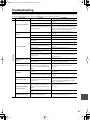
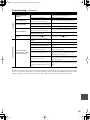
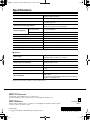
1
DPS-5.5_En.book Page 1 Monday, May 17, 2004 4:45 PM
DVD Player
DPS-5.5
Instruction Manual
DPS-5.5_En.book Page 2 Monday, May 17, 2004 4:45 PM
WARNING:
TO REDUCE THE RISK OF FIRE OR ELECTRIC
SHOCK, DO NOT EXPOSE THIS APPARATUS
TO RAIN OR MOISTURE.
WARNING
AVIS
RISK OF ELECTRIC SHOCK
DO NOT OPEN
RISQUE DE CHOC ELECTRIQUE
NE PAS OUVRIR
The lightning flash with arrowhead symbol, within an
equilateral triangle, is intended to alert the user to the
presence of uninsulated “dangerous voltage” within
the product’s enclosure that may be of sufficient
magnitude to constitute a risk of electric shock to
persons.
CAUTION:
TO REDUCE THE RISK OF ELECTRIC SHOCK,
DO NOT REMOVE COVER (OR BACK). NO
USER-SERVICEABLE PARTS INSIDE. REFER
SERVICING
TO
QUALIFIED
SERVICE
PERSONNEL.
The exclamation point within an equilateral triangle is
intended to alert the user to the presence of important
operating and maintenance (servicing) instructions in
the literature accompanying the appliance.
Important Safety Instructions
1.
2.
3.
4.
5.
6.
7.
8.
9.
10.
11.
12.
13.
14.
2
Read these instructions.
Keep these instructions.
Heed all warnings.
Follow all instructions.
Do not use this apparatus near water.
Clean only with dry cloth.
Do not block any ventilation openings. Install in
accordance with the manufacturer’s instructions.
Do not install near any heat sources such as radiators, heat registers, stoves, or other apparatus
(including amplifiers) that produce heat.
Do not defeat the safety purpose of the polarized or
grounding-type plug. A polarized plug has two
blades with one wider than the other. A grounding
type plug has two blades and a third grounding
prong. The wide blade or the third prong are provided for your safety. If the provided plug does not
fit into your outlet, consult an electrician for
replacement of the obsolete outlet.
Protect the power cord from being walked on or
pinched particularly at plugs, convenience receptacles, and the point where they exit from the apparatus.
Only use attachments/accessories specified by the
manufacturer.
Use only with the cart, stand, PORTABLE CART WARNING
tripod, bracket, or table specified by the manufacturer, or
sold with the apparatus.
When a cart is used, use caution when moving the cart/
apparatus combination to
avoid injury from tip-over.
S3125A
Unplug this apparatus during lightning storms or
when unused for long periods of time.
Refer all servicing to qualified service personnel.
Servicing is required when the apparatus has been
damaged in any way, such as power-supply cord or
plug is damaged, liquid has been spilled or objects
have fallen into the apparatus, the apparatus has
been exposed to rain or moisture, does not operate
normally, or has been dropped.
15. Damage Requiring Service
Unplug the apparatus form the wall outlet and refer
servicing to qualified service personnel under the
following conditions:
A. When the power-supply cord or plug is damaged,
B. If liquid has been spilled, or objects have fallen
into the apparatus,
C. If the apparatus has been exposed to rain or
water,
D. If the apparatus does not operate normally by
following the operating instructions. Adjust only
those controls that are covered by the operating
instructions as an improper adjustment of other
controls may result in damage and will often
require extensive work by a qualified technician
to restore the apparatus to its normal operation,
E. If the apparatus has been dropped or damaged in
any way, and
F. When the apparatus exhibits a distinct change in
performance this indicates a need for service.
16. Object and Liquid Entry
Never push objects of any kind into the apparatus
through openings as they may touch dangerous voltage points or short-out parts that could result in a
fire or electric shock.
The apparatus shall not be exposed to dripping or
splashing and no objects filled with liquids, such as
vases shall be placed on the apparatus.
Don’t put candles or other burning objects on top of
this unit.
17. Batteries
Always consider the environmental issues and follow local regulations when disposing of batteries.
18. If you install the apparatus in a built-in installation,
such as a bookcase or rack, ensure that there is adequate ventilation.
Leave 20 cm (8") of free space at the top and sides
and 10 cm (4") at the rear. The rear edge of the shelf
or board above the apparatus shall be set 10 cm (4")
away from the rear panel or wall, creating a flue-like
gap for warm air to escape.
DPS-5.5_En.book Page 3 Monday, May 17, 2004 4:45 PM
Precautions
This unit contains a semiconductor laser system and is
classified as a “CLASS 1 LASER PRODUCT”. So, to
use this model properly, read this Instruction Manual
carefully. In case of any trouble, please contact the store
where you purchased the unit.
To prevent being exposed to the laser beam, do not try
to open the enclosure.
DANGER:
VISIBLE AND INVISIBLE LASER RADIATION
WHEN OPEN AND INTERLOCK FAILED OR
DEFEATED. DO NOT STARE INTO BEAM.
CAUTION:
THIS PRODUCT UTILIZES A LASER. USE OF
CONTROLS OR ADJUSTMENTS OR PERFORMANCE OF PROCEDURES OTHER THAN THOSE
SPECIFIED HEREIN MAY RESULT IN HAZARDOUS RADIATION EXPOSURE.
The label on the right is
applied on the rear panel
except for USA and Canadian
models.
1. This unit is a CLASS 1 LASER PRODUCT and employs a
laser inside the cabinet.
2. To prevent the laser from being exposed, do not remove the
cover. Refer servicing to qualified personnel.
For U.S. model
The laser is covered by a housing which prevents exposure during operation or maintenance. However, this
product is classified as a Laser Product by CDRH (Center for Devices and Radiological Health) which is a
department of the Food and Drug Administration.
According to their regulations 21 CFR section 1002.30,
all manufactures who sell Laser Products must maintain
records of written communications between the manufacturer, dealers and customers concerning radiation
safety. If you have any complaints about instructions or
explanations affecting the use of this product, please
feel free to write to the address on the back page of this
manual. When you write us, please include the model
number and serial number of your unit.
In compliance with Federal Regulations, the certification, identification and the period of manufacture are
indicated on the rear panel.
FCC INFORMATION FOR USER
CAUTION:
The user changes or modifications not expressly
approved by the party responsible for compliance could
void the user’s authority to operate the equipment.
NOTE:
This equipment has been tested and found to comply
with the limits for a Class B digital device, pursuant to
Part 15 of the FCC Rules.
These limits are designed to provide reasonable protection against harmful interference in a residential installation. This equipment generates, uses and can radiate
radio frequency energy and, if not installed and used in
accordance with the instructions, may cause harmful
interference to radio communications. However, there is
no guarantee that interference will not occur in a particular installation.
If this equipment does cause harmful interference to
radio or television reception, which can be determined
by turning the equipment off and on, the user is encouraged to try to correct the interference by one or more of
the following measures:
•
•
•
•
•
Reorient or relocate the receiving antenna.
Increase the separation between the equipment and receiver.
Connect the equipment into an outlet on a circuit different from
that to which the receiver is connected.
Consult the dealer or an experienced radio/TV technician
for help.
3
DPS-5.5_En.book Page 4 Monday, May 17, 2004 4:45 PM
Precautions—Continued
For Canadian model
NOTE: This class B digital apparatus complies with
Canadian ICES-003.
For models having a power cord with a polarized plug:
CAUTION: TO PREVENT ELECTRIC SHOCK,
MATCH WIDE BLADE OF PLUG TO WIDE SLOT,
FULLY INSERT.
Modèle pour les Canadien
REMARQUE: Cet appareil numérique de la classe B
est conforme à la norme NMB-003 du Canada.
Sur les modèles dont la fiche est polarisee:
ATTENTION: POUR ÉVITER LES CHOCS ÉLECTRIQUES, INTRODUIRE LA LAME LA PLUS
LARGE DE LA FICHE DANS LA BORNE CORRESPONDANTE DE LA PRISE ET POUSSER
JUSQU’AU FOND.
For British models
Replacement and mounting of an AC plug on the power
supply cord of this unit should be performed only by
qualified service personnel.
IMPORTANT
The wires in the mains lead are coloured in accordance
with the following code:
Blue:
Neutral
Brown: Live
As the colours of the wires in the mains lead of this
apparatus may not correspond with the coloured markings identifying the terminals in your plug, proceed as
follows:
The wire which is coloured blue must be connected to
the terminal which is marked with the letter N or
coloured black.
The wire which is coloured brown must be connected to
the terminal which is marked with the letter L or
coloured red.
IMPORTANT
A 5 ampere fuse is fitted in this plug. Should the fuse
need to be replaced, please ensure that the replacement
fuse has a rating of 5 amperes and that it is approved by
ASTA or BSI to BS1362. Check for the ASTA mark or
the BSI mark on the body of the fuse.
IF THE FITTED MOULDED PLUG IS UNSUITABLE
FOR THE SOCKET OUTLET IN YOUR HOME
THEN THE FUSE SHOULD BE REMOVED AND
THE PLUG CUT OFF AND DISPOSED OF SAFELY.
THERE IS A DANGER OF SEVERE ELECTRICAL
SHOCK IF THE CUT OFF PLUG IS INSERTED
INTO ANY 13 AMPERE SOCKET.
If in any doubt, consult a qualified electrician.
4
For European Models
Declaration of Conformity
We, ONKYO EUROPE
ELECTRONICS GmbH
LIEGNITZERSTRASSE
6, 82194 GROEBENZELL,
GERMANY
declare in own responsibility, that the ONKYO product described
in this instruction manual is in compliance with the corresponding
technical standards such as EN60065, EN55013, EN55020 and
EN61000-3-2, -3-3.
GROEBENZELL, GERMANY
I. MORI
ONKYO EUROPE ELECTRONICS GmbH
1. Region Numbers
The DVD standard uses region numbers to control how
discs can be played around the world, the world being
divided into six regions. This unit will only play DVD
discs that match its region number, which can be found
on its rear panel (e.g., 1 ).
2. About this Manual
This manual explains how to use all of this unit’s functions. Although the DVD standard offers many special
features, not all discs use them all, so depending on the
disc being played, this unit may not respond to certain
functions. See the disc’s sleeve notes for supported features.
When you attempt to use a DVD feature that is
not available, this logo may appear onscreen,
indicating that the feature is not supported by
the current disc or this unit.
3. Recording Copyright
Unless it’s for personal use only, recording copyrighted
material is illegal without the permission of the copyright holder.
4. Power
WARNING
BEFORE PLUGGING IN THE UNIT FOR THE
FIRST TIME, READ THE FOLLOWING SECTION
CAREFULLY.
AC outlet voltages vary from country to country. Make
sure that the voltage in your area meets the voltage
requirements printed on this unit’s rear panel (e.g., AC
120 V, 60 Hz).
DPS-5.5_En.book Page 5 Monday, May 17, 2004 4:45 PM
Precautions—Continued
5. Never Touch this Unit with Wet Hands
9. To Obtain a Clear Picture
Never handle this unit or its power cord while your
hands are wet or damp. If water or any other liquid gets
inside this unit, have it checked by the dealer from
whom you purchased this unit.
This unit is a high-tech, precision device. If the lens on
the optical pickup, or the disc drive mechanism
becomes dirty or worn, the picture quality may be
affected. To maintain the best picture quality, we recommend regular inspection and maintenance (cleaning or
worn part replacement) every 1,000 hours of use
depending on the operating environment. Contact the
dealer from whom you purchased this unit.
6. Installing this Unit
• Install this unit in a well-ventilated location.
Ensure that there’s adequate ventilation all around
this unit, especially if it’s installed in an audio rack. If
the ventilation is inadequate, the unit may overheat,
leading to malfunction.
• Do not expose this unit to direct sunlight or heat
sources, because its internal temperature may rise,
shortening the life of the optical pickup.
• Avoid damp and dusty places, and places subject to
vibrations from loudspeakers. Never put the unit on
top of, or directly above a loudspeaker.
• Install this unit horizontally. Never use it on its side or
on a sloping surface, because it may cause a malfunction.
• If you install this unit near a TV, radio, or VCR, the
picture and sound quality may be affected. If this
occurs, move this unit away from the TV, radio, or
VCR.
7. Care
Occasionally, you should dust this unit all over with a
soft cloth. For stubborn stains, use a soft cloth dampened with a weak solution of mild detergent and water.
Dry the unit immediately afterwards with a clean cloth.
Do not use abrasive cloths, thinners, alcohol, or other
chemical solvents, because they may damage the finish
or remove the panel lettering.
8. Handling Notes
10. Moisture Condensation
Moisture condensation may damage this unit.
Read the following carefully:
When you take a glass containing a cold drink outside
on a summer’s day, drops of water, called condensation,
form on the outside of the glass. Similarly, moisture
may condense on the lens of the optical pickup, one of
the most important parts inside this unit.
• Moisture condensation can occur in the following situations:
— The unit is moved from a cold place to a warm
place.
— A heater is turned on, or cold air from an air conditioner is hitting the unit.
— In the summer, when this unit is moved from an
air conditioned room to a hot and humid place.
— The unit is used in a humid place.
• Do not use this unit when there’s the possibility of
moisture condensation occurring. Doing so may damage your discs and certain parts inside this unit.
If condensation does occur, remove all discs and
leave this unit turned on for two to three hours. By
this time, the unit will have warmed up and any condensation will have evaporated. To reduce the risk of
condensation, keep this unit connected to a wall outlet.
• If you need to transport this unit, use the original
packaging to pack it how it was when you originally
bought it.
• Do not use volatile liquids, such as insect sprays, near
this unit. Do not leave rubber or plastic items on this
unit for a long time, because they may leave marks on
the case.
• This unit’s top and rear panels may get warm after
prolonged use. This is normal.
• When you’ve finished using this unit, remove all discs
and turn off the power.
• If you do not use this unit for a long time, it may not
work properly the next time you turn it on, so be sure
to use it occasionally.
5
DPS-5.5_En.book Page 6 Monday, May 17, 2004 4:45 PM
Table of Contents
Basic Operation
Advanced Operation
Overview
Playback Techniques
Important Safety Instructions.............................. 2
Precautions ........................................................ 3
Introduction......................................................... 8
Supplied Accessories ..................................... 8
DPS-5.5 Features ........................................... 8
Disc Notes ...................................................... 9
Before Using the DPS-5.5 ................................ 12
Installing the Batteries .................................. 12
Using the Remote Controller ........................ 12
Front & Rear Panels ......................................... 13
Front Panel ................................................... 13
Display .......................................................... 14
Rear Panel.................................................... 15
Remote Controller ........................................ 16
Connections
Connecting the DPS-5.5................................... 18
Before Making Any Connections .................. 18
AV Cables & Connectors .............................. 18
Basic Setup .................................................. 19
Connecting Your TV ..................................... 20
Connecting to an AV Receiver ..................... 20
Connecting
-compatible Components .... 21
Controlling AV Components
that are Out of Range................................. 22
Connecting the Power/Turning on the DPS-5.5 ...23
Getting Started and Setting up
Getting Started ................................................. 24
Using the on-screen displays ....................... 24
Setting up with the Setup Navigator ............. 24
Basic Playback
Playing discs................................................. 26
Basic playback controls ................................ 27
Resume and Last Memory ........................... 27
DVD-Video disc menus ................................ 28
Video CD PBC menus .................................. 28
Miscellaneous information
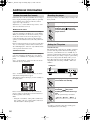
Additional information ....................................... 50
Screen sizes and disc formats...................... 50
Resetting the player...................................... 50
Setting the TV system .................................. 50
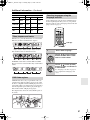
Titles, chapters and tracks............................ 51
DVD-Video regions ....................................... 51
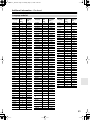
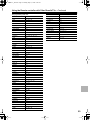
Selecting languages using the language
code list ...................................................... 51
Country code list ........................................... 52
Language code list ....................................... 53
Glossary ........................................................... 56
Troubleshooting................................................ 57
Specifications ................................................... 60
6
Playing discs ..................................................... 29
Using the Disc Navigator to browse
the contents of a disc.................................. 29
Scanning discs .............................................. 30
Playing in slow motion................................... 30
Frame advance/frame reverse ...................... 31
Looping a section of a disc............................ 31
Using repeat play .......................................... 32
Using random play ........................................ 33
Creating a program list.................................. 34
Editing a program list .................................... 35
Other functions available
from the program menu .............................. 36
Searching a disc............................................ 36
Switching subtitles......................................... 37
Switching DVD audio language..................... 37
Switching VR format DVD-RW
audio channel ............................................. 37
Switching audio channel when playing
a Video CD ................................................. 37
Zooming the screen ...................................... 38
Switching camera angles .............................. 38
Displaying disc information ........................... 39
Viewing JPEG discs.......................................... 40
Viewing JPEG discs ...................................... 40
Using the JPEG Disc Navigator
and Photo Browser ..................................... 40
Using the Photo Browser .............................. 41
Zooming the screen ...................................... 41
Detailed Settings
Audio Settings menu......................................... 42
Audio DRC .................................................... 42
Video Adjust menu............................................ 43
Video Adjust .................................................. 43
Initial Settings menu.......................................... 44
Using the Initial Settings menu...................... 44
Digital Audio Out settings.............................. 44
Video Output settings.................................... 45
Language settings......................................... 46
Display settings ............................................. 47
Options.......................................................... 48
PhotoViewer.................................................. 49
Using the remote controller
Using the Remote controller
with Other Brand’s TVs ................................. 54
DPS-5.5_En.book Page 7 Monday, May 17, 2004 4:45 PM
Thank you for purchasing the Integra
DPS-5.5 DVD Player. Read this manual
carefully before using your new DVD
Player. A good understanding of its features and operation will allow you to
achieve optimum performance and
enjoyment.
Important Safety Instructions........ 2
Introduction..................................... 8
Keep this manual for future reference.
Connecting the DPS-5.5 ............... 18
Getting Started.............................. 24
Playing discs................................. 29
Viewing JPEG discs ..................... 40
Audio Settings menu.................... 42
Video Adjust menu ....................... 43
Initial Settings menu..................... 44
Additional information ................. 50
Using the Remote controller with
Other Brand’s TVs ...................... 54
Troubleshooting ........................... 57
7
DPS-5.5_En.book Page 8 Monday, May 17, 2004 4:45 PM
Introduction
Supplied Accessories
Make sure you have the following accessories:
RC-536DV
DPS-5.5 Features
Highlights
• Dolby*1 Digital and DTS*2
• DVD-Video / Video CD / Audio CD playback
• CD-R, CD-RW (Video CD, audio CD, MP3/WMA*3/
JPEG)
• DVD-R (DVD-Video)
• DVD-RW (DVD-Video, VR format)
• Vector Linear Shaping Circuitry
Video
Remote controller & 2 batteries (AA, R6)
AV cable (RCA/phono) (59-1/16" / 1.5 m)
S-Video cable (59-1/16" / 1.5 m)
•
•
•
•
•
•
•
•
•
•
•
•
Advanced 54 MHz/10-bit video D/A converter
Component video output
S-Video and composite video outputs
Frame-by-frame playback
Slow motion playback
Fast forward and reverse
Repeat playback
Random playback
Supports 4:3 and 16:9 aspect ratio TVs
Multiple camera angle support
Parental Lock function
Screen Saver function
Audio
cable (31-7/16" / 0.8 m)
This cable is used to connect the DVD player to other
-compatible Integra components for
(Remote
Interactive) control.
To use
, in addition to an
connection, you must
make an analog audio connection (RCA) between the
DVD player and your Integra AV receiver.
• Direct digital path for signal purity
• 192 kHz/24-bit D/A converter
• Optical / Coaxial digital output
Others
•
•
•
•
Dynamic Range Control setting
Adjustable display brightness
Full-function remote controller
Use the remote controller to control your TV
Power cord (70-7/8" / 1.8 m)
Shape may vary depending on the area which it was purchased.
* In catalogs and on packaging, the letter added to the end of
the product name indicates the color of the DPS-5.5. Specifications and operation are the same regardless of color.
8
*1. Manufactured under license from Dolby Laboratories.
“Dolby” and the double-D symbol are trademarks of Dolby
Laboratories.
*2. “DTS” and “DTS Digital Out” are trademarks of Digital Theater Systems, Inc.
*3.
Windows Media, and the Windows logo are trademarks, or registered trademarks of Microsoft
Corporation in the United States
and/or other countries.
DPS-5.5_En.book Page 9 Monday, May 17, 2004 4:45 PM
Introduction—Continued
• Don’t use discs with an unusual shape, such as those
shown below, because you may damage the DPS-5.5.
Disc Notes
Supported Discs
The DPS-5.5 supports the following discs.
Disc
DVD-Video
Logo
Format or file type
See page 51 for
region information.
DVD-Video
DVD-R
DVD-RW
DVD-Video,
VR format
• Don’t use discs that have residue from adhesive tape,
rental discs with peeling labels, or discs with custommade labels or stickers. Doing so may damage the
DPS-5.5 and you may not be able to remove the disc
properly.
Discs Made on Personal Computers
Including PBC
PCM and DTS
Discs made on personal computers, including those of a
compatible format, may not work properly in the DPS5.5 because of incorrect settings in the disc burning software. Check the manuals supplied with your disc burning software for additional compatibility information.
CD-R
Video CD, audio CD,
MP3, WMA, JPEG
About WMA
CD-RW
Video CD, audio CD,
MP3, WMA, JPEG
JPEG CD
JPEG
Video CD
Audio CD
• Some audio CDs feature copy protection that doesn’t
conform to the official CD standard. Since these are
nonstandard discs, they may not play properly in the
DPS-5.5.
• The DPS-5.5 supports CD-R and CD-RW discs
recorded in Video CD format, audio CD format, or
ISO 9660 Level 1 or 2 format with MP3, WMA, and
JPEG files. It also supports DVD-R and DVD-RW
discs recorded in DVD-Video format. However, some
CD-R, CD-RW, DVD-R, and DVD-RW discs may not
work properly for any of the following reasons:
incomplete disc finalization, disc burner characteristics, disc characteristics, the disc is damaged or dirty.
See the manual supplied with your disc burner for
more information. Condensation or dirt on the optical
pickup lens can also affect playback.
• The DPS-5.5 supports 8 cm and 12 cm discs.
• The DPS-5.5 does not support disc types not listed.
WMA is short for Windows Media Audio and refers to
an audio compression technology developed by
Microsoft Corporation. WMA data can be encoded by
using Windows Media Player version 8 or later or Windows Media Player for Windows XP.
Windows Media and the Windows logo are trademarks
or registered trademarks of Microsoft Corporation in the
United States and/or other countries.
9
DPS-5.5_En.book Page 10 Monday, May 17, 2004 4:45 PM
Introduction—Continued
10
MP3/WMA Compatibility
JPEG Compatibility
• This unit will play CD-R, and CD-RW discs containing files saved in the MPEG-1 Audio Layer 3 (MP3)
or Windows Media Audio (WMA) format with a sampling rate of 32*, 44.1 or 48 kHz. Incompatible files
will not play and the message “Can’t play this format”
will be displayed (“NO PLAY” in the front panel display).
* This unit will not play 32 kHz WMA files encoded
at 20 kbps.
• Fixed bit-rate MP3 files are recommended. Variable
bit-rate (VBR) MP3 files are playable, but playing
times may not be shown correctly.
• This player is compatible with WMA data encoded
using Windows Media Player version 8 (or less) or
Windows Media Player for Windows XP.
• This player is not compatible with lossless-encoding
or variable bit-rate (VBR) WMA files.
• WMA files encoded with DRM (Digital Rights Management) copy protection will not play and the message “Can’t play this format” will be displayed (“NO
PLAY” in the front panel display).
• WMA/MP3 discs must be ISO 9660 Level 1 or 2 compliant. CD physical format: Mode1, Mode2 XA
Form1. Romeo and Joliet file systems are both compatible with this player.
• Use CD-R or CD-RW media for recording your files.
The disc must be finalized (i.e. the session must be
closed) in order to play in this unit. This player is not
compatible with multi-session discs. Only the first session of a multi-session disc will be recognized.
• This player only plays tracks that are named with the
file extension .mp3, .MP3, .wma, or .WMA.
• When naming MP3 and WMA files, add the corresponding file name extension (.mp3 or .wma). Files
are played according to the file extension. To prevent
noise and malfunctions, do not use these extensions
for other kinds of files.
• This player can recognize up to 999 files (WMA/MP3/
JPEG) and up to 499 folders. If a disc exceeds these
limits, only files and folders up to these limits will be
playable. Files and folders are read/displayed in alphabetical order. Note that if the file structure is very complex, you may not be able to read/play all files on the
disc.
• Folder and track names (excluding the file extension)
are displayed.
• There are many different recording bit rates available
to encode MP3 files. This unit was designed to be
compatible with all of them. Audio encoded at
128 Kbps should sound close to standard audio CD
quality. This player will play lower bit-rate files, but
please note that the sound quality becomes noticeably
worse at lower bit-rates.
• Baseline JPEG and EXIF 2.1* still image files up to 8
mega-pixels are supported (maximum vertical and
horizontal resolution is 5120 pixels).
(*File format used by digital still cameras)
• JPEG discs must be ISO 9660 Level 1 or 2 compliant.
CD physical format: Mode1, Mode2 XA Form1.
Romeo and Joliet file systems are both compatible
with this player.
• This player only displays files that are named with the
file extension .jpg or .JPG.
Copyright
It is forbidden by law to copy, broadcast, show, broadcast
on cable, play in public, or rent copyrighted material
without permission.
DVD-Video discs are copy-protected, and any recordings made from these discs will be distorted.
This product incorporates copyright protection technology that is protected by method claims of certain U.S.
patents and other intellectual property rights owned by
Macrovision Corporation and other rights owners. Use
of this copyright-protection technology must be authorized by Macrovision Corporation, and is intended for
home and other limited viewing uses only, unless otherwise authorized by Macrovision Corporation. Reverse
engineering or disassembly is prohibited.
DPS-5.5_En.book Page 11 Monday, May 17, 2004 4:45 PM
Introduction—Continued
Handling Discs
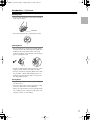
• Never touch the underside of a disc. Always hold discs
by the edge, as shown.
Underside
• Never attach adhesive tape or sticky labels to discs.
Cleaning Discs
• For best results, keep your discs clean. Fingerprints
and dust can affect the sound and picture quality and
should be removed as follows. Using a clean soft
cloth, wipe from the center outwards, as shown. Never
wipe in a circular direction.
✔
• To remove stubborn dust or dirt, wipe the disc with a
damp soft cloth, and then dry it with a dry cloth.
• Never use solvent-based cleaning fluids, such as thinner or benzine, commercially available cleaners, or
antistatic sprays intended for vinyl records, because
they may damage the disc.
Storing Discs
• Don’t store discs in places subject to direct sunlight, or
near heat sources.
• Don’t store discs in places subject to moisture or dust,
such as in a bathroom or near a humidifier.
• Always store discs in their cases and vertically. Stacking, or putting objects on unprotected discs may cause
warping, scratches, or other damage.
11
DPS-5.5_En.book Page 12 Monday, May 17, 2004 4:45 PM
Before Using the DPS-5.5
Installing the Batteries
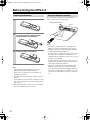
1
Open the battery compartment, as shown.
Using the Remote Controller
To use the remote controller, point it at the DPS-5.5’s
remote control sensor, as shown below.
Remote control sensor
DPS-5.5
Standby/
On
Standby
Display
Power
Play Mode
On
Of f
Dimmer
Clear
Open /Close
Pause
Stop
Play
DPS-5.
5
2
Insert the two supplied batteries (AA) in
accordance with the polarity diagram
inside the battery compartment.
30˚
)
5
30˚
.
ox
pr
16
(
ft.
m
Ap
3
Close the battery compartment.
Notes:
• The supplied batteries should last for about six
months, although this will vary with usage.
• If the remote controller doesn’t work reliably, try
replacing both batteries.
• Don’t mix new and old batteries, or different types of
batteries.
• If you intend not to use the remote controller for a long
time, remove the batteries to prevent possible leakage
and corrosion.
• Flat batteries should be removed as soon as possible to
prevent possible leakage and corrosion.
12
Notes:
• The remote controller may not work reliably if the
DPS-5.5 is subjected to bright light, such as direct
sunlight or inverter-type fluorescent lights. Keep this
in mind when installing the DPS-5.5.
• If another remote controller of the same type is used in
the same room, or the DPS-5.5 is installed close to
equipment that uses infrared rays, the remote controller may not work reliably.
• Don’t put anything, such as a book, on the remote controller, because the buttons may be pressed inadvertently, thereby draining the batteries.
• The remote controller may not work reliably if the
DPS-5.5 is installed in a rack behind colored glass
doors. Keep this in mind when installing the DPS-5.5.
• The remote controller will not work if there’s an obstacle between it and the DPS-5.5’s remote control sensor.
DPS-5.5_En.book Page 13 Monday, May 17, 2004 4:45 PM
Front & Rear Panels
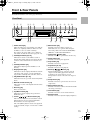
For detailed information, refer to the pages in brackets.
Front Panel
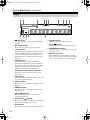
A B
C
D E F
G
H I J
Standby/On
K
Open /Close
Display
Play Mode
Dimmer
Clear
L
Pause
M
N
Stop
Play
Standby
Power
On
Of f
DPS-5.5
S R
A Power switch [23]
This is the main power switch. When set to Off, the
DPS-5.5 is completely shutdown. When set to On,
the DPS-5.5 can be set to On or Standby.
Don’t turn on the power until you’ve completed,
and double checked all connections (pages 18–22).
B Standby/On button [23, 26]
This button is used to set the DPS-5.5 to On or
Standby. For models with a Power switch, this button has no effect unless the Power switch is set to
On.
C Standby indicator [23]
This indicator lights up when the DPS-5.5 is in
Standby.
D Display button [39]
This button is used to display information about the
current disc, title, chapter, or track, including the
elapsed time, remaining time, total time, and so on.
E Play Mode button [31–36]
This button is used to open and close the Play Mode
menu.
F Remote control sensor [12]
This sensor receives control signals from the remote
controller.
G Disc tray [26]
Discs are loaded here.
H Top Menu button [28]
This button is used to display the top menu of a
DVD-Video disc.
I Cursor
/ / / & Enter buttons [24]
The four cursor buttons located around the central
[Enter] button are used to navigate DVD-Video
menus and the onscreen setup menus.
The central [Enter] button is used to start playback
of the selected title, chapter, or track and to confirm
settings.
Q
P
O
J Menu button [28]
This button is used to display a menu on a
DVD-Video disc or to open the Disc Navigator
when using a Video CD, audio CD, WMA/MP3/
JPEG disc, or VR format DVD-RW disc.
K Open/Close
button [26]
This button is used to open and close the disc tray.
L Pause button [27]
This button is used to pause playback.
M Stop button [27]
This button is used to stop playback.
N Play button [26, 27]
This button is used to start playback.
O Down/Up
/
buttons [27]
The Down button is used to select the previous
chapter or track. During playback it selects the
beginning of the current chapter or track.
The Up button is used to select the next chapter or
track.
P Setup button [24]
This button is used to open and close the onscreen
setup menus.
Q Return button [24, 28]
This button is used to return to the main menu without saving your changes.
R Clear button [35]
This button is used to cancel various functions.
S Dimmer button
This button is used to adjust the display brightness.
13
DPS-5.5_En.book Page 14 Monday, May 17, 2004 4:45 PM
Front & Rear Panels—Continued
Display
1
2
DVD
D
3
V CD
TITLE
456
7
8 9 0
GUI
TRACK CHP
TOTAL REMAIN
PROGRESSIVE
A B C D
1
D indicator
This indicator appears when playing Dolby Digital
material.
2 Disc type indicators
These indicators show the type of disc loaded.
3 TITLE indicator
This indicator appears while title numbers are being
displayed. While stopped, the total number of titles
on the current DVD-Video disc is displayed here.
During playback, the number of the current title is
displayed.
4 TRACK indicator
This indicator appears while track numbers are
being displayed. While stopped, the total number of
tracks on the current Video CD, audio CD, or MP3/
WMA disc are displayed. During playback, the
number of the current track is displayed.
5 GUI (Graphical User Interface) indicator
This indicator appears when the onscreen setup
menu is open.
6 CHP indicator
This indicator appears while the number of the current chapter is being displayed.
7 TOTAL indicator
This indicator appears while the total time is being
displayed.
8 REMAIN indicator
This indicator appears while the remaining time is
being displayed.
9 Repeat
indicator
This indicator appears when A–B playback or
repeat playback is used.
0 Camera angle
indicator
This indicator appears if the DVD-Video disc being
played features multiple camera angles.
A DTS indicator
This indicator appears when playing DTS material.
14
E
B Play
indicator
This indicator is shown during playback.
C Pause
indicator
This indicator appears when playback is paused.
D PROGRESSIVE indicator
This indicator appears when the Progressive Scanning function is on.
E Message & time area
Time information, such as total time, remaining
time, and so on, is displayed here in hours, minutes,
and seconds. Other messages are also displayed.
DPS-5.5_En.book Page 15 Monday, May 17, 2004 4:45 PM
Front & Rear Panels—Continued
Rear Panel
1 2
34
5
6
A IR IN/OUT (22)
The IR IN connector can be used to connect a commercially available IR receiver, which can be used
to pickup signals from the remote controller when
the DPS-5.5 is located in another room, installed in
a rack, or is out of range of the remote controller
The IR OUT connector can be used to connect a
commercially available IR emitter, which can be
used to pass remote controller signals received by
the IR IN along to other AV components.
B OPTICAL DIGITAL AUDIO OUTPUT [20]
This optical digital audio output can be connected to
an optical digital audio input on a hi-fi amp, AV
receiver, or surround sound decoder (Dolby Digital,
DTS).
C COAXIAL DIGITAL AUDIO OUTPUT [20]
7
8
9J
K
H COMPONENT 1 VIDEO OUTPUT [20]
These RCA/phono connectors can be used to connect a TV, projector or AV receiver with component
video inputs.
I VIDEO OUTPUT [19]
These RCA/phono connectors can be used to connect TVs, projectors or AV receivers with composite
video inputs.
J S VIDEO OUTPUT [20]
These connectors can be used to connect TVs or
projectors with S-Video inputs.
K AC INLET [23]
The supplied power cord is connected here.
The other of the power cord should be connected to a suitable wall outlet.
This coaxial digital audio output can be connected
to a coaxial digital audio input on a hi-fi amp, AV
receiver, or surround sound decoder (Dolby Digital,
DTS).
D
jacks [21]
These
(Remote Interactive) connectors can be
connected to the
connectors on your other Integra AV components for interactive control.
For remote control operation, you must make an
analog RCA/phono connection between your DPS5.5 and the other AV component, even if they are
connected digitally.
E ANALOG AUDIO OUTPUT [19]
These RCA/phono connectors can be connected to the analog audio inputs on your TV,
hi-fi amp, AV receiver.
F RS 232
This RS-232 port can be connected to an external
controller.
G COMPONENT 2 VIDEO OUTPUT [20]
These BNC connectors can be used to connect
a TV or projector with BNC component video
inputs.
15
DPS-5.5_En.book Page 16 Monday, May 17, 2004 4:45 PM
Front & Rear Panels—Continued
Remote Controller
1
2
3
4
On
N
Standby
Repeat
Open/
Close
Random
A-B
O
Play Mode
1
2
3
Display
5
4
5
6
7
8
9
0
Clear
Dimmer
Menu
Top Menu
6
7
8
9
J
K
L
M
P
Q
R
S
T
U
Enter
Return
Setup
Audio
Angle Subtitle Zoom
Play
Stop
Pause
Down
Up
T V Control
T V/Video Channel
On/
Standby
V
W
X
Y
Z
a
b
Volume
RC-536DV
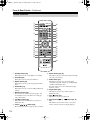
A Standby button [23]
This button is used to set the DPS-5.5 to Standby.
B On button [23]
This button is used to turn on the DPS-5.5.
C Repeat button [32]
This button is used to set the repeat playback functions.
D A-B button [31]
This button is used to set the A–B Repeat Playback
function.
E Number buttons [36]
These buttons are used to enter title, chapter, and
track numbers and to enter times for locating specific points in time.
F Top Menu button [28]
This button is used to display the top menu on a
DVD-Video disc.
G Cursor
/ / / buttons [24]
These buttons are used to navigate onscreen menus.
16
H Return button [24, 28]
This button is used to return to the main menu without saving your changes.
I Audio button [37]
This button is used to select foreign language
soundtracks and audio formats (e.g., Dolby Digital
or DTS) on DVD-Video discs.
For Video CDs you can select left-channel, rightchannel, or stereo.
J Angle button [38]
This button is used to select camera angles on
DVD-Video discs.
K Stop
button [27]
This button is used to stop playback.
L Fast Reverse
/(
) button [27, 30,
31]
This button is used for fast reverse, reverse slow
motion, and reverse frame-by-frame playback.
DPS-5.5_En.book Page 17 Monday, May 17, 2004 4:45 PM
Front & Rear Panels—Continued
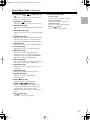
M Fast Forward
/(
) button [27, 30,
31]
This button is used for fast forward, slow motion,
and frame-by-frame playback.
N Open/Close
button [26]
This button is used to open and close the disc tray.
O Random button [33]
This button is used with the Random Playback function.
b TV Control buttons [54]
TV/Video button
Used to select TV or VCR on your TV.
Channel –/+ buttons
Used to select channels on your TV.
On/Standby button
Used to set your TV to On or Standby.
Volume / buttons
Used to adjust your TV’s volume.
P Play Mode button [31]
This button is used to open and close the Play Mode
menu.
Q Display button [39]
This button is used to display information about the
current disc, title, chapter, or track, including the
elapsed time, remaining time, total time, and so on.
R Dimmer button
This button is used to adjust the display brightness.
S Clear button [35]
This button is used to cancel various functions.
T Menu button [28]
This button is used to display the menu on a
DVD-Video disc or to open the Disc Navigator
when using a Video CD, audio CD, WMA/MP3/
JPEG disc, or VR format DVD-RW disc.
U Enter button [24]
This button is used to start playback of the selected
title, chapter, or track, and to confirm settings.
V Setup button [24]
This button is used to open and close the onscreen
setup menus.
W Zoom button [38]
This button is used with the Zoom function.
X Subtitle button [37]
This button is used to select subtitles on
DVD-Video discs.
Y Pause
button [27]
This button is used to pause playback.
Z Down/Up
/
buttons [27]
The Down button is used to select the previous
chapter or track. During playback it selects the
beginning of the current chapter or track.
The Up button is used to select the next chapter or
track.
a Play
button [27]
This button is used to start playback.
17
DPS-5.5_En.book Page 18 Monday, May 17, 2004 4:45 PM
Connecting the DPS-5.5
RCA/phono AV Connection Color Coding
Before Making Any Connections
RCA/phono AV connections are usually color coded:
red, white, and yellow. Use red plugs to connect rightchannel audio inputs and outputs (typically labeled “R”).
Use white plugs to connect left-channel audio inputs and
outputs (typically labeled “L”). And use yellow plugs to
connect composite video inputs and outputs.
• Read the manuals supplied with your AV components.
• Don’t connect the power cord until you’ve completed
all audio and video connections.
Optical Digital Inputs
The DPS-5.5’s optical digital connectors have a shuttertype cover that opens when an optical plug is inserted,
and closes when it’s removed. Push the plug in all the
way.
Right (red)
Analog audio
Left (white)
(Yellow)
Right (red)
Left (white)
Composite video
• Push each plug in all the way to
make a good connection (loose
connections can cause noise or
malfunctions).
• To prevent interference, keep
audio and video cables away from
power cords and speaker cables.
(Yellow)
Right!
Wrong!
AV Cables & Connectors
Video
P R / CR
P R / CR
P B / CB
P B / CB
Y
Component
video
Y
PB
PR
Y
PR / C R
PR / C R
PB / C B
PB / C B
COMPONENT 2
Y
Y
PB
PR
Component video separates the luminance (Y)
and color difference signals (PR, PB), providing
the best picture quality. Some TV manufacturers
label their component video inputs differently.
The DPS-5.5 has RCA/phono and BNC component video outputs.
Y
S VIDEO
S-Video provides better picture quality than composite video.
VIDEO
Composite video can be found on virtually all
TVs, VCRs, and video equipment.
S-Video
Composite
video
Audio
Optical
digital
OPTICAL
Optical digital audio connections provide better
audio quality than analog connections.
Coaxial
digital
COAXIAL
Coaxial digital audio connections provide better
audio quality than analog connections.
AUDIO
Analog
18
L
R
RCA/phono analog audio connectors can be
found on virtually all AV components.
DPS-5.5_En.book Page 19 Monday, May 17, 2004 4:45 PM
Connecting the DPS-5.5—Continued
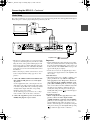
Basic Setup
The setup described here is a basic setup that allows you to play discs using just the AV cable supplied with the player.
In this setup, stereo audio is played through the speakers in your TV.
VIDEO IN
TV
L
R
ANALOG
INPUT
To power outlet
• This player is equipped with copy protection technology. Do not connect this player to your TV via a VCR
using AV cables, as the picture from this player will
not appear properly on your TV. (This player may also
not be compatible with some combination TV/VCRs
for the same reason; refer to the manufacturer for more
information.)
• When connecting to your TV as shown above, do not
set the “Component Out” setting (page 45) to “Progressive.”
1. Connect the VIDEO OUTPUT and AUDIO OUTPUT ANALOG L/R jacks to a set of A/V inputs
on your TV.
Use the supplied AV cable, connecting the red and
white plugs to the audio outputs and the yellow plug
to the video output. Make sure you match up the left
and right audio outputs with their corresponding
inputs for correct stereo sound.
See the following page if you want to use a component or S-Video cable for the video connection.
2. Connect the supplied AC power cord to the AC
INLET, then plug into a power outlet.
Important
• Before unplugging the player from the power outlet,
make sure you first switch it into standby using either
the front panel Standby/On button, or the remote controller, and wait of the “GOOD BYE” message to disappear from the player’s display.
• For the above reasons, do not plug this player into a
switched power supply found on some amplifiers and
AV receivers.
Australian model
• When TV System is set to “AUTO” or “NTSC”, and
playing an NTSC disc only: When “Component
Out” (page 45) is set to “Progressive”, there is no
video output from the “VIDEO OUTPUT” (composite) and “S VIDEO” jacks. If you want to display
video on more than one monitor simultaneously, make
sure that it is set to Interlace. Switch the player to
standby then, using the front panel controls, press
Standby/On while pressing
to switch the player
back to “Interlace.”
North American model
• When “Component Out” (page 45) is set to “Progressive”, there is no video output from the
“VIDEO OUTPUT” (composite) and “S VIDEO”
jacks. If you want to display video on more than one
monitor simultaneously, make sure that it is set to
Interlace. Switch the player to standby then, using the
front panel controls, press Standby/On while pressing
to switch the player back to “Interlace.”
19
DPS-5.5_En.book Page 20 Monday, May 17, 2004 4:45 PM
Connecting the DPS-5.5—Continued
Connecting Your TV
• Connect the DVD Player to the TV directly. If you
connect the DVD Player to a VCR, TV/VCR combination, or video selector, the playback picture may be
distorted as DVD videos are copy protected.
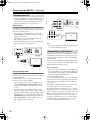
Using S-Video
If your TV (or other equipment) has an S-Video input,
you can use this instead of the standard (composite) output for a better quality picture.
• Use an S-Video cable (supplied) to connect the SVIDEO OUTPUT to an S-Video input on your TV (or
monitor or AV receiver).
• The DPS-5.5 has two S-Video output connectors.
They output the same video signal.
• Line up the small triangle above the jack with the same
mark on the plug before plugging in.
COMPONENT
VIDEO IN
Y
PB
TV
PR
Note:
• To set up the player for use with a progressive scan TV,
see “Component Out” on page 45.
Connecting to an AV Receiver
TV
S VIDEO IN
Using Component Video
You can use the component video output instead of the
standard video out jack to connect this player to your TV
(or other equipment).
This should give you the best quality picture from the
three types of video output available.
• Use a component video cable (not supplied) to connect the COMPONENT VIDEO OUTPUT jacks to a
component video input on your TV, monitor or AV
receiver.
• If your TV or projector has BNC component video
inputs, use a BNC component video cable to connect
them to the DPS-5.5’s BNC component video outputs.
• The DPS-5.5 has two component video outputs. The
COMPONENT 1 output uses RCA/phono connectors.
The COMPONENT 2 output uses BNC connectors.
They output the same video signal.
20
Although you can reproduce the DVD Player’s sound
from the TV speakers with the connections on page 19,
connecting with an amplifier provides you high quality
dynamic sounds.
To reproduce Dolby Digital surround and DTS surround
sound, you need to connect to an amplifier with a Dolby
Digital and DTS decoder respectively.
Before connecting
• When you connect the DVD Player to the amplifier, be
sure to turn off the power and unplug both units from
the wall outlet before making any connections. Otherwise, the speakers may be damaged.
• Connect the plugs securely.
To enjoy surround sound you need to connect this player
to an AV receiver using a digital output. This player has
both coaxial and optical digital jacks; use whichever is
convenient.
In addition to a digital connection, we recommend also
connecting using the stereo analog connection.
To record the audio from a CD-R disc etc. to a cassette
or CDR recorder that’s connected to the AV receiver, and
when your AV receiver has Zone2, you must connect the
DPS-5.5’s analog audio outputs to the AV receiver.
You’ll probably also want to connect a video output to
your AV receiver. You can use any of the video outputs
available on this player (the illustration on next page
shows a standard (composite) connection).
DPS-5.5_En.book Page 21 Monday, May 17, 2004 4:45 PM
Connecting the DPS-5.5—Continued
1. Connect one of DIGITAL AUDIO OUTPUT jacks
on this player to a digital input on your AV
receiver.
OPTICAL
3. Connect the AV receiver’s video output to a video
input on your TV.
Tip:
• The DPS-5.5 has two composite video output connectors and two pairs of stereo analog audio output connectors. They output the same video and audio signals
respectively.
• You usually have to connect the same kind of video
cable between your DVD player and AV receiver, and
between your AV receiver and TV.
COAXIAL
Connecting
Components
-compatible
AV receiver
This enables you to listen to surround sound.
For an optical connection, use an optical cable (not supplied) to connect the “OPTICAL DIGITAL AUDIO
OUTPUT” jack to an optical input on your AV receiver.
For a coaxial connection, use a coaxial cable (similar to
the supplied video cable) to connect the “COAXIAL
DIGITAL AUDIO OUTPUT” jack to a coaxial input on
your AV receiver.
2. Connect the analog AUDIO OUTPUT L/R and
VIDEO OUTPUT jacks on this player to a set of
analog audio and video inputs on your AV
receiver.
AV receiver
DVD
IN
IN
L
REMOTE
CONTROL
R
DVD
AV receiver
• The remote controller supplied with Integra AV
receiver or amplifiers can be used to control the DPS5.5.
• The function of the upper and lower
connectors are
the same. Connect to either one.
• For remote control operation, you must make an analog RCA/phono connection between your DPS-5.5
and the AV receiver or amplifier, even if they are connected digitally.
FRONT
L
R
The diagram shows standard video connections, but you
can alternatively use the S-Video or component video
connections if they’re available.
21
DPS-5.5_En.book Page 22 Monday, May 17, 2004 4:45 PM
Connecting the DPS-5.5—Continued
Controlling AV Components that are Out of Range
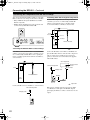
You can use the following multi-room kits to control the
DPS-5.5 when it’s out of range of the remote controller:
• Onkyo Multi-Room System (IR Remote Controller
Extension System)
• Multiroom AV distribution and control systems such
as those made by Niles® and Xantech®.
Controlling Other Out-of-range AV Components
If another AV component is out of range of its remote
controller, you can use a commercially available IR
emitter to retransmit the remote controller signals
received at the DPS-5.5’s IR IN, as shown below.
IR receiver
Connecting
block
IR IN
IR OUT
DPS-5.5
IR emitter
Remote controller
Other
component
: Signal flow
Controlling the DPS-5.5 When It’s Out of Range
If the DPS-5.5 is located in another room, installed in a
cabinet, or out of range of its remote controller, you can
use a commercially available IR receiver to pickup the
remote controller signals and feed them to the DPS-5.5,
as shown below.
Connect the IR emitter to the DPS-5.5’s IR OUT, and
place the IR emitter in front of the other AV component’s
remote control sensor (usually located on its front
panel), as shown below. See the instructions supplied
with the IR emitter.
Other component
Connecting
block
IR receiver
Remote control
sensor
from connecting block
IR IN
IR emitter
Miniplug cable
DPS-5.5
Remote controller
Miniplug
Inside
cabinet
IR Emitter
: Signal flow
DPS-5.5
:Signal flow
Connect the IR receiver to the DPS-5.5 as shown below.
from connecting block
Miniplug cable
DPS-5.5
22
Only remote controller signals received by the DPS5.5’s IR IN are fed through to the IR OUT. Signals
picked up by the DPS-5.5’s remote control sensor are not
output.
DPS-5.5_En.book Page 23 Monday, May 17, 2004 4:45 PM
Connecting the Power/Turning on the DPS-5.5
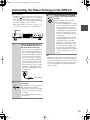
Before connecting
• The DPS-5.5 is shipped with the Power switch in the
on position ( On). When the power cord is plugged
in for the first time, the DPS-5.5 will automatically
enter the standby state and the Standby indicator will
light (same condition after step 2 below).
• Make sure that all the connections on pages 18 – 22
are complete (the connection to a TV is required).
Standby/On
Standby/On
Open /Close
Display
Play Mode
Dimmer
Clear
Pause
Stop
Play
Standby
Power
On
Of f
DPS-5.5
Power
1
Plug the supplied power cord
into the AC INLET and then into
the power outlet on the wall.
• Do not use a power cord other than
the one supplied with the DPS-5.5.
The power cord supplied is designed
for use with the DPS-5.5 and should
not be used with any other device.
• Never have the power cord disconnected from the DPS-5.5 while the
other end is plugged into the wall
outlet. Doing so may cause an electric shock. Always connect by plugging into the wall outlet last and
disconnect by unplugging from the
wall outlet first.
3
Standby/On
Press Standby/On on the DVD
Player or On on the remote controller.
The DVD Player turns on and the
Standby indicator turns off.
• To put the DVD Player in the standby
mode, press Standby/On on the DVD
Player, or Standby on the remote
controller. Be sure to set the volume
to minimum before putting the DVD
Player in the standby mode for the
next use to avoid sudden loud sound
reproduction.
• While the Standby indicator lights
up, the DVD Player can receive signals from the remote controller.
However, if you press Power on the
DVD Player to switch off the main
power, the remote controller cannot
be used to turn on the DVD Player.
• Setting the Standby button to standby
does not shut off the power completely.
Note:
• This player features a screen saver and an auto power
off function. If the player is stopped and no button is
pressed for five minutes, the screen saver starts. If the
disc tray is closed but no disc is playing and no control
is pressed for 30 minutes, the player automatically
goes into standby.
To a wall outlet
2
Power
On
Of f
Press Power to switch on the
main power.
The DVD Player enters standby mode.
The Standby indicator lights up.
• The buttons on the remote controller
do not operate if the Power switch is
set to Off.
• To switch off the main power, press
Power again.
23
DPS-5.5_En.book Page 24 Monday, May 17, 2004 4:45 PM
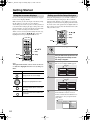
Getting Started
Using the on-screen displays
Setting up with the Setup Navigator
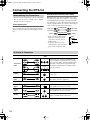
For ease of use, this player makes extensive use of graphical on-screen displays (OSDs).
Make sure that you select the input on the TV (by using
the TV remote) to view the on-screen displays.
You should get used to the way these work as you’ll need
to use them when setting up the player, using some of the
playback features, such as program play, and when making more advanced settings for audio and video.
All the screens are navigated in basically the same way,
using the cursor buttons ( / / / )to change the
highlighted item and pressing Enter to select it.
Using the Setup Navigator you can make a number of
other initial settings for this player. We recommend
using the Setup Navigator, especially if you connected
this player to an AV receiver for playing surround sound.
To answer some of the questions about digital audio formats you may need to look at the instructions that came
with your AV receiver.
4
5
6
7
8
9
0
Clear
Dimmer
/
Menu
Top Menu
/ /
Enter
Enter
Return
Setup
Audio
Angle Subtitle Zoom
Setup
On
Standby
Repeat
A-B
Stop
Open/
Close
Random
Stop
Play
Down
Pause
Up
Play Mode
1
2
3
4
5
6
7
8
9
0
Clear
T V Control
T V/Video Channel
Display
Dimmer
Menu
Top Menu
/
Return
Setup
Audio
Angle Subtitle Zoom
Return
Play
Turn on your TV and make sure
that you select the input on the TV
(by using the TV remote) to view
the setup navigator.
3
Press Setup.
The on-screen display (OSD) appears.
Up
T V Control
T V/Video Channel
Note:
Throughout this manual, “Select” means use the cursor buttons to highlight an item on-screen, then press
Enter.
Setup
2
Pause
Down
Button
If a disc is playing, press Stop ( ).
/ /
Setup
Stop
Stop
Enter
Enter
Stop
1
Setup
HOME MENU
DVD
What it does
Audio Settings
Video Adjust
Play Mode
Disc Navigator
Setup Navigator
Initial Settings
Display/exit the on-screen display.
4
Select “Setup Navigator.”
HOME MENU
Enter
Enter
Return
DVD
Changes the highlighted menu item.
Selects the highlighted menu item
(both Enter buttons work in exactly the
same way).
Returns to the main menu without saving changes.
Audio Settings
Video Adjust
Play Mode
Disc Navigator
Initial Settings
5
Setup Navigator
Select a DVD language.
Some DVD discs feature on-screen
menus, soundtracks and subtitles in several languages. Set your preferred language here.
Setup Navigator
Language Settings
Audio Out Settings
AV Receiver Func.
24
DVD Language
English
French
German
Italian
Spanish
Other Language
DPS-5.5_En.book Page 25 Monday, May 17, 2004 4:45 PM
Getting Started—Continued
The available languages vary between
models.
9
• North American model: English, French,
Spanish, German, Italian, Other Language.
• Australian model: English, French, Spanish, Chinese (traditional), Other Language.
Setup Navigator
Language Settings
Audio Out Settings
• Note that the language you choose
here may not be available on all discs.
• If you want to select a language other
than those listed, select “Other Language.” See “Selecting languages
using the language code list” on
page 51 for detailed information.
6
Connected
Not Connected
• If you selected “Not Connected” here,
that completes setup using the Setup
Navigator. Press Enter to exit.
7
Compatible
Not Compatible
Don't Know
Notes:
• If you set the player to DTS on a nonDTS compatible disc, you will have no
sound outputting because the disc is
not have a DTS soundtrack.
• When a DVD disc is loaded into the
DVD player, the disc would default to
Dolby digital format. For DTS playback you would need to select DTS in
the table of contents of the movie.
Usually in “Language” or in “Audio
Setup”.
Setup Navigator
AV Receiver
Dolby Digital
DTS
AV Receiver Func.
Did you connect this player to an
amplifier or AV receiver?
Select “Connected” or “Not Connected.”
Language Settings
Audio Out Settings
AV Receiver Func.
Is your AV receiver DTS compatible?
Select “Compatible,” “Not Compatible”
or “Don’t Know.”
10
Is your AV receiver MPEG compatible?
Select “Compatible,” “Not Compatible”
or “Don’t Know.”
Setup Navigator
Did you connect this player to an
AV receiver using a digital output?
Select “Connected” or “Not Connected.”
Language Settings
Audio Out Settings
AV Receiver Func.
Dolby Digital
DTS
MPEG
Compatible
Not Compatible
Don't Know
Setup Navigator
Language Settings
Audio Out Settings
AV Receiver Func.
AV Receiver
Digital Audio Out
Connected
Not Connected
11
• If you selected “Not Connected” here,
that completes setup using the Setup
Navigator. Press Enter to exit.
8
Setup Navigator
Language Settings
Audio Out Settings
AV Receiver Func.
Is your AV receiver Dolby Digital
compatible?
Select “Compatible,” “Not Compatible”
or “Don’t Know.”
12
Setup Navigator
Language Settings
Audio Out Settings
AV Receiver Func.
Dolby Digital
Compatible
Not Compatible
Don't Know
Is your AV receiver compatible
with 96 kHz Linear PCM audio?
Select “Compatible,” “Not Compatible”
or “Don’t Know.”
Dolby Digital
DTS
MPEG
96kHz Linear PCM
Compatible
Not Compatible
Don't Know
Press Enter to complete the setup,
or press Setup to quit the Setup
Navigator without making any
changes.
Setup Navigator
Language Settings
Audio Out Settings
AV Receiver Func.
Dolby Digital
Compatible
Not Compatible
DTS
Settings complete
Unknown
MPEG
Press ENTER to exit
96kHz Linear PCM
ENTER
Congratulations, setup is complete!
25
DPS-5.5_En.book Page 26 Monday, May 17, 2004 4:45 PM
Getting Started—Continued
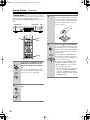
Playing discs
3
Load a disc.
Load a disc with the label side facing up,
using the disc tray guide to align the disc
(if you’re loading a double-sided DVD
disc, load it with the side you want to
play face down).
The basic playback controls for playing DVD,
CD, Video CD and WMA/MP3/JEPG discs are covered
here.
Standby/On
Open/Close
Standby/On
Open /Close
Display
Play Mode
Dimmer
Clear
Pause
Play
Stop
Play
Standby
Power
On
Of f
DPS-5.5
On
On
Standby
Repeat
A-B
Open/
Close
Random
Play Mode
1
2
3
4
5
6
Open/
Close
Display
4
Dimmer
7
8
9
0
Clear
Play
Menu
Top Menu
Enter
Return
Setup
Audio
Angle Subtitle Zoom
Stop
Play
Pause
Play
Down
Up
Remote
controller
Play
T V Control
T V/Video Channel
On/
1
Standby/On
Remote
controller
If the player isn’t already on, press
DVD player’s Standby/On or the
remote controller’s On to switch it
on.
If you’re playing a DVD or Video CD,
also turn on your TV and make sure that
it is set to the correct video input.
On
2
Open /Close
Remote
controller
Open/
Close
26
Press Open/Close to open the disc
tray.
Press Play ( ) to start playback.
If you’re playing a DVD or Video CD, a
menu may appear. See “DVD-Video disc
menus” on page 28 and “Video CD PBC
menus” on page 28 for more on how to
navigate these.
If you’re playing an WMA/MP3 disc, it
may take a few seconds before playback
starts, depending on the complexity of
the file structure on the disc.
If you loaded a CD/CD-R/RW containing JPEGs, a slideshow will start. See
“Viewing JPEG discs” on page 40 for
more on playing these discs.
• See also “PhotoViewer” on page 49 if
the disc contains both WMA/MP3
audio files and JPEG picture files (by
default, you will not be able to play the
WMA/MP3 files).
DPS-5.5_En.book Page 27 Monday, May 17, 2004 4:45 PM
Getting Started—Continued
Front panel controls
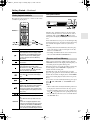
Basic playback controls
The table below shows the basic controls on the remote
controller for playing discs.
Pause
Standby/On
Open /Close
Display
Play Mode
Dimmer
Clear
Pause
Play
Stop
Play
Standby
Power
On
On
Standby
Repeat
A-B
1
2
3
4
5
6
7
8
9
0
Clear
Of f
DPS-5.5
Open/
Close
Random
/
Play Mode
Stop
Display
Numbers
Dimmer
Menu
Top Menu
Enter
Stop
/
Return
Setup
Audio
Angle Subtitle Zoom
Stop
Play
Down
Pause
Up
Play
Pause
Down
/ Up
T V Control
TV/Video Channel
Button
What it does
Starts playback.
DVD and Video CD: If the display shows
RESUME or LAST MEM playback starts
from the resume or last memory point
(see also “Resume and Last Memory”
right colum.)
Pauses a disc that’s playing, or restarts a
paused disc.
Stops playback.
DVD and Video CD: Display shows
RESUME. Press Stop ( ) again to cancel
the resume function (see also “Resume
and Last Memory” right colum).
Press to start fast reverse scanning.
Press Play ( ) to resume normal playback.
Press to start fast forward scanning.
Press Play ( ) to resume normal playback.
Skips to the start of the current track or
chapter, then to previous tracks/chapters.
While the Resume function is active,
pressing this button starts playback from
the beginning of the title (DVD) or the first
track (VCD).
Skips to the next track or chapter.
Numbers
Use to enter a title, chapter, or track number.
Press Enter to select (or wait a few seconds).
• If the disc is stopped, playback starts
from the selected title (for DVD) or track
number (for CD/Video CD/WMA/MP3).
• If the disc is playing, playback jumps to
the start of the selected chapter or track.
The Play, Stop, and Pause buttons on the front panel
work in exactly the same way as their remote control
equivalents. The combined
/
buttons on the
front panel work slightly differently from the remote buttons.
Press and hold for fast scan; press for track/chapter skip.
See Front panel on page 13 for the location and description of all the front panel controls for your model.
Notes:
• You may find with some DVD discs that some playback controls don’t work in certain parts of the disc.
This is not a malfunction.
• Track skip and number buttons for track selection do
not work with unfinalized CD-R/RW discs.
Resume and Last Memory
When you stop playback of a DVD or Video CD disc,
“RESUME” is shown in the display indicating that you
can resume playback again from that point.
If the disc tray is not opened, the next time you start playback the display shows “RESUME” and playback
resumes from the resume point.
For DVD discs only: If you take the disc out of the
player, the play position is stored in memory. When you
load the disc next time, the display shows “LAST MEM”
and you can resume playback (this works for up to five
discs).
If you want to clear the resume/last memory point, press
Stop ( ) while “RESUME” or “LAST MEM” is displayed.
Notes:
• When a Video CD is loaded, the Resume point is lost
if the player is switched off or the disc tray opened.
• For the Last Memory function to work, you must press
Stop ( ) to stop playback before opening the disc tray.
• The Last Memory function doesn’t work with VR format DVD-RW discs.
27
DPS-5.5_En.book Page 28 Monday, May 17, 2004 4:45 PM
Getting Started—Continued
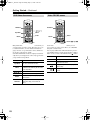
DVD-Video disc menus
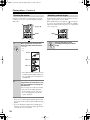
On
Standby
Repeat
A-B
2
3
Video CD PBC menus
On
Open/
Close
Random
Standby
Repeat
A-B
1
2
3
4
5
6
Play Mode
1
Play Mode
Display
Numbers
4
5
Display
Numbers
6
Dimmer
7
8
9
0
Clear
/ /
Menu
Top Menu
Dimmer
7
/
Top Menu
Open/
Close
Random
8
9
0
Clear
Menu
Top Menu
Menu
Enter
Enter
Return
Setup
Audio
Angle Subtitle Zoom
Return
Stop
Play
Enter
Setup
Audio
Angle Subtitle Zoom
Return
Pause
Down
Return
Stop
Up
Play
Down
Enter
Pause
Up
Down
T V Control
T V/Video Channel
On/
On/
Many DVD-Video discs contain menus from which you
can select what you want to watch. They may give access
to additional features, such as subtitle and audio language selection, or special features such as slideshows.
See the disc packaging for details.
Sometimes DVD-Video menus are displayed automatically when you start playback; others only appear when
you press Menu or Top Menu.
Some Video CDs have menus from which you can
choose what you want to watch. These are called PBC
(Playback control) menus.
You can play a PBC Video CD without having to navigate the PBC menu by starting playback using a number
button to select a track, rather than the Play ( ) button.
Button
Return
Button
Top Menu
/
/
/
Enter
28
What it does
Displays the “top menu” of a DVD
disc—this varies with the disc.
Displays a DVD disc menu—this varies with the disc and may be the same
as the “top menu.”
Menu
/ Up
T V Control
T V/Video Channel
Moves the cursor around the screen.
Selects the current menu option.
Return
Returns to the previously displayed
menu screen.
Numbers
Highlights a numbered menu option
(some discs only). Press Enter to
select.
Numbers
What it does
Displays the PBC menu.
Use to enter a numbered menu option.
Press Enter to select.
Displays the previous menu page (if
there is one).
Displays the next menu page (if there
is one).
DPS-5.5_En.book Page 29 Monday, May 17, 2004 4:45 PM
Playing discs
Introduction
Most of the features described in this chapter make use
of on-screen displays. For an explanation of how to navigate these, see “Using the on-screen displays” on
page 24.
Many of the functions covered in this chapter apply to
DVD discs, Video CDs, CDs and WMA/MP3/JPEG
discs, although the exact operation of some varies
slightly with the kind of disc loaded.
Some DVD discs restrict the use of some functions (random or repeat, for example). This is not a malfunction.
When playing Video CDs, some of the functions are not
available during PBC playback. If you want to use them,
start the disc playing using a number button to select a
track.
Using the Disc Navigator to browse
the contents of a disc
Use the Disc Navigator to browse through the contents
of a disc to find the part you want to play. You can use the
Disc Navigator when a disc is playing or stopped.
4
5
6
7
8
9
0
Clear
Disc Navigator
DVD
Title 1-10
Chapter 1-3
Title 01
Title 02
Title 03
Title 04
Title 05
Title 06
Title 07
Title 08
Chapter 001
Chapter 002
Chapter 003
For a VR (Video Recording) mode DVDRW disc select between the “Playlist”
and “Original” areas of the disc, or a title.
Press
(cursor right) to preview the
title.
• It’s not possible to switch between
“Original” and “Playlist” during playback.
• Not all VR format DVD-RW discs
have a Playlist.
Disc Navigator
DVD-RW
Original
Play List
Title(1-03)
01. 3/31 FIRST LEAGUE
02. 4/28 SECOND LEAGUE
03. 4/29 FINAL ROUND
Dimmer
/
Menu
Top Menu
/ /
Enter
Enter
Return
Setup
Audio
Angle Subtitle Zoom
Setup
Stop
Play
Down
1
Setup
Disc Navigator
Track 1-10
CD
Track 01
Track 02
Track 03
Track 04
Track 05
Track 06
Track 07
Track 08
Pause
Up
Press Setup and select “Disc Navigator” from the on-screen display.
Alternatively, if a VR format DVD-RW,
CD, Video CD or WMA/MP3/JPEG disc
is loaded, you can press Menu, which
takes you straight to the Disc Navigator
screen.
HOME MENU
DVD
Audio Settings
Video Adjust
Play Mode
Disc Navigator
Initial Settings
The screen for CDs and Video CDs
shows a list of tracks.
Setup Navigator
The screen for an WMA/MP3 disc shows
the folder names on the left and the track
names on the right (note that if there are
more than 16 folders or names that contain accented or non-roman characters,
tracks and folders may show up with
generic names “-F_033”, “T_035”, etc.).
Select a folder, or a track within a folder.
Disc Navigator
WMA/MP3
Folder 1-17
Track 1-10
001. ACP
002. Nth Degree
003. Pfeuti
004. Live
005. Glitch music
006. CodHead
007. Thermo
008. Missing Man
001. Gravity deluxe
002. Tesla's patent
003. Border dispute
004. Delayed by rain
005. Accident incident
006. Pigeon post
007. Outernational
008. Vacuum tube
Playback starts after you press Enter.
2
Select what you want to play.
Depending on the type of disc you have
loaded, the Disc Navigator looks slightly
different.
The screen for DVD discs shows the
titles on the left and the chapters on the
right. Select a title, or a chapter within a
title.
Tips:
• The Disc Navigator is not available unless there is a
disc loaded.
• It’s not possible to use the Disc Navigator when playing a Video CD in PBC mode, or an unfinalized CDR/RW disc.
• Another way to find a particular place on a disc is to
use one of the search modes. See “Searching a disc”
on page 36.
29
DPS-5.5_En.book Page 30 Monday, May 17, 2004 4:45 PM
Playing discs—Continued
Scanning discs
Playing in slow motion
You can fast-scan discs forward or backward at various
different speeds.
On
Standby
Repeat
A-B
1
2
3
4
5
6
Open/
Close
Random
You can play DVDs and Video CDs at four different forward slow motion speeds. DVD-Video discs can also be
played at two reverse speeds. (With Video CDs and VR
format DVD-RWs, you can only use forward slow
motion playback.)
Play Mode
Display
On
Dimmer
7
8
9
0
Clear
Standby
Repeat
A-B
1
2
3
4
5
6
Open/
Close
Random
Play Mode
Menu
Top Menu
Display
Dimmer
7
Enter
Return
Setup
Audio
Angle Subtitle Zoom
8
9
0
Clear
Menu
Top Menu
Stop
Play
Down
Pause
Play
Enter
Up
Return
Setup
Audio
Angle Subtitle Zoom
/
T V Control
T V/Video Channel
Stop
Play
Pause
On/
1
During playback, press
to start scanning.
Down
/
or
Play
Pause
Up
T V Control
TV/Video Channel
On/
2
3
30
Press repeatedly to increase the
scanning speed.
• WMA/MP3 tracks can only be
scanned at one speed.
• The scanning speed is shown onscreen (i.e., Scan1
).
Play
To resume normal playback, press
Play ( ).
• Sound can be heard while scanning
audio CDs and MP3 discs.
• There is no sound while scanning
DVDs, Video CDs and WMA discs,
and no subtitles while scanning DVDs.
• When scanning a Video CD or WMA/
MP3 track, playback automatically
resumes at the end or beginning of the
track.
• Depending on the disc, normal playback may automatically resume when
a new chapter is reached on a DVD
disc.
1 Pause
During playback, press Pause (
2
Press and hold
or
or
until slow motion playback starts.
• The slow motion speed is shown
onscreen.
• There is no sound during slow motion
playback.
3
Press repeatedly to change the
slow motion speed.
• The slow motion speed is displayed
onscreen.
4
Play
).
To resume normal playback, press
Play ( ).
Notes:
• The picture quality during slow
motion playback is not as good as during normal playback.
• Depending on the disc, normal playback may automatically resume when
a new chapter is reached.
DPS-5.5_En.book Page 31 Monday, May 17, 2004 4:45 PM
Playing discs—Continued
Frame advance/frame reverse
Looping a section of a disc
You can advance or back up a DVD disc frame-byframe. With Video CDs and VR format DVD-RWs, you
can only use frame advance.
4
5
6
7
8
9
0
Clear
Dimmer
Menu
Top Menu
Enter
Return
Setup
Audio
Angle Subtitle Zoom
Stop
Play
Down
/
Pause
Up
The A-B Repeat function allows you to specify two
points (A and B) within a track (CD and Video CD) or
title (DVD) that form a loop which is played over and
over.
Note:
• You can’t use A-B Repeat with WMA/MP3 discs,
Video CDs in PBC 1mode, or unfinalized CD-R/RW
discs.
Play
Pause
On
Standby
Repeat
A-B
2
3
T V Control
T V/Video Channel
Open/
Close
Random
Play Mode
1
O /
Display
1 Pause
During playback, press Pause (
).
4
5
6
7
8
9
0
Clear
A-B
Play Mode
Dimmer
Menu
Top Menu
/
/ /
Enter
2
Press
or
to reverse
or advance a frame at a time.
Return
Setup
Audio
Angle Subtitle Zoom
Stop
Play
Enter
Pause
Down
Up
T V Control
T V/Video Channel
On/
3
Play
To resume normal playback, press
Play ( ).
Tips:
• The picture quality when using frame
reverse is not as good as frame
advance.
• Depending on the disc, normal playback may automatically resume when
a new chapter is reached.
• When changing direction with a DVD
disc, the picture may “move” in an
unexpected way. This is not a malfunction.
1
Play Mode
During playback, press Play Mode
and select “A-B Repeat” from the
list of functions on the left.
Play Mode
A-B Repeat
Repeat
Random
A(Start Point)
B(End Point)
Off
Program
Search Mode
2
Press Enter on “A (Start Point)” to
set the loop start point.
Play Mode
Enter
A-B Repeat
Repeat
Random
Program
Search Mode
A(Start Point)
B(End Point)
Off
31
DPS-5.5_En.book Page 32 Monday, May 17, 2004 4:45 PM
Playing discs—Continued
3
Press Enter on “B (End Point)” to
set the loop end point.
1
Play Mode
Play Mode
Enter
Play Mode
A-B Repeat
Repeat
A(Start Point)
B(End Point)
Random
Program
Search Mode
Off
After pressing Enter, playback jumps
back to the start point and plays the loop.
• The minimum loop time is 2 seconds.
4
During playback, press Play Mode
and select “Repeat” from the list of
functions on the left.
To resume normal playback, select
“Off” from the menu.
2
A-B Repeat
Repeat
Title Repeat
Chapter Repeat
Random
Program
Search Mode
Repeat Off
Select a repeat play option.
If program play is active, select “Program Repeat” to repeat the program list,
or “Repeat Off” to cancel.
For DVD discs, select “Title Repeat” or
“Chapter Repeat” (or “Repeat Off”).
Play Mode
Using the A-B button
With the A-B button you can quickly set the A-B Repeat
function. Simply press the A-B button to set the A point.
“A” appears on the display. Press the A-B button again to
set the B point. “B” appears on the display and A-B
repeat playback starts. To cancel A-B repeat playback,
press the Clear button.
A-B Repeat
Repeat
Random
Program
Search Mode
Title Repeat
Chapter Repeat
Repeat Off
For CDs and Video CDs, select “Disc
Repeat” or “Track Repeat” (or “Repeat
Off”).
Play Mode
Using repeat play
A-B Repeat
There are various repeat play options, depending on the
kind of disc loaded. It’s also possible to use repeat play
together with program play to repeat the tracks/chapters
in the program list (see “Creating a program list” on
page 34).
Note:
• You can’t use Repeat play with Video CDs in PBC
mode, or unfinalized CD-R/RW discs.
On
Repeat
Random
Repeat
A-B
1
2
3
4
5
6
7
8
9
0
Clear
Repeat
Repeat Off
Program
Search Mode
For WMA/MP3 discs, select “Disc
Repeat”, “Folder Repeat” or “Track
Repeat” (or “Repeat Off”).
Play Mode
A-B Repeat
Repeat
Random
Program
Search Mode
Standby
Disc Repeat
Track Repeat
Disc Repeat
Folder Repeat
Track Repeat
Repeat Off
Open/
Close
Random
Play Mode
Display
Play Mode
Dimmer
Menu
Top Menu
/
Enter
Return
Setup
Audio
Angle Subtitle Zoom
Stop
32
Play
Pause
Enter
/ /
Using the Repeat Button
With the Repeat button you can quickly set the Repeat
Playback function. Press Repeat repeatedly to select one
of the repeat options. Repeat playback starts when the
current title, chapter, or track has finished playing.
To cancel repeat playback, press Clear.
Notes:
• You can’t use repeat and random play at the same
time.
• If you switch camera angle during repeat play, repeat
play is canceled.
DPS-5.5_En.book Page 33 Monday, May 17, 2004 4:45 PM
Playing discs—Continued
Using random play
Use the random play function to play titles or chapters
(DVD-Video) or tracks (CD, Video CD and WMA/MP3
discs) in a random order.
You can set the random play option when a disc is playing or stopped.
• You can’t use random play with VR format DVD-RW
discs, Video CDs playing in PBC mode, or while a
DVD disc menu is being displayed.
On
Standby
Repeat
A-B
Open/
Close
Random
Play Mode
1
2
3
4
5
6
7
8
9
0
Clear
Display
Dimmer
Menu
/
/ /
Enter
Return
Setup
Audio
Angle Subtitle Zoom
Stop
Play
Down
1
Play Mode
Enter
Pause
Up
Press Play Mode and select “Random” from the list of functions on
the left.
Play Mode
A-B Repeat
Repeat
Random
Program
Random Title
Random Chapter
Random Off
Search Mode
2
Play Mode
A-B Repeat
Random All
Repeat
Random
Random Track
Random Off
Program
Search Mode
Using the Random Button
Random
Play Mode
Clear
Top Menu
For WMA/MP3 discs, select “Random
All” (all folders) or “Random Track”
(current folder only), (or “Random Off”).
With the Random button you can quickly set the Random
Playback function. Press Random repeatedly to select
one of the random options. Press Enter, the random playback starts.
To cancel random playback, press Clear.
Tips:
• To stop the disc and cancel random playback, press
Stop ( ).
• To cancel random playback without stopping playback, press Clear. The disc will play to the end, then
stop.
• During random play, the
and
buttons function a little differently to normal:
returns to the
beginning of the current track/chapter. You can’t go
back further than this.
selects another track/chapter at random from those remaining.
• You can’t use random play together with program or
repeat play.
Select a random play option.
For DVD discs, select “Random Title” or
“Random Chapter,” (or “Random Off”).
Play Mode
A-B Repeat
Repeat
Random
Random Title
Random Chapter
Random Off
Program
Search Mode
For CDs and Video CDs, select “On” or
“Off” to switch random play on or off.
Play Mode
A-B Repeat
Repeat
Random
On
Off
Program
Search Mode
33
DPS-5.5_En.book Page 34 Monday, May 17, 2004 4:45 PM
Playing discs—Continued
Creating a program list
This feature lets you program the play order of titles/
chapters/folders/tracks on a disc.
• You can’t use Program play with VR format DVD-RW
discs, Video CDs playing in PBC mode, or while a
DVD disc menu is being displayed.
On
Standby
Repeat
A-B
1
2
3
4
5
6
Open/
Close
Random
For a DVD disc, you can add a whole
title, or a chapter within a title to the program list.
• To add a title, select the title.
Program
Program Step
Title 1~38
Chapter 1~4
01. 01
02.
03.
04.
05.
06.
07.
08.
Title 01
Title 02
Title 03
Title 04
Title 05
Title 06
Title 07
Title 08
Chapter 001
Chapter 002
Chapter 003
Chapter 004
Play Mode
Display
Play Mode
Dimmer
7
8
9
0
Clear
/
Menu
Top Menu
/ /
Program
Enter
Return
Setup
Audio
Angle Subtitle Zoom
Stop
Play
Pause
Down
Enter
Play
Up
Play Mode
Press Play Mode and select “Program” from the list of functions on
the left.
Play Mode
A-B Repeat
Repeat
Random
Program
Search Mode
2
Create/Edit
Playback Start
Playback Stop
Program Delete
Program Memory
Off
Select “Create/Edit” from the list of
program options.
Play Mode
A-B Repeat
Repeat
Random
Program
Search Mode
Create/Edit
Playback Start
Playback Stop
Program Delete
Program Memory
Off
The Program edit screen that appears
depends on the kind of disc loaded.
On the left side is the program list, then
to the right is a list of titles (if a DVD disc
is loaded), tracks (for CDs and Video
CDs), or folder names (for WMA/MP3
discs). On the far right is a list of chapters
(for DVD) or track names (for WMA/
MP3).
3
34
Program Step
Title 1-38
Chapter 1-4
01. 01-003
02.
03.
04.
05.
06.
07.
08.
Title 01
Title 02
Title 03
Title 04
Title 05
Title 06
Title 07
Title 08
Chapter 001
Chapter 002
Chapter 003
Chapter 004
For a CD or Video CD, select a track to
add to the program list.
T V Control
T V/Video Channel
On/
1
• To add a chapter, first highlight the
title, then press
(cursor right) and
select a chapter from the list.
Select a title, chapter, folder or
track for the current step in the
program list.
Program
Program Step
Track 1~12
01. 04
02.
03.
04.
05.
06.
07.
08.
Track 01
Track 02
Track 03
Track 04
Track 05
Track 06
Track 07
Track 08
For an WMA/MP3 disc, you can add a
whole folder, or a track within a folder to
the program list.
• To add a folder, select the folder.
Program
Program Step
Folder 1-6
Track 1-10
01. 001
02.
03.
04.
05.
06.
07.
08.
001. ACP
002. Nth Degree
003. Pfeuti
004. Live
005. Glitch music
006. CodHead
001. Gravity deluxe
002. Tesla's patent
003. Border dispute
004. Delayed by rain
005. Accident incident
006. Pigeon post
007. Outernational
008. Vacuum tube
• To add a track, first find the folder, then
press
(cursor right) and select a
track name from the list.
Program
Program Step
Folder 1-6
Track 1-10
01. 001-003
02.
03.
04.
05.
06.
07.
08.
001. ACP
002. Nth Degree
003. Pfeuti
004. Live
005. Glitch music
006. CodHead
001. Gravity deluxe
002. Tesla's patent
003. Border dispute
004. Delayed by rain
005. Accident incident
006. Pigeon post
007. Outernational
008. Vacuum tube
After pressing Enter to select the title/
chapter/folder/track, the program step
number automatically moves down one.
DPS-5.5_En.book Page 35 Monday, May 17, 2004 4:45 PM
Playing discs—Continued
4
Repeat step 3 to build up a program list.
A program list can contain up to 24 titles/
chapters/folders/tracks.
5
Play
Editing a program list
After creating a program list, you can add, delete and
change steps.
To play the program list, press
(play).
Program play remains active until you
turn off program play (see below), erase
the program list (see below), eject the
disc or switch off the player.
On
Standby
Repeat
A-B
1
2
3
4
5
6
7
8
9
0
Clear
Play Mode
Display
Play Mode
Dimmer
Clear
Menu
Top Menu
Tips:
• To save your program list and exit the program edit
screen without starting playback, press Play Mode or
Setup. (Don’t press Return—your program list won’t
be saved.)
• During program play, press
to skip to the next
program step; press
to go back to the previous
program step.
• Press Clear during playback to switch off program
play. Press while stopped to erase the program list.
Open/
Close
Random
/
Enter
Return
Setup
Audio
Angle Subtitle Zoom
Stop
Play
Down
1
Play Mode
/ /
Enter
Pause
Up
Press Play Mode and select “Program” from the list of functions on
the left.
2
Select “Create/Edit” from the list of
program options.
3
To clear a step, highlight the step
number and press Clear.
Clear
4
To insert a step in the middle of the
program list, highlight the step
where you want the new step to
appear, then select a title/chapter/
folder/track to add.
After pressing Enter, the new step is
inserted into the list.
5
To add a step to the end of the program list, highlight the next free
step then select a title/chapter/
folder/track to add.
Tips:
• To save your program list and exit the program edit
screen without starting playback, press Play Mode or
Setup.
• If you want to exit the program edit screen without
saving the changes you made, press Return.
35
DPS-5.5_En.book Page 36 Monday, May 17, 2004 4:45 PM
Playing discs—Continued
Other functions available from the
program menu
As well as creating and editing a program list, you can
start program play, cancel program play, erase the program list, and memorize a program list from the Play
Mode menu.
Searching a disc
You can search DVD discs by title or chapter number, or
by time. CDs can be searched by track number, and
Video CDs by track number or time. WMA/MP3 discs
can be searched by folder or track number.
On
Standby
Repeat
A-B
1
2
3
4
5
6
7
8
9
0
Clear
Open/
Close
Random
Play Mode
Display
Numbers
On
Standby
Repeat
Open/
Close
Random
A-B
Play Mode
1
2
3
4
5
6
Display
Dimmer
/
8
9
0
Clear
/ /
Menu
Top Menu
Play Mode
Enter
Dimmer
7
Play Mode
/
Menu
Top Menu
/ /
Return
Setup
Audio
Angle Subtitle Zoom
Stop
Play
Enter
Pause
Enter
Return
Setup
Audio
Angle Subtitle Zoom
Enter
1
Press Play Mode and select
“Search Mode” from the list of
functions on the left.
The search options that appear depend on
the kind of disc loaded. The screen below
shows the DVD search options.
Play Mode
Stop
Play
Pause
Down
1
Play Mode
Up
Press Play Mode and select “Program” from the list of functions on
the left.
Play Mode
A-B Repeat
Repeat
Random
Play Mode
2
A-B Repeat
Repeat
Random
Create/Edit
Program
Search Mode
Program Delete
Program Memory
Chapter Search
Time Search
Program
Search Mode
Playback Start
Playback Stop
Off
Select a program play function.
• Create/Edit—See above
• Playback Start—Starts playback of a
saved program list
• Playback Stop—Turns off program
play, but does not erase the program
list
• Program Delete—Erases the program
list and turns off program play
• Program Memory (DVD only)—
Select “On” to save the program list
for the disc loaded. (Select “Off” to
cancel the program memory for the
disc loaded)
Notes:
• Program lists are saved for the DVD disc loaded.
When you load a disc with a saved program list, program play is automatically turned on.
• You can save program lists for up to 24 discs. After
that, the oldest one is replaced with the new one saved.
2
Select a search mode.
3
Use the number buttons to enter a
title, chapter, folder or track number, or a time.
1
2
3
4
5
6
Play Mode
7
8
0
9
A-B Repeat
Repeat
Title Search
Chapter Search
Random
Program
Search Mode
Time Search
Input Chapter
0 0 1
• For a time search, enter the number of
minutes and seconds into the currently
playing title (DVD) or track (Video
CD) you want playback to resume
from. For example, press 4, 5, 0, 0 to
have playback start from 45 minutes
into the disc. For 1 hour, 20 minutes
and 30 seconds, press 8, 0, 3, 0.
4
Press Enter to start playback.
Enter
36
Title Search
DPS-5.5_En.book Page 37 Monday, May 17, 2004 4:45 PM
Playing discs—Continued
Notes:
• The disc must be playing in order to use time search.
• Search functions are not available with Video CDs in
PBC mode, or unfinalized CD-R/RW discs.
Switching subtitles
Switching VR format DVD-RW audio
channel
When playing a VR format DVD-RW disc recorded with
dual-mono audio, you can switch between the main, sub,
and mixed channels during playback.
Some DVD discs have subtitles in one or more languages; the disc box will usually tell you which subtitle
languages are available.
You can switch subtitle language during playback.
Enter
Audio
Return
Setup
Audio
Angle Subtitle Zoom
Stop
Play
Menu
Top Menu
Enter
Up
T V Control
TV/Video Channel
Setup
Audio
Angle Subtitle Zoom
Play
Subtitle
Pause
Down
Audio
Press Audio repeatedly to select
an audio channel option.
Up
Audio
T V Control
T V/Video Channel
Subtitle
Pause
Down
Return
Stop
Menu
Top Menu
1L
Dolby Digital 1+1CH
Press Subtitle repeatedly to select
a subtitle option.
Current / Total
Subtitle
1/2
Switching audio channel when
playing a Video CD
English
Notes:
• Some discs only allow you to change subtitle language
from the disc menu. Press Top Menu to access.
• To set subtitle preferences, see “Subtitle Language”
on page 46.
When playing a Video CD, you can switch between stereo, just the left channel or just the right channel.
Enter
Audio
Menu
Top Menu
Return
Setup
Audio
Angle Subtitle Zoom
Stop
Switching DVD audio language
When playing a DVD disc recorded with dialog in two or
more languages, you can switch audio language during
playback.
Menu
Top Menu
Play
Pause
Down
Up
T V Control
TV/Video Channel
Audio
Press Audio repeatedly to select
an audio channel option.
Enter
Audio
Audio
Return
Setup
Audio
Angle Subtitle Zoom
Stop
Play
Stereo
Pause
Down
Up
T V Control
T V/Video Channel
Audio
Press Audio repeatedly to select
an audio language option.
Audio
Current /Total
1/2
French
Dolby Digital 3/2.1CH
Notes:
• Some discs only allow you to change audio language
from the disc menu. Press Top Menu to access.
• To set audio language preferences, see “Audio Language” on page 46.
37
DPS-5.5_En.book Page 38 Monday, May 17, 2004 4:45 PM
Playing discs—Continued
Zooming the screen
Switching camera angles
Using the zoom feature you can magnify a part of the
screen by a factor of 2 or 4, while watching a DVD or
Video CD.
Display
4
5
6
Dimmer
7
8
9
0
Clear
/
/ /
Some DVD discs feature scenes shot from two or more
angles—check the disc box for details.
When a multi-angle scene is playing, a
icon appears
on screen to let you know that other angles are available
(this can be switched off if you prefer—see “Angle Indicator” on page 47).
Menu
Top Menu
Return
Setup
Return
Setup
Audio
Angle Subtitle Zoom
Audio
Angle Subtitle Zoom
Top Menu
Enter
Stop
Play
Down
Menu
Enter
Zoom
Pause
Angle
Up
Stop
Play
Down
T V Control
T V/Video Channel
Pause
Up
T V Control
T V/Video Channel
On/
1
Zoom
During playback, use the Zoom
button to select the zoom factor.
• Normal
• 2x
• 4x
Normal
Zoom 2
Zoom 2x
Zoom 4x
Zoom 4x
• Since DVD and Video CD have a fixed
resolution, picture quality will deteriorate, especially at 4x zoom. This is not
a malfunction.
2
During the navigator square is displayed at the top of the screen, use
the cursor buttons to change the
zoomed area.
You can change the zoom factor and the
zoomed area freely during playback.
• If the navigation square at the top of
the screen disappears, press Zoom
again to display it.
Notes:
• We do not recommend using DVD disc menus when
the screen is zoomed as menu options will not be highlighted.
• If you are displaying subtitles, these will disappear
when the screen is zoomed. They will reappear when
you return the screen to normal.
38
Angle
During playback (or when
paused), press Angle to switch
angle.
DPS-5.5_En.book Page 39 Monday, May 17, 2004 4:45 PM
Playing discs—Continued
Displaying disc information
Various track, chapter and title information, as well as
the video transmission rate for DVD discs, can be displayed on-screen while a disc is playing.
On
Standby
Repeat
A-B
1
2
3
4
5
6
Note:
• You can see disc information (number of titles/chapters, tracks, folders and so on) from the Disc Navigator
screen. See “Using the Disc Navigator to browse the
contents of a disc” on page 29.
Open/
Close
Random
Play Mode
Display
Display
Dimmer
7
8
9
0
Clear
Menu
Top Menu
Display
To show/switch the information
displayed, press Display.
When a disc is playing, the information
appears at the top of the screen. Keep
pressing Display to change the displayed
information.
• DVD displays
Play
DVD
Current / Total
Elapsed
Remain
11/38
2.05
4.57
1. French
1. English
Audio Dolby Digital 3/2.1CH
Subtitle
Title
Play
Chapter
Tr. Rate
Total
7.02
1
Angle
DVD
Current / Total
11/38
Elapsed
2.05
Total
Remain
4.57
7.02
8.6Mbps
• VR format DVD-RW displays
Play
Title
DVD-RW
Current / Total
1/32
1
Audio Dolby Digital
Play
Chapter
Tr. Rate
Original
Elapsed
0.08
2/0CH
Remain
30.22
--
Total
30.30
Subtitle
DVD-RW
Original
Current / Total
1/1
4.3Mbps
• CD and Video CD displays
Play
Track
CD
Current / Total
2/16
Play
Elapsed
1.07
Remain
4.40
Total
5.47
Elapsed
28.00
Remain
30.20
Total
58.20
CD
Disc
• WMA/MP3 disc displays
Play
MP3
Current / Total
Elapsed
Track
1/17
0.18
Track Name
Outernational
Play
Folder
Remain
12.42
Total
13.00
MP3
Current / Total
2/7
Folder Name
ACP
• JPEG disc displays
Play
JPEG
Current / Total
File
1/40
File Name
FL000001
Play
JPEG
Current / Total
Folder
1/40
Folder Name Holiday
39
DPS-5.5_En.book Page 40 Monday, May 17, 2004 4:45 PM
Viewing JPEG discs
Viewing JPEG discs
After loading a CD/CD-R/RW containing JPEG pictures, press Play ( ) to start a slideshow from the first
folder/picture on the disc. The player displays the pictures in each folder in alphabetical order.
Pictures are automatically adjusted so that they fill as
much of the screen as possible (if the aspect ratio of the
picture is different to your TV screen you may notice
black bars at the sides, or at the top and bottom of the
screen).
Using the JPEG Disc Navigator and
Photo Browser
Use the JPEG Disc Navigator to find a particular folder
or picture by filename; use the Photo Browser to find a
picture within a folder by thumbnail image.
On
Standby
Repeat
A-B
1
2
3
4
5
6
Open/
Close
Random
Play Mode
Display
Dimmer
7
On
Standby
Repeat
A-B
2
3
Open/
Close
Random
8
9
0
Clear
/
Menu
Play Mode
1
Enter
Display
4
5
6
7
8
9
0
Clear
/ /
Menu
Top Menu
Return
Setup
Audio
Angle Subtitle Zoom
Enter
Dimmer
Stop
Play
Pause
Menu
Top Menu
Down
Menu
Up
Enter
Return
T V Control
TV/Video Channel
Setup
On/
Audio
Angle
Play
Stop
Angle Subtitle Zoom
Play
Down
Zoom
Pause
Down
Pause
Up
1
/ Up
Press Menu to display the Disc
Navigator screen.
Menu
T V Control
T V/Video Channel
Disc Navigator
Folder 1-2
On/
JPEG
While the slideshow is running:
Button
What it does
001. F_001
002. F_002
File 1-40
001. FL000001
002. FL000002
003. FL000003
004. FL000004
005. FL000005
006. FL000006
007. FL000007
008. FL000008
Pauses the slideshow; press again to
restart.
The left column shows the folders on the
disc, the right column shows the files in a
folder.
Displays the previous picture.
Displays the next picture.
Angle
Pauses the slideshow and rotates the
currently displayed picture 90˚ clockwise. Press Play ( ) to restart slideshow).
Zoom
Pauses the slideshow and zooms the
screen (see below). Press Play ( ) to
restart slideshow).
Menu
Displays the Disc Navigator screen
(see below).
Notes:
• The Pause ( ), Angle and Zoom buttons do not work
while the display shows “LOADING.”
• The time it takes for the player to load a file increases
with large file sizes.
• Up to 999 files are viewable on a disc. If there are more
files than this on a disc, only the first 999 files are
viewable.
40
2
Enter
3
Use the cursor buttons ( / / /
) to navigate.
When a file is highlighted, a thumbnail
image is displayed.
• When a folder is highlighted you can
press Enter to open the Photo Browser
screen for that folder. See below for
more on using the Photo Browser.
To resume the slideshow from the
highlighted file, press Enter.
Enter
DPS-5.5_En.book Page 41 Monday, May 17, 2004 4:45 PM
Viewing JPEG discs—Continued
Using the Photo Browser
Zooming the screen
The Photo Browser displays nine thumbnail images at a
time from the current folder.
On
Standby
Repeat
A-B
Using the zoom feature you can magnify a part of the
screen by a factor of 2 or 4, while viewing pictures from
a JPEG disc.
Open/
Close
Random
On
Play Mode
1
2
3
4
5
6
Standby
Repeat
A-B
1
2
3
4
5
6
Open/
Close
Random
Display
Play Mode
Dimmer
7
8
9
0
Clear
Display
/
Dimmer
/ /
7
8
9
0
Clear
Menu
Top Menu
/
/ /
Menu
Top Menu
Enter
Return
Setup
Audio
Angle Subtitle Zoom
Stop
Play
Down
Enter
Enter
Pause
Up
Down
/ Up
Play
Return
Setup
Audio
Angle Subtitle Zoom
Stop
Play
Pause
Down
Zoom
Up
T V Control
TV/Video Channel
T V Control
T V/Video Channel
1
Enter
From the Disc Navigator screen,
highlight a folder to display then
press Enter.
The Photo Browser screen opens with the
first nine pictures displayed as thumbnails.
Photo Browser
2 / 40
1
Zoom
During slideshow playback, use
the Zoom button to select the
zoom factor.
• Normal
Normal
• 2x
• 4x
Live at Soft
Zoom 2x
Zoom 4x
2
Enter
3
Enter
Use the cursor buttons ( / / /
) to highlight a thumbnail picture.
• Use the track skip buttons (
and
) to see the previous / next page of
thumbnails. Keep the button pressed if
you want to skip several pages; release
when you reach the page you want.
• To return to the Disc Navigator screen,
press Return.
• The slideshow is paused when the
screen is zoomed.
• Since JPEG pictures have a fixed resolution, picture quality may deteriorate,
especially at 4x zoom. This is not a
malfunction.
2
Press Enter to display the selected
thumbnail full size on screen.
The slideshow resumes from the selected
picture.
Enter
3
Play
Use the cursor buttons ( / / /
) to change the zoomed area.
You can change the zoom factor and the
zoomed area freely.
• When you change the zoom area, this
becomes the new “default” zoom area
for the disc loaded.
To resume the slideshow, press
Play ( ).
41
DPS-5.5_En.book Page 42 Monday, May 17, 2004 4:45 PM
Audio Settings menu
Audio DRC
■ Default setting: Off
When watching Dolby Digital DVDs at low volume, it’s
easy to lose the quieter sounds completely—including
some of the dialog.
Switching Audio DRC (Dynamic Range Control) to On
can help by bringing up the quieter sounds, while controlling loud peaks.
How much of a difference you hear depends on the material you’re listening to. If the material doesn’t have wide
variations in volume, you may not notice much change.
On
Standby
Repeat
A-B
1
2
3
4
5
6
Open/
Close
Random
Play Mode
Display
Dimmer
7
8
9
0
Clear
Menu
Top Menu
/
Enter
Enter
Return
Setup
Audio
Angle Subtitle Zoom
Setup
Stop
Play
Down
Pause
Up
T V Control
T V/Video Channel
1
Setup
Press Setup and select “Audio Settings” from the on-screen display.
HOME MENU
DVD
Audio Settings
Video Adjust
Play Mode
Disc Navigator
Initial Settings
2
Enter
Setup Navigator
Highlight Audio DRC, then use the
/ (cursor left/right) buttons to
change to “On” or “Off”, as
required.
Audio Settings
Audio DRC
3
Off
Press Enter to make the setting
and exit the Audio Settings screen.
Enter
Notes:
• Audio DRC is only effective with Dolby Digital audio
sources.
42
• Audio DRC is only effective through the digital output
when “Digital Out” (see page 44) is set to “On”, and
“Dolby Digital Out” (see page 44) is set to “Dolby
Digital > PCM”.
• The effect of Audio DRC depends on your speakers
and AV receiver settings.
DPS-5.5_En.book Page 43 Monday, May 17, 2004 4:45 PM
Video Adjust menu
Video Adjust
4
Adjust the picture quality settings.
■ Default setting: Standard
Memory1
From the Video Adjust screen you can select the standard
video presentation or define presets of your own.
Recall Settings
min
max
Brightness
min
min
max
max
Chroma Level
On
Standby
Repeat
A-B
2
3
Open/
Close
Random
• Use the / (cursor up/down) buttons to select a setting.
• Use the / (cursor left/right) buttons to adjust the current setting.
• Press Display to switch between full
and single view.
• To use the settings from another preset, select “Recall Settings,” and then
use the / (cursor left/right) buttons to select Memory 1, Memory 2, or
Standard.
You can adjust any or all of the following
picture quality settings:
• Contrast—Adjusts the contrast
between light and dark.
• Brightness—Adjusts the overall
brightness.
• Chroma Level—Adjusts how saturated colors appear.
Play Mode
1
Display
4
5
6
7
8
9
0
Clear
Dimmer
Menu
Top Menu
/
Enter
Enter
Return
Setup
Audio
Angle Subtitle Zoom
Setup
Stop
Play
Pause
Down
Up
T V Control
T V/Video Channel
1
Setup
Press Setup and select “Video
Adjust” from the on-screen display.
HOME MENU
DVD
Audio Settings
Video Adjust
Play Mode
Disc Navigator
Setup Navigator
Initial Settings
Memory1
Contrast
5
Press Enter to save the preset and
exit the Video Adjust screen.
Enter
2
Use the / (cursor left/right)
buttons to select a preset.
Video Adjust
Enter
Standard
• With the Standard option, the default
settings are used. If you choose this
option, go to step 5.
• With the Memory 1-2 options, you can
store and recall your own settings. If
you select this option, go to step 3.
3
Press
(cursor down) to select
“Detailed Settings” then press
Enter.
Enter
Video Adjust
Memory1
Detailed Settings
43
DPS-5.5_En.book Page 44 Monday, May 17, 2004 4:45 PM
Initial Settings menu
Using the Initial Settings menu
The Initial Settings menu gives you complete control in
setting up your DVD player, including audio, and video
output settings, audience limitation settings, among others.
If an option is grayed out it means that it cannot be
changed at the current time. This is usually because a
disc is playing. Stop the disc, then change the setting.
1
While playback is stopped, press
Setup and select “Initial Settings”
from the on-screen display.
Setup
HOME MENU
DVD
Audio Settings
Video Adjust
Play Mode
Disc Navigator
Setup Navigator
Initial Settings
2
Select the setup category from the
list on the left, then select an item
from the menu list to the right.
3
Make the setting you want.
Note:
• The language options shown in the onscreen display
illustrations on the following pages may not correspond to those available in your country or region.
Digital Audio Out settings
Digital Out
You only need to make this setting if you connected this
player to an AV receiver (or other component) using one
of the digital outputs.
Initial Settings
Digital Out
Dolby Digital Out
DTS Out
Display
96 kHz PCM Out
Options
MPEG Out
On
Off
If at any time you need to switch off the digital audio
output, set this to “Off”, otherwise leave it “On”.
Note that you can’t switch on/off the optical and coaxial
outputs individually.
44
You only need to make this setting if you connected this
player to an AV receiver (or other component) using one
of the digital outputs.
■ Default setting: Dolby Digital
Initial Settings
Digital Audio Out
Digital Out
Dolby Digital
Video Output
Language
Dolby Digital Out
DTS Out
Dolby Digital > PCM
Display
Options
96 kHz PCM Out
MPEG Out
If your AV receiver (or other connected component) is
Dolby Digital compatible, set to “Dolby Digital”, otherwise set to “Dolby Digital > PCM”.
DTS Out
You only need to make this setting if you connected this
player to an AV receiver (or other component) using one
of the digital outputs.
■ Default setting: DTS
Initial Settings
Digital Audio Out
Video Output
Language
Display
Digital Out
Dolby Digital Out
DTS Out
96 kHz PCM Out
Options
MPEG Out
DTS
Off
If your AV receiver (or other connected component) has
a built-in DTS decoder, set this to “DTS”, otherwise set
to “Off”. Check the manual that came with the other
component if you’re unsure whether it is DTS compatible.
Note:
• If you set to DTS with a non-DTS compatible amplifier, noise will be output when you play a DTS disc.
96kHz PCM Out
You only need to make this setting if you connected this
player to an AV receiver (or other component) using one
of the digital outputs.
■ Default setting: On
Digital Audio Out
Video Output
Language
Dolby Digital Out
■ Default setting: 96 kHz > 48kHz
Initial Settings
Digital Audio Out
Video Output
Language
Digital Out
96 kHz > 48kHz
Dolby Digital Out
DTS Out
96 kHz
Display
Options
96 kHz PCM Out
MPEG Out
If your AV receiver (or other connected component) is
compatible with high sampling rates (96 kHz), set this to
“96 kHz,” otherwise set it to “96 kHz > 48 kHz” (96 kHz
audio is converted to a more compatible 48 kHz). Check
the manual that came with the other component if you’re
unsure whether it is 96 kHz compatible.
DPS-5.5_En.book Page 45 Monday, May 17, 2004 4:45 PM
Initial Settings menu—Continued
■ Default setting: Interlace
MPEG Out
You only need to make this setting if you connected this
player to an AV receiver (or other component) using one
of the digital outputs.
■ Default setting: MPEG > PCM
Initial Settings
Digital Audio Out
TV Screen
Progressive
Video Output
Language
Component Out
S-Video Out
Interlace
Display
Options
Initial Settings
Digital Audio Out
Digital Out
MPEG
Video Output
Dolby Digital Out
MPEG > PCM
Language
Display
DTS Out
96 kHz PCM Out
Options
MPEG Out
If your AV receiver (or other connected component) is
compatible with MPEG audio, set this to “MPEG”, otherwise set it to “MPEG > PCM” (MPEG audio is converted to more compatible PCM audio). Check the
manual that came with the other component if you’re
unsure whether it is MPEG audio compatible.
Video Output settings
TV Screen
■ Default setting: 4:3 (Letter Box)
Initial Settings
Digital Audio Out
Video Output
Language
Display
If you have a progressive-scan compatible TV, set this to
“Progressive” for flicker-free video output. If your TV is
not compatible with progressive-scan video, set to Interlace.
Check the operating instructions that came with your TV
if you’re unsure about its compatibility.
• When setting to “Progressive”, you have to press Enter
once more to confirm. See also below for important
information on progressive scan video.
About progressive scan video
Compared to interlace video, progressive scan video
effectively doubles the scanning rate of the picture,
resulting in a very stable, flicker-free image. Progressive
scan video is available only from the component video
output.
Important
TV Screen
Component Out
S-Video Out
4:3 (Letter Box)
4:3 (Pan&Scan)
16:9 (Wide)
Options
If you have a widescreen TV, select the “16:9 (Wide)”
setting—widescreen DVD software is then shown using
the full screen area. When playing software recorded in
conventional (4:3) format, the settings on your TV will
determine how the material is presented—see the manual that came with your TV for details on what options
are available.
If you have a conventional TV, select either “4:3 (Letter
Box)” or “4:3 (Pan & Scan)”. In Letter Box mode, widescreen software is shown with black bars at the top and
bottom of the screen. Pan & Scan chops the sides off
widescreen material to make it fit the 4:3 screen (so even
though the image looks larger on the screen, you’re actually seeing less of the picture). See also “Screen sizes
and disc formats” on page 50. Pan & Scan only works
with DVD-Video discs that support Pan & Scan.
Component Out
You only need to make this setting if you connected this
player to a progressive scan compatible TV using the
component video outputs.
• Australian model and when TV system is set to
“AUTO” or “NTSC” only: When Component Out
(see above) is set to “Progressive”, there is no video
output from the VIDEO OUT (composite) and
S (S-video) jacks. If you want to display video on
more than one monitor simultaneously, make sure that
it is set to “Interlace.” See also “Setting the TV system” on page 50.
North American model
• When Component Out (see above) is set to “Progressive”, there is no video output from the VIDEO
OUT (composite) and S (S-video) jacks. If you want
to display video on more than one monitor simultaneously, make sure that it is set to “Interlace.” See also
“Setting the TV system” on page 50.
• If you connect a TV that is not compatible with a
progressive scan signal and switch the player to
progressive, you will not be able to see any picture
at all. In this case, switch everything off and reconnect
using the supplied video cable (see “Basic Setup” on
page 19), then switch back to Interlace. Switch the
player to standby then, using the front panel controls,
press Standby/On while pressing
to switch the
player back to “Interlace.”
• Australian model and when TV system is set to
“AUTO” or “NTSC” only: When set to “Progressive”,
PAL and NTSC discs are both output as progressive
NTSC video. When TV System is set to “PAL” only:
Progressive cannot be selected. See page 50.
45
DPS-5.5_En.book Page 46 Monday, May 17, 2004 4:45 PM
Initial Settings menu—Continued
Compatibility of this unit with progressive-scan TVs.
This player is compatible with progressive video Macro
Vision System Copy Guard.
CONSUMERS SHOULD NOTE THAT NOT ALL
HIGH DEFINITION TELEVISION SETS ARE FULLY
COMPATIBLE WITH THIS PRODUCT AND MAY
CAUSE ARTIFACTS TO BE DISPLAYED IN THE
PICTURE. IN CASE OF 525 PROGRESSIVE SCAN
PICTURE PROBLEMS, IT IS RECOMMENDED
THAT THE USER SWITCH THE CONNECTION TO
THE “STANDARD DEFINITION” OUTPUT. IF
THERE ARE QUESTIONS REGARDING OUR TV
SET COMPATIBILITY WITH THIS MODEL 525p
DVD PLAYER, PLEASE CONTACT OUR CUSTOMER SERVICE CENTER.
Tips:
• You can switch between the languages recorded on a
DVD disc during playback using the Audio button.
(This does not affect this setting.) See “Switching
DVD audio language” on page 37.
• Some DVD discs set the audio language automatically
when loaded, overriding the “Audio Language” setting.
• Discs with two or more audio languages usually allow
you to select the audio language from the disc menu.
Press Menu to access the disc menu.
Subtitle Language
■ Default setting: English
Initial Settings
S-Video Out
You only need to make this setting if you connected this
player to your TV using an Svideo cable.
■ Default setting: S2
Initial Settings
Digital Audio Out
Video Output
Language
TV Screen
Component Out
S-Video Out
S1
S2
Display
Options
If you find that the picture is stretched or distorted on the
default “S2” setting, try changing it to “S1”.
Language settings
Audio Language
■ Default setting: English
Initial Settings
Digital Audio Out
Video Output
Language
Display
Options
Audio Language
Subtitle Language
DVD Menu Lang.
Subtitle Display
English
French
German
Italian
Spanish
Other Language
This setting is your preferred audio language for DVD
discs. If the language you specify here is recorded on a
disc, the player automatically plays the disc in that language.
The DVD format recognizes 136 different languages.
Select “Other Language” if you want to specify a language other than those listed. See also “Selecting languages using the language code list” on page 51.
The available languages vary between models.
• North American model: English, French, Spanish, German,
Italian, Other Language.
• Australian model: English, French, Spanish, Chinese (traditional), Other Language.
46
Digital Audio Out
Video Output
Audio Language
Subtitle Language
English
French
Language
Display
DVD Menu Lang.
Subtitle Display
German
Italian
Options
Spanish
Other Language
This setting is your preferred subtitle language for DVD
discs. If the language you specify here is recorded on a
disc, the player automatically plays the disc with those
subtitles.
The DVD format recognizes 136 different languages.
Select “Other Language” if you want to specify a language other than those listed. See also “Selecting languages using the language code list” on page 51.
DPS-5.5_En.book Page 47 Monday, May 17, 2004 4:45 PM
Initial Settings menu—Continued
The available languages vary between models.
• North American model: English, French, Spanish, German,
Italian, Other Language.
• Australian model: English, French, Spanish, Chinese (traditional), Other Language.
Tips:
• You can change or switch off the subtitles on a DVD
disc during playback using the Subtitle button. (This
does not affect this setting.) See “Switching subtitles”
on page 37.
• Some DVD discs set the subtitle language automatically when loaded, overriding the “Subtitle Language”
setting.
• Discs with two or more subtitle languages usually
allow you to select the subtitle language from the disc
menu. Press Menu to access the disc menu.
■ Default setting: On
Initial Settings
Digital Audio Out
Audio Language
On
Video Output
Language
Subtitle Language
DVD Menu Lang.
Off
Display
Options
Subtitle Display
When set to “On”, the player displays subtitles according to the “Subtitle Language” setting. Set to “Off” to
switch subtitles off altogether.
Display settings
OSD Language
■ Default setting: English
DVD Menu Language
■ Default setting: w/Subtitle Lang.
Initial Settings
Digital Audio Out
Video Output
Audio Language
Subtitle Language
w/Subtitle Lang.
English
Language
Display
DVD Menu Lang.
Subtitle Display
French
German
Options
Subtitle Display
Italian
Spanish
Other Language
Some multilingual discs have disc menus in several languages. This setting specifies in which language the disc
menus should appear. Leave on the default setting for
menus to appear in the same language as your “Subtitle
Language”—see above.
The DVD format recognizes 136 different languages.
Select “Other Language” if you want to specify a language other than those listed. See also “Selecting languages using the language code list” on page 51.
The available languages vary between models.
• North American model: English, French, Spanish, German,
Italian, Other Language.
• Australian model: English, French, Spanish, Chinese (traditional), Other Language.
Initial Settings
Digital Audio Out
Video Output
OSD Language
On Screen Display
English
français
Language
Display
Angle Indicator
Deutsch
Italiano
Español
Options
This sets the language of this player’s onscreen displays.
The available languages vary between models.
• North American model: English, Français, Español, Deutsch,
Italiano.
• Australian model: English, Français, Español,
.
On Screen Display
■ Default setting: On
Initial Settings
Digital Audio Out
Video Output
Language
Display
OSD Language
On
On Screen Display
Off
Angle Indicator
Options
This sets whether operation displays are shown onscreen (“Play”, “Resume”, “Scan” and so on.)
Angle Indicator
■ Default setting: On
Initial Settings
Digital Audio Out
Video Output
Language
Display
Options
OSD Language
On Screen Display
Angle Indicator
On
Off
If you prefer not to see the camera icon onscreen during
multi-angle scenes on DVD discs, change this setting to
“Off”.
47
DPS-5.5_En.book Page 48 Monday, May 17, 2004 4:45 PM
Initial Settings menu—Continued
Options
3
Parental Lock
■ Default level: Off
■ Default password: none
Press Enter to register the password and
return to the Options menu screen.
If you forget your password, you can reset the
player then register a new one. See “Resetting the
player” on page 50 for how to reset the player.
■ Default Country code: us (2119)
Some DVD-Video discs feature a Parental Lock level. If
your player is set to a lower level than the disc, the disc
won’t play. This gives you some control about what your
children watch on your DVD player.
Some discs also support the Country code feature. The
player does not play certain scenes on these discs,
depending on the Country code you set.
Before you can set the Parental Lock level or the Country
code you must register a password.
As the password owner, you can change the Parental
Lock level or Country code whenever you like. You can
also change the password.
Notes:
• Not all discs that you may consider inappropriate for
your children use the Parental Lock feature. These
discs will always play without requiring the password
first.
• If you forget your password, you’ll need to reset the
player to its factory settings (see “Resetting the
player” on page 50), then register a new password.
Changing your password
To change your password, confirm your existing password then enter a new one.
1
Select “Password Change”.
Initial Settings
Digital Audio Out
Parental Lock
Password Change
Video Output
Language
PhotoViewer
Level Change
Country Code
Display
Options
2
Use the number buttons to enter your
existing password, then press Enter.
The numbers appear as asterisks as you enter
them.
Initial Settings
Digital Audio Out
Video Output
Language
Display
Options
Registering a new password
Parental Lock: Password Change
Password
* * * *
New Password
You must register a password before you can change the
Parental Lock level or enter a Country code.
1
3
Select “Password”.
Initial Settings
Initial Settings
Parental Lock
Password
Digital Audio Out
Video Output
PhotoViewer
Level Change
Video Output
Language
Password
* * * *
Display
Options
New Password
* * * *
Country Code
Use the number buttons to enter a 4-digit
password.
Initial Settings
Digital Audio Out
Video Output
Language
Display
Options
Parental Lock: Register Code Number
* * * *
The numbers you enter show up as asterisks (*)
on-screen.
48
Parental Lock: Password Change
Digital Audio Out
Language
Display
Options
2
Enter a new password.
4
Press Enter to register the new password
and return to the Options menu screen.
DPS-5.5_En.book Page 49 Monday, May 17, 2004 4:45 PM
Initial Settings menu—Continued
Setting/changing the Parental Lock level
1
3
Select “Level Change”.
Initial Settings
Digital Audio Out
Parental Lock
Password Change
Video Output
Language
PhotoViewer
Level Change
Country Code
Select a Country code.
There are two ways you can do this.
• Select by code letter: Use / (cursor up/
down) to change the Country code.
Initial Settings
Parental Lock: Country Code
Digital Audio Out
Display
Options
Video Output
* * * *
Password
Language
Display
Country Code List
Code
us
2 1 1 9
Options
2
Use number buttons to enter your password, then press Enter.
• Select by code number: Press
(cursor right)
then use the number buttons to enter the 4-digit
Country code (you can find the “Country code
list” on page 52.)
Initial Settings
Digital Audio Out
Video Output
Language
Parental Lock : Level Change
* * * *
Password
Display
Options
Initial Settings
1 2 3 4 5 6 7 8 off
Parental Lock: Country Code
Digital Audio Out
Video Output
3
Select a new level.
* * * *
Password
Language
Display
Options
Country Code List
us
Code
2 1 1 9
Initial Settings
Digital Audio Out
Video Output
Language
Parental Lock : Level Change
* * * *
Password
Display
Options
4
Press Enter to set the new Country code
and return to the Options menu screen.
1 2 3 4 5 6 7 8 off
Press
(cursor left) repeatedly to lock more levels (more discs will require the password);press
(cursor right) to unlock levels. You can’t lock
level 1.
To cancel the Parental Lock function, select “Off.”
4
Press Enter to set the new level and return
to the Options menu screen.
Setting/changing the Country code
Note:
• Changing the Country code does not take effect until
the next disc is loaded (or the current disc is reloaded).
PhotoViewer
■ Default setting: On
Initial Settings
Digital Audio Out
Video Output
Language
Parental Lock
PhotoViewer
On
Off
Display
Options
You may also want to refer to the “Country code list” on
page 52.
1
Select “Country Code”.
Initial Settings
Digital Audio Out
Parental Lock
Password Change
Video Output
Language
PhotoViewer
Level Change
Country Code
Display
Options
2
Use number buttons to enter your password, then press Enter.
This setting is important if you load a disc that contains
both WMA/MP3 audio files and JPEG picture files.
The default “On” setting allows you to view only the
JPEG files on this kind of disc. Set to “Off” to be able to
play the WMA/MP3 audio files.
Note:
• Changing the PhotoViewer setting does not take effect
until the next disc is loaded (or the current disc is
reloaded).
Initial Settings
Digital Audio Out
Video Output
Language
Display
Options
Parental Lock: Country Code
Password
* * * *
Country Code List
Code
us
2 1 1 9
49
DPS-5.5_En.book Page 50 Monday, May 17, 2004 4:45 PM
Additional information
Screen sizes and disc formats
DVD-Video discs come in several different screen aspect
ratios, ranging from TV programs, which are generally
4:3, to Cinema- Scope widescreen movies, with an
aspect ratio of up to about 7:3.
Televisions, too, come in different aspect ratios; “standard” 4:3 and widescreen 16:9.
Resetting the player
Use this procedure to reset all the player’s settings to the
factory default.
1
2
Standard TV users
If you have a standard TV, the “TV Screen” setting
(page 45) of this player should be set to “4:3 (Letter
Box)” or “4:3 (Pan&Scan)”, depending on which you
prefer.
Set to “4:3 (Letter Box)”, widescreen discs are shown
with black bars top and bottom.
Using the front panel buttons, hold
down the Stop ( ) button and
press Standby/On to switch the
player back on.
Stop
Widescreen TV users
If you have a widescreen TV, the TV Screen setting
(page 45) of this player should be set to “16:9 (Wide)”.
When you watch discs recorded in 4:3 format, you can
use the TV controls to select how the picture is presented. Your TV may offer various zoom and stretch
options; see the instructions that came with your TV for
details.
Please note that some movie aspect ratios are wider than
16:9, so even though you have a widescreen TV, these
discs will still play in a “letter box” style with black bars
at the top and bottom of the screen.
Switch the player into standby.
Standby/On
Setting the TV system
(Australian model)
The default setting of this player is “AUTO”, and unless
you notice that the picture is distorted when playing
some discs, you should leave it set to “AUTO”. If you
experience picture distortion with some discs, set the TV
system to match your country or region’s system. Doing
this, however, may restrict the kinds of disc you can
watch. The table below shows what kinds of disc are
compatible with each setting (“AUTO” , “PAL” and
“NTSC”).
Standby/On
Standby/On
Open /Close
Display
Play Mode
Dimmer
Clear
Pause
Stop
Play
Standby
Power
On
Of f
DPS-5.5
Set to “4:3 (Pan&Scan)”, widescreen discs are shown
with the left and right sides cropped.
Although the picture looks larger, you don’t actually see
the whole picture.
1
Standby/On
If the player is on, press Standby/
On to switch it to standby.
Standby/On
Using the front panel controls,
hold down
then press
Standby/On to switch the TV system.
The TV system changes as follows:
2
Please note that many widescreen discs override the
player’s settings so that the disc is shown in letter box
format regardless of the setting.
Note:
• Using the “16:9 (Wide)” setting with a standard 4:3
TV, or either of the “4:3” settings with a widescreen
TV, will result in a distorted picture.
AUTO
NTSC
PAL
Note:
• You have to switch the player into standby (press
Standby/On) before each change.
50
DPS-5.5_En.book Page 51 Monday, May 17, 2004 4:45 PM
Additional information—Continued
Disc
Type
Player setting
Format
NTSC
PAL
AUTO
NTSC
DVD
NTSC
NTSC
MOD.PA
L
Video CD
NTSC
NTSC
MOD.PA
L
NTSC
PAL
NTSC
PAL
PAL
–
NTSC
PAL
NTSC or
PAL
CD/no
disc
Selecting languages using the
language code list
Some of the language options (such as “DVD Language”
in the Setup Navigator) allow you to set your prefered
language from any of the 136 languages listed in the language code list on page 53.
On
Standby
Repeat
A-B
1
2
3
4
5
6
Open/
Close
Random
Play Mode
Display
Titles, chapters and tracks
Dimmer
7
DVD discs are generally divided into one or more titles.
Titles may be further subdivided into chapters.
8
9
0
Clear
Menu
Top Menu
/
Enter
Title 1
Title 2
Title 3
CDs and Video CDs are divided into tracks.
Track 3
Track 1
Track 1
Track 2
Track 3
Folder B
Folder C
Track 1
File 1
.jpg
.jpg
.mp3
.mp3
.mp3
.mp3
Track 1
Angle Subtitle Zoom
Play
Pause
Select “Other Language”.
2
Use the / (cursor left/right)
buttons to select either a code
letter or a code number.
Track 2
CD-ROMs contain folders and files. MP3 and WMA
files are referred to as tracks. Folders may contain further
folders.
Folder A
Audio
/ /
1
Enter
Track 2
Setup
Stop
Chapter 1 Chapter 2 Chapter 3 Chapter 1 Chapter 1 Chapter 2
Track 1
Return
File 2
3
Enter
Use the / (cursor up/down)
buttons to select a code letter or
a code number.
See “Language code list” on page 53
for a complete list of languages and
codes.
DVD-Video regions
All DVD-Video discs carry a region mark on the case
somewhere that indicates which region(s) of the world
the disc is compatible with. Your DVD player also has a
region mark, which you can find on the rear panel. Discs
from incompatible regions will not play in this player.
Discs marked “ALL” will play in any player.
The diagram below shows the various DVD regions of
the world.
1
5
2
6
2
1
3
4
5
2
4
51
DPS-5.5_En.book Page 52 Monday, May 17, 2004 4:45 PM
Additional information—Continued
Country code list
Country
52
Country code
Country code
letter
Argentina
0118
ar
Australia
0121
au
Austria
0120
at
Belgium
0205
be
Brazil
0218
br
Canada
0301
ca
Chile
0312
cl
China
0314
cn
Denmark
0411
dk
Finland
0609
fi
France
0618
fr
Germany
0405
de
Hong Kong
0811
hk
India
0914
in
Indonesia
0904
id
Italy
0920
it
Japan
1016
jp
Korea, Republic of
1118
kr
Malaysia
1325
my
Mexico
1324
mx
Netherlands
1412
nl
New Zealand
1426
nz
Norway
1415
no
Pakistan
1611
pk
Philippines
1608
ph
Portugal
1620
pt
Russian Federation
1821
ru
Singapore
1907
sg
Spain
0519
es
Sweden
1905
se
Switzerland
0308
ch
Taiwan
2023
tw
Thailand
2008
th
United Kingdom
0702
gb
USA
2119
us
DPS-5.5_En.book Page 53 Monday, May 17, 2004 4:45 PM
Additional information—Continued
Language code list
Language
Language
code
letter
Language
code
Language
Language
code
letter
Language
code
Language
Language
code
letter
Language
code
Japanese
ja
1001
Croatian
hr
0818
Sindhi
sd
1904
English
en
0514
Hungarian
hu
0821
Sangho
sg
1907
French
fr
0618
Armenian
hy
0825
sh
1908
German
de
0405
Interlingua
ia
0901
SerboCroatian
Italian
it
0920
Interlingue
ie
0905
Sinhalese
si
1909
Spanish
es
0519
Inupiak
ik
0911
Slovak
sk
1911
Chinese
zh
2608
Indonesian
in
0914
Slovenian
sl
1912
0919
Samoan
sm
1913
sn
1914
Dutch
nl
1412
Icelandic
is
Portuguese
pt
1620
Hebrew
iw
0923
Shona
Swedish
sv
1922
Yiddish
ji
1009
Somali
so
1915
1023
Albanian
sq
1917
1101
Serbian
sr
1918
ss
1919
Russian
Korean
ru
ko
1821
1115
Javanese
Georgian
jw
ka
Greek
el
0512
Kazakh
kk
1111
Siswati
Afar
aa
0101
Greenlandic
kl
1112
Sesotho
st
1920
Abkhazian
ab
0102
Cambodian
km
1113
Sundanese
su
1921
Afrikaans
af
0106
Kannada
kn
1114
Swahili
sw
1923
1119
Tamil
ta
2001
1121
Telugu
te
2005
tg
2007
Amharic
Arabic
am
ar
0113
0118
Kashmiri
Kurdish
ks
ku
Assamese
as
0119
Kirghiz
ky
1125
Tajik
Aymara
ay
0125
Latin
la
1201
Thai
th
2008
ti
2009
Azerbaijani
az
0126
Lingala
ln
1214
Tigrinya
Bashkir
ba
0201
Laothian
lo
1215
Turkmen
tk
2011
Byelorussian
be
0205
Lithuanian
lt
1220
Tagalog
tl
2012
Bulgarian
bg
0207
Latvian
lv
1222
Setswana
tn
2014
to
2015
Bihari
bh
0208
Malagasy
mg
1307
Tonga
Bislama
bi
0209
Maori
mi
1309
Turkish
tr
2018
ts
2019
Bengali
bn
0214
Macedonian
mk
1311
Tsonga
Tibetan
bo
0215
Malayalam
ml
1312
Tatar
tt
2020
tw
2023
2111
Breton
br
0218
Mongolian
mn
1314
Twi
Catalan
ca
0301
Moldavian
mo
1315
Ukrainian
uk
Corsican
co
0315
Marathi
mr
1318
Urdu
ur
2118
uz
2126
Czech
cs
0319
Malay
ms
1319
Uzbek
Welsh
cy
0325
Maltese
mt
1320
Vietnamese
vi
2209
vo
2215
Danish
da
0401
Burmese
my
1325
Volapük
Bhutani
dz
0426
Nauru
na
1401
Wolof
wo
2315
xh
2408
Esperanto
eo
0515
Nepali
ne
1405
Xhosa
Estonian
et
0520
Norwegian
no
1415
Yoruba
yo
2515
Basque
eu
0521
Occitan
oc
1503
Zulu
zu
2621
Persian
fa
0601
Oromo
om
1513
Finnish
fi
0609
Oriya
or
1518
Fiji
fj
0610
Panjabi
pa
1601
Faroese
fo
0615
Polish
pl
1612
Frisian
fy
0625
1619
ga
0701
Pashto,Push
to
ps
Irish
Scots-Gaelic
gd
0704
Quechua
qu
1721
Galician
gl
0712
RhaetoRomance
rm
1813
Guarani
gn
0714
Kirundi
rn
1814
Gujarati
gu
0721
Romanian
ro
1815
Hausa
ha
0801
Kinyarwanda
rw
1823
Hindi
hi
0809
Sanskrit
sa
1901
53
DPS-5.5_En.book Page 54 Monday, May 17, 2004 4:45 PM
Using the Remote controller with Other Brand’s
TVs
Learning a pre-programming code
On
Standby
Repeat
A-B
1
2
3
4
5
6
5
Press some operation buttons
for the component that you want
to operate to check if the system
operates properly.
If the system operates properly, the
code is correct. If the component does
not operate properly, return to step 2.
Open/
Close
Random
Play Mode
Display
Numbers
Dimmer
7
8
9
0
Clear
Menu
Top Menu
/
/ /
Enter
Return
Setup
Audio
Angle Subtitle Zoom
Stop
Play
Down
Enter
Pause
Up
T V Control
TV/Video Channel
On/
Standby
On/
Standby
Volume
TV Control
Notes:
• With some brand’s components, some buttons may not
work correctly.
• If more than one code is given in the table, try the code
one by one until you reach the code for your component (i.e. if the first code does not work, then try the
next).
• The code can be retained by changing the batteries
within 1 minute. If the code is lost, store the pre-programming code again.
RC-536DV
Controlling a TV
You can make RC-536DV remote controller to operate a
TV from other brand than Integra by storing the pre-programming code of the brand in the RC-536DV.
1
Find the 3-digit number for the
brand name of the component
that you want to operate in the
table on page 55.
2
Turn on the TV that you want to
operate.
3
While holding down the On/
Standby on the RC-536DV that
you want to program, press
Enter, and then release both buttons.
(Make sure you press On/Standby
before Enter.)
1
On/
Standby
2
Channel
Volume
On/
Standby
Enter
4
1
Within 10 seconds, enter the 3digit code number.
2
4
5
6
7
8
9
0
54
3
T V/Video
Press On/Standby to turn on the
device.
Press the desired operation button.
+
: Changes the TV channel
upward.
–
: Changes the TV channel downward.
: Increases the TV volume.
: Decrease the TV volume.
TV/Video : Switches the TV/VCR
inputs.
DPS-5.5_En.book Page 55 Monday, May 17, 2004 4:45 PM
Using the Remote controller with Other Brand’s TVs—Continued
Pre-programming Code List
Brand
Brand
Code
Code
SAMSUNG
202, 203, 204, 205, 206, 207, 208
209, 210, 211, 212
AIWA
100. 101
SANYO
AKAI
102, 103, 104
SCHNEIDER
103
AUDIO SONIC
105
SEARS
213
BELL&HOWELL
106
SELECO
214, 215
BLAUPUNKT
107
SHARP
216, 217
BRIONVEGA
108, 109
SONY
218, 219, 220, 221, 222, 223
CENTURION
110
SYMPHONIC
224, 225
COLTINA
111, 112, 113
TELEFUNKEN
201, 226, 227
CORONAD
114
THOMSON
228
CROWN
115, 116
TOSHIBA
213, 229
DAEWOO
117, 118, 119, 120, 121
UNIVERSUM
230
DUAL
122
ZENITH
231, 232
EMERSON
123, 124, 125, 126, 127
FENNER
128, 129
FERGUSON
130, 131
FISHER
132
FUNAI
133, 134, 135
FUJITSU GENERAL
136, 137,138
GE • PANA
139, 140
GE • RCA
141
GOLD STAR
142, 143
GOODMANS
144
GRUNDIG
145, 146
HITACHI
147, 148, 149, 150
HYPER
151
INNO-HIT
152
IRRADIO
103
JVC
153, 154, 155, 156, 157
KENDO
158
KTV
159, 160
LUXOR
161
MAGNAVOX
162, 163
MARANTZ
164
MARK
165
MATSUI
166, 167, 168, 169
MITSUBISHI
170, 171, 172, 173
MIVAR
174, 175
NEC
176, 177
NOKIA
178, 179, 180, 181
NOKIA OCEANIC
181
NORDMENDE
182, 183
OKANO
152
ORION
184, 185, 186
PANASONIC
187, 188, 189, 190
PHILIPS
162, 191, 152
PIONEER
192, 193
PROSCAN
194
QUASAR
195
RADIOSHARK
196
RCA
141, 197, 198, 110, 199, 200
SABA
201, 182, 183
55
DPS-5.5_En.book Page 56 Monday, May 17, 2004 4:45 PM
Glossary
Analog audio
JPEG
An electrical signal that directly represents sound. Compare this to digital audio which can be an electrical signal, but is an indirect representation of sound. See also
“Digital audio”.
A file format used for still images, such as photographs
and illustrations. JPEG files are identified by the file
extension “.jpg” or “.JPG”. Most digital cameras use this
format.
Aspect ratio
MP3
The width of a TV screen relative to its height. Conventional TVs are 4:3 (in other words, the screen is almost
square); widescreen models are 16:9 (the screen is
almost twice as wide as it is high).
MP3 (MPEG1 audio layer 3) is a compressed audio file
format. Files are recognized by their file extension
“.mp3” or “.MP3”.
Digital audio
An audio format used on Video CDs and some DVD
discs. This unit can convert MPEG audio to PCM format
for wider compatibility with digital recorders and AV
amplifiers. See also “PCM (Pulse Code Modulation)”.
An indirect representation of sound by numbers. During
recording, the sound is measured at discrete intervals
(44,100 times a second for CD audio) by an analog-todigital converter, generating a stream of numbers.
On playback, a digital-to-analog converter generates an
analog signal based on these numbers. See also “Sampling frequency” and “Analog audio”.
MPEG video
Dolby Digital
PBC (PlayBack Control) (Video CD only)
Using a maximum of 5.1 channels of audio,
this high quality surround system is used in many of the
finer movie theaters around the world.
The on-screen display shows which channels are active,
for example showing 3/2.1. The 3 being the two front
channels and the center channel; the 2 being the surround
channels, and the .1 being the LFE channel.
A system of navigating a Video CD through on-screen
menus recorded onto the disc. Especially good for discs
that you would normally not watch from beginning to
end all at once—karaoke discs, for example.
The video format used for Video CDs and DVDs. Video
CD uses the older MPEG-1 standard, while DVD uses
the newer and much better quality MPEG-2 standard.
PCM (Pulse Code Modulation)
DRM (digital rights management) is a type of server
software developed to enable secure distribution of paid
content over the web, recently incorporated by WMA
(Windows Media Audio ).
The most common system of encoding digital audio,
found on CDs and DAT. Excellent quality, but requires a
lot of data compared to formats such as Dolby Digital
and MPEG audio. For compatibility with digital audio
recorders (CD, MD and DAT) and AV amplifiers with
digital inputs, this unit can convert Dolby Digital, DTS
and MPEG audio to PCM. See also “Digital audio”.
DTS
Regions (DVD-Video only)
DTS stands for Digital Theater Systems. DTS is
a surround system different from Dolby Digital that has
become a popular surround sound format for movies.
These associate discs and players with particular areas of
the world. This unit will only play discs that have compatible region codes. You can find the region code of
your unit by looking on the rear panel. Some discs are
compatible with more than one region (or all regions).
DRM
Dynamic range
The difference between the quietest and loudest sounds
possible in an audio signal (without distorting or getting
lost in noise).
Dolby Digital and DTS soundtracks are capable of a very
wide dynamic range, delivering dramatic cinema-like
effects.
EXIF (Exchangeable Image File)
A file format developed by Fuji Photo Film for digital
still cameras. Digital cameras from various manuafcturers use this compressed file format which carries date,
time and thumbnail information, as well as the picture
data.
File extension
A tag added to the end of a filename to indicate the type
of file. For example, “.mp3” indicates an MP3 file.
ISO 9660 format
International standard for the volume and file structure
of CD-ROM discs.
56
MPEG audio
Sampling frequency
The rate at which sound is measured to be turned into
digital audio data. The higher the rate, the better the
sound quality, but the more digital information is generated. Standard CD audio has a sampling frequency of
44.1kHz, which means 44,100 samples (measurements)
per second. See also “Digital audio”.
WMA
WMA is short for Windows Media Audio and refers to
an audio compression technology developed by
Microsoft Corporation. WMA data can be encoded by
using Windows Media Player version 8 or Windows
Media Player for Windows XP.
DPS-5.5_En.book Page 57 Monday, May 17, 2004 4:45 PM
Troubleshooting
If you have any trouble using your DPS-5.5, check the following table for possible causes and remedies. If you still can’t
resolve the issue yourself, please contact the dealer from whom you purchased this unit.
Symptoms
Causes
The power cord is not connected.
The [Power] switch is set to Off.
Set the [Power] switch to On (page 23).
External interference is affecting the DPS5.5’s digital circuitry.
Turn off the DPS-5.5, wait five seconds, then try
turning it on again. If that fails, disconnect the
power cord from the wall outlet, wait five seconds,
reconnect it, then try turning it on again.
The disc is not centered in the disc tray.
Place the disc in the center of the disc tray
(page 26).
The disc is dirty.
Remove the disc and clean it (page 11).
No disc is loaded.
Load a disc (page 26).
The disc cannot be played because it’s
incompatible.
Use only compatible discs (page 9).
The disc is upside down.
Load the disc the correct way up (page 26).
The disc is not centered in the disc tray.
Place the disc in the center of the disc tray
(page 26).
The disc is dirty.
Remove the disc and clean it (page 11).
The disc uses parental lock and the Parental Lock function is on.
Turn off the Parental Lock function (page 48).
The DVD-Video disc is intended for use in
another region.
If the region number on the disc does not match
the region number on the DPS-5.5, the disc can’t
be played (page 51).
The disc is dirty.
Remove the disc and clean it (page 11).
You’re using the Fast Forward or Fast
Reverse function.
A little picture distortion may occur when using
these functions. This is normal.
The DPS-5.5 is connected to your TV via a
VCR or other video equipment and a
copy-protection system is affecting the
picture.
Connect the DPS-5.5 directly to your TV
(page 19).
The wrong input source is selected on
your TV.
On your TV, select the input to which the DPS-5.5
is connected.
The video cable is not connected properly.
Check the video cable and correct as necessary
(page 19).
If there’s a power failure, or the power
cord is disconnected inadvertently, any
settings are lost.
Before you disconnect the power cord, set the
DPS-5.5 to Standby by pressing the [Standby/On]
button, and wait until “GOOD BYE” has disappeared from the display.
The DPS-5.5 is connected to your TV via a
VCR or other video equipment and a
copy-protection system is affecting the
picture.
Connect the DPS-5.5 directly to your TV
(page 19).
Your TV doesn’t support progressive scanning.
Reset the DPS-5.5 to its initial settings (page 45).
You are using repeat playback, program
playback, or random playback.
Select normal playback (pages 31–35).
Can’t turn on the DPS-5.5?
The disc tray won’t close
properly?
DVD Player
Can’t start playback?
The picture distorts occasionally?
Picture instability or noise?
No picture?
Settings are not saved?
Brightness is unstable or
the picture is noisy?
Chapters or tracks don’t
play in the correct order?
Remedies
Connect the power cord to a suitable wall outlet
(page 23).
57
DPS-5.5_En.book Page 58 Monday, May 17, 2004 4:45 PM
Troubleshooting—Continued
Buttons on the DPS-5.5 and
remote controller don’t
work?
DVD Player
No sound?
The picture appears
stretched or the wrong
shape?
Power supply voltage fluctuations and
other anomalies, such as static electricity,
can interfere with normal operation.
Turn off the DPS-5.5, wait five seconds, then turn
it on again. If that doesn’t resolve the issue, disconnect the power cord from the wall outlet, wait five
seconds, reconnect it, then try again.
The 96 kHz PCM Out setting is set to
“96 kHz.”
Change the 96 kHz PCM Out setting to “96 kHz >
48 kHz,” or use analog connections (page 44).
The Digital Out setting is set to “Off.”
Change the Digital Out setting to “On” (page 44).
The wrong input source is selected on
your TV, hi-fi amp, or AV receiver.
On your TV, hi-fi amp, or AV receiver, select the
input to which the DPS-5.5 is connected.
The audio cable is not connected properly.
Check the audio cable and correct as necessary
(page 20).
The TV, hi-fi amp, or AV receiver connected to the DPS-5.5’s audio outputs is
either not on or its volume is turned
down.
Turn on the TV, hi-fi amp, or AV receiver and set
its volume as appropriate.
A DPS-5.5 Digital Audio Out setting is set
incorrectly.
Check the Digital Audio Out settings and correct
as necessary (page 44).
Playback is paused.
Resume playback (page 27).
The DVD-Video disc or CD uses the DTS
audio format and you are using the analog
outputs.
DTS audio is only output by the digital outputs. To
play DTS material you need to connect one of the
DPS-5.5’s digital outputs to a digital input on a
hi-fi amp or AV receiver that has a DTS decoder
built-in (page 20).
The TV Screen setting is wrong.
Set the TV Screen setting to match the aspect ratio
of your TV (page 45).
Your TV is connected with an S-Video
cable.
If you’ve used an S-Video cable to connect your
TV, in some cases the picture may appear
stretched. In this case, try changing the S-Video
Out setting to “S1” (page 46).
The loaded audio CD uses copy control.
Copy-controlled CDs are special discs that don’t
conform to the audio CD standard and, therefore,
may not work properly with the DPS-5.5.
MP3 files without a “.mp3” or “.MP3” filename extension are not recognized.
Use the correct filename extension (page 10).
The MP3 disc contains over 499 folders
and 999 files.
The DPS-5.5 recognizes only the first 499 folders
and 999 files. Folders in excess of this aren’t recognized and cannot be played (page 10).
The MP3 disc is a multisession disc.
The DPS-5.5 doesn’t fully support multisession
discs. Only files in the first session can be played
(page 10).
Audio CD playback skips or
jumps or is noisy?
An audio CD is loaded but
the DPS-5.5 displays “NO
DISC”?
The first track doesn’t play?
Locating a specific point
takes longer than usual?
Playback starts in the middle of a track?
Some sections of a track are
skipped?
Playback stops in the middle of a track?
The DPS-5.5 displays the
wrong messages?
Some MP3 files don’t play?
58
DPS-5.5_En.book Page 59 Monday, May 17, 2004 4:45 PM
Troubleshooting—Continued
Can’t play MP3/WMA/
JPEG discs?
DVD Player
Can’t select MP3 files?
Can’t play WMA files?
Can’t view JPEG files?
Remote Controller
The system functions do
not work.
Buttons on the DPS-5.5
work OK but those on the
remote controller don’t?
The disc is not ISO9660 Level 1 or 2 format.
Correct format should be used when recording is
ISO 9660 and closed session(page 10).
The disc has not been finalized.
Finalize the disc (page 10).
MP3 files without a “.mp3” or “.MP3” filename extension are not recognized.
Use the correct filename extension (page 10).
WMA files without a “.wma” or “.WMA”
filename extension are not recognized.
Use the correct filename extension (page 10).
The WMA file’s copyright option is on.
Don’t use the copyright option (page 10).
JPEG files without a “.jpg” or “.JPG” filename extension are not recognized.
Use the correct filename extension (page 10).
Only Baseline JPEG files are supported.
Progressive JPEG files are not.
Use Baseline JPEG files (page 10).
Connecting only the
cable does not
complete the system connection.
Make sure that the
cable and audio pin cables
are connected correctly. (page 21)
There are no batteries in the remote
controller.
Install new batteries (page 12).
The batteries are flat.
Replace with new batteries (page 12).
The batteries are installed incorrectly.
Check the batteries and correct as necessary
(page 12).
You’re not pointing the remote controller
at the DPS-5.5’s remote sensor.
Point the remote controller at the DPS-5.5’s
remote sensor (page 12).
You’re too far away from the DPS-5.5.
Use the remote controller closer to the DPS-5.5
(page 12). The remote controller has a range of
approximately 16 ft. (5 meters).
A strong light source is interfering with
the DPS-5.5’s remote sensor.
Make sure that the DPS-5.5 is not subjected to
direct sunshine or inverter-type fluorescent lights.
Relocate if necessary.
If the DPS-5.5 is installed in a cabinet with
colored glass doors, the remote controller
may not work reliably when the doors are
closed.
Open the doors, or use a cabinet without colored
glass.
The DPS-5.5 contains a microcomputer for signal processing and control functions. In very rare situations, severe interference, noise from an external source, or static electricity may cause it to lockup. In the unlikely even that this should
happen, unplug the power cord from the wall outlet, wait at least five seconds, and then plug it back in again.
59
DPS-5.5_En.book Page 60 Monday, May 17, 2004 4:45 PM
Specifications
Signal System
North American model: Standard NTSC,
Australian model: PAL/AUTO
Composite Video Output/Impedance
1.0 V (p-p)/75 Ω negative sync, RCA/phono
S-Video Output/Impedance
Y: 0.7 V (p-p)/75 Ω negative sync, 4-pin mini DIN
C: 0.286 V (p-p)/75 Ω
Component Video Output/Impedance
Y: 1.0 V (p-p)/75 Ω
PB/PR: 0.7 V (p-p)/75 Ω RCA/ phono, BNC
Frequency response
DVD Linear Sound
4 Hz–44 kHz (96kHz)
4 Hz–22 kHz (48kHz)
Audio CD
4 Hz–20 kHz (44.1kHz)
S/N Ratio
106 dB
Audio Dynamic Range
96 dB
THD (Total Harmonic Distortion)
0.008 % (1kHz)
Wow and Flutter
Below threshold of measurability
Audio Output (Digital/Optical)
–22.5 dBm
Audio Output/Impedance (Digital/Coaxial)
0.5 p-p/75 Ω
Audio Output/Impedance (Analog)
2.0 V (rms)/470 Ω
■ General
Power Supply
North American model: 120 V AC, 60 Hz
Australian model: 100–240 V AC, 50/60 Hz
Power Consumption
15 W
Stand-by Power Consumption
North American model: 0.90 W
Australian model: 0.96 W
Dimensions (W x H x D)
435 X 81 X 313 mm (17-1/8" X 3-3/16" X 12-5/16")
Weight
7.3 lbs.
3.3 kg
Operation Condition Temperature
5˚ C–35˚ C
Disc Compatibility
DVD-video, DVD-R/RW, Audio CD, CD-R/RW, Video CD, MP3,
WMA, JPEG
Disc that have not been property finalized may only be partially
playable or not playable at all
Specifications and features subject to change without notice.
Integra Division of
ONKYO U.S.A. CORPORATION
18 park Way, Upper Saddle River, N.J. 07458, U.S.A.
Tel: 201-785-2600 Fax: 201-785-2650 http://www.integrahometheater.com
Integra Division of
ONKYO CORPORATION
Sales & Product Planning Div.: 2-1, Nisshin-cho, Neyagawa-shi, OSAKA 572-8540, JAPAN
Tel: 072-831-8023 Fax: 072-831-8124
En
Printed in Japan
I0405-1
SN 29343798
(C) Copyright 2004 ONKYO CORPORATION Japan. All rights reserved.
60
* 2 9 3 4 3 7 9 8 *