1
ECONCEPT ST
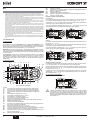
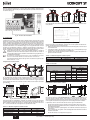
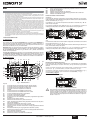
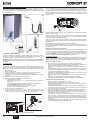
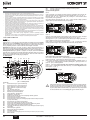
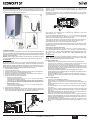
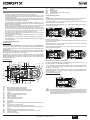
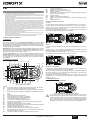
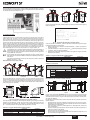
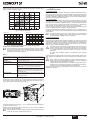
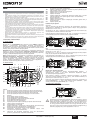
Boiler lighting
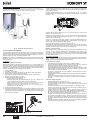
Hot water temperature adjustment
Switch on the power to the unit.
Operate the DHW buttons (details 1 and 2 - fig. 1) to adjust the temperature from a min.
of 10 °C to a max. of 65°C.
e co
co mf ort
m od e
m ode
bar
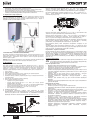
fig. 5 - Boiler lighting
•
•
•
•
e co
co m fo rt
eco
reset
For the following 120 seconds the display will show FH which identifies the heating
system air venting cycle.
During the first 5 seconds the display will also show the card software version.
Open the gas cock ahead of the boiler.
When the message FH disappears, the boiler is ready to operate automatically
whenever domestic hot water is drawn or in case of a room thermostat demand.
re set
fig. 10
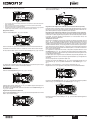
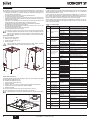
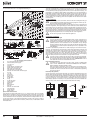
Room temperature adjustment (with optional room thermostat)
Using the room thermostat, set the temperature desired in the rooms. If the room thermostat is not installed the boiler will keep the heating system at its setpoint temperature.
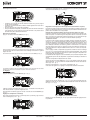
Turning the boiler off
Room temperature adjustment (with optional remote timer control)
Press the on/off button (detail 9 - fig. 1) for 1 second.
Using the remote timer control, set the temperature desired in the rooms. The boiler unit
will set the system water according to the required room temperature. For information on
the remote timer control, please refer to its user's manual.
Sliding Temperature
e co
com f ort
m o de
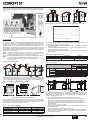
When the optional external probe is installed, the control panel display (detail 5 - fig. 1)
shows the actual outside temperature detected by the probe. The boiler control system
operates with "Sliding Temperature". In this mode, the heating system temperature is adjusted according to the outside weather conditions, to ensure high comfort and energy
saving throughout the year. In particular, as the outside temperature increases, the heating system delivery temperature is decreased according to a specific "compensation
curve".
reset
fig. 6 - Turning the boiler off
When the boiler is turned off, the PCB is still powered.
Domestic hot water and heating are disabled. The antifreeze system remains activated.
To relight the boiler, press the on/off button (detail 9 fig. 1) again for 1 second.
With Sliding Temperature adjustment, the temperature set with the heating buttons (details 3 and 4 - fig. 1) becomes the maximum system delivery temperature. It is advisable
to set a maximum value to allow system adjustment throughout its useful operating
range.
The boiler must be adjusted at the time of installation by qualified personnel. Adjustments can in any case be made by the user to improve comfort.
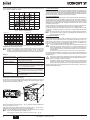
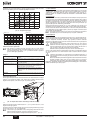
Compensation curve and curve offset
e co
c o mfo rt
eco
m ode
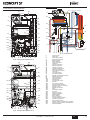
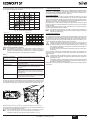
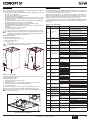
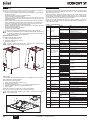
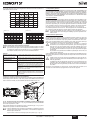
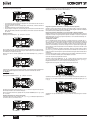
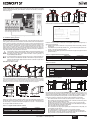
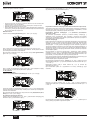
Press the mode button (detail 10 - fig. 1) once to display the actual compensation curve
(fig. 11), which can be modified with the DHW buttons (details 1 and 2 - fig. 1).
bar
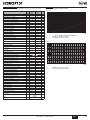
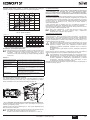
Adjust the required curve from 1 to 10 according to the characteristic (fig. 13).
reset
By setting the curve to 0, sliding temperature adjustment is disabled.
fig. 7
The boiler will be immediately ready to operate whenever domestic hot water is drawn
or in case of a room thermostat demand.
2.4 Adjustments
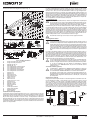
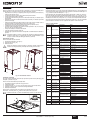
Summer/Winter Switchover
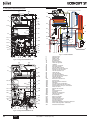
Press the summer/winter button (detail 6 - fig. 1) for 1 second.
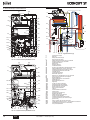
fig. 11 - Compensation curve
Press the heating buttons (details 3 and 4 - fig. 1) to access parallel curve offset (fig. 14),
modifiable with the DHW buttons (details 1 and 2 - fig. 1).
eco
co mfort
eco
m ode
bar
res et
fig. 8
The display activates the Summer symbol (detail 27 - fig. 1): the boiler will only deliver
domestic hot water. The antifreeze system remains activated.
To deactivate Summer mode, press the summer/winter button (detail 6 - fig. 1) again
for 1 second.
fig. 12 - Parallel curve offset
Press the mode button (detail 10 - fig. 1) again to exit parallel curve adjustment mode.
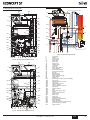
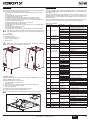
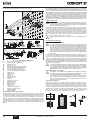
Heating temperature setting
Use the heating buttons
(details 3 and 4 - fig. 1) to adjust the temperature
from a min. of 20°C to a max. of 90°C.
eco
co m for t
eco
m o de
bar
reset
fig. 9
36
EN
cod. 3540S814 - /201 (Rev. 00)