1
V1.0
Instruction manual
IMPORTANT
PC microphone
The instructions of these
manual are for reference
about the product.
There may be differences due to update.
Please check our web site (www.steren.com) to
obtain the latest version of the instruction manual.
•Do not use or store the equipment near wet
places.
•To minimize the chance of feedback (a
loud howling or squealing noise), position the
microphone beside or behind loudspeakers.
COMPUTACIÓN
CAUTIONS
1115a
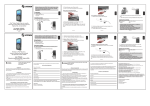
- The PC microphone has a base to place it on a
table or a flat surface.
- It includes an on/off button, and the pipe is very
flexible so you will set it any direction or any height.
HIGHLIGHTS
1. Microphone
2. On / Off button
3. 3.5 mm connector
1
•Clean only with a soft, dry cloth.
- The 3.5 mm connector is nickel plated.
When the microphone is connected, computer
should detect and install it to use with any audio
application or program without the need to install
additional software.
PARTS
HOW TO USE
- Connect the microphone to your computer’s
3.5mm mic input.
Frequency response: 45Hz - 16kHz
Sensitivity: -62dB +/- 2dB
Impedance: 11 00 Ω
- Adjust it to desired position and talk toward
the microphone.
- Slide the button to turn on the microphone.
- The microphone has a filter to reduce noises,
getting clear and sharp voice recordings.
Input connector
MIC IN
3
2
TROUBLESHOOTING
SPECIFICATIONS
WARRANTY
Date of delivery ___________________________________________________
Serial number ____________________________________________________
Part number______________________________________________________
Brand ___________________________________________________________
Product _________________________________________________________
Address _________________________________________________________
Name of the retailer _______________________________________________
RETAILER INFORMATION
b) If you lose the warranty card, we can reissue it, if you show the invoice or purchase ticket.
a) The consumer can also claim the warranty service in the purchase establishment.
safe keeping, among others.
failure to follow enclosed instructions, improper repair by unauthorized personnel, improper
If the product has been damaged by an accident, acts of God, mishandling, leaky batteries,
THIS WARRANTY IS VOID IN THE NEXT CASES:
addresses mentioned later.
01 800 500 9000
In case your product fails
or have questions, please
contact your nearest
dealer. If you are in
Mexico, please call to our
Call Center.
4. Steren sell parts, components, consumables and accessories to customer, as well as warranty service, at any of the
3. The repairing time will not exceed 30 natural days, from the day the claim was received.
2. If the product is in the warranty time, the company will repair it free of charge.
when warranty service is required.
1. This warranty card with all the required information, invoice, product box or package, and product, must be presented
CONDITIONS
purchaser for one year from the date of purchase.
- Place microphone over a flat surface.
This Steren product is warranted under normal usage against defects in workmanship and materials to the original
WARRANTY
Read these manual to avoid
any damage.
Product : PC microphone
Part number: MIC-525
Brand: Steren
MIC-525