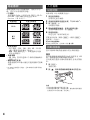
1
Location of controls and basic operations
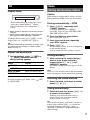
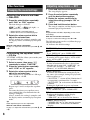
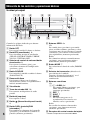
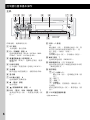
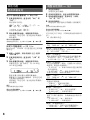
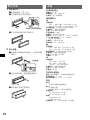
Main unit
12 3
4
5
6
7 8
OFF
PUSH SELECT
EQ
SEEK
SOURCE
AUX
SEEK
DIM
DSPL
MODE
ALBM
1
9 q; qa qs
2
qd
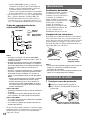
Refer to the pages listed for details.
A OFF button
To power off; stop the source.
B EQ (equalizer) button 8
To select an equalizer type (XPLOD,
NATURAL, HARD, UPBEAT, VOCAL,
CUSTOM or OFF).
C Volume control dial/select button 8
To adjust volume (rotate); select setup items
(press and rotate).
D SOURCE button
To power on; change the source (Radio/CD/
AUX).
E Disc slot
To insert the disc (label side up). Playback
starts automatically.
F Display window
G AUX input jack 9
To connect a portable audio device.
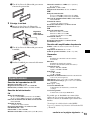
H Z (eject) button
To eject the disc.
I
(front panel release) button 4
J DSPL (display)/DIM (dimmer) button
7
To change display items (press); change the
display brightness (press and hold).
REP
SHUF
3
4
qf
PAUSE
5
CDX-GT260S
CDX-GT260
6
qg
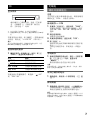
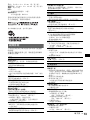
K SEEK –/+ buttons
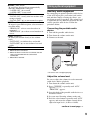
CD:
To skip tracks (press); skip tracks
continuously (press, then press again within
about 1 second and hold); reverse/fastforward a track (press and hold).
Radio:
To tune in stations automatically (press); find
a station manually (press and hold).
L MODE button 7
To select the radio band (FM/MW/SW).
M Frequency select switch (located on the
bottom of the unit)
See “Frequency select switch” in the
supplied installation/connections manual.
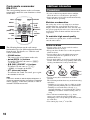
N Number buttons
CD:
(1)/(2): ALBM –/+*
To skip albums (press); skip albums
continuously (press and hold).
(3): REP 7
(4): SHUF 7
(6): PAUSE
To pause playback. To cancel, press
again.
Radio:
To receive stored stations (press); store
stations (press and hold).
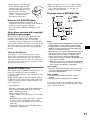
O Receptor for the card remote
commander
* When an MP3/WMA is played.
6