1
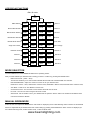
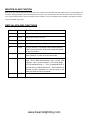
LED DISPLAY FUNCTIONS
rENt: IR mode
rENt
DMX address
A001
A512
4U00
4U20
Sound 4
Manual Red dimmer
R000
R255
3U00
3U20
Sound 3
Manual Green dimmer
G000
G255
2U00
2U20
Sound 2
Manual Blue dimmer
B000
B255
1U00
1U20
Sound 1
Manual White dimmer
H000
H255
2J00
2J20
Color fade
Single color strobe
1E00
1E20
1J00
1J20
Color change
2E00
2E20
7F00
7F20
Dimmer 7
Dimmer 1
1F00
1F20
6F00
6F20
Dimmer 6
Dimmer 2
2F00
2F20
5F00
5F20
Dimmer 5
Dimmer 3
3F00
3F20
4F00
4F20
Dimmer 4
Multicolor strobe
MODE SELECTION
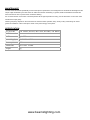
The LED FlatPAR-154 x10mm RGBW IR DMX has five operating modes:
After you have selected your desired mode or setting you have to confirm it by pressing the ENTER button.
-
DMX control mode – (A001 – A512)
This function will allow you to control each individual fixtures traits with a standard DMX 512 controller .
-
Manual RGBW Mode - Adjust one of the four colours to mix your desired colour.
R000-R512 = Red 0 – 100%, G000-G255 = Green 0-100%, B000-B255 = Blue 0-100% and H000-H255 = White 0-100%
-
Auto Mode - There are 11 Auto Modes to choose from
-
Sound-Active mode - The unit have 4 Sound modes which will react to sound.
-
IR mode – The unti can control using the IR remote control
-
Slave Mode - Set the “Master” unit to your desired mode of operation. Set the “Slave” unit in DMX mode address A001
unit will now follow the “Master”.
MANUAL RGBW MODE
Switch the unit on and press the MENU button until “RXXX” is displayed you are in Red dimming mode. Press the UP and DOWN
buttons to adjust intensity of the RED LEDs and confirm setting by pressing the ENTER button. When “G.XXX” is displayed you
are in Green dimming mode, “B.XXX” is Blue mode, “H.XXX” is White mode.
www.beamzlighting.com