1
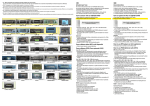
CONNESSIONI • CONNECTIONS
CONNEXIONS • KABEL-VERBINDUNGEN
CONEXIONES
FORD
C-MAX >’07 • S-MAX - FOCUS ‘05>’11 • FUSION ‘06>
FIESTA ‘06>’08 • GALAXY ‘07> - MONDEO ‘08> • KUGA >’12
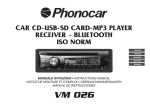
MANUALE ISTRUZIONI • INSTRUCTIONS MANUAL • NOTICE DE MONTAGE ET D’EMPLOI
GEBRAUCHSANWEISUNGEN • MANUAL DE INSTRUCCIONES
VM086-VM087
Via F.lli Cervi, 167/C • 42124 Reggio Emilia (Italy) • Tel. ++39 0522 941621 www.phonocar.com • e-mail:[email protected]
FUNZIONI • FUNCTIONS • FONCTIONS • FUNKTIONEN • FUNCIONES
16
15
14
13
12
1
11
2
10
3
9
4
8
5
7
6
1.
2.
3.
4.
5.
6.
7.
8.
9.
10.
11.
12.
13.
14.
15.
16.
Zurück zum Hauptmenü
Radio
On - Off - Volume
Bluetooth
Helligkeit
USB-Anschluss für Updates
Navigations
ON-OFF Audionavigationssystem
Sender/Stück
danach-davor / Seek+ / SeekDVD
CD-Auswurf
Reset
SD-Öffnung media
CD-Öffnung
Navigations-SD-Öffnung
Mikrofon
1.
2.
3.
4.
5.
6.
7.
8.
9.
10.
11.
12.
13.
14.
15.
16.
Back to Main Menu
Radio
On - Off / Volume
Bluetooth
Brightness
USB input for update
Navigation
ON-OFF navigation audio
Station/Track after-before
Seek+/SeekDVD
Expell-CD
Reset
SD Card slot media
CD-opening
SD Card slot navigation
Microphone
1.
2.
3.
4.
5.
6.
7.
8.
9.
10.
11.
12.
13.
14.
15.
16.
1.
2.
3.
4.
5.
6.
7.
8.
9.
10.
11.
12.
13.
14.
15.
16.
Retourne au menu principal
Radio
On - Off / Volume
Bluetooth
Luminosité
Port USB pour mises à jour
Navigation
ON-OFF audio navigation
Station/trace suivante-précédente
Seek+/SeekDVD
Ejection disque
Reset
Slot SD Card media
Fente insertion disque
Slot SD Card navigation
Microphone
Torna al menù principale
Radio
On - Off - Volume
Bluetooth
Illuminazione
Porta USB per aggiornamenti
Navigazione
ON-OFF audio navigazione
Stazione/Traccia
successiva-precedente/Seek+/SeekDVD
Espulsione disco
Reset
Slot SD Card media
Feritoia inserimento disco
Slot SD Card navigazione
Microfono
1.
2.
3.
4.
5.
6.
7.
8.
9.
10.
11.
12.
13.
14.
15.
16.
Vuelve al menú principal
Radio
Volumen / ON-OFF
Bluetooth
Brillo
Puerto USB para actualizaciones
Navegación
ON-OFF audio de navegación
Emisora/Canción
siguiente-precedente / Seek+/SeekDVD
Expulsión disco
Reset
Ranura SD Card media
Ranura introducción disco
Ranura SD Card navegación
Micrófono
USB
ROSSO / RED
BIANCO / WHITE
GIALLO / YELLOW
GIALLO / YELLOW
GIALLO / YELLOW
GIALLO / YELLOW
VERDE / GREEN
ROSSO / RED
BIANCO / WHITE
ROSSO / RED
BIANCO / WHITE
AUX IN R 1
AUX IN L 1
AUX VIDEO 1
CAM IN
AUX VIDEO 1
AUX VIDEO 2
SUB WOOFER
FRONT R
FRONT L
REAR R
REAR L
AL CONNETTORE ORIGINALE
ORIGINAL CONNECTOR
GPS
ANTENNA
GIALLO / YELLOW
ANTENNA / AERIAL
FM/AM
CAN BUS
INTERFACE
AZZURRO / BLUE
1
FRENO A MANO / HAND-BRAKE
GRIGIO / GREY
NON ATTIVO
NOT AVAILABLE
1
RETROCAMERA / REAR CAMERA
USCITE SERVIZI / SERVICES OUTPUT
FUSE
BIANCO / WHITE
ODOMETRO / ODOMETER
MARRONE / BROWN
COMANDI AL VOLANTE / STEERING WHEEL COMMANDS
iPOD
CANALE DESTRO / RIGHT CHANNEL 1
CANALE SINISTRO / LEFT CHANNEL 1
INGRESSO A/V 1
INPUT A/V 1
USCITA VIDEO 1 / VIDEO OUTPUT 1
USCITA VIDEO 1 / VIDEO OUTPUT 1
USCITA VIDEO 2 / VIDEO OUTPUT 2
USCITA SUB WOOFER / SUB-WOOFER OUTPUT
ANTERIORE DESTRO / FRONT RIGHT
ANTERIORE SINISTRA / FRONT LEFT
POSTERIORE DESTRO / REAR RIGHT
POSTERIORE SINISTRA / REAR LEFT
I COMANDI AL VOLANTE: ATTENZIONE l’interfaccia è già programmata e non necessita di alcuna ulteriore programmazione. Nel caso in cui durante la fase di
installazione si verificassero inconvenienti tali da far perdere la programmazione, procedere al RESET nel modo seguente:
• Con l’interfaccia accesa premere il tasto PRG fino a quando il led verde si spegne.
• Scollegare il filo MARRONE della centralina • Ruotare la chiave di accensione. Il led effettuerà un lampeggio di colore rosso.
• Premere il comando VOL- sul volante. Il led effettuerà un lampeggio di colore rosso a conferma della memorizzazione e proseguire con la stessa procedura per i rimanenti (VOL+, SEEK-,SEEK+,SRC). • Premere 5 volte il tasto PRG per confermare l’avvenuta memorizzazione ed il led si illuminerà di verde.
GB STEERING-WHEEL COMANDS: please NOTE that the Interface has already been programmed and does NOT need further programming. In case of problems
during installation, causing the loss of such programming, please effect a RESET as follows:
• With switched-on Interface, press PRG-key, until the Green Led goes off.
• Disconnect the BROWN cable from the central-unit. • Turn the ignition-key. Led flashes Red.
• Press VOL- on the steering-wheel. The Led with flash Red, meaning that memorization has been carried out. Now repeat the procedure for all remaining commands
(VOL+, SEEK-, SEEK+, SRC). • Press 5 times the PRG-key, to confirm memorization. The Led will light Green. FR COMMANDES AU VOLANT: ATTENTION l’interface est déjà programmée et ne nécessite pas d’ultérieurs programmation. si pendant l’installation vous avez des
soucis provoquant la perte de la programmation, faire le RESET en suivant la procédure suivante:
• Avec l’interface allumée appuyer la touche PRG jusqu’à l’extinction du led vert.
• Débrancher le fil Marron de la centrale • tourner la clé de démarrage. le led effectuera un clignotement rouge.
• Appuyer la commande VOL- sur le volant. Le led effectuera un clignotement rouge pour confirmer la mémorisation et continuer avec la même procédure pour les restants (VOL+, SEEK-,SEEK+,SRC). • Appuyer 5 fois la touche PRG pour confirmer la réussite de la mémorisation et le led s’illuminera vert.
D LENKRAD-STEUERUNGEN: bitte BEACHTEN, dass die Interface bereits programmiert ist und keine weitere Programmierung benötigt. Sollten, während der Installation, Probleme entstehen, wodurch die Programmierung womöglich verschwindet, bitte ein RESET wie folgt vornehmen:
• Bei eingeschalteter Interface, PRG-Taste drücken, bis das grüne Led erlischt.
• BRAUNES Kabel von der Zentral-Einheit trennen. • Wagen-Zündschlüssel drehen. Led blinkt Rot.
• VOL- auf dem Lenkrad drücken. Led blinkt Rot und zeigt dadurch an, dass die Einspeicherung erfolgt ist. Diese Prozedur bei allen übrigen Funktionen wiederholen
(VOL+, SEEK-, SEEK+, SRC). • PRG-Taste 5 mal drücken, um die Einspeicherung zu bestätigen. Das grüne Led leuchtet auf.
E MANDOS DE VOLANTE: ATENCIÓN El interfaz ya está programado y no necesita ningúna otra programación.
En el caso de que en la fase de instalación se verifique mal funcionamiento hasta el punto de perder la programación, efectuar el RESET en el modo siguiente :
• Con el interfaz encendido presionar la tecla PRG hasta cuando el Led verde se apague.
• Desconectar el cable MARRON de la centralita • Girar la llave de encendido. El Led efectuará un destello de color rojo.
• Presionar el mando VOL- en el volante. El Led efectuará un destello de color rojo para confirmar la memorización, con el mismo procedimiento memorizar los
demás mandos del volante (VOL+, SEEK-, SEEK+, SRC) • Presionar 5 veces la tecla PRG para confirmar la memorización, el Led se iluminará de color verde.