1
ENGLISH
MM1000
Instruction Manual
General Specifications
L
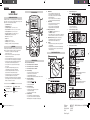
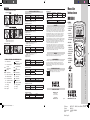
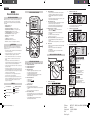
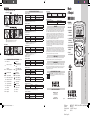
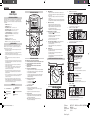
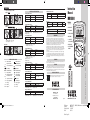
The Klein Tools MM1000 is an auto-ranging multimeter. It measures AC/DC
voltage, AC/DC current, resistance, capacitance, frequency, duty cycle, and
temperature. It can also test diodes and continuity.
•
•
•
•
•
•
•
•
•
•
•
•
DC Direct Current
DC/AC Voltage or Current
Ground
MM1000-Instructions-139543TART.indd 5-8
AT
10
20
30
40
M
H
G
F
E
RANGE
REL
MAX/MIN
HOLD
I
SELECT
Duty
ºF ºC
L.
K
A
C
Temp
B
m
COM
Max / Min Hold
• Press to enter Max / Min mode; the largest and
smallest values will be saved while in this mode.
• Press repeatedly to alternate between the maximum
and minimum readings.
• Press for 2 seconds to return to live reading and
clear the stored maximum and minimum values.
2.
AC / DC Current (large): < 10A
Features:
REL
HOLD
RANGE
MAX/MIN
ºF ºC
Duty
PRESS
ºF ºC
m
m
m
Hold / Backlight
• Press to hold the current input on the display.
• Press again to return to live reading.
• Press for 2 seconds to enable/disable lights.
• Using lights drains the battery significantly.
J. K.Battery / Fuse Replacement
• When
indicator is displayed on the LCD,
batteries must be replaced.
• Remove rubber boot, back screw, and replace 2 x AAA batteries.
• This meter uses 440mA / 1000V and 11A / 1000V fast blow fuses.
m
3.
Features:
REL
HOLD
RANGE
MAX/MIN
Duty
ºF ºC
PRESS
ºF ºC
Magnetic Hanger Accessory (Optional, Sold Separately)
• Slide magnetic adapter into protective rubber boot.
• Attach instrument to metal for hands-free use.
m
m
M.Bar Graph
• The bar graph shows an approximate analog representation
of a measurement.
• The bar graph responds much faster than the digital display.
• The scale of the bar graph is zero to the maximum reading
of the selected range.
COM
• Start with this setting if current level is unknown.
• Attach red lead to “A” input.
• Select AC or DC current source.
AC / DC Current (small): < 400mA
m
COM
• Attach red lead to “mAµA” input.
• Select µA or mA, and AC or DC current source.
Resistance / Diode / Continuity
4.
PRESS
TO SELECT
Duty
Resistance
Diode
Function Instructions
Continuity
5
4
A.Do not attempt to measure more than 1000V.
1
ºF ºC
Duty
F.
Double Insulated Class II
AC Source
G.
Diode Features:
HOLD
• Forward voltage drop if forward biased.
• “O.L.” if reverse biased.
Relative Reading Mode
• Press to store current value.
• Display will now show the difference between
the stored and live readings.
• Press again to return to live reading.
Auto / Manual Range
• Press repeatedly to cycle through manual ranges.
• Press for 2 seconds to return to auto ranging mode.
• AT is displayed on LCD only during auto ranging mode.
Continuity Features:
ºF ºC
m
1.
.
MAX/MIN
Display shows:
COM
Device will power off after 30 minutes non-use.
Turn the dial or press a button to wake.
Disabled during Max / Min function.
Holding Select button while turning on disables Auto Power-Off.
Select Functionality Button
• Switch between AC and DC.
• Switch between Ω,
, and
• Switch between Hz and %.
• Switch between °F and °C.
REL
•
m
Auto Power-Off (Apo)
•
•
•
•
MAX/MIN
ºF ºC
2
C.Do not attempt to measure more than 10A.
E.
3
RANGE
Do not measure resistance
on a live circuit.
• Ω < 40MΩ
COM
m
B.Do not attempt to measure more than 400mA.
D.
Resistance Features:
m
HOLD
Feature Details
A. B. C. Use CAT III / CAT IV rated leads.
ºF ºC
7
6
SYMBOLS
Warning or Caution
V
0
To ensure safe operation and service of the tester, follow these instructions.
Failure to observe these warnings can result in severe injury or death.
AC Alternating Current
I.
Apo
D
WARNINGS
~
MM1000
J
Operating Altitude: 2000m
Relative Humidity: < 75%
Operating Temperature: 0°C / 32°F to 40°C / 104°F
Storage Temperature: -20°C / -4°F to 60°C / 140°F < 80% R.H.
Accuracy Temperature: 18°C / 64°F to 28°C / 82°F
Temperature Coefficient: 0.1*(specified accuracy) / °C
Sampling Frequency: 3 samples per second
Dimensions: 7" x 3.5" x 1.875"
Weight: 14oz.
Calibration: Accurate for one year
CAT Rating: CAT III 1000V, CAT IV 600V
Accuracy: ±(% of reading + # of least significant digits)
• Before each use, verify meter operation by measuring
a known voltage or current.
• Never use the meter on a circuit with voltages that exceed the
category based rating of this meter.
• Do not use the meter during electrical storms, or in wet weather.
• Do not use the meter or test leads if they appear to be damaged.
• Ensure meter leads are fully seated, and keep fingers away from
the metal probe contacts when making measurements.
• Do not open the meter to replace batteries while the probes
are connected.
• Use caution when working with voltages above 60V DC,
or 25V AC RMS. Such voltages pose a shock hazard.
• To avoid false readings that can lead to electrical shock,
replace batteries if a low battery indicator appears.
• Unless measuring voltage or current, shut off and lock out
power before measuring resistance or capacitance.
• Always adhere to local and national safety codes. Use individual
protective equipment to prevent shock and arc blast injury where
hazardous live conductors are exposed.
H.
Feature Details
HOLD
AC / DC Voltage: < 1000V
Features:
Duty
REL
HOLD
RANGE
PRESS
Duty
COM
MAX/MIN
MAX/MIN
Display shows: resistance
• Forward voltage drop if forward biased.
• Buzzer sounds if less than 30Ω
ºF ºC
m
5.
m
Capacitance: < 4000µF
Features: HOLD
COM
Duty
Duty
• Select AC or DC voltage source.
ºF ºC
m
ºF ºC
m
COM
•
Safely discharge capacitor before measurement.
• Reading may take up to 60 seconds for large capacitors.
File Name:
Product: Packge Part#:
Date: Client Sign off:
4/6/10 10:18 AM
MKT121707 - MM1000-Multimeters-139543TART
MM1000
139543T
2/23/10