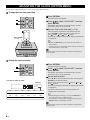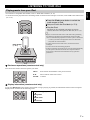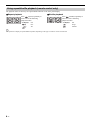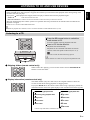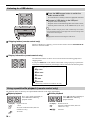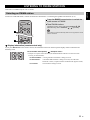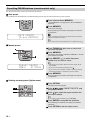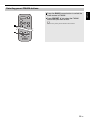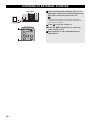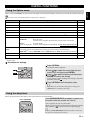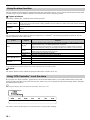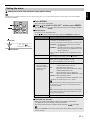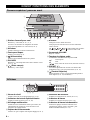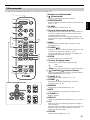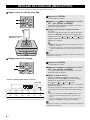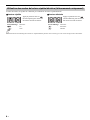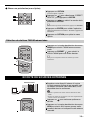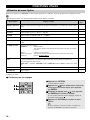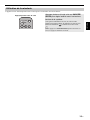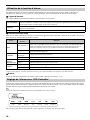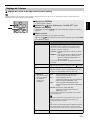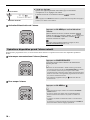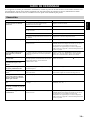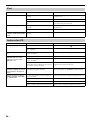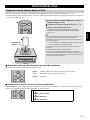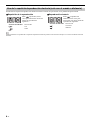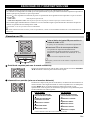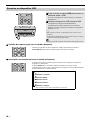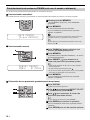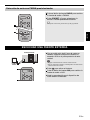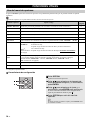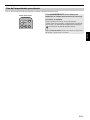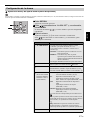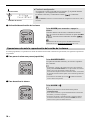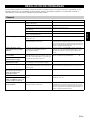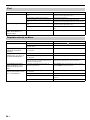
1
ULHV Micro Component System Micro-Chaîne MCR-042 27 May OWNER’S MANUAL MODE D’EMPLOI MANUAL DE INSTRUCCIONES IMPORTANT SAFETY INSTRUCTIONS CAUTION RISK OF ELECTRIC SHOCK DO NOT OPEN CAUTION: TO REDUCE THE RISK OF ELECTRIC SHOCK, DO NOT REMOVE COVER (OR BACK). NO USER-SERVICEABLE PARTS INSIDE. REFER SERVICING TO QUALIFIED SERVICE PERSONNEL. • Explanation of Graphical Symbols The lightning flash with arrowhead symbol, within an equilateral triangle, is intended to alert you to the presence of uninsulated “dangerous voltage” within the product’s enclosure that may be of sufficient magnitude to constitute a risk of electric shock to persons. The exclamation point within an equilateral triangle is intended to alert you to the presence of important operating and maintenance (servicing) instructions in the literature accompanying the appliance. 1 2 3 4 5 6 7 8 9 10 11 12 IMPORTANT Please record the serial number of this unit in the space below. MODEL: Serial No.: The serial number is located on the rear of the unit. Retain this Owner’s Manual in a safe place for future reference. 13 14 Read these instructions. Keep these instructions. Heed all warnings. Follow all instructions. Do not use this apparatus near water. Clean only with dry cloth. Do not block any ventilation openings. Install in accordance with the manufacturer’s instructions. Do not install near any heat sources such as radiators, heat registers, stoves, or other apparatus (including amplifiers) that produce heat. Do not defeat the safety purpose of the polarized or grounding-type plug. A polarized plug has two blades with one wider than the other. A grounding type plug has two blades and a third grounding prong. The wide blade or the third prong are provided for your safety. If the provided plug does not fit into your outlet, consult an electrician for replacement of the obsolete outlet. Protect the power cord from being walked on or pinched particularly at plugs, convenience receptacles, and the point where they exit from the apparatus. Only use attachments/accessories specified by the manufacturer. Use only with the cart, stand, tripod, bracket, or table specified by the manufacturer, or sold with the apparatus. When a cart is used, use caution when moving the cart/apparatus combination to avoid injury from tip-over. Unplug this apparatus during lightning storms or when unused for long periods of time. Refer all servicing to qualified service personnel. Servicing is required when the apparatus has been damaged in any way, such as power-supply cord or plug is damaged, liquid has been spilled or objects have fallen into the apparatus, the apparatus has been exposed to rain or moisture, does not operate normally, or has been dropped. We Want You Listening For A Lifetime Yamaha and the Electronic Industries Association’s Consumer Electronics Group want you to get the most out of your equipment by playing it at a safe level. One that lets the sound come through loud and clear without annoying blaring or distortion – and, most importantly, without affecting your sensitive hearing. Since hearing damage from loud sounds is often undetectable until it is too late, Yamaha and the Electronic Industries Association’s Consumer Electronics Group recommend you to avoid prolonged exposure from excessive volume levels. i En FCC INFORMATION (for US customers) Compliance with FCC regulations does not guarantee that interference will not occur in all installations. If this product is found to be the source of interference, which can be determined by turning the unit “OFF” and “ON”, please try to eliminate the problem by using one of the following measures: Relocate either this product or the device that is being affected by the interference. In the case of radio or TV interference, relocate/reorient the antenna. If the antenna lead-in is 300 ohm ribbon lead, change the lead-in to coaxial type cable. Svenska The above statements apply ONLY to those products distributed by Yamaha Corporation of America or its subsidiaries. Deutsch If these corrective measures do not produce satisfactory results, please contact the local retailer authorized to distribute this type of product. If you can not locate the appropriate retailer, please contact Yamaha Corporation of America A/V Division, 6600 Orangethorpe Avenue, Buena Park, CA 90620, USA. Français Utilize power outlets that are on different branch (circuit breaker or fuse) circuits or install AC line filter/s. Italiano FCC WARNING Change or modifications not expressly approved by the party responsible for compliance could void the user’s authority to operate the equipment. ANTENNA FM SPEAKERS Español FOR CANADIAN CUSTOMERS This Class B digital apparatus complies with Canadian ICES-003. English 1 IMPORTANT NOTICE: DO NOT MODIFY THIS UNIT! This product, when installed as indicated in the instructions contained in this manual, meets FCC requirements. Modifications not expressly approved by Yamaha may void your authority, granted by the FCC, to use the product. 2 IMPORTANT: When connecting this product to accessories and/or another product use only high quality shielded cables. Cable/s supplied with this product MUST be used. Follow all installation instructions. Failure to follow instructions could void your FCC authorization to use this product in the USA. 3 NOTE: This product has been tested and found to comply with the requirements listed in FCC Regulations, Part 15 for Class “B” digital devices. Compliance with these requirements provides a reasonable level of assurance that your use of this product in a residential environment will not result in harmful interference with other electronic devices. This equipment generates/uses radio frequencies and, if not installed and used according to the instructions found in the users manual, may cause interference harmful to the operation of other electronic devices. AUX IN Nederlands CAUTION Use of controls or adjustments or performance of procedures other than those specified herein may result in hazardous radiation exposure. LASER SAFETY Русский This unit employs a laser. Due to possible eye injury, only a qualified service person should remove the cover or attempt to service this device. DANGER This unit emits visible laser radiation when open. Avoid direct eye exposure to beam. When this unit is plugged into the wall outlet, do not place your eyes close to the opening of the disc slot and other openings to look into inside. The laser component in this product is capable of emitting radiation exceeding the limit for Class 1. ii En CAUTION: READ THIS BEFORE OPERATING YOUR UNIT. 1 To assure the finest performance, please read this manual carefully. Keep it in a safe place for future reference. 2 Install this unit in a well ventilated, cool, dry, clean place away from direct sunlight, heat sources, vibration, dust, moisture and cold. For proper ventilation, allow the following minimum clearances. Top: 15 cm (6 in) Rear: 10 cm (4 in) Sides: 10 cm (4 in) 3 Locate this unit away from other electrical appliances, motors, or transformers to avoid humming sounds. 4 Do not expose this unit to sudden temperature changes from cold to hot, and do not locate this unit in an environment with high humidity (i.e. a room with a humidifier) to prevent condensation inside this unit, which may cause an electrical shock, fire, damage to this unit, and/or personal injury. 5 Avoid installing this unit where foreign object may fall onto this unit and/or this unit may be exposed to liquid dripping or splashing. On the top of this unit, do not place: – Other components, as they may cause damage and/or discoloration on the surface of this unit. – Burning objects (i.e. candles), as they may cause fire, damage to this unit, and/or personal injury. – Containers with liquid in them, as they may fall and liquid may cause electrical shock to the user and/or damage to this unit. 6 Do not cover this unit with a newspaper, tablecloth, curtain, etc. in order not to obstruct heat radiation. If the temperature inside this unit rises, it may cause fire, damage to this unit, and/or personal injury. 7 Do not plug in this unit to a wall outlet until all connections are complete. 8 Do not operate this unit upside-down. It may overheat, possibly causing damage. 9 Do not use force on switches, knobs and/or cords. 10 When disconnecting the power cable from the wall outlet, grasp the plug; do not pull the cable. 11 Do not clean this unit with chemical solvents; this might damage the finish. Use a clean, dry cloth. 12 Only voltage specified on this unit must be used. Using this unit with a higher voltage than specified is dangerous and may cause fire, damage to this unit, and/or personal injury. Yamaha will not be held responsible for any damage resulting from use of this unit with a voltage other than specified. 13 To prevent damage by lightning, keep the power cable disconnected from a wall outlet or this unit during a lightning storm. 14 Do not attempt to modify or fix this unit. Contact qualified Yamaha service personnel when any service is needed. The cabinet should never be opened for any reasons. 15 When not planning to use this unit for long periods of time (i.e. vacation), disconnect the AC power plug from the wall outlet. 16 Be sure to read the “TROUBLESHOOTING” section on common operating errors before concluding that this unit is faulty. 17 Before moving this unit, press to set the system to off, and disconnect the AC power plug from the wall outlet. iii En 18 Condensation will form when the surrounding temperature changes suddenly. Disconnect the power cable from the outlet, then leave this unit alone. 19 When using this unit for a long time, this unit may become warm. Turn the system off, then leave this unit alone for cooling. 20 Install this unit near the wall outlet and where the AC power plug can be reached easily. 21 The batteries shall not be exposed to excessive heat such as sunshine, fire or the like. When you dispose of batteries, follow your regional regulations. – Keep the batteries in a location out of reach of children. Batteries can be dangerous if a child were to put in his or her mouth. – If the batteries grow old, the effective operation range of the remote control decreases considerably. If this happens, replace the batteries with new one as soon as possible. – Do not use old batteries together with new ones. – Do not use different types of batteries (such as alkaline and manganese batteries) together. Read the packaging carefully as these different types of batteries may have the same shape and color. – Exhausted batteries may leak. If the batteries have leaked, dispose of them immediately. Avoid touching the leaked material or letting it come into contact with clothing, etc. Clean the battery compartment thoroughly before installing new batteries. – If you plan not to use the unit for a long period of time, remove the batteries from the unit. Otherwise, the batteries will wear out, possibly resulting in a leakage of battery liquid that may damage the unit. – Do not throw away batteries with general house waste. Dispose of them correctly in accordance with your local regulations. 22 Excessive sound pressure from earphones and headphones can cause hearing loss. This unit is not disconnected from the AC power source as long as it is connected to the wall outlet, even if this unit itself is turned off by . In this state, this unit is designed to consume a very small quantity of power. WARNING TO REDUCE THE RISK OF FIRE OR ELECTRIC SHOCK, DO NOT EXPOSE THIS UNIT TO RAIN OR MOISTURE. CAUTION Danger of explosion if battery is incorrectly replaced. Replace only with the same or equivalent type. There is a chance that placing this unit too close to a CRTbased (Braun tube) TV set might impair picture color. Should this happen, move this unit away from the TV set. LASER Type Wave length Output Power Semiconductor laser GaAS/GaAlAs 790 nm 7 mW CONTENTS LISTENING TO FM/AM STATIONS........................11 Connecting the speakers and antenna ..........................2 Connecting the power cable...........................................3 Other connections ..........................................................3 Selecting an FM/AM station .........................................11 Presetting FM/AM stations (remote control only) .........12 Selecting preset FM/AM stations .................................13 NAMES OF PARTS AND THEIR FUNCTIONS ........4 LISTENING TO EXTERNAL SOURCES ................14 USEFUL FUNCTIONS ............................................15 Top panel/Front panel ....................................................4 Front panel display.........................................................4 Remote control...............................................................5 Playing music from your iPod.........................................7 Using repeat/shuffle playback (remote control only) ......8 LISTENING TO CD AND USB DEVICES .................9 TROUBLESHOOTING ............................................19 NOTES ON DISCS AND USB DEVICES ................22 SPECIFICATIONS...................................................23 Deutsch Listening to a CD............................................................9 Listening to a USB device ............................................10 Using repeat/shuffle playback (remote control only) ....10 Français ADJUSTING THE CLOCK (OPTION MENU) ...........6 LISTENING TO YOUR iPod......................................7 Using the Option menu ................................................15 Using the sleep timer ...................................................15 Using the alarm function ..............................................16 Using “DTA Controller” to set the alarm .......................16 Setting the alarm ..........................................................17 Operations while the alarm sound is playing................18 English CONNECTIONS ........................................................2 Features Español • References to the iPod appearing in this manual also include the iPhone. • If an operation can be performed using either the buttons on the unit itself or from the remote control, the explanation will focus on operation using the remote control. • AM radio is available only for U.S.A. model. • indicates precautions for use of the unit and its feature limitations. • indicates supplementary explanations for better use. Italiano About this manual Svenska • Play back music from external devices such as your iPod/iPhone/iPad, audio/data CDs, USB devices, or external devices via the AUX jack, and listen to the FM/AM. • Use your favorite music or a beep tone as an alarm. When the set time arrives, the music you select is played at the volume that you specify, giving you the ideal start to your day (IntelliAlarm function). • You can take advantage of more sophisticated alarm functionality by using the free “DTA Controller” application for the iPod touch/iPhone/iPad (☞ P. 16). • You can easily store and recall 30 of your favorite FM/AM stations. • Bass, middle, and treble can be adjusted to your taste. Supplied accessories Speaker cable (1.5 m (4.9') x 2) AM antenna (U.S.A. model only) Dock cover Русский How to use the remote control FM antenna Replacing the battery in the remote control While pushing the release tab in direction battery holder in direction . Nederlands Remote control (With CR2032 battery) , slide out the Within 6 m (20') CR2032 battery Battery insulation sheet: Remove before using. 1 En CONNECTIONS Connecting the speakers and antenna Connect the speakers and antenna. If you use a commercially available outdoor antenna instead of the supplied antenna, reception may be better. If FM/AM reception is poor, try changing the height or direction or placement of the antenna to find a location that has better reception. AM radio is available only for U.S.A. model. Do not connect this unit’s power cable until you’ve finished connecting all cables. Speakers • You must peel off the insulation (covering) from the tip of the speaker cable to expose the conductor. • Check the connections; make sure that left and right (L, R) and polarity (red: +, black: –) are connected correctly. If connections are incorrect, the sound will be unnatural and the low frequencies may be insufficient. There might not be any sound at all if connections are incorrect. • Take care that the conductors of the speaker cable do not touch each other, and that the conductors do not touch any other metal part. Such conditions can damage this unit or the speakers. • Use only the supplied speakers. Using other speakers may result in unnatural sound. • If you’re using this unit nearby a CRT display and you notice distorted color or noise in the display, move the speakers farther away from the display. Twist the bare wires tightly so the individual strands are not splayed. To the AC wall outlet ANTENNA AM SPEAKERS FM AUX IN The AM antenna cable is not polarized. When you’ve finished making connections, pull gently on the cable to ensure that the connection is solid. AM antenna Assembling AM antenna FM antenna (U.S.A. model only) Be sure to stretch out the antenna. Signal reception may be inadvertently affected if a digital device is located near the antenna. 2 En CONNECTIONS Connecting the power cable When you’ve completed all connections, connect this unit’s power cable to an AC outlet. English Rear panel Français Other connections iPod Connect your iPod to the iPod dock on the top panel. For details on compatible iPod models, refer to “SPECIFICATIONS” (P. 23). iPod dock iPad Connect your iPad to the front panel USB port. For details on compatible iPad models, refer to “SPECIFICATIONS” (P. 23). • When you turn the system on and set the audio source to USB, the iPad connected to this unit will be recharged. • You can remove the iPad during playback. Connect your USB device to the USB port on the front panel. For details on playable files, refer to “NOTES ON DISCS AND USB DEVICES” (P. 22). Nederlands USB device Español Make sure to use a Dock Connector to USB Cable that is supplied with your iPad. Italiano • Your iPod will be recharged while it is connected to the dock. However if USB is selected as the audio source, the iPod will not be recharged. • Your iPod can also play back music and charge while connected to the USB port. To do this, select USB as the audio source (☞ P. 10). • You can remove the iPod during playback. Svenska • Be sure to use a dock adaptor that is compatible with your iPod. If you do not use the adaptor or the adaptor is not compatible, the connection could be loose or poor, which could cause damage to the connector. For details on dock adaptor information, please visit Apple’s official website. • If an iPod in a protective case is forcibly connected, the connector may be damaged. Remove the protective case before connection. • When the iPod is not in use, install the dock cover to protect the connector. Deutsch Dock adaptor Русский Stop playback before disconnecting the USB device. When you turn the system on and set the audio source to USB, the USB device connected to this unit will be recharged. External devices Using a commercially available 3.5 mm mini-plug cable, connect your external device to the AUX jack on the rear panel of this unit. Rear panel AUX IN 3 En NAMES OF PARTS AND THEIR FUNCTIONS Top panel/Front panel 1 2 k 3 4 5 6 7 a iPod dock 8 9 g SOURCE Connect your iPod here (☞ P. 3, 6, 7). Be sure to use a dock adaptor that is compatible with your iPod (☞ P. 3). Switch the audio source to be played. Pressing this repeatedly will change the selection in the following order. CD iPod USB FM AM (U.S.A. model only) AUX back to CD b Front panel display The clock and other information is displayed here. h VOLUME knob c Disc slot Adjust the volume. Insert a CD here (☞ P. 9). d i Audio control buttons (Power) Use these to operate the iPod/CD/USB device. Press to turn the system on/off. : e USB port : Connect your USB device/iPod/iPhone/iPad here (☞ P. 3, 10). f j (Headphone jack) / Play/Pause Stop : Skip, Search backward/forward (press and hold down) j PRESET / Connect headphones here. Use these buttons to select a radio station (preset) that you’ve stored (☞ P. 13). k (Eject button) Eject the CD (cannot be operated while the option menu (☞ P. 15) is displayed). Front panel display 1 2 3 4 ~~~~~~ ~~~~~~ 76 5 a Alarm time This indicates the alarm time (☞ P. 17). b Repeat/shuffle indicator Displays the playback mode (☞ P. 8, 10). c Multi-function indicator Displays various information, including the clock time, information about the currently-playing track, and the frequency of the radio station. d Remote control signal receiver Make sure that this sensor is not obstructed (☞ P. 1). 4 En e Sleep indicator Turns on if the sleep timer has been set (☞ P. 15). f Alarm indicator Turns on if the alarm has been set (☞ P. 17). g Weekly alarm indicator Shows alarm information specified using the free “DTA Controller” application for the iPod touch/iPhone/iPad (☞ P. 16). NAMES OF PARTS AND THEIR FUNCTIONS Remote control AM radio is available only for U.S.A. model. b c SNOOZE/SLEEP Set the sleep timer or switch the alarm to snooze mode (☞ P. 15, 18). 4 d ALARM Switches the alarm on/off (☞ P. 18). e Source buttons 5 Switch the audio source to be played. If you press one of these while the system is off, the system will automatically turn on. (U.S.A. model only) When listening to the radio, press RADIO to switch between FM/AM. f MENU Switch the playback folder when playing music on data CDs or USB devices (☞ P. 9, 10). Select items or edit numerical values (☞ P. 7, 15). Italiano h ENTER Svenska Switch the iPod menu item/Return to the previous menu (☞ P. 7). g FOLDER / p o n Deutsch r q 9 j Français 3 8 (Power) Press to turn the system on/off. 2 6 7 English a Remote control signal transmitter 1 Confirm a selected item or value. i Audio control buttons Use these to operate the iPod/CD/USB device. : k l m / j Stop Play/Pause : Skip, Search backward/forward (press and hold down) (Repeat)/ (Shuffle) / Tune the radio (☞ P. 11, 12). l PRESET / iPod control buttons Nederlands Play music on an iPod, CD or USB device in repeat/ shuffle mode (☞ P. 8, 10). k TUNING Español : Select a FM/AM station that you stored (☞ P. 12, 13). Русский m MEMORY Store a FM/AM station (☞ P. 12). n MUTE Mute or unmute the sound. o VOLUME +/– Adjust the volume. p DISPLAY Switch the information shown in the front panel display (☞ P. 6, 7, 9, 10, 11). q +10 Skip ten songs ahead of the currently-playing song. When playing a data CD or a USB device, this button skips ten songs within the current folder. r OPTION Display the option menu (☞ P. 15). 5 En ADJUSTING THE CLOCK (OPTION MENU) You’ll use the option menu (☞ P. 15) to set this unit’s date and time. To copy the time from your iPod 1 Press OPTION. The option menu will appear. 1 2 Press / to select “CLOCK SET,” and then press ENTER. 2 The display will indicate “CLOCK YEAR,” and the numerical value to be set will blink. 3 Set your iPod in the iPod dock (☞ P. 3). The time will be copied from your iPod to this unit. Press ENTER to confirm the items in the order of year month day hour minute. When clock setting has finished, the display will indicate “Completed!” 3 Dock adaptor (☞ P. 3) • By pressing DISPLAY you can select the time format (12hour/24-hour). • The time will not be copied if the iPod is already connected or if the audio source is set to USB. The time settings will be reset if the unit remains unpowered for about one hour. Setting the clock manually 1 Press OPTION. The option menu will appear. 1 2 2 Press / to select “CLOCK SET,” and then press ENTER. 3 The display will indicate “CLOCK YEAR,” and the numerical value to be set will blink. 3 Set the date and time. The clock is shown as below. (24-hour) 26 Apr Jan Feb Mar Apr May Jun January February March April May June Nov Dec Jul Aug Sep Oct July August September October November December Press ▲/▼ to edit each numerical value, and then press ENTER to confirm the setting. Set the items in the order of year month day hour minute. When clock setting has finished, the display will indicate “Completed!” The clock will be set to 0 second the moment you complete the clock settings. • While making these settings, you can press DISPLAY to select the time format (12-hour/24-hour). • If you decide to cancel without changing the setting, press OPTION before confirming the change. The time settings will be reset if the unit remains unpowered for about one hour. 6 En ?? LISTENING TO YOUR iPod Playing music from your iPod English • For details on compatible iPod models, refer to “SPECIFICATIONS” (P. 23). • Your iPod can also play back music and charge while connected to the USB port. To do this, select USB as the audio source (☞ P. 10). 1 Press the iPod source button to switch the audio source to iPod. 1 3 Play the iPod. Playback can be controlled with either the remote control, iPod or the front panel on this unit (☞ P. 4, 5). 2 Svenska Dock adaptor (☞ P. 3) Deutsch • If you’ve selected an audio source other than USB, performing the following operations will automatically switch the audio source to iPod and start playback even if the system is turned off. − Connect your iPod in the playback state to the iPod dock. − Play back the connected iPod. • If USB is selected as the audio source, the iPod will not be recharged. • You can remove the iPod during playback. • If iPod is selected as the audio source, this unit will automatically turn the system off when 60 minutes have elapsed without a device being connected to the iPod dock nor any operation performed. Français 2 Set your iPod in the iPod dock (☞ P. 3). Italiano Español iPod menu operations (remote control only) You can use the remote control to operate your iPod. Switch menu items/Return to the previous menu ▲/▼: Move between items in the menu ENTER: Confirm Nederlands MENU: If you press DISPLAY on the remote control while a song is playing or paused, the information shown on the front panel display will be switched in the following order. Elapsed song playback time Song name Album name Artist name 7 En Русский Display information (remote control only) LISTENING TO YOUR iPod Using repeat/shuffle playback (remote control only) The playback status is shown by the repeat/shuffle indicator in the front panel display. Repeat playback Shuffle playback Press (repeat) repeatedly to select one of the following playback modes. No display: : Off One : All Press (shuffle) repeatedly to select one of the following playback modes. No display: : : The operation or display of repeat/shuffle may differ, depending on the type or software version of iPod used. 8 En Off Songs Albums LISTENING TO CD AND USB DEVICES − Audio CD: from the first track of the CD. − Data CD*/USB device: from the first track of the folder contains the track you listened to last time. Français • This unit automatically turns off the system if no operation has been performed for 60 minutes after CD/USB device playback is stopped. * “Data CD” is a CD that contains MP3/WMA files. For details on playable discs and files, refer to “NOTES ON DISCS AND USB DEVICES” (P. 22). Deutsch Listening to a CD 1 Press the CD source button to switch the audio source to CD. 1 English The unit will operate as follows when playing back tracks/files on CD/USB devices. • If the CD/USB device being played is stopped, the track that you listened will start playback from the beginning of the track the next time you play. • If you press while playback is stopped, tracks will play as follows the next time playback begins: If a CD is already inserted, playback will start. Svenska 2 Insert a CD into the disc slot. Playback starts automatically. Playback can be controlled with either the remote control, or the front panel on this unit (☞ P. 4, 5). Folders and files on a data CD are played in alphabetical order. Italiano Insert the CD with the label side facing upward. 2 While a data CD is playing, you can use the remote control’s FOLDER ▲/▼ buttons to select the folder. Español Skipping folders (remote control only) Nederlands Display information (remote control only) Audio CD Data CD Elapsed song playback time Elapsed song playback time Remaining song playback time Song name* Song name* Album name* Album name* Artist name* Artist name* File name Folder name * Shown only if this data is included in the song. 9 En Русский The folder number (only for a data CD) or the song/file number is shown for several seconds when starting playback or skipping tracks. If you press DISPLAY on the remote control while a song is playing or paused, the information shown on the front panel display will be switched in the following order. LISTENING TO CD AND USB DEVICES Listening to a USB device 1 Press the USB source button to switch the audio source to USB. 1 If a USB device is already connected, playback will start. 2 Connect a USB device to the USB port. Playback starts automatically. Playback can be controlled using either the remote control, the front panel on this unit, or the USB device (☞ P. 4, 5). • Folders and files will play in the order in which they were written. • Your iPod/iPhone/iPad can also play back music and charge while connected to the USB port. Stop playback before disconnecting the USB device. 2 Skipping folders (remote control only) While a USB device is playing, you can use the remote control’s FOLDER ▲/▼ buttons to select the folder. Display information (remote control only) The folder/file number is shown for several seconds when starting playback or skipping tracks. If you press DISPLAY on the remote control while a song is playing or paused, the information shown on the front panel display will be switched in the following order. Elapsed song playback time Song name* Album name* Artist name* File name Folder name * Shown only if this data is included in the song. Using repeat/shuffle playback (remote control only) The playback status is shown by the repeat/shuffle indicator in the front panel display. Repeat playback Shuffle playback Press (repeat) repeatedly to select one of the following playback modes. No display: Repeat mode off : 1 track : All tracks within the folder (data CD/ USB device only) : 10 En All tracks Press (shuffle) repeatedly to select one of the following playback modes. No display: Shuffle mode off : All tracks within the folder (data CD/ USB device only) : All tracks LISTENING TO FM/AM STATIONS AM radio is available only for U.S.A. model. English Selecting an FM/AM station To listen to a FM/AM station, connect the antenna as described in “Connecting the speakers and antenna” (P. 2). 1 Press the RADIO source button to switch the audio source to FM/AM. Automatic tuning: Press and hold TUNING / . Manual tuning: Press TUNING / repeatedly. 1 Deutsch If you tune to a station manually while receiving FM, the sound will be monaural. Français 2 Tune FM/AM stations 2 If you press DISPLAY on the remote control, the information shown on the front panel display will be switched in the following order. Preset number and frequency Svenska Display information (remote control only) Reception status* TUNED/STEREO: A strong FM stereo broadcast is being received. TUNED/MONO: A monaural FM broadcast is being received (even if the FM broadcast is stereo, reception will be monaural if the signal is weak). Not TUNED: No broadcast is being received. Italiano * Example of reception status indication (the STEREO/MONO indication is not shown while receiving an AM broadcast). Español Nederlands Русский 11 En LISTENING TO FM/AM STATIONS Presetting FM/AM stations (remote control only) Use the preset function to store your favorite 30 stations. Auto preset This method tunes automatically, and automatically presets only the stations that have good reception. 1 Press and hold down MEMORY. 1 2 “AUTO PRESET” will appear and “Press MEMORY” will blink. 2 Press MEMORY. Auto preset will begin. When presetting has finished, the display will indicate “Completed!” AUTO PRESET Press MEMORY When you perform auto preset, all stored stations are cleared and the new stations are stored. If you want to stop auto preset before it is completed, press . Manual preset 1 Press TUNING / you want to preset. 1 to tune a station that 2 Press MEMORY. 2 4 3 The display will indicate “PRESET MEMORY,” and the preset number will blink. 3 Press PRESET / to select the preset number that you want to store. PRESETMEMORY FM0187.5MHz • The lowest preset number that has not been stored will be selected first. • If you want to cancel the presetting, press . • If you select a preset number in which a station has already been stored, it will be overwritten by the new station. 4 Press MEMORY. When presetting has finished, the display will indicate “Completed!” Deleting a stored preset (Option menu) 1 Press OPTION. The option menu will appear. 2 Press / to select PRESET DELETE, and then press ENTER. 1 5 2 3 4 3 Press / to select the preset number that you want to delete. If you want to cancel the deleting, press OPTION. 4 Press ENTER to complete the operation. When deleting has finished, the display will indicate “Deleted!”. 5 Press OPTION to exit the option menu. 12 En LISTENING TO FM/AM STATIONS Selecting preset FM/AM stations 2 Press PRESET / to select the FM/AM station that you want to hear. English 1 Press the RADIO source button to switch the audio source to FM/AM. Français You can only select presets that have been stored. 1 2 Deutsch Svenska Italiano Español Nederlands Русский 13 En LISTENING TO EXTERNAL SOURCES Rear panel 1 Using a commercially available 3.5 mm miniplug cable, connect your external device to the AUX jack on the rear panel of this unit. AUX IN 1 • Turn off the system before connecting the audio cable. • Turn down the volume of the unit and your external audio device before connection. 2 Press 2 to turn the system on. 3 Press the AUX source button to switch the audio source to AUX. 4 Start playback on the connected external audio device. 3 14 En USEFUL FUNCTIONS Using the Option menu (eject button) cannot be operated while the option menu is displayed. Option menu Setting or range See page FM/AM*1). 12 DIMMER Adjusts the brightness of the front panel display (1*2: bright, 2: medium, 3: dim). – EQ LOW Adjusts the tonal character (low frequencies) (–10 - 0*2 - +10 dB). – EQ MID Adjusts the tonal character (mid frequencies) (–10 - 0*2 - +10 dB). – EQ HIGH - +10 dB). – BALANCE Adjusts the volume balance of the left and right speakers (L+10 - POWER SAVING Switches the system-off state NORMAL: Show the clock An iPod can be charged in the iPod Dock, and the alarm will operate CENTER*2 - R+10). – Deutsch Adjusts the tonal character (high frequencies) (–10 - 0*2 Français PRESET DELETE Deletes a stored preset (shown only if the audio source is English When you press OPTION, the option menu will appear in the front panel display, allowing you to make the following settings. – Svenska No clock display ECO*2: (power saving mode) An iPod can be charged in the iPod Dock, but the alarm will not operate You can specify the time after which the system will turn off automatically. If no operation occurs for the duration you specify, the system will turn off automatically (TIME 12H*2: 12 hours, TIME 8H: 8 hours, TIME 4H: 4 hours, OFF: the system will not turn off). – CLOCK SET Sets the date and time. 6 ALARM SET Sets the alarm. 17 *1 AM radio is available only for U.S.A. model. *2 Default setting Italiano AUTO POWER OFF Procedure for settings Español 1 Press OPTION. The option menu will appear. 2 Press / to select the menu item that you want to set, and then press ENTER. 1 4 3 Press / to edit the setting, and then press ENTER to confirm the setting. If you want to continue making other settings, repeat the procedure from step 2 . Nederlands 2 3 4 Press OPTION to exit the option menu. Using the sleep timer When the specified time has elapsed, the system will turn off automatically. Press repeatedly Press SNOOZE/SLEEP repeatedly to specify the time after which the system will turn off. You can specify 30, 60, 90, 120 or OFF. When you select a time, the sleep timer is turned on, and the sleep indicator ( ) is shown in the front panel display. If you press SNOOZE/SLEEP while the sleep timer is activated, the sleep timer setting will be canceled. 15 En Русский If you decide to cancel without changing the setting, press OPTION before confirming the change. USEFUL FUNCTIONS Using the alarm function The unit includes an alarm function (IntelliAlarm) that plays back audio sources or a set of beep (internal alarm sound) at the set time using a variety of different methods. The alarm function has the following features. 3 types of alarms Select from 3 alarm types, combining music and beep sounds. SOURCE+BEEP SOURCE BEEP The selected audio source and the beep sound are played at the set time. Source playback begins to fade in 3 minutes before the set time and the volume gradually increases to the set volume. Then, at the set time, the beep sound is activated. The selected audio source is played at the set time. The volume fades in gradually and increases to the set volume. The beep sound is played at the set time. Various audio sources You can choose from iPod, audio CD, data CD, USB device, or FM/AM*1. The following playback methods can also be selected depending on the audio source: Playback method Source Playlist*2 iPod Resume Audio CD Data CD/USB device FM/AM*1 *1 *2 Selected track Resume Folder Resume Preset station Resume Function A specific playlist stored on the iPod is played back repeatedly. To play a playlist, create a playlist with the name “ALARM Yamaha DTA” in advance. When entering the playlist name, use single-byte spaces to separate words, and enter single-byte characters, taking care that uppercase/lowercase letters are used correctly. If the “ALARM Yamaha DTA” playlist cannot be found within the iPod, the unit resumes play from the last track you played. The selected track is played repeatedly. The track you listened to last time is played back. The selected folder is played repeatedly. The track you listened to last time is played back. The selected preset station is played. The FM/AM*1 station you listened to last time is played back. AM radio is available only for U.S.A. model. For information on creating a playlist, refer to the instructions for your iPod or iTunes. Snooze The snooze function can be enabled to replay the alarm after 5 minutes (☞ P. 18). Using “DTA Controller” to set the alarm By using the free “DTA Controller” application for the iPod touch/iPhone/iPad, you can make detailed alarm settings that cannot be made using this unit by itself. For each day of the week, you can specify the alarm time (Weekly Alarm), and adjust the IntelliAlarm as desired. The front panel display shows information for the Weekly Alarm you’ve set. MON TUE WED THU FRI SAT SUN Monday Tuesday Wednesday Thursday Friday Saturday Sunday For details, refer to the description of “DTA Controller” in the product webpage. 16 En USEFUL FUNCTIONS Setting the alarm Setting the alarm time and alarm type (Option menu) English The alarm will not function when the unit is in power saving (☞ P. 15). To use the alarm function, set the Option menu item POWER SAVING to NORMAL. 1 Press OPTION. 2 Press / to select “ALARM SET”, and then press ENTER. The alarm indicator ( 2 3 ) and numerical value you’re setting will blink. Français The option menu will appear. 1 3 Set the alarm. Set items 1-5 described below. Items Setting or range * This can be selected after you’ve used the “DTA ALARM SELECT 1 4 Deutsch Press / to select a numerical value, and press ENTER to confirm it. Controller” to set the alarm (☞ P. 16). If you’re not using the “DTA Controller”, proceed to 2. Alarm time Alarm indicator 4 SOURCE Play back music from your iPod (refer to “Various audio sources” (P. 16)). Play back music from a CD. Specify the track number (data CD: folder number) (RESUME, 1-99). USB: Play back music from a USB device. Specify the folder number (RESUME, 1-999). FM/AM*: Play a FM/AM* station. Specify the preset number (RESUME, 1-30). minutes. iPod: (If you selected SOURCE+BEEP or CD: SOURCE as the alarm type) * AM radio is available only for U.S.A. model. If you choose RESUME when specifying the track/folder/ preset number, the last-played track/folder/station will be played (resume playback). 5 VOLUME Specifies the volume (5-60) of the alarm. 4 Complete the settings. When you set the VOLUME for item 5, the display will indicate “Completed!” and your settings will be confirmed. The alarm will be turned on and the alarm indicator ( ) will light. If you press OPTION or turn off the system while making alarm settings, the settings will be cancelled. 17 En Русский If the selected source cannot be played back at the time set for the alarm (e.g., the iPod is not connected), the beep sound is played back. Nederlands Select from SOURCE+BEEP, SOURCE or BEEP. For details, refer to “3 types of alarms” (P. 16). If you selected BEEP, proceed to item 5. Español Make settings in the order of hours 3 ALARM TYPE Italiano 2 ALARM TIME Svenska ONE DAY: An alarm that sounds only once at the specified time. WEEKLY: An alarm whose time can be specified for each day of the week (settable only using “DTA Controller”). If you’ve chosen WEEKLY, this completes the alarm setting. 9:12 Completed! USEFUL FUNCTIONS Switching the alarm on/off Press ALARM to turn the alarm on/off. When the alarm is on, the alarm indicator ( ) will light, and the alarm time will be shown. If you press ALARM again, the alarm indicator ( ) and the alarm will turn off. If the Option menu item POWER SAVING is set to ECO, the alarm will not function (☞ P. 15). Operations while the alarm sound is playing When the set time arrives, the selected alarm sound will play. During playback, the following operations are available. To pause the alarm (Snooze) Press SNOOZE/SLEEP. Snooze will stop the alarm and play it again 5 minutes later. • If SOURCE + BEEP is set as the alarm type, you can press SNOOZE/SLEEP once to stop the beep sound, and twice to stop the audio source. Five minutes after the audio source is stopped, it will start fading in again and the beep sound will resume. • Buttons on the unit other than the will also function as the snooze button. To turn the alarm off Press ALARM or . • You can also stop the alarm by holding down SNOOZE/SLEEP. • If you don’t stop the alarm, it will stop automatically after 60 minutes and the system will turn off. • The alarm setting will be saved even if the alarm is turned off. If the alarm is turned on again by pressing ALARM, the alarm will sound with the previous alarm settings. 18 En TROUBLESHOOTING General Problem Cause Solution The volume might be set to the minimum level, or muted. Adjust the volume level. The source may be incorrect. Select the correct source. The speakers may not be connected securely. Check the connections (☞ P. 2). Headphones are connected. Remove the headphones. The volume of a connected external device is not loud enough. Raise the volume of the external device. The sleep timer may be set (☞ P. 15). Turn the system on and play the source again. The automatic system-off function may have operated. When the time specified for AUTO POWER OFF in the option menu has elapsed (☞ P. 15) or when 60 minutes have elapsed without any operation being performed after stopping USB device or CD playback, the unit will turn the system off automatically. Sound is cracked/distorted or there is abnormal noise. Input source volume is excessive, or volume of this unit is excessive (especially Bass). Adjust volume with VOLUME, or use the option menu (☞ P. 15) to adjust the bass range. If an external device is playing back, lower the volume of the external device. The unit does not operate properly. The unit may have received a strong electrical shock such as lightning or excessive static electricity, or power supply may have dropped. Restart the system by holding down the seconds. A digital or high-frequency equipment produces noises. The unit may be placed too close to the digital or high-frequency equipment. Place the unit farther away from the equipment. The clock setting has been cleared. The unit was left for about one hour with the power cable disconnected from the wall outlet. Plug the power cable into the wall outlet firmly, and set the clock again (☞ P. 6). The iPod does not play back at the alarm time even if the alarm source is set to iPod. The iPod is not set in the iPod dock. Set the iPod in the iPod dock (☞ P. 3). Alarm does not sound. The unit is set to power saving mode. In the option menu, set POWER SAVING to NORMAL (☞ P. 15). The automatic system-off function may have operated. When the time specified for AUTO POWER OFF in the option menu has elapsed (☞ P. 15) or when 60 minutes have elapsed without any operation being performed after stopping USB device or CD playback, the unit will turn the system off automatically. Nederlands Русский 19 En Español The unit turns the system off unexpectedly. Italiano The front panel display indicates “ALARM not work” and can’t set the alarm. for about 10 Svenska The system turns on but immediately shuts off. Deutsch Sound suddenly turns off. Français The speakers make no sound. English If there is a problem with the unit, check the following list first. If you cannot resolve the problem with the suggested solutions or if the problem is not listed below, turn off and unplug the system, and consult the nearest authorized Yamaha dealer or service center. TROUBLESHOOTING iPod Problem No sound. The iPod does not charge up. The front panel display indicates “iPod Unknown” when you connect the iPod. Cause Solution The iPod is not set in the iPod dock firmly. Remove the iPod from the unit, and then set it in the iPod dock again (☞ P. 3). The headphones of the iPod are connected. Remove the Headphones. The iPod software version has not been updated. Download the latest iTunes software to update the iPod software version to the latest. The iPod is not set in the iPod dock firmly. Remove the iPod from the unit, and then set it in the iPod dock again (☞ P. 3). USB is selected as the audio source. Select something other than USB as the audio source. The iPod being used is not supported by the unit. Use a supported iPod (☞ P. 23). Disc playback Problem Disc cannot be inserted. Cause Solution Another disc is already inserted. Unload the disc with You are attempting to insert a disc that cannot be used by this unit. Use a disc supported by the unit (☞ P. 22). Some button operations do not work. The disc loaded into the unit may not be compatible. Use a disc supported by the unit (☞ P. 22). Playback does not start immediately after pressing (stops immediately). The disc may be dirty. Wipe the disc clean (☞ P. 22). The disc loaded into the unit may not be compatible. Use a disc supported by the unit (☞ P. 22). If the unit was moved from a cold to warm place, condensation may have formed on the disc reading lens. Wait for an hour or two until the unit adjusts to the room temperature, and try again. The front panel display indicates “no operation”, and a disc cannot be inserted or unloaded. The option menu is displayed. Alternatively, the alarm is playing. Press OPTION to exit the option menu. Alternatively, press ALARM to stop the alarm. When you insert a disk, the front panel display indicates “CD No Disc” or “CD Unknown.” The disc loaded into the unit may not be compatible. Use a disc supported by the unit (☞ P. 22). The disc may be dirty. Wipe the disc clean (☞ P. 22). The disc does not contain playable files. Use a disc contains playable files (☞ P. 22). The disc was inserted upside down. Insert the disc with the label facing upward. 20 En . TROUBLESHOOTING USB device playback MP3/WMA file in the USB device does not play. Solution The USB device is not recognized. Turn the system off and reconnect the USB device to the unit. If the solutions above do not resolve the problem, the USB device is not playable on the unit (☞ P. 22). The USB device does not contain playable files. Use a USB device contains playable files (☞ P. 22). An incompatible USB device was connected to the unit. Alternatively, the USB device is not connect firmly to the unit. Turn the system off and reconnect the USB device to the unit. If it does not resolve the problem, the USB device is not playable on the unit (☞ P. 22). Deutsch FM/AM reception Problem Too much noise. Cause Français When you connect a USB device, the front panel display indicates “USB OverCurrent,” and then the front panel display goes blank. Cause English Problem Solution The antenna is too close to the unit or to an electronic device. Position the antenna as far away as possible from the unit or the electronic device. Too much noise during stereo broadcast. The radio station you selected may be far from your area, or the radio wave reception is weak in your area. Try manual tuning to improve the signal quality (☞ P. 11) or use a commercially available outdoor antenna. Even with an outdoor antenna, radio wave reception is weak. (Sound is distorted.) Multipath reflection or other radio interferences may have occurred. Change the height, direction, or placement of the antenna (☞ P. 2). Italiano Make sure the antenna is connected properly (☞ P. 2) or use a commercially available outdoor antenna. Svenska The antenna may be connected improperly. Remote control Cause Change the lighting or orientation of the unit. The battery may be worn out. Replace the battery with a new one (☞ P. 1). There are obstacles between the remote control signal receiver on the unit (☞ P. 4) and the remote control. Remove the obstacles. Nederlands The remote control signal receiver on the unit (☞ P. 4) may be exposed to direct sunlight or lighting (inverted fluorescent lamps). Solution For information on the remote control operation range, refer to “How to use the remote control” (P. 1). Español Problem The remote control does not work The remote control may be operated outside its properly. operation range. Русский 21 En NOTES ON DISCS AND USB DEVICES CD information This unit is designed for use with audio CD, CD-R*, and CD-RW* with the logos followings. * ISO 9660 format CD-R/RW This unit can play back discs bearing any of the logo marks above. A disc logo mark is printed on the disc and the disc jacket. • Do not load any other type of disc into this unit. Doing so may damage this unit. • CD-R/RW cannot be played back unless finalized. • Some discs cannot be played back depending on the disc characteristics or recording conditions. • Do not use any non-standard shaped discs such as a heart-shaped disc. • Do not use discs with many scratches on their surface. • Do not load a cracked, warped, or glued disc. • Do not use 8-cm discs. Handling a disc • Do not touch the surface of the disc. Hold a disc by its edge (and the center hole). • Do not use a pencil or pointed marker to write on the disc. • Do not put a tape, seal, glue, etc., on a disc. • Do not use a protective cover to prevent scratches. • Do not load more than one disc into this unit at one time. This can cause damage to both this unit and the discs. • Do not insert any foreign objects into the disc slot. • Do not expose a disc to direct sunlight, high temperature, high humidity, or a lot of dust. Caution • If a disc becomes dirty, wipe it with a clean, dry cloth from the center out to the edge. Do not use record cleaner or paint thinner. • To avoid malfunction, do not use a commercially available lens cleaner. 22 En USB device information This unit supports USB mass storage class devices (e.g., flash memories or portable audio players) using FAT16 or FAT32 format. • Some devices may not work properly even if they meet the requirements. • Do not connect devices other than USB mass storage class devices (such as USB chargers or USB hubs), PCs, card readers, an external HDD, etc. • Yamaha will not be held responsible for any damage to or data loss on the USB device occurring while the device is connected to this unit. • Playability of and power supply to all kind of USB devices are not guaranteed. • USB devices with encryption cannot be used. About MP3 or WMA files • The unit can play back: File Bitrate (kbps) Sampling frequency (kHz) MP3 8-320** 16-48 WMA 16-320** 22.05-48 ** Both constant and variable bitrates are supported. • The maximum numbers of files/folders that can be played on the unit are as follows. Data CD USB Maximum total number of file 512 9999 Maximum folder number 255 999 Maximum file number per folder 511 255 • Copyright-protected files cannot be played back. SPECIFICATIONS PLAYER SECTION [As of July, 2012] Tuning range • FM ......................................................................87.50 to 108.00 MHz • Compatible iPhone models ......................... iPhone 4S, iPhone 4, iPhone 3GS, iPhone 3G, iPhone SPEAKER SECTION • Compatible iPad models .............. iPad (3rd generation), iPad 2, iPad • Type ................................................................... Full range bass reflex non magnetic shielding type An iPod may not be detected by the unit or some features may not be compatible, depending on the model or software version of the iPod. • AM (U.S.A. model only) ....................................530 kHz to 1710 kHz • Driver.......................................................11 cm (4-1/2") cone type ×1 • Frequency response .................................... 50 Hz to 20 kHz (–10 dB) • Media............................................................................ CD, CD-R/RW • Dimensions (W × H × D) ...........................................129 (5-1/8") × 126(5") × 251 (9-7/8") mm • Audio format ..................................................Audio CD, MP3, WMA USB • Audio format .................................................................... MP3, WMA AUX GENERAL • Power supply U.S.A. model .......................................................... AC 120 V, 60 Hz Asia model .............................................. AC 220 to 240 V, 50/60 Hz Taiwan model .............................................. AC 110 to 120 V, 60 Hz AMPLIFIER SECTION • Power consumption ..................................................................... 30 W • Maximum output power ..........15 W + 15 W (6 Ω 1 kHz, 10 % THD) • System off consumption .................................. 3.0 W or less (NORMAL)/0.5 W or less (ECO) • Headphones ..............3.5 mm (1/8 in) STEREO mini jack (Impedance 16 to 32 Ω) • Weight..........................................................................2.7 kg (6.0 lbs.) Italiano • Equalizer characteristics EQ Low (Bass)/EQ Mid (Middle)/EQ High (Treble) ..............±10 dB • Dimensions (W × H × D) ........................................180 (7-1/8") × 127 (5") × 273 (10-3/4") mm Svenska • Input connector............................ 3.5 mm (1/8 in) STEREO mini jack • Weight..........................................................................1.7 kg (3.7 lbs.) Deutsch CD Français • Compatible iPod models ..................................... iPod touch (1st, 2nd, 3rd and 4th generations) iPod nano (2nd, 3rd, 4th, 5th and 6th generations) English iPod (Digital connection) TUNER SECTION Specifications are subject to change without notice. Español iPod, iPhone, iPad iPad, iPhone, iPod, iPod nano, iPod touch and iTunes are trademarks of Apple Inc., registered in the U.S. and other countries. COMPLIANCE INFORMATION STATEMENT (DECLARATION OF CONFORMITY PROCEDURE) 23 En Русский Yamaha Corporation of America A/V Division 6600 Orangethorpe Avenue, Buena Park, CA 90620, USA Telephone: 1-714-522-9011 Type of Equipment: Micro Component System Model Name: MCR-042 This device complies with Part 15 of the FCC Rules. Operation is subject to the following two conditions: 1) this device may not cause harmful interference, and 2) this device must accept any interference received including interference that may cause undesired operation. See user manual instructions if interference to radio reception is suspected. Responsible Party: Address: Nederlands “Made for iPod”, “Made for iPhone” and “Made for iPad” mean that an electronic accessory has been designed to connect specifically to iPod, iPhone or iPad, respectively, and has been certified by the developer to meet Apple performance standards. Apple is not responsible for the operation of this device or its compliance with safety and regulatory standards. Please note that the use of this accessory with iPod, iPhone or iPad may affect wireless performance. PRÉCAUTIONS CONCERNANT LA SÉCURITÉ CAUTION RISK OF ELECTRIC SHOCK DO NOT OPEN ATTENTION: POUR RÉDUIRE LES RISQUES D’INCENDIE ET DE DÉCHARGE ELECTRIQUE, NE PAS RETIRER LE COUVERCLE (OU LE PANNEAU ARRIÈRE). AUCUNE PIÈCE INTERNE NE PEUT ÊTRE CHANGÉE PAR L’UTILISATEUR. POUR L’ENTRETIEN, S’ADRESSER À UN PERSONNEL QUALIFIÉ. • 1 2 3 4 5 6 7 8 9 Explication des symboles L’éclair avec une flèche à l’intérieur d’un triangle équilatéral est destiné à attirer l’attention de l’utilisateur sur la présence d’une “tension dangereuse” non isolée à l’intérieur du produit, pouvant être suffisamment élevée pour constituer un risque d’électrocution. 10 11 Le point d’exclamation à l’intérieur d’un triangle équilatéral est destiné à attirer l’attention de l’utilisateur sur la présence d’instructions importantes sur l’emploi ou de la maintenance (réparation) de l’appareil dans la documentation fournie. 12 13 IMPORTANT Veuillez enregistrer le numéro de série de cet appareil dans l’espace réservé à cet effet, ci-dessous. MODÈLE : No. de série : Le numéro de série se trouve à l’arrière de l’appareil. Prière de conserver le mode d’emploi en lieu sûr pour toute référence future. 14 Lire ces instructions. Conserver ces instructions. Tenir compte de tous les avertissements. Suivre toutes les instructions. Ne pas utiliser cet appareil à proximité de l’eau. Nettoyer cet appareil avec un chiffon sec seulement. Ne pas recouvrir les ailettes de ventilation. Installer l’appareil selon les instructions du fabricant. Ne pas installer près d’une source de chaleur, comme un appareil de chauffage, une résistance électrique, un poêle, ou tout autre appareil (amplificateurs compris) produisant de la chaleur. Ne pas désamorcer le système de sécurité d’une fiche polarisée ou d’une fiche avec mise à la terre. Une fiche polarisée est munie de deux lames, dont l’une est plus large que l’autre. Une fiche avec mise à la terre est munie de deux lames et d’une broche de terre. La lame la plus large ou la troisième broche sont reliées à la terre pour des raisons de sécurité. Si la fiche fournie ne s’insère pas dans la prise, s’adresser à un électricien pour faire remplacer la prise obsolète. Protéger le cordon d’alimentation de sorte qu’il ne risque pas d’être piétiné ou coincé, surtout au niveau des fiches, des prises et de sa sortie de l’appareil. Utiliser seulement les fixations et accessoires spécifiés par le fabricant. Utiliser seulement le chariot, socle, trépied, support ou meuble spécifié par le fabricant ou vendu avec l’appareil. Si un chariot est utilisé, faire attention de ne pas se blesser ou de le renverser pendant le transport de l’appareil. Débrancher cet appareil pendant les orages électriques, ou s’il ne doit pas être utilisé pendant un certain temps. Pour toute inspection s’adresser à un personnel qualifié. Une inspection est nécessaire en cas de dommage, quel qu’il soit, par exemple cordon d’alimentation ou fiche endommagé, liquide répandu ou objet tombé à l’intérieur de l’appareil, exposition de l’appareil à la pluie ou à l’humidité, fonctionnement anormal ou chute de l’appareil. Nous vous souhaitons un plaisir musical durable Yamaha et le Groupe des Entreprises Électroniques Grand Public de l’Association des Industries Électroniques vous demandent de tirer le meilleur parti de votre équipement tout en écoutant à un niveau non dommageable pour l’ouïe, c’està-dire un niveau où vous pouvez obtenir un son fort et clair, sans hurlement ni distorsion, mais sans aucun danger pour l’ouïe. Comme les sons trop forts causent des lésions auditives qui ne peuvent être détectées qu’à long terme, lorsqu’il est trop tard, Yamaha et le Groupe des Entreprises Électroniques Grand Public de l’Association des Industries Électroniques vous déconseillent l’écoute prolongée à des volumes excessifs. i Fr Informations de la FCC (Pour les clients résidents aux États-Unis) 2 IMPORTANT: N’utiliser que des câbles blindés de haute qualité pour le raccordement de ce produit à des accessoires et/ou à un autre produit. Seuls le ou les câbles fournis avec le produit DOIVENT être utilisés. Suivre les instructions concernant l’installation. Le non respect des instructions peut invalider l’autorisation, accordée par la FCC, d’utiliser ce produit aux États-Unis. Réorienter ce produit ou le dispositif affecté par les interférences. Dans le cas d’interférences radio ou TV, changer de place l’antenne et la réorienter. Si l’antenne est un conducteur plat de 300 ohms, remplacer ce câble par un câble de type coaxial. Les déclarations précédentes NE concernent QUE les produits commercialisés par Yamaha Corporation of America ou ses filiales. ANTENNA FM SPEAKERS Español POUR LES CONSOMMATEURS CANADIENS Cet appareil numérique de la classe B est conforme à la norme NMB-003 du Canada. Italiano AVERTISSEMENT DE LA FCC Tout changement ou toute modification non approuvé expressément par le tiers responsable peut aboutir à l’interdiction de faire fonctionner cet appareil. Svenska Si ces mesures ne donnent pas les résultats escomptés, prière de contacter le détaillant local autorisé à commercialiser ce type de produit. Si ce n’est pas possible, prière de contacter Yamaha Corporation of America A/V Division, 6600 Orangethorpe Avenue, Buena Park, CA 90620, USA. Deutsch 3 REMARQUE: Ce produit a été testé et déclaré conforme aux normes relatives aux appareils numériques de Classe “B”, telles que fixées dans l’Article 15 de la Réglementation FCC. Ces normes sont destinées à assurer une protection suffisante contre les interférences nuisibles avec d’autres appareils électroniques dans une installation résidentielle. Cet équipement génère et utilise des fréquences radio qui, en cas d’installation et d’utilisation non conformes aux instructions du mode d’emploi, peuvent être à l’origine d’interférences empêchant d’autres appareils de fonctionner. Utiliser des prises d’alimentation branchées sur différents circuits (avec interrupteur de circuit ou fusible) ou installer un ou des filtres pour ligne secteur. Français Cependant, la conformité à la Réglementation FCC ne garantit pas l’absence d’interférences dans une installation particulière. Si ce produit devait produire des interférences, ce qui peut être déterminé en “ÉTEIGNANT” et en “RALLUMANT” le produit, l’utilisateur est invité à essayer de corriger le problème d’une des manières suivantes: English 1 AVIS IMPORTANT: NE PAS APPORTER DE MOFIDICATIONS À CET APPAREIL! Ce produit est conforme aux exigences de la FCC s’il est installé selon les instructions du mode d’emploi. Toute modification non approuvée expressément par Yamaha peut invalider l’autorisation, accordée par la FCC, d’utiliser ce produit. AUX IN Nederlands AVERTISSEMENT L’utilisation de commandes et l’emploi de réglages ou de méthodes autres que ceux décrits ci-dessous, peuvent entraîner une exposition à un rayonnement dangereux. Русский SÉCURITÉ LASER L’appareil utilise un laser. En raison des risques de blessure des yeux, le retrait du couvercle ou les réparations de l’appareil devront être confiés exclusivement à un technicien d’entretien qualifié. DANGER Risque d’exposition au laser en cas d’ouverture. Eviter toute exposition au faisceau. Quand cet appareil est branché à une prise de courant, ne regardez jamais à l’intérieur de l’appareil à travers la fente pour disque ou d’autres ouvertures. Le laser de cet appareil peut émettre un rayonnement dépassant les limites de la classe 1. ii Fr ATTENTION: VEUILLEZ LIRE CE QUI SUIT AVANT D’UTILISER L’APPAREIL. 1 Pour utiliser l’appareil au mieux de ses possibilités, lisez attentivement ce mode d’emploi. Conservez-le soigneusement pour référence. 2 Installez cet appareil dans un endroit frais, bien aéré, sec et propre - à l’abri de la lumière du soleil, des sources de chaleur, des vibrations, des poussières, de l’humidité et du froid. Pour une aération correcte, tenez compte des distances minimales suivantes. Au-dessus: 15 cm À l’arrière: 10 cm Sur les côtés: 10 cm 3 Placez l’appareil loin des équipements, moteurs et transformateurs électriques, pour éviter les ronflements parasites. 4 N’exposez pas l’appareil à des variations brutales de température, ne le placez pas dans un environnement très humide (par exemple dans une pièce contenant un humidificateur) car cela peut entraîner la condensation d’humidité à l’intérieur de l’appareil qui elle-même peut être responsable de décharge électrique, d’incendie, de dommage à l’appareil ou de blessure corporelle. 5 Evitez d’installer l’appareil dans un endroit où des objets peuvent tomber, ainsi que là où l’appareil pourrait être exposé à des éclaboussures ou des gouttes d’eau. Sur le dessus de l’appareil, ne placez pas: – d’autres appareils qui peuvent endommager la surface de l’appareil ou provoquer sa décoloration. – des objets se consumant (par exemple, une bougie) qui peuvent être responsables d’incendie, de dommage à l’appareil ou de blessure corporelle. – des récipients contenant des liquides qui peuvent être à l’origine de décharge électrique ou de dommage à l’appareil. 6 Ne couvrez pas l’appareil d’un journal, d’une nappe, d’un rideau, etc. car cela empêcherait l’évacuation de la chaleur. Toute augmentation de la température intérieure de l’appareil peut être responsable d’incendie, de dommage à l’appareil ou de blessure corporelle. 7 Ne branchez pas la fiche du câble d’alimentation de l’appareil sur une prise secteur aussi longtemps que tous les raccordements n’ont pas été effectués. 8 Ne pas faire fonctionner l’appareil à l’envers. Il risquerait de chauffer et d’être endommagé. 9 N’exercez aucune force excessive sur les commutateurs, les boutons et les cordons. 10 Pour débrancher la fiche du câble d’alimentation au niveau de la prise secteur, saisissez la fiche et ne tirez pas sur le cordon. 11 Ne nettoyez pas l’appareil au moyen d’un solvant chimique, ce qui pourrait endommager la finition. Utilisez un chiffon sec et propre. 12 N’alimentez l’appareil qu’à partir de la tension prescrite. Alimenter l’appareil sous une tension plus élevée est dangereux et peut être responsable d’incendie, de dommage à l’appareil ou de blessure corporelle. Yamaha ne saurait être tenue responsable des dommages résultant de l’alimentation de l’appareil sous une tension autre que celle prescrite. 13 Pour empêcher tout dommage causé par les éclairs, déconnectez la câble d’alimentation et toute antenne extérieure de la prise murale pendant un orage. 14 Ne tentez pas de modifier ni de réparer l’appareil. Consultez le service Yamaha compétent pour toute réparation qui serait requise. Le coffret de l’appareil ne doit jamais être ouvert, quelle que soit la raison. 15 Si vous envisagez de ne pas vous servir de l’appareil pendant une longue période (par exemple, pendant les vacances), débranchez la fiche du câble d’alimentation au niveau de la prise secteur. 16 Lisez la section intitulée “GUIDE DE DÉPANNAGE” où figurent une liste d’erreurs de manipulation communes avant de conclure que l’appareil présente une anomalie de fonctionnement. iii Fr 17 Avant de déplacer l’appareil, appuyez sur pour éteindre le système puis débranchez la fiche du câble d’alimentation au niveau de la prise secteur. 18 La condensation se forme lorsque la température ambiante change brusquement. En ce cas, débranchez la fiche du câble d’alimentation et laissez l’appareil reposer. 19 La température de l’appareil peut augmenter en raison d’une utilisation prolongée. En ce cas, coupez l’alimentation de l’appareil et laissez-le au repos pour qu’il refroidisse. 20 Installez cet appareil à proximité de la prise secteur et à un emplacement où la fiche du câble d’alimentation est facilement accessible. 21 Les piles ne doivent pas être exposées à une chaleur extrême, par exemple au soleil, à une flamme, etc. Lors de la mise au rebut des piles, suivez vos réglementations locales. – Conservez les piles hors de portée des enfants. Les piles constituent un danger potentiel si les enfants les mettent en bouche. – Si les piles sont vieilles, la portée de la télécommande risque de diminuer considérablement. Le cas échéant, remplacez les piles le plus rapidement possible par deux piles neuves. – N’utilisez pas à la fois des piles neuves et des piles usagées. – N’utilisez pas non plus des piles de deux types différents (par exemple, des piles alcalines et des piles au manganèse). Lisez les instructions de l’emballage, car ces types de piles peuvent être de forme et de couleur différentes. – Des piles épuisées risquent de fuir. En cas de fuite, jetez les piles immédiatement. Évitez de toucher le liquide qui a fui et veillez à ce qu’il n’entre pas en contact avec vos vêtements, etc. Nettoyez soigneusement le logement d’insertion des piles avant d’insérer de nouvelles piles. – Retirez les piles de l’appareil si vous n’avez pas l’intention d’utiliser ce dernier pendant une période prolongée. Sans cela, les piles s’usent et risquent de fuir, ce qui pourrait endommager l’appareil. – Ne jetez pas les piles avec les ordures ménagères. Mettez-les au rebut conformément aux réglementations locales en vigueur. 22 Une pression excessive du son par les écouteurs et le casque d’écoute peut entraîner la perte de l’ouïe. Cet appareil n’est pas déconnecté du secteur tant qu’il reste branché à la prise de courant, même si l’appareil en soi est éteint par la touche . Dans cet état, l’appareil consomme une très faible quantité de courant. AVERTISSEMENT POUR RÉDUIRE LES RISQUES D’INCENDIE OU DE DÉCHARGE ÉLECTRIQUE, N’EXPOSEZ PAS CET APPAREIL À LA PLUIE OU À L’HUMIDITÉ. ATTENTION Danger d’explosion si la pile n’est pas remplacée correctement. La remplacer par une pile de type identique ou équivalent. Il y a un risque possible de création d’interférences, visibles sur les images en couleurs si cet appareil est placé à côté d’un téléviseur à tube cathodique (tube de Braun). Dans ce cas, éloigner l’unité du téléviseur. LASER Type Laser semi-conducteur GaAs/GaAlAs Longueur d’onde 790 nm Puissance de sortie 7 mW TABLE DES MATIÈRES ÉCOUTE DE STATIONS FM/AM ............................11 Connexion des haut-parleurs et de l’antenne ................2 Connexion du cordon d’alimentation..............................3 Autres connexions..........................................................3 Sélection d’une station FM/AM ....................................11 Présélection de stations FM/AM (télécommande uniquement) .......................................12 Sélection de stations FM/AM mémorisées ...................13 NOM ET FONCTIONS DES ÉLÉMENTS..................4 Panneau supérieur / panneau avant ..............................4 Afficheur .........................................................................4 Télécommande ..............................................................5 Écouter la musique d’un iPod ........................................7 Utilisation des modes de lecture répétée/aléatoire (télécommande uniquement) .........................................8 ÉCOUTE D’UN CD ET D’APPAREILS USB.............9 GUIDE DE DÉPANNAGE .......................................19 REMARQUES SUR LES DISQUES ET APPAREILS USB ..............................................22 CARACTÉRISTIQUES TECHNIQUES ...................23 Deutsch Écoute d’un CD ..............................................................9 Écoute d’un appareil USB ............................................10 Utilisation des modes de lecture répétée/aléatoire (télécommande uniquement) .......................................10 Utilisation du menu Option ...........................................14 Utilisation de la minuterie .............................................15 Utilisation de la fonction d’alarme ................................16 Réglage de l’alarme avec “DTA Controller” .................16 Réglage de l’alarme .....................................................17 Opérations disponibles quand l’alarme retentit ............18 Français RÉGLAGE DE L’HORLOGE (MENU OPTION) ........6 ÉCOUTER UN iPod ..................................................7 ÉCOUTE DE SOURCES EXTERNES.....................13 FONCTIONS UTILES ..............................................14 English CONNEXIONS...........................................................2 Caractéristiques Svenska Italiano • Lecture de plages de dispositifs externes tels que iPod/iPhone/iPad, de CD de musique/données, de plages de dispositifs USB ou d’appareils externes raccordés à la prise AUX, et écoute de la radio FM/AM. • Réveillez-vous avec votre musique préférée ou une sonnerie - ou les deux. À l’heure programmée,la plage choisie est lue au volume prédéfini, pour le meilleur des réveils (fonction IntelliAlarm). • Vous pouvez en outre exploiter d’autres réglages d’alarme plus sophistiqués par le biais de l’application gratuite “DTA Controller” pour iPod touch/iPhone/iPad (☞ P.16). • Mémorisez et rappelez vos 30 stations FM/AM préférées en toute facilité. • Réglez le grave, le médium et l’aigu comme bon vous semble. Quelques mots sur ce mode d’emploi Télécommande (avec pile CR2032) Câble de haut-parleur (1,5 m x 2) Dans un rayon de 6 m Antenne AM (modèle pour les États-Unis uniquement) Couvercle de la station d’accueil Remplacement de la pile de télécommande Tout en poussant la languette de dégagement dans la direction , faites glisser vers l’extérieur le support de la pile dans la direction . Pile CR2032 Feuille isolante de la pile: retirer avant usage. 1 Fr Русский Utilisation de la télécommande Antenne FM Nederlands Accessoires fournis Español • Les passages de ce manuel faisant référence à l’iPod désignent aussi l’iPhone. • Pour les fonctions pilotables via les boutons de l’appareil ou les touches de sa télécommande, ce manuel décrit l’utilisation de la télécommande. • La radio AM est uniquement disponible sur le modèle pour les États-Unis. • signale les précautions à prendre concernant l’utilisation de l’unité et les limites de ses fonctions. • signale des explications supplémentaires permettant une meilleure utilisation. CONNEXIONS Connexion des haut-parleurs et de l’antenne Connectez les haut-parleurs et l’antenne. Si, au lieu de l’antenne fournie, vous utilisez une antenne extérieure disponible dans le commerce, la réception pourrait s’avérer meilleure. Si la réception FM/AM laisse à désirer, changez la hauteur, l’orientation ou l’emplacement de l’antenne pour essayer d’améliorer la réception. La radio AM est uniquement disponible sur le modèle pour les États-Unis. Ne connectez pas le cordon d’alimentation de l’appareil avant d’avoir effectué tous les branchements. Haut-parleurs • Veillez à retirer l’isolant recouvrant l’extrémité des câbles de haut-parleur pour découvrir le fil. • Vérifiez les connexions; assurez-vous que les indications de canal (L, R) et de polarité (rouge : +, noir : –) sont respectées. Si les connexions ne sont pas correctes, le son sera dénaturé et il se pourrait en outre qu’il manque de graves. Il se pourrait même qu’aucun son ne soit audible en cas d’erreur de connexions. • Veillez à ce que les portions dénudées des câbles de haut-parleur ne se touchent pas et ne soient en contact avec aucune partie métallique. Cela risquerait d’endommager cet appareil ou les haut-parleurs. • Utilisez uniquement les haut-parleurs fournis. L’utilisation d’autres haut-parleurs risquerait de dénaturer le son. • Si, quand vous utilisez cet appareil à proximité d’un écran CRT, vous remarquez une dégradation des couleurs ou une déformation de l’image à l’écran, éloignez les haut-parleurs du moniteur. Torsadez correctement les fils dénudés pour bien rassembler les brins individuels. Vers la prise secteur murale ANTENNA AM SPEAKERS FM AUX IN Les câbles de l’antenne AM n’ont pas de polarité. Quand toutes les connexions sont effectuées, vérifiez si le câble est fermement inséré en tirant légèrement dessus au niveau de la borne. Antenne AM Montage de l’antenne AM (modèle pour les États-Unis uniquement) La présence d’un appareil numérique à proximité de l’antenne peut perturber la réception. 2 Fr Antenne FM Veillez à déployer correctement l’antenne. CONNEXIONS Connexion du cordon d’alimentation Quand toutes les connexions sont effectuées, branchez le cordon d’alimentation de cet appareil à une prise secteur. English Panneau arrière iPod Branchez votre iPod à la station d’accueil sur le panneau supérieur de l’appareil. Pour plus de détails à propos des modèles d’iPod compatibles, veuillez consulter “CARACTÉRISTIQUES TECHNIQUES” (P. 23). iPad Italiano • Votre iPod se recharge quand il est branché à sa station d’accueil. Toutefois, si vous avez sélectionné USB comme source audio, l’iPod ne se rechargera pas. • Vous pouvez aussi écouter de la musique avec un iPod connecté au port USB tout en le chargeant. Pour ce faire, sélectionnez USB comme source audio (☞ P.10). • Vous pouvez retirer l’iPod pendant la lecture. Svenska • Assurez-vous d’utiliser un adaptateur de station d’accueil compatible avec votre iPod. Si vous n’utilisez pas l’adaptateur ou s’il n’est pas compatible, la connexion peut être instable ou insuffisante, ce qui peut endommager le connecteur. Pour en savoir plus sur l’adaptateur de station d’accueil, surfez sur le site web officiel de Apple. • Si un iPod dans sa housse de protection est connecté en forçant, le connecteur peut être endommagé. Retirez la housse de protection avant la connexion. • Lorsque l’iPod n’est pas utilisé, mettez le couvercle de la station d’accueil en place pour protéger le connecteur. Deutsch Station d’accueil pour iPod Adaptateur de station d’accueil Français Autres connexions Branchez votre iPad au port USB du panneau avant. Pour plus de détails à propos des modèles d’iPad compatibles, veuillez consulter “CARACTÉRISTIQUES TECHNIQUES” (P. 23). • Si vous avez choisi USB comme source audio et mettez le système sous tension, l’iPad connecté à l’appareil se rechargera. • Vous pouvez débrancher l’iPad pendant la lecture. Español Veillez à utiliser le câble connecteur de station d’accueil/USB fourni avec votre iPad. Nederlands Dispositif USB Arrêtez la lecture avant de débrancher le dispositif USB. Si vous avez choisi USB comme source audio et mettez le système sous tension, le dispositif USB connecté à l’appareil se rechargera. Dispositifs externes Branchez votre dispositif externe à la prise AUX du panneau arrière avec un câble à minifiches jack stéréo de 3,5 mm disponible dans le commerce. AUX IN Panneau arrière 3 Fr Русский Branchez votre dispositif USB au port USB sur le panneau avant. Pour plus de détails sur les types de fichiers compatibles, lisez “REMARQUES SUR LES DISQUES ET APPAREILS USB” (P. 22). NOM ET FONCTIONS DES ÉLÉMENTS Panneau supérieur / panneau avant 1 2 k 3 4 5 6 7 a Station d’accueil pour iPod 8 9 g SOURCE Branchez-y votre iPod (☞ P. 3, 6, 7). Assurez-vous d’utiliser un adaptateur de station d’accueil compatible avec votre iPod (☞ P. 3). Change de source audio de lecture. Chaque pression sélectionne une source audio dans l’ordre suivant. CD iPod USB FM AM (modèle pour les ÉtatsUnis uniquement) AUX retour à la source CD b Afficheur Affiche l’horloge et d’autres informations. h Commande VOLUME c Fente pour disque Règle le volume. Insérez-y un CD (☞ P. 9). d i Touches de réglage audio (Alimentation) Commandent l’iPod/le CD/le dispositif USB. Appuyez pour allumer/éteindre le système. : e Port USB : Branchez-y votre dispositif USB / iPod / iPhone / iPad (☞ P. 3, 10). f j / Lecture/pause Arrêt : Saut, recherche arrière/avant (maintenir enfoncé) j PRESET / (Prise casque) Branchez-y votre casque. Ces touches permettent de choisir une station radio (présélection) que vous avez mémorisée (☞ P. 13). k (Touche d’éjection) Permet d’éjecter le CD (n’est pas disponible quand le menu Option (☞ P. 14) est affiché). Afficheur 1 2 3 4 ~~~~~~ ~~~~~~ 76 5 a Heure du réveil Affiche l’heure du réveil programmée (☞ P. 18). b Indicateur de lecture répétée/aléatoire Affiche le mode de lecture (☞ P. 8, 10). c Affichage multifonction Affiche diverses informations telles que l’heure, des informations sur la plage en cours de lecture et la fréquence de la station radio. d Capteur de télécommande Veillez à ce que ce capteur soit toujours dégagé (☞ P. 1). 4 Fr e Indicateur de minuterie S’allume si la minuterie est activée (☞ P. 15). f Indicateur d’alarme S’allume si l’alarme est activée (☞ P. 18). g Indicateur d’alarme hebdomadaire Affiche les réglages d’alarme effectués avec l’application gratuite “DTA Controller” pour iPod touch/iPhone/iPad (☞ P. 16). NOM ET FONCTIONS DES ÉLÉMENTS Télécommande La radio AM est uniquement disponible sur le modèle pour les États-Unis. b English a Émetteur de télécommande 1 (Alimentation) Appuyez pour allumer/éteindre le système. 2 c SNOOZE/SLEEP Règle la minuterie ou bascule l’alarme en mode snooze (☞ P. 15, 18). 4 d ALARM Active/désactive l’alarme (☞ P. 18). Français 3 e Touches de sélection de source 6 7 Change d’option de menu iPod / retourne au menu précédent (☞ P. 7). 9 g FOLDER / p o n Change de dossier lors de la lecture de musique sur CD de données ou dispositifs USB (☞ P. 9, 10). Permet de sélectionner les options ou de modifier les valeurs numériques (☞ P. 7, 9, 14). h ENTER Confirme l’option ou la valeur choisie. Italiano j f MENU Svenska 8 r q Deutsch Changent de source audio de lecture. Une pression sur une de ces touches quand le système est éteint active automatiquement ce dernier. (modèle pour les États-Unis uniquement) Quand vous utilisez la radio, appuyez sur RADIO pour alterner entre FM/AM. 5 i Touches de réglage audio Commandent l’iPod/le CD/le dispositif USB. l m : / j Arrêt Lecture/pause : Saut, recherche arrière/avant (maintenir enfoncé) (répétition)/ (lecture aléatoire) / Recherche les stations radio (☞ P. 11, 12). l PRESET / Touches de réglage de l’iPod Nederlands Lecture de musique sur iPod, CD ou dispositif USB en mode répété/aléatoire (☞ P. 8, 10). k TUNING Español : k Sélectionnez une station FM/AM que vous avez mémorisée (☞ P. 12, 13). Русский m MEMORY Mémorise une station FM/AM (☞ P. 12). n MUTE Active ou désactive la fonction de coupure du son. o VOLUME +/– Règle le volume. p DISPLAY Change les informations sur l’afficheur (☞ P. 6, 7, 9, 10, 11). q +10 Effectue un saut de 10 plages par rapport à la plage en cours de lecture. Quand vous lisez une plage d’un CD de données ou d’un dispositif USB, cette touche effectue un saut de 10 plages dans le même dossier. r OPTION Affiche le menu Option (☞ P. 14). 5 Fr RÉGLAGE DE L’HORLOGE (MENU OPTION) Le menu Option (☞ P. 14) de cet appareil permet de régler la date et l’heure. Régler l’heure sur celle de votre iPod 1 Appuyez sur OPTION. Le menu Option s’affiche. 1 2 Appuyez sur / pour sélectionner “CLOCK SET”, puis appuyez sur ENTER. 2 “CLOCK YEAR” apparaît sur l’afficheur et la valeur numérique à ajuster clignote. 3 Placez votre iPod sur la station d’accueil (☞ P. 3). 3 L’heure de l’appareil est réglée sur celle de votre iPod. Appuyez sur ENTER pour confirmer les réglages dans l’ordre suivant: année mois jour heure minute. Quand le réglage de l’horloge est terminé, “Completed!” apparaît sur l’afficheur. Adaptateur de station d’accueil (☞ P. 3) • DISPLAY permet de choisir le format d’affichage de l’heure (12 heures / 24 heures). • Le réglage de l’heure sur celle de l’iPod ne sera pas effectué si ce dernier est déjà branché ou si USB est choisi comme source audio. Les réglages de l’heure sont initialisés si l’appareil reste débranché pendant environ une heure. Réglage manuel de l’horloge 1 Appuyez sur OPTION. Le menu Option s’affiche. 1 2 2 Appuyez sur / pour sélectionner “CLOCK SET”, puis appuyez sur ENTER. 3 “CLOCK YEAR” apparaît sur l’afficheur et la valeur numérique à ajuster clignote. 3 Réglez la date et l’heure. L’heure est affichée comme illustré ci-dessous. (24 heures) 26 Apr Jan Feb Mar Apr May Jun Janvier Février Mars Avril Mai Juin Jul Aug Sep Oct Nov Dec Juillet Août Septembre Octobre Novembre Décembre Appuyez sur ▲/▼ pour modifier chaque valeur numérique, puis sur ENTER pour valider le réglage. Effectuez les réglages dans l’ordre suivant: année mois jour heure minute. Quand le réglage de l’horloge est terminé, “Completed!” apparaît sur l’afficheur. Une fois le réglage de l’horloge terminé, celle-ci affiche l’heure depuis la seconde initiale de la minute choisie. • Quand vous effectuez ces réglages, DISPLAY permet de choisir le format d’affichage de l’heure (12 heures / 24 heures). • Si vous le souhaitez, vous pouvez annuler vos réglages en appuyant sur OPTION avant l’étape de validation. Les réglages de l’heure sont initialisés si l’appareil reste débranché pendant environ une heure. 6 Fr ?? ÉCOUTER UN iPod Écouter la musique d’un iPod 2 Placez votre iPod sur la station d’accueil (☞ P. 3). Français 1 Appuyez sur la touche de sélection de source iPod pour choisir iPod comme source audio. 1 English • Pour plus de détails à propos des modèles d’iPod compatibles, veuillez consulter “CARACTÉRISTIQUES TECHNIQUES” (P. 23). • Vous pouvez aussi écouter de la musique avec un iPod connecté au port USB tout en le chargeant. Pour ce faire, sélectionnez USB comme source audio (☞ P. 10). 3 Lisez l’iPod. Adaptateur de station d’accueil (☞ P. 3) Español Vous pouvez piloter à distance les fonctions de votre iPod avec la télécommande. Passe en revue les options du menu. ENTER: Valide les réglages. Nederlands Change d’option de menu. / Retourne au menu précédent. ▲/▼: Italiano Fonctions du menu iPod (télécommande uniquement) MENU: Svenska • Si vous avez choisi une source audio autre que USB, les opérations suivantes sélectionnent automatiquement iPod comme source audio et démarrent la lecture, cela même lorsque l’appareil est hors tension. − Brancher un iPod en cours de lecture à la station d’accueil. − Lancer la lecture sur l’iPod connecté. • Si vous avez sélectionné USB comme source audio, l’iPod ne se rechargera pas. • Vous pouvez retirer l’iPod pendant la lecture. • Si iPod est choisi comme source audio et que la station d’accueil reste vide ou que vous n’effectuez aucune opération de lecture pendant 60 minutes, le système coupe automatiquement son alimentation. 2 Deutsch Vous pouvez piloter la lecture avec la télécommande, l’iPod ou le panneau avant de l’appareil (☞ P. 4, 5). Si vous appuyez sur la touche DISPLAY de la télécommande pendant qu’une plage est en cours de lecture ou en pause, les informations sur l’afficheur changent dans l’ordre suivant. Temps écoulé de la plage lue Titre de la plage Nom de l album Nom de l auteur 7 Fr Русский Affiche des informations (télécommande uniquement) ÉCOUTER UN iPod Utilisation des modes de lecture répétée/aléatoire (télécommande uniquement) Le statut de lecture est signalé sur l’afficheur par l’indicateur de lecture répétée/aléatoire. Lecture répétée Lecture aléatoire Appuyez plusieurs fois sur (lecture répétée) pour choisir un des modes suivants de lecture. Aucun affichage: : Désactivé Un : Tous Appuyez plusieurs fois sur (lecture aléatoire) pour choisir un des modes suivants de lecture. Aucun affichage: Désactivé : Morceaux : Albums Le fonctionnement ou l’affichage de la lecture en répétée/aléatoire pourrait varier selon le type ou la version du logiciel de l’iPod utilisé. 8 Fr ÉCOUTE D’UN CD ET D’APPAREILS USB English Cette section décrit le fonctionnement de l’appareil pour la lecture de plages/fichiers sur CD/appareils USB. • Quand vous arrêtez puis relancez la lecture du CD/de l’appareil USB, cet appareil reprend la lecture de la dernière plage lue depuis le début. • Si vous appuyez sur quand la lecture est à l’arrêt, l’appareil lit les plages comme suit la prochaine fois que vous lancez la lecture: − CD audio: depuis la première plage du CD. − CD de données*/appareil USB: depuis la première plage du dossier contenant la dernière plage écoutée. * Un “CD de données” est un CD contenant des fichiers MP3/WMA. Français • Cet appareil éteint automatiquement le système si aucune opération n’est effectuée dans les 60 minutes suivant l’arrêt de lecture du CD/appareil USB. Pour plus de détails sur les types de disques et fichiers compatibles, lisez “REMARQUES SUR LES DISQUES ET APPAREILS USB” (P. 22). Deutsch Écoute d’un CD 1 Appuyez sur la touche de sélection de source CD pour choisir CD comme source audio. 1 2 Glissez un CD dans la fente prévue à cet effet. La lecture commence automatiquement. Vous pouvez piloter la lecture avec la télécommande ou le panneau avant de l’appareil (☞ P. 4, 5). Svenska Si un CD est déjà chargé, la lecture démarre. Italiano Chargez le CD en tournant son côté étiquette vers le haut. Les dossiers et fichiers d’un CD de données sont lus dans l’ordre alphabétique. 2 Español Sélection de dossiers (télécommande uniquement) Pendant la lecture d’un CD de données, les touches FOLDER ▲/▼ de la télécommande permettent de choisir un dossier. Nederlands Afficher des informations (télécommande uniquement) CD audio CD de données Temps écoulé de la plage lue Temps écoulé de la plage lue Temps restant de la plage lue Titre de la plage* Titre de la plage* Nom de l’album* Nom de l’album* Nom de l’auteur* Nom de l’auteur* Nom de fichier Nom de dossier * S’affiche uniquement si la plage contient ces données. 9 Fr Русский Le numéro de dossier (uniquement pour un CD de données) ou le numéro de plage/fichier s’affiche pendant quelques secondes quand vous lancez la lecture ou sautez les plages. Si vous appuyez sur la touche DISPLAY de la télécommande pendant qu’une plage est en cours de lecture ou en pause, les informations sur l’afficheur changent dans l’ordre suivant. ÉCOUTE D’UN CD ET D’APPAREILS USB Écoute d’un appareil USB 1 Appuyez sur la touche de sélection de source USB pour choisir USB comme source audio. 1 Si un dispositif USB est déjà connecté, la lecture démarre. 2 Branchez un appareil USB au port USB. La lecture commence automatiquement. Vous pouvez piloter la lecture avec la télécommande, le panneau avant de cet appareil ou le dispositif USB (☞ P. 4, 5). • Les dossiers et fichiers sont lus selon l’ordre dans lequel ils ont été créés. • Vous pouvez aussi écouter de la musique avec un iPod/iPhone/ iPad connecté au port USB tout en le chargeant. 2 Arrêtez la lecture avant de débrancher le dispositif USB. Sélection de dossiers (télécommande uniquement) Pendant la lecture d’un appareil USB, les touches FOLDER ▲/▼ de la télécommande permettent de choisir un dossier. Afficher des informations (télécommande uniquement) Le numéro de dossier/fichier s’affiche pendant quelques secondes quand vous lancez la lecture ou sautez les plages. Si vous appuyez sur la touche DISPLAY de la télécommande pendant qu’une plage est en cours de lecture ou en pause, les informations sur l’afficheur changent dans l’ordre suivant. Temps écoulé de la plage lue Titre de la plage* Nom de l’album* Nom de l’auteur* Nom de fichier Nom de dossier * S’affiche uniquement si la plage contient ces données. Utilisation des modes de lecture répétée/aléatoire (télécommande uniquement) Le statut de lecture est signalé sur l’afficheur par l’indicateur de lecture répétée/aléatoire. Lecture répétée Lecture aléatoire Appuyez plusieurs fois sur (lecture répétée) pour choisir un des modes suivants de lecture. Aucun affichage: : : : 10 Fr Mode de répétition désactivé Répétition d’une plage Toutes les plages du dossier (uniquement pour CD de données/appareil USB) Répétition de toutes les plages Appuyez plusieurs fois sur (lecture aléatoire) pour choisir un des modes suivants de lecture. Aucun affichage: Mode aléatoire désactivé : Toutes les plages du dossier (uniquement pour CD de données/ appareil USB) : Toutes les plages ÉCOUTE DE STATIONS FM/AM La radio AM est uniquement disponible sur le modèle pour les États-Unis. Pour pouvoir écouter des stations radio FM/AM, vous devez brancher l’antenne comme décrit sous “Connexion des hautparleurs et de l’antenne” (P. 2). 2 Choisissez la station FM/AM voulue. 1 Si vous syntonisez manuellement une station FM, le son sera en mono. Deutsch Syntonisation automatique: appuyez et maintenez TUNING / enfoncé. Syntonisation manuelle: appuyez plusieurs fois sur TUNING / . Français 1 Appuyez sur la touche de sélection de source RADIO pour choisir FM/AM comme source audio. English Sélection d’une station FM/AM 2 Si vous appuyez sur la touche DISPLAY de la télécommande, les informations sur l’afficheur changent dans l’ordre suivant. Numéro et fréquence de présélection Svenska Afficher des informations (télécommande uniquement) Statut de réception* * Exemple d’affichage de statut de réception (l’indication STEREO/MONO ne s’affiche pas pendant la réception d’une station AM). Réception d’une station radio FM de signal puissant. TUNED/MONO: Réception d’une station radio FM émettant en mono (si le signal d’une station FM est faible, il sera reçu en mono - et cela même si la station émet en stéréo). Not TUNED: Aucun signal radio n’est reçu. Italiano TUNED/STEREO: Español Nederlands Русский 11 Fr ÉCOUTE DE STATIONS FM/AM Présélection de stations FM/AM (télécommande uniquement) La fonction Preset vous permet de mémoriser vos 30 stations préférées. Présélection automatique Cette méthode accorde et mémorise automatiquement uniquement les stations dont le signal est assez puissant. 1 Appuyez et maintenez MEMORY enfoncé. 1 2 “AUTO PRESET” s’affiche et “Press MEMORY” clignote. 2 Appuyez sur MEMORY. La présélection automatique démarre. Quand la présélection est terminée, “Completed!” apparaît sur l’afficheur. AUTO PRESET Press MEMORY Quand vous effectuez la procédure de présélection automatique, toutes les stations déjà mémorisées sont remplacées par les nouvelles présélections. Pour arrêter la procédure de présélection automatique en cours, appuyez sur . Présélection manuelle 1 Appuyez sur TUNING station à mémoriser. 1 / pour choisir une 2 Appuyez sur MEMORY. 2 4 3 “PRESET MEMORY” apparaît sur l’afficheur et le numéro de présélection clignote. 3 Appuyez sur PRESET / pour choisir le numéro de la présélection où vous voulez mémoriser la station. PRESETMEMORY FM0187.5MHz • L’appareil choisit d’abord le plus petit numéro de présélection disponible. • Pour annuler la procédure de présélection, appuyez sur . • Si vous choisissez un numéro de présélection où une station est déjà mémorisée, celle-ci sera remplacée par la nouvelle station. 4 Appuyez sur MEMORY. Quand la présélection est terminée, “Completed!” apparaît sur l’afficheur. 12 Fr ÉCOUTE DE SOURCES EXTERNES Effacer une présélection (menu Option) 1 Appuyez sur OPTION. 2 Appuyez sur / pour sélectionner “PRESET DELETE”, puis appuyez sur ENTER. 1 5 4 2 3 English Le menu Option s’affiche. 3 Appuyez sur / pour choisir le numéro de la présélection à effacer. 4 Appuyez sur ENTER pour valider l’opération. Français Pour annuler la procédure d’effacement, appuyez sur OPTION. Quand la présélection est effacée, “Deleted!” apparaît sur l’afficheur. Deutsch 5 Appuyez sur OPTION pour quitter le menu Option. Sélection de stations FM/AM mémorisées 1 Italiano 2 Appuyez sur PRESET / pour choisir la station FM/AM que vous voulez écouter. Svenska 1 Appuyez sur la touche de sélection de source RADIO pour choisir FM/AM comme source audio. Vous pouvez uniquement choisir des stations qui ont été mémorisées. Español 2 Nederlands ÉCOUTE DE SOURCES EXTERNES Panneau arrière 1 • Mettez le système hors tension avant de brancher le câble audio. • Baissez le volume de cet appareil et de votre dispositif audio externe avant le raccordement. 2 2 Appuyez sur service. pour mettre ce système en 3 Appuyez sur la touche de sélection de source AUX pour choisir AUX comme source audio. 3 4 Lancez la lecture sur le dispositif audio externe raccordé. 13 Fr Русский AUX IN 1 Branchez votre dispositif externe à la prise AUX du panneau arrière de cet appareil avec un câble à minifiches jack stéréo de 3,5 mm disponible dans le commerce. FONCTIONS UTILES Utilisation du menu Option Quand vous appuyez sur OPTION, le menu Option apparaît sur l’afficheur. Il permet d’effectuer les réglages suivants. (touche d’éjection) n’est pas disponible quand le menu Option est affiché. Menu Option Réglage ou plage Voyez page PRESET DELETE Efface une station mémorisée (apparaît uniquement si FM/AM*1 est sélectionné comme source audio). 13 DIMMER Règle la luminosité de l’afficheur (1*2: lumineux, 2: moyen, 3: faible). – EQ LOW Règle le timbre (le grave) (–10 - 0*2 - +10 dB). – EQ MID Règle le timbre (le médium) (–10 - 0*2 - +10 dB). – EQ HIGH Règle le timbre (l’aigu) (–10 - 0*2 - +10 dB). – BALANCE Permet d’équilibrer le volume entre les haut-parleurs droit et gauche (L+10 - CENTER*2 R+10). – POWER SAVING Change le statut hors tension. NORMAL: Affiche l’heure Vous pouvez charger un iPod inséré dans la station d’accueil, et l’alarme est active ECO*2: (mode d’économie d’énergie) AUTO POWER OFF – L’heure n’est pas affichée Vous pouvez charger un iPod inséré dans la station d’accueil, mais l’alarme n’est pas active Vous pouvez définir après combien de temps le système est automatiquement mis hors tension. Si aucune manipulation n’est effectuée dans l’intervalle de temps défini, le système est automatiquement mis hors tension (TIME 12H*2: 12 heures, TIME 8H: 8 heures, TIME 4H: 4 heures, OFF: le système ne s’éteint pas). – CLOCK SET Règle la date et l’heure. 6 ALARM SET Règle l’alarme. 17 *1 La radio AM est uniquement disponible sur le modèle pour les États-Unis. *2 Réglage par défaut Procédure pour les réglages 1 Appuyez sur OPTION. Le menu Option s’affiche. 1 4 2 3 2 Appuyez sur / pour sélectionner l’option de menu que vous voulez régler, puis appuyez sur ENTER. 3 Effectuez le réglage avec /, puis appuyez sur ENTER pour valider le réglage. Si vous voulez effectuer d’autres réglages, répétez la procédure depuis l’étape 2 . 4 Appuyez sur OPTION pour quitter le menu Option. Si vous le souhaitez, vous pouvez annuler vos réglages en appuyant sur OPTION avant l’étape de validation. 14 Fr FONCTIONS UTILES Utilisation de la minuterie L’appareil est mis automatiquement hors tension après l’écoulement de la durée définie. Appuyez plusieurs fois de suite sur SNOOZE/ SLEEP pour régler le délai avant la mise hors tension de le système. Français Vous pouvez sélectionner 30, 60, 90, 120 ou OFF. Quand vous réglez le délai, la minuterie est activée et le témoin de minuterie ( ) s’affiche sur la face avant. English Appuyez plusieurs fois de suite Si vous appuyez sur SNOOZE/SLEEP quand la minuterie est active, le réglage de minuterie est annulé. Deutsch Svenska Italiano Español Nederlands Русский 15 Fr FONCTIONS UTILES Utilisation de la fonction d’alarme Cet appareil comporte une fonction d’alarme (IntelliAlarm) qui vous permet de lire la source audio voulue et/ou de déclencher une sonnerie (son du système) à l’heure prédéfinie. Voici les particularités de cette fonction d’alarme : 3 types d’alarmes Les 3 types d’alarmes permettent de combiner de la musique avec la sonnerie. SOURCE+BEEP La source audio sélectionnée et la sonnerie retentissent en même temps. Le volume de lecture de la source commence à diminuer 3 minutes avant l’heure réglée, puis il augmente régulièrement pour atteindre le volume réglé. Ensuite, à l’heure réglée, le bip sonore est activé. SOURCE La lecture de la source audio choisie démarre à l’heure prédéfinie. Le volume augmente progressivement jusqu’au niveau prédéfini. BEEP La sonnerie retentit à l’heure réglée. Diverses sources audio Vous pouvez choisir parmi iPod, CD audio, CD de données, appareil USB ou FM/AM*1. Selon la source audio, vous pouvez aussi choisir une des méthodes de lecture suivantes: Source Méthode de lecture Fonction Liste de lecture*2 Une liste de lecture mémorisée sur l’iPod est lue en boucle. Pour pouvoir lire une liste de lecture, créez au préalable une liste de lecture, que vous nommerez “ALARM Yamaha DTA”. Quand vous nommez la liste de lecture, séparez les mots avec des espaces d’un octet et utilisez des caractères d’un octet, en veillant à respecter les majuscules/minuscules. Reprise Si la liste de lecture “ALARM Yamaha DTA” est introuvable sur l’iPod, l’appareil reprend la lecture de la dernière plage lue. Plage sélectionnée La plage sélectionnée est lue en boucle. Reprise La dernière plage que vous avez écoutée est lue. Dossier Le dossier sélectionné est lu en boucle. Reprise La dernière plage que vous avez écoutée est lue. iPod CD audio CD de données/ dispositif USB FM/AM*1 *1 *2 Présélection La présélection choisie est activée. Reprise La dernière station FM/AM*1 écoutée est activée. La radio AM est uniquement disponible sur le modèle pour les États-Unis. Pour en savoir plus sur la création d’une liste de lecture, voyez la documentation accompagnant votre iPod ou iTunes. Snooze Activer la fonction Snooze permet de redéclencher l’alarme 5 minutes plus tard (☞ P. 18). Réglage de l’alarme avec “DTA Controller” L’application gratuite “DTA Controller” pour iPod touch/iPhone/iPad permet d’effectuer des réglages d’alarme plus pointus qui ne sont pas disponibles depuis l’appareil même. Pour chaque jour de la semaine, vous pouvez définir l’heure de l’alarme (Weekly Alarm) et régler les paramètres IntelliAlarm comme bon vous semble. L’afficheur indique des informations pour l’alarme hebdomadaire que vous avez réglée. MON TUE WED THU FRI SAT SUN Lundi Mardi Mercredi Jeudi Vendredi Samedi Dimanche Pour en savoir plus, lisez la description du “DTA Controller” sur la page web de nos produits. 16 Fr FONCTIONS UTILES Réglage de l’alarme Réglage de l’heure et du type d’alarme (menu Option) English Quand l’appareil est en mode d’économie d’énergie, l’alarme ne fonctionne pas (☞ P. 14). Pour utiliser l’alarme, réglez le paramètre POWER SAVING du menu Option sur NORMAL. 1 Appuyez sur OPTION. 2 3 Français Le menu Option s’affiche. 1 2 Appuyez sur / pour sélectionner “ALARM SET”, puis appuyez sur ENTER. L’indicateur d’alarme ( clignoter. ) et la valeur numérique à régler se mettent à Réglez les paramètres 1-5 décrits ci-dessous. Appuyez sur / pour sélectionner une valeur numérique, puis sur ENTER pour valider le réglage. Paramètres Réglage ou plage l’application “DTA Controller” pour régler l’alarme (☞ P. 16). Si vous n’utilisez pas l’application “DTA Controller”, passez à l’étape 2. Choisissez entre SOURCE+BEEP, SOURCE ou BEEP. Pour plus de détails, lisez “3 types d’alarmes” (P. 16). Si vous avez choisi BEEP, passez à l’étape 5. 4 SOURCE Lisez les plages de votre iPod (lisez “Diverses sources audio” (P. 16)). Lisez les plages d’un CD. Choisissez le numéro de plage (CD de données: numéro de dossier) (RESUME, 1-99). Lisez les plages d’un dispositif USB. Choisissez le numéro de dossier (RESUME, 1-999). FM/AM*: Écoutez une station FM/AM*. Choisissez le numéro de présélection (RESUME, 1-30). iPod: (Si vous avez choisi SOURCE+BEEP CD: ou SOURCE comme type d’alarme) USB: * La radio AM est uniquement disponible sur le modèle pour les États-Unis. Si la source sélectionnée ne peut pas être lue à l’heure de réveil programmée (si l’iPod n’est pas branché, par exemple), la sonnerie retentira. Si vous choisissez RESUME quand vous définissez la plage/ le dossier/le numéro de présélection, le dernier morceau/ dossier/station radio écouté sera activé (reprise de la lecture). Définit le volume (5-60) de l’alarme. 17 Fr Русский 3 ALARM TYPE minutes. Nederlands Réglez l’heure de l’alarme comme suit: heures Español 2 ALARM TIME Italiano ONE DAY: L’alarme retentit une seule fois à l’heure définie. WEEKLY: Vous pouvez spécifier l’heure de l’alarme pour chaque jour de la semaine (cette option est uniquement disponible via “DTA Controller”). Si vous avez choisi WEEKLY, le réglage de l’alarme est terminé. Svenska 1 ALARM SELECT * Ce réglage est disponible après que vous avez utilisé 5 VOLUME Deutsch 3 Réglez l’alarme. FONCTIONS UTILES 4 Valide les réglages. 4 Heure du réveil 9:12 Completed! Indicateur d’alarme Quand vous réglez le paramètre VOLUME (5), l’écran affiche “Completed!” et vos réglages sont validés. L’alarme est activée et l’indicateur d’alarme ( ) s’allume. Si vous appuyez sur OPTION ou mettez le système hors tension pendant les réglages d’alarme, ces derniers seront effacés. Activation/Désactivation de l’alarme Appuyez sur ALARM pour activer/désactiver l’alarme. Quand l’alarme est activée, le témoin d’alarme ( ) s’allume et l’heure de l’alarme s’affiche. Si vous appuyez à nouveau sur ALARM, l’indicateur d’alarme ( ) s’éteint et l’alarme est coupée. Si l’option de menu POWER SAVING est réglée sur ECO, l’alarme ne fonctionnera pas (☞ P. 14). Opérations disponibles quand l’alarme retentit Quand l’heure programmée arrive, le son d’alarme choisi retentit. Les opérations suivantes sont disponibles pendant la lecture. Interrompre momentanément l’alarme (Snooze) Appuyez sur SNOOZE/SLEEP. La fonction Snooze arrête l’alarme et la redéclenche 5 minutes plus tard. • Si vous avez choisi SOURCE + BEEP comme type d’alarme, vous pouvez appuyer une fois sur SNOOZE/SLEEP pour arrêter le son d’alarme, et deux fois pour couper la source audio. Cinq minutes après l’arrêt de la source audio, l’appareil reprend la lecture de cette source en augmentant progressivement le volume et la sonnerie retentit de nouveau. • Les boutons de l’appareil autres que font aussi office de bouton Snooze. Pour couper l’alarme Appuyez sur ALARM ou . • Vous pouvez aussi couper l’alarme en maintenant SNOOZE/ SLEEP enfoncé. • Si vous ne coupez pas l’alarme, elle sera automatiquement désactivée dans les 60 minutes et le système se mettra hors tension. • Le réglage de l’alarme est mémorisé même si vous désactivez l’alarme. Si vous activez à nouveau l’alarme en appuyant sur ALARM, la fonction d’alarme utilise les réglages précédents. 18 Fr GUIDE DE DÉPANNAGE Généralités Anomalies Solution Le volume est peut-être réglé au niveau minimum ou le son est coupé. Réglez le niveau du volume. La source est peut-être incorrecte. Sélectionnez la source correcte. Les connexions des haut-parleurs ne sont peutêtre pas correctes. Vérifiez les connexions (☞ P. 2). Le casque est branché. Débranchez le casque. Le volume d’un dispositif externe connecté n’est pas suffisant. Augmentez le volume du dispositif externe. La minuterie d arrêt programmé (☞ P. 15) a agi. Allumez l’appareil et lancez à nouveau la lecture. La fonction de mise hors tension automatique est peut-être activée. Quand la durée spécifiée pour le paramètre AUTO POWER OFF du menu Option est écoulée (☞ P. 14) ou que 60 minutes se sont écoulées sans une seule manipulation de l’appareil après l’arrêt d’un dispositif USB ou d’un CD, l’appareil se met automatiquement hors tension le système. Le son grésille/comporte de la distortion ou il y a un bruit anormal. Le volume de la source d’entrée est excessif ou le volume de l’appareil est excessif (en particulier les graves). Réglez le volume avec VOLUME, ou utilisez le menu Option (☞ P. 14) pour régler le grave. Si un dispositif externe est en cours de lecture, baissez son volume. Cet appareil ne fonctionne pas correctement. Cet appareil a peut-être été soumis à un choc électrique puissant, comme la foudre ou une forte charge électrostatique, ou bien la tension d’alimentation a chuté. Redémarrez le système en maintenant environ 10 secondes. Un appareil numérique ou haute fréquence produit des bruits. Cet appareil est trop près de l’appareil numérique ou haute fréquence. Éloignez les deux appareils l’un de l’autre. Le réglage de l’horloge a été effacé. L’appareil est resté débranché du secteur pendant environ une heure. Branchez à fond la prise du cordon d’alimentation sur la prise murale et réglez de nouveau l’horloge (☞ P. 6). Bien qu’il soit choisi comme source pour l’alarme, l’iPod ne démarre pas la lecture à l’heure définie pour l’alarme. L’iPod n’est pas placé sur sa station d’accueil. Placez l’iPod sur sa station d’accueil (☞ P. 3). Le son de l’alarme ne retentit pas. Le système est réglé en mode d’économie d’énergie. Sous le menu Option, réglez POWER SAVING sur NORMAL (☞ P. 14). La fonction de mise hors tension automatique est peut-être activée. Quand la durée spécifiée pour le paramètre AUTO POWER OFF du menu Option est écoulée (☞ P. 14) ou que 60 minutes se sont écoulées sans une seule manipulation de l’appareil après l’arrêt d’un dispositif USB ou d’un CD, l’appareil se met automatiquement hors tension le système. Español Nederlands Русский L’afficheur indique “ALARM not work” et l’alarme ne peut pas être utilisée. Le système de l’appareil se coupe soudainement. Italiano enfoncé pendant Svenska Le système s’éteint immédiatement après s’être allumé. Deutsch Le son est subitement coupé. Français Les haut-parleurs n’émettent aucun son. Causes possibles English Si cet appareil ne semble pas fonctionner normalement, vérifiez les points de la liste suivante. Si l’anomalie constatée n’est pas mentionnée, ou bien si les mesures suggérées sont sans effet, mettez le système hors service, débranchez le cordon d’alimentation et adressez-vous au revendeur ou service après-vente Yamaha le plus proche. 19 Fr GUIDE DE DÉPANNAGE iPod Anomalies Aucun son. Causes possibles Solution L’iPod n’est pas solidement placé sur sa station d’accueil. Retirez l’iPod de l’appareil puis replacez-le sur sa station d’accueil (☞ P. 3). Les écouteurs de l’iPod sont branchés. Débranchez les écouteurs. La version du logiciel de l’iPod n’a pas été mise à Téléchargez le logiciel iTunes le plus récent pour mettre à jour. jour la version du logiciel de l’iPod. L’iPod ne se charge pas. L’afficheur indique “iPod Unknown” quand vous branchez l’iPod. L’iPod n’est pas solidement placé sur sa station d’accueil. Retirez l’iPod de l’appareil puis replacez-le sur sa station d’accueil (☞ P. 3). USB est sélectionné comme source audio. Choisissez une source audio autre que USB. L’iPod utilisé n’est pas pris en charge par l’appareil. Utilisez un iPod pris en charge (☞ P. 23). Lecture d’un CD Anomalies Causes possibles Le disque ne peut pas être inséré. Un disque se trouve déjà dans l’appareil. Solution Éjectez le disque avec la touche . Vous tentez de charger un disque incompatible avec cet appareil. Utilisez un disque pris en charge par l’appareil (☞ P. 22). Certains boutons ne fonctionnent pas. Il se peut que le disque inséré dans l’appareil ne soit pas compatible. Utilisez un disque pris en charge par l’appareil (☞ P. 22). La lecture ne commence pas immédiatement après avoir appuyé sur (ou s’arrête immédiatement). Il se peut que le disque soit sale. Essuyez le disque (☞ P. 22). Il se peut que le disque inséré dans l’appareil ne soit pas compatible. Utilisez un disque pris en charge par l’appareil (☞ P. 22). Si l’appareil a été déplacé d’un endroit froid à un endroit chaud, de la condensation a pu se former sur la lentille de lecture de disque. Attendez une heure ou deux que l’appareil s’acclimate à la température de la pièce puis réessayez. L’afficheur indique “no operation”, signalant que vous ne pouvez ni charger ni éjecter de disque. Le menu Option est affiché. Il se pourrait aussi que l’alarme soit pendant la lecture. Appuyez sur OPTION pour quitter le menu Option. Vous pouvez aussi appuyer sur ALARM pour arrêter l’alarme. Quand vous chargez un disque, l’afficheur indique “CD No Disc” ou “CD Unknown”. Il se peut que le disque inséré dans l’appareil ne soit pas compatible. Utilisez un disque pris en charge par l’appareil (☞ P. 22). Il se peut que le disque soit sale. Essuyez le disque (☞ P. 22). Le disque ne contient aucun fichier lisible. Utilisez un disque contenant des fichiers lisibles (☞ P. 22). Vous avez chargé le disque dans le mauvais sens. Chargez le CD en tournant son étiquette vers le haut. 20 Fr GUIDE DE DÉPANNAGE Lecture d’un appareil USB Un fichier MP3/WMA sur l’appareil USB ne peut pas être lu. Causes possibles Solution Arrêtez le système et rebranchez l’appareil USB à l’appareil. Si les solutions ci-dessus ne permettent pas de résoudre le problème, alors l’appareil USB n’est pas compatible avec l’appareil (☞ P. 22). L’appareil USB ne contient aucun fichier lisible. Utilisez un appareil USB contenant des fichiers lisibles (☞ P. 22). Quand vous branchez un Un appareil USB incompatible a été connecté à dispositif USB, l’afficheur l’appareil. Il se peut aussi que le dispositif USB indique “USB OverCurrent” puis ne soit pas fermement connecté à l’appareil. s’éteint. Réception FM/AM Anomalies Solution Vérifiez que l’antenne est correctement connectée (☞ P. 2) ou utilisez une antenne extérieure disponible dans le commerce. L’antenne est trop proche de l’appareil ou d’un dispositif électronique. Placez l’antenne aussi loin que possible de l’appareil ou du dispositif électronique. Trop de parasites pendant l’écoute d’une station stéréophonique. La station sélectionnée est trop éloignée, ou bien la réception des ondes est médiocre dans la région où vous habitez. Essayez d effectuer l accord manuellement pour obtenir un signal de meilleure qualité (☞ P. 11) ou bien utilisez une antenne extérieure disponible dans le commerce. Même avec une antenne extérieure, la réception est médiocre. (Le son présente de la distorsion.) Distorsion due à la propagation par trajets multiples ou aux interférences radio. Modifiez la hauteur, l’orientation ou la disposition de l’antenne (☞ P. 2). Español Télécommande Anomalies Causes possibles Solution Pour de plus amples informations sur la portée de la télécommande, reportez-vous à “Utilisation de la télécommande” (P. 1). Le récepteur de signal de télécommande de cet appareil (☞ P. 4) est exposé à la lumière du soleil ou d un éclairage (lampe fluorescente à convertisseur). Changez d’éclairage ou réorientez l’appareil. La pile est épuisée. Remplacez la pile par une neuve (☞ P. 1). Présence d’obstacles entre le récepteur de signal de télécommande de l’appareil (☞ P. 4) et la télécommande. Retirez les obstacles. Русский Vous utilisez la télécommande hors de sa portée de fonctionnement. Nederlands La télécommande ne fonctionne pas convenablement. Italiano L’antenne n’est pas convenablement raccordée. Svenska Bruit excessif. Causes possibles Deutsch Arrêtez le système et rebranchez l’appareil USB à l’appareil. Si cela ne permet pas de résoudre le problème, alors l’appareil USB n’est pas compatible avec l’appareil (☞ P. 22). Français L’appareil USB n’est pas détecté. English Anomalies 21 Fr REMARQUES SUR LES DISQUES ET APPAREILS USB Informations sur les disques Cet appareil est conçu pour lire des CD audio, CD-R*, et CD-RW* comportant les logos suivants. * CD-R/RW au format ISO 9660 De façon générale, cet appareil est capable de lire les disques portant les logos ci-dessus. Les logos sont imprimés sur les disques et sur leur pochette. • Ne mettez pas d’autres types de disques dans cet appareil. Vous risqueriez sinon de l’endommager. • Les CD-R/RW ne peuvent être lus que s’ils ont été clôturés. • Certains disques ne peuvent pas être lus à cause de leurs caractéristiques ou de leurs conditions d’enregistrement. • Ne pas utiliser des disques qui ne sont pas ronds (en forme de cœur, etc.). • Ne pas utiliser des disques dont la surface est rayée. • Ne posez pas de disque fendu, voilé ou présentant des parties collantes. • N’utilisez pas de disque de 8 cm. Manipulation des disques • Ne touchez pas la surface des disques. Tenez un disque par le bord (et le centre). • N’utilisez pas de stylo ni de marqueur pointu pour écrire sur le disque. • Ne collez pas de ruban, étiquette, adhésif ou autre sur vos disques. • Ne protégez pas le disque d’une enveloppe pour éviter les rayures. • N’insérez pas plus d’un disque dans le logement de disque. L’appareil et les disques risqueraient d’être endommagés. • N’insérez pas d’objets étrangers dans le logement de disque. • N’exposez pas les disques à la lumière directe du soleil, à une Attention température ou à une humidité élevée, ou bien à la poussière. • Si le disque est sale, essuyez-le avec un chiffon sec, du centre vers la périphérie. N’utilisez pas d’agent de nettoyage, ni de diluant. • Pour éviter tout problème, n’utilisez pas les nettoyeurs d’optique, en vente dans le commerce. 22 Fr Informations relatives aux appareils USB Cet appareil prend en charge les dispositifs de stockage en masse USB (ex. mémoires flash et lecteurs audio portables) conformes au format FAT16 ou FAT32. • Certains dispositifs peuvent ne pas fonctionner correctement avec cet appareil même s’ils remplissent les exigences requises. • Ne raccordez pas de dispositifs autres que des dispositifs de stockage en masse USB (ex. chargeurs USB ou concentrateurs USB), ordinateurs, lecteurs de cartes, disques durs externes, etc. à cet appareil. • Yamaha décline toute responsabilité quant aux dommages ou pertes de données enregistrées sur le dispositif USB pouvant se produire lorsqu’un dispositif est relié à cet appareil. • L’utilisation et l’alimentation de tous les types de dispositifs USB ne sont pas garanties. • Les dispositifs USB à encryptage ne sont pas compatibles. À propos des fichiers MP3 ou WMA • L’appareil peut lire: Fichier Débit binaire (kbps) Fréquence d’échantillonnage (kHz) MP3 8 - 320** 16 - 48 WMA 16 - 320** 22,05 - 48 ** Les débits binaires constants et variables sont pris en charge. • Voici les nombres maximaux de fichiers/dossiers pouvant être lus sur l’appareil. CD de données USB Nombre maximum de fichiers 512 9999 Nombre maximum de dossiers 255 999 Nombre maximum de fichiers par dossier 511 255 • Les fichiers protégés par des droits d’auteur ne peuvent pas être lus. CARACTÉRISTIQUES TECHNIQUES SECTION LECTEUR [Spécifications en juillet 2012] Plage de syntonisation • iPod compatibles ................iPod touch (1re, 2e, 3e et 4e générations) • FM ....................................................................... 87,50 à 108,00 MHz iPod nano (2e, 3e, 4e, 5e et 6e générations) • AM (modèle pour les États-Unis uniquement)............530 à 1710 kHz • iPhone compatibles ......................... iPhone 4S, iPhone 4, iPhone 3GS, iPhone 3G, iPhone L’iPod peut ne pas être détecté par l’unité. Certaines fonctions risquent de ne pas être compatibles selon le modèle ou la version du logiciel de l’iPod. CD SECTION ENCEINTE • Type ..............................................Système bass reflex pleine gamme blindage non magnétique • Haut-parleur ..................................................... 11 cm de type cône x1 • Réponse en fréquences .................................50 Hz à 20 kHz (–10 dB) • Dimensions (L × H × P) .................................... 129 × 126 × 251 mm • Format audio ................................................... CD audio, MP3, WMA • Poids .......................................................................................... 1,7 kg • Format audio .................................................................... MP3, WMA AUX • Connecteur d’entrée ............... prise STÉRÉO à mini fiche de 3,5 mm • Puissance de sortie maximale ...15 W + 15 W (6 Ω 1 kHz, 10% THD) • Casque ................................... prise STÉRÉO à mini fiche de 3,5 mm (impédance adaptable de 16 à 32 Ω) • Consommation............................................................................. 30 W • Consommation lorsque le système est désactivé ......................... 3,0 W ou moins (NORMAL)/0,5 W ou moins (ECO) • Dimensions (L × H × P) ..................................... 180 × 127 × 273 mm • Poids .......................................................................................... 2,7 kg Italiano • Caractéristiques de l’égaliseur EQ Low (grave)/EQ Mid (médium)/EQ High (aigu)................±10 dB • Alimentation Modèles pour les États-Unis ................................... CA 120 V, 60 Hz Modèle pour l’Asie ...................................CA 220 à 240 V, 50/60 Hz Modèle pour Taïwan ......................................CA 110 à 120 V, 60 Hz Svenska SECTION AMPLIFICATEUR GÉNÉRALITÉS Deutsch • Supports........................................................................ CD, CD-R/RW USB Français • iPad compatibles ........................... iPad (3e générations), iPad 2, iPad English iPod (connexion numérique) SECTION RADIO Les caractéristiques peuvent être modifiées sans préavis. (DECLARATION DE PROCEDURE DE CONFORMITE) Entité responsable: Adresse: Yamaha Corporation of America A/V Division 6600 Orangethorpe Avenue, Buena Park, CA 90620, USA Téléphone: 1-714-522-9011 Type d’équipement: Micro-Chaîne Nom de modèle: MCR-042 Cet appareil est conforme à l’article 15 de la Réglementation FCC. Son fonctionnement est soumis aux deux conditions suivantes: 1) cet appareil ne doit pas causer d’interférences pernicieuses, et 2) cet appareil doit accepter toutes les interférences, y compris les interférences pouvant causer un fonctionnement indésirable. Se reporter au mode d’emploi si des interférences semblent perturber la réception radio. 23 Fr Русский iPad, iPhone, iPod, iPod nano, iPod touch et iTunes sont des marques commerciales d’Apple Inc. déposées aux États-Unis et dans d’autres pays. DECLARATION D’INFORMATIONS DE CONFORMITE Nederlands “Made for iPod”, “Made for iPhone” et “Made for iPad” signifient qu’un accessoire électronique a été conçu pour être raccordé à un iPod, un iPhone ou à un iPad et qu’il est certifié par le développeur pour répondre aux normes de performance Apple. Apple n’est pas responsable du fonctionnement de cet appareil ni de sa conformité aux normes de sécurité et aux normes réglementaires. Notez que l’utilisation de cet accessoire avec un appareil iPod, iPhone ou iPad peut avoir une incidence sur les performances en mode sans fil. Español iPod, iPhone, iPad PRECAUCIONES DE SEGURIDAD IMPORTANTES CAUTION RISK OF ELECTRIC SHOCK DO NOT OPEN PRECAUCIÓN: PARA REDUCIR EL RIESGO DE DESCARGA ELECTRICA, NO QUITE LA CUBIERTA. EL USUARIO NO DEBERA DAR NINGUN TIPO DE SERVICIO A NINGUNA PARTE INTERNA. DEBERA SER REALIZADO SOLO POR PERSONAL DE SERVICIO CALIFICADO. • 1 2 3 4 5 6 7 8 9 Explicación de símbolos gráficos El símbolo del rayo con una flecha, en el interior de un triángulo equilátero, tiene la intención de alertar al usuario de la presencia en el interior del producto de “tensiones peligrosas”, sin aislamiento, y de una magnitud suficiente como para constituir un riesgo de descarga eléctrica para las personas. El símbolo de exclamación dentro de un triángulo equilátero tiene como objeto alertar al usuario de importantes instrucciones de funcionamiento y mantenimiento (reparaciones) en la literatura que acompaña al aparato. 10 11 12 13 14 IMPORTANTE Anote el número de serie de esta unidad en el espacio a continuación. MODELO: Núm. de serie.: El número de serie se encuentra en la parte posterior de la unidad. Guarde este Manual de instrucciones en un lugar seguro para su futura referencia. Lea estas instrucciones. Guarde estas instrucciones. Preste atención a todas las advertencias. Siga todas las instrucciones. No utilice este aparato cerca del agua. Límpielo únicamente con un paño seco. No tape las aberturas de ventilación. Instale el aparato siguiendo las instrucciones del fabricante. No instale el aparato cerca de fuentes de calor, por ejemplo, radiadores, salidas de aire caliente, estufas u otros aparatos (incluyendo amplificadores) que produzcan calor. No anule la seguridad de la clavija polarizada ni la de la clavija con conexión a tierra. Una clavija polarizada tiene dos patillas, una más ancha que la otra. Una clavija con conexión a tierra tiene dos patillas y una espiga de conexión a tierra. La patilla ancha y la espiga se proporcionan para su seguridad. Si la clavija que se proporciona no entra en su toma de corriente, consulte a un electricista para reemplazar la toma de corriente obsoleta. Proteja el cable de alimentación para que nadie lo pise ni quede aplastado, especialmente en las clavijas, tomas de corriente y puntos por donde sale del aparato. Utilice solamente los accesorios suministrados por el fabricante. Utilice el aparato únicamente con el carrito, soporte, trípode, ménsula o mesa especificado por el fabricante, o que se vende con el propio aparato. Cuando utilice un carrito, tenga cuidado al mover la combinación del carrito y el aparato para evitar que se caiga y se estropee. Desenchufe este aparato durante las tormentas eléctricas o cuando no lo utilice durante largos periodos de tiempo. Solicite todos los trabajos de reparación solamente a personal cualificado. Las reparaciones serán necesarias cuando se haya dañado el aparato de cualquier forma: cuando se haya estropeado el cable o la clavija de alimentación, se hayan derramado líquidos o hayan caído objetos en el interior del aparato, cuando éste haya estado expuesto a la lluvia o a la humedad, cuando no funcione normalmente o cuando se haya caído. Queremos que escuche toda la vida Yamaha y el Grupo de Electrónica de Consumo de la Asociación de Industrias Electrónicas deseamos que saque el mejor partido a su equipo utilizándolo en un nivel seguro. Un nivel que permite que el sonido llegue alto y claro pero sin ser retumbante o con molestas distorsiones y, lo que es más importante, sin afectar a sus sensibles oídos. Dado que a menudo el daño auditivo como resultado de sonidos a alto volumen no se puede detectar hasta que es demasiado tarde, Yamaha y el Grupo de Electrónica de Consumo de la Asociación de Industrias Electrónicas le recomendamos que evite la exposición prolongada a niveles excesivos de volumen. i Es Información de la Comisión Federal de las Comunicaciones (FCC) (para los consumidores de EE. UU.) PARA CLIENTES EN CANADÁ Este aparato digital de Clase B cumple la norma canadiense ICES-003. ANTENNA FM SPEAKERS AUX IN PRECAUCIÓN El uso de los controles, los ajustes o los procedimientos que no se especifican enste manual pueden causar una exposición peligrosa a la radiación. SEGURIDAD CONTRA LA RADIACIÓN LÁSER Esta unidad utiliza rayos láser. Debido a la posibilidad de que se produzcan daños en los ojos, la extracción de la cubierta de la unidad o las reparaciones solamente deberán ser realizadas por un técnico cualificado. PELIGRO Esta unidad emite radiacion laser visible cuando se abre. Evite la exposicion directa a los rayos laser. Cuando se conecte esta unidad a una toma de corriente, no acerque sus ojos a la abertura de la ranura para el disco ni a otras aberturas para mirar al interior. El componente láser de este producto es capaz de emitir radiación que sobrepasa el límite establecido para la clase 1. ii Es Español ADVERTENCIA FCC Cualquier cambio o modificación no aprobado expresamente por la parte responsable de la compatibilidad anulará la autoridad del usuario de utilizar el equipo. Français El cumplimiento de las reglas de la FCC no garantiza que no se producirán interferencias en todas las instalaciones. Si se descubre que este producto es la fuente de las interferencias, lo que se puede comprobar encendiendo y apagando el aparato, intente por favor eliminar el problema empleando una de las siguientes medidas: Mueva a en un lugar distinto este producto o el dispositivo que se ve afectado por la interferencia. Emplee tomas de corriente que estén en circuitos de diferente derivación (interruptor o fusible) o instale filtro(s) de la línea de corriente. En caso de interferencias de radio o televisión, cambie de sitio o reoriente la antena. Si el conductor de la antena es una cinta conductora de 300 ohmios, cambie el conductor por un cable de tipo coaxial. Si estas medidas de corrección no producen resultados satisfactorios, póngase por favor en contacto con el minorista local autorizado para distribuir este tipo de productos. Si no puede localizar al minorista apropiado, póngase por favor en contacto con Yamaha Corporation of America A/V Division, 6660 Orangethorpe Avenue, Buena Park, CA 90620, USA. Las declaraciones anteriores ÚNICAMENTE conciernen a aquellos productos distribuidos por Yamaha Corporation of America o sus filiales. English 1 AVISO IMPORTANTE: ¡NO MODIFIQUE ESTA UNIDAD! Este producto, cuando se instale según se indica en las instrucciones que contiene este manual, satisface los requisitos de la FCC. Las modificaciones no aprobadas expresamente por Yamaha podrían invalidar la autoridad del usuario, concedida por la FCC, para usar el producto. 2 IMPORTANTE: Cuando conecte este producto con accesorios y/u otro producto, utilice únicamente cables con blindaje magnético de alta calidad. Se DEBEN utilizar el cable o cables que se suministran con este producto. Siga todas las instrucciones de instalación. El incumplimiento de las directivas podría invalidar la autorización que usted recibe de la FCC para utilizar este producto en los EE. UU. 3 NOTA: Este producto ha sido sometido a pruebas y se ha encontrado que cumple con los requisitos que aparecen en las reglas de la FCC, Sección 15, para dispositivos digitales de la Clase “B”. El cumplimiento de estos requisitos le proporciona un nivel razonable de seguridad en cuanto a que el uso de este producto en un entorno residencial no tendrá como resultado interferencias negativas con otros dispositivos electrónicos. Este equipo genera/utiliza frecuencias de radio y, si no se instala y se utiliza de acuerdo con las instrucciones que se encuentran en el manual del usuario, podrían causar interferencias negativas en el funcionamiento de otros dispositivos electrónicos. PRECAUCIÓN: LEA LAS INDICACIONES SIGUIENTES ANTES DE UTILIZAR ESTE APARATO. 1 Para asegurar el mejor rendimiento de este aparato, lea atentamente este manual. Y luego guárdelo en un lugar seguro para poder consultarlo en el futuro en caso de ser necesario. 2 Instale esta unidad en un lugar bien ventilado, fresco, seco y limpio, alejado de la luz directa del sol, fuentes de calor, vibración, polvo, humedad y frío. Para una adecuada ventilación, permita que el equipo tenga el siguiente espacio libre mínimo: Arriba: 15 cm Atrás: 10 cm A los lados: 10 cm 3 Coloque este aparato lejos de otros aparatos eléctricos, motores o transformadores, para evitar así los ruidos de zumbido. 4 No exponga este aparato a cambios bruscos de temperaturas, del frío al calor, ni lo coloque en lugares muy húmedos (una habitación con deshumidificador, por ejemplo), para impedir así que se forme condensación en su interior, lo que podría causar una descarga eléctrica, un incendio, daños en el aparato y/o lesiones a las personas. 5 Evite instalar este aparato en un lugar donde puedan caerle encima objetos extraños y/o donde quede expuesto al goteo o a la salpicadura de líquidos. Encima de este aparato no ponga: – Otros componentes, porque pueden causar daños y/o decoloración en la superficie de este aparato. – Objetos con fuego (velas, por ejemplo), porque pueden causar un incendio, daños en el aparato y/o lesiones a las personas. – Recipientes con líquidos, porque pueden caerse y derramar el líquido, causando descargas eléctricas al usuario y/o dañando el aparato. 6 No tape este aparato con un periódico, mantel, cortina, etc. para no impedir el escape del calor. Si aumenta la temperatura en el interior del aparato, esto puede causar un incendio, daños en el aparato y/o lesiones a las personas. 7 No enchufe este aparato a una toma de corriente hasta después de haber terminado todas las conexiones. 8 No ponga el aparato al revés. Podría recalentarse y posiblemente causar daños. 9 No utilice una fuerza excesiva con los conmutadores, los controles y/o los cables. 10 Cuando desconecte el cable de alimentación de la toma de corriente, sujete la clavija y tire de ella; no tire del propio cable. 11 No limpie este aparato con disolventes químicos porque podría estropear el acabado. Utilice un paño limpio y seco para limpiar el aparato. 12 Utilice solamente la tensión especificada en este aparato. Utilizar el aparato con una tensión superior a la especificada resulta peligroso y puede producir un incendio, daños en el aparato y/o lesiones a las personas. Yamaha no se hará responsable de ningún daño debido al uso de este aparato con una tensión diferente de la especificada. 13 Para impedir daños debidos a relámpagos, desconecte el cable de alimentación y antenas externas de la toma de corriente durante una tormenta eléctrica. 14 No intente modificar ni arreglar este aparato. Póngase en contacto con el personal de servicio Yamaha cualificado cuando necesite realizar alguna reparación. La caja no deberá abrirse nunca por ninguna razón. 15 Cuando no piense utilizar este aparato durante mucho tiempo (cuando se ausente de casa por vacaciones, por ejemplo) desconecte el cable de alimentación de la toma de corriente. 16 Asegúrese de leer la sección “RESOLUCIÓN DE PROBLEMAS” antes de dar por concluido que su aparato está averiado. 17 Antes de trasladar este aparato, pulse para activar el sistema y, a continuación, desconecte el cable de alimentación CA de la toma de corriente. iii Es 18 La condensación se formará cuando cambie de repente la temperatura ambiental. Desconecte en este caso el cable de alimentación de la toma de corriente y no utilice el aparato. 19 El aparato se calentará cuando la utilice durante mucho tiempo. Desactive el sistema y, a continuación, no utilice la unidad para dejar que se enfríe. 20 Instale este aparato cerca de la toma de CA y donde se pueda alcanzar fácilmente la clavija de alimentación. 21 Las baterías no deberán exponerse a un calor excesivo como, por ejemplo, el que producen los rayos del sol, el fuego y similares. Cuando deseche las baterías, por favor cumpla las regulaciones de su región. – Mantenga las baterías en un lugar fuera del alcance de los niños. Las baterías pueden ser peligrosas y los niños se las llevan a la boca. – Si las pilas se agotan, el alcance operativo eficaz del mando a distancia se reduce considerablemente. Si esto sucediese, cambie las pilas por dos nuevas tan pronto como sea posible. – No utilice pilas viejas y nuevas juntas. – No utilice juntas pilas de tipos diferentes (alcalinas de manganeso, por ejemplo). Lea atentamente las instrucciones de la caja ya que hay distintos tipos de pilas con la misma forma y color. – Las pilas gastadas pueden tener derrames. Si se produce algún derrame en las pilas, deséchelas inmediatamente. Evite tocar el líquido derramado o que entre en contacto con la ropa, etc. Ante de instalar pilas nuevas, limpie bien el compartimento de las pilas. – Si no piensa utilizar la unidad durante un largo periodo de tiempo, extraiga las baterías de la unidad. De lo contrario, las baterías se gastarán y podrían filtrar líquido y dañar la unidad. – No arroje las pilas al cubo de la basura. Deséchelas de acuerdo con la normativa local aplicables. 22 La presión acústica excesiva de los auriculares puede causar pérdida auditiva. Este aparato no se desconecta de la fuente de alimentación de CA si está conectada a una toma de corriente, aunque la propia aparato esté apagada con . En este estado, este aparato ha sido diseñada para que consuma un cantidad de corriente muy pequeña. ADVERTENCIA PARA REDUCIR EL RIESGO DE INCENDIO O DESCARGA ELÉCTRICA, NO EXPONGA ESTE APARATO A LA LLUVIA NI A LA HUMEDAD. PRECAUCIÓN Peligro de explosión si la pila se sustituye incorrectamente. Sustitúyala por otra del mismo tipo o de un tipo equivalente. Si se instala la unidad demasiado cerca de un televisor con tubo de rayos catódicos, la calidad del color podría verse perjudicada. En este caso, aleje el sistema del televisor. LÁSER Tipo Láser semiconductor GaAs/GaAlAs Longitud de onda 790 nm Potencia de salida 7 mW CONTENIDO ESCUCHAR EMISORAS DE FM/AM......................11 Conexión de los altavoces y la antena...........................2 Conexión del cable de alimentación ..............................3 Otras conexiones ...........................................................3 Selección de una emisora FM/AM ...............................11 Presintonización de emisoras FM/AM (solo con el mando a distancia) ...................................12 Selección de emisoras FM/AM presintonizadas ..........13 NOMBRES DE LAS PARTES Y SUS FUNCIONES...4 Panel superior / Panel frontal.........................................4 Pantalla del panel frontal................................................4 Mando a distancia ..........................................................5 ESCUCHAR EL iPod ................................................7 Reproducción de música desde el iPod.........................7 Uso de la repetición/reproducción aleatoria (solo con el mando a distancia) .....................................8 Escuchar un CD .............................................................9 Escuchar un dispositivo USB .......................................10 Uso de la repetición/reproducción aleatoria (solo con el mando a distancia) ...................................11 FUNCIONES ÚTILES ..............................................14 Uso del menú de opciones...........................................14 Uso del temporizador para dormir................................15 Uso de la función de alarma ........................................16 Uso del “DTA Controller” para programar la alarma ....16 Configuración de la alarma ..........................................17 Operaciones durante la reproducción del sonido de la alarma .................................................................18 RESOLUCIÓN DE PROBLEMAS ...........................19 NOTAS SOBRE LOS DISCOS Y LOS DISPOSITIVOS USB...............................................22 ESPECIFICACIONES .............................................23 Características • Reproduzca música desde dispositivos externos como iPod/iPhone/iPad, CD de audio/datos, dispositivos USB o bien desde dispositivos externos a través del conector AUX y sintonice la FM/AM. • Use su música favorita o tono de pitido como alarma. A la hora programada para la alarma, la música seleccionada se reproduce al volumen especificado para iniciar el día de la mejor forma posible (función IntelliAlarm). • Puede aprovechar la funcionalidad más sofisticada de la alarma utilizando la aplicación gratuita “DTA Controller” para el iPod touch/iPhone/iPad (☞ P. 16). • Puede almacenar y recordar con facilidad 30 de sus emisores FM/AM favoritas. • Puede ajustar los tonos bajos, medios y agudos a su gusto. Acerca de este manual • Las referencias al iPod que aparecen en este manual también incluyen el iPhone. • Si se pueden utilizar los botones de la propia unidad o del mando a distancia para realizar una operación, la explicación se centrará en la operación con el mando a distancia. • La radio AM solo está disponible para el modelo EE.UU. • indica precauciones de uso de la unidad y las limitaciones. • indica explicaciones complementarias para mejorar el uso. Accesorios incluidos Mando a distancia (Con pila CR2032) Cable del altavoz (1,5 m x 2) Uso del mando a distancia Antena FM Antena AM (solo para el modelo EE.UU.) Tapa para base Sustitución de la pila del mando a distancia Mientras pulsa la lengüeta en la dirección , deslice el soporte de la pila en la dirección . En un radio de 6 m Pila CR2032 Lámina de aislamiento de la pila: quitar antes de usar. 1 Es Español ESCUCHAR CD Y DISPOSITIVOS USB ..................9 ESCUCHAR UNA FUENTE EXTERNA ..................13 Français AJUSTE DEL RELOJ (MENÚ DE OPCIONES)........6 English CONEXIONES ...........................................................2 CONEXIONES Conexión de los altavoces y la antena Conecte los altavoces y la antena. Si utiliza una antena exterior de venta en tiendas en lugar de la antena incluida, la recepción puede ser mejor. Si la recepción de FM es deficiente, pruebe a cambiar la altura, la dirección o la colocación de la antena para encontrar una ubicación que proporcione una mejor recepción. La radio AM solo está disponible para el modelo EE.UU. No conecte el cable de alimentación de esta unidad hasta que haya terminado de conectar todos los cables. Altavoces • Debe retirar el aislamiento (cobertura) de la punta del cable del altavoz para exponer el conductor. • Compruebe las conexiones; asegúrese de que las conexiones izquierda y derecha (L, R) y la polaridad (rojo: +, negro: –) se han conectado correctamente. Si las conexiones son incorrectas, el sonido no se emitirá de forma natural y es posible que las frecuencias bajas sean insuficientes. Puede que no se escuche ningún sonido si todas las conexiones son incorrectas. • Asegúrese de que los conductores del cable del altavoz no se tocan entre sí y de que los conductores no tocan otras partes de metal. Tales condiciones pueden dañar esta unidad o los altavoces. • Utilice únicamente los altavoces suministrados. El uso de otros altavoces puede provocar un sonido poco natural. • Si utiliza esta unidad cerca de una pantalla con tubo de rayos catódicos y detecta distorsión del color o ruido en la pantalla, aleje los altavoces de la misma. Trenzan los cables pelados firmemente para que los filamentos individuales no se separen. A la toma de CA de la pared ANTENNA AM SPEAKERS FM AUX IN Los cables de la antena de AM no tienen polaridad. Una vez finalizadas todas las conexiones, tire ligeramente del cable en el terminal para verificar que está firmemente conectado. antena AM Montaje de la antena AM (solo para el modelo EE.UU.) La recepción de señales puede verse afectada inadvertidamente si se coloca un aparato digital cerca de la antena. 2 Es antena FM Asegúrese de estirar la antena. CONEXIONES Conexión del cable de alimentación Una vez finalizadas todas las conexiones, conecte el cable de alimentación de esta unidad a una toma de CA. English Panel posterior Français Otras conexiones iPod Conecte el iPod a la base de iPod en el panel superior. Para obtener información sobre los modelos de iPod compatibles, consulte “ESPECIFICACIONES” (P. 23). • Puede recargar el iPod mientras está conectado a la base. Sin embargo, si se selecciona USB como la fuente de audio, el iPod no se recargará. • El iPod también puede reproducir música y cargarse cuando está conectado al puerto USB. Para ello, seleccione USB como la fuente de audio (☞ P. 10). • Puede retirar el iPod durante la reproducción. iPad Conecte el iPad al puerto USB del panel frontal. Para obtener información sobre los modelos de iPad compatibles, consulte “ESPECIFICACIONES” (P. 23). Asegúrese de utilizar un conector de la base al cable USB suministrado con el iPad. • Al encender el sistema y configurar la fuente de audio como USB, el iPad conectado a esta unidad se recargará. • Puede retirar el iPad durante la reproducción. Dispositivo USB Conecte el dispositivo USB al puerto USB en el panel frontal. Para obtener información sobre los archivos reproducibles, consulte “NOTAS SOBRE LOS DISCOS Y LOS DISPOSITIVOS USB” (P. 22). Detenga la reproducción antes de desconectar el dispositivo USB. Al encender el sistema y configurar la fuente de audio como USB, el dispositivo USB conectado a esta unidad se recargará. Dispositivos externos Con un cable mini de 3,5 mm de venta en tiendas, conecte el dispositivo externo al conector AUX en la parte posterior de esta unidad. AUX IN Panel posterior 3 Es Español Base de iPod Adaptador de la base • Es importante que utilice un adaptador de la base que sea compatible con el iPod. Si no usa un adaptador o el adaptador no es compatible, la conexión será débil o de mala calidad, lo que puede traducirse en un deterioro del conector. Para ver información del adaptador de base, visite el sitio web oficial de Apple. • Si se fuerza la conexión de un iPod en una funda protectora, puede provocar daños en el conector. Retire la funda protectora antes de realizar la conexión. • Cuando no utilice el iPod, instale la tapa de la base para proteger el conector. NOMBRES DE LAS PARTES Y SUS FUNCIONES Panel superior / Panel frontal 1 2 k 3 4 5 6 7 a Base de iPod 8 9 j g SOURCE Conecte el iPod aquí (☞ P. 3, 6, 7). Es importante que utilice un adaptador de la base que sea compatible con el iPod (☞ P. 3). Cambie la fuente de audio que va a reproducir. Si pulsa varias veces cambiará la selección en el orden siguiente. CD iPod USB FM AM (solo para el modelo EE.UU.) AUX de nuevo CD b Pantalla del panel frontal El reloj y otra información se muestran aquí. c Ranura para el disco Ajuste el volumen. Introduzca un CD aquí (☞ P. 9). d h Mando VOLUME i Botones de control de audio (Alimentación) Utilícelos para hacer funcionar el iPod/CD/dispositivo USB. Pulse este botón para encender o apagar el sistema. e Puerto USB : Conecte el dispositivo USB / iPod / iPhone / iPad aquí (☞ P. 3, 10). f : / (Conector de auriculares) Conecte los auriculares aquí. Reproducir o poner en pausa Detener : Saltar, buscar hacia atrás o hacia delante (mantener pulsado) j PRESET / Utilice estos botones para seleccionar una emisora de radio (presintonizada) que haya guardado (☞ P. 13). k (Botón de expulsión) Expulsa el CD (no se puede utilizar cuando se muestra el menú de opciones (☞ P. 14)). Pantalla del panel frontal 1 2 3 4 ~~~~~~ ~~~~~~ 76 5 a Hora de alarma Indica la hora de la alarma (☞ P. 18). b Indicador de repetición/reproducción aleatoria Muestra el modo de reproducción (☞ P. 8, 11). c Indicador multifunción Muestra información variada, como la hora del reloj, información sobre la pista que se reproduce actualmente y la frecuencia de la emisora de radio. d Receptor de señales del mando a distancia Asegúrese de que este sensor no se ve obstaculizado (☞ P. 1). e Indicador de temporización de apagado Se activa si se ha configurado el temporizador para dormir (☞ P. 15). f Indicador de alarma Se activa si se ha configurado la alarma (☞ P. 18). g Indicador de alarma semanal Muestra la información de alarma especificada utilizando la aplicación gratuita “DTA Controller” para el iPod touch/iPhone/iPad (☞ P. 16). 4 Es NOMBRES DE LAS PARTES Y SUS FUNCIONES Mando a distancia La radio AM solo está disponible para el modelo EE.UU. b (Alimentación) Pulse este botón para encender o apagar el sistema. 2 English a Transmisor de señales del mando a distancia 1 c SNOOZE/SLEEP Français Configure el temporizador para dormir o cambie la alarma al modo de repetición (☞ P. 15, 18). 3 d ALARM 4 Activa o desactiva la alarma (☞ P. 18). e Botones de fuente 6 7 8 r q Cambie el elemento de menú del iPod / Regrese al menú anterior (☞ P. 7). g FOLDER / 9 j f MENU Cambie la carpeta de reproducción al reproducir música desde CD de datos o dispositivos USB (☞ P. 9, 10). Seleccione elementos o edite valores numéricos (☞ P. 7, 14). p o n h ENTER Confirme un elemento o valor seleccionado. i Botones de control de audio Utilícelos para hacer funcionar el iPod/CD/dispositivo USB. : : / k l m j Detener Reproducir o poner en pausa : Saltar, buscar hacia atrás o hacia delante (mantener pulsado) (Repetición)/ (Reproducción Aleatoria) Reproduzca música en un iPod, CD o dispositivo USB en modo de repetición/reproducción aleatoria (☞ P. 8, 11). k TUNING / Ajuste la radio (☞ P. 11, 12). l PRESET / Seleccione una emisora FM/AM que haya guardado (☞ P. 12, 13). Botones de control del iPod m MEMORY Guarde una emisora FM/AM (☞ P. 12). n MUTE Silencie o anule el silenciamiento del sonido. o VOLUME +/– Ajuste el volumen. p DISPLAY Cambie la información mostrada en la pantalla del panel frontal (☞ P. 6, 7, 9, 10, 11). q +10 Salte diez canciones desde la canción que se reproduce actualmente. Al reproducir un CD de datos o un dispositivo USB, este botón permite saltar diez canciones en la carpeta actual. r OPTION Muestra el menú de opciones (☞ P. 14). 5 Es Español Cambie la fuente de audio que va a reproducir. Si pulsa uno de estos botones con el sistema apagado, este se encenderá automáticamente. (solo para el modelo EE.UU.) Cuando escuche la radio, pulse RADIO para cambiar entre FM/AM. 5 AJUSTE DEL RELOJ (MENÚ DE OPCIONES) Debe utilizar el menú de opciones (☞ P. 14) para establecer la fecha y hora de esta unidad. Para copiar la hora desde el iPod 1 Pulse OPTION. Aparecerá el menú de opciones. 1 2 Pulse / para seleccionar “CLOCK SET” y, a continuación, pulse ENTER. 2 La pantalla indicará “CLOCK YEAR” y el valor numérico que se va a configurar parpadeará. 3 Coloque el iPod en la base de iPod (☞ P. 3). 3 La hora se copiará desde el iPod a esta unidad. Pulse ENTER para confirmar los elementos en el orden de año mes día hora minuto. Una vez finalizado el ajuste del reloj, la pantalla indicará “Completed!”. Adaptador de la base (☞ P. 3) • Al pulsar DISPLAY puede seleccionar el formato de hora (12 horas / 24 horas). • La hora no se copiará si el iPod ya está conectado o su la fuente de audio se ha establecido en USB. Los ajustes de hora se restablecerán si la unidad permanece apagada durante una hora aproximadamente. Ajuste manual del reloj 1 Pulse OPTION. Aparecerá el menú de opciones. 1 2 2 Pulse / para seleccionar “CLOCK SET” y, a continuación, pulse ENTER. 3 La pantalla indicará “CLOCK YEAR” y el valor numérico que se va a configurar parpadeará. 3 Ajuste la fecha y la hora. El reloj se muestra como en la imagen siguiente. (24 horas) 26 Apr Jan Enero Jul Julio Feb Febrero Aug Agosto Mar Marzo Sep Septiembre Apr Abril Oct Octubre May Jun Mayo Junio Nov Dec Noviembre Diciembre Pulse ▲/▼ para editar cada valor numérico y, a continuación, pulse ENTER para confirmar el ajuste. Ajuste los elementos en el orden de año mes día hora minuto. Una vez finalizado el ajuste del reloj, la pantalla indicará “Completed!”. El reloj se establecerá en 0 segundos cuando finalice los ajustes. • Al realizar estos ajustes, puede pulsar DISPLAY para seleccionar el formato de hora (12 horas / 24 horas). • Si decide cancelar sin cambiar el ajuste, pulse OPTION antes de confirmar el cambio. Los ajustes de hora se restablecerán si la unidad permanece apagada durante una hora aproximadamente. 6 Es ?? ESCUCHAR EL iPod Reproducción de música desde el iPod English • Para obtener información sobre los modelos de iPod compatibles, consulte “ESPECIFICACIONES” (P. 23). • El iPod también puede reproducir música y cargarse cuando está conectado al puerto USB. Para ello, seleccione USB como la fuente de audio (☞ P. 10). 1 Pulse el botón de fuente iPod para cambiar la fuente de audio a iPod. 1 3 Inicie la reproducción del iPod. La reproducción puede controlarse con el mando a distancia, el iPod o el panel frontal de esta unidad (☞ P. 4, 5). 2 Adaptador de la base (☞ P. 3) Operaciones del menú del iPod (solo con el mando a distancia) Puede emplear el mando a distancia para utilizar el iPod. MENU: Cambiar elementos de menú / Regresar al menú anterior ▲/▼: Desplazarse por los elementos del menú ENTER: Confirmar Información en pantalla (solo con el mando a distancia) Si pulsa DISPLAY en el mando a distancia cuando una canción se está reproduciendo o está en pausa, la información que aparece en la pantalla del panel frontal cambiará en el orden siguiente. Tiempo de reproducción transcurrido de la canción Nombre de la canción Nombre del álbum Nombre del artista 7 Es Español • Si ha seleccionado una fuente de audio distinta de USB, al realizar las operaciones siguientes la fuente de audio cambiará automáticamente a iPod y se iniciará la reproducción aunque el sistema esté apagado. − Conecte el iPod con el estado de reproducción a la base de iPod. − Inicie la reproducción del iPod conectado. • Si se selecciona USB como la fuente de audio, el iPod no se recargará. • Puede retirar el iPod durante la reproducción. • Si se selecciona iPod como la fuente de audio, esta unidad apagará el sistema automáticamente cuando hayan transcurrido 60 minutos sin conectar un dispositivo a la base de iPod y sin que se haya realizado ninguna operación. Français 2 Coloque el iPod en la base de iPod (☞ P. 3). ESCUCHAR EL iPod Uso de la repetición/reproducción aleatoria (solo con el mando a distancia) El indicador de repetición/reproducción aleatoria muestra el estado de reproducción en la pantalla del panel frontal. Repetición de la reproducción Pulse (repetición) varias veces para seleccionar uno de los modos de reproducción siguientes. Ausencia de indicador: : Desactivado Una : Todas Reproducción aleatoria Pulse (reproducción aleatoria) varias veces para seleccionar uno de los modos de reproducción siguientes. Ausencia de indicador: Desactivado : Canciones : Álbumes El funcionamiento o la pantalla de la repetición/reproducción aleatoria pueden variar en función del tipo o la versión de software del iPod utilizado. 8 Es ESCUCHAR CD Y DISPOSITIVOS USB English La unidad funcionará del siguiente modo al reproducir pistas o archivos de CD/dispositivos de USB. • Si se detiene el CD/dispositivo de USB que se está reproduciendo, la pista que estaba escuchando empezará a reproducirse desde el principio la próxima vez que la reproduzca. • Si pulsa con la reproducción detenida, las pistas se reproducirán de la siguiente forma la próxima vez que se inicie la reproducción: − CD de audio: desde la primera pista del CD. − CD de datos*/dispositivo USB: desde la primera pista de la carpeta que contiene la pista que escuchó la última vez. * “CD de datos” es un CD que contiene archivos MP3/WMA. Français • Esta unidad apaga automáticamente el sistema si no se ha realizado ninguna operación durante 60 minutos después de detener la reproducción del CD/dispositivo USB. Para obtener información sobre los discos y archivos reproducibles, consulte “NOTAS SOBRE LOS DISCOS Y LOS DISPOSITIVOS USB” (P. 22). Español Escuchar un CD 1 Pulse el botón de fuente CD para cambiar la fuente de audio a CD. 1 Si ya hay un CD insertado, se iniciará la reproducción. 2 Inserte un CD en la ranura para el disco. La reproducción empezará automáticamente. La reproducción puede controlarse con el mando a distancia o el panel frontal de esta unidad (☞ P. 4, 5). Inserte el CD con la etiqueta hacia arriba. Las carpetas y archivos de un CD de datos se reproducen en orden alfabético. 2 Omisión de carpetas (solo con el mando a distancia) Durante la reproducción de un CD de datos, puede utilizar los botones FOLDER ▲/▼ del mando a distancia para seleccionar la carpeta. Información en pantalla (solo con el mando a distancia) El número de carpeta (solo para un CD de datos) o el número de canción/archivo se muestra durante varios segundos cuando se inicia la reproducción o se saltan pistas. Si pulsa DISPLAY en el mando a distancia cuando una canción se está reproduciendo o está en pausa, la información que aparece en la pantalla del panel frontal cambiará en el orden siguiente. CD de audio CD de datos Tiempo de reproducción transcurrido de la canción Tiempo de reproducción transcurrido de la canción Tiempo de reproducción restante de la canción Nombre de la canción* Nombre del álbum* Nombre de la canción* Nombre del artista* Nombre del álbum* Nombre del archivo Nombre del artista* Nombre de la carpeta * Solo se muestra si este dato se ha incluido en la canción. 9 Es ESCUCHAR CD Y DISPOSITIVOS USB Escuchar un dispositivo USB 1 1 Pulse el botón de fuente USB para cambiar la fuente de audio a USB. Si ya hay un dispositivo USB conectado, se iniciará la reproducción. 2 Conecte un dispositivo USB al puerto USB. La reproducción empezará automáticamente. La reproducción puede controlarse con el mando a distancia, el panel frontal de esta unidad o el dispositivo USB (☞ P. 4, 5). 2 • Las carpetas y archivos se reproducirán en el orden en que se grabaron. • El iPod/iPhone/iPad también puede reproducir música y cargarse cuando está conectado al puerto USB. Detenga la reproducción antes de desconectar el dispositivo USB. Omisión de carpetas (solo con el mando a distancia) Durante la reproducción de un dispositivo USB, puede utilizar los botones FOLDER ▲/▼ del mando a distancia para seleccionar la carpeta. Información en pantalla (solo con el mando a distancia) El número de carpeta o archivo aparece durante varios segundos al empezar a reproducir o saltar pistas. Si pulsa DISPLAY en el mando a distancia cuando una canción se está reproduciendo o está en pausa, la información que aparece en la pantalla del panel frontal cambiará en el orden siguiente. Tiempo de reproducción transcurrido de la canción Nombre de la canción* Nombre del álbum* Nombre del artista* Nombre del archivo Nombre de la carpeta * Solo se muestra si este dato se ha incluido en la canción. 10 Es ESCUCHAR EMISORAS DE FM/AM Uso de la repetición/reproducción aleatoria (solo con el mando a distancia) El indicador de repetición/reproducción aleatoria muestra el estado de reproducción en la pantalla del panel frontal. Reproducción aleatoria Pulse (repetición) varias veces para seleccionar uno de los modos de reproducción siguientes. Todas las pistas Español : Ausencia de indicador: Modo de reproducción aleatoria desactivado : Todas las pistas de la carpeta (solo CD de datos/dispositivo USB) : Todas las pistas ESCUCHAR EMISORAS DE FM/AM La radio AM solo está disponible para el modelo EE.UU. Selección de una emisora FM/AM Para escuchar la emisora FM/AM, conecte la antena como se describe en “Conexión de los altavoces y la antena” (P. 2). 1 Pulse el botón de fuente RADIO para cambiar la fuente de audio a FM/AM. 2 Sintonice las emisoras FM/AM. Sintonización automática: mantenga pulsado TUNING / . Sintonización manual: pulse TUNING / varias veces. 1 Français Ausencia de indicador: Modo de repetición desactivado : 1 pista : Todas las pistas de la carpeta (solo CD de datos/dispositivo USB) Pulse (reproducción aleatoria) varias veces para seleccionar uno de los modos de reproducción siguientes. English Repetición de la reproducción Si sintoniza una emisora manualmente mientras recibe una señal FM, el sonido será monoaural (mono). 2 Información en pantalla (solo con el mando a distancia) Si pulsa DISPLAY en el mando a distancia, la información que aparece en la pantalla del panel frontal cambiará en el orden siguiente. Número y frecuencia de presintonía Estado de recepción* * Ejemplo de indicación de estado de recepción (la indicación STEREO/MONO no se muestra durante la recepción de una emisión AM). TUNED/STEREO: Se recibe una emisión estéreo FM intensa. TUNED/MONO: Se recibe una emisión FM mono (aunque la emisión FM sea estéreo, la recepción será mono si la señal es débil). Not TUNED: No se recibe ninguna emisión. 11 Es ESCUCHAR EMISORAS DE FM/AM Presintonización de emisoras FM/AM (solo con el mando a distancia) Use la función de presintonización para guardar sus 30 emisoras favoritas. Presintonización automática Este método permite sintonizar y presintonizar de forma automática únicamente las emisoras con buena recepción. 1 Mantenga pulsado MEMORY. 1 2 “AUTO PRESET” aparecerá y “Press MEMORY” parpadeará. 2 Pulse MEMORY. Se iniciará la presintonización automática. Una vez finalizada la presintonización, la pantalla indicará “Completed!”. AUTO PRESET Press MEMORY Al realizar la presintonización automática, todas las emisoras guardadas se borran y se guardan las nuevas emisoras. Si desea detener la presintonización automática antes de que finalice, pulse . Presintonización manual 1 Pulse TUNING / para sintonizar una emisora que desee presintonizar. 1 2 Pulse MEMORY. 2 4 3 La pantalla indicará “PRESET MEMORY” y el número de presintonía parpadeará. 3 Pulse PRESET / para seleccionar el número de presintonía que desee guardar. PRESETMEMORY FM0187.5MHz • El número de presintonía más bajo que no se haya guardado se seleccionará primero. • Si desea cancelar la presintonización, pulse . • Si selecciona un número de presintonía en el que ya se ha guardado una emisora, se sobrescribirá con la nueva emisora. 4 Pulse MEMORY. Una vez finalizada la presintonización, la pantalla indicará “Completed!”. Eliminación de una presintonía guardada (menú de opciones) 1 Pulse OPTION. Aparecerá el menú de opciones. 2 Pulse / para seleccionar PRESET DELETE y, a continuación, pulse ENTER. 1 5 2 3 4 3 Pulse / para seleccionar el número de presintonía que desee eliminar. Si desea cancelar la eliminación, pulse OPTION. 4 Pulse ENTER para finalizar la operación. Una vez finalizada la eliminación, la pantalla indicará “Deleted!”. 5 Pulse OPTION para salir del menú de opciones. 12 Es ESCUCHAR UNA FUENTE EXTERNA Selección de emisoras FM/AM presintonizadas 2 Pulse PRESET / para seleccionar la emisora FM/AM que desee escuchar. English 1 Pulse el botón de fuente RADIO para cambiar la fuente de audio a FM/AM. Français Solo puede seleccionar presintonías que haya guardado. 1 2 Español ESCUCHAR UNA FUENTE EXTERNA Panel posterior AUX IN 1 2 1 Con un cable mini de 3,5 mm de venta en tiendas, conecte el dispositivo externo al conector AUX en la parte posterior de esta unidad. • Apague el sistema antes de conectar el cable de audio. • Baje el volumen de la unidad y el del dispositivo de audio externo antes de realizar la conexión. 2 Pulse para activar el sistema. 3 Pulse el botón de fuente AUX para cambiar la fuente de audio a AUX. 4 Inicie la reproducción en el dispositivo de audio externo conectado. 3 13 Es FUNCIONES ÚTILES Uso del menú de opciones Al pulsar OPTION aparecerá el menú de opciones en la pantalla del panel frontal, que le permite realizar los ajustes siguientes. (botón de expulsión) no se puede utilizar cuando se muestra el menú de opciones. Menú de opciones Ajuste o rango Consulte la página PRESET DELETE Elimina una presintonía guardada (solo se muestra si la fuente de audio es FM/AM*1). 12 DIMMER Ajusta el brillo de la pantalla del panel frontal (1*2: brillante, 2: medio, 3: tenue). – EQ LOW Ajuste el carácter tonal (frecuencias bajas) (–10 - 0*2 - +10 dB). – EQ MID Ajuste el carácter tonal (frecuencias medias) (–10 - 0*2 - +10 dB). – EQ HIGH Ajuste el carácter tonal (frecuencias altas) (–10 - 0*2 - +10 dB). – BALANCE Ajusta al balance del volumen de los altavoces izquierdo/derecho (L+10 - CENTER*2 - R+10). – POWER SAVING Cambia el estado de apagado. NORMAL: Se muestra el reloj Se puede cargar un iPod en la base de iPod y la alarma funcionará – No se muestra el reloj. ECO*2: (modo de ahorro Se puede cargar un iPod en la base de iPod pero la alarma no funcionará de energía) AUTO POWER OFF Puede especificar el tiempo que tardará el sistema en apagarse automáticamente. Si no se realiza ninguna operación durante el periodo especificado, el sistema se apagará automáticamente (TIME 12H*2: 12 horas, TIME 8H: 8 horas, TIME 4H: 4 horas, OFF: el sistema no se apagará). – CLOCK SET Ajusta la fecha y la hora. 6 ALARM SET Ajusta la alarma. 17 *1 La radio AM solo está disponible para el modelo EE.UU. *2 Configuración predeterminada Procedimiento de configuración 1 Pulse OPTION. Aparecerá el menú de opciones. 1 4 2 3 2 Pulse / para seleccionar el elemento de menú que desee configurar y, a continuación, pulse ENTER. 3 Pulse / para seleccionar el ajuste y, a continuación, pulse ENTER para confirmarlo. Si desea continuar realizando otras configuraciones, repita el procedimiento desde el paso 2 . 4 Pulse OPTION para salir del menú de opciones. Si decide cancelar sin cambiar el ajuste, pulse OPTION antes de confirmar el cambio. 14 Es FUNCIONES ÚTILES Uso del temporizador para dormir Una vez transcurrido el tiempo especificado, el sistema se apagará automáticamente. Pulse SNOOZE/SLEEP varias veces para especificar el tiempo que transcurrirá hasta que el sistema se apague. Français Puede especificar 30, 60, 90, 120 o OFF minutos. Cuando selecciona un tiempo, el temporizador para dormir está activado y el indicador de temporización de apagado ( ) se muestra en la pantalla del panel frontal. English Pulse varias veces Si pulsa SNOOZE/SLEEP mientras está activado el temporizador para dormir, el ajuste de este se cancelará. Español 15 Es FUNCIONES ÚTILES Uso de la función de alarma La unidad incluye una función de alarma (IntelliAlarm) que reproduce fuentes de audio o un conjunto de sonidos (sonido de la alarma interna) a la hora programada mediante distintos métodos. La función de alarma incluye las siguientes prestaciones. 3 tipos de alarmas Seleccione entre 3 tipos de alarma, que combinan la música con el sonido de pitido. SOURCE+BEEP SOURCE BEEP La fuente de audio seleccionada y el sonido de pitido se reproducen a la hora programada. La fuente empieza a reproducirse 3 minutos antes de la hora programada y el volumen va subiendo progresivamente hasta alcanzar el volumen definido. Al llegar a la hora programa, se activa el sonido de pitido. La fuente de audio seleccionada se reproduce a la hora programada. El volumen va subiendo progresivamente hasta alcanzar el volumen definido. Se reproduce el sonido de pitido a la hora programada. Diversas fuentes de audio Puede elegir entre iPod, CD de audio, CD de datos, dispositivo USB o FM/AM*1. Según la fuente de audio, también puede seleccionar los siguientes métodos de reproducción: Fuente iPod CD de audio CD de datos/ dispositivo USB FM/AM*1 *1 *2 Método de reproducción Función Puede reproducirse repetidamente una lista de reproducción específica guardada en el iPod. Para reproducir una lista de reproducción, antes cree una llamada “ALARMA Yamaha DTA”. Lista de Al introducir el nombre de la lista de reproducción, utilice espacios de un solo bit para separar *2 reproducción palabras e introduzca caracteres de un solo bit; además, asegúrese de que las letras mayúsculas/minúsculas se usan correctamente. Si la lista de reproducción “ALARM Yamaha DTA” no puede encontrarse en el iPod, la Reanudar unidad reanudará la reproducción desde la última pista que reprodujo. Pista La pista seleccionada se reproduce una y otra vez. seleccionada Reanudar Se reproduce la pista que escuchó la última vez. Carpeta La carpeta seleccionada se reproduce una y otra vez. Reanudar Se reproduce la pista que escuchó la última vez. Emisora Se reproduce la emisora presintonizada seleccionada. presintonizada Reanudar Se reproduce la emisora FM/AM*1 que escuchó la última vez. La radio AM solo está disponible para el modelo EE.UU. Para obtener información acerca de crear una lista de reproducción, consulte las instrucciones de su iPod o iTunes. Repetición La función de repetición puede activarse para repetir la alarma después de 5 minutos (☞ P. 18). Uso del “DTA Controller” para programar la alarma Mediante el uso de la aplicación gratuita “DTA Controller” para el iPod touch/iPhone/iPad, puede realizar ajustes detallados de la alarma que no se pueden realizar utilizando la propia unidad. Para cada día de la semana, puede especificar la hora de la alarma (Weekly Alarm) y ajustar la función IntelliAlarm como desee. En la pantalla del panel frontal se muestra información sobre la alarma semanal que ha programado. MON TUE WED THU FRI SAT SUN Lunes Martes Miércoles Jueves Viernes Sábado Domingo Para obtener más información, consulte la descripción de “Controlador DTA” en la página web del producto. 16 Es FUNCIONES ÚTILES Configuración de la alarma Ajuste de la hora y del tipo de alarma (menú de opciones) English Si la unidad se encuentra en modo de ahorro de energía, la alarma no funcionará (☞ P. 14). Para utilizar la alarma, configure el elemento del menú de opciones POWER SAVING en NORMAL. 1 Pulse OPTION. 2 3 2 Pulse / para seleccionar “ALARM SET” y, a continuación, pulse ENTER. El indicador de alarma ( parpadearán. ) y el valor numérico que está configurando Ajuste los elementos 1-5 tal como se describe a continuación. Pulse / para seleccionar un valor numérico y, a continuación, pulse ENTER para confirmarlo. Elementos Ajuste o rango 1 ALARM SELECT * Se puede seleccionar después de utilizar el “DTA Controller” para ajustar la alarma (☞ P. 16). Si no utiliza el “DTA Controller”, continúe con el elemento 2. ONE DAY: Una alarma que solo sonará una vez a la hora especificada. WEEKLY: Una alarma cuya hora se puede especificar para cada día de la semana (se puede programar utilizando únicamente el “DTA Controller”). Si ha elegido WEEKLY, finaliza el ajuste de la alarma. 2 ALARM TIME Realice ajustes en el orden de horas 3 ALARM TYPE Seleccione SOURCE+BEEP, SOURCE o BEEP. Para ver más información, consulte “3 tipos de alarmas” (P. 16). Si ha seleccionado BEEP, continúe con el elemento 5. 4 SOURCE iPod: minutos. Reproduce música desde el iPod (consulte “Diversas fuentes de audio” (P. 16)). CD: Reproduce música desde un CD. Especifique el número de pista (CD de datos: número de carpeta) (RESUME, 1-99). USB: Reproduce música desde un dispositivo USB. Especifique el número de carpeta (RESUME, 1-999). FM/AM*:Reproduce una emisora FM/AM*. Especifique el número de presintonía (RESUME, 1-30). * La radio AM solo está disponible para el modelo EE.UU. Si no es posible reproducir la fuente seleccionada a la hora programada para la alarma (por ejemplo, porque el iPod no está conectado), se reproducirá el sonido de pitido. Si elige RESUME al especificar el número de canción/ carpeta/presintonía, se reproducirá la canción/carpeta/ emisora reproducida por última vez (reanudar reproducción). 5 VOLUME Especifica el volumen (5-60) de la alarma. 17 Es Español 3 Ajuste la alarma. (Si ha seleccionado SOURCE+BEEP o SOURCE como el tipo de alarma) Français Aparecerá el menú de opciones. 1 FUNCIONES ÚTILES 4 Finalice la configuración. 4 Hora de alarma 9:12 Completed! Indicador de alarma Al configurar el valor VOLUME para el elemento 5, la pantalla indicará “Completed!” y la configuración se confirmará. La alarma se activará y el indicador de alarma ( ) se iluminará. Si pulsa OPTION o desactiva el sistema durante la configuración de la alarma, esta se cancelará. Activación/desactivación de la alarma Pulse ALARM para encender o apagar la alarma. Cuando la alarma está activada, el indicador de alarma ( ) y la hora de alarma se muestran. Si pulsa ALARM de nuevo, se desactivarán el indicador de alarma ( )y la alarma. Si el elemento del menú de opciones POWER SAVING está establecido en ECO, la alarma no funcionará (☞ P. 14). Operaciones durante la reproducción del sonido de la alarma A la hora programada, se reproducirá el sonido de alarma seleccionado. Durante la reproducción, las siguientes operaciones son posibles. Para poner la alarma en pausa (repetición) Pulse SNOOZE/SLEEP. La repetición detendrá la alarma y la volverá a reproducir tras 5 minutos. • Si SOURCE + BEEP se ha establecido como el tipo de alarma, puede pulsar SNOOZE/SLEEP una vez para detener el sonido de pitido y dos veces para detener la fuente de audio. Cinco minutos después de detener la fuente de audio, se reanudará la reproducción del sonido de pitido, con un aumento gradual del volumen. • Los botones de la unidad que no sean también funcionarán como el botón de repetición. Para desactivar la alarma Pulse ALARM o . • También puede detener la alarma manteniendo pulsado SNOOZE/SLEEP. • Si no detiene la alarma, se parará automáticamente transcurridos 60 minutos y el sistema se apagará. • El ajuste de la alarma se guardará aunque se apague la alarma. Si se activa la alarma de nuevo pulsando ALARM, la alarma sonará con los ajustes de alarma anteriores. 18 Es RESOLUCIÓN DE PROBLEMAS General Problema Los altavoces no suenan. Causa Solución Ajuste el nivel del volumen. Es posible que la fuente no sea la correcta. Seleccione la fuente correcta. Es posible que los altavoces no estén conectados correctamente. Revise las conexiones (☞ P. 2). Français Es posible que el volumen esté ajustado al mínimo o silenciado. Desconecte los auriculares. El volumen de un dispositivo externo conectado no es lo suficientemente alto. Suba el volumen del dispositivo externo. Es posible que esté ajustado el temporizador para dormir (☞ P. 15). Encienda el sistema y reproduzca la fuente de nuevo. Es posible que esté activada la función de apagado automático del sistema. Si ha transcurrido el tiempo especificado para AUTO POWER OFF en el menú de opciones (☞ P. 14) o si han transcurrido 60 minutos sin realizar ninguna operación tras detener la reproducción del dispositivo USB o del CD, el sistema se apagará automáticamente. Suenan chasquidos, suena distorsionado o hay un sonido anormal. El volumen de la fuente de entrada es excesivo o el volumen de esta unidad es excesivo (especialmente el Bajo). Ajuste el volumen con VOLUME o utilice el menú de opciones (☞ P. 14) para ajustar la gama de graves. Si se reproduce un dispositivo externo, baje el volumen del mismo. La unidad no funciona correctamente. Es posible que la unidad haya recibido una fuerte descarga eléctrica, como por ejemplo, de un rayo o excesiva electricidad estática, o es posible que se haya caído el suministro eléctrico. Reinicie el sistema manteniendo pulsado el botón durante 10 segundos aproximadamente. Un equipo de alta frecuencia o digital produce ruido. Es posible que la unidad esté situada demasiado cerca del equipo de alta frecuencia o digital. Aleje la unidad del equipo. Se ha borrado el ajuste del reloj. La unidad ha pasado aproximadamente una hora con el cable de alimentación desconectado de la toma de pared. Conecte el cable de alimentación a la toma de corriente de pared con firmeza y programe de nuevo el reloj (☞ P. 6). El iPod no se reproduce a la hora de la alarma a pesar de que la fuente de la alarma se ha establecido en iPod. El iPod no está colocado en la base para iPod. Coloque el iPod en la base para iPod (☞ P. 3). La alarma no suena. La unidad se encuentra en el modo de ahorro de energía. En el menú de opciones, establezca POWER SAVING en NORMAL (☞ P. 14). Es posible que esté activada la función de apagado automático del sistema. Si ha transcurrido el tiempo especificado para AUTO POWER OFF en el menú de opciones (☞ P. 14) o si han transcurrido 60 minutos sin realizar ninguna operación tras detener la reproducción del dispositivo USB o del CD, el sistema se apagará automáticamente. El sistema se enciende pero inmediatamente se apaga. La pantalla del panel frontal indica “ALARM not work” y no se puede establecer la alarma. La unidad apaga el sistema inesperadamente. 19 Es Español Los auriculares están conectados. El sonido se apaga de repente. English Si tiene algún problema con la unidad, compruebe primero la siguiente lista. Si no puede solucionar su problema con las siguientes soluciones o si el problema no está en la lista, apague y desenchufe la unidad y a continuación, consulte al concesionario o centro de servicio Yamaha autorizado más cercano. RESOLUCIÓN DE PROBLEMAS iPod Problema No hay sonido. El iPod no se carga. Causa Solución El iPod no está bien colocado en la base para iPod. Retire el iPod de la unidad y, a continuación, vuelva a colocarlo en la base para iPod (☞ P. 3). Los auriculares del iPod están conectados. Desconecte los auriculares. No se ha actualizado la versión de software del iPod. Descargue la versión de iTunes más reciente para actualizar la versión de software del iPod a la más reciente. El iPod no está bien colocado en la base para iPod. Retire el iPod de la unidad y, a continuación, vuelva a colocarlo en la base para iPod (☞ P. 3). Se ha seleccionado USB como la fuente de audio. Realice otra selección que no sea USB como la fuente de audio. La pantalla del panel frontal indica “iPod Unknown” al conectar el iPod. El iPod utilizado no es compatible con la unidad. Utilice un iPod compatible (☞ P. 23). Reproducción de un disco Problema No se puede introducir el disco. Causa Solución Ya hay insertado otro disco. Expulse el disco pulsando Está intentando insertar un disco que esta unidad no puede utilizar. Utilice un disco compatible con la unidad (☞ P. 22). Algunas operaciones que se realizan con los botones no funcionan. Es posible que el disco cargado en la unidad no sea compatible. Utilice un disco compatible con la unidad (☞ P. 22). La reproducción no empieza inmediatamente tras pulsar (se detiene inmediatamente). Es posible que el disco esté sucio. Limpie el disco (☞ P. 22). Es posible que el disco cargado en la unidad no sea compatible. Utilice un disco compatible con la unidad (☞ P. 22). Si la unidad se ha movido de un lugar frío a uno cálido, puede haberse formado condensación en las lentes de lectura de discos. Espere una hora o dos hasta que la unidad se aclimate a la temperatura de la habitación y vuelva a intentarlo. La pantalla del panel frontal indica “no operation” y no se puede insertar ni extraer un disco. Se muestra el menú de opciones. O bien, la alarma está reproducción. Pulse OPTION para salir del menú de opciones. O bien, pulse ALARM para detener la alarma. Al insertar un disco, la pantalla del panel frontal indica “CD No Disc” o “CD Unknown”. Es posible que el disco cargado en la unidad no sea compatible. Utilice un disco compatible con la unidad (☞ P. 22). Es posible que el disco esté sucio. Limpie el disco (☞ P. 22). El disco no contiene archivos reproducibles. Utilice un disco que contenga archivos reproducibles (☞ P. 22). El disco se ha insertado boca abajo. Inserte el disco con la etiqueta hacia arriba. 20 Es . RESOLUCIÓN DE PROBLEMAS Reproducción de un dispositivo USB Problema Causa El dispositivo USB no contiene archivos reproducibles. Utilice un dispositivo USB que contenga archivos reproducibles (☞ P. 22). El dispositivo USB que se ha conectado a la unidad no es compatible. O bien, el dispositivo USB no está bien conectado a la unidad. Apague el sistema y vuelva a conectar el dispositivo USB a la unidad. Si no logra resolver el problema con esta solución, la unidad no puede reproducir el dispositivo USB (☞ P. 22). Français Español Al conectar un dispositivo USB, la pantalla del panel frontal indica “USB OverCurrent” y después se queda en blanco. Solución Apague el sistema y vuelva a conectar el dispositivo USB a la unidad (☞ P. 22). Si no logra resolver el problema con estas soluciones, la unidad no puede reproducir el dispositivo USB. Recepción de FM/AM Problema Causa Solución Es posible que la antena esté conectada de forma incorrecta. Asegúrese de que la antena se ha conectado correctamente (☞ P. 2) o utilice una antena exterior de venta en tiendas. La antena está demasiado cerca de la unidad o de un dispositivo electrónico. Coloque la antena lo más alejada posible de la unidad o del dispositivo electrónico. Hay demasiado ruido durante la emisión estéreo. Es posible que la emisora de radio que ha seleccionado se encuentre alejada de su zona, o que la recepción de ondas de radio sea muy débil en su zona. Intente sintonizarla de forma manual para mejorar la calidad de señal (☞ P. 11) o utilice una antena exterior de venta en tiendas. Incluso con una antena exterior, es posible que la recepción de ondas de radio sea débil (El sonido está distorsionado). Pueden haberse producido reflejos multirruta u otras interferencias de radio. Cambie la altura, dirección o colocación de la antena (☞ P. 2). Demasiado ruido. Mando a distancia Problema El mando a distancia no funciona bien. English No se reproduce un archivo MP3/ La unidad no reconoce el dispositivo USB. WMA del dispositivo USB. Causa Solución Es posible que el mando a distancia se esté utilizando fuera de su radio de funcionamiento. Para obtener información acerca del radio de funcionamiento del mando a distancia, consulte “Uso del mando a distancia” (P. 1). Es posible que el receptor de señales del mando a distancia de la unidad (☞ P. 4) esté expuesto a iluminación o luz solar directa (lámparas fluorescentes invertidas). Cambie la iluminación o la orientación de la unidad. Es posible que la pila esté agotada. Cambie la pila por otra nueva (☞ P. 1). Hay obstáculos entre el receptor de señales del mando a distancia de la unidad (☞ P. 4) y el mando a distancia. Elimine los obstáculos. 21 Es NOTAS SOBRE LOS DISCOS Y LOS DISPOSITIVOS USB Información del disco compacto Esta unidad está diseñada para CD, CD-R* y CD-RW* de audio con los siguientes logotipos. * CD-R/RW formato ISO 9660 Esta unidad puede reproducir discos que lleven cualquiera de las marcas de logotipos anteriores. La marca del logotipo del disco se imprime en el disco y en la carátula. • No cargue ningún otro tipo de disco en esta unidad. Podría dañarla. • CD-R/RW no puede reproducirse hasta que no finalice. • Algunos discos no se pueden reproducir debido a las características del disco o a las condiciones de grabación. • No utilice discos con formas extrañas, como por ejemplo, en forma de corazón. • No utilice discos que tengan la superficie muy rayada. • No inserte un disco agrietado, combado o con pegamento. • No utilice discos de 8 cm. Manejo de un disco • No toque la superficie del disco. Manipule el disco por el borde (y el agujero central). • No utilice un lápiz ni un rotulador para escribir en el disco. • No coloque cinta, adhesivo, pegamento, etc. en el disco. • No utilice una cubierta protectora para evitar rayones. • No inserte más de un disco en la ranura al mismo tiempo. Podría producir daños tanto en la unidad como en los discos. • No inserte objetos extraños en la ranura del disco. • No exponga el disco a la luz solar directa, altas temperaturas, humedad o gran Precaución cantidad de polvo. • Si un disco se ensucia, límpielo con un paño limpio y seco desde el centro hasta el borde. No utilice ni limpiadores para discos ni disolventes. • Para evitar un funcionamiento incorrecto, no utilice un limpiador de lentes disponible en el mercado. 22 Es Información sobre los dispositivos USB Esta unidad es compatible con dispositivos de almacenamiento masivos USB (por ejemplo, memorias flash o reproductores de audio portátiles) que utilizan el formato FAT16 o FAT32. • Es posible que algunos dispositivos no funcionen correctamente aunque cumplan los requisitos. • No conecte dispositivos que no sean dispositivos USB de almacenamiento masivos (tales como cargadores USB o concentradores USB), PC, lectores de tarjetas, una unidad de disco duro externa, etc. • Yamaha no se responsabilizará de los daños causados o las pérdidas de datos en el dispositivo USB que tengan lugar cuando el dispositivo esté conectado a esta unidad. • No se garantiza el sonido ni el suministro eléctrico en todos los tipos de dispositivos USB. • No es posible utilizar dispositivos USB con cifrado. Acerca de los archivos MP3 o WMA • La unidad puede reproducir: Archivo Velocidad de bits (kbps) Frecuencia de muestreo (kHz) MP3 8 - 320** 16 - 48 WMA 16 - 320** 22,05 - 48 ** Se admiten tanto las velocidades de bits constantes como variables. • A continuación, indicamos el número máximo de archivos y carpetas que puede reproducirse en la unidad. CD de datos USB Número máximo de archivos 512 9999 Número máximo de carpetas 255 999 Número máximo de archivos por carpeta 511 255 • Los archivos protegidos por copyright no pueden reproducirse. ESPECIFICACIONES SECCIÓN DEL TUNER iPod (conexión digital) Margen de sintonía [Hasta julio de 2012] • Modelos de iPod compatibles ...................................................iPod touch (1ª, 2ª, 3ª y 4ª generación) • FM ................................................................ De 87,50 a 108,00 MHz • AM (solo para el modelo EE.UU.) ....................... De 530 a 1710 kHz English SECCIÓN DEL REPRODUCTOR iPod nano (2ª, 3ª, 4ª, 5ª y 6ª generación) SECCIÓN DEL ALTAVOCES • Modelos de iPad compatibles .........iPad (3ª generación), iPad 2, iPad • Tipo ............................................. Reflejo de bajos de rango completo tipo blindado no magnéticamente Algunas funciones pueden no ser compatibles, dependiendo del modelo o la versión de software de iPod, o del modelo de dock de iPod. CD • Multimedia .................................................................. CD, CD-R/RW USB • Formato de audio ............................................................. MP3, WMA AUX • Conector de entrada.................... Miniconector ESTÉREO de 3,5 mm • Respuesta de frecuencia................................. 50 Hz–20 kHz (–10 dB) • Dimensiones (An × Al × Pr) .............................. 129 × 126 × 251 mm • Peso ............................................................................................ 1,7 kg GENERALIDADES • Alimentación Modelos para EE.UU. ............................................. 120 V CA, 60 Hz Modelo para Asia ............................... De 220 a 240 V CA, 50/60 Hz Modelo para Taiwán ................................De 110 a 120 V CA, 60 Hz • Consumo...................................................................................... 30 W SECCIÓN DEL AMPLIFICADOR • Consumo del sistema apagado ............................3,0 W o menos (NORMAL)/0,5 W o menos (ECO) • Potencia de salida máxima ......15 W + 15 W (6 Ω 1 kHz, 10% THD) • Dimensiones (An × Al × Pr) .............................. 180 × 127 × 273 mm • Auriculares ................................ Miniconector ESTÉREO de 3,5 mm (Impedancia adaptativa de 16 a 32 Ω) • Peso ............................................................................................ 2,7 kg • Características del ecualizador EQ bajo (grave)/EQ medio (medio)/EQ alto (agudo) ..............±10 dB iPod, iPhone, iPad “Made for iPod” (Fabricado para iPod), “Made for iPhone” (Fabricado para iPhone) y “Made for iPad” (Fabricado para iPad) significa que un accesorio electrónico se ha diseñado específicamente para conectarse a un iPod, un iPhone o un iPad, respectivamente y que el desarrollador ha certificado que cumple con los estándares de rendimiento de Apple. Apple no se hace responsable del funcionamiento de este dispositivo ni de su cumplimiento con los estándares normativos y de seguridad. Tenga en cuenta que el uso de este accesorio con un iPod, iPhone o un iPad puede afectar al rendimiento inalámbrico. iPad, iPhone, iPod, iPod nano, iPod touch y iTunes son marcas comerciales de Apple Inc., registradas en Estados Unidos y en otros países. Las especificaciones están sujetas a cambio sin previo aviso. DECLARACIÓN DE INFORMACIÓN DE CONFORMIDAD (DECLARACIÓN DEL PROCEDIMIENTO DE CONFORMIDAD) Parte responsable: Dirección: Yamaha Corporation of America A/V Division 6600 Orangethorpe Avenue, Buena Park, CA 90620, USA Teléfono: 1-714-522-9011 Tipo de equipo: Sistema De Microcomponente Nombre del modelo: MCR-042 El dispositivo cumple la Parte 15 de las Normas FCC. Su funcionamiento está sujeto a las siguientes dos condiciones: 1) este dispositivo no puede causar interferencias nocivas; y 2) este dispositivo debe aceptar cualquier interferencia recibida, incluidas interferencias que puedan provocar un funcionamiento indeseado. Consulte el manual de instrucciones si sospecha de interferencias en la recepción de radio. 23 Es Español • Formato de audio ....................................... CD de audio, MP3, WMA • Driver .................................................. Altavoz con cono de 11 cm ×1 Français • Modelos de iPhone compatibles ......................... iPhone 4S, iPhone 4, iPhone 3GS, iPhone 3G, iPhone © 2012 Yamaha Corporation Printed in Malaysia ZD94890-1