1
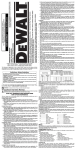
Selecting the Operating Mode (Fig. 1)
Setting the Electronic Speed and Impact
Control Dial (Fig. 1, 4)
Hammerdrilling: for concrete, brick, stone and masonry
drilling operations.
Hammering only: for chiselling and demolition applications.
In this mode the tool can also be used as a lever to free a
jammed drill bit.
1. To select the operating mode, rotate the mode selector switch (F)
until it points to the symbol of the required mode.
It may be neccessary to twist the tool holder (L) slightly to allow
the mode selector switch (F) to pass the
position.
2. Check that the mode selector switch (F) is locked in place.
Turn the dial (G) to the desired FIG. 4
level. Turn the dial upwards for
higher speed and downwards
for lower speed. The required
setting is a matter of experience,
e.g.:
S
– when chiselling or drilling
T
in soft, brittle materials or
R
when minimum break-out
is required, set the dial to a
low setting;
G
– when breaking or drilling in
Q
harder materials, set the dial
to a high setting.
Inserting and Removing SDS Max®
Accessories (Fig. 1, 3A, 3B)
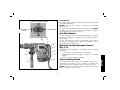
This machine uses SDS Max® bits and chisels (refer to the inset in
figure 3B for a cross-section of an SDS Max® bit shank).
1. Clean the bit shank.
2. Pull back the locking sleeve (O) and insert the bit shank.
3. Turn the bit slightly until the sleeve snaps into position.
4. Pull on the bit to check if it is properly locked. The hammering
function requires the bit to be able to move axially several
centimetres when locked in the tool holder (L).
5. To remove a bit pull back the tool holder locking sleeve/collar and
pull the bit out of the tool holder.
Lock-On
ce
Brush Servi
P
Setting the TwoStage Mechanical Clutch (Fig. 4)
NOTICE: Always turn the tool off before changing torque control
settings or damage to the tool may result.
Move the torque control lever (R) to setting 40 Nm or 80 Nm as
needed for application.
Clutch Setting 40 Nm (S) is designed for most drilling applications
and is designed to easily clutch out when the drill bit encounters
re-bar or other foreign substances.
Clutch Setting 80 Nm (T) is designed for higher torque applications
such as core-bits and deep hole drilling and is designed to clutch
out at a higher torque threshold.
NOTE: Allow the motor housing to rotate a little while changing
torque.
Each time the tool is plugged in, it will automatically default to clutch
setting 1 into clutch setting 40 Nm (S), the most sensitive setting.
FIG. 3B
L
Service
O
19
English
FIG. 3A
D-65510
DEWALT,
Y
GERMAN
IDSTEIN,
lpU.com
www.2he
ALT.eu
www.DEW