1
manual.
Havedefective
switches
replaced
byauthorized
service
center.
Donotusetoolifswitch
doesnotturnitonandoff.
SAVE THESE INSTRUCTIONS
Motor
Your DEWALT tool is powered by a DEWALT built motor. Be sure your
power supply agrees with the nameplate marking. Voltage decrease of
more than 10% will cause loss of power and overheating. All DEWALT
tools are factory tested; if this tool does not operate, check the power
supply.
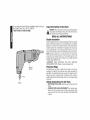
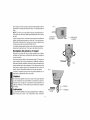
PADDLE SWITCH
BUTTON
Switch
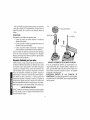
To start tool, depress the paddle switch (Figure 1). To turn the tool off,
release the paddle. The paddle switch can be locked on by engaging
the lock button located near the rear of the tool, while holding the paddle
depressed. Always be su re that the tool is not locked on before plugging
in. To turn the tool off when it is locked on, squeeze and release the
paddle once.
Setting
the Cutter
TURN OFF TOOL AND DISCONNECT FROM POWER SUPPLY.
The cutter can be set to cut in any direction relative to the body. Release
the set screw in the knurled ring (Figure 2) with key provided and
unscrew the ring by rotating in a counterclockwise direction as viewed
from the cutter.
FIG. 2
FIG. 3
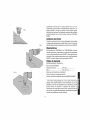
Loosen ring just enough to be able to rotate the die. Set the die so that
the connecting web (Figure 3) is on the opposite side of the direction of
cut. Fully tighten the knurled ring and lock by tightening the set screw.
Operation
NOTE: ALWAYS WEAR SAFETY GLASSES.
Make sure the knurled ring (Figure 2) is tight prior to use. Keep fingers
away from cutter and other moving parts.
---DIE
DIRECTION OF CUT
CONNECTING
WEB