1
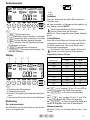
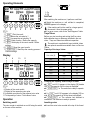
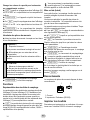
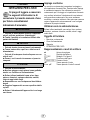
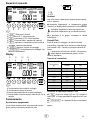
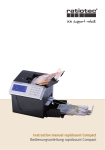
Operating Elements 1 2 1 On 2 Off Self-Test After switching the machine on, it performs a self-test. Switch the machine on. A self-test is completed, 888888 appears in the display. If the machine will not be used for a longer period, disconnect it from the power outlet. If an error occurs, refer to the "Self-Diagnosis" table. 7 6 4 5 2 3 1 3 1 PRINT Print the result 2 -1 Reduce the set value by 1 3 +10 Increase the set value by 10 4 BAT Batch function / Define the capacity 5 SET Set display of the count results / Define settings 6 CLEAR Reset the count results 7 START/STOP Start/Stop the counting process / Confirm settings Trays/Tubes Before you start counting and sorting the Euro coins, define whether trays or tubes are installed in the ma chine . Trays and tubes have different capacities. The machine is supplied with trays installed; tubes are optional accessories available from our Service Center. Capacity of the trays / tubes Capacity Display 8 9 10 11 Coin value (€) Trays Tubes 0.01 300 50 0.02 200 50 0.05 200 50 0.10 150 40 0.20 150 40 0.50 150 40 1.00 100 25 2.00 70 25 Operation Changing the capacity value to trays or tubes BAT until 0.01 appears in the display [10] beside 300. The capacity of all the trays is displayed. START/STOP The machine is ready to operate. or 2 x BAT until 0.01 appears in the display [10] be side 50. The capacity of all the tubes is displayed. START/STOP The collector last selected is reselected. The machine is ready to operate. Switching on/off Inserting coins The coin counter is switched on and off using the switch on the rear of the machine. Insert the coins to be counted at the top of the funnel. 4 8 Display of the count results 9 Display of the respective coin value 10 Individual count result of the adjacent coin value 11 Total quantity of coins / Total value of coins 8 G