1
About the Atomic Clock
A clock is considered atomic if it has an accuracy of one second in a million
years. Consumer clocks are considered atomic if they attain this accuracy by
receiving a signal from an atomic clock. In North America, the National Institute
of Standards and Technologies operates an atomic clock in Colorado which
transmits the time codes via the the radio station WWVB. The signal is
transmitted in a very low frequency (60,000 Hz). The Acurite clock you have
purchased includes a built-in receiver which picks up the signal from the WWVB
station. For the best possible reception, place the main unit with the back side
facing Colorado. NOTE: Due to solar radiation in the atmosphere, the atomic
clock signal is weaker during the day. Most synchronization with the WWVB
atomic clock signal happens at night when there is less interference.
40
Extended periods of cold temperatures ( below -4ºF / -20ºC )
can cause alkaline batteries to function improperly. This will
cause the outdoor wireless sensor to stop transmitting
temperature readings. Use lithium batteries in these low
temperature conditions to ensure continued operation for
wireless sensors placed outdoors.
PLEASE DISPOSE OF OLD OR DEFECTIVE BATTERIES IN AN ENVIRONMENTALLY
SAFE WAY AND IN ACCORDANCE WITH YOUR LOCAL LAWS AND REGULATIONS.
BATTERY SAFETY: Follow the polarity (+/-) diagram in the battery compartment. Promptly remove dead batteries from the device.
Dispose of used batteries properly. Only batteries of the same or equivalent type as recommended are to be used. DO NOT incinerate used
batteries. DO NOT dispose of batteries in fire, as batteries may explode or leak. DO NOT mix old and new batteries or types of batteries
(alkaline/standard). DO NOT use rechargeable batteries. DO NOT recharge non-rechargeable batteries. DO NOT short-circuit the supply terminals.
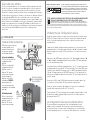
Main Unit : Basic Setup
After installing batteries, the time zone, time, DST (daylight saving time) and ºF
or ºC preferences must be set initially. After the initial manual setting, the
atomic clock will maintain it’s accuracy and adjust for DST automatically.
2 • SETUP
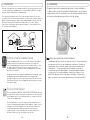
Install Batteries
NOTE: Install all batteries in both
units within a 6 minute period to
ensure proper wireless
functionality.
A. Wireless Sensor
1) Remove the 4 battery
compartment screws.
2) Remove the battery
compartment cover and
install 2 fresh “AA”
batteries as shown here.
Always install batteries
into the wireless sensor
FIRST to ensure proper
wireless synchronization
with the main unit.
B. Main Unit
Remove the battery
compartment cover and
install 3 fresh “AA”
batteries as shown here.
REMOVE
BATTERY
COMPARTMENT
COVER
When first entering basic setup mode, the time zone will be flashing. Adjust the
time zone using the “ ” or “ ” buttons on the side of the main unit, then press
the “SET” button to confirm your time zone selection and move on.
ABC
Now select DST (daylight saving time) “on” or “off” by pressing the “ ” or “ ”
buttons on the side of the main unit. Press the “SET” button to confirm your DST
selection.
Next, adjust the HOUR by pressing the “ ” or “ ” buttons on the back of the
main unit. Press the “SET” button to confirm your HOUR selection and to move
on to MINUTE setting. Again, adjust the MINUTE by pressing the “ ” or “ ”
buttons. You may press and HOLD the “ ” or “ ” to adjust the minutes at a
faster rate. Press the “SET” button again to confirm your time setting.
REMOVE
BATTERY
COMPARTMENT
COVER
ABC
INSTALL
3 “AA”
BATTERIES
Next, adjust the MONTH and then the DATE in the same manner, using the
“ ” and “ ” buttons to adjust and the “SET” button to confirm and move on.
Finally, press the “ ” or “ ” buttons to select between fahrenheit (ºF ) or
celsius (ºC) temperature display units.
Press the “SET” button one more time to exit basic setup mode. You may enter
basic setup mode again at any time by pressing the “SET” button.
Basic Setup is Now Complete
The wireless sensor will soon send a signal to the main unit and the two
units will be synchronized. It may take a few minutes for synchronization to
be complete. If both or one of the units appear to be functioning improperly,
refer to the troubleshooting section in this manual.
-2-
-3-