1
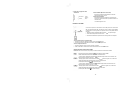
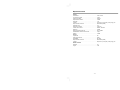
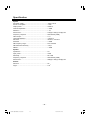
Specification
System
AC Power supply ............................................................. ~230V / 50 Hz
Power consumption ........................................................ £ 70W
Output power ................................................................... 100W x 2
Channel Separation ........................................................ ³ 40dB
Distortion ......................................................................... £ 1%
Dimensions ..................................................................... 215(W) x 205(H) x 275(D) mm
Frequency response ....................................................... 50Hz-20kHz (±3dB)
Video output ..................................................................... 1 VP-P
Horizontal definition ......................................................... ³ 500 (TV)
Disc Size .......................................................................... F80mm, F120mm
S/N Ratio ......................................................................... ³ 65dB
FM Frequency range ........................................................ 87.5-108 MHz
FM Noise limit sensitivity ................................................. £ 20mV
FM S/N ............................................................................. ³ 45dB
Speaker
Impedance ...................................................................... 4W
Input power ...................................................................... 100W
Sensitivity ......................................................................... 80 ± 4dB
Frequency response ....................................................... 50Hz-20kHz (±3dB)
Dimensions ..................................................................... 208(W) x 300(H) x 250(D) mm
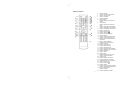
Remote
Distance .......................................................................... 6 m
Angle ................................................................................ ± 30O
- 21 -
1506D-e(#EJS89S,re-11)-1.p65
21
2009-10-27, 11:05