1
85% R.H.,(max), Transmitter Only
Operating Frequency:
433.92MHz,868.35MHz (WS8985 Only)
Operating Temperature: -10°C to 55°C (14°F to 131°F),
Transmitter Only
Battery:
CR2 Lithium (Panasonic or Duracell)
Battery Life:
4 years (under typical use)
Compatible Receivers: RF5132-433/868, SCW9045/47-433/868,
RFK55XX-433/868, PC4164, and PC9155
Out of Box:
WS4985/WS8985 (water sensor and wireless transmitter),
Hardware pack, Installation sheet.
Activate, Locate, and Operate
The WS4985/WS8985 comes with the battery preinstalled. To activate it, hold the WS4985/WS8985 transmitter firmly in one hand and pull the plastic tab in the
direction indicated. Then, select the locations where the
transmitter and sensor will be mounted. For detailed operation of your alarm system, refer to the Alarm System user
manual.
Enroll, Program, and Place
The one-way wireless flood detector must be enrolled on the
security panel before it can transmit system events, supervisory signals, or provide the local WS4985/WS8985 status
NOTE: The electronic serial number is a 6-digit alphanumeric number located on a sticker on the wireless device.
7. Repeat Steps 2 to 6 to enroll additional WS4985/
WS8985.
Serial Number Programming (1-6)
1. Enter [*][8] [Installer Code] on a system keypad.
2. Enter [804] to enter ESN (electronic serial number) programming.
3. Enter the desired subsections [001]-[032] (e.g., [001]
zone 1... [032] zone 32).
4. Enter “00”. Enter the 6-digit ESN (on the back of the
unit) in the next available zone slot.
5. Repeat Steps 3 and 4 to enroll additional devices.
6. Press [#] to exit the current programming section.
Step 2-Program Zone Definition
1. Enter Section [001] - [002].
2. Assign the corresponding zone with the appropriate zone
type ([19] 24hr Water).
NOTE: All wireless devices must be tested for good signal
strength from where they are positioned.
Step 3-Device Placement Test
1. Enter Section [904].
2. To start the test, open the wireless transmitter housing
(Figure 3) or short the probes of the water sensor with a
screwdriver.
NOTE: It is recommended that you placement test the flood
detector with the water sensor connected.
NOTE: There is a 3 to 5 second delay until an alarm is sent
by the device.
3. The control panel is programmed to respond with 1 beep
Once the proper location for the device is determined the
WS4985/WS8985 can be permanently mounted.
NOTE: The installer is responsible for ensuring that the WS4985/
WS8985 is securely mounted in the intended location.
Figure 2
Mount Flood Detector
TRANSMITTER
Avoid locating
near metal
objects
SENSOR
WIRE
Washing
Machine
SENSOR
Floor
Water Sensor
The water sensor must be mounted so both probes of the
device are touching water when an alarm condition is
desired. The water sensor should be mounted at low spots
where water will first accumulate (e.g., floor). Secure the
water sensor to the mounting surface with the screws provided. There are mounting holes for wall and floor surfaces
if you are installing the device in these locations (Figure 2).
Connect the sensor wire to the transmitter, see Wireless
Transmitter section below.
NOTE: Avoid mounting the transmitter portion of the
device behind a metal object such as a washing machine,
refrigerator, or freezer. RF signals can be affected by
metal objects.
NOTE: After every flood detection, each flood detector
should be cleaned and dried. Otherwise, the unit may not
operate as intended due to the nature of different liquids.
NOTE: After water has been cleared from the sensor head,
the alarm restoral time is approximately 1 minute.
Tamper Switch
Out of the box the WS4985/WS8985 transmitter comes
equipped with transmitter case tamper detection. If the transmitter case is removed, the WS4985/WS8985 will report a
zone tamper to the control panel. For added security the
WS4985/WS8985 was designed to provide wall tamper monitoring as well. Simply replace the short rubber actuator (Figure
5) with the longer one that is included. With this option, if the
case is opened or if the WS4985/WS8985 is removed from it's
location, a tamper will be sent to the control panel. It is
strongly recommended that mounting screws be used when
using the wall tamper option.
NOTE: If the sensor wire is cut, the WS4985/WS8985
reports a tamper event to the control panel.
NOTE: Test the unit at least once yearly.
Battery Replacement
To replace the battery, insert a flathead screwdriver into
either side of the transmitter and carefully twist to separate
the top and bottom plastic (Figure 3). Once separated, the
battery will be visible (Figure 4). Remove the old battery
and install the new battery. Ensure the correct polarity is
observed. Disposal of used batteries must be made in accordance with the waste recovery and recycling regulations in
your area. Caution: The battery used in this device may present a fire or chemical burn hazard if mistreated. Do not
recharge, disassemble, heat above 100 °C (212 °F) or dispose of in fire. Replace battery with one 3V lithium battery,
Panasonic CR2 or Duracell CR2 only. Use of another battery
may present a risk of fire or explosion. Dispose of the used
batteries as per local regulations. Keep away from children.
Figure 3
Remove Cover
Wireless Transmitter
Remove the backplate from the transmitter (Figure 3).
• Using Provided Screws: Mount the back of the transmitter with them.
• Using Adhesive Tape: Ensure you are attaching the wireless transmitter to a painted and primed surface. If surface conditions are unsuitable, secure the transmitter
with the mounting screws provided.
The external contact terminals of the transmitter are used to
connect the sensor wire (Figure 4). Ensure that all wiring is
stripped to 6mm (1/4”) max. and does not touch any of the
components. The sensor wire can be cut to length for the
best fit. Wire clamps should be used to keep the wire snug
to the wall. Ensure that the sensor wire is laid out in such a
7RUHPRYHFRYHULQVHUWVFUHZGULYHU
KHUHDQGJHQWO\WZLVW
DG009081
Operating Humidity:
The WS4985/WS8985 flood detector can be enrolled by
Quick Enroll or manually by Serial Number Programming.
Perform one of the following:
Quick Enroll (1-7)
1. Enter [*][8] [Installer Code] [898] on the system keypad.
2. Place the Flood Detector near the Control panel.
3. Tamper the WS4985/WS8985 by opening the transmitter housing.
4. The Keypad displays the ESN (electronic serial number).
Press [*] to confirm it.
5. Select the zone number the device will occupy.
6. Select the zone type the device will follow; 24hr Water is
recommended.
Device Mounting
way that accidents cannot occur. Connected cables must not
be subject to excessive mechanical strain. Once the
WS4985/WS8985 is installed, test the water sensor to verify it activates in the event of an alarm condition.
Tamper Switch
Figure 4
Install Battery
+
BATTERY
-
DG009082
DG009083
Specifications
Step 1-Enrolling
if the location is “Good”, and 3 beeps if the location is
“Bad”. If the location is “Bad” change locations and
repeat Step 2.
External Contact Terminals
Wall Tamper
Figure 5
Change Tamper
DG009080
ENG
Use this installation sheet
Figure 1
TRANSMITTER
along with the associated DSC
wireless receiver and control
panel installation manual. All SENSOR WIRE
instructions specified within
Wall Mounting
those manuals must be
Holes (2)
observed. The WS4985/
WATER
SENSOR
WS8985 is a one-way wireless flood detector intended Probes (2) Floor Mounting
Holes (2)
for use with compatible DSC
Security Systems. Multiple WS4985/ WS8985 flood detectors can be enrolled on and supervised by the same security
panel up to the maximum number of zones supported by
that panel. The flood detector consists of a water sensor and
a wireless transmitter that are connected by a 1.82m(6ft)
wire cable. This device continuously monitors for unacceptable water levels. If water is detected (e.g., when both
probes are in contact with the water), the WS4985/
WS8985 wirelessly communicates this alarm condition to
the control panel receiver.
(e.g., case and wall tamper switch state, battery state, and
line cut state). The following outlines the basic steps for programming and enrolling this device on PC9155 series security panels. For additional options or for other systems
please refer to the specific receiver or security system installation manuals.
DG009365
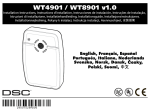
WS4985 / WS8985 One-Way Wireless
Flood Detector Installation Instructions
Backplate