1
Wireless N Access Point • Quick Install Guide
English
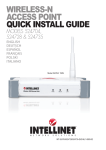
Thank you for purchasing this Intellinet Network Solutions™ Wireless N Access Point:
Model 525404 (150N); 524728 (300N); or 524735 (300N PoE).
This quick install guide presents basic installation steps. For operation details and
specifications, refer to the user manual at intellinet-network.com.
CONNECTIONS
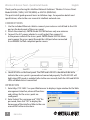
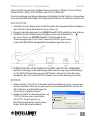
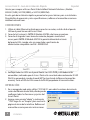
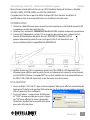
1. Use the included Ethernet cable to connect your router or switch/hub to the LAN
port on the back panel of the access point.
2. Attach the antenna(s). NOTE: Model 524704 features only one antenna.
3. Connect the A/C power adapter to a wall socket, then connect it
to the power socket of the access point. NOTE: Model 524735 allows
you to power the access point through the LAN port when connected
to an IEEE802.3af PoE-compliant power source.
4.
Check all LEDs on the front panel. The PWR and LAN LEDs should both be on to
indicate the access point is powered and connected properly. The WLAN LED will
light when WPS mode is enabled (refer to the user manual); both the LAN and WLAN
LEDs will blink data is transmitted.
OPERATION
1.
2.
Enter http://192.168.2.1 on your Web browser to display a login window for the Web
management interface, where all functions
and settings for the access point are
configured.
User name:
Enter “admin” for username and “1234” for
Password:
password, then click “OK” to display the
home page of the interface. Refer to the user
manual for further instructions.
2
ENGLISH