1
Important Safety Instructions
SAVE THESE INSTRUCTIONS
Quick Installation
1
This manual contains instructions and warnings that should be followed during the installation,
operation and storage of all Tripp Lite UPS Systems.
NOTE! after you plug the UPS into a live AC
outlet, the UPS will automatically charge its
batteries,** but will not supply power to its
outlets until it is turned ON (see Step 3 below).
UPS Location Warnings
• Install your UPS indoors, away from excess moisture or heat, conductive contaminants,
dust or direct sunlight.
• For best performance, keep the indoor temperature between 32º F and 104º F
(0º C and 40º C).
• Leave adequate space around all sides of the UPS for proper ventilation.
• Do not install the UPS near magnetic storage media, as this may result in data corruption.
* See Specifications for circuit amperage requirements.
Select models include an additional plug which can be
switched by a qualified electrician. See Specifications for
details. ** The BATTERY CHARGE LED will be the only
LED illuminated.
2
UPS Connection Warnings
• Connect your UPS directly to a properly grounded AC power outlet. Do not plug the UPS
into itself; this will damage the UPS.
• Do not modify the UPS’s plug, and do not use an adapter that would eliminate the UPS’s
ground connection.
• Do not use extension cords to connect the UPS to an AC outlet. Your warranty will be
voided if anything is used to connect your UPS to an outlet.
• If the UPS receives power from a motor-powered AC generator, the generator must
provide clean, filtered, computer-grade output.
Equipment Connection Warnings
• Do not use Tripp Lite UPS Systems for life support applications in which a malfunction
or failure of a Tripp Lite UPS System could cause failure or significantly alter the
performance of a life-support device.
• Do not connect surge suppressors or extension cords to the output of your UPS. This
might overload the UPS and will void the surge suppressor and UPS warranties.
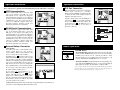
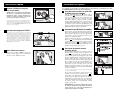
Plug the UPS into an outlet
on a dedicated circuit.*
SMART2200VSXL shown
2
SMART2200VSXL shown
Plug your equipment into
the UPS.*
* Your UPS is designed to only support computer equipment.
You will overload the UPS if the total VA ratings for all
the equipment you connect exceeds the UPS’s Output
Capacity (see Specifications). To find your equipment’s
VA ratings, look on their nameplates. If the equipment is
listed in amps, multiply the number of amps by 120 to
determine VA. (Example: 1 amp × 120 = 120 VA). If you
are unsure if you have overloaded the UPS’s outlets, see
“OUTPUT LOAD LEVEL” LED description.
3
1
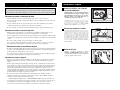
Turn the UPS ON.
Press and hold the “POWER” button for one
second. The alarm will beep once briefly
after one second has passed. Release the button.
Battery Warnings
3
• Your UPS does not require routine maintenance. Do not open your UPS for any reason
except battery replacement. There are no user-serviceable parts inside.
• Because the batteries present a risk of electrical shock and burn from high short-circuit
current, observe proper precautions. Unplug and turn off the UPS before performing battery
replacement. Use tools with insulated handles, and replace the existing batteries with the
same number and type of new batteries (Sealed Lead-Acid). Do not open the batteries.
Do not short or bridge the battery terminals with any object. Tripp Lite offers a complete
line of UPS System Replacement Battery Cartridges (R.B.C.). Visit Tripp Lite on the
Web at www.tripplite.com/support/battery/index.cfm to locate the specific replacement
battery for your UPS.
• The UPS batteries are recyclable. Refer to local codes for disposal requirements, or in the
USA only call 1-800-SAV-LEAD or 1-800-8-BATTERY (1-800-8-228-8379) or visit
www.rbrc.com for recycling information. Do not dispose of the batteries in a fire.
• If your UPS model is equipped with an external battery connector, only connect Tripp Lite
battery packs of the appropriate type and correct voltage. Do not connect or disconnect
external batteries while the UPS is operating from battery.
2
3