1
This installation guide provides basic
instructions for installing the DAP-2230
Wireless N PoE Access Point on your
network. For additional information about
how to use the Access Point, please see
the datasheet and user manual available on
the D-Link support website.
www.dlink.com
Minimum System Requirements
-- Computer with Windows, Mac OS, or
Linux-based operating system, and an
Ethernet adapter installed
-- Internet Explorer 7, Mozilla Firefox 12.0,
Safari 4.0, or Chrome 20.0 or newer
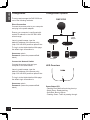
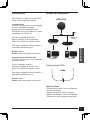
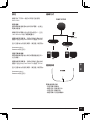
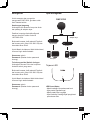
Connect an Ethernet Cable
Connect an Ethernet cable to the port
labeled LAN (PoE). If your switch does
not support PoE, follow the non PoE
instructions below.
ENGLISH
Quick Installation Guide
LAN (PoE)
Connect Power Supply (non PoE)
If your switch does not support PoE, plug in
the supplied power adapter.
Package Contents
-- DAP-2230 Wireless N PoE Access Point
-- Power adapter(included with some
models)
Power receptor
-- Wall mounting bracket with mounting kit
If any of the above items are missing,
please contact your reseller.
Connecting to a Network
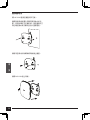
Physical Installation
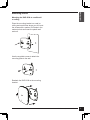
Remove the Mounting Bracket
Slide the DAP-2230 and mounting plate in
opposite directions to release the mounting
bracket.
Power on the Access Point
You can connect the DAP-2230 to a PoE
switch, or you can use the included power
adapter to supply power.
Connecting to a PoE Switch
Connect an Ethernet cable from the
DAP-2230 to your PoE switch.
Connecting to a Switch without PoE
Connect an Ethernet cable from the
DAP-2230 to your PoE switch. Then plug
in the power adapter to an outlet and then
connect the power receptor.
D-Link DAP-2230 Quick Install Guide
1