1
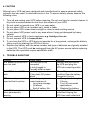
4. CAUTION
Although your UPS has been designed and manufactured to assure personal safety,
improper use can result in electrical shock or fire. To assure safety, please observe the
following rules:
1. Turn off and unplug your UPS before cleaning. Do not use liquid or aerosol cleaner. A
dry cloth is recommended to dust from the surface of your UPS.
2. Do not install or operate your UPS in or near water
3. Do not place UPS on an unstable cart, stand or table
4. Do not place UPS under direct sunlight or close to heat emitting source
5. Do not place UPS power cord in any area where it may get damaged by heavy
objects.
6. Do not connect UPS to home appliance e.g. hairdryer, fan etc.
7. Do not connect UPS to Laser printer
8. If you store the UPS or UPS does not operate for a long period, recharge the battery
every month by starting the UPS for 8 hours.
9. Replace the battery with the same number and type of batteries as originally installed
in the UPS. The UPS must be unplugged from the AC power source before replacing
batteries (this operation require specialistic staff)
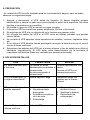
5. TROUBLE SHOOTING
Situation
Check items
UPS power is on but UPS The line cord is not
does not start
connected
Or not plugged in.
The wall outlet is dead
Start UPS but red LED
Low battery power because
flash
of long term AC power
failure
UPS does not provide the The battery may be in low
expected back-up time
power because of:
1. Long-term storage
2. Overload
3. End of battery life
Red LED illuminated and UPS fault
alarm permanently
beeping
Solution
Connect the line cord to
the UPS and plug the
UPS into a working outlet
When AC power in normal
condition Execute battery
charge for 8 hours
1. Charge the battery for
8 hours
2. Turn off connected
applications
3. Replace the battery
Unplug the UPS from wall
outlet and Unplug the
UPS from wall outlet and