1
3
OPERATIONAL CHECK
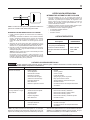
AUTOMATIC FLOAT SWITCH
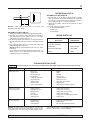
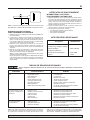
3"
(76 mm)
NOTICE : Switch tether is factory set at 3" for sump use.
DO NOT change tether length.
AUTOMATIC FLOAT SWITCH
1. Install pump following installation and operating instructions.
2. Automatic float switch is sealed and factory adjusted for
most home sumps. Turn-on water level is 10" - 12" above
pump base. Turn-off water level is 4" - 6".
3. Be sure float clearance is at least 8". For best performance,
the sump diameter must be 14” and the sump depth must be
18".
4. Plug piggyback switch cord into 115V AC outlet. Then, plug
pump into piggyback switch cord.
NOTICE: Minimum recommended turn-off level is 2" above
pump base.
Do not allow cord to interfere with float control motion or to
drape over pump motor. With electrician's tape, secure cord
to discharge pipe for cord protection.
1. Fill sump with 12"-14" of water to check operation and tightness of connections. During first automatic cycle, it may take
30 seconds or more before pump is primed and pumping.
Turn-on will occur approx. 11" above pump base.
2. Check turn-off position. Turn-off will occur approx. 5" above
pump base.
3. If the pump does not operate, check for:
• an obstructed float switch
• a blown fuse
• proper voltage.
REPAIR PARTS LIST
Description
Model
FP0S6000A-08
Discharge Connector 1-1/2" (incl. 2 clamps)
U74-68
Power Cord
PS117-98-TSU
Automatic Float Switch
FP18-15BD
Screen
12924
TROUBLESHOOTING CHART
Hazardous Voltage. Can cause serious or fatal electrical shock. Disconnect power to pump before servicing.
SYMPTOM
PROBABLE CAUSE(S)
CORRECTIVE ACTION
Motor does not run.
Blown fuse
Tripped circuit
Disconnected plug
Corroded plug
Inadequate water level
Tripped overload
Defective switch
Defective motor
Float in wrong position
Replace.
Reset.
Reinstall.
Clean prongs.
Add water and test.
Allow pump to cool.
Adjust float; replace switch.
Replace pump.
See Automatic Float Switch section.
Motor hums but flow
is reduced or no flow
Impeller jammed
Plugged check valve
Blocked screen
Line leak
Worn Impeller
Defective motor
Unplug pump and unclog.
Unplug pump and unclog.
Unplug pump and clean screen.
Unplug pump and repair.
Unplug pump and replace pump impeller.
Replace pump.
Runs continuously
Plugged screen
Defective switch
Float obstruction
Unplug pump and clean screen.
Replace switch.
See Automatic Float Switch section.
NOTICE : A plugged screen can be mistaken for a faulty switch.
Unlike other pumps, screen and impeller design of pump can provide significant flow, even when screen is nearly plugged. If pump
RUNS CONTINUOUSLY or for EXTENDED PERIODS between
turn-offs – FIRST check for a DIRTY SCREEN.
For parts or assistance, call Flotec Customer Service at 1-800-365-6832