1
MANUAL DE INSTRUCCIONES
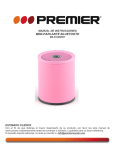
MINI-PARLANTE C/BLUETOOTH
MS-5196SDBT
ESTIMADO CLIENTE
Con el fin de que obtenga el mayor desempeño de su producto, por favor lea este manual de
instrucciones cuidadosamente antes de comenzar a utilizarlo, y guárdelo para su futura referencia.
Si necesita soporte adicional, no dude en escribir a: [email protected]
ÍNDICE
CONTENIDO .............................................................................................................................................. 2 DESCRIPCIÓN .......................................................................................................................................... 2 FUNCIONES DEL PARLANTE ................................................................................................................. 2 BATERÍA ................................................................................................................................................... 3 BLUETOOTH ............................................................................................................................................. 3 MODO DE TARJETA................................................................................................................................. 4 FUNCIÓN DE MEMORIA ........................................................................................................................... 4 CONEXIÓN ................................................................................................................................................ 4 TRANSMISIÓN DE DATOS....................................................................................................................... 5 INSTRUCCIONES DE SEGURIDAD ......................................................................................................... 5 ESPECIFICACIONES ................................................................................................................................ 5 PRECAUCIÓN
RIESGO DE CHOQUE
ELÉCTRICO , NO ABRA
Precaución: Para reducir el riesgo de choque eléctrico, no
retire la cubierta, no hay partes manipulables por el usuario al
interior de la unidad.
Refiera todo mantenimiento o
intervención técnica a personal técnico calificado.
Este símbolo indica la existencia de voltaje peligroso al
interior de esta unidad, que constituye un riesgo de choque
eléctrico.
Este símbolo indica que hay importantes instrucciones de
operación y mantenimiento en la literatura que acompaña a
esta unidad.
LÍNEAS DE SERVICIO AL CLIENTE PREMIER
Venezuela:
Panamá:
Sitio Web:
E-mail:
0800 – ELECTRIC (353-2874)
300-5185
www.premiermundo.com
[email protected]
NOTA
Nos reservamos el derecho de modificar las especificaciones, características y/u operación de este
producto sin previo aviso, con el fin de continuar las mejoras y desarrollo del mismo.
P-1
CONTENIDO
•
•
•
•
•
•
1 parlante Bluetooth
1 cable de datos USB
1 cable de audio de 3.5mm
1 cuerda de algodón
1 adaptador AC
1 manual del usuario
DESCRIPCIÓN
1. Siguiente/Volumen +
2. Play/Pausa/Contestar
3. Anterior/Volumen4. Modo
5. Encender/Apagar
FUNCIONES DEL PARLANTE
•
•
•
•
•
•
Conexión Bluetooth 2.0 para todos los dispositivos con esta función.
Micrófono incorporado para que utilice el dispositivo como manos libres.
Reproducción de micro tarjeta SD.
Batería recargable de larga duración. Hasta 4 horas de operación.
Cable USB con doble funcionalidad: para cargar el parlante y para transmitir datos.
Conector de audio 3.5mm.
Ranura de Tarjeta SD
Interface micro USB
P-2
Conector de audio 3.5mm
Conector de audífonos 3.5mm
BATERÍA
Usted puede disfrutar de hasta 4 horas con la batería recargable incorporada.
Antes de usar la batería por vez primera cárguela por 10 horas para obtener el mejor desempeño.
Luego sólo será necesario cargarla por 2 horas. Si no la va a utilizar por un período prolongado se
recomienda cargarla al menos una vez al mes.
AHORRO AUTOMÁTICO DE ENERGÍA
Si la operación se pone en modo de pausa por más de 2 minutos, el parlante se apagará
automáticamente.
BLUETOOTH
Verifique que el dispositivo que quiere conectar cuente con la función Bluetooth.
Encienda el parlante manteniendo presionado el botón de encendido hasta que escuche un sonido
“ding dong”. El parlante comenzará en la primera función por defecto que es Bluetooth y la luz
indicadora se encenderá de color azul y parpadeará rápidamente para buscar su dispositivo.
Ingrese la
contraseña
Cuando el parlante y el otro dispositivo Bluetooth se enlacen, el dispositivo Bluetooth recibirá una señal
mostrando el modelo del parlante MS-5196SDBT. Introduzca la contraseña por defecto 0000 para
completar el enlace.
CONTESTAR UNA LLAMADA ENTRANTE
Si está reproduciendo música en el parlante y se recibe una llamada telefónica, la música se pausará
automáticamente y entrará al modo de llamada. Presione el botón de Teléfono en el parlante para
contestar. Con el micrófono incorporado en el parlante usted será escuchado perfectamente.
Contestar
Teléfono
P-3
MODO DE TARJETA
Inserte una tarjeta SD en la ranura y seleccione el modo de tarjeta SD del parlante.
Utilice los botones normalmente para reproducir la información de la tarjeta.
Ranura de Tarjeta SD
FUNCIÓN DE MEMORIA
Al estar reproduciendo una pista, si de repente se va la energía, una vez se reanude la unidad
recordará el punto donde se detuvo y continuará a partir de ahí. Lo mismo sucede con el ajuste de
volumen, el cual se mantendrá igual cuando se reanude la operación.
CONEXIÓN
Utilice los conectores de 3.5 para conectar una unidad exterior como fuente de sonido, y para conectar
sus audífonos.
Conector de audio
3.5mm
Conector de
audífonos 3.5mm
Usted puede utilizar la entrada de audio con cualquier dispositivo que tenga esta salida de sonido, como
por ejemplo, computadores, teléfonos celulares, reproductores de CD, etc.
P-4
TRANSMISIÓN DE DATOS
Al conectar el parlante al computador por medio del cable USB usted puede transmitir información del
computador al parlante. Utilice el parlante como una memoria USB tradicional en la cual puede añadir o
eliminar datos.
Recuerde no desconectar el cable USB cuando se está haciendo una transferencia de datos.
INSTRUCCIONES DE SEGURIDAD
•
•
•
•
Mantenga la unidad fuera del alcance de los niños.
Evite que la unidad se caiga y se golpee.
Mantenga la unidad lejos del agua y no la coloque en lugares con temperaturas muy altas son muy
bajas.
No intente reparar la unidad usted mismo. Remita toda revisión, mantenimiento y reparación a
personal de servicio técnico calificado.
ESPECIFICACIONES
Categoría
Bluetooth
Audio
Soporte de archivos
Tarjeta de memoria
Energía
Puertos
•
Elemento
Versión
Frecuencia
Rango de operación
Protocolo de comunicación
Unidad de controlador
RMS
Frecuencia
Relación señal a ruido
Impedancia
Distorsión
Formatos de música
Soporte
Lectura de tarjeta
Batería
Voltaje
Puerto de carga y de datos
Especificación
Bluetooth 2.0
2.4 – 2.48GHz
10 metros
HS/HF, A2DP, AVRCP
50.8mm
3 watts
100Hz – 18KHz
≥57dB
4 ohm
≤11%
MP3
Micro Tarjeta SD
Función activa
Li-on recargable
DC 3.7V
Puerto Micro-USB
Las personas y/o Marcas registradas en este manual de instrucciones no están afiliadas a Premier Electric Japan Corp. y aparecen en
este Manual con propósitos ilustrativos únicamente.
P-5
INSTRUCTION MANUAL
BLUETOOTH SPEAKER
MS-5196SDBT
DEAR CUSTOMER
In order to achieve the best performance of your product, please read this instruction manual carefully
before using, and keep it for future reference.
If you need extra support, please write to [email protected]
CAUTION
RISK OF ELECTRIC
SHOCK, DO NOT
OPEN
Caution: To reduce the risk of electric shock do not open
this device, there are not serviceable parts for customers.
Please refer any maintenance or repair to qualified
personnel.
This sign means the existence of dangerous voltage at
the inside of the unit, which states a risk of electric shock.
This sign means that there are important instructions of
operation and handling in the manual that comes with this
device.
PREMIER CUSTOMER SERVICE
Venezuela:
Panama:
Website
E-mail:
0800 – ELECTRIC (353-2874)
300-5185
www.premiermundo.com
[email protected]
NOTE
This unit may be submitted to changes in specifications, characteristics and/or operation without prior
notice to the user, in order to continue improving and developing its technology.
P-1
Chapter 1:Simple Instructions
1.1 Accessories
-Bluetooth speaker×1
-USB Power/data cable×1
-3.5mm Audio cable×1
-Cotton Rope×1
-User guide×1
-AC Adapter×1
1.2 Outer Constructions
NEXT/VOL+
Play/Pause/Answer
PREV/VolSwitch mode
Power ON/OFF
1.3 Speaker Functions
Bluetooth 2.0 for all of your devices with built-in Bluetooth function.
Built-in Microphone gives you a hands-free call,press the phone button
answer the phone under Bluetooth mode.
Support TF Card and TF card is universal plug and play.
Play format:MP3
Rechargeable LI-ON Battery with a long working time up to 4 hours
Three-in-one data line
USB data cable,you can use it achieve rechargeable lithium battery,USB sound
card connection and data transfer three functions.
3.5mm AUX IN
Universal 3.5mm Line-in for all of your devices with audio output.
Speaker USB sound card,use USB data cable connect the speaker and
computer play music,you can directly control your computer’s music player turn
P-2
next song.
Card reader function
3.5mm audio
interface
TF card slot
input
3.5mm earphone port
Micro USB interface
Chape 2:Li-on battery Notice
You will enjoy music up to 4 hours,as there is 1 built-in high capacity
rechargeable li-on battery.
4h
2.1 Precautious
To activate it best performance of the battery,please charge the
speaker up to 10 hours before you fist using.
Every month you need to recharge it one time at least if you don’t
use it for a long time.
As this is a charger capacity battery, you must use a standard 5V-1A
charger.Use of less than 5V-1A charger cause charge to fail.
2.2 State of charging
Charging red light flash quickly,full charged,the red light flash slow.
2.3 Automatic power saving mode
In TF card,LINE-IN and Bluetooth mode pause playback,audio will shut
down automatically without any operation after five minutes,work indicator
light go out.
Chapter 3 Bluetooth wireless connection
3.2 Turn on your speaker by press/hold the power on/off button until you
hear a sound of “dingdong”.Then it will go into the 1st default
mode”bluetooth” and the blue indicator light will flash quickly to search your
bluetooth device.
3.3 When your speaker and other bluetooth device find them each
other,your bluetooth device will receive a signal saying”MS-5196SDBT”.
Please enter the default password”0000” and then they will be paired
P-3
successfully.If you are fail to pair them,pls try it again as per these steps.
Enter the
default
password
3.4Answer Incoming Phone
When play music with Bluetooth connective, if there have phone call in, the
music will automatically pause and turn incoming calls state. It would
autoreply the current operating mode after the call finish.
Press the
botton to answer the call, the built-in MIC will bring you a clear
call experience.
Dear
123456789
Calling
Chapter 4 Play Music
4.1 TF Card music player operations
Default boot into reader mode (TF card), then you can insert the TF card play
songs, now it only support MP3 audio file.
When reader mode, the system light flashes slowly, the light turn into red
after pull TF out.
- PREV./Vol+ NEXT/VOL+
Short press: in the TF card mode and Bluetooth mode to paly next songs, it’s
invalid in the audio input mode.
Long press: to increase the volume
P-4
Chapter 5 Memory Function
5.1 The way of memory function
1. Track List Memory: Speaker playing a song, if a sudden power failure or
shutdown, the speaker will record the moment of play state, it will directly play
from the record moment next time.
2 .Volume Memory: In any mode, adjust the volume, the volume memory will not
change whether it is switched off, poweroff or shutdown ,when it power off when
the volume is less than half, it will automatically jump back to the default value of
10.
Chapter 6 Audio Input/Output
6.1 Audio input basic operation
Use the 3.5mm audio cable to connect with computer/mobiles/MP3 players,
then it can play music, the system light will turn into red
6.2 Audio output basic operation
When your earphone/headset inserted , it will transmit audio into your device,
and the speaker will be quiet.
3.5mm audio input interface
3.5mm audio output interface
6.3 Devices witch can use audio input
All devices with 3.5mm audio interface mobile phones, computers, CD and MP3,
Ipad,tablets.
P-5
Chapter 7: Data Transmission
7.1 Basic operation of setup mode
When boot state, connect to the computer can enter the USB card reader
mode, also supports USB audio mode at the same time.
It can operate the file directly in the computer.
7.2 FAQs
--data transmission function can only use when the speaker already started up.
--if can not found storage device when connect with the computer.
First check weather the speaker is turned on, then check the USB cable, if
possible, try each USB port of your computer.
--if all USB port does not respond, you will need to reinstall the drives---USB
Composite Devece & USB Mass Storage Device. First uninstall those drives then use USB digital cable
to connect with your computer, it will automatically
reinstall these two drivers.
chapter8:Specifications
Category
Bluetooth
Auduio
Item
Specifications
Version
Bluetooth 2.0
Frequency
2.4~2.48GHZ
Working Distance
10m
communication protocol
HS/HF,A2DP,AVRCP
Driver unit
50.8MM
RMS
3W
Frequency
100HZ~18KHZ
SNR
S/N≥57DB
Impedence
4.0Ω
Distortion
THD≤11%
Supported files Music format
Memory Card
Power
Ports
P-6
Mp3
Support
TF Card
Card Reader
Card Reader function
Battery
Built-in rechargeable Li-on battery
Volt
DC 3.7V
Charge/Data port
Micro USB Port
Warnings:
1.Not toys for Children
2.To avoid/minimize artificial damage,Please do not beat it crazily or drop itOnto
the solid floor.
3.Free your speaker from water,high Temperature,and too cold conditions.
4.For any function problems,please send them back to the service center,Pls do
not open it privately,if you are not an electronic engineer.
5.After a long time using,maybe there will be some natural oxidized
issues(likerusts, painting-droop off).Such issues are not in our guarantee service.
P-7