1
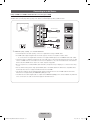
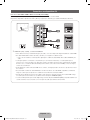
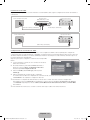
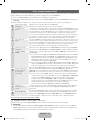
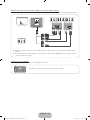
Using a Component (up to 1080p) or an Audio/Video (480i only) Cable
Available devices: DVD player, Blu-ray player, cable box, STB satellite receiver, VCR
R
Red
W
R
B
White
Red
Blue
R
R
G
Green
Red
Device
COMPONENT OUT
PR
B
Y
G
White Yellow
Device
AUDIO OUT
VIDEO OUT
W
R
AUDIO OUT
R-AUDIO-L
R-AUDIO-L
Y
W
R
R
R
PB
Y
Y
W
W
Component Cable
(Not Supplied)
Audio Cable
(Not Supplied)
W
R
G
B
Component
Adapter(Supplied)
W
W
Y
Y
Y
R
R
Audio Cable
(Not Supplied)
White Yellow
Video Cable
(Not Supplied)
R
W
Red
✎✎For better picture quality, we recommend the Component connection over the A/V connection.
✎✎When connecting to AV IN, the color of the AV IN 1[VIDEO] jack (green) will not match the video cable (yellow).
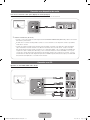
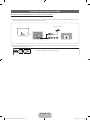
Using an EX-Link Cable Connection
Available Devices: External devices that support EX-Link.
EX-LINK: Connector for service only.
English - 13
[PD8000-NA]BN68-03447A-01L03.indb 13
2011-02-10 오전 11:55:20