1
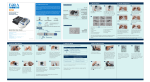
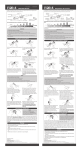
D20 No-Coding Blood Glucose Plus Blood Pressure Monitoring System Dear ForaCare D20 No-Coding System Owner: Front View of Meter Thank you for choosing ForaCare D20 No-Coding Blood Glucose Plus Blood Pressure Monitoring System to take control of your diabetes. Being a home care device, this system is helpful in tracking your blood glucose and blood pressure values. The Quick Start User Guide will assist you in setting up the system and testing your blood glucose levels. Please read it carefully before use. For complete information on the system’s use and features, please refer to the Owner’s Manual. Test Strip Vial Clear Cap Test Strips Lancets Control Solution Pressure Cuff On/Off Button C Button M Button Test Slot DC Adapter Port PC Link Port Display Screen S Button Please note: Use only FORA D20 test strips with ForaCare D20 No-Coding System meter. (for obtaining blood from places other than your fingertip) Rear View of Meter Lancing Device Cap Quick Start User Guide Depth Indicator Arrow For self-testing. Read instructions before use. For In vitro diagnostic use. 11 Distributed by ForaCare Fora Care Inc. 893 Patriot Dr., Suite D, Moorpark, CA 93021 Products made in Taiwan Toll Free: 1-888-307-8188 (8:30am-5:00pm PST, Mon.-Fri.) 1-866-469-2632 (24 Hours, 7 days/week) www.foracare.com 1. Setting the Monitor Press to start setting. Year flashes first. Ejector Lancing device, lancets and clear cap may not be included. If your lancing device differs from the one shown here, please refer to the manufacturer’s manual to ensure proper usage. 315-3263100-011 1.1 Cocking Control Release Button Adjustable Tip Please Note: Your lancing device may differ from the one shown in here. 1. Setting the Monitor 1.2 Press to change values. Hold down to increase the number more quickly. Press to move on to the next step. Battery Compartment 11 Battery Cover 1.3 2. Setting the Lancing Device 1. 2. 3. 4. 5. 6. Date flashes. Follow settings is: 1.2 (1) date (2) time (3) unit of blood pressure 2.1 2.2 Twist and pull off the cap of the lancing device. Insert a lancet into the lancet holder and push down firmly until it is fully secured. 2.3 2.4 Twist the protective disk off the lancet. Replace and twist the cap to the right to close the lock as shown in the picture until you hear the click. When the lock is properly closed lock indicator is in the extreme right position. to make changes. The sequence of (4) memory deletion (5) voice volume (6) language (L1: English, L2: Spanish) The meter will automatically turn off when the setting is complete. For memory deletion, please refer to the Owner’s Manual for details. 2. Set the Lancing Device 3. Testing Your Blood Glucose 2.5 2.6 Holding the cap select on the depth of penetration by turning the adjustable tip in either direction so that the arrow on the cap points to the desired depth. Pull the cocking control back until it clicks. You will see a color change inside the release button when it is ready. ► If it does not click, the device may have been cocked when the lancet was inserted. 3. Testing Your Blood Glucose 3.1 3.2 3.5 3.6 Tear off the security label (Tamper Seal). When opening the vial for the first time, record the date on the label. Wash and dry your hands thoroughly. Take a test strip out and then close the vial tightly. Gently squeeze around the punctured area to obtain enough blood. While “ ” is flashing on the display, hold and touch the absorbent hole of the test strip to the drop of blood until the confirmation window is completely filled. 3.3 3.4 3.7 3.8 Insert a test strip to turn on the monitor. The sequences of LCD display are: “ ” → flashing “ ” with date and time. Take the pre-set lancing device. Hold the lancing device firmly against the puncture site. Press the release button to obtain a drop of blood. After the monitor counts down to 0, your test result will appear along with the date and time and will be automatically stored in the memory. Remove the used test strip. Dispose of the used strip and lancet carefully. For testing with control solution, please refer to the Owner’s Manual for detailed information. 4. Reading Your Result 5. Testing Your Blood Pressure 5. Testing Your Blood Pressure Your result will display the following messages: 5.1 5.2 5.5 5.6 Sit down for at least 10 minutes before measuring. Stretch your left arm forward with your palm facing up. Slide the cuff onto your left arm, above your elbow. The red line on the edge of the cuff should be approximately 0.8 to 1.2 inch (2 to 3 cm) above your elbow. Measurement is in progress: Start inflation → Stop inflation when cuff pressure is enough → Cuff pressure deflates steadily The monitor will display the systolic pressure, diastolic pressure, and heart rate along with the date and time. Press to switch off. 5.3 5.4 Arrange tubing over the main arteries inside of your arm. Press . Relax and make sure the cuff is at the same height as your heart. Appears When glucose < 20 mg/dL (1.1 mmol/L) ≥ 240 mg/dL (13.3 mmol/L) > 600 mg/dL (33.3 mmol/L) Reference values for blood glucose: Time of day Normal plasma glucose range for people without diabetes Fasting and before meal < 100 mg/dL (5.6 mmol/L) 2 hours after meals < 140 mg/dL (7.8 mmol/L) Source: American Diabetes Association (2012). Diabetes Care, 35 (Suppl 1): S64-71. Please work with your doctor to determine a target range that works best for you. D20 No-Coding Sistema de Vigilancia de Glucosa y Medidor de Presión Arterial Estimado Usuario del Sistema ForaCare D20 No-Coding: Vista Frontal del Medidor Gracias por adquirir el Sistema de Vigilancia de Glucosa y Medidor de Presión Arterial ForaCare D20 No-Coding para controlar su diabetes. Al ser un aparato para ser utilizado en el hogar, este sistema le ayudará a vigilar sus niveles de glucosa en la sangre así como su presión arterial. La Guía de Referencia Rápida le asistirá para programar su sistema y examinar los niveles de glucosa en la sangre. Para obtener la información completa sobre este sistema y sus características, por favor revise el manual del usuario. Probando la Tira Reactiva Casquillo Claro Tira Reactivas Lancetas Solución de Control Banda de Presión Botón de On/Off Botón de C Botón M Ranura de Prueba Por favor notar: Utilice solamente las tiras reactivas FORA D20 con el medidor ForaCare D20 No-Coding. Puerto para el Adaptador de Corriente Alterna Puerto para Enlace de su Computadora Personal Visualización de Pantalla Botón S (Para obtener muestra de sangre de otras partes que no sea la yema del dedo) Vista de la Parte Trasera del Medidor El Dispositivo de Punción Tapa Guía de Referencia Rápida Indicador de profundidad Flecha Para autoanálisis. Lea las instrucciones antes de utilizarse. Para uso diagnóstico in vitro. 11 Distribuido por ForaCare Fora Care Inc. 893 Patriot Dr., Suite D, Moorpark, CA 93021 Productos hecho en Taiwan Número de Teléfono Gratuito: 1-888-307-8188 (8:30am-5:00pm N, Lunes a Viernes) 1-866-469-2632 (24 Horas, 7 Días a la semana) www.foracare.com Punta ajustable 1. Programando el Medidor Presione para comenzar la programación. La luz del año parpadeará primero. Eyectar Control de expulsión El dispositivo de punción, las lancetas, la casquillo claro podrían no estar incluidas en su equipo. Si su dispositivo de punción difiere del mostrado aquí, por favor diríjase al Manual del Usuario para asegurarse de hacer el uso debido del mismo. 315-3263100-012 1.1 Botón de liberación Por favor note: El dispositivo de punción puede diferenciar. 1. Programando el Medidor 1.2 Presione para cambiar los valores. Presione para aumentar los número más rapidamente. Presione (Programación) para seguir con el próximo paso. Compartimiento de la Batería 11 Covertor de la Batería 1.3 2. Preparando el Dispositivo de Punción 1. 2. 3. 4. 5. 6. 2.1 2.2 Gire y destape el casquillo o tapa del dispositivo de punción. Inserte una lanceta dentro orificio del dispositivo y empújela firmemente hacia abajo hasta que entre completamente en su lugar. 2.3 2.4 Twist the protective disk off the lancet. Replace and twist the cap to the right to close the lock as shown in the picture until you hear the click. When the lock is properly closed lock indicator is in the extreme right position. La Fecha se iluminará. Siga 1.2 Para hacer los cambios. La secuencia para la programación será: (1) Fecha (2) Hora (3) Unidad de medida de la presión (4) Borrado de Memoria (5) Volumen de la voz (6) Lenguaje (L1: Inglés, L2: Español) El medidor se apagará automáticamente cuando la programación esté completa. Para borrar la memoria, por favor revise el Manual del Usuario para obtener mayores detalles. 2. Preparando el Dispositivo de Punción 2.5 2.6 Sujetando el tapón, seleccione la profundidad de la penetración girando la punta ajustable en cualquier dirección de modo que la flecha del tapón señale la profundidad deseada. Deslice el control de expulsión hasta que haga un “clic”. Verá que el color en el botón de liberación cambiará cuando está listo. ► Si no hace un clic, es posible que el dispositivo de punción fuera montado cuando la lanceta fue insertada. 3. Haciendo una Prueba de Glucosa en la Sangre 3. Haciendo una Prueba de Glucosa en la Sangre 3.1 3.2 3.5 Desprenda el sello de seguridad (Sellado para certificar su autencidad) Al abrir el frasco de las tiras por primera vez, escriba la fecha en el envase. Lávese y séquese bien las manos. Saque una tira reactiva y asegúrese de cerrar bien el envase. Gentilmente apriete el área alrededor del lugar de punción para obtener suficiente sangre. Mientras “ ” esté parpadeando en pantalla, aplique la gota de sangre en el canal absorbente de la tira reactiva hasta que la ventana de confirmación esté completamente llena. 3.3 3.4 3.7 3.8 Inserte una tira reactiva para encender su monitor. La secuencia que aparecerá en el LCD será: “ ” parpadeando “ ” con la fecha y la hora. Tome el dispositivo de punción preparado anteriormente. Sostenga el dispositivo firmemente contra el lugar de punción. Presione y libere el botón para obtener una gota de sangre. El medidor contará de manera regresiva hasta 0, el resultado aparecerá junto con la fecha y la hora; y será almacenado automáticamente en memoria. Saque la tira reactiva usada. Descarte la tira y la lanceta con mucho cuidado. 3.6 Para hacer una prueba con la solución de control, por favor diríjase al Manual del Usuario para obtener mayor información. 4. Leyendo sus Resultados 5. Haciendo una Prueba de la Presión Arterial 5. Haciendo una Prueba de la Presión Arterial Su resultado mostrará los siguientes mensajes: 5.1 5.2 5.5 5.6 Siéntese al menos 10 minutos antes de realizar la medición. Estire su brazo izquierdo con la palma hacia arriba. Deslice la banda de presión en su brazo izquierdo, un poco más arriba del codo. La línea roja en el borde de la banda de presión debe estar aproximadamente de 0.8 a 1.2 pulgadas (de 2 a 3 cm) más arriba de su codo. Medición en progreso: Inicio de inflado → Cuando la banda de presión tiene suficiente aire se detendrá → La banda de presión se desinflará continuamente El monitor mostrará la presión sistólica, la presión diastólica y el pulso así como la fecha y la hora. Presione para apagarlo. 5.3 5.4 Arregle los tubos de aire para que queden encima de las principales arterias de su brazo. Presione . Relájese y asegúrese de que la banda esté a la misma altura que su corazón. Aparecerá Cuando la glucosa < 20 mg/dL (1.1 mmol/L) ≥ 240 mg/dL (13.3 mmol/L) > 600 mg/dL (33.3 mmol/L) Referencias del valor de la glucosa en la sangre: Hora del día En ayuno o antes de la comida 2 horas después de la comida Rango normal para el plasma en la glucosa para personas sin diabetes < 100 mg/dL (5.6 mmol/L) < 140 mg/dL (7.8 mmol/L) Fuente: Asociación Americana contra la Diabetes. (2012) Recomendaciones Practicas Clínica. Cuidados de Diabetes, 35 (Supplemento 1): S64-71. Por favor consulte con su doctor para determinar cual es el rango meta que más conveniente para usted.