1
UX830_cover.qxd
4/18/08
6:42 PM
Page 1
U X 830
ENGLISH
USER GUIDE
Lea este manual cuidadosamente antes de utilizar su teléfono.
Guárdelo para consultarlo en el futuro.
U X 830
MANUAL DEL USUARIO
U X 830
USER GUIDE
Please read this manual carefully before operating your mobile
phone. Retain it for future reference.
P/N : MMBB0282801(1.0) W
ESPAÑOL
UX830_cover.qxd
4/18/08
6:42 PM
Page 2
Copyright ©2007 LG Electronics, Inc. All rights reserved.
LG and the LG logo are registered trademarks of LG
Group and its related entities. All other trademarks are the
property of their respective owners.
UX830_Eng.qxd
4/18/08
6:08 PM
Page 1
Important Safety Precautions
Read these instructions. Breaking the rules may be dangerous or
illegal. Further detailed information is given in this user guide.
WARNING! Violation of the instructions may cause serious injury or
death.
2. Never place your phone in a microwave oven as it will
cause the battery to explode.
3. Never store your phone in temperatures less than
-4°F or greater than 122°F.
4. Do not dispose of your battery by fire or with
hazardous or flammable materials.
5. When riding in a car, do not leave your phone or set
up the hands-free kit near to the air bag. If wireless
equipment is improperly installed and the air bag is
deployed, you may be seriously injured.
I m p o r ta n t S a f ety P re c a u t i o n s
1. Never use an unapproved battery since this could
damage the phone and/or battery and could cause
the battery to explode.
6. Do not use a hand-held phone while driving.
7. Do not use the phone in areas where its use is
prohibited. (For example: aircraft)
1
UX830_Eng.qxd
4/18/08
6:08 PM
Page 2
Important Safety Precautions
1. Do not expose the battery charger or adapter to direct
sunlight or use it in places with high humidity, such as
a bathroom.
2. Do not use harsh chemicals (such as alcohol, benzene,
thinners, etc.) or detergents to clean your phone. This
could cause a fire.
I m p o r ta n t S a f ety P re c a u t i o n s
3. Do not drop, strike, or shake your phone severely. It
may harm the internal circuit boards of the phone.
4. Do not use your phone in high explosive areas as the
phone may generate sparks.
5. Do not damage the power cord by bending, twisting,
pulling, or heating. Do not use the plug if it is loose as
it may cause a fire or electric shock.
6. Do not place any heavy items on the power cord. Do
not allow the power cord to be crimped as it may
cause electric shock or fire.
7. Do not handle the phone with wet hands while it is
being charged. It may cause an electric shock or
seriously damage your phone.
8. Do not disassemble the phone.
2
UX830_Eng.qxd
4/18/08
6:08 PM
Page 3
1. Do not place or answer calls while charging the phone as it may
short-circuit the phone and/or cause electric shock or fire.
2. Do not hold or let the antenna come in contact with your body
during a call.
3. Make sure that no sharp-edged items such as animal’s teeth or
nails, come into contact with the battery. This could cause a fire.
6. Unplug the power cord and charger during lightning storms to
avoid electric shock or fire.
7. Only use the batteries and chargers provided by LG. The
warranty will not be applied to products provided by other
suppliers.
8. Only authorized personnel should service the phone and its
accessories. Faulty installation or service may result in accidents
and consequently invalidate the warranty.
9. Your service provider programs one or more emergency phone
numbers, such as 911, that you can call under any
circumstances, even when your phone is locked. Your phone’s
preprogrammed emergency number(s) may not work in all
locations, and sometimes an emergency call cannot be placed
due to network, environmental, or interference issues.
I m p o r ta n t S a f ety P re c a u t i o n s
4. Store the battery out of reach of children.
5. Be careful that children do not swallow any parts (such as
rubber plugs, earphone, connection parts of the phone, etc.)
This could cause asphyxiation or suffocation resulting in serious
injury or death.
3
UX830_Eng.qxd
4/18/08
6:08 PM
Page 4
Table of Contents
Important Safety
Precautions
Installing the Battery
1
Table of Contents
4
Welcome
9
Technical Details
FCC RF Exposure Information
10
12
Bodily Contact During Operation 12
Ta b l e o f C o n te n ts
Vehicle-Mounted the External
Antenna
13
FCC Notice and Cautions
13
Phone Overview
Touch Sensitive Soft Keys
Touch Screen Shortcut Menu
Menus Overview
Menu Access
14
15
17
18
21
Getting Started with Your
Phone
22
The Battery
4
22
Removing the Battery
Charging the Battery
Battery Charge Level
Turning the Phone On and Off
22
22
22
23
23
Turning the Phone On
23
Turning the Phone Off
23
Signal Strength
Screen Icons
Making Calls
Correcting Dialing Mistakes
Redialing Calls
Receiving Calls
24
24
24
25
25
25
Quick Access to Convenient
Features
26
Lock Mode
Mute Function
Volume Quick Adjustment
Call Waiting
Caller ID
Speed Dialing
26
26
26
26
27
27
UX830_Eng.qxd
4/18/08
Entering and Editing
Information
Text Input
6:08 PM
28
28
Contacts in Your Phone’s
Memory
29
29
29
Storing a Number with Pauses
30
Adding a Pause to an Existing
Number
30
Recent Calls
1. Missed Calls
2. Received Calls
3. Dialed Calls
Contacts
1. New Contact
2. Contact List
3. Groups
4. Speed Dials
5. My Name Card
Messaging
Searching Your Phone’s Memory 31
Accessing Options
31
Making a Call From Your Phone’s
Memory
32
Using Phone Menus
4. All Calls
5. Call Timer
6. Data
7. Data Counter
34
34
34
35
35
35
35
35
36
36
36
37
37
38
38
39
1. New Text Message
2. New Picture Message
3. Inbox
4. Sent
5. Drafts
6. Voicemail
7. Quick-Text
8. Settings
9. Delete All
39
42
43
45
46
46
47
47
49
New Events Manager
easyedge
50
50
Ta b l e o f C o n te n ts
The Basics of Storing Contacts
Entries
Phone Numbers With Pauses
Page 5
5
UX830_Eng.qxd
4/18/08
6:08 PM
Page 6
Table of Contents
1. easyedge
2. easyedge Info
Multimedia
Ta b l e o f C o n te n ts
6
Music
Shuffle
Take Photo
Image
Record Video
Video
Record Voice
Audio
Tools
Voice Command
Alarm Clock
Calendar
World Clock
Calculator
Ez Tip Calc
Notepad
Unit Converter
51
51
52
52
53
53
55
55
57
57
57
58
58
59
59
60
60
61
61
62
Settings
63
Display
63
1. Wallpaper
2. Banner
3. Backlight
4. Languages
5. Clock & Calendar
6. Font Settings
7. Color Scheme
Sound & Touch
1. Ringers
2. Volume
3. Message Alert
4. Alert Type
5. Service Alerts
6. Power On/Off Tones
7. Slide Tone
8. Touch Key Feedback
9. Touch Calibration
63
63
63
64
64
64
65
65
65
66
66
66
67
67
68
68
68
Bluetooth®
69
1. Power
2. Add New
69
70
UX830_Eng.qxd
4/18/08
3. Paired Devices
4. Settings
6:08 PM
71
71
4.1 Power Off
71
4.2 Visibility Hidden
71
4.3 Device Name
71
4.4 Device Info
72
USB Connection
Security
72
74
Call Settings
1. Answer Options
2. End Options
3. Auto Retry
4. One-Touch Dial
5. Voice Privacy
6. Auto Volume
7. Airplane Mode
8. TTY Mode
74
75
75
76
76
77
77
77
77
78
78
78
79
79
System
1. Network
2. Location
Phone Information
1. My Number
2. ESN/MEID
3. Icon Glossary
4. Version
5. Memory
Safety
TIA Safety Information
80
80
81
82
82
82
82
83
83
84
84
Exposure to Radio Frequency
Signal
84
Antenna Care
84
Phone Operation
85
Tips on Efficient Operation
85
Driving
85
Electronic Devices
85
Pacemakers
85
Persons with pacemakers:
86
Hearing Aids
86
Ta b l e o f C o n te n ts
1. Lock Phone
2. Restrictions
3. Emergency #s
4. Change Lock Code
5. Reset Default
Page 7
7
UX830_Eng.qxd
4/18/08
6:08 PM
Page 8
Table of Contents
Other Medical Devices
86
Health Care Facilities
86
Vehicles
87
Posted Facilities
87
Aircraft
87
Blasting Areas
87
Potentially Explosive Atmosphere 87
For Vehicles Equipped with an
Air Bag
Ta b l e o f C o n te n ts
Safety Information
88
Charger and Adapter Safety
88
Battery Information and Care
89
Explosion, Shock, and Fire Hazards 89
General Notice
Warning! Important safety
information
90
92
Avoiding hearing damage
92
Using your phone safely
92
Avoiding hearing damage
93
Using headsets safely
93
FDA Consumer Update
10 Driver Safety Tips
8
88
94
104
Consumer Information on SAR
108
FCC Hearing-Aid Compatibility
(HAC) Regulations for Wireless
Devices
111
Accessories
114
Limited Warranty
Statement
115
Index
119
UX830_Eng.qxd
4/18/08
6:08 PM
Page 9
Welcome
Thank you for choosing the UX830
cellular phone designed to operate
with the latest digital mobile
communication technology, Code
Division Multiple Access (CDMA).
Along with the many advanced
features of the CDMA system, such
as greatly enhanced voice clarity,
this compact phone offers:
●
Music capability and microSD™
card slot.
Significantly enhanced voice
clarity.
●
Slim and sleek design with
internal antenna (Internal
antenna described as antenna
throughout this user guide).
●
Large, easy-to-read, 9-line
backlit LCD with status icons.
Paging, messaging, voice mail,
and caller ID.
15-key keypad and Touch
Screen.
Speakerphone feature.
Menu-driven interface with
●
●
●
●
●
●
Note
The Bluetooth® word mark and
logos are owned by the Bluetooth
SIG, Inc. and any use of such marks
by LG Electronics is under license.
Other trademarks and trade names
are those of their respective owners.
We l c o m e
●
●
prompts for easy operation and
configuration.
Any key answer, auto answer,
auto retry, one-touch and speed
dialing with 99 memory
locations.
Bilingual (English and Spanish)
capabilities.
Bluetooth® wireless technology.
9
UX830_Eng.qxd
4/18/08
6:08 PM
Page 10
Technical Details
Important Information
This user’s guide provides
important information on the use
and operation of your phone.
Please read all the information
carefully prior to using the
phone for the best performance
and to prevent any damage to or
misuse of the phone. Any
unapproved changes or
modifications will void your
warranty.
Te c h n i c a l D eta i l s
10
FCC Part 15 Class B
Compliance
This device and its accessories
comply with part 15 of FCC rules.
Operation is subject to the
following two conditions: (1) This
device and its accessories may not
cause harmful interference, and
(2) this device and its accessories
must accept any interference
received, including interference
that causes undesired operation.
Technical Details
The UX830 is an all digital phone
that operates on both Code
Division Multiple Access (CDMA)
frequencies: Cellular services at
800 MHz and Personal
Communication Services (PCS) at
1.9 GHz.
CDMA technology uses a feature
called DSSS (Direct Sequence
Spread Spectrum) that enables the
phone to keep communication from
being crossed and to use one
frequency channel by multiple users
in the same specific area. This results
in a 10-fold capacity increase when
compared with analog mode. In
addition, features such as soft /
softer handoff, hard handoff, and
dynamic RF power control
technologies combine to reduce call
interruptions.
The Cellular and PCS CDMA
networks consist of MSO (Mobile
Switching Office), BSC (Base
Station Controller), BTS (Base
Station Transmission System), and
MS (Mobile Station).
UX830_Eng.qxd
4/18/08
6:08 PM
* TSB-74: Protocol between an IS95A system and ANSI J-STD008
Its battery life is twice as long as
IS-95. High-speed data
CDMA Standard Designator
Page 11
transmission is also possible.
The following tab lists some
major CDMA standards.
Description
CDMA Dual-Mode Air Interface
14.4kbps radio link protocol and interband operations
IS-95 adapted for PCS frequency band
CDMA2000 1xRTT Air Interface
Network
TIA/EIA/IS-634
TIA/EIA/IS/651
TIA/EIA/IS-41-C
TIA/EIA/IS-124
MAS-BS
PCSC-RS
Intersystem operations
Non-signaling data comm.
Service
TIA/EIA/IS-96-B
TIA/EIA/IS-637
TIA/EIA/IS-657
IS-801
TIA/EIA/IS-707-A
Speech CODEC
Short Message Service
Packet Data
Position Determination Service (gpsOne)
High Speed Packet Data
TIA/EIA/IS-856
TIA/EIA/IS-878
CDMA2000 High Rate Packet Data Air
Interface
1x EV-DO
Related
interface
Te c h n i c a l D eta i l s
TIA/EIA-95A
TSB-74
ANSI J-STD-008
TIA/EIA-IS2000
Basic Air
Interface
1xEV-DO Inter-Operability Specification for
CDMA2000 Access Network Interfaces
TIA/EIA/IS-866
TIA/EIA/IS-890
Recommended Minimum Performance
Standards for CDMA2000 High Rate
Packet Data Access Terminal Test
Application Specification (TAS) for High
Rate Packet Data Air Interface
11
UX830_Eng.qxd
4/18/08
6:08 PM
Page 12
Technical Details
FCC RF Exposure Information
WARNING! Read this
information before operating
the phone.
Te c h n i c a l D eta i l s
12
In August 1996, the Federal
Communications Commission
(FCC) of the United States, with
its action in Report and Order
FCC 96-326, adopted an
updated safety standard for
human exposure to Radio
Frequency (RF) electromagnetic
energy emitted by FCC regulated
transmitters. Those guidelines are
consistent with the safety
standard previously set by both
U.S. and international standards
bodies. The design of this phone
complies with the FCC guidelines
and these international
standards.
Bodily Contact During
Operation
This device was tested for typical
use with the back of the phone
kept 0.79 inches (2.0 cm) from
the body. To comply with FCC
RF exposure requirements, a
minimum separation distance of
0.79 inches (2.0 cm) must be
maintained between the user’s
body and the back of the phone,
including the antenna, whether
extended or retracted. Thirdparty belt-clips, holsters, and
similar accessories containing
metallic components should not
be used. Avoid the use of
accessories that cannot maintain
0.79 inches (2.0 cm) distance
between the user’s body and the
back of the phone and have not
been tested for compliance with
FCC RF exposure limits.
UX830_Eng.qxd
4/18/08
6:08 PM
FCC Notice and Cautions
This device and its accessories
comply with part 15 of FCC
rules. Operation is subject to the
following two conditions: (1)
This device and its accessories
may not cause harmful
interference, and (2) this device
and its accessories must accept
any interference received,
including interference that
causes undesired operation.
Any changes or modifications
not expressly approved in this
user guide could void your
warranty for this equipment. Use
only the supplied antenna. Use
of unauthorized antennas (or
modifications to the antenna)
could impair call quality, damage
the phone, void your warranty
and/or violate FCC regulations.
Don't use the phone with a
damaged antenna. A damaged
antenna could cause a minor skin
burn. Contact your local dealer
for a replacement antenna.
Te c h n i c a l D eta i l s
Vehicle-Mounted the External
Antenna
(Optional, if available.)
To satisfy FCC RF exposure
requirements, keep 8 inches (20
cm) between the user /
bystander and vehicle-mounted
the external antenna. For more
information about RF exposure,
visit the FCC website at
www.fcc.gov.
Page 13
13
UX830_Eng.qxd
4/18/08
6:08 PM
Page 14
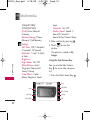
Phone Overview
P h o n e O ve r v i ew
14
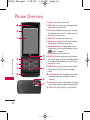
1.Earpiece Lets you hear the caller.
2. Slide Slide up to answer an incoming call and
slide it down to end the call.
3.LCD Screen Displays incoming calls, messages
and indicator icons as well as a wide variety of
content you select to view.
4.TALK Key Use to place or answer calls.
5.Alphanumeric Keypad Use to enter numbers
and characters and select menu items.
6.Vibrate Mode Key In standby mode, set the
vibrate mode by pressing and holding the key
about 2 seconds.
7. Microphone Lets callers hear you.
8.BACK Key Deletes single spaces or characters
with a quick press, but press and hold to delete
entire words. Will also back you out of menus,
one level at a time.
9.PWR/END Key Use to turn the power on/off
and to end a call. Also returns to standby
mode.
10. Lock Mode Key Use to lock the phone (from
standby mode press and hold for about 3
seconds).
11. Camera Lens Used to take photos and record
video. Keep it clean for optimal photo quality.
12. Flash When taking a picture, a light flashes.
UX830_Eng.qxd
4/18/08
6:08 PM
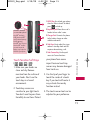
1.HOLD Key Use to lock your phone
when the slide is closed. To unlock,
press
or slide up.
2.Earphone Jack Allows the use of a
headset to hear caller's voice.
3.Charger Port Connects the phone
to the battery charger or other
available accessories.
4.Side Keys Use to adjust the ringer
volume in standby mode and the
earpiece volume during a call.
5.Side Camera Key Use for quick
access to Camera functions.
microSD™ card slot
(accommodates optional
microSD™ card up to
4GB.) Insert microSD™
card for external memory.
Use LG-approved
microSD™ card. To access
the microSD™ card slot
you must remove the
battery cover located on
the back of your phone.
,
,
,
)
1. Make sure your hands are
clean and dry. Remove
moisture from the surface of
your hands. Don't use the
touch keys in a humid
environment.
2. Touch key sensors are
sensitive to your light touch.
You don't need to press them
forcefully to use them. Protect
your phone from severe
impact because touch key
sensors may become damaged
from harsh use.
3. Use the tip of your finger to
touch the center of a touch
key. If you touch off-center it
may activate the nearby
function instead.
P h o n e O ve r v i ew
Touch Sensitive Soft Keys
(
Page 15
4. The touch sensor level can be
adjusted to your preference.
15
UX830_Eng.qxd
4/18/08
6:08 PM
Page 16
Phone Overview
5. When both the outside LCD
screen and touch key lights are
off, touch keys are deactivated.
Press the Unlock Key ( ) to
turn on the Touch Screen and
touch key lights.
P h o n e O ve r v i ew
6. If the slide is closed and the
Touch Protection function is
on, during calls the Touch
Protection feature is
automatically enabled.
7. Keep metal and other
conductive material away from
the surface of touch keys
because contact may cause
electronic interference.
WARNING
● Do
not put heavy objects on the
Touch Screen.
● Do not sit on your phone because
it may damage the Touch Screen.
● Do not drag or scratch your
phone with any sharp materials.
● Do not keep your phone in
extreme conditions (places that
are too humid, hot, or cold).
● Keep chemicals away from your
phone because they may change
the cosmetic or functional
features of your phone.
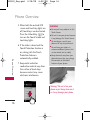
Warning! Do not sit on your
phone or put heavy items on it
as it may damage your phone.
16
UX830_Eng.qxd
4/18/08
6:08 PM
Page 17
The Touch Screen is a great way to interact with the
UX830 software. Take a little time to become accustomed
to using it. If it doesn’t react as you expect, adjust the
Touch Screen calibration.
TIP Keep in mind that the smaller the text appears on the
screen, the smaller the area of touch activation. Try zooming
the screen in, if available, to increase the touch area.
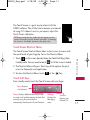
Touch Screen Shortcut Menu
The Touch Screen Shortcut Menu allows instant access to menus with
the quick touch of your fingertip. To use the Shortcut Menu:
2. The Shortcut Menu will open. Touch any of the options for quick
access to frequently used applications.
3. To close the Shortcut Menu, touch
or the
Key.
P h o n e O ve r v i ew
1. Touch
on the screen (located above the Touch Soft Keys) from
standby mode. You may need to touch
first if the screen is locked.
Touch Soft Keys
From standby mode, touch the Touch Screen with your finger.
Menu: Displays
a list of menus.
Phone: Displays additional touch keys so you
can make a call without opening the slide. Dial
manually using the numeric keys or
automatically from Recent Calls and Contacts.
Message:
Displays the
Messaging
menu.
Contacts:
Displays your
Contact List.
17
UX830_Eng.qxd
4/18/08
6:08 PM
Page 18
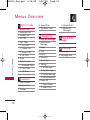
Menus Overview
Recent Calls
1.
2.
3.
4.
5.
M e nu s O ve r v i ew
Missed Calls
Received Calls
Dialed Calls
All Calls
Call Timer
1. Last Call
2. Home Calls
3. Roam Calls
4. All Calls
6. Data
7. Data Counter
1. Received Data
2. Sent Data
3. All Data
Contacts
1. New Contact
2. Contact List
3. Groups
18
4. Speed Dials
5. My Name Card
Messaging
1. New Text Message
2. New Picture
Message
3. Inbox
4. Sent
5. Drafts
6. Voicemail
7. Quick-Text
8. Settings
1. All Messages
2. Text Message
3. Picture Message
4. Edit Voicemail#
9. Delete All
1. Delete Inbox
2. Delete Sent
3. Delete Drafts
4. Delete All
Messages
New Events
Manager
easyedge
1. easyedge
2. easyedge Info
UX830_Eng.qxd
4/18/08
Music
1.
2.
3.
4.
5.
6.
All Songs
Playlists
Recently Played
Artists
Genres
Albums
6:08 PM
Page 19
Voice Command
Alarm Clock
Calendar
World Clock
Take Photo
Calculator
Image
Ez Tip Calc
Record Video
M e nu s O ve r v i ew
Shuffle
Notepad
Video
Record Voice
Unit Converter
Audio
19
UX830_Eng.qxd
4/18/08
6:08 PM
Page 20
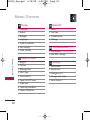
Menus Overview
Display
1. Wallpaper
2. Banner
3. Backlight
4. Languages
5. Clock & Calendar
6. Font Settings
7. Color Scheme
M e nu s O ve r v i ew
20
Bluetooth
1.
2.
3.
4.
Power
Add New
Paired Devices
Settings
USB Connection
1. USB Modem
2. USB Mass Storage
Sound & Touch
1.
2.
3.
4.
5.
6.
7.
8.
9.
Ringers
Volume
Message Alert
Alert Type
Service Alerts
Power On/Off Tones
Slide Tone
Touch Key Feedback
Touch Calibration
Security
1.
2.
3.
4.
5.
Lock Phone
Restrictions
Emergency #s
Change Lock Code
Reset Default
UX830_Eng.qxd
4/18/08
Call Settings
1.
2.
3.
4.
5.
6.
7.
8.
Answer Options
End Options
Auto Retry
One-Touch Dial
Voice Privacy
Auto Volume
Airplane Mode
TTY Mode
6:08 PM
Page 21
System
1. Network
2. Location
Phone Information
M e nu s O ve r v i ew
1. My Number
2. ESN/MEID
3. Icon Glossary
4. Version
5. Memory
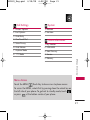
Menu Access
Touch the MENU
Touch Key to have access to phone menus.
To access the MENU, unlock first by pressing down the unlock key on
the left side of your phone. To go back to standby mode, touch
or press
at the bottom center of your phone.
21
UX830_Eng.qxd
4/18/08
6:08 PM
Page 22
Getting Started with Your Phone
The Battery
Note
It is important to fully charge the
battery before initial use of the
phone.
G ett i n g S ta r te d w i t h Yo u r P h o n e
The phone comes with a
rechargeable battery. Keep the
battery charged while not in use
in order to maximize talk and
standby time. The battery charge
level is shown at the top of the
LCD screen.
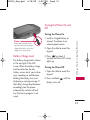
Installing the Battery
Insert the bottom of the battery
into the opening on the back of
the phone, then push the battery
down until the latch clicks.
Removing the Battery
22
1. Turn off the phone, then push
down on the battery cover
button (located on the top of
your phone).
2. While holding down the
battery cover button, lift and
remove the battery cover.
3. Lift the top of the battery out
using the fingertip cutouts,
then remove it.
Charging the Battery
To use the charger provided with
your phone:
Warning! Use only the charger
provided with the phone. Using
any charger other than the one
included with the UX830 may
damage your phone or battery.
1. Plug the end of the adapter
into the phone’s charger port
and the other end into an
electrical outlet.
2. The charge time varies
depending upon the battery
level.
UX830_Eng.qxd
4/18/08
6:08 PM
Page 23
Turning the Phone On and
Off
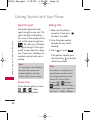
Turning the Phone On
Please make sure that the LG
logo faces up before inserting a
charger, data cable, etc into the
charger port of your phone.
Battery Charge Level
The battery charge level is shown
at the top right of the LCD
screen. When the battery charge
level becomes low, the low
battery sensor alerts you in three
ways: sounding an audible tone,
blinking the battery icon, and
displaying a warning message. If
the battery charge level becomes
exceedingly low, the phone
automatically switches off and
any function in progress is not
saved.
1. Install a charged battery or
connect the phone to an
external power source.
2. Open the slide to reveal the
keypad.
3. Press
for about 3
seconds until the LCD screen
lights up.
Turning the Phone Off
1. Open the slide to reveal the
keypad.
2. Press and hold
display turns off.
G ett i n g S ta r te d w i t h Yo u r P h o n e
Notice
until the
23
UX830_Eng.qxd
4/18/08
6:08 PM
Page 24
Getting Started with Your Phone
G ett i n g S ta r te d w i t h Yo u r P h o n e
Signal Strength
Making Calls
Call quality depends on the
signal strength in your area. The
signal strength is indicated on
the screen as the number of bars
next to the signal strength icon
. The more bars, the better
the signal strength. If the signal
quality is poor, move to an open
area. If you are in a building, the
reception may be better near a
window.
1. Make sure the phone is
turned on. If not, press
for about 3 seconds.
Note
The call quality is also affected by
the places where you are and
weather conditions with radio
frequency (RF) emission changes.
Screen Icons
To see the icon glossary, touch
->
->
-> Icon
Glossary on your phone.
24
2. Enter the phone number
(include the area code if
needed).
3. Press
or touch Call .
lf the phone is locked, press
the Unlock Key
on the left
side of your phone.
Note
If the phone is restricted, you can
only dial phone numbers saved in
the Emergency Numbers or your
Contact List. To turn off this
function:
->
Settings ->
Security -> Enter Lock Code. ->
2 Restrictions -> Enter Application
Lock Code. -> 1 Calls -> 4 None
UX830_Eng.qxd
4/18/08
6:08 PM
4. Press
or touch END to
end the call.
Correcting Dialing Mistakes
Redialing Calls
1. Press
twice to redial the
last number you dialed. The
last 150 numbers (dialing,
incoming, missed) are stored
in the call history list and you
can also select any of these to
redial.
Receiving Calls
1. When the phone rings or
vibrates, press
to answer.
Tip
Call Settings Menu allows you to
choose answer options:
Open Slide/ Press Any Key/ Press
Send Key/ Auto Answer
Note
If you press
or (the side
keys), while the phone is ringing,
the ringing or vibration is muted for
that call.
2. Press
to end the call.
G ett i n g S ta r te d w i t h Yo u r P h o n e
If you make a mistake while
dialing a number, press
or
touch
once to
erase the last digit entered, or
hold down
or touch and
hold
for at least 2 seconds
to go to standby mode.
Page 25
25
UX830_Eng.qxd
4/18/08
6:08 PM
Page 26
Quick Access to Convenient Features
Q u i c k Ac c es s to C o nve n i e n t Fe at u res
Lock Mode
Volume Quick Adjustment
Sets your phone to require a 4digit password in order to use
the phone.
Use the side keys to adjust the
ringer volume in standby mode,
and the earpiece volume during a
call. The upper key increases the
volume and the lower key
decreases the volume.
Note
Until you change it, the default
lock code/password is the last 4
digits of your phone number.
To quickly lock your phone press
for three seconds. To
cancel, touch Unlock and enter
the password.
Mute Function
The Mute Function is used
during a phone call. To quickly
activate the Mute function, touch
and touch Mute/ Unmute.
- or Touch
26
to mute and unmute.
Note
Keypad Volume is adjusted
through the Sounds Volume Menu.
(
->
-> Sound & Touch
-> Volume -> Keypad).
Call Waiting
Your cellular service may offer
call waiting. While a call is in
progress, two beeps indicate
another incoming call. When call
waiting is enabled, you may put
the active call on hold while you
answer the other incoming call.
Check with your cellular service
provider for information about
this function.
UX830_Eng.qxd
1. Press
call.
4/18/08
6:08 PM
to receive a waiting
while simultaneously dialing that
phone number for you. Speed
Dial Number 1 is set to Voice
Mailbox by default and is
unchangeable.
Caller ID
Caller ID displays the phone
number or name of the incoming
call. If the caller’s identity is stored
in Contacts, the name will appear
along with the phone number.
Check with your service provider to
ensure they offer this feature.
Speed Dialing
Speed dialing is a convenient
feature that allows you to make
phone calls quickly. A number
key can be assigned to a specific
phone number. By pressing and
holding down a number key, your
phone will recall the phone
number associated from the
Contact List and display it briefly
Dialing Single Digit Speed
Dials (from 2 to 9)
Press and hold the Speed Dial
number.
OR
Enter the Speed Dial number
and press
.
Dialing Double Digit Speed
Dials (from 10 to 99)
Q u i c k Ac c es s to C o nve n i e n t Fe at u res
2. Press
again to switch
between calls.
Page 27
Press the first digit and then
press and hold the key of the
second digit.
OR
Enter the first and second
digits and press
.
27
UX830_Eng.qxd
4/18/08
6:08 PM
Page 28
Entering and Editing Information
Text Input
You can enter information using the Touch Screen or the keypad.
Each has special key functions to help you with text entry.
E n te r i n g a n d E d i t i n g I n f o r m at i o n
28
Using the Touch Screen
When creating a Text, Picture or Video message using the outside LCD,
the Touch Screen provides you with Touch Keys specific to the type of
field.
UX830_Eng.qxd
4/18/08
6:08 PM
Page 29
Contacts in Your Phone’s Memory
Phone Numbers With
Pauses
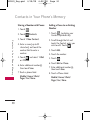
1. From standby mode enter the
phone number you want to
save (up to 48 digits).
When you call automated
systems such as voice mail or
credit billing numbers, you often
have to enter a series of numbers
to navigate through the system.
Instead of entering these
numbers by hand, you can store
the numbers in your Contacts
separated by special pause
characters (W, P). There are two
different types of pauses you can
use when storing a number:
2. Touch
.
3. Touch Save and select either
New Entry or Existing Entry
on the pop-up screen.
4. Touch a Phone Label.
Mobile/ Home/ Work/
Pager/ Fax/ None
Note
Wait (W)
Use Existing Entry to add another
phone number to a contact already
stored in memory.
The phone stops dialing until
you select Release to advance to
the next number.
5. Enter a name for the phone
number (up to 32 characters)
and touch Save.
A confirmation message is
displayed briefly.
C o n ta c ts i n Yo u r P h o n e ’s M e m o r y
The Basics of Storing
Contacts Entries
Pause (P)
The phone waits 2 seconds
before sending the next string of
digits.
29
UX830_Eng.qxd
4/18/08
6:08 PM
Page 30
Contacts in Your Phone’s Memory
Storing a Number with Pauses
C o n ta c ts i n Yo u r P h o n e ’s M e m o r y
30
1. Touch
.
2. Touch
Contacts.
3. Touch 1 New Contact.
4. Enter a name (up to 32
characters) and touch the
number field to enter a
number.
5. Touch
and select 1 Wait
or 2 Pause.
6. Enter additional number(s)
then touch Save.
7. Touch a phone label.
Mobile/ Home/ Work/
Pager/ Fax/ None
Adding a Pause to an Existing
Number
1. Touch
. to display your
Contacts alphabetically.
2. Scroll through the list and
touch the Contact entry you
wish to edit. Touch
.
3. Touch Edit.
4. Touch the number.
5. Touch
.
6. Touch Wait or Pause.
7. Enter additional number(s),
then touch Save.
8. Touch a Phone Label.
Mobile/ Home/ Work/
Pager/ Fax/ None
UX830_Eng.qxd
4/18/08
6:08 PM
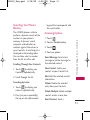
Searching Your Phone’s
Memory
Scrolling Through Your Contacts
keypad that corresponds with
the search letter.
Accessing Options
1. Touch
.
2. Touch a Contact entry.
3. Touch
.
4. Touch an option:
Send Message: Send a text
message or picture message to
the selected contact.
1. Touch
to display your
Contacts alphabetically.
New Contact: Add a new
contact to your Contact List.
2. Scroll through the list.
Edit: Edit the selected contact
information.
Searching by Letter
1. Touch
to display your
contacts alphabetically.
2. Press (or press repeatedly)
the key on the alphanumeric
C o n ta c ts i n Yo u r P h o n e ’s M e m o r y
The UX830 phone is able to
perform a dynamic search of the
contents in your phone’s
memory. A dynamic search
compares entered letters or
numbers against the entries in
your Contacts. A matching list is
displayed in descending order.
You can then select a number
from the list to call or edit.
Page 31
Delete: Delete the selected
entry from your Contacts.
Delete Multiple: Delete multiple
contact entries at one time.
Send Contact: Send a
31
UX830_Eng.qxd
4/18/08
6:08 PM
Page 32
Contacts in Your Phone’s Memory
C o n ta c ts i n Yo u r P h o n e ’s M e m o r y
contact(vCard) via Bluetooth. In
case Bluetooth power is not on,
a notice pops up to turn
Bluetooth on.
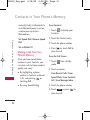
From Contacts
Set Speed Dial/ Remove Speed
Dial
2. Touch the Contact entry.
Set as Default #
4. Press
or touch Call to
place the call.
Making a Call From Your
Phone’s Memory
Once you have stored phone
numbers in your Contacts, you
can place calls to those numbers
quickly and easily.
●
By highlighting a phone
number in Contacts or Recent
Calls, and pressing
or
touching Call.
●
By using Speed Dialing.
1. Touch
to display your
Contacts.
3. Touch the phone number.
From the Call Screen
1. Touch
mode.
from standby
2. Touch an option.
From Recent Calls/ From
Speed Dials/ From Contacts
List/ From Message Inbox
3. Touch the phone number.
4. Touch Call or press
place the call.
32
to
UX830_Eng.qxd
4/18/08
6:08 PM
Page 33
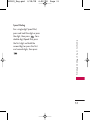
Speed Dialing
C o n ta c ts i n Yo u r P h o n e ’s M e m o r y
For a single-digit Speed Dial,
press and hold the digit or press
the digit, then press
. For a
double-digit Speed Dial, press
the first digit and hold the
second digit or press the first
and second digits, then press
.
33
UX830_Eng.qxd
4/18/08
6:08 PM
Page 34
Using Phone Menus
Recent Calls
The Recent Calls Menu is a list
of the last phone numbers or
Contact entries for calls you
placed, accepted, or missed. It is
continually updated as new
numbers are added to the
beginning of the list and the
oldest entries are removed from
the bottom of the list.
1. Missed Calls
Allows you to view the list of
missed calls; up to 50 entries.
1. Touch
.
2. Touch
.
3. Touch 1 Missed Calls.
4. Touch the entry.
U s i n g P h o n e M e nu s
●
Press
to place a call to
the number.
●
Touch
to select Call/
Save/ Send Message/ View
Timer/ Delete/ Delete
Multiple.
Note
To view a quick list of all your
recent calls, press TALK Key
from standby mode.
Note
The Save Option will be displayed as
Contact Details if the selected
number is already saved in your
Contacts.
●
34
Press
to return to
standby mode.
UX830_Eng.qxd
4/18/08
6:08 PM
Page 35
3. Touch 4 All Calls.
Allows you to view the list of
incoming calls; up to 50 entries.
4. The history of all calls is
displayed.
1. Touch
.
5. Call Timer
2. Touch
.
3. Touch 2 Received Calls.
Allows you to view the duration
of selected calls.
4. Touch the entry.
1. Touch
.
2. Touch
.
3. Dialed Calls
Allows you to view the list of
outgoing calls; up to 50 entries.
1. Touch
.
2. Touch
.
3. Touch 5 Call Timer.
4. Touch a call list.
Last Call/ Home Calls/ Roam
Calls/ All Calls
3. Touch 3 Dialed Calls.
6. Data
4. Touch the entry.
Allows you to view the list of
data calls; up to 50 entries.
4. All Calls
1. Touch
.
Allows you to view a list of all
calls.
2. Touch
.
1. Touch
.
2. Touch
.
U s i n g P h o n e M e nu s
2. Received Calls
3. Touch 6 Data.
4. Touch the entry.
35
UX830_Eng.qxd
4/18/08
6:08 PM
Page 36
Using Phone Menus
7. Data Counter
Allows you to check the amount
of memory used for data calls.
1. Touch
.
2. Touch
.
3. Touch 7 Data Counter.
4. Touch a data call list.
U s i n g P h o n e M e nu s
Received Data/ Sent Data/
All Data
Contacts
The Contacts Menu allows you to
store names, phone numbers and
other information in your phone’s
memory. When you access your
Contacts, the number in
parentheses represents the
number of entries you have
stored (up to 500).
1. New Contact
Allows you to add a new contact
to your Contact List.
Note
Using this submenu, the number is
saved as a new Contact. To save
the number into an existing
Contact, edit the Contact entry.
1. Touch
.
2. Touch
.
3. Touch 1 New Contact.
4. Enter the name.
36
UX830_Eng.qxd
4/18/08
6:08 PM
5. Touch the Phone Number field
, and enter the number.
●
6. Continue entering Contact
information by touching the
corresponding field and
entering the desired
information.
7. Touch Save when you are
finished.
Allows you to view your Contact
List.
Touch
to select one of
the following:
Send Message/ New
Contact/ Edit/ Delete/
Delete Multiple/
Send Contact/
Set(Remove) Speed Dial/
Set as Default #
●
Touch New Contact to
store new contact
information.
3. Groups
3. Touch 2 Contact List.
Allows you to view your grouped
Contacts, add a new group,
change the name of a group, or
delete a whole group.
4. Touch a Contact entry.
1. Touch
.
5. Choose from the following
options:
2. Touch
.
1. Touch
.
2. Touch
.
●
Scroll through your
Contacts alphabetically.
U s i n g P h o n e M e nu s
2. Contact List
Page 37
3. Touch 3 Groups.
4. Choose from the following
37
UX830_Eng.qxd
4/18/08
6:08 PM
Page 38
Using Phone Menus
options:
and touch Assign.
●
Touch a group to view.
5. Touch the Contact.
●
Touch a group, then touch
to choose from the
following options:
6. Touch the icon next to the
phone number to switch
between numbers, then touch
Select.
U s i n g P h o n e M e nu s
Send Message/ New Group/
Edit/ Delete/ Delete
Multiple/ Send via
Bluetooth
4. Speed Dials
Allows you to view your Speed
Dials list, designate new Speed
Dials, or remove Speed Dial
designations entered in your
Contacts.
1. Touch
.
2. Touch
.
3. Touch 4 Speed Dials.
4. Touch the Speed Dial location
(or press the corresponding
number key on the keypad)
38
A confirmation message is
displayed.
5. My Name Card
Allows you to view all of your
personal Contact information
including name and phone
numbers.
1. Touch
.
2. Touch
.
3. Touch 5 My Name Card.
4. Touch Edit.
5. Touch the feature you want to
edit.
UX830_Eng.qxd
4/18/08
6:08 PM
6. Edit the information as
necessary and touch Save.
Note
You cannot edit your mobile phone
number, but you can add an
additional phone number.
Page 39
Messaging
Shortcut
From standby mode, touch
.
1. New Text Message
U s i n g P h o n e M e nu s
The phone can store up to 540
messages. The UX830 supports
up to 160 characters. The
information stored in the
message is determined by phone
model and service capability.
Other limits such as available
characters per message may
exist, please check with your
service provider for system
features and capabilities.
Allows you to send text
messages, pages, and e-mail
transmissions. Each message will
be formatted and sent according
to the destination address.
39
UX830_Eng.qxd
4/18/08
6:08 PM
Page 40
Using Phone Menus
The Basics of Sending a Text
Message
1. Touch
.
and
2. Touch Messaging
1. New Text Message.
3. Touch the address field and
enter the recipient's address.
4. Touch the Message tab to
access the message screen.
U s i n g P h o n e M e nu s
5. Type your message (text or
e-mail).
6. Touch Send .
A confirmation message is
displayed.
Customizing the Text Message
Using Options
1. Touch
.
2. Touch Messaging
and
1 New Text Message.
3. Touch
40
.
4. Touch the option(s) to
customize.
Contacts To select a recipient
from your Contact List.
Recent Calls To select a
recipient from your Recent Calls.
Recent Messages Choose
Inbox/ Sent to select a recipient
from your Recent Messages.
Groups Select a recipient from
your Groups.
General/ Family/ Friends/
Colleagues/ Business/ School
*Priority Level Choose Normal/
High to set the priority level of
your message.
*Callback # Choose On/ Off/
Edit to set your callback number
to On or Off, or to edit your
callback number.
*Delivery Notice Choose
Enhanced/ Normal to set the
status of the Delivery Notice.
Cancel Cancels editing your
message.
* These options are only
available from the Message tab.
UX830_Eng.qxd
4/18/08
6:08 PM
5. Complete and send the
message.
4. Touch
.
5. Touch the option(s) to
customize.
Text Options
While you are composing the text
of a message you can insert
customized text.
Add Quick-Text/ Signature
Note
Messages with advanced features
cannot be sent to e-mail. If the text
format is set, the message is sent in
a form of photo message.
Depending on the network, such
enhanced messages may not be
supported.
Message Icon Reference
Text Message
Description
Single Address
Normal High
Picture Message
Multi-Address
Normal High
Single Address Multi-Address
Normal High Normal High
U s i n g P h o n e M e nu s
1. Touch
.
and
2. Touch Messaging
1 New Text Message.
3. Touch the Message tab to
access the message screen.
Page 41
Sent
Fail
Pending
Cancel
Delivery Acknowledgement
Read
Incomplete
WAP Push Msg
Draft
41
UX830_Eng.qxd
4/18/08
6:08 PM
Page 42
Using Phone Menus
Save As Draft/ Quick-Text
Priority Level Normal/ High
Callback # On/ Off
Delivery Notice Enhanced/
Normal
Cancel message Cancels editing
your message.
U s i n g P h o n e M e nu s
6. Complete your message and
send or save it.
2. New Picture Message
Allows you to send messages with
Text, Image/ Video, and Audio.
●
Image/ Video/ Take Photo/
Record Video
6. Touch the Image or Video you
want to add.
TIP
Slide your finger gently across the
screen from left to right or right to
left to scroll through the images.
7. Touch Audio, then touch the
option you want to select.
.
Audio/ Record Voice
2. Touch Messaging
and
2 New Picture Message.
8. Select the option(s) to
customize.
3. Touch the address field and
enter the recipient's address.
* Editing the Receiver
1. Touch
4. Touch the Subject tab and
enter a subject for your
message.
42
5. Touch the Slide1 tab to add
Text, Image/ Video, and Audio
to your message.
Contacts/ Recent Calls/
Recent messages/ Groups/
Online Album/ Cancel
* Editing the Text
UX830_Eng.qxd
4/18/08
6:08 PM
Preview Shows your message
before sending.
Page 43
3. Inbox
The phone alerts you in 3 ways
when you receive a new message
by:
Save As Draft/ Quick-Text
●
Displaying a notification
message on the screen.
●
Displaying the message icon
(It blinks when the
message is urgent).
●
Playing an audio tone or
vibrating, depending on your
personal sound settings.
Priority Level Normal/ High
Delivery Notice Informs you
that the message has been
successfully delivered to the
recipient.
Enhanced/ Normal
Remove Image/Video/ Audio/
Slide
Cancel Cancels the contents of
message field.
* Editing Subject
Preview/ Add Quick-Text/
Save As/ Priority Level/
Delivery Notice/ Cancel
9. Touch Send to send.
Received text messages, page
messages, picture messages and
e-mail lists may be searched and
the contents viewed. Received
messages are displayed from
newest to oldest.
U s i n g P h o n e M e nu s
Add Quick-Text/ Signature/
Slide
Viewing Your Inbox
Up to 400 messages (200 text
messages + 100 received picture
messages + 100 received picture
43
UX830_Eng.qxd
4/18/08
6:08 PM
Page 44
Using Phone Menus
message notifications) can be
stored in the Inbox.
1. Touch
Save Media Choose Image/
Audio to save the attached
media to your phone. (Only for
messages with Images or Audio
attached.)
.
2. Touch Messaging
3 Inbox.
and
Save Video Saves the attached
video to your phone. (Only for
messages with video attached.)
3. Touch an Inbox message.
U s i n g P h o n e M e nu s
●
Touch Reply to reply to the
message.
●
Touch
to choose from
the following options:
Text Messages: Call/ Delete/
Forward/ Save Contact/
Delete Multiple/ Lock/
Information
Picture Messages: Call/
Delete/ Forward/ Save
Contact/ Delete Multiple/
Lock/ Message Info
4. While viewing the selected
message, touch Reply or
44
.
Delete Deletes the selected
message.
Forward Forwards a received
message to other destination
address(es).
Reply with Copy Allows you to
reply by entering text within the
body of the received message.
Save Contact Stores the callback
number, e-mail address, and
numbers in the received message
into your Contacts.
Save Quick-Text
Call Back Calls the number in
the received message.
UX830_Eng.qxd
4/18/08
6:08 PM
Page 45
Lock/Unlock Locks or unlocks
the selected message.
Information/Message Info
Shows the message type priority
and status.
Save Media Choose Image/
Audio to save the attached
media to your phone. (Only for
messages with images or audio
attached.)
4. Sent
Save Video Saves the attached
video to your phone. (Only for
messages with video attached.)
1. Touch
.
2. Touch Messaging
4 Sent.
and
3. Touch an Outbox message.
While viewing the selected
Outbox message, touch
Resend or touch
.
Delete Deletes the selected
message.
Forward Forwards a sent
message to other destination
address(es).
Save Contact Choose New
Entry/ Existing Entry to save the
phone number in your Contacts.
Save as Quick-Text Stores the
message as quick text for future
messages.
Lock/Unlock Locks or unlocks
the selected message.
U s i n g P h o n e M e nu s
Up to 100 messages (50 sent
text messages + 50 sent picture
messages) can be stored in the
Sent folder. View lists and
contents of sent messages and
verify whether the transmission
was successful or not.
45
UX830_Eng.qxd
4/18/08
6:08 PM
Page 46
Using Phone Menus
Information/Message Info
Shows the message's Type,
Priority, and Status.
so that it is not erased if the
Erase Saved or Erase All feature is
used.
5. Drafts
5. Touch Edit to edit the Draft
message.
Displays saved messages and
draft messages.
1. Touch
.
U s i n g P h o n e M e nu s
2. Touch Messaging
5 Drafts.
and
4. Touch
to choose from the
following options:
Delete Deletes the selected
message from the Drafts.
Delete Multiple Deletes multiple
messages at one time.
Lock/Unlock Locks a message
While viewing the message,
touch
to choose from the
following options:
Add/ Save As/ Priority Level/
Callback #/ Delivery
Notice/ Cancel Message
3. Touch a Saved message.
Save Contact Choose New
Entry/ Existing Entry to save the
phone number in your Contacts.
46
●
●
When you are finished editing
the message, press Send to
send it.
6. Voicemail
Allows you to view new voice
messages recorded in your voice
mail box. Your phone will alert
you when you receive a new
voice message.
Checking Your Voicemail Box
UX830_Eng.qxd
1. Touch
4/18/08
6:08 PM
Edit/ Add/ Delete/ Delete
Multiple
.
2. Touch Messaging
6 Voicemail.
and
3. Choose from the following
options:
Touch Clear to clear the
voice mail count.
●
Touch Call to listen to the
message(s).
7. Quick-Text
Allows you to display, edit, and
add text phrases. These text
strings allow you to reduce
manual text input into messages.
.
2. Touch Messaging
7 Quick-Text.
8. Settings
Allows you to configure 9 settings
for received messages.
1. Touch
.
2. Touch Messaging
8 Settings.
and
3. Touch All Messages/ Text
Message/ Picture Message/
Edit Voicemail #.
4. Touch one of the settings.
Message Settings Sub-Menu
Descriptions
U s i n g P h o n e M e nu s
●
1. Touch
Page 47
and
3. Touch a Quick-Text message
and touch
to choose
from the following options:
All Messages
1. Auto Save (Auto Save/
Prompt/ Do Not Save)
47
UX830_Eng.qxd
4/18/08
6:08 PM
Page 48
Using Phone Menus
With this feature on, messages
are automatically saved in the
Sent folder when transmitted.
2. Auto Delete (On/ Off)
With this feature on, read
messages are automatically
deleted when you exceed the
storage limit.
U s i n g P h o n e M e nu s
3. Entry Mode
Allows you to select the
default input method
including T9Word, Abc and
123.
4. Signature
Allows you to make/edit a
signature to automatically
send with your messages.
5. Speed Messaging (On/ Off)
This feature allows you to
speed dial text and picture
messages.
48
For example:
1. Assign the number 2 as a
speed dial for one of your
contacts.
2. Compose a new text or
picture message. In the
destination address window,
hold down the number 2 key
instead of entering the
address, and the message will
be automatically sent to that
contact.
Text Message
1. Auto Play (On/ Off)
Allows the display to
automatically scroll down
while viewing messages.
2. Callback #
With this feature on, you can
input the callback number
that will automatically be
UX830_Eng.qxd
4/18/08
6:08 PM
included when you send a
message.
Picture Message
Edit Voicemail #
Allows you to manually enter the
access number for Voicemail
Service. This feature should only
be used when a VMS (Voicemail
Service) access number is not
provided from the network.
You can also erase all messages at
the same time.
1. Touch
.
2. Touch Messaging
9 Delete All.
and
3. Touch Delete Inbox/ Delete
Sent/ Delete Drafts/ Delete
All Messages.
U s i n g P h o n e M e nu s
1. Auto Receive (On/ Off)
With this feature on, any
media attached to a Picture
Message will automatically
download when the message
is received.
Page 49
9. Delete All
Allows you to erase all the
messages stored in your Inbox,
Sent, or Saved messages folders.
49
UX830_Eng.qxd
4/18/08
6:08 PM
Page 50
Using Phone Menus
New Events Manager
U s i n g P h o n e M e nu s
This menu allows you to view a
list of your missed alerts. When
there are multiple types of
missed alerts (Voicemail,
Messaging, Missed Calls, etc.),
they will all be displayed in the
New Events Manager. If there is
only one alert, it will be
displayed independently on your
screen, not in the New Events
Manager.
1. Touch
.
2. Touch New Events Manager
.
3. Touch the event you wish to
view.
easyedge
easyedge allows you to do more
than just talk on your phone.
easyedge is a technology and
service that allows you to
download and use applications
on your phone. With easyedge, it
is quick and easy to personalize
your phone to your lifestyle and
tastes. Just download the
applications that appeal to you
including ringtones, games to
productivity tools, you can find
something useful, practical, or
down right entertaining. There
are new applications constantly
available for your use.
Downloading Applications
You can download applications
and use easyedgeSM where service
is available.
Incoming Calls
While downloading an
50
UX830_Eng.qxd
4/18/08
6:08 PM
Page 51
application, incoming calls will
automatically be sent to your
voice mail, if available. If you do
not have voice mail, downloading
will not be interrupted by an
incoming call, and the caller will
receive a busy signal.
2. easyedge Info
When using applications, an
incoming call will automatically
pause the application and allow
you to answer the call. When you
complete your call, you can
resume using the application.
2. Touch easyedge
2 easyedge Info.
Allows you to download selected
applications while displaying the
entire application list retrieved
from the easyedge server
connection.
1. Touch
.
2. Touch easyedge
1 easyedge.
and
1. Touch
.
and
Managing Your easyedge
Applications
Add new applications and
remove old ones at any time.
Removing Applications
Only removing an application
deletes it completely from the
memory of the phone. To restore
an application once it has been
removed, you will be charged to
download it again.
U s i n g P h o n e M e nu s
1. easyedge
Allows you to set the Data Charges
Warning Message that appears
when you start easyedge to On or
Off.
1. Access easyedge.
2. Touch Settings.
51
UX830_Eng.qxd
4/18/08
6:08 PM
Page 52
Multimedia
3. Touch Manage Apps.
4. Touch the application to be
deleted.
5. Touch Remove.
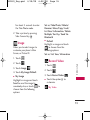
Music
Allows you to transfer songs
stored in your memory card.
To access this feature, there
should be stored music in your
memory card.
1. Touch
.
2. Touch
.
3. Touch Music
.
Multimedia
4. You can view the list of All
Songs, Playlists, Recently
Played, Artists, Genres and
Albums.
Notes
●
52
Check with microSD card is
inserted into your phone.
microSD card slot is located
with the inner side of battery
cover. (Refer to page 15.)
UX830_Eng.qxd
4/18/08
6:08 PM
Notes
●
●
●
Be sure to use only
recommended microSDTM cards.
Using non-recommended
microSDTM cards could cause
data loss and damage your
phone.
The microSDTM card and its
adapter can be easily damaged
by improper operation. Please be
careful when inserting, removing,
or handling it.
Shuffle
Allows you to customize your
phone's Wallpaper and Ringtone
shuffle lists.
1. Touch
2. Touch
4. Touch Ringtone List/
Wallpaper List.
5. Touch the Images or Ringtones
you want to add to your list.
6. When you are finished, touch
Done.
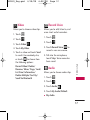
Take Photo
1. Touch
.
2. Touch
.
3. Touch Take Photo
●
.
Touch the option(s) to
customize.
My Image
Changes from Camera mode
to Video mode.
.
Flash
.
View Mode Normal View/
Wide View
3. Touch Shuffle
.
Multimedia
Do not remove a microSDTM card
while files are being accessed or
transferred. It will result in loss
or damage of data.
Page 53
Photo Settings
Resolution 2M/ 1.3M/
53
UX830_Eng.qxd
4/18/08
6:08 PM
Page 54
Multimedia
VGA(640*480)/
QVGA(320*240)
Quality Fine/ Normal/
Economy
Memory Storage Phone
Memory/ Card Memory
Multimedia
Settings
Self Timer Off/ 3 Seconds/
5 Seconds/ 10 Seconds
Multishot 1 shot/ 3 shots/
6 shots
Brightness
Night Mode On/ Off
White Balance Auto/
Tungsten/ Fluorescent/
Sunny/ Cloudy
Color Effects Color/
Mono/ Negative/ Sepia/
Aqua
Templates On/ Off
Shutter Sound Sound 1/
Sound 2/ Sound 3/
Sound 4/Say Cheese/ None
4. Take a picture by pressing
5. Touch
picture.
to save the
The picture is stored in My
Images.
Using the Side Camera Key
You can use the Side Camera
Key to access the sub menu
list.
1. Press the Side Camera Key
Flash
Zoom
View Mode
Photo Settings
My Image
Record Video
54
Settings
Back
.
UX830_Eng.qxd
4/18/08
6:08 PM
for about 3 seconds to enter
the Take Photo mode.
2. Take a picture by pressing
Side Camera Key .
Image
Allows you to select images to
customize your phone's Main
Screen, or Picture ID.
.
2. Touch
.
3. Touch Image
Record Video
.
4. Touch My Image/Default.
My Image
Highlight an image and touch
Send to send the image to
somebody else, or touch
to
choose from the following
options:
●
Set as/ Take Photo/ Delete/
Rename/ Move/Copy/ Lock/
List View/ Information/ Delete
Multiple/ Sort by/ Send Via
Bluetooth
● Default
Highlight an image and touch
to choose from the
following options:
Set as/ List View/ Information
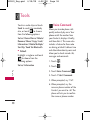
1. Touch
.
2. Touch
.
3. Touch Record Video
●
.
Multimedia
1. Touch
Page 55
Touch the option(s) to
customize.
My Video
55
UX830_Eng.qxd
4/18/08
6:08 PM
Page 56
Multimedia
Changes from Video mode
to Camera mode.
Flash
Mute/ Unmute
Multimedia
Video Settings
Resolution
QVGA(320*240)/
QCIF(176*144)
Quality Fine/ Normal/
Economy
Record Time 15 sec/ 1
hour
Memory Storage Phone
Memory/ Card Memory
Settings
Brightness
White Balance Auto/
Tungsten/ Fluorescent/
Sunny/ Cloudy
Color Effects Color/
Mono/ Negative/ Sepia/
Aqua
Cue Sound Cue 1/ Cue 2/
Cue 3/ Off
4. Press
to begin recording.
5. Press
to stop recording.
6. Touch
to save the video.
The video is stored in My
Video.
Flash
Zoom
Mute/ Unmute
Video Settings
My Video
Take Photo
56
Settings
Back
UX830_Eng.qxd
4/18/08
6:08 PM
Video
Page 57
Record Voice
Allows you to choose video clips.
1. Touch
.
2. Touch
.
3. Touch Video
.
4. Touch My Video.
5. Touch a video and touch Send
to send it to somebody else,
or touch
to choose from
the following options:
1. Touch
.
2. Touch
.
to
3. Touch Record Voice
record a new voice memo.
4. Talk into the microphone,
touch Stop. Voice memo has
been saved.
Audio
Allows you to choose audio clips.
1. Touch
.
2. Touch
.
3. Touch Audio
Multimedia
Record Video/ Delete/
Rename/ Move/ Copy/ Lock/
List View/ Information/
Delete Multiple/ Sort By/
Send Via Bluetooth
Allows you to add, listen to, and
erase short verbal reminders.
.
4. Touch My Audio/Default.
●
My Audio
57
UX830_Eng.qxd
4/18/08
6:08 PM
Page 58
Tools
Touch an audio clip and touch
Send to send it to somebody
else, or touch
to choose
from the following options:
Set as/ Record Voice/ Delete/
Rename/ Move/ Copy/ Lock/
Information/ Delete Multiple/
Sort By/ Send Via Bluetooth
● Default
Highlight a ringtone and touch
to choose from the
following options:
Set as/ Information
Voice Command
Allows you to make phone calls
quickly and easily by voice. Your
phone recalls the number from
your Contacts, displays it briefly,
and then dials it. This menu also
includes a feature for those who
are driving or blind. It delivers time
and date information by voice and
allows you to check missed calls,
messages and voicemails.
1. Touch
.
2. Touch
.
To o l s
3. Touch Voice Command
.
4. Touch 1 Start Command.
5. When prompted, say “Call”.
6. When prompted, say the
name or phone number of the
Contact you want to call. The
phone will ask you to confirm
the name or phone number
58
UX830_Eng.qxd
4/18/08
6:08 PM
following.
before dialing.
Call <Name/Number>/
Voicemail/ Missed Calls/
Messages/ Time & Date
Allows you to set up to four
alarms. At the alarm time, any set
alarm will sound the tone of your
choice, and a notification
message will be displayed on
your screen.
2. Touch
.
3. Touch Alarm Clock
.
10. Touch a tone and touch Set.
11. Touch Save.
Calendar
Allows you to store and access
your agenda(s). Simply store
your appointments in your
Calendar and your phone will
alert you with a reminder.
1. Touch
.
4. Touch the alarm number.
2. Touch
.
5. Set the alarm time.
3. Touch Calendar
6. Touch Once (recurring
setting).
4. Touch the scheduled day.
7. Touch to select one of the
5. Touch
New.
To o l s
.
Once/ Daily/ Mon - Fri/
Weekends
8. Touch Default (ringer type).
9. Touch My Audio/ Default.
Alarm Clock
1. Touch
Page 59
.
to select Add
59
UX830_Eng.qxd
4/18/08
6:08 PM
Page 60
Tools
6. Enter your schedule
information including:
Set Date
Topic
● Reminder
current date and time in that
city.
Set Time
Repeat
● Ringtone
●
●
●
●
7. Touch Save.
World Clock
Allows you to determine the
current time in another time zone
or country.
1. Touch
To o l s
2. Touch
.
.
4. Scroll through countries by
touching the arrows under the
globe.
5. Touch a country to view cities.
6. Touch a city to view the
60
8. Touch a city from the list.
Touch the selected city on the
globe to view the current date
and time.
9. Touch
to turn Daylight
Savings Time on or off.
Calculator
.
3. Touch World Clock
7. Touch Cities to choose from a
list of available cities.
Allows you to perform simple
mathematical calculations. You
can enter numbers up to the
sixth decimal place.
1. Touch
.
2. Touch
.
3. Touch Calculator
4. Enter data.
.
UX830_Eng.qxd
4/18/08
6:08 PM
Page 61
●
Use keypad to enter
numbers.
●
Use
to enter
decimals.
●
Touch
to delete the
last digit entered, or touch
and hold to erase the entire
entry.
1. Touch
.
●
Touch the corresponding
Touch Keys to enter
functions ( +, -, x, / ).
2. Touch
.
Touch = to complete
equation.
4. Touch Add to write a new
note.
Ez Tip Calc
5. Type the note, then touch
Save .
●
1. Touch
.
.
.
3. Touch Ez Tip Calc
Notepad
Allows you to add, read, edit,
and erase notes to yourself.
3. Touch Notepad
.
To o l s
Allows you to quickly and easily
estimate the tip and total
amount of a bill by inputting the
bill amount before tip, the tip
percentage, and divide it by the
number of people paying.
2. Touch
A confirmation message displays
briefly, then displays your list of
notes.
Viewing a Notepad Entry
1. Access Notepad and highlight
the entry.
61
UX830_Eng.qxd
4/18/08
6:08 PM
Tools
2. To erase, touch
●
●
.
Edit ● Add New
Delete ● Delete All
Touch the entry, touch View
and touch Edit. Or touch
and Edit.
Unit Converter
Allows you to convert units of
measurement.
To o l s
1. Touch
.
2. Touch
.
3. Touch Unit Converter
.
4. Touch the unit of measurement
you want to convert:
Area/ Length/ Temperature/
Mass/ Volume/ Velocity
62
Page 62
UX830_Eng.qxd
4/18/08
6:08 PM
Page 63
Settings
LCD screen.
Display
Options to customize your
phone's display screen.
1. Touch
.
2. Touch
.
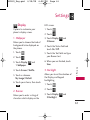
1. Wallpaper
3. Touch Display
2 Banner.
Allows you to choose the kind of
background to be displayed on
the phone.
1. Touch
.
2. Touch
.
3. Touch Display
1 Wallpaper.
and
4. Touch the Status field and
touch On/ Off.
5. Touch the Text field and type
your Banner text.
and
6. When you are finished, touch
Save.
3. Backlight
5. Touch a submenu.
My Image/ Default
Allows you to set the duration of
the Display and Keypad
backlighting.
6. Touch your choice, then touch
Set .
1. Touch
.
2. Touch
.
2. Banner
Allows you to enter a string of
characters which display on the
3. Touch Display
3 Backlight.
S ett i n g s
4. Touch Screen/ Shuffle.
and
63
UX830_Eng.qxd
4/18/08
6:08 PM
Page 64
Settings
4. Touch a submenu.
Display/ Keypad
clocks displayed on the LCD
screen.
5. Touch a duration time:
1. Touch
.
2. Touch
.
7 seconds/ 10 seconds/
15 seconds/ 30 seconds/
Always Off
6. When you are finished, touch
Save.
4. Languages
S ett i n g s
Allows you to set the bilingual
feature according to your
preference. Choose between
English and Spanish.
1. Touch
.
2. Touch
.
3. Touch Display
4 Languages.
4. Touch the left or right arrow
buttons to scroll through the
available option:
Off/ Analog Clock/ Digital
Clock/Dual Clock(Set City in
World Clock)/Calendar
5. Touch Save .
6. Font Settings
and
4. Touch English or Spanish.
5. Clock & Calendar
64
and
3. Touch Display
5 Clock & Calendar.
Allows you to select the type of
Allows you to select the type of
font displayed on LCD.
1. Touch
.
2. Touch
.
3. Touch Display
6 Font Settings.
and
UX830_Eng.qxd
4/18/08
6:08 PM
4. Touch a sub-menu.
Font Type
Options for Font Type
LG Gothic/ LG Serif/
LG Joy/ LG Script
7. Color Scheme
Allows you to choose the color
of the background screen.
1. Touch
.
2. Touch
.
4. Touch Background Style/
Menu Icons Style.
Options for Background Style
Black/ Blue/ Pond/ Metal
Sound & Touch
Options to customize the
phone’s sounds.
1. Ringers
Allows you to assign ringtones
for incoming calls.
1. Touch
.
2. Touch
.
3. Touch Sound & Touch
and 1 Ringers.
4. Touch All Calls/ Caller ID/ No
Caller ID/ Restricted Calls/
Shuffle.
S ett i n g s
and
3. Touch Display
7 Color Scheme.
Page 65
5. Touch My Audio/ Default.
6. Touch a ringer, then touch
Set .
Options for Menu Icons Style
Black & White/ Color
65
UX830_Eng.qxd
4/18/08
6:08 PM
Page 66
Settings
2. Volume
Allows you to set various volume
settings.
1. Touch
.
2. Touch
.
3. Touch Sound & Touch
and 2 Volume.
4. Touch Master Volume/
Keypad/ Earpiece/ Speaker.
5. Touch My Audio/ Default.
6. Touch a ringtone, then touch
Set.
For the Message Reminder
option, choose from the
following settings:
Once/ Every 2 Minutes/
Every 15 Minutes/ Off
S ett i n g s
5. Adjust the volume by touching
up or down arrow buttons and
touch OK to save the setting.
4. Alert Type
3. Message Alert
Allows you to select the alert
types.
Allows you to select the alert
tones for new messages.
1. Touch
.
1. Touch
.
2. Touch
.
2. Touch
.
3. Touch Sound & Touch
and 4 Alert Type.
3. Touch Sound & Touch
and 3 Message Alert.
66
4. Touch Text Message/ Picture
Message/ Voicemail/ All
Messages/ Message
Reminder.
4. Touch the option you want to
UX830_Eng.qxd
4/18/08
6:08 PM
Page 67
customize:
Call Connect
Call Alert/ Message Alert/
Schedule Alert/ Alarm Alert
Alerts you when the call is
connected.
5. Choose from the following
settings:
Ring Only/ Vibration/ Ring
& Vib
5. Service Alerts
Allows you to set any of the 3
Service Alert options to On or
Off.
.
2. Touch
.
3. Touch Sound & Touch
and 5 Service Alerts.
4. Touch an alert option.
Minute Beep
Alerts you 10 seconds before the
end of every minute during a call.
Alerts you when the battery
charge level is low.
5. Touch a setting.
On/ Off
(for Low Battery option,
Announce/ Tone)
6. Power On/Off Tones
Allows you to set the phone to
sound a tone when the phone is
powered on and off.
1. Touch
.
2. Touch
.
S ett i n g s
1. Touch
Low Battery
3. Touch Sound & Touch
and 6 Power On/Off Tones.
4. Touch a setting.
On/ Off
67
UX830_Eng.qxd
4/18/08
6:08 PM
Page 68
Settings
7. Slide Tone
Allows you to set a slide tone
that will play when you slide your
phone open or closed.
1. Touch
.
2. Touch
.
3. Touch Sound & Touch
and 7 Slide Tone.
4. Touch the option you want to
customize:
●
Type
Silence/ Vibration/ Sound/
Vibration & Sound
●
Sound
Sound 1/ Sound 2/
Sound 3/ Sound 4
●
Vibration
Vibration 1/ Vibration 2/
Vibration 3/ Vibration 4
●
Level
Level 1/ Level 2/ Level 3/
Level 4
4. Touch a setting.
On/ Off
S ett i n g s
8. Touch Key Feedback
Allows you to customize your
Touch Screen's sound and
vibration settings.
5. When you are finished, touch
Save.
1. Touch
.
9. Touch Calibration
2. Touch
.
Allows you to calibrate the Touch
Screen to ensure it is working
properly.
3. Touch Sound & Touch
and 8 Touch Key Feedback.
1. Touch
68
.
UX830_Eng.qxd
2. Touch
4/18/08
6:08 PM
.
3. Touch Sound & Touch
and 9 Touch Calibration.
4. Touch the target on the
screen to start calibration,
then touch the target each
time it appears.
Bluetooth®
Bluetooth QD ID B013122
Note
Read user guide of each Bluetooth
accessory that you are trying to
pair with your phone because the
instructions may be different.
Note
The Bluetooth features of this
handset may not be compatible
with all Bluetooth enabled devices.
Your service provider or handset
manufacturer cannot be held
responsible for compatibility issues
with devices not sold by the
service provider or handset
manufacturer.
1. Power
S ett i n g s
The UX830 is compatible with
devices that support the
Bluetooth headset and handsfree profile(s)*. You may create
and store 25 pairings within the
UX830 and connect to one
device at a time. The
approximate communication
range for Bluetooth wireless
technology is up to 30 feet (10
meters).
Page 69
Allows you to set the power
On/Off.
1. Touch
.
2. Touch
.
3. Touch Bluetooth
1 Power.
and
69
UX830_Eng.qxd
4/18/08
6:08 PM
Page 70
Settings
5. If Bluetooth power is set to
off, you will be prompted to
turn power on. Touch Yes.
4. Touch a setting.
On/ Off
Note
By default, your device’s Bluetooth
functionality is turned off.
2. Add New
Pairing is the process that allows
the handset to locate, establish
and register 1-to-1 connection
with the target device.
S ett i n g s
Pairing a new Bluetooth®
device
1. Touch
.
2. Touch
.
3. Touch Bluetooth
2 Add New.
7. The handset will prompt you
for the passkey. Consult the
Bluetooth accessory
instructions for the
appropriate passkey (typically
“0000” - 4 zeroes). Enter the
passkey and touch Pair .
8. Once pairing is successful,
touch Yes to connect with the
device.
and
4. Follow the Bluetooth
accessory instructions to set
the device to pairing mode.
70
6. The device will appear in the
Found Devices menu once it
has been located. Touch the
device, and touch Pair.
9. Once connected, you will see
the device listed in the Paired
Devices menu.
UX830_Eng.qxd
4/18/08
6:08 PM
Page 71
3. Paired Devices
4.2 Visibility Hidden
Allows you to view the list of
paired devices with your phone.
Allows you to set the visibility of
your Bluetooth feature.
1. Touch
.
1. Touch
.
2. Touch
.
2. Touch
.
3. Touch Bluetooth
3 Paired Devices.
and
4. Settings
,
3. Touch Bluetooth
4 Settings and 2 Visibility
Hidden.
4. Touch a setting.
4.1 Power Off
1. Touch
.
2. Touch
.
,
3. Touch Bluetooth
4 Settings and 1 Power Off.
4. Touch a setting.
On/ Off
Visible for 1 min/ Hidden
Note
If you turn on My Visibility, your
device is able to be searched by
other in-range Bluetooth devices.
S ett i n g s
Allows you to set the power
On/Off.
4.3 Device Name
Allows you to edit the name of
the Bluetooth device.
1. Touch
.
2. Touch
.
71
UX830_Eng.qxd
4/18/08
6:08 PM
Page 72
Settings
3. Touch Bluetooth
,
4 Settings and 3 Device
Name.
4. Hold down
existing name.
USB Connection
Allows you to select the data
port.
to clear the
1. Touch
.
5. Use the alphanumeric keypad
to enter a new alias.
2. Touch
.
6. Touch Save to save and exit.
3. Touch USB Connection
4. Touch a setting.
4.4 Device Info
Allows you to view your phone's
Bluetooth information.
S ett i n g s
1. Touch
.
2. Touch
.
USB Modem/ USB Mass
Storage
Using UX830 USB Drive Mode
Note
●
Users who use a memory card
reader do not require a USB
cable and would not need to
follow all those steps.
●
The supported files may vary
depending on the software
version of your phone.
,
3. Touch Bluetooth
4 Settings and 4 Device Info.
72
.
UX830_Eng.qxd
4/18/08
6:08 PM
Requirements:
●
UX830 Phone
●
UX830 USB Cable
●
microSDTM card installed on
the phone
●
Windows XP® Computer
Steps to using USB Mass Storage
mode:
1. Install the USB Cable drivers
into the computer.
3. Make sure the microSDTM card
has been formatted on the
phone so the required folders
will be created for use with
your phone. To format the
memory card navigate the
phone to Menu > Settings >
Phone Information >
6. Memory > 3. Card Memory
and select the Format option.
Select YES to format the
microSD™ card.
Note
If an error message saying, "Not
available during the UMS mode",
follow these steps:
Touch
>
> > USB Modem
Try the card again.
4. On the phone, go to Menu >
Settings > USB Connection >
USB Mass Storage.
A prompt will be displayed
stating “USB Connection Set”.
Press END key to return to
standby mode. After a few
seconds, a new explorer
window containing the
following folders should pop
up on the computer screen:
S ett i n g s
2. After installing the USB cable
drivers, connect the cable to
the computer and attach the
phone. Allow the computer to
detect the phone USB drivers
and install them.
Page 73
73
UX830_Eng.qxd
4/18/08
6:08 PM
Page 74
Settings
●
●
●
●
My_Audios
My_Images
My_Music
My_Videos
5. The Music Player files will
need to be copied into the
music folder. Music Player only
supports MP3 files, AAC files,
AAC+ files and WMA files.
(Not enhanced AAC files)
S ett i n g s
6. Once you are done
transferring files, disconnect
the phone. When you launch
Music Player or go into the
My Media folders, an
"Initializing..." folder will pop
up on the phone while it
refreshes the memory card
contents.
Security
The Security menu allows you to
secure the phone electronically.
1. Lock Phone
Keeps your phone from
unauthorized use. Once the
phone is locked, it is in restricted
mode until the lock code is
entered. You can still receive
phone calls and make emergency
calls. You can modify the lock
code by navigating to Change
Lock Code within the Security
menu.
1. Touch
.
2. Touch
.
3. Touch Security
.
4. Enter the four-digit lock code.
The default lock code is
commonly the last 4 digits of
your phone number.
74
UX830_Eng.qxd
4/18/08
6:08 PM
Page 75
5. Touch 1 Lock Phone.
3. Touch Security
6. Touch an option.
4. Enter the four-digit lock code.
Unlock The phone is never
locked (Lock mode can still be
used).
Lock The phone is always
locked. When locked, you can
receive incoming calls and
make only emergency calls.
On Power Up The phone is
locked when it is turned on.
2. Restrictions
5. Touch 2 Restrictions.
6. Enter the four-digit lock code.
7. Touch a Restrictions submenu,
then the setting.
Calls (Outgoing Only/
Incoming Only/ All/ None)/
Messaging (Outgoing Only/
Incoming Only/ All/ None)/
Camera (Unlock/Lock) /
easyedge (Unlock/Lock)
3. Emergency #s
Note
You can receive the incoming calls
from saved contacts on your phone,
when Incoming Only is on.
1. Touch
.
2. Touch
.
S ett i n g s
Allows you to restrict incoming
and/or outgoing calls.
.
Allows you to enter 3 emergency
numbers. You can call these
emergency numbers and 911,
even when the phone is locked
or restricted.
1. Touch
.
2. Touch
.
75
UX830_Eng.qxd
4/18/08
6:08 PM
Page 76
Settings
3. Touch Security
.
4. Enter the four-digit lock code.
5. Touch 3 Emergency #s.
6. Touch the emergency number
you want to edit.
4. Change Lock Code
5. Reset Default
Allows you to reset your phone
to the factory default settings.
1. Touch
.
2. Touch
.
Allows you to enter a new fourdigit lock code.
3. Touch Security
1. Touch
.
4. Enter the four-digit lock code.
2. Touch
.
5. Touch 5 Reset Default.
S ett i n g s
3. Touch Security
.
4. Enter the four-digit lock code.
5. Touch 4 Change Lock Code.
6. Touch 1 Phone Only or
2 Call & Applications.
7. Enter a new 4-digit lock code.
8. For confirmation, it will ask
76
you to enter the new lock
code again.
.
6. Read the disclaimer and touch
OK to continue.
7. A message will pop up that
says "User preference will be
restored to factory default."
Touch Yes or No.
UX830_Eng.qxd
4/18/08
6:08 PM
Call Settings
The Call Settings menu allows
you to designate how the phone
handles both incoming and
outgoing calls.
1. Answer Options
Allows you to determine how to
handle an incoming call.
1. Touch
.
2. Touch
.
4. Touch a setting.
Open Slide/ Press Any Key/
Press Send Key/ Auto
Answer
2. End Options
Allows you to determine how the
phone will disconnect from a call.
1. Touch
.
2. Touch
.
3. Touch Call Settings
and 2 End Options.
,
4. Touch a setting.
Close Slide/ Press End Key
Only
3. Auto Retry
Allows you to set the length of
time the phone waits before
automatically redialing a number
when the attempted call fails.
1. Touch
.
2. Touch
.
3. Touch Call Settings
and 3 Auto Retry.
S ett i n g s
,
3. Touch Call Settings
and 1 Answer Options.
Page 77
,
77
UX830_Eng.qxd
4/18/08
6:08 PM
Page 78
Settings
4. Touch a setting.
Off/ Every 10 Seconds/
Every 30 Seconds/ Every 60
Seconds
4. One-Touch Dial
Allows you to initiate a speed
dial call by pressing and holding
the speed dial digit. If set to Off,
Speed Dial numbers designated
in your Contacts will not
function.
S ett i n g s
1. Touch
.
2. Touch
.
,
3. Touch Call Settings
and 4 One-Touch Dial.
4. Touch a setting.
On/ Off
78
5. Voice Privacy
Allows you to set the voice
privacy feature for CDMA calls as
Enhanced or Standard. CDMA
offers inherent voice privacy.
Check with your service provider
for availability.
1. Touch
.
2. Touch
.
3. Touch Call Settings
and 5 Voice Privacy.
,
4. Touch a setting.
Enhanced/ Standard
6. Auto Volume
When this feature is enabled, it
provides a better audio
experience by controlling the
dynamic range and volume of the
sending and receiving voices
across different environments
and conditions.
UX830_Eng.qxd
1. Touch
.
2. Touch
.
4/18/08
3. Touch Call Settings
and 6 Auto Volume.
6:08 PM
Page 79
8. TTY Mode
,
4. Touch a setting.
On/ Off
7. Airplane Mode
Allows you to attach a TTY
(Teletype writer) device enabling
you to communicate with parties
also using a TTY device. A phone
with TTY support is able to
translate typed characters to
voice. Voice can also be
translated into characters and
then displayed on the TTY.
1. Touch
.
2. Touch
.
1. Touch
.
2. Touch
.
3. Touch Call Settings
and 8 TTY Mode.
,
3. Touch Call Settings
and 7 Airplane Mode.
4. Read the disclaimer and touch
OK .
,
4. Read the disclaimer and touch
OK .
S ett i n g s
Only allows you to use features
on your phone that do not
require wireless communications.
5. Touch a setting.
TTY Full/ TTY + Talk/ TTY +
Hear/ TTY Off
5. Touch a setting.
On/ Off
79
UX830_Eng.qxd
4/18/08
6:08 PM
Page 80
Settings
System
1. Network
Allows you to select the phone’s
NAM (Number Assignment
Module) if the phone is
registered with multiple service
providers.
1.1 System Select
1. Touch
.
Allows you to set up the phone
producer’s management
environment. Leave this setting
as the default unless you want to
alter system selection as
instructed by your service
provider.
2. Touch
.
The System menu allows you to
designate specific system
network settings.
,
3. Touch System
1 Network and 2 Set NAM.
4. Touch a setting.
S ett i n g s
NAM1/ NAM2
1. Touch
.
1.3 Auto NAM
2. Touch
.
Allows the phone to
automatically switch between
programmed telephone numbers
corresponding to the service
provider area.
,
3. Touch System
1 Network and 1 System
Select.
4. Touch a setting.
Home Only/ Automatic A/
Automatic B
80
1.2 Set NAM
1. Touch
.
2. Touch
.
UX830_Eng.qxd
4/18/08
6:08 PM
3. Touch System
,
1 Network and 3 Auto NAM.
4. Touch a setting.
On/ Off
Page 81
2. Location
Menu for GPS (Global
Positioning System: Satellite
assisted location information
system) mode.
1.4 Serving System
1. Touch
.
Identifies the channel number of
a system that is served as a SID
Number. This information should
only be used for technical
support.
2. Touch
.
.
2. Touch
.
,
3. Touch System
1 Network and 4 Serving
System.
and
4. Touch a setting.
Location On/ E911 Only
Note
GPS satellite signals are not always
transmitted, especially under bad
atmospheric and environmental
conditions, indoors etc.
S ett i n g s
1. Touch
3. Touch System
2 Location.
81
UX830_Eng.qxd
4/18/08
6:08 PM
Page 82
Settings
Phone Information
The Phone Information menu
provides you with specific
information pertaining to your
phone model.
1. Touch
.
2. Touch
.
Allows you to view the ESN and
MEID information of your phone.
1. Touch
.
2. Touch
.
3. Touch Phone Information
and 2 ESN/MEID.
S ett i n g s
3. Touch Phone Information
.
3. Icon Glossary
1. My Number
Allows you to view all the icons
and their meanings.
Allows you to view your phone
number.
1. Touch
.
2. Touch
.
1. Touch
.
2. Touch
.
3. Touch Phone Information
and 1 My Number.
82
2. ESN/MEID
3. Touch Phone Information
and 3 Icon Glossary.
UX830_Eng.qxd
4/18/08
6:08 PM
Reserved Memory/
Multimedia
4. Version
Allows you to view the versions
of various applications.
1. Touch
.
2. Touch
.
Page 83
●
Card Memory
3. Touch Phone Information
and 4 Version.
5. Memory
Allows you to check out the
memory status of your phone.
.
2. Touch
.
S ett i n g s
1. Touch
3. Touch Phone Information
and 5 Memory.
4. Touch an option:
●
Save Options
Image/ Video/ Audio
●
Phone Memory
83
UX830_Eng.qxd
4/18/08
6:08 PM
Page 84
Safety
TIA Safety Information
The following is the complete
TIA Safety Information for
wireless handheld phones.
Exposure to Radio Frequency
Signal
Your wireless handheld portable
phone is a low power radio
transmitter and receiver. When
ON, it receives and sends out
Radio Frequency (RF) signals.
S a f ety
In August, 1996, the Federal
Communications Commissions
(FCC) adopted RF exposure
guidelines with safety levels for
handheld wireless phones. Those
guidelines are consistent with
the safety standards previously
set by both U.S. and
international standards bodies:
ANSI C95.1 (1992) *
NCRP Report 86 (1986)
84
ICNIRP (1996)
* American National Standards
Institute; National Council on
Radiation Protection and
Measurements; International
Commission on Non-Ionizing
Radiation Protection.
Those standards were based on
comprehensive and periodic
evaluations of the relevant
scientific literature. For example,
over 120 scientists, engineers,
and physicians from universities,
government health agencies, and
industry reviewed the available
body of research to develop the
ANSI Standard (C95.1).
The design of your phone
complies with the FCC guidelines
(and those standards).
Antenna Care
Use only the supplied or an
approved replacement antenna.
Unauthorized antennas,
modifications, or attachments
UX830_Eng.qxd
4/18/08
6:08 PM
could damage the phone and
may violate FCC regulations.
Phone Operation
NORMAL POSITION: Hold the
phone as you would any other
telephone with the antenna
pointed up and over your
shoulder.
Tips on Efficient Operation
For your phone to operate
most efficiently:
Page 85
always obey them. Also, if using
your phone while driving, please
observe the following:
●
Give full attention to driving -driving safely is your first
responsibility;
●
Use hands-free operation, if
available;
●
Pull off the road and park
before making or answering a
call if driving conditions or the
law require it.
Electronic Devices
Driving
Pacemakers
Check the laws and regulations
on the use of wireless phones in
the areas where you drive and
The Health Industry
Manufacturers Association
Most modern electronic
equipment is shielded from RF
signals. However, certain
electronic equipment may not be
shielded against the RF signals
from your wireless phone.
S a f ety
Don’t touch the antenna
unnecessarily when the phone is
in use. Contact with the antenna
affects call quality and may cause
the phone to operate at a higher
power level than otherwise
needed.
85
UX830_Eng.qxd
4/18/08
6:08 PM
Page 86
Safety
recommends that a minimum
separation of six (6) inches be
maintained between a handheld
wireless phone and a pacemaker
to avoid potential interference
with the pacemaker. These
recommendations are consistent
with the independent research
by and recommendations of
Wireless Technology Research.
Persons with pacemakers:
S a f ety
●
Should ALWAYS keep the
phone more than six (6)
inches from their pacemaker
when the phone is turned ON;
●
Should not carry the phone in
a breast pocket;
●
Should use the ear opposite
the pacemaker to
minimize the potential for
interference;
●
86
Should turn the phone OFF
immediately if there is any
reason to suspect that
interference is taking place.
Hearing Aids
Some digital wireless phones may
interfere with some hearing aids.
In the event of such interference,
you may want to consult your
service provider (or call the
customer service line to discuss
alternatives).
Other Medical Devices
If you use any other personal
medical device, consult the
manufacturer of your device to
determine if it is adequately
shielded from external RF energy.
Your physician may be able to
assist you in obtaining this
information.
Health Care Facilities
Turn your phone OFF in health
care facilities when any
regulations posted in these areas
UX830_Eng.qxd
4/18/08
6:08 PM
instruct you to do so. Hospitals
or health care facilities may use
equipment that could be
sensitive to external RF energy.
Vehicles
Posted Facilities
Turn your phone OFF in any
facility where posted notices so
require.
Aircraft
FCC regulations prohibit using
your phone while in the air.
Switch OFF your phone before
boarding an aircraft.
Blasting Areas
To avoid interfering with blasting
operations, turn your phone OFF
when in a “blasting area” or in
areas posted: “Turn off two-way
radio”. Obey all signs and
instructions.
Potentially Explosive
Atmosphere
Turn your phone OFF when in
any area with a potentially
explosive atmosphere and obey
all signs and instructions. Sparks
in such areas could cause an
explosion or fire resulting in
bodily injury or even death.
Areas with a potentially explosive
atmosphere are often, but not
always marked clearly. Potential
areas may include: fueling areas
(such as gasoline stations);
S a f ety
RF signals may affect improperly
installed or inadequately
shielded electronic systems in
motor vehicles. Check with the
manufacturer or its
representative regarding your
vehicle. You should also consult
the manufacturer of any
equipment that has been added
to your vehicle.
Page 87
87
UX830_Eng.qxd
4/18/08
6:08 PM
Page 88
Safety
below deck on boats; fuel or
chemical transfer or storage
facilities; vehicles using liquefied
petroleum gas (such as propane
or butane); areas where the air
contains chemicals or particles
(such as grain, dust, or metal
powders); and any other area
where you would normally be
advised to turn off your vehicle
engine.
For Vehicles Equipped with an
Air Bag
S a f ety
88
An air bag inflates with great
force. DO NOT place objects,
including either installed or
portable wireless equipment, in
the area over the air bag or in
the air bag deployment area. If
in-vehicle wireless equipment is
improperly installed and the air
bag inflates, serious injury could
result.
Safety Information
Please read and observe the
following information for safe
and proper use of your phone
and to prevent damage. Also,
keep the user guide in an
accessible place at all times after
reading it.
C a u t i o n! Violation of the
instructions may cause minor
or serious damage to the
product.
Charger and Adapter Safety
●
The charger and adapter are
intended for indoor use only.
●
Insert the battery pack
charger vertically into the wall
power socket.
●
Use the correct adapter for
your phone when using the
battery pack charger abroad.
UX830_Eng.qxd
●
4/18/08
6:08 PM
Only use the approved battery
charger. Otherwise, you may
cause serious damage to your
phone.
Recharge the battery after
long periods of non-use to
maximize battery life.
●
Battery life will vary due to
usage patterns and
environmental conditions.
Please dispose of your battery
properly or take it to your
local wireless carrier for
recycling.
●
Use of extended backlighting,
Browser, and data connectivity
kits affect battery life and
talk/standby times.
●
The battery doesn't need to
be empty before recharging.
●
The self-protection function of
the battery cuts the power of
the phone when its operation
is in an abnormal state. In this
case, remove the battery from
the phone, reinstall it, and turn
the phone on.
●
Use only LG-approved
chargers specific to your
phone model since they are
designed to maximize battery
life.
●
Do not disassemble or shortcircuit the battery.
●
Keep the battery’s metal
contacts clean.
●
Replace the battery when it no
longer provides acceptable
performance. The battery can
be recharged several hundred
times before replacement.
S a f ety
●
Battery Information and Care
●
Page 89
Explosion, Shock, and Fire
Hazards
●
Do not put your phone in a
place subject to excessive dust
and keep the minimum required
distance between the power
cord and heat sources.
89
UX830_Eng.qxd
4/18/08
6:08 PM
Page 90
Safety
●
●
●
S a f ety
●
90
Unplug the power cord prior
to cleaning your phone, and
clean the power plug pin when
it’s dirty.
When using the power plug,
ensure that it’s firmly
connected. If not, it may cause
excessive heat or fire.
If you put your phone in a
pocket or bag without
covering the receptacle of the
phone (power plug pin),
metallic articles (such as a
coin, paperclip or pen) may
short-circuit the phone.
Always cover the receptacle
when not in use.
Don’t short-circuit the battery.
Metallic articles such as a
coin, paperclip or pen in your
pocket or bag may shortcircuit the + and – terminals
of the battery (metal strips on
the battery) upon moving.
Short-circuit of the terminal
may damage the battery and
cause an explosion.
●
Do not disassemble or crush
the battery. It may cause a
fire.
General Notice
●
Using a damaged battery or
placing a battery in your
mouth may cause serious
injury.
●
Do not place items containing
magnetic components such as
a credit card, phone card,
bank book, or subway ticket
near your phone. The
magnetism of the phone may
damage the data stored in the
magnetic strip.
●
Talking on your phone for a
long period of time may
reduce call quality due to heat
generated during use.
●
When the phone is not used
for a long period time, store it
UX830_Eng.qxd
4/18/08
6:08 PM
important phone numbers.
(Ring tones, text messages,
voice messages, pictures, and
videos could also be deleted.)
The manufacturer is not liable
for damage due to the loss of
data.
in a safe place with the power
cord unplugged.
●
Using the phone in proximity
to receiving equipment (i.e.,
TV or radio) may cause
interference to the phone.
●
Do not use the phone if the
antenna is damaged. If a
damaged antenna contacts
skin, it may cause a slight
burn. Please contact an LG
Authorized Service Center to
replace the damaged antenna.
Do not immerse your phone
in water. If this happens, turn
it off immediately and remove
the battery. If the phone does
not work, take it to an LG
Authorized Service Center.
●
Do not paint your phone.
●
The data saved in your phone
might be deleted due to
careless use, repair of the
phone, or upgrade of the
software. Please backup your
●
When you use the phone in
public places, set the ringtone
to vibration so you don't
disturb others.
●
Do not turn your phone on or
off when putting it to your ear.
●
Use accessories, such as
earphones and headsets, with
caution. Ensure that cables are
tucked away safely and do not
touch the antenna
unnecessarily.
S a f ety
●
Page 91
91
UX830_Eng.qxd
4/18/08
6:08 PM
Page 92
Safety
Warning! Important
safety information
●
Avoid turning up the volume
to block out noisy
surroundings.
Avoiding hearing damage
●
Turn the volume down if you
can’t hear people speaking
near you.
S a f ety
Permanent hearing loss may
occur if you use your phone
and/or headset at a high volume.
Set the volume to a safe level.
You can adapt over time to a
higher volume of sound that may
sound normal but can be
damaging to your hearing. If you
experience ringing in your ears or
muffled speech, stop listening
and have your hearing checked.
The louder the volume, the less
time is required before your
hearing could be affected.
Hearing experts suggest that to
protect your hearing:
●
92
Limit the amount of time you
use your phone and/or
headset at high volume.
For information about how to set
a maximum volume limit on your
phone, see the features guide for
your phone.
Using your phone safely
Use of your phone while
operating a vehicle is not
recommended and is illegal in
some areas. Be careful and
attentive while driving. Stop
using your phone if you find it
disruptive or distracting while
operating any type of vehicle or
performing any other activity
that requires your full attention.
UX830_Eng.qxd
4/18/08
6:08 PM
Avoiding hearing damage
●
Limit the amount of time you
use headset at high volume.
●
Avoid turning up the volume
to block out noisy
surroundings.
●
Turn the volume down if you
can’t hear people speaking
near you.
For information about how to set
a maximum volume limit on your
handset, please refer to the
features guide for your handset.
Using headsets safely
Use of headsets to listen to
music while operating a vehicle is
not recommended and is illegal
in some areas. Be careful and
attentive while driving. Stop
using this device if you find it
disruptive or distracting while
operating any type of vehicle or
performing any other activity
that requires your full attention.
S a f ety
Permanent hearing loss may
occur if you use your headset at
a high volume. Set the volume to
a safe level. You can adapt over
time to a higher volume of sound
that may sound normal but can
be damaging to your hearing. If
you experience ringing in your
ears or muffled speech, stop
listening and have your hearing
checked. The louder the volume,
the less time is required before
your hearing could be affected.
Hearing experts suggest that to
protect your hearing:
Page 93
93
UX830_Eng.qxd
4/18/08
6:08 PM
Page 94
Safety
FDA Consumer
Update
The U.S. Food and Drug
Administration’s Center for
Devices and Radiological Health
Consumer Update on Mobile
Phones:
1. Do wireless phones pose a
health hazard?
S a f ety
94
The available scientific evidence
does not show that any health
problems are associated with
using wireless phones. There is
no proof, however, that wireless
phones are absolutely safe.
Wireless phones emit low levels
of Radio Frequency (RF) energy
in the microwave range while
being used. They also emit very
low levels of RF when in standby
mode. Whereas high levels of RF
can produce health effects (by
heating tissue), exposure to low
level RF that does not produce
heating effects causes no known
adverse health effects. Many
studies of low level RF exposures
have not found any biological
effects. Some studies have
suggested that some biological
effects may occur, but such
findings have not been confirmed
by additional research. In some
cases, other researchers have had
difficulty in reproducing those
studies, or in determining the
reasons for inconsistent results.
2. What is the FDA's role
concerning the safety of
wireless phones?
Under the law, the FDA does not
review the safety of radiationemitting consumer products such
as wireless phones before they
can be sold, as it does with new
drugs or medical devices.
However, the agency has
authority to take action if
wireless phones are shown to
emit Radio Frequency (RF)
UX830_Eng.qxd
4/18/08
6:08 PM
energy at a level that is
hazardous to the user. In such a
case, the FDA could require the
manufacturers of wireless phones
to notify users of the health
hazard and to repair, replace, or
recall the phones so that the
hazard no longer exists.
Although the existing scientific
data do not justify FDA
regulatory actions, the FDA has
urged the wireless phone
industry to take a number of
steps, including the following:
●
●
Support needed research into
possible biological effects of
RF of the type emitted by
wireless phones;
Design wireless phones in a
way that minimizes any RF
exposure to the user that is
not necessary for device
function; and
Cooperate in providing users
of wireless phones with the
best possible information on
possible effects of wireless
phone use on human health.
The FDA belongs to an
interagency working group of the
federal agencies that have
responsibility for different
aspects of RF safety to ensure
coordinated efforts at the federal
level. The following agencies
belong to this working group:
●
National Institute for
Occupational Safety and
Health
●
Environmental Protection
Agency
●
Occupational Safety and
Health Administration
●
National Telecommunications
and Information
Administration
The National Institutes of Health
participates in some interagency
working group activities, as well.
S a f ety
●
Page 95
95
UX830_Eng.qxd
4/18/08
6:08 PM
Page 96
Safety
The FDA shares regulatory
responsibilities for wireless
phones with the Federal
Communications Commission
(FCC). All phones that are sold
in the United States must comply
with FCC safety guidelines that
limit RF exposure. The FCC relies
on the FDA and other health
agencies for safety questions
about wireless phones.
S a f ety
96
The FCC also regulates the base
stations that the wireless phone
networks rely upon. While these
base stations operate at higher
power than do the wireless
phones themselves, the RF
exposures that people get from
these base stations are typically
thousands of times lower than
those they can get from wireless
phones. Base stations are thus
not the subject of the safety
questions discussed in this
document.
3. What kinds of phones are
the subject of this update?
The term “wireless phone” refers
here to handheld wireless phones
with built-in antennas, often
called “cell”, “mobile”, or “PCS”
phones. These types of wireless
phones can expose the user to
measurable Radio Frequency
(RF) energy because of the short
distance between the phone and
the user’s head.
These RF exposures are limited
by FCC safety guidelines that
were developed with the advice
of the FDA and other federal
health and safety agencies. When
the phone is located at greater
distances from the user, the
exposure to RF is drastically
lower because a person's RF
exposure decreases rapidly with
increasing distance from the
source. The so-called “cordless
phones,” which have a base unit
UX830_Eng.qxd
4/18/08
6:08 PM
connected to the telephone
wiring in a house, typically
operate at far lower power levels,
and thus produce RF exposures
far below the FCC safety limits.
4. What are the results of the
research done already?
had been genetically engineered
or treated with cancer-causing
chemicals so as to be predisposed to develop cancer in
the absence of RF exposure.
Other studies exposed the
animals to RF for up to 22 hours
per day. These conditions are
not similar to the conditions
under which people use wireless
phones, so we do not know with
certainty what the results of such
studies mean for human health.
Three large epidemiology studies
have been published since
December 2000. Between them,
the studies investigated any
possible association between the
use of wireless phones and
primary brain cancer, glioma,
meningioma, or acoustic
neuroma, tumors of the brain or
salivary gland, leukemia, or other
cancers. None of the studies
demonstrated the existence of
any harmful health effects from
S a f ety
The research done thus far has
produced conflicting results, and
many studies have suffered from
flaws in their research methods.
Animal experiments investigating
the effects of Radio Frequency
(RF) energy exposures
characteristic of wireless phones
have yielded conflicting results
that often cannot be repeated in
other laboratories. A few animal
studies, however, have suggested
that low levels of RF could
accelerate the development of
cancer in laboratory animals.
However, many of the studies
that showed increased tumor
development used animals that
Page 97
97
UX830_Eng.qxd
4/18/08
6:08 PM
Page 98
Safety
wireless phone RF exposures.
However, none of the studies can
answer questions about longterm exposures, since the
average period of phone use in
these studies was around three
years.
5. What research is needed to
decide whether RF exposure
from wireless phones poses a
health risk?
S a f ety
98
A combination of laboratory
studies and epidemiological
studies of people actually using
wireless phones would provide
some of the data that are
needed. Lifetime animal exposure
studies could be completed in a
few years. However, very large
numbers of animals would be
needed to provide reliable proof
of a cancer promoting effect if
one exists. Epidemiological
studies can provide data that is
directly applicable to human
populations, but ten or more
years follow-up may be needed
to provide answers about some
health effects, such as cancer.
This is because the interval
between the time of exposure to
a cancer-causing agent and the
time tumors develop — if they
do — may be many, many years.
The interpretation of
epidemiological studies is
hampered by difficulties in
measuring actual RF exposure
during day-to-day use of wireless
phones. Many factors affect this
measurement, such as the angle
at which the phone is held, or
which model of phone is used.
6. What is the FDA doing to
find out more about the
possible health effects of
wireless phone RF?
The FDA is working with the U.S.
National Toxicology Program and
with groups of investigators
around the world to ensure that
UX830_Eng.qxd
4/18/08
6:08 PM
high priority animal studies are
conducted to address important
questions about the effects of
exposure to Radio Frequency
(RF) energy.
The FDA and the Cellular
Telecommunications & Internet
Association (CTIA) have a formal
Cooperative Research And
Development Agreement
(CRADA) to do research on
wireless phone safety. The FDA
provides the scientific oversight,
obtaining input from experts in
government, industry, and
academic organizations. CTIAfunded research is conducted
through contracts with
independent investigators. The
initial research will include both
laboratory studies and studies of
wireless phone users. The
CRADA will also include a broad
assessment of additional
research needs in the context of
the latest research developments
around the world.
7. How can I find out how much
Radio Frequency energy
exposure I can get by using my
wireless phone?
S a f ety
The FDA has been a leading
participant in the World Health
Organization International
Electro Magnetic Fields (EMF)
Project since its inception in
1996. An influential result of this
work has been the development
of a detailed agenda of research
needs that has driven the
establishment of new research
programs around the world. The
project has also helped develop
a series of public information
documents on EMF issues.
Page 99
All phones sold in the United
States must comply with Federal
Communications Commission
(FCC) guidelines that limit Radio
Frequency (RF) energy exposures.
The FCC established these
99
UX830_Eng.qxd
4/18/08
6:08 PM
Page 100
Safety
S a f ety
100
guidelines in consultation with
the FDA and the other federal
health and safety agencies. The
FCC limit for RF exposure from
wireless phones is set at a
Specific Absorption Rate (SAR)
of 1.6 watts per kilogram (1.6
W/kg). The FCC limit is
consistent with the safety
standards developed by the
Institute of Electrical and
Electronic Engineering (IEEE) and
the National Council on
Radiation Protection and
Measurement. The exposure limit
takes into consideration the
body’s ability to remove heat
from the tissues that absorb
energy from the wireless phone
and is set well below levels known
to have effects. Manufacturers of
wireless phones must report the
RF exposure level for each model
of phone to the FCC. The FCC
website
(http://www.fcc.gov/oet/rfsafety)
gives directions for locating the
FCC identification number on
your phone so you can find your
phone’s RF exposure level in the
online listing.
8. What has the FDA done to
measure the Radio Frequency
energy coming from wireless
phones?
The Institute of Electrical and
Electronic Engineers (IEEE) is
developing a technical standard
for measuring the Radio
Frequency (RF) energy exposure
from wireless phones and other
wireless handsets with the
participation and leadership of
FDA scientists and engineers.
The standard, “Recommended
Practice for Determining the
Spatial-Peak Specific Absorption
Rate (SAR) in the Human Body
Due to Wireless Communications
Devices: Experimental
Techniques”, sets forth the first
consistent test methodology for
UX830_Eng.qxd
4/18/08
6:08 PM
9. What steps can I take to
reduce my exposure to Radio
Frequency energy from my
wireless phone?
If there is a risk from these
products — and at this point we
do not know that there is — it is
probably very small. But if you
are concerned about avoiding
even potential risks, you can take
a few simple steps to minimize
your exposure to Radio
Frequency (RF) energy. Since
time is a key factor in how much
exposure a person receives,
reducing the amount of time
spent using a wireless phone will
reduce RF exposure. If you must
conduct extended conversations
by wireless phone every day, you
could place more distance
between your body and the
source of the RF, since the
exposure level drops off
dramatically with distance. For
example, you could use a
S a f ety
measuring the rate at which RF is
deposited in the heads of
wireless phone users. The test
method uses a tissue-simulating
model of the human head.
Standardized SAR test
methodology is expected to
greatly improve the consistency
of measurements made at
different laboratories on the
same phone. SAR is the
measurement of the amount of
energy absorbed in tissue, either
by the whole body or a small
part of the body. It is measured
in watts/kg (or milliwatts/g) of
matter. This measurement is used
to determine whether a wireless
phone complies with safety
guidelines.
Page 101
101
UX830_Eng.qxd
4/18/08
6:08 PM
Page 102
Safety
headset and carry the wireless
phone away from your body or
use a wireless phone connected
to a remote antenna. Again, the
scientific data do not
demonstrate that wireless
phones are harmful. But if you
are concerned about the RF
exposure from these products,
you can use measures like those
described above to reduce your
RF exposure from wireless phone
use.
S a f ety
102
10. What about children using
wireless phones?
The scientific evidence does not
show a danger to users of
wireless phones, including
children and teenagers. If you
want to take steps to lower
exposure to Radio Frequency
(RF) energy, the measures
described above would apply to
children and teenagers using
wireless phones. Reducing the
time of wireless phone use and
increasing the distance between
the user and the RF source will
reduce RF exposure.
Some groups sponsored by
other national governments have
advised that children be
discouraged from using wireless
phones at all. For example, the
government in the United
Kingdom distributed leaflets
containing such a
recommendation in December
2000. They noted that no
evidence exists that using a
wireless phone causes brain
tumors or other ill effects. Their
recommendation to limit wireless
phone use by children was
strictly precautionary; it was not
based on scientific evidence that
any health hazard exists.
UX830_Eng.qxd
4/18/08
6:08 PM
11. What about wireless phone
interference with medical
equipment?
wireless phone EMI.
The FDA has tested hearing aids
for interference from handheld
wireless phones and helped
develop a voluntary standard
sponsored by the Institute of
Electrical and Electronic
Engineers (IEEE). This standard
specifies test methods and
performance requirements for
hearing aids and wireless phones
so that no interference occurs
when a person uses a
“compatible” phone and a
“compatible” hearing aid at the
same time. This standard was
approved by the IEEE in 2000.
S a f ety
Radio Frequency (RF) energy
from wireless phones can interact
with some electronic devices. For
this reason, the FDA helped
develop a detailed test method
to measure Electro Magnetic
Interference (EMI) of implanted
cardiac pacemakers and
defibrillators from wireless
telephones. This test method is
now part of a standard
sponsored by the Association for
the Advancement of Medical
Instrumentation (AAMI). The
final draft, a joint effort by the
FDA, medical device
manufacturers, and many other
groups, was completed in late
2000. This standard will allow
manufacturers to ensure that
cardiac pacemakers and
defibrillators are safe from
Page 103
The FDA continues to monitor
the use of wireless phones for
possible interactions with other
medical devices. Should harmful
interference be found to occur,
the FDA will conduct testing to
assess the interference and work
to resolve the problem.
103
UX830_Eng.qxd
4/18/08
6:08 PM
Page 104
Safety
S a f ety
104
12. Where can I find additional
information?
For additional information, please
refer to the following resources:
FDA web page on wireless
phones
(http://www.fda.gov/cellphones/)
Federal Communications
Commission (FCC) RF Safety
Program
(http://www.fcc.gov/oet/rfsafety)
International Commission on
Non-lonizing Radiation
Protection
(http://www.icnirp.de)
World Health Organization
(WHO) International EMF
Project
(http://www.who.int/emf)
National Radiological Protection
Board (UK)
(http://www.hpa.org.uk/radiation/)
10 Driver Safety Tips
Your wireless phone gives you the
powerful ability to communicate
by voice almost anywhere,
anytime. An important
responsibility accompanies the
benefits of wireless phones, one
that every user must uphold.
When operating a car, driving is
your first responsibility. When
using your wireless phone behind
the wheel of a car, practice good
common sense and remember
the following tips:
1. Get to know your wireless
phone and its features such as
speed dial and redial. Carefully
read your instruction manual
and learn to take advantage of
valuable features most phones
offer, including automatic
redial and memory. Also, work
to memorize the phone
keypad so you can use the
UX830_Eng.qxd
4/18/08
6:08 PM
speed dial function without
taking your attention off the
road.
2. When available, use a handsfree device. A number of
hands-free wireless phone
accessories are readily
available today. Whether you
choose an installed mounted
device for your wireless phone
or a speaker phone accessory,
take advantage of these
devices if available to you.
4. Suspend conversations during
hazardous driving conditions
or situations. Let the person
you are speaking with know
you are driving; if necessary,
suspend the call in heavy
traffic or hazardous weather
conditions. Rain, sleet, snow,
and ice can be hazardous, but
so is heavy traffic. As a driver,
your first responsibility is to
pay attention to the road.
5. Don’t take notes or look up
phone numbers while driving.
If you are reading an address
book or business card, or
writing a “to-do” list while
driving a car, you are not
watching where you are going.
It is common sense. Do not
get caught in a dangerous
situation because you are
reading or writing and not
paying attention to the road
or nearby vehicles.
S a f ety
3. Make sure you place your
wireless phone within easy
reach and where you can
reach it without removing
your eyes from the road. If
you get an incoming call at an
inconvenient time, if possible,
let your voicemail answer it for
you.
Page 105
105
UX830_Eng.qxd
4/18/08
6:08 PM
Page 106
Safety
6. Dial sensibly and assess the
traffic; if possible, place calls
when you are not moving or
before pulling into traffic. Try
to plan your calls before you
begin your trip or attempt to
coincide your calls with times
you may be stopped at a stop
sign, red light, or otherwise
stationary. But if you need to
dial while driving, follow this
simple tip -- dial only a few
numbers, check the road and
your mirrors, then continue.
S a f ety
106
7. Do not engage in stressful or
emotional conversations that
may be distracting. Stressful
or emotional conversations
and driving do not mix; they
are distracting and even
dangerous when you are
behind the wheel of a car.
Make people you are talking
with aware you are driving and
if necessary, suspend
conversations which have the
potential to divert your
attention from the road.
8. Use your wireless phone to call
for help. Your wireless phone is
one of the greatest tools you
can own to protect yourself
and your family in dangerous
situations -- with your phone
at your side, help is only three
numbers away. Dial 911 or
other local emergency number
in the case of fire, traffic
accident, road hazard, or
medical emergency. Remember,
it’s a free call on your wireless
phone!
9. Use your wireless phone to
help others in emergencies.
Your wireless phone provides
you a perfect opportunity to
be a “Good Samaritan” in
your community. If you see an
auto accident, crime in
UX830_Eng.qxd
4/18/08
6:08 PM
progress or other serious
emergency where lives are in
danger, call 911 or other local
emergency number, as you
would want others to do for
you.
special non-emergency
wireless number.
The above tips are meant as
general guidelines. Before
deciding to use your mobile
device while operating a vehicle,
it is recommended that you
consult your applicable
jurisdiction’s local laws or other
regulations regarding such use.
Such laws or other regulations
may prohibit or otherwise
restrict the manner in which a
driver may use his or her phone
while operating a vehicle.
S a f ety
10. Call roadside assistance or a
special wireless nonemergency assistance
number when necessary.
Certain situations you
encounter while driving may
require attention, but are not
urgent enough to merit a call
for emergency services. But
you can still use your
wireless phone to lend a
hand. If you see a brokendown vehicle posing no
serious hazard, a broken
traffic signal, a minor traffic
accident where no one
appears injured or a vehicle
you know to be stolen, call
roadside assistance or other
Page 107
107
UX830_Eng.qxd
4/18/08
6:08 PM
Page 108
Safety
Consumer Information
on SAR
(Specific Absorption Rate)
S a f ety
108
This Model Phone Meets the
Government’s Requirements for
Exposure to Radio Waves. Your
wireless phone is a radio
transmitter and receiver. It is
designed and manufactured not
to exceed the emission limits for
exposure to radiofrequency (RF)
energy set by the Federal
Communications Commission
(FCC) of the U.S. Government.
These FCC exposure limits are
derived from the
recommendations of two expert
organizations, the National
Counsel on Radiation Protection
and Measurement (NCRP) and
the Institute of Electrical and
Electronics Engineers (IEEE). In
both cases, the
recommendations were
developed by scientific and
engineering experts drawn from
industry, government, and
academia after extensive reviews
of the scientific literature related
to the biological effects of RF
energy.
The exposure Limit for wireless
mobile phones employs a unit of
measurement known as the
Specific Absorption Rate, or SAR.
The SAR is a measure of the rate
of absorption of RF energy by
the human body expressed in
units of watts per kilogram
(W/kg). The FCC requires
wireless phones to comply with a
safety limit of 1.6 watts per
kilogram (1.6 W/kg). The FCC
exposure limit incorporates a
substantial margin of safety to
give additional protection to the
public and to account for any
variations in measurements.
UX830_Eng.qxd
4/18/08
6:08 PM
Before a phone model is available
for sale to the public, it must be
tested and certified to the FCC
that it does not exceed the limit
established by the governmentadopted requirement for safe
exposure. The tests are
performed in positions and
locations (e.g., at the ear and
worn on the body) as required
by the FCC for each model.
This device was tested for typical
body-worn operations with the
back of the phone kept 0.79
inches (2.0 cm) between the
user’s body and the back of the
phone. To comply with FCC RF
exposure requirements, a
minimum separation distance of
0.79 inches (2.0 cm) must be
maintained between the user s
body and the back of the phone.
Third-party belt-clips, holsters,
and similar accessories
containing metallic components
should not be used. Body-worn
accessories that cannot maintain
0.79 inches (2.0 cm) separation
distance between the user's
body and the back of the phone,
and have not been tested for
typical body-worn operations
S a f ety
Tests for SAR are conducted
using standard operating
positions specified by the FCC
with the phone transmitting at its
highest certified power level in all
tested frequency bands.
Although SAR is determined at
the highest certified power level,
the actual SAR level of the phone
while operating can be well below
the maximum value. Because the
phone is designed to operate at
multiple power levels to use only
the power required to reach the
network, in general, the closer
you are to a wireless base station
antenna, the lower the power
output.
Page 109
109
UX830_Eng.qxd
4/18/08
6:08 PM
Page 110
Safety
may not comply with FCC RF
exposure limits and should be
avoided.
The FCC has granted an
Equipment Authorization for this
model phone with all reported
SAR levels evaluated as in
compliance with the FCC RF
emission guidelines.
S a f ety
The highest SAR value for this
model phone when tested for
use at the ear is 1.27 W/kg and
when worn on the body, as
described in this user’s manual, is
0.373 W/kg. While there may be
differences between SAR levels of
various phones and at various
positions, they all meet the
government requirement for safe
exposure.
SAR information on this model
phone is on file with the FCC
and can be found under the
Display Grant section of
http://www.fcc.gov/oet/fccid
110
after searching on FCC ID.
To find information that pertains
to a particular model phone, this
site uses the phone FCC ID
number which is usually printed
somewhere on the case of the
phone. Sometimes it may be
necessary to remove the battery
pack to find the number. Once
you have the FCC ID number for
a particular phone, follow the
instructions on the website and
it should provide values for
typical or maximum SAR for a
particular phone.
Additional information on
Specific Absorption Rates (SAR)
can be found on the Cellular
Telecommunications Industry
Association (CTIA) website at
http://www.ctia.org/
*In the United States and
Canada, the SAR limit for mobile
phones used by the public is 1.6
watts/kg (W/kg) averaged over
UX830_Eng.qxd
4/18/08
6:08 PM
one gram of tissue. The standard
incorporates a substantial margin
of safety to give additional
protection for the public and to
account for any variations in
measurements.
FCC Hearing-Aid
Compatibility (HAC)
Regulations for Wireless
Devices
While some wireless phones are
used near some hearing devices
(hearing aids and cochlear
implants), users may detect a
buzzing, humming, or whining
noise. Some hearing devices are
more immune than others to this
interference noise, and phones
also vary in the amount of
interference they generate.
The wireless telephone industry
has developed a rating system
for wireless phones, to assist
hearing device users to find
phones that may be compatible
with their hearing devices. Not
all phones have been rated.
Phones that are rated have the
rating on their box or a label
located on the box.
The ratings are not guarantees.
Results will vary depending on
the user's hearing device and
hearing loss. If your hearing
device happens to be vulnerable
to interference, you may not be
S a f ety
On July 10, 2003, the U.S.
Federal Communications
Commission (FCC) Report and
Order in WT Docket 01-309
modified the exception of
wireless phones under the
Hearing Aid Compatibility Act of
1988 (HAC Act) to require
digital wireless phones be
compatible with hearing-aids.
The intent of the HAC Act is to
ensure reasonable access to
telecommunications services for
persons with hearing disabilities.
Page 111
111
UX830_Eng.qxd
4/18/08
6:08 PM
Page 112
Safety
able to use a rated phone
successfully. Trying out the
phone with your hearing device
is the best way to evaluate it for
your personal needs.
M-Ratings: Phones rated M3 or
M4 meet FCC requirements and
are likely to generate less
interference to hearing devices
than phones that are not
labeled. M4 is the better/higher
of the two ratings.
S a f ety
112
Hearing devices may also be
rated. Your hearing device
manufacturer or hearing health
professional may help you find
this rating. Higher ratings mean
that the hearing device is
relatively immune to interference
noise. The hearing aid and
wireless phone rating values are
then added together. A sum of 5
is considered acceptable for
normal use. A sum of 6 is
considered for best use.
In the above example, if a hearing
aid meets the M2 level rating
and the wireless phone meets
the M3 level rating, the sum of
the two values equal M5. This
should provide the hearing aid
user with “normal usage” while
using their hearing aid with the
particular wireless phone.
“Normal usage” in this context is
defined as a signal quality that’s
acceptable for normal operation.
The M mark is intended to be
synonymous with the U mark.
The T mark is intended to be
synonymous with the UT mark.
The M and T marks are
UX830_Eng.qxd
4/18/08
6:08 PM
recommended by the Alliance for
Telecommunications Industries
Solutions (ATIS). The U and UT
marks are referenced in Section
20.19 of the FCC Rules. The
HAC rating and measurement
procedure are described in the
American National Standards
Institute (ANSI) C63.19
standard.
Page 113
When you're talking over the cell
phone, it's recommended you'd
turn the BT (Bluetooth) mode
off for HAC.
For information about hearing aids and digital wireless
phones
Gallaudet University, RERC
http://tap.Gallaudet.edu/DigWireless.KS/DigWireless.htm
S a f ety
FCC Hearing Aid Compatibility and Volume Control
http://www.fcc.gov/cgb/dro/hearing.html
Hearing Loss Association of America [HLAA]
http://www.hearingloss.org/learn/cellphonetech.asp
The Hearing Aid Compatibility FCC Order
http://hraunfoss.fcc.gov/edocs_public/attachmatch/FCC-03168A1.pdf
113
UX830_Eng.qxd
4/18/08
6:08 PM
Page 114
Accessories
There are a variety of accessories available for your mobile phone.
Consult your local dealer for availability. Optional items are sold
separately.
Ac c es s o r i es
Battery
Charger
Pouch
Battery
Stereo Headset Adaptor
with Microphone
Vehicle Power
Charger
Protection Film
(LCD Cover)
USB Cable
Stylus Touch Pen
Note
The actual images may vary.
114
UX830_Eng.qxd
4/18/08
6:08 PM
Page 115
Limited Warranty Statement
1. WHAT THIS WARRANTY
COVERS:
(1) The limited warranty for the
product extends for TWELVE
(12) MONTHS beginning on
the date of purchase of the
product with valid proof of
purchase, or absent valid
proof of purchase, FIFTEEN
(15) MONTHS from date of
manufacture as determined
by the unit’s manufacture
date code.
(2) The limited warranty extends
only to the original
purchaser of the product
and is not assignable or
(3) This warranty is good only
to the original purchaser of
the product during the
warranty period as long as it
is in the U.S, including
Alaska, Hawaii, U.S.
Territories and Canada.
(4) The external housing and
cosmetic parts shall be free
of defects at the time of
shipment and, therefore,
shall not be covered under
these limited warranty terms.
L i m i te d Wa r ra n ty S tate m e n t
LG offers you a limited warranty
that the enclosed subscriber unit
and its enclosed accessories will
be free from defects in material
and workmanship, according to
the following terms and
conditions:
transferable to any
subsequent purchaser/end
user.
(5) Upon request from LG, the
consumer must provide
information to reasonably
prove the date of purchase.
(6) The customer shall bear the
cost of shipping the product
to the Customer Service
115
UX830_Eng.qxd
4/18/08
6:08 PM
Page 116
Limited Warranty Statement
Department of LG. LG shall
bear the cost of shipping
the product back to the
consumer after the
completion of service under
this limited warranty.
L i m i te d Wa r ra n ty S tate m e n t
116
2. WHAT THIS WARRANTY
DOES NOT COVER:
(1) Defects or damages
resulting from use of the
product in other than its
normal and customary
manner.
(2) Defects or damages from
abnormal use, abnormal
conditions, improper
storage, exposure to
moisture or dampness,
unauthorized modifications,
unauthorized connections,
unauthorized repair, misuse,
neglect, abuse, accident,
alteration, improper
installation, or other acts
which are not the fault of
LG, including damage caused
by shipping, blown fuses,
spills of food or liquid.
(3) Breakage or damage to
antennas unless caused
directly by defects in
material or workmanship.
(4) That the Customer Service
Department at LG was not
notified by consumer of the
alleged defect or
malfunction of the product
during the applicable limited
warranty period.
(5) Products which have had the
serial number removed or
made illegible.
(6) This limited warranty is in
lieu of all other warranties,
express or implied either in
fact or by operations of law,
UX830_Eng.qxd
4/18/08
6:08 PM
statutory or otherwise,
including, but not limited to
any implied warranty of
marketability or fitness for a
particular use.
(8) All plastic surfaces and all
other externally exposed
parts that are scratched or
damaged due to normal
customer use.
(9) Products operated outside
published maximum ratings.
(10)Products used or obtained
in a rental program.
(11)Consumables (such as
fuses).
3. WHAT LG WILL DO:
“LG will, at its sole option, either
repair, replace or refund the
purchase price of any unit that
does not conform to this limited
warranty. LG may choose at its
option to use functionally
equivalent re-conditioned,
refurbished or new units or parts
or any units. In addition, LG will
not re-install or back-up any
data, applications or software
that you have added to your
phone. It is therefore
recommended that you back-up
any such data or information
prior to sending the unit to LG
to avoid the permanent loss of
such information.”
4. STATE LAW RIGHTS:
L i m i te d Wa r ra n ty S tate m e n t
(7) Damage resulting from use
of non-LG approved
accessories.
Page 117
No other express warranty is
applicable to this product. THE
DURATION OF ANY IMPLIED
WARRANTIES, INCLUDING THE
IMPLIED WARRANTY OF
MARKETABILITY, IS LIMITED TO
THE DURATION OF THE
EXPRESS WARRANTY HEREIN.
117
UX830_Eng.qxd
4/18/08
6:08 PM
Page 118
Limited Warranty Statement
L i m i te d Wa r ra n ty S tate m e n t
118
LG SHALL NOT BE LIABLE FOR
THE LOSS OF THE USE OF THE
PRODUCT, INCONVENIENCE,
LOSS OR ANY OTHER
DAMAGES, DIRECT OR
CONSEQUENTIAL, ARISING
OUT OF THE USE OF, OR
INABILITY TO USE, THIS
PRODUCT OR FOR ANY
BREACH OF ANY EXPRESS OR
IMPLIED WARRANTY,
INCLUDING THE IMPLIED
WARRANTY OF MARKETABILITY
APPLICABLE TO THIS
PRODUCT.
Some states do not allow the
exclusive limitation of incidental
or consequential damages or
limitations on how long an
implied warranty lasts; so these
limitations or exclusions may not
apply to you. This warranty gives
you specific legal rights and you
may also have other rights which
vary from state to state.
5. HOW TO GET WARRANTY
SERVICE:
To obtain warranty service,
please call or fax to the following
telephone numbers from
anywhere in the continental
United States:
Tel. 1-800-793-8896 or Fax.
1-800-448-4026
Or visit http://us.lgservice.com.
Correspondence may also be
mailed to:
LG Electronics Service- Mobile
Handsets
P.O. Box 240007, Huntsville, AL
35824
DO NOT RETURN YOUR
PRODUCT TO THE ABOVE
ADDRESS. Please call or write
for the location of the LG
authorized service center nearest
you and for the procedures for
obtaining warranty claims.
UX830_Eng.qxd
4/18/08
6:08 PM
Page 119
Index
A
Add New
Airplane Mode
Alarm Clock
Alert Type
All Calls
Answer Options
Audio
Auto Retry
Auto Volume
70
79
59
66
35
77
57
77
78
B
C
Calculator
Calendar
Call Settings
Call Timer
60
59
77
35
D
Data Counter
Delete All
Dialed Calls
Display
Drafts
36
49
35
63
46
E
easyedge
50, 51
easyedge Info
51
Emergency #s
75
End Options
77
Entering and Editing
Information
28
ESN/MEID
82
Ez Tip Calc
61
F
FCC Hearing-Aid
Compatibility (HAC)
Regulations for
Wireless Devices 111
FDA Consumer Update
94
Font Settings
64
G
Groups
37
I n d ex
Backlight
63
Banner
63
Battery Charge Level
23
69
Bluetooth®
Call Waiting
26
Caller ID
27
Change Lock Code 76
Charging the Battery
22
Clocks & Calendar 64
Color Scheme
65
Consumer Information
on SAR
108
Contact List
37
Contacts
36
Correcting Dialing
Mistakes
25
I
Icon Glossary
Image
Important Safety
Precautions
82
55
1
119
UX830_Eng.qxd
4/18/08
6:08 PM
Page 120
Index
Inbox
43
L
Languages
Location
Lock Mode
Lock Phone
64
81
26
74
I n d ex
24
83
18
66
39
34
52
26
38
82
N
Network
New Contact
120
O
One-Touch Dial
M
Making Calls
Memory
Menus Overview
Message Alert
Messaging
Missed Calls
Music
Mute Function
My Name Card
My Number
New Events Manager
50
New Picture Message
42
New Text Message 39
Notepad
61
80
36
78
R
Received Calls
Receiving Calls
Recent Calls
Record Video
Redialing Calls
Reset Default
Restrictions
Ringers
35
25
34
55
25
76
75
65
P
S
Paired Devices
71
Phone Information 82
Phone Overview
14
Power
69
Power On/Off Tones
67
Safety Information 88
Screen Icons
24
Security
74
Sent
45
Service Alerts
67
Settings
47, 71
Shuffle
53
Signal Strength
24
Slide Tone
68
Sound & Touch
65
Speed Dialing
27
Speed Dials
38
Q
Quick Access to
Convenient Features
26
Quick-Text
47
UX830_Eng.qxd
System
4/18/08
80
6:08 PM
Page 121
Using Phone Menus
34
T
V
Version
Video
Voice Command
Voice Privacy
Voicemail
Volume
Volume Quick
Adjustment
83
57
58
78
46
66
26
W
Wallpaper
63
Warning! Important
safety information 92
World Clock
60
I n d ex
Table of Contents 4
Take Photo
53
Technical Details 10
The Battery
22
TIA Safety Information
84
Touch Calibration 68
Touch Key Feedback
68
Touch Screen Shortcut
Menu
17
Touch Sensitive Soft
Keys
15
Touch Soft Keys
17
TTY Mode
79
Turning the Phone On
and Off
23
U
Unit Converter
USB Connection
62
72
121
UX830_Spa.qxd
4/18/08
6:40 PM
Page 1
Precaución de Seguridad Importante
Lea estas sencillas instrucciones. Romper las reglas puede ser
peligroso o ilegal. Se ofrece más información detallada en esta guía
del usuario.
1. No use nunca una batería no aprobada, ya que esto
podría dañar el teléfono o la batería, y podría
ocasionar que estalle la batería.
2. Nunca coloque el teléfono en un horno de microondas
ya que esto haría que estallara la batería.
3. Nunca almacene el teléfono a temperaturas menores
de -4°F ni mayores de 122°F.
4. No se deshaga de la batería mediante el fuego o con
materiales peligrosos o inflamables.
5. Al ir en automóvil, no deje el teléfono ni instale el kit
de manos libres cerca de la bolsa de aire. Si el equipo
inalámbrico está instalado incorrectamente y se activa
la bolsa de aire, usted puede resultar gravemente
lesionado.
6. No use un teléfono de mano cuando esté
conduciendo.
7. No use el teléfono en zonas donde esté prohibido
hacerlo. (Por ejemplo: en los aviones)
P re c a u c i ó n d e S e g u r i d a d I m p o r ta n te
¡Aviso! No seguir las instrucciones puede ocasionar lesiones graves o la
muerte.
1
UX830_Spa.qxd
4/18/08
6:40 PM
Page 2
Precaución de Seguridad Importante
1. No exponga cargador de baterías o el adaptador a la
luz directa del sol, ni lo utilice en sitios con elevada
humedad, como por ejemplo el baño.
P re c a u c i ó n d e S e g u r i d a d I m p o r ta n te
2. No use sustancias químicas corrosivas (como alcohol,
bencina, solventes, etc.) ni detergentes para limpiar el
teléfono. Existe riesgo de causar un incendio.
3. No deje caer el teléfono, ni lo golpee o agite
fuertemente. Tales acciones pueden dañar las tarjetas
de circuitos internas del teléfono.
4. No use el teléfono en áreas altamente explosivas, ya
que puede generar chispas.
5. No dañe el cable de corriente doblándolo,
retorciéndolo, tirando de él o calentándolo. No use la
clavija si está suelta, ya que esto puede ocasionar
incendios o descargas eléctricas.
6. No coloque objetos pesados sobre el cable de
corriente. No permita que el cable de corriente se
doble, ya que esto puede ocasionar incendios o
descargas eléctricas.
7. No manipule el teléfono con las manos húmedas
cuando se esté cargando. Puede causar un choque
eléctrico o dañar gravemente el teléfono.
8. No desarme el teléfono.
2
UX830_Spa.qxd
4/18/08
6:40 PM
Page 3
P re c a u c i ó n d e S e g u r i d a d I m p o r ta n te
1. No haga ni conteste llamadas mientras esté cargando el teléfono, ya que
puede causar un corto circuito en éste o provocar descargas eléctricas o
incendios.
2. No sostenga la antena ni permita que entre en contacto con su cuerpo
durante las llamadas.
3. Asegúrese de que no entren en contacto con la batería objetos con
bordes cortante, como dientes de animales o uñas. Hay riesgo de causar
un incendio.
4. Almacene la batería en un sitio alejado del alcance de los niños.
5. Cuide que los niños no se traguen partes del teléfono, como los tapones
de hule (del auricular, partes conectoras del teléfono, etc.) Esto podría
causar asfixia o sofocación, dando como resultado lesiones graves o la
muerte.
6. Desconecte el enchufe de la toma de corriente y el cargador cuando se
ilumina porque puede provocar unchoque electrico o peligro de incendio.
7. Sólo use baterías, antenas y cargadores proporcionados por LG.
La garantía no se aplicará a productos proporcionados por otros
proveedores.
8. Sólo personal autorizado debe darle servicio al teléfono y a sus
accesorios. La instalación o servicio incorrectos pueden dar como
resultado accidentes y por tanto invalidar la garantía.
9. Su proveedor de servicios proporciona uno o más números de
emergencia, tal como 911, a los cuales usted puede llamar en cualquier
circunstancia, incluso cuando su teléfono está bloqueado. Es posible que
los números de emergencia preprogramados de su teléfono no funcionen
en todo lugar, y a veces una llamada de emergencia no puede colocarse
debido a problemas de la red, ambientales o de interferencia.
3
UX830_Spa.qxd
4/18/08
6:40 PM
Page 4
Contenido
Precaución de Seguridad
Importante
1
Contenido
4
Bienvenidos
9
Detalles Técnicos
10
C o n te n i d o
Información de la FCC sobre
exposición a la RF
Contacto corporal durante el
funcionamiento
Antena externa instalada en un
vehículo
FCC Notice y Precaución
13
13
Descripción general del
teléfono
14
Teclas suaves sensibles al tacto
12
12
15
Menú Atajo De La Pantalla Táctil 17
Descripción general de los
menús
18
Acceso a los menús
4
21
Para hacer funcionar su
teléfono por primera vez 22
La batería
Instalación de la batería
Extraer la batería
22
22
22
Cargar la batería
22
Nivel de carga de la batería
23
Encender y apagar el teléfono
23
Encender el teléfono
Apagar el teléfono
Fuerza de la señal
23
23
23
Iconos en pantalla
24
Hacer llamadas
24
Corrección de errores de marcado 25
Remarcado de llamadas
25
Recibir llamadas
25
Acceso rápido a funciones
prácticas
26
Modo de bloqueo
26
Función de silencio
26
Ajuste rápido del volumen
26
Llam. en Espera
26
UX830_Spa.qxd
4/18/08
6:40 PM
Page 5
ID de Llamador
27
3. Llamadas de Salientes
35
Marcado rápido
27
4. Llamadas Todos
35
Introducir y editar
información
Entrada de texto
5. Ver Temporizador
35
28
6. Datos
36
28
Contactos
Contactos en la memoria del
teléfono
29
Aspectos básicos del almacenamiento
de entradas de contactos
29
Números de teléfono con pausas 29
Búsqueda en la memoria del
teléfono
31
Desplazamiento por sus contactos 31
Hacer llamadas desde la memoria
del teléfono
32
Uso de los menús del
teléfono
Llamas. Recntes
34
34
1. Llamada Perdidas
34
2. Llamadas Entrantes
35
36
37
1. Nuevo Contacto
37
2. Lista Contacto
37
3. Grupos
38
4. Marcado Veloz
38
5. Mi Tarjeta de Nombre
39
Mensajería
1. Nuevo Mensaje Texto
40
40
2. Nuevo Mensaje Foto
42
3. Entrada
44
4. Enviado
45
5. Borrador
46
6. Buzón de Voz
46
7. Textos Rápidos
47
8. Ambiente
47
9. Borrar Todo
49
Admin. nuevo evento
easyedge
C o n te n i d o
Agregar una pausa a un número ya
existente
30
7. Contador KB
49
50
5
UX830_Spa.qxd
4/18/08
6:40 PM
Page 6
Contenido
1. easyedge
51
2. easyedge Info
51
Multimedia
C o n te n i d o
Música
Shuffle
Tomar Foto
Imágenes
Grabar Vídeo
Vídeo
Grabar Voz
Audio
Voz Comando
Alarma de Reloj
Herramientas
Calendario
Reloj Mundial
Calculadora
Ez Sugerencia
Nota
Convertidor de Unidades
6
Ambiente
62
Pantalla
62
52
1. Papel Tapiz
52
53
53
55
55
56
57
57
58
58
2. Pendón
62
3. Luz de Fondo
62
58
59
59
60
60
61
61
62
4. Idiomas
63
5. Relojes & Calendario
63
6. Config de fuente
63
7. Esquemas de Color
64
Sonidos & Toque
65
1. Timbres
65
2. Volumen
65
3. Alertas de Mensaje
65
4. Sonidos Alerta
66
5. Alertas Servc
66
6. Tonos de Activación/
Desactivación
67
7. Tono de slide
67
8. Feedback de tecla de t...
67
9. Calibración
68
Bluetooth®
68
1. Potencia
69
UX830_Spa.qxd
4/18/08
6:40 PM
Page 7
2. Agregar Nuevo
69
Sistema
80
3. Pareja de Disposit.
70
1. Red
80
4. Configuración
70
2. Lugar
4.1 Potencia Encender
4.2 Visibilidad Escondido
4.3 Nombre de Aparato
4.4 Info de Aparato
Conexión USB
Seguridad
70
71
71
72
72
74
74
2. Restricciones
75
3. Emergencia #s
75
4. Cambiar Código de Bloq...
76
5. Restablecer Implícito
76
Config Llamada
77
1. Opciones Cont
77
2. Terminar Opciones
77
3. Auto Reintent
77
4. Marcar 1Toque
78
5. Privacidad
78
6. Volumen de Auto
78
7. Modo de Avión
79
8. Modo TTY
79
1. Mi Numero
81
82
82
2. ESN/MEID
82
3. Glosario de Iconos
82
4. Versión
83
5. Memoria
83
Información de seguridad de
la TIA
84
Exposición a las señales de
radiofrecuencia
Seguridad
84
84
Cuidado de la antena
85
Funcionamiento del teléfono
85
Sugerencias para un funcionamiento
más eficiente
85
Manejo
85
Dispositivos electrónicos
86
Marcapasos
86
Las personas con marcapasos:
86
Aparatos para la sordera
86
C o n te n i d o
1. Bloq. Teléfono
Info. de Tel
7
UX830_Spa.qxd
4/18/08
6:40 PM
Page 8
Contenido
Otros dispositivos médicos
87
Centros de atención médica
87
Vehículos
87
Instalaciones con letreros
87
Aeronaves
87
Áreas de explosivos
87
Atmósfera potencialmente explosiva 88
Para vehículos equipados con bolsas
de aire
88
Información de seguridad
89
C o n te n i d o
Seguridad del cargador y del
adaptador
89
Información y cuidado de la batería 89
Peligros de explosión, descargas
eléctricas e incendio
90
Aviso general
91
¡Información de Seguridad
Importante!
92
Evite los daños a la audición
92
Uso de su teléfono con seguridad 93
Evite los daños a la audición
93
Uso de los audífonos con seguridad94
Actualización de la FDA para los
consumidores
94
8
10 Consejos de Seguridad para
Conductores
105
Información al consumidor
sobre la SAR
109
Reglas para la compatibilidad
con aparatos para la sordera
(HAC) de la FCC para los
dispositivos inalámbricos
112
Accesorios
116
Índice
122
UX830_Spa.qxd
4/18/08
6:40 PM
Page 9
Bienvenidos
●
Teclado de 15 teclas y pantalla
●
Función de altavoz.
Interface activada por menús
con indicaciones para fácil
operación y configuración.
Respuesta con cualquier tecla,
respuesta automática,
remarcado automático,
marcado con una tecla y
marcado rápido con 99
ubicaciones de memoria.
Funciones bilingües (Inglés y
Español).
La tecnología inalámbrica
Bluetooth®.
del tacto.
●
●
●
●
Nota
B i e nve n i d o s
Felicidades por elegir el avanzado
y compacto teléfono celular
UX830 diseñado para funcionar
con la más reciente tecnología de
comunicaciones móviles digitales:
Acceso múltiple de división de
código (Code Division Multiple
Access, CDMA). Junto con las
muchas funciones avanzadas del
sistema CDMA, este teléfono
ofrece:
● Capacidad de almacenar
música y ranura para la tarjeta
de microSD™.
● Una claridad de voz
enormemente mejorada
● Diseño delgado y elegante
con antena interna (a lo largo
de esta guía del usuario, el
término "antena" se referirá a
la antena interna).
● LCD de 9 líneas, grande, de
fácil lectura, con luz de fondo
e iconos de estado.
● Localizador, mensajería, correo
de voz e identificador de
llamadas.
Las palabras de la marca y los
logotipos de Bluetooth® son
propiedad de Bluetooth SIG, Inc. y
cualquier uso de tales marcas por
parte de LG Electronics se hace bajo
licencia. Otras marcas y nombres
comerciales son de sus respectivos
propietarios.
9
UX830_Spa.qxd
4/18/08
6:40 PM
Page 10
Detalles Técnicos
D eta l l es Té c n i c o s
10
Información importante
Detalles técnicos
Esta guía del usuario contiene
información importante acerca del
uso y funcionamiento del
teléfono. Lea toda la información
con cuidado antes de usar el
teléfono para obtener un
desempeño óptimo y evitar
cualquier daño o mal uso del
aparato. Cualquier cambio o
modificación no aprobados
anulará la garantía.
EL UX830 es un teléfono de
modo dual que opera en ambas
frecuencias de Acceso múltiple
de división de código (CDMA):
servicios celulares a 800 MHz y
Servicios de comunicación
personal (Personal
Communication Services, PCS) a
1.9 Ghz.
Cumplimiento de clase B según el
artículo 15 de la FCC
Este dispositivo y sus accesorios
cumplen con el artículo 15 de las
reglas de la FCC. La operación está
sujeta a las dos condiciones
siguientes: (1) Este dispositivo y
sus accesorios no podrán causar
interferencias dañinas y (2) este
dispositivo y sus accesorios deben
tolerar cualquier interferencia que
reciban, incluida aquélla que pueda
provocar un funcionamiento
incorrecto.
La tecnología CDMA usa una
función llamada DSSS (Direct
Sequence Spread Spectrum,
Espectro propagado de
secuencia directa) que permite
que el teléfono evite que se
cruce la comunicación y que
varios usuarios empleen un canal
de frecuencia en la misma área
específica. Esto da como
resultado una capacidad 10
veces mayor en comparación con
el modo analógico. Además, las
funciones como handoff
(transferencia de enlace) suave y
más suave, handoff duro y
tecnologías de control de la
UX830_Spa.qxd
4/18/08
6:40 PM
potencia de radiofrecuencia
dinámica se combinan para
reducir las interrupciones en las
llamadas.
Las redes celular y CDMA PCS
constan de MSO (Oficina de
conmutación de telefonía móvil),
BSC (Controlador de estación de
base), BTS (Sistema de
transmisión de estación de base)
y MS (Estación móvil).
Institución
designada
* TSB -74: Protocolo entre un
sistema IS-95A y ANSI J-STD008
La duración de su batería es del
doble que la de IS-95.
La tabla siguiente muestra
algunos de los principales
estándares CDMA.
Descripción
TIA/EIA-IS2000
Interfaz de aire Modo dual CDMA
Protocolo de enlace de radio de 14.4 kbps y operaciones
interbandas
ICS-95 adoptado para la interfaz de aire 1xRTT cdma2000
de banda de frecuencia PCS
Red
TIA/EIA/IS-634
TIA/EIA/IS/651
TIA/EIA/IS-41-C
TIA/EIA/IS-124
MAS-BS
PCSC-RS
Operaciones intersistemas
Comunicación de datos de no señalización
Servicio
TIA/EIA/IS-96-B
TIA/EIA/IS-637
IS-801
Speech CODEC
Servicio de mensajes cortos
Servicio de determinación de posición (gpsOne)
Función
TIA/EIA/IS-97
TIA/EIA/IS-98
ANSI J-STD-018
ANSI J-STD-019
TIA/EIA/IS-125
Estación de base celular
Estación de móvil celular
Estación personal PCS
Estación de base PCS
Speech CODEC
TIA/EIA-95A
Interfaz de TSB-74
aire básica ANSI J-STD-008
D eta l l es Té c n i c o s
Estándar de
CDMA
Page 11
11
UX830_Spa.qxd
4/18/08
6:40 PM
Page 12
Detalles Técnicos
D eta l l es Té c n i c o s
12
Información de la FCC sobre
exposición a la RF
Contacto corporal durante el
funcionamiento
¡ADVERTENCIA! Lea esta
información antes de hacer
funcionar el teléfono.
Este dispositivo se probó para un
uso ordinario con la parte
posterior del teléfono a una
distancia de 2.0 cm (0.79
pulgadas) del cuerpo. Para cumplir
con los requisitos de exposición a
RF de la FCC, debe mantenerse
una distancia de separación
mínima de 2.0 cm (0.79
pulgadas) entre el cuerpo del
usuario y la parte posterior del
teléfono, incluida la antena, ya sea
extendida o retraída. No deben
usarse sujetadores de cinturón,
fundas y otros accesorios de
terceros que contengan
componentes metálicos. Evite el
uso de accesorios que no puedan
mantener una distancia de 2.0 cm
(0.79 pulgadas) entre el cuerpo
del usuario y la parte posterior del
teléfono y que no se hayan
probado para determinar que
cumplen los límites de exposición
a RF de la FCC.
En agosto de 1996, la Comisión
federal de comunicaciones (FCC)
de los Estados Unidos, con su
acción sobre el Informe y orden
FCC 96-326, adoptó un
estándar de seguridad
actualizado para la exposición
humana a la energía
electromagnética de
radiofrecuencia (RF) emitida por
transmisores regulados por la
FCC. Esos lineamientos son
consistentes con el estándar de
seguridad establecido
previamente por los cuerpos de
estándares tanto de los EE.UU.
como internacionales. El diseño
de este teléfono cumple con las
directrices de la FCC y estos
estándares internacionales.
UX830_Spa.qxd
4/18/08
6:40 PM
FCC Notice y Precaución
Este dispositivo y sus accesorios
cumplen con el artículo 15 de las
reglas de la FCC. El
funcionamiento está sujeto a las
dos siguientes condiciones: (1)
Este dispositivo y sus accesorios
no pueden causar interferencia
dañina y (2) este dispositivo y
sus accesorios deben aceptar
cualquier interferencia que
reciban, incluida la interferencia
que cause un funcionamiento no
deseado.
Cualquier cambio o modificación
no aprobado expresamente en
esta guía del usuario podría
anular su garantía para este
equipo. Use sólo la antena
incluida y aprobada. El uso de
antenas no autorizadas o
modificaciones no autorizadas
pueden afectar la calidad de la
llamada telefónica, dañar al
teléfono, anular su garantía o dar
como resultado una violación de
las reglas de la FCC.
No use el teléfono si la antena
está dañada. Si una antena
dañada entra en contacto con la
piel, puede producirse una ligera
quemadura. Comuníquese con su
distribuidor local para obtener
una antena de reemplazo.
D eta l l es Té c n i c o s
Antena externa instalada en un
vehículo
(Opcional, en caso de estar
disponible.)
Debe mantenerse una distancia
mínima de separación de 20 cm
(8 pulgadas) entre el usuario o
quien esté cerca y la antena
externa instalada en un vehículo
para satisfacer los requisitos de
exposición a RF de la FCC. Para
Obtener más información sobre
la exposición a la RF, visite el sitio
Web de la FCC en www.fcc.gov.
Page 13
13
UX830_Spa.qxd
4/18/08
6:40 PM
Page 14
Descripción general del teléfono
D es c r i p c i ó n g e n e ra l d e l te l é f o n o
1. Audífono Le permite escuchar a quien le llama.
2. Tapa Deslice el teléfono hacia arriba para
responder a una llamada entrante y deslícelo hacia
abajo para terminar la llamada.
3. Pantalla de cristal líquido Muestra mensajes e
iconos indicadores. Cuando la tapa está abierta, el
modo de ahorro de energía atenúna
automáticamente la pantalla y luego la oscurece si
no se oprime ninguna tecla.
4. Tecla TALK Utilícela para hacer o contestar
llamadas.
5. Teclado alfanumérico Úselo para introducir
números y caracteres y para seleccionar elementos
del menú.
6. Tecla de modo de vibrar Úsela en modo de
espera para fijar el modo vibrar manteniéndola
presionada 2 segundos aproximadamente.
7. Micrófono Permite que lo escuchen quienes lo
llaman.
8. Tecla BACK Con un toque rápido, borra caracteres
o espacios de a uno; si la mantiene oprimida,
borra palabras enteras. También sirve para
retroceder por los menús, un nivel a la vez.
9. Tecla PWR/END Úsela para apagar o
encender el teléfono y para terminar una
llamada. También regresa a la pantalla del
menú principal.
10. Tecla de modo de bloqueo Úsela en modo
de espera para fijar la función de bloqueo
manteniéndola presionada unos 3 sequndos.
11. Lente de la cámara Proyecta el objeto al tomar
una foto.
12. Flash Al tomar una foto, una luz se
enciende.
14
UX830_Spa.qxd
4/18/08
6:40 PM
Teclas suaves sensibles al tacto
,
,
,
)
1. Asegúrese de tener las manos
limpias y secas. Elimine la
humedad de la superficie de
sus manos. No use los teclas
táctiles en un entorno húmedo.
2. Los sensores de los teclas
táctiles son sensibles a un
toque ligero. No tiene que
oprimir los teclas táctiles de
modo prolongado o fuerte para
usarlos. Proteja su teléfono de
los golpes fuertes porque los
sensores de los teclas táctiles
pueden dañarse con el uso
violento.
3. Use la punta del dedo para
tocar el centro de los teclas
táctiles. Si los toca fuera del
centro, puede activar en su
lugar la función que está junto.
D es c r i p c i ó n g e n e ra l d e l te l é f o n o
1.Tecla HOLD Úsela para bloquear el
teléfono. Para desbloquearlo, deslícela
hacia arriba o toque
en la pantalla.
2.Conector del audífono Úselo para conectar el
audífiono para permitirle oír a quien le llama.
3.Puerto para cargador Le permite cargar
tu batería del teléfono o conectar unos
audífonos opcionales.
4.Teclas laterales Úselas para ajustar el
volumen del timbre en modo de espera y
el volumen del auricular durante una
llamada.
5.Tecla lateral de Cámara Úsela para
acceder rápidamente a la función de
Cámara.
Ranura de microSD™
(Acepta tarjetas
microSD™ opcionales
hasta 4GB.) Use
tarjetas microSD™ LG
aprobadas. Para
acceder a la tarjeta
de microSD™,
remueva la tapa
trasera que cubre su
teléfono.
(
Page 15
4. El nivel del sensor de tacto se
puede ajustar a su preferencia.
5. Cuando están apagadas tanto
la luz de la pantalla de inicio
como las de los teclas táctiles,
éstos están desactivados.
15
UX830_Spa.qxd
4/18/08
6:40 PM
Page 16
Descripción general del teléfono
Oprima y suelte la tecla de
bloqueo ( ) para encender
la pantalla de inicio y las luces
de los teclas táctiles.
D es c r i p c i ó n g e n e ra l d e l te l é f o n o
6. Si la tapa está cerrada y está
activada la función de
Protección táctil, durante las
llamadas, la función Bloqueo
de los teclas táctiles se
habilita automáticamente.
7. Mantenga los materiales
metálicos o conductores de
otro tipo apartados de la
superficie de los teclas
táctiles, ya que el contacto
con ellos puede ocasionar
interferencia electrónica.
ADVERTENCIA
● No
coloque objetos pesados
sobre la pantalla táctil.
● No se siente sobre su teléfono.
Podría dañar la pantalla táctil.
● No arrastre ni raye su teléfono
con materiales punzantes.
● No someta el teléfono a
condiciones extremas (lugares
demasiado húmedos, cálidos o
fríos).
● Mantenga los productos químicos
alejados del teléfono, ya que
podrían cambiar las funciones
estéticas o funciones de éste.
¡Advertencia! No se siente ni
apoye cosas pesadas sobre el
teléfono, dado que se puede
romper.
16
UX830_Spa.qxd
4/18/08
6:40 PM
Page 17
La pantalla táctil es una manera excelente de interactuar
con el software del UX830. Acostumbrarse a usarla lleva
algo de tiempo. Si no reacciona cómo usted espera, ajuste
la calibración de la pantalla táctil.
SUGERENCIA Tenga en cuenta que cuánto más pequeño sea el texto que aparece en
Menú Atajo De La Pantalla Táctil
El menú Atajo le brinda un acceso instantáneo a nueve menús con el
toque veloz de su dedo. Para usar el menú Atajo:
1. Toque la flecha que apunta hacia a la derecha localizada arriba de
las teclas suaves sensibles
. Si su pantalla está bloqueada,
presione la tecla de HOLD.
2. Se abrirá el menú Atajo. Elija cualquiera de las opciones que desea
acceder.
3. Para cerrar el MENÚ de ATAJO, toque
o la tecla END .
D es c r i p c i ó n g e n e ra l d e l te l é f o n o
la pantalla, más pequeña será la zona de activación táctil. Intente acercar la pantalla con el
zoom, si está disponible, para aumentar el área de toque.
Acceso
En el modo de espera, toque la pantalla táctil con el dedo.
Menú: Exhibe el
menú principal.
Teléfono: Muestra las teclas táctiles de modo
que usted puede realizar una llamada sin abrir
la tapa. Marque manualmente usando las teclas
numéricas o automáticamente desde Llamadas
recientes y Contactos.
Mensaje:
Muestra el
menú
Mensajería.
Contactos:
Muestra su Lista
de contactos.
17
UX830_Spa.qxd
4/18/08
6:40 PM
Page 18
Descripción general de los menús
Llamas. Recntes
D es c r i p c i ó n g e n e ra l d e l o s m e nú s
18
1.
2.
3.
4.
5.
Llamadas Perdidas
Llamadas Entrantes
Llamadas Salientes
Llamadas Todos
Ver Temporizador
1. Última Llamada
2. Llamada de Base
3. Llamada de Roam
4. Todas Las
Llamada
6. Datos
7. Contador KB
1. Recibido
2. Transmitido
3. Todos los Datos
Contactos
1.
2.
3.
4.
5.
Nuevo contacto
Lista Contacto
Grupos
Marcado Veloz
Mi Tarjeta de
Nombre
Mensajería
1. Nuevo Mensaje
Texto
2. Nuevo Mensaje Foto
3. Entrada
4. Enviado
5. Borrador
6. Buzón de Voz
7. Textos Rápidos
8. Ambiente
1. Todos los
Mensajes
2. Mensajes de
Texto
3. Mensaje de Foto
4. Correo Voz #
9. Borrar Todo
1. Borrar Entrada
2. Borrar Enviado
3. Borrar Borrador
4. Borrar Todo
Admin. nuevo
evento
Easyedge
1. easyedge
2. easyedge Info
UX830_Spa.qxd
4/18/08
Música
6:40 PM
Page 19
Voz Comando
1. Todas canciones
2. Listas
Alarma de Reloj
3. Hace poco tocado
5. Géneros
Calendario
6. Álbums
Reloj Mundial
Shuffle
Tomar Foto
Calculadora
Imágene
Ez Sugerencia
Grabar Vídeo
Nota
Vídeo
D es c r i p c i ó n g e n e ra l d e l o s m e nú s
4. Artistas
Convertidor de Unidades
Grabar Voz
Audio
19
UX830_Spa.qxd
4/18/08
6:40 PM
Page 20
Descripción general de los menús
Pantalla
D es c r i p c i ó n g e n e ra l d e l o s m e nú s
20
1. Papel Tapiz
2. Pendón
3. Luz de Fondo
4. Idiomas
5. Relojes & Calendario
6. Config de fuente
7. Esquemas de Color
Bluetooth
1.
2.
3.
4.
Potencia
Agregar Nuevo
Pareja de Disposit.
Configuración
Connexión USB
1. Módem del USB
2. USB Memoria de Gr
Sonidos & Toque
1.
2.
3.
4.
5.
6.
Timbres
Volumen
Alertas de Mensaje
Sonidos Alerta
Alertas Servc
Tonos de Activación/
Desactivación
7. Tono de slide
8. Feedback de tecla de...
9. Calibración
Seguridad
1. Bloq. Teléfono
2. Restricciones
3. Emergencia #s
4. Cambiar Código de Bl...
5. Restablecer Implícito
UX830_Spa.qxd
4/18/08
Config Llamada
Opciones Cont
Terminar Opciones
Auto Reintent
Marcar 1 Toque
Privacidad
Volumen de Auto
Modo de Avión
Modo TTY
Page 21
Sistema
1. Red
2. Lugar
Info. de Tel
1. Mi Numero
2. ESN/MEID
3. Glosario de Iconos
4. Versión
5. Memoria
D es c r i p c i ó n g e n e ra l d e l o s m e nú s
1.
2.
3.
4.
5.
6.
7.
8.
6:40 PM
Acceso a los menús
Toque la tecla sensitiva MENÚ
para obtener acceso a menús de
teléfono. Para acceder al MENÚ, primero desbloquéela oprimiendo la
tecla lateral de desbloqueo del teléfono(HOLD). Para ir de nuevo a la
pantalla espera, toque la tecla
u oprima
en el centro del
teléfono.
21
UX830_Spa.qxd
4/18/08
6:40 PM
Page 22
Para hacer funcionar su teléfono por primera vez
La batería
Para hacer funcionar su teléfono por primera vez
Nota
Es importante cargar completamente
la batería antes de usar el teléfono
por primera vez.
El teléfono viene con una batería
recargable. Conserve cargada la
batería cuando no use el teléfono,
para mantener al máximo el
tiempo de llamada y de espera.
El nivel de carga de la batería se
muestra en la parte superior de la
pantalla de cristal líquido.
Instalación de la batería
Introduzca la parte superior de la
batería en la abertura que está
en la parte posterior del teléfono
y empújela hacia abajo hasta que
el pestillo haga un clic.
Extraer la batería
1. Apague el teléfono y luego
mueva el pestillo de la
cubierta de la batería hacia
22
afuera, para liberar esta última.
2. Levante y quite la cubierta de
la batería.
3. Levante la parte superior de la
batería usando los espacios
para los dedos, y luego
retírela.
Cargar la batería
Para usar el cargador incuido con
su teléfono:
¡Advertencia! Use únicamente el
cargador que viene incluido con
el teléfono. El uso de cualquier
cargador distinto del que viene
incluido con el UX830 puede
dañar el teléfono o la batería.
1. Conecte el terminal
redondeado del adaptador AC
en el teléfono y el otro
terminal en el tomacorriente
de la pared.
2. El tiempo de carga varía en
función del nivel de la batería.
UX830_Spa.qxd
4/18/08
6:40 PM
Page 23
Encender y apagar el
teléfono
Aviso
Asegúrese de que el logotipo
de LG esté hacia arriba antes
de conectar el cargador o el
cable de datos en el puerto del
cargador.
Nivel de carga de la batería
El nivel de carga de la batería se
muestra en la parte superior
derecha de la pantalla de cristal
líquido. Cuando el nivel de carga
de la batería es bajo, el sensor
de batería baja le avisa de tres
formas: haciendo sonar un tono
audible, haciendo parpadear el
icono de la batería y mostrando
un mensaje de alertas. Si el nivel
de carga de la batería llega a
estar muy bajo, el teléfono se
apaga automáticamente y no se
guarda ninguna función en curso.
1. Instale una batería cargada o
conecte el teléfono a una
fuente de corriente externa.
2. Abra la tapa deslizante para
ver el teclado.
3. Oprima
durante 3
segundos hasta que se
encienda la pantalla de cristal
líquido.
Apagar el teléfono
1. Mantenga presionada
hasta que se apague la
pantalla.
2. Abra la tapa deslizante para
ver el teclado.
Para hacer funcionar su teléfono por primera vez
Encender el teléfono
Fuerza de la señal
La calidad de las llamadas
depende de la fuerza de la señal
en su zona. La fuerza de la señal
se muestra en la pantalla según
23
UX830_Spa.qxd
4/18/08
6:40 PM
Page 24
Para hacer funcionar su teléfono por primera vez
Para hacer funcionar su teléfono por primera vez
el número de barras que
aparecen junto al icono de fuerza
de la señal: Entre más barras
haya, mejor será la fuerza de la
señal. Si la calidad de la señal es
mala, trasládese a un sitio
abierto. Si está en un edificio, la
recepción puede ser mejor cerca
de una ventana.
Nota
La calidad de la llamada también se
ve afectada por el lugar donde usted
se encuentre y las condiciones
meteorológicas con variaciones en las
emisiones de radiofrecuencia.
Iconos en pantalla
Para ver el glosario de iconos,
vaya a
->
->
->
Glosario de Iconos de su
teléfono.
Hacer llamadas
24
1. Cerciórese de que el teléfono
esté encendido. En caso
contrario, oprima
por
cerca de 3 segundos.
2. Introduzca el número de
teléfono (incluya el código de
área si fuera necesario).
3. Oprima
o toque
Llamada .
Si el teléfono está bloqueado,
oprima la tecla de desbloqueo
en el lateral izquierdo del
teléfono.
Nota
Si el teléfono está restringido, sólo
podrá marcar números de teléfono
guardados en los Números de
emergencia o en el lista del Contactos.
Para desactivar esta función:
Ambiente ->
->
Seguridad -> Ingrese código de
bloqueo. -> OK -> 2 Restricciones ->
Ingrese código de bloqueo-> OK ->
Llamadas/Mensajería -> Ninguno
4. Oprima
o toque END
para dar por terminada la
llamada.
UX830_Spa.qxd
4/18/08
6:40 PM
Corrección de errores de
marcado
Remarcado de llamadas
1. Oprima
dos veces para
remarcar el último número que
marcó. Los últimos 150
números (marcadas, recibidas,
perdidas) se almacenan en la
lista del historial de llamadas y
también puede elegir una de
éstas para remarcar.
Recibir llamadas
1. Cuando el teléfono suene o
vibre, oprima
para
contestar.
Sugerencia
Menú ->
->
->
1 Opciones Cont
El menú de configuración de llamadas
le permite elegir opciones para
contestar las llamadas:
Abrir Slide/ Presione cualquie.../
Presione sólo la t../ Auto
Respuesta
Nota
Si presiona
o (las teclas
laterales), cuando el teléfono está
sonando, se silencia el timbre o la
vibración de esa llamada.
Para hacer funcionar su teléfono por primera vez
Si comete un error al marcar un
número, oprima
o toque
una vez para borrar el
último número que introdujo o
mantenga presionada
o
simplemente toque
durante
al menos 2 segundos para vaya a
la pantalla de espera.
Page 25
2. Oprima
para dar por
terminada la llamada.
25
UX830_Spa.qxd
4/18/08
6:40 PM
Page 26
Acceso rápido a funciones prácticas
Modo de bloqueo
Ajusta su teléfono para que se
requiera su contraseña de 4 cifras
para usar el teléfono.
Ac c es o rá p i d o a f u n c i o n es p rá c t i c as
Nota
Hasta que lo cambie, el código de
bloqueo o contraseña son las
últimas 4 cifras de su número de
teléfono.
Ajuste rápido del volumen
Use las teclas laterales para
ajustar el volumen del auricular y
del timbre. La tecla superior
aumenta el volumen y la inferior
lo disminuye.
Nota
Para bloquear rápidamente su
teléfono, oprima
durante 3
segundos. Para desbloquear,
toque Desbloquear e introduzca
la contraseña.
Función de silencio
La función muda se utiliza durante
una llamada telefónica. Para activar
Mudo rápidamente, toque
.
También puede acceder a la
función de Mudo durante una
llamada telefónica. Presione la
tecla de HOLD para desbloquear
el teléfono, oprima la tecla de
26
opciones
y seleccione Mudo/
Desenmudecer.
El teclado se ajusta llendo al menú
de Sonido & Toque (
->
->
-> Volumen -> Teclado).
Llam. en Espera
Es posible que su servicio celular
le ofrezca el servicio de llamada
en espera. Mientras una llamada
está en curso, dos sonidos
indican que otra llamada está
entrando. Cuando está habilitada
la llamada en espera, puede
poner en retención la llamada
activa mientras contesta la otra
llamada que está entrando. Hable
con su proveedor de servicio para
UX830_Spa.qxd
4/18/08
6:40 PM
pedirle información sobre esta
función.
1. Oprima
para recibir una
llamada en espera.
ID de Llamador
El identificador de llamadas
muestra el número de la persona
que llama cuando suena su
teléfono. Si la identidad de la
persona que llama está
almacenada en Contactos,
aparece el nombre con el
número. Hable con su proveedor
de servicio para cerciorarse de si
ofrece esta función.
Marcado rápido
El Marcardo rápido es una
característica conveniente que
permite que usted haga llamadas
telefónicas rápidamente. Una
tecla del número se puede
asignar a un número de teléfono
específico. Presionando y
manteniendo una tecla del
número, su teléfono recordará el
número de teléfono asociado de
la lista de los contactos y lo
exhibirá brevemente mientras que
simultáneamente marca ese
número de teléfono para usted. El
dial número 1 de la velocidad es
fijado para expresar la caja por el
defecto y es unchangeable.
Marcado rápido (del 2 al 9)
Mantenga presionado el
número de marcado rápido.
O
Introduzca el número de
marcado rápido y oprima
.
Ac c es o rá p i d o a f u n c i o n es p rá c t i c as
2. Oprima
de nuevo para
alternar entre llamadas.
Page 27
Marcado rápido (del 10 al 99)
Oprima el primer número y
luego mantenga presionada la
tecla del segundo.
O
Introduzca el primero y
segundo dígitos y oprima
.
27
UX830_Spa.qxd
4/18/08
6:40 PM
Page 28
Introducir y editar información
Entrada de texto
Puede introducir información usando la pantalla táctil externa o el
teclado. Cada uno tiene funciones de tecla especiales para ayudarle con
la introducción de texto.
I n t ro d u c i r y e d i ta r i n f o r m a c i ó n
28
Uso de la pantalla táctil
Cuando crea un mensaje de texto, imagen o video usando la pantalla
LCD externa, la pantalla táctil le provee teclas táctiles específicas del
tipo de campo. Consulte los ejemplos a continuación:
UX830_Spa.qxd
4/18/08
6:40 PM
Page 29
Contactos en la memoria del teléfono
Aspectos básicos del
almacenamiento de
entradas de contactos
2. Toque
.
3. Toque Guar y seleccionar
Nueva Entrada o Entrd
Existente en la pantalla
emergente.
4. Toque una etiqueta de
teléfono.
Móvil / Casa/ Trabajo/
Biper/ Fax/ Ningún
Nota
Use Entrd Existente para agregar
otro número de teléfono a un
contacto que ya esté almacenado en
la memoria.
Números de teléfono con
pausas
Cuando usted llama sistemas
automatizados tales como correo
de voz o números del servicio al
cliente (crédito o facturación),
usted tiene que incorporar a
menudo una serie de números
para navegar a través del sistema.
En lugar de introducir esos
números a mano, puede
almacenarlos en sus Contactos,
separados por caracteres de
pausa especiales (W, P). Hay dos
distintos tipos de pausas que
puede usar al almacenar un
número:
C o n ta c to s e n l a m e m o r i a d e l te l é f o n o
1. En el modo de espera
introduzca el número de
teléfono (de hasta 48 dígitos)
que desee guardar.
5. Introduzca el nombre (hasta
32 caracteres) del número
telefónico y toque Guar.
Aparece brevemente un
mensaje de confirmación.
29
UX830_Spa.qxd
4/18/08
6:40 PM
Page 30
Contactos en la memoria del teléfono
Espera (W)
C o n ta c to s e n l a m e m o r i a d e l te l é f o n o
El teléfono deja de marcar hasta
que usted seleccionar Liberar
para avanzar al número siguiente.
Pausa (P)
El teléfono espera 2 segundos
antes de enviar la siguientes
cadena de dígitos.
Almacenar un número con
pausas
1. Toque
.
2. Toque
Contactos.
3. Toque 1 Nuevo contacto.
4. Introduzca un nombre (de
hasta 32 caracteres) y el
número telefónico.
5. Toque
y seleccione
Espera o Pausa.
6. Introduzca números
adicionales y toque Guar.
7. Introduzca el número en
30
cualquiera de las etiquetas
presentadas (Móvil/ Casa/
Trabajo/ Biper/ Fax/ Ningún).
Agregar una pausa a un
número ya existente
1. Oprima
Sus Contactos se
muestran en orden alfabético.
2. Desplácese por la lista hasta
encontrar el contacto que
quiere editar y tóquelo.
Toque
.
3. Toque Editar.
4. Toque el número.
5. Toque
.
6. Toque Espera o Pausa.
7. Introduzca los números
adicionales y toque Guar.
8. Introduzca el número en
cualquiera de las etiquetas
presentadas (Móvil/ Casa/
Trabajo/ Biper/ Fax/ Ningún).
UX830_Spa.qxd
4/18/08
6:40 PM
Búsqueda en la memoria
del teléfono
Desplazamiento por sus
contactos
1. Toque
. Seleccione
2 Lista Contacto. Se muestra
la lista de contactos en orden
alfabético.
2. Desplazarse por la lista.
Accediendo opciones
1. Toque
. Seleccione
2 Lista Contacto. Se muestra
la lista de contactos en orden
alfabético.
2. Toque
.
3. Toque el criterio de búsqueda:
Enviar mensaje: Enviar un
mensaje de texto o de foto al
contacto seleccionado.
Nueva Contacto: Agregue un
nuevo contacto a la lista de
contactos.
Editar: Editar la información de
contacto seleccionada.
C o n ta c to s e n l a m e m o r i a d e l te l é f o n o
El teléfono UX830 puede llevar a
cabo una búsqueda dinámica del
contenido de su memoria. La
búsqueda dinámica compara las
letras o números introducidos
con las entradas de sus
Contactos. Se muestra una lista
de coincidencias en orden
descendente. Entonces puede
seleccionar un número de la lista
para llamar o para modificarlo.
Page 31
Borrar: Borre la entrada
seleccionada en sus contactos.
Eliminar multiple: Borra
múltiples entradas.
31
UX830_Spa.qxd
4/18/08
6:40 PM
Page 32
Contactos en la memoria del teléfono
C o n ta c to s e n l a m e m o r i a d e l te l é f o n o
Enviar contacto: Enviar a un
contacto (vCard) mediante
conexión Bluetooth. En caso de
que el Bluetooth no esté
encendido, aparece un aviso para
que lo encienda.
Hacer llamadas desde la
memoria del teléfono
Una vez que haya almacenado
números de teléfono en sus
Contactos, puede llamar a esos
números de manera rápida y
sencilla.
●
Presionando la tecla
o
tocando Llamada después
de haber buscado un número
de teléfono en Contactos o en
Llamadas recientes.
●
Usando Marcado rápido.
Desde Contactos
1. Toque
para ver los
contactos.
2. Toque una entrada de
Contacto.
3. Toque el número de teléfono.
4. Oprima
o toque
Llamada para hacer la
llamada.
Desde Llamadas recientes
1. Toque
.
2. Toque el tipo de llamada
reciente.
De Llamas. Recntes/
De Marcaciones Rápidas/
De Lista Contactos/
De Mensaje Entrada
32
UX830_Spa.qxd
4/18/08
6:40 PM
Page 33
3. Toque el número de teléfono.
4. Toque Llamada o oprima
para hacer la llamada.
Mantenga oprimida la cifra de
marcado rápido u oprima la cifra
de marcado rápido y oprima
.
Oprima la primera cifra del
marcado rápido y luego
mantenga oprimida la tecla de la
segunda cifra del mismo o bien
Oprima el primer y segundo
números del marcado rápido y
oprima
.
C o n ta c to s e n l a m e m o r i a d e l te l é f o n o
Marcado rápido
33
UX830_Spa.qxd
4/18/08
6:40 PM
Page 34
Uso de los menús del teléfono
Llamas. Recntes
U s o d e l o s m e nú s d e l te l é f o n o
34
El Menú de Llamas. Recntes es
una lista de los últimos números
de teléfono o entradas de
Contactos de llamadas que haya
realizado, aceptado o perdido.
Se actualiza constantemente con
los nuevos números agregándose
al principio de la lista y las
entradas más antiguas
eliminándose del final.
1. Llamada Perdidas
Le permite ver la lista de
llamadas perdidas, puede tener
hasta 50 entradas.
1. Toque
.
2. Toque
.
3. Toque 1 Llamada Perdidas.
4. Toque una entrada.
●
Oprima la tecla
para
llamar a ese número.
●
Toque
para seleccionar
Llamada/ Guar / Enviar
Mensaje/ Ver Tiempo/
Borrar/ Borrar Múltiple
●
Oprima la tecla
para
volver a la pantalla de menú
principal.
Nota
Para ver una lista rápida de todas sus
llamadas recientes, oprima la tecla
Enviar
desde el Menú principal.
Acceso Directo
Toque
en el teclado para
acceder al menú de llamadas
recientes desde el modo de espera.
Haga llamadas utilizando
directamente las opciones para
hacer llamadas a partir de las
llamadas recientes, los marcados
rápidos, la lista de contactos o la
bandeja de mensajes.
Nota
La opción Guar cambia a Detalles de
Contacto cuando el número de
teléfono es parte de la lista de
contactos.
UX830_Spa.qxd
4/18/08
6:40 PM
Page 35
2. Llamadas Entrantes
4. Llamadas Todos
Le permite ver la lista de
llamadas que ha recibido, puede
tener hasta 50 entradas.
Le permite borrar las listas de
llamadas que desee.
.
2. Toque
.
3. Toque 2 Llamadas Entrantes.
4. Toque una entrada.
3. Llamadas de Salientes
Le permite ver la lista de
llamadas que ha hecho, puede
tener hasta 50 entradas.
1. Toque
2. Toque
.
.
3. Toque 3 Llamadas de
Salientes.
4. Toque una entrada.
1. Toque
.
2. Toque
.
3. Toque 5 Llamadas Todos.
4. Toque una entrada.
5. Ver Temporizador
Le permite ver la duración de las
llamadas seleccionadas.
1. Toque
.
2. Toque
.
U s o d e l o s m e nú s d e l te l é f o n o
1. Toque
3. Toque 6 Ver Temporizador.
4. Toque una lista de llamadas.
Última Llamada/ Llamada de
Base/ Llamada de Roam/
Todas Las Llamada
35
UX830_Spa.qxd
4/18/08
6:40 PM
Page 36
Uso de los menús del teléfono
U s o d e l o s m e nú s d e l te l é f o n o
36
6. Datos
7. Contador KB
Le permete ver la lista de
llamadas que ha datos, puede
tener hasta 50 entradas.
Le permite ver una lista de las
llamadas de datos recibidas y
transmitidas.
1. Toque
.
1. Toque
.
2. Toque
.
2. Toque
.
3. Toque 4 Datos.
3. Toque 7 Contador KB.
4. Toque una entrada.
4. Toque una lista de llamadas
de datos.
●
Toque
para seleccionar
Borrar/ Borrar Múltiple
●
Oprima la tecla
para
volver a la pantalla de menú
principal.
Recibido/ Transmitido/
Todos los Datos
UX830_Spa.qxd
4/18/08
6:40 PM
Contactos
1. Nuevo Contacto
Le permite agregar un nuevo
contacto.
4. Introduzca el nombre.
5. Toque la información que
desea.
6. Introduzca el número.
7. Siga guardando la entrada
según lo necesite.
2. Lista Contacto
Le permite ver su lista de
Contactos.
1. Toque
.
Nota
2. Toque
.
Con este submenú, el número se
guarda como un nuevo Contacto.
Para guardar el número en un
Contacto ya existente, modifique la
entrada del Contacto.
3. Toque 2 Lista Contacto.
U s o d e l o s m e nú s d e l te l é f o n o
El Menú de Contactos le permite
almacenar nombres, números de
teléfono y otros datos en la
memoria de su teléfono. Al entrar
a sus Contactos, el número en
paréntesis representa el número
de entradas que ha almacenado
(hasta 500).
Page 37
4. Toque una entrada de
Contacto.
5. Opciones desde este punto:
1. Toque
.
2. Toque
.
3. Toque 1 Nuevo contacto.
●
Desplazarse por sus
Contactos en orden
alfabético.
37
UX830_Spa.qxd
4/18/08
6:40 PM
Page 38
Uso de los menús del teléfono
●
Toque
para seleccionar
uno de los siguientes:
U s o d e l o s m e nú s d e l te l é f o n o
Enviar mensaje/ Nueva
Contacto/ Editar/ Borrar/
Eliminar multiple/ Enviar
contacto/ Prog (Borrar)
Marc Vel/ Establecer
como (Quitar) mi...
●
Seleccione Nueva Contacto
para guardar un nuevo
contacto.
3. Grupos
Le permite ver sus Contactos
agrupados, agregar un nuevo
grupo, cambiar el nombre de un
grupo o borrar todo un grupo.
1. Toque
.
2. Toque
.
3. Toque 3 Grupos.
4. Opciones desde este punto:
●
38
Toque un grupo que desee
ver.
●
Toque un grupo y toque
para cambiar el
nombre del grupo o para
borrarlo.
Enviar mensaje/ Nuevo
grupo/ Editar/ Borrar/
Borrar Múltiple/ Enviar vía
Bluetooth
4. Marcado Veloz
Le permite ver su lista de
Marcado Veloz o designar
Marcado Veloz para números
introducidos en sus Contactos.
1. Toque
.
2. Toque
.
3. Toque 4 Marcado Veloz.
4. Toque la posición de marcado
rápido (o introduzca el dígito
de marcado rápido) y toque
Asignar.
UX830_Spa.qxd
4/18/08
6:40 PM
5. Toque el contacto.
Aparece un mensaje de
confirmación.
5. Mi Tarjeta de Nombre
Le permite ver toda su
información de contacto
personal, lo que incluye el
nombre y números de teléfono.
1. Toque
.
2. Toque
.
según sea necesario y toque
Guar.
Nota
No puede editar su número de
teléfono pero puede agregar otro
número de teléfono.
U s o d e l o s m e nú s d e l te l é f o n o
6. Toque el ícono que está
enseguida del número
telefónico para cambiar de
números de teléfono. Después
toque Selecci...
Page 39
3. Toque 5 Mi Tarjeta de
Nombre.
4. Toque la característica que
desea editar.
5. Modifique la información
39
UX830_Spa.qxd
4/18/08
6:40 PM
Page 40
Uso de los menús del teléfono
Mensajería
U s o d e l o s m e nú s d e l te l é f o n o
El teléfono puede almacenar
hasta 540 mensajes. El UX830
admite hasta 160 caracteres por
mensaje. La información
almacenada en el mensaje está
determinada por el modo del
teléfono y la capacidad del
servicio. Puede haber otros
límites al número de caracteres
disponibles por cada mensaje.
Pregunte a su proveedor de
servicios acerca de las funciones
y capacidades del sistema.
Acceso Directo
En el modo de espera, toque
.
1. Nuevo Mensaje Texto
Le permite enviar mensajes de
texto, de localizador y
transmisiones de correo
electrónico. Cada mensaje será
ajustado a formato y enviado
según la dirección de destinación.
40
Aspectos básicos del envío de
mensajes
1. Toque
.
2. Toque Mensajería
y
1 Nuevo Mensaje Texto.
3. Toque el campo de la
dirección e introduzca la
dirección del destinatario.
4. Toque Mensaje para acceder
a la pantalla de mensajes.
5. Escriba su mensaje (de texto o
de correo electrónico).
6. Toque Enviar .
Aparece un mensaje de
confirmación.
Selección de destinatarios
usando Opciones
1. Toque
.
2. Toque Mensajería
y
1 Nuevo Mensaje Texto.
3. Toque
.
UX830_Spa.qxd
4/18/08
6:40 PM
4. Seleccione la opción u
opciones que desea
personalizar.
un destinatario de sus Grupos.
General/ Familia/ Amigos/
Colegas/ Negocio/ Escuela
Prioridad Normal/ Alto
Llame Al # Encendido/
Apagado/ Editar
Noticia de Entrega Mejorado/
Normal
Cancelar Cancela la edición del
mensaje.
5. Concluir y enviar el mensaje.
Referencia de los iconos de mensaje
Mensaje de texto
Descripción
Mensaje de foto
Una dirección Direcciones Múltiples
Normal Alto Normal
Alto
Una dirección Direcciones Múltiples
Normal Alto Normal
Alto
U s o d e l o s m e nú s d e l te l é f o n o
Contactos Para seleccionar a un
destinatario de su lista de
Contactos.
Llams. Recntes Para seleccionar
a un destinatario de su lista de
Llamadas recientes.
Mensaje. Recntes Entrada/
Enviado
Grupos Grupo para seleccionar a
Page 41
Enviado
Fallados
Pendiente
Cancelado
Noticia de Entrega
Leídos
Incompletos
WAP Push Mensaje
Borrador
41
UX830_Spa.qxd
4/18/08
6:40 PM
Page 42
Uso de los menús del teléfono
Opciones de texto
Al redactar un mensaje de texto,
puede optar por insertar texto
personalizado.
1. Toque
.
U s o d e l o s m e nú s d e l te l é f o n o
y
2. Toque Mensajería
1 Nuevo Mensaje Texto.
3. Toque Mensaje para acceder
a la pantalla de mensaje.
4. Toque
.
5. Seleccione la opción u
opciones que desea
personalizar.
Agregar Textos-Rápidos/ Firma
Nota
Mensajes con configuraciones
avanzados no pueden ser enviados
en mensajes de e-mail. Si el e-mail es
enviado con configuraciones
avanzadas, es mandado en forma de
mensaje de texto.Dependiendo de la
red, tales mensajes realzados no
pueden ser apoyados.
42
Guardar Como B... Borrador/
Textos-Rápidos
Prioridad Normal/ Alto
Llame Al # Encendido/
Apagado
Noticia de Entrega Mejorado/
Normal
Cancelar Mensaje Cancela la
edición del mensaje.
6. Complete el mensaje y envíelo
o guárdelo.
2. Nuevo Mensaje Foto
Le permite enviar mensajes de
Texto, Imágen/Vídeo y Audio.
1. Toque
.
2. Toque Mensajería
y
2 Nuevo Mensaje Foto.
3. Toque el campo de la
dirección e introduzca la
dirección del destinatario.
4. Toque Asunto y e introduzca
el asunto del mensaje.
UX830_Spa.qxd
4/18/08
6:40 PM
5. Toque Slide1 para agregarle
al mensaje un memo, una
imagen o un video clip.
●
Imágen/ Vídeo: Imagen/
Vídeo/ Tomar Foto/
Grabar Vídeo
Sugerencia
Toque la imagen seleccionada y
deslice suavemente su dedo de
izquierda a derecha o viceversa para
mover y ver mas imágenes en la
pantalla.
7. Toque Audio, y, a
continuación, toque la opción
que desee seleccionar.
Audio/ Grabar Voz
8. Seleccione la opción u
opciones que desea
personalizar.
* Editar la dirección
Contactos/ Llamas. Recntes/
Mensaje. Recntes/ Grupos/
Álbum en linea
* Editar Texto
Avance Muestra su mensaje antes
de enviarlo.
Agregar Texto Rápido/ Firma/
Slide
Guardar Como Borrador/ Texto
Rápido
Prioridad Normal/ Alto
Noticia de Entrega Informa que
el mensaje ha sido entregado
exitosamente al recipiente.
Mejorado/ Normal
Eliminar Imagen/Vídeo/ Audio/
Slide
Cancelar Borra la dirección o el
contenido del campo del mensaje.
U s o d e l o s m e nú s d e l te l é f o n o
6. Toque la foto que desee.
Page 43
* Editar Asunto
Avance/ Agregar Texto
Rápido/ Guardar Como/
Prioridad/ Noticia de
Entrega/ Cancelar
9. Toque Enviar para enviar.
43
UX830_Spa.qxd
4/18/08
6:40 PM
Page 44
Uso de los menús del teléfono
3. Entrada
U s o d e l o s m e nú s d e l te l é f o n o
El teléfono le avisa de 2 formas
cuando recibe un mensaje nuevo:
● Haciendo un sonido o vibrando,
si así lo ha configurado.
● Haciendo parpadear
(Sólo
cuando recibe un mensaje
urgente).
Se pueden hacer búsquedas en
los mensajes de texto recibidos,
mensajes de localizador, mensaje
foto y correo electrónico, y ver
su contenido. Los mensajes
recibidos se muestran del más
reciente al más antiguo.
Ver su buzón de entrada
Se pueden almacenar hasta 400
mensajes (200 mensajes de texto
+ 100 mensajes de foto recibidas
+ Notificaciones de mensaje de
foto) recibidos en la Bandeja de
entrada.
1. Toque
44
.
2. Toque Mensajería
3 Entrada.
y
3. Seleccione un mensaje de
entrada.
● Toque Respon... para
responder al mensaje.
● Toque
para elegir entre
las siguientes opciones:
Mensajes de Texto: Llamada/
Borrar/ Transferir/ Guardar
Contacto/ Borrar Múltiple/
Bloq/ Información
Mensajes de Foto: Llamada/
Borrar/ Transferir/ Guardar
Contacto/ Borrar Múltiple/
Bloq/ Info. Mensaje
4. Mientras que ve el mensaje
seleccionado, toque Respon...
o
.
Guardar Multim... Imagen/
Audio
Borrar Borra los mensajes
seleccionados del Buzón de entrada.
Transferir Reenvía un mensaje
recibido a otras direcciones de
destino.
Guardar Contacto/ Añdr a
Contac Almacena en sus
UX830_Spa.qxd
4/18/08
6:40 PM
4. Enviado
Se pueden almacenar hasta 100
mensajes (50 mensajes de texto
mandados + 50 mensajes de foto
mandados) en el Buzón de
Enviado. Ver listas y contenidos
de los mensajes enviados y
comprobar si la transmisión fue
correcta o no.
1. Toque
.
2. Toque Mensajería
4 Enviado.
y
3. Mientras que ve el mensaje
enviado seleccionado, toque
Reenviar o toque
.
Borrar Borra los mensajes
seleccionados del Buzón de
salida.
Transferir Almacena en sus
Contactos el número de
devolución de llamada, la
dirección de correo electrónico y
los números de los datos del
usuario incluidos en el mensaje
recibido.
Guardar Contacto/ Añdr a
Contac Nueva Entrada/ Entrd
Existente
Guardar Texto Rápido Almacena
el mensaje como Plantillas para
futuros mensajes.
Guardar Multim. Imagen/ Audio
U s o d e l o s m e nú s d e l te l é f o n o
Contactos el número de
devolución de llamada, la
dirección de correo electrónico y
los números incluidos en el
mensaje recibido.
Grdr Txto Ráp Almacena el
mensaje como Plantillas para
futuros mensajes.
Bloq/Desbloq Bloquea o
desbloquea el mensaje
seleccionado.
Info. Mensaje/ Información
Muestra la prioridad y estado del
tipo de mensaje.
Responder con copia Le permite
responder dejandolo escribir su
respuesta dentro del mesaje
recibido.
Guardar Vídeo Guarda el vídeo
en su teléfono (Esta opción solo
aparece en mensajes con vídeos
anexos).
Page 45
45
UX830_Spa.qxd
4/18/08
6:40 PM
Page 46
Uso de los menús del teléfono
U s o d e l o s m e nú s d e l te l é f o n o
46
Bloq/Desbloq Bloquea o
desbloquea el mensaje
seleccionado.
Info. Mensaje/ Información
Muestra el estado, del tipo de
mensaje, y la prioridad.
Guardar Vídeo Guarda el vídeo
en su teléfono (Esta opción solo
aparece en mensajes con vídeos
anexos).
5. Borrador
1. Toque
.
2. Toque Mensajería
y
5 Borrador.
3. Toque un mensaje guardado.
4. Toque
para elegir entre
las siguientes opciones:
Borrar Borra el mensaje de la
carpeta de Borradores.
Guardar Contacto Nueva
Entrada/ Entrd Existente
Bloq/ Desloq Bloquea el mensaje
para que el mensaje no sea
borrado cuando la opción de
Borrar o Borrar Múltiple es
utilizada.
5. Toque Editar para editar
Borradores.
● Mientras que ve el mensaje
seleccionado, toque
:
Agregar/ Guardar Como B.../
Prioridad/ Llame Al #/
Noticia de Entrega/ Cancelar
Mensaje
● Cuando el mensaje haya sido
editado, oprima la tecla Send.
6. Buzón de Voz
Le permite ver los nuevos
mensajes de voz grabados en su
buzón de correo de voz. Una vez
alcanzado el límite de
almacenamiento, se sobrescriben
los mensajes antiguos. Cuando
tiene un mensaje de voz nuevo, el
teléfono le avisa.
Para comprobar su buzón de
correo de voz
1. Toque
.
2. Toque Mensajería
y
6 Buzón de Voz.
3. Opciones desde este punto:
UX830_Spa.qxd
●
●
4/18/08
6:40 PM
Toque Anular para eliminar
el cuenta de Buzón de Voz.
Toque Llamada para escuchar
el mensaje o mensajes.
7. Textos Rápidos
1. Toque
.
2. Toque Mensajería
y
7 Textos Rápidos.
3. Toque
para elegir entre
las siguientes opciones: Editar/
Añad/ Borrar/ Borrar Múltiple
8. Ambiente
Le permite configurar los
mensajes recibidos.
1. Toque
.
2. Toque Mensajería
8 Ambiente.
y
3. Toque Todos los Mensajes/
Mensaje de Texto/ Mensaje
de Foto/ Correo Voz #.
Descripciones de submenús de
configuración de Todos los
Mensajes
Todos los Mensajes
1. Auto Guardar (Auto
Guardar/ Preguntar/ No
Guardar)
Con esta función activada, los
mensajes se guardan
automáticamente en el Buzón
de salida cuando se
transmiten.
2. Auto Borrar (Encendido/
Apagado)
Con esta función activada, los
mensajes leídos se borran
automáticamente al superarse
el límite de almacenamiento.
3. Modo Anotac (Pala.T9/ Abc/
123)
Le permite seleccionar el
método de introducción
predeterminado.
U s o d e l o s m e nú s d e l te l é f o n o
Le permite mostrar, editar y
agregar frases de texto. Estas
cadenas de texto le ayudan a
disminuir la entrada de texto
manual en los mensajes.
Page 47
47
UX830_Spa.qxd
4/18/08
6:40 PM
Page 48
Uso de los menús del teléfono
U s o d e l o s m e nú s d e l te l é f o n o
48
4. Firma
Le permite crear o modificar
una firma que se envíe
automáticamente con sus
mensajes.
5. Mensaje de
Prisa(Encendido/ Apagado)
Esta caracteristica permite que
usted apresure mensajes de
texto y del cuadro de
marcado.
Por ejemplo:
1. Asigne el numero 2 como dial
de la velocidad para uno de
sus contactos.
2. Componga un mensaje de
texto o foto nueva, al
incorporar la dirección de
destino en vez de incorporar
el número telefónico,
mantenga presionado el
número 2 y el mensaje del
texto sera enviado
automaticamente a ese
contacto.
Mensajes de Texto
1. Auto-reproducir
(Encendido/ Apagado)
Le permite a la pantalla
desplazarse automáticamente
hacia abajo al ver mensajes.
2. Llame Al #
Con esta función activada,
puede introducir el número de
devolución de llamada que se
incluirá automáticamente
cuando envíe un mensaje.
Mensaje de Foto
1. Auto Recibir (Encendido/
Apagado)
Le permite ajustar que se
reciban las fotos
automáticamente.
UX830_Spa.qxd
4/18/08
6:40 PM
Correo Voz #
Admin. nuevo evento
9. Borrar Todo
Le permite borrar todos los
mensajes de texto guardados en
su Buzón de entrada, Buzón de
salida o Mensajes guardados.
También puede borrar todos los
mensajes al mismo tiempo.
Este menú le permite ver su lista
de alertas perdidas. Cuando hay
múltiples alertas perdidas (Buzón
de voz, mensajes de texto,
llamadas perdidas etc...), éstan
serán guardadas en Admin.
nuevo evento. Si hay solo una
alerta, ésta aparecerá solo en su
pantalla, no en Admin. nuevo
evento.
1. Toque
.
2. Toque Admin. nuevo evento
.
3. Toque el evento que desea ver.
U s o d e l o s m e nú s d e l te l é f o n o
Le permite introducir
manualmente el número de
acceso del servicio de correo de
voz. Este número sólo debería
usarse cuando por la red no se
proporciona un número de
acceso de servicio de correo de
voz (Servicio de Correo Voz).
1. Toque
Page 49
.
2. Toque Mensajería
9 Borrar Todo.
y
3. Toque Borrar Entrada/ Borrar
Enviado/ Borrar Borrador/
Borrar Todo.
49
UX830_Spa.qxd
4/18/08
6:40 PM
Page 50
Uso de los menús del teléfono
easyedge
U s o d e l o s m e nú s d e l te l é f o n o
easyedge le permite hacer en su
teléfono más que sólo hablar.
easyedge es un servicio que le
permite descargar y usar
aplicaciones en su teléfono. Con
easyedge, es rápido y fácil
adaptar su teléfono a su estilo
de vida y sus gustos.
Simplemente descargue las
aplicaciones que le atraigan. Con
una amplia gama de productos
disponible, desde tonos de
timbre hasta juegos y
herramientas de productividad,
puede estar seguro de que
encontrará algo útil, práctico o
directamente entretenido. Se
están creando constantemente
nuevas aplicaciones para que las
use.
Descarga de aplicaciones
Puede descargar aplicaciones y
50
usar easyedge donde quiera que
esté disponible el servicio, vea el
mapa para obtener detalles.
Llamadas entrantes
Al estar descargando una
aplicación, las llamadas entrantes
se enviarán automáticamente a
su Correo de voz, si está
disponible. Si no tiene Correo de
voz, la descarga no se
interrumpirá por las llamadas
entrantes, y quien llama recibirá
una señal de ocupado.
Al usar las aplicaciones, las
llamadas entrantes pausarán
automáticamente la aplicación y
le permitirán contestar la
llamada. Cuando termine la
llamada, puede seguir usando la
aplicación.
UX830_Spa.qxd
4/18/08
6:40 PM
1. easyedge
Le permite descargar aplicaciones
seleccionadas al tiempo que
muestra la lista de aplicaciones de
easyedge reenviada de la conexión
al servidor de easyedge.
.
2. Toque easyedge
1 easyedge.
3. Toque Gestionar programas.
4. Toque la aplicación a borrar.
Le da información sobre la tecla de
selección easyedge.
.
2. Toque easyedge
1 easyedge Info.
1. Acceso a la easyedge.
2. Toque Configuración.
y
2. easyedge Info
1. Toque
Sólo eliminar una aplicación la
borra completamente de la
memoria del teléfono. Para
restaurar una aplicación después
de eliminarla, será necesario que
pague y la descargue de nuevo.
y
5. Toque Borrar.
U s o d e l o s m e nú s d e l te l é f o n o
1. Toque
Page 51
Administración de sus
aplicaciones de easyedge
Agregar nuevas aplicaciones y
eliminar las antiguas en cualquier
momento.
Eliminar aplicaciones
51
UX830_Spa.qxd
4/18/08
6:40 PM
Page 52
Multimedia
Música
Permite transferir canciones
desde su tarjeta de música hacia
el teléfono. Para tener esa
habilidad, su tarjeta de música
debe tener canciones
almacenadas.
1. Toque
.
2. Toque
.
3. Toque Música
Multimedia
52
Notas
● Consulte con tarjeta microSD se
inserta en su teléfono. Ranura
para tarjetas microSD se
encuentra con la cara interna de
la tapa de las pilas. (Consulte la
página 15.)
●
Este seguro de utilizar tarjetas
solamente recomendadas por
microSD™. Usar tarjetas norecomendadas por microSD™
podría causar pérdida de datos y
dañar su teléfono.
●
La tarjeta de microSDTM y su
adaptador se pueden dañar
fácilmente por la operación
incorrecta. Tenga por favor
cuidado al insertar, quitar, o
manejar su tarjeta de microSD™.
●
No quite una tarjeta de
microSDTM mientras los archivos
están siendo alcanzados o
transferidos. Esto dará lugar a
pérdida o daño de datos.
.
4. Usted puede visión la lista de
Toda las canciones, Listas,
Hace poco tocado, Artistas,
Genéros, Álbums.
UX830_Spa.qxd
4/18/08
6:40 PM
Shuffle
Page 53
Tomar Foto
Le permite seleccionar el papel
tapiz y el tono de timbre de las
listas al azar.
1. Toque
.
2. Toque
.
1. Toque
3. Toque Tomar Foto
2. Toque
.
●
.
3. Toque Shuffle
.
4. Toque Lista de Timbre/ Lista
de Papel Tapiz.
.
Toque la opción u opciones
que desea personalizar.
Mi Imagen
Cambia del modo Cámara al
modo Video.
Flash
Multimedia
Modo de Vista Vista
Normal/ Vista amplia
Flash
Zoom
Modo de vista
Configuración de foto
Mi Imagen
Grabar Vídeo
Configuraciones
Atrás
53
UX830_Spa.qxd
4/18/08
6:40 PM
Page 54
Multimedia
Configuración de foto
Resolución 2M/ 1.3M/
VGA(640*480)/
QVGA(320*240)
Calidad Fina/ Normal/
Económica
Almacenaje de La Memoria
Memoria Del Teléfono/
Memoria de La Tarjeta
Multimedia
54
Configuraciones
Disparo Auto Apagado/
3 Segundos/ 5 Segundos/
10 Segundos
Multishot 1 shot/ 3 shots/
6 shots
Brillo
Modo Nocturno Activado/
Desactivado
Equil Blanco Auto/
Tungsteno/ Fluorescente/
De sol/ Nublado
Effectos de color Color/
Mono/ Negativo/ Sepia/
Aguamarina
Plantilla Activado/
Desactivado
Sonido del obturador
Sonido 1/ Sonido 2/ Sonido
3/ Sonido 4/ Say Cheese/
Ninguno
4. Tome una foto presionando
.
5. Toque Guar
.
La imágen se puede guardar
en:
●
Guardar en teléfono
●
Guardar en Memoria de La
Tarjeta
Uso de la tecla lateral de cámara
Puede usar la tecla lateral de
cámara para acceder a la lista
del submenú.
UX830_Spa.qxd
4/18/08
6:40 PM
1. Oprima la tecla lateral de
cámara durante unos 3
segundos para entrar al modo
Tomar foto.
2. Para tomar la foto, oprima la
tecla lateral de cámara .
Imágenes
Le permite seleccionar imágenes
para configurarlas en la pantalla
principal de su teléfono o como
foto de identificación.
.
2. Toque
.
3. Toque Imágene
4. Toque Mi Imagen/ Preferido.
5. Toque el imágene que se
muestra.
Grabar Vídeo
1. Toque
.
2. Toque
.
3. Toque Grabar Vídeo
●
.
Toque la opción u opciones
que desea personalizar.
Mi Vídeo
Cambia del modo Video al
modo Cámara.
.
Flash
Multimedia
1. Toque
Page 55
Flash
Zoom
Mudo/ Cancelar mudo
Configuración de Vídeo
Mi Vídeo
Tomar Foto
Configuraciones
Atrás
55
UX830_Spa.qxd
4/18/08
6:40 PM
Page 56
Multimedia
Mudo/ Cancelar mudo
Configuración de Vídeo
Resolución
QVGA(320*240)/
QCIF(176*144)
Calidad Fina/ Normal/
Económica
Tiempo de Rec. 15 seg/
1 hora
Almacenaje de La Memoria
Memoria Del Teléfono/
Memoria de La Tarjeta
Multimedia
56
Configuraciones
Brillo
Equil Blanco Auto/
Tungsteno/ Fluorescente/
De sol/ Nublado
Effectos de color Color/
Mono/ Negativo/ Sepia/
Aguamarina
Sonido de sugerencia
Cue 1/ Cue 2/ Cue 3/
Apagado
4. Oprima
grabar.
para comenzar a
5. Oprima
grabar.
para parar de
6. Toque Guar
.
El vídeo se guarda en la
memoria del teléfono.
Vídeo
Le permite elegir vídeo clips.
1. Toque
.
2. Toque
.
3. Toque Vídeo
.
4. Toque Mi Vídeo.
5. Toque un vídeo y toque Env
para mandarlo en forma de
mensaje, o toque
:
Grabar Vídeo/ Borrar/
Cambiar Nombre/ Mover/
Copiar/ Bloq/ Ver lista/
UX830_Spa.qxd
4/18/08
6:40 PM
Información/ Borrar Múltiple/
Ordenar Por/ Envio vía
Bluetooth
Grabar Voz
Le permite agregar breves
recordatorios verbales,
escucharlos y borrarlos.
1. Toque
.
2. Toque
.
4. Hable al micrófono y toque
Detener. La nota de voz se ha
guardado.
Audio
Le permite elegir audioclips.
1. Toque
.
2. Toque
.
3. Toque Audio
.
4. Toque Mi Audio/ Preferido.
Multimedia
para
3. Toque Grabar Voz
grabar un nuevo memorándum
de voz.
Page 57
57
UX830_Spa.qxd
4/18/08
6:40 PM
Page 58
Herramientas
desea llamar. El teléfono le
pedirá que confirme el nombre
antes de marcar.
Voz Comando
Nota
Ésta opción no está disponible en
Español.
H e r ra m i e n tas
Le permite hacer llamadas de
teléfono rápida y fácilmente
mediante comandos verbales. Su
teléfono recuerda el número de
sus Contactos, lo muestra
brevemente y lo marca. Este
menú también incluye una
función para quienes están
manejando o son invidentes.
Ofrece información de la hora
por voz y permite comprobar las
llamadas perdidas, mensajes y
Buzón de Voz.
1. Toque
.
2. Toque
.
3. Toque Voz Comando
Alarma de Reloj
Le permite fijar una de cuatro
alarmas. A la hora de la alarma,
aparecerá Alarma 1 (o 2 o 3, o
Alárma Rápida, según sea el caso)
en la pantalla de cristal líquido y
sonará la alarma.
1. Toque
.
2. Toque
.
3. Toque Alarma de Reloj
.
4. Toque 1 Iniciar Comando.
58
Llamar <nombre/ número>/
Buzón de Voz/ Llamada
Perdida/ Mensajes/ Hora &
Fecha
5. Cuando se le pida, diga el
nombre del Contacto al que
.
4. Toque el número de alarma.
5. Configure la hora de la alarma.
6. Toque Una vez (configuración
predeterminada).
UX830_Spa.qxd
4/18/08
6:40 PM
7. Toque para seleccionar una de
las siguientes.
Una Vez/ Diario/ Lun - Vie/
Fines de semana
8. Toque Mi Audio/ Preferido.
9. Seleccione un tono y toque
Fijada.
10. Toque Guar.
2. Toque
.
3. Toque Calendario
6. Introduzca la información de su
calendario incluyendo:
● Fijar Fecha ● Fijar Tiemp
● Contenido ● Repetir tipo
● Alarma
● Audio
7. Toque Guar.
.
Le permite determinar la hora
actual en otro huso horario o en
otro país.
1. Toque
.
2. Toque
.
3. Toque Reloj Mundial
.
4. Desplacese por los paises
usando las flechas que se
encuentran debajo del mapa
mundi.
4. Toque el día agendado.
5. Toque un pais para ver las
ciudades.
5. Toque
6. Toque una ciudad para ver la
para seleccionar
H e r ra m i e n tas
El programador le ayuda a
mantener una agenda
conveniente fácil de acceso.
Almacena citas programadas y
alerta al usuario sobre su
próxima cita. Puede también
aprovechar las funciones de
Alarma de reloj.
.
Agregar Nuevo.
Reloj Mundial
Calendario
1. Toque
Page 59
59
UX830_Spa.qxd
4/18/08
6:40 PM
Page 60
Herramientas
fecha y hora en esa ciudad.
7. Toque Ciudad para elegir
entre una lista de ciudades.
8. Toque una ciudad de la lista.
Toque la ciudad seleccionada
en el mapa mundi para ver la
fecha y hora.
H e r ra m i e n tas
9. Toque
para establecer el
horario. La siguiente vez que el
usuario seleccione Reloj
Mundial, el horario de la
ciudad será mostrada.
Calculadora
Le permite hacer cálculos
matemáticos sencillos. Puede
introducir números de hasta 8
dígitos."
1. Toque
.
2. Toque
.
3. Toque Calculadora
4. Incorpore los datos.
.
●
●
●
Use el teclado para
introducir números.
Use
para introducir
decimales.
Toque
para borrar la
entrada.
●
Use las telas
correspondientes que se
muestran en la pantalla
para introducir el operador
correspondiente.
●
Toque = para completar
la ecuación.
Ez Sugerencia
Le permite calcular rápida y
fácilmente la propina de una
cuenta usando como variables la
total cantidad de dinero, y el
número de personas a pagar.
1. Toque
.
2. Toque
.
3. Toque Ez Sugerencia
60
.
UX830_Spa.qxd
4/18/08
6:40 PM
Nota
●
Le permite leer, agregar,
modificar y borrar notas que
haya escrito para usted mismo.
1. Toque
.
2. Toque
.
3. Toque Nota
4. Toque Agregar para escribir
una nota nueva.
Aparece brevemente un
mensaje de confirmación y
luego se muestra su lista de
notas.
Ver una entrada de la Libreta
de notas
1. Acceda a la Libreta de notas y
resalte la entrada.
Editar
●
●
Borrar todos
Para corregir, resalte la
entrada, luego toque Ver y
y
toque Editar. O toque
Editar.
Le permite convertir unidades de
medida de: Área, Longitud,
Temperatura, Masa, Volúmen y
Velocidad.
1. Toque
.
2. Toque
.
H e r ra m i e n tas
5. Escriba la nota y toque Guar .
●
Borrar
Convertidor de
Unidades
.
2. Para borrar, toque
Page 61
3. Toque Convertidor de
.
Unidades
4. Introduzca el valor que desee
convertir a otra unidad.
.
Agregar Nuevo
61
UX830_Spa.qxd
4/18/08
6:40 PM
Page 62
Ambiente
2. Pendón
Pantalla
Opciones para personalizar la
pantalla del teléfono.
1. Papel Tapiz
Le permite seleccionar el tipo de
fondo que se muestra en el
teléfono.
1. Toque
.
2. Toque
.
1. Toque
.
2. Toque
.
3. Toque Pantalla
2 Pendón.
A m b i e n te
3. Toque Pantalla
1 Papel Tapiz.
y
4. Toque Pantalla/ Shuffle.
5. Toque un submenú.
Mi Imagen/ Preferido
6. Toque la opción que desee y
luego toque Fijada .
62
Le permite introducir un saludo
(letras, palabras y/o enunciados)
que se muestra en la pantalla
LCD.
y
4. Cambie el Estado del pendón
de Apagado a Encendido.
5. Introduzca el texto en la
pantalla de texto y toque
Guar .
3. Luz de Fondo
Le permite fijar la duración de
iluminación de la luz de fondo.
1. Toque
.
2. Toque
.
UX830_Spa.qxd
4/18/08
3. Toque Pantalla
3 Luz de Fondo.
6:40 PM
y
Page 63
5. Relojes & Calendario
Le permite elegir el tipo de reloj
que se mostrará en la pantalla
LCD principal.
4. Toque un submenú.
Pantalla/ Teclado
Hay diferentes tipos de opciones
de tiempo:
7 segundos/ 10 segundos/
15 segundos/ 30 segundos/
Siempre Desac
1. Toque
.
2. Toque
.
y
3. Toque Pantalla
5 Relojes & Calendario.
4. Toque una configuración.
4. Idiomas
Reloj Analógico/ Reloj
Digital/ Reloj Doble/
Calendario/ Apagado
1. Toque
.
5. Toque Guar .
2. Toque
.
6. Config de fuente
3. Toque Pantalla
4 Idiomas.
y
4. Toque Inglés o Español.
A m b i e n te
Le permite configurar la función
del idioma según su preferencia.
Elija entre inglés y español.
Permite que usted seleccione el
tipo de fuente en el LCD.
1. Toque
.
2. Toque
.
63
UX830_Spa.qxd
4/18/08
6:40 PM
Page 64
Ambiente
3. Toque Pantalla
y
6 Config de fuente.
4. Toque un submenú.
Tipo de Fuente
Opciones de el Tipo de Fuente
LG Gothic/ LG Serif/ LG Joy/
LG Script
7. Esquemas de Color
Le permite elegir el color de la
pantalla de fondo.
A m b i e n te
1. Toque
.
2. Toque
.
y
3. Toque Pantalla
7 Esquemas de Color.
4. Toque Estilo de fondo/ Estilo
de iconos de menú.
64
Las opciones del Estilo de
Fondo son:
Negro/ Azul/ Estanque/
Metal
Las opciones de el Estilo de
iconos de menú son:
Negro & Blanco/ Color
UX830_Spa.qxd
4/18/08
6:40 PM
Sonidos & Toque
Opciones para personalizar los
sonidos del teléfono.
1. Timbres
Configura tonos para distintos
tipos de llamadas entrantes.
1. Toque
.
2. Toque
.
3. Toque Sonidos & Toque
y 1 Timbres.
5. Toque My Audio/ Preferido.
6. Toque un timbre y toque
Fijada .
2. Volumen
Le permite configurar varios
valores de volumen.
1. Toque
.
2. Toque
.
3. Toque Sonidos & Toque
y 2 Volumen.
4. Toque Vol Principal/ Teclado/
Auricular/ Altavoz.
5. Ajuste el volumen tocando los
botones de flecha arriba o
flecha abajo y toque OK para
guardar la configuración.
3. Alertas de Mensaje
A m b i e n te
4. Toque Todas Las Llamadas/
ID de Llamador/ Sin ID de
Llamador/ Llamadas
Restringidas/ Shuffle
Page 65
Le permite seleccionar el tipo de
aviso para un mensaje nuevo.
1. Toque
.
2. Toque
.
65
UX830_Spa.qxd
4/18/08
6:40 PM
Page 66
Ambiente
3. Toque Sonidos & Toque
y 3 Alertas de Mensaje.
4. Toque Mensaje de Texto/
Mensaje Foto/ Correo de
Voz/ Todos los mensajes/
Recordatorio de mensaje.
5. Toque una configuración.
4. Sonidos Alerta
Le permite seleccionar diferente
opciones a cualquiera de los
tipos alerta.
Solo timbre/ Vibración/
Sonido Llamda.
5. Alertas Servc
Le permite configurar como
Encendido o Apagado cualquiera
de las tres opciones de Aviso.
1. Toque
.
2. Toque
.
A m b i e n te
1. Toque
.
3. Toque Sonidos & Toque
y 5 Alertas Servc.
2. Toque
.
4. Toque una opción de alerta.
3. Toque Sonidos & Toque
y 4 Sonidos Alerta.
4. Toque un estilo de tono y
toque Guar .
Alertas de Llamada/ Alertas
de Mensaje/ Alertas de
Agenda/ Alertas de Alarma
66
5. Elija entre las siguientes
opciones:
Bip de Minuto
Le avisa 10 segundos antes del
final de cada minuto durante una
llamada.
Conectar Llam
Le avisa cuando la llamada se ha
conectado.
UX830_Spa.qxd
4/18/08
6:40 PM
Page 67
Batería baja
7. Tono de slide
Le avisa cuando el nivel de carga
de la batería está bajo.
Le permite configurar un tono
que sonará cuando abra o cierre
la tapa deslizante de su teléfono.
5. Toque una configuración.
Encendido/ Apagado
(para el opcione Batería baja,
Anunciar/ Timbre)
6. Tonos de Activación/
Desactivación
1. Toque
.
2. Toque
.
3. Toque Sonidos & Toque
y 7 Tono de slide.
4. Toque una configuración.
Encendido/ Apagado
1. Toque
.
2. Toque
.
Permite configurar los niveles de
los sonidos, tonos y vibraciones
que el teléfono efectua.
8. Feedback de tecla de t...
3. Toque Sonidos & Toque
y 6 Tonos de Activación/
Desactivación.
1. Toque
.
2. Toque
.
4. Toque una configuración.
3. Toque Sonidos & Toque
y 8 Feedback de tecla de t....
Encendido/ Apagado
A m b i e n te
Le permite configurar el teléfono
para que haga sonar un tono
cuando se enciende, cuando se
apaga o en ambos casos.
67
UX830_Spa.qxd
4/18/08
6:40 PM
Page 68
Ambiente
4. Toque una configuración.
● Tipo
Silenciar/ Vibración/
Sonidos/ Vibración & Soni...
● Sonidos
Sonido 1/ Sonido 2/ Sonido
3/ Sonido 4
● Vibración
Vibración 1/ Vibración 2/
Vibración 3/ Vibración 4
● Nivel
Nivel 1/ Nivel 2/ Nivel 3/
Nivel 4
A m b i e n te
68
9. Calibración
Calibra el toque de la pantalla.
Siga el blanco e intente golpear/
tocar el blanco tan exacto como
sea posible según lo dirija la
pantalla.
1. Toque
.
2. Toque
.
3. Toque Sonidos & Toque
y 9 Calibración.
4. Toque el objetivo en la
pantalla para iniciar la
calibración y luego toque el
objetivo cada vez que
aparezca.
Bluetooth®
El UX830 es compatible con
dispositivos que admiten los
perfiles de audífonos y manos
libres de Bluetooth®. Puede crear
y almacenar 25 emparejamientos
dentro del UX830 y conectarse a
un dispositivo a la vez.
El alcance de comunicación
aproximado para la tecnología
inalámbrica Bluetooth® es de
hasta 10 metros (30 pies).
Bluetooth QD ID B013122
Nota
Lea la guía del usuario de cada
accesorio del Bluetooth® que usted
está intentando aparear con su
teléfono porque las instrucciones
pueden ser diferentes.
UX830_Spa.qxd
4/18/08
6:40 PM
Page 69
Nota
Nota
Las funciones de Bluetooth® de esta
terminal pueden no ser compatibles
con todos los dispositivos
habilitados para Bluetooth®; su
proveedor de servicios o fabricante
de la teminal no puede ser
responsable de la compatibilidad
con dispositivos que no venden el
proveedor de servicios o el
fabricante de la terminal.
De manera predeterminada, la
funcionalidad del Bluetooth® de su
dispositivo está desactivada.
1. Potencia
1. Toque
.
2. Toque
.
3. Toque Bluetooth
1 Potencia.
y
4. Toque una configuración.
Encender/ Apagar
El emparejamiento es el proceso
que permite que la terminal
ubique, establezca y registre una
conexión 1-a-1 con el
dispositivo objetivo.
Para emparejar un nuevo
dispositivo Bluetooth®
1. Toque
.
2. Toque
.
3. Toque Bluetooth
2 Agregar Nuevo.
A m b i e n te
Le permite establecer el estado de
alimentación Encender/ Apagar.
2. Agregar Nuevo
y
4. Consulte las instrucciones del
accesorio de Bluetooth® para
configurar el dispositivo en el
modo de emparejamiento.
69
UX830_Spa.qxd
4/18/08
6:40 PM
Page 70
Ambiente
5. Si Bluetooth® se configuró en
apagado, se le indicará que lo
encienda. Toque Sí.
6. El dispositivo aparecerá en el
menú Aparatos Encontrados
una vez que se lo ubica. Toque
el dispositivo.
Le permite ver la lista de
dispositivos en par con su
teléfono.
1. Toque
.
2. Toque
.
A m b i e n te
7. El teléfono le pedirá la
contraseña. Consulte las
instrucciones del accesorio de
Bluetooth® para utilizar la
contraseña adecuada (por lo
general “0000” - 4 ceros).
Introduzca la contraseña y
toque Empan... .
y
3. Toque Bluetooth®
3 Pareja de Disposit..
8. Una vez que el
emparejamiento es
satisfactorio, toque Sí para
conectarse con el dispositivo.
1. Toque
.
2. Toque
.
9. Una vez conectado, el
dispositivo aparecerá en el
menú Pareja de Dispositivos.
70
3. Pareja de Disposit.
4. Configuración
4.1 Potencia Encender
Le permite establecer el estado de
alimentación Encendido/Apagado.
,
3. Toque Bluetooth®
4 Configuración y 1 Potencia
Encender
4. Toque una configuración.
Encender/ Apagar
UX830_Spa.qxd
4/18/08
6:40 PM
Page 71
4.2 Visibilidad Escondido
4.3 Nombre de Aparato
Le permite establecer Escondido/
Visible por 1 min para emparejar.
Le permite editar el nombre del
Bluetooth®.
1. Toque
.
1. Toque
.
2. Toque
.
2. Toque
.
,
3. Toque Bluetooth
4 Configuración y
2 Visibilidad Escondido.
,
3. Toque Bluetooth
4 Configuración y 3 Nombre
de Aparato.
4. Use
para seleccionar un
valor y oprima
.
4. Manténgase
para borrar
el nombre existente.
Nota
Si activa Mi Visibilidad, su
dispositivo puede ser reconocido
por otros dispositivos de Bluetooth
que estén en el radio de acción.
5. Use el teclado numérico para
introducir un nuevo nombre
personalizado.
6. Toque Guar para guardar y
salir.
A m b i e n te
Visible por 1 min/ Escondido
71
UX830_Spa.qxd
4/18/08
6:40 PM
Page 72
Ambiente
4.4 Info de Aparato
Nota
Le permite ver la información del
Bluetooth.
1. Toque
.
2. Toque
.
,
3. Toque Bluetooth
4 Configuración y 4 Info de
Aparato.
Conexión USB
A m b i e n te
Le permite seleccionar el puerto
de datos.
1. Toque
.
2. Toque
.
3. Toque Conexión USB
Los usuarios que utilizan un
lector de tarjetas de memoria no
requieren un cable de USB y no
necesitarán seguir todos esos
pasos.
●
Los archivos apoyados pueden
variar dependiendo de la version
del programa de su telefono.
Requisitos:
● Teléfono UX830
● Cable USB de UX830
● microSDTM instalada en el
teléfono
● Computadora Windows XP®
Pasos para usar el modo de
unidad Almacenamenido Masivo
USB:
.
4. Toque una configuración..
Módem del USB/ USB
Memoria de Gr
Uso del modo de unidad USB
UX830
72
●
1. Instale los controladores del
cable USB en la computadora.
2. Después de instalar los
controladores del cable USB,
conecte el cable a la
computadora y conecte el
teléfono. Permita que la
UX830_Spa.qxd
4/18/08
6:40 PM
computadora detecte los
controladores USB del
teléfono e instálelos.
Nota
Si aparece un mensaje de error
diciendo, "No disponible durante el
modo UMS", siga estos pasos:
Toque
>
>
> Módem del
USB
intente formatear la tarjeta de
nuevo.
4. En el teléfono, vaya a
>
> Conexión USB > USB
Memoria de Gran. Aparecerá
una indicación señalando
"Conexión PC Fijado”. Oprima
la tecla END para volver a la
pantalla de inactividad.
Después de uno segundos,
una nueva ventana es abierta
en la pantalla de su
computadora. En esta ventana,
seleccione el folder con las
siguientes carpetas que a
continuación se mencionan:
● My_Audios
● My_Images
● My_Music
● My_Videos
A m b i e n te
3. Cerciórese de que se haya
formateado la tarjeta de
memoria microSDTM en el
teléfono, de modo que las
carpetas requeridas se creen
para su uso con el teléfono.
Para formatear la tarjeta de
memoria, navegue en el
teléfono a
>
> Info.
de Tel > 5 Memoria >
Memoria de La Tarjeta y
seleccione la opción Format...
Seleccione SÍ para formatear
la tarjeta microSDTM.
Page 73
5. Los archivos del reproductor
de música deberán copiarse
en la carpeta de música. El
reproductor de música sólo
admite archivos MP3 ,
archivos AAC, archivos AAC+
y archivos WMA. (no archivos
73
UX830_Spa.qxd
4/18/08
6:40 PM
Page 74
Ambiente
AAC mejorados)
6. Una vez que haya terminado
de transferir los archivos,
desconecte el teléfono. Al
iniciar el reproductor de
música o al ir a las carpetas
Mis medios, verá que el
teléfono muestra una carpeta
“Inicialización” mientras
actualiza el contenido de la
tarjeta de memoria del
teléfono.
A m b i e n te
Seguridad
El menú de Seguridad le permite
asegurar electrónicamente el
teléfono.
1. Bloq. Teléfono
Evita el uso no autorizado del
teléfono. Una vez bloqueado, el
teléfono queda en modo
restringido hasta que se introduzca
el código de bloqueo. Puede
74
recibir llamadas y seguir haciendo
llamadas de emergencia.
Puede modificar el código de
bloqueo con el código Bloqueo
nuevo en el menú Seguridad.
1. Toque
.
2. Toque
.
3. Toque Seguridad
.
4. Introduzca el código de
bloqueo de cuatro dígitos.
El código de bloqueo son
habitualmente las 4 últimas
cifras de su número de
teléfono.
5. Toque 1 Bloq. Teléfono.
6. Toque una opción.
Desbloquear El teléfono
nunca está bloqueado (se
puede usar el modo de
Bloqueo).
Bloquear Ahora El teléfono
siempre está bloqueado. Al
UX830_Spa.qxd
4/18/08
6:40 PM
estar bloqueado, puede recibir
llamadas entrantes o hacer
sólo llamadas de emergencia.
Al Encenderse El teléfono está
bloqueado cuando el teléfono
se enciende.
2. Restricciones
Le permite restringir las llamadas
que entran y/o salen.
1. Toque
.
2. Toque
.
.
5. Toque 2 Restricciones.
6. Introduzca el código de
bloqueo de cuatro dígitos.
7. Toque un submenú de
Restricciones, luego la
configuración.
Llamadas (Llamadas
Entrantes/ Llamadas
Salientes/ Todo/ Ninguno)/
Mensajería (Llamadas
Entrantes/ Llamadas
Salientes/ Todo/ Ninguno)/
Cámara (Desbloquear/
Bloquear)/ easyedge
(Desbloquear/ Bloquear)
3. Emergencia #s
Le permite introducir 3 números
de emergencia. Podrá llamar a
estos números de emergencia y
al 911 incluso si el teléfono está
bloqueado o restringido.
1. Toque
.
2. Toque
.
3. Toque Seguridad
A m b i e n te
3. Toque Seguridad
4. Introduzca el código de
bloqueo de cuatro dígitos.
Page 75
.
4. Introduzca el código de
bloqueo de cuatro dígitos.
5. Toque 3 Emergencia #s.
75
UX830_Spa.qxd
4/18/08
6:40 PM
Page 76
Ambiente
6. Toque para editar un número
telefónico de emergencia.
4. Cambiar Código de
Bloq...
Le permite introducir un nuevo
código de bloqueo de cuatro
dígitos.
1. Toque
.
2. Toque
.
3. Toque Seguridad
5. Restablecer Implícito
Le permite restaurar su teléfono a
los valores predeterminados de
fábrica.
1. Toque
.
2. Toque
.
3. Toque Seguridad
.
A m b i e n te
4. Introduzca el código de
bloqueo de cuatro dígitos.
5. Toque 4 Cambiar Código de
Bloq....
6. Toque 1 Sólo teléfono o
2 Llamada & Aplicaciones.
7. Introduzca el nuevo código de
bloqueo de cuatro cifras.
8. Introduzca el nuevo código de
76
bloqueo otra vez para
confirmar.
.
4. Introduzca el código de
bloqueo de cuatro dígitos.
5. Toque 5 Restablecer
Implícito.
6. Lea el mensaje de advertencia
y toque OK para continuar.
7. Aparece una mensaje que
Todas las configuraciones
revertirán al valor implícito de
fábrica y seleccione Sí/ No.
UX830_Spa.qxd
4/18/08
6:40 PM
desconecte una llamada.
Config Llamada
El menú de Config Llamada le
permite decidir cómo maneja el
teléfono las llamadas de entrada
y de salida.
1. Opciones Cont
Le permite determinar cómo
manejar una llamada contestada.
1. Toque
.
2. Toque
.
4. Toque una configuración.
Abrir slide/ Presione
cualquier.../ Presione sólo
la t.../ Auto Respuesta
2. Terminar Opciones
Le permite determinar cómo
quiere que el teléfono
1. Toque
.
2. Toque
.
3. Toque Config Llamada
y 2 Terminar Opciones.
,
4. Toque una configuración.
Cerrar slide/ Presione sólo
la t...
3. Auto Reintent
,
Le permite fijar el tiempo que el
teléfono esperará antes de
remarcar automáticamente un
número cuando no se consiga
una llamada que se intentó.
1. Toque
.
2. Toque
.
3. Toque Config Llamada
y 3 Auto Reintent.
A m b i e n te
3. Toque Config Llamada
y 1 Opciones Cont.
Page 77
,
4. Toque una configuración.
77
UX830_Spa.qxd
4/18/08
6:40 PM
Page 78
Ambiente
llamadas CDMA como Mejorado
o Normal. CDMA ofrece una
privacidad de voz inherente.
Pregunte sobre su disponibilidad
con su proveedor de servicios.
Desactivado/ Cada 10
Segundos/ Cada 30
Segundos/ Cada 60
Segundos
4. Marcar 1Toque
Le permite marcar un número
telefónico manteniendo
presionado un numero de
marcado rápido. Si se fija en
Apagado los números de
Marcado rápido designados en
sus Contactos no funcionarán.
A m b i e n te
1. Toque
.
2. Toque
.
3. Toque Config Llamada
y 4 Marcar 1Toque.
.
2. Toque
.
3. Toque Config Llamada
y 5 Privacidad.
,
4. Toque una configuración.
Mejorado/ Normal
6. Volumen de Auto
,
4. Toque una configuración.
Encendido/ Apagado
5. Privacidad
Le permite configurar la función
de privacidad de voz para las
78
1. Toque
Proporciona una mejor
experiencia de audio habilitando
la función de Volumen automático
para controlar el rango dinámico y
el volumen de la voz que se envía
y recibe por distintos niveles de
altavoces y entornos.
1. Toque
.
2. Toque
.
UX830_Spa.qxd
4/18/08
3. Toque Config Llamada
y 6 Volumen de Auto.
6:40 PM
,
4. Toque una configuración.
Encendido/ Apagado
7. Modo de Avión
Permite que usted utilice el uso
general y restringe la salida de la
comunicación del RF.
Page 79
personas con problemas de
audición) para comunicarse con
personas que también lo usen.
Un teléfono con compatibilidad
TTY puede traducir caracteres
escritos a voz. La voz también
puede traducirse en caracteres y
mostrarse en el TTY.
1. Toque
.
.
1. Toque
.
2. Toque
2. Toque
.
3. Toque Config Llamada
y 8 Modo TTY.
,
4. Lea el mensaje de advertencia
y toque OK .
5. Toque una configuración.
Encendar/ Apagar
4. Lea el mensaje de advertencia
y toque OK .
5. Toque una configuración.
TTY lleno/ TTY + hablar/
TTY+ oír/ TTY apagado
A m b i e n te
3. Toque Config Llamada
y 7 Modo de Avion.
,
8. Modo TTY
Le permite conectar un
dispositivo TTY (teclado para
79
UX830_Spa.qxd
4/18/08
6:40 PM
Page 80
Ambiente
Sistema
El menú Sistema le permite
designar configuraciones
específicas de red del sistema.
1. Red
1.1 Selec Sistema
A m b i e n te
Le permite configurar el entorno
de administración del productor
del teléfono. Deje esta
configuración como
predeterminada a menos que
desee alterar la selección del
sistema como se lo haya indicado
su proveedor de servicio.
1. Toque
.
2. Toque
.
,
3. Toque Sistema
1 Red y 1 Selec Sistema.
4. Toque una configuración.
Sólo Base/ Automático A/
80
Automático B
1.2 Fijar NAM
Le permite seleccionar el NAM
(Módulo de asignación de
número) del teléfono si éste está
registrado con varios
proveedores de servicio.
1. Toque
.
2. Toque
.
,
3. Toque Sistema
1 Red y 2 Fijar NAM.
4. Toque una configuración.
NAM1/ NAM2
1.3 Auto NAM
Permite que el teléfono cambie
automáticamente entre números
telefónicos programados que
correspondan al área del
proveedor de servicio.
1. Toque
.
UX830_Spa.qxd
2. Toque
4/18/08
6:40 PM
.
,
3. Toque Sistema
1 Red y 3 Auto NAM.
4. Toque una configuración.
Page 81
2. Lugar
Menú para modo GPS (Sistema
de posicionamiento global:
sistema de infomación de
ubicación asistido por satélite).
Encender/ Apagar
1. Toque
.
1.4 Sistema de Servicio
2. Toque
.
Identifica el número de canal de
un sistema atendido y un número
SID. Esta información es sólo
para asistencia técnica.
3. Toque Sistema
2 Lugar.
.
2. Toque
.
,
3. Toque Sistema
1 Red y 4 Sistema de
Servicio.
4. Leer el instrucióne y toque
OK .
5. Toque una configuración.
Ubicación Activ/ Sólo E911
A m b i e n te
1. Toque
y
Nota
Las señales de satélite GPS no
siempre se transmiten,
especialmente si hay malas
condiciones atmosféricas o
ambientales, bajo techo y en otros
casos.
81
UX830_Spa.qxd
4/18/08
6:40 PM
Page 82
Ambiente
2. ESN/MEID
Info. de Tel
El menú Información del teléfono
le da información concreta
respecto al modelo del teléfono.
1. Toque
.
2. Toque
.
3. Toque Info. de Tel
1. Toque
.
2. Toque
.
3. Toque Info. de Tel
2 ESN/MEID.
.
y
A m b i e n te
1. Mi Numero
3. Glosario de Iconos
Le permite ver su número de
teléfono.
Le permite ver todos los iconos y
sus significados.
1. Toque
.
1. Toque
.
2. Toque
.
2. Toque
.
3. Toque Info. de Tel
1 Mi Numero.
82
Le permite ver la información del
ESN y del MEID del teléfono.
y
y
3. Toque Info. de Tel
3 Glosario de Iconos.
UX830_Spa.qxd
4/18/08
6:40 PM
Page 83
4. Versión
Le permite ver las versiones de
las aplicaciones.
1. Toque
.
2. Toque
.
3. Toque Info. de Tel
4 Versión.
y
5. Memoria
1. Toque
.
2. Toque
.
3. Toque Info. de Tel
5 Memoria.
A m b i e n te
Le permite ver información
resumida sobre el uso del
teléfono.
y
4. Toque una configuración.
Excepto Opciones/
Memoria Del Teléfono/
Memoria de la Tarjeta
83
UX830_Spa.qxd
4/18/08
6:40 PM
Page 84
Seguridad
Información de
seguridad de la TIA
Lo que sigue es la Información
completa de seguridad de la TIA
(Asociación de la industria de las
telecomunicaciones) sobre
teléfonos inalámbricos de mano.
Exposición a las señales de
radiofrecuencia
Seguridad
84
Su teléfono celular de mano
inalámbrico es un transmisor y
receptor de radio de baja
potencia. Cuando está
encendido, recibe y también
envía señales de radiofrecuencia
(RF).
En agosto de 1996, la Comisión
Federal de Comunicaciones
(FCC) de EE.UU. adoptó
lineamientos de exposición a RF
con niveles de seguridad para
teléfonos inalámbricos de mano.
Esos lineamientos corresponden
a la norma de seguridad
establecida previamente por
organismos de estándares tanto
de EE.UU. como internacionales:
ANSI C95.1 (1992) *
NCRP Report 86 (1986)
ICNIRP (1996)
* Instituto de estándares nacional
estadounidense, Consejo
nacional de protección contra la
radiación y mediciones, Comisión
internacional de protección de
radiación no ionizante Estos
estándares se basaron en
evaluaciones amplias y periódicas
de la literatura científica
relevante. Por ejemplo, más de
120 científicos, ingenieros y
médicos de universidades,
dependencias gubernamentales
de salud y de la industria
revisaron las investigaciones
realizadas para desarrollar el
estándar ANSI (C95.1).
El diseño de su teléfono cumple
UX830_Spa.qxd
4/18/08
6:40 PM
los lineamientos de la FCC (y
esas normas internacionales).
Cuidado de la antena
Utilice solamente la antena
incluida o una antena de
reemplazo aprobada. Las
antenas, modificaciones o
accesorios no autorizados
pueden dañar el teléfono y violar
los reglamentos de la FCC.
Funcionamiento del teléfono
Sugerencias para un
funcionamiento más eficiente
Para que su teléfono funcione
con la máxima eficiencia:
No toque la antena
innecesariamente cuando esté
usando el teléfono. El contacto
con la antena afecta la calidad de
la llamada y puede ocasionar que
el teléfono funcione a un nivel de
potencia mayor que el que
necesitaría de otro modo.
Manejo
Compruebe las leyes y
reglamentos referidos al uso de
teléfonos inalámbricos en las
áreas donde usted maneja y
cúmplalas siempre. Igualmente, si
va a usar el teléfono mientras
maneja, por favor tenga presente
lo siguiente:
●
Preste toda su atención a
conducir: manejar con
seguridad es su primera
responsabilidad;
●
Use la operación a manos
libres, si la tiene;
●
Salga del camino y
estaciónese antes de hacer o
recibir una llamada si las
Seguridad
POSICIÓN NORMAL: Sostenga
el teléfono como cualquier otro
teléfono con la antena
apuntando hacia arriba por
sobre su hombro.
Page 85
85
UX830_Spa.qxd
4/18/08
6:40 PM
Page 86
Seguridad
condiciones de manejo o la
ley así lo demandan.
Seguridad
86
Investigación en tecnología
inalámbrica.
Dispositivos electrónicos
Las personas con marcapasos:
La mayoría del equipo electrónico
moderno está blindado contra las
señales de RF. Sin embargo,
algunos equipos electrónicos
pueden no estar blindados contra
las señales de RF de su teléfono
inalámbrico.
●
Deben SIEMPRE mantener el
teléfono a más de quince
centímetros (seis pulgadas)
del marcapasos cuando el
teléfono esté encendido;
●
No deben llevar el teléfono en
un bolsillo del pecho;
Marcapasos
●
Deben usar la oreja opuesta al
marcapasos para reducir al
mínimo la posibilidad de
interferencia;
●
Deben apagar el teléfono de
inmediato si tienen motivo
para sospechar que está
ocurriendo una interferencia.
La Asociación de fabricantes de
la industria médica recomienda
una separación mínima de quince
(15) centímetros o seis (6)
pulgadas entre el teléfono
inalámbrico de mano y un
marcapasos para evitar la posible
interferencia con éste. Estas
recomendaciones son coherentes
con las investigaciones
independientes y las
recomendaciones de
Aparatos para la sordera
Algunos teléfonos inalámbricos
digitales pueden interferir con
algunos aparatos para la sordera.
En caso de presentarse tal
UX830_Spa.qxd
4/18/08
6:40 PM
interferencia, es recomendable
que consulte con su proveedor
de servicio (o llame a la línea de
servicio al cliente para comentar
las opciones a su alcance).
Otros dispositivos médicos
Centros de atención médica
Apague el teléfono cuando esté
en instalaciones de atención
médica en las que haya letreros
que así lo indiquen. Los
hospitales o las instalaciones de
atención médica pueden emplear
equipos que podrían ser sensible
a la energía de RF externa.
Vehículos
Las señales de RF pueden afectar
a los sistemas electrónicos mal
instalados o blindados de
manera inadecuada en los
vehículos automotores. Pregunte
al fabricante o a su representante
respecto de su vehículo. También
debe consultar al fabricante de
cualquier equipo que haya
añadido a su vehículo.
Instalaciones con letreros
Apague el teléfono en cualquier
instalación donde así lo exijan los
letreros de aviso.
Aeronaves
Seguridad
Si usa cualquier otro dispositivo
médico personal, consulte al
fabricante de dicho dispositivo
para saber si está
adecuadamente blindado contra
la energía de RF externa. Su
médico puede ayudarle a
obtener esta información.
Page 87
Los reglamentos de la FCC
prohíben el uso del teléfono en
el aire. Apague el teléfono antes
de abordar una aeronave.
Áreas de explosivos
Para evitar la interferencia en
zonas donde se realicen
explosiones, apague el teléfono
87
UX830_Spa.qxd
4/18/08
6:40 PM
Page 88
Seguridad
cuando esté en estos sitios o en
áreas con letreros que indiquen:
“Apague los radios de dos vías”.
Obedezca todos los letreros e
instrucciones.
Atmósfera potencialmente
explosiva
Seguridad
88
Apague el teléfono cuando esté
en un área con una atmósfera
potencialmente explosiva y
obedezca todos los letreros e
instrucciones. Las chispas en
dichas áreas pueden causar una
explosión o un incendio que den
como resultado lesiones
personales o incluso la muerte.
Las áreas con una atmósfera
potencialmente explosiva están
claramente marcadas con
frecuencia, pero no siempre.
Entre las áreas potenciales
tenemos: las áreas de
abastecimiento de combustible
(como las gasolineras), bajo
cubierta en barcos, instalaciones
de almacenamiento o
transferencia de combustible o
sustancias químicas, vehículos
que usen gas de petróleo licuado
(como propano o butano), áreas
en las que el aire contenga
sustancias químicas o partículas
(como granos, polvo o polvo
metálico) y cualquier otra área en
la que normalmente sería
recomendable que apagara el
motor de su vehículo.
Para vehículos equipados con
bolsas de aire
Una bolsa de aire se infla con
gran fuerza. NO coloque objetos,
incluido el equipo inalámbrico, ya
sea instalado o portátil, en el
área que está sobre la bolsa de
aire o en el área donde se
despliega. Si el equipo
inalámbrico del interior del
vehículo está mal instalado y se
infla la bolsa de aire, pueden
producirse graves lesiones.
UX830_Spa.qxd
4/18/08
6:40 PM
Información de
seguridad
Lea y atienda la información
siguiente para el uso seguro y
adecuado de su teléfono y para
evitar cualquier daño.
Igualmente, mantenga la guía del
usuario en un sitio accesible en
todo momento después de
leerla.
¡ Pr e c a u c i ó n! No seguir las
instrucciones puede ocasionar
daños leves o graves al producto.
●
●
●
El cargador y el adaptador
stán diseñados sólo para ser
usados bajo techo.
Intro duzca el cargador de
baterías verticalmente en el
enchufe eléctrico de pared.
Use el adaptador correcto
para su teléfono al usar el
cargador de baterías en el
extranjero.
Únicamente use el cargador
de baterías aprobado. En caso
contrario, esto podría dar
como resultado graves daños
al teléfono.
Información y cuidado de la
batería
●
●
●
●
●
Deshágase de la batería
correctamente o llévela con su
proveedor de servicios
inalábricos para que sea
reciclada.
La batería no necesita estar
totalmente descargada para
cargarse.
Use únicamente cargadores
aprobados por LG que sean
específicamente para el
modelo de su teléfono, ya que
están diseñados para
maximizar la vida útil de la
batería.
No desarme la batería ni le
provoque un corto circuito.
Mantenga limpios los
contactos de metal de la
batería.
Seguridad
Seguridad del cargador y del
adaptador
●
Page 89
89
UX830_Spa.qxd
4/18/08
6:40 PM
Page 90
Seguridad
●
●
●
Seguridad
●
●
90
Reemplace la batería cuando
ya no tenga un desempeño
aceptable. La batería puede
recargarse varios cientos de
veces antes de necesitar ser
reemplazada.
Cargue la batería después de
períodos prolongados sin usar
el teléfono para maximizar la
vida útil de la misma.
La vida útil de la batería será
distinta en función de los
patrones de uso y las
condiciones
medioambientales.
El uso extendido de la luz de
fondo, del mininavegador y de
los kits de conectividad de
datos afectan la vida útil de la
batería y los tiempos de
conversación y espera.
La función de autoprotección
de la interrumpe la
alimentación del teléfono
cuando su operación esté en
un estado anormal. En este
caso, extraiga la batería del
teléfono, vuelva a instalarla y
encienda el teléfono.
Peligros de explosión, descargas
eléctricas e incendio
●
●
●
●
No coloque el teléfono en
sitios espuestos a exceso de
polvo y mantenga la distancia
mínima requerida entre el
cable de alimentación y las
fuentes de calor.
Desconecte el cable de
alimentación antes de limpiar
el teléfono, y limpie la clavija
de alimentación cuando esté
sucia.
Al usar la clavija de
alimentación, asegúrese de
que esté conectada
firmemente. En caso contrario,
puede provocar calor excesivo
o incendio.
Si coloca el teléfono en un
bolsillo o bolso sin cubrir el
receptáculo (clavija de
alimentación), los artículos
metálicos (tales como una
moneda, clip o pluma) pueden
provocarle un corto circuito al
teléfono. Siembre cubra el
receptáculo cuando no se esté
UX830_Spa.qxd
●
●
4/18/08
6:40 PM
●
●
●
Aviso general
●
●
El uso de una batería dañada
o el introducir la batería en la
boca pueden causar gravs
lesiones.
No coloque cerca del teléfono
artículos que contengan
componentes magnéticos
como serían tarjetas de
crédito, tarjetas telefónicas,
libretas de banco o boletos
●
del metro. El magnetismo del
teléfono puede dañar los
datos almacenados en la tira
magnética.
Hablar por el teléfono durante
un período de tiempo
prolongado puede reducir la
calidad de la llamada debido
al calor generado durante la
utilización.
Cuando el teléfono no se use
durante mucho tiempo,
almacénelo en un lugar seguro
con el cable de alimentación
desconectado.
El uso del teléfono cerca de
equipo receptor (como un
televisor o radio) puede
causar interferencia el
teléfono.
No use el teléfono si la antena
está dañada. Si una antena
dañada toca la piel, puede
causar una ligera quemadura.
Comuníquese con un Centro
de servicio autorizado LG para
que reemplacen la antena
dañada.
Seguridad
usando.
No le provoque un corto
circuito a la batería. Los
artículos metálicos como
monedas, clips o plumas en el
bolsillo o bolso pueden
provocar al moverse un
cortocircuito en los terminales
+ y – de la batería (las tiras
de metal de la batería). El
cortocircuito de los terminales
puede dañar la batería y
ocasionar una explosión.
No desarme ni aplaste la
batería. Podría ocasionar un
incendio.
Page 91
91
UX830_Spa.qxd
4/18/08
6:40 PM
Page 92
Seguridad
●
●
●
Seguridad
●
●
92
No sumerja el teléfono en
agua. Si esto ocurre, apáguelo
de inmediato y extraiga la
batería. Si el teléfono no
funciona, llévelo a un Centro
de servicio autorizado LG.
No pinte el teléfono.
Los datos guardados en el
teléfono se pueden borrar
debido a un uso descuidado,
reparación del teléfono o
actualización del software. Por
favor respalde sus números de
teléfono importantes.
(También podrían borrarse los
tonos de timbre, mensajes de
texto, mensajes de voz,
imágenes y videos.) El
fabricante no es responsable
de daños debidos a la pérdida
de datos.
Al usar el teléfono en lugares
públicos, fije el tono de timbre
en vibración para no molestar
a otras personas.
No apague o encienda el
teléfono cuando se lo ponga
al oído.
●
Use los accesorios
(especialmente los
micrófonos) con cuidado y
asegúrese de que los cables
están protegidos y no están
en contacto con la antena
innecesariamente.
¡Información de
Seguridad Importante!
Evite los daños a la audición
Puede haber pérdida permanente
de la audición si usa su teléfono o
audífonos a un volumen alto.
Ajuste el volumen en un nivel
seguro. Al paso del tiempo puede
adaptarse a un volumen más alto
del sonido del que puede parecer
normal, pero esto puede ser
dañino para su audición. Si
experimenta zumbidos en el oído o
escucha apagada la voz, deje de
escuchar y haga que le revisen la
audición. Mientras más alto es el
volumen, se requiere menos tiempo
antes de que su audición pueda
UX830_Spa.qxd
4/18/08
6:40 PM
quedar afectada. Los expertos en
audición sugieren que, para
proteger su audición:
●
Limite la cantidad de tiempo
que usa su teléfono o
audífonos a un volumen alto.
●
Evite subir el volumen para
bloquear entornos ruidosos.
●
Baje el volumen si no puede
escuchar a la gente hablando
cerca de usted.
Uso de su teléfono con
seguridad
No se recomienda el uso de su
teléfono mientras opera un
vehículo y es ilegal en algunas
áreas. Sea cuidadoso y atento al
manejar. Deje de usar el teléfono si
lo encuentra molesto o le distrae
mientras opera cualquier tipo de
vehículo o realiza cualquier otra
actividad que requiera su total
atención.
Evite los daños a la audición
Puede haber pérdida permanente
de la audición si usa los audífonos
a un volumen alto. Ajuste el
volumen en un nivel seguro. Al
paso del tiempo puede adaptarse a
un volumen más alto del sonido del
que puede parecer normal, pero
esto puede ser dañino para su
audición. Si experimenta zumbidos
en el oído o escucha apagada la
voz, deje de escuchar y haga que le
revisen la audición. Mientras más
alto es el volumen, se requiere
menos tiempo antes de que su
audición pueda quedar afectada.
Los expertos en audición sugieren
que, para proteger su audición:
●
Seguridad
Para obtener información sobre
cómo ajustar un límite máximo de
volumen en su teléfono, vea la guía
de características del mismo.
Page 93
Limite la cantidad de tiempo
que usa los audífonos a un
volumen alto.
93
UX830_Spa.qxd
4/18/08
6:40 PM
Page 94
Seguridad
●
Evite subir el volumen para
bloquear entornos ruidosos.
●
Baje el volumen si no puede
escuchar a la gente hablando
cerca de usted.
Para obtener información sobre
cómo ajustar un límite máximo de
volumen en sus audífonos, vea la guía
de características del terminal.
Uso de los audífonos con
seguridad
Seguridad
94
No se recomienda el uso de
audífonos para escuchar música
mientras opera un vehículo y es
ilegal en algunas áreas. Sea
cuidadoso y atento al manejar.
Deje de usar este dispositivo si lo
encuentra molesto o le distrae
mientras opera cualquier tipo de
vehículo o realiza cualquier otra
actividad que requiera su total
atención.
Actualización de
la FDA para los
consumidores
Actualización para consumidores
sobre teléfonos móviles del Centro de
dispositivos y salud radiológica de la
Administración de alimentos y
medicamentos de EE.UU.:
1. ¿Representan un riesgo para la
salud los teléfonos inalámbricos?
La evidencia científica disponible no
muestra que haya ningún problema de
salud asociado con el uso de
teléfonos inalámbricos. Sin embargo,
no hay pruebas de que los teléfonos
inalámbricos sean totalmente seguros.
Los teléfonos inalámbricos emiten
bajos niveles de energía de
radiofrecuencia (RF) en el rango de
microondas cuando se usan. También
emiten muy bajos niveles de RF
cuando están en modo de espera.
Mientras que altos niveles de RF
pueden producir efectos en la salud
(calentando los tejidos), la exposición
UX830_Spa.qxd
4/18/08
6:40 PM
2. ¿Cuál es el papel de la FDA en
cuanto a que los teléfonos
inalámbricos sean seguros?
Según las leyes, la FDA no comprueba
la seguridad de los productos para el
consumidor que emitan radiación
antes de que puedan venderse, como
sí lo hace con los nuevos
medicamentos o dispositivos
médicos. No obstante, la agencia
tiene autoridad para emprender
acciones si se demuestra que los
teléfonos inalámbricos emiten energía
de radiofrecuencia (RF) a un nivel que
sea peligroso para el usuario. En tal
caso, la FDA podría exigir a los
fabricantes de teléfonos inalámbricos
que informaran a los usuarios del
riesgo para la salud y reparar,
reemplazar o sacar del mercado los
teléfonos de modo que deje de existir
el riesgo.
Aunque los datos científicos
existentes no justifican que la FDA
emprenda acciones reglamentarias, la
agencia ha instado a la industria de
los teléfonos inalámbricos para que
dé determinados pasos, entre ellos
los siguientes:
●
Apoyar la investigación necesaria
sobre los posibles efectos
biológicos de las radiofrecuencias
del tipo que emiten los teléfonos
inalámbricos;
●
Diseñar teléfonos inalámbricos de
tal modo que se minimice la
exposición del usuario a RF que no
Seguridad
a RF de bajo nivel no produce efectos
de calentamiento y no causa efectos
conocidos adversos para la salud.
Muchos estudios sobre la exposición
a RF de bajo nivel no han encontrado
ningún efecto biológico. Algunos
estudios han sugerido que puede
haber algunos efectos biológicos,
pero tales conclusiones no se han
visto confirmadas por investigaciones
adicionales. En algunos casos, los
investigadores han tenido dificultades
en reproducir tales estudios o en
determinar el motivo de las
inconsistencias en los resultados.
Page 95
95
UX830_Spa.qxd
4/18/08
6:40 PM
Page 96
Seguridad
sea necesaria para la función del
dispositivo y
●
Seguridad
96
Cooperar para dar a los usuarios
de teléfonos inalámbricos la mejor
información sobre los posibles
efectos del uso de los teléfonos
inalámbricos sobre la salud
humana.
La FDA pertenece a un grupo de
trabajo interinstitucional de
dependencias federales que tienen
responsabilidad en distintos aspectos
de la seguridad de la RF para
garantizar la coordinación de
esfuerzos a nivel federal. Las siguientes
instituciones pertenecen a este grupo
de trabajo:
●
National Institute for Occupational
Safety and Health
●
Environmental Protection Agency
●
Occupational Safety and Health
Administration
●
National Telecommunications and
Information Administration
El National Institutes of Health
también participa en algunas
actividades del grupo de trabajo
interinstitucional.
La FDA comparte las
responsabilidades reglamentarias
sobre los teléfonos inalámbricos con
la Comisión federal de comunicaciones
(FCC). Todos los teléfonos que se
venden en EE.UU. deben cumplir con
los lineamientos de seguridad de la
FCC que limitan la exposición a
radiofrecuencias. La FCC depende de
la FDA y de otras instituciones de
salud para las cuestiones de seguridad
de los teléfonos inalámbricos. La FCC
también regula las estaciones de base
de las cuales dependen los teléfonos
inalámbricos. Mientras que estas
estaciones de base funcionan a una
potencia mayor que los teléfonos
inalámbricos mismos, la exposición a
RF que recibe la gente de estas
estaciones de base es habitualmente
miles de veces menor de la que
pueden tener procedente de los
teléfonos inalámbricos. Las estaciones
UX830_Spa.qxd
4/18/08
6:40 PM
de base, por tanto no están sujetas a
las cuestiones de seguridad que se
analizan en este documento.
3. ¿Qué tipos de teléfonos son el
tema de esta actualización?
incrementarse la distancia de la
fuente. Los así llamados "teléfonos
inalámbricos" que tienen una unidad
de base conectada al cableado
telefónico de una casa habitualmente
funcionan a niveles de potencia
mucho menores y por tanto producen
exposiciones a RF que están muy por
debajo de los límites de seguridad de
la FCC.
4. ¿Cuáles son los resultados de la
investigación que ya se ha realizado?
La investigación realizada hasta la
fecha ha producido resultados
contradictorios y muchos estudios
han sufrido de fallas en sus métodos
de investigación. Los experimentos
con animales que investigan los
efectos de la exposición a las energías
de radiofrecuencia (RF) características
de los teléfonos inalámbricos han
producido resultados contradictorios
que con frecuencia no pueden
repetirse en otros laboratorios.
Algunos estudios con animales, sin
embargo, sugieren que bajos niveles
Seguridad
El término “teléfonos inalámbricos” se
refiere a los teléfonos inalámbricos de
mano con antenas interconstruidas,
con frecuencia llamados teléfonos
“celulares”, “móviles” o “PCS”. Estos
tipos de teléfonos inalámbricos
pueden exponer al usuario a una
energía de radiofrecuencia (RF)
mensurable debido a la corta
distancia entre el teléfono y la cabeza
del usuario. Estas exposiciones a RF
están limitadas por los lineamientos
de seguridad de la FCC que se
desarrollaron con indicaciones de la
FDA y otras dependencias federales
de salud y seguridad. Cuando el
teléfono se encuentra a distancias
mayores del usuario, la exposición a
RF es drásticamente menor, porque la
exposición a RF de una persona
disminuye rápidamente al
Page 97
97
UX830_Spa.qxd
4/18/08
6:40 PM
Page 98
Seguridad
Seguridad
98
de RF podrían acelerar el desarrollo
del cáncer en animales de laboratorio.
Sin embargo, muchos de los estudios
que mostraron un desarrollo de
tumores aumentado usaron animales
que habían sido alterados
genéticamente o tratados con
sustancias químicas causantes de
cáncer de modo que estuvieran
predispuestos a desarrollar cáncer
aún sin la presencia de una exposición
a RF. Otros estudios expusieron a los
animales a RF durante períodos de
hasta 22 horas al día. Estas
condiciones no se asemejan a las
condiciones bajo las cuales la gente
usa los teléfonos inalámbricos, de
modo que no sabemos con certeza
qué significan los resultados de
dichos estudios para la salud humana.
Tres grandes estudios
epidemiológicos se han publicado
desde diciembre de 2000. Entre
ellos, los estudios investigaron
cualquier posible asociación entre el
uso de teléfonos inalámbricos y el
cáncer primario del cerebro, glioma,
meningioma, o neuroma acústico,
tumores del cerebro o de la glándula
salival, leucemia u otros tipos de
cáncer. Ninguno de los estudios
demostró la existencia de ningún
efecto dañino para la salud originado
en la exposición a RF de los teléfonos
inalámbricos. No obstante, ninguno
de los estudios puede responder a
preguntas sobre la exposición a largo
plazo, ya que el período promedio de
uso del teléfono en estos estudios fue
de alrededor de tres años.
5. ¿Qué investigaciones se necesitan
para decidir si la exposición a RF de
los teléfonos inalámbricos
representa un riesgo para la salud?
Una combinación de estudios de
laboratorio y estudios
epidemiológicos de gente que utiliza
teléfonos inalámbricos efectivamente
proporcionaría algunos de los datos
necesarios. Dentro de algunos años
se podrán realizar estudios de
exposición animal durante toda la
vida. Sin embargo, se necesitarían
UX830_Spa.qxd
4/18/08
6:40 PM
6. ¿Qué está haciendo la FDA para
averiguar más acerca de los posibles
efectos en la salud de la RF de los
teléfonos inalámbricos?
La FDA está trabajando con el U.S.
National Toxicology Program
(Programa nacional de toxicología de
EE.UU.) y con grupos de
investigadores en todo el mundo para
asegurarse de que se lleven a cabo
estudios de alta prioridad con animales
para ocuparse de importantes
preguntas referentes a los efectos de la
exposición a la energía de
radiofrecuencia (RF).
La FDA ha sido un participante líder
en el Proyecto de campos
electromagnéticos (EMF)
internacional de la Organización
Mundial de la Salud desde su origen
en 1996. Un importante resultado de
este trabajo ha sido el desarrollo de
una agenda detallada de necesidades
de investigación que ha impulsado el
establecimiento de nuevos programas
de investigación por todo el mundo.
Seguridad
grandes cantidades de animales para
proporcionar pruebas confiables de
un efecto promotor del cáncer, si
existiera. Los estudios
epidemiológicos pueden proporcionar
datos directamente aplicables a
poblaciones humanas, pero puede ser
necesario un seguimiento de 10 años
o más para proporcionar respuestas
acerca de algunos efectos sobre la
salud, como lo sería el cáncer. Esto se
debe a que al intervalo entre el
momento de la exposición a un
agente cancerígeno y el momento en
que se desarrollan los tumores, en
caso de hacerlo, puede ser de
muchos, muchos años. La
interpretación de los estudios
epidemiológicos se ve entorpecida
por la dificultad de medir la
exposición real a RF durante el uso
cotidiano de los teléfonos
inalámbricos. Muchos factores afectan
esta medición, como el ángulo al que
se sostiene el teléfono, o el modelo de
teléfono que se usa.
Page 99
99
UX830_Spa.qxd
4/18/08
6:40 PM
Page 100
Seguridad
Seguridad
100
El proyecto también ha ayudado a
desarrollar una serie de documentos
de información pública sobre temas
de EMF. La FDA y la Asociación de
Telecomunicaciones e Internet Celular
(CTIA) tienen un Acuerdo de
investigación y desarrollo en
colaboración (CRADA) formal para
realizar investigaciones sobre la
seguridad de los teléfonos
inalámbricos. La FDA proporciona la
supervisión científica, recibiendo
informes de expertos de
organizaciones gubernamentales, de
la industria y académicas. La
investigación patrocinada por la CTIA
se realiza por medio de contratos con
investigadores independientes. La
investigación inicial incluirá tanto
estudios de laboratorio como
estudios de los usuarios de teléfonos
inalámbricos. El CRADA también
incluirá una amplia evaluación de las
necesidades de investigación
adicionales en el contexto de los más
recientes desarrollos de investigación
del mundo.
7. ¿Cómo puedo averiguar cuánta
exposición a energía de
radiofrecuencia puedo recibir al usar
mi teléfono inalámbrico?
Todos los teléfonos que se venden en
Estados Unidos deben cumplir con
los lineamientos de la Comisión
Federal de Comunicaciones (FCC)
que limitan las exposiciones a la
energía de radiofrecuencia (RF). La
FCC estableció esos lineamientos
asesorada por la FDA y otras
dependencias federales de salud y
seguridad. El límite de la FCC para
exposición a RF de teléfonos
inalámbricos se ha fijado a una Tasa
de absorción específica (Specific
Absorption Rate, SAR) de 1.6 watts
por kilogramo (1.6 W/kg). El límite de
la FCC es consistente con los
estándares de seguridad
desarrollados por el Instituto de
ingeniería eléctrica y electrónica
(Institute of Electrical and Electronic
Engineering, IEEE) y el Consejo
nacional para la protección y
medición de la radiación (National
UX830_Spa.qxd
4/18/08
6:40 PM
8. ¿Qué ha hecho la FDA para medir
la energía de radiofrecuencia que
proviene de los teléfonos
inalámbricos?
El Instituto de Ingenieros en
Electrónica y Electricidad (IEEE) está
desarrollando un estándar técnico
para la medición de la exposición a
energía de radiofrecuencia (RF)
proveniente de los teléfonos
inalámbricos y otros dispositivos
inalámbricos con la participación y el
liderazgo de científicos e ingenieros
de la FDA. El estándar denominado
“Práctica recomendada para
determinar la Tasa de absorción
específica (SAR) pico espacial en el
cuerpo humano debida a los
dispositivos de comunicación
inalámbrica: técnicas experimentales”
establece la primera metodología
consistente de pruebas para medir la
tasa a la cual se deposita la RF en la
cabeza de los usuarios de teléfonos
inalámbricos. El método de prueba
utiliza un modelo de la cabeza
humana que simula sus tejidos. Se
espera que la metodología de pruebas
de SAR estandarizada mejore
notablemente la consistencia de las
mediciones realizadas en distintos
laboratorios con el mismo teléfono. La
SAR es la medición de la cantidad de
energía que absorben los tejidos, ya
Seguridad
Council on Radiation Protection and
Measurement). El límite de exposición
toma en consideración la capacidad
del cuerpo de eliminar el calor de los
tejidos que absorben energía de los
teléfonos inalámbricos y se ha fijado
muy por debajo de los niveles que se
sabe que tienen algún efecto. Los
fabricantes de teléfonos inalámbricos
deben informar a la FCC del nivel de
exposición a RF de cada modelo de
teléfono. El sitio Web de la FCC
(http://www. fcc.gov/oet/ rfsafety)
ofrece direcciones para ubicar el
número de certificación de la FCC en
su teléfono de modo que puede
encontrar el nivel de exposición de RF
de su teléfono en la lista que aparece
en línea.
Page 101
101
UX830_Spa.qxd
4/18/08
6:40 PM
Page 102
Seguridad
sea de todo el cuerpo o de una
pequeña parte de él. Se mide en
watts/kg (o miliwatts/g) de materia.
Esta medición se emplea para
determinar si un teléfono inalámbrico
cumple con los lineamientos de
seguridad.
9. ¿Qué pasos puedo dar para
reducir mi exposición a la energía de
radiofrecuencia de mi teléfono
inalámbrico?
Seguridad
102
Si estos productos presentan un
riesgo, cosa que en este momento no
sabemos que ocurra, es
probablemente muy pequeño. Pero si
le preocupa evitar incluso los riesgos
potenciales, puede tomar en cuenta
estos consejos sencillos para reducir
al mínimo su exposición a la energía
de radiofrecuencia (RF). Dado que el
tiempo es un factor clave en la
cantidad de exposición que una
persona puede recibir, la reducción
del tiempo dedicado al uso de
teléfonos inalámbricos reducirá la
exposición a RF. Si debe mantener
conversaciones prolongadas con
teléfonos inalámbricos todos los días,
puede aumentar la distancia entre su
cuerpo y la fuente de la RF, dado que
el nivel de exposición cae
drásticamente con la distancia. Por
ejemplo, podría usar un auricular y
llevar el teléfono inalámbrico lejos del
cuerpo o usar teléfonos inalámbricos
conectados a una antena remota.
Reiteramos que los datos científicos
no demuestran que los teléfonos
inalámbricos sean dañinos. Pero si le
preocupa la exposición a RF de estos
productos, puede usar medidas como
las descritas arriba para reducir su
exposición a RF producto del uso de
teléfonos inalámbricos.
10. ¿Qué hay del uso de teléfonos
inalámbricos por parte de los niños?
La evidencia científica no muestra
ningún peligro para los usuarios de
teléfonos inalámbricos, incluidos los
niños y adolescentes. Si desea reducir
la exposición a la energía de
radiofrecuencia (RF), las medidas
UX830_Spa.qxd
4/18/08
6:40 PM
arriba indicadas se aplicarían a niños y
adolescentes que usen teléfonos
inalámbricos. La reducción del tiempo
de uso de teléfonos inalámbricos y
aumentar la distancia entre el usuario
y la fuente de RF disminuirá la
exposición a RF.
11. ¿Qué hay de la interferencia de
los teléfonos inalámbricos con el
equipo médico?
La energía de radiofrecuencia (RF) de
los teléfonos inalámbricos puede
interactuar con algunos dispositivos
electrónicos. Por este motivo, la FDA
ayudó al desarrollo de un método de
prueba detallado para medir la
interferencia electromagnética (EMI)
de los teléfonos inalámbricos en los
marcapasos implantados y los
desfibriladores. El método de prueba
ahora es parte de un estándar
patrocinado por la Asociación para el
avance de la instrumentación médica
(Association for the Advancement of
Medical Instrumentation, AAMI). El
borrador final, un esfuerzo conjunto
de la FDA, los fabricantes de
dispositivos médicos y otros grupos,
se concluyó a fines de 2000. Este
estándar permitirá a los fabricantes
asegurarse de que los marcapasos
cardiacos y los desfibriladores estén a
salvo de EMI de teléfonos
inalámbricos.
Seguridad
Algunos grupos patrocinados por
otros gobiernos han aconsejado que
se desaliente el uso de teléfonos
inalámbricos del todo para los niños.
Por ejemplo, el gobierno del Reino
Unido distribuyó volantes con una
recomendación similar en diciembre
de 2000. Señalaron que no hay
pruebas de que el uso de teléfonos
inalámbricos cause tumores cerebrales
u otros efectos dañinos. Su
recomendación para que se limitara el
uso de teléfonos inalámbricos por
parte de los niños era estrictamente
precautoria, no estaba basada en
ninguna evidencia científica de que
exista ningún riesgo para la salud.
Page 103
103
UX830_Spa.qxd
4/18/08
6:40 PM
Page 104
Seguridad
Seguridad
La FDA ha probado aparatos para la
sordera para determinar si reciben
interferencia de los teléfonos
inalámbricos de mano y ayudó a
desarrollar un estándar voluntario
patrocinado por el Instituto de
Ingenieros en Electrónica y
Electricidad (IEEE). Este estándar
especifica los métodos de prueba y
los requisitos de desempeño de los
aparatos para la sordera y los
teléfonos inalámbricos de modo que
no ocurra ninguna interferencia
cuando una persona use al mismo
tiempo un teléfono y un aparato para
la sordera que sean “compatibles”.
Este estándar fue aprobado por la
IEEE en 2000.
La FDA sigue supervisando el uso de
los teléfonos inalámbricos para
detectar posibles interacciones con
otros dispositivos médicos. Si se
determinara que se presenta una
interferencia dañina, la FDA realizará
las pruebas necesarias para evaluar la
interferencia y trabajará para resolver
el problema.
104
12. ¿Dónde puedo hallar
información adicional?
Para obtener información adicional,
por favor consulte los recursos
siguientes:
Página Web de la FDA sobre teléfonos
inalámbricos
(http://www.fda.gov/cellphones/)
Programa de seguridad de RF de la
Comisión Federal de Comunicaciones
(FCC)
(http://www.fcc.gov/oet/rfsafety)
Comisión Internacional para la
Protección contra Radiación no
Ionizante
(http://www.icnirp.de)
Proyecto de EMF internacional de la
Organización Mundial de la Salud
(OMS)
(http://www.who.int/emf)
Junta Nacional de Protección
Radiológica (R.U.)
(http://www.hpa.org.uk/radiation/)
UX830_Spa.qxd
4/18/08
6:40 PM
10 Consejos de
Seguridad para
Conductores
1. Conozca su teléfono
inalámbrico y sus funciones,
como la marcación rápida y la
rellamada. Lea el manual de
instrucciones con atención y
aprenda a sacar partido de las
valiosas funciones que ofrecen
la mayoría de teléfonos, entre
las que se incluyen la
rellamada automática y la
memoria. Asimismo, memorice
el teclado del teléfono para
que pueda utilizar la función
de marcación rápida sin dejar
de prestar atención a la
carretera.
2. Cuando esté disponible,
utilice un dispositivo de
manos libres. Varios
accesorios para teléfonos
inalámbricos con manos libres
están a su disposición
actualmente. Tanto si elige un
dispositivo montado e
instalado para su teléfono
inalámbrico como si utiliza un
accesorio para teléfono con
altavoz, saque partido de
estos dispositivos si están a su
disposición.
3. Asegúrese de que coloca el
teléfono inalámbrico en un
lugar de fácil alcance y donde
Seguridad
Un teléfono inalámbrico le ofrece
la extraordinaria capacidad de
comunicarse por voz
prácticamente en cualquier lugar
y a cualquier hora. Las ventajas
de los teléfonos inalámbricos van
acompañadas de una gran
responsabilidad por parte de los
conductores.
Cuando conduzca un coche, la
conducción es su primera
responsabilidad. Cuando utilice
un teléfono inalámbrico y esté al
volante, sea sensato y tenga
presente los siguientes consejos:
Page 105
105
UX830_Spa.qxd
4/18/08
6:40 PM
Page 106
Seguridad
pueda utilizarlo sin perder de
vista la carretera. Si recibe una
llamada en un momento
inoportuno, si es posible,
dejeque el buzón de voz
conteste en su lugar.
Seguridad
106
4. Termine las conversaciones
que se produzcan en
condiciones o situaciones de
conducción peligrosa.
Comunique a la persona con
la que está hablando que está
conduciendo; si fuera
necesario, termine la llamada
en situaciones de tráfico
denso o en las que las
condiciones climatológicas
comporten un peligro para la
conducción. La lluvia, el
aguanieve, la nieve y el hielo
pueden ser peligrosos, así
como un tráfico denso. Como
conductor, su principal
responsabilidad es prestar
atención a la carretera.
5. No tome notas ni busque
números de teléfono mientras
conduce. Si está leyendo una
agenda o una tarjeta de visita,
así como si está escribiendo
una lista de “tareas por hacer”
mientras conduce, no está
viendo lo que está haciendo.
Es de sentido común:no se
ponga en una situación
peligrosa porque esté leyendo
o escribiendo y no esté
prestando atención a la
carretera o a los vehículos
cercanos.
6. Marque con cuidado y
observe el tráfico; si es
posible, realice las llamadas
cuando no esté circulando o
antes de ponerse en
circulación. Intente planificar
sus llamadas antes de iniciar el
viaje o intente que éstas
coincidan con los momentos
en los que esté parado en una
señal de Stop, en un semáforo
UX830_Spa.qxd
4/18/08
6:40 PM
en rojo o en cualquier otra
situación en la que deba
detenerse. Si necesita marcar
mientras conduce, siga este
sencillo consejo: marque unos
cuantos números, compruebe
la carretera y los espejos y, a
continuación, siga marcando.
8. Utilice el teléfono inalámbrico
para pedir ayuda. Un teléfono
inalámbrico es una de las
mejores herramientas que
posee para protegerse a usted
y proteger a su familia en
situaciones peligrosas; con el
teléfono a su lado, sólo tres
números le separarán de la
ayuda necesaria. Marque el
911 u otro número de
emergencia local en caso de
incendio, accidente de tráfico,
peligro en la carretera o
emergencia médica. ¡Recuerde
que es una llamada gratuita
para su teléfono inalámbrico!
9. Utilice el teléfono inalámbrico
para ayudar a otras personas
en situaciones de emergencia.
Un teléfono inalámbrico le
ofrece la oportunidad perfecta
para ser un “buen samaritano”
en su comunidad. Si presencia
un accidente de circulación,
un delito o cualquier otra
Seguridad
7. No mantenga conversaciones
conflictivas o de gran carga
emocional que puedan
distraerle. Este tipo de
conversaciones debe evitarse
a toda costa, ya que le
distraen e incluso le pueden
poner en peligro cuando está
al volante. Asegúrese de que
la gente con la que está
hablando sabe que está
conduciendo y, si fuera
necesario, termine aquellas
conversaciones que puedan
distraer su atención de la
carretera.
Page 107
107
UX830_Spa.qxd
4/18/08
6:40 PM
Page 108
Seguridad
emergencia grave en la que
haya vidas en peligro, llame al
911 o a otro número de
emergencia local, ya que
también le gustaría que otros
lo hicieran por usted.
Seguridad
108
10. Llame al servicio de asistencia
en carretera o a un número
de asistencia especial para
situaciones que no sean de
emergencia si fuera
necesario. Durante la
conducción encontrará
situaciones que precisen de
atención, pero no serán lo
bastante urgentes como para
llamar a los servicios de
emergencia. Sin embargo,
puede utilizar el teléfono
inalámbrico para echar una
mano. Si ve un vehículo
averiado que no supone un
peligro, una señal de tráfico
rota, un accidente de tráfico
de poca importancia en la
que no parece haber heridos
o un vehículo robado, llame
al servicio de asistencia en
carretera o a otro número de
asistencia especial para
situaciones que no sean de
emergencia.
Las sugerencias que aparecen
arriba se ofrecen como
lineamientos generales. Antes de
decidir si usar su dispositivo
móvil mientras opera un vehículo,
se recomienda que consulte con
las leyes locales aplicables de su
jurisdicción u otras normativas
respecto de dicho uso. Tales
leyes u otras normativas pueden
prohibir o restringir de otra
forma la manera en la cual un
conductor pued eusar su
teléfono al estar operando un
vehículo.
UX830_Spa.qxd
4/18/08
6:40 PM
Información al
consumidor sobre la
SAR
(Tasa de absorción específica,
Specific Absorption Rate)
Instituto de Ingenieros Eléctricos
y Electrónicos (IEEE). En ambos
casos, las recomendaciones
fueron desarrolladas por
científicos y expertos en
ingeniería provenientes de la
industria, el gobierno y
academias después de revisiones
extensivas de la literatura
científica relacionada con los
efectos biológicos de la energía
de RF. El límite de exposición
para los teléfonos móviles
inalámbricos emplea una unidad
de medida conocida como la
Tasa de Absorción Específica o
SAR. La SAR es una medida de la
tasa de absorción de energía de
RF por el cuerpo humano
expresada en unidades de watts
por kilogramo (W/kg). La FCC
requiere que los teléfonos
inalámbricos cumplan con un
límite de seguridad de 1,6 watts
por kilogramo (1,6 W/kg). El
límite de exposición de la FCC
Seguridad
Este modelo de teléfono
cumple los requisitos del
gobierno sobre exposición a las
ondas radiales. Su teléfono
inalámbrico es esencialmente un
transmisor y receptor de radio.
Ha sido diseñado y fabricado
para no sobrepasar los límites de
emisión en cuanto a exposición a
energía de radiofrecuencia (RF)
establecidos por la Comisión
Federal de Comunicaciones
(FCC) del gobierno de EE.UU.
Estos límites de exposición de la
FCC derivan de las
recomendaciones de dos
organizaciones expertas, el
Consejo Nacional para las
Mediciones y la Protección
contra Radiación (NCRP) y el
Page 109
109
UX830_Spa.qxd
4/18/08
6:40 PM
Page 110
Seguridad
incorpora un margen sustancial
de seguridad para dar protección
adicional al público y para dar
cuenta de las variaciones en las
mediciones.
Seguridad
110
Las pruebas de SAR se llevan a
cabo usando posiciones de
operación estándar especificadas
por la FCC con el teléfono
transmitiendo a su nivel de
potencia certificado más elevado
en todas las bandas de
frecuencia probadas. Aunque la
SAR se determina al máximo nivel
de potencia certificado, el nivel
de SAR real del teléfono mientras
está en funcionamiento puede
ser bien por debajo del valor
máximo. Debido a que el
teléfono ha sido diseñado para
funcionar en múltiples niveles de
potencia para usar sólo la
potencia requerida para llegar a
la red, en general cuanto más
cerca se encuentre de una
antena de estación base
inalámbrica, más baja será la
salida de potencia.
Antes de que un modelo de
teléfono esté disponible para la
venta al público, debe ser
probado y certificado ante la
FCC de que no excede el límite
establecido por el requisito
adoptado por el gobierno para
una exposición segura. Las
pruebas se realizan en posiciones
y ubicaciones (por ejemplo, en el
oído y usado en el cuerpo),
según lo requerido por la FCC
para cada modelo. Este
dispositivo fue probado para
operaciones típicas usado en el
cuerpo con la parte posterior del
teléfono a 0,6 pulgadas entre el
cuerpo del usuario y la parte
posterior del teléfono. Para
cumplir con los requisitos de
exposición de RF de la FCC,
debe mantenerse una distancia
de separación mínima de 0,79
pulgadas (2,0 cm) entre el
UX830_Spa.qxd
4/18/08
6:40 PM
La FCC ha otorgado una
Autorización de Equipos para
este modelo de teléfono con
todos los niveles de SAR
informados evaluados en
cumplimiento con las pautas de
emisión de RF de la FCC.
El valor más elevado de la SAR
para este modelo de teléfono
cuando se probó para ser usado
en el oído es de 1.27 W/kg y
cuando se lo usa sobre el
cuerpo, según lo descrito en este
manual del usuario es de 0.373
W/kg. Si bien pueden existir
diferencias entre niveles de SAR
de diversos teléfonos y en varias
posiciones, todos cumplen con el
requisito del gobierno para una
exposición segura.
La información de la SAR sobre
este modelo de teléfono está
archivada en la FCC y puede
encontrarse en la sección Display
Grant de
http://www.fcc.gov/oet/fccid
después de buscar en FCC ID.
Para buscar información
correspondiente a un modelo de
teléfono en particular, el sitio usa
el número de ID de FCC del
teléfono que generalmente está
impreso en algún lugar en la
cubierta del teléfono. A veces
puede ser necesario quitar las
Seguridad
cuerpo del usuario y la parte
posterior del teléfono. No deben
usarse sujetadores de cinturón,
fundas y otros accesorios de
terceros que contengan
componentes metálicos. Los
accesorios usados sobre le
cuerpo que no pueden mantener
una distancia de separación de
0,79 pulgadas (2,0 cm) entre el
cuerpo del usuario y la parte
posterior del teléfono, y que no
han sido probados para
operaciones típicas de uso en el
cuerpo pueden no cumplir con
los límites de exposición de RF
de la FCC y deben evitarse.
Page 111
111
UX830_Spa.qxd
4/18/08
6:40 PM
Page 112
Seguridad
baterías para encontrar el
número. Una vez que tiene el
número de ID de la FCC para un
teléfono en particular, siga las
instrucciones en el sitio Web, el
cual deberá proveer valores para
una SAR máxima o típica para un
teléfono en particular.
Seguridad
112
Puede encontrar información
adicional sobre Tasas de
Absorción Específicas en el sitio
Web de la Asociación de
Industrias de Telecomunicaciones
Celulares (CTIA) en
http://www.ctia.org/
*En Estados Unidos y Canadá, el
límite de SAR de los teléfonos
celulares usados por el público
es de 1.6 watts/kg (W/kg)
promediados sobre un gramo de
tejido. El estándar incluye un
margen sustancial de seguridad
para dar una protección adicional
al público y para tomar en
cuenta cualquier variación en las
mediciones.
Reglas para la
compatibilidad con
aparatos para la sordera
(HAC) de la FCC para
los dispositivos
inalámbricos
El 10 de julio de 2003, el
Informe y orden de la minuta WT
01-309 de la Comisión federal
de comunicaciones (FCC) de los
EE.UU. modificó la excepción a
los teléfonos inalámbricos en los
términos de la Ley de
compatibilidad con aparatos para
la sordera de 1988 (Ley HAC)
para exigir que los teléfonos
inalámbricos digitales sean
compatibles con los aparatos
para la sordera. El objetivo de la
Ley HAC es asegurar un acceso
razonable a los servicios de
telecomunicaciones por parte de
las personas con discapacidades
auditivas.
UX830_Spa.qxd
4/18/08
6:40 PM
Aunque algunos teléfonos
inalámbricos se usan cerca de
algunos dispositivos para la
audición (aparatos para la
sordera e implantes cocleares),
los usuarios pueden detectar un
ruido de zumbido, murmullo o
chirrido. Algunos dispositivos
auditivos son más inmunes a este
ruido de interferencia que otros,
y los teléfonos también varían en
la cantidad de interferencia que
generan.
Las clasificaciones no son
garantías.
Los resultados variarán en
función del dispositivo auditivo
del usuario y su pérdida de
audición. Si su dispositivo
auditivo resultara ser vulnerable a
la interferencia, es posible que
no pueda usar satisfactoriamente
un teléfono clasificado. Probar el
teléfono con su dispositivo
auditivo es la mejor forma de
evaluarlo para sus necesidades
personales.
Clasificaciones M: Los teléfonos
con clasificación M3 o M4
cumplen los requisitos de la FCC
y probablemente generen menos
interferencia para los dispositivos
auditivos que los teléfonos no
etiquetados. M4 es la mejor o
más alta de las dos
clasificaciones.
Seguridad
La industria de los teléfonos
inalámbricos ha desarrollado un
sistema de clasificación para los
teléfonos inalámbricos, para
ayudar a los usuarios de
dispositivos auditivos a
encontrar teléfonos que puedan
ser compatibles con sus
dispositivos. No se han
clasificado todos los teléfonos.
Los teléfonos clasificados tienen
la clasificación en su caja o llevan
una etiqueta situada en la caja.
Page 113
Clasificaciones T: Los teléfonos
clasificados como T3 o T4
113
UX830_Spa.qxd
4/18/08
6:40 PM
Page 114
Seguridad
cumplen con los requisitos de la
FCC y es probable que generen
menos interferencia a los
dispositivos para la audición que
los teléfonos que no están
etiquetados. T4 la mejor o más
alta de las dos clasificaciones.
Seguridad
114
Los dispositivos auditivos
también pueden estar
clasificados. El fabricante de su
dispositivo auditivo o su
profesional de la salud auditiva
puede ayudarle a encontrar esta
clasificación. Las clasificaciones
más altas indican que el
dispositivo auditivo es
relativamente inmune al ruido de
interferencia. Los valores de la
clasificación del aparato para
sordera y el teléfono inalámbrico
se suman. Una suma de 5 se
considera aceptable para el uso
normal. Una suma de 6 se
considera como la de mejor uso.
En el ejemplo antes señalado, si
un aparato para sordera cumple
con la clasificación de nivel M2 y
el teléfono inalámbrico cumple la
clasificación de nivel M3, la suma
de los dos valores es igual a M5.
Esto debería proporcionar al
usuario del aparato para sordera
un "uno normal” al usar su
dispositivo auditivo con ese
teléfono inalámbrico en
particular. “Uso normal” en este
contexto se define como una
calidad de señal que es
aceptable para el funcionamiento
normal.
La marca M tiene tiene por
objeto ser sinónimo de la marca
UX830_Spa.qxd
4/18/08
6:40 PM
U. La marca T tiene tiene por
objeto ser sinónimo de la marca
UT. Las marcas M y T son
recomendadas por la Alianza
para las soluciones de las
industrias de telecomunicaciones
(ATIS). Las marcas U y UT se
referencian en la Sección 20.19
de las reglas de la FCC.
Page 115
El procedimiento de clasificación
y medición HAC se describe en
el estándar C63.19 del Instituto
de estándares nacional
estadounidense (ANSI).
Al estar hablando por el telefono
celular, se recomienda que
desactive el modo BT
(Bluetooth) para HAC.
Para obtener información sobre los aparatos para audición y los
teléfonos digitales inalámbricos
http://www.fcc.gov/cgb/dro/hearing.html
Universidad de Gallaudet, RERC
Seguridad
Compatibilidad y control de volumen según la FCC
http://tap.Gallaudet.edu/DigWireless.KS/DigWireless.htm
Hearing Loss Association of America [HLAA]
http://www.hearingloss.org/learn/cellphonetech.asp
Orden de compatibilidad con aparatos para la audición de la FCC
http://hraunfoss.fcc.gov/edocs_public/attachmatch/FCC-03-168A1.pdf
115
UX830_Spa.qxd
4/18/08
6:40 PM
Page 116
Accesorios
Hay diversos accesorios disponibles para su teléfono celular. Consulte a
su distribuidor local para saber con cuáles cuenta. Los artículos
opcionales se venden por separado.
Cargador
de viajero
Bolsa
Batería
Adaptador de audífonos
estéreo con micrófono
Ac c es o r i o s
Cargador para
el automóvil
Película protectora
(cubierta de la
pantalla LCD)
Cable del USB
Lápiz óptico
Nota
116
Las imágenes reales pueden variar.
UX830_Spa.qxd
4/18/08
6:40 PM
Page 117
Declaración De Garantía Limitada
1. LO QUE CUBRE ESTA
GARANTÍA:
(1) La garantía limitada del
producto se prolonga
durante DOCE (12) MESES
contado a partir de la fecha
de adquisicion del producto.
El periodo de garantía
restante QUINCE (15)
MESES de la unidad que se
esta reparando o
sustituyendo se determinara
mediante la presentacion del
recibo de ventas original por
la compra de la unidad.
(3) Esta garantía solo es buena
para el comprador original
del producto durante el
periodo de garantía siempre
que sea en los EE.UU.,
incluidos Alaska, Hawaii, los
territorios de los EE.UU. y
todas las provincias
canadienses.
(4) La carcasa externa y las
partes cosmeticas estaran
libres de defectos al
momento de la distribucion,
y por tanto no estaran
cubiertas por los terminos
de esta garantía limitada.
D e c l a ra c i ó n D e G a ra n t í a L i m i ta d a
LG le ofrece una garantía limitada
de que la unidad de suscriptor
adjunta y sus accesorios
incluidos estaran libres de
defectos de materiales y mano
de obra segun los terminos y
condiciones siguientes:
(2) La garantía limitada se
extiende solo al comprador
original del producto y no
es asignable ni transferible a
ningun otro comprador o
usuario final subsecuentes.
117
UX830_Spa.qxd
4/18/08
6:40 PM
Page 118
Declaración De Garantía Limitada
(5) A solicitud de LG, el
consumidor debera aportar
informacion aceptable para
probar la fecha de compra.
D e c l a ra c i ó n D e G a ra n t í a L i m i ta d a
118
(6) El cliente se hara cargo del
costo de envio del producto
al Departamento de servicio
al cliente de LG. LG se hara
cargo del costo de envio del
producto de vuelta al
consumidor despues de
realizar el servicio segun
esta garantía limitada.
2. LO QUE NO CUBRE ESTA
GARANTÍA:
almacenamiento inadecuado,
exposicion a humedad o
agua, modificaciones no
autorizadas, conexiones no
autorizadas, reparacion no
autorizada, mal uso,
negligencia, abuso,
accidentes, alteraciones,
instalacion incorrecta o
cualquier otro acto que no
sea responsabilidad de LG,
incluido el dano causado
por la transportacion,
fusibles fundidos y derrames
de alimentos o liquidos.
(1) Defectos o danos producto
del uso del producto de una
forma distinta de la normal y
acostumbrada.
(3) Rotura o danos a las antenas
a menos que hayan sido
ocasionadas directamente
por defectos en los
materiales o mano de obra.
(2) Defectos o danos producto
de un uso anormal,
condiciones anormales,
(4) El consumidor debe notificar
al Departamento de servicio
al cliente de LG el supuesto
UX830_Spa.qxd
4/18/08
6:40 PM
defecto o desperfecto del
producto durante el periodo
de garantía limitada
aplicable para hacer efectiva
la garantía.
(6) Esta garantía limitada se
otorga en lugar de cualquier
otra garantía, explícita o
implícita, de hecho o por lo
dispuesto en las leyes,
establecido por ellas o
implicado, incluso, aunque
de manera enunciativa y no
limitativa, cualquier garantía
implícita de comerciabilidad
o adecuacion para un uso en
particular.
(7) Danos resultantes del uso
de accesorios no aprobados
por LG.
(8) Todas las superficies de
plastico y todas las demas
piezas externas expuestas
que se rayen o danen debido
al uso normal por parte del
cliente.
(9) Productos que hayan sido
puestos en funcionamiento
por encima de las
limitaciones maximas
indicadas.
(10) Productos utilizados u
obtenidos en un programa
de arrendamiento.
D e c l a ra c i ó n D e G a ra n t í a L i m i ta d a
(5) Productos a los que se haya
eliminado el numero de
serie, o en los que este sea
ilegible.
Page 119
(11) Consumibles (como seria el
caso de los fusibles).
119
UX830_Spa.qxd
4/18/08
6:40 PM
Page 120
Declaración De Garantía Limitada
3. LO QUE HARÁ LG:
D e c l a ra c i ó n D e G a ra n t í a L i m i ta d a
120
LG, a su exclusivo criterio,
reparará, reemplazará o
rembolsará el precio de compra
de cualquier unidad que no
cumpla con la presente garantía
limitada. LG puede, a su elección,
optar por usar partes o unidades
nuevas, restauradas o
reacondicionadas equivalentes en
cuanto a funcionalidad. Además,
LG no reinstalará o realizará
copias de seguridad de ningún
dato, aplicación o software que
el usuario haya agregado al
teléfono. Por lo tanto, se
recomienda que usted realice
una copia de seguridad de todo
dato o información de ese tipo
antes de enviar la unidad a LG,
de modo de evitar una pérdida
permanente de esa información.
4. DERECHOS DE LA LEY
ESTATAL:
No se aplica a este producto
ninguna otra garantía explícita.
LA DURACION DE CUALQUIER
GARANTÍA IMPLÍCITA,
INCLUIDA LA GARANTÍA
IMPLÍCITA DE
COMERCIABILIDAD, SE LIMITA A
LA DURACION DE LA
GARANTÍA EXPLÍCITA AQUI
INDICADA. LG NO TENDRA
RESPONSABILIDAD LEGAL POR
LA PERDIDA DEL USO DE ESTE
PRODUCTO, LAS
INCOMODIDADES, PERDIDAS
O CUALQUIER OTRO DANO,
DIRECTO O CONSECUENCIAL,
QUE SE PRODUZCA POR EL
USO O LA INCAPACIDAD DE
USAR ESTE PRODUCTO, NO
POR LA VIOLACION DE
CUALQUIER GARANTÍA
EXPLÍCITA O IMPLÍCITA,
INCLUIDA LA GARANTÍA
UX830_Spa.qxd
4/18/08
6:40 PM
IMPLÍCITA DE
COMERCIABILIDAD APLICABLE
A ESTE PRODUCTO.
5. CÓMO OBTENER SERVICIO
POR LA GARANTÍA:
Tel. 1-800-793-8896 o
Fax. 1-800-448-4026
O visite http://us.lgservice.com.
También puede enviar
correspondencia a:
LG Electronics Service- Mobile
Handsets,
P.O. Box 240007, Huntsville, AL
35824
NO DEVUELVA SU PRODUCTO
A LA DIRECCIÓN ARRIBA
INDICADA. Llame o escriba para
conocer la ubicación del centro
de servicio autorizado LG más
cercano a usted y los
procedimientos necesarios para
presentar una reclamación por
garantía.
D e c l a ra c i ó n D e G a ra n t í a L i m i ta d a
Algunos paises no permiten la
excluyente de limitación de
daños incidentales o
consecuenciales, o las
limitaciones sobre la duración de
la garantía implícita, de modo
que es posible que estas
limitaciones o exclusiones no se
le apliquen a usted. Esta garantía
le concede derechos legales
concretos y es posible que
tambien tenga otros derechos,
que varian de estado a estado.
Page 121
Para obtener servicio de esta
garantía llame al siguiente
teléfono desde cualquier
ubicacion continental de los
Estados Unidos:
121
UX830_Spa.qxd
4/18/08
6:40 PM
Page 122
Índice
Índice
A
C
Acceso rápido a
funciones prácticas 26
Accesorios
116
Actualización de la
FDA para los
consumidores
94
Agregar Nuevo
69
Ajuste rápido del
volumen
26
Alarma de Reloj
58
Alertas de Mensaje 65
Alertas Servc
66
Ambiente
47
Audio
57
Auto Reintent
77
Calculadora
60
Calendario
59
Calibración
68
Cambiar Código de
Bloq...
76
Cargar la batería 22
Conexión USB
72
Config de fuente 63
Config Llamada
77
Configuración
70
Contactos
37
Contactos en la
memoria del teléfono
29
Contador KB
36
Contenido
4
Convertidor de
Unidades
61
Corrección de errores
de marcado
25
B
Bienvenidos
Bloq. Teléfono
Bluetooth®
Borrador
Borrar Todos
Buzón de Voz
122
9
74
68
46
49
46
D
Declaración De
Garantía Limitada 117
Descripción general de
los menús
18
Descripción general del
teléfono
14
Detalles Técnicos
10
E
easyedge
50, 51
easyedge Info
51
Emergencia #s
75
Encender y apagar el
teléfono
23
Entrada
44
Enviado
45
ESN/MEID
82
Esquemas de Color 64
Ez Sugerencia
60
F
Feedback de tecla de...
67
Fuerza de la señal 23
Función de silencio 26
UX830_Spa.qxd
4/18/08
G
Glosario de Iconos 82
Grabar Vídeo
55
Grupos
38
H
Hacer llamadas
24
I
Page 123
Introducir y editar
información
28
L
La batería
22
Lista Contacto
37
Llam. en Espera
26
Llamada Perdidas 34
Llamadas de Entrantes
35
Llamadas de Salientes
35
Llamas. Recntes
34
Lugar
81
Luz de Fondo
62
M
Marcado rápido
27
Marcado Veloz
38
Marcar 1Toque
78
Memoria
83
Mensajería
40
Mi Numero
82
Mi Tarjeta de Nombre
39
Modo de Avión
Modo de bloqueo
Modo TTY
Música
79
26
79
52
N
Nivel de carga de la
batería
23
Nota
61
Nuevo Contacto 37
Nuevo Mensaje Foto
42
Nuevo Mensaje Texto
40
O
Opciones Cont
77
Índice
Iconos en pantalla 24
ID de Llamador
27
Idiomas
63
Imágenes
55
Info. de Tel
82
Información al
consumidor sobre la
SAR
109
Información de
seguridad
89
Información de
seguridad de la TIA 84
Información de
Seguridad Importante
92
6:40 PM
P
Pantalla
62
Papel Tapiz
62
Para hacer funcionar su
teléfono por primera
vez
22
Pareja de Disposit. 70
123
UX830_Spa.qxd
4/18/08
6:40 PM
Page 124
Índice
Pendón
62
Potencia
69
Precaución de
Seguridad Importante
1
Privacidad
78
R
Índice
Recibir llamadas
25
Red
80
Reloj Mundial
59
Relojes & Calendario
63
Remarcado de
llamadas
25
Restablecer Implícito
76
Restricciones
75
S
Seguridad
74, 84
Shuffle
53
Sistema
80
Sonidos & Toque 65
Sonidos Alerta
66
124
T
Teclas suaves sensibles
al tacto
15
Terminar Opciones 77
Textos Rápidos
47
Timbres
65
Tomar Foto
53
Tono de slide
67
Tonos de Activación/
Desactivación
67
U
Uso de los menús del
teléfono
34
V
Ver Temporizador 35
Versión
83
Vídeo
56
Volumen
65
Volumen Automático
78
Voz Comando
58