1
EnglisH
Line in Mode
The i-Station also offers the ability to allow other portable audio devices such as iPod shuffle, MP3, MiniDisc and Portable
CD Players to be connected for use as a speaker system.
1.Put the docking cover back on the unit, this will protect the 30 pin connector from accidental damage and dust.
2.Plug in the line in cable (3.5mm right angle jack - supplied) into the rear of the i-Station Line in Socket.
3.Connect the other end of the line in cable (3.5mm straight jack) to your device.
4.Set your device volume to Maximum.
5.Turn on your i-Station.
Note: Remember to remove the line in cable when using the docking station as the line in cable will override
any sound coming from the docking station.
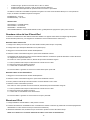
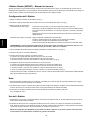
System Specifications
Total 10W Output (5W / Channel)
Tweeter (22mm) per satellite
Mid range (50mm) per satellite
Distortion <=1%
S/N ratio: 60dB
Frequency Response: 200Hz – 20 kHz
Provided Power Adaptor:5VDC@2A
Video Output is only Compatible with the following:
iPhone / iPhone3G :640 x 480 pixels (Max)
iPod touch / touch 2G: 640 x 480 pixels (Max)
iPod classic: 640 x 480 pixels (Max)
iPod nano 3G / 4G: 640 x 480 pixels (Max)
iPod 5G: 480 x 480 pixels (Max)
Trouble Shooting
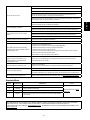
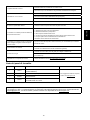
Problem
i-Station does not turn ON when powered via
AC Mains
What Should I do?
Check the AC power cable is connected firmly into the AC wall outlet and the
i-Station.
Test the i-Station by powering the unit with 4 x AA batteries.
Ensure Battery Switch on the back of the speaker is switched to OFF position
i-Station does not turn ON when powered via
Batteries
Test the i-Station by powering the unit via AC Mains, if this works replace the batteries
with new ones.
Ensure Battery Switch on the back of the speaker is switched to ON position
Ensure the correct cradle is used with your iPod/iPhone.
Ensure the line in cable is not plugged into the i-Station
Check Play status on the iPod/iPhone.
No sound
Please try updating the firmware for your iPod/iPhone using the latest iTunes which
is available from www.apple.com/ipod/download
Check i-Station is not in power save mode. Press any button to exit this mode
Check the MUTE function is not ON by pressing the MUTE on the remote control
Sound Quality is poor
If you are using AA Batteries, replace them with new ones.
Ensure the correct cradle is used with your iPod/iPhone.
6