1
B
eyco
R
e
p
m
e
n
te
cro
cto
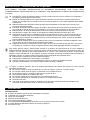
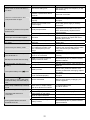
r Abnormal Situation
o
n
ca
te
d
p
ro
p
ln
y.e
UPS shutdowns immediately, ON
switch does not work and there is
no alarm
UPS can not be turned on and
LCD panel does not light.
Cause
Solution
DIP Switch setting error.
Set correct Voltage and frequency on the
DIP Switch (2)
ON button (3) switch was not
pressed or pressed less than 3
seconds.
Battery voltage is too low
Battery is not connected
properly.
UPS is not connected to AC
Power supply.
ON button (3) switch on front panel
doesn’t work.
Faulty microprocessor
ON button (3) was damaged.
UPS input circuit breaker tripped
Overload
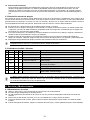
UPS starts up normally but there is
no output.
UPS is normal but the computer
can’t be turned on.
Output breaker or output relay is
damaged.
Power cord is loose
Blown Input fuse (or breaker) /
Line voltage is too high or too
low / Line frequency is over
range.
Input relay damaged.
Computer input power cord is
loose or not connected.
Backup time is less than the rating.
Battery is not fully charged or
battery is dead or weak.
UPS is always at battery mode.
UPS is slightly overloaded.
Communication function is not
working.
Wrong interface cable.
Battery is weak.
The replace battery icon (
) is lit.
The overload icon (
) is lit and
power output is normal, UPS emits
continuous beep, and fault LED (2)
is lit.
The fault icon (
) is lit and the
alarm beeps continuously in backup
mode.
The site wiring fault icon (
) is lit.
UPS stays idle while AC is
connected.
During power failures, the UPS
automatic turns off
Press and hold the Main On switch for
more than 3 seconds.
Recharge the battery for at least 4 hours.
Check that battery connectors are fully
engaged.
Check that the power cable from the UPS
to the utility power supply is securely
connected.
Unplug power cord and all connected
equipment from the UPS to let it shut
down automatically. Replace PCB or
microprocessor.
Replace ON button
Remove some load by unplugging noncritical equipment and press the circuit
breaker (6) to reset it.
Check and Replace output breaker or
output relay.
Re-plug the power cord firmly.
Remove load and replace fuse (or
resetting the input breaker) with the same
rating and check input voltage and
frequency.
Replace Input relay.
Reconnect computer input power cord
correctly.
Recharge the battery for 4 hours and retest the backup time. If problem remains,
Replace batteries
Remove the least critical load
Use the communication cable included in
UPS box
Allow the battery to recharge for at least 4
hours. Then, perform a self-test. If the
problem persists after recharging, replace
the battery.
Check that the battery connector is fully
engaged.
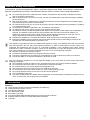
UPS is overloaded.
Remove some load by unplugging noncritical equipment
UPS Fault including overload,
short circuit, or output voltage,
and other abnormal conditions.
Site wiring problem.
Call an electrician to check your wiring.
Power cord plug is loose
Check the power cord plug
Input breaker on rear panel
blown or Input Fuse blown
Wall socket is damaged
Battery is not fully charged or
battery is dead.
UPS is faulty.
8
1. Check output circuit
2. Call for service
Reset the input breaker or replace fuse
Check wall socket with a table lamp.
Recharge the battery for 4 hours and retest the backup time. If problem remains,
replace batteries
Call for service.