1
8353237
1 HP Dust Collector
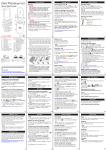
Figure 7. Installing upper bag support.
V 1.50
Figure 8. Adjusting collector support plate bolts.
COLLECTOR SUPPORT BOLTS
1. Adjust the two hex bolts located on the collector support plate (Figure 8) so the bolt heads press against the
motor/impeller housing.
2. Tighten the hex nuts against the support.
COLLECTION AND FILTRATION BAGS
3. Bag clamp springs should be located between the belt and latch (Figure 10); if not, the bag clamp will not
work. Adjust the springs if needed.
Components and Hardware Needed
Qty
Collection Bag
1
Filtration Bag
1
Bag Clamps
2
TO INSTALL THE COLLECTION BAG:
1. Place the collection bag over the bottom edge of the collector and secure the bag clamp as shown in
Figure 9.
2. If belts are not already installed on the collection and filtration bags, thread the cleated end of each belt
through the left hole and out the right hole of each bag. Make sure cleated tips face out.
3. Bag clamp springs should be located between the belt and latch (Figure 10); if not, the bag clamp will not
work. Adjust the aprins if needed
Figure 9. Securing collection bag
onto collector.
Figure 10. Correct bag clamp
spring position.
Figure 11. Filtration and collection
bags installed.
TO INSTALL THE FILTRATION BAG:
1. Hook the top of the filtration bag onto the upper bag support rod, slip the filtration bag over the top of the
collector, and secure the bag clamp. The dust collector should look similar to Figure 11 when
fully assembled.
For technical questions call: 1-800-665-8685
7