1
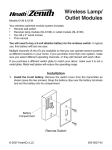
SL-6136
SL-6138
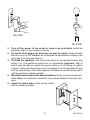
2. Turn off the power to the outlet or lamp to be controlled. Install the
switched outlet or lamp module as shown.
3. For the SL-6136, plug in the device(s) you wish to control. Screw the light
bulb into the SL-6138. Caution: do not exceed the specifications listed on the
next page. Turn the power back on.
4. To check the operation, hold the remote switch at the desired location and
switch it on. The appliance should turn on immediately. Important: Wait at
least 3 seconds after you switch the remote switch on or off before you switch
it again to allow the transmission to be completed. Turn the appliance off and
back on several times. If the switch appears unreliable, move the remote switch
until the appliance switches reliably.
5. Mount the remote switch at the desired location with the two wood screws provided. Note: Your particular installation may require different mounting hardware.
6. Install the switch plate on the remote switch
with the screws provided.
-2-
595-5627-05