1
Troubleshooting (cont.)
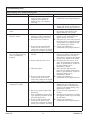
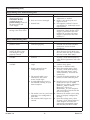
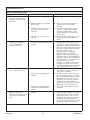
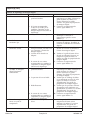
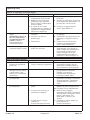
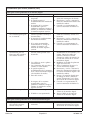
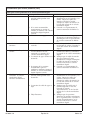
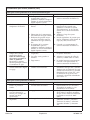
Music Troubleshooting Table
Symptoms
9.
The media module can
not access Windows
Media Connect library.
Probable Cause
B. No IP address assigned to the
media module.
A. Windows Media Connect is not
configured for sharing.
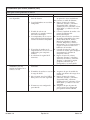
10. The media module can
A. Musicmatch is not running.
not access the Musicmatch
library.
B. Musicmatch is not configured
for sharing.
1078024-2-A
14
Recommended Action
B. The media module was not
assigned an IP address via DHCP,
but the PC was. In this situation,
the media module is able to see the
library via Rendezvous, but is not
able to connect to the library. Here
is how to check your media
module’s address: Enter the
settings menu, select ″System,″
select ″Music,″ select ″Roku IP
Address.″ If your IP address is of
the form 169.254.xxx.xxx, the media
module did not get a
DHCP-assigned address. Check the
configuration of your router to
ensure it is set up to assign DHCP
addresses. Reboot the media
module by disconnecting and
reconnecting the AC power.
A. Make sure that your computer
containing your music library is
powered ON and Windows Media
Connect is running (icon should be
visible in the task tray). With the
media module powered ON and
connected to your network, make
sure that the media module is an
authorized device. Launch
Windows Media Connect through
your Control Panel. On the wizard
screen, scroll down the list of
devices. If the media module is not
listed, click the ″Add″ button at the
bottom of the list. Click on media
module, then click ″OK.″ It should
show up on the list of authorized
devices. Click ″Done.″ Reboot the
media module by disconnecting
and reconnecting the AC power.
A. Make sure the computer containing
your music library is powered ON.
B. Make sure music sharing is enabled
in Musicmatch. From the main
Musicmatch menu, click on
Options/Settings. Click on the tab
″CD Lookup/Connectivity.″ Click
the buttons next to ″Enable music
server″ as well as ″Universal Plug
and Play.″ Musicmatch does not
need to be running while using the
media module; once enabled, the
UPnP server runs in the
background. Reboot the media
module by disconnecting and
reconnecting the AC power.
Kohler Co.